iCake
{Wireframing an iPad App Prototype}
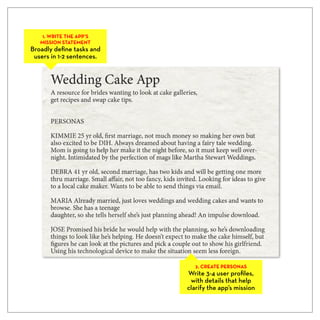
1. WRITE THE APP’S
   MISSION STATEMENT
Broadly define tasks and
 users in 1-2 sentences.


                             2. CREATE PERSONAS
                           Write 3-4 user profiles,
                            with details that help
                           clarify the app’s mission
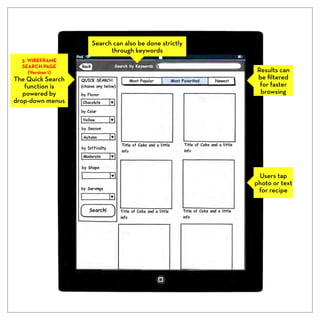
Search can also be done strictly
                         through keywords
  3. WIREFRAME
  SEARCH PAGE
     (Version 1)                                      Results can
The Quick Search                                      be filtered
    function is                                        for faster
   powered by                                          browsing
drop-down menus


                                                       Users tap
                                                      photo or text
                                                       for recipe
Results shown
                      here by photo
                      (see previous
  3. WIREFRAME          screen for
  SEARCH PAGE        results by grid)
     (Version 2)
The Quick Search
  is done with
 pop-up pickers


  Users select         Users tap
 how results are     button to see
   displayed            details


  Favorites and
 recent searches
are easy to access
4. WIREFRAME
                     RESULTS PAGE
                        (Version 1)
                   When users select
                     a cake from the
                      search results,
                   they are presented
                   with more options,
                  including the recipe


 Instead of a
  text-based
favorites list,
users create a
 visual library
4. WIREFRAME
  RESULTS PAGE
     (Version 2)
When users select
 a cake from the
  search results,
  they are taken
   to the recipe


 The shopping list
  can be emailed
or sent to a phone


                     Recipe can be
                       emailed or
                       added to a
                      favorites list

iCake wireframes

  • 1.
  • 2.
    1. WRITE THEAPP’S MISSION STATEMENT Broadly define tasks and users in 1-2 sentences. 2. CREATE PERSONAS Write 3-4 user profiles, with details that help clarify the app’s mission
  • 3.
    Search can alsobe done strictly through keywords 3. WIREFRAME SEARCH PAGE (Version 1) Results can The Quick Search be filtered function is for faster powered by browsing drop-down menus Users tap photo or text for recipe
  • 4.
    Results shown here by photo (see previous 3. WIREFRAME screen for SEARCH PAGE results by grid) (Version 2) The Quick Search is done with pop-up pickers Users select Users tap how results are button to see displayed details Favorites and recent searches are easy to access
  • 5.
    4. WIREFRAME RESULTS PAGE (Version 1) When users select a cake from the search results, they are presented with more options, including the recipe Instead of a text-based favorites list, users create a visual library
  • 6.
    4. WIREFRAME RESULTS PAGE (Version 2) When users select a cake from the search results, they are taken to the recipe The shopping list can be emailed or sent to a phone Recipe can be emailed or added to a favorites list