SUNY-WEMBA-Biswas-Finance-
Ch4 1
Chapter 4
Time Value of Money
2
Time Value Topics
 Future value
 Present value
 Rates of return
 Amortization
3
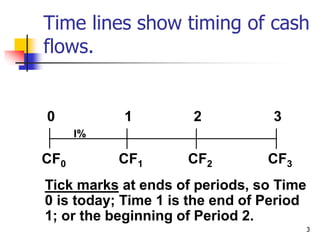
Time lines show timing of cash
flows.
CF0 CF1 CF3
CF2
0 1 2 3
I%
Tick marks at ends of periods, so Time
0 is today; Time 1 is the end of Period
1; or the beginning of Period 2.
4
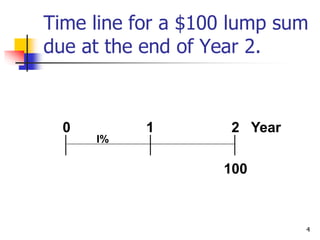
Time line for a $100 lump sum
due at the end of Year 2.
100
0 1 2 Year
I%
5
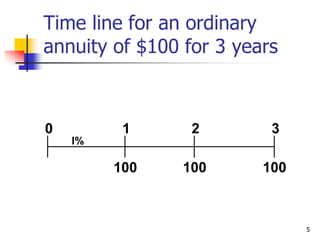
Time line for an ordinary
annuity of $100 for 3 years
100 100
100
0 1 2 3
I%
6
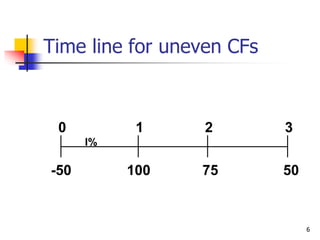
Time line for uneven CFs
100 50
75
0 1 2 3
I%
-50
7
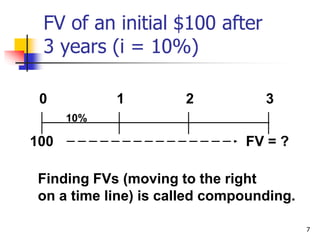
FV of an initial $100 after
3 years (i = 10%)
FV = ?
0 1 2 3
10%
Finding FVs (moving to the right
on a time line) is called compounding.
100
8
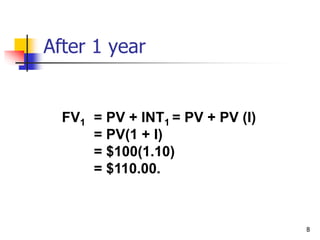
After 1 year
FV1 = PV + INT1 = PV + PV (I)
= PV(1 + I)
= $100(1.10)
= $110.00.
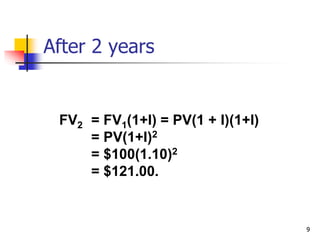
9
After 2 years
FV2 = FV1(1+I) = PV(1 + I)(1+I)
= PV(1+I)2
= $100(1.10)2
= $121.00.
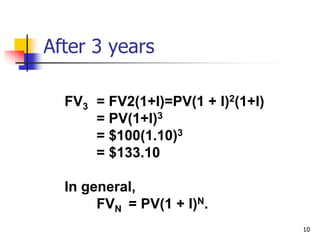
10
After 3 years
FV3 = FV2(1+I)=PV(1 + I)2(1+I)
= PV(1+I)3
= $100(1.10)3
= $133.10
In general,
FVN = PV(1 + I)N.
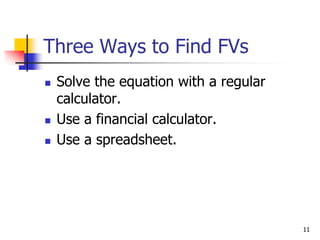
11
Three Ways to Find FVs
 Solve the equation with a regular
calculator.
 Use a financial calculator.
 Use a spreadsheet.
12
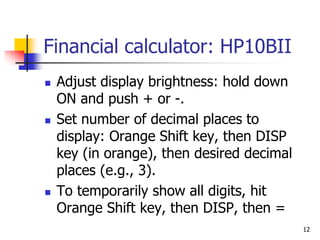
Financial calculator: HP10BII
 Adjust display brightness: hold down
ON and push + or -.
 Set number of decimal places to
display: Orange Shift key, then DISP
key (in orange), then desired decimal
places (e.g., 3).
 To temporarily show all digits, hit
Orange Shift key, then DISP, then =
13
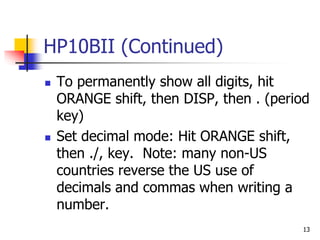
HP10BII (Continued)
 To permanently show all digits, hit
ORANGE shift, then DISP, then . (period
key)
 Set decimal mode: Hit ORANGE shift,
then ./, key. Note: many non-US
countries reverse the US use of
decimals and commas when writing a
number.
14
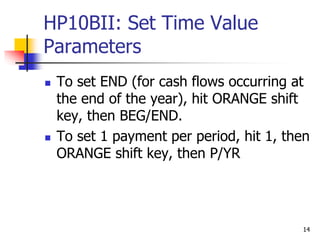
HP10BII: Set Time Value
Parameters
 To set END (for cash flows occurring at
the end of the year), hit ORANGE shift
key, then BEG/END.
 To set 1 payment per period, hit 1, then
ORANGE shift key, then P/YR
15
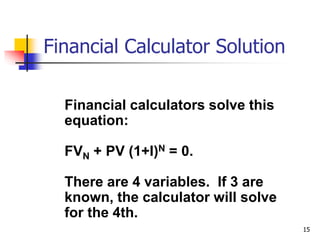
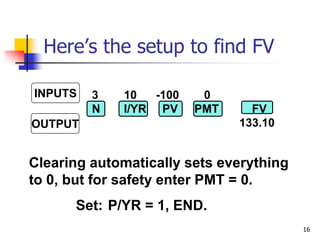
Financial calculators solve this
equation:
FVN + PV (1+I)N = 0.
There are 4 variables. If 3 are
known, the calculator will solve
for the 4th.
Financial Calculator Solution
16
3 10 -100 0
N I/YR PV PMT FV
133.10
Clearing automatically sets everything
to 0, but for safety enter PMT = 0.
Set: P/YR = 1, END.
INPUTS
OUTPUT
Here’s the setup to find FV
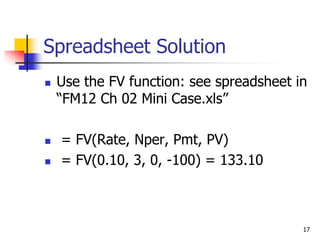
17
Spreadsheet Solution
 Use the FV function: see spreadsheet in
“FM12 Ch 02 Mini Case.xls”
 = FV(Rate, Nper, Pmt, PV)
 = FV(0.10, 3, 0, -100) = 133.10
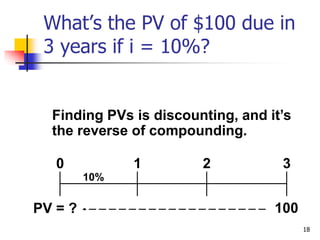
18
10%
What’s the PV of $100 due in
3 years if i = 10%?
Finding PVs is discounting, and it’s
the reverse of compounding.
100
0 1 2 3
PV = ?
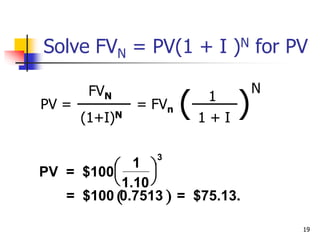
19
Solve FVN = PV(1 + I )N for PV
PV =
FVN
(1+I)N
= FVn ( )
1
1 + I
N
 
PV = $100
1
1.10
= $100 0.7513 = $75.13.


 


3
20
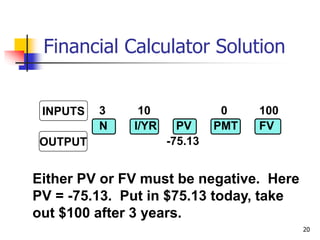
3 10 0 100
N I/YR PV PMT FV
-75.13
Either PV or FV must be negative. Here
PV = -75.13. Put in $75.13 today, take
out $100 after 3 years.
INPUTS
OUTPUT
Financial Calculator Solution
21
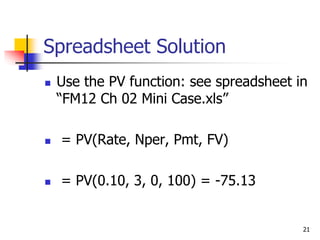
Spreadsheet Solution
 Use the PV function: see spreadsheet in
“FM12 Ch 02 Mini Case.xls”
 = PV(Rate, Nper, Pmt, FV)
 = PV(0.10, 3, 0, 100) = -75.13
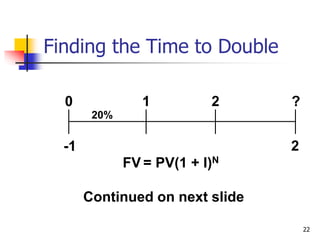
22
20%
2
0 1 2 ?
-1
FV = PV(1 + I)N
Continued on next slide
Finding the Time to Double
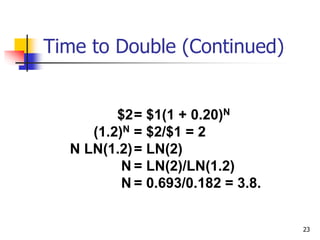
23
Time to Double (Continued)
$2= $1(1 + 0.20)N
(1.2)N = $2/$1 = 2
N LN(1.2)= LN(2)
N = LN(2)/LN(1.2)
N = 0.693/0.182 = 3.8.
24
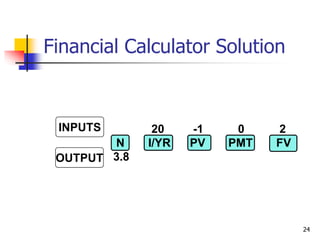
20 -1 0 2
N I/YR PV PMT FV
3.8
INPUTS
OUTPUT
Financial Calculator Solution
25
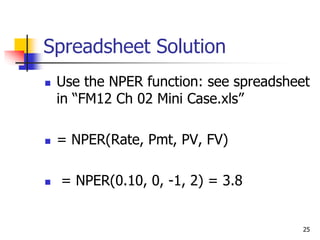
Spreadsheet Solution
 Use the NPER function: see spreadsheet
in “FM12 Ch 02 Mini Case.xls”
 = NPER(Rate, Pmt, PV, FV)
 = NPER(0.10, 0, -1, 2) = 3.8
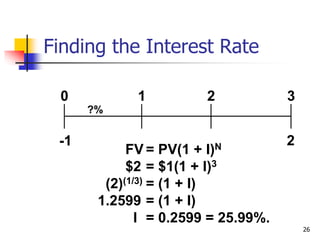
26
?%
2
0 1 2 3
-1
FV = PV(1 + I)N
$2 = $1(1 + I)3
(2)(1/3) = (1 + I)
1.2599 = (1 + I)
I = 0.2599 = 25.99%.
Finding the Interest Rate
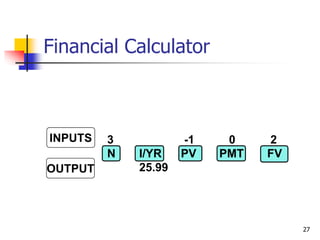
27
3 -1 0 2
N I/YR PV PMT FV
25.99
INPUTS
OUTPUT
Financial Calculator
28
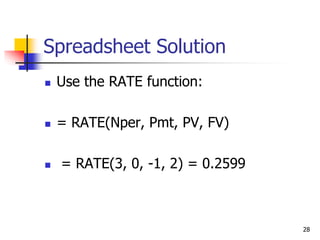
Spreadsheet Solution
 Use the RATE function:
 = RATE(Nper, Pmt, PV, FV)
 = RATE(3, 0, -1, 2) = 0.2599
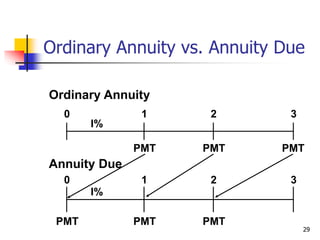
29
Ordinary Annuity
PMT PMT
PMT
0 1 2 3
I%
PMT PMT
0 1 2 3
I%
PMT
Annuity Due
Ordinary Annuity vs. Annuity Due
30
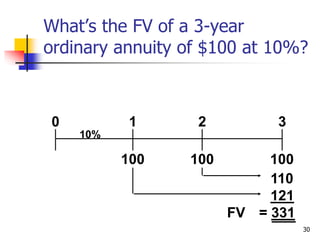
What’s the FV of a 3-year
ordinary annuity of $100 at 10%?
100 100
100
0 1 2 3
10%
110
121
FV = 331
31
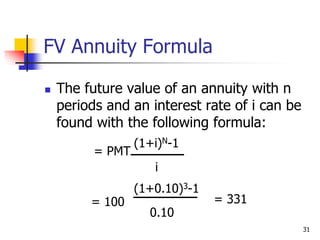
FV Annuity Formula
 The future value of an annuity with n
periods and an interest rate of i can be
found with the following formula:
= PMT
(1+i)N-1
i
= 100
(1+0.10)3-1
0.10
= 331
32
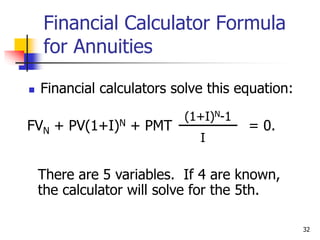
Financial Calculator Formula
for Annuities
 Financial calculators solve this equation:
FVN + PV(1+I)N + PMT
(1+I)N-1
I
= 0.
There are 5 variables. If 4 are known,
the calculator will solve for the 5th.
33
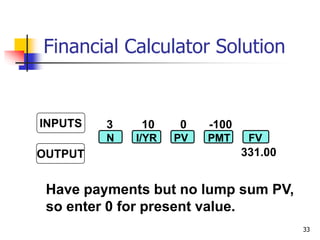
3 10 0 -100
331.00
N I/YR PV PMT FV
Have payments but no lump sum PV,
so enter 0 for present value.
INPUTS
OUTPUT
Financial Calculator Solution
34
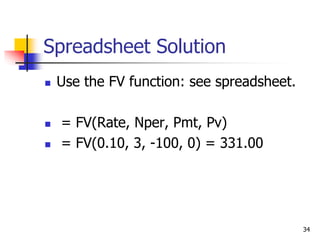
Spreadsheet Solution
 Use the FV function: see spreadsheet.
 = FV(Rate, Nper, Pmt, Pv)
 = FV(0.10, 3, -100, 0) = 331.00
35
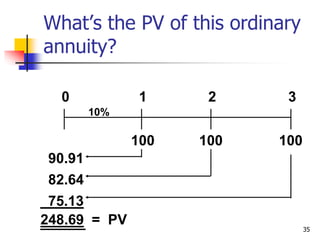
What’s the PV of this ordinary
annuity?
100 100
100
0 1 2 3
10%
90.91
82.64
75.13
248.69 = PV
36
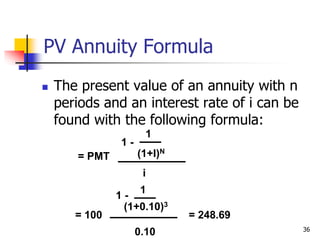
PV Annuity Formula
 The present value of an annuity with n
periods and an interest rate of i can be
found with the following formula:
= PMT
1 -
1
(1+I)N
i
= 100
1 -
1
(1+0.10)3
0.10
= 248.69
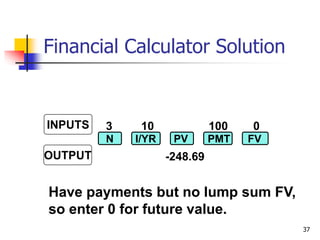
37
Have payments but no lump sum FV,
so enter 0 for future value.
3 10 100 0
N I/YR PV PMT FV
-248.69
INPUTS
OUTPUT
Financial Calculator Solution
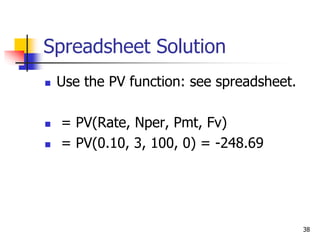
38
Spreadsheet Solution
 Use the PV function: see spreadsheet.
 = PV(Rate, Nper, Pmt, Fv)
 = PV(0.10, 3, 100, 0) = -248.69
39
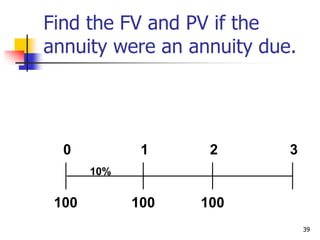
Find the FV and PV if the
annuity were an annuity due.
100 100
0 1 2 3
10%
100
40
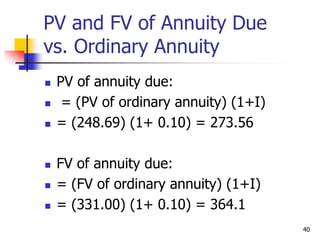
PV and FV of Annuity Due
vs. Ordinary Annuity
 PV of annuity due:
 = (PV of ordinary annuity) (1+I)
 = (248.69) (1+ 0.10) = 273.56
 FV of annuity due:
 = (FV of ordinary annuity) (1+I)
 = (331.00) (1+ 0.10) = 364.1
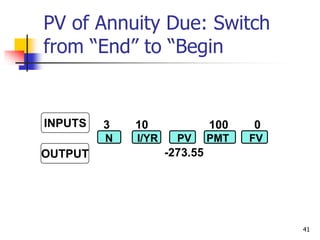
41
3 10 100 0
-273.55
N I/YR PV PMT FV
INPUTS
OUTPUT
PV of Annuity Due: Switch
from “End” to “Begin
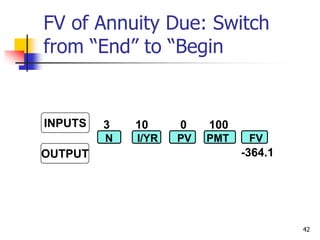
42
3 10 0 100
-364.1
N I/YR PV PMT FV
INPUTS
OUTPUT
FV of Annuity Due: Switch
from “End” to “Begin
43
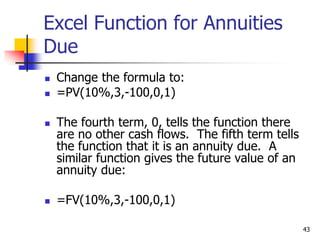
Excel Function for Annuities
Due
 Change the formula to:
 =PV(10%,3,-100,0,1)
 The fourth term, 0, tells the function there
are no other cash flows. The fifth term tells
the function that it is an annuity due. A
similar function gives the future value of an
annuity due:
 =FV(10%,3,-100,0,1)
44
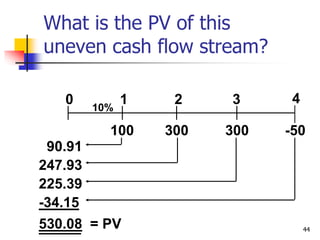
What is the PV of this
uneven cash flow stream?
0
100
1
300
2
300
3
10%
-50
4
90.91
247.93
225.39
-34.15
530.08 = PV
45
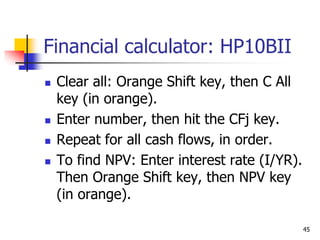
Financial calculator: HP10BII
 Clear all: Orange Shift key, then C All
key (in orange).
 Enter number, then hit the CFj key.
 Repeat for all cash flows, in order.
 To find NPV: Enter interest rate (I/YR).
Then Orange Shift key, then NPV key
(in orange).
46
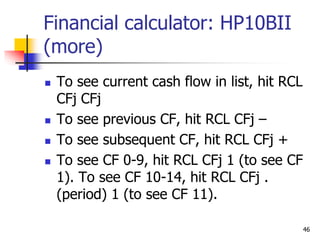
Financial calculator: HP10BII
(more)
 To see current cash flow in list, hit RCL
CFj CFj
 To see previous CF, hit RCL CFj –
 To see subsequent CF, hit RCL CFj +
 To see CF 0-9, hit RCL CFj 1 (to see CF
1). To see CF 10-14, hit RCL CFj .
(period) 1 (to see CF 11).
47
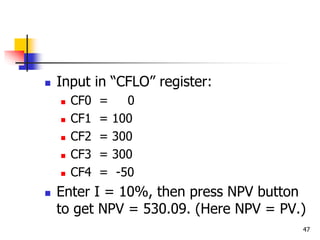
 Input in “CFLO” register:
 CF0 = 0
 CF1 = 100
 CF2 = 300
 CF3 = 300
 CF4 = -50
 Enter I = 10%, then press NPV button
to get NPV = 530.09. (Here NPV = PV.)
48
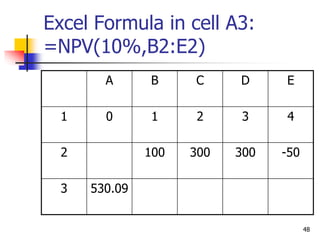
Excel Formula in cell A3:
=NPV(10%,B2:E2)
A B C D E
1 0 1 2 3 4
2 100 300 300 -50
3 530.09
49
Nominal rate (INOM)
 Stated in contracts, and quoted by
banks and brokers.
 Not used in calculations or shown on
time lines
 Periods per year (M) must be given.
 Examples:
 8%; Quarterly
 8%, Daily interest (365 days)
50
Periodic rate (IPER )
 IPER = INOM/M, where M is number of compounding
periods per year. M = 4 for quarterly, 12 for monthly,
and 360 or 365 for daily compounding.
 Used in calculations, shown on time lines.
 Examples:
 8% quarterly: IPER = 8%/4 = 2%.
 8% daily (365): IPER = 8%/365 = 0.021918%.
51
The Impact of Compounding
 Will the FV of a lump sum be larger or
smaller if we compound more often,
holding the stated I% constant?
 Why?
52
The Impact of Compounding
(Answer)
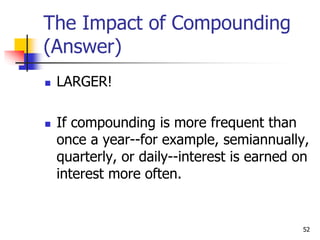
 LARGER!
 If compounding is more frequent than
once a year--for example, semiannually,
quarterly, or daily--interest is earned on
interest more often.
53
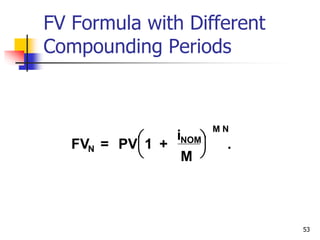
FV Formula with Different
Compounding Periods
FV = PV 1 .
+
i
M
N
NOM
M N


 


54
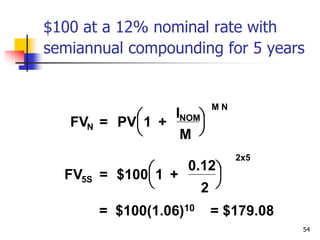
$100 at a 12% nominal rate with
semiannual compounding for 5 years
= $100(1.06)10 = $179.08
FV = PV 1 +
I
M
N
NOM
M N


 


FV = $100 1 +
0.12
2
5S
2x5


 


55
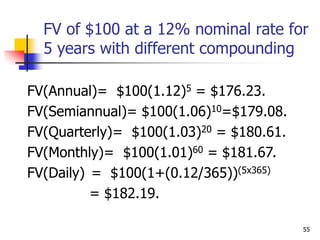
FV of $100 at a 12% nominal rate for
5 years with different compounding
FV(Annual)= $100(1.12)5 = $176.23.
FV(Semiannual)= $100(1.06)10=$179.08.
FV(Quarterly)= $100(1.03)20 = $180.61.
FV(Monthly)= $100(1.01)60 = $181.67.
FV(Daily) = $100(1+(0.12/365))(5x365)
= $182.19.
56
Effective Annual Rate (EAR =
EFF%)
 The EAR is the annual rate which
causes PV to grow to the same FV as
under multi-period compounding.
57
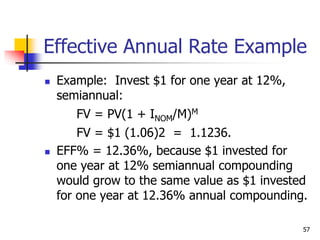
Effective Annual Rate Example
 Example: Invest $1 for one year at 12%,
semiannual:
FV = PV(1 + INOM/M)M
FV = $1 (1.06)2 = 1.1236.
 EFF% = 12.36%, because $1 invested for
one year at 12% semiannual compounding
would grow to the same value as $1 invested
for one year at 12.36% annual compounding.
58
Comparing Rates
 An investment with monthly payments
is different from one with quarterly
payments. Must put on EFF% basis to
compare rates of return. Use EFF%
only for comparisons.
 Banks say “interest paid daily.” Same
as compounded daily.
59
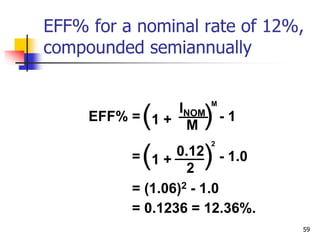
= - 1.0
(1 + )
0.12
2
2
= (1.06)2 - 1.0
= 0.1236 = 12.36%.
EFF% for a nominal rate of 12%,
compounded semiannually
EFF% = - 1
(1 + )
INOM
M
M
60
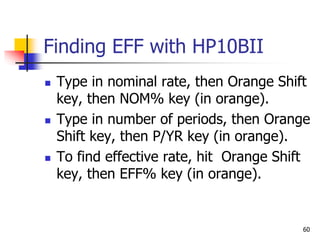
Finding EFF with HP10BII
 Type in nominal rate, then Orange Shift
key, then NOM% key (in orange).
 Type in number of periods, then Orange
Shift key, then P/YR key (in orange).
 To find effective rate, hit Orange Shift
key, then EFF% key (in orange).
61
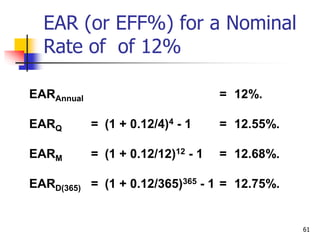
EAR (or EFF%) for a Nominal
Rate of of 12%
EARAnnual = 12%.
EARQ = (1 + 0.12/4)4 - 1 = 12.55%.
EARM = (1 + 0.12/12)12 - 1 = 12.68%.
EARD(365) = (1 + 0.12/365)365 - 1 = 12.75%.
62
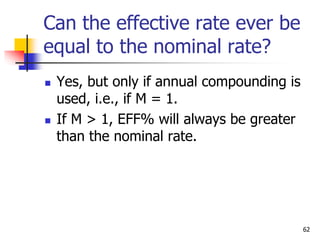
Can the effective rate ever be
equal to the nominal rate?
 Yes, but only if annual compounding is
used, i.e., if M = 1.
 If M > 1, EFF% will always be greater
than the nominal rate.
63
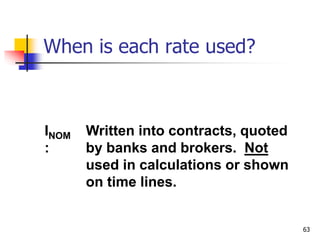
When is each rate used?
INOM
:
Written into contracts, quoted
by banks and brokers. Not
used in calculations or shown
on time lines.
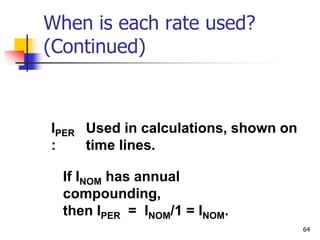
64
IPER
:
Used in calculations, shown on
time lines.
If INOM has annual
compounding,
then IPER = INOM/1 = INOM.
When is each rate used?
(Continued)
65
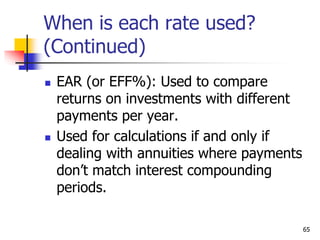
When is each rate used?
(Continued)
 EAR (or EFF%): Used to compare
returns on investments with different
payments per year.
 Used for calculations if and only if
dealing with annuities where payments
don’t match interest compounding
periods.
66
Amortization
 Construct an amortization schedule for
a $1,000, 10% annual rate loan with 3
equal payments.
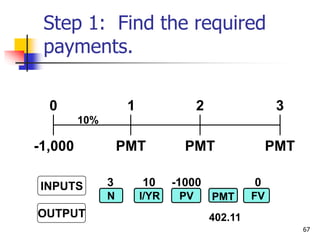
67
Step 1: Find the required
payments.
PMT PMT
PMT
0 1 2 3
10%
-1,000
3 10 -1000 0
INPUTS
OUTPUT
N I/YR PV FV
PMT
402.11
68
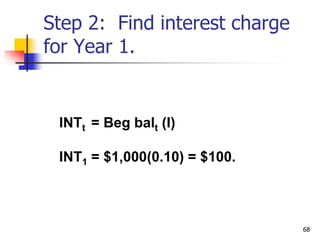
Step 2: Find interest charge
for Year 1.
INTt = Beg balt (I)
INT1 = $1,000(0.10) = $100.
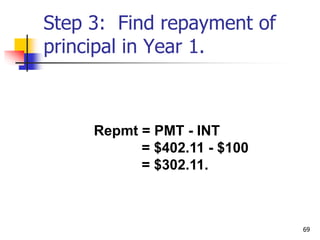
69
Repmt = PMT - INT
= $402.11 - $100
= $302.11.
Step 3: Find repayment of
principal in Year 1.
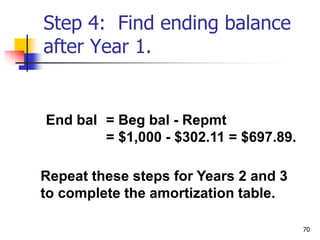
70
Step 4: Find ending balance
after Year 1.
End bal = Beg bal - Repmt
= $1,000 - $302.11 = $697.89.
Repeat these steps for Years 2 and 3
to complete the amortization table.
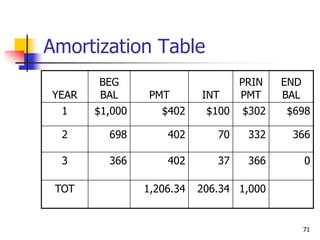
71
Amortization Table
YEAR
BEG
BAL PMT INT
PRIN
PMT
END
BAL
1 $1,000 $402 $100 $302 $698
2 698 402 70 332 366
3 366 402 37 366 0
TOT 1,206.34 206.34 1,000
72
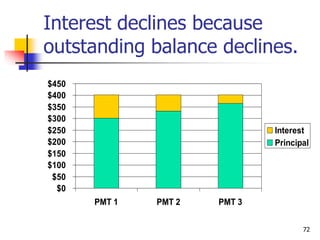
Interest declines because
outstanding balance declines.
$0
$50
$100
$150
$200
$250
$300
$350
$400
$450
PMT 1 PMT 2 PMT 3
Interest
Principal
73
 Amortization tables are widely
used--for home mortgages, auto
loans, business loans, retirement
plans, and more. They are very
important!
 Financial calculators (and
spreadsheets) are great for setting
up amortization tables.
74
Fractional Time Periods
 On January 1 you deposit $100 in an
account that pays a nominal interest
rate of 11.33463%, with daily
compounding (365 days).
 How much will you have on October 1,
or after 9 months (273 days)? (Days
given.)
75
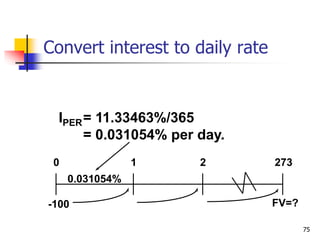
IPER= 11.33463%/365
= 0.031054% per day.
FV=?
0 1 2 273
0.031054%
-100
Convert interest to daily rate
76
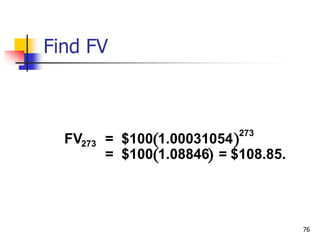
 
 
FV = $100 1.00031054
= $100 1.08846 = $108.85.
273
273
Find FV
77
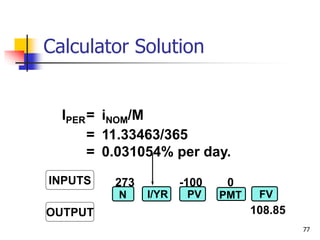
273 -100 0
108.85
INPUTS
OUTPUT
N I/YR PV FV
PMT
IPER= iNOM/M
= 11.33463/365
= 0.031054% per day.
Calculator Solution
78
Non-matching rates and periods
 What’s the value at the end of Year 3 of
the following CF stream if the quoted
interest rate is 10%, compounded
semiannually?
79
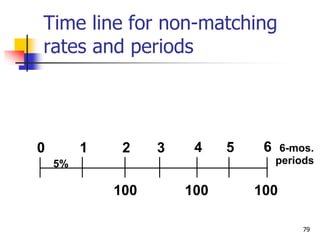
Time line for non-matching
rates and periods
0 1
100
2 3
5%
4 5 6 6-mos.
periods
100 100
80
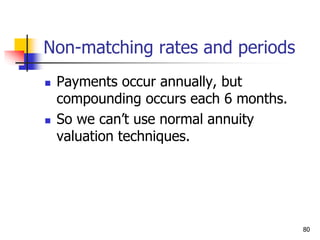
Non-matching rates and periods
 Payments occur annually, but
compounding occurs each 6 months.
 So we can’t use normal annuity
valuation techniques.
81
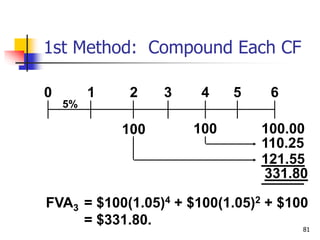
1st Method: Compound Each CF
0 1
100
2 3
5%
4 5 6
100 100.00
110.25
121.55
331.80
FVA3 = $100(1.05)4 + $100(1.05)2 + $100
= $331.80.
82
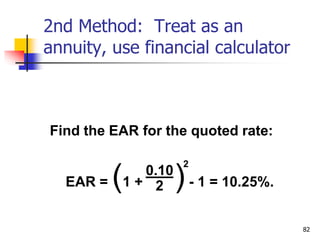
2nd Method: Treat as an
annuity, use financial calculator
Find the EAR for the quoted rate:
EAR = (1 + )- 1 = 10.25%.
0.10
2
2
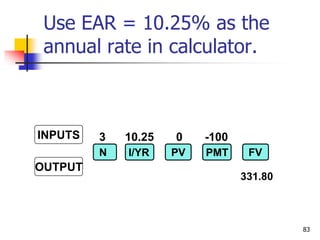
83
3 10.25 0 -100
INPUTS
OUTPUT
N I/YR PV FV
PMT
331.80
Use EAR = 10.25% as the
annual rate in calculator.
84
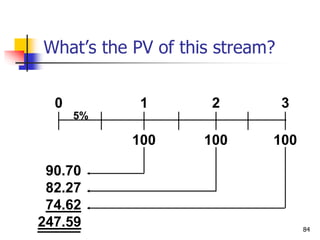
What’s the PV of this stream?
0
100
1
5%
2 3
100 100
90.70
82.27
74.62
247.59
85
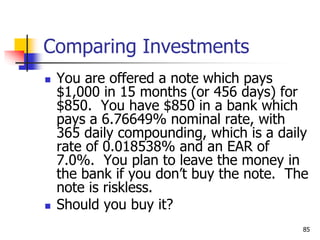
Comparing Investments
 You are offered a note which pays
$1,000 in 15 months (or 456 days) for
$850. You have $850 in a bank which
pays a 6.76649% nominal rate, with
365 daily compounding, which is a daily
rate of 0.018538% and an EAR of
7.0%. You plan to leave the money in
the bank if you don’t buy the note. The
note is riskless.
 Should you buy it?
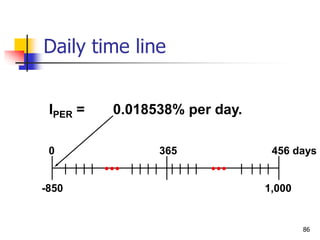
86
IPER = 0.018538% per day.
1,000
0 365 456 days
-850
Daily time line
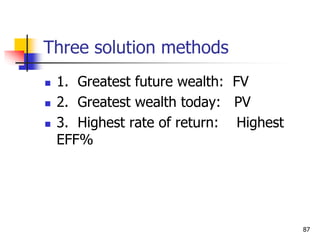
87
Three solution methods
 1. Greatest future wealth: FV
 2. Greatest wealth today: PV
 3. Highest rate of return: Highest
EFF%
88
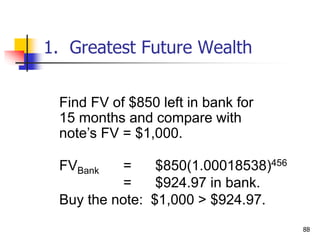
1. Greatest Future Wealth
Find FV of $850 left in bank for
15 months and compare with
note’s FV = $1,000.
FVBank = $850(1.00018538)456
= $924.97 in bank.
Buy the note: $1,000 > $924.97.
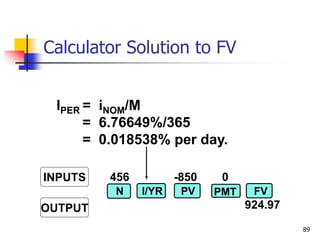
89
456 -850 0
924.97
INPUTS
OUTPUT
N I/YR PV FV
PMT
IPER = iNOM/M
= 6.76649%/365
= 0.018538% per day.
Calculator Solution to FV
90
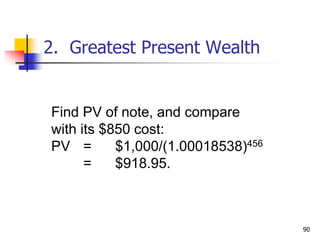
Find PV of note, and compare
with its $850 cost:
PV = $1,000/(1.00018538)456
= $918.95.
2. Greatest Present Wealth
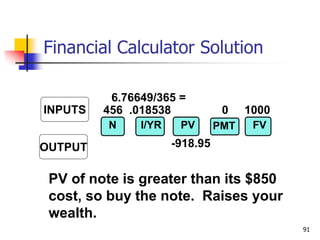
91
456 .018538 0 1000
-918.95
INPUTS
OUTPUT
N I/YR PV FV
PMT
6.76649/365 =
PV of note is greater than its $850
cost, so buy the note. Raises your
wealth.
Financial Calculator Solution
92
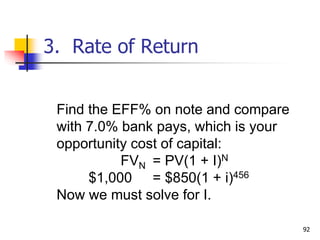
Find the EFF% on note and compare
with 7.0% bank pays, which is your
opportunity cost of capital:
FVN = PV(1 + I)N
$1,000 = $850(1 + i)456
Now we must solve for I.
3. Rate of Return
93
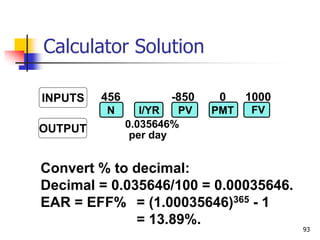
456 -850 0 1000
0.035646%
per day
INPUTS
OUTPUT
N I/YR PV FV
PMT
Convert % to decimal:
Decimal = 0.035646/100 = 0.00035646.
EAR = EFF% = (1.00035646)365 - 1
= 13.89%.
Calculator Solution
94
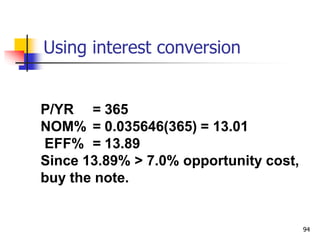
P/YR = 365
NOM% = 0.035646(365) = 13.01
EFF% = 13.89
Since 13.89% > 7.0% opportunity cost,
buy the note.
Using interest conversion

IBS-TVM-Ch4-1.ppt

  • 1.
  • 2.
    2 Time Value Topics Future value  Present value  Rates of return  Amortization
  • 3.
    3 Time lines showtiming of cash flows. CF0 CF1 CF3 CF2 0 1 2 3 I% Tick marks at ends of periods, so Time 0 is today; Time 1 is the end of Period 1; or the beginning of Period 2.
  • 4.
    4 Time line fora $100 lump sum due at the end of Year 2. 100 0 1 2 Year I%
  • 5.
    5 Time line foran ordinary annuity of $100 for 3 years 100 100 100 0 1 2 3 I%
  • 6.
    6 Time line foruneven CFs 100 50 75 0 1 2 3 I% -50
  • 7.
    7 FV of aninitial $100 after 3 years (i = 10%) FV = ? 0 1 2 3 10% Finding FVs (moving to the right on a time line) is called compounding. 100
  • 8.
    8 After 1 year FV1= PV + INT1 = PV + PV (I) = PV(1 + I) = $100(1.10) = $110.00.
  • 9.
    9 After 2 years FV2= FV1(1+I) = PV(1 + I)(1+I) = PV(1+I)2 = $100(1.10)2 = $121.00.
  • 10.
    10 After 3 years FV3= FV2(1+I)=PV(1 + I)2(1+I) = PV(1+I)3 = $100(1.10)3 = $133.10 In general, FVN = PV(1 + I)N.
  • 11.
    11 Three Ways toFind FVs  Solve the equation with a regular calculator.  Use a financial calculator.  Use a spreadsheet.
  • 12.
    12 Financial calculator: HP10BII Adjust display brightness: hold down ON and push + or -.  Set number of decimal places to display: Orange Shift key, then DISP key (in orange), then desired decimal places (e.g., 3).  To temporarily show all digits, hit Orange Shift key, then DISP, then =
  • 13.
    13 HP10BII (Continued)  Topermanently show all digits, hit ORANGE shift, then DISP, then . (period key)  Set decimal mode: Hit ORANGE shift, then ./, key. Note: many non-US countries reverse the US use of decimals and commas when writing a number.
  • 14.
    14 HP10BII: Set TimeValue Parameters  To set END (for cash flows occurring at the end of the year), hit ORANGE shift key, then BEG/END.  To set 1 payment per period, hit 1, then ORANGE shift key, then P/YR
  • 15.
    15 Financial calculators solvethis equation: FVN + PV (1+I)N = 0. There are 4 variables. If 3 are known, the calculator will solve for the 4th. Financial Calculator Solution
  • 16.
    16 3 10 -1000 N I/YR PV PMT FV 133.10 Clearing automatically sets everything to 0, but for safety enter PMT = 0. Set: P/YR = 1, END. INPUTS OUTPUT Here’s the setup to find FV
  • 17.
    17 Spreadsheet Solution  Usethe FV function: see spreadsheet in “FM12 Ch 02 Mini Case.xls”  = FV(Rate, Nper, Pmt, PV)  = FV(0.10, 3, 0, -100) = 133.10
  • 18.
    18 10% What’s the PVof $100 due in 3 years if i = 10%? Finding PVs is discounting, and it’s the reverse of compounding. 100 0 1 2 3 PV = ?
  • 19.
    19 Solve FVN =PV(1 + I )N for PV PV = FVN (1+I)N = FVn ( ) 1 1 + I N   PV = $100 1 1.10 = $100 0.7513 = $75.13.       3
  • 20.
    20 3 10 0100 N I/YR PV PMT FV -75.13 Either PV or FV must be negative. Here PV = -75.13. Put in $75.13 today, take out $100 after 3 years. INPUTS OUTPUT Financial Calculator Solution
  • 21.
    21 Spreadsheet Solution  Usethe PV function: see spreadsheet in “FM12 Ch 02 Mini Case.xls”  = PV(Rate, Nper, Pmt, FV)  = PV(0.10, 3, 0, 100) = -75.13
  • 22.
    22 20% 2 0 1 2? -1 FV = PV(1 + I)N Continued on next slide Finding the Time to Double
  • 23.
    23 Time to Double(Continued) $2= $1(1 + 0.20)N (1.2)N = $2/$1 = 2 N LN(1.2)= LN(2) N = LN(2)/LN(1.2) N = 0.693/0.182 = 3.8.
  • 24.
    24 20 -1 02 N I/YR PV PMT FV 3.8 INPUTS OUTPUT Financial Calculator Solution
  • 25.
    25 Spreadsheet Solution  Usethe NPER function: see spreadsheet in “FM12 Ch 02 Mini Case.xls”  = NPER(Rate, Pmt, PV, FV)  = NPER(0.10, 0, -1, 2) = 3.8
  • 26.
    26 ?% 2 0 1 23 -1 FV = PV(1 + I)N $2 = $1(1 + I)3 (2)(1/3) = (1 + I) 1.2599 = (1 + I) I = 0.2599 = 25.99%. Finding the Interest Rate
  • 27.
    27 3 -1 02 N I/YR PV PMT FV 25.99 INPUTS OUTPUT Financial Calculator
  • 28.
    28 Spreadsheet Solution  Usethe RATE function:  = RATE(Nper, Pmt, PV, FV)  = RATE(3, 0, -1, 2) = 0.2599
  • 29.
    29 Ordinary Annuity PMT PMT PMT 01 2 3 I% PMT PMT 0 1 2 3 I% PMT Annuity Due Ordinary Annuity vs. Annuity Due
  • 30.
    30 What’s the FVof a 3-year ordinary annuity of $100 at 10%? 100 100 100 0 1 2 3 10% 110 121 FV = 331
  • 31.
    31 FV Annuity Formula The future value of an annuity with n periods and an interest rate of i can be found with the following formula: = PMT (1+i)N-1 i = 100 (1+0.10)3-1 0.10 = 331
  • 32.
    32 Financial Calculator Formula forAnnuities  Financial calculators solve this equation: FVN + PV(1+I)N + PMT (1+I)N-1 I = 0. There are 5 variables. If 4 are known, the calculator will solve for the 5th.
  • 33.
    33 3 10 0-100 331.00 N I/YR PV PMT FV Have payments but no lump sum PV, so enter 0 for present value. INPUTS OUTPUT Financial Calculator Solution
  • 34.
    34 Spreadsheet Solution  Usethe FV function: see spreadsheet.  = FV(Rate, Nper, Pmt, Pv)  = FV(0.10, 3, -100, 0) = 331.00
  • 35.
    35 What’s the PVof this ordinary annuity? 100 100 100 0 1 2 3 10% 90.91 82.64 75.13 248.69 = PV
  • 36.
    36 PV Annuity Formula The present value of an annuity with n periods and an interest rate of i can be found with the following formula: = PMT 1 - 1 (1+I)N i = 100 1 - 1 (1+0.10)3 0.10 = 248.69
  • 37.
    37 Have payments butno lump sum FV, so enter 0 for future value. 3 10 100 0 N I/YR PV PMT FV -248.69 INPUTS OUTPUT Financial Calculator Solution
  • 38.
    38 Spreadsheet Solution  Usethe PV function: see spreadsheet.  = PV(Rate, Nper, Pmt, Fv)  = PV(0.10, 3, 100, 0) = -248.69
  • 39.
    39 Find the FVand PV if the annuity were an annuity due. 100 100 0 1 2 3 10% 100
  • 40.
    40 PV and FVof Annuity Due vs. Ordinary Annuity  PV of annuity due:  = (PV of ordinary annuity) (1+I)  = (248.69) (1+ 0.10) = 273.56  FV of annuity due:  = (FV of ordinary annuity) (1+I)  = (331.00) (1+ 0.10) = 364.1
  • 41.
    41 3 10 1000 -273.55 N I/YR PV PMT FV INPUTS OUTPUT PV of Annuity Due: Switch from “End” to “Begin
  • 42.
    42 3 10 0100 -364.1 N I/YR PV PMT FV INPUTS OUTPUT FV of Annuity Due: Switch from “End” to “Begin
  • 43.
    43 Excel Function forAnnuities Due  Change the formula to:  =PV(10%,3,-100,0,1)  The fourth term, 0, tells the function there are no other cash flows. The fifth term tells the function that it is an annuity due. A similar function gives the future value of an annuity due:  =FV(10%,3,-100,0,1)
  • 44.
    44 What is thePV of this uneven cash flow stream? 0 100 1 300 2 300 3 10% -50 4 90.91 247.93 225.39 -34.15 530.08 = PV
  • 45.
    45 Financial calculator: HP10BII Clear all: Orange Shift key, then C All key (in orange).  Enter number, then hit the CFj key.  Repeat for all cash flows, in order.  To find NPV: Enter interest rate (I/YR). Then Orange Shift key, then NPV key (in orange).
  • 46.
    46 Financial calculator: HP10BII (more) To see current cash flow in list, hit RCL CFj CFj  To see previous CF, hit RCL CFj –  To see subsequent CF, hit RCL CFj +  To see CF 0-9, hit RCL CFj 1 (to see CF 1). To see CF 10-14, hit RCL CFj . (period) 1 (to see CF 11).
  • 47.
    47  Input in“CFLO” register:  CF0 = 0  CF1 = 100  CF2 = 300  CF3 = 300  CF4 = -50  Enter I = 10%, then press NPV button to get NPV = 530.09. (Here NPV = PV.)
  • 48.
    48 Excel Formula incell A3: =NPV(10%,B2:E2) A B C D E 1 0 1 2 3 4 2 100 300 300 -50 3 530.09
  • 49.
    49 Nominal rate (INOM) Stated in contracts, and quoted by banks and brokers.  Not used in calculations or shown on time lines  Periods per year (M) must be given.  Examples:  8%; Quarterly  8%, Daily interest (365 days)
  • 50.
    50 Periodic rate (IPER)  IPER = INOM/M, where M is number of compounding periods per year. M = 4 for quarterly, 12 for monthly, and 360 or 365 for daily compounding.  Used in calculations, shown on time lines.  Examples:  8% quarterly: IPER = 8%/4 = 2%.  8% daily (365): IPER = 8%/365 = 0.021918%.
  • 51.
    51 The Impact ofCompounding  Will the FV of a lump sum be larger or smaller if we compound more often, holding the stated I% constant?  Why?
  • 52.
    52 The Impact ofCompounding (Answer)  LARGER!  If compounding is more frequent than once a year--for example, semiannually, quarterly, or daily--interest is earned on interest more often.
  • 53.
    53 FV Formula withDifferent Compounding Periods FV = PV 1 . + i M N NOM M N      
  • 54.
    54 $100 at a12% nominal rate with semiannual compounding for 5 years = $100(1.06)10 = $179.08 FV = PV 1 + I M N NOM M N       FV = $100 1 + 0.12 2 5S 2x5      
  • 55.
    55 FV of $100at a 12% nominal rate for 5 years with different compounding FV(Annual)= $100(1.12)5 = $176.23. FV(Semiannual)= $100(1.06)10=$179.08. FV(Quarterly)= $100(1.03)20 = $180.61. FV(Monthly)= $100(1.01)60 = $181.67. FV(Daily) = $100(1+(0.12/365))(5x365) = $182.19.
  • 56.
    56 Effective Annual Rate(EAR = EFF%)  The EAR is the annual rate which causes PV to grow to the same FV as under multi-period compounding.
  • 57.
    57 Effective Annual RateExample  Example: Invest $1 for one year at 12%, semiannual: FV = PV(1 + INOM/M)M FV = $1 (1.06)2 = 1.1236.  EFF% = 12.36%, because $1 invested for one year at 12% semiannual compounding would grow to the same value as $1 invested for one year at 12.36% annual compounding.
  • 58.
    58 Comparing Rates  Aninvestment with monthly payments is different from one with quarterly payments. Must put on EFF% basis to compare rates of return. Use EFF% only for comparisons.  Banks say “interest paid daily.” Same as compounded daily.
  • 59.
    59 = - 1.0 (1+ ) 0.12 2 2 = (1.06)2 - 1.0 = 0.1236 = 12.36%. EFF% for a nominal rate of 12%, compounded semiannually EFF% = - 1 (1 + ) INOM M M
  • 60.
    60 Finding EFF withHP10BII  Type in nominal rate, then Orange Shift key, then NOM% key (in orange).  Type in number of periods, then Orange Shift key, then P/YR key (in orange).  To find effective rate, hit Orange Shift key, then EFF% key (in orange).
  • 61.
    61 EAR (or EFF%)for a Nominal Rate of of 12% EARAnnual = 12%. EARQ = (1 + 0.12/4)4 - 1 = 12.55%. EARM = (1 + 0.12/12)12 - 1 = 12.68%. EARD(365) = (1 + 0.12/365)365 - 1 = 12.75%.
  • 62.
    62 Can the effectiverate ever be equal to the nominal rate?  Yes, but only if annual compounding is used, i.e., if M = 1.  If M > 1, EFF% will always be greater than the nominal rate.
  • 63.
    63 When is eachrate used? INOM : Written into contracts, quoted by banks and brokers. Not used in calculations or shown on time lines.
  • 64.
    64 IPER : Used in calculations,shown on time lines. If INOM has annual compounding, then IPER = INOM/1 = INOM. When is each rate used? (Continued)
  • 65.
    65 When is eachrate used? (Continued)  EAR (or EFF%): Used to compare returns on investments with different payments per year.  Used for calculations if and only if dealing with annuities where payments don’t match interest compounding periods.
  • 66.
    66 Amortization  Construct anamortization schedule for a $1,000, 10% annual rate loan with 3 equal payments.
  • 67.
    67 Step 1: Findthe required payments. PMT PMT PMT 0 1 2 3 10% -1,000 3 10 -1000 0 INPUTS OUTPUT N I/YR PV FV PMT 402.11
  • 68.
    68 Step 2: Findinterest charge for Year 1. INTt = Beg balt (I) INT1 = $1,000(0.10) = $100.
  • 69.
    69 Repmt = PMT- INT = $402.11 - $100 = $302.11. Step 3: Find repayment of principal in Year 1.
  • 70.
    70 Step 4: Findending balance after Year 1. End bal = Beg bal - Repmt = $1,000 - $302.11 = $697.89. Repeat these steps for Years 2 and 3 to complete the amortization table.
  • 71.
    71 Amortization Table YEAR BEG BAL PMTINT PRIN PMT END BAL 1 $1,000 $402 $100 $302 $698 2 698 402 70 332 366 3 366 402 37 366 0 TOT 1,206.34 206.34 1,000
  • 72.
    72 Interest declines because outstandingbalance declines. $0 $50 $100 $150 $200 $250 $300 $350 $400 $450 PMT 1 PMT 2 PMT 3 Interest Principal
  • 73.
    73  Amortization tablesare widely used--for home mortgages, auto loans, business loans, retirement plans, and more. They are very important!  Financial calculators (and spreadsheets) are great for setting up amortization tables.
  • 74.
    74 Fractional Time Periods On January 1 you deposit $100 in an account that pays a nominal interest rate of 11.33463%, with daily compounding (365 days).  How much will you have on October 1, or after 9 months (273 days)? (Days given.)
  • 75.
    75 IPER= 11.33463%/365 = 0.031054%per day. FV=? 0 1 2 273 0.031054% -100 Convert interest to daily rate
  • 76.
    76     FV= $100 1.00031054 = $100 1.08846 = $108.85. 273 273 Find FV
  • 77.
    77 273 -100 0 108.85 INPUTS OUTPUT NI/YR PV FV PMT IPER= iNOM/M = 11.33463/365 = 0.031054% per day. Calculator Solution
  • 78.
    78 Non-matching rates andperiods  What’s the value at the end of Year 3 of the following CF stream if the quoted interest rate is 10%, compounded semiannually?
  • 79.
    79 Time line fornon-matching rates and periods 0 1 100 2 3 5% 4 5 6 6-mos. periods 100 100
  • 80.
    80 Non-matching rates andperiods  Payments occur annually, but compounding occurs each 6 months.  So we can’t use normal annuity valuation techniques.
  • 81.
    81 1st Method: CompoundEach CF 0 1 100 2 3 5% 4 5 6 100 100.00 110.25 121.55 331.80 FVA3 = $100(1.05)4 + $100(1.05)2 + $100 = $331.80.
  • 82.
    82 2nd Method: Treatas an annuity, use financial calculator Find the EAR for the quoted rate: EAR = (1 + )- 1 = 10.25%. 0.10 2 2
  • 83.
    83 3 10.25 0-100 INPUTS OUTPUT N I/YR PV FV PMT 331.80 Use EAR = 10.25% as the annual rate in calculator.
  • 84.
    84 What’s the PVof this stream? 0 100 1 5% 2 3 100 100 90.70 82.27 74.62 247.59
  • 85.
    85 Comparing Investments  Youare offered a note which pays $1,000 in 15 months (or 456 days) for $850. You have $850 in a bank which pays a 6.76649% nominal rate, with 365 daily compounding, which is a daily rate of 0.018538% and an EAR of 7.0%. You plan to leave the money in the bank if you don’t buy the note. The note is riskless.  Should you buy it?
  • 86.
    86 IPER = 0.018538%per day. 1,000 0 365 456 days -850 Daily time line
  • 87.
    87 Three solution methods 1. Greatest future wealth: FV  2. Greatest wealth today: PV  3. Highest rate of return: Highest EFF%
  • 88.
    88 1. Greatest FutureWealth Find FV of $850 left in bank for 15 months and compare with note’s FV = $1,000. FVBank = $850(1.00018538)456 = $924.97 in bank. Buy the note: $1,000 > $924.97.
  • 89.
    89 456 -850 0 924.97 INPUTS OUTPUT NI/YR PV FV PMT IPER = iNOM/M = 6.76649%/365 = 0.018538% per day. Calculator Solution to FV
  • 90.
    90 Find PV ofnote, and compare with its $850 cost: PV = $1,000/(1.00018538)456 = $918.95. 2. Greatest Present Wealth
  • 91.
    91 456 .018538 01000 -918.95 INPUTS OUTPUT N I/YR PV FV PMT 6.76649/365 = PV of note is greater than its $850 cost, so buy the note. Raises your wealth. Financial Calculator Solution
  • 92.
    92 Find the EFF%on note and compare with 7.0% bank pays, which is your opportunity cost of capital: FVN = PV(1 + I)N $1,000 = $850(1 + i)456 Now we must solve for I. 3. Rate of Return
  • 93.
    93 456 -850 01000 0.035646% per day INPUTS OUTPUT N I/YR PV FV PMT Convert % to decimal: Decimal = 0.035646/100 = 0.00035646. EAR = EFF% = (1.00035646)365 - 1 = 13.89%. Calculator Solution
  • 94.
    94 P/YR = 365 NOM%= 0.035646(365) = 13.01 EFF% = 13.89 Since 13.89% > 7.0% opportunity cost, buy the note. Using interest conversion