SCM300
Business Processes in
Manufacturing (SAP ERP)
.
.
PARTICIPANT HANDBOOK
INSTRUCTOR-LED TRAINING
.
Course Version: 15
Course Duration:
Material Number: 50128804
Librería ERP https://libreriaerp.com/us info@libreriaerp.com
SAP Copyrights, Trademarks and
Disclaimers
© 2022 SAP SE or an SAP affiliate company. All rights reserved.
No part of this publication may be reproduced or transmitted in any form or for any
purpose without the express permission of SAP SE or an SAP affiliate company.
SAP and other SAP products and services mentioned herein as well as their
respective logos are trademarks or registered trademarks of SAP SE (or an SAP
affiliate company) in Germany and other countries. Please see https://
www.sap.com/corporate/en/legal/copyright.html for additional trademark
information and notices.
Some software products marketed by SAP SE and its distributors contain proprietary
software components of other software vendors.
National product specifications may vary.
These materials may have been machine translated and may contain grammatical
errors or inaccuracies.
These materials are provided by SAP SE or an SAP affiliate company for
informational purposes only, without representation or warranty of any kind, and SAP
SE or its affiliated companies shall not be liable for errors or omissions with respect
to the materials. The only warranties for SAP SE or SAP affiliate company products
and services are those that are set forth in the express warranty statements
accompanying such products and services, if any. Nothing herein should be
construed as constituting an additional warranty.
In particular, SAP SE or its affiliated companies have no obligation to pursue any
course of business outlined in this document or any related presentation, or to
develop or release any functionality mentioned therein. This document, or any related
presentation, and SAP SE’s or its affiliated companies’ strategy and possible future
developments, products, and/or platform directions and functionality are all subject
to change and may be changed by SAP SE or its affiliated companies at any time for
any reason without notice. The information in this document is not a commitment,
promise, or legal obligation to deliver any material, code, or functionality. All forward-
looking statements are subject to various risks and uncertainties that could cause
actual results to differ materially from expectations. Readers are cautioned not to
place undue reliance on these forward-looking statements, which speak only as of
their dates, and they should not be relied upon in making purchasing decisions.
Librería ERP https://libreriaerp.com/us info@libreriaerp.com
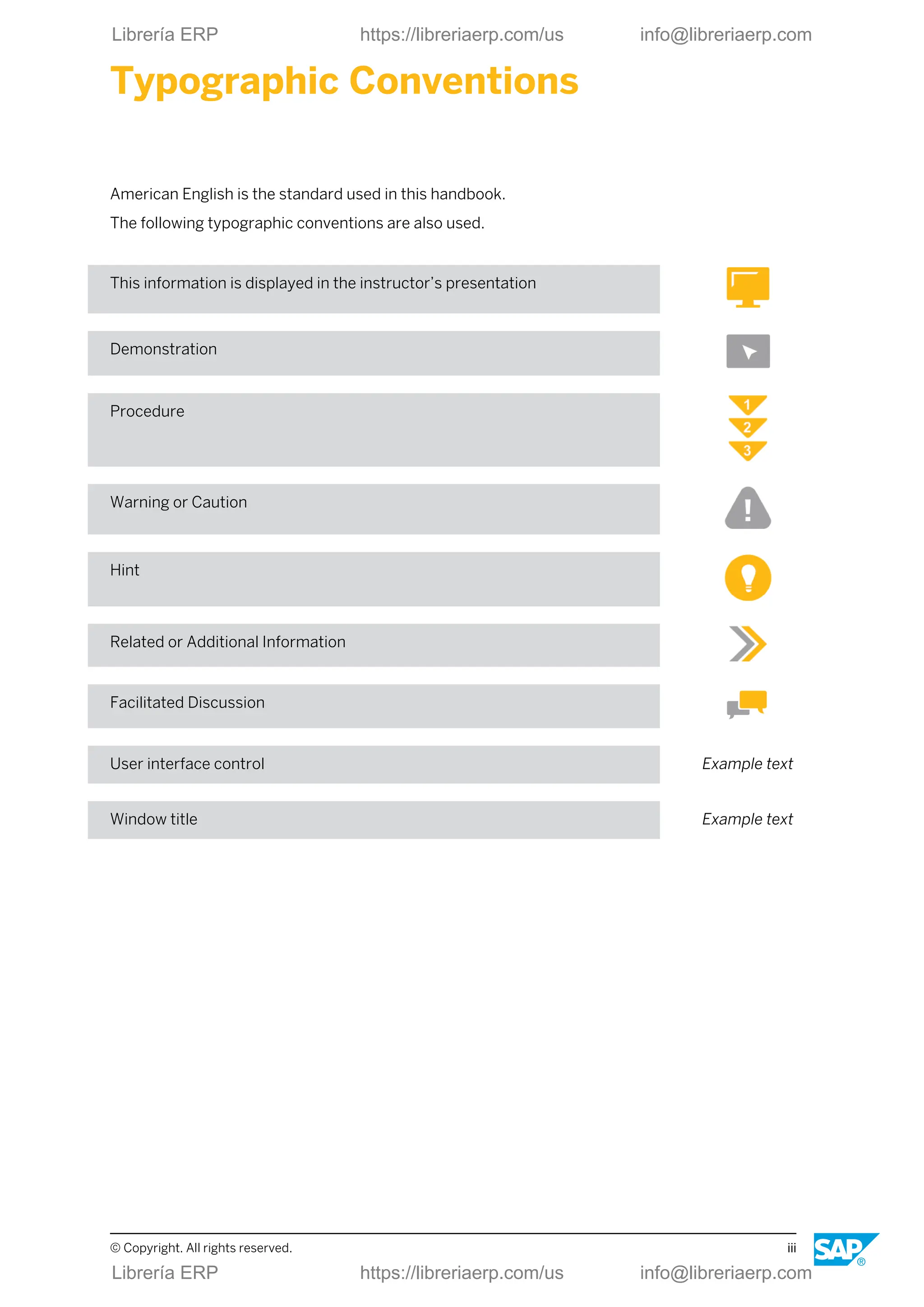
Typographic Conventions
American English is the standard used in this handbook.
The following typographic conventions are also used.
This information is displayed in the instructor’s presentation
Demonstration
Procedure
Warning or Caution
Hint
Related or Additional Information
Facilitated Discussion
User interface control Example text
Window title Example text
© Copyright. All rights reserved. iii
Librería ERP https://libreriaerp.com/us info@libreriaerp.com
iv © Copyright. All rights reserved.
Librería ERP https://libreriaerp.com/us info@libreriaerp.com
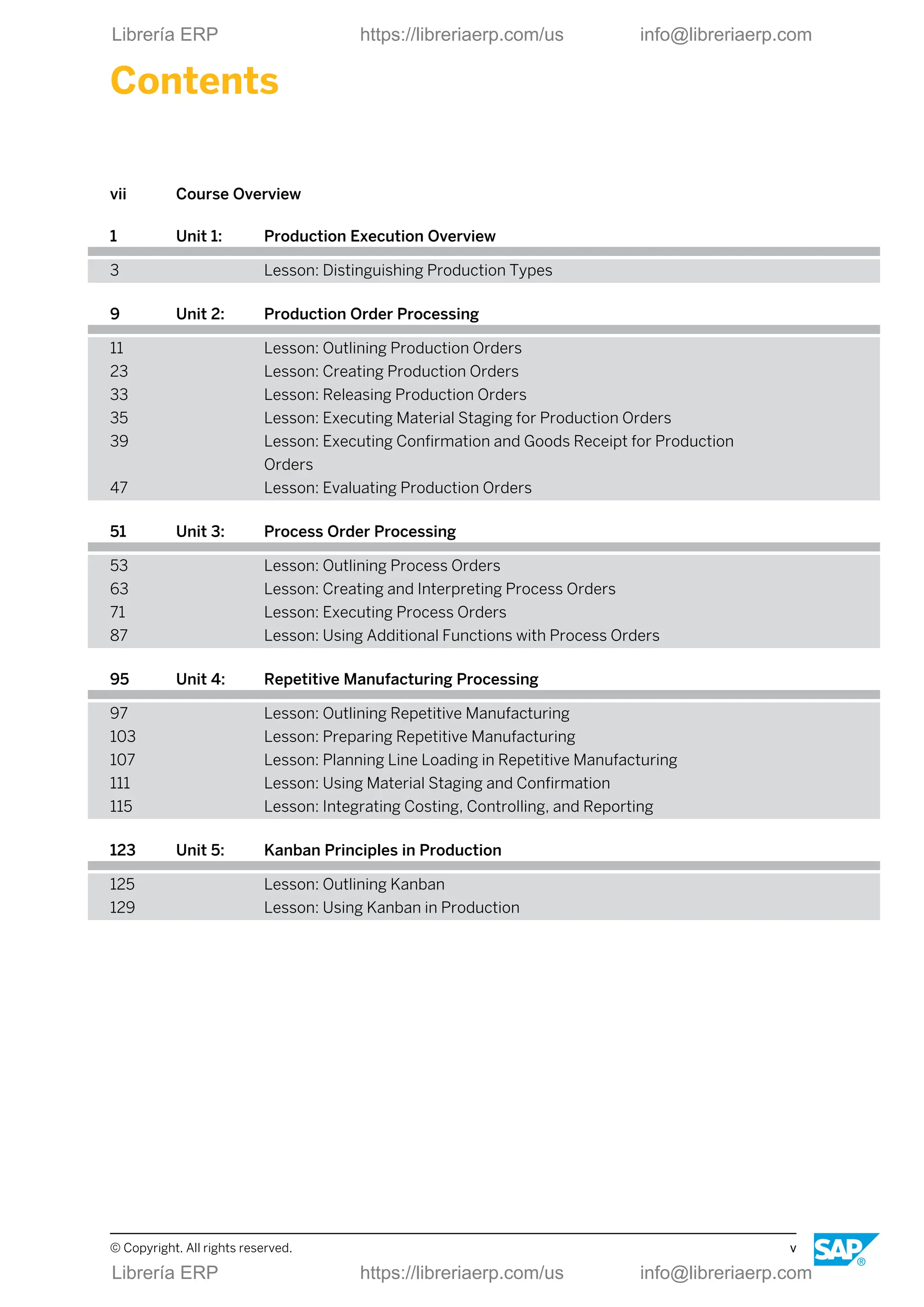
Contents
vii Course Overview
1 Unit 1: Production Execution Overview
3 Lesson: Distinguishing Production Types
9 Unit 2: Production Order Processing
11 Lesson: Outlining Production Orders
23 Lesson: Creating Production Orders
33 Lesson: Releasing Production Orders
35 Lesson: Executing Material Staging for Production Orders
39 Lesson: Executing Confirmation and Goods Receipt for Production
Orders
47 Lesson: Evaluating Production Orders
51 Unit 3: Process Order Processing
53 Lesson: Outlining Process Orders
63 Lesson: Creating and Interpreting Process Orders
71 Lesson: Executing Process Orders
87 Lesson: Using Additional Functions with Process Orders
95 Unit 4: Repetitive Manufacturing Processing
97 Lesson: Outlining Repetitive Manufacturing
103 Lesson: Preparing Repetitive Manufacturing
107 Lesson: Planning Line Loading in Repetitive Manufacturing
111 Lesson: Using Material Staging and Confirmation
115 Lesson: Integrating Costing, Controlling, and Reporting
123 Unit 5: Kanban Principles in Production
125 Lesson: Outlining Kanban
129 Lesson: Using Kanban in Production
© Copyright. All rights reserved. v
Librería ERP https://libreriaerp.com/us info@libreriaerp.com
vi © Copyright. All rights reserved.
Librería ERP https://libreriaerp.com/us info@libreriaerp.com
Course Overview
TARGET AUDIENCE
This course is intended for the following audiences:
● Application Consultant
● Business Process Architect
● Business Process Owner/Team Lead/Power User
● User
© Copyright. All rights reserved. vii
Librería ERP https://libreriaerp.com/us info@libreriaerp.com
viii © Copyright. All rights reserved.
Librería ERP https://libreriaerp.com/us info@libreriaerp.com
UNIT 1 Production Execution Overview
Lesson 1
Distinguishing Production Types 3
UNIT OBJECTIVES
● Distinguish production types
© Copyright. All rights reserved. 1
Librería ERP https://libreriaerp.com/us info@libreriaerp.com
Unit 1: Production Execution Overview
2 © Copyright. All rights reserved.
Librería ERP https://libreriaerp.com/us info@libreriaerp.com
Unit 1
Lesson 1
Distinguishing Production Types
LESSON OVERVIEW
In this lesson, you will learn about the production types that are supported within the SAP
Business Suite.
Business Example
Your company implements the SAP Business Suite. You are a member of the project team
responsible for implementing the shop floor control functions. You use various scenarios to
gain an overview of the possibilities and functions of the supported production types.
LESSON OBJECTIVES
After completing this lesson, you will be able to:
● Distinguish production types
SAP Applications
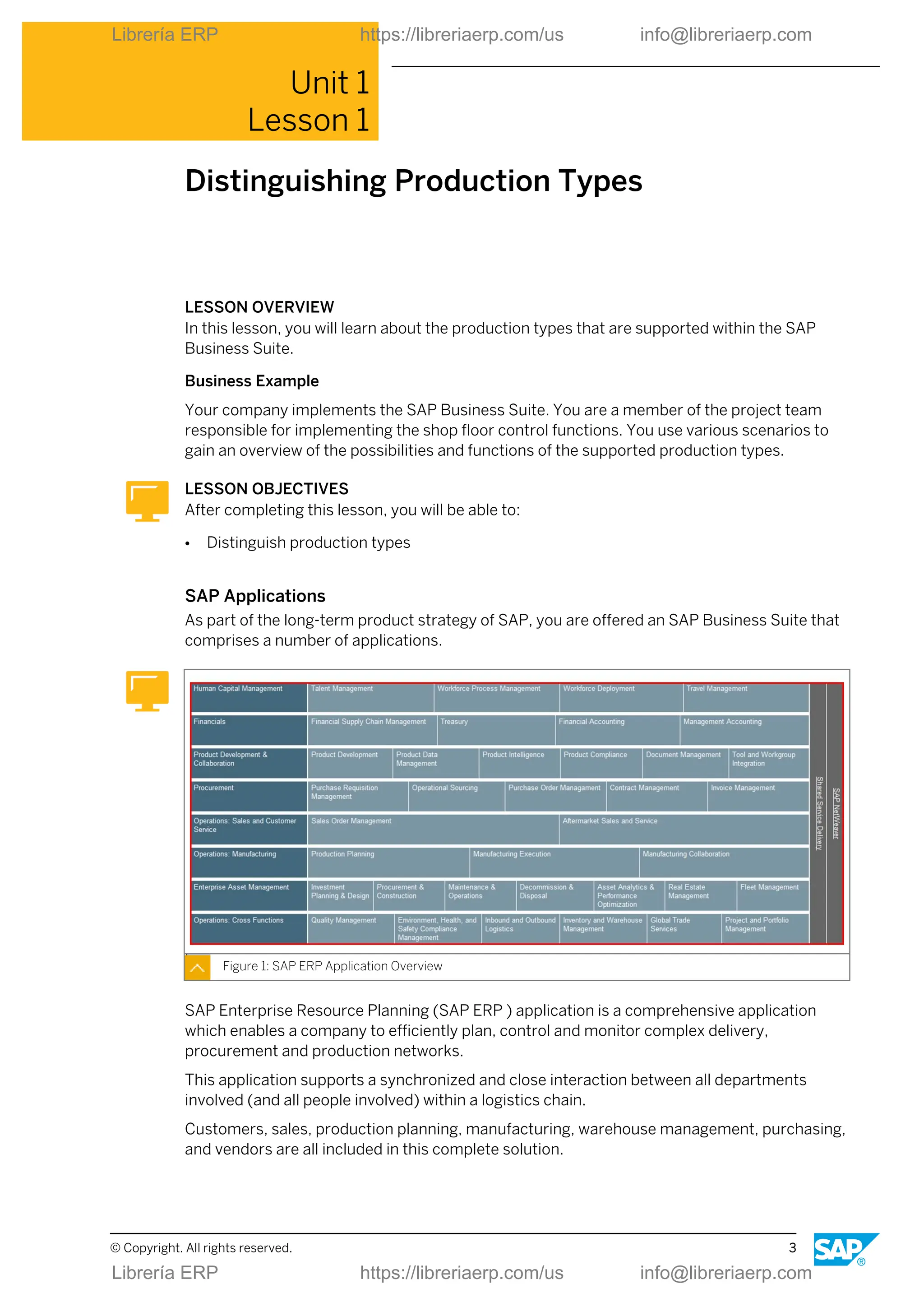
As part of the long-term product strategy of SAP, you are offered an SAP Business Suite that
comprises a number of applications.
Figure 1: SAP ERP Application Overview
SAP Enterprise Resource Planning (SAP ERP ) application is a comprehensive application
which enables a company to efficiently plan, control and monitor complex delivery,
procurement and production networks.
This application supports a synchronized and close interaction between all departments
involved (and all people involved) within a logistics chain.
Customers, sales, production planning, manufacturing, warehouse management, purchasing,
and vendors are all included in this complete solution.
© Copyright. All rights reserved. 3
Librería ERP https://libreriaerp.com/us info@libreriaerp.com
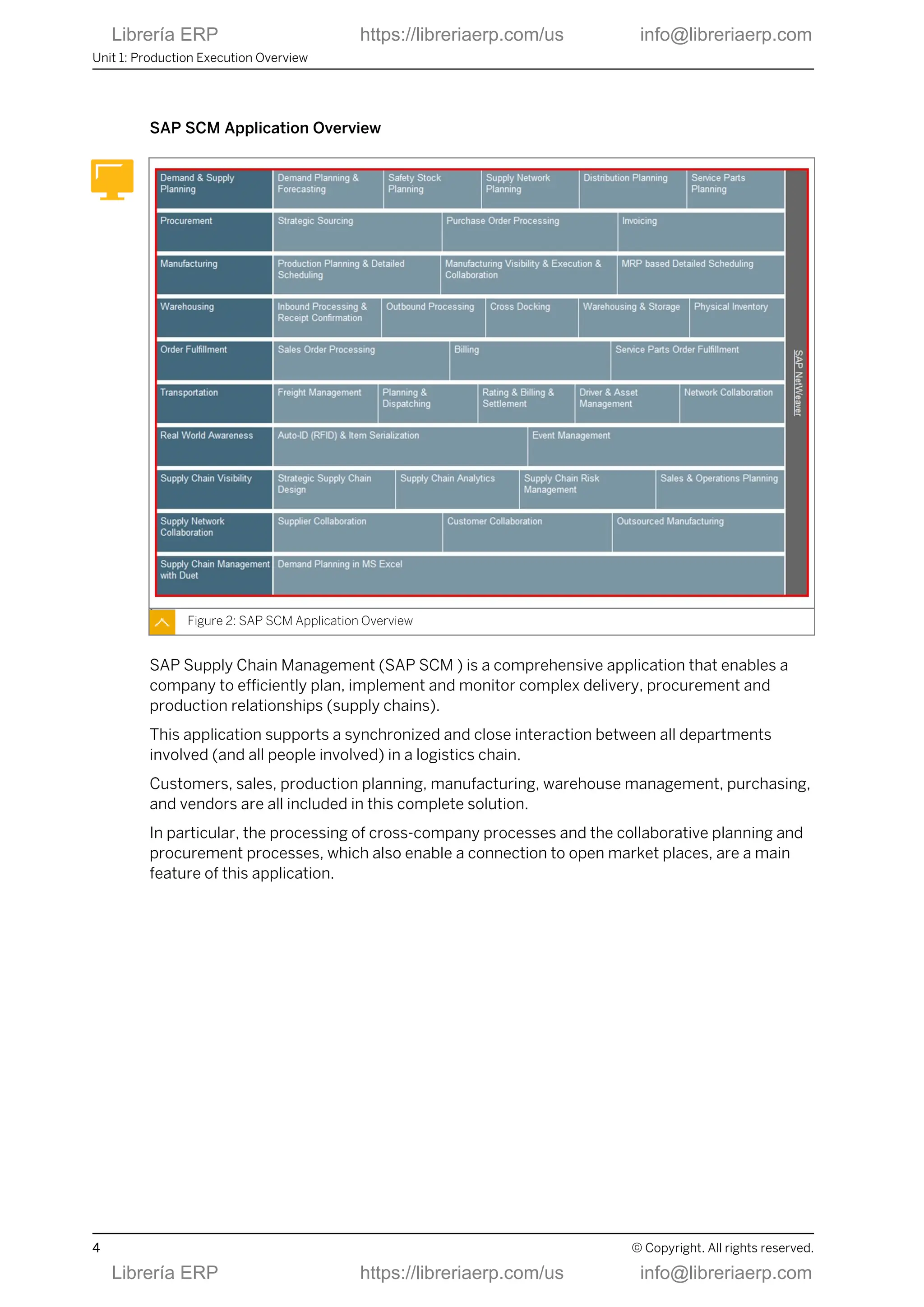
SAP SCM Application Overview
Figure 2: SAP SCM Application Overview
SAP Supply Chain Management (SAP SCM ) is a comprehensive application that enables a
company to efficiently plan, implement and monitor complex delivery, procurement and
production relationships (supply chains).
This application supports a synchronized and close interaction between all departments
involved (and all people involved) in a logistics chain.
Customers, sales, production planning, manufacturing, warehouse management, purchasing,
and vendors are all included in this complete solution.
In particular, the processing of cross-company processes and the collaborative planning and
procurement processes, which also enable a connection to open market places, are a main
feature of this application.
Unit 1: Production Execution Overview
4 © Copyright. All rights reserved.
Librería ERP https://libreriaerp.com/us info@libreriaerp.com
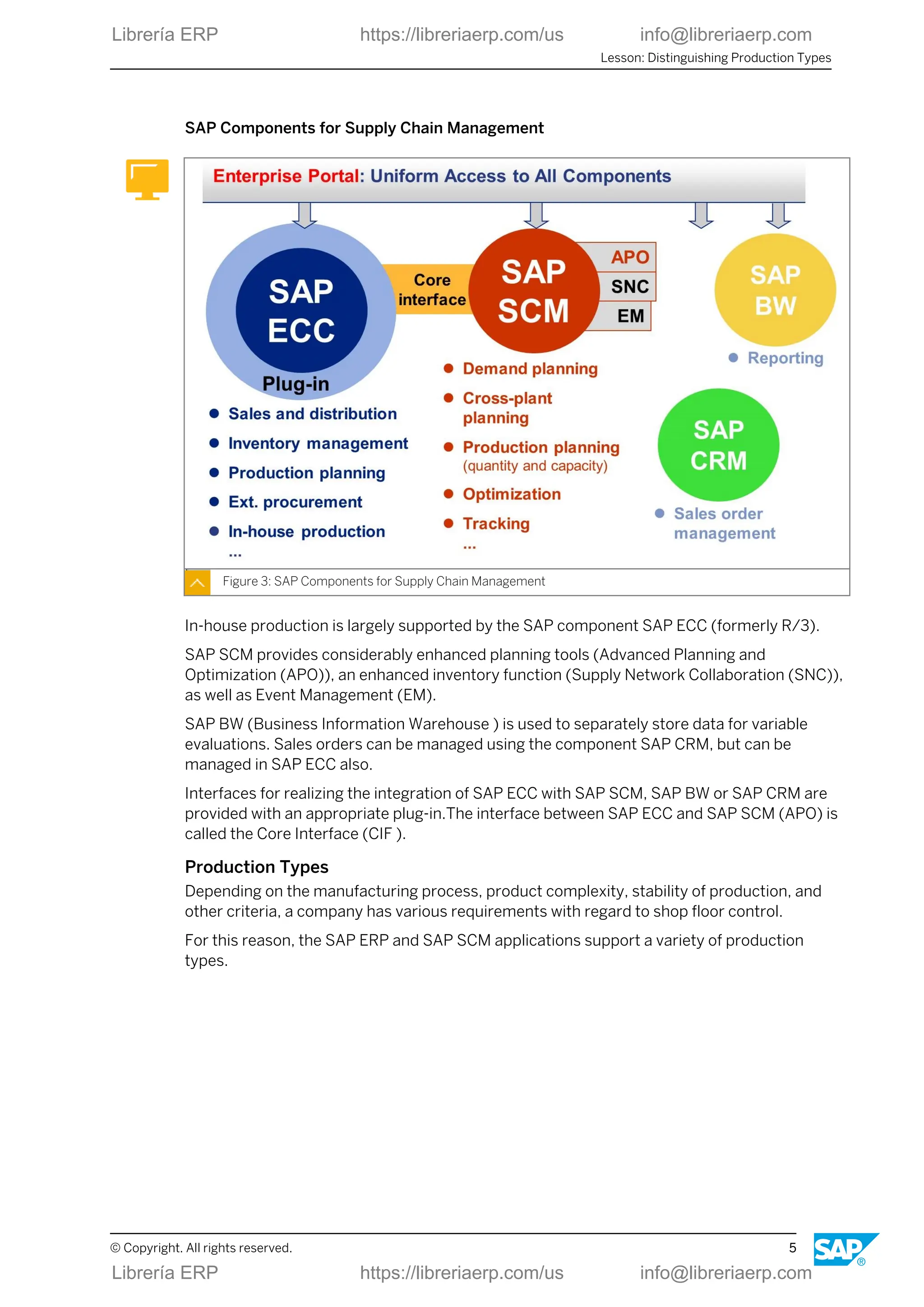
SAP Components for Supply Chain Management
Figure 3: SAP Components for Supply Chain Management
In-house production is largely supported by the SAP component SAP ECC (formerly R/3).
SAP SCM provides considerably enhanced planning tools (Advanced Planning and
Optimization (APO)), an enhanced inventory function (Supply Network Collaboration (SNC)),
as well as Event Management (EM).
SAP BW (Business Information Warehouse ) is used to separately store data for variable
evaluations. Sales orders can be managed using the component SAP CRM, but can be
managed in SAP ECC also.
Interfaces for realizing the integration of SAP ECC with SAP SCM, SAP BW or SAP CRM are
provided with an appropriate plug-in.The interface between SAP ECC and SAP SCM (APO) is
called the Core Interface (CIF ).
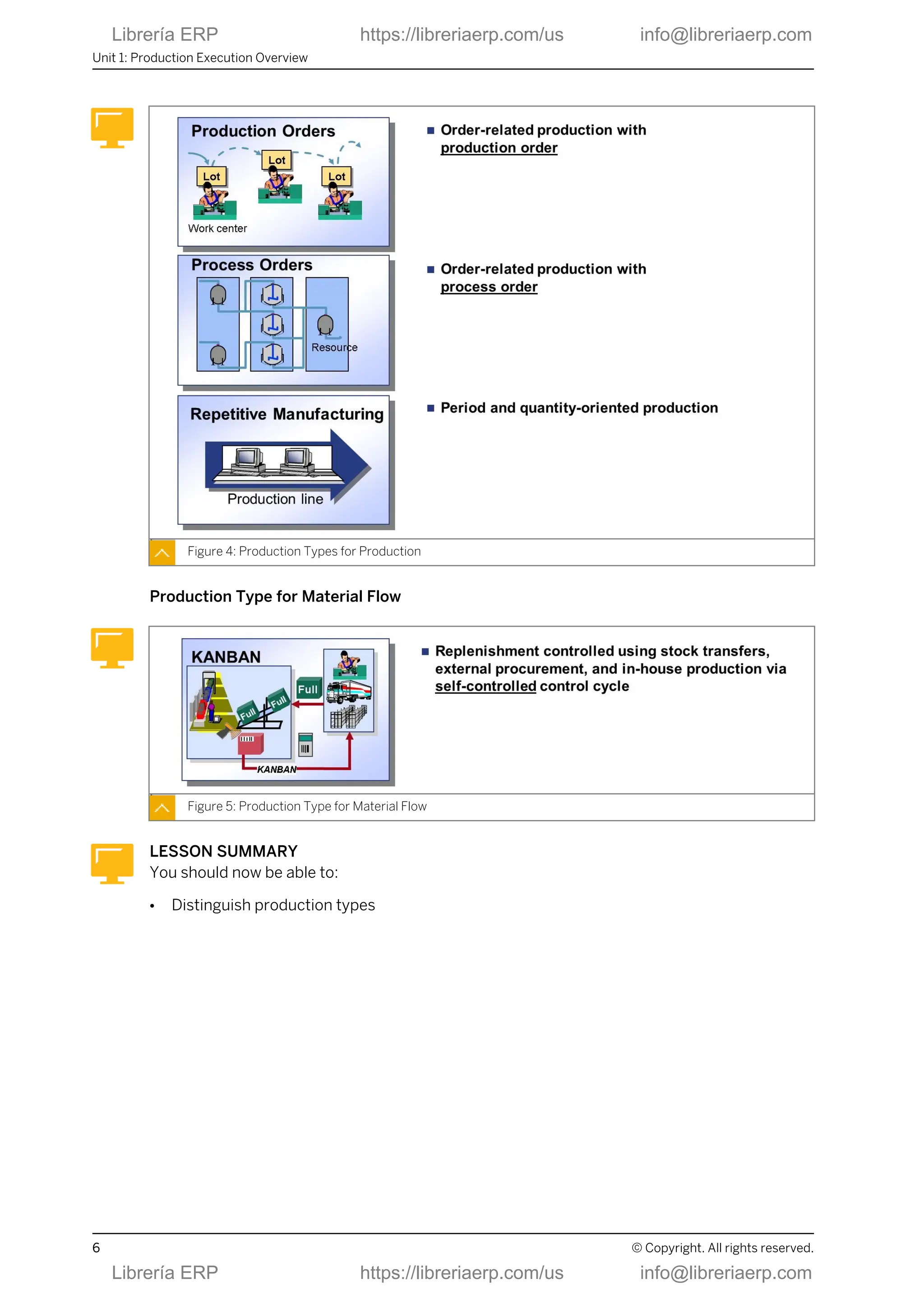
Production Types
Depending on the manufacturing process, product complexity, stability of production, and
other criteria, a company has various requirements with regard to shop floor control.
For this reason, the SAP ERP and SAP SCM applications support a variety of production
types.
Lesson: Distinguishing Production Types
© Copyright. All rights reserved. 5
Librería ERP https://libreriaerp.com/us info@libreriaerp.com
Figure 4: Production Types for Production
Production Type for Material Flow
Figure 5: Production Type for Material Flow
LESSON SUMMARY
You should now be able to:
● Distinguish production types
Unit 1: Production Execution Overview
6 © Copyright. All rights reserved.
Librería ERP https://libreriaerp.com/us info@libreriaerp.com
Unit 1
Learning Assessment
1. Note down the basic production types according to the ability of controlling the
production process manually.
© Copyright. All rights reserved. 7
Librería ERP https://libreriaerp.com/us info@libreriaerp.com
Unit 1
Learning Assessment - Answers
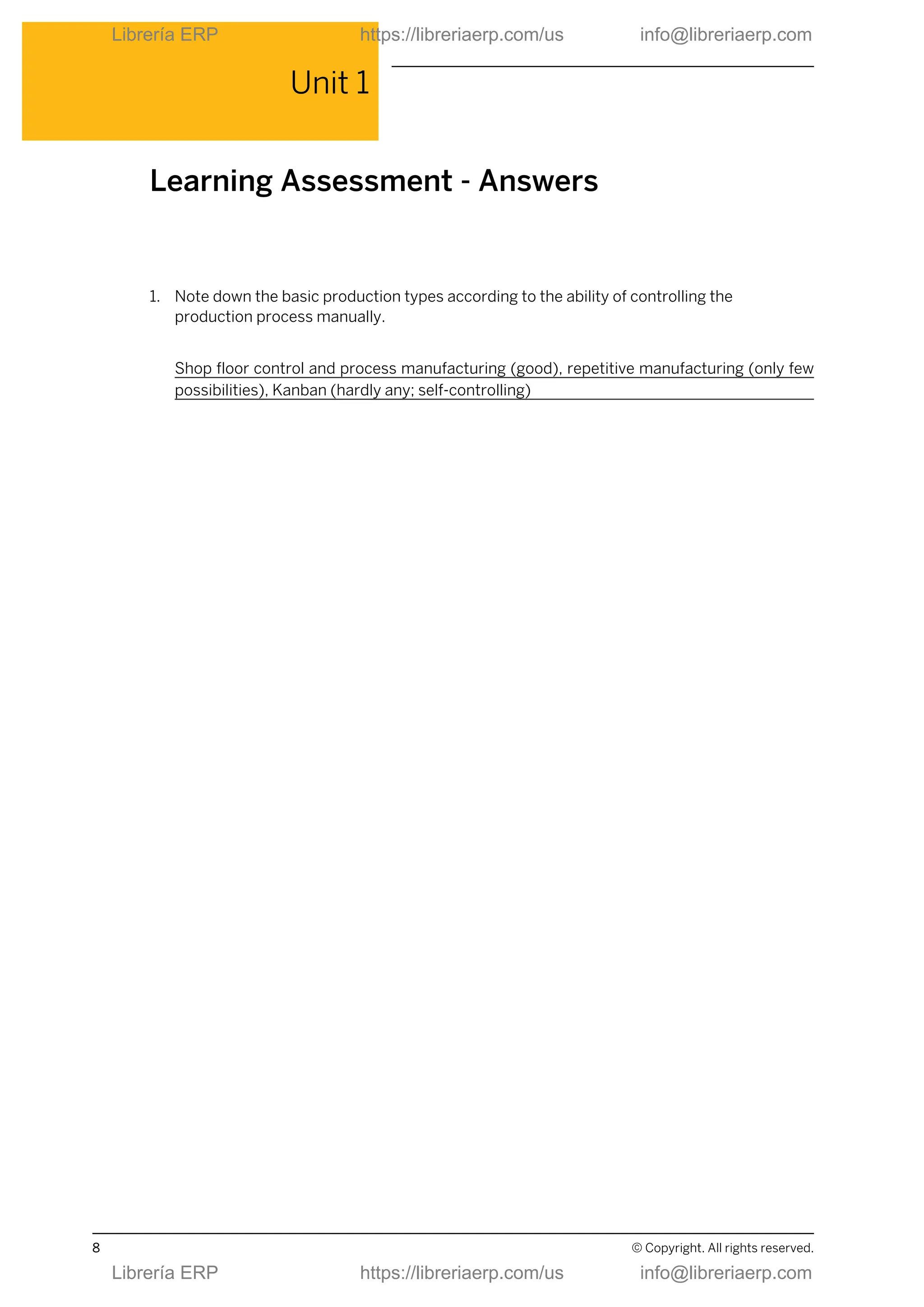
1. Note down the basic production types according to the ability of controlling the
production process manually.
Shop floor control and process manufacturing (good), repetitive manufacturing (only few
possibilities), Kanban (hardly any; self-controlling)
8 © Copyright. All rights reserved.
Librería ERP https://libreriaerp.com/us info@libreriaerp.com
UNIT 2 Production Order Processing
Lesson 1
Outlining Production Orders 11
Lesson 2
Creating Production Orders 23
Lesson 3
Releasing Production Orders 33
Lesson 4
Executing Material Staging for Production Orders 35
Lesson 5
Executing Confirmation and Goods Receipt for Production Orders 39
Lesson 6
Evaluating Production Orders 47
UNIT OBJECTIVES
● Outline production orders
● Create production orders
● Release a production order
● Execute material staging for production orders
● Execute confirmation and goods receipt for production orders
● Evaluate production orders
© Copyright. All rights reserved. 9
Librería ERP https://libreriaerp.com/us info@libreriaerp.com
Unit 2: Production Order Processing
10 © Copyright. All rights reserved.
Librería ERP https://libreriaerp.com/us info@libreriaerp.com
Unit 2
Lesson 1
Outlining Production Orders
LESSON OVERVIEW
In this lesson you will get an overview of application areas of production orders and the
characteristics of order-based production. Moreover the cross-application functional process
will be outlined and master data for production orders will be introduced.
Business Example
Your company manufactures finished products in an order-related way. You belong to the
team that is implementing production orders in SAP ERP. To implement production orders,
you must implement the whole process chain for in-house production, which will allow your
company to organize, control, and execute production for a plant based on the shop floor
concept.
LESSON OBJECTIVES
After completing this lesson, you will be able to:
● Outline production orders
Production Orders Applications
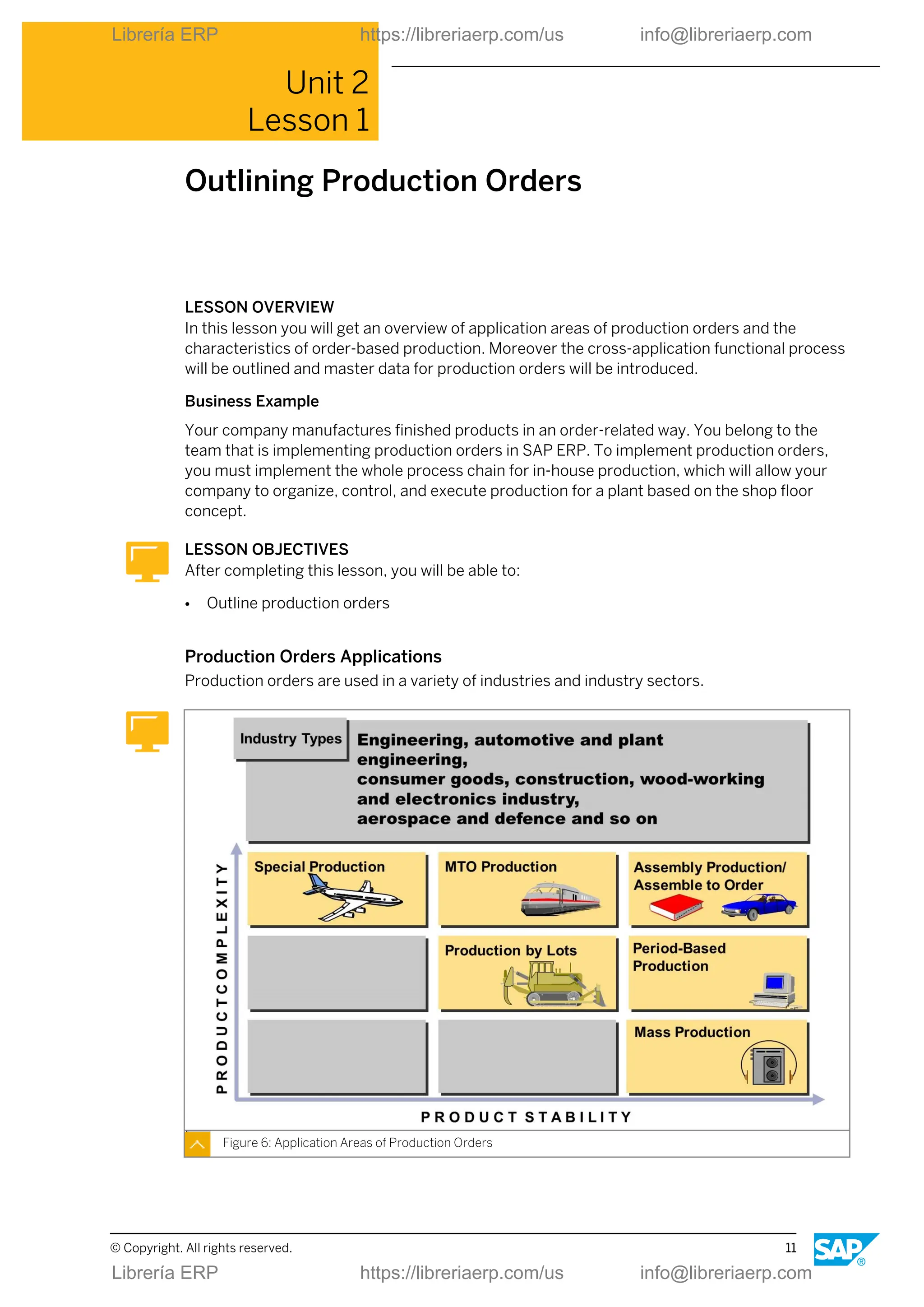
Production orders are used in a variety of industries and industry sectors.
Figure 6: Application Areas of Production Orders
© Copyright. All rights reserved. 11
Librería ERP https://libreriaerp.com/us info@libreriaerp.com
Production orders can be used in a numerous production types. These production types are
mainly dependent on the product stability, product complexity, and the production
procedures used.
Production Order Characteristics
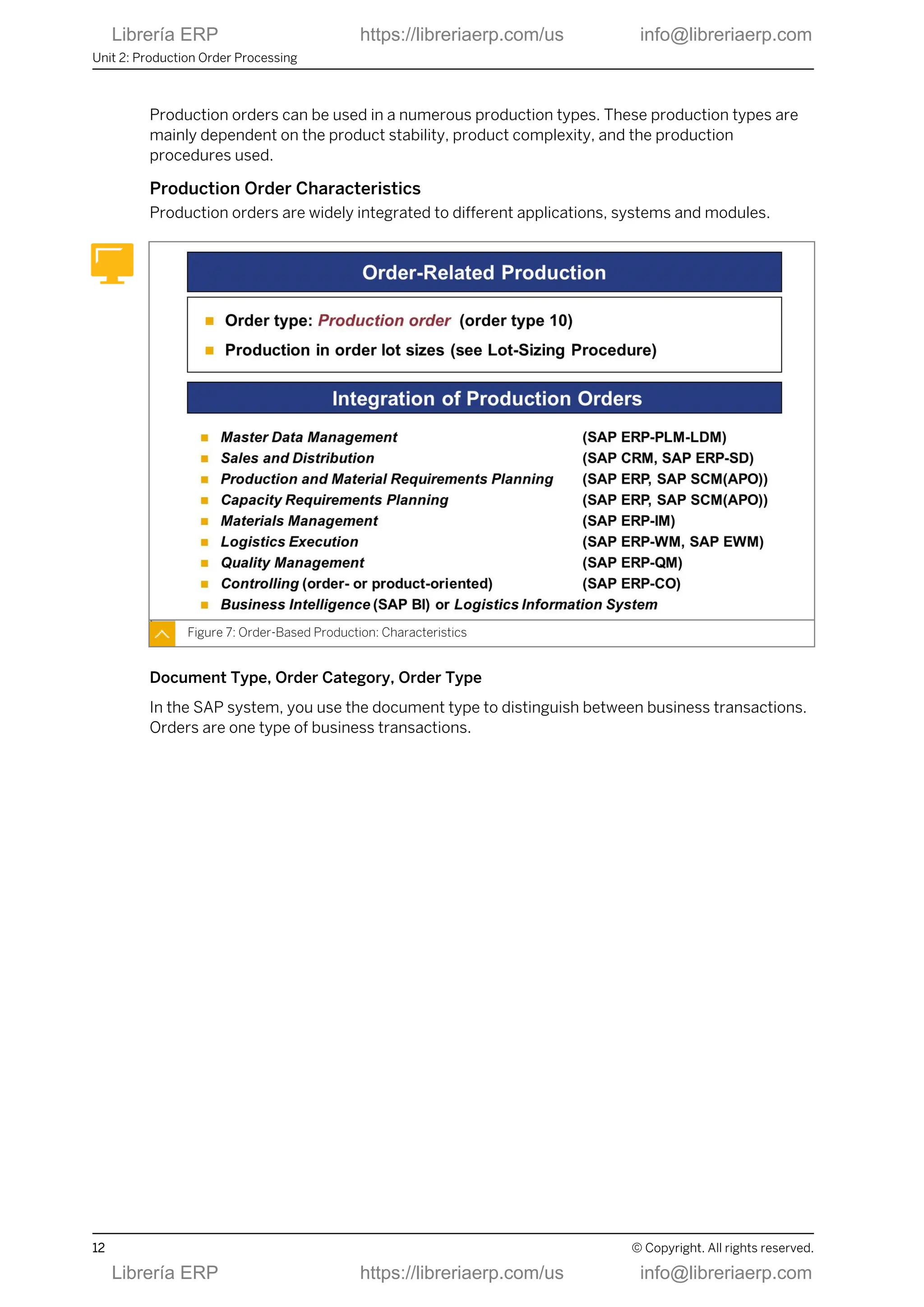
Production orders are widely integrated to different applications, systems and modules.
Figure 7: Order-Based Production: Characteristics
Document Type, Order Category, Order Type
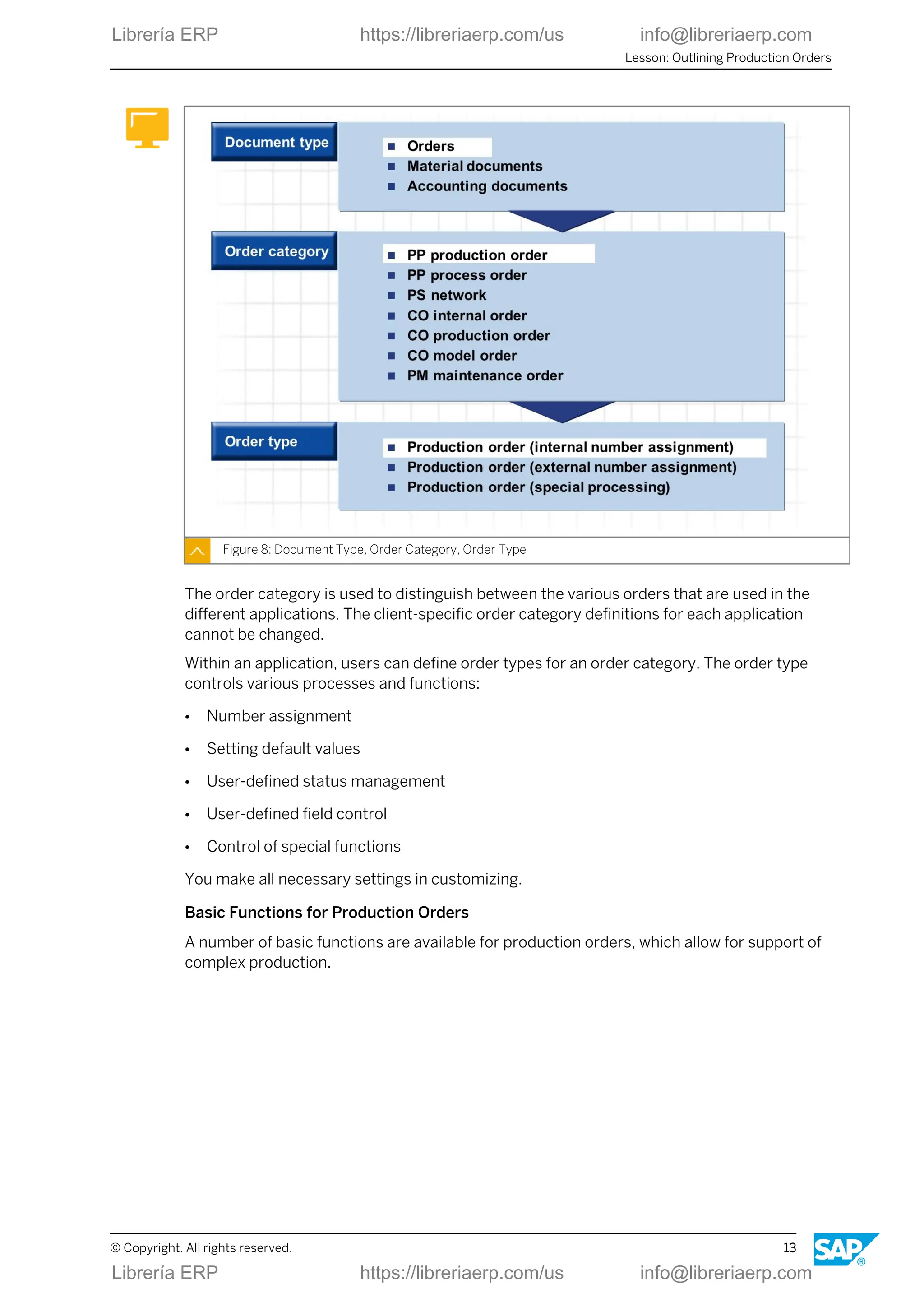
In the SAP system, you use the document type to distinguish between business transactions.
Orders are one type of business transactions.
Unit 2: Production Order Processing
12 © Copyright. All rights reserved.
Librería ERP https://libreriaerp.com/us info@libreriaerp.com
Figure 8: Document Type, Order Category, Order Type
The order category is used to distinguish between the various orders that are used in the
different applications. The client-specific order category definitions for each application
cannot be changed.
Within an application, users can define order types for an order category. The order type
controls various processes and functions:
● Number assignment
● Setting default values
● User-defined status management
● User-defined field control
● Control of special functions
You make all necessary settings in customizing.
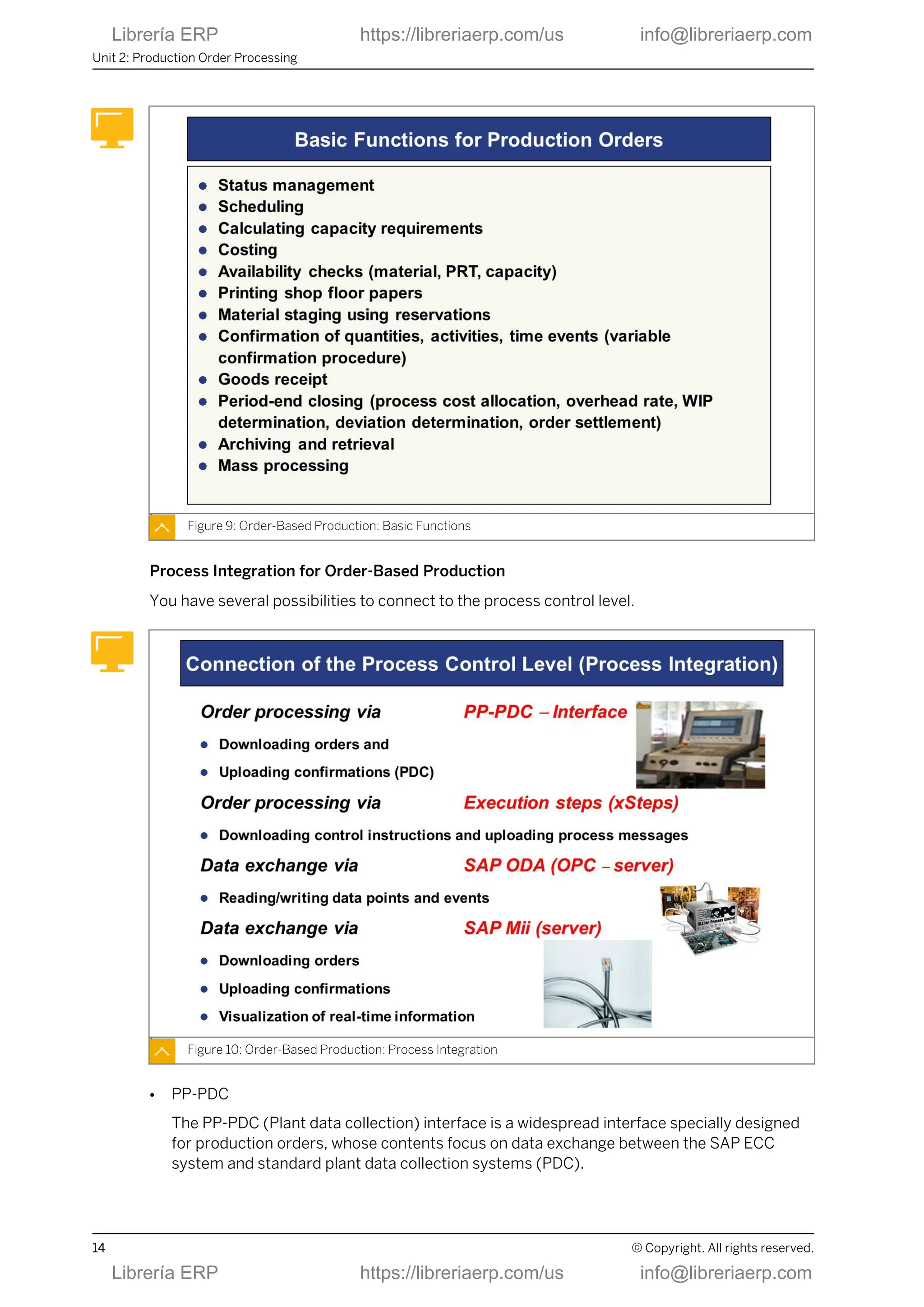
Basic Functions for Production Orders
A number of basic functions are available for production orders, which allow for support of
complex production.
Lesson: Outlining Production Orders
© Copyright. All rights reserved. 13
Librería ERP https://libreriaerp.com/us info@libreriaerp.com
Figure 9: Order-Based Production: Basic Functions
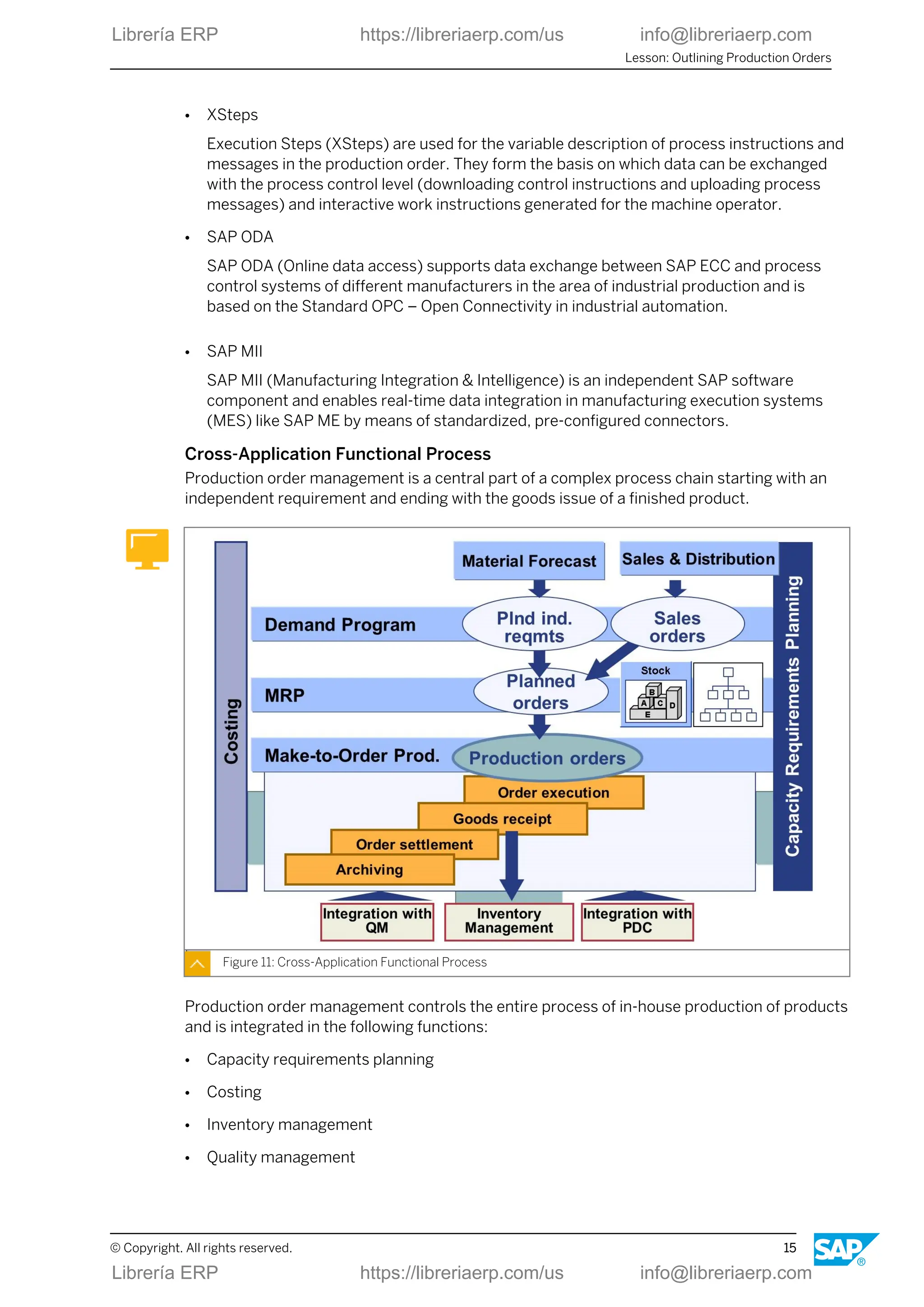
Process Integration for Order-Based Production
You have several possibilities to connect to the process control level.
Figure 10: Order-Based Production: Process Integration
● PP-PDC
The PP-PDC (Plant data collection) interface is a widespread interface specially designed
for production orders, whose contents focus on data exchange between the SAP ECC
system and standard plant data collection systems (PDC).
Unit 2: Production Order Processing
14 © Copyright. All rights reserved.
Librería ERP https://libreriaerp.com/us info@libreriaerp.com
● XSteps
Execution Steps (XSteps) are used for the variable description of process instructions and
messages in the production order. They form the basis on which data can be exchanged
with the process control level (downloading control instructions and uploading process
messages) and interactive work instructions generated for the machine operator.
● SAP ODA
SAP ODA (Online data access) supports data exchange between SAP ECC and process
control systems of different manufacturers in the area of industrial production and is
based on the Standard OPC – Open Connectivity in industrial automation.
● SAP MII
SAP MII (Manufacturing Integration & Intelligence) is an independent SAP software
component and enables real-time data integration in manufacturing execution systems
(MES) like SAP ME by means of standardized, pre-configured connectors.
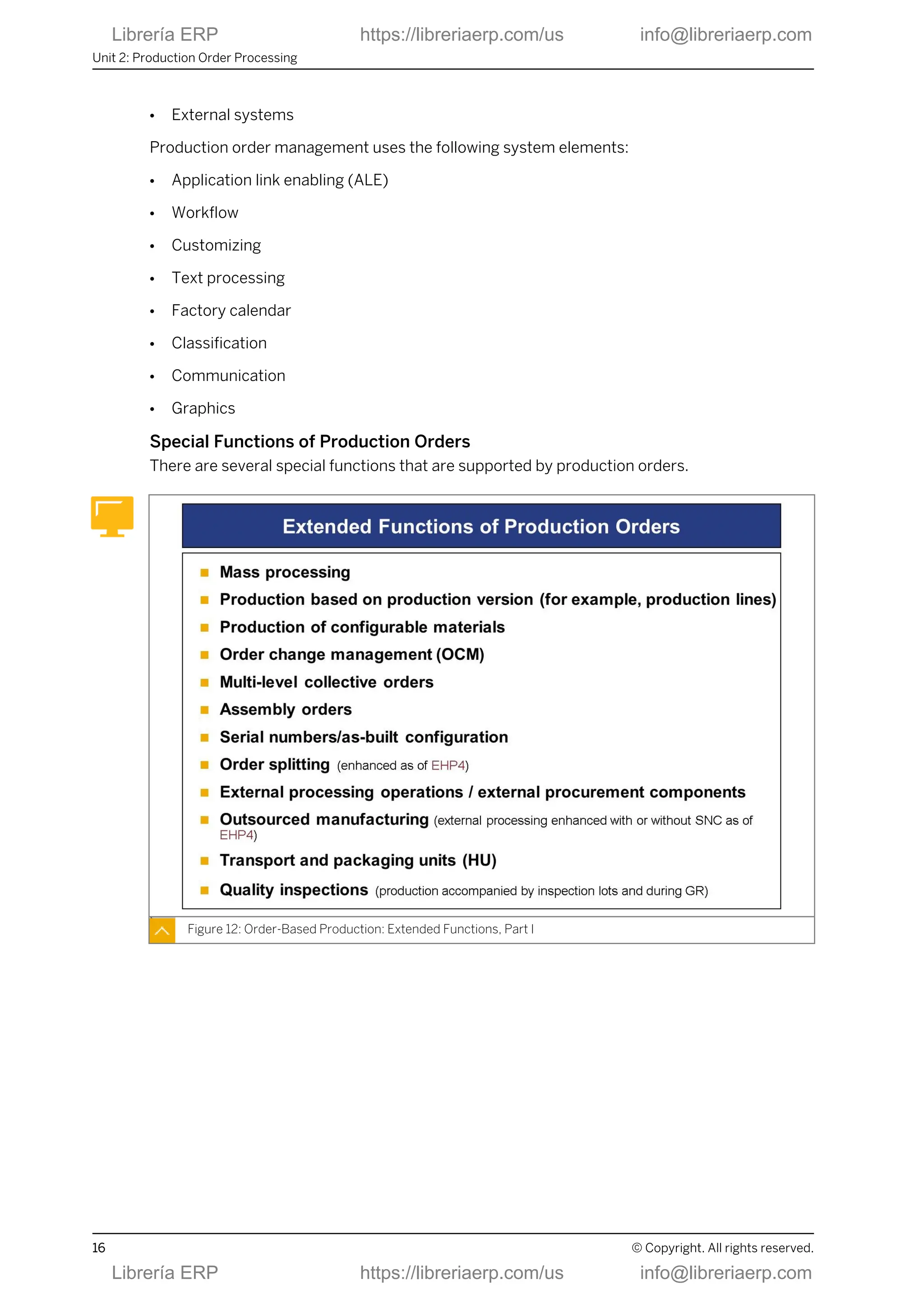
Cross-Application Functional Process
Production order management is a central part of a complex process chain starting with an
independent requirement and ending with the goods issue of a finished product.
Figure 11: Cross-Application Functional Process
Production order management controls the entire process of in-house production of products
and is integrated in the following functions:
● Capacity requirements planning
● Costing
● Inventory management
● Quality management
Lesson: Outlining Production Orders
© Copyright. All rights reserved. 15
Librería ERP https://libreriaerp.com/us info@libreriaerp.com
● External systems
Production order management uses the following system elements:
● Application link enabling (ALE)
● Workflow
● Customizing
● Text processing
● Factory calendar
● Classification
● Communication
● Graphics
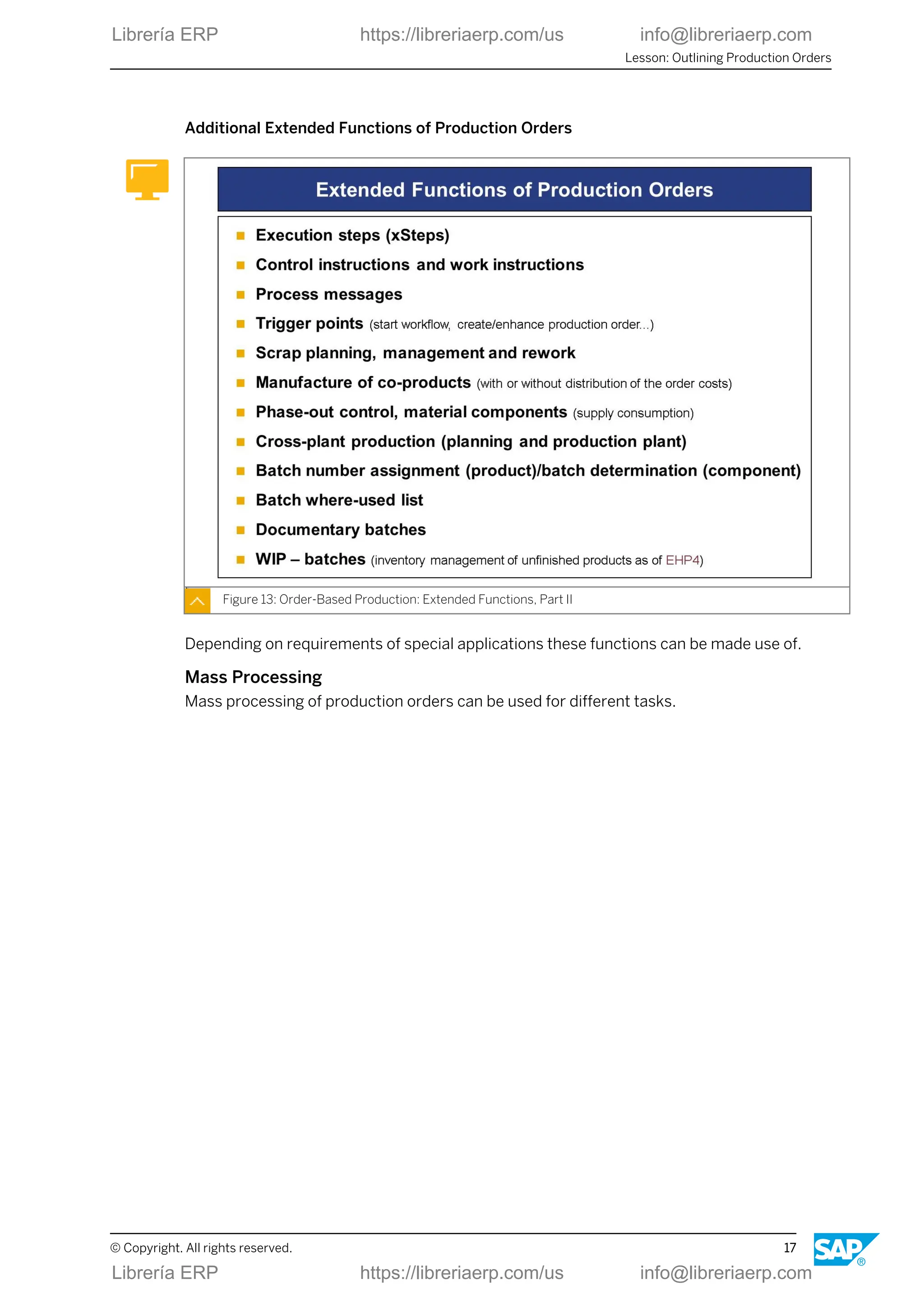
Special Functions of Production Orders
There are several special functions that are supported by production orders.
Figure 12: Order-Based Production: Extended Functions, Part I
Unit 2: Production Order Processing
16 © Copyright. All rights reserved.
Librería ERP https://libreriaerp.com/us info@libreriaerp.com
Additional Extended Functions of Production Orders
Figure 13: Order-Based Production: Extended Functions, Part II
Depending on requirements of special applications these functions can be made use of.
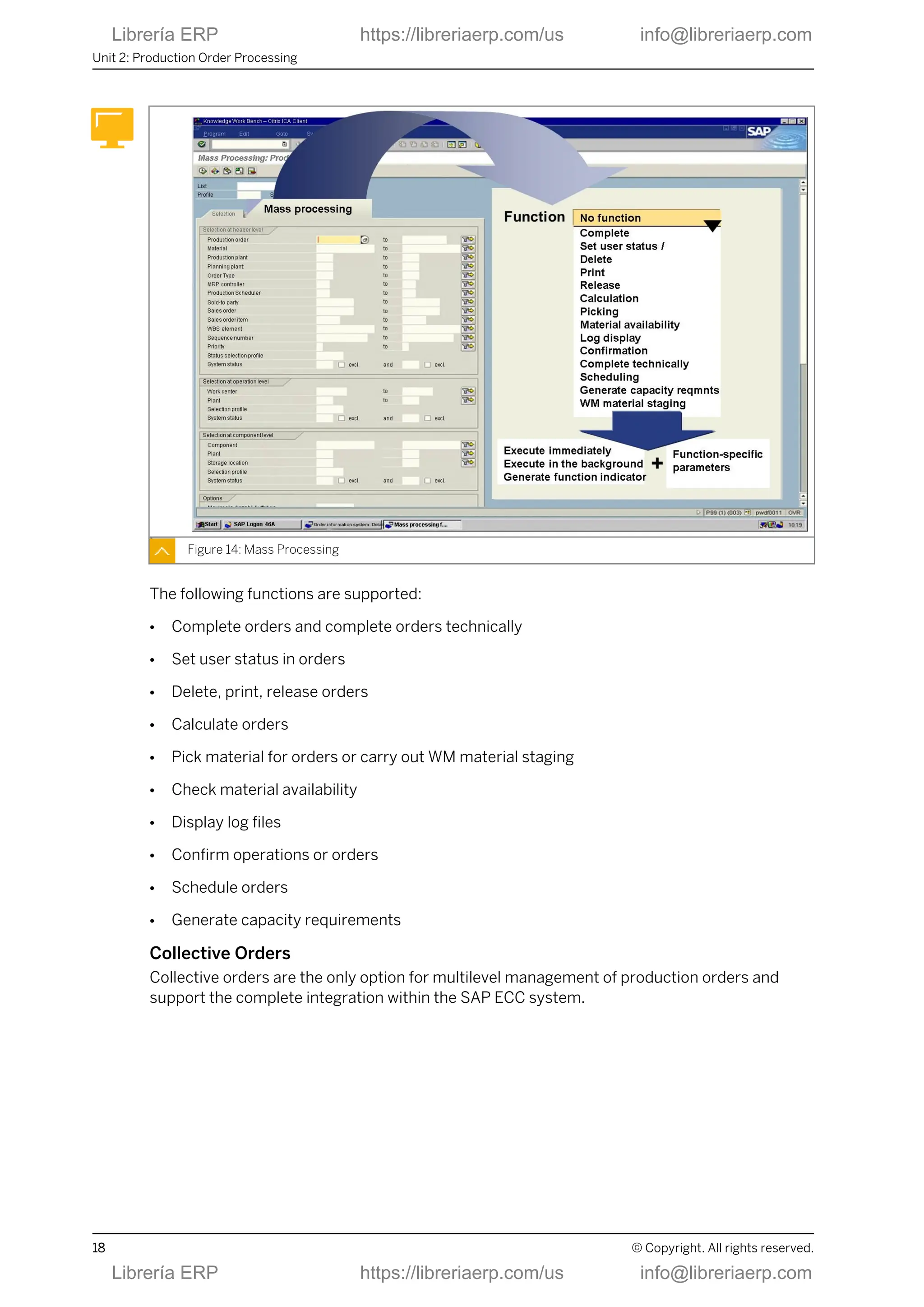
Mass Processing
Mass processing of production orders can be used for different tasks.
Lesson: Outlining Production Orders
© Copyright. All rights reserved. 17
Librería ERP https://libreriaerp.com/us info@libreriaerp.com
Figure 14: Mass Processing
The following functions are supported:
● Complete orders and complete orders technically
● Set user status in orders
● Delete, print, release orders
● Calculate orders
● Pick material for orders or carry out WM material staging
● Check material availability
● Display log files
● Confirm operations or orders
● Schedule orders
● Generate capacity requirements
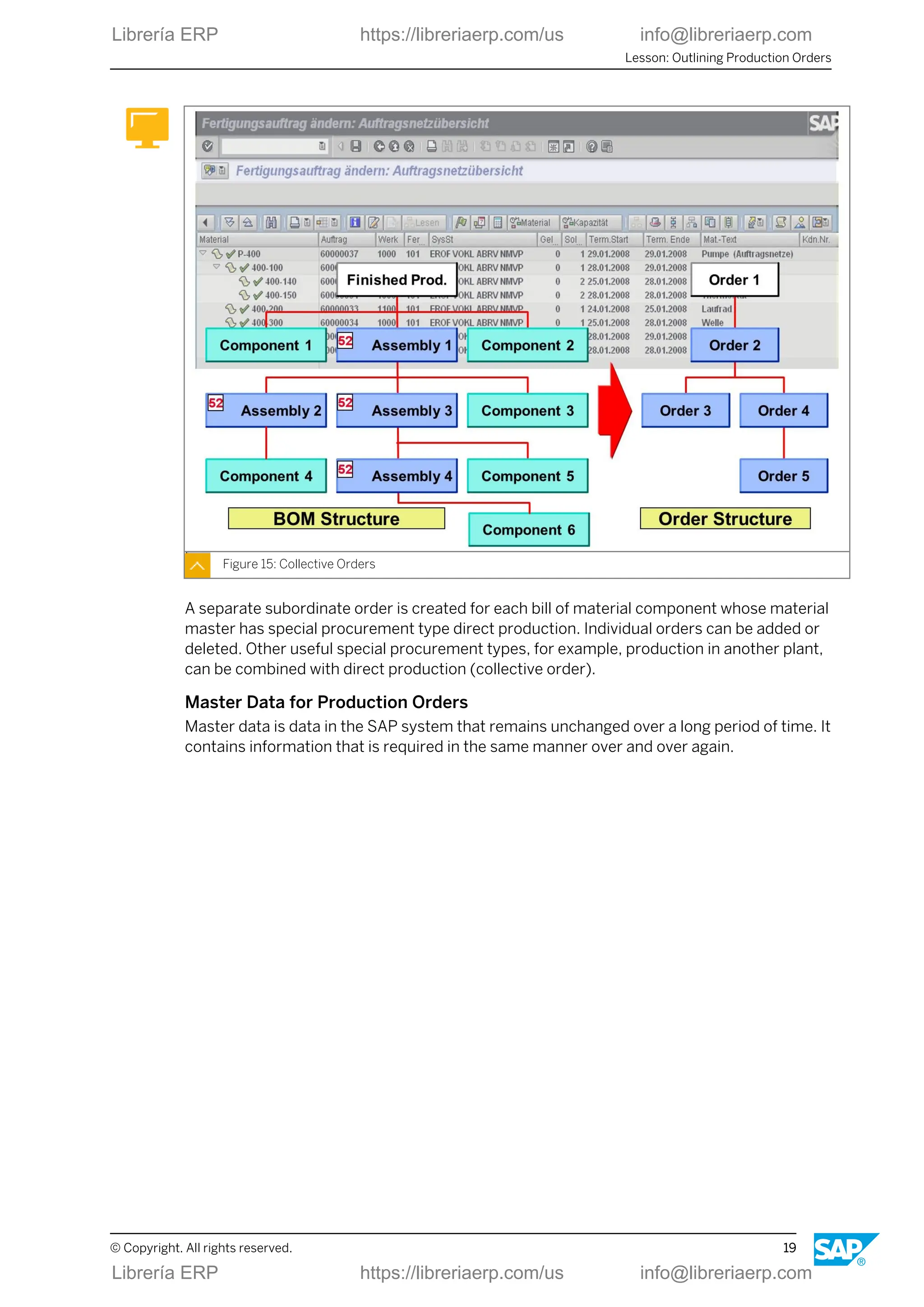
Collective Orders
Collective orders are the only option for multilevel management of production orders and
support the complete integration within the SAP ECC system.
Unit 2: Production Order Processing
18 © Copyright. All rights reserved.
Librería ERP https://libreriaerp.com/us info@libreriaerp.com
Figure 15: Collective Orders
A separate subordinate order is created for each bill of material component whose material
master has special procurement type direct production. Individual orders can be added or
deleted. Other useful special procurement types, for example, production in another plant,
can be combined with direct production (collective order).
Master Data for Production Orders
Master data is data in the SAP system that remains unchanged over a long period of time. It
contains information that is required in the same manner over and over again.
Lesson: Outlining Production Orders
© Copyright. All rights reserved. 19
Librería ERP https://libreriaerp.com/us info@libreriaerp.com
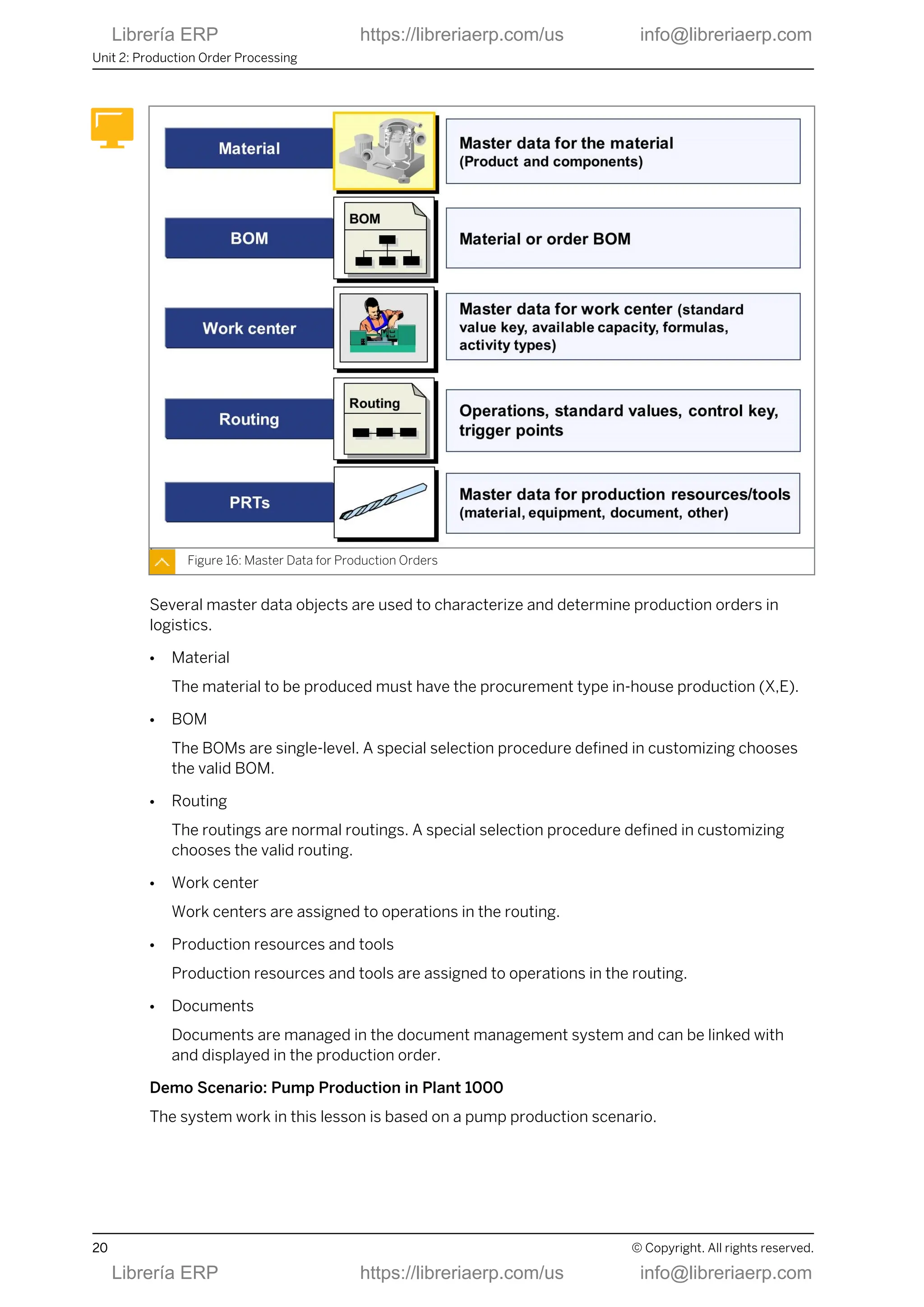
Figure 16: Master Data for Production Orders
Several master data objects are used to characterize and determine production orders in
logistics.
● Material
The material to be produced must have the procurement type in-house production (X,E).
● BOM
The BOMs are single-level. A special selection procedure defined in customizing chooses
the valid BOM.
● Routing
The routings are normal routings. A special selection procedure defined in customizing
chooses the valid routing.
● Work center
Work centers are assigned to operations in the routing.
● Production resources and tools
Production resources and tools are assigned to operations in the routing.
● Documents
Documents are managed in the document management system and can be linked with
and displayed in the production order.
Demo Scenario: Pump Production in Plant 1000
The system work in this lesson is based on a pump production scenario.
Unit 2: Production Order Processing
20 © Copyright. All rights reserved.
Librería ERP https://libreriaerp.com/us info@libreriaerp.com
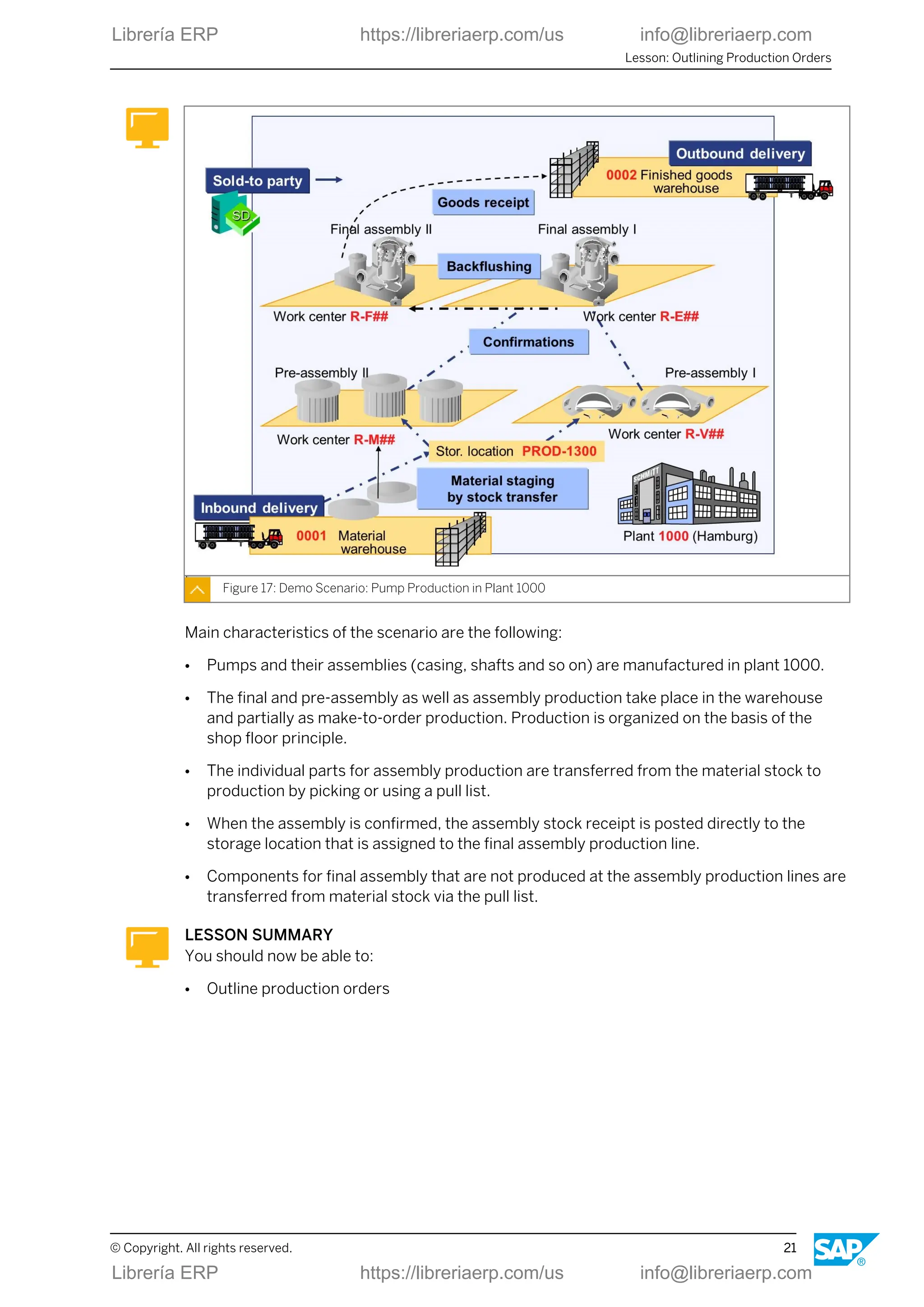
Figure 17: Demo Scenario: Pump Production in Plant 1000
Main characteristics of the scenario are the following:
● Pumps and their assemblies (casing, shafts and so on) are manufactured in plant 1000.
● The final and pre-assembly as well as assembly production take place in the warehouse
and partially as make-to-order production. Production is organized on the basis of the
shop floor principle.
● The individual parts for assembly production are transferred from the material stock to
production by picking or using a pull list.
● When the assembly is confirmed, the assembly stock receipt is posted directly to the
storage location that is assigned to the final assembly production line.
● Components for final assembly that are not produced at the assembly production lines are
transferred from material stock via the pull list.
LESSON SUMMARY
You should now be able to:
● Outline production orders
Lesson: Outlining Production Orders
© Copyright. All rights reserved. 21
Librería ERP https://libreriaerp.com/us info@libreriaerp.com
Unit 2: Production Order Processing
22 © Copyright. All rights reserved.
Librería ERP https://libreriaerp.com/us info@libreriaerp.com
Unit 2
Lesson 2
Creating Production Orders
LESSON OVERVIEW
In this lesson, you learn about important elements and functions of a production order as well
as the typical way it is created.
Business Example
Important steps for order-related production are order creation, scheduling, release, printing
papers, material withdrawal, execution, confirmation, goods receipt, and settlement. These
functions are integrated with other areas in your company, such as, controlling and
warehouse management. For this reason, you must take into account the extensive
integration relationships of production orders during implementation.
LESSON OBJECTIVES
After completing this lesson, you will be able to:
● Create production orders
Production Order Processing and Structure
Production orders go through several individual activities. A number of settings available in
customizing allow you to successfully perform each step in order processing. Many of these
activities can run automatically or in the background so that manual processing of orders is
minimized.
© Copyright. All rights reserved. 23
Librería ERP https://libreriaerp.com/us info@libreriaerp.com
Figure 18: Production Order Processing
● In the figure, Production Order Processing, functions with the key 1 can be automated via
customizing and functions with the key 2 can be executed via background processing.
● The following periodic work for Cost Object Controlling (COC) is usually processed in the
background:
- WIP determination (work in process)
- Variance calculation
- Settlement
You can use the quality management (QM) tools during the production process and for the
goods receipt. Various interfaces for process integration are available for downloading orders
and uploading process messages.
Elements of a Production Order
Principally, a production order in SAP ERP offers the structure shown in the figure, Elements
of a Production Order.
Unit 2: Production Order Processing
24 © Copyright. All rights reserved.
Librería ERP https://libreriaerp.com/us info@libreriaerp.com
Figure 19: Elements of a Production Order
● Operations
A standard sequence of operations may have other (parallel, alternative) operation
sequences. You can make a selection from several alternative sequences. The standard
sequence must have at least one operation. If necessary, the system creates one
automatically. You can choose whether to assign material components, production
resources and tools and trigger points to the operation. Suboperations are permitted
within an operation.
● Documents
You can link documents of the document management (drawings, text files, images and so
on) to the production order.
● XSteps
Execution steps are any process instructions (for example, pressure, temperature, texts)
that can be transferred to a recipient of your choice (for example, control instruction in
SAP ERP, process control computer, CNC machine) using the process integration
functions in the form of a control instruction or that can be prepared by this recipient and
sent back to the SAP ECC system in the form of process messages.
● Costs
Costs are determined at operation level, managed at order header level and a settlement
rule is created for the orders for order-related COC only.
Order Creation Options
Creating a production order is technically also referred to as "opening".
Lesson: Creating Production Orders
© Copyright. All rights reserved. 25
Librería ERP https://libreriaerp.com/us info@libreriaerp.com
Figure 20: Order Creation Options
There are different ways to open a production order:
● Create with routing or BOM
Operations, material components and production resources and tools are usually derived
from the routing and the BOM. If not otherwise specified in the routing, the components of
the BOM are assigned to the first operation.
When opening a production order the system uses the criteria validity period and lot-size
area to determine suitable routing or BOM alternatives directly for the material.
● Create with production version
You can use production versions when opening production orders. A production version
determines which routing alternative is to be used along with which BOM alternative for
production. When opening a production order the system uses the criteria validity period
and lot-size area to determine a suitable production version directly for the material.
● Create with planned order
When converting a planned order, the system does not read the BOM again. Instead, the
dependent requirements in the planned order are converted into reservations for the
production order. In this process, any existing production version is also copied to the
production order and the corresponding routing copied.
● Create without planned order
When creating a production order without a planned order, the routing and BOM are
copied directly to the production order.
● Create manually
You can create a production order manually any way you want.
Unit 2: Production Order Processing
26 © Copyright. All rights reserved.
Librería ERP https://libreriaerp.com/us info@libreriaerp.com
Planning Integration
For planning tasks, both SAP ECC and SAP SCM-APO can be used.
Figure 21: Integration with Planning (SAP ECC or SAP SCM-APO)
Therefore the ERP and SCM applications offer alternatives for integrating planning and
production:
● Planning with the functions of the SAP ECC component
● Planning with the functions of the SAP SCM-APO component
● Planning with both functions of the SAP ECC and SAP SCM-APO component
Planning tasks can usually be either carried out using SAP ECC or SAP SCM-APO. Some
examples are as follows:
● Material requirements planning
● Capacity planning
● Availability check
In contrast to this, the following steps always occur with the functions of the SAP ECC
component:
● Production preparation
● Production execution
● Production control
These functions in SAP ECC include the following tasks:
Lesson: Creating Production Orders
© Copyright. All rights reserved. 27
Librería ERP https://libreriaerp.com/us info@libreriaerp.com
● Costing
● Release
● Material staging
● Confirmation
● Goods movements
● Settlement
Order Creation with Planned Orders
In planning, planned orders are created using material requirements planning.
Figure 22: Order Creation with Planned Orders
The creation of production orders using planned orders is the most common case of
application. The production order data is created automatically in this way.
Note:
If available, inspection data is copied from the routing. An inspection lot is then
generated, but is not written in the production order.
The conversion of planned orders into production orders can be carried out by MRP
controllers or by reports.
Detailed Planning Integration
Detailed planning (capacity planning, work center commitment) can be carried out both in
SAP ERP and in SAP SCM-APO. A prerequisite for all methods of detailed planning is rough
long-term or medium-term capacity requirements planning.
Unit 2: Production Order Processing
28 © Copyright. All rights reserved.
Librería ERP https://libreriaerp.com/us info@libreriaerp.com
Figure 23: Detailed Planning on Work Centers
You can use the order information system to create a list of the operations for each work
center.
Example: Graphical Planning Table
In leveling of complex capacity requirements you usually carry out using graphical planning
tools. The figure, Example: Graphical Planning Table shows an example of a graphical detailed
scheduling planning board in the SAP SCM-APO) component. Orders and operations can be
displayed and accessed in Gantt charts.
Lesson: Creating Production Orders
© Copyright. All rights reserved. 29
Librería ERP https://libreriaerp.com/us info@libreriaerp.com
Figure 24: Example: Graphical Planning Table
A planning board like this is also available in the SAP ECC system. The planning boards can be
customized and therefore can vary considerably in their appearance.
Typical charts for capacity planning are the following:
● Utilization of work centers (capacities)
● Order due list
● Planned operations
● Material stock development
A second basic display method uses tabular capacity planning tables that enable you to
evaluate the utilization of work centers in figures.
Availability Checks
In production orders availability checks can be performed for the following objects:
● Material (components)
● Capacity
● Production resource and tools (PRT)
This can be done manually or automatically, individually or using mass processing.
Unit 2: Production Order Processing
30 © Copyright. All rights reserved.
Librería ERP https://libreriaerp.com/us info@libreriaerp.com
Figure 25: Availability Checks (Material, Capacity, PRT)
Check instructions control the availability check in customizing.
Check results can be the following:
● Assignment of the confirmed quantity (partial quantities can be confirmed)
● Status material shortage, capacity shortage, PRT shortage
● Missing part record
LESSON SUMMARY
You should now be able to:
● Create production orders
Lesson: Creating Production Orders
© Copyright. All rights reserved. 31
Librería ERP https://libreriaerp.com/us info@libreriaerp.com
Unit 2: Production Order Processing
32 © Copyright. All rights reserved.
Librería ERP https://libreriaerp.com/us info@libreriaerp.com
Unit 2
Lesson 3
Releasing Production Orders
LESSON OVERVIEW
In this lesson you will learn how to release production orders and how to print order papers.
Business Example
As production scheduler you must be well versed in the process steps required to release and
print a production order.
LESSON OBJECTIVES
After completing this lesson, you will be able to:
● Release a production order
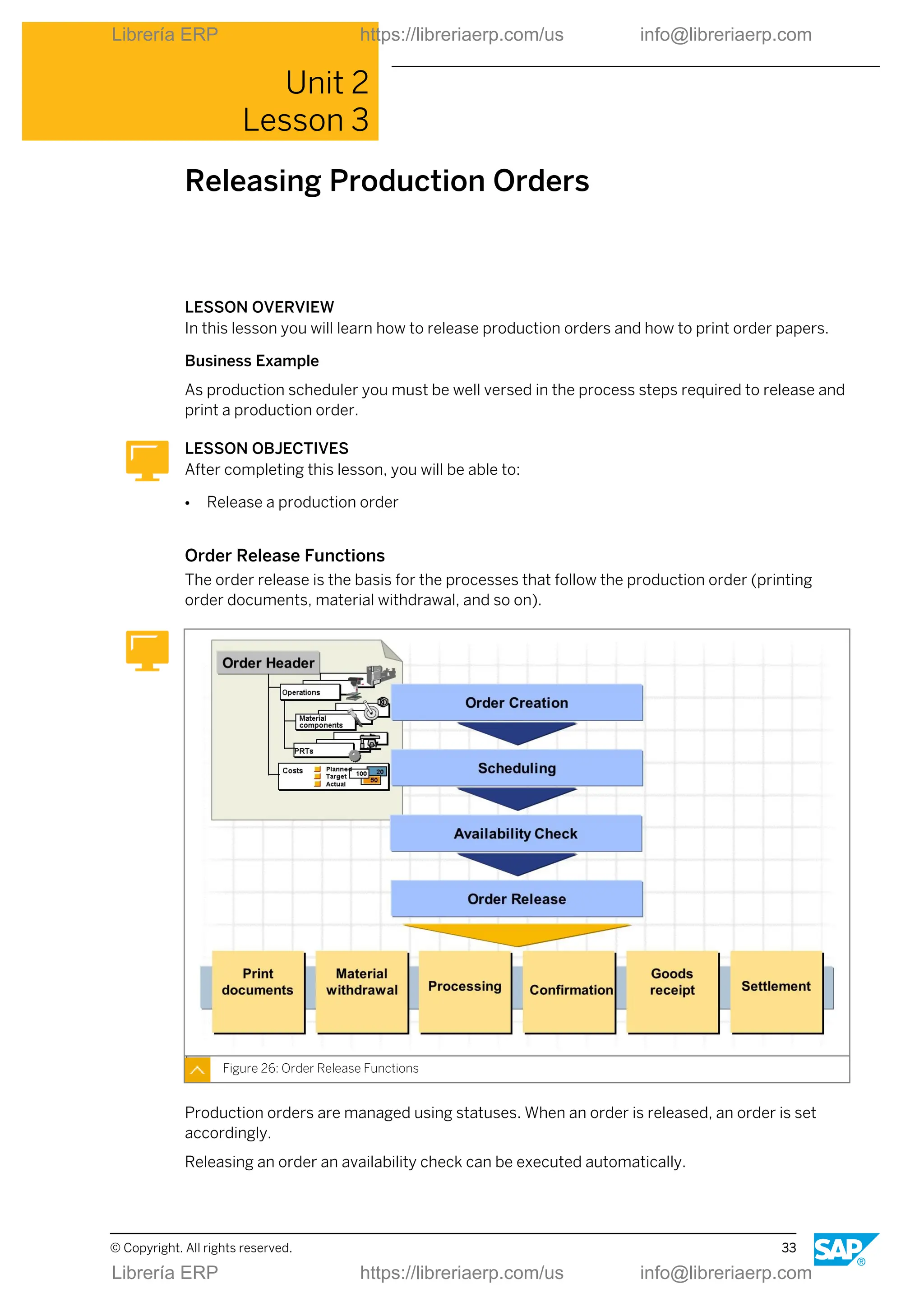
Order Release Functions
The order release is the basis for the processes that follow the production order (printing
order documents, material withdrawal, and so on).
Figure 26: Order Release Functions
Production orders are managed using statuses. When an order is released, an order is set
accordingly.
Releasing an order an availability check can be executed automatically.
© Copyright. All rights reserved. 33
Librería ERP https://libreriaerp.com/us info@libreriaerp.com
You can release the following objects:
● One or several individual operations
● One or several orders
A corresponding function is also available for the mass release of operations or orders.
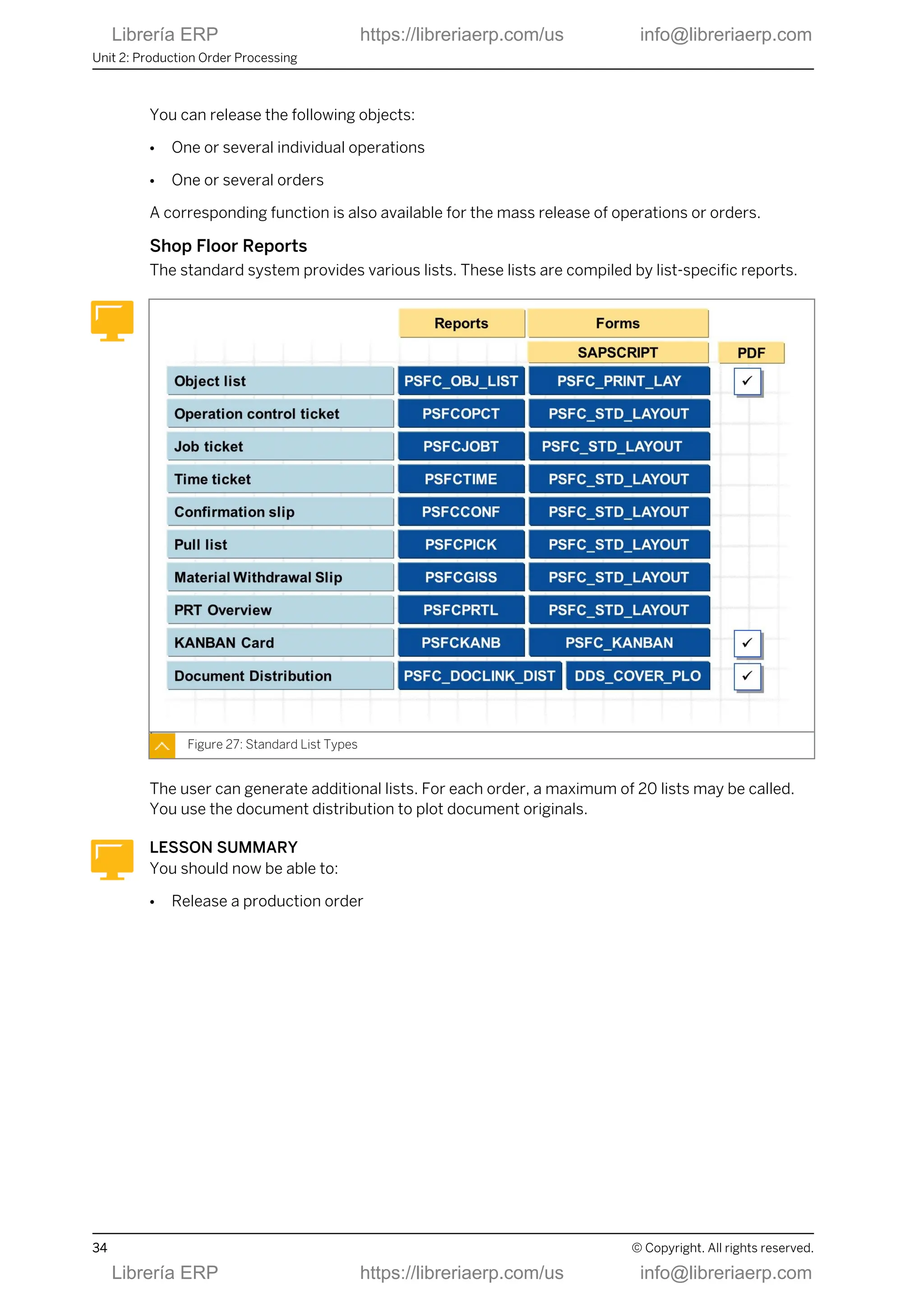
Shop Floor Reports
The standard system provides various lists. These lists are compiled by list-specific reports.
Figure 27: Standard List Types
The user can generate additional lists. For each order, a maximum of 20 lists may be called.
You use the document distribution to plot document originals.
LESSON SUMMARY
You should now be able to:
● Release a production order
Unit 2: Production Order Processing
34 © Copyright. All rights reserved.
Librería ERP https://libreriaerp.com/us info@libreriaerp.com
Unit 2
Lesson 4
Executing Material Staging for Production
Orders
LESSON OVERVIEW
In this lesson you will learn the different types of material staging for production orders.
Business Example
As production scheduler you must be well versed in material staging for production orders.
LESSON OBJECTIVES
After completing this lesson, you will be able to:
● Execute material staging for production orders
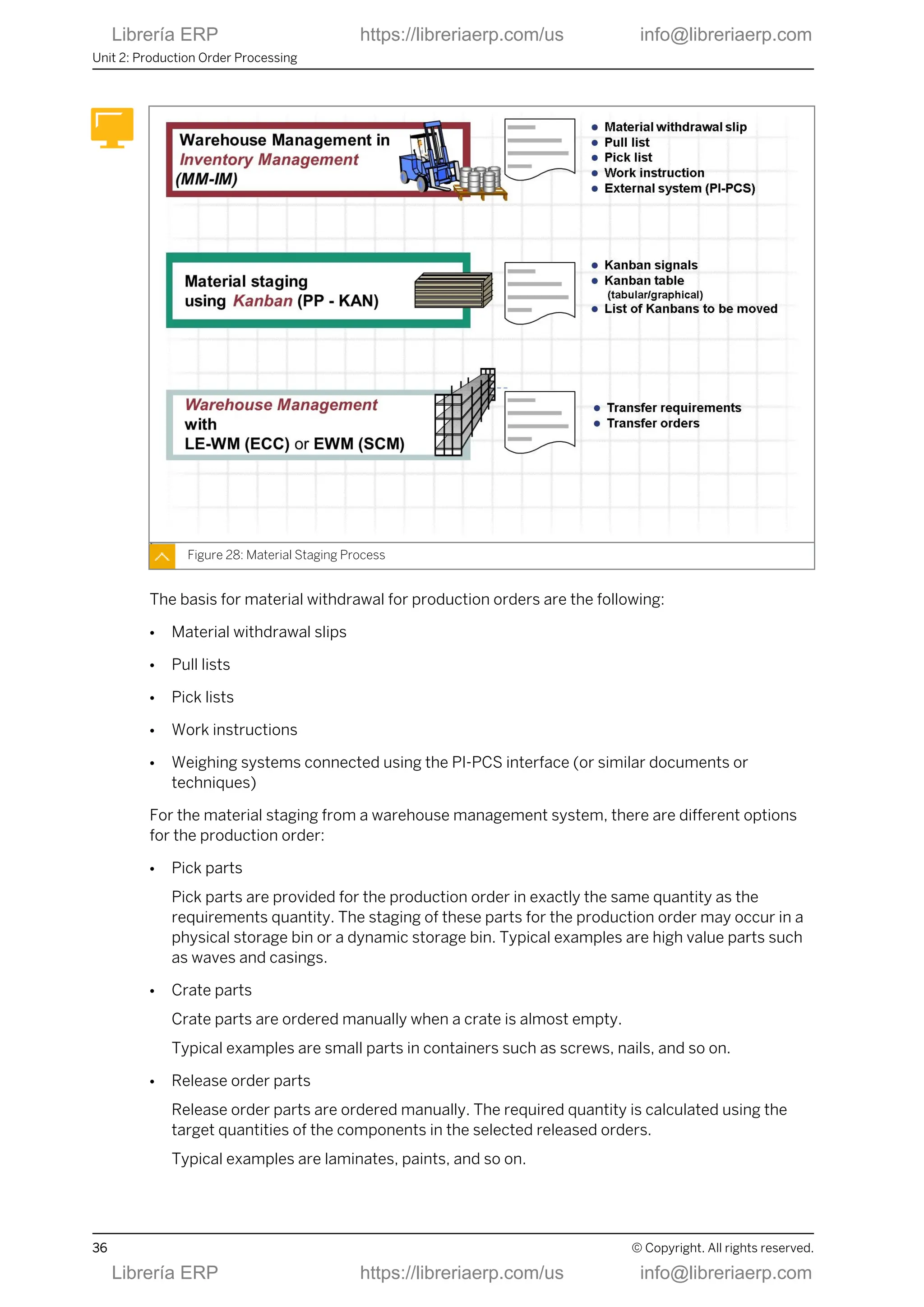
Material Staging Process
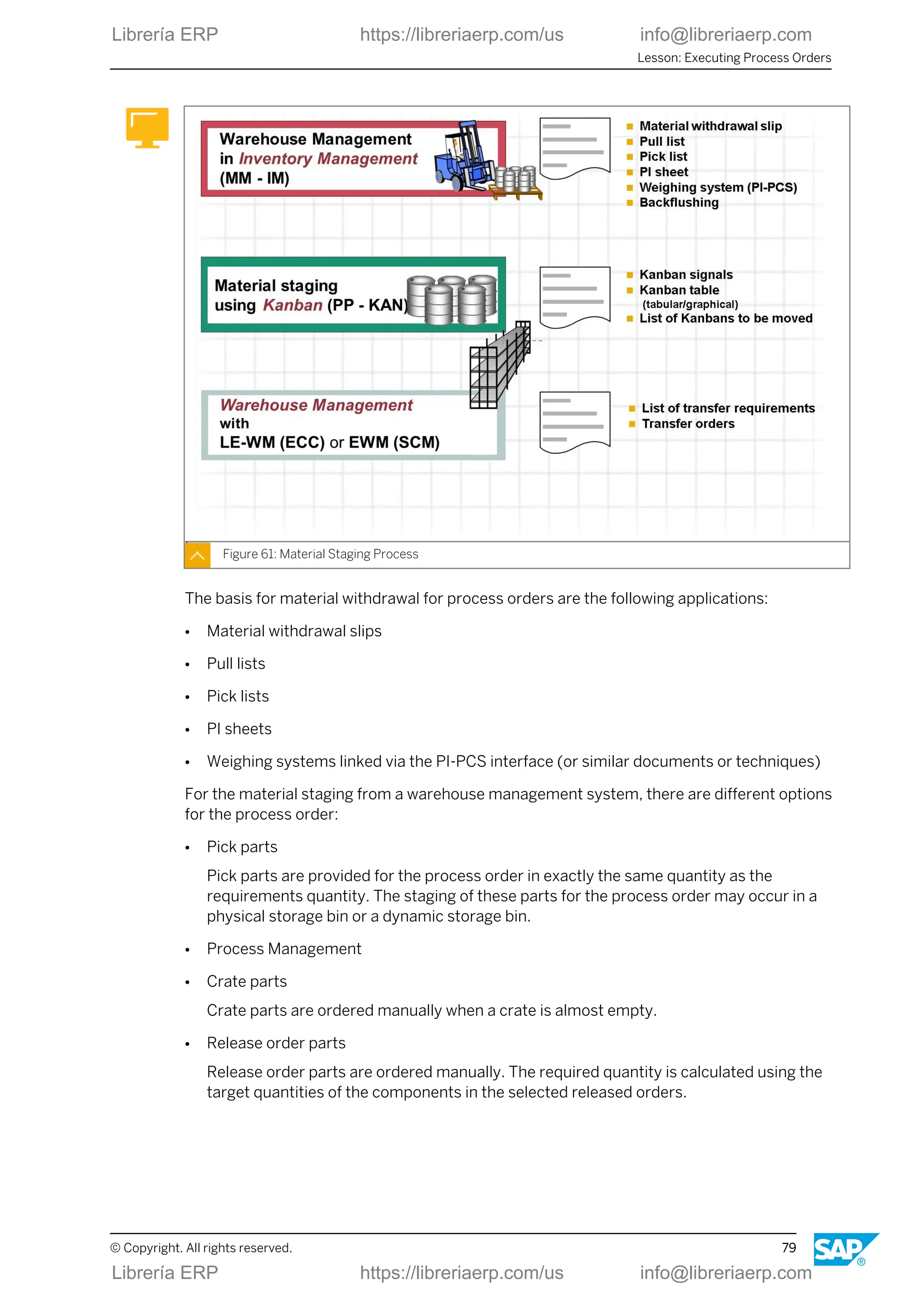
To organize the material staging , the SAP ECC and SAP SCM systems provide the following
different procedures that depend on the type of inventory management and warehousing:
● Warehouse management with the Inventory Management (MM-IM) component
● Replenishment control with the Kanban component
● Storage bin management and replenishment control with a warehouse management
system based on the component Logistics Execution Warehouse Management (LE-WM) in
SAP ERP or Extended Warehouse Management (EWM) in SAP SCM
© Copyright. All rights reserved. 35
Librería ERP https://libreriaerp.com/us info@libreriaerp.com
Figure 28: Material Staging Process
The basis for material withdrawal for production orders are the following:
● Material withdrawal slips
● Pull lists
● Pick lists
● Work instructions
● Weighing systems connected using the PI-PCS interface (or similar documents or
techniques)
For the material staging from a warehouse management system, there are different options
for the production order:
● Pick parts
Pick parts are provided for the production order in exactly the same quantity as the
requirements quantity. The staging of these parts for the production order may occur in a
physical storage bin or a dynamic storage bin. Typical examples are high value parts such
as waves and casings.
● Crate parts
Crate parts are ordered manually when a crate is almost empty.
Typical examples are small parts in containers such as screws, nails, and so on.
● Release order parts
Release order parts are ordered manually. The required quantity is calculated using the
target quantities of the components in the selected released orders.
Typical examples are laminates, paints, and so on.
Unit 2: Production Order Processing
36 © Copyright. All rights reserved.
Librería ERP https://libreriaerp.com/us info@libreriaerp.com
Production Order: Goods Issue Posting
The goods issue posting (GI ) is executed for consumption of a material component for a
production order. This can take place manually or automatically.
Figure 29: Production Order: Goods Issue Posting
The following functions are executed when a goods issue is posted:
● Storage location-related update of stock and consumption fields.
● Reduction of reservations (for planned withdrawal).
● Determination of actual costs (evaluation) and update of order.
● Generation of material documents, accounting documents and cost accounting
documents.
The following documents are created:
● The material document describes the goods movement from the materials management
(stock) point of view.
● The accounting document describes the goods movement from the financial accounting
point of view.
● The cost accounting documents are used for various cost analysis purposes.
In this context you have the following options:
● When you display the material document, you can branch to the other documents.
● You can print a goods issue document.
Lesson: Executing Material Staging for Production Orders
© Copyright. All rights reserved. 37
Librería ERP https://libreriaerp.com/us info@libreriaerp.com
LESSON SUMMARY
You should now be able to:
● Execute material staging for production orders
Unit 2: Production Order Processing
38 © Copyright. All rights reserved.
Librería ERP https://libreriaerp.com/us info@libreriaerp.com
Unit 2
Lesson 5
Executing Confirmation and Goods Receipt for
Production Orders
LESSON OVERVIEW
In this lesson you will confirm production orders and post goods receipt.
Business Example
As production scheduler you must be well versed in confirming production orders and posting
goods receipt.
LESSON OBJECTIVES
After completing this lesson, you will be able to:
● Execute confirmation and goods receipt for production orders
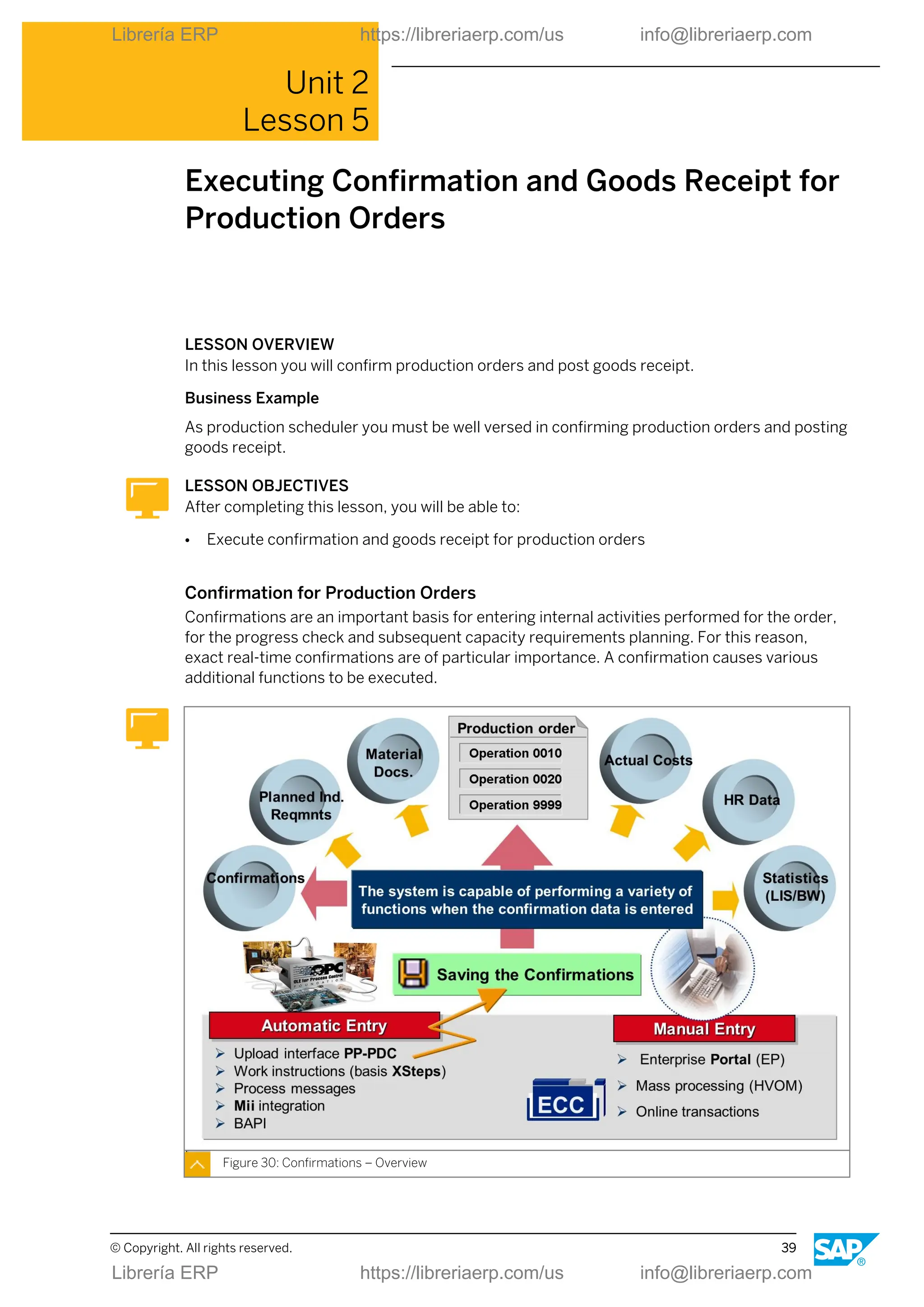
Confirmation for Production Orders
Confirmations are an important basis for entering internal activities performed for the order,
for the progress check and subsequent capacity requirements planning. For this reason,
exact real-time confirmations are of particular importance. A confirmation causes various
additional functions to be executed.
Figure 30: Confirmations – Overview
© Copyright. All rights reserved. 39
Librería ERP https://libreriaerp.com/us info@libreriaerp.com
Confirmations are always executed in the SAP ECC component, but can be implemented with
various technical procedures:
● Using online transactions
● Using the browser-based enterprise portal as part of the role of a production scheduler
● Using the PP-PDC interface
● Using automatic process messages
● Using an SAP server, for example, with SAP ME (Manufacturing Execution)
There are various procedures for confirmations. Each procedure implements different
requirements that a company might have. Depending on the application, one or more
procedure may be used. The procedures must be selected to suit the methods of organization
within your company and the allowed workload.
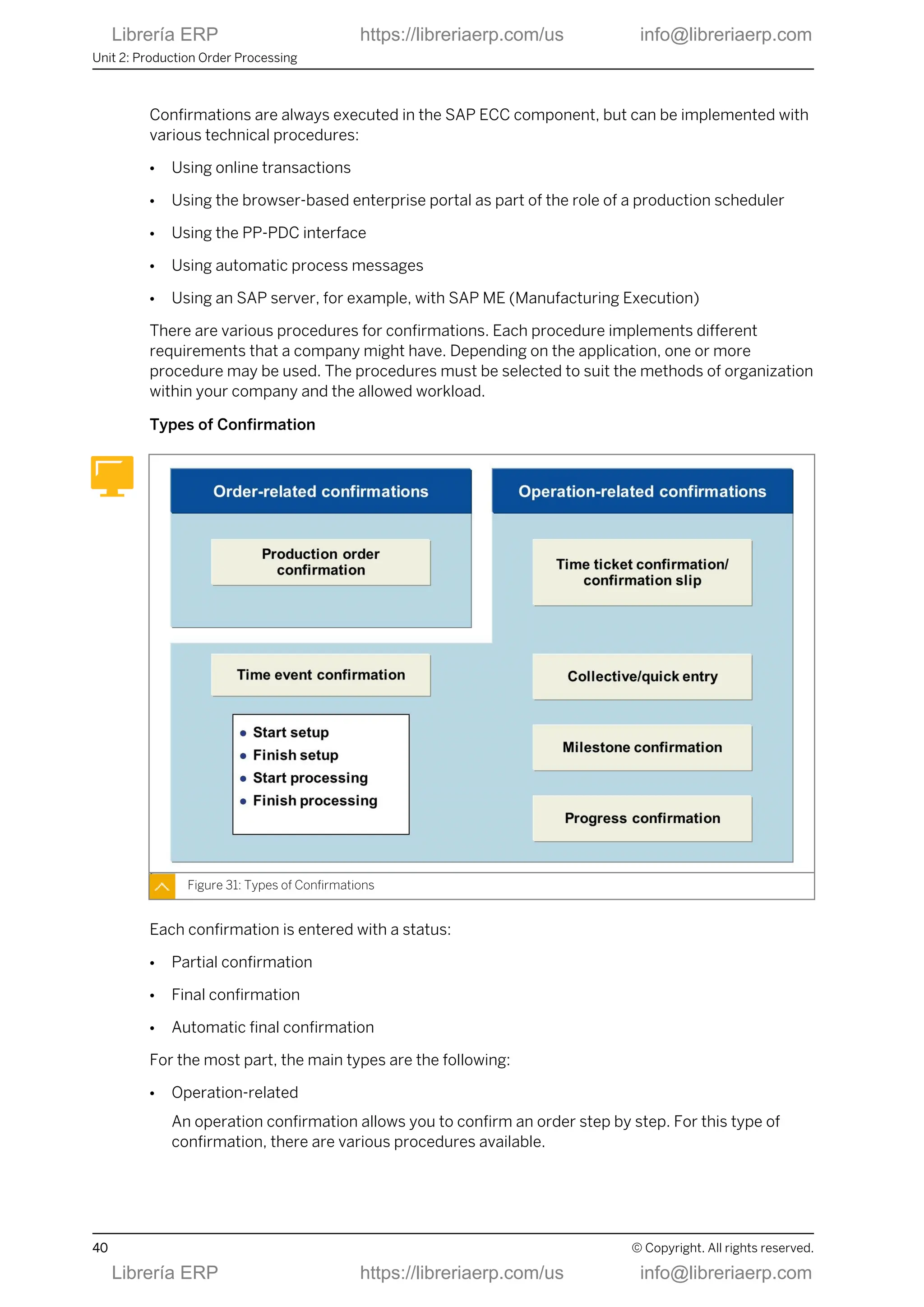
Types of Confirmation
Figure 31: Types of Confirmations
Each confirmation is entered with a status:
● Partial confirmation
● Final confirmation
● Automatic final confirmation
For the most part, the main types are the following:
● Operation-related
An operation confirmation allows you to confirm an order step by step. For this type of
confirmation, there are various procedures available.
Unit 2: Production Order Processing
40 © Copyright. All rights reserved.
Librería ERP https://libreriaerp.com/us info@libreriaerp.com
● Order-related confirmations
Order confirmation is a confirmation of the entire order at order header level.
Note:
You can carry out a confirmation for an order only if no confirmations have
already been entered for the operations.
Effects of Production Order Confirmations
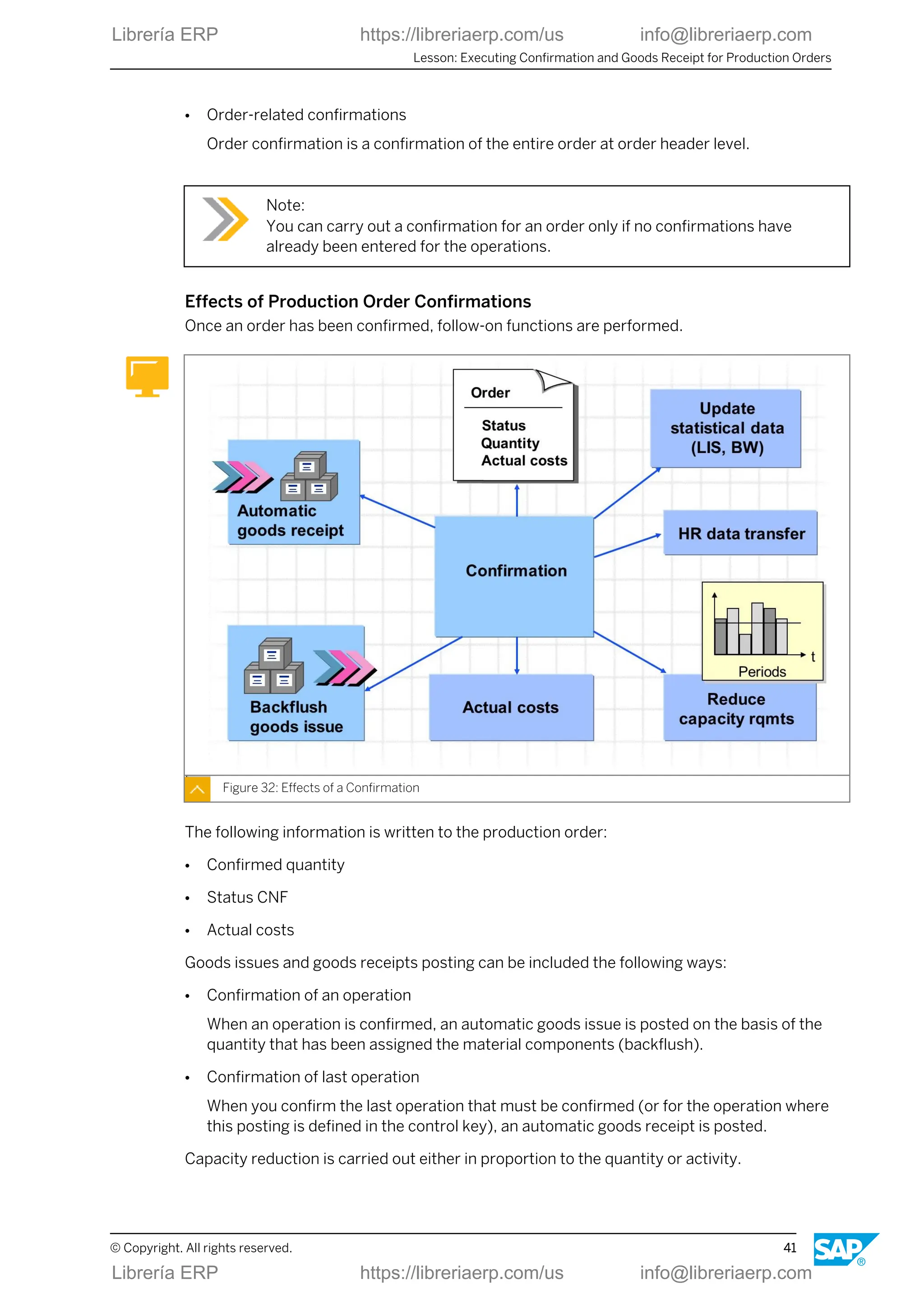
Once an order has been confirmed, follow-on functions are performed.
Figure 32: Effects of a Confirmation
The following information is written to the production order:
● Confirmed quantity
● Status CNF
● Actual costs
Goods issues and goods receipts posting can be included the following ways:
● Confirmation of an operation
When an operation is confirmed, an automatic goods issue is posted on the basis of the
quantity that has been assigned the material components (backflush).
● Confirmation of last operation
When you confirm the last operation that must be confirmed (or for the operation where
this posting is defined in the control key), an automatic goods receipt is posted.
Capacity reduction is carried out either in proportion to the quantity or activity.
Lesson: Executing Confirmation and Goods Receipt for Production Orders
© Copyright. All rights reserved. 41
Librería ERP https://libreriaerp.com/us info@libreriaerp.com
Note:
If a scrap or rework quantity is confirmed, a quality notification can be generated
automatically.
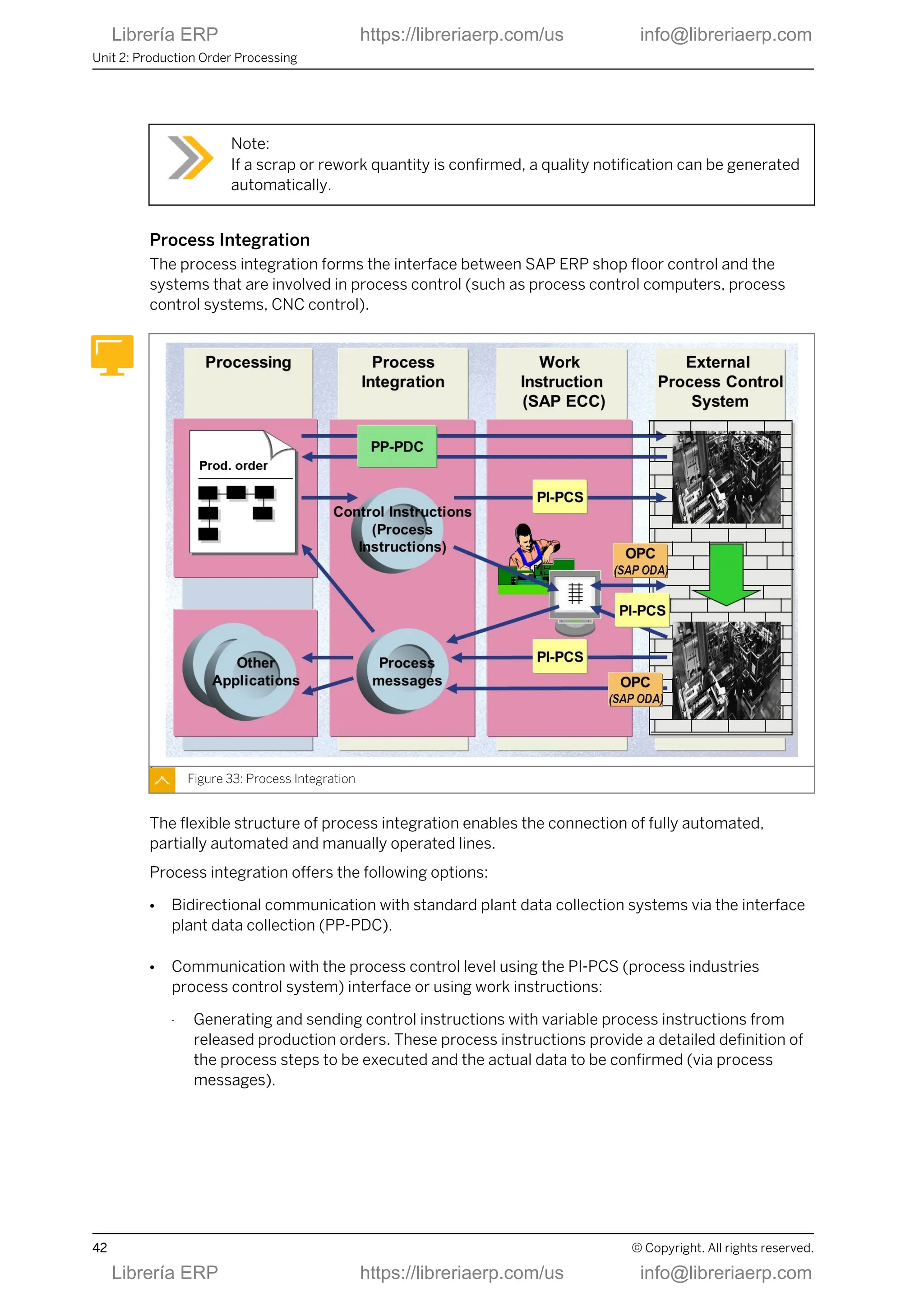
Process Integration
The process integration forms the interface between SAP ERP shop floor control and the
systems that are involved in process control (such as process control computers, process
control systems, CNC control).
Figure 33: Process Integration
The flexible structure of process integration enables the connection of fully automated,
partially automated and manually operated lines.
Process integration offers the following options:
● Bidirectional communication with standard plant data collection systems via the interface
plant data collection (PP-PDC).
● Communication with the process control level using the PI-PCS (process industries
process control system) interface or using work instructions:
- Generating and sending control instructions with variable process instructions from
released production orders. These process instructions provide a detailed definition of
the process steps to be executed and the actual data to be confirmed (via process
messages).
Unit 2: Production Order Processing
42 © Copyright. All rights reserved.
Librería ERP https://libreriaerp.com/us info@libreriaerp.com
- Formatting the control instructions in natural language in the form of work instructions
and their manual processing by the machine operator on screen.
- Sending the control instructions to process control computers using the PI-PCS
interface and processing them automatically.
- Receiving, checking and sending manually or automatically entered process messages
with the actual data of the production process from the work instructions or the
process control system using the PI-PCS interface.
● Reading and writing data points and events using the function SAP OPC Data Access (SAP
ODA) by means of the OPC (Object Linking and Embedding for Process Control) server of
the SAP ECC system (reading and writing using work instructions or by means of the
function Automatically Create Process Messages).
● SAP MII (Manufacturing Integration and Intelligence) and SAP ME (Manufacturing
Execution).
● RFID (Radio frequency identification).
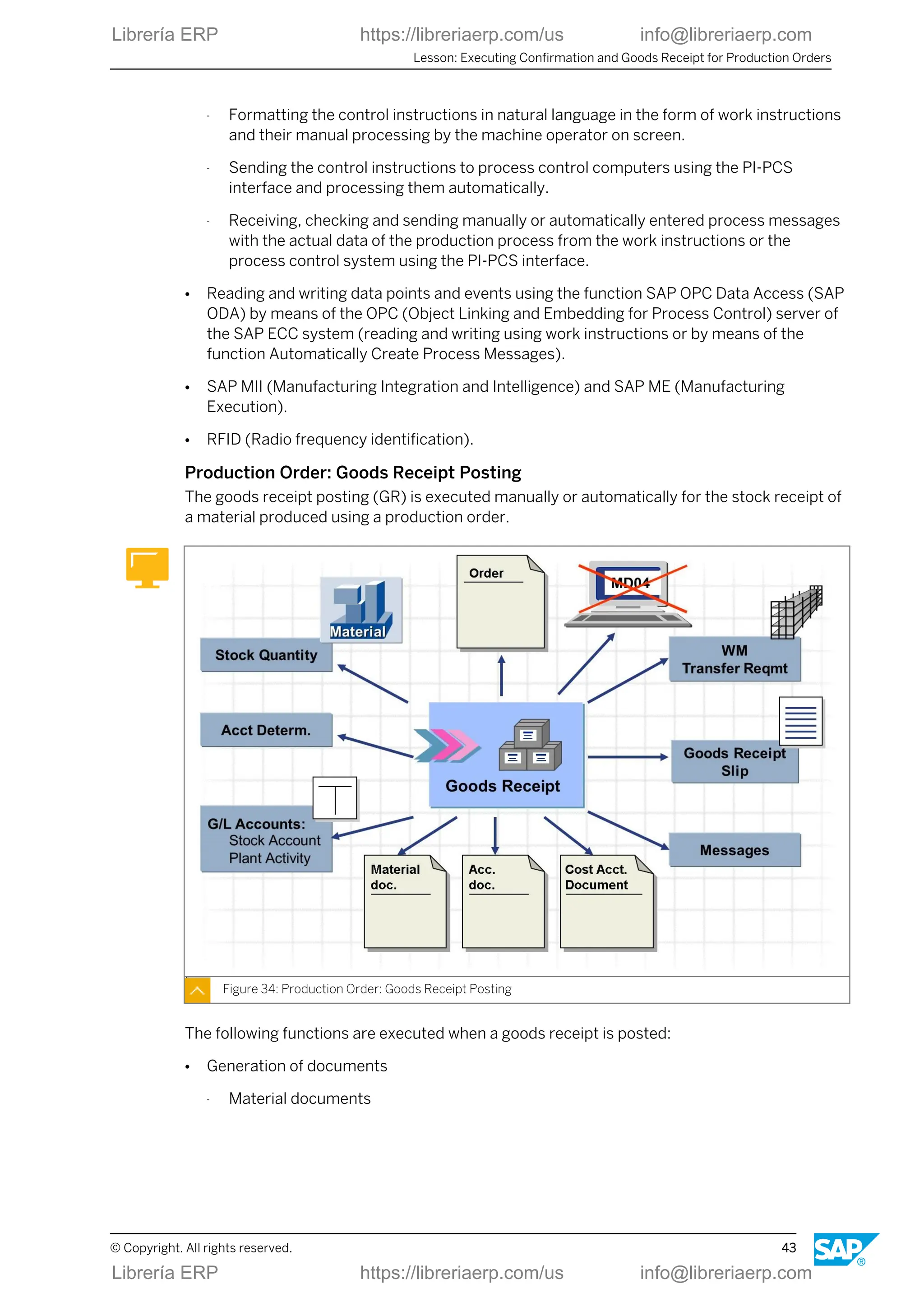
Production Order: Goods Receipt Posting
The goods receipt posting (GR) is executed manually or automatically for the stock receipt of
a material produced using a production order.
Figure 34: Production Order: Goods Receipt Posting
The following functions are executed when a goods receipt is posted:
● Generation of documents
- Material documents
Lesson: Executing Confirmation and Goods Receipt for Production Orders
© Copyright. All rights reserved. 43
Librería ERP https://libreriaerp.com/us info@libreriaerp.com
The material document describes the goods movement from the materials
management (stock) point of view.
You can print a goods receipt document.
When you display the material document, you can branch to other documents.
- Accounting documents
The accounting document describes the goods movement from the financial
accounting point of view.
- Cost accounting documents
The cost accounting documents are used for various cost analysis purposes.
● Update of the delivered quantity in an order
● Evaluation of the receipt
● Credit to order
● Update of plant activity
Cost Object Controlling
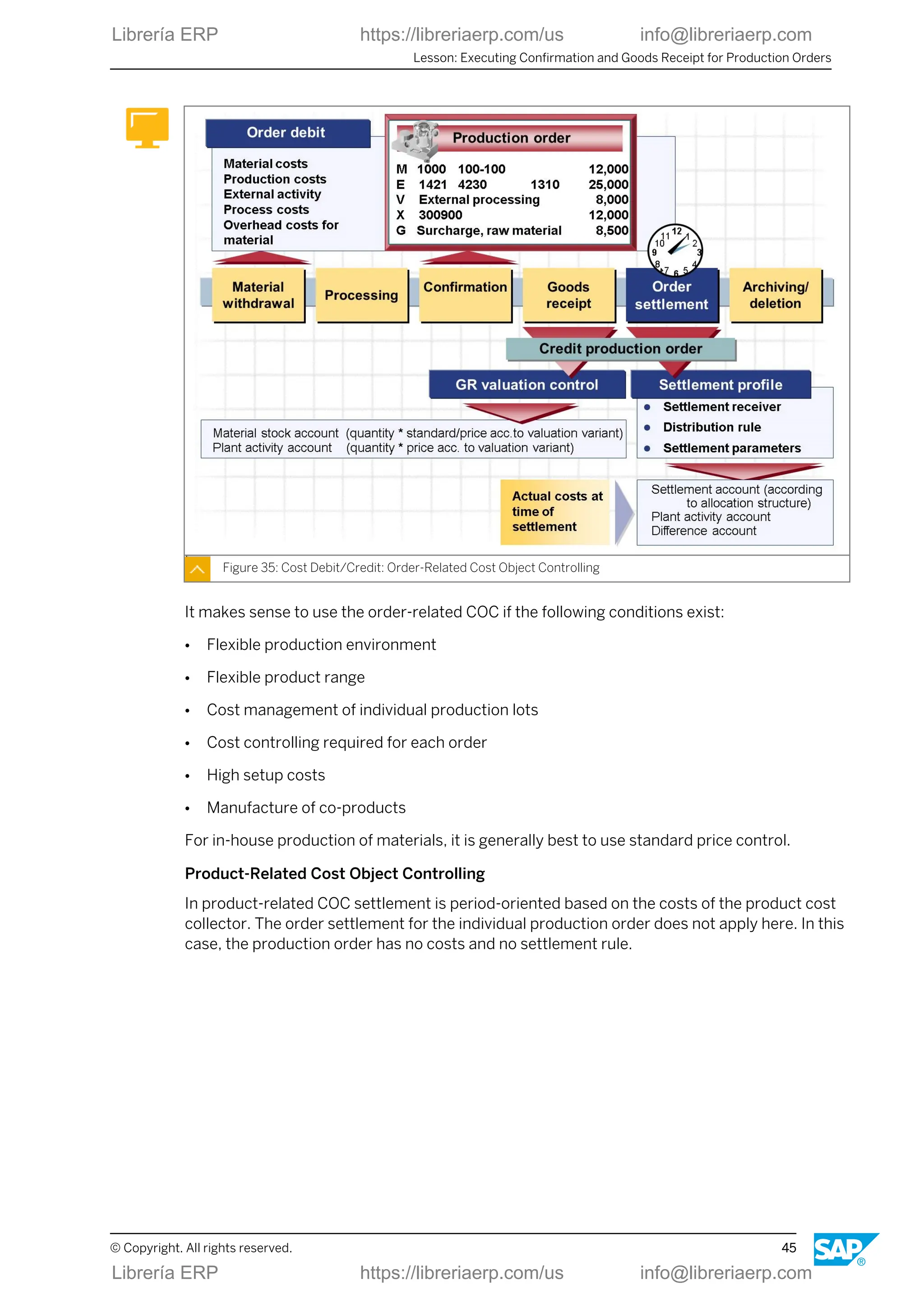
The manner in which a production order is credited and debited depends on the variant of
Cost Object Controlling (COC) selected in Controlling.
You can perform this as follows:
● Order-related
● Product-related
Order-Related Cost Object Controlling
In order related COC the Order settlement credits the order. Settlement is usually periodic. It
is controlled using a settlement profile.
Unit 2: Production Order Processing
44 © Copyright. All rights reserved.
Librería ERP https://libreriaerp.com/us info@libreriaerp.com
Figure 35: Cost Debit/Credit: Order-Related Cost Object Controlling
It makes sense to use the order-related COC if the following conditions exist:
● Flexible production environment
● Flexible product range
● Cost management of individual production lots
● Cost controlling required for each order
● High setup costs
● Manufacture of co-products
For in-house production of materials, it is generally best to use standard price control.
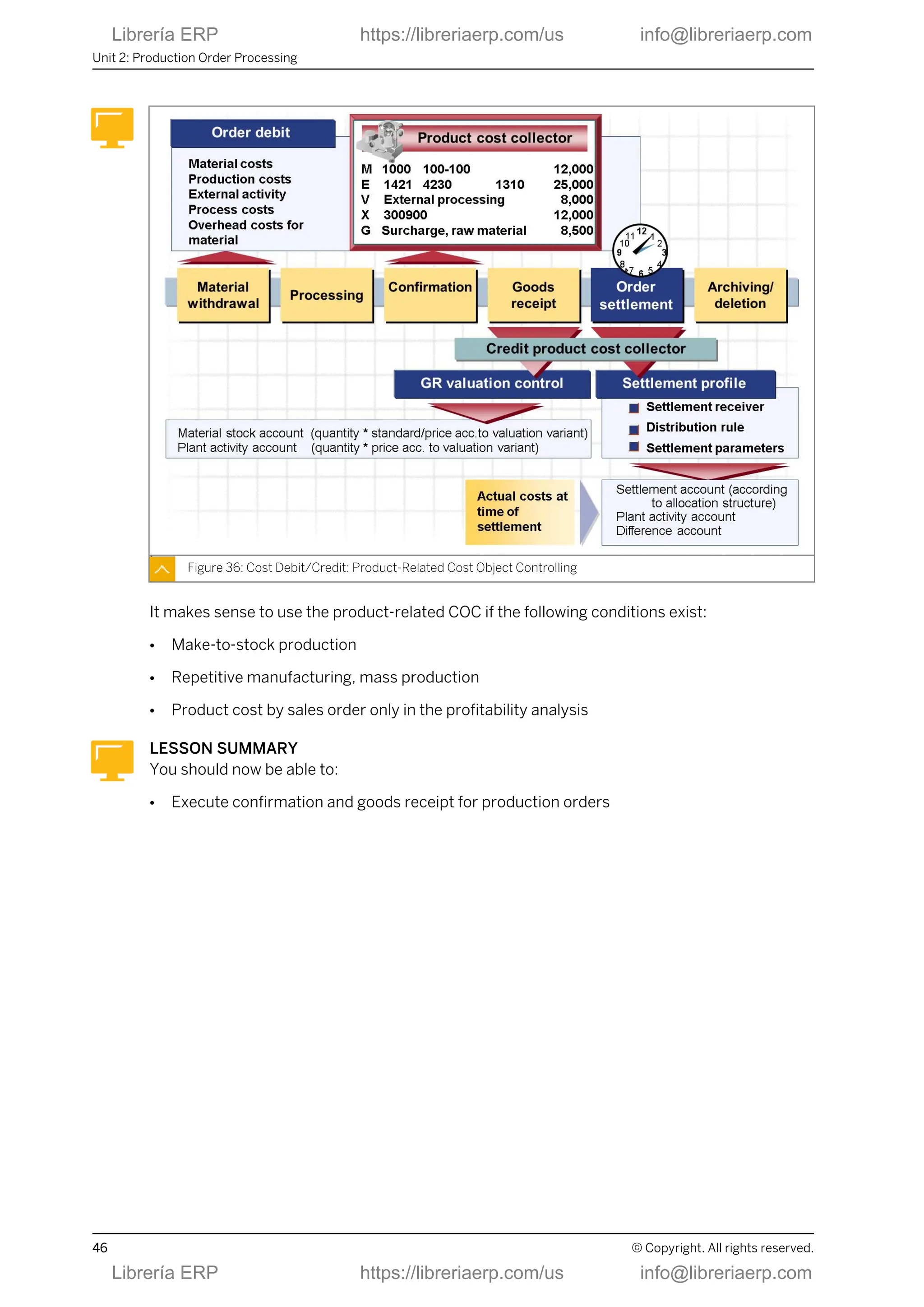
Product-Related Cost Object Controlling
In product-related COC settlement is period-oriented based on the costs of the product cost
collector. The order settlement for the individual production order does not apply here. In this
case, the production order has no costs and no settlement rule.
Lesson: Executing Confirmation and Goods Receipt for Production Orders
© Copyright. All rights reserved. 45
Librería ERP https://libreriaerp.com/us info@libreriaerp.com
Figure 36: Cost Debit/Credit: Product-Related Cost Object Controlling
It makes sense to use the product-related COC if the following conditions exist:
● Make-to-stock production
● Repetitive manufacturing, mass production
● Product cost by sales order only in the profitability analysis
LESSON SUMMARY
You should now be able to:
● Execute confirmation and goods receipt for production orders
Unit 2: Production Order Processing
46 © Copyright. All rights reserved.
Librería ERP https://libreriaerp.com/us info@libreriaerp.com
Unit 2
Lesson 6
Evaluating Production Orders
LESSON OVERVIEW
In this lesson you will evaluate production orders.
Business Example
As production scheduler you must be well versed in evaluating production orders.
LESSON OBJECTIVES
After completing this lesson, you will be able to:
● Evaluate production orders
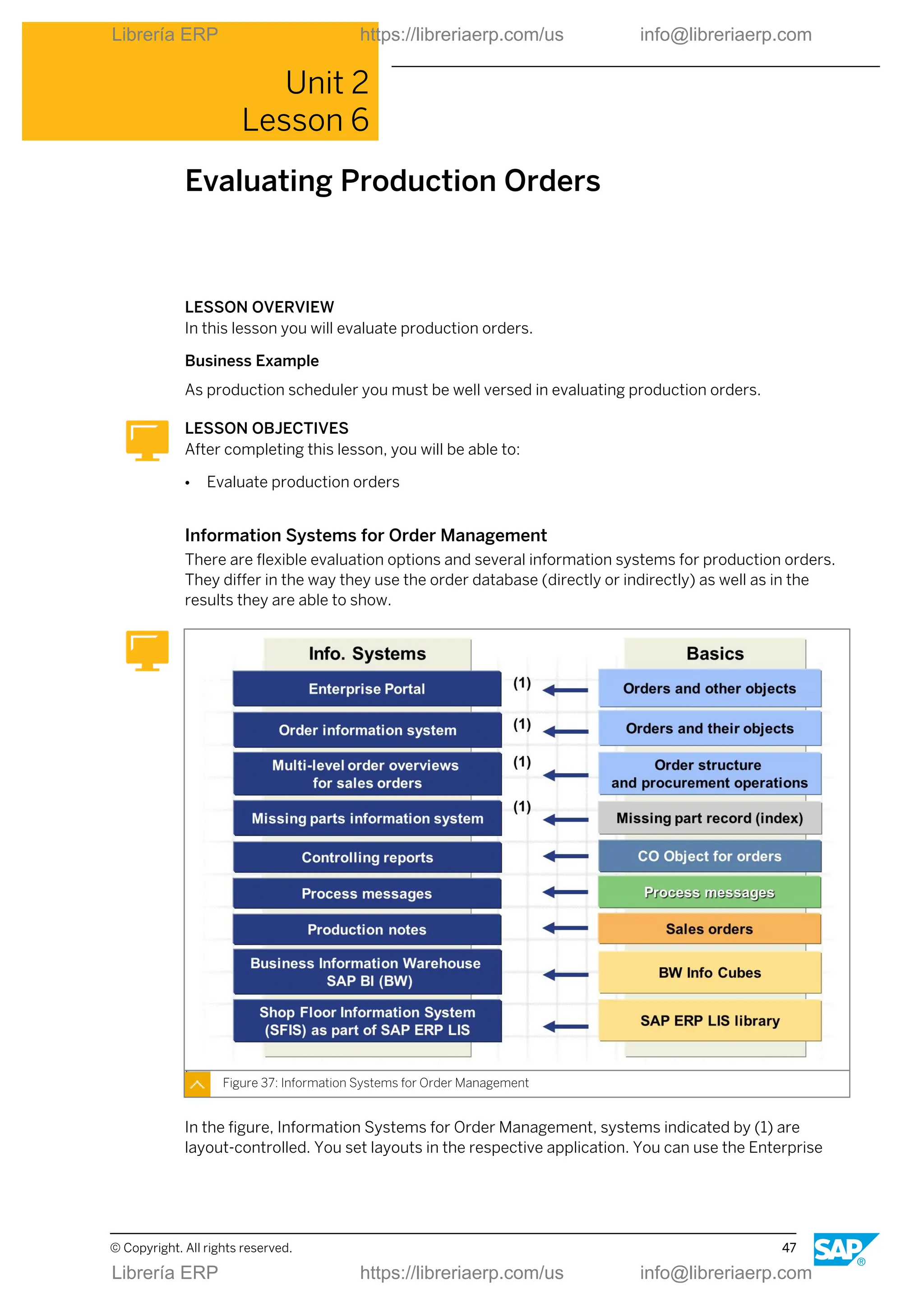
Information Systems for Order Management
There are flexible evaluation options and several information systems for production orders.
They differ in the way they use the order database (directly or indirectly) as well as in the
results they are able to show.
Figure 37: Information Systems for Order Management
In the figure, Information Systems for Order Management, systems indicated by (1) are
layout-controlled. You set layouts in the respective application. You can use the Enterprise
© Copyright. All rights reserved. 47
Librería ERP https://libreriaerp.com/us info@libreriaerp.com
Portal for the role of a production scheduler to process and track production orders, among
others.
In addition to the above-mentioned evaluation options, there are further possibilities:
● Capacity evaluations
● Event Manager (SAP SCM-EM)
● Alert Monitor (SAP SCM-APO)
● Batch where-used list
● Evaluation of digital signatures
LESSON SUMMARY
You should now be able to:
● Evaluate production orders
Unit 2: Production Order Processing
48 © Copyright. All rights reserved.
Librería ERP https://libreriaerp.com/us info@libreriaerp.com
Unit 2
Learning Assessment
1. Name some application areas for production orders.
2. Name some basic functions of the production order.
3. Name the logistics master data objects for the production order.
4. Name the main steps in the processing of a production order before the shop floor papers
are printed.
5. Name the main steps when a goods issue for a production order is posted.
6. Which setting is necessary to support an automatic posting of stock receipt during
confirmation?
7. Which transaction code leads to the order information system for production orders?
© Copyright. All rights reserved. 49
Librería ERP https://libreriaerp.com/us info@libreriaerp.com
Unit 2
Learning Assessment - Answers
1. Name some application areas for production orders.
Engineering, automotive, plant engineering, electronics industry, etc.
2. Name some basic functions of the production order.
Status management. scheduling, costing, availability check, material staging, etc.
3. Name the logistics master data objects for the production order.
Material master, BOM, work center, routing, production resource/tools, documents
4. Name the main steps in the processing of a production order before the shop floor papers
are printed.
Order creation, Scheduling, Availability check, Order release
5. Name the main steps when a goods issue for a production order is posted.
Update of stock and consumption fields, reduction of reservations, update of actual costs,
generation of material documents & accounting documents & cost accounting
documents, update of order
6. Which setting is necessary to support an automatic posting of stock receipt during
confirmation?
The auto goods receipt setting in the control key must be activated.
7. Which transaction code leads to the order information system for production orders?
COOIS
50 © Copyright. All rights reserved.
Librería ERP https://libreriaerp.com/us info@libreriaerp.com
UNIT 3 Process Order Processing
Lesson 1
Outlining Process Orders 53
Lesson 2
Creating and Interpreting Process Orders 63
Lesson 3
Executing Process Orders 71
Lesson 4
Using Additional Functions with Process Orders 87
UNIT OBJECTIVES
● Outline process orders
● Create and interpret process orders
● Execute process orders
● Use additional functions with process orders
© Copyright. All rights reserved. 51
Librería ERP https://libreriaerp.com/us info@libreriaerp.com
Unit 3: Process Order Processing
52 © Copyright. All rights reserved.
Librería ERP https://libreriaerp.com/us info@libreriaerp.com
Unit 3
Lesson 1
Outlining Process Orders
LESSON OVERVIEW
In this lesson you will be introduced to the application areas and characteristics of process
orders. You will get an overview of the general process and the relevant master data.
Business Example
Your company is a process manufacturing company. You produce order-related products.
You are on the project team for implementing shop floor control functions based on process
orders.
LESSON OBJECTIVES
After completing this lesson, you will be able to:
● Outline process orders
Application Areas of Process Orders
Process orders are used in different areas of the process manufacturing industry.
Figure 38: Application Areas of Process Orders
Process orders can be used for various production procedures and identified, for example,
according to the criteria product complexity and product stability.
© Copyright. All rights reserved. 53
Librería ERP https://libreriaerp.com/us info@libreriaerp.com
Process Order Characteristics
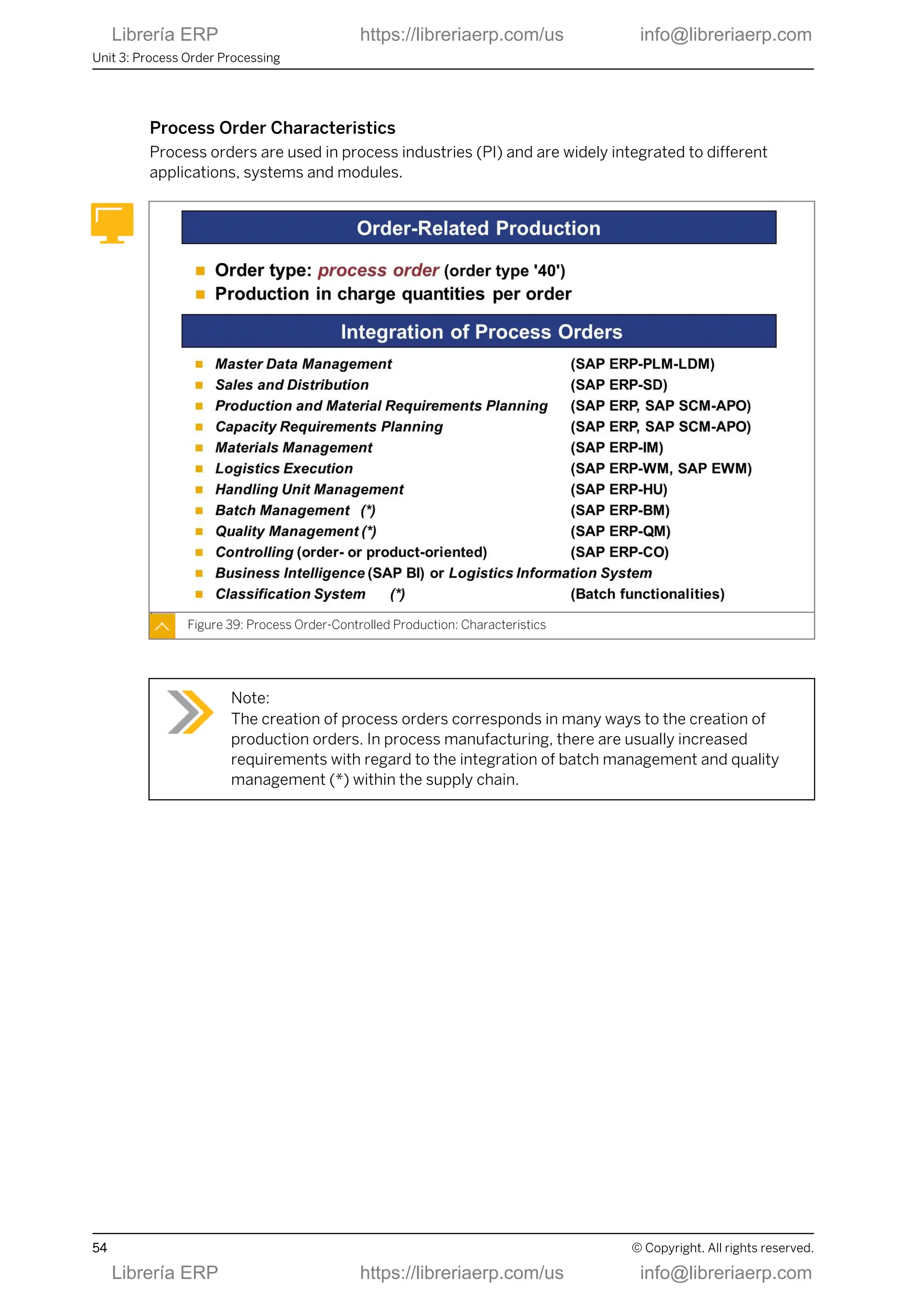
Process orders are used in process industries (PI) and are widely integrated to different
applications, systems and modules.
Figure 39: Process Order-Controlled Production: Characteristics
Note:
The creation of process orders corresponds in many ways to the creation of
production orders. In process manufacturing, there are usually increased
requirements with regard to the integration of batch management and quality
management (*) within the supply chain.
Unit 3: Process Order Processing
54 © Copyright. All rights reserved.
Librería ERP https://libreriaerp.com/us info@libreriaerp.com
Basic Functions of the Process Order
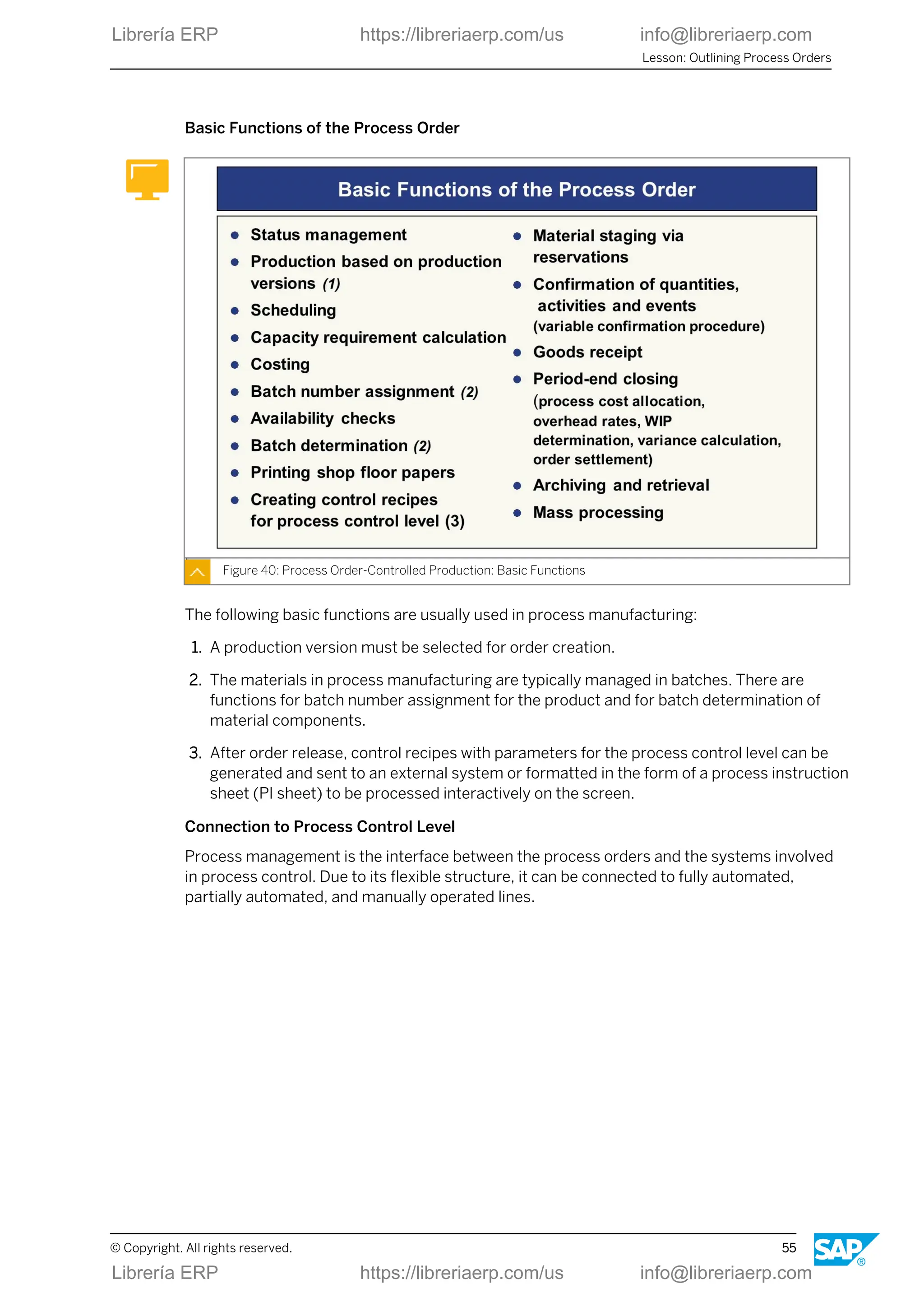
Figure 40: Process Order-Controlled Production: Basic Functions
The following basic functions are usually used in process manufacturing:
1. A production version must be selected for order creation.
2. The materials in process manufacturing are typically managed in batches. There are
functions for batch number assignment for the product and for batch determination of
material components.
3. After order release, control recipes with parameters for the process control level can be
generated and sent to an external system or formatted in the form of a process instruction
sheet (PI sheet) to be processed interactively on the screen.
Connection to Process Control Level
Process management is the interface between the process orders and the systems involved
in process control. Due to its flexible structure, it can be connected to fully automated,
partially automated, and manually operated lines.
Lesson: Outlining Process Orders
© Copyright. All rights reserved. 55
Librería ERP https://libreriaerp.com/us info@libreriaerp.com
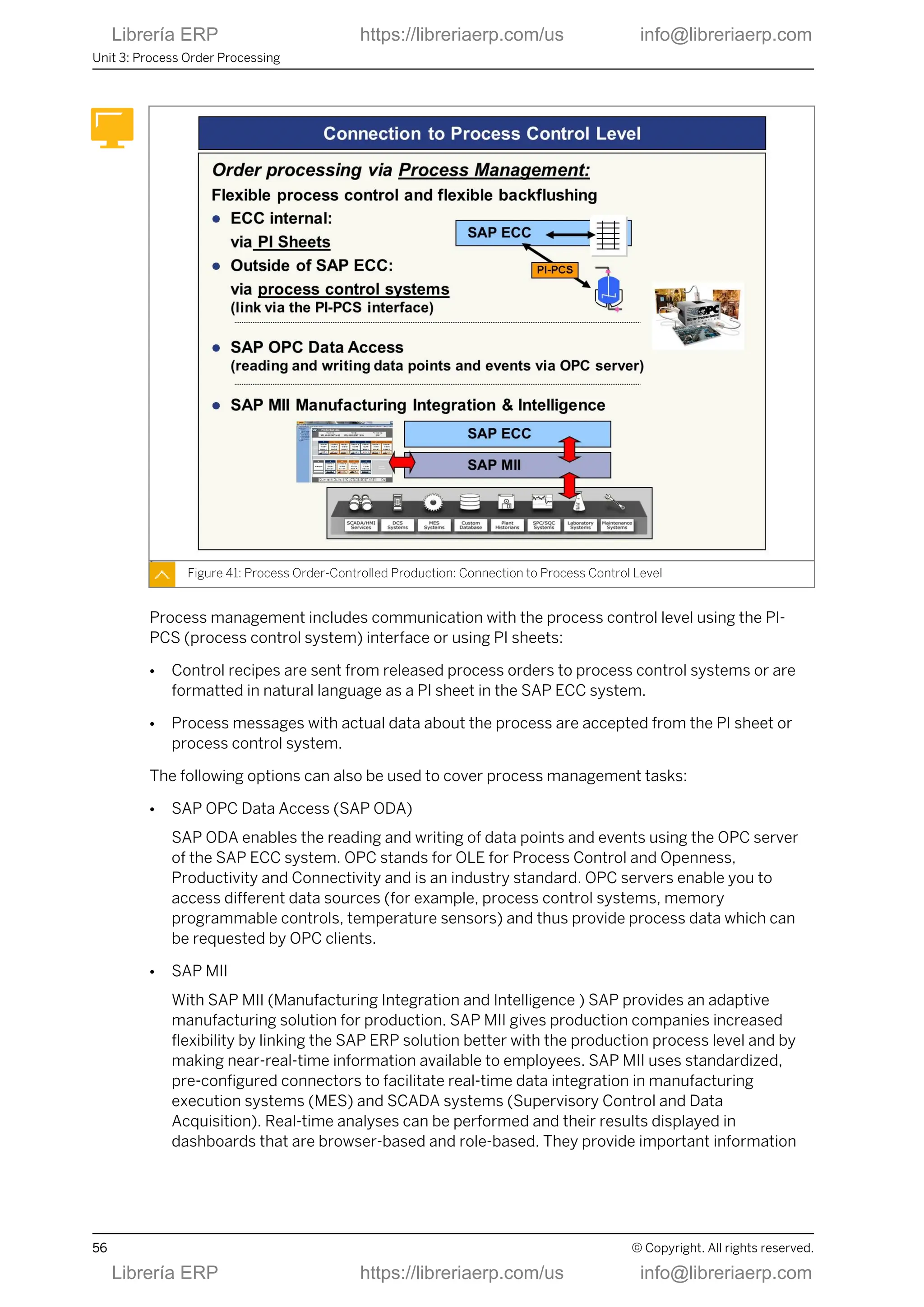
Figure 41: Process Order-Controlled Production: Connection to Process Control Level
Process management includes communication with the process control level using the PI-
PCS (process control system) interface or using PI sheets:
● Control recipes are sent from released process orders to process control systems or are
formatted in natural language as a PI sheet in the SAP ECC system.
● Process messages with actual data about the process are accepted from the PI sheet or
process control system.
The following options can also be used to cover process management tasks:
● SAP OPC Data Access (SAP ODA)
SAP ODA enables the reading and writing of data points and events using the OPC server
of the SAP ECC system. OPC stands for OLE for Process Control and Openness,
Productivity and Connectivity and is an industry standard. OPC servers enable you to
access different data sources (for example, process control systems, memory
programmable controls, temperature sensors) and thus provide process data which can
be requested by OPC clients.
● SAP MII
With SAP MII (Manufacturing Integration and Intelligence ) SAP provides an adaptive
manufacturing solution for production. SAP MII gives production companies increased
flexibility by linking the SAP ERP solution better with the production process level and by
making near-real-time information available to employees. SAP MII uses standardized,
pre-configured connectors to facilitate real-time data integration in manufacturing
execution systems (MES) and SCADA systems (Supervisory Control and Data
Acquisition). Real-time analyses can be performed and their results displayed in
dashboards that are browser-based and role-based. They provide important information
Unit 3: Process Order Processing
56 © Copyright. All rights reserved.
Librería ERP https://libreriaerp.com/us info@libreriaerp.com
for monitoring and supporting decisions, such as warnings, task lists, analyses, reports
and near-real-time messages on production variances.
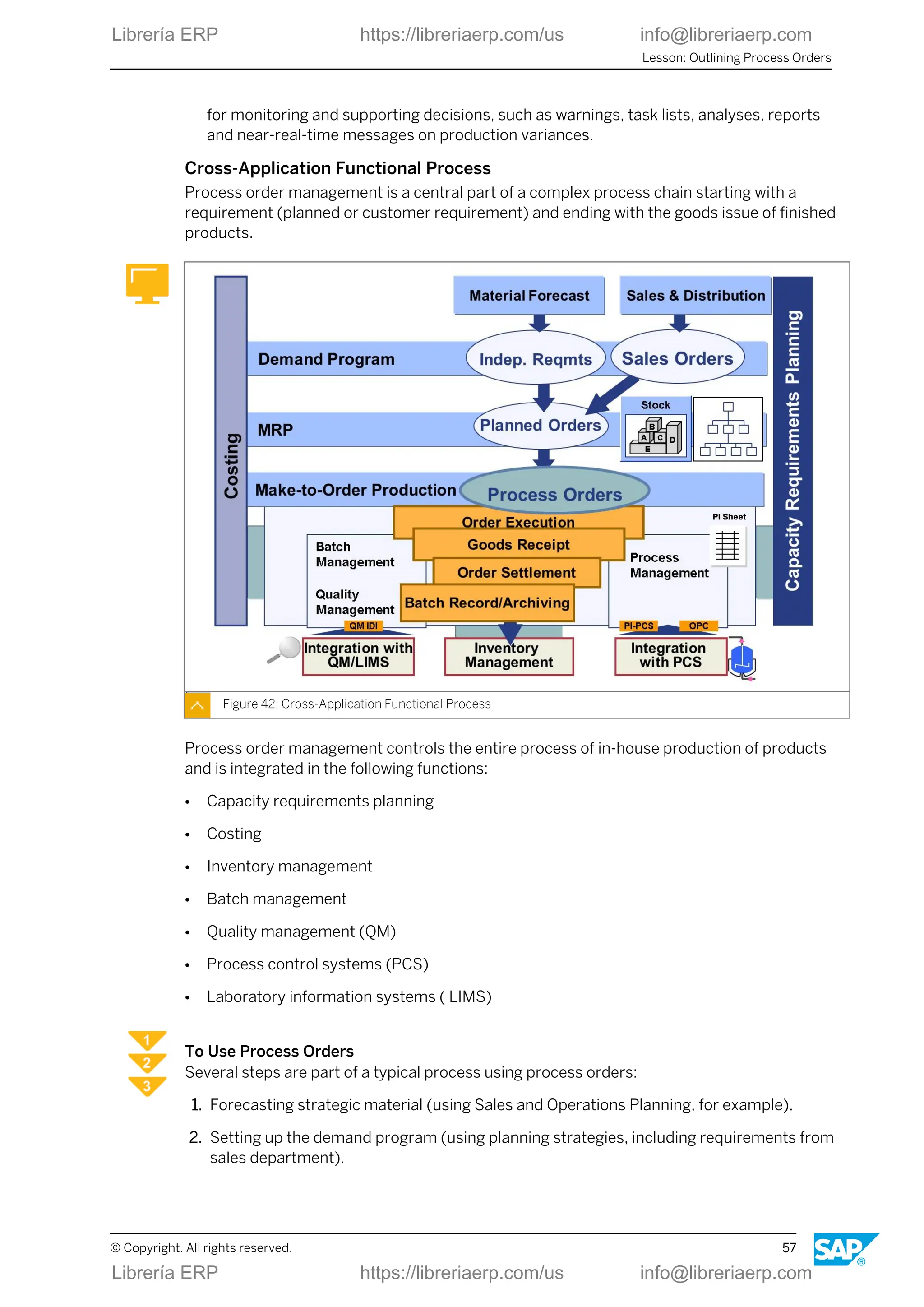
Cross-Application Functional Process
Process order management is a central part of a complex process chain starting with a
requirement (planned or customer requirement) and ending with the goods issue of finished
products.
Figure 42: Cross-Application Functional Process
Process order management controls the entire process of in-house production of products
and is integrated in the following functions:
● Capacity requirements planning
● Costing
● Inventory management
● Batch management
● Quality management (QM)
● Process control systems (PCS)
● Laboratory information systems ( LIMS)
To Use Process Orders
Several steps are part of a typical process using process orders:
1. Forecasting strategic material (using Sales and Operations Planning, for example).
2. Setting up the demand program (using planning strategies, including requirements from
sales department).
Lesson: Outlining Process Orders
© Copyright. All rights reserved. 57
Librería ERP https://libreriaerp.com/us info@libreriaerp.com
3. If necessary, using Material Requirements Planning to create planned receipts.
4. Convert planned orders to process orders.
5. Execute process orders (capacity planning, material staging, confirmation, etc.).
6. Post goods receipt and settle order.
7. Batch record and archive.
Master Data for Process Orders
Master data is data in the SAP system that remains unchanged over a long period of time. It
contains information that is required in the same manner over and over again.
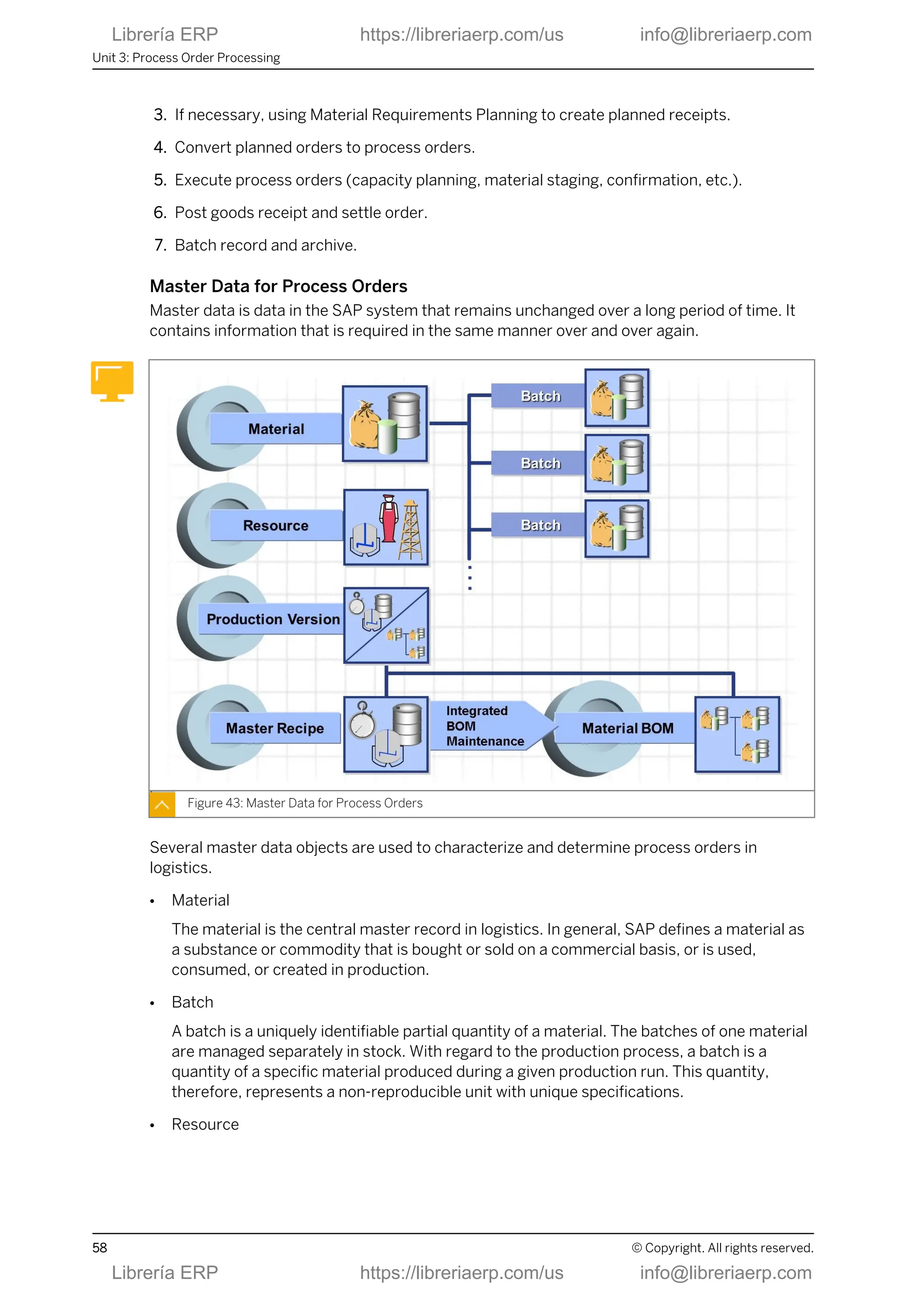
Figure 43: Master Data for Process Orders
Several master data objects are used to characterize and determine process orders in
logistics.
● Material
The material is the central master record in logistics. In general, SAP defines a material as
a substance or commodity that is bought or sold on a commercial basis, or is used,
consumed, or created in production.
● Batch
A batch is a uniquely identifiable partial quantity of a material. The batches of one material
are managed separately in stock. With regard to the production process, a batch is a
quantity of a specific material produced during a given production run. This quantity,
therefore, represents a non-reproducible unit with unique specifications.
● Resource
Unit 3: Process Order Processing
58 © Copyright. All rights reserved.
Librería ERP https://libreriaerp.com/us info@libreriaerp.com
The master data for resources describes the means of production in the production
process.
● Production version:
A production version determines which BOM in combination with which master recipe is
used for process order manufacturing.
● Recipe
The master data of the master recipes describes the production of one or more materials
in one production run without relating to a particular order.
● BOM
Material BOMs describe the structure of products that are produced in a company. They
are usually created and maintained from the master recipe (integrated maintenance).
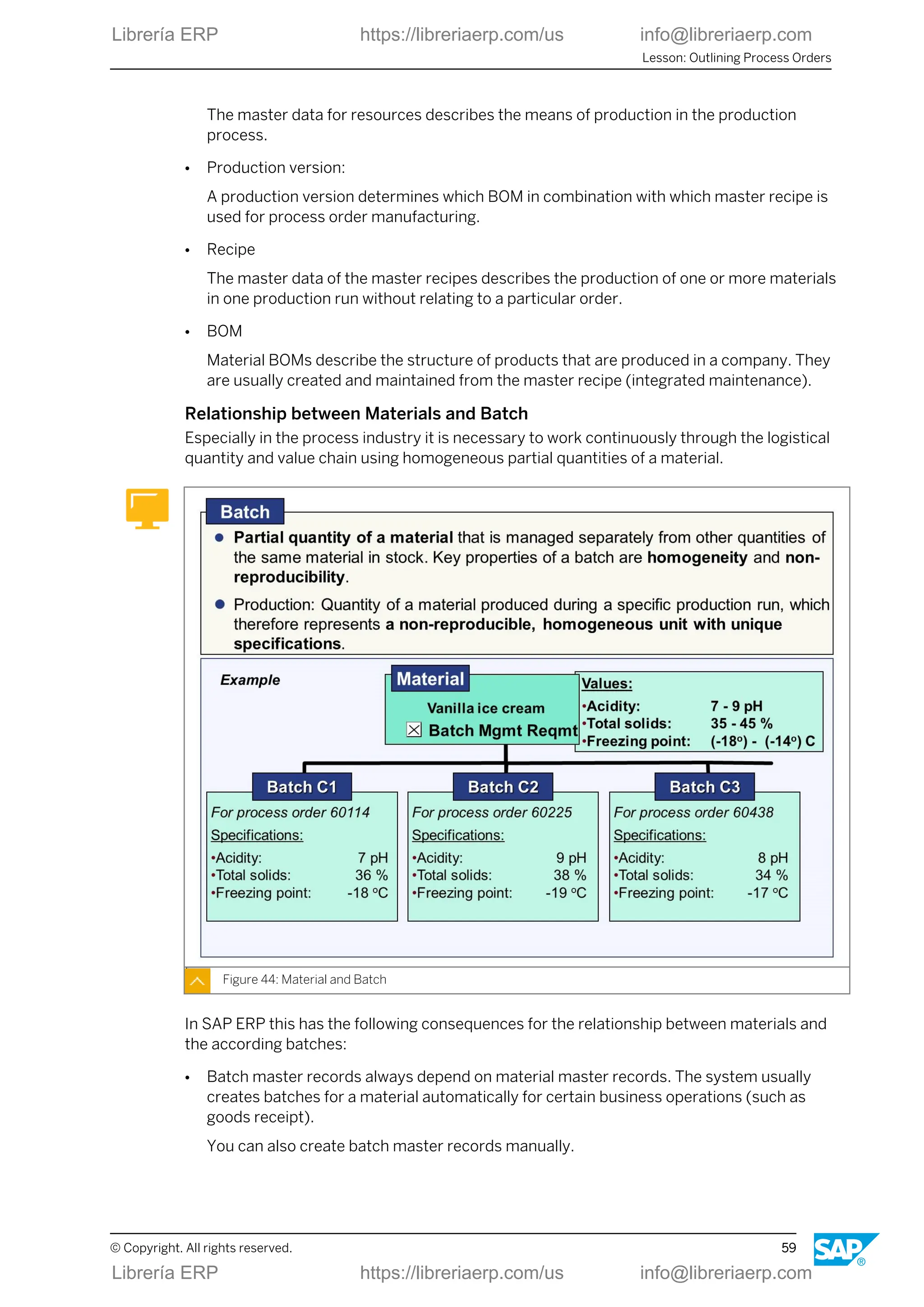
Relationship between Materials and Batch
Especially in the process industry it is necessary to work continuously through the logistical
quantity and value chain using homogeneous partial quantities of a material.
Figure 44: Material and Batch
In SAP ERP this has the following consequences for the relationship between materials and
the according batches:
● Batch master records always depend on material master records. The system usually
creates batches for a material automatically for certain business operations (such as
goods receipt).
You can also create batch master records manually.
Lesson: Outlining Process Orders
© Copyright. All rights reserved. 59
Librería ERP https://libreriaerp.com/us info@libreriaerp.com
● In general, the data of a material master is valid for all batches assigned to it. In contrast, a
batch master record contains data that uniquely identifies the relevant batch and
characterizes it as a non-reproducible unit.
● The characteristic batch specifications are assigned using characteristics from the
classification system in the material master and are inherited by the corresponding batch
master records.
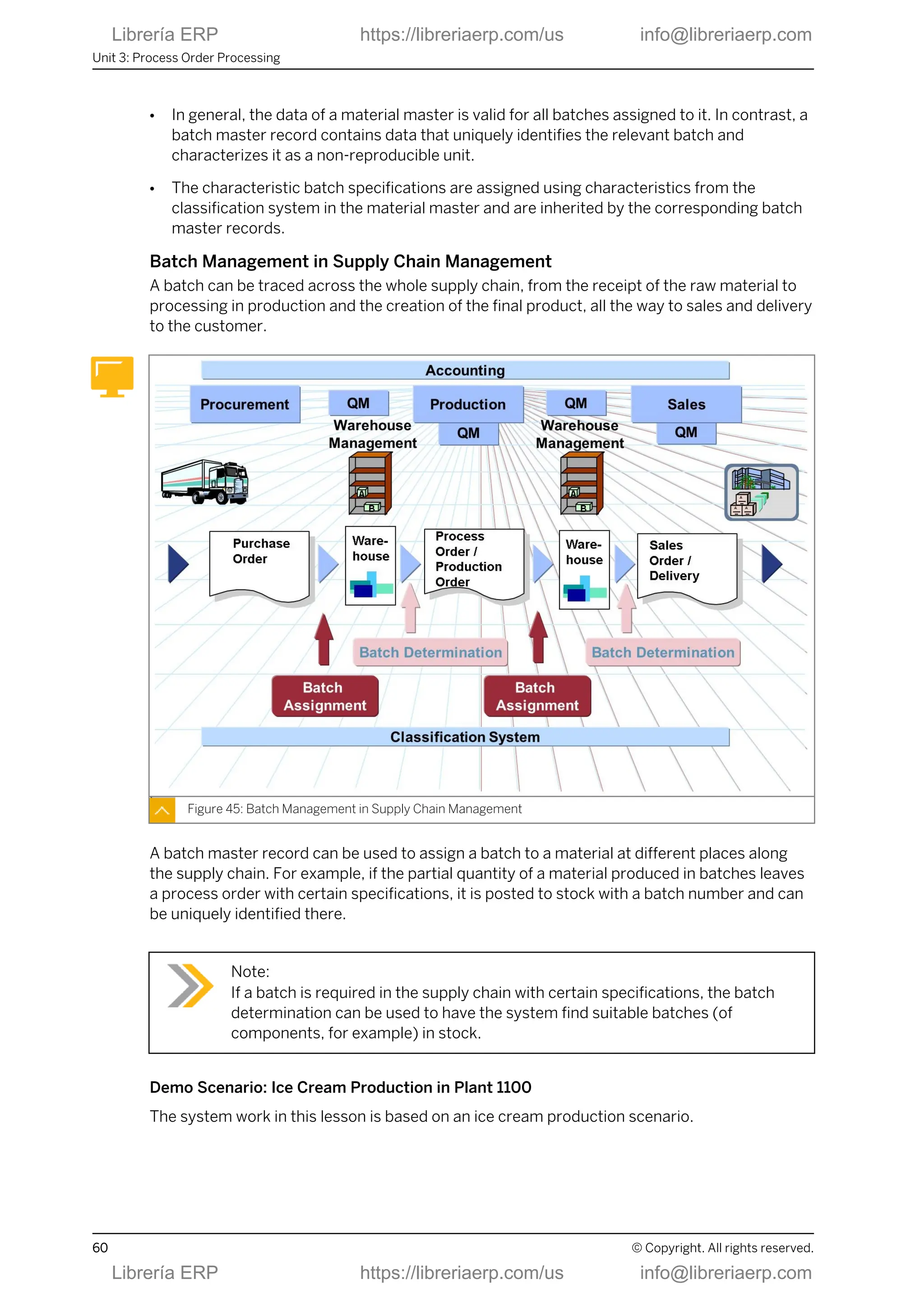
Batch Management in Supply Chain Management
A batch can be traced across the whole supply chain, from the receipt of the raw material to
processing in production and the creation of the final product, all the way to sales and delivery
to the customer.
Figure 45: Batch Management in Supply Chain Management
A batch master record can be used to assign a batch to a material at different places along
the supply chain. For example, if the partial quantity of a material produced in batches leaves
a process order with certain specifications, it is posted to stock with a batch number and can
be uniquely identified there.
Note:
If a batch is required in the supply chain with certain specifications, the batch
determination can be used to have the system find suitable batches (of
components, for example) in stock.
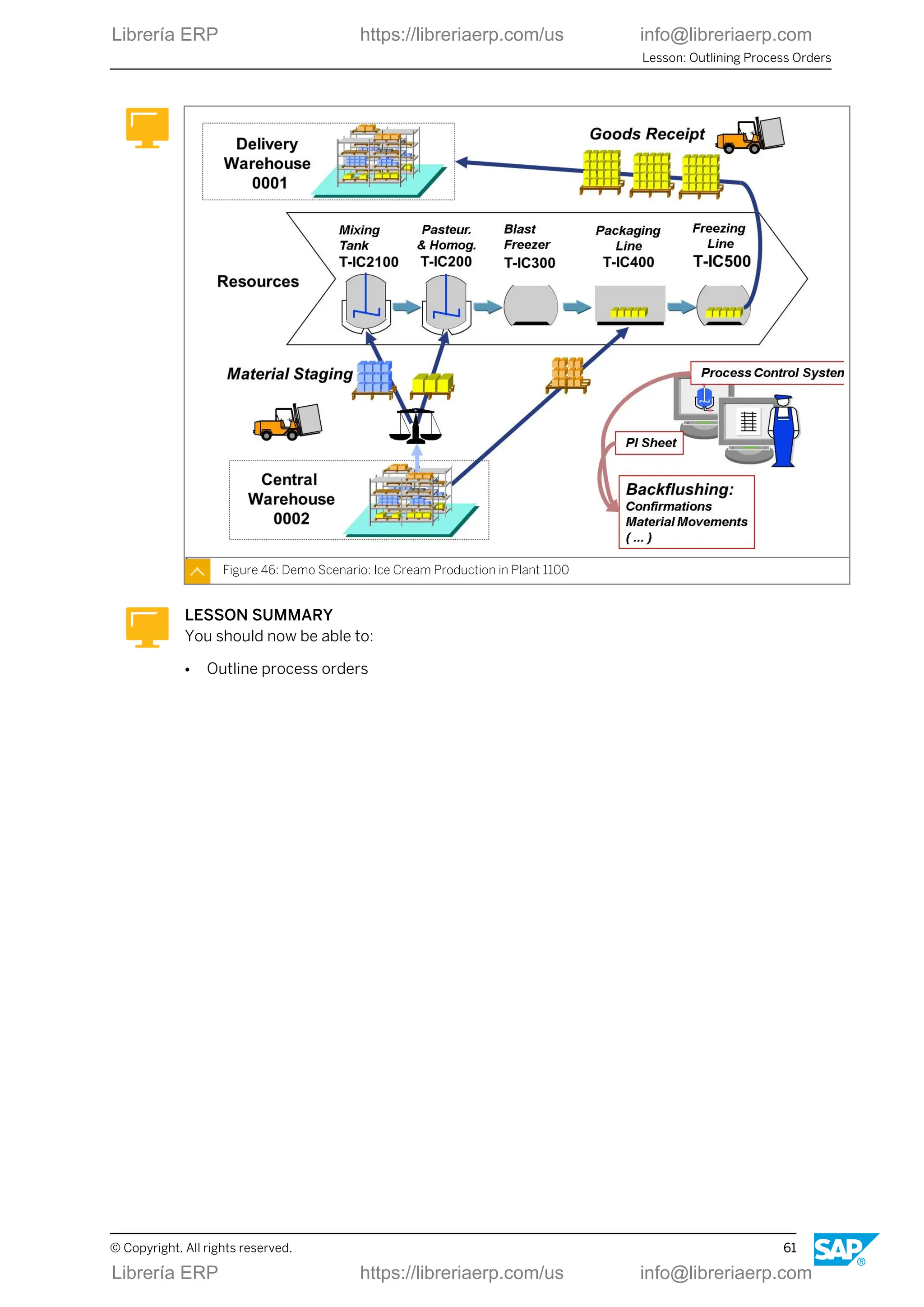
Demo Scenario: Ice Cream Production in Plant 1100
The system work in this lesson is based on an ice cream production scenario.
Unit 3: Process Order Processing
60 © Copyright. All rights reserved.
Librería ERP https://libreriaerp.com/us info@libreriaerp.com
Figure 46: Demo Scenario: Ice Cream Production in Plant 1100
LESSON SUMMARY
You should now be able to:
● Outline process orders
Lesson: Outlining Process Orders
© Copyright. All rights reserved. 61
Librería ERP https://libreriaerp.com/us info@libreriaerp.com
Unit 3: Process Order Processing
62 © Copyright. All rights reserved.
Librería ERP https://libreriaerp.com/us info@libreriaerp.com
Unit 3
Lesson 2
Creating and Interpreting Process Orders
LESSON OVERVIEW
In this lesson, you learn about important elements and functions of a process order as well as
the typical way it is created.
Business Example
Important steps in process order management are order creation, batch determination,
scheduling, availability checks, release, transfer of control recipes to process control, material
withdrawal, confirmations, material delivery, and settlement. The first step in process
management is the creation of the process order. Based on this, you will explore some basic
functionalities within the order.
LESSON OBJECTIVES
After completing this lesson, you will be able to:
● Create and interpret process orders
Process Flow and Structure of Process Order
Process orders go through several individual activities. A number of settings available in
customizing allow you to successfully perform each step in order processing. Many of these
activities can run automatically or in the background so that manual processing of orders is
minimized.
© Copyright. All rights reserved. 63
Librería ERP https://libreriaerp.com/us info@libreriaerp.com
Figure 47: Processing a Process Order
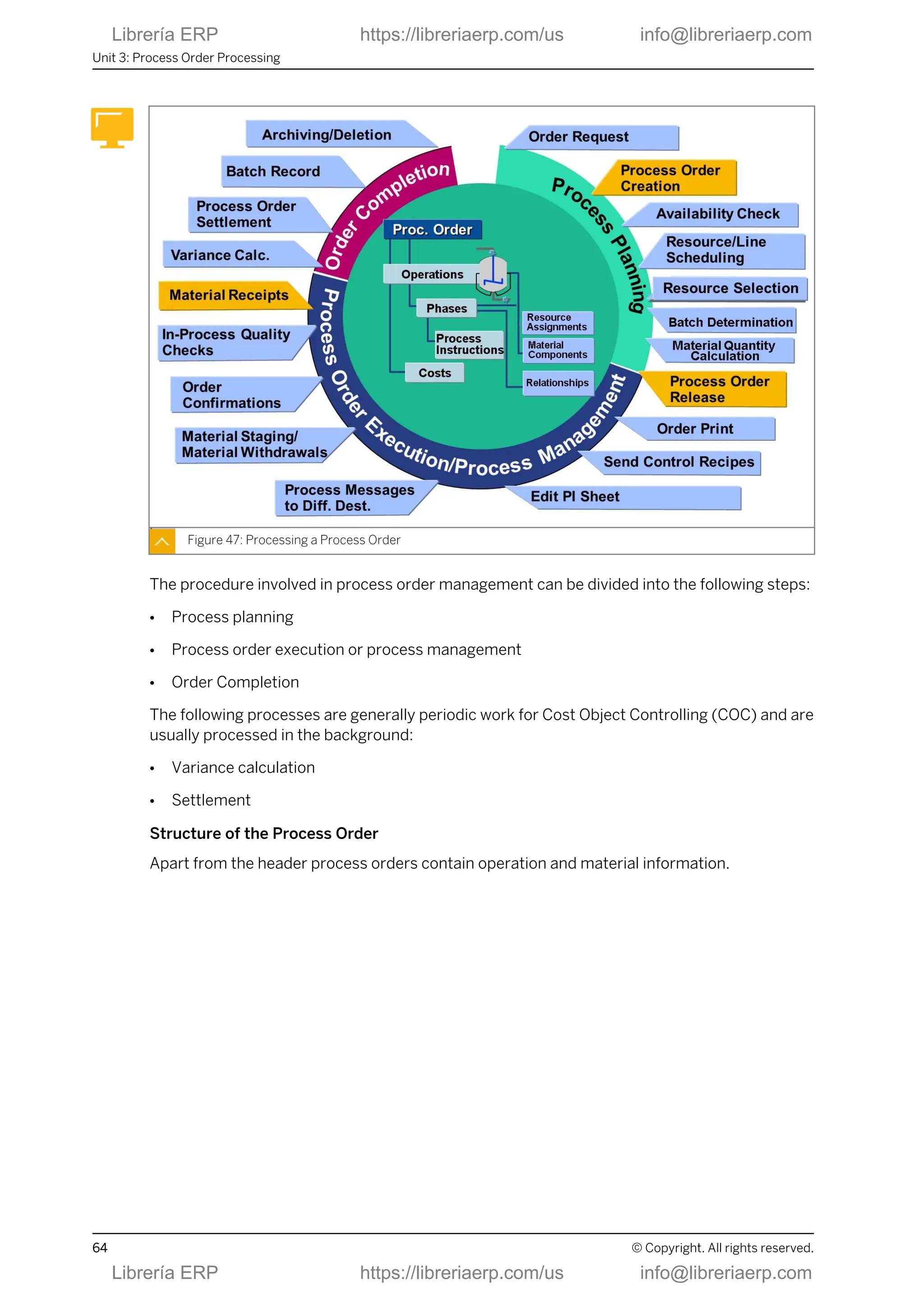
The procedure involved in process order management can be divided into the following steps:
● Process planning
● Process order execution or process management
● Order Completion
The following processes are generally periodic work for Cost Object Controlling (COC) and are
usually processed in the background:
● Variance calculation
● Settlement
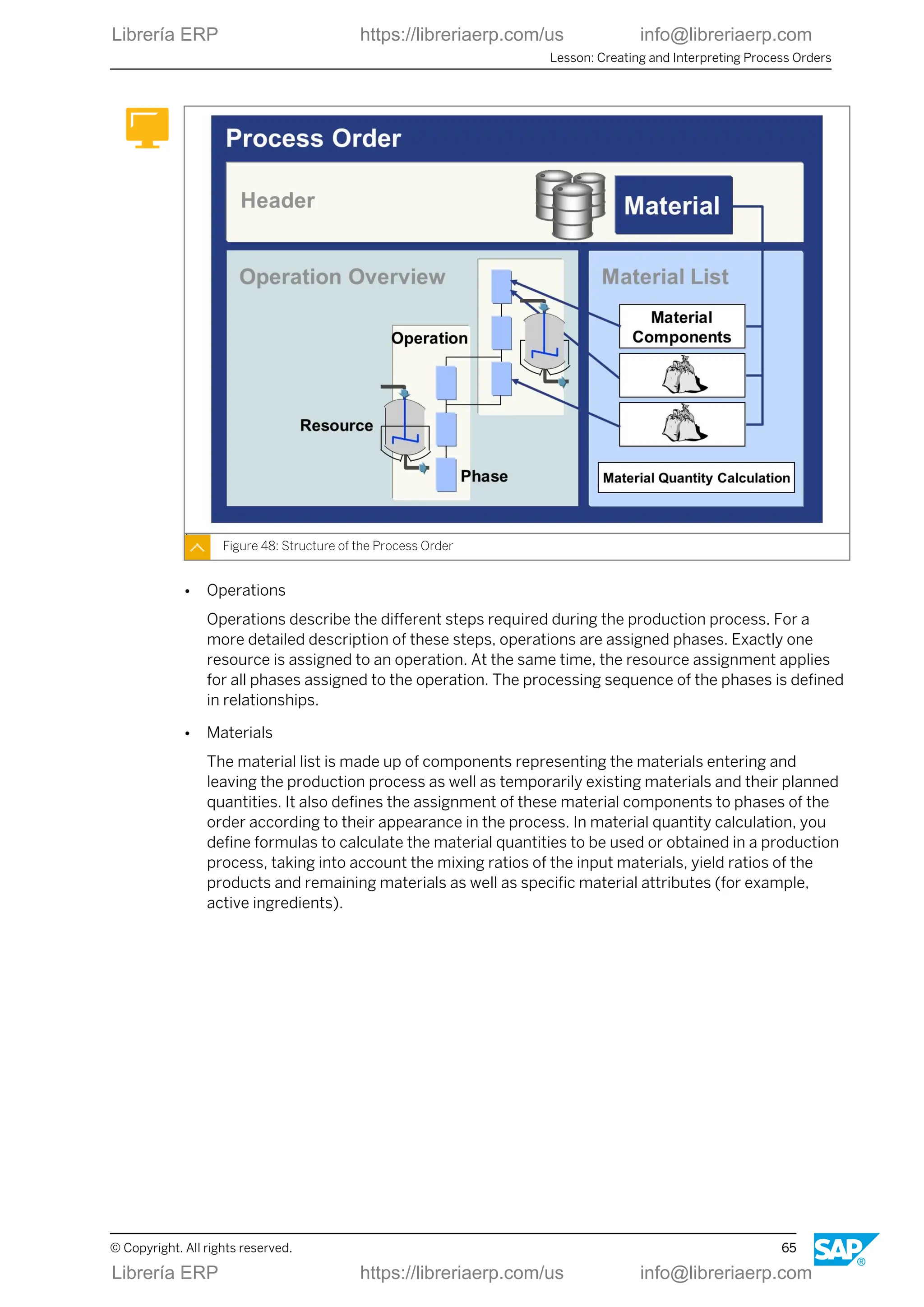
Structure of the Process Order
Apart from the header process orders contain operation and material information.
Unit 3: Process Order Processing
64 © Copyright. All rights reserved.
Librería ERP https://libreriaerp.com/us info@libreriaerp.com
Figure 48: Structure of the Process Order
● Operations
Operations describe the different steps required during the production process. For a
more detailed description of these steps, operations are assigned phases. Exactly one
resource is assigned to an operation. At the same time, the resource assignment applies
for all phases assigned to the operation. The processing sequence of the phases is defined
in relationships.
● Materials
The material list is made up of components representing the materials entering and
leaving the production process as well as temporarily existing materials and their planned
quantities. It also defines the assignment of these material components to phases of the
order according to their appearance in the process. In material quantity calculation, you
define formulas to calculate the material quantities to be used or obtained in a production
process, taking into account the mixing ratios of the input materials, yield ratios of the
products and remaining materials as well as specific material attributes (for example,
active ingredients).
Lesson: Creating and Interpreting Process Orders
© Copyright. All rights reserved. 65
Librería ERP https://libreriaerp.com/us info@libreriaerp.com
Elements of the Process Order
Figure 49: Elements of the Process Order
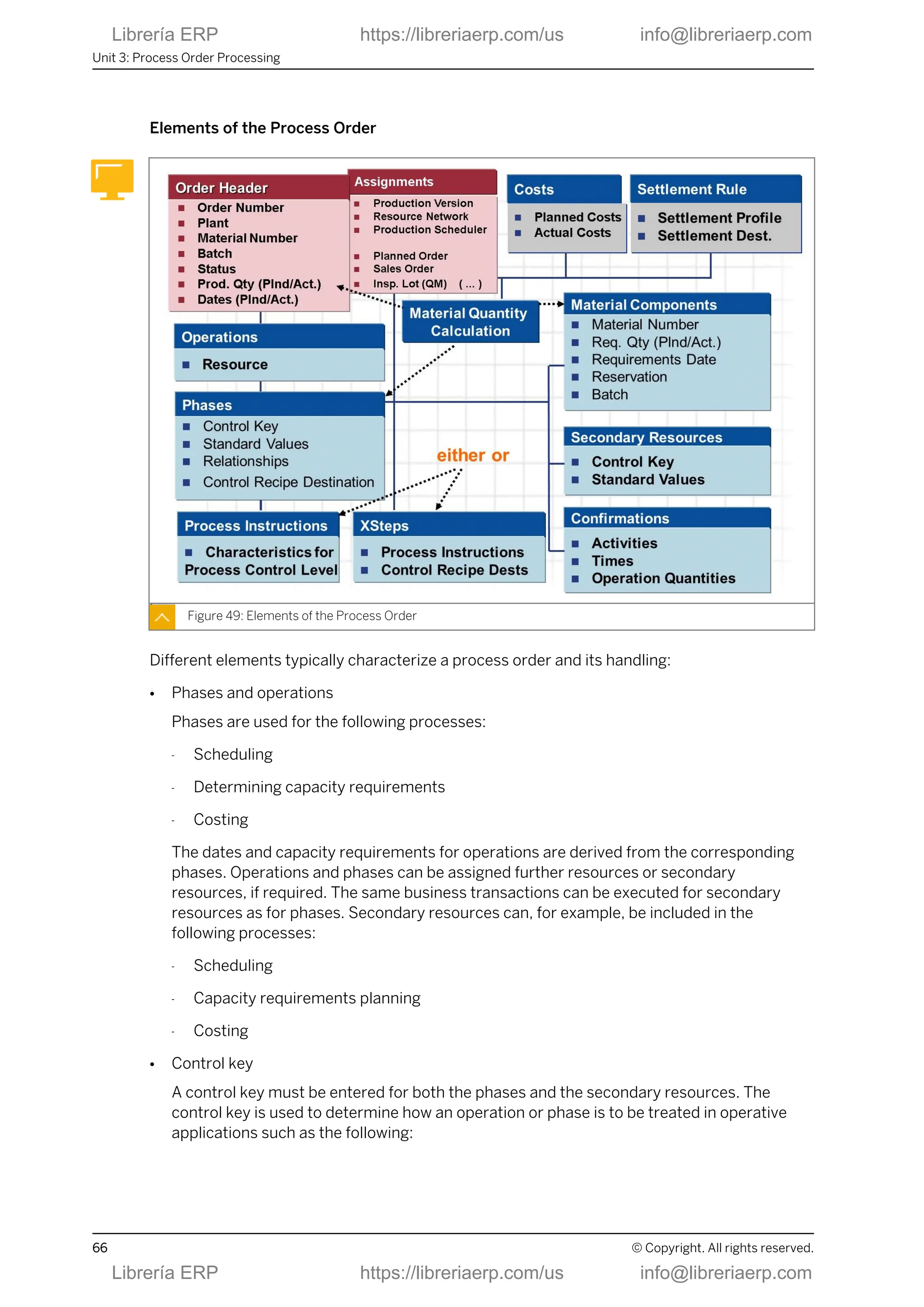
Different elements typically characterize a process order and its handling:
● Phases and operations
Phases are used for the following processes:
- Scheduling
- Determining capacity requirements
- Costing
The dates and capacity requirements for operations are derived from the corresponding
phases. Operations and phases can be assigned further resources or secondary
resources, if required. The same business transactions can be executed for secondary
resources as for phases. Secondary resources can, for example, be included in the
following processes:
- Scheduling
- Capacity requirements planning
- Costing
● Control key
A control key must be entered for both the phases and the secondary resources. The
control key is used to determine how an operation or phase is to be treated in operative
applications such as the following:
Unit 3: Process Order Processing
66 © Copyright. All rights reserved.
Librería ERP https://libreriaerp.com/us info@libreriaerp.com
- Process orders
- Costing
- Capacity requirements planning
● Standard values
A standard value is a planned value used to carry out a phase or secondary resource, such
as the execution time. Standard values are used for calculations in the following
applications:
- Costing
- Scheduling
- Capacity requirements planning
There are mainly two alternatives for data maintenance in process management:
● Process instructions are structures used to transfer data from process orders to process
control (PI sheets or process control systems). Process instructions are assigned to the
phases of a process order. The process instructions are combined into control recipes,
which are then transferred to the control recipe destinations defined for the phases.
● Data for the process management can alternatively be maintained in the form of SAP
Execution Steps (XSteps). Using XSteps allows you to maintain process instructions in the
form of reusable and referenceable modules. A standard XStep repository is available with
version management.
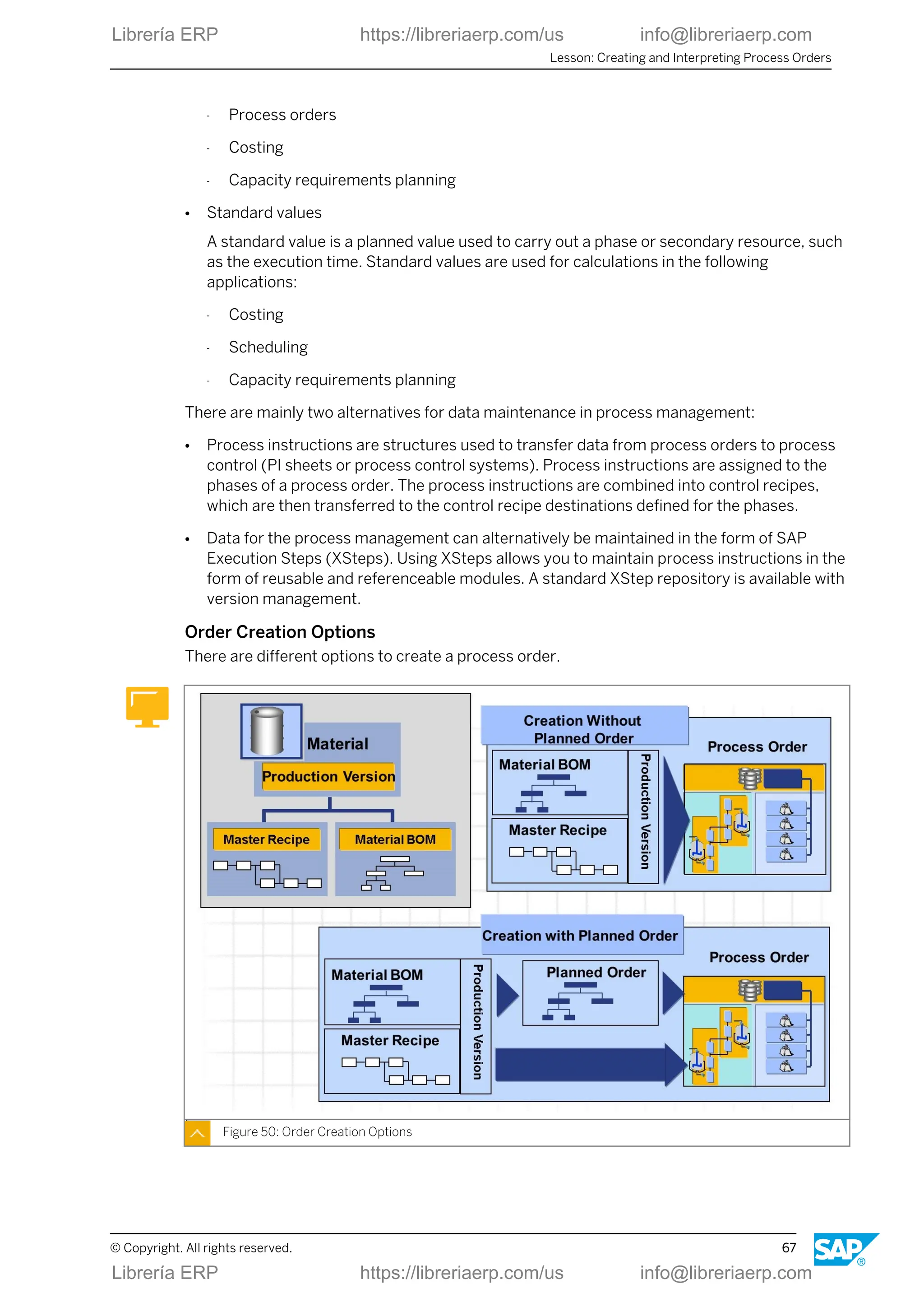
Order Creation Options
There are different options to create a process order.
Figure 50: Order Creation Options
Lesson: Creating and Interpreting Process Orders
© Copyright. All rights reserved. 67
Librería ERP https://libreriaerp.com/us info@libreriaerp.com
● Order creation with planned order
To create a planned order in process management, a suitable production version is
determined for the material based on the validity period and charge quantity range. A
production version determines which BOM in combination with which master recipe is
used for production. When a planned order is converted, the production version created
for it is made known to the process order and its recipe is transferred. The BOM is not
reread, rather the dependent requirements of the planned order are converted to
reservations for the process order.
● Order creation without planned order
If a process order is created without a planned order, it takes the recipe and BOM from the
production version directly.
Planning Integration
For planning tasks, both SAP ERP and SAP SCM-APO can be used.
Figure 51: Integration with Planning (SAP ECC or SAP SCM-APO)
Therefore the ERP and SCM applications offer alternatives for integrating planning and
production:
● Planning with the functions of the SAP ECC component
● Planning with the functions of the SAP SCM-APO component
● Planning with both functions of the SAP ECC and SAP SCM-APO component
Planning tasks can usually be either carried out using SAP ECC or SAP SCM-APO. Examples
are:
● Material requirements planning
Unit 3: Process Order Processing
68 © Copyright. All rights reserved.
Librería ERP https://libreriaerp.com/us info@libreriaerp.com
● Capacity planning
● Availability check
In contrast to this, the following steps always occur with the functions of the SAP ECC
component:
● Production preparation
● Production execution
● Production control
These functions in SAP ECC include the following tasks:
● Costing
● Release
● Material staging
● Confirmation
● Goods movements
● Settlement
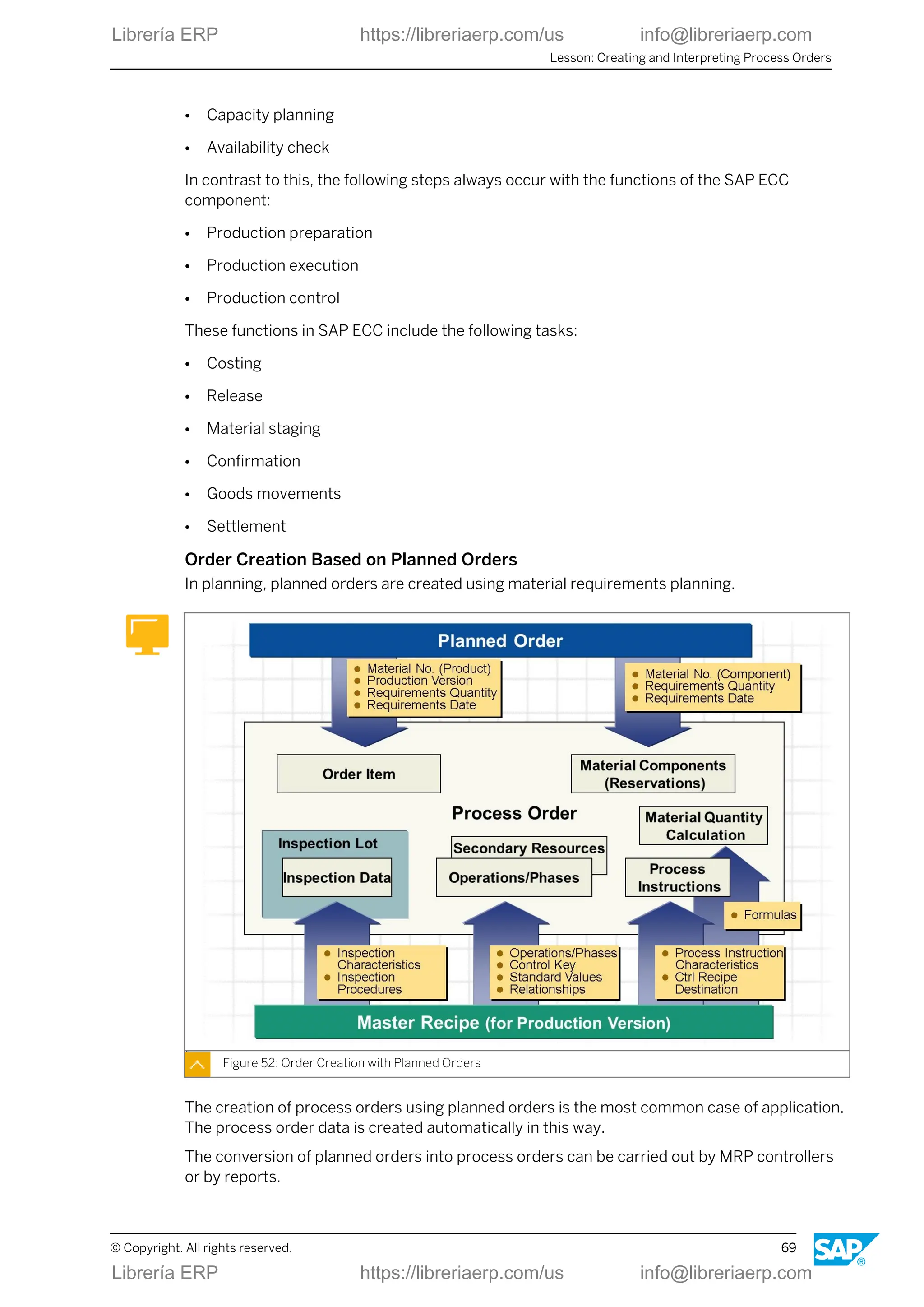
Order Creation Based on Planned Orders
In planning, planned orders are created using material requirements planning.
Figure 52: Order Creation with Planned Orders
The creation of process orders using planned orders is the most common case of application.
The process order data is created automatically in this way.
The conversion of planned orders into process orders can be carried out by MRP controllers
or by reports.
Lesson: Creating and Interpreting Process Orders
© Copyright. All rights reserved. 69
Librería ERP https://libreriaerp.com/us info@libreriaerp.com
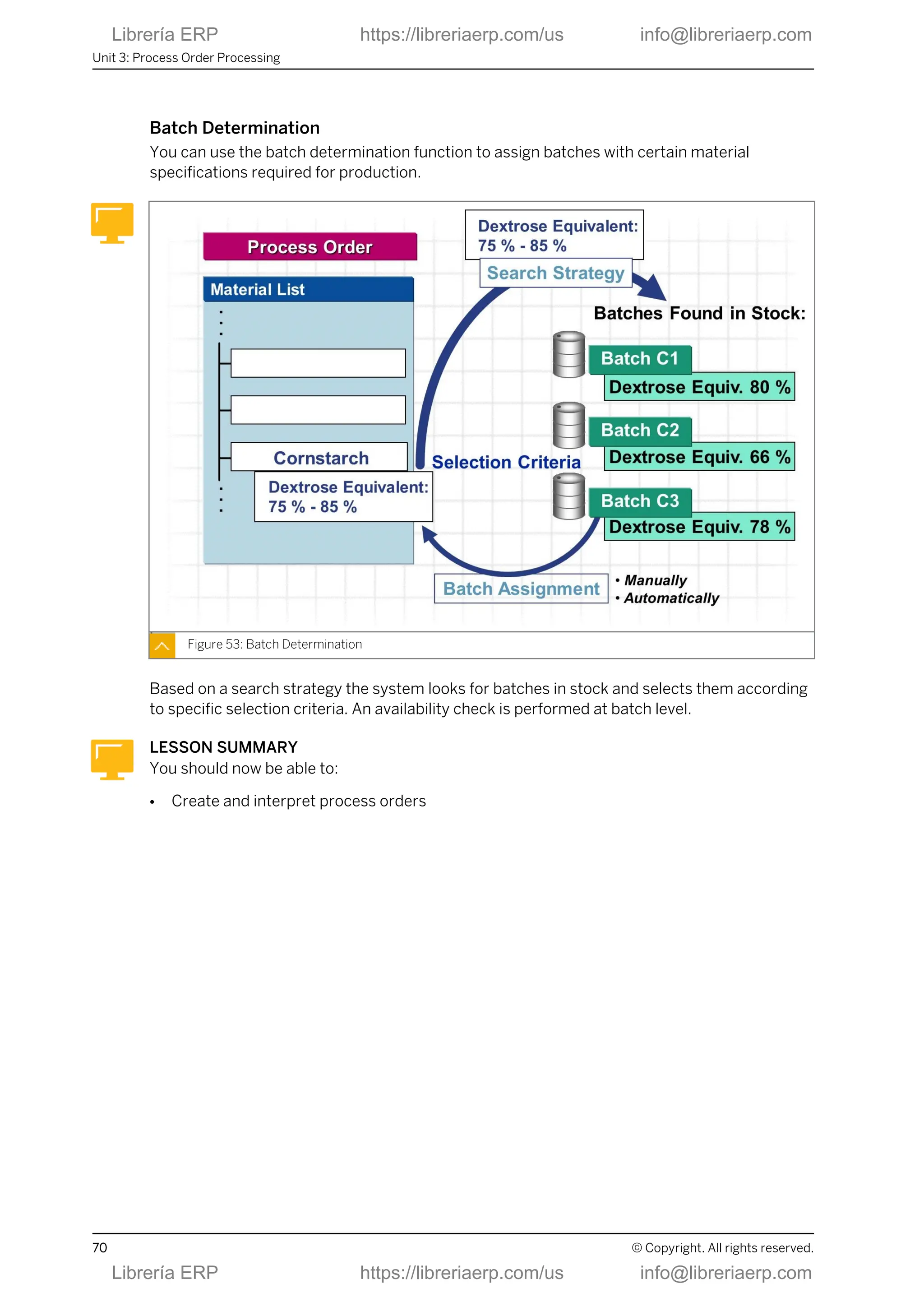
Batch Determination
You can use the batch determination function to assign batches with certain material
specifications required for production.
Figure 53: Batch Determination
Based on a search strategy the system looks for batches in stock and selects them according
to specific selection criteria. An availability check is performed at batch level.
LESSON SUMMARY
You should now be able to:
● Create and interpret process orders
Unit 3: Process Order Processing
70 © Copyright. All rights reserved.
Librería ERP https://libreriaerp.com/us info@libreriaerp.com
Unit 3
Lesson 3
Executing Process Orders
LESSON OVERVIEW
In this lesson, you learn about important elements and functions of a process order as well as
the typical way it is processed.
Business Example
Important steps in process order management are order creation, batch determination,
scheduling, availability checks, release, transfer of control recipes to process control, material
withdrawal, confirmations, material delivery, and settlement. To link the process control level
with process control systems and PI sheets, you must set up the process management
functions. The prerequisite for process order processing is the order release you will deal with
in this lesson. Based on this, you will process an order using the PI sheet.
LESSON OBJECTIVES
After completing this lesson, you will be able to:
● Execute process orders
Order Release Functions
Process orders have a status management that controls the possible processing sequence of
the individual business operations. When an order is released, a status is set accordingly.
© Copyright. All rights reserved. 71
Librería ERP https://libreriaerp.com/us info@libreriaerp.com
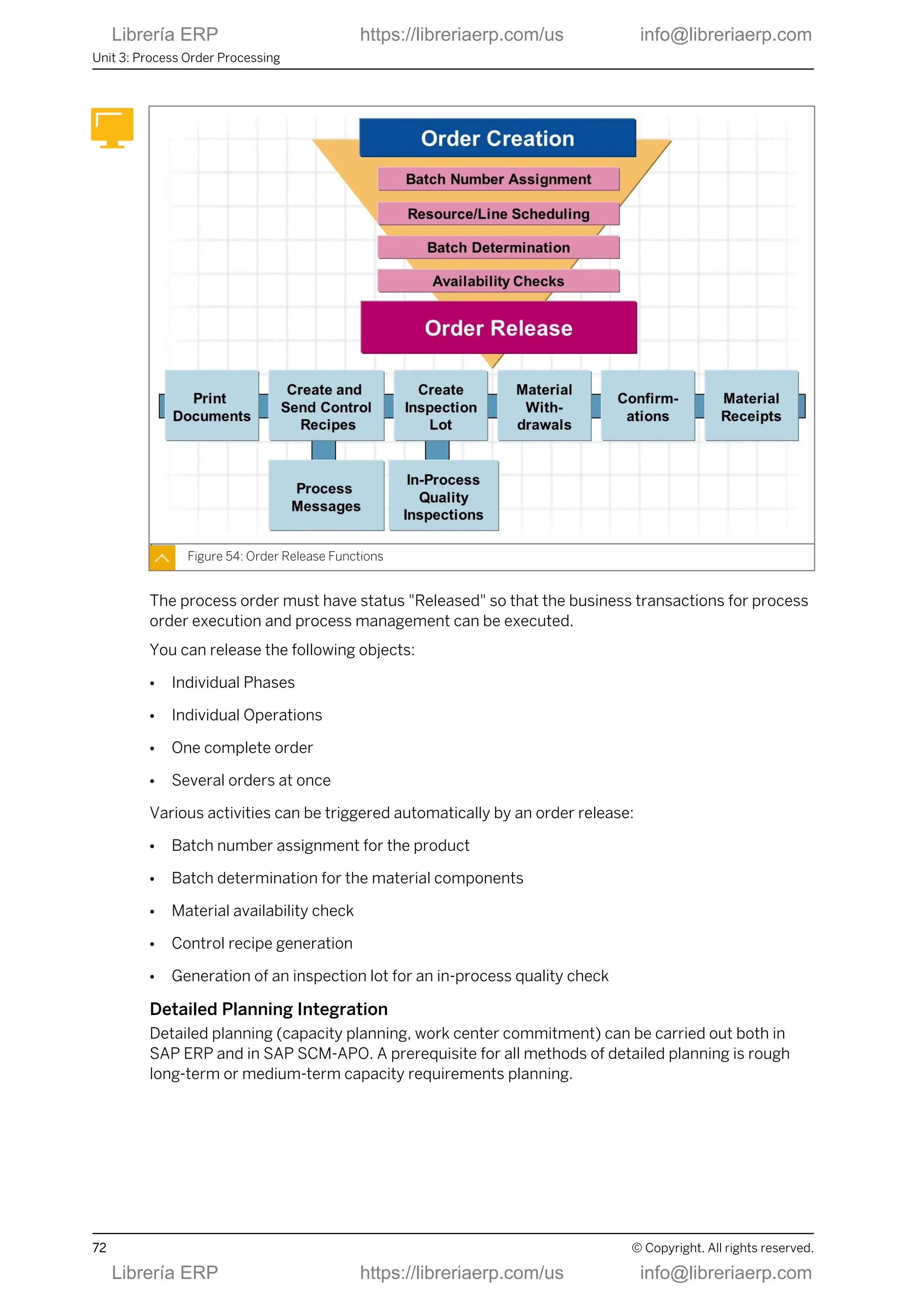
Figure 54: Order Release Functions
The process order must have status "Released" so that the business transactions for process
order execution and process management can be executed.
You can release the following objects:
● Individual Phases
● Individual Operations
● One complete order
● Several orders at once
Various activities can be triggered automatically by an order release:
● Batch number assignment for the product
● Batch determination for the material components
● Material availability check
● Control recipe generation
● Generation of an inspection lot for an in-process quality check
Detailed Planning Integration
Detailed planning (capacity planning, work center commitment) can be carried out both in
SAP ERP and in SAP SCM-APO. A prerequisite for all methods of detailed planning is rough
long-term or medium-term capacity requirements planning.
Unit 3: Process Order Processing
72 © Copyright. All rights reserved.
Librería ERP https://libreriaerp.com/us info@libreriaerp.com
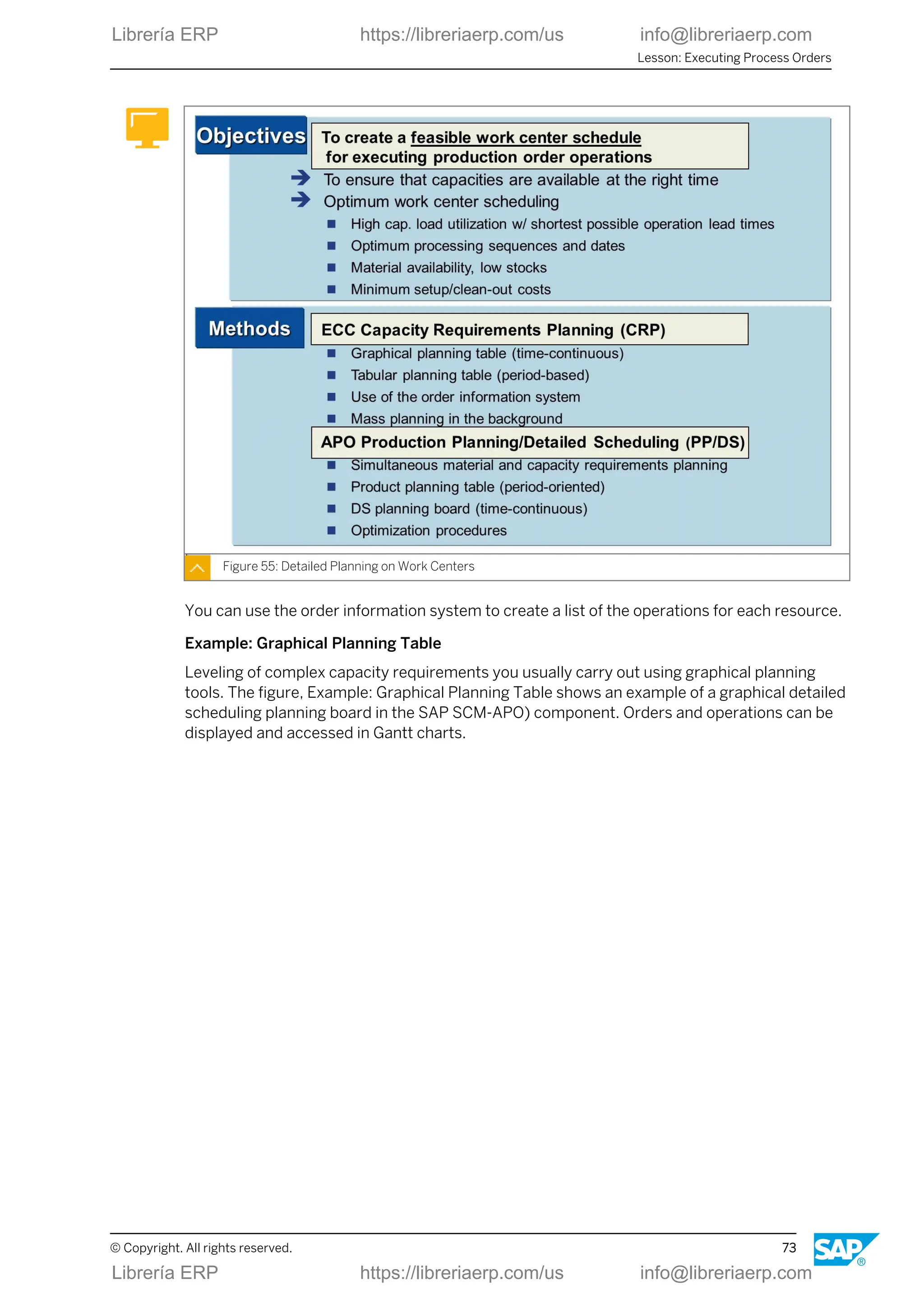
Figure 55: Detailed Planning on Work Centers
You can use the order information system to create a list of the operations for each resource.
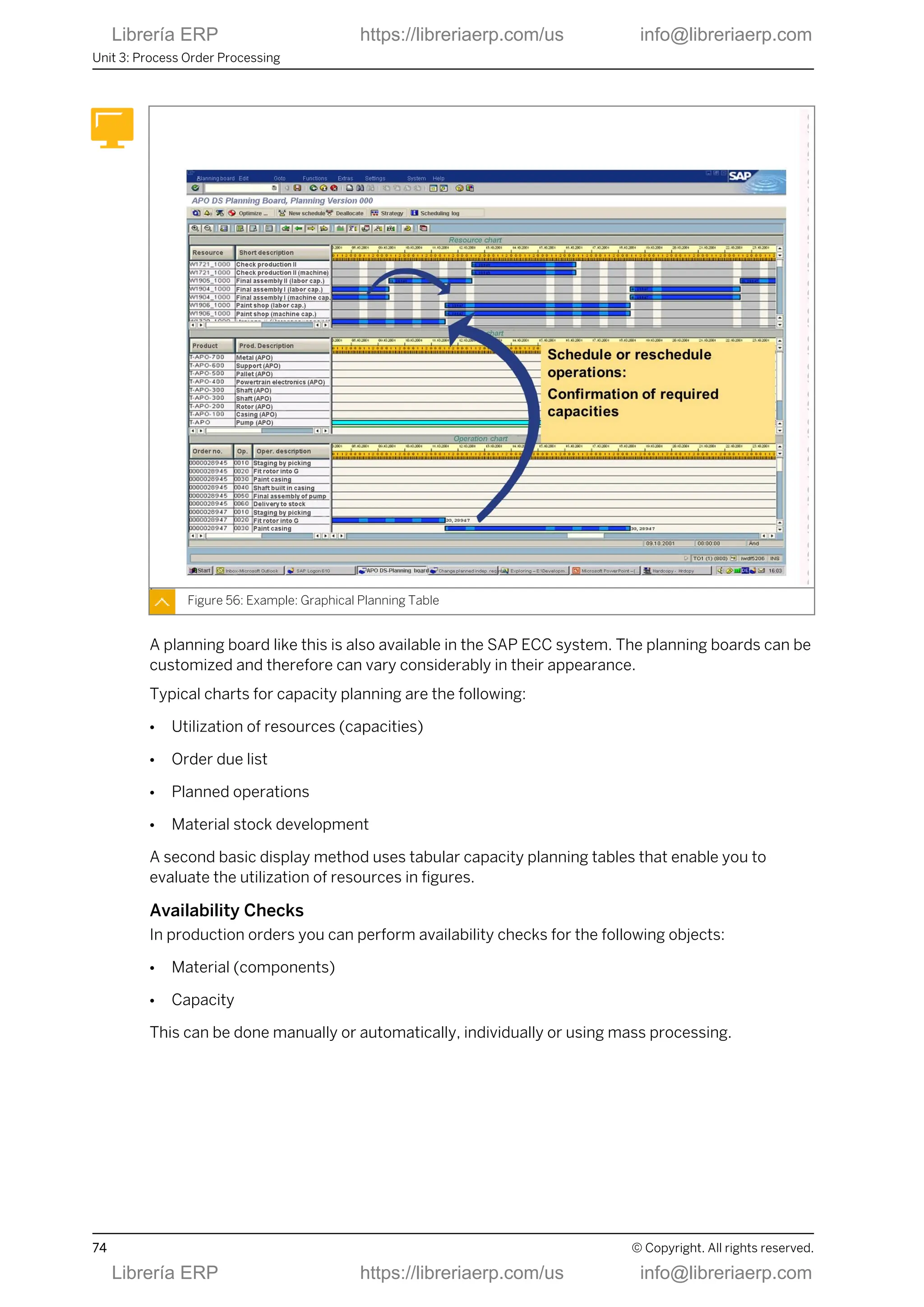
Example: Graphical Planning Table
Leveling of complex capacity requirements you usually carry out using graphical planning
tools. The figure, Example: Graphical Planning Table shows an example of a graphical detailed
scheduling planning board in the SAP SCM-APO) component. Orders and operations can be
displayed and accessed in Gantt charts.
Lesson: Executing Process Orders
© Copyright. All rights reserved. 73
Librería ERP https://libreriaerp.com/us info@libreriaerp.com
Figure 56: Example: Graphical Planning Table
A planning board like this is also available in the SAP ECC system. The planning boards can be
customized and therefore can vary considerably in their appearance.
Typical charts for capacity planning are the following:
● Utilization of resources (capacities)
● Order due list
● Planned operations
● Material stock development
A second basic display method uses tabular capacity planning tables that enable you to
evaluate the utilization of resources in figures.
Availability Checks
In production orders you can perform availability checks for the following objects:
● Material (components)
● Capacity
This can be done manually or automatically, individually or using mass processing.
Unit 3: Process Order Processing
74 © Copyright. All rights reserved.
Librería ERP https://libreriaerp.com/us info@libreriaerp.com
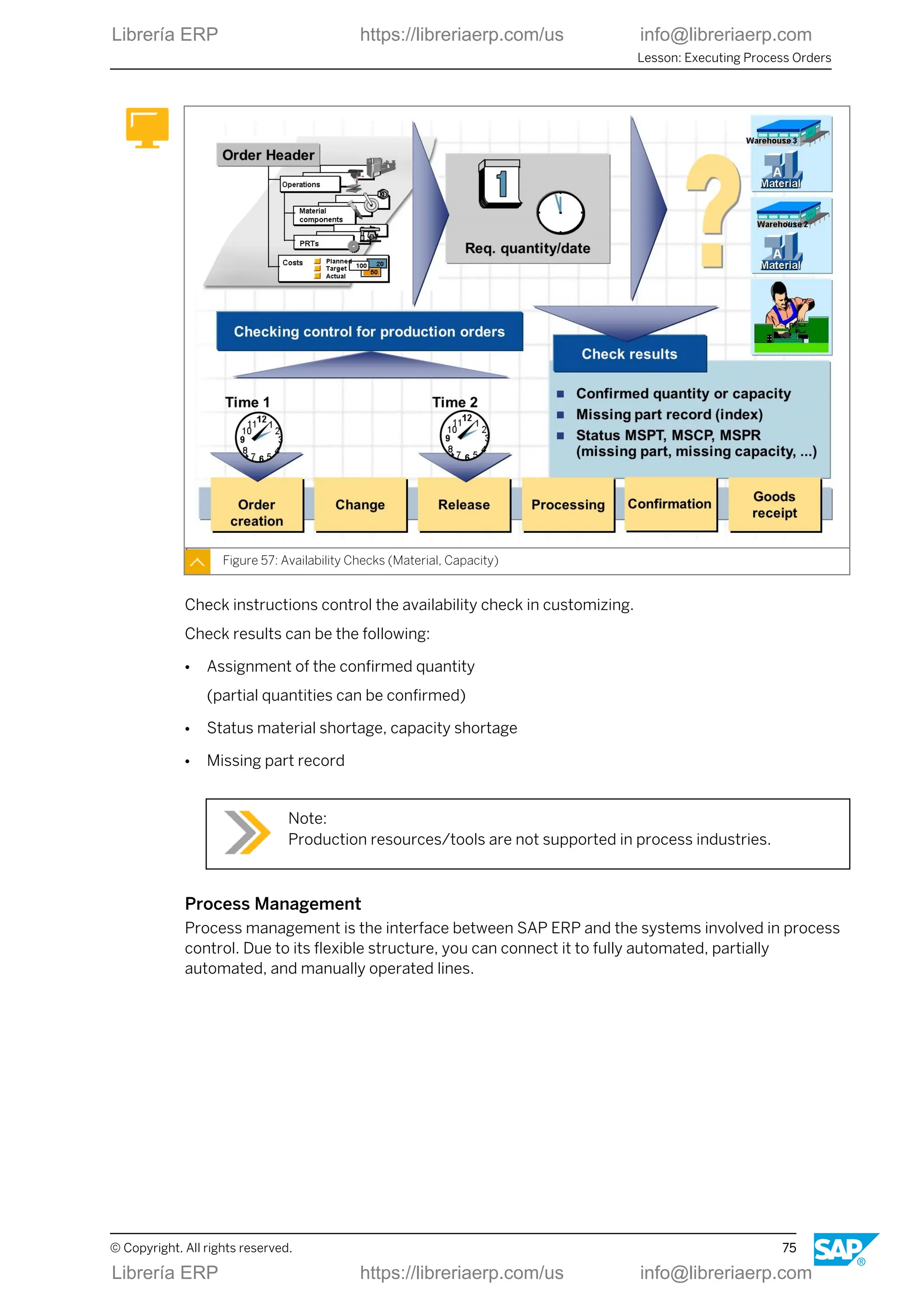
Figure 57: Availability Checks (Material, Capacity)
Check instructions control the availability check in customizing.
Check results can be the following:
● Assignment of the confirmed quantity
(partial quantities can be confirmed)
● Status material shortage, capacity shortage
● Missing part record
Note:
Production resources/tools are not supported in process industries.
Process Management
Process management is the interface between SAP ERP and the systems involved in process
control. Due to its flexible structure, you can connect it to fully automated, partially
automated, and manually operated lines.
Lesson: Executing Process Orders
© Copyright. All rights reserved. 75
Librería ERP https://libreriaerp.com/us info@libreriaerp.com
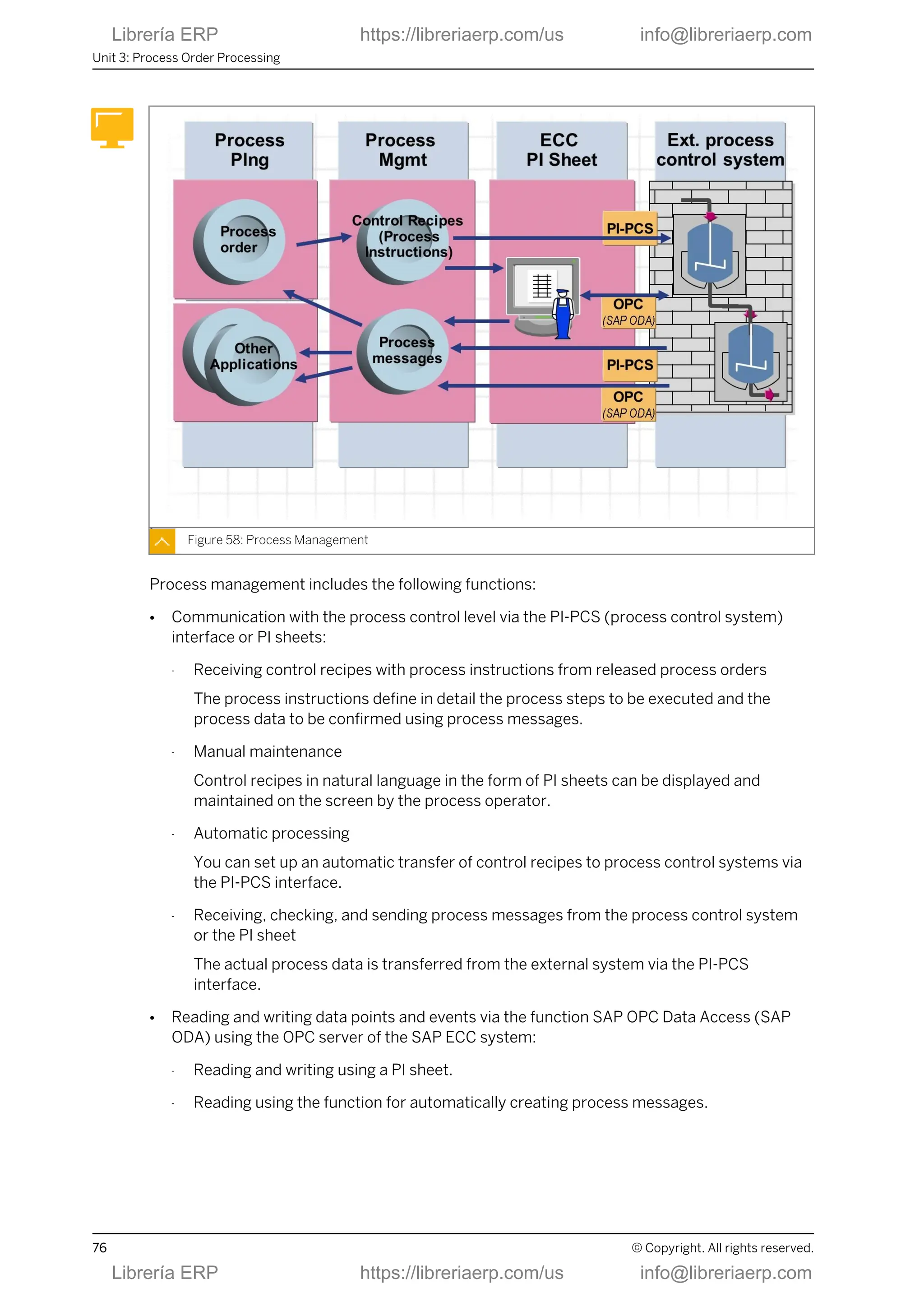
Figure 58: Process Management
Process management includes the following functions:
● Communication with the process control level via the PI-PCS (process control system)
interface or PI sheets:
- Receiving control recipes with process instructions from released process orders
The process instructions define in detail the process steps to be executed and the
process data to be confirmed using process messages.
- Manual maintenance
Control recipes in natural language in the form of PI sheets can be displayed and
maintained on the screen by the process operator.
- Automatic processing
You can set up an automatic transfer of control recipes to process control systems via
the PI-PCS interface.
- Receiving, checking, and sending process messages from the process control system
or the PI sheet
The actual process data is transferred from the external system via the PI-PCS
interface.
● Reading and writing data points and events via the function SAP OPC Data Access (SAP
ODA) using the OPC server of the SAP ECC system:
- Reading and writing using a PI sheet.
- Reading using the function for automatically creating process messages.
Unit 3: Process Order Processing
76 © Copyright. All rights reserved.
Librería ERP https://libreriaerp.com/us info@libreriaerp.com
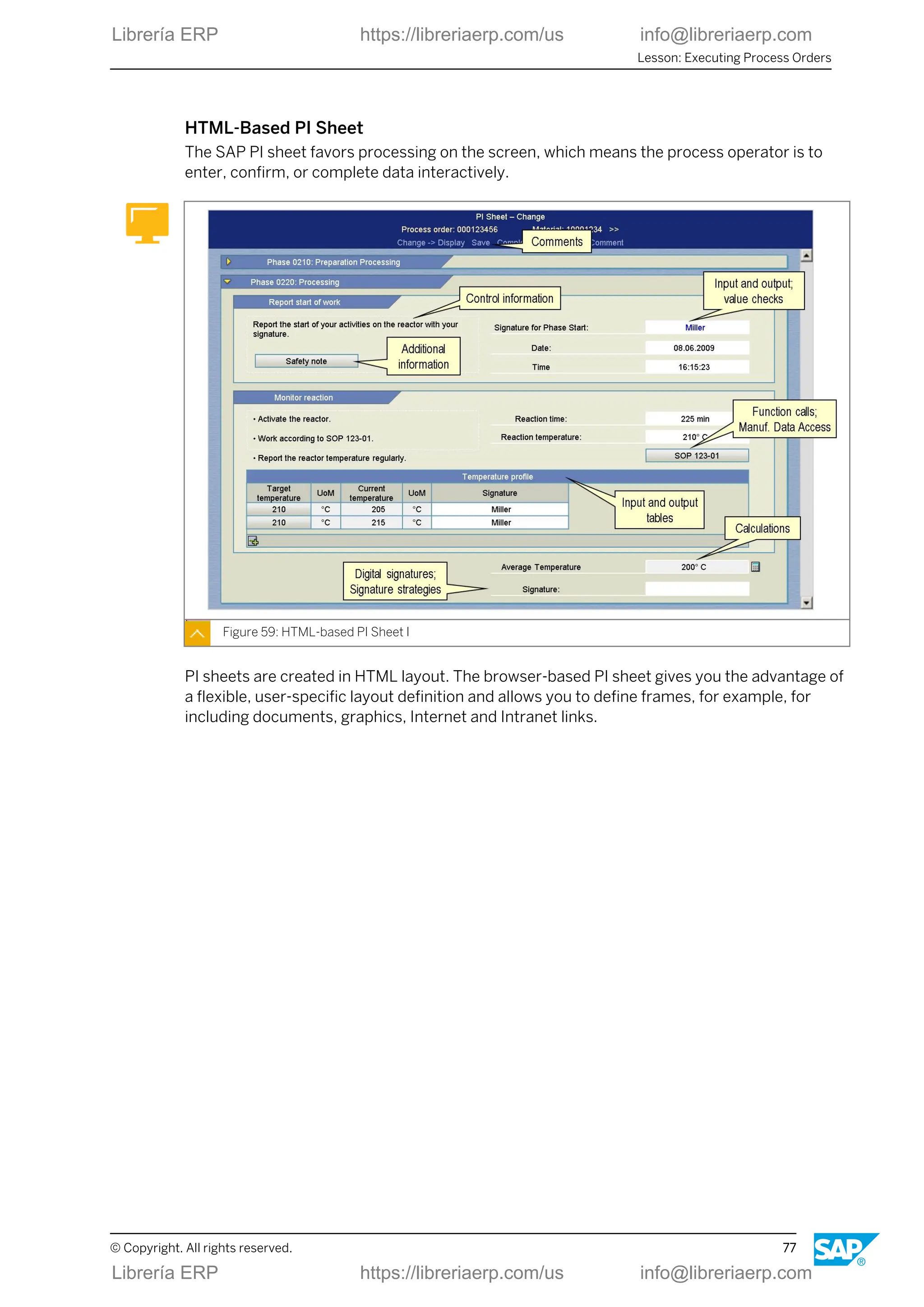
HTML-Based PI Sheet
The SAP PI sheet favors processing on the screen, which means the process operator is to
enter, confirm, or complete data interactively.
Figure 59: HTML-based PI Sheet I
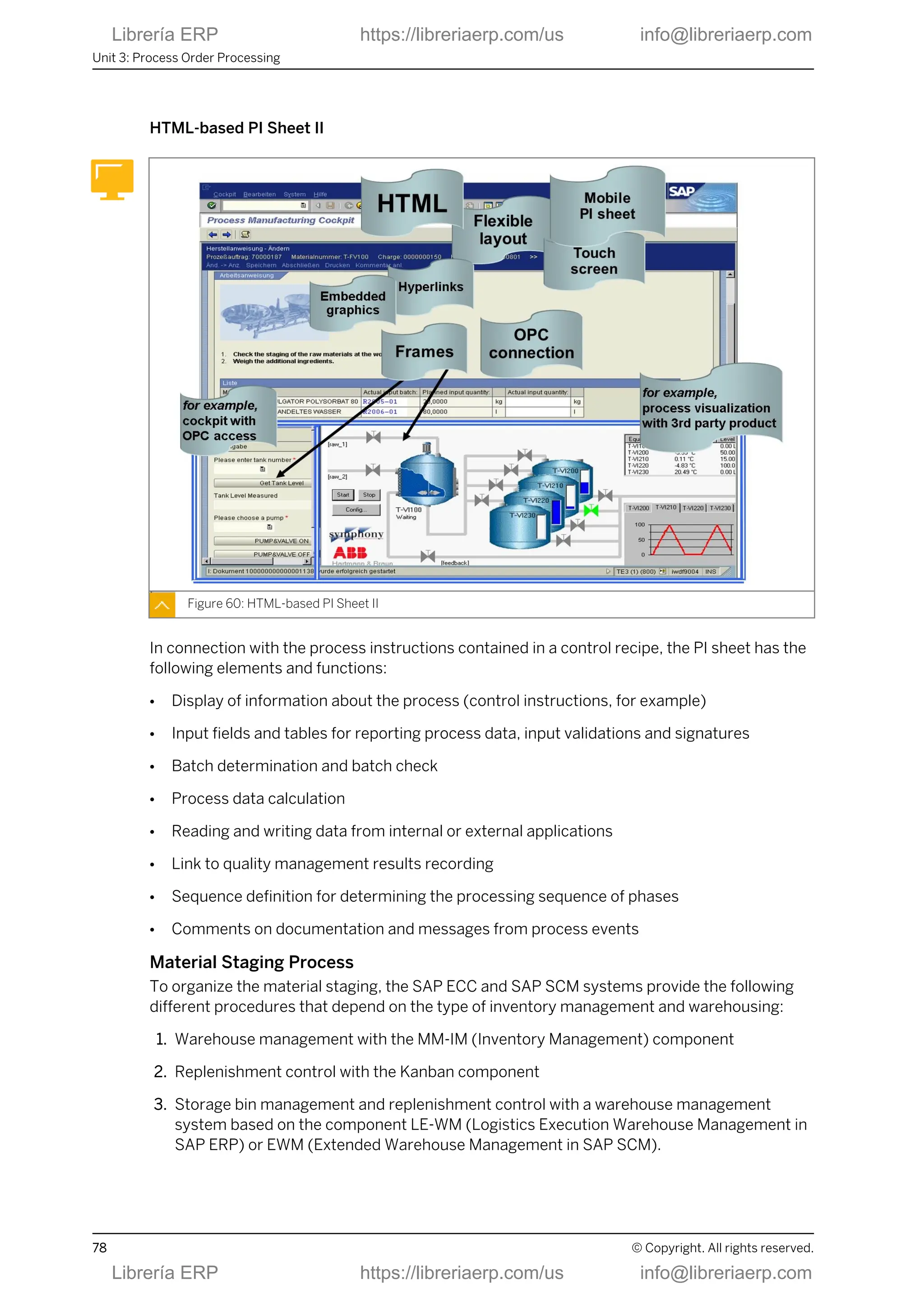
PI sheets are created in HTML layout. The browser-based PI sheet gives you the advantage of
a flexible, user-specific layout definition and allows you to define frames, for example, for
including documents, graphics, Internet and Intranet links.
Lesson: Executing Process Orders
© Copyright. All rights reserved. 77
Librería ERP https://libreriaerp.com/us info@libreriaerp.com
HTML-based PI Sheet II
Figure 60: HTML-based PI Sheet II
In connection with the process instructions contained in a control recipe, the PI sheet has the
following elements and functions:
● Display of information about the process (control instructions, for example)
● Input fields and tables for reporting process data, input validations and signatures
● Batch determination and batch check
● Process data calculation
● Reading and writing data from internal or external applications
● Link to quality management results recording
● Sequence definition for determining the processing sequence of phases
● Comments on documentation and messages from process events
Material Staging Process
To organize the material staging, the SAP ECC and SAP SCM systems provide the following
different procedures that depend on the type of inventory management and warehousing:
1. Warehouse management with the MM-IM (Inventory Management) component
2. Replenishment control with the Kanban component
3. Storage bin management and replenishment control with a warehouse management
system based on the component LE-WM (Logistics Execution Warehouse Management in
SAP ERP) or EWM (Extended Warehouse Management in SAP SCM).
Unit 3: Process Order Processing
78 © Copyright. All rights reserved.
Librería ERP https://libreriaerp.com/us info@libreriaerp.com
Figure 61: Material Staging Process
The basis for material withdrawal for process orders are the following applications:
● Material withdrawal slips
● Pull lists
● Pick lists
● PI sheets
● Weighing systems linked via the PI-PCS interface (or similar documents or techniques)
For the material staging from a warehouse management system, there are different options
for the process order:
● Pick parts
Pick parts are provided for the process order in exactly the same quantity as the
requirements quantity. The staging of these parts for the process order may occur in a
physical storage bin or a dynamic storage bin.
● Process Management
● Crate parts
Crate parts are ordered manually when a crate is almost empty.
● Release order parts
Release order parts are ordered manually. The required quantity is calculated using the
target quantities of the components in the selected released orders.
Lesson: Executing Process Orders
© Copyright. All rights reserved. 79
Librería ERP https://libreriaerp.com/us info@libreriaerp.com
Process Orders Postings to System
The standard postings for process orders (goods issue, confirmation, goods receipt) can be
entered manually in the SAP ECC system, or using process messages from a PI sheet or a
process control system.
Figure 62: Standard Postings for Process Orders
The process instructions of the order define which process messages are requested from a PI
sheet or a process control system.
Unit 3: Process Order Processing
80 © Copyright. All rights reserved.
Librería ERP https://libreriaerp.com/us info@libreriaerp.com
Process Order: Goods Issue Posting
Figure 63: Process Order: Goods Issue Posting
The following functions are executed when a goods issue is posted:
● Storage location-related update of stock and consumption fields
● Reduction of reservations (for planned withdrawal)
● Determination of actual costs (evaluation) and update of order
● Generation of material documents, accounting documents and cost accounting
documents
The following documents are created:
● The material document describes the goods movement from the materials management
(stock) point of view.
● The accounting document describes the goods movement from the financial accounting
point of view.
● The cost accounting documents are used for various cost analysis purposes.
In this context you have the following options:
● When you display the material document, you can branch to the other documents.
● You can print a goods issue document.
Process Orders Confirmation
Confirmations are an important basis for entering internal activities performed for the order,
for the progress check and subsequent capacity requirements planning. For this reason,
exact real-time confirmations are of particular importance. A confirmation causes various
additional functions to be executed.
Lesson: Executing Process Orders
© Copyright. All rights reserved. 81
Librería ERP https://libreriaerp.com/us info@libreriaerp.com
Figure 64: Confirmations – Overview
Confirmations are always executed in the SAP ECC component, but can be implemented with
different technical procedures:
● Using online transactions
● Using the browser-based Enterprise Portal
● Using the PP-PDC interface
● Using automatic process messages
● Using an SAP MII server
There are various procedures for confirmations. Each procedure implements different
requirements that a company might have. Depending on the application, one or more
procedures may be used. The procedures must be selected to suit the methods of
organization within your company and the allowed workload.
Unit 3: Process Order Processing
82 © Copyright. All rights reserved.
Librería ERP https://libreriaerp.com/us info@libreriaerp.com
Types of Confirmations
Figure 65: Types of Confirmations
Each confirmation is entered with a status:
● Partial confirmation
● Final confirmation
● Automatic final confirmation
For the most part, the main types are the following:
● Phase-related confirmations
A phase confirmation allows you to confirm an order step by step.
● Secondary resource-related confirmations
A secondary resource can be compared to a suboperation and can be confirmed
separately.
● Order-related confirmations
Order confirmation is a confirmation of the entire order at order header level.
Note:
You can carry out a confirmation for an order only if no confirmations have
already been entered for the phases.
Flexible Data Entry with Process Messages
Process messages are data structures with which actual data for a process is confirmed from
process control to one or more destinations.
Lesson: Executing Process Orders
© Copyright. All rights reserved. 83
Librería ERP https://libreriaerp.com/us info@libreriaerp.com
Figure 66: Flexible Data Entry with Process Messages
The SAP standard system contains a number of predefined message categories that enable
you to transfer actual data from process control to the SAP ECC system.
Note:
You can define your own process messages in customizing according to your
own specific requirements.
Compliance with GMP in Production
The functions for GMP-compliant production (GMP = Good Manufacturing Practice) fulfill
special requirements from the pharmaceuticals industry (safe production, product liability,
obligation to produce supporting documents).
Unit 3: Process Order Processing
84 © Copyright. All rights reserved.
Librería ERP https://libreriaerp.com/us info@libreriaerp.com
Figure 67: Functions for production in compliance with GMP
The functions flagged with (*) are supported exclusively as part of process orders.
The guidelines on Good Manufacturing Practice (GMP) laid down by the U.S. Food and Drug
Administration (FDA) and other international institutions have become an international
standard in many areas of process industries. In particular, they must be taken into account in
processes of the pharmaceutical industry.
Production in Compliance with GMP
Figure 68: Production in Compliance with GMP
● Options for GMP-compliant production
Lesson: Executing Process Orders
© Copyright. All rights reserved. 85
Librería ERP https://libreriaerp.com/us info@libreriaerp.com
- You can specify that a process order can only be created if an approved recipe exists.
The order data is therefore locked and cannot be changed. The approval procedure is
performed in SAP ERP Engineering Change Management.
- You can exchange information about the product quality and analysis values between
the production plant and the laboratory or the quality assurance system. You use the
SAP ERP quality management functionality to do so.
- You can use the inspection results for batch specification by automatically copying
them to the characteristics of the batch produced.
- You can activate the digital signature function to execute certain business operations in
the SAP ECC system.
● Tools for GMP-compliant production
- Material identification function
You use the material identification function to check whether the material that was
picked for the process order is completely available at the production line and will be
used in the correct sequence.
- Material reconciliation function
You use the material reconciliation function to analyze and verify the ingredients and
yield at the end of the production process.
- Batch record
With regard to product liability, the batch record contains all planned and actual data
for the production process of a batch.
LESSON SUMMARY
You should now be able to:
● Execute process orders
Unit 3: Process Order Processing
86 © Copyright. All rights reserved.
Librería ERP https://libreriaerp.com/us info@libreriaerp.com
Unit 3
Lesson 4
Using Additional Functions with Process
Orders
LESSON OVERVIEW
This lesson overviews some of the special functionality that exists for process orders to
support certain industries like pharmaceuticals. You will also look at reporting for process
order.
Business Example
Using process orders you get informed about further special functions.
LESSON OBJECTIVES
After completing this lesson, you will be able to:
● Use additional functions with process orders
Enhanced Process Order Functions
Several additional features enhance the range of standard functions of process orders.
Figure 69: Enhanced Functions for Process Order
The functions flagged with (*) are available for process orders only.
© Copyright. All rights reserved. 87
Librería ERP https://libreriaerp.com/us info@libreriaerp.com
Material Quantity Calculation
Figure 70: Material Quantity Calculation
In material quantity calculation, you define formulas to calculate the material quantities to be
used or obtained in a production process, taking into account the following items:
● Mixing ratios of the input materials
● Yield ratios of the products and remaining materials
● Specific batch attributes (for example, concentration, active ingredient content)
You can also define formulas for calculating phase quantities in material quantity calculation.
Note:
By using batch determination in combination with the material quantity
calculation and batch-specific alternative units of measure, you can implement
active ingredient management in the process order.
Unit 3: Process Order Processing
88 © Copyright. All rights reserved.
Librería ERP https://libreriaerp.com/us info@libreriaerp.com
Resource Network and Resource Selection
Figure 71: Resource Network and Resource Selection
You can use the resource selection function to find suitable resources for carrying out an
operation at the time of production. In system-aided resource selection, the system
compares the characteristic values maintained for the resources and operations.

The resource network, representing the physical connection of resources, can be taken into
account during resource selection.
Lesson: Using Additional Functions with Process Orders
© Copyright. All rights reserved. 89
Librería ERP https://libreriaerp.com/us info@libreriaerp.com
Batch Derivation
Figure 72: Batch Derivation
Property Example components from the figure above
Component batches can be sender of data B, D, G
Produced batches can be receivers of data B, A
Component can be sender and receiver B
● Process characteristics
- You can use batch derivation to transfer, offer for selection, or display, batch master
data and classification data from component batches that went into batches you
produced.
- To be able to derive batch data, you must have set up the batch where-used list. The
derivation functions along the batch where-used list, which means that only those
component batches are used that went into the batch produced. In the evaluation of the
batch where-used list, both existing and planned goods movements are considered.
- The batch derivation is performed with the help of the condition technique. You
maintain the receiver-sender relationships in the strategy records of the “batch
derivation” application or in the BOM for selected BOM items.
● Restrictions
- It is not possible to transfer from a produced batch to a component batch.
- In the standard system you cannot make derivations in connection with collective
orders, because the batch where-used list cannot evaluate the links.
Unit 3: Process Order Processing
90 © Copyright. All rights reserved.
Librería ERP https://libreriaerp.com/us info@libreriaerp.com
Process Manufacturing: Information Systems
Various information systems can be used to evaluate process orders and objects in this
context.
Figure 73: Process Manufacturing: Information Systems
Batch Where-Used List
Figure 74: Batch Where-Used List
Lesson: Using Additional Functions with Process Orders
© Copyright. All rights reserved. 91
Librería ERP https://libreriaerp.com/us info@libreriaerp.com
The batch Where-Used list documents the path of the batch through the enterprise. The
batch where-used list is used within the scope of product liability. This report enables you to
find batches which, for example, must be recalled for quality reasons.
Analysis method Aim
Top-down Which batches came a batch from?
Bottom-up Which batches a batch went into?
The batch where-used list is structured on the basis of material movement data for materials
subject to batch management. It also considers the following processes and objects:
● Transfers from charge to charge
● Stock transfers in the two-step procedure
● Purchase orders (including subcontracting orders)
You can start the batch where-used list from the batch management menu or from the Batch
Information Cockpit. If you want to use the batch where-used list, for example, to evaluate
information from the sales or warehouse management areas, you can either use the pick-up
list in the “batch management” menu or the “batch related objects” selection expansion in the
Batch Information Cockpit.
The batch where-used list offers the following display options:
● Hierarchical tree structure
● ALV list (SAP list viewer)
LESSON SUMMARY
You should now be able to:
● Use additional functions with process orders
Unit 3: Process Order Processing
92 © Copyright. All rights reserved.
Librería ERP https://libreriaerp.com/us info@libreriaerp.com
Unit 3
Learning Assessment
1. Name some application areas for process orders.
2. Name some basic functions of the process order.
3. Name the master data for the process order.
4. Name some of the main steps in the processing of a process order.
5. Name some of the functions for mapping a GMP-compliant production.
© Copyright. All rights reserved. 93
Librería ERP https://libreriaerp.com/us info@libreriaerp.com
Unit 3
Learning Assessment - Answers
1. Name some application areas for process orders.
Production by customer request, Make-to-order production, Batch production,
Production campaigns, Mass production
2. Name some basic functions of the process order.
Status management, Production by production versions, Scheduling, Calculating capacity
requirements, Costing, Batch number assignment, Manufacture of co-products,
Availibility checks, Material quantity calculation, Active ingredient management, Batch
determination, Resource network, Resource selection, Printing shop floor papers
3. Name the master data for the process order.
Material master records and batch master records (integration with batch management),
Resources, Production versions with master recipes and material BOMs
4. Name some of the main steps in the processing of a process order.
Order Request, Process order creation, Availability check, Resource/line scheduling,
Resource selection, Batch determination, Material quantity calculation, Process order
release, Order print, Send control recipes, Edit PI sheet, Process messages to various
destinations, Material staging/material withdrawals, Order confirmations, In-process
quality checks, Material receipts, Variance calculation, Process order settlement, Batch
record, Archiving/deletion
5. Name some of the functions for mapping a GMP-compliant production.
Material reconciliation, Digital signature, Material identification, Approved recipe,
Approved process order, Batch record, Approved inspection plan, Quality management,
Batch management
94 © Copyright. All rights reserved.
Librería ERP https://libreriaerp.com/us info@libreriaerp.com
UNIT 4 Repetitive Manufacturing
Processing
Lesson 1
Outlining Repetitive Manufacturing 97
Lesson 2
Preparing Repetitive Manufacturing 103
Lesson 3
Planning Line Loading in Repetitive Manufacturing 107
Lesson 4
Using Material Staging and Confirmation 111
Lesson 5
Integrating Costing, Controlling, and Reporting 115
UNIT OBJECTIVES
● Outline repetitive manufacturing
● Prepare repetitive manufacturing
● Plan line loading in repetitive manufacturing
● Use material staging and confirmation
● Integrate costing, controlling, and reporting
© Copyright. All rights reserved. 95
Librería ERP https://libreriaerp.com/us info@libreriaerp.com
Unit 4: Repetitive Manufacturing Processing
96 © Copyright. All rights reserved.
Librería ERP https://libreriaerp.com/us info@libreriaerp.com
Unit 4
Lesson 1
Outlining Repetitive Manufacturing
LESSON OVERVIEW
In this lesson you will deal with application areas and characteristics of repetitive
manufacturing and its functional flow.
Business Example
Your company produces products in large numbers. The production is quantity based and
period based. You belong to the team that implements repetitive manufacturing within the
SAP implementation project. For this purpose, you must implement the entire process chain
for in-house production, which allows your company to organize, control, and execute
production based on SAP functions.
LESSON OBJECTIVES
After completing this lesson, you will be able to:
● Outline repetitive manufacturing
Application Areas
Repetitive manufacturing is used in a variety of industries and industry sectors.
© Copyright. All rights reserved. 97
Librería ERP https://libreriaerp.com/us info@libreriaerp.com
Figure 75: Application Areas
It is mainly of interest in scenarios with high product stability, high repetition rates, and low
product complexity.
Repetitive Manufacturing Characteristics
Repetitive manufacturing is widely integrated to different applications, systems and modules.
Figure 76: Repetitive Manufacturing: Characteristics
Unit 4: Repetitive Manufacturing Processing
98 © Copyright. All rights reserved.
Librería ERP https://libreriaerp.com/us info@libreriaerp.com
Repetitive Manufacturing: Basic Functions
A number of basic functions are available for repetitive manufacturing, which allow for
support of complex production.
Figure 77: Repetitive Manufacturing: Basic Functions
Cross-Application Functional Process
The complex process chain from independent requirements to the goods issue of the finished
product is modeled in a lean version in repetitive manufacturing.
Figure 78: Cross-Application Functional Process
Lesson: Outlining Repetitive Manufacturing
© Copyright. All rights reserved. 99
Librería ERP https://libreriaerp.com/us info@libreriaerp.com
Typical features are the following:
● Planned orders are used for production (planned orders are not converted to production
orders, they only obtain the new order type of the run schedule quantity- RSQ - when the
production version is assigned).
● Finished products are confirmed with simultaneous backflushing of the components used.
Repetitive Manufacturing Master Data
Master data is data in the SAP system that remains unchanged over a long period of time. It
contains information that is required in the same manner over and over again.
Figure 79: Master Data for Repetitive Manufacturing
Several master data objects are used to characterize and determine repetitive manufacturing
in logistics.
● Material
To allow a material to be used in repetitive manufacturing, you need to set the repetitive
manufacturing indicator in the material master. This means that you can allow the various
production versions of this material for repetitive manufacturing.
● BOM
The BOM defines the planned material consumption for the components.
● Work center
Production lines are usually created as simple work centers in the SAP ECC system. In the
work center, you define the availability of the production line. The production line is
entered in the production version. This same work center is specified in the single
operation of the routing. Production lines that have more than one work center can be
represented in a line hierarchy.
● Routing
Unit 4: Repetitive Manufacturing Processing
100 © Copyright. All rights reserved.
Librería ERP https://libreriaerp.com/us info@libreriaerp.com
In repetitive manufacturing, the routing defines the production rate (quantity per time
unit) used to produce materials on production lines. The production quantities and their
capacity requirements are scheduled and calculated respectively according to the
production rate.
Note:
You can use standard routings or rate routings for repetitive manufacturing.
Demo Scenario: PC Production in Dresden Plant
The system work in this lesson is based on a PC production scenario.
Figure 80: Demo Scenario: PC Production in Dresden Plant
The demonstration example for repetitive manufacturing deals with personal computers
(PCs) and PC assemblies that are manufactured in plant 1200. Material is usually staged
using the pull-list or Kanban. Confirmations are carried out in a period-based manner.
LESSON SUMMARY
You should now be able to:
● Outline repetitive manufacturing
Lesson: Outlining Repetitive Manufacturing
© Copyright. All rights reserved. 101
Librería ERP https://libreriaerp.com/us info@libreriaerp.com
Unit 4: Repetitive Manufacturing Processing
102 © Copyright. All rights reserved.
Librería ERP https://libreriaerp.com/us info@libreriaerp.com
Unit 4
Lesson 2
Preparing Repetitive Manufacturing
LESSON OVERVIEW
In this lesson, you will familiarize yourself with the essential functions and standard process
steps in repetitive manufacturing.
Business Example
Important stages of repetitive manufacturing include the dispatching of quantities on the
production lines, material staging of the components, backflush of quantities produced and
settlement of the costs collector. These functions are integrated with other areas in your
company, such as controlling and warehouse management. Therefore, you must consider the
many integration relationships when implementing repetitive manufacturing.
LESSON OBJECTIVES
After completing this lesson, you will be able to:
● Prepare repetitive manufacturing
Repetitive Manufacturing Process
Despite a streamlined implementation of basic functions, a range of activities is possible in
repetitive manufacturing.
Figure 81: Repetitive Manufacturing: Process Flow
Important stations in the repetitive manufacturing process flow are the following:
© Copyright. All rights reserved. 103
Librería ERP https://libreriaerp.com/us info@libreriaerp.com
● Planning of line loading and simultaneous capacity monitoring:
You can, for example, use the planning table (multilevel access) to check the availability of
assemblies for the finished product.
● Shop floor papers:
The worker gets the information he or she needs from two papers:
- Operational method sheet (a description of the operation is possible, if required)
- Production list (materials, quantities, and dates)
● Material staging:
Material staging is performed using stock transfers or Kanban provision to the line.
● Confirmation:
During production, a reporting point backflush can be used to determine the work in
progress. After production processing, the finished product is confirmed to stock. This
means both the goods receipt and the component backflush are posted.
● Costs:
A product cost collector looks after cost accounting.
Repetitive Manufacturing Planning Integration
There are different general means of integrating planning and production:
● Planning with the functions belonging to the SAP ECC component
● Planning with the functions belonging to the SAP SCM-APO component
● Planning with the functions belonging to SAP ECC and SAP SCM-APO components
Figure 82: Planning in Repetitive Manufacturing
Unit 4: Repetitive Manufacturing Processing
104 © Copyright. All rights reserved.
Librería ERP https://libreriaerp.com/us info@libreriaerp.com
Planning tasks can usually be either carried out using SAP ECC or SAP SCM-APO. Examples
are:
● Material requirements planning
● Capacity planning
● Availability check
In contrast to this, the following steps always occur with the functions of the SAP ECC
component:
● Production preparation
● Production execution
● Production control
These functions in SAP ERP include the following tasks:
● Costing
● Release
● Material staging
● Confirmation
● Goods movements
● Settlement
Note:
A distinguishing feature of repetitive manufacturing is that planned orders with
order type RSQ (run schedule quantity) are used for production, which means
that planned orders are not converted. Only the order type changes when the
planned order is assigned to the production line.
Basic Repetitive Manufacturing Planning Strategies
Both make-to-stock and make-to-order planning are supported by repetitive manufacturing.
Lesson: Preparing Repetitive Manufacturing
© Copyright. All rights reserved. 105
Librería ERP https://libreriaerp.com/us info@libreriaerp.com
Figure 83: Basic Planning Strategies for Repetitive Manufacturing
● Make-to-stock production:
You can use repetitive manufacturing for pure make-to-stock production. This means you
produce finished products with no direct reference to sales orders. The planned
independent requirements from demand management are used as the basis for planning.
Sales orders are filled from warehouse stock.
● Make-to-order production:
You can use repetitive manufacturing for pure make-to-order production (sales order-
based production). This means you produce products with direct reference to the sales
orders. The products are stored in the sales order stock to deliver the corresponding sales
order.
Note:
If you use variant configuration, you can plan and manufacture configurable
materials using make-to-order repetitive manufacturing.
LESSON SUMMARY
You should now be able to:
● Prepare repetitive manufacturing
Unit 4: Repetitive Manufacturing Processing
106 © Copyright. All rights reserved.
Librería ERP https://libreriaerp.com/us info@libreriaerp.com
Unit 4
Lesson 3
Planning Line Loading in Repetitive
Manufacturing
LESSON OVERVIEW
In this lesson, you will familiarize yourself with line loading in repetitive manufacturing.
Business Example
Important stages of repetitive manufacturing include the dispatching of quantities on the
production lines, material staging of the components, backflush of quantities produced and
settlement of the costs collector. A very central part is the planning of line loading you will
carry out in this lesson.
LESSON OBJECTIVES
After completing this lesson, you will be able to:
● Plan line loading in repetitive manufacturing
Line Loading
Line loading is the process to dispatch and schedule planned orders on the available
production lines.
Figure 84: Overview: Planning Line Loading
© Copyright. All rights reserved. 107
Librería ERP https://libreriaerp.com/us info@libreriaerp.com
Within the two planning systems SAP ECC and SAP SCM-APO, you can use any of the
following four options to plan line loading:
● Selection method
Using this material master setting planned orders are automatically assigned to the line
specified by the production version. If several lines are available, the system assigns the
first line it finds.
● Quota arrangement
If several production lines are available but one is preferred (to reach full capacity load),
you can use quota arrangements to distribute the remaining quantity among the
alternative lines. Generally, you should only use quota arrangements for rough-cut
planning and also carry out postprocessing using a planning table.
● Planning tables
In contrast to the aforementioned methods, quantities are also manually scheduled on the
available lines when planned orders are assigned or reassigned in a planning table (SAP
ECC or SAP SCM-APO).
● Heuristics
If you use SAP SCM-APO heuristics for repetitive manufacturing (REM heuristics), some or
all of the steps of quantity planning, line loading planning, and capacity requirements
planning can be combined and executed automatically. This option is not available in SAP
ERP.
Actions for Manual Line Loading Planning
Figure 85: Actions for Manual Line Loading Planning (Example: SAP ERP)
● SAP ERP planning table
The planner uses the SAP ERP planning table to process the master production schedule.
Among others the following functions are included:
Unit 4: Repetitive Manufacturing Processing
108 © Copyright. All rights reserved.
Librería ERP https://libreriaerp.com/us info@libreriaerp.com
- You can check the production quantities.
- You can change production quantities, if required.
- You can create new production quantities.
- You can determine the capacity utilization of the production line as well as the
availability situation of the products.
- You can display the source of the capacity requirements (pegged capacity).
The display in the planning table is quantity-based and period-based. You can choose any
planning period:
- Shift
- Day
- Week
- Month
- Planning calendar period
In assignment mode, the planner can assign the production quantities to a production
version and thus also to a production line. If this has already been done in MRP, he or she
can also change existing assignments. Changes you make in the planning table are not
written to the database unless you save them.
● SAP SCM-APO planning table
The SAP SCM-APO product planning table is an enhancement of the SAP ERP planning
table and serves as the interactive planning tool in the SAP SCM system. The figure,
Actions for Manual Line Loading Planning (Example: SAP ERP), shows the basic structure
of the SAP ERP planning table. To illustrate the SAP SCM-APO product planning table, the
terms Material and Line/Capacity would have to be replaced by the terms Product and
Resource.
LESSON SUMMARY
You should now be able to:
● Plan line loading in repetitive manufacturing
Lesson: Planning Line Loading in Repetitive Manufacturing
© Copyright. All rights reserved. 109
Librería ERP https://libreriaerp.com/us info@libreriaerp.com
Unit 4: Repetitive Manufacturing Processing
110 © Copyright. All rights reserved.
Librería ERP https://libreriaerp.com/us info@libreriaerp.com
Unit 4
Lesson 4
Using Material Staging and Confirmation
LESSON OVERVIEW
In this lesson, you will familiarize yourself with stagingand backflushing functions in repetitive
manufacturing.
Business Example
Important stages of repetitive manufacturing include the dispatching of quantities on the
production lines, material staging of the components, backflush of quantities produced and
settlement of the costs collector. These functions are integrated with other areas in your
company, such as controlling and warehouse management. Therefore, you must consider the
many integration relationships when implementing repetitive manufacturing.
LESSON OBJECTIVES
After completing this lesson, you will be able to:
● Use material staging and confirmation
Material Staging Options
SAP ERP offers various methods to control material staging.
Figure 86: Material Staging Options
The following concepts can be used for repetitive manufacturing:
© Copyright. All rights reserved. 111
Librería ERP https://libreriaerp.com/us info@libreriaerp.com
● Warehouse management with the Inventory Management (MM-IM) component
● Replenishment control with the Kanban component
● Storage bin management and replenishment control with the LE-WM (Warehouse
Management system) component
The pull list enables staging in the following ways:
● Using transfer postings at storage location level
● Using event-driven Kanban
● Using Extended Warehouse Management (EWM)
● Using Warehouse Management (WM)
Note:
Since pick part processing is order-based, the Warehouse Management
system prefers to use release order parts for non order-based repetitive
manufacturing. Release order parts are ordered manually. Here the required
quantity is calculated from the target quantity of the components of the
selected orders that have been released.
Backflush and Goods Receipt
A separate transaction is available for the entering of confirmations manually in the SAP ECC
system. You can use a BAPI interface for confirming from PDC systems.
Figure 87: Backflush and Goods Receipt
Unit 4: Repetitive Manufacturing Processing
112 © Copyright. All rights reserved.
Librería ERP https://libreriaerp.com/us info@libreriaerp.com
When the goods receipt for the finished parts is posted during confirmation, a number of
different actions are performed by default:
● Goods issue posting of the components used (usually by backflushing)
● Statistics update in the Logistics Information System (LIS) or the Business Information
Warehouse (BW)
● Reduction of production quantities and the associated capacity requirements on the
production lines
● Posting of incurred production costs (material costs, production activities, overhead
costs) to a product cost collector
● Creation of a data entry document
Further optional actions include the following:
● Consideration of setup costs for lot size-independent material quantities
● Posting component/assembly scrap
● Collective entry for different materials in a line
● Archiving backflush documents
● Goods issue backflush only or activity backflush only (more/less activity)
● Reporting point backflush
● Time-based decoupled backflushing processes
● Aggregation
● Various postprocessing and reversal options
Note:
Sales-order based production enables backflushing with reference to sales
orders.
Reporting Point Backflush
Reporting point backflush is a special process for production lines with long lead times and
the requirement to post goods issues on-time and not delayed by backflushing with final
confirmation at the end of the production line.
Lesson: Using Material Staging and Confirmation
© Copyright. All rights reserved. 113
Librería ERP https://libreriaerp.com/us info@libreriaerp.com
Figure 88: Backflush: Reporting Point Backflush
● Issue
All components used along the production line are usually backflushed during final
confirmation. If there are long lead times, the goods issues for the components may be
posted much later in the system than when they are actually physically withdrawn.
● Solution
Use the reporting point backflush to post the withdrawal of components (and production
activities) at an earlier stage after operations already completed. The above example
contains the three reporting points that are linked to operations 10 (work center 1-1), 20
(work center 1-2), and 40 (work center 1-4).
Note:
Depending on the application, you should either use optional or mandatory
reporting point backflush. The master data effort for reporting point backflush is
higher than for a standard scenario.
LESSON SUMMARY
You should now be able to:
● Use material staging and confirmation
Unit 4: Repetitive Manufacturing Processing
114 © Copyright. All rights reserved.
Librería ERP https://libreriaerp.com/us info@libreriaerp.com
Unit 4
Lesson 5
Integrating Costing, Controlling, and Reporting
LESSON OVERVIEW
In this lesson, you are familiarized with some of the most important special functions of
repetitive manufacturing and some neighboring areas.
Business Example
Important stages of repetitive manufacturing include the dispatching of quantities on the
production lines, material staging of the components, backflush of quantities produced and
settlement of the costs collector. These functions are integrated with other areas in your
company, such as controlling and warehouse management. Therefore, you must consider the
many integration relationships when implementing repetitive manufacturing.
LESSON OBJECTIVES
After completing this lesson, you will be able to:
● Integrate costing, controlling, and reporting
Product-Related Cost Object Controlling
Settlement in repetitive manufacturing is always period-based and based on the costs of the
product cost collector (product-related cost object controlling).
Figure 89: Cost Debit/Credit (Product-Related Cost Object Controlling)
© Copyright. All rights reserved. 115
Librería ERP https://libreriaerp.com/us info@libreriaerp.com
● Cost debitand cost credit
During the confirmation in repetitive manufacturing, the following costs are automatically
posted to the product cost collector:
- Material costs for the components
- Production activities (only if a material cost estimate with price update has been carried
out in advance)
At the same time the product cost collector is credited with the according price of the
assembly:
- The valuation price is taken for materials controlled with standard price.
- The moving average price is taken for materials controlled with the moving average
price.
Note:
Overhead share determined periodically during period-end closing in Controlling
using an overhead structure and are posted to the product cost collector. You
can use a separate transaction in the Repetitive Manufacturing menu for this.
● Settlement
- Issue
Components that differ from those planned may be used in production or the overhead
cost rates may change. This results in variances in the product cost collector.
- Solution
A settlement must be carried out. The aim of the settlement is to credit the product
cost collector in full. During settlement, the costs not yet credited to the product cost
collector are transferred. For a material that is valuated using the standard price, the
variant costs are posted to the price difference account.
Integration with Controlling
Having covered the logistical master data there is the need for additional controlling master
data.
Unit 4: Repetitive Manufacturing Processing
116 © Copyright. All rights reserved.
Librería ERP https://libreriaerp.com/us info@libreriaerp.com
Figure 90: Integration with Controlling
As orders are not allowed in classic repetitive manufacturing there is the need to cover the
posting of production activities using material cost estimates with price updates.
Repetitive Manufacturing: Information Systems
Repetitive manufacturing supports various evaluation methods, some of the supporting
special processes only.
Figure 91: Repetitive Manufacturing: Information Systems
Lesson: Integrating Costing, Controlling, and Reporting
© Copyright. All rights reserved. 117
Librería ERP https://libreriaerp.com/us info@libreriaerp.com
In addition to analyses that use CO reports, data is updated into the Logistics Information
System LIS by default (exception: planning data must be updated manually or in a
background job). A connection to the Business Information Warehouse (BW) is also standard.
Note:
Evaluations based on orders are not supported because the processing is not
order-related.
Repetitive Manufacturing: Enhanced Functions
Apart from the basic functions, repetitive manufacturing provides and supports several
additional and integrated functions.
Figure 92: Period-Based Repetitive Manufacturing: Additional Functions
Depending on the process you can make use of the following functions:
● Printing
A Microsoft Office link is available for printing work instructions (using Microsoft Word)
and printing the production list (using Microsoft Excel).
● WIP (work in process)
To determine the work in progress or to post component backflushing more promptly, you
can use reporting point processing (only in make-to-stock).
● Action control
In terms of configurable materials, action control enables actions to be triggered
automatically (for example, printing the component list).
● Handling unit management
Repetitive manufacturing supports handling unit management during which goods and
packaging are set up as a logistics unit.
● Serial numbers
A serial number assignment is possible in repetitive manufacturing for a unique
identification.
Unit 4: Repetitive Manufacturing Processing
118 © Copyright. All rights reserved.
Librería ERP https://libreriaerp.com/us info@libreriaerp.com
● Batches
The use of batches is supported.
● Flow manufacturing
The modelling of takts, and the sequence planning it involves, is represented by a separate
function: Takt-based flow manufacturing.
LESSON SUMMARY
You should now be able to:
● Integrate costing, controlling, and reporting
Lesson: Integrating Costing, Controlling, and Reporting
© Copyright. All rights reserved. 119
Librería ERP https://libreriaerp.com/us info@libreriaerp.com
Unit 4: Repetitive Manufacturing Processing
120 © Copyright. All rights reserved.
Librería ERP https://libreriaerp.com/us info@libreriaerp.com
Unit 4
Learning Assessment
1. Name some basic functions of repetitive manufacturing.
2. Why do you need a material cost estimate to calculate production activities in repetitive
manufacturing?
© Copyright. All rights reserved. 121
Librería ERP https://libreriaerp.com/us info@libreriaerp.com
Unit 4
Learning Assessment - Answers
1. Name some basic functions of repetitive manufacturing.
Planning line loading, Scheduling, Calculation and monitoring of capacity requirements,
Costing, Avaiability checks, Printing dispatch lists, Printing operational method sheet,
Material staging, Goods issue/backflushing, Goods receipt with final confirmation, Period-
end closing.
2. Why do you need a material cost estimate to calculate production activities in repetitive
manufacturing?
Due to the handling of production quantities with planned orders there is no real "order"
object to collect and carry the production activities. This is covered by a material cost
estimate and subsequent price update in the material master.
122 © Copyright. All rights reserved.
Librería ERP https://libreriaerp.com/us info@libreriaerp.com
UNIT 5 Kanban Principles in Production
Lesson 1
Outlining Kanban 125
Lesson 2
Using Kanban in Production 129
UNIT OBJECTIVES
● Outline Kanban
● Use Kanban in production
© Copyright. All rights reserved. 123
Librería ERP https://libreriaerp.com/us info@libreriaerp.com
Unit 5: Kanban Principles in Production
124 © Copyright. All rights reserved.
Librería ERP https://libreriaerp.com/us info@libreriaerp.com
Unit 5
Lesson 1
Outlining Kanban
LESSON OVERVIEW
This lesson outlines the principle of the Kanban procedure.
Business Example
You decide to organize replenishment using stock transfers, external procurement, and in-
house production with the SAP ERP Kanban functions.
LESSON OBJECTIVES
After completing this lesson, you will be able to:
● Outline Kanban
Application Areas
The application areas of Kanban are not restricted to certain industries. The graphic only
contains one selection.
Figure 93: Application Areas
The Kanban principle can be used together with all other production types.
© Copyright. All rights reserved. 125
Librería ERP https://libreriaerp.com/us info@libreriaerp.com
Kanban Principle
In Kanban, the material flow is organized using containers that are kept directly at the
appropriate work centers in production.
Figure 94: Kanban Principle
With Kanban, material is staged where it is used and is always available in small material
buffers. This means that material staging does not need to be planned. Instead, material that
is consumed is replenished immediately using Kanban.
● The process:
Each box contains the quantity of material that work center personnel need for a certain
period of time. As soon as a container is emptied by the demand source, replenishment is
initiated in Kanban. The supply source for the required material can be another place in
production, an external vendor or a warehouse. The demand source can use material from
other containers until the actual container returns to full.
● The goal
The aim is to control the replenishment process in production itself and to reduce the
manual posting efforts for personnel as much as possible. This self-management process
and the fact that replenishment elements are created close to the time they are actually
consumed means that stocks are reduced and lead times are shortened (replenishment is
only triggered when a material is actually required and not before).
● The key benefit
By using Kanban with the SAP ECC system, you can automate the transfer of
replenishment data. For example, scanning the barcode on a Kanban card is sufficient to
transfer the data required for procurement and to post the goods receipt when the
material is received.
Unit 5: Kanban Principles in Production
126 © Copyright. All rights reserved.
Librería ERP https://libreriaerp.com/us info@libreriaerp.com
Kanban Characteristics
Using Kanban there are several properties that need to be known:
Figure 95: Kanban: Characteristics
This is only a high level introduction. Major benefits of Kanban are found when mapping
special processes like Kanban with SD, Kanban with RFID (radio frequency identification),and
so on.
LESSON SUMMARY
You should now be able to:
● Outline Kanban
Lesson: Outlining Kanban
© Copyright. All rights reserved. 127
Librería ERP https://libreriaerp.com/us info@libreriaerp.com
Unit 5: Kanban Principles in Production
128 © Copyright. All rights reserved.
Librería ERP https://libreriaerp.com/us info@libreriaerp.com
Unit 5
Lesson 2
Using Kanban in Production
LESSON OVERVIEW
This lesson outlines the prerequisites for the Kanban procedure and how it is implemented.
Business Example
You decide to organize replenishment using stock transfers, external procurement, and in-
house production with the Kanban functions.
LESSON OBJECTIVES
After completing this lesson, you will be able to:
● Use Kanban in production
Kanban in Production
In the general production process, the Kanban principle is used within material staging.
Figure 96: Kanban in Production
Master Data Implementation
The structure and organization of production are important criteria when introducing Kanban.
Basic master data objects in Kanban are the following:
© Copyright. All rights reserved. 129
Librería ERP https://libreriaerp.com/us info@libreriaerp.com
● Production supply area
● Control cycle
An existing production supply area is a prerequisite for creating a control cycle and will be
dealt with first.
Figure 97: Master Data: Production Supply Area
With Kanban, material is staged in specific areas directly in production, known as supply
areas. A supply area can be used by one or more work centers. The supply areas act as a
buffer for the required materials, for example, on shelves or in marked-out areas on the floor.
The supply area is assigned the following objects in the system:
● Storage location
The production supply area is a data object that is used to organize material flow for
Kanban. It is not an inventory management object. Therefore, storage locations must be
assigned to the supply areas. Inventory management (which is relevant, for example, for
posting goods receipts) takes place at the storage location to which the supply area is
assigned.
● Person responsible
Another significant organizational prerequisite is that you create a person who is
responsible for each supply area. This person is responsible as the demand source for
processing material and for monitoring stocks in the supply area. The person responsible
entered in the control cycle for in-house production is responsible as the supply source for
replenishment, that is, for material provision and, if necessary, for delivery to the demand
source.
● Unloading point
In external procurement, the supplier often does not deliver the material directly to the
production supply area, but delivers it to a certain unloading point from which the Kanbans
Unit 5: Kanban Principles in Production
130 © Copyright. All rights reserved.
Librería ERP https://libreriaerp.com/us info@libreriaerp.com
are transported to the production supply area. The unloading point defines where the
supplier has to deliver the material, for example, gate 1. It is printed on the Kanban card or
is transferred to the summarized JIT call.
● Delivery address:
You can maintain an address in the supply area. When you create a control cycle, this
address is transferred to the delivery address of the control cycle.
Master Data: Kanban Control Cycle
To control the relationship between supply and demand source, you define a control cycle.
Figure 98: Master Data: Kanban Control Cycle
Among others, the control cycle defines the following objects and parameters:
● Demand source
This is the production supply area.
● Replenishment strategy
This is for example, replenishment using a purchase order for external procurement, using
run schedule quantities for in-house production or using stock transfer reservations for
stock transfer.
● Supply source
This is the supplier or issuing plant for external procurement, the person responsible for in-
house production, the storage location for stock transfer.
● Number of containers
This is the number of Kanbans circulating between the demand and the supply source.
● Quantity
Lesson: Using Kanban in Production
© Copyright. All rights reserved. 131
Librería ERP https://libreriaerp.com/us info@libreriaerp.com
This is the quantity for each container.
● Delivery address
Here, you can enter detailed information required for the supply area. You can print this
data on a Kanban card, for example.
● Print parameters
Print parameters are used for printing the Kanban card.
● The pallet position
The pallet position specifies more precisely the position (for example, a specific shelf
section) of the material in the production supply area. The pallet position can also be
printed on the Kanban card.
● Parameters for the automatic Kanban calculation
Kanban calculation supports the prediction of number of containers or quantity if the
requirements are known.
Note:
You can also delete or lock Kanbans in the control cycle. You lock a Kanban, for
example, if it is not going to be used for a certain period because consumption
has reduced within the control cycle.
Production Supply Using Control Cycles
Figure 99: Production Supply Using Control Cycles
When you use the Kanban procedure, warehouses or vendors are linked to the supply areas
that are assigned to the relevant production storage locations using control cycles.
Unit 5: Kanban Principles in Production
132 © Copyright. All rights reserved.
Librería ERP https://libreriaerp.com/us info@libreriaerp.com
Since the link to material staging can also take place using in-house production within
Kanban, pre-assembly and final assembly can, for example, be linked using Kanban.
Kanban Status
The progress of production in Kanban is controlled by setting the Kanban to the appropriate
status. Usually, only the Empty and Full statuses are used.
Figure 100: Setting the Kanban to Empty = Triggering Replenishment
If the demand source is set to Empty , the system creates a replenishment element,
instructing the material supply source to deliver.
Note:
Emptying a Kanban does not result in a goods issue posting. In Kanban, goods
issues are usually backflushed when an order is confirmed or when a goods issue
is posted manually for an order.
You can set the status to Empty by the following activities:
● Scanning a bar code on the Kanban card
● Using the manual Kanban signal transaction
● Using the Kanban board
Lesson: Using Kanban in Production
© Copyright. All rights reserved. 133
Librería ERP https://libreriaerp.com/us info@libreriaerp.com
Setting Kanban Status to Full
Figure 101: Setting Kanban to Full = Posting Goods Receipt
If the demand source sets the Kanban to Full, the system automatically posts the goods
receipt for the material with reference to the procurement element.
You can set the status to Full by the following activities:
● Scanning a bar code on the Kanban card
● Using manual Kanban signal transaction
● Using the Kanban board
Demand-Driven Production versus Kanban
Depending on the application the decision between demand-driven production and Kanban is
always based on different criteria.
Unit 5: Kanban Principles in Production
134 © Copyright. All rights reserved.
Librería ERP https://libreriaerp.com/us info@libreriaerp.com
Figure 102: Plan-Controlled Production versus Kanban
Advantages of Kanban:
● Kanban is a simplified form of production control: as far as possible, replenishment is
controlled by production.
● Manual posting effort is minimized.
● The material is available directly in production. Therefore, you are not required to organize
material staging.
● The production quantities correspond to actual requirements. This automated process
and the fact that replenishment elements are created close to the time they are actually
consumed means that stocks are reduced and lead times are shortened. Replenishment is
only triggered when a material is actually required and not before.
LESSON SUMMARY
You should now be able to:
● Use Kanban in production
Lesson: Using Kanban in Production
© Copyright. All rights reserved. 135
Librería ERP https://libreriaerp.com/us info@libreriaerp.com
Unit 5: Kanban Principles in Production
136 © Copyright. All rights reserved.
Librería ERP https://libreriaerp.com/us info@libreriaerp.com
Unit 5
Learning Assessment
1. What are the objectives of the Kanban procedure?
2. How is replenishment initiated in the Kanban procedure?
3. Name the basic master data of Kanban.
4. When is the goods issue typically posted in Kanban?
5. When is the goods receipt typically posted in Kanban?
© Copyright. All rights reserved. 137
Librería ERP https://libreriaerp.com/us info@libreriaerp.com
Unit 5
Learning Assessment - Answers
1. What are the objectives of the Kanban procedure?
The following objectives can be achieved in many cases by controlling the production
process in production itself and by reducing the manual posting effort required:
shortening the lead times and reducing the stock
2. How is replenishment initiated in the Kanban procedure?
In the Kanban procedure, replenishment is initiated when the demand source sets the
container in the system to empty.
3. Name the basic master data of Kanban.
Supply areas, Control cycles
4. When is the goods issue typically posted in Kanban?
In Kanban, goods issues are typically backflushed when an order is confirmed (or when a
goods issue is posted manually for an order). Emptying a Kanban does not result in a
goods issue posting.
5. When is the goods receipt typically posted in Kanban?
If the demand source sets the status to Full, the system automatically posts the goods
receipt for the material with reference to the procurement element.
138 © Copyright. All rights reserved.
Librería ERP https://libreriaerp.com/us info@libreriaerp.com

Business Processes in Manufacturing (SAP ERP)

  • 1.
    SCM300 Business Processes in Manufacturing(SAP ERP) . . PARTICIPANT HANDBOOK INSTRUCTOR-LED TRAINING . Course Version: 15 Course Duration: Material Number: 50128804 Librería ERP https://libreriaerp.com/us info@libreriaerp.com Librería ERP https://libreriaerp.com/us info@libreriaerp.com
  • 2.
    SAP Copyrights, Trademarksand Disclaimers © 2022 SAP SE or an SAP affiliate company. All rights reserved. No part of this publication may be reproduced or transmitted in any form or for any purpose without the express permission of SAP SE or an SAP affiliate company. SAP and other SAP products and services mentioned herein as well as their respective logos are trademarks or registered trademarks of SAP SE (or an SAP affiliate company) in Germany and other countries. Please see https:// www.sap.com/corporate/en/legal/copyright.html for additional trademark information and notices. Some software products marketed by SAP SE and its distributors contain proprietary software components of other software vendors. National product specifications may vary. These materials may have been machine translated and may contain grammatical errors or inaccuracies. These materials are provided by SAP SE or an SAP affiliate company for informational purposes only, without representation or warranty of any kind, and SAP SE or its affiliated companies shall not be liable for errors or omissions with respect to the materials. The only warranties for SAP SE or SAP affiliate company products and services are those that are set forth in the express warranty statements accompanying such products and services, if any. Nothing herein should be construed as constituting an additional warranty. In particular, SAP SE or its affiliated companies have no obligation to pursue any course of business outlined in this document or any related presentation, or to develop or release any functionality mentioned therein. This document, or any related presentation, and SAP SE’s or its affiliated companies’ strategy and possible future developments, products, and/or platform directions and functionality are all subject to change and may be changed by SAP SE or its affiliated companies at any time for any reason without notice. The information in this document is not a commitment, promise, or legal obligation to deliver any material, code, or functionality. All forward- looking statements are subject to various risks and uncertainties that could cause actual results to differ materially from expectations. Readers are cautioned not to place undue reliance on these forward-looking statements, which speak only as of their dates, and they should not be relied upon in making purchasing decisions. Librería ERP https://libreriaerp.com/us info@libreriaerp.com Librería ERP https://libreriaerp.com/us info@libreriaerp.com
  • 3.
    Typographic Conventions American Englishis the standard used in this handbook. The following typographic conventions are also used. This information is displayed in the instructor’s presentation Demonstration Procedure Warning or Caution Hint Related or Additional Information Facilitated Discussion User interface control Example text Window title Example text © Copyright. All rights reserved. iii Librería ERP https://libreriaerp.com/us info@libreriaerp.com Librería ERP https://libreriaerp.com/us info@libreriaerp.com
  • 4.
    iv © Copyright.All rights reserved. Librería ERP https://libreriaerp.com/us info@libreriaerp.com Librería ERP https://libreriaerp.com/us info@libreriaerp.com
  • 5.
    Contents vii Course Overview 1Unit 1: Production Execution Overview 3 Lesson: Distinguishing Production Types 9 Unit 2: Production Order Processing 11 Lesson: Outlining Production Orders 23 Lesson: Creating Production Orders 33 Lesson: Releasing Production Orders 35 Lesson: Executing Material Staging for Production Orders 39 Lesson: Executing Confirmation and Goods Receipt for Production Orders 47 Lesson: Evaluating Production Orders 51 Unit 3: Process Order Processing 53 Lesson: Outlining Process Orders 63 Lesson: Creating and Interpreting Process Orders 71 Lesson: Executing Process Orders 87 Lesson: Using Additional Functions with Process Orders 95 Unit 4: Repetitive Manufacturing Processing 97 Lesson: Outlining Repetitive Manufacturing 103 Lesson: Preparing Repetitive Manufacturing 107 Lesson: Planning Line Loading in Repetitive Manufacturing 111 Lesson: Using Material Staging and Confirmation 115 Lesson: Integrating Costing, Controlling, and Reporting 123 Unit 5: Kanban Principles in Production 125 Lesson: Outlining Kanban 129 Lesson: Using Kanban in Production © Copyright. All rights reserved. v Librería ERP https://libreriaerp.com/us info@libreriaerp.com Librería ERP https://libreriaerp.com/us info@libreriaerp.com
  • 6.
    vi © Copyright.All rights reserved. Librería ERP https://libreriaerp.com/us info@libreriaerp.com Librería ERP https://libreriaerp.com/us info@libreriaerp.com
  • 7.
    Course Overview TARGET AUDIENCE Thiscourse is intended for the following audiences: ● Application Consultant ● Business Process Architect ● Business Process Owner/Team Lead/Power User ● User © Copyright. All rights reserved. vii Librería ERP https://libreriaerp.com/us info@libreriaerp.com Librería ERP https://libreriaerp.com/us info@libreriaerp.com
  • 8.
    viii © Copyright.All rights reserved. Librería ERP https://libreriaerp.com/us info@libreriaerp.com Librería ERP https://libreriaerp.com/us info@libreriaerp.com
  • 9.
    UNIT 1 ProductionExecution Overview Lesson 1 Distinguishing Production Types 3 UNIT OBJECTIVES ● Distinguish production types © Copyright. All rights reserved. 1 Librería ERP https://libreriaerp.com/us info@libreriaerp.com Librería ERP https://libreriaerp.com/us info@libreriaerp.com
  • 10.
    Unit 1: ProductionExecution Overview 2 © Copyright. All rights reserved. Librería ERP https://libreriaerp.com/us info@libreriaerp.com Librería ERP https://libreriaerp.com/us info@libreriaerp.com
  • 11.
    Unit 1 Lesson 1 DistinguishingProduction Types LESSON OVERVIEW In this lesson, you will learn about the production types that are supported within the SAP Business Suite. Business Example Your company implements the SAP Business Suite. You are a member of the project team responsible for implementing the shop floor control functions. You use various scenarios to gain an overview of the possibilities and functions of the supported production types. LESSON OBJECTIVES After completing this lesson, you will be able to: ● Distinguish production types SAP Applications As part of the long-term product strategy of SAP, you are offered an SAP Business Suite that comprises a number of applications. Figure 1: SAP ERP Application Overview SAP Enterprise Resource Planning (SAP ERP ) application is a comprehensive application which enables a company to efficiently plan, control and monitor complex delivery, procurement and production networks. This application supports a synchronized and close interaction between all departments involved (and all people involved) within a logistics chain. Customers, sales, production planning, manufacturing, warehouse management, purchasing, and vendors are all included in this complete solution. © Copyright. All rights reserved. 3 Librería ERP https://libreriaerp.com/us info@libreriaerp.com Librería ERP https://libreriaerp.com/us info@libreriaerp.com
  • 12.
    SAP SCM ApplicationOverview Figure 2: SAP SCM Application Overview SAP Supply Chain Management (SAP SCM ) is a comprehensive application that enables a company to efficiently plan, implement and monitor complex delivery, procurement and production relationships (supply chains). This application supports a synchronized and close interaction between all departments involved (and all people involved) in a logistics chain. Customers, sales, production planning, manufacturing, warehouse management, purchasing, and vendors are all included in this complete solution. In particular, the processing of cross-company processes and the collaborative planning and procurement processes, which also enable a connection to open market places, are a main feature of this application. Unit 1: Production Execution Overview 4 © Copyright. All rights reserved. Librería ERP https://libreriaerp.com/us info@libreriaerp.com Librería ERP https://libreriaerp.com/us info@libreriaerp.com
  • 13.
    SAP Components forSupply Chain Management Figure 3: SAP Components for Supply Chain Management In-house production is largely supported by the SAP component SAP ECC (formerly R/3). SAP SCM provides considerably enhanced planning tools (Advanced Planning and Optimization (APO)), an enhanced inventory function (Supply Network Collaboration (SNC)), as well as Event Management (EM). SAP BW (Business Information Warehouse ) is used to separately store data for variable evaluations. Sales orders can be managed using the component SAP CRM, but can be managed in SAP ECC also. Interfaces for realizing the integration of SAP ECC with SAP SCM, SAP BW or SAP CRM are provided with an appropriate plug-in.The interface between SAP ECC and SAP SCM (APO) is called the Core Interface (CIF ). Production Types Depending on the manufacturing process, product complexity, stability of production, and other criteria, a company has various requirements with regard to shop floor control. For this reason, the SAP ERP and SAP SCM applications support a variety of production types. Lesson: Distinguishing Production Types © Copyright. All rights reserved. 5 Librería ERP https://libreriaerp.com/us info@libreriaerp.com Librería ERP https://libreriaerp.com/us info@libreriaerp.com
  • 14.
    Figure 4: ProductionTypes for Production Production Type for Material Flow Figure 5: Production Type for Material Flow LESSON SUMMARY You should now be able to: ● Distinguish production types Unit 1: Production Execution Overview 6 © Copyright. All rights reserved. Librería ERP https://libreriaerp.com/us info@libreriaerp.com Librería ERP https://libreriaerp.com/us info@libreriaerp.com
  • 15.
    Unit 1 Learning Assessment 1.Note down the basic production types according to the ability of controlling the production process manually. © Copyright. All rights reserved. 7 Librería ERP https://libreriaerp.com/us info@libreriaerp.com Librería ERP https://libreriaerp.com/us info@libreriaerp.com
  • 16.
    Unit 1 Learning Assessment- Answers 1. Note down the basic production types according to the ability of controlling the production process manually. Shop floor control and process manufacturing (good), repetitive manufacturing (only few possibilities), Kanban (hardly any; self-controlling) 8 © Copyright. All rights reserved. Librería ERP https://libreriaerp.com/us info@libreriaerp.com Librería ERP https://libreriaerp.com/us info@libreriaerp.com
  • 17.
    UNIT 2 ProductionOrder Processing Lesson 1 Outlining Production Orders 11 Lesson 2 Creating Production Orders 23 Lesson 3 Releasing Production Orders 33 Lesson 4 Executing Material Staging for Production Orders 35 Lesson 5 Executing Confirmation and Goods Receipt for Production Orders 39 Lesson 6 Evaluating Production Orders 47 UNIT OBJECTIVES ● Outline production orders ● Create production orders ● Release a production order ● Execute material staging for production orders ● Execute confirmation and goods receipt for production orders ● Evaluate production orders © Copyright. All rights reserved. 9 Librería ERP https://libreriaerp.com/us info@libreriaerp.com Librería ERP https://libreriaerp.com/us info@libreriaerp.com
  • 18.
    Unit 2: ProductionOrder Processing 10 © Copyright. All rights reserved. Librería ERP https://libreriaerp.com/us info@libreriaerp.com Librería ERP https://libreriaerp.com/us info@libreriaerp.com
  • 19.
    Unit 2 Lesson 1 OutliningProduction Orders LESSON OVERVIEW In this lesson you will get an overview of application areas of production orders and the characteristics of order-based production. Moreover the cross-application functional process will be outlined and master data for production orders will be introduced. Business Example Your company manufactures finished products in an order-related way. You belong to the team that is implementing production orders in SAP ERP. To implement production orders, you must implement the whole process chain for in-house production, which will allow your company to organize, control, and execute production for a plant based on the shop floor concept. LESSON OBJECTIVES After completing this lesson, you will be able to: ● Outline production orders Production Orders Applications Production orders are used in a variety of industries and industry sectors. Figure 6: Application Areas of Production Orders © Copyright. All rights reserved. 11 Librería ERP https://libreriaerp.com/us info@libreriaerp.com Librería ERP https://libreriaerp.com/us info@libreriaerp.com
  • 20.
    Production orders canbe used in a numerous production types. These production types are mainly dependent on the product stability, product complexity, and the production procedures used. Production Order Characteristics Production orders are widely integrated to different applications, systems and modules. Figure 7: Order-Based Production: Characteristics Document Type, Order Category, Order Type In the SAP system, you use the document type to distinguish between business transactions. Orders are one type of business transactions. Unit 2: Production Order Processing 12 © Copyright. All rights reserved. Librería ERP https://libreriaerp.com/us info@libreriaerp.com Librería ERP https://libreriaerp.com/us info@libreriaerp.com
  • 21.
    Figure 8: DocumentType, Order Category, Order Type The order category is used to distinguish between the various orders that are used in the different applications. The client-specific order category definitions for each application cannot be changed. Within an application, users can define order types for an order category. The order type controls various processes and functions: ● Number assignment ● Setting default values ● User-defined status management ● User-defined field control ● Control of special functions You make all necessary settings in customizing. Basic Functions for Production Orders A number of basic functions are available for production orders, which allow for support of complex production. Lesson: Outlining Production Orders © Copyright. All rights reserved. 13 Librería ERP https://libreriaerp.com/us info@libreriaerp.com Librería ERP https://libreriaerp.com/us info@libreriaerp.com
  • 22.
    Figure 9: Order-BasedProduction: Basic Functions Process Integration for Order-Based Production You have several possibilities to connect to the process control level. Figure 10: Order-Based Production: Process Integration ● PP-PDC The PP-PDC (Plant data collection) interface is a widespread interface specially designed for production orders, whose contents focus on data exchange between the SAP ECC system and standard plant data collection systems (PDC). Unit 2: Production Order Processing 14 © Copyright. All rights reserved. Librería ERP https://libreriaerp.com/us info@libreriaerp.com Librería ERP https://libreriaerp.com/us info@libreriaerp.com
  • 23.
    ● XSteps Execution Steps(XSteps) are used for the variable description of process instructions and messages in the production order. They form the basis on which data can be exchanged with the process control level (downloading control instructions and uploading process messages) and interactive work instructions generated for the machine operator. ● SAP ODA SAP ODA (Online data access) supports data exchange between SAP ECC and process control systems of different manufacturers in the area of industrial production and is based on the Standard OPC – Open Connectivity in industrial automation. ● SAP MII SAP MII (Manufacturing Integration & Intelligence) is an independent SAP software component and enables real-time data integration in manufacturing execution systems (MES) like SAP ME by means of standardized, pre-configured connectors. Cross-Application Functional Process Production order management is a central part of a complex process chain starting with an independent requirement and ending with the goods issue of a finished product. Figure 11: Cross-Application Functional Process Production order management controls the entire process of in-house production of products and is integrated in the following functions: ● Capacity requirements planning ● Costing ● Inventory management ● Quality management Lesson: Outlining Production Orders © Copyright. All rights reserved. 15 Librería ERP https://libreriaerp.com/us info@libreriaerp.com Librería ERP https://libreriaerp.com/us info@libreriaerp.com
  • 24.
    ● External systems Productionorder management uses the following system elements: ● Application link enabling (ALE) ● Workflow ● Customizing ● Text processing ● Factory calendar ● Classification ● Communication ● Graphics Special Functions of Production Orders There are several special functions that are supported by production orders. Figure 12: Order-Based Production: Extended Functions, Part I Unit 2: Production Order Processing 16 © Copyright. All rights reserved. Librería ERP https://libreriaerp.com/us info@libreriaerp.com Librería ERP https://libreriaerp.com/us info@libreriaerp.com
  • 25.
    Additional Extended Functionsof Production Orders Figure 13: Order-Based Production: Extended Functions, Part II Depending on requirements of special applications these functions can be made use of. Mass Processing Mass processing of production orders can be used for different tasks. Lesson: Outlining Production Orders © Copyright. All rights reserved. 17 Librería ERP https://libreriaerp.com/us info@libreriaerp.com Librería ERP https://libreriaerp.com/us info@libreriaerp.com
  • 26.
    Figure 14: MassProcessing The following functions are supported: ● Complete orders and complete orders technically ● Set user status in orders ● Delete, print, release orders ● Calculate orders ● Pick material for orders or carry out WM material staging ● Check material availability ● Display log files ● Confirm operations or orders ● Schedule orders ● Generate capacity requirements Collective Orders Collective orders are the only option for multilevel management of production orders and support the complete integration within the SAP ECC system. Unit 2: Production Order Processing 18 © Copyright. All rights reserved. Librería ERP https://libreriaerp.com/us info@libreriaerp.com Librería ERP https://libreriaerp.com/us info@libreriaerp.com
  • 27.
    Figure 15: CollectiveOrders A separate subordinate order is created for each bill of material component whose material master has special procurement type direct production. Individual orders can be added or deleted. Other useful special procurement types, for example, production in another plant, can be combined with direct production (collective order). Master Data for Production Orders Master data is data in the SAP system that remains unchanged over a long period of time. It contains information that is required in the same manner over and over again. Lesson: Outlining Production Orders © Copyright. All rights reserved. 19 Librería ERP https://libreriaerp.com/us info@libreriaerp.com Librería ERP https://libreriaerp.com/us info@libreriaerp.com
  • 28.
    Figure 16: MasterData for Production Orders Several master data objects are used to characterize and determine production orders in logistics. ● Material The material to be produced must have the procurement type in-house production (X,E). ● BOM The BOMs are single-level. A special selection procedure defined in customizing chooses the valid BOM. ● Routing The routings are normal routings. A special selection procedure defined in customizing chooses the valid routing. ● Work center Work centers are assigned to operations in the routing. ● Production resources and tools Production resources and tools are assigned to operations in the routing. ● Documents Documents are managed in the document management system and can be linked with and displayed in the production order. Demo Scenario: Pump Production in Plant 1000 The system work in this lesson is based on a pump production scenario. Unit 2: Production Order Processing 20 © Copyright. All rights reserved. Librería ERP https://libreriaerp.com/us info@libreriaerp.com Librería ERP https://libreriaerp.com/us info@libreriaerp.com
  • 29.
    Figure 17: DemoScenario: Pump Production in Plant 1000 Main characteristics of the scenario are the following: ● Pumps and their assemblies (casing, shafts and so on) are manufactured in plant 1000. ● The final and pre-assembly as well as assembly production take place in the warehouse and partially as make-to-order production. Production is organized on the basis of the shop floor principle. ● The individual parts for assembly production are transferred from the material stock to production by picking or using a pull list. ● When the assembly is confirmed, the assembly stock receipt is posted directly to the storage location that is assigned to the final assembly production line. ● Components for final assembly that are not produced at the assembly production lines are transferred from material stock via the pull list. LESSON SUMMARY You should now be able to: ● Outline production orders Lesson: Outlining Production Orders © Copyright. All rights reserved. 21 Librería ERP https://libreriaerp.com/us info@libreriaerp.com Librería ERP https://libreriaerp.com/us info@libreriaerp.com
  • 30.
    Unit 2: ProductionOrder Processing 22 © Copyright. All rights reserved. Librería ERP https://libreriaerp.com/us info@libreriaerp.com Librería ERP https://libreriaerp.com/us info@libreriaerp.com
  • 31.
    Unit 2 Lesson 2 CreatingProduction Orders LESSON OVERVIEW In this lesson, you learn about important elements and functions of a production order as well as the typical way it is created. Business Example Important steps for order-related production are order creation, scheduling, release, printing papers, material withdrawal, execution, confirmation, goods receipt, and settlement. These functions are integrated with other areas in your company, such as, controlling and warehouse management. For this reason, you must take into account the extensive integration relationships of production orders during implementation. LESSON OBJECTIVES After completing this lesson, you will be able to: ● Create production orders Production Order Processing and Structure Production orders go through several individual activities. A number of settings available in customizing allow you to successfully perform each step in order processing. Many of these activities can run automatically or in the background so that manual processing of orders is minimized. © Copyright. All rights reserved. 23 Librería ERP https://libreriaerp.com/us info@libreriaerp.com Librería ERP https://libreriaerp.com/us info@libreriaerp.com
  • 32.
    Figure 18: ProductionOrder Processing ● In the figure, Production Order Processing, functions with the key 1 can be automated via customizing and functions with the key 2 can be executed via background processing. ● The following periodic work for Cost Object Controlling (COC) is usually processed in the background: - WIP determination (work in process) - Variance calculation - Settlement You can use the quality management (QM) tools during the production process and for the goods receipt. Various interfaces for process integration are available for downloading orders and uploading process messages. Elements of a Production Order Principally, a production order in SAP ERP offers the structure shown in the figure, Elements of a Production Order. Unit 2: Production Order Processing 24 © Copyright. All rights reserved. Librería ERP https://libreriaerp.com/us info@libreriaerp.com Librería ERP https://libreriaerp.com/us info@libreriaerp.com
  • 33.
    Figure 19: Elementsof a Production Order ● Operations A standard sequence of operations may have other (parallel, alternative) operation sequences. You can make a selection from several alternative sequences. The standard sequence must have at least one operation. If necessary, the system creates one automatically. You can choose whether to assign material components, production resources and tools and trigger points to the operation. Suboperations are permitted within an operation. ● Documents You can link documents of the document management (drawings, text files, images and so on) to the production order. ● XSteps Execution steps are any process instructions (for example, pressure, temperature, texts) that can be transferred to a recipient of your choice (for example, control instruction in SAP ERP, process control computer, CNC machine) using the process integration functions in the form of a control instruction or that can be prepared by this recipient and sent back to the SAP ECC system in the form of process messages. ● Costs Costs are determined at operation level, managed at order header level and a settlement rule is created for the orders for order-related COC only. Order Creation Options Creating a production order is technically also referred to as "opening". Lesson: Creating Production Orders © Copyright. All rights reserved. 25 Librería ERP https://libreriaerp.com/us info@libreriaerp.com Librería ERP https://libreriaerp.com/us info@libreriaerp.com
  • 34.
    Figure 20: OrderCreation Options There are different ways to open a production order: ● Create with routing or BOM Operations, material components and production resources and tools are usually derived from the routing and the BOM. If not otherwise specified in the routing, the components of the BOM are assigned to the first operation. When opening a production order the system uses the criteria validity period and lot-size area to determine suitable routing or BOM alternatives directly for the material. ● Create with production version You can use production versions when opening production orders. A production version determines which routing alternative is to be used along with which BOM alternative for production. When opening a production order the system uses the criteria validity period and lot-size area to determine a suitable production version directly for the material. ● Create with planned order When converting a planned order, the system does not read the BOM again. Instead, the dependent requirements in the planned order are converted into reservations for the production order. In this process, any existing production version is also copied to the production order and the corresponding routing copied. ● Create without planned order When creating a production order without a planned order, the routing and BOM are copied directly to the production order. ● Create manually You can create a production order manually any way you want. Unit 2: Production Order Processing 26 © Copyright. All rights reserved. Librería ERP https://libreriaerp.com/us info@libreriaerp.com Librería ERP https://libreriaerp.com/us info@libreriaerp.com
  • 35.
    Planning Integration For planningtasks, both SAP ECC and SAP SCM-APO can be used. Figure 21: Integration with Planning (SAP ECC or SAP SCM-APO) Therefore the ERP and SCM applications offer alternatives for integrating planning and production: ● Planning with the functions of the SAP ECC component ● Planning with the functions of the SAP SCM-APO component ● Planning with both functions of the SAP ECC and SAP SCM-APO component Planning tasks can usually be either carried out using SAP ECC or SAP SCM-APO. Some examples are as follows: ● Material requirements planning ● Capacity planning ● Availability check In contrast to this, the following steps always occur with the functions of the SAP ECC component: ● Production preparation ● Production execution ● Production control These functions in SAP ECC include the following tasks: Lesson: Creating Production Orders © Copyright. All rights reserved. 27 Librería ERP https://libreriaerp.com/us info@libreriaerp.com Librería ERP https://libreriaerp.com/us info@libreriaerp.com
  • 36.
    ● Costing ● Release ●Material staging ● Confirmation ● Goods movements ● Settlement Order Creation with Planned Orders In planning, planned orders are created using material requirements planning. Figure 22: Order Creation with Planned Orders The creation of production orders using planned orders is the most common case of application. The production order data is created automatically in this way. Note: If available, inspection data is copied from the routing. An inspection lot is then generated, but is not written in the production order. The conversion of planned orders into production orders can be carried out by MRP controllers or by reports. Detailed Planning Integration Detailed planning (capacity planning, work center commitment) can be carried out both in SAP ERP and in SAP SCM-APO. A prerequisite for all methods of detailed planning is rough long-term or medium-term capacity requirements planning. Unit 2: Production Order Processing 28 © Copyright. All rights reserved. Librería ERP https://libreriaerp.com/us info@libreriaerp.com Librería ERP https://libreriaerp.com/us info@libreriaerp.com
  • 37.
    Figure 23: DetailedPlanning on Work Centers You can use the order information system to create a list of the operations for each work center. Example: Graphical Planning Table In leveling of complex capacity requirements you usually carry out using graphical planning tools. The figure, Example: Graphical Planning Table shows an example of a graphical detailed scheduling planning board in the SAP SCM-APO) component. Orders and operations can be displayed and accessed in Gantt charts. Lesson: Creating Production Orders © Copyright. All rights reserved. 29 Librería ERP https://libreriaerp.com/us info@libreriaerp.com Librería ERP https://libreriaerp.com/us info@libreriaerp.com
  • 38.
    Figure 24: Example:Graphical Planning Table A planning board like this is also available in the SAP ECC system. The planning boards can be customized and therefore can vary considerably in their appearance. Typical charts for capacity planning are the following: ● Utilization of work centers (capacities) ● Order due list ● Planned operations ● Material stock development A second basic display method uses tabular capacity planning tables that enable you to evaluate the utilization of work centers in figures. Availability Checks In production orders availability checks can be performed for the following objects: ● Material (components) ● Capacity ● Production resource and tools (PRT) This can be done manually or automatically, individually or using mass processing. Unit 2: Production Order Processing 30 © Copyright. All rights reserved. Librería ERP https://libreriaerp.com/us info@libreriaerp.com Librería ERP https://libreriaerp.com/us info@libreriaerp.com
  • 39.
    Figure 25: AvailabilityChecks (Material, Capacity, PRT) Check instructions control the availability check in customizing. Check results can be the following: ● Assignment of the confirmed quantity (partial quantities can be confirmed) ● Status material shortage, capacity shortage, PRT shortage ● Missing part record LESSON SUMMARY You should now be able to: ● Create production orders Lesson: Creating Production Orders © Copyright. All rights reserved. 31 Librería ERP https://libreriaerp.com/us info@libreriaerp.com Librería ERP https://libreriaerp.com/us info@libreriaerp.com
  • 40.
    Unit 2: ProductionOrder Processing 32 © Copyright. All rights reserved. Librería ERP https://libreriaerp.com/us info@libreriaerp.com Librería ERP https://libreriaerp.com/us info@libreriaerp.com
  • 41.
    Unit 2 Lesson 3 ReleasingProduction Orders LESSON OVERVIEW In this lesson you will learn how to release production orders and how to print order papers. Business Example As production scheduler you must be well versed in the process steps required to release and print a production order. LESSON OBJECTIVES After completing this lesson, you will be able to: ● Release a production order Order Release Functions The order release is the basis for the processes that follow the production order (printing order documents, material withdrawal, and so on). Figure 26: Order Release Functions Production orders are managed using statuses. When an order is released, an order is set accordingly. Releasing an order an availability check can be executed automatically. © Copyright. All rights reserved. 33 Librería ERP https://libreriaerp.com/us info@libreriaerp.com Librería ERP https://libreriaerp.com/us info@libreriaerp.com
  • 42.
    You can releasethe following objects: ● One or several individual operations ● One or several orders A corresponding function is also available for the mass release of operations or orders. Shop Floor Reports The standard system provides various lists. These lists are compiled by list-specific reports. Figure 27: Standard List Types The user can generate additional lists. For each order, a maximum of 20 lists may be called. You use the document distribution to plot document originals. LESSON SUMMARY You should now be able to: ● Release a production order Unit 2: Production Order Processing 34 © Copyright. All rights reserved. Librería ERP https://libreriaerp.com/us info@libreriaerp.com Librería ERP https://libreriaerp.com/us info@libreriaerp.com
  • 43.
    Unit 2 Lesson 4 ExecutingMaterial Staging for Production Orders LESSON OVERVIEW In this lesson you will learn the different types of material staging for production orders. Business Example As production scheduler you must be well versed in material staging for production orders. LESSON OBJECTIVES After completing this lesson, you will be able to: ● Execute material staging for production orders Material Staging Process To organize the material staging , the SAP ECC and SAP SCM systems provide the following different procedures that depend on the type of inventory management and warehousing: ● Warehouse management with the Inventory Management (MM-IM) component ● Replenishment control with the Kanban component ● Storage bin management and replenishment control with a warehouse management system based on the component Logistics Execution Warehouse Management (LE-WM) in SAP ERP or Extended Warehouse Management (EWM) in SAP SCM © Copyright. All rights reserved. 35 Librería ERP https://libreriaerp.com/us info@libreriaerp.com Librería ERP https://libreriaerp.com/us info@libreriaerp.com
  • 44.
    Figure 28: MaterialStaging Process The basis for material withdrawal for production orders are the following: ● Material withdrawal slips ● Pull lists ● Pick lists ● Work instructions ● Weighing systems connected using the PI-PCS interface (or similar documents or techniques) For the material staging from a warehouse management system, there are different options for the production order: ● Pick parts Pick parts are provided for the production order in exactly the same quantity as the requirements quantity. The staging of these parts for the production order may occur in a physical storage bin or a dynamic storage bin. Typical examples are high value parts such as waves and casings. ● Crate parts Crate parts are ordered manually when a crate is almost empty. Typical examples are small parts in containers such as screws, nails, and so on. ● Release order parts Release order parts are ordered manually. The required quantity is calculated using the target quantities of the components in the selected released orders. Typical examples are laminates, paints, and so on. Unit 2: Production Order Processing 36 © Copyright. All rights reserved. Librería ERP https://libreriaerp.com/us info@libreriaerp.com Librería ERP https://libreriaerp.com/us info@libreriaerp.com
  • 45.
    Production Order: GoodsIssue Posting The goods issue posting (GI ) is executed for consumption of a material component for a production order. This can take place manually or automatically. Figure 29: Production Order: Goods Issue Posting The following functions are executed when a goods issue is posted: ● Storage location-related update of stock and consumption fields. ● Reduction of reservations (for planned withdrawal). ● Determination of actual costs (evaluation) and update of order. ● Generation of material documents, accounting documents and cost accounting documents. The following documents are created: ● The material document describes the goods movement from the materials management (stock) point of view. ● The accounting document describes the goods movement from the financial accounting point of view. ● The cost accounting documents are used for various cost analysis purposes. In this context you have the following options: ● When you display the material document, you can branch to the other documents. ● You can print a goods issue document. Lesson: Executing Material Staging for Production Orders © Copyright. All rights reserved. 37 Librería ERP https://libreriaerp.com/us info@libreriaerp.com Librería ERP https://libreriaerp.com/us info@libreriaerp.com
  • 46.
    LESSON SUMMARY You shouldnow be able to: ● Execute material staging for production orders Unit 2: Production Order Processing 38 © Copyright. All rights reserved. Librería ERP https://libreriaerp.com/us info@libreriaerp.com Librería ERP https://libreriaerp.com/us info@libreriaerp.com
  • 47.
    Unit 2 Lesson 5 ExecutingConfirmation and Goods Receipt for Production Orders LESSON OVERVIEW In this lesson you will confirm production orders and post goods receipt. Business Example As production scheduler you must be well versed in confirming production orders and posting goods receipt. LESSON OBJECTIVES After completing this lesson, you will be able to: ● Execute confirmation and goods receipt for production orders Confirmation for Production Orders Confirmations are an important basis for entering internal activities performed for the order, for the progress check and subsequent capacity requirements planning. For this reason, exact real-time confirmations are of particular importance. A confirmation causes various additional functions to be executed. Figure 30: Confirmations – Overview © Copyright. All rights reserved. 39 Librería ERP https://libreriaerp.com/us info@libreriaerp.com Librería ERP https://libreriaerp.com/us info@libreriaerp.com
  • 48.
    Confirmations are alwaysexecuted in the SAP ECC component, but can be implemented with various technical procedures: ● Using online transactions ● Using the browser-based enterprise portal as part of the role of a production scheduler ● Using the PP-PDC interface ● Using automatic process messages ● Using an SAP server, for example, with SAP ME (Manufacturing Execution) There are various procedures for confirmations. Each procedure implements different requirements that a company might have. Depending on the application, one or more procedure may be used. The procedures must be selected to suit the methods of organization within your company and the allowed workload. Types of Confirmation Figure 31: Types of Confirmations Each confirmation is entered with a status: ● Partial confirmation ● Final confirmation ● Automatic final confirmation For the most part, the main types are the following: ● Operation-related An operation confirmation allows you to confirm an order step by step. For this type of confirmation, there are various procedures available. Unit 2: Production Order Processing 40 © Copyright. All rights reserved. Librería ERP https://libreriaerp.com/us info@libreriaerp.com Librería ERP https://libreriaerp.com/us info@libreriaerp.com
  • 49.
    ● Order-related confirmations Orderconfirmation is a confirmation of the entire order at order header level. Note: You can carry out a confirmation for an order only if no confirmations have already been entered for the operations. Effects of Production Order Confirmations Once an order has been confirmed, follow-on functions are performed. Figure 32: Effects of a Confirmation The following information is written to the production order: ● Confirmed quantity ● Status CNF ● Actual costs Goods issues and goods receipts posting can be included the following ways: ● Confirmation of an operation When an operation is confirmed, an automatic goods issue is posted on the basis of the quantity that has been assigned the material components (backflush). ● Confirmation of last operation When you confirm the last operation that must be confirmed (or for the operation where this posting is defined in the control key), an automatic goods receipt is posted. Capacity reduction is carried out either in proportion to the quantity or activity. Lesson: Executing Confirmation and Goods Receipt for Production Orders © Copyright. All rights reserved. 41 Librería ERP https://libreriaerp.com/us info@libreriaerp.com Librería ERP https://libreriaerp.com/us info@libreriaerp.com
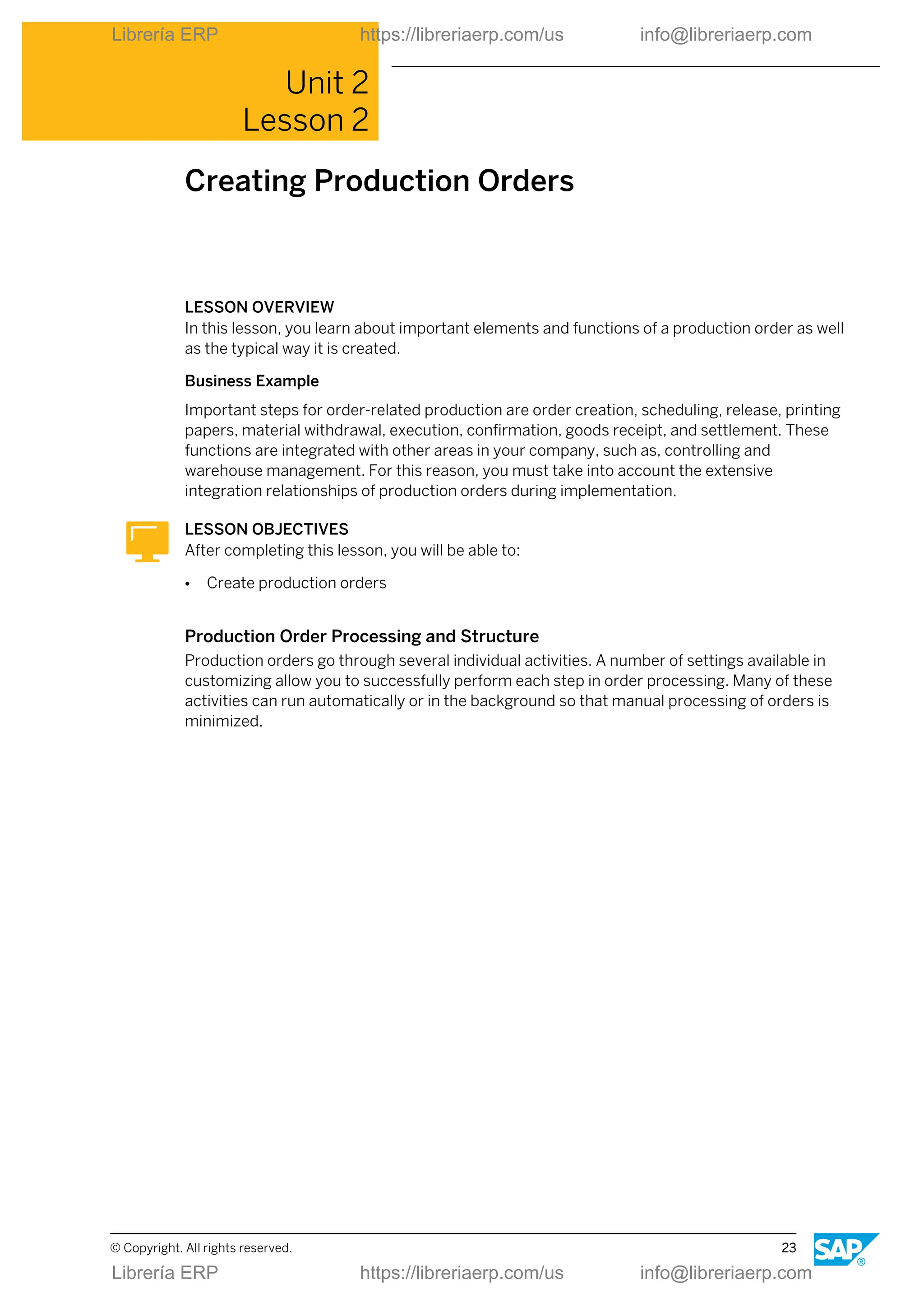
  • 50.
    Note: If a scrapor rework quantity is confirmed, a quality notification can be generated automatically. Process Integration The process integration forms the interface between SAP ERP shop floor control and the systems that are involved in process control (such as process control computers, process control systems, CNC control). Figure 33: Process Integration The flexible structure of process integration enables the connection of fully automated, partially automated and manually operated lines. Process integration offers the following options: ● Bidirectional communication with standard plant data collection systems via the interface plant data collection (PP-PDC). ● Communication with the process control level using the PI-PCS (process industries process control system) interface or using work instructions: - Generating and sending control instructions with variable process instructions from released production orders. These process instructions provide a detailed definition of the process steps to be executed and the actual data to be confirmed (via process messages). Unit 2: Production Order Processing 42 © Copyright. All rights reserved. Librería ERP https://libreriaerp.com/us info@libreriaerp.com Librería ERP https://libreriaerp.com/us info@libreriaerp.com
  • 51.
    - Formatting thecontrol instructions in natural language in the form of work instructions and their manual processing by the machine operator on screen. - Sending the control instructions to process control computers using the PI-PCS interface and processing them automatically. - Receiving, checking and sending manually or automatically entered process messages with the actual data of the production process from the work instructions or the process control system using the PI-PCS interface. ● Reading and writing data points and events using the function SAP OPC Data Access (SAP ODA) by means of the OPC (Object Linking and Embedding for Process Control) server of the SAP ECC system (reading and writing using work instructions or by means of the function Automatically Create Process Messages). ● SAP MII (Manufacturing Integration and Intelligence) and SAP ME (Manufacturing Execution). ● RFID (Radio frequency identification). Production Order: Goods Receipt Posting The goods receipt posting (GR) is executed manually or automatically for the stock receipt of a material produced using a production order. Figure 34: Production Order: Goods Receipt Posting The following functions are executed when a goods receipt is posted: ● Generation of documents - Material documents Lesson: Executing Confirmation and Goods Receipt for Production Orders © Copyright. All rights reserved. 43 Librería ERP https://libreriaerp.com/us info@libreriaerp.com Librería ERP https://libreriaerp.com/us info@libreriaerp.com
  • 52.
    The material documentdescribes the goods movement from the materials management (stock) point of view. You can print a goods receipt document. When you display the material document, you can branch to other documents. - Accounting documents The accounting document describes the goods movement from the financial accounting point of view. - Cost accounting documents The cost accounting documents are used for various cost analysis purposes. ● Update of the delivered quantity in an order ● Evaluation of the receipt ● Credit to order ● Update of plant activity Cost Object Controlling The manner in which a production order is credited and debited depends on the variant of Cost Object Controlling (COC) selected in Controlling. You can perform this as follows: ● Order-related ● Product-related Order-Related Cost Object Controlling In order related COC the Order settlement credits the order. Settlement is usually periodic. It is controlled using a settlement profile. Unit 2: Production Order Processing 44 © Copyright. All rights reserved. Librería ERP https://libreriaerp.com/us info@libreriaerp.com Librería ERP https://libreriaerp.com/us info@libreriaerp.com
  • 53.
    Figure 35: CostDebit/Credit: Order-Related Cost Object Controlling It makes sense to use the order-related COC if the following conditions exist: ● Flexible production environment ● Flexible product range ● Cost management of individual production lots ● Cost controlling required for each order ● High setup costs ● Manufacture of co-products For in-house production of materials, it is generally best to use standard price control. Product-Related Cost Object Controlling In product-related COC settlement is period-oriented based on the costs of the product cost collector. The order settlement for the individual production order does not apply here. In this case, the production order has no costs and no settlement rule. Lesson: Executing Confirmation and Goods Receipt for Production Orders © Copyright. All rights reserved. 45 Librería ERP https://libreriaerp.com/us info@libreriaerp.com Librería ERP https://libreriaerp.com/us info@libreriaerp.com
  • 54.
    Figure 36: CostDebit/Credit: Product-Related Cost Object Controlling It makes sense to use the product-related COC if the following conditions exist: ● Make-to-stock production ● Repetitive manufacturing, mass production ● Product cost by sales order only in the profitability analysis LESSON SUMMARY You should now be able to: ● Execute confirmation and goods receipt for production orders Unit 2: Production Order Processing 46 © Copyright. All rights reserved. Librería ERP https://libreriaerp.com/us info@libreriaerp.com Librería ERP https://libreriaerp.com/us info@libreriaerp.com
  • 55.
    Unit 2 Lesson 6 EvaluatingProduction Orders LESSON OVERVIEW In this lesson you will evaluate production orders. Business Example As production scheduler you must be well versed in evaluating production orders. LESSON OBJECTIVES After completing this lesson, you will be able to: ● Evaluate production orders Information Systems for Order Management There are flexible evaluation options and several information systems for production orders. They differ in the way they use the order database (directly or indirectly) as well as in the results they are able to show. Figure 37: Information Systems for Order Management In the figure, Information Systems for Order Management, systems indicated by (1) are layout-controlled. You set layouts in the respective application. You can use the Enterprise © Copyright. All rights reserved. 47 Librería ERP https://libreriaerp.com/us info@libreriaerp.com Librería ERP https://libreriaerp.com/us info@libreriaerp.com
  • 56.
    Portal for therole of a production scheduler to process and track production orders, among others. In addition to the above-mentioned evaluation options, there are further possibilities: ● Capacity evaluations ● Event Manager (SAP SCM-EM) ● Alert Monitor (SAP SCM-APO) ● Batch where-used list ● Evaluation of digital signatures LESSON SUMMARY You should now be able to: ● Evaluate production orders Unit 2: Production Order Processing 48 © Copyright. All rights reserved. Librería ERP https://libreriaerp.com/us info@libreriaerp.com Librería ERP https://libreriaerp.com/us info@libreriaerp.com
  • 57.
    Unit 2 Learning Assessment 1.Name some application areas for production orders. 2. Name some basic functions of the production order. 3. Name the logistics master data objects for the production order. 4. Name the main steps in the processing of a production order before the shop floor papers are printed. 5. Name the main steps when a goods issue for a production order is posted. 6. Which setting is necessary to support an automatic posting of stock receipt during confirmation? 7. Which transaction code leads to the order information system for production orders? © Copyright. All rights reserved. 49 Librería ERP https://libreriaerp.com/us info@libreriaerp.com Librería ERP https://libreriaerp.com/us info@libreriaerp.com
  • 58.
    Unit 2 Learning Assessment- Answers 1. Name some application areas for production orders. Engineering, automotive, plant engineering, electronics industry, etc. 2. Name some basic functions of the production order. Status management. scheduling, costing, availability check, material staging, etc. 3. Name the logistics master data objects for the production order. Material master, BOM, work center, routing, production resource/tools, documents 4. Name the main steps in the processing of a production order before the shop floor papers are printed. Order creation, Scheduling, Availability check, Order release 5. Name the main steps when a goods issue for a production order is posted. Update of stock and consumption fields, reduction of reservations, update of actual costs, generation of material documents & accounting documents & cost accounting documents, update of order 6. Which setting is necessary to support an automatic posting of stock receipt during confirmation? The auto goods receipt setting in the control key must be activated. 7. Which transaction code leads to the order information system for production orders? COOIS 50 © Copyright. All rights reserved. Librería ERP https://libreriaerp.com/us info@libreriaerp.com Librería ERP https://libreriaerp.com/us info@libreriaerp.com
  • 59.
    UNIT 3 ProcessOrder Processing Lesson 1 Outlining Process Orders 53 Lesson 2 Creating and Interpreting Process Orders 63 Lesson 3 Executing Process Orders 71 Lesson 4 Using Additional Functions with Process Orders 87 UNIT OBJECTIVES ● Outline process orders ● Create and interpret process orders ● Execute process orders ● Use additional functions with process orders © Copyright. All rights reserved. 51 Librería ERP https://libreriaerp.com/us info@libreriaerp.com Librería ERP https://libreriaerp.com/us info@libreriaerp.com
  • 60.
    Unit 3: ProcessOrder Processing 52 © Copyright. All rights reserved. Librería ERP https://libreriaerp.com/us info@libreriaerp.com Librería ERP https://libreriaerp.com/us info@libreriaerp.com
  • 61.
    Unit 3 Lesson 1 OutliningProcess Orders LESSON OVERVIEW In this lesson you will be introduced to the application areas and characteristics of process orders. You will get an overview of the general process and the relevant master data. Business Example Your company is a process manufacturing company. You produce order-related products. You are on the project team for implementing shop floor control functions based on process orders. LESSON OBJECTIVES After completing this lesson, you will be able to: ● Outline process orders Application Areas of Process Orders Process orders are used in different areas of the process manufacturing industry. Figure 38: Application Areas of Process Orders Process orders can be used for various production procedures and identified, for example, according to the criteria product complexity and product stability. © Copyright. All rights reserved. 53 Librería ERP https://libreriaerp.com/us info@libreriaerp.com Librería ERP https://libreriaerp.com/us info@libreriaerp.com
  • 62.
    Process Order Characteristics Processorders are used in process industries (PI) and are widely integrated to different applications, systems and modules. Figure 39: Process Order-Controlled Production: Characteristics Note: The creation of process orders corresponds in many ways to the creation of production orders. In process manufacturing, there are usually increased requirements with regard to the integration of batch management and quality management (*) within the supply chain. Unit 3: Process Order Processing 54 © Copyright. All rights reserved. Librería ERP https://libreriaerp.com/us info@libreriaerp.com Librería ERP https://libreriaerp.com/us info@libreriaerp.com
  • 63.
    Basic Functions ofthe Process Order Figure 40: Process Order-Controlled Production: Basic Functions The following basic functions are usually used in process manufacturing: 1. A production version must be selected for order creation. 2. The materials in process manufacturing are typically managed in batches. There are functions for batch number assignment for the product and for batch determination of material components. 3. After order release, control recipes with parameters for the process control level can be generated and sent to an external system or formatted in the form of a process instruction sheet (PI sheet) to be processed interactively on the screen. Connection to Process Control Level Process management is the interface between the process orders and the systems involved in process control. Due to its flexible structure, it can be connected to fully automated, partially automated, and manually operated lines. Lesson: Outlining Process Orders © Copyright. All rights reserved. 55 Librería ERP https://libreriaerp.com/us info@libreriaerp.com Librería ERP https://libreriaerp.com/us info@libreriaerp.com
  • 64.
    Figure 41: ProcessOrder-Controlled Production: Connection to Process Control Level Process management includes communication with the process control level using the PI- PCS (process control system) interface or using PI sheets: ● Control recipes are sent from released process orders to process control systems or are formatted in natural language as a PI sheet in the SAP ECC system. ● Process messages with actual data about the process are accepted from the PI sheet or process control system. The following options can also be used to cover process management tasks: ● SAP OPC Data Access (SAP ODA) SAP ODA enables the reading and writing of data points and events using the OPC server of the SAP ECC system. OPC stands for OLE for Process Control and Openness, Productivity and Connectivity and is an industry standard. OPC servers enable you to access different data sources (for example, process control systems, memory programmable controls, temperature sensors) and thus provide process data which can be requested by OPC clients. ● SAP MII With SAP MII (Manufacturing Integration and Intelligence ) SAP provides an adaptive manufacturing solution for production. SAP MII gives production companies increased flexibility by linking the SAP ERP solution better with the production process level and by making near-real-time information available to employees. SAP MII uses standardized, pre-configured connectors to facilitate real-time data integration in manufacturing execution systems (MES) and SCADA systems (Supervisory Control and Data Acquisition). Real-time analyses can be performed and their results displayed in dashboards that are browser-based and role-based. They provide important information Unit 3: Process Order Processing 56 © Copyright. All rights reserved. Librería ERP https://libreriaerp.com/us info@libreriaerp.com Librería ERP https://libreriaerp.com/us info@libreriaerp.com
  • 65.
    for monitoring andsupporting decisions, such as warnings, task lists, analyses, reports and near-real-time messages on production variances. Cross-Application Functional Process Process order management is a central part of a complex process chain starting with a requirement (planned or customer requirement) and ending with the goods issue of finished products. Figure 42: Cross-Application Functional Process Process order management controls the entire process of in-house production of products and is integrated in the following functions: ● Capacity requirements planning ● Costing ● Inventory management ● Batch management ● Quality management (QM) ● Process control systems (PCS) ● Laboratory information systems ( LIMS) To Use Process Orders Several steps are part of a typical process using process orders: 1. Forecasting strategic material (using Sales and Operations Planning, for example). 2. Setting up the demand program (using planning strategies, including requirements from sales department). Lesson: Outlining Process Orders © Copyright. All rights reserved. 57 Librería ERP https://libreriaerp.com/us info@libreriaerp.com Librería ERP https://libreriaerp.com/us info@libreriaerp.com
  • 66.
    3. If necessary,using Material Requirements Planning to create planned receipts. 4. Convert planned orders to process orders. 5. Execute process orders (capacity planning, material staging, confirmation, etc.). 6. Post goods receipt and settle order. 7. Batch record and archive. Master Data for Process Orders Master data is data in the SAP system that remains unchanged over a long period of time. It contains information that is required in the same manner over and over again. Figure 43: Master Data for Process Orders Several master data objects are used to characterize and determine process orders in logistics. ● Material The material is the central master record in logistics. In general, SAP defines a material as a substance or commodity that is bought or sold on a commercial basis, or is used, consumed, or created in production. ● Batch A batch is a uniquely identifiable partial quantity of a material. The batches of one material are managed separately in stock. With regard to the production process, a batch is a quantity of a specific material produced during a given production run. This quantity, therefore, represents a non-reproducible unit with unique specifications. ● Resource Unit 3: Process Order Processing 58 © Copyright. All rights reserved. Librería ERP https://libreriaerp.com/us info@libreriaerp.com Librería ERP https://libreriaerp.com/us info@libreriaerp.com
  • 67.
    The master datafor resources describes the means of production in the production process. ● Production version: A production version determines which BOM in combination with which master recipe is used for process order manufacturing. ● Recipe The master data of the master recipes describes the production of one or more materials in one production run without relating to a particular order. ● BOM Material BOMs describe the structure of products that are produced in a company. They are usually created and maintained from the master recipe (integrated maintenance). Relationship between Materials and Batch Especially in the process industry it is necessary to work continuously through the logistical quantity and value chain using homogeneous partial quantities of a material. Figure 44: Material and Batch In SAP ERP this has the following consequences for the relationship between materials and the according batches: ● Batch master records always depend on material master records. The system usually creates batches for a material automatically for certain business operations (such as goods receipt). You can also create batch master records manually. Lesson: Outlining Process Orders © Copyright. All rights reserved. 59 Librería ERP https://libreriaerp.com/us info@libreriaerp.com Librería ERP https://libreriaerp.com/us info@libreriaerp.com
  • 68.
    ● In general,the data of a material master is valid for all batches assigned to it. In contrast, a batch master record contains data that uniquely identifies the relevant batch and characterizes it as a non-reproducible unit. ● The characteristic batch specifications are assigned using characteristics from the classification system in the material master and are inherited by the corresponding batch master records. Batch Management in Supply Chain Management A batch can be traced across the whole supply chain, from the receipt of the raw material to processing in production and the creation of the final product, all the way to sales and delivery to the customer. Figure 45: Batch Management in Supply Chain Management A batch master record can be used to assign a batch to a material at different places along the supply chain. For example, if the partial quantity of a material produced in batches leaves a process order with certain specifications, it is posted to stock with a batch number and can be uniquely identified there. Note: If a batch is required in the supply chain with certain specifications, the batch determination can be used to have the system find suitable batches (of components, for example) in stock. Demo Scenario: Ice Cream Production in Plant 1100 The system work in this lesson is based on an ice cream production scenario. Unit 3: Process Order Processing 60 © Copyright. All rights reserved. Librería ERP https://libreriaerp.com/us info@libreriaerp.com Librería ERP https://libreriaerp.com/us info@libreriaerp.com
  • 69.
    Figure 46: DemoScenario: Ice Cream Production in Plant 1100 LESSON SUMMARY You should now be able to: ● Outline process orders Lesson: Outlining Process Orders © Copyright. All rights reserved. 61 Librería ERP https://libreriaerp.com/us info@libreriaerp.com Librería ERP https://libreriaerp.com/us info@libreriaerp.com
  • 70.
    Unit 3: ProcessOrder Processing 62 © Copyright. All rights reserved. Librería ERP https://libreriaerp.com/us info@libreriaerp.com Librería ERP https://libreriaerp.com/us info@libreriaerp.com
  • 71.
    Unit 3 Lesson 2 Creatingand Interpreting Process Orders LESSON OVERVIEW In this lesson, you learn about important elements and functions of a process order as well as the typical way it is created. Business Example Important steps in process order management are order creation, batch determination, scheduling, availability checks, release, transfer of control recipes to process control, material withdrawal, confirmations, material delivery, and settlement. The first step in process management is the creation of the process order. Based on this, you will explore some basic functionalities within the order. LESSON OBJECTIVES After completing this lesson, you will be able to: ● Create and interpret process orders Process Flow and Structure of Process Order Process orders go through several individual activities. A number of settings available in customizing allow you to successfully perform each step in order processing. Many of these activities can run automatically or in the background so that manual processing of orders is minimized. © Copyright. All rights reserved. 63 Librería ERP https://libreriaerp.com/us info@libreriaerp.com Librería ERP https://libreriaerp.com/us info@libreriaerp.com
  • 72.
    Figure 47: Processinga Process Order The procedure involved in process order management can be divided into the following steps: ● Process planning ● Process order execution or process management ● Order Completion The following processes are generally periodic work for Cost Object Controlling (COC) and are usually processed in the background: ● Variance calculation ● Settlement Structure of the Process Order Apart from the header process orders contain operation and material information. Unit 3: Process Order Processing 64 © Copyright. All rights reserved. Librería ERP https://libreriaerp.com/us info@libreriaerp.com Librería ERP https://libreriaerp.com/us info@libreriaerp.com
  • 73.
    Figure 48: Structureof the Process Order ● Operations Operations describe the different steps required during the production process. For a more detailed description of these steps, operations are assigned phases. Exactly one resource is assigned to an operation. At the same time, the resource assignment applies for all phases assigned to the operation. The processing sequence of the phases is defined in relationships. ● Materials The material list is made up of components representing the materials entering and leaving the production process as well as temporarily existing materials and their planned quantities. It also defines the assignment of these material components to phases of the order according to their appearance in the process. In material quantity calculation, you define formulas to calculate the material quantities to be used or obtained in a production process, taking into account the mixing ratios of the input materials, yield ratios of the products and remaining materials as well as specific material attributes (for example, active ingredients). Lesson: Creating and Interpreting Process Orders © Copyright. All rights reserved. 65 Librería ERP https://libreriaerp.com/us info@libreriaerp.com Librería ERP https://libreriaerp.com/us info@libreriaerp.com
  • 74.
    Elements of theProcess Order Figure 49: Elements of the Process Order Different elements typically characterize a process order and its handling: ● Phases and operations Phases are used for the following processes: - Scheduling - Determining capacity requirements - Costing The dates and capacity requirements for operations are derived from the corresponding phases. Operations and phases can be assigned further resources or secondary resources, if required. The same business transactions can be executed for secondary resources as for phases. Secondary resources can, for example, be included in the following processes: - Scheduling - Capacity requirements planning - Costing ● Control key A control key must be entered for both the phases and the secondary resources. The control key is used to determine how an operation or phase is to be treated in operative applications such as the following: Unit 3: Process Order Processing 66 © Copyright. All rights reserved. Librería ERP https://libreriaerp.com/us info@libreriaerp.com Librería ERP https://libreriaerp.com/us info@libreriaerp.com
  • 75.
    - Process orders -Costing - Capacity requirements planning ● Standard values A standard value is a planned value used to carry out a phase or secondary resource, such as the execution time. Standard values are used for calculations in the following applications: - Costing - Scheduling - Capacity requirements planning There are mainly two alternatives for data maintenance in process management: ● Process instructions are structures used to transfer data from process orders to process control (PI sheets or process control systems). Process instructions are assigned to the phases of a process order. The process instructions are combined into control recipes, which are then transferred to the control recipe destinations defined for the phases. ● Data for the process management can alternatively be maintained in the form of SAP Execution Steps (XSteps). Using XSteps allows you to maintain process instructions in the form of reusable and referenceable modules. A standard XStep repository is available with version management. Order Creation Options There are different options to create a process order. Figure 50: Order Creation Options Lesson: Creating and Interpreting Process Orders © Copyright. All rights reserved. 67 Librería ERP https://libreriaerp.com/us info@libreriaerp.com Librería ERP https://libreriaerp.com/us info@libreriaerp.com
  • 76.
    ● Order creationwith planned order To create a planned order in process management, a suitable production version is determined for the material based on the validity period and charge quantity range. A production version determines which BOM in combination with which master recipe is used for production. When a planned order is converted, the production version created for it is made known to the process order and its recipe is transferred. The BOM is not reread, rather the dependent requirements of the planned order are converted to reservations for the process order. ● Order creation without planned order If a process order is created without a planned order, it takes the recipe and BOM from the production version directly. Planning Integration For planning tasks, both SAP ERP and SAP SCM-APO can be used. Figure 51: Integration with Planning (SAP ECC or SAP SCM-APO) Therefore the ERP and SCM applications offer alternatives for integrating planning and production: ● Planning with the functions of the SAP ECC component ● Planning with the functions of the SAP SCM-APO component ● Planning with both functions of the SAP ECC and SAP SCM-APO component Planning tasks can usually be either carried out using SAP ECC or SAP SCM-APO. Examples are: ● Material requirements planning Unit 3: Process Order Processing 68 © Copyright. All rights reserved. Librería ERP https://libreriaerp.com/us info@libreriaerp.com Librería ERP https://libreriaerp.com/us info@libreriaerp.com
  • 77.
    ● Capacity planning ●Availability check In contrast to this, the following steps always occur with the functions of the SAP ECC component: ● Production preparation ● Production execution ● Production control These functions in SAP ECC include the following tasks: ● Costing ● Release ● Material staging ● Confirmation ● Goods movements ● Settlement Order Creation Based on Planned Orders In planning, planned orders are created using material requirements planning. Figure 52: Order Creation with Planned Orders The creation of process orders using planned orders is the most common case of application. The process order data is created automatically in this way. The conversion of planned orders into process orders can be carried out by MRP controllers or by reports. Lesson: Creating and Interpreting Process Orders © Copyright. All rights reserved. 69 Librería ERP https://libreriaerp.com/us info@libreriaerp.com Librería ERP https://libreriaerp.com/us info@libreriaerp.com
  • 78.
    Batch Determination You canuse the batch determination function to assign batches with certain material specifications required for production. Figure 53: Batch Determination Based on a search strategy the system looks for batches in stock and selects them according to specific selection criteria. An availability check is performed at batch level. LESSON SUMMARY You should now be able to: ● Create and interpret process orders Unit 3: Process Order Processing 70 © Copyright. All rights reserved. Librería ERP https://libreriaerp.com/us info@libreriaerp.com Librería ERP https://libreriaerp.com/us info@libreriaerp.com
  • 79.
    Unit 3 Lesson 3 ExecutingProcess Orders LESSON OVERVIEW In this lesson, you learn about important elements and functions of a process order as well as the typical way it is processed. Business Example Important steps in process order management are order creation, batch determination, scheduling, availability checks, release, transfer of control recipes to process control, material withdrawal, confirmations, material delivery, and settlement. To link the process control level with process control systems and PI sheets, you must set up the process management functions. The prerequisite for process order processing is the order release you will deal with in this lesson. Based on this, you will process an order using the PI sheet. LESSON OBJECTIVES After completing this lesson, you will be able to: ● Execute process orders Order Release Functions Process orders have a status management that controls the possible processing sequence of the individual business operations. When an order is released, a status is set accordingly. © Copyright. All rights reserved. 71 Librería ERP https://libreriaerp.com/us info@libreriaerp.com Librería ERP https://libreriaerp.com/us info@libreriaerp.com
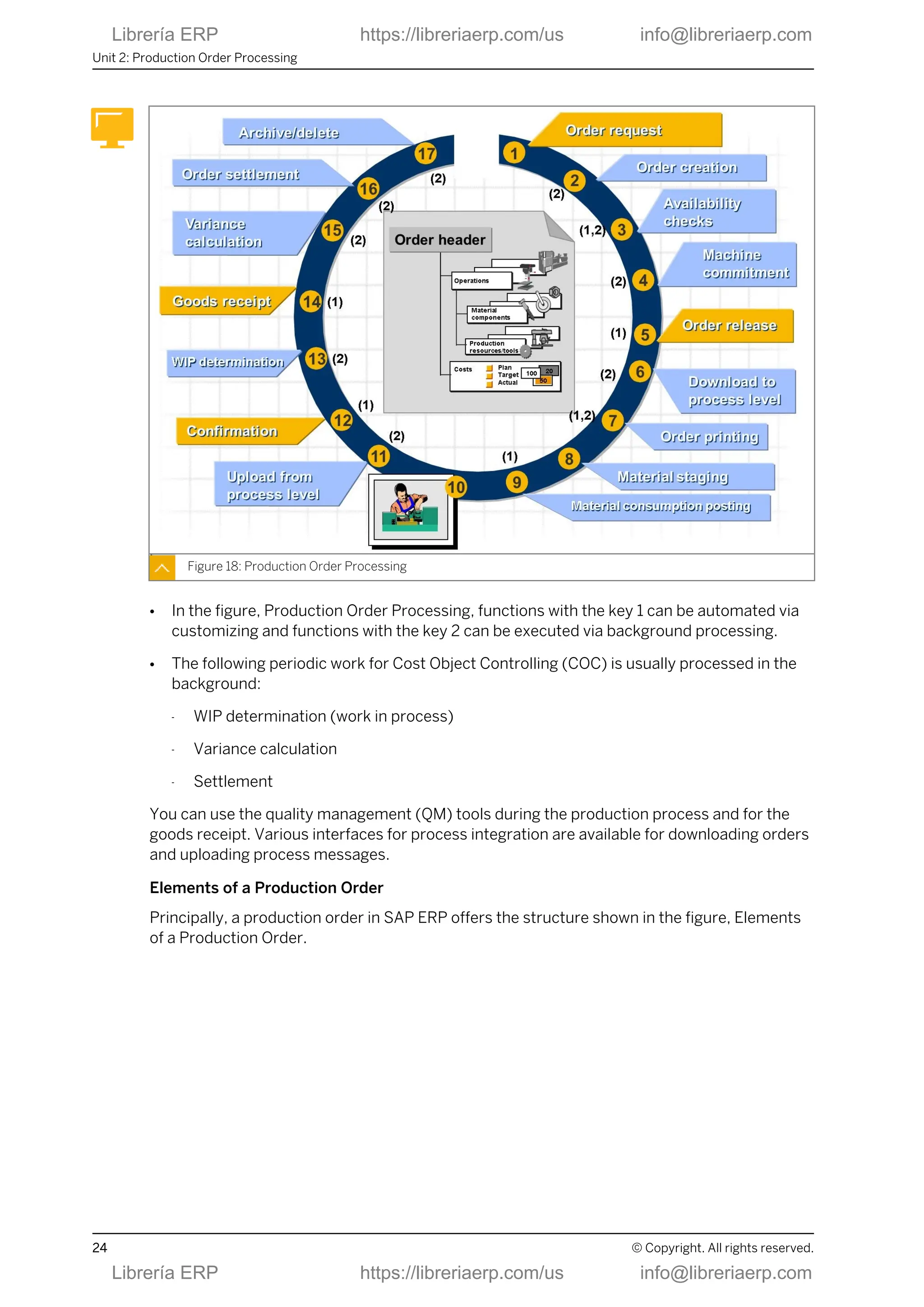
  • 80.
    Figure 54: OrderRelease Functions The process order must have status "Released" so that the business transactions for process order execution and process management can be executed. You can release the following objects: ● Individual Phases ● Individual Operations ● One complete order ● Several orders at once Various activities can be triggered automatically by an order release: ● Batch number assignment for the product ● Batch determination for the material components ● Material availability check ● Control recipe generation ● Generation of an inspection lot for an in-process quality check Detailed Planning Integration Detailed planning (capacity planning, work center commitment) can be carried out both in SAP ERP and in SAP SCM-APO. A prerequisite for all methods of detailed planning is rough long-term or medium-term capacity requirements planning. Unit 3: Process Order Processing 72 © Copyright. All rights reserved. Librería ERP https://libreriaerp.com/us info@libreriaerp.com Librería ERP https://libreriaerp.com/us info@libreriaerp.com
  • 81.
    Figure 55: DetailedPlanning on Work Centers You can use the order information system to create a list of the operations for each resource. Example: Graphical Planning Table Leveling of complex capacity requirements you usually carry out using graphical planning tools. The figure, Example: Graphical Planning Table shows an example of a graphical detailed scheduling planning board in the SAP SCM-APO) component. Orders and operations can be displayed and accessed in Gantt charts. Lesson: Executing Process Orders © Copyright. All rights reserved. 73 Librería ERP https://libreriaerp.com/us info@libreriaerp.com Librería ERP https://libreriaerp.com/us info@libreriaerp.com
  • 82.
    Figure 56: Example:Graphical Planning Table A planning board like this is also available in the SAP ECC system. The planning boards can be customized and therefore can vary considerably in their appearance. Typical charts for capacity planning are the following: ● Utilization of resources (capacities) ● Order due list ● Planned operations ● Material stock development A second basic display method uses tabular capacity planning tables that enable you to evaluate the utilization of resources in figures. Availability Checks In production orders you can perform availability checks for the following objects: ● Material (components) ● Capacity This can be done manually or automatically, individually or using mass processing. Unit 3: Process Order Processing 74 © Copyright. All rights reserved. Librería ERP https://libreriaerp.com/us info@libreriaerp.com Librería ERP https://libreriaerp.com/us info@libreriaerp.com
  • 83.
    Figure 57: AvailabilityChecks (Material, Capacity) Check instructions control the availability check in customizing. Check results can be the following: ● Assignment of the confirmed quantity (partial quantities can be confirmed) ● Status material shortage, capacity shortage ● Missing part record Note: Production resources/tools are not supported in process industries. Process Management Process management is the interface between SAP ERP and the systems involved in process control. Due to its flexible structure, you can connect it to fully automated, partially automated, and manually operated lines. Lesson: Executing Process Orders © Copyright. All rights reserved. 75 Librería ERP https://libreriaerp.com/us info@libreriaerp.com Librería ERP https://libreriaerp.com/us info@libreriaerp.com
  • 84.
    Figure 58: ProcessManagement Process management includes the following functions: ● Communication with the process control level via the PI-PCS (process control system) interface or PI sheets: - Receiving control recipes with process instructions from released process orders The process instructions define in detail the process steps to be executed and the process data to be confirmed using process messages. - Manual maintenance Control recipes in natural language in the form of PI sheets can be displayed and maintained on the screen by the process operator. - Automatic processing You can set up an automatic transfer of control recipes to process control systems via the PI-PCS interface. - Receiving, checking, and sending process messages from the process control system or the PI sheet The actual process data is transferred from the external system via the PI-PCS interface. ● Reading and writing data points and events via the function SAP OPC Data Access (SAP ODA) using the OPC server of the SAP ECC system: - Reading and writing using a PI sheet. - Reading using the function for automatically creating process messages. Unit 3: Process Order Processing 76 © Copyright. All rights reserved. Librería ERP https://libreriaerp.com/us info@libreriaerp.com Librería ERP https://libreriaerp.com/us info@libreriaerp.com
  • 85.
    HTML-Based PI Sheet TheSAP PI sheet favors processing on the screen, which means the process operator is to enter, confirm, or complete data interactively. Figure 59: HTML-based PI Sheet I PI sheets are created in HTML layout. The browser-based PI sheet gives you the advantage of a flexible, user-specific layout definition and allows you to define frames, for example, for including documents, graphics, Internet and Intranet links. Lesson: Executing Process Orders © Copyright. All rights reserved. 77 Librería ERP https://libreriaerp.com/us info@libreriaerp.com Librería ERP https://libreriaerp.com/us info@libreriaerp.com
  • 86.
    HTML-based PI SheetII Figure 60: HTML-based PI Sheet II In connection with the process instructions contained in a control recipe, the PI sheet has the following elements and functions: ● Display of information about the process (control instructions, for example) ● Input fields and tables for reporting process data, input validations and signatures ● Batch determination and batch check ● Process data calculation ● Reading and writing data from internal or external applications ● Link to quality management results recording ● Sequence definition for determining the processing sequence of phases ● Comments on documentation and messages from process events Material Staging Process To organize the material staging, the SAP ECC and SAP SCM systems provide the following different procedures that depend on the type of inventory management and warehousing: 1. Warehouse management with the MM-IM (Inventory Management) component 2. Replenishment control with the Kanban component 3. Storage bin management and replenishment control with a warehouse management system based on the component LE-WM (Logistics Execution Warehouse Management in SAP ERP) or EWM (Extended Warehouse Management in SAP SCM). Unit 3: Process Order Processing 78 © Copyright. All rights reserved. Librería ERP https://libreriaerp.com/us info@libreriaerp.com Librería ERP https://libreriaerp.com/us info@libreriaerp.com
  • 87.
    Figure 61: MaterialStaging Process The basis for material withdrawal for process orders are the following applications: ● Material withdrawal slips ● Pull lists ● Pick lists ● PI sheets ● Weighing systems linked via the PI-PCS interface (or similar documents or techniques) For the material staging from a warehouse management system, there are different options for the process order: ● Pick parts Pick parts are provided for the process order in exactly the same quantity as the requirements quantity. The staging of these parts for the process order may occur in a physical storage bin or a dynamic storage bin. ● Process Management ● Crate parts Crate parts are ordered manually when a crate is almost empty. ● Release order parts Release order parts are ordered manually. The required quantity is calculated using the target quantities of the components in the selected released orders. Lesson: Executing Process Orders © Copyright. All rights reserved. 79 Librería ERP https://libreriaerp.com/us info@libreriaerp.com Librería ERP https://libreriaerp.com/us info@libreriaerp.com
  • 88.
    Process Orders Postingsto System The standard postings for process orders (goods issue, confirmation, goods receipt) can be entered manually in the SAP ECC system, or using process messages from a PI sheet or a process control system. Figure 62: Standard Postings for Process Orders The process instructions of the order define which process messages are requested from a PI sheet or a process control system. Unit 3: Process Order Processing 80 © Copyright. All rights reserved. Librería ERP https://libreriaerp.com/us info@libreriaerp.com Librería ERP https://libreriaerp.com/us info@libreriaerp.com
  • 89.
    Process Order: GoodsIssue Posting Figure 63: Process Order: Goods Issue Posting The following functions are executed when a goods issue is posted: ● Storage location-related update of stock and consumption fields ● Reduction of reservations (for planned withdrawal) ● Determination of actual costs (evaluation) and update of order ● Generation of material documents, accounting documents and cost accounting documents The following documents are created: ● The material document describes the goods movement from the materials management (stock) point of view. ● The accounting document describes the goods movement from the financial accounting point of view. ● The cost accounting documents are used for various cost analysis purposes. In this context you have the following options: ● When you display the material document, you can branch to the other documents. ● You can print a goods issue document. Process Orders Confirmation Confirmations are an important basis for entering internal activities performed for the order, for the progress check and subsequent capacity requirements planning. For this reason, exact real-time confirmations are of particular importance. A confirmation causes various additional functions to be executed. Lesson: Executing Process Orders © Copyright. All rights reserved. 81 Librería ERP https://libreriaerp.com/us info@libreriaerp.com Librería ERP https://libreriaerp.com/us info@libreriaerp.com
  • 90.
    Figure 64: Confirmations– Overview Confirmations are always executed in the SAP ECC component, but can be implemented with different technical procedures: ● Using online transactions ● Using the browser-based Enterprise Portal ● Using the PP-PDC interface ● Using automatic process messages ● Using an SAP MII server There are various procedures for confirmations. Each procedure implements different requirements that a company might have. Depending on the application, one or more procedures may be used. The procedures must be selected to suit the methods of organization within your company and the allowed workload. Unit 3: Process Order Processing 82 © Copyright. All rights reserved. Librería ERP https://libreriaerp.com/us info@libreriaerp.com Librería ERP https://libreriaerp.com/us info@libreriaerp.com
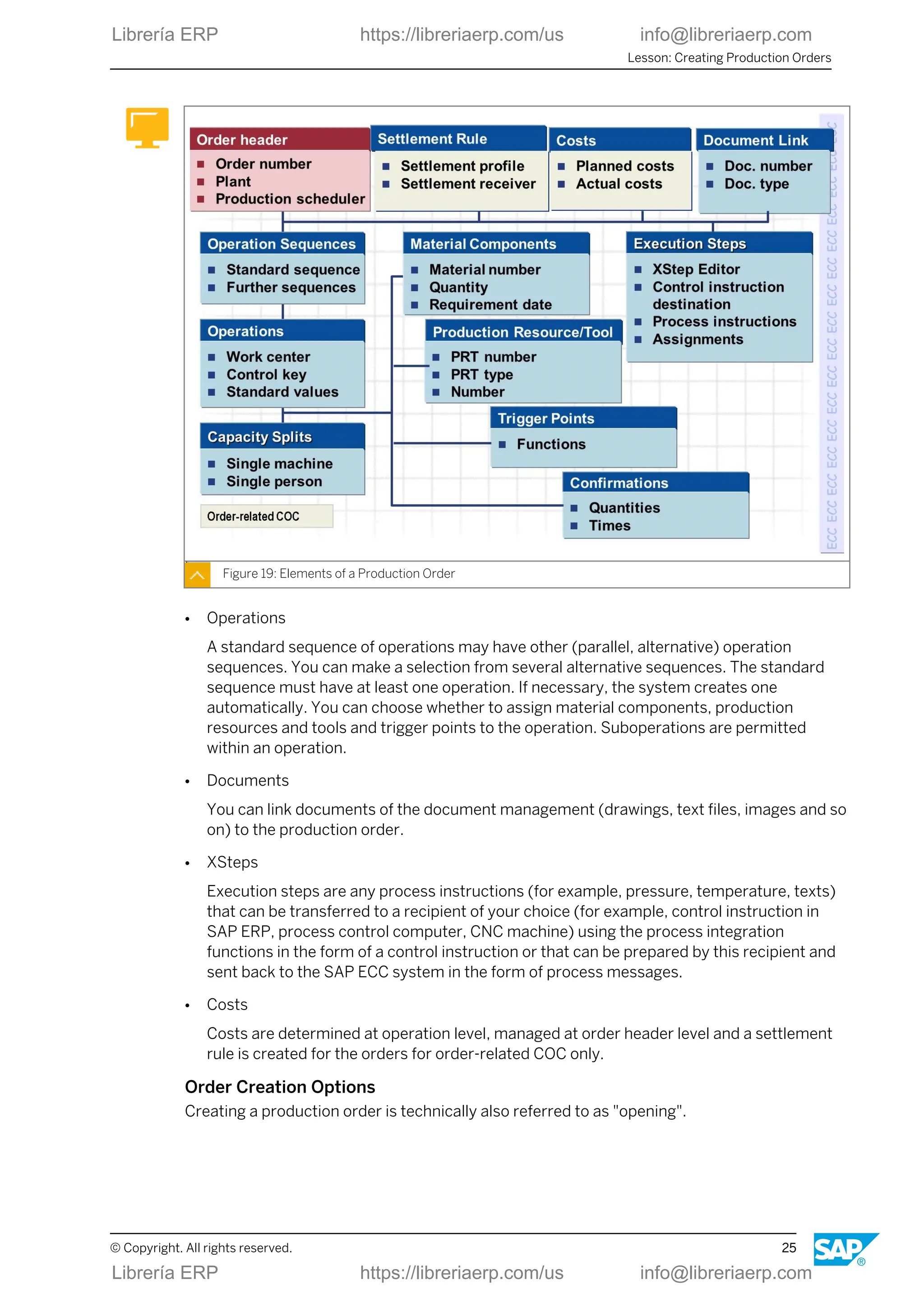
  • 91.
    Types of Confirmations Figure65: Types of Confirmations Each confirmation is entered with a status: ● Partial confirmation ● Final confirmation ● Automatic final confirmation For the most part, the main types are the following: ● Phase-related confirmations A phase confirmation allows you to confirm an order step by step. ● Secondary resource-related confirmations A secondary resource can be compared to a suboperation and can be confirmed separately. ● Order-related confirmations Order confirmation is a confirmation of the entire order at order header level. Note: You can carry out a confirmation for an order only if no confirmations have already been entered for the phases. Flexible Data Entry with Process Messages Process messages are data structures with which actual data for a process is confirmed from process control to one or more destinations. Lesson: Executing Process Orders © Copyright. All rights reserved. 83 Librería ERP https://libreriaerp.com/us info@libreriaerp.com Librería ERP https://libreriaerp.com/us info@libreriaerp.com
  • 92.
    Figure 66: FlexibleData Entry with Process Messages The SAP standard system contains a number of predefined message categories that enable you to transfer actual data from process control to the SAP ECC system. Note: You can define your own process messages in customizing according to your own specific requirements. Compliance with GMP in Production The functions for GMP-compliant production (GMP = Good Manufacturing Practice) fulfill special requirements from the pharmaceuticals industry (safe production, product liability, obligation to produce supporting documents). Unit 3: Process Order Processing 84 © Copyright. All rights reserved. Librería ERP https://libreriaerp.com/us info@libreriaerp.com Librería ERP https://libreriaerp.com/us info@libreriaerp.com
  • 93.
    Figure 67: Functionsfor production in compliance with GMP The functions flagged with (*) are supported exclusively as part of process orders. The guidelines on Good Manufacturing Practice (GMP) laid down by the U.S. Food and Drug Administration (FDA) and other international institutions have become an international standard in many areas of process industries. In particular, they must be taken into account in processes of the pharmaceutical industry. Production in Compliance with GMP Figure 68: Production in Compliance with GMP ● Options for GMP-compliant production Lesson: Executing Process Orders © Copyright. All rights reserved. 85 Librería ERP https://libreriaerp.com/us info@libreriaerp.com Librería ERP https://libreriaerp.com/us info@libreriaerp.com
  • 94.
    - You canspecify that a process order can only be created if an approved recipe exists. The order data is therefore locked and cannot be changed. The approval procedure is performed in SAP ERP Engineering Change Management. - You can exchange information about the product quality and analysis values between the production plant and the laboratory or the quality assurance system. You use the SAP ERP quality management functionality to do so. - You can use the inspection results for batch specification by automatically copying them to the characteristics of the batch produced. - You can activate the digital signature function to execute certain business operations in the SAP ECC system. ● Tools for GMP-compliant production - Material identification function You use the material identification function to check whether the material that was picked for the process order is completely available at the production line and will be used in the correct sequence. - Material reconciliation function You use the material reconciliation function to analyze and verify the ingredients and yield at the end of the production process. - Batch record With regard to product liability, the batch record contains all planned and actual data for the production process of a batch. LESSON SUMMARY You should now be able to: ● Execute process orders Unit 3: Process Order Processing 86 © Copyright. All rights reserved. Librería ERP https://libreriaerp.com/us info@libreriaerp.com Librería ERP https://libreriaerp.com/us info@libreriaerp.com
  • 95.
    Unit 3 Lesson 4 UsingAdditional Functions with Process Orders LESSON OVERVIEW This lesson overviews some of the special functionality that exists for process orders to support certain industries like pharmaceuticals. You will also look at reporting for process order. Business Example Using process orders you get informed about further special functions. LESSON OBJECTIVES After completing this lesson, you will be able to: ● Use additional functions with process orders Enhanced Process Order Functions Several additional features enhance the range of standard functions of process orders. Figure 69: Enhanced Functions for Process Order The functions flagged with (*) are available for process orders only. © Copyright. All rights reserved. 87 Librería ERP https://libreriaerp.com/us info@libreriaerp.com Librería ERP https://libreriaerp.com/us info@libreriaerp.com
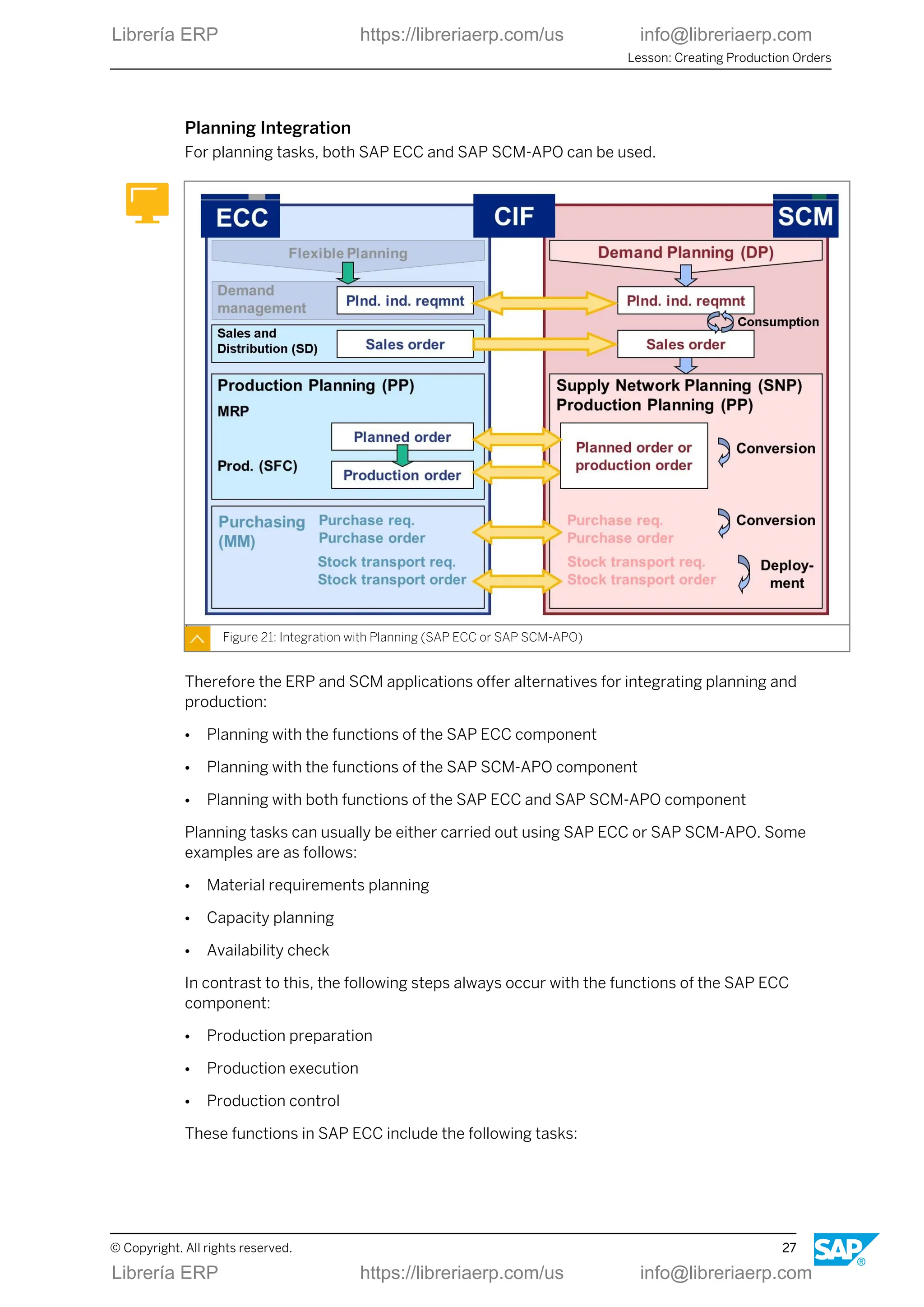
  • 96.
    Material Quantity Calculation Figure70: Material Quantity Calculation In material quantity calculation, you define formulas to calculate the material quantities to be used or obtained in a production process, taking into account the following items: ● Mixing ratios of the input materials ● Yield ratios of the products and remaining materials ● Specific batch attributes (for example, concentration, active ingredient content) You can also define formulas for calculating phase quantities in material quantity calculation. Note: By using batch determination in combination with the material quantity calculation and batch-specific alternative units of measure, you can implement active ingredient management in the process order. Unit 3: Process Order Processing 88 © Copyright. All rights reserved. Librería ERP https://libreriaerp.com/us info@libreriaerp.com Librería ERP https://libreriaerp.com/us info@libreriaerp.com
  • 97.
    Resource Network andResource Selection Figure 71: Resource Network and Resource Selection You can use the resource selection function to find suitable resources for carrying out an operation at the time of production. In system-aided resource selection, the system compares the characteristic values maintained for the resources and operations. The resource network, representing the physical connection of resources, can be taken into account during resource selection. Lesson: Using Additional Functions with Process Orders © Copyright. All rights reserved. 89 Librería ERP https://libreriaerp.com/us info@libreriaerp.com Librería ERP https://libreriaerp.com/us info@libreriaerp.com
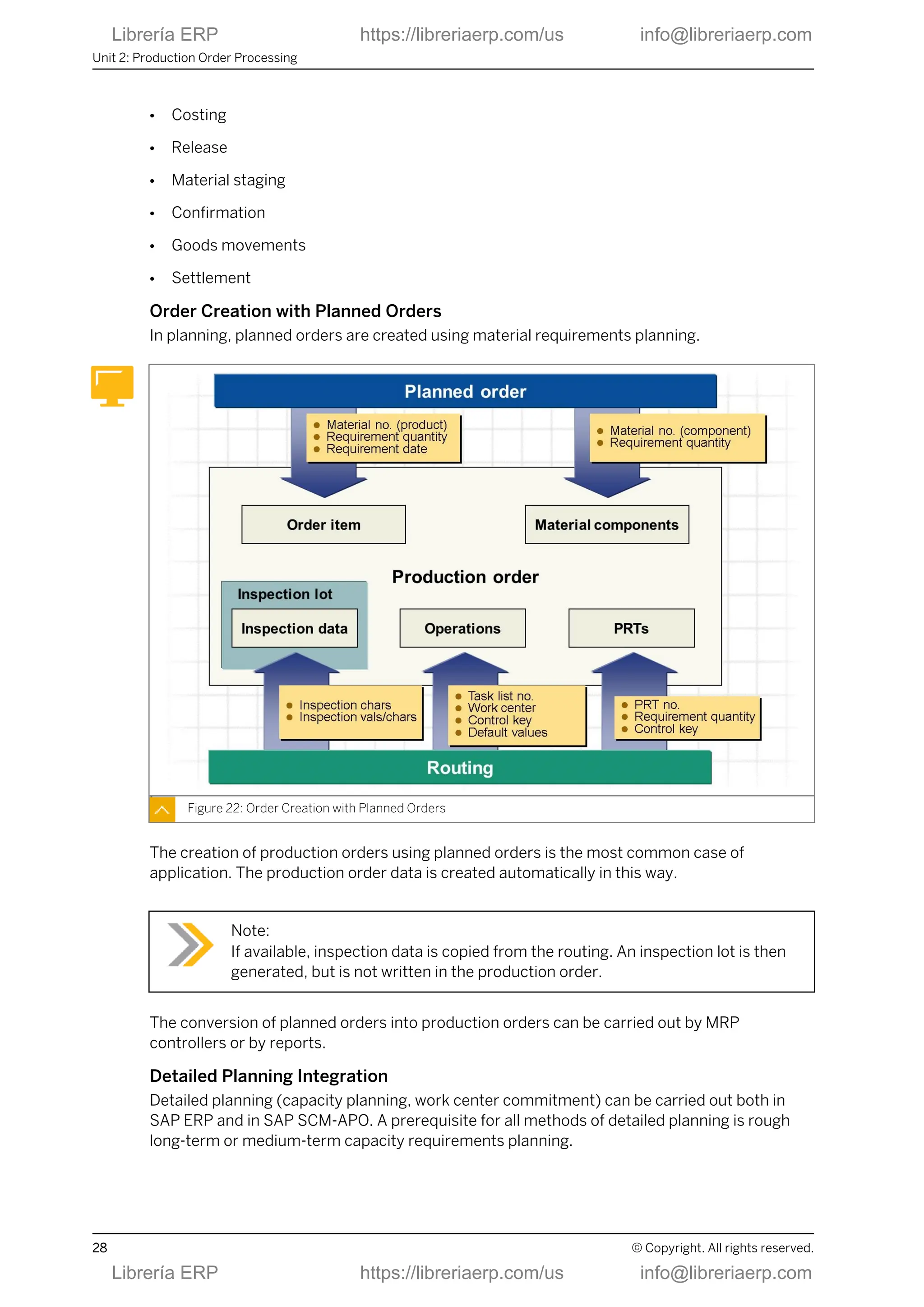
  • 98.
    Batch Derivation Figure 72:Batch Derivation Property Example components from the figure above Component batches can be sender of data B, D, G Produced batches can be receivers of data B, A Component can be sender and receiver B ● Process characteristics - You can use batch derivation to transfer, offer for selection, or display, batch master data and classification data from component batches that went into batches you produced. - To be able to derive batch data, you must have set up the batch where-used list. The derivation functions along the batch where-used list, which means that only those component batches are used that went into the batch produced. In the evaluation of the batch where-used list, both existing and planned goods movements are considered. - The batch derivation is performed with the help of the condition technique. You maintain the receiver-sender relationships in the strategy records of the “batch derivation” application or in the BOM for selected BOM items. ● Restrictions - It is not possible to transfer from a produced batch to a component batch. - In the standard system you cannot make derivations in connection with collective orders, because the batch where-used list cannot evaluate the links. Unit 3: Process Order Processing 90 © Copyright. All rights reserved. Librería ERP https://libreriaerp.com/us info@libreriaerp.com Librería ERP https://libreriaerp.com/us info@libreriaerp.com
  • 99.
    Process Manufacturing: InformationSystems Various information systems can be used to evaluate process orders and objects in this context. Figure 73: Process Manufacturing: Information Systems Batch Where-Used List Figure 74: Batch Where-Used List Lesson: Using Additional Functions with Process Orders © Copyright. All rights reserved. 91 Librería ERP https://libreriaerp.com/us info@libreriaerp.com Librería ERP https://libreriaerp.com/us info@libreriaerp.com
  • 100.
    The batch Where-Usedlist documents the path of the batch through the enterprise. The batch where-used list is used within the scope of product liability. This report enables you to find batches which, for example, must be recalled for quality reasons. Analysis method Aim Top-down Which batches came a batch from? Bottom-up Which batches a batch went into? The batch where-used list is structured on the basis of material movement data for materials subject to batch management. It also considers the following processes and objects: ● Transfers from charge to charge ● Stock transfers in the two-step procedure ● Purchase orders (including subcontracting orders) You can start the batch where-used list from the batch management menu or from the Batch Information Cockpit. If you want to use the batch where-used list, for example, to evaluate information from the sales or warehouse management areas, you can either use the pick-up list in the “batch management” menu or the “batch related objects” selection expansion in the Batch Information Cockpit. The batch where-used list offers the following display options: ● Hierarchical tree structure ● ALV list (SAP list viewer) LESSON SUMMARY You should now be able to: ● Use additional functions with process orders Unit 3: Process Order Processing 92 © Copyright. All rights reserved. Librería ERP https://libreriaerp.com/us info@libreriaerp.com Librería ERP https://libreriaerp.com/us info@libreriaerp.com
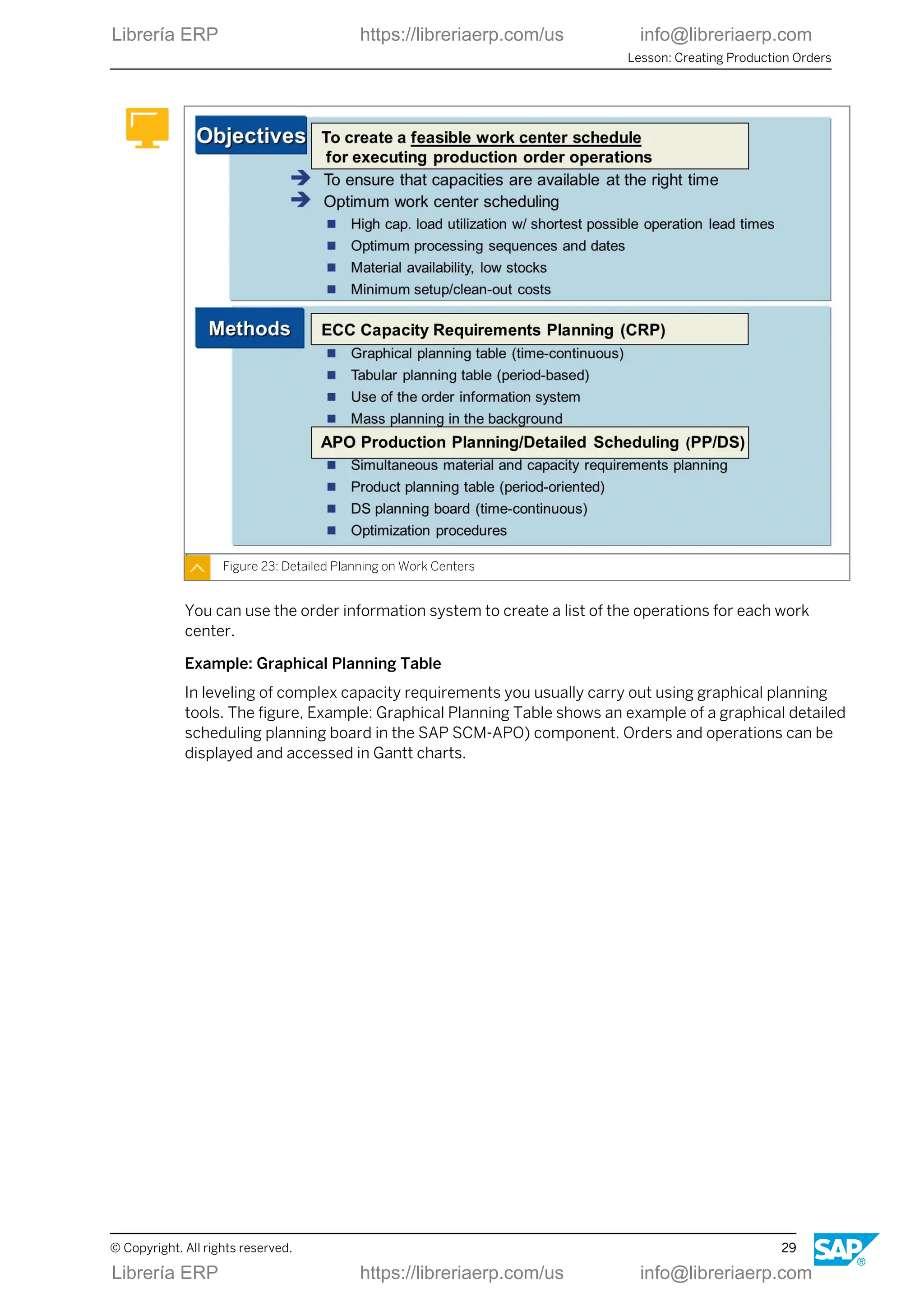
  • 101.
    Unit 3 Learning Assessment 1.Name some application areas for process orders. 2. Name some basic functions of the process order. 3. Name the master data for the process order. 4. Name some of the main steps in the processing of a process order. 5. Name some of the functions for mapping a GMP-compliant production. © Copyright. All rights reserved. 93 Librería ERP https://libreriaerp.com/us info@libreriaerp.com Librería ERP https://libreriaerp.com/us info@libreriaerp.com
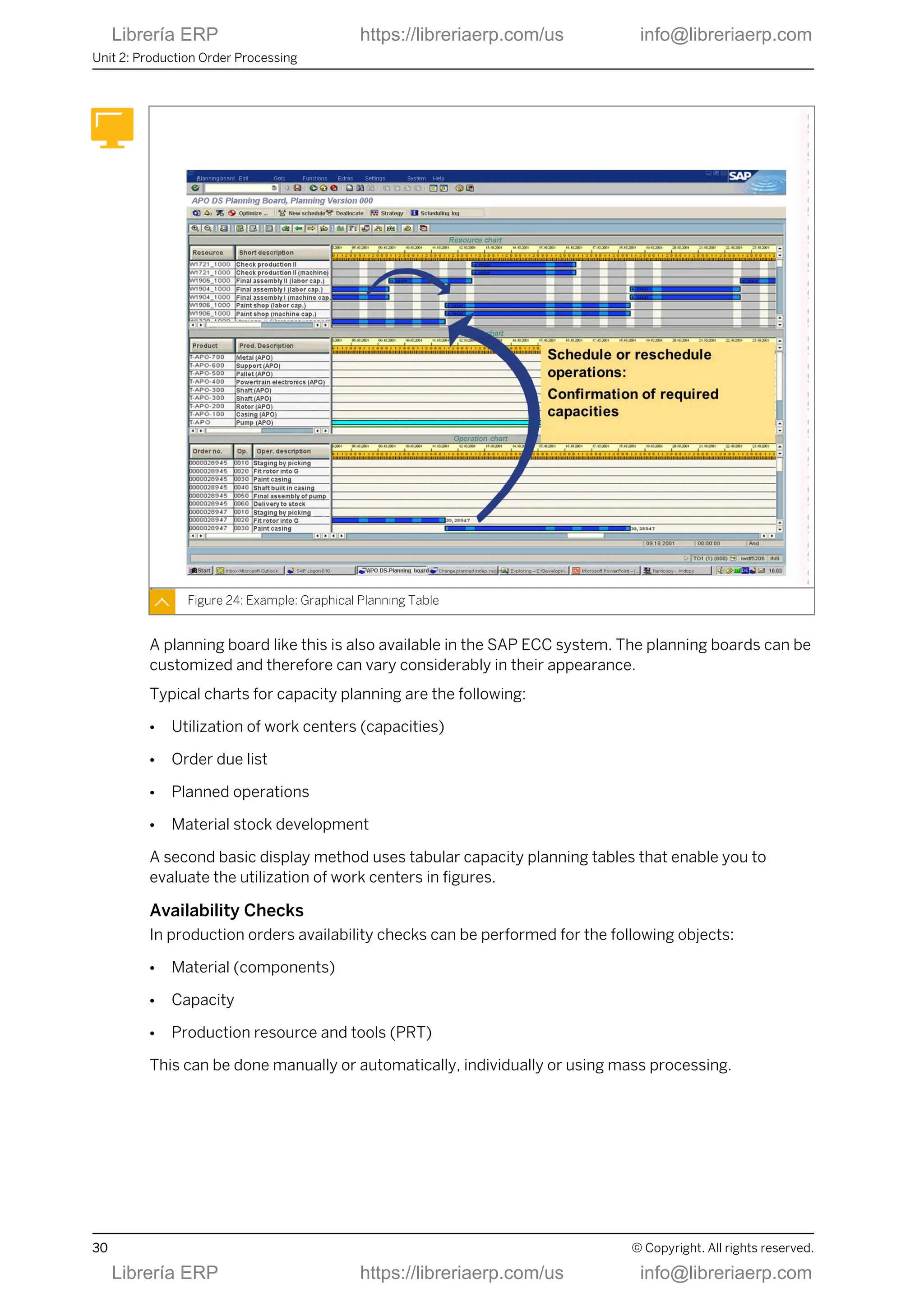
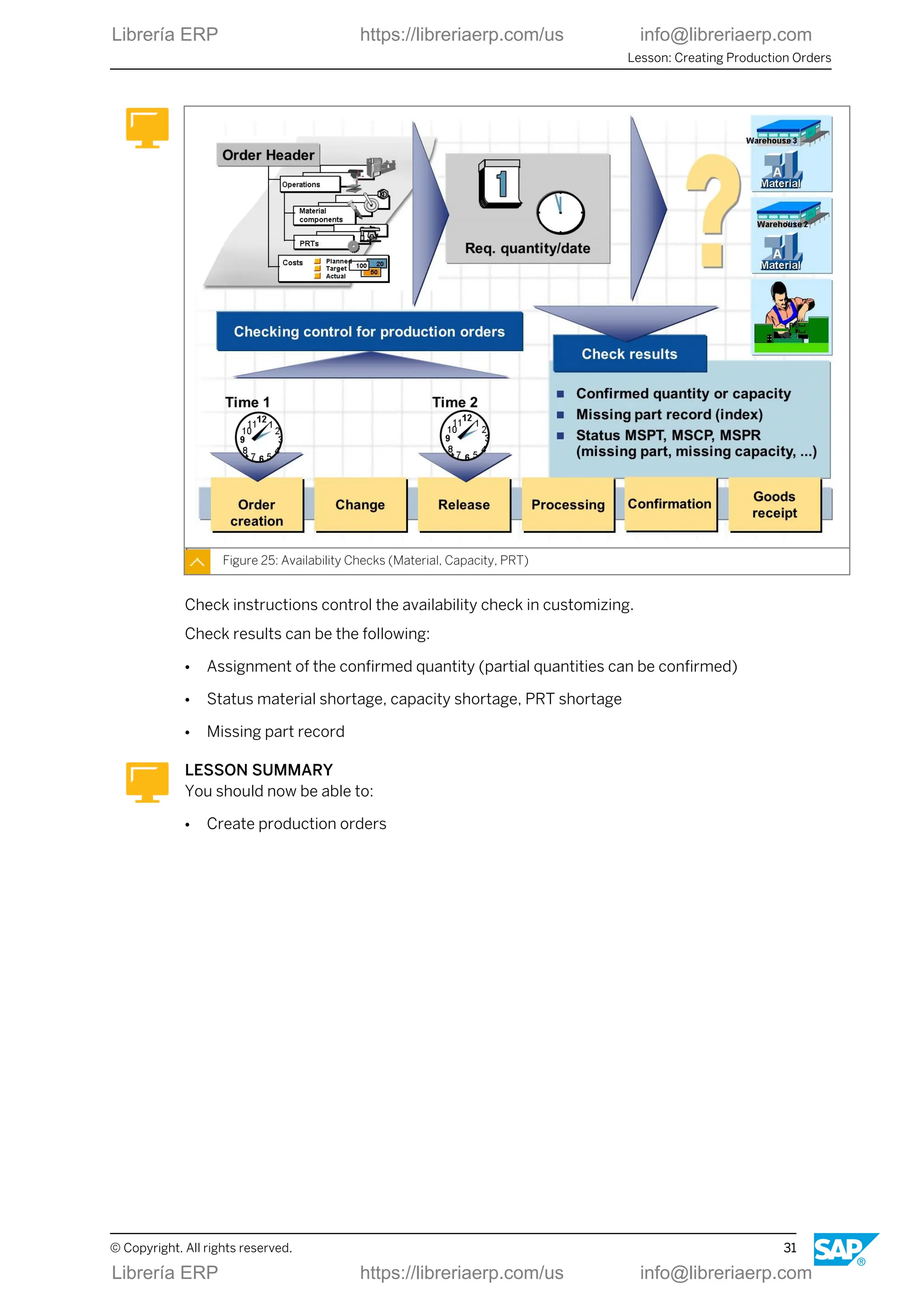
  • 102.
    Unit 3 Learning Assessment- Answers 1. Name some application areas for process orders. Production by customer request, Make-to-order production, Batch production, Production campaigns, Mass production 2. Name some basic functions of the process order. Status management, Production by production versions, Scheduling, Calculating capacity requirements, Costing, Batch number assignment, Manufacture of co-products, Availibility checks, Material quantity calculation, Active ingredient management, Batch determination, Resource network, Resource selection, Printing shop floor papers 3. Name the master data for the process order. Material master records and batch master records (integration with batch management), Resources, Production versions with master recipes and material BOMs 4. Name some of the main steps in the processing of a process order. Order Request, Process order creation, Availability check, Resource/line scheduling, Resource selection, Batch determination, Material quantity calculation, Process order release, Order print, Send control recipes, Edit PI sheet, Process messages to various destinations, Material staging/material withdrawals, Order confirmations, In-process quality checks, Material receipts, Variance calculation, Process order settlement, Batch record, Archiving/deletion 5. Name some of the functions for mapping a GMP-compliant production. Material reconciliation, Digital signature, Material identification, Approved recipe, Approved process order, Batch record, Approved inspection plan, Quality management, Batch management 94 © Copyright. All rights reserved. Librería ERP https://libreriaerp.com/us info@libreriaerp.com Librería ERP https://libreriaerp.com/us info@libreriaerp.com
  • 103.
    UNIT 4 RepetitiveManufacturing Processing Lesson 1 Outlining Repetitive Manufacturing 97 Lesson 2 Preparing Repetitive Manufacturing 103 Lesson 3 Planning Line Loading in Repetitive Manufacturing 107 Lesson 4 Using Material Staging and Confirmation 111 Lesson 5 Integrating Costing, Controlling, and Reporting 115 UNIT OBJECTIVES ● Outline repetitive manufacturing ● Prepare repetitive manufacturing ● Plan line loading in repetitive manufacturing ● Use material staging and confirmation ● Integrate costing, controlling, and reporting © Copyright. All rights reserved. 95 Librería ERP https://libreriaerp.com/us info@libreriaerp.com Librería ERP https://libreriaerp.com/us info@libreriaerp.com
  • 104.
    Unit 4: RepetitiveManufacturing Processing 96 © Copyright. All rights reserved. Librería ERP https://libreriaerp.com/us info@libreriaerp.com Librería ERP https://libreriaerp.com/us info@libreriaerp.com
  • 105.
    Unit 4 Lesson 1 OutliningRepetitive Manufacturing LESSON OVERVIEW In this lesson you will deal with application areas and characteristics of repetitive manufacturing and its functional flow. Business Example Your company produces products in large numbers. The production is quantity based and period based. You belong to the team that implements repetitive manufacturing within the SAP implementation project. For this purpose, you must implement the entire process chain for in-house production, which allows your company to organize, control, and execute production based on SAP functions. LESSON OBJECTIVES After completing this lesson, you will be able to: ● Outline repetitive manufacturing Application Areas Repetitive manufacturing is used in a variety of industries and industry sectors. © Copyright. All rights reserved. 97 Librería ERP https://libreriaerp.com/us info@libreriaerp.com Librería ERP https://libreriaerp.com/us info@libreriaerp.com
  • 106.
    Figure 75: ApplicationAreas It is mainly of interest in scenarios with high product stability, high repetition rates, and low product complexity. Repetitive Manufacturing Characteristics Repetitive manufacturing is widely integrated to different applications, systems and modules. Figure 76: Repetitive Manufacturing: Characteristics Unit 4: Repetitive Manufacturing Processing 98 © Copyright. All rights reserved. Librería ERP https://libreriaerp.com/us info@libreriaerp.com Librería ERP https://libreriaerp.com/us info@libreriaerp.com
  • 107.
    Repetitive Manufacturing: BasicFunctions A number of basic functions are available for repetitive manufacturing, which allow for support of complex production. Figure 77: Repetitive Manufacturing: Basic Functions Cross-Application Functional Process The complex process chain from independent requirements to the goods issue of the finished product is modeled in a lean version in repetitive manufacturing. Figure 78: Cross-Application Functional Process Lesson: Outlining Repetitive Manufacturing © Copyright. All rights reserved. 99 Librería ERP https://libreriaerp.com/us info@libreriaerp.com Librería ERP https://libreriaerp.com/us info@libreriaerp.com
  • 108.
    Typical features arethe following: ● Planned orders are used for production (planned orders are not converted to production orders, they only obtain the new order type of the run schedule quantity- RSQ - when the production version is assigned). ● Finished products are confirmed with simultaneous backflushing of the components used. Repetitive Manufacturing Master Data Master data is data in the SAP system that remains unchanged over a long period of time. It contains information that is required in the same manner over and over again. Figure 79: Master Data for Repetitive Manufacturing Several master data objects are used to characterize and determine repetitive manufacturing in logistics. ● Material To allow a material to be used in repetitive manufacturing, you need to set the repetitive manufacturing indicator in the material master. This means that you can allow the various production versions of this material for repetitive manufacturing. ● BOM The BOM defines the planned material consumption for the components. ● Work center Production lines are usually created as simple work centers in the SAP ECC system. In the work center, you define the availability of the production line. The production line is entered in the production version. This same work center is specified in the single operation of the routing. Production lines that have more than one work center can be represented in a line hierarchy. ● Routing Unit 4: Repetitive Manufacturing Processing 100 © Copyright. All rights reserved. Librería ERP https://libreriaerp.com/us info@libreriaerp.com Librería ERP https://libreriaerp.com/us info@libreriaerp.com
  • 109.
    In repetitive manufacturing,the routing defines the production rate (quantity per time unit) used to produce materials on production lines. The production quantities and their capacity requirements are scheduled and calculated respectively according to the production rate. Note: You can use standard routings or rate routings for repetitive manufacturing. Demo Scenario: PC Production in Dresden Plant The system work in this lesson is based on a PC production scenario. Figure 80: Demo Scenario: PC Production in Dresden Plant The demonstration example for repetitive manufacturing deals with personal computers (PCs) and PC assemblies that are manufactured in plant 1200. Material is usually staged using the pull-list or Kanban. Confirmations are carried out in a period-based manner. LESSON SUMMARY You should now be able to: ● Outline repetitive manufacturing Lesson: Outlining Repetitive Manufacturing © Copyright. All rights reserved. 101 Librería ERP https://libreriaerp.com/us info@libreriaerp.com Librería ERP https://libreriaerp.com/us info@libreriaerp.com
  • 110.
    Unit 4: RepetitiveManufacturing Processing 102 © Copyright. All rights reserved. Librería ERP https://libreriaerp.com/us info@libreriaerp.com Librería ERP https://libreriaerp.com/us info@libreriaerp.com
  • 111.
    Unit 4 Lesson 2 PreparingRepetitive Manufacturing LESSON OVERVIEW In this lesson, you will familiarize yourself with the essential functions and standard process steps in repetitive manufacturing. Business Example Important stages of repetitive manufacturing include the dispatching of quantities on the production lines, material staging of the components, backflush of quantities produced and settlement of the costs collector. These functions are integrated with other areas in your company, such as controlling and warehouse management. Therefore, you must consider the many integration relationships when implementing repetitive manufacturing. LESSON OBJECTIVES After completing this lesson, you will be able to: ● Prepare repetitive manufacturing Repetitive Manufacturing Process Despite a streamlined implementation of basic functions, a range of activities is possible in repetitive manufacturing. Figure 81: Repetitive Manufacturing: Process Flow Important stations in the repetitive manufacturing process flow are the following: © Copyright. All rights reserved. 103 Librería ERP https://libreriaerp.com/us info@libreriaerp.com Librería ERP https://libreriaerp.com/us info@libreriaerp.com
  • 112.
    ● Planning ofline loading and simultaneous capacity monitoring: You can, for example, use the planning table (multilevel access) to check the availability of assemblies for the finished product. ● Shop floor papers: The worker gets the information he or she needs from two papers: - Operational method sheet (a description of the operation is possible, if required) - Production list (materials, quantities, and dates) ● Material staging: Material staging is performed using stock transfers or Kanban provision to the line. ● Confirmation: During production, a reporting point backflush can be used to determine the work in progress. After production processing, the finished product is confirmed to stock. This means both the goods receipt and the component backflush are posted. ● Costs: A product cost collector looks after cost accounting. Repetitive Manufacturing Planning Integration There are different general means of integrating planning and production: ● Planning with the functions belonging to the SAP ECC component ● Planning with the functions belonging to the SAP SCM-APO component ● Planning with the functions belonging to SAP ECC and SAP SCM-APO components Figure 82: Planning in Repetitive Manufacturing Unit 4: Repetitive Manufacturing Processing 104 © Copyright. All rights reserved. Librería ERP https://libreriaerp.com/us info@libreriaerp.com Librería ERP https://libreriaerp.com/us info@libreriaerp.com
  • 113.
    Planning tasks canusually be either carried out using SAP ECC or SAP SCM-APO. Examples are: ● Material requirements planning ● Capacity planning ● Availability check In contrast to this, the following steps always occur with the functions of the SAP ECC component: ● Production preparation ● Production execution ● Production control These functions in SAP ERP include the following tasks: ● Costing ● Release ● Material staging ● Confirmation ● Goods movements ● Settlement Note: A distinguishing feature of repetitive manufacturing is that planned orders with order type RSQ (run schedule quantity) are used for production, which means that planned orders are not converted. Only the order type changes when the planned order is assigned to the production line. Basic Repetitive Manufacturing Planning Strategies Both make-to-stock and make-to-order planning are supported by repetitive manufacturing. Lesson: Preparing Repetitive Manufacturing © Copyright. All rights reserved. 105 Librería ERP https://libreriaerp.com/us info@libreriaerp.com Librería ERP https://libreriaerp.com/us info@libreriaerp.com
  • 114.
    Figure 83: BasicPlanning Strategies for Repetitive Manufacturing ● Make-to-stock production: You can use repetitive manufacturing for pure make-to-stock production. This means you produce finished products with no direct reference to sales orders. The planned independent requirements from demand management are used as the basis for planning. Sales orders are filled from warehouse stock. ● Make-to-order production: You can use repetitive manufacturing for pure make-to-order production (sales order- based production). This means you produce products with direct reference to the sales orders. The products are stored in the sales order stock to deliver the corresponding sales order. Note: If you use variant configuration, you can plan and manufacture configurable materials using make-to-order repetitive manufacturing. LESSON SUMMARY You should now be able to: ● Prepare repetitive manufacturing Unit 4: Repetitive Manufacturing Processing 106 © Copyright. All rights reserved. Librería ERP https://libreriaerp.com/us info@libreriaerp.com Librería ERP https://libreriaerp.com/us info@libreriaerp.com
  • 115.
    Unit 4 Lesson 3 PlanningLine Loading in Repetitive Manufacturing LESSON OVERVIEW In this lesson, you will familiarize yourself with line loading in repetitive manufacturing. Business Example Important stages of repetitive manufacturing include the dispatching of quantities on the production lines, material staging of the components, backflush of quantities produced and settlement of the costs collector. A very central part is the planning of line loading you will carry out in this lesson. LESSON OBJECTIVES After completing this lesson, you will be able to: ● Plan line loading in repetitive manufacturing Line Loading Line loading is the process to dispatch and schedule planned orders on the available production lines. Figure 84: Overview: Planning Line Loading © Copyright. All rights reserved. 107 Librería ERP https://libreriaerp.com/us info@libreriaerp.com Librería ERP https://libreriaerp.com/us info@libreriaerp.com
  • 116.
    Within the twoplanning systems SAP ECC and SAP SCM-APO, you can use any of the following four options to plan line loading: ● Selection method Using this material master setting planned orders are automatically assigned to the line specified by the production version. If several lines are available, the system assigns the first line it finds. ● Quota arrangement If several production lines are available but one is preferred (to reach full capacity load), you can use quota arrangements to distribute the remaining quantity among the alternative lines. Generally, you should only use quota arrangements for rough-cut planning and also carry out postprocessing using a planning table. ● Planning tables In contrast to the aforementioned methods, quantities are also manually scheduled on the available lines when planned orders are assigned or reassigned in a planning table (SAP ECC or SAP SCM-APO). ● Heuristics If you use SAP SCM-APO heuristics for repetitive manufacturing (REM heuristics), some or all of the steps of quantity planning, line loading planning, and capacity requirements planning can be combined and executed automatically. This option is not available in SAP ERP. Actions for Manual Line Loading Planning Figure 85: Actions for Manual Line Loading Planning (Example: SAP ERP) ● SAP ERP planning table The planner uses the SAP ERP planning table to process the master production schedule. Among others the following functions are included: Unit 4: Repetitive Manufacturing Processing 108 © Copyright. All rights reserved. Librería ERP https://libreriaerp.com/us info@libreriaerp.com Librería ERP https://libreriaerp.com/us info@libreriaerp.com
  • 117.
    - You cancheck the production quantities. - You can change production quantities, if required. - You can create new production quantities. - You can determine the capacity utilization of the production line as well as the availability situation of the products. - You can display the source of the capacity requirements (pegged capacity). The display in the planning table is quantity-based and period-based. You can choose any planning period: - Shift - Day - Week - Month - Planning calendar period In assignment mode, the planner can assign the production quantities to a production version and thus also to a production line. If this has already been done in MRP, he or she can also change existing assignments. Changes you make in the planning table are not written to the database unless you save them. ● SAP SCM-APO planning table The SAP SCM-APO product planning table is an enhancement of the SAP ERP planning table and serves as the interactive planning tool in the SAP SCM system. The figure, Actions for Manual Line Loading Planning (Example: SAP ERP), shows the basic structure of the SAP ERP planning table. To illustrate the SAP SCM-APO product planning table, the terms Material and Line/Capacity would have to be replaced by the terms Product and Resource. LESSON SUMMARY You should now be able to: ● Plan line loading in repetitive manufacturing Lesson: Planning Line Loading in Repetitive Manufacturing © Copyright. All rights reserved. 109 Librería ERP https://libreriaerp.com/us info@libreriaerp.com Librería ERP https://libreriaerp.com/us info@libreriaerp.com
  • 118.
    Unit 4: RepetitiveManufacturing Processing 110 © Copyright. All rights reserved. Librería ERP https://libreriaerp.com/us info@libreriaerp.com Librería ERP https://libreriaerp.com/us info@libreriaerp.com
  • 119.
    Unit 4 Lesson 4 UsingMaterial Staging and Confirmation LESSON OVERVIEW In this lesson, you will familiarize yourself with stagingand backflushing functions in repetitive manufacturing. Business Example Important stages of repetitive manufacturing include the dispatching of quantities on the production lines, material staging of the components, backflush of quantities produced and settlement of the costs collector. These functions are integrated with other areas in your company, such as controlling and warehouse management. Therefore, you must consider the many integration relationships when implementing repetitive manufacturing. LESSON OBJECTIVES After completing this lesson, you will be able to: ● Use material staging and confirmation Material Staging Options SAP ERP offers various methods to control material staging. Figure 86: Material Staging Options The following concepts can be used for repetitive manufacturing: © Copyright. All rights reserved. 111 Librería ERP https://libreriaerp.com/us info@libreriaerp.com Librería ERP https://libreriaerp.com/us info@libreriaerp.com
  • 120.
    ● Warehouse managementwith the Inventory Management (MM-IM) component ● Replenishment control with the Kanban component ● Storage bin management and replenishment control with the LE-WM (Warehouse Management system) component The pull list enables staging in the following ways: ● Using transfer postings at storage location level ● Using event-driven Kanban ● Using Extended Warehouse Management (EWM) ● Using Warehouse Management (WM) Note: Since pick part processing is order-based, the Warehouse Management system prefers to use release order parts for non order-based repetitive manufacturing. Release order parts are ordered manually. Here the required quantity is calculated from the target quantity of the components of the selected orders that have been released. Backflush and Goods Receipt A separate transaction is available for the entering of confirmations manually in the SAP ECC system. You can use a BAPI interface for confirming from PDC systems. Figure 87: Backflush and Goods Receipt Unit 4: Repetitive Manufacturing Processing 112 © Copyright. All rights reserved. Librería ERP https://libreriaerp.com/us info@libreriaerp.com Librería ERP https://libreriaerp.com/us info@libreriaerp.com
  • 121.
    When the goodsreceipt for the finished parts is posted during confirmation, a number of different actions are performed by default: ● Goods issue posting of the components used (usually by backflushing) ● Statistics update in the Logistics Information System (LIS) or the Business Information Warehouse (BW) ● Reduction of production quantities and the associated capacity requirements on the production lines ● Posting of incurred production costs (material costs, production activities, overhead costs) to a product cost collector ● Creation of a data entry document Further optional actions include the following: ● Consideration of setup costs for lot size-independent material quantities ● Posting component/assembly scrap ● Collective entry for different materials in a line ● Archiving backflush documents ● Goods issue backflush only or activity backflush only (more/less activity) ● Reporting point backflush ● Time-based decoupled backflushing processes ● Aggregation ● Various postprocessing and reversal options Note: Sales-order based production enables backflushing with reference to sales orders. Reporting Point Backflush Reporting point backflush is a special process for production lines with long lead times and the requirement to post goods issues on-time and not delayed by backflushing with final confirmation at the end of the production line. Lesson: Using Material Staging and Confirmation © Copyright. All rights reserved. 113 Librería ERP https://libreriaerp.com/us info@libreriaerp.com Librería ERP https://libreriaerp.com/us info@libreriaerp.com
  • 122.
    Figure 88: Backflush:Reporting Point Backflush ● Issue All components used along the production line are usually backflushed during final confirmation. If there are long lead times, the goods issues for the components may be posted much later in the system than when they are actually physically withdrawn. ● Solution Use the reporting point backflush to post the withdrawal of components (and production activities) at an earlier stage after operations already completed. The above example contains the three reporting points that are linked to operations 10 (work center 1-1), 20 (work center 1-2), and 40 (work center 1-4). Note: Depending on the application, you should either use optional or mandatory reporting point backflush. The master data effort for reporting point backflush is higher than for a standard scenario. LESSON SUMMARY You should now be able to: ● Use material staging and confirmation Unit 4: Repetitive Manufacturing Processing 114 © Copyright. All rights reserved. Librería ERP https://libreriaerp.com/us info@libreriaerp.com Librería ERP https://libreriaerp.com/us info@libreriaerp.com
  • 123.
    Unit 4 Lesson 5 IntegratingCosting, Controlling, and Reporting LESSON OVERVIEW In this lesson, you are familiarized with some of the most important special functions of repetitive manufacturing and some neighboring areas. Business Example Important stages of repetitive manufacturing include the dispatching of quantities on the production lines, material staging of the components, backflush of quantities produced and settlement of the costs collector. These functions are integrated with other areas in your company, such as controlling and warehouse management. Therefore, you must consider the many integration relationships when implementing repetitive manufacturing. LESSON OBJECTIVES After completing this lesson, you will be able to: ● Integrate costing, controlling, and reporting Product-Related Cost Object Controlling Settlement in repetitive manufacturing is always period-based and based on the costs of the product cost collector (product-related cost object controlling). Figure 89: Cost Debit/Credit (Product-Related Cost Object Controlling) © Copyright. All rights reserved. 115 Librería ERP https://libreriaerp.com/us info@libreriaerp.com Librería ERP https://libreriaerp.com/us info@libreriaerp.com
  • 124.
    ● Cost debitandcost credit During the confirmation in repetitive manufacturing, the following costs are automatically posted to the product cost collector: - Material costs for the components - Production activities (only if a material cost estimate with price update has been carried out in advance) At the same time the product cost collector is credited with the according price of the assembly: - The valuation price is taken for materials controlled with standard price. - The moving average price is taken for materials controlled with the moving average price. Note: Overhead share determined periodically during period-end closing in Controlling using an overhead structure and are posted to the product cost collector. You can use a separate transaction in the Repetitive Manufacturing menu for this. ● Settlement - Issue Components that differ from those planned may be used in production or the overhead cost rates may change. This results in variances in the product cost collector. - Solution A settlement must be carried out. The aim of the settlement is to credit the product cost collector in full. During settlement, the costs not yet credited to the product cost collector are transferred. For a material that is valuated using the standard price, the variant costs are posted to the price difference account. Integration with Controlling Having covered the logistical master data there is the need for additional controlling master data. Unit 4: Repetitive Manufacturing Processing 116 © Copyright. All rights reserved. Librería ERP https://libreriaerp.com/us info@libreriaerp.com Librería ERP https://libreriaerp.com/us info@libreriaerp.com
  • 125.
    Figure 90: Integrationwith Controlling As orders are not allowed in classic repetitive manufacturing there is the need to cover the posting of production activities using material cost estimates with price updates. Repetitive Manufacturing: Information Systems Repetitive manufacturing supports various evaluation methods, some of the supporting special processes only. Figure 91: Repetitive Manufacturing: Information Systems Lesson: Integrating Costing, Controlling, and Reporting © Copyright. All rights reserved. 117 Librería ERP https://libreriaerp.com/us info@libreriaerp.com Librería ERP https://libreriaerp.com/us info@libreriaerp.com
  • 126.
    In addition toanalyses that use CO reports, data is updated into the Logistics Information System LIS by default (exception: planning data must be updated manually or in a background job). A connection to the Business Information Warehouse (BW) is also standard. Note: Evaluations based on orders are not supported because the processing is not order-related. Repetitive Manufacturing: Enhanced Functions Apart from the basic functions, repetitive manufacturing provides and supports several additional and integrated functions. Figure 92: Period-Based Repetitive Manufacturing: Additional Functions Depending on the process you can make use of the following functions: ● Printing A Microsoft Office link is available for printing work instructions (using Microsoft Word) and printing the production list (using Microsoft Excel). ● WIP (work in process) To determine the work in progress or to post component backflushing more promptly, you can use reporting point processing (only in make-to-stock). ● Action control In terms of configurable materials, action control enables actions to be triggered automatically (for example, printing the component list). ● Handling unit management Repetitive manufacturing supports handling unit management during which goods and packaging are set up as a logistics unit. ● Serial numbers A serial number assignment is possible in repetitive manufacturing for a unique identification. Unit 4: Repetitive Manufacturing Processing 118 © Copyright. All rights reserved. Librería ERP https://libreriaerp.com/us info@libreriaerp.com Librería ERP https://libreriaerp.com/us info@libreriaerp.com
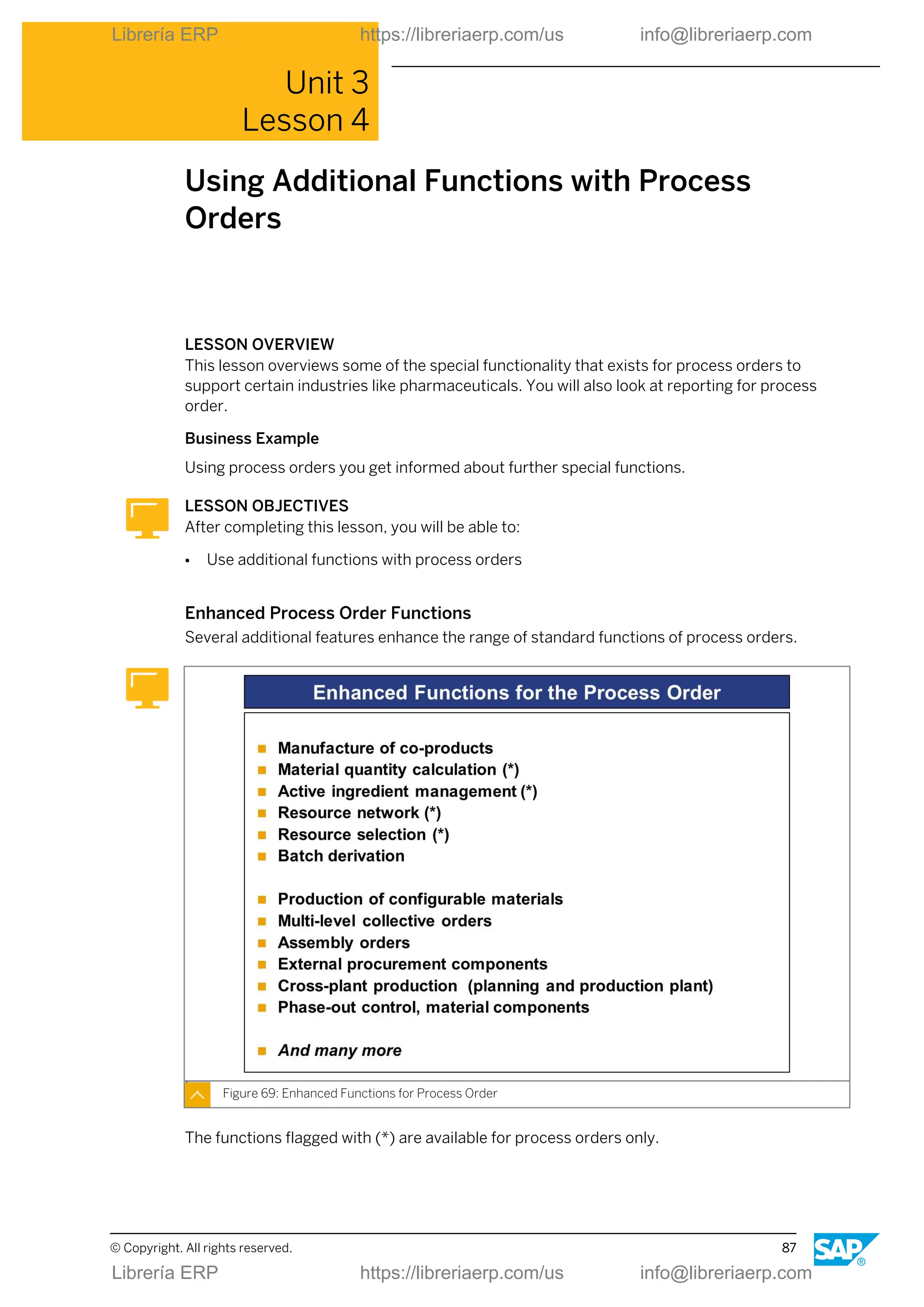
  • 127.
    ● Batches The useof batches is supported. ● Flow manufacturing The modelling of takts, and the sequence planning it involves, is represented by a separate function: Takt-based flow manufacturing. LESSON SUMMARY You should now be able to: ● Integrate costing, controlling, and reporting Lesson: Integrating Costing, Controlling, and Reporting © Copyright. All rights reserved. 119 Librería ERP https://libreriaerp.com/us info@libreriaerp.com Librería ERP https://libreriaerp.com/us info@libreriaerp.com
  • 128.
    Unit 4: RepetitiveManufacturing Processing 120 © Copyright. All rights reserved. Librería ERP https://libreriaerp.com/us info@libreriaerp.com Librería ERP https://libreriaerp.com/us info@libreriaerp.com
  • 129.
    Unit 4 Learning Assessment 1.Name some basic functions of repetitive manufacturing. 2. Why do you need a material cost estimate to calculate production activities in repetitive manufacturing? © Copyright. All rights reserved. 121 Librería ERP https://libreriaerp.com/us info@libreriaerp.com Librería ERP https://libreriaerp.com/us info@libreriaerp.com
  • 130.
    Unit 4 Learning Assessment- Answers 1. Name some basic functions of repetitive manufacturing. Planning line loading, Scheduling, Calculation and monitoring of capacity requirements, Costing, Avaiability checks, Printing dispatch lists, Printing operational method sheet, Material staging, Goods issue/backflushing, Goods receipt with final confirmation, Period- end closing. 2. Why do you need a material cost estimate to calculate production activities in repetitive manufacturing? Due to the handling of production quantities with planned orders there is no real "order" object to collect and carry the production activities. This is covered by a material cost estimate and subsequent price update in the material master. 122 © Copyright. All rights reserved. Librería ERP https://libreriaerp.com/us info@libreriaerp.com Librería ERP https://libreriaerp.com/us info@libreriaerp.com
  • 131.
    UNIT 5 KanbanPrinciples in Production Lesson 1 Outlining Kanban 125 Lesson 2 Using Kanban in Production 129 UNIT OBJECTIVES ● Outline Kanban ● Use Kanban in production © Copyright. All rights reserved. 123 Librería ERP https://libreriaerp.com/us info@libreriaerp.com Librería ERP https://libreriaerp.com/us info@libreriaerp.com
  • 132.
    Unit 5: KanbanPrinciples in Production 124 © Copyright. All rights reserved. Librería ERP https://libreriaerp.com/us info@libreriaerp.com Librería ERP https://libreriaerp.com/us info@libreriaerp.com
  • 133.
    Unit 5 Lesson 1 OutliningKanban LESSON OVERVIEW This lesson outlines the principle of the Kanban procedure. Business Example You decide to organize replenishment using stock transfers, external procurement, and in- house production with the SAP ERP Kanban functions. LESSON OBJECTIVES After completing this lesson, you will be able to: ● Outline Kanban Application Areas The application areas of Kanban are not restricted to certain industries. The graphic only contains one selection. Figure 93: Application Areas The Kanban principle can be used together with all other production types. © Copyright. All rights reserved. 125 Librería ERP https://libreriaerp.com/us info@libreriaerp.com Librería ERP https://libreriaerp.com/us info@libreriaerp.com
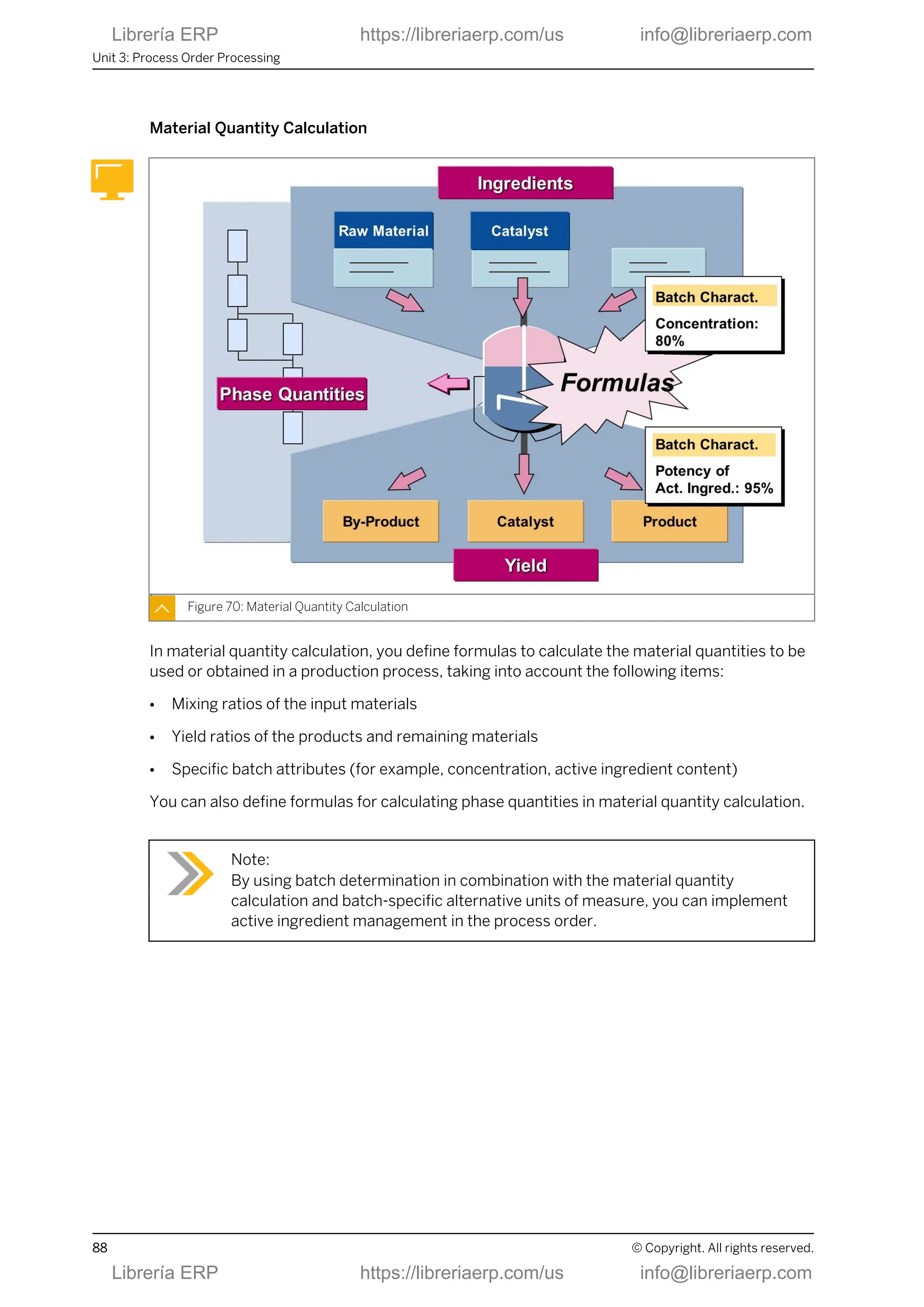
  • 134.
    Kanban Principle In Kanban,the material flow is organized using containers that are kept directly at the appropriate work centers in production. Figure 94: Kanban Principle With Kanban, material is staged where it is used and is always available in small material buffers. This means that material staging does not need to be planned. Instead, material that is consumed is replenished immediately using Kanban. ● The process: Each box contains the quantity of material that work center personnel need for a certain period of time. As soon as a container is emptied by the demand source, replenishment is initiated in Kanban. The supply source for the required material can be another place in production, an external vendor or a warehouse. The demand source can use material from other containers until the actual container returns to full. ● The goal The aim is to control the replenishment process in production itself and to reduce the manual posting efforts for personnel as much as possible. This self-management process and the fact that replenishment elements are created close to the time they are actually consumed means that stocks are reduced and lead times are shortened (replenishment is only triggered when a material is actually required and not before). ● The key benefit By using Kanban with the SAP ECC system, you can automate the transfer of replenishment data. For example, scanning the barcode on a Kanban card is sufficient to transfer the data required for procurement and to post the goods receipt when the material is received. Unit 5: Kanban Principles in Production 126 © Copyright. All rights reserved. Librería ERP https://libreriaerp.com/us info@libreriaerp.com Librería ERP https://libreriaerp.com/us info@libreriaerp.com
  • 135.
    Kanban Characteristics Using Kanbanthere are several properties that need to be known: Figure 95: Kanban: Characteristics This is only a high level introduction. Major benefits of Kanban are found when mapping special processes like Kanban with SD, Kanban with RFID (radio frequency identification),and so on. LESSON SUMMARY You should now be able to: ● Outline Kanban Lesson: Outlining Kanban © Copyright. All rights reserved. 127 Librería ERP https://libreriaerp.com/us info@libreriaerp.com Librería ERP https://libreriaerp.com/us info@libreriaerp.com
  • 136.
    Unit 5: KanbanPrinciples in Production 128 © Copyright. All rights reserved. Librería ERP https://libreriaerp.com/us info@libreriaerp.com Librería ERP https://libreriaerp.com/us info@libreriaerp.com
  • 137.
    Unit 5 Lesson 2 UsingKanban in Production LESSON OVERVIEW This lesson outlines the prerequisites for the Kanban procedure and how it is implemented. Business Example You decide to organize replenishment using stock transfers, external procurement, and in- house production with the Kanban functions. LESSON OBJECTIVES After completing this lesson, you will be able to: ● Use Kanban in production Kanban in Production In the general production process, the Kanban principle is used within material staging. Figure 96: Kanban in Production Master Data Implementation The structure and organization of production are important criteria when introducing Kanban. Basic master data objects in Kanban are the following: © Copyright. All rights reserved. 129 Librería ERP https://libreriaerp.com/us info@libreriaerp.com Librería ERP https://libreriaerp.com/us info@libreriaerp.com
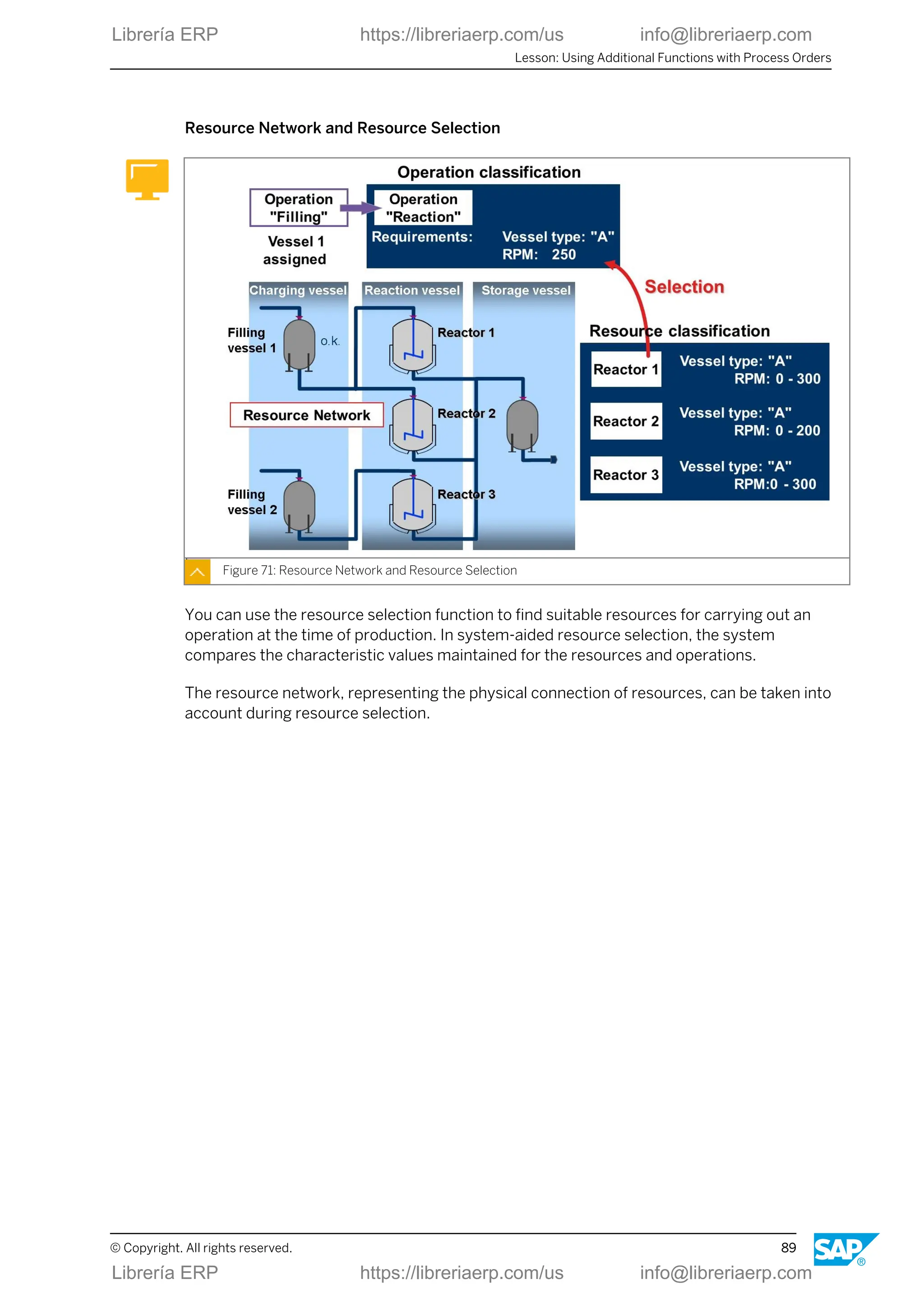
  • 138.
    ● Production supplyarea ● Control cycle An existing production supply area is a prerequisite for creating a control cycle and will be dealt with first. Figure 97: Master Data: Production Supply Area With Kanban, material is staged in specific areas directly in production, known as supply areas. A supply area can be used by one or more work centers. The supply areas act as a buffer for the required materials, for example, on shelves or in marked-out areas on the floor. The supply area is assigned the following objects in the system: ● Storage location The production supply area is a data object that is used to organize material flow for Kanban. It is not an inventory management object. Therefore, storage locations must be assigned to the supply areas. Inventory management (which is relevant, for example, for posting goods receipts) takes place at the storage location to which the supply area is assigned. ● Person responsible Another significant organizational prerequisite is that you create a person who is responsible for each supply area. This person is responsible as the demand source for processing material and for monitoring stocks in the supply area. The person responsible entered in the control cycle for in-house production is responsible as the supply source for replenishment, that is, for material provision and, if necessary, for delivery to the demand source. ● Unloading point In external procurement, the supplier often does not deliver the material directly to the production supply area, but delivers it to a certain unloading point from which the Kanbans Unit 5: Kanban Principles in Production 130 © Copyright. All rights reserved. Librería ERP https://libreriaerp.com/us info@libreriaerp.com Librería ERP https://libreriaerp.com/us info@libreriaerp.com
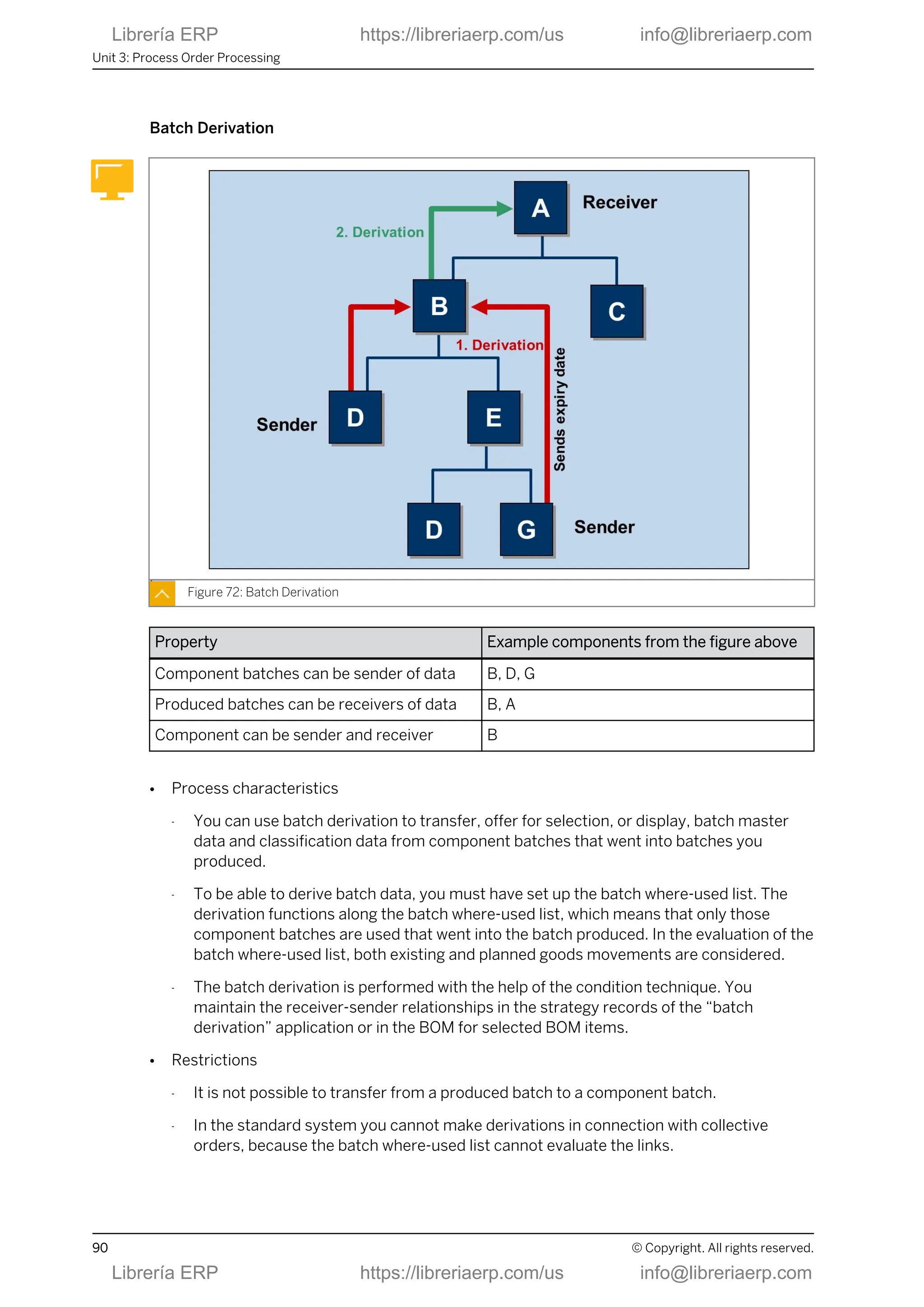
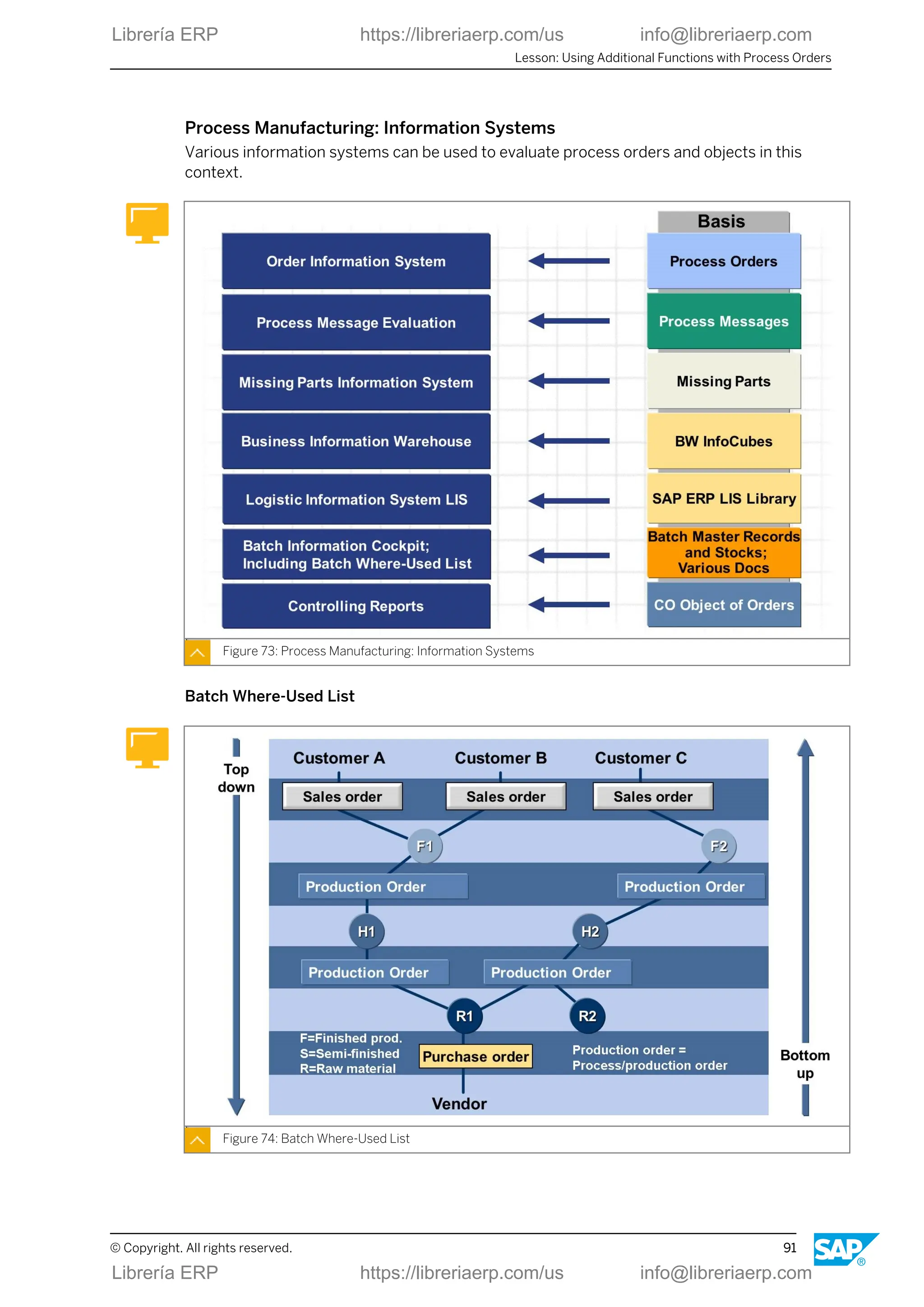
  • 139.
    are transported tothe production supply area. The unloading point defines where the supplier has to deliver the material, for example, gate 1. It is printed on the Kanban card or is transferred to the summarized JIT call. ● Delivery address: You can maintain an address in the supply area. When you create a control cycle, this address is transferred to the delivery address of the control cycle. Master Data: Kanban Control Cycle To control the relationship between supply and demand source, you define a control cycle. Figure 98: Master Data: Kanban Control Cycle Among others, the control cycle defines the following objects and parameters: ● Demand source This is the production supply area. ● Replenishment strategy This is for example, replenishment using a purchase order for external procurement, using run schedule quantities for in-house production or using stock transfer reservations for stock transfer. ● Supply source This is the supplier or issuing plant for external procurement, the person responsible for in- house production, the storage location for stock transfer. ● Number of containers This is the number of Kanbans circulating between the demand and the supply source. ● Quantity Lesson: Using Kanban in Production © Copyright. All rights reserved. 131 Librería ERP https://libreriaerp.com/us info@libreriaerp.com Librería ERP https://libreriaerp.com/us info@libreriaerp.com
  • 140.
    This is thequantity for each container. ● Delivery address Here, you can enter detailed information required for the supply area. You can print this data on a Kanban card, for example. ● Print parameters Print parameters are used for printing the Kanban card. ● The pallet position The pallet position specifies more precisely the position (for example, a specific shelf section) of the material in the production supply area. The pallet position can also be printed on the Kanban card. ● Parameters for the automatic Kanban calculation Kanban calculation supports the prediction of number of containers or quantity if the requirements are known. Note: You can also delete or lock Kanbans in the control cycle. You lock a Kanban, for example, if it is not going to be used for a certain period because consumption has reduced within the control cycle. Production Supply Using Control Cycles Figure 99: Production Supply Using Control Cycles When you use the Kanban procedure, warehouses or vendors are linked to the supply areas that are assigned to the relevant production storage locations using control cycles. Unit 5: Kanban Principles in Production 132 © Copyright. All rights reserved. Librería ERP https://libreriaerp.com/us info@libreriaerp.com Librería ERP https://libreriaerp.com/us info@libreriaerp.com
  • 141.
    Since the linkto material staging can also take place using in-house production within Kanban, pre-assembly and final assembly can, for example, be linked using Kanban. Kanban Status The progress of production in Kanban is controlled by setting the Kanban to the appropriate status. Usually, only the Empty and Full statuses are used. Figure 100: Setting the Kanban to Empty = Triggering Replenishment If the demand source is set to Empty , the system creates a replenishment element, instructing the material supply source to deliver. Note: Emptying a Kanban does not result in a goods issue posting. In Kanban, goods issues are usually backflushed when an order is confirmed or when a goods issue is posted manually for an order. You can set the status to Empty by the following activities: ● Scanning a bar code on the Kanban card ● Using the manual Kanban signal transaction ● Using the Kanban board Lesson: Using Kanban in Production © Copyright. All rights reserved. 133 Librería ERP https://libreriaerp.com/us info@libreriaerp.com Librería ERP https://libreriaerp.com/us info@libreriaerp.com
  • 142.
    Setting Kanban Statusto Full Figure 101: Setting Kanban to Full = Posting Goods Receipt If the demand source sets the Kanban to Full, the system automatically posts the goods receipt for the material with reference to the procurement element. You can set the status to Full by the following activities: ● Scanning a bar code on the Kanban card ● Using manual Kanban signal transaction ● Using the Kanban board Demand-Driven Production versus Kanban Depending on the application the decision between demand-driven production and Kanban is always based on different criteria. Unit 5: Kanban Principles in Production 134 © Copyright. All rights reserved. Librería ERP https://libreriaerp.com/us info@libreriaerp.com Librería ERP https://libreriaerp.com/us info@libreriaerp.com
  • 143.
    Figure 102: Plan-ControlledProduction versus Kanban Advantages of Kanban: ● Kanban is a simplified form of production control: as far as possible, replenishment is controlled by production. ● Manual posting effort is minimized. ● The material is available directly in production. Therefore, you are not required to organize material staging. ● The production quantities correspond to actual requirements. This automated process and the fact that replenishment elements are created close to the time they are actually consumed means that stocks are reduced and lead times are shortened. Replenishment is only triggered when a material is actually required and not before. LESSON SUMMARY You should now be able to: ● Use Kanban in production Lesson: Using Kanban in Production © Copyright. All rights reserved. 135 Librería ERP https://libreriaerp.com/us info@libreriaerp.com Librería ERP https://libreriaerp.com/us info@libreriaerp.com
  • 144.
    Unit 5: KanbanPrinciples in Production 136 © Copyright. All rights reserved. Librería ERP https://libreriaerp.com/us info@libreriaerp.com Librería ERP https://libreriaerp.com/us info@libreriaerp.com
  • 145.
    Unit 5 Learning Assessment 1.What are the objectives of the Kanban procedure? 2. How is replenishment initiated in the Kanban procedure? 3. Name the basic master data of Kanban. 4. When is the goods issue typically posted in Kanban? 5. When is the goods receipt typically posted in Kanban? © Copyright. All rights reserved. 137 Librería ERP https://libreriaerp.com/us info@libreriaerp.com Librería ERP https://libreriaerp.com/us info@libreriaerp.com
  • 146.
    Unit 5 Learning Assessment- Answers 1. What are the objectives of the Kanban procedure? The following objectives can be achieved in many cases by controlling the production process in production itself and by reducing the manual posting effort required: shortening the lead times and reducing the stock 2. How is replenishment initiated in the Kanban procedure? In the Kanban procedure, replenishment is initiated when the demand source sets the container in the system to empty. 3. Name the basic master data of Kanban. Supply areas, Control cycles 4. When is the goods issue typically posted in Kanban? In Kanban, goods issues are typically backflushed when an order is confirmed (or when a goods issue is posted manually for an order). Emptying a Kanban does not result in a goods issue posting. 5. When is the goods receipt typically posted in Kanban? If the demand source sets the status to Full, the system automatically posts the goods receipt for the material with reference to the procurement element. 138 © Copyright. All rights reserved. Librería ERP https://libreriaerp.com/us info@libreriaerp.com Librería ERP https://libreriaerp.com/us info@libreriaerp.com