IBP820
Deployment Optimizer in SAP IBP
.
.
PARTICIPANT HANDBOOK
INSTRUCTOR-LED TRAINING
.
Course Version: 2205
Course Duration: 2 Day(s)
Material Number: 50159863
Librería ERP — Sample | libreriaerp.com/us | info@libreriaerp.com
SAP Copyrights, Trademarks and
Disclaimers
© 2022 SAP SE or an SAP affiliate company. All rights reserved.
No part of this publication may be reproduced or transmitted in any form or for any purpose without the
express permission of SAP SE or an SAP affiliate company.
SAP and other SAP products and services mentioned herein as well as their respective logos are
trademarks or registered trademarks of SAP SE (or an SAP affiliate company) in Germany and other
countries. Please see https://www.sap.com/corporate/en/legal/copyright.html for additional
trademark information and notices.
Some software products marketed by SAP SE and its distributors contain proprietary software
components of other software vendors.
National product specifications may vary.
These materials may have been machine translated and may contain grammatical errors or
inaccuracies.
These materials are provided by SAP SE or an SAP affiliate company for informational purposes only,
without representation or warranty of any kind, and SAP SE or its affiliated companies shall not be liable
for errors or omissions with respect to the materials. The only warranties for SAP SE or SAP affiliate
company products and services are those that are set forth in the express warranty statements
accompanying such products and services, if any. Nothing herein should be construed as constituting an
additional warranty.
In particular, SAP SE or its affiliated companies have no obligation to pursue any course of business
outlined in this document or any related presentation, or to develop or release any functionality
mentioned therein. This document, or any related presentation, and SAP SE’s or its affiliated companies’
strategy and possible future developments, products, and/or platform directions and functionality are
all subject to change and may be changed by SAP SE or its affiliated companies at any time for any
reason without notice. The information in this document is not a commitment, promise, or legal
obligation to deliver any material, code, or functionality. All forward-looking statements are subject to
various risks and uncertainties that could cause actual results to differ materially from expectations.
Readers are cautioned not to place undue reliance on these forward-looking statements, which speak
only as of their dates, and they should not be relied upon in making purchasing decisions.
© Copyright. All rights reserved. iii
Librería ERP — Sample | libreriaerp.com/us | info@libreriaerp.com
Typographic Conventions
American English is the standard used in this handbook.
The following typographic conventions are also used.
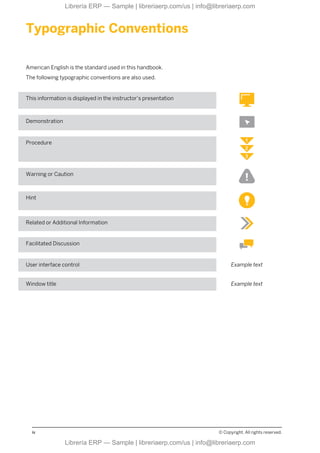
This information is displayed in the instructor’s presentation
Demonstration
Procedure
Warning or Caution
Hint
Related or Additional Information
Facilitated Discussion
User interface control Example text
Window title Example text
iv © Copyright. All rights reserved.
Librería ERP — Sample | libreriaerp.com/us | info@libreriaerp.com
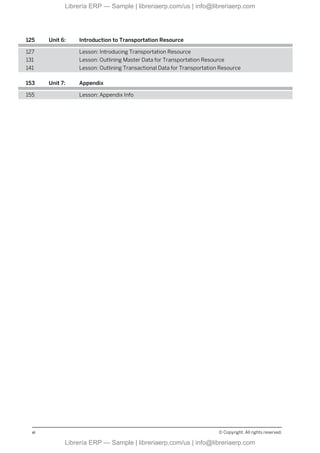
Contents
vii Course Overview
1 Unit 1: Order-Based Planning Overview and Integration
3 Lesson: Introducing Order-Based Planning (OBP)
11 Lesson: Outlining SAP IBP Integration Scenarios
15 Lesson: Introducing SAP Smart Data Integration
17 Lesson: Integrating Data Using SAP Smart Data Integration
21 Lesson: Setting Up the Integration
25 Lesson: Running the Integration
33 Unit 2: Deployment Overview
35 Lesson: Choosing the Right Solver
39 Lesson: Introducing Deployment Planning
41 Lesson: Differentiating Types of Deployment Algorithms
43 Lesson: Understanding the Deployment Planning Process Flow
45 Lesson: Marking Order Types as Available to Deploy (ATD)
47 Lesson: Checking Deployment Stock Transfer Requisitions in SAP
IBP
49 Lesson: Identifying Use Cases for the Deployment Optimizer
55 Unit 3: Optimizer and Costs
57 Lesson: Describing the Value Proposition of the Optimizer
59 Lesson: Working with Cost Settings and Optimizer Parameters
65 Lesson: Defining Cost Key Figures
67 Lesson: Defining Deployment Key Figures
73 Unit 4: Deployment Optimizer
75 Lesson: Describing an Optimized Distribution Plan
77 Lesson: Defining Fair Share in Order-Based Optimization
79 Lesson: Outlining How to Achieve Fair Share for Demands
87 Lesson: Outlining How to Achieve Fair Share for Inventory
101 Lesson: Describing Optimization Best Practices
109 Unit 5: Deployment Cost Generation
111 Lesson: Introducing and Running Deployment Cost Generation
115 Lesson: Describing Input Data and Generated Cost Model
119 Lesson: Reviewing Generated Costs
© Copyright. All rights reserved. v
Librería ERP — Sample | libreriaerp.com/us | info@libreriaerp.com
125 Unit 6: Introduction to Transportation Resource
127 Lesson: Introducing Transportation Resource
131 Lesson: Outlining Master Data for Transportation Resource
141 Lesson: Outlining Transactional Data for Transportation Resource
153 Unit 7: Appendix
155 Lesson: Appendix Info
vi © Copyright. All rights reserved.
Librería ERP — Sample | libreriaerp.com/us | info@libreriaerp.com
Course Overview
TARGET AUDIENCE
This course is intended for the following audiences:
© Copyright. All rights reserved. vii
Librería ERP — Sample | libreriaerp.com/us | info@libreriaerp.com
viii © Copyright. All rights reserved.
Librería ERP — Sample | libreriaerp.com/us | info@libreriaerp.com
UNIT 1 Order-Based Planning Overview
and Integration
Lesson 1
Introducing Order-Based Planning (OBP) 3
Lesson 2
Outlining SAP IBP Integration Scenarios 11
Lesson 3
Introducing SAP Smart Data Integration 15
Lesson 4
Integrating Data Using SAP Smart Data Integration 17
Lesson 5
Setting Up the Integration 21
Lesson 6
Running the Integration 25
UNIT OBJECTIVES
● Introduce Order-Based Planning (OBP)
● Describe SAP IBP Integration Scenarios
● Outline key features of SAP Smart Data Integration
● Understand the data transfer using SAP Smart Data Integration
● Understand how to set up integration
● Understand how to run integration
© Copyright. All rights reserved. 1
Librería ERP — Sample | libreriaerp.com/us | info@libreriaerp.com
Unit 1: Order-Based Planning Overview and Integration
2 © Copyright. All rights reserved.
Librería ERP — Sample | libreriaerp.com/us | info@libreriaerp.com
Unit 1
Lesson 1
Introducing Order-Based Planning (OBP)
LESSON OBJECTIVES
After completing this lesson, you will be able to:
● Introduce Order-Based Planning (OBP)
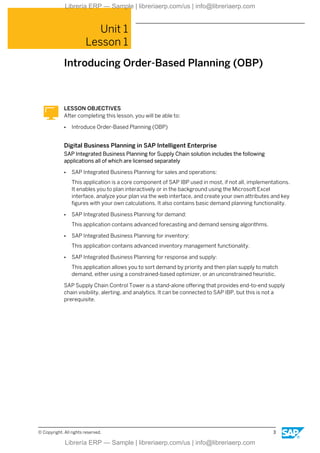
Digital Business Planning in SAP Intelligent Enterprise
SAP Integrated Business Planning for Supply Chain solution includes the following
applications all of which are licensed separately
● SAP Integrated Business Planning for sales and operations:
This application is a core component of SAP IBP used in most, if not all, implementations.
It enables you to plan interactively or in the background using the Microsoft Excel
interface, analyze your plan via the web interface, and create your own attributes and key
figures with your own calculations. It also contains basic demand planning functionality.
● SAP Integrated Business Planning for demand:
This application contains advanced forecasting and demand sensing algorithms.
● SAP Integrated Business Planning for inventory:
This application contains advanced inventory management functionality.
● SAP Integrated Business Planning for response and supply:
This application allows you to sort demand by priority and then plan supply to match
demand, either using a constrained-based optimizer, or an unconstrained heuristic.
SAP Supply Chain Control Tower is a stand-alone offering that provides end-to-end supply
chain visibility, alerting, and analytics. It can be connected to SAP IBP, but this is not a
prerequisite.
© Copyright. All rights reserved. 3
Librería ERP — Sample | libreriaerp.com/us | info@libreriaerp.com
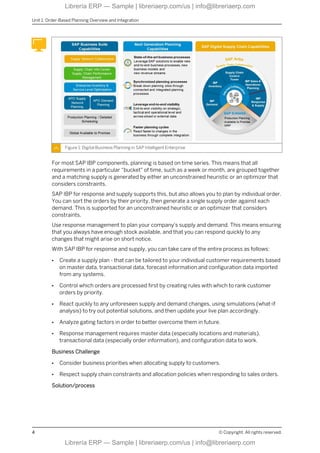
Figure 1: Digital Business Planning in SAP Intelligent Enterprise
For most SAP IBP components, planning is based on time series. This means that all
requirements in a particular “bucket" of time, such as a week or month, are grouped together
and a matching supply is generated by either an unconstrained heuristic or an optimizer that
considers constraints.
SAP IBP for response and supply supports this, but also allows you to plan by individual order.
You can sort the orders by their priority, then generate a single supply order against each
demand. This is supported for an unconstrained heuristic or an optimizer that considers
constraints.
Use response management to plan your company's supply and demand. This means ensuring
that you always have enough stock available, and that you can respond quickly to any
changes that might arise on short notice.
With SAP IBP for response and supply, you can take care of the entire process as follows:
● Create a supply plan - that can be tailored to your individual customer requirements based
on master data, transactional data, forecast information and configuration data imported
from any systems.
● Control which orders are processed first by creating rules with which to rank customer
orders by priority.
● React quickly to any unforeseen supply and demand changes, using simulations (what-if
analysis) to try out potential solutions, and then update your live plan accordingly.
● Analyze gating factors in order to better overcome them in future.
● Response management requires master data (especially locations and materials),
transactional data (especially order information), and configuration data to work.
Business Challenge
● Consider business priorities when allocating supply to customers.
● Respect supply chain constraints and allocation policies when responding to sales orders.
Solution/process
Unit 1: Order-Based Planning Overview and Integration
4 © Copyright. All rights reserved.
Librería ERP — Sample | libreriaerp.com/us | info@libreriaerp.com
● Create a multi-level supply plan that takes prioritized demands and capacity/material
constraints into consideration.
● Create product allocations for order confirmation based on a multi-level supply plan and
pegging functionality.
● Respect an established allocation plan when calculating order confirmations of prioritized
sales orders.
● Identify gating factors for faster resolution
Supply and Deployment Optimization
Business Challenge
● Synchronize demands and supplies within your supply chain.
● Improve inventory and minimize lost sales due to missing capacity, components and
materials.
Solution/process
● Plan supply within entire network at all levels simultaneously (production, distribution,
procurement) to minimize total cost.
● Balance inventory across the network.
● Create a distribution plan that takes capacity constraints and material availability into
account.
● Deploy stock from central to downstream supply chain stocking points to meet expected
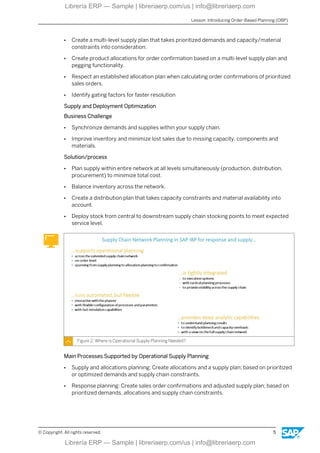
service level.
Figure 2: Where is Operational Supply Planning Needed?
Main Processes Supported by Operational Supply Planning
● Supply and allocations planning: Create allocations and a supply plan; based on prioritized
or optimized demands and supply chain constraints.
● Response planning: Create sales order confirmations and adjusted supply plan; based on
prioritized demands, allocations and supply chain constraints.
Lesson: Introducing Order-Based Planning (OBP)
© Copyright. All rights reserved. 5
Librería ERP — Sample | libreriaerp.com/us | info@libreriaerp.com
● Deployment planning: Create a deployment plan, adjust other stock transfer proposals,
and sales order confirmations; based upon prioritized or optimized demands, allocations,
supply chain constraints, and deployment settings.
These processes work on tightly integrated information from SAP ERP, allowing for supply
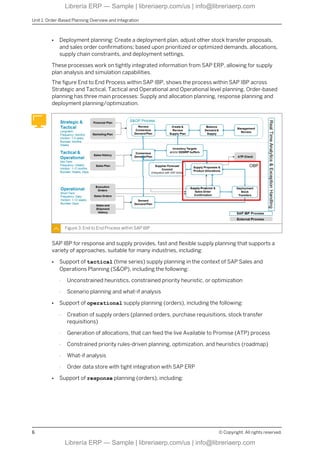
plan analysis and simulation capabilities.
The figure End to End Process within SAP IBP, shows the process within SAP IBP across
Strategic and Tactical, Tactical and Operational and Operational level planning. Order-based
planning has three main processes: Supply and allocation planning, response planning and
deployment planning/optimization.
Figure 3: End to End Process within SAP IBP
SAP IBP for response and supply provides, fast and flexible supply planning that supports a
variety of approaches, suitable for many industries, including:
● Support of tactical (time series) supply planning in the context of SAP Sales and
Operations Planning (S&OP), including the following:
- Unconstrained heuristics, constrained priority heuristic, or optimization
- Scenario planning and what-if analysis
● Support of operational supply planning (orders), including the following:
- Creation of supply orders (planned orders, purchase requisitions, stock transfer
requisitions)
- Generation of allocations, that can feed the live Available to Promise (ATP) process
- Constrained priority rules-driven planning, optimization, and heuristics (roadmap)
- What-if analysis
- Order data store with tight integration with SAP ERP
● Support of response planning (orders), including:
Unit 1: Order-Based Planning Overview and Integration
6 © Copyright. All rights reserved.
Librería ERP — Sample | libreriaerp.com/us | info@libreriaerp.com
- Adjusting  creating supply orders (planned orders, purchase requisitions, stock
transfer requisitions)
- Re-confirmation of sales orders
- Deployment planning
- What-if analysis
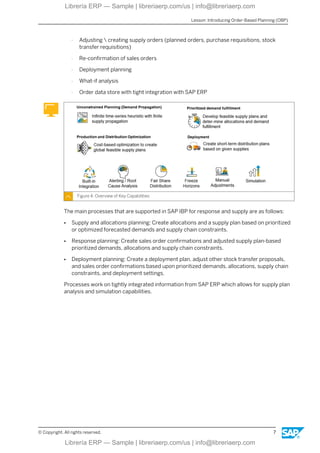
- Order data store with tight integration with SAP ERP
Figure 4: Overview of Key Capabilities
The main processes that are supported in SAP IBP for response and supply are as follows:
● Supply and allocations planning: Create allocations and a supply plan based on prioritized
or optimized forecasted demands and supply chain constraints.
● Response planning: Create sales order confirmations and adjusted supply plan-based
prioritized demands, allocations and supply chain constraints.
● Deployment planning: Create a deployment plan, adjust other stock transfer proposals,
and sales order confirmations based upon prioritized demands, allocations, supply chain
constraints, and deployment settings.
Processes work on tightly integrated information from SAP ERP which allows for supply plan
analysis and simulation capabilities.
Lesson: Introducing Order-Based Planning (OBP)
© Copyright. All rights reserved. 7
Librería ERP — Sample | libreriaerp.com/us | info@libreriaerp.com
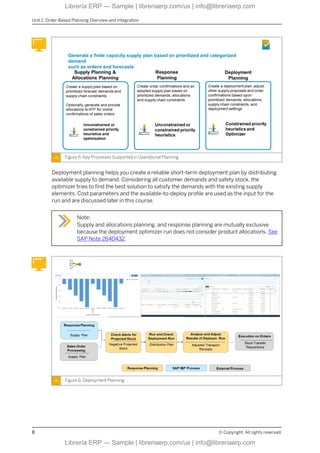
Figure 5: Key Processes Supported in Operational Planning
Deployment planning helps you create a reliable short-term deployment plan by distributing
available supply to demand. Considering all customer demands and safety stock, the
optimizer tries to find the best solution to satisfy the demands with the existing supply
elements. Cost parameters and the available-to-deploy profile are used as the input for the
run and are discussed later in this course.
Note:
Supply and allocations planning, and response planning are mutually exclusive
because the deployment optimizer run does not consider product allocations. See
SAP Note 2640432.
Figure 6: Deployment Planning
Unit 1: Order-Based Planning Overview and Integration
8 © Copyright. All rights reserved.
Librería ERP — Sample | libreriaerp.com/us | info@libreriaerp.com
LESSON SUMMARY
You should now be able to:
● Introduce Order-Based Planning (OBP)
Lesson: Introducing Order-Based Planning (OBP)
© Copyright. All rights reserved. 9
Librería ERP — Sample | libreriaerp.com/us | info@libreriaerp.com
Unit 1: Order-Based Planning Overview and Integration
10 © Copyright. All rights reserved.
Librería ERP — Sample | libreriaerp.com/us | info@libreriaerp.com
Unit 1
Lesson 2
Outlining SAP IBP Integration Scenarios
LESSON OBJECTIVES
After completing this lesson, you will be able to:
● Describe SAP IBP Integration Scenarios
SAP IBP Integration Scenarios
For SAP IBP the required integration tool is bundled with the application license and this is
SAP Cloud Integration for data services. There are “templates” available, which are pre-
defined dataflows with mappings from SAP ERP, SAP S/4HANA or SAP Advanced Planning
and Optimization (SAP APO) to a data model in SAP IBP. These templates can be used as-is,
or can be used as a starting point for further customization. In addition, the write back (from
SAP IBP to ERP/APO) can be done using SAP Cloud Integration for data services.
In the SAP IBP suite, there is one exception with SAP IBP for response and supply. SAP IBP
for response and supply leverages the SAP Smart Data Integration engine with the goal to
enable real-time replication in the future. There is no SAP Smart Data Integration web user
interface available and no customizations to mappings are possible. The configuration is done
through the SAP IBP Fiori user interface. Consequently, only the agent from SAP Smart Data
Integration is visible to customers as a component they need to install.
SAP Cloud Integration for data services is a cloud based data integration tool for batch/
scheduled data integration between on-premise applications and cloud applications. The
main use case for SAP Smart Data Integration is loading data to SAP IBP, but there is also
connectivity to other cloud applications through standards such as SOAP, REST or OData.
SAP Smart Data Integration does not provide real-time data integration, and has a limited set
of transformation capabilities.
SAP HANA smart data integration is a native technology inside an SAP HANA database to
load data in (and out of) this SAP HANA database. In addition to a batch or scheduled data
load, it can also do real-time replication and even data federation. It has a rich set of adapters
for connectivity and provides many transformation capabilities, leveraging the SAP HANA in-
memory database as an engine.
© Copyright. All rights reserved. 11
Librería ERP — Sample | libreriaerp.com/us | info@libreriaerp.com
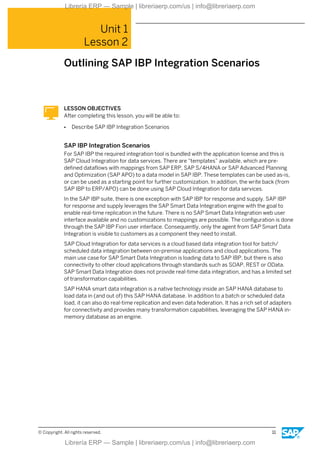
Figure 7: Data Integration Options
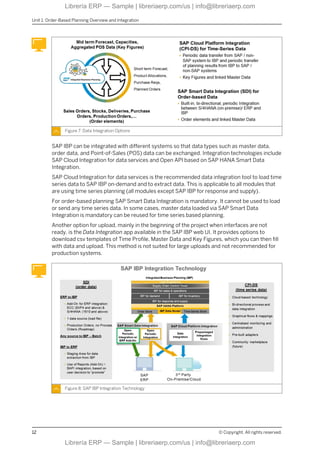
SAP IBP can be integrated with different systems so that data types such as master data,
order data, and Point-of-Sales (POS) data can be exchanged. Integration technologies include
SAP Cloud Integration for data services and Open API based on SAP HANA Smart Data
Integration.
SAP Cloud Integration for data services is the recommended data integration tool to load time
series data to SAP IBP on-demand and to extract data. This is applicable to all modules that
are using time series planning (all modules except SAP IBP for response and supply).
For order-based planning SAP Smart Data Integration is mandatory. It cannot be used to load
or send any time series data. In some cases, master data loaded via SAP Smart Data
Integration is mandatory can be reused for time series based planning.
Another option for upload, mainly in the beginning of the project when interfaces are not
ready, is the Data Integration app available in the SAP IBP web UI. It provides options to
download csv templates of Time Profile, Master Data and Key Figures, which you can then fill
with data and upload. This method is not suited for large uploads and not recommended for
production systems.
Figure 8: SAP IBP Integration Technology
Unit 1: Order-Based Planning Overview and Integration
12 © Copyright. All rights reserved.
Librería ERP — Sample | libreriaerp.com/us | info@libreriaerp.com

IBP820 Col2205 Deployment Optimizer in SAP IBP

  • 1.
    IBP820 Deployment Optimizer inSAP IBP . . PARTICIPANT HANDBOOK INSTRUCTOR-LED TRAINING . Course Version: 2205 Course Duration: 2 Day(s) Material Number: 50159863 Librería ERP — Sample | libreriaerp.com/us | info@libreriaerp.com Librería ERP — Sample | libreriaerp.com/us | info@libreriaerp.com
  • 2.
    Librería ERP —Sample | libreriaerp.com/us | info@libreriaerp.com Librería ERP — Sample | libreriaerp.com/us | info@libreriaerp.com
  • 3.
    SAP Copyrights, Trademarksand Disclaimers © 2022 SAP SE or an SAP affiliate company. All rights reserved. No part of this publication may be reproduced or transmitted in any form or for any purpose without the express permission of SAP SE or an SAP affiliate company. SAP and other SAP products and services mentioned herein as well as their respective logos are trademarks or registered trademarks of SAP SE (or an SAP affiliate company) in Germany and other countries. Please see https://www.sap.com/corporate/en/legal/copyright.html for additional trademark information and notices. Some software products marketed by SAP SE and its distributors contain proprietary software components of other software vendors. National product specifications may vary. These materials may have been machine translated and may contain grammatical errors or inaccuracies. These materials are provided by SAP SE or an SAP affiliate company for informational purposes only, without representation or warranty of any kind, and SAP SE or its affiliated companies shall not be liable for errors or omissions with respect to the materials. The only warranties for SAP SE or SAP affiliate company products and services are those that are set forth in the express warranty statements accompanying such products and services, if any. Nothing herein should be construed as constituting an additional warranty. In particular, SAP SE or its affiliated companies have no obligation to pursue any course of business outlined in this document or any related presentation, or to develop or release any functionality mentioned therein. This document, or any related presentation, and SAP SE’s or its affiliated companies’ strategy and possible future developments, products, and/or platform directions and functionality are all subject to change and may be changed by SAP SE or its affiliated companies at any time for any reason without notice. The information in this document is not a commitment, promise, or legal obligation to deliver any material, code, or functionality. All forward-looking statements are subject to various risks and uncertainties that could cause actual results to differ materially from expectations. Readers are cautioned not to place undue reliance on these forward-looking statements, which speak only as of their dates, and they should not be relied upon in making purchasing decisions. © Copyright. All rights reserved. iii Librería ERP — Sample | libreriaerp.com/us | info@libreriaerp.com Librería ERP — Sample | libreriaerp.com/us | info@libreriaerp.com
  • 4.
    Typographic Conventions American Englishis the standard used in this handbook. The following typographic conventions are also used. This information is displayed in the instructor’s presentation Demonstration Procedure Warning or Caution Hint Related or Additional Information Facilitated Discussion User interface control Example text Window title Example text iv © Copyright. All rights reserved. Librería ERP — Sample | libreriaerp.com/us | info@libreriaerp.com Librería ERP — Sample | libreriaerp.com/us | info@libreriaerp.com
  • 5.
    Contents vii Course Overview 1Unit 1: Order-Based Planning Overview and Integration 3 Lesson: Introducing Order-Based Planning (OBP) 11 Lesson: Outlining SAP IBP Integration Scenarios 15 Lesson: Introducing SAP Smart Data Integration 17 Lesson: Integrating Data Using SAP Smart Data Integration 21 Lesson: Setting Up the Integration 25 Lesson: Running the Integration 33 Unit 2: Deployment Overview 35 Lesson: Choosing the Right Solver 39 Lesson: Introducing Deployment Planning 41 Lesson: Differentiating Types of Deployment Algorithms 43 Lesson: Understanding the Deployment Planning Process Flow 45 Lesson: Marking Order Types as Available to Deploy (ATD) 47 Lesson: Checking Deployment Stock Transfer Requisitions in SAP IBP 49 Lesson: Identifying Use Cases for the Deployment Optimizer 55 Unit 3: Optimizer and Costs 57 Lesson: Describing the Value Proposition of the Optimizer 59 Lesson: Working with Cost Settings and Optimizer Parameters 65 Lesson: Defining Cost Key Figures 67 Lesson: Defining Deployment Key Figures 73 Unit 4: Deployment Optimizer 75 Lesson: Describing an Optimized Distribution Plan 77 Lesson: Defining Fair Share in Order-Based Optimization 79 Lesson: Outlining How to Achieve Fair Share for Demands 87 Lesson: Outlining How to Achieve Fair Share for Inventory 101 Lesson: Describing Optimization Best Practices 109 Unit 5: Deployment Cost Generation 111 Lesson: Introducing and Running Deployment Cost Generation 115 Lesson: Describing Input Data and Generated Cost Model 119 Lesson: Reviewing Generated Costs © Copyright. All rights reserved. v Librería ERP — Sample | libreriaerp.com/us | info@libreriaerp.com Librería ERP — Sample | libreriaerp.com/us | info@libreriaerp.com
  • 6.
    125 Unit 6:Introduction to Transportation Resource 127 Lesson: Introducing Transportation Resource 131 Lesson: Outlining Master Data for Transportation Resource 141 Lesson: Outlining Transactional Data for Transportation Resource 153 Unit 7: Appendix 155 Lesson: Appendix Info vi © Copyright. All rights reserved. Librería ERP — Sample | libreriaerp.com/us | info@libreriaerp.com Librería ERP — Sample | libreriaerp.com/us | info@libreriaerp.com
  • 7.
    Course Overview TARGET AUDIENCE Thiscourse is intended for the following audiences: © Copyright. All rights reserved. vii Librería ERP — Sample | libreriaerp.com/us | info@libreriaerp.com Librería ERP — Sample | libreriaerp.com/us | info@libreriaerp.com
  • 8.
    viii © Copyright.All rights reserved. Librería ERP — Sample | libreriaerp.com/us | info@libreriaerp.com Librería ERP — Sample | libreriaerp.com/us | info@libreriaerp.com
  • 9.
    UNIT 1 Order-BasedPlanning Overview and Integration Lesson 1 Introducing Order-Based Planning (OBP) 3 Lesson 2 Outlining SAP IBP Integration Scenarios 11 Lesson 3 Introducing SAP Smart Data Integration 15 Lesson 4 Integrating Data Using SAP Smart Data Integration 17 Lesson 5 Setting Up the Integration 21 Lesson 6 Running the Integration 25 UNIT OBJECTIVES ● Introduce Order-Based Planning (OBP) ● Describe SAP IBP Integration Scenarios ● Outline key features of SAP Smart Data Integration ● Understand the data transfer using SAP Smart Data Integration ● Understand how to set up integration ● Understand how to run integration © Copyright. All rights reserved. 1 Librería ERP — Sample | libreriaerp.com/us | info@libreriaerp.com Librería ERP — Sample | libreriaerp.com/us | info@libreriaerp.com
  • 10.
    Unit 1: Order-BasedPlanning Overview and Integration 2 © Copyright. All rights reserved. Librería ERP — Sample | libreriaerp.com/us | info@libreriaerp.com Librería ERP — Sample | libreriaerp.com/us | info@libreriaerp.com
  • 11.
    Unit 1 Lesson 1 IntroducingOrder-Based Planning (OBP) LESSON OBJECTIVES After completing this lesson, you will be able to: ● Introduce Order-Based Planning (OBP) Digital Business Planning in SAP Intelligent Enterprise SAP Integrated Business Planning for Supply Chain solution includes the following applications all of which are licensed separately ● SAP Integrated Business Planning for sales and operations: This application is a core component of SAP IBP used in most, if not all, implementations. It enables you to plan interactively or in the background using the Microsoft Excel interface, analyze your plan via the web interface, and create your own attributes and key figures with your own calculations. It also contains basic demand planning functionality. ● SAP Integrated Business Planning for demand: This application contains advanced forecasting and demand sensing algorithms. ● SAP Integrated Business Planning for inventory: This application contains advanced inventory management functionality. ● SAP Integrated Business Planning for response and supply: This application allows you to sort demand by priority and then plan supply to match demand, either using a constrained-based optimizer, or an unconstrained heuristic. SAP Supply Chain Control Tower is a stand-alone offering that provides end-to-end supply chain visibility, alerting, and analytics. It can be connected to SAP IBP, but this is not a prerequisite. © Copyright. All rights reserved. 3 Librería ERP — Sample | libreriaerp.com/us | info@libreriaerp.com Librería ERP — Sample | libreriaerp.com/us | info@libreriaerp.com
  • 12.
    Figure 1: DigitalBusiness Planning in SAP Intelligent Enterprise For most SAP IBP components, planning is based on time series. This means that all requirements in a particular “bucket" of time, such as a week or month, are grouped together and a matching supply is generated by either an unconstrained heuristic or an optimizer that considers constraints. SAP IBP for response and supply supports this, but also allows you to plan by individual order. You can sort the orders by their priority, then generate a single supply order against each demand. This is supported for an unconstrained heuristic or an optimizer that considers constraints. Use response management to plan your company's supply and demand. This means ensuring that you always have enough stock available, and that you can respond quickly to any changes that might arise on short notice. With SAP IBP for response and supply, you can take care of the entire process as follows: ● Create a supply plan - that can be tailored to your individual customer requirements based on master data, transactional data, forecast information and configuration data imported from any systems. ● Control which orders are processed first by creating rules with which to rank customer orders by priority. ● React quickly to any unforeseen supply and demand changes, using simulations (what-if analysis) to try out potential solutions, and then update your live plan accordingly. ● Analyze gating factors in order to better overcome them in future. ● Response management requires master data (especially locations and materials), transactional data (especially order information), and configuration data to work. Business Challenge ● Consider business priorities when allocating supply to customers. ● Respect supply chain constraints and allocation policies when responding to sales orders. Solution/process Unit 1: Order-Based Planning Overview and Integration 4 © Copyright. All rights reserved. Librería ERP — Sample | libreriaerp.com/us | info@libreriaerp.com Librería ERP — Sample | libreriaerp.com/us | info@libreriaerp.com
  • 13.
    ● Create amulti-level supply plan that takes prioritized demands and capacity/material constraints into consideration. ● Create product allocations for order confirmation based on a multi-level supply plan and pegging functionality. ● Respect an established allocation plan when calculating order confirmations of prioritized sales orders. ● Identify gating factors for faster resolution Supply and Deployment Optimization Business Challenge ● Synchronize demands and supplies within your supply chain. ● Improve inventory and minimize lost sales due to missing capacity, components and materials. Solution/process ● Plan supply within entire network at all levels simultaneously (production, distribution, procurement) to minimize total cost. ● Balance inventory across the network. ● Create a distribution plan that takes capacity constraints and material availability into account. ● Deploy stock from central to downstream supply chain stocking points to meet expected service level. Figure 2: Where is Operational Supply Planning Needed? Main Processes Supported by Operational Supply Planning ● Supply and allocations planning: Create allocations and a supply plan; based on prioritized or optimized demands and supply chain constraints. ● Response planning: Create sales order confirmations and adjusted supply plan; based on prioritized demands, allocations and supply chain constraints. Lesson: Introducing Order-Based Planning (OBP) © Copyright. All rights reserved. 5 Librería ERP — Sample | libreriaerp.com/us | info@libreriaerp.com Librería ERP — Sample | libreriaerp.com/us | info@libreriaerp.com
  • 14.
    ● Deployment planning:Create a deployment plan, adjust other stock transfer proposals, and sales order confirmations; based upon prioritized or optimized demands, allocations, supply chain constraints, and deployment settings. These processes work on tightly integrated information from SAP ERP, allowing for supply plan analysis and simulation capabilities. The figure End to End Process within SAP IBP, shows the process within SAP IBP across Strategic and Tactical, Tactical and Operational and Operational level planning. Order-based planning has three main processes: Supply and allocation planning, response planning and deployment planning/optimization. Figure 3: End to End Process within SAP IBP SAP IBP for response and supply provides, fast and flexible supply planning that supports a variety of approaches, suitable for many industries, including: ● Support of tactical (time series) supply planning in the context of SAP Sales and Operations Planning (S&OP), including the following: - Unconstrained heuristics, constrained priority heuristic, or optimization - Scenario planning and what-if analysis ● Support of operational supply planning (orders), including the following: - Creation of supply orders (planned orders, purchase requisitions, stock transfer requisitions) - Generation of allocations, that can feed the live Available to Promise (ATP) process - Constrained priority rules-driven planning, optimization, and heuristics (roadmap) - What-if analysis - Order data store with tight integration with SAP ERP ● Support of response planning (orders), including: Unit 1: Order-Based Planning Overview and Integration 6 © Copyright. All rights reserved. Librería ERP — Sample | libreriaerp.com/us | info@libreriaerp.com Librería ERP — Sample | libreriaerp.com/us | info@libreriaerp.com
  • 15.
    - Adjusting creating supply orders (planned orders, purchase requisitions, stock transfer requisitions) - Re-confirmation of sales orders - Deployment planning - What-if analysis - Order data store with tight integration with SAP ERP Figure 4: Overview of Key Capabilities The main processes that are supported in SAP IBP for response and supply are as follows: ● Supply and allocations planning: Create allocations and a supply plan based on prioritized or optimized forecasted demands and supply chain constraints. ● Response planning: Create sales order confirmations and adjusted supply plan-based prioritized demands, allocations and supply chain constraints. ● Deployment planning: Create a deployment plan, adjust other stock transfer proposals, and sales order confirmations based upon prioritized demands, allocations, supply chain constraints, and deployment settings. Processes work on tightly integrated information from SAP ERP which allows for supply plan analysis and simulation capabilities. Lesson: Introducing Order-Based Planning (OBP) © Copyright. All rights reserved. 7 Librería ERP — Sample | libreriaerp.com/us | info@libreriaerp.com Librería ERP — Sample | libreriaerp.com/us | info@libreriaerp.com
  • 16.
    Figure 5: KeyProcesses Supported in Operational Planning Deployment planning helps you create a reliable short-term deployment plan by distributing available supply to demand. Considering all customer demands and safety stock, the optimizer tries to find the best solution to satisfy the demands with the existing supply elements. Cost parameters and the available-to-deploy profile are used as the input for the run and are discussed later in this course. Note: Supply and allocations planning, and response planning are mutually exclusive because the deployment optimizer run does not consider product allocations. See SAP Note 2640432. Figure 6: Deployment Planning Unit 1: Order-Based Planning Overview and Integration 8 © Copyright. All rights reserved. Librería ERP — Sample | libreriaerp.com/us | info@libreriaerp.com Librería ERP — Sample | libreriaerp.com/us | info@libreriaerp.com
  • 17.
    LESSON SUMMARY You shouldnow be able to: ● Introduce Order-Based Planning (OBP) Lesson: Introducing Order-Based Planning (OBP) © Copyright. All rights reserved. 9 Librería ERP — Sample | libreriaerp.com/us | info@libreriaerp.com Librería ERP — Sample | libreriaerp.com/us | info@libreriaerp.com
  • 18.
    Unit 1: Order-BasedPlanning Overview and Integration 10 © Copyright. All rights reserved. Librería ERP — Sample | libreriaerp.com/us | info@libreriaerp.com Librería ERP — Sample | libreriaerp.com/us | info@libreriaerp.com
  • 19.
    Unit 1 Lesson 2 OutliningSAP IBP Integration Scenarios LESSON OBJECTIVES After completing this lesson, you will be able to: ● Describe SAP IBP Integration Scenarios SAP IBP Integration Scenarios For SAP IBP the required integration tool is bundled with the application license and this is SAP Cloud Integration for data services. There are “templates” available, which are pre- defined dataflows with mappings from SAP ERP, SAP S/4HANA or SAP Advanced Planning and Optimization (SAP APO) to a data model in SAP IBP. These templates can be used as-is, or can be used as a starting point for further customization. In addition, the write back (from SAP IBP to ERP/APO) can be done using SAP Cloud Integration for data services. In the SAP IBP suite, there is one exception with SAP IBP for response and supply. SAP IBP for response and supply leverages the SAP Smart Data Integration engine with the goal to enable real-time replication in the future. There is no SAP Smart Data Integration web user interface available and no customizations to mappings are possible. The configuration is done through the SAP IBP Fiori user interface. Consequently, only the agent from SAP Smart Data Integration is visible to customers as a component they need to install. SAP Cloud Integration for data services is a cloud based data integration tool for batch/ scheduled data integration between on-premise applications and cloud applications. The main use case for SAP Smart Data Integration is loading data to SAP IBP, but there is also connectivity to other cloud applications through standards such as SOAP, REST or OData. SAP Smart Data Integration does not provide real-time data integration, and has a limited set of transformation capabilities. SAP HANA smart data integration is a native technology inside an SAP HANA database to load data in (and out of) this SAP HANA database. In addition to a batch or scheduled data load, it can also do real-time replication and even data federation. It has a rich set of adapters for connectivity and provides many transformation capabilities, leveraging the SAP HANA in- memory database as an engine. © Copyright. All rights reserved. 11 Librería ERP — Sample | libreriaerp.com/us | info@libreriaerp.com Librería ERP — Sample | libreriaerp.com/us | info@libreriaerp.com
  • 20.
    Figure 7: DataIntegration Options SAP IBP can be integrated with different systems so that data types such as master data, order data, and Point-of-Sales (POS) data can be exchanged. Integration technologies include SAP Cloud Integration for data services and Open API based on SAP HANA Smart Data Integration. SAP Cloud Integration for data services is the recommended data integration tool to load time series data to SAP IBP on-demand and to extract data. This is applicable to all modules that are using time series planning (all modules except SAP IBP for response and supply). For order-based planning SAP Smart Data Integration is mandatory. It cannot be used to load or send any time series data. In some cases, master data loaded via SAP Smart Data Integration is mandatory can be reused for time series based planning. Another option for upload, mainly in the beginning of the project when interfaces are not ready, is the Data Integration app available in the SAP IBP web UI. It provides options to download csv templates of Time Profile, Master Data and Key Figures, which you can then fill with data and upload. This method is not suited for large uploads and not recommended for production systems. Figure 8: SAP IBP Integration Technology Unit 1: Order-Based Planning Overview and Integration 12 © Copyright. All rights reserved. Librería ERP — Sample | libreriaerp.com/us | info@libreriaerp.com Librería ERP — Sample | libreriaerp.com/us | info@libreriaerp.com