Identity and Access Management
10 Steps to Role-based Access Control
Steve Jensen
Senior Director and Chief Information Security Officer
Blue Cross Blue Shield of Minnesota
Identity Lifecycle Management
Business Requirements
> The ability to request and review access in
terminology understood by the business.
> Speed up the on boarding process.
> Role based access control
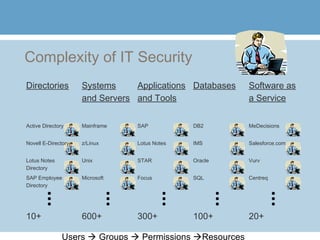
Complexity of IT Security
Directories Systems
and Servers
Applications
and Tools
Databases Software as
a Service
Active Directory Mainframe SAP DB2 MeDecisions
Novell E-Directory z/Linux Lotus Notes IMS Salesforce.com
Lotus Notes
Directory
Unix STAR Oracle Vurv
SAP Employee
Directory
Microsoft Focus SQL Centreq
10+ 600+ 300+ 100+ 20+
Users  Groups  Permissions Resources
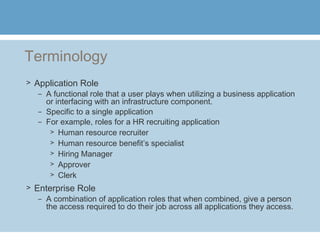
Terminology
> Application Role
– A functional role that a user plays when utilizing a business application
or interfacing with an infrastructure component.
– Specific to a single application
– For example, roles for a HR recruiting application
> Human resource recruiter
> Human resource benefit’s specialist
> Hiring Manager
> Approver
> Clerk
> Enterprise Role
– A combination of application roles that when combined, give a person
the access required to do their job across all applications they access.
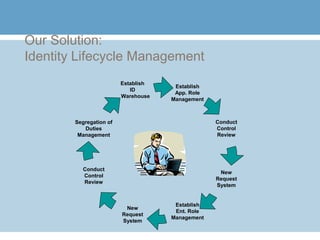
Our Solution:
Identity Lifecycle Management
Establish
App. Role
Management
Establish
Ent. Role
Management
Segregation of
Duties
Management
Conduct
Control
Review
New
Request
System
New
Request
System
Conduct
Control
Review
Establish
ID
Warehouse
Step 1 – Create an identity warehouse
> Leverage purchase by quick-win – password self-
service functionality
> Platform coverage should be a key purchasing decision
> You will still need to build custom feeds
– Legacy systems
– Externally hosted systems
– Proprietary security systems
> Move to directory services whenever possible
> Don’t just buy an IAM suite for “automated
provisioning”. Focus on role management
Step 2 – Establish enterprise role
management
> Either design/build or purchase a role
management product
> Ensure product can meet business
requirements
> Include role management, role mining, and role
attestation as bare-bones minimum
requirements
> Plenty of choices now on the market
Step 3 – Define application roles
> Create application roles
– Don’t attempt enterprise roles on day one
– Don’t attempt to link roles to HR
> Map one or more access groups into application roles.
Leverage documentation, group comments, and group
description fields
> Add entitlements to provide flexibility
> Combine like entitlements that have been applied on
multiple platforms
Step 4 – Conduct online role attestation
> Validate the assignments of application
functionality to users
> Must be in business terms
– No acronyms
– No technical terms
– No security specific terms
> Provide timely adjustments
Step 5 – Adjust request system
> Change your request system to request via application
roles instead of “IT technical lingo”
> Immediate business value
> Generate processes to keep role management in synch
> Can show what access is in place, and they can add
checks, or remove checks
> My advice – do not make automated provisioning your
goal just yet
Step 6 – Create enterprise roles
> Go to each line of business with a plan
> Assign role ownership – usually the manager
> Allow for multiple enterprise roles per person
> Advice – don’t try to align with HR job codes
> KISS - Don’t focus on keeping roles to a minimum – you
have role management software to deal with the
complexity.
> Adjust your role approval processes
Step 7 – Transparency - Conduct online
role attestation
> Validate the assignments of enterprise roles to
users
> Must be in business terms
– No acronyms
– No technical terms
– No security specific terms
> Provide drill-down capabilities to application
roles
Step 8 - Adjust request system (again)
> Change your request system to request a enterprise
roles instead of application role
> New request type – grant access of an enterprise role
to an application role.
> Tremendous business value
> Generate processes to keep role management in synch
> Again, show what access is in place, and they can add
checks, or remove checks
> Automation of provisioning is best done at this phase
Step 9 – Segregation of Duties Analysis
> Solicit from internal audit
> Solicit from risk management
> Provide mutually exclusive application roles
and do not allow a enterprise role to have both
Step 10 – Leverage and Measure
> Apply role management from internal
employees to address customers, suppliers,
business partners, etc.
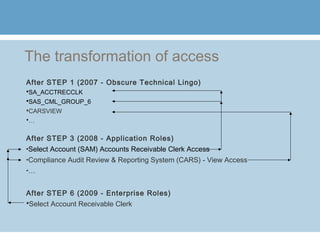
The transformation of access
After STEP 1 (2007 - Obscure Technical Lingo)
SA_ACCTRECCLK
SAS_CML_GROUP_6
CARSVIEW
…
After STEP 3 (2008 - Application Roles)
•Select Account (SAM) Accounts Receivable Clerk Access
•Compliance Audit Review & Reporting System (CARS) - View Access
•…
After STEP 6 (2009 - Enterprise Roles)
Select Account Receivable Clerk
Questions?

IAM Role Management

  • 1.
    Identity and AccessManagement 10 Steps to Role-based Access Control Steve Jensen Senior Director and Chief Information Security Officer Blue Cross Blue Shield of Minnesota
  • 2.
    Identity Lifecycle Management BusinessRequirements > The ability to request and review access in terminology understood by the business. > Speed up the on boarding process. > Role based access control
  • 3.
    Complexity of ITSecurity Directories Systems and Servers Applications and Tools Databases Software as a Service Active Directory Mainframe SAP DB2 MeDecisions Novell E-Directory z/Linux Lotus Notes IMS Salesforce.com Lotus Notes Directory Unix STAR Oracle Vurv SAP Employee Directory Microsoft Focus SQL Centreq 10+ 600+ 300+ 100+ 20+ Users  Groups  Permissions Resources
  • 4.
    Terminology > Application Role –A functional role that a user plays when utilizing a business application or interfacing with an infrastructure component. – Specific to a single application – For example, roles for a HR recruiting application > Human resource recruiter > Human resource benefit’s specialist > Hiring Manager > Approver > Clerk > Enterprise Role – A combination of application roles that when combined, give a person the access required to do their job across all applications they access.
  • 5.
    Our Solution: Identity LifecycleManagement Establish App. Role Management Establish Ent. Role Management Segregation of Duties Management Conduct Control Review New Request System New Request System Conduct Control Review Establish ID Warehouse
  • 6.
    Step 1 –Create an identity warehouse > Leverage purchase by quick-win – password self- service functionality > Platform coverage should be a key purchasing decision > You will still need to build custom feeds – Legacy systems – Externally hosted systems – Proprietary security systems > Move to directory services whenever possible > Don’t just buy an IAM suite for “automated provisioning”. Focus on role management
  • 7.
    Step 2 –Establish enterprise role management > Either design/build or purchase a role management product > Ensure product can meet business requirements > Include role management, role mining, and role attestation as bare-bones minimum requirements > Plenty of choices now on the market
  • 8.
    Step 3 –Define application roles > Create application roles – Don’t attempt enterprise roles on day one – Don’t attempt to link roles to HR > Map one or more access groups into application roles. Leverage documentation, group comments, and group description fields > Add entitlements to provide flexibility > Combine like entitlements that have been applied on multiple platforms
  • 9.
    Step 4 –Conduct online role attestation > Validate the assignments of application functionality to users > Must be in business terms – No acronyms – No technical terms – No security specific terms > Provide timely adjustments
  • 10.
    Step 5 –Adjust request system > Change your request system to request via application roles instead of “IT technical lingo” > Immediate business value > Generate processes to keep role management in synch > Can show what access is in place, and they can add checks, or remove checks > My advice – do not make automated provisioning your goal just yet
  • 11.
    Step 6 –Create enterprise roles > Go to each line of business with a plan > Assign role ownership – usually the manager > Allow for multiple enterprise roles per person > Advice – don’t try to align with HR job codes > KISS - Don’t focus on keeping roles to a minimum – you have role management software to deal with the complexity. > Adjust your role approval processes
  • 12.
    Step 7 –Transparency - Conduct online role attestation > Validate the assignments of enterprise roles to users > Must be in business terms – No acronyms – No technical terms – No security specific terms > Provide drill-down capabilities to application roles
  • 13.
    Step 8 -Adjust request system (again) > Change your request system to request a enterprise roles instead of application role > New request type – grant access of an enterprise role to an application role. > Tremendous business value > Generate processes to keep role management in synch > Again, show what access is in place, and they can add checks, or remove checks > Automation of provisioning is best done at this phase
  • 14.
    Step 9 –Segregation of Duties Analysis > Solicit from internal audit > Solicit from risk management > Provide mutually exclusive application roles and do not allow a enterprise role to have both
  • 15.
    Step 10 –Leverage and Measure > Apply role management from internal employees to address customers, suppliers, business partners, etc.
  • 16.
    The transformation ofaccess After STEP 1 (2007 - Obscure Technical Lingo) SA_ACCTRECCLK SAS_CML_GROUP_6 CARSVIEW … After STEP 3 (2008 - Application Roles) •Select Account (SAM) Accounts Receivable Clerk Access •Compliance Audit Review & Reporting System (CARS) - View Access •… After STEP 6 (2009 - Enterprise Roles) Select Account Receivable Clerk
  • 17.