


iVend Retail
Retail Management Solution

N e w Yo r k

|

Mexico

|

Panama

|

Nairobi

|

London

|

New Delhi

|

Singapore

|

Sydney
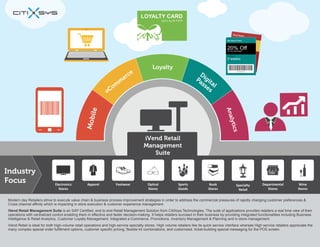
Modern day Retailers strive to execute value chain & business process improvement strategies in order to address the commercial pressures of rapidly changing customer preferences &
Cross channel affinity which is impacting in store execution & customer experience management.
iVend Retail Management Suite is an SAP Certified, end to end Retail Management Solution from CitiXsys Technologies. The suite of applications provides retailers a real time view of their
operations with centralized control enabling them in effective and faster decision-making. It helps retailers succeed in their business by providing integrated functionalities including Business
Intelligence & Retail Analytics, Customer Loyalty Management, Integrated e-Commerce, Promotions, Inventory Management & Planning and in-store management.
iVend Retail is ideal for both high-volume retail operations and high-service specialty stores. High volume retailers like its quick service interface whereas High service retailers appreciate the
many complex special order fulfillment options, customer specific pricing, flexible kit combinations, and customized, ticket-building special messaging for the POS screen.
iVend POS - Terminal & Mobile
iVend POS is fast, dependable and powerful Point Of Service application with an easy to use keyboard or touchscreen operated
user interface. iVend POS makes transactions processing error free and easy to manage & execute. iVend POS is the execution
point for configurations done at the Head Office which include pricing, discounts, promotions, tender types, layaways, and returns.
Terminal POS is the traditional POS application packed with multitude of features and is the execution point for configurations
done at the Head Office which include pricing, discounts, promotions, tender types, layaways, and returns.
Mobile POS, as the name suggests is a POS which operates on a handheld device like an iPhone or iPad or select models of
Android tablets. iVend Store component at the retail outlet or alternatively directly into iVend Enterprise at the Head Office in case
iVend Store component is not installed at the retail outlet. Mobile POS brings the power and effectiveness of a traditional POS to a
mobile device and helps retailers enhance customer experience and also maximize the real estate in the store.

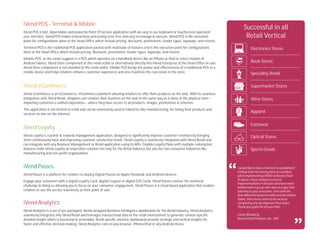
Successful in all
Retail Vertical
Electronics Stores
Book Stores
Speciality Retail

iVend eCommerce

Supermarket Stores

iVend eCommerce is an eCommerce, mCommerce platform allowing retailers to offer their products on the web. With its seamless
integration with iVend Retail, shoppers can conduct their business on the web in the same way as is done at the physical store –
imparting customers a unified experience – where they have access to all products, images, promotions & schemes.

Wine Stores

This application is not limited to retail and can be extensively used in industries like manufacturing, for listing their products and
services on-line on the Internet.

Apparel

iVend Loyalty
iVend Loyalty is a points & rewards management application, designed to significantly improve customer retention by bringing
them continuously back and improving customer satisfaction levels. iVend Loyalty is seamlessly integrated with iVend Retail and
can integrate with any Business Management or Retail application using its APIs. Flexible Loyalty Plans with multiple redemption
features make iVend Loyalty an imperative solution not only for the Retail Industry, but also for non-consumer industries like
manufacturing and non-profit organizations.

iVend Passes
iVend Passes is a platform for retailers to deploy Digital Passes on Apple Passbook and Android devices.
Engage your customers with a digital Loyalty Card, digital Coupon or digital Gift Cards. iVend Passes remove the technical
challenge in doing so allowing you to focus on your consumer engagement. iVend Passes is a cloud based application that enables
retailers to use the service seamlessly at their point of sale.

iVend Analytics
iVend Analytics is a set of pre-packaged, shrink-wrapped Business Intelligence dashboards for the Retail Industry. iVend Analytics
seamlessly integrates into iVend Retail and leverages transactional data of the retail environment to generate context-specific
detailed insight which is functional & actionable. Retail specific intuitive dashboards provide strategic and tactical insights for
faster and effective decision-making. iVend Analytics runs on any browser, iPhone/iPad or any Android device

Footwear
Optical Stores
Sports Goods

I would like to take a moment to compliment
CitiXsys team for having done an excellent
job in implementing iVEND at Reeves Floral
Products. I have worked on several
implementations in the past and have never
worked with a group who were as eager and
talented as your associates. Even with the
time difference between India and the United
States, there never seems to be an issue
completing any development that arises.
Thank you again for all your help.
Chuck Woodring,
Reeves Floral Products, Inc., USA
POS and Retail Management Solution
Retailers face multitude of challenges in today's
marketplace. To succeed in an increasingly
competitive marketplace, retailers must find
innovative ways to compete that are not based
solely on price. To effectively stay in business
and maximize profitability, retailers must
effectively manage business variables, reduce
operation costs, maximize efficiencies, ensure
excellent customer service, and collaborate with
suppliers. To stay ahead of competition retailers
must follow customer-buying patterns and
forecast future needs.

iVend Retail is an end to end retail solution that
covers everything from POS to Back Office to
Head Office operations. An iVend Retail setup can
scale upto a complex multi-store environment
with complete integration with your day to day
business operations. The solution automates the
entire operations, virtually eliminating paper work.

Many midsize retailers struggle everyday to
compete with effectiveness. They lack proper
technology solutions and are still struggling with
old legacy applications that are not compatible
and non-integrated with their business /
accounting application; Or worse that they are
using spreadsheet applications for analysis
which is extremely ineffective and time
consuming.

iVend Retail allows the management team at the
Head Office to have complete control over data at
the stores. It extends flexibility at the Head Office
to setup and configure the system from one place
and therefore simplifies the management of data.
iVend Retail delivers a configurable, flexible, and
scalable solution that is easy to setup and
implement and integrates seamlessly with SAP
Business All-in-One.

I would like to take a moment to compliment CitiXsys team for having done an excellent job in
implementing IVEND at Reeves Floral Products. I have worked on several implementations in the
past and have never worked with a group who were as eager and talented as your associates. Even
with the time difference between India and the United States, there never seems to be an issue
completing any development that arises.
Thank you again for all your help.
Chuck Woodring,
Reeves Floral Products, Inc., USA

“

“

Most retailers need an end-to-end solution, which
provides them a near real time view of their
operations with centralized control and enables
them in faster decision-making.
Benefits
Stay connected with your business operations -

Reliable and safe Credit Card transactions –

iVend Retail comes as an end-to-end business solution
for retailers and is an extensive retail management
application to manage Store and POS functions.
Fail-safe integration with a standard ERP keeps the
head office always connected with the store operations
across the complete retail chain.

iVend Retail offers fast, easy, safe, and cost-effective
card management with integrated payment processing
from industry-leading banks.

Retail, head office operations have complete visibility
of stock across the retail chain and can effectively push
stock rather than relying on store requisitions.
Additionally the merchandising department can raise
purchase orders in time to avoid complete stock out
situations.

Never loose a sale – iVend Retail delivers up to
date visibility of stock across the retail chain. POS
operators can gain complete visibility of stock across
stores or at the main warehouse / distribution centers
right from the POS interface. In stock out situations,
POS operators can put items on order and fulfill them
from other stores or at a later date by replenishing
stock from the distribution center.
Smoothly process routine and complex
transactions – iVend Retail enables the POS operator
to combine multiple transaction types with in single
POS transaction. For example – POS operators can
process a sale refund and sale transaction in a single
transaction rather than a two-step process, which
involves a separate transaction for sales refund and
sale.

Make the right decisions – Flexible reporting options
in iVend help you make accurate decisions.

“

Retain customers and manage customer
communication – The loyalty management module in
iVend allows you to define flexible / lucrative
campaigns, which ensure that the customers keep
coming back, thereby increasing customer profitability
by rewarding the right customer. It delivers a full range
of analytics and service capabilities that help you
better understand each customer's value and design
promotions that maximize the potential of all your
customer relationships. Customers can be informed of
available points, their value and their validity.

Promotions that maximize profitability – Manage
targeted promotions by easily analyzing detailed
customer trends at individual stores and throughout
the retail chain. Promotions can be defined in multiple
formats such as period based discounts, quantitative
discounts, mix and match and buy some get some.
Go Green – iVend Passes negate the need for
plastic cards and pesky paper coupons saving
investment on plastic and paper thereby contributing to
the environment. Being digital, iVend Passes keep the
information of loyalty cards, gift cards and coupons
updated. They are geo-tagged and location enabled to
keep the customer always informed on his status of
loyalty cards & coupons

“

Inventory control and replenishment - With iVend

Grow your average sales ticket - Up sell and
alternate item suggestions pop up on the POS
interface enabling the POS operator to make additional
recommendations to the customers.

We needed a better system to support our company, so we went with SAP®. Our retail shop also needed an
easier, user friendly system which integrated with SAP so we selected iVend Retail. We are now better able to
track transactions through the system and can also create gift certificates on the fly.
Angela Hahn, Administrator,
MiniJumbuk, Australia
Overview
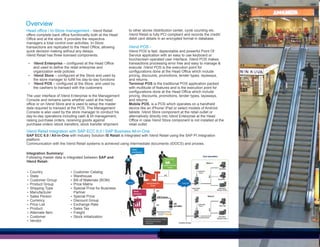
Head office / In-Store management - iVend Retail
offers complete back office functionality both at the Head
Office and at the store. It provides the respective
managers a total control over activities. In-Store
transactions are replicated to the Head Office, allowing
quick decision making without any delays.
iVend Retail has three licensed components:
Ÿ iVend Enterprise – configured at the Head Office

and used to define the retail enterprise and
organization wide policies
Ÿ iVend Store – configured at the Store and used by
the store manager to fulfill his day-to-day functions
Ÿ iVend POS – configured at the Store, and used by
the cashiers to transact with the customers
The user interface of iVend Enterprise is the Management
Console and remains same whether used at the head
office or on iVend Store and is used to setup the master
data required to transact at the POS. The Management
Console is also used by the store manager to conduct his
day-to-day operations including cash & till management,
raising purchase orders, receiving goods against
purchase orders /stock transfers, stock transfer shipment

to other stores /distribution center, cycle counting etc.
iVend Retail is fully PCI compliant and records the credit/
debit card details in an encrypted format in database.

iVend POS iVend POS is fast, dependable and powerful Point Of
Service application with an easy to use keyboard or
touchscreen operated user interface. iVend POS makes
transactions processing error free and easy to manage &
execute. iVend POS is the execution point for
configurations done at the Head Office which include
pricing, discounts, promotions, tender types, layaways,
and returns.
Terminal POS is the traditional POS application packed
with multitude of features and is the execution point for
configurations done at the Head Office which include
pricing, discounts, promotions, tender types, layaways,
and returns.
Mobile POS, is a POS which operates on a handheld
device like an iPhone/ iPad or select models of Android
tablets. iVend Store component at the retail outlet or
alternatively directly into iVend Enterprise at the Head
Office in case iVend Store component is not installed at the
retail outlet.

iVend Retail integration with SAP ECC 6.0 / SAP Business All-in-One
SAP ECC 6.0 / All-in-One with Industry Solution IS Retail is integrated with iVend Retail using the SAP PI Integration
platform.
Communication with the iVend Retail systems is achieved using intermediate documents (IDOCS) and proxies.
Integration Summary:
Following master data is integrated between SAP and
iVend RetailŸ Country
Ÿ State
Ÿ Customer Group
Ÿ Product Group
Ÿ Shipping Type
Ÿ Manufacturer
Ÿ Sales Person
Ÿ Currency
Ÿ Price List
Ÿ Product
Ÿ Alternate Item
Ÿ Customer
Ÿ Vendor

Ÿ Customer Catalog
Ÿ Warehouse
Ÿ Bill of Materials (BOM)
Ÿ Price Matrix
Ÿ Special Price for Business

Partner
Ÿ Special Price
Ÿ Discount Group
Ÿ Exchange Rate
Ÿ Sales Tax
Ÿ Freight
Ÿ Stock initialization
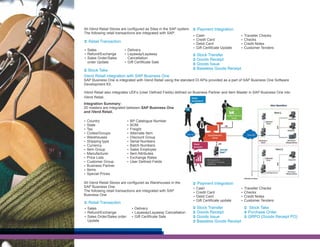
All iVend Retail Stores are configured as Sites in the SAP system. Ü Payment Integration
The following retail transactions are integrated with SAP:
Ÿ Cash
Ÿ Credit Card
Ü Retail Transaction
Ÿ Debit Card
Ÿ Gift Certificate Update
Ÿ Sales
Ÿ Delivery
Ÿ Refund/Exchange
Ÿ Layaway/Layaway
Ü Stock Transfer
Ÿ Sales Order/Sales
Cancellation
Ü Goods Receipt
order Update
Ÿ Gift Certificate Sale

Ÿ Traveller Checks
Ÿ Checks
Ÿ Credit Notes
Ÿ Customer Tenders

Ü Goods Issue
Ü Baseless Goods Receipt

Ü Stock Take

iVend Retail integration with SAP Business One
SAP Business One is integrated with iVend Retail using the standard DI APIs provided as a part of SAP Business One Software
Development Kit.
iVend Retail also integrates UDFs (User Defined Fields) defined on Business Partner and Item Master in SAP Business One into
iVend Retail.
Integration Summary:
25 masters are integrated between SAP Business One
and iVend Retail.
Ÿ Country
Ÿ State
Ÿ Tax
Ÿ Codes/Groups
Ÿ Warehouses
Ÿ Shipping type
Ÿ Currency
Ÿ Item Group
Ÿ Manufacturer
Ÿ Price Lists
Ÿ Customer Group
Ÿ Business Partner
Ÿ Items
Ÿ Special Prices

Ÿ BP Catalogue Number
Ÿ BOM
Ÿ Freight
Ÿ Alternate Item
Ÿ Discount Group
Ÿ Serial Numbers
Ÿ Batch Numbers
Ÿ Sales Employee
Ÿ Item Attributes
Ÿ Exchange Rates
Ÿ User Defined Fields

All iVend Retail Stores are configured as Warehouses in the
SAP Business One.
The following retail transactions are integrated with SAP
Business One
Ü Retail Transaction
Ÿ Sales
Ÿ Refund/Exchange
Ÿ Sales Order/Sales order

Update

Ÿ Delivery
Ÿ Layaway/Layaway Cancellation
Ÿ Gift Certificate Sale

Ü Payment Integration
Ÿ Cash
Ÿ Credit Card
Ÿ Debit Card
Ÿ Gift Certificate update

Ü
Ü
Ü
Ü

Ÿ Traveller Checks
Ÿ Checks
Ÿ Credit Notes
Ÿ Customer Tenders

Stock Transfer
Ü Stock Take
Goods Receipt
Ü Purchase Order
Goods Issue
Ü GRPO (Goods Receipt PO)
Baseless Goods Receipt
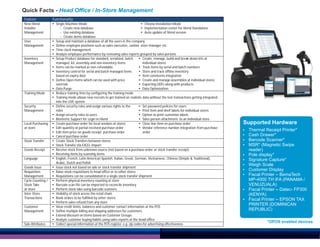
Quick Facts - Head Office / In-Store Management
Feature

Functionality

New iVend
Installer
Management

Ÿ Single Machine Mode
Ÿ Choose Installation Mode
- Create new database
Ÿ Implementation center for iVend Standalone
- Use existing database
Ÿ Auto update of iVend version
- Create demo database
Ÿ Setup and maintain a database of all the users in the company
Ÿ Define employee positions such as sales executive, cashier, store manager etc .
Ÿ Time clock management
Ÿ Analyze employee performance by reviewing sales reports grouped by sales persons
Ÿ Setup Product database for standard, serialized, batch
Ÿ Create, manage, build and break down kits at
managed, kit, assembly and non-inventory items
individual stores
Ÿ Items can be marked as non-refundable
Ÿ Track items by serial and batch numbers
Ÿ Inventory control for serial and batch managed items
Ÿ Store and track offline inventory
based on expiry date
Ÿ Item comments integration
Ÿ Define Open Items which can be used with price
Ÿ Create and manage assemblies at individual stores
override
Ÿ Exporting UDFs along with products
Ÿ Data Purge
Ÿ Data Optimization
Ÿ Reduce training time by configuring the training mode
Ÿ Training mode allows new recruits to get trained on realistic data without the test transactions getting integrated
into the LIVE system
Ÿ Define security roles and assign various rights to the
Ÿ Set password policies for users
roles
Ÿ Print item and shelf labels for individual stores
Ÿ Assign security roles to users
Ÿ Option to print customize labels
Ÿ Biometric Support for Login in iVend
Ÿ Sales person attachment to an individual store
Ÿ Create purchase order for local vendors at stores
Ÿ Close line item on purchase order
Ÿ Edit quantity at partial received purchase order
Ÿ Vendor reference number integration from purchase
Ÿ Edit item price on goods receipt purchase order
order
Ÿ Cancel purchase order
Ÿ Create Stock Transfers between stores
Ÿ Stock Transfer Via EXCEL Import
Ÿ Receive stock from unknown source (not based on a purchase order or stock transfer receipt)
Ÿ Receiving items by scanning items
Ÿ English, French, Latin American Spanish, Italian, Greek, German, Vietnamese, Chinese (Simple & Traditional),
Arabic, Dutch and Polish
Ÿ Issue stock not based on sale or stock transfer shipment
Ÿ Raise stock requisitions to head office or to other stores
Ÿ Requisitions can be consolidated in a single stock transfer shipment
Ÿ Perform physical inventory counting at store
Ÿ Barcode scan file can be imported to reconcile inventory
Ÿ Perform stock take using barcode scanners
Ÿ Visibility of stock across the retail chain
Ÿ Book orders to be fulfilled by other stores
Ÿ Perform sales refund from any store
Ÿ View credit limits, balances and customer contact information at the POS
Ÿ Define multiple billing and shipping addresses for customers
Ÿ Extend discount on items based on Customer Groups
Ÿ Analyze customer buying habits using sales reports at the head office
Ÿ Collect special information at the POS register, e.g. zip codes for advertising effectiveness

User
Management

Inventory
Management

Training Mode

Security
Management

Local Purchasing
at store

Stock Transfer
Goods Receipt
Language
Goods Issue
Requisition
Management
Cycle Counting /
Stock Take
at store
Inter-Store
Transactions
Customer
Management

Sale Attributes

Supported Hardware
Ÿ
Ÿ
Ÿ
Ÿ
Ÿ
Ÿ
Ÿ
Ÿ
Ÿ

Ÿ
Ÿ

Thermal Receipt Printer*
Cash Drawer*
Barcode Scanner*
MSR* (Magnetic Swipe
reader)
Pole display*
Signature Capture*
Weigh Scale
Customer Display
Fiscal Printer – BemaTech
MP-4000 TH IFA (PANAMA /
VENUZUALA)
Fiscal Printer – Datec- FP300
(KENYA)
Fiscal Printer – EPSON TAX
PRINTER (DOMINICAN
REPUBLIC)
*OPOS enabled devices
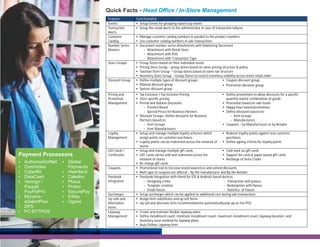
Quick Facts - Head Office / In-Store Management
Feature

Functionality

Events
Transaction
Alerts
Customer
Catalog
Number Series
Masters

Ÿ Setup Events for grouping reports by events
Ÿ Setup the email alerts to the administrator in case of transaction failures

Store Groups

Discount Group

Pricing and
Promotion
Management

Loyalty
Management

Payment Processors
AuthorizeDotNet
Commidea
CyberBit
DataCash
Verisign /
Paypal/
PayFloPro
Ÿ MoneriseSelectPlus
Ÿ DPS
Ÿ PC-EFTPOS
Ÿ
Ÿ
Ÿ
Ÿ
Ÿ

Gift Cards /
Certificates

Ÿ Global
Ÿ
Ÿ
Ÿ
Ÿ
Ÿ
Ÿ
Ÿ

Payments
Heartland
Caledon
Plutus
Protox
SecurePay
EWay
Ogone

Coupons
Passbook
Integration

Surcharges
Up sells and
Alternative
Items
Layaway
Management

Ÿ Manage customer catalog numbers in parallel to the product numbers
Ÿ Use customer catalog numbers in sale transactions
Ÿ Document number series attachments with Marketing Document
- Attachment with Retail Store
- Attachment with POS
- Attachment with Transaction Type
Ÿ Group Stores based on their individual needs
Ÿ Pricing Store Group – group stores based on same pricing structure & policy
Ÿ Taxation Store Group – Group stores based on same tax structure
Ÿ Inventory Store Group – Group Stores to restrict inventory visibility across entire retail chain
Ÿ Define multiple types of discount groups
Ÿ Coupon discount group
Ÿ Manual discount group
Ÿ Promotion discount group
Ÿ System discount group
Ÿ Tax Exclusive / Tax Inclusive Pricing
Ÿ Define promotions to allow discounts for a specific
Ÿ Store specific pricing
quantity and/or combination of goods
Ÿ Period and Volume Discounts:
Ÿ Promotion based on sale totals
- Pricelist Based
Ÿ Happy hour based promotions
- Special Prices for Business Partners
Ÿ Define discounts based on:
Ÿ Discount Groups: Define discounts for Business
- Item Groups
Partners based on:
- Manufacturers
- Item Groups
Ÿ Coupons – by Manufacturers or by Retailer
- Item Manufacturers
Ÿ Setup and manage multiple loyalty schemes which
Ÿ Redeem loyalty points against new customer
assign points on customer purchases
purchases
Ÿ Loyalty points can be redeemed across the network of
Ÿ Define ageing criteria for loyalty points
stores
Ÿ Setup and manage multiple gift cards
Ÿ Cash back on gift cards
Ÿ Gift Cards can be sold and redeemed across the
Ÿ Support for card or paper based gift cards
network of stores
Ÿ Recharge of Store Credit
Ÿ Re-charge gift cards
Ÿ Promotional tool to increase brand awareness and extend discounts
Ÿ Both type of coupons are offered – By the manufacturer and By the Retailer
Ÿ Passbook Integration with iVend for iOS & Android based devices
- Designing a Pass
- Transaction with passes
- Template creation
- Redemption with Passes
- Email Passes
- Statistics of Passes
Ÿ Setup surcharges which can be applied as additional cost during sale transactions
Ÿ Assign item substitutes and up sell items
Ÿ Up sell and alternate item recommendations automatically pop up on the POS
Ÿ Create and maintain flexible layaway plans
Ÿ Define installment count, minimum installment count, maximum installment count, layaway duration, and
inventory issue method for layaway plans
Ÿ Auto Deliver Layaway Item
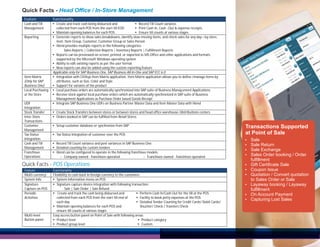
Quick Facts - Head Office / In-Store Management
Feature

Functionality

Cash and Till
Management

Ÿ Create and track cash being disbursed and
Ÿ Record Till Count variance
collected from each POS from the start till EOD
Ÿ Print Cash-In, Cash –Out & expense receipts
Ÿ Maintain opening balances for each POS
Ÿ Ensure till counts at various stages.
Ÿ Generate reports to show sales breakdowns, identify slow-moving items, and check sales for any day—by store,
item, Item Group, Customer, Customer Group or Sales Person
Ÿ iVend provides multiple reports in the following categories:
Sales Reports | Collection Reports | Inventory Reports | Fulfillment Reports
Ÿ Reports can be previewed on screen, printed, or exported to MS Office and other applications and formats
supported by the Microsoft Windows operating system
Ÿ Ability to edit existing reports as per the user format
Ÿ New reports can also be added using the custom reporting feature
Applicable only for SAP Business One, SAP Business All-In-One and SAP ECC 6.0
Ÿ Integration with CitiXsys Item Matrix application. Item Matrix application allows you to define /manage items by
attributes, such as Size, Color and Style
Ÿ Support for variants of the product
Ÿ Local purchase orders are automatically synchronized into SAP suite of Business Manag ement Applications
Ÿ Receive stock against local purchase orders which are automatically synchronized in SAP suite of Business
Management Applications as Purchase Order based Goods Receipt
Ÿ Integrate SAP Business One UDFs on Business Partner Master Data and Item Master Data with iVend

Reporting

Item Matrix
(Only for SAP
Business One)
Local Purchasing
at the Store
UDF
Integration
Stock Transfer
Inter-Store
Transactions
Customer
Management
Tax Status
Integration
Cash and Till
Management
Franchisee
Operations

Ÿ Create Stock Transfers between stores or between stores and head office warehouse /distributions centers
Ÿ Orders booked in SAP can be fulfilled from Retail Stores
Ÿ Setup customer database or synchronize from SAP
Ÿ Tax Status Integration of customer over the POS
Ÿ Record Till Count variance and post variances in SAP Business One
Ÿ Detailed counting for custom tenders
Ÿ iVend can be configured to operate in the following franchisee models:
- Company owned - franchisee operated
- Franchisee owned - franchisee operated

Quick Facts - POS Operations
Feature

Functionality

Multi-currency
System Info
Signature
Capture on POS
Periodic
Activities

Flexibility to cash-back in foreign currency to the customers
Ÿ System Information menu on POS
Ÿ Signature capture device integration with following transaction:
Sale | Sale Order | Sale Refund
Ÿ Create and track the cash being disbursed and
Ÿ Perform Cash In/Cash Out for the till at the POS
collected from each POS from the start till end of
Ÿ Facility to book petty expenses at the POS
each day
Ÿ Detailed Tender Counting for Credit Cards/ Debit Cards/
Ÿ Maintain opening balances for each POS and
Voucher/ Check / Travelers Check
ensure till counts at various stages
Easy access button panel on Point of Sale with following areas:
Ÿ Product category
Ÿ Product level
Ÿ Product group level
Ÿ Custom

Multi-level
Button panel

Transactions Supported
at Point of Sale
Ÿ
Ÿ
Ÿ
Ÿ
Ÿ
Ÿ
Ÿ
Ÿ
Ÿ
Ÿ

Sale
Sale Return
Sale Exchange
Sales Order booking / Order
fulfillment
Gift Certificate Sale
Coupon Issue
Quotation / Convert quotation
to Sales Order or Sale
Layaway booking / Layaway
fulfillment
On Account Payment
Capturing Lost Sales
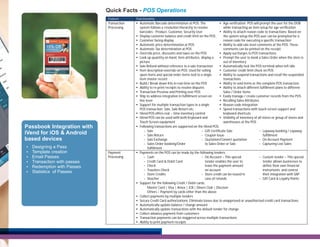
Quick Facts - POS Operations
Feature

Functionality

Transaction
Processing

Ÿ Automatic Barcode determination at POS: The
Ÿ Age verification: POS will prompt the user for the DOB
system follows a resolution hierarchy to resolve
while transacting an item setup for age verification
barcodes - Product, Customer, Security User
Ÿ Ability to attach reason code to transactions: Based on
Ÿ Display customer balance and credit limit on the POS
the system setup the POS user can be prompted for a
Ÿ Customer facing display
reason code for executing a specific transaction
Ÿ Automatic price determination at POS
Ÿ Ability to add sale level comments at the POS. These
Ÿ Automatic Tax determination at POS
comments can be printed on the receipt.
Ÿ Override price, discounts and taxes on the POS
Ÿ Apply surcharges to POS transactions
Ÿ Look up quantity on hand, item attributes, display a
Ÿ Prompt the user to book a Sales Order when the store is
picture
out of inventory
Ÿ Sale Refund without reference to a sale transaction
Ÿ Automatically lock the POS terminal when left idle.
Ÿ Item description override on POS: Used for selling
Ÿ Customer credit limit check on POS
open items and special order items tied to a single
Ÿ Ability to suspend transactions and recall the suspended
item master record
transactions
Ÿ Build / Break down Kits in real-time on the POS
Ÿ Ability to void items or the complete POS transaction.
Ÿ Ability to re-print receipts to resolve disputes
Ÿ Ability to attach different fulfillment plans to different
Ÿ Transaction Preview and Printing over POS
Sales / Order items
Ÿ Ship to address integration in fulfillment screen on
Ÿ Easily manage / create customer records from the POS
line level
Ÿ Recalling Sales Attributes
Ÿ Support for multiple transaction types in a single
Ÿ Reason code integration
POS transaction: Sale, Sale Return etc.
Ÿ Speed transactions with touch-screen support and
Ÿ iVend POS offers real – time inventory control
keyboard shortcuts
Ÿ iVend POS can be used with both Keyboard and
Ÿ Visibility of inventory of all stores or group of stores and
Touch Screen equipment
warehouses at the POS
Ÿ Following transactions are supported on the iVend POS:
- Sale
- Gift Certificate Sale
- Layaway booking / Layaway
- Sale Return
- Coupon Issue
fulfillment
- Sale Exchange
- Quotation/Convert quotation
- On Account Payment
- Sales Order booking/Order
to Sales Order or Sale
- Capturing Lost Sales
fulfillment
Ÿ Payments on the POS can be made by the following tenders:
- Cash
- On Account – This special
- Custom tender – This special
- Credit Card & Debit Card
tender enables the user to
tender allows businesses to
- Check
leave the payment amount
define their own financial
- Travelers Check
on account
instruments and control
- Store Credits
- Store credit can be issued in
their integration with SAP
- Voucher
case of refunds
- Gift Card & Loyalty Points
Ÿ Support for the following Credit / Debit cards:
Master Card | Visa | Amex | JCB | Diners Club | Discover
Others – Payment by cards other than the above
Ÿ Collect payments by multiple tenders
Ÿ Secure Credit Card authorizations: Eliminate losses due to unapproved or unauthorized credit card transactions.
Ÿ Automatically update balance / change amount
Ÿ Automatically update transactions with the default tender for change
Ÿ Collect advance payment from customers
Ÿ Transaction payments can be staggered across multiple transactions
Ÿ Ability to print payment receipts

Passbook Integration with
iVend for iOS & Android
based devices
Ÿ
Ÿ
Ÿ
Ÿ
Ÿ
Ÿ

Designing a Pass
Template creation
Email Passes
Transaction with passes
Redemption with Passes
Statistics of Passes

Payment
Processing

iVend Retail - Retail Management Solution

  • 1.
    iVend Retail Retail ManagementSolution N e w Yo r k | Mexico | Panama | Nairobi | London | New Delhi | Singapore | Sydney
  • 2.
    Modern day Retailersstrive to execute value chain & business process improvement strategies in order to address the commercial pressures of rapidly changing customer preferences & Cross channel affinity which is impacting in store execution & customer experience management. iVend Retail Management Suite is an SAP Certified, end to end Retail Management Solution from CitiXsys Technologies. The suite of applications provides retailers a real time view of their operations with centralized control enabling them in effective and faster decision-making. It helps retailers succeed in their business by providing integrated functionalities including Business Intelligence & Retail Analytics, Customer Loyalty Management, Integrated e-Commerce, Promotions, Inventory Management & Planning and in-store management. iVend Retail is ideal for both high-volume retail operations and high-service specialty stores. High volume retailers like its quick service interface whereas High service retailers appreciate the many complex special order fulfillment options, customer specific pricing, flexible kit combinations, and customized, ticket-building special messaging for the POS screen.
  • 3.
    iVend POS -Terminal & Mobile iVend POS is fast, dependable and powerful Point Of Service application with an easy to use keyboard or touchscreen operated user interface. iVend POS makes transactions processing error free and easy to manage & execute. iVend POS is the execution point for configurations done at the Head Office which include pricing, discounts, promotions, tender types, layaways, and returns. Terminal POS is the traditional POS application packed with multitude of features and is the execution point for configurations done at the Head Office which include pricing, discounts, promotions, tender types, layaways, and returns. Mobile POS, as the name suggests is a POS which operates on a handheld device like an iPhone or iPad or select models of Android tablets. iVend Store component at the retail outlet or alternatively directly into iVend Enterprise at the Head Office in case iVend Store component is not installed at the retail outlet. Mobile POS brings the power and effectiveness of a traditional POS to a mobile device and helps retailers enhance customer experience and also maximize the real estate in the store. Successful in all Retail Vertical Electronics Stores Book Stores Speciality Retail iVend eCommerce Supermarket Stores iVend eCommerce is an eCommerce, mCommerce platform allowing retailers to offer their products on the web. With its seamless integration with iVend Retail, shoppers can conduct their business on the web in the same way as is done at the physical store – imparting customers a unified experience – where they have access to all products, images, promotions & schemes. Wine Stores This application is not limited to retail and can be extensively used in industries like manufacturing, for listing their products and services on-line on the Internet. Apparel iVend Loyalty iVend Loyalty is a points & rewards management application, designed to significantly improve customer retention by bringing them continuously back and improving customer satisfaction levels. iVend Loyalty is seamlessly integrated with iVend Retail and can integrate with any Business Management or Retail application using its APIs. Flexible Loyalty Plans with multiple redemption features make iVend Loyalty an imperative solution not only for the Retail Industry, but also for non-consumer industries like manufacturing and non-profit organizations. iVend Passes iVend Passes is a platform for retailers to deploy Digital Passes on Apple Passbook and Android devices. Engage your customers with a digital Loyalty Card, digital Coupon or digital Gift Cards. iVend Passes remove the technical challenge in doing so allowing you to focus on your consumer engagement. iVend Passes is a cloud based application that enables retailers to use the service seamlessly at their point of sale. iVend Analytics iVend Analytics is a set of pre-packaged, shrink-wrapped Business Intelligence dashboards for the Retail Industry. iVend Analytics seamlessly integrates into iVend Retail and leverages transactional data of the retail environment to generate context-specific detailed insight which is functional & actionable. Retail specific intuitive dashboards provide strategic and tactical insights for faster and effective decision-making. iVend Analytics runs on any browser, iPhone/iPad or any Android device Footwear Optical Stores Sports Goods I would like to take a moment to compliment CitiXsys team for having done an excellent job in implementing iVEND at Reeves Floral Products. I have worked on several implementations in the past and have never worked with a group who were as eager and talented as your associates. Even with the time difference between India and the United States, there never seems to be an issue completing any development that arises. Thank you again for all your help. Chuck Woodring, Reeves Floral Products, Inc., USA
  • 4.
    POS and RetailManagement Solution Retailers face multitude of challenges in today's marketplace. To succeed in an increasingly competitive marketplace, retailers must find innovative ways to compete that are not based solely on price. To effectively stay in business and maximize profitability, retailers must effectively manage business variables, reduce operation costs, maximize efficiencies, ensure excellent customer service, and collaborate with suppliers. To stay ahead of competition retailers must follow customer-buying patterns and forecast future needs. iVend Retail is an end to end retail solution that covers everything from POS to Back Office to Head Office operations. An iVend Retail setup can scale upto a complex multi-store environment with complete integration with your day to day business operations. The solution automates the entire operations, virtually eliminating paper work. Many midsize retailers struggle everyday to compete with effectiveness. They lack proper technology solutions and are still struggling with old legacy applications that are not compatible and non-integrated with their business / accounting application; Or worse that they are using spreadsheet applications for analysis which is extremely ineffective and time consuming. iVend Retail allows the management team at the Head Office to have complete control over data at the stores. It extends flexibility at the Head Office to setup and configure the system from one place and therefore simplifies the management of data. iVend Retail delivers a configurable, flexible, and scalable solution that is easy to setup and implement and integrates seamlessly with SAP Business All-in-One. I would like to take a moment to compliment CitiXsys team for having done an excellent job in implementing IVEND at Reeves Floral Products. I have worked on several implementations in the past and have never worked with a group who were as eager and talented as your associates. Even with the time difference between India and the United States, there never seems to be an issue completing any development that arises. Thank you again for all your help. Chuck Woodring, Reeves Floral Products, Inc., USA “ “ Most retailers need an end-to-end solution, which provides them a near real time view of their operations with centralized control and enables them in faster decision-making.
  • 5.
    Benefits Stay connected withyour business operations - Reliable and safe Credit Card transactions – iVend Retail comes as an end-to-end business solution for retailers and is an extensive retail management application to manage Store and POS functions. Fail-safe integration with a standard ERP keeps the head office always connected with the store operations across the complete retail chain. iVend Retail offers fast, easy, safe, and cost-effective card management with integrated payment processing from industry-leading banks. Retail, head office operations have complete visibility of stock across the retail chain and can effectively push stock rather than relying on store requisitions. Additionally the merchandising department can raise purchase orders in time to avoid complete stock out situations. Never loose a sale – iVend Retail delivers up to date visibility of stock across the retail chain. POS operators can gain complete visibility of stock across stores or at the main warehouse / distribution centers right from the POS interface. In stock out situations, POS operators can put items on order and fulfill them from other stores or at a later date by replenishing stock from the distribution center. Smoothly process routine and complex transactions – iVend Retail enables the POS operator to combine multiple transaction types with in single POS transaction. For example – POS operators can process a sale refund and sale transaction in a single transaction rather than a two-step process, which involves a separate transaction for sales refund and sale. Make the right decisions – Flexible reporting options in iVend help you make accurate decisions. “ Retain customers and manage customer communication – The loyalty management module in iVend allows you to define flexible / lucrative campaigns, which ensure that the customers keep coming back, thereby increasing customer profitability by rewarding the right customer. It delivers a full range of analytics and service capabilities that help you better understand each customer's value and design promotions that maximize the potential of all your customer relationships. Customers can be informed of available points, their value and their validity. Promotions that maximize profitability – Manage targeted promotions by easily analyzing detailed customer trends at individual stores and throughout the retail chain. Promotions can be defined in multiple formats such as period based discounts, quantitative discounts, mix and match and buy some get some. Go Green – iVend Passes negate the need for plastic cards and pesky paper coupons saving investment on plastic and paper thereby contributing to the environment. Being digital, iVend Passes keep the information of loyalty cards, gift cards and coupons updated. They are geo-tagged and location enabled to keep the customer always informed on his status of loyalty cards & coupons “ Inventory control and replenishment - With iVend Grow your average sales ticket - Up sell and alternate item suggestions pop up on the POS interface enabling the POS operator to make additional recommendations to the customers. We needed a better system to support our company, so we went with SAP®. Our retail shop also needed an easier, user friendly system which integrated with SAP so we selected iVend Retail. We are now better able to track transactions through the system and can also create gift certificates on the fly. Angela Hahn, Administrator, MiniJumbuk, Australia
  • 6.
    Overview Head office /In-Store management - iVend Retail offers complete back office functionality both at the Head Office and at the store. It provides the respective managers a total control over activities. In-Store transactions are replicated to the Head Office, allowing quick decision making without any delays. iVend Retail has three licensed components: Ÿ iVend Enterprise – configured at the Head Office and used to define the retail enterprise and organization wide policies Ÿ iVend Store – configured at the Store and used by the store manager to fulfill his day-to-day functions Ÿ iVend POS – configured at the Store, and used by the cashiers to transact with the customers The user interface of iVend Enterprise is the Management Console and remains same whether used at the head office or on iVend Store and is used to setup the master data required to transact at the POS. The Management Console is also used by the store manager to conduct his day-to-day operations including cash & till management, raising purchase orders, receiving goods against purchase orders /stock transfers, stock transfer shipment to other stores /distribution center, cycle counting etc. iVend Retail is fully PCI compliant and records the credit/ debit card details in an encrypted format in database. iVend POS iVend POS is fast, dependable and powerful Point Of Service application with an easy to use keyboard or touchscreen operated user interface. iVend POS makes transactions processing error free and easy to manage & execute. iVend POS is the execution point for configurations done at the Head Office which include pricing, discounts, promotions, tender types, layaways, and returns. Terminal POS is the traditional POS application packed with multitude of features and is the execution point for configurations done at the Head Office which include pricing, discounts, promotions, tender types, layaways, and returns. Mobile POS, is a POS which operates on a handheld device like an iPhone/ iPad or select models of Android tablets. iVend Store component at the retail outlet or alternatively directly into iVend Enterprise at the Head Office in case iVend Store component is not installed at the retail outlet. iVend Retail integration with SAP ECC 6.0 / SAP Business All-in-One SAP ECC 6.0 / All-in-One with Industry Solution IS Retail is integrated with iVend Retail using the SAP PI Integration platform. Communication with the iVend Retail systems is achieved using intermediate documents (IDOCS) and proxies. Integration Summary: Following master data is integrated between SAP and iVend RetailŸ Country Ÿ State Ÿ Customer Group Ÿ Product Group Ÿ Shipping Type Ÿ Manufacturer Ÿ Sales Person Ÿ Currency Ÿ Price List Ÿ Product Ÿ Alternate Item Ÿ Customer Ÿ Vendor Ÿ Customer Catalog Ÿ Warehouse Ÿ Bill of Materials (BOM) Ÿ Price Matrix Ÿ Special Price for Business Partner Ÿ Special Price Ÿ Discount Group Ÿ Exchange Rate Ÿ Sales Tax Ÿ Freight Ÿ Stock initialization
  • 7.
    All iVend RetailStores are configured as Sites in the SAP system. Ü Payment Integration The following retail transactions are integrated with SAP: Ÿ Cash Ÿ Credit Card Ü Retail Transaction Ÿ Debit Card Ÿ Gift Certificate Update Ÿ Sales Ÿ Delivery Ÿ Refund/Exchange Ÿ Layaway/Layaway Ü Stock Transfer Ÿ Sales Order/Sales Cancellation Ü Goods Receipt order Update Ÿ Gift Certificate Sale Ÿ Traveller Checks Ÿ Checks Ÿ Credit Notes Ÿ Customer Tenders Ü Goods Issue Ü Baseless Goods Receipt Ü Stock Take iVend Retail integration with SAP Business One SAP Business One is integrated with iVend Retail using the standard DI APIs provided as a part of SAP Business One Software Development Kit. iVend Retail also integrates UDFs (User Defined Fields) defined on Business Partner and Item Master in SAP Business One into iVend Retail. Integration Summary: 25 masters are integrated between SAP Business One and iVend Retail. Ÿ Country Ÿ State Ÿ Tax Ÿ Codes/Groups Ÿ Warehouses Ÿ Shipping type Ÿ Currency Ÿ Item Group Ÿ Manufacturer Ÿ Price Lists Ÿ Customer Group Ÿ Business Partner Ÿ Items Ÿ Special Prices Ÿ BP Catalogue Number Ÿ BOM Ÿ Freight Ÿ Alternate Item Ÿ Discount Group Ÿ Serial Numbers Ÿ Batch Numbers Ÿ Sales Employee Ÿ Item Attributes Ÿ Exchange Rates Ÿ User Defined Fields All iVend Retail Stores are configured as Warehouses in the SAP Business One. The following retail transactions are integrated with SAP Business One Ü Retail Transaction Ÿ Sales Ÿ Refund/Exchange Ÿ Sales Order/Sales order Update Ÿ Delivery Ÿ Layaway/Layaway Cancellation Ÿ Gift Certificate Sale Ü Payment Integration Ÿ Cash Ÿ Credit Card Ÿ Debit Card Ÿ Gift Certificate update Ü Ü Ü Ü Ÿ Traveller Checks Ÿ Checks Ÿ Credit Notes Ÿ Customer Tenders Stock Transfer Ü Stock Take Goods Receipt Ü Purchase Order Goods Issue Ü GRPO (Goods Receipt PO) Baseless Goods Receipt
  • 8.
    Quick Facts -Head Office / In-Store Management Feature Functionality New iVend Installer Management Ÿ Single Machine Mode Ÿ Choose Installation Mode - Create new database Ÿ Implementation center for iVend Standalone - Use existing database Ÿ Auto update of iVend version - Create demo database Ÿ Setup and maintain a database of all the users in the company Ÿ Define employee positions such as sales executive, cashier, store manager etc . Ÿ Time clock management Ÿ Analyze employee performance by reviewing sales reports grouped by sales persons Ÿ Setup Product database for standard, serialized, batch Ÿ Create, manage, build and break down kits at managed, kit, assembly and non-inventory items individual stores Ÿ Items can be marked as non-refundable Ÿ Track items by serial and batch numbers Ÿ Inventory control for serial and batch managed items Ÿ Store and track offline inventory based on expiry date Ÿ Item comments integration Ÿ Define Open Items which can be used with price Ÿ Create and manage assemblies at individual stores override Ÿ Exporting UDFs along with products Ÿ Data Purge Ÿ Data Optimization Ÿ Reduce training time by configuring the training mode Ÿ Training mode allows new recruits to get trained on realistic data without the test transactions getting integrated into the LIVE system Ÿ Define security roles and assign various rights to the Ÿ Set password policies for users roles Ÿ Print item and shelf labels for individual stores Ÿ Assign security roles to users Ÿ Option to print customize labels Ÿ Biometric Support for Login in iVend Ÿ Sales person attachment to an individual store Ÿ Create purchase order for local vendors at stores Ÿ Close line item on purchase order Ÿ Edit quantity at partial received purchase order Ÿ Vendor reference number integration from purchase Ÿ Edit item price on goods receipt purchase order order Ÿ Cancel purchase order Ÿ Create Stock Transfers between stores Ÿ Stock Transfer Via EXCEL Import Ÿ Receive stock from unknown source (not based on a purchase order or stock transfer receipt) Ÿ Receiving items by scanning items Ÿ English, French, Latin American Spanish, Italian, Greek, German, Vietnamese, Chinese (Simple & Traditional), Arabic, Dutch and Polish Ÿ Issue stock not based on sale or stock transfer shipment Ÿ Raise stock requisitions to head office or to other stores Ÿ Requisitions can be consolidated in a single stock transfer shipment Ÿ Perform physical inventory counting at store Ÿ Barcode scan file can be imported to reconcile inventory Ÿ Perform stock take using barcode scanners Ÿ Visibility of stock across the retail chain Ÿ Book orders to be fulfilled by other stores Ÿ Perform sales refund from any store Ÿ View credit limits, balances and customer contact information at the POS Ÿ Define multiple billing and shipping addresses for customers Ÿ Extend discount on items based on Customer Groups Ÿ Analyze customer buying habits using sales reports at the head office Ÿ Collect special information at the POS register, e.g. zip codes for advertising effectiveness User Management Inventory Management Training Mode Security Management Local Purchasing at store Stock Transfer Goods Receipt Language Goods Issue Requisition Management Cycle Counting / Stock Take at store Inter-Store Transactions Customer Management Sale Attributes Supported Hardware Ÿ Ÿ Ÿ Ÿ Ÿ Ÿ Ÿ Ÿ Ÿ Ÿ Ÿ Thermal Receipt Printer* Cash Drawer* Barcode Scanner* MSR* (Magnetic Swipe reader) Pole display* Signature Capture* Weigh Scale Customer Display Fiscal Printer – BemaTech MP-4000 TH IFA (PANAMA / VENUZUALA) Fiscal Printer – Datec- FP300 (KENYA) Fiscal Printer – EPSON TAX PRINTER (DOMINICAN REPUBLIC) *OPOS enabled devices
  • 9.
    Quick Facts -Head Office / In-Store Management Feature Functionality Events Transaction Alerts Customer Catalog Number Series Masters Ÿ Setup Events for grouping reports by events Ÿ Setup the email alerts to the administrator in case of transaction failures Store Groups Discount Group Pricing and Promotion Management Loyalty Management Payment Processors AuthorizeDotNet Commidea CyberBit DataCash Verisign / Paypal/ PayFloPro Ÿ MoneriseSelectPlus Ÿ DPS Ÿ PC-EFTPOS Ÿ Ÿ Ÿ Ÿ Ÿ Gift Cards / Certificates Ÿ Global Ÿ Ÿ Ÿ Ÿ Ÿ Ÿ Ÿ Payments Heartland Caledon Plutus Protox SecurePay EWay Ogone Coupons Passbook Integration Surcharges Up sells and Alternative Items Layaway Management Ÿ Manage customer catalog numbers in parallel to the product numbers Ÿ Use customer catalog numbers in sale transactions Ÿ Document number series attachments with Marketing Document - Attachment with Retail Store - Attachment with POS - Attachment with Transaction Type Ÿ Group Stores based on their individual needs Ÿ Pricing Store Group – group stores based on same pricing structure & policy Ÿ Taxation Store Group – Group stores based on same tax structure Ÿ Inventory Store Group – Group Stores to restrict inventory visibility across entire retail chain Ÿ Define multiple types of discount groups Ÿ Coupon discount group Ÿ Manual discount group Ÿ Promotion discount group Ÿ System discount group Ÿ Tax Exclusive / Tax Inclusive Pricing Ÿ Define promotions to allow discounts for a specific Ÿ Store specific pricing quantity and/or combination of goods Ÿ Period and Volume Discounts: Ÿ Promotion based on sale totals - Pricelist Based Ÿ Happy hour based promotions - Special Prices for Business Partners Ÿ Define discounts based on: Ÿ Discount Groups: Define discounts for Business - Item Groups Partners based on: - Manufacturers - Item Groups Ÿ Coupons – by Manufacturers or by Retailer - Item Manufacturers Ÿ Setup and manage multiple loyalty schemes which Ÿ Redeem loyalty points against new customer assign points on customer purchases purchases Ÿ Loyalty points can be redeemed across the network of Ÿ Define ageing criteria for loyalty points stores Ÿ Setup and manage multiple gift cards Ÿ Cash back on gift cards Ÿ Gift Cards can be sold and redeemed across the Ÿ Support for card or paper based gift cards network of stores Ÿ Recharge of Store Credit Ÿ Re-charge gift cards Ÿ Promotional tool to increase brand awareness and extend discounts Ÿ Both type of coupons are offered – By the manufacturer and By the Retailer Ÿ Passbook Integration with iVend for iOS & Android based devices - Designing a Pass - Transaction with passes - Template creation - Redemption with Passes - Email Passes - Statistics of Passes Ÿ Setup surcharges which can be applied as additional cost during sale transactions Ÿ Assign item substitutes and up sell items Ÿ Up sell and alternate item recommendations automatically pop up on the POS Ÿ Create and maintain flexible layaway plans Ÿ Define installment count, minimum installment count, maximum installment count, layaway duration, and inventory issue method for layaway plans Ÿ Auto Deliver Layaway Item
  • 10.
    Quick Facts -Head Office / In-Store Management Feature Functionality Cash and Till Management Ÿ Create and track cash being disbursed and Ÿ Record Till Count variance collected from each POS from the start till EOD Ÿ Print Cash-In, Cash –Out & expense receipts Ÿ Maintain opening balances for each POS Ÿ Ensure till counts at various stages. Ÿ Generate reports to show sales breakdowns, identify slow-moving items, and check sales for any day—by store, item, Item Group, Customer, Customer Group or Sales Person Ÿ iVend provides multiple reports in the following categories: Sales Reports | Collection Reports | Inventory Reports | Fulfillment Reports Ÿ Reports can be previewed on screen, printed, or exported to MS Office and other applications and formats supported by the Microsoft Windows operating system Ÿ Ability to edit existing reports as per the user format Ÿ New reports can also be added using the custom reporting feature Applicable only for SAP Business One, SAP Business All-In-One and SAP ECC 6.0 Ÿ Integration with CitiXsys Item Matrix application. Item Matrix application allows you to define /manage items by attributes, such as Size, Color and Style Ÿ Support for variants of the product Ÿ Local purchase orders are automatically synchronized into SAP suite of Business Manag ement Applications Ÿ Receive stock against local purchase orders which are automatically synchronized in SAP suite of Business Management Applications as Purchase Order based Goods Receipt Ÿ Integrate SAP Business One UDFs on Business Partner Master Data and Item Master Data with iVend Reporting Item Matrix (Only for SAP Business One) Local Purchasing at the Store UDF Integration Stock Transfer Inter-Store Transactions Customer Management Tax Status Integration Cash and Till Management Franchisee Operations Ÿ Create Stock Transfers between stores or between stores and head office warehouse /distributions centers Ÿ Orders booked in SAP can be fulfilled from Retail Stores Ÿ Setup customer database or synchronize from SAP Ÿ Tax Status Integration of customer over the POS Ÿ Record Till Count variance and post variances in SAP Business One Ÿ Detailed counting for custom tenders Ÿ iVend can be configured to operate in the following franchisee models: - Company owned - franchisee operated - Franchisee owned - franchisee operated Quick Facts - POS Operations Feature Functionality Multi-currency System Info Signature Capture on POS Periodic Activities Flexibility to cash-back in foreign currency to the customers Ÿ System Information menu on POS Ÿ Signature capture device integration with following transaction: Sale | Sale Order | Sale Refund Ÿ Create and track the cash being disbursed and Ÿ Perform Cash In/Cash Out for the till at the POS collected from each POS from the start till end of Ÿ Facility to book petty expenses at the POS each day Ÿ Detailed Tender Counting for Credit Cards/ Debit Cards/ Ÿ Maintain opening balances for each POS and Voucher/ Check / Travelers Check ensure till counts at various stages Easy access button panel on Point of Sale with following areas: Ÿ Product category Ÿ Product level Ÿ Product group level Ÿ Custom Multi-level Button panel Transactions Supported at Point of Sale Ÿ Ÿ Ÿ Ÿ Ÿ Ÿ Ÿ Ÿ Ÿ Ÿ Sale Sale Return Sale Exchange Sales Order booking / Order fulfillment Gift Certificate Sale Coupon Issue Quotation / Convert quotation to Sales Order or Sale Layaway booking / Layaway fulfillment On Account Payment Capturing Lost Sales
  • 11.
    Quick Facts -POS Operations Feature Functionality Transaction Processing Ÿ Automatic Barcode determination at POS: The Ÿ Age verification: POS will prompt the user for the DOB system follows a resolution hierarchy to resolve while transacting an item setup for age verification barcodes - Product, Customer, Security User Ÿ Ability to attach reason code to transactions: Based on Ÿ Display customer balance and credit limit on the POS the system setup the POS user can be prompted for a Ÿ Customer facing display reason code for executing a specific transaction Ÿ Automatic price determination at POS Ÿ Ability to add sale level comments at the POS. These Ÿ Automatic Tax determination at POS comments can be printed on the receipt. Ÿ Override price, discounts and taxes on the POS Ÿ Apply surcharges to POS transactions Ÿ Look up quantity on hand, item attributes, display a Ÿ Prompt the user to book a Sales Order when the store is picture out of inventory Ÿ Sale Refund without reference to a sale transaction Ÿ Automatically lock the POS terminal when left idle. Ÿ Item description override on POS: Used for selling Ÿ Customer credit limit check on POS open items and special order items tied to a single Ÿ Ability to suspend transactions and recall the suspended item master record transactions Ÿ Build / Break down Kits in real-time on the POS Ÿ Ability to void items or the complete POS transaction. Ÿ Ability to re-print receipts to resolve disputes Ÿ Ability to attach different fulfillment plans to different Ÿ Transaction Preview and Printing over POS Sales / Order items Ÿ Ship to address integration in fulfillment screen on Ÿ Easily manage / create customer records from the POS line level Ÿ Recalling Sales Attributes Ÿ Support for multiple transaction types in a single Ÿ Reason code integration POS transaction: Sale, Sale Return etc. Ÿ Speed transactions with touch-screen support and Ÿ iVend POS offers real – time inventory control keyboard shortcuts Ÿ iVend POS can be used with both Keyboard and Ÿ Visibility of inventory of all stores or group of stores and Touch Screen equipment warehouses at the POS Ÿ Following transactions are supported on the iVend POS: - Sale - Gift Certificate Sale - Layaway booking / Layaway - Sale Return - Coupon Issue fulfillment - Sale Exchange - Quotation/Convert quotation - On Account Payment - Sales Order booking/Order to Sales Order or Sale - Capturing Lost Sales fulfillment Ÿ Payments on the POS can be made by the following tenders: - Cash - On Account – This special - Custom tender – This special - Credit Card & Debit Card tender enables the user to tender allows businesses to - Check leave the payment amount define their own financial - Travelers Check on account instruments and control - Store Credits - Store credit can be issued in their integration with SAP - Voucher case of refunds - Gift Card & Loyalty Points Ÿ Support for the following Credit / Debit cards: Master Card | Visa | Amex | JCB | Diners Club | Discover Others – Payment by cards other than the above Ÿ Collect payments by multiple tenders Ÿ Secure Credit Card authorizations: Eliminate losses due to unapproved or unauthorized credit card transactions. Ÿ Automatically update balance / change amount Ÿ Automatically update transactions with the default tender for change Ÿ Collect advance payment from customers Ÿ Transaction payments can be staggered across multiple transactions Ÿ Ability to print payment receipts Passbook Integration with iVend for iOS & Android based devices Ÿ Ÿ Ÿ Ÿ Ÿ Ÿ Designing a Pass Template creation Email Passes Transaction with passes Redemption with Passes Statistics of Passes Payment Processing