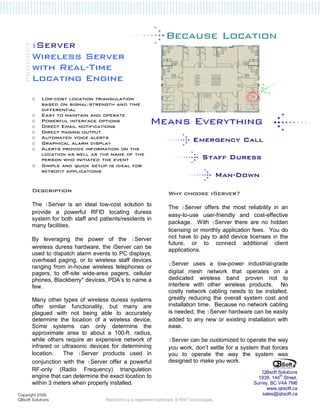
iServer
       Wireless Server
       with Real-Time
       Locating Engine
       o    Low-cost location triangulation
            based on signal-strength and time
            differential
       o    Easy to maintain and operate
       o    Powerful interface options
       o    Direct Email notifications
       o    Direct paging output
       o    Automated voice alerts
       o    Graphical alarm display
       o    Alerts provide information on the
            location as well as the name of the
            person who initiated the event
       o    Simple and quick setup is ideal for
            retrofit applications


       Description                                                  Why choose iServer?
       The iServer is an ideal low-cost solution to                 The iServer offers the most reliability in an
       provide a powerful RFID locating duress
                                                                    easy-to-use user-friendly and cost-effective
                                                                    package. With iServer there are no hidden
       system for both staff and patients/residents in
       many facilities.
                                                                    licensing or monthly application fees. You do
       By leveraging the power of the iServer                       not have to pay to add device licenses in the
                                                                    future, or to connect additional client
       wireless duress hardware, the iServer can be
                                                                    applications.
       used to dispatch alarm events to PC displays,
                                                                    iServer uses a low-power industrial-grade
       overhead paging, or to wireless staff devices
       ranging from in-house wireless telephones or
       pagers, to off-site wide-area pagers, cellular               digital mesh network that operates on a
       phones, Blackberry* devices, PDA’s to name a                 dedicated wireless band proven not to
       few.                                                         interfere with other wireless products. No
                                                                    costly network cabling needs to be installed,
       Many other types of wireless duress systems                  greatly reducing the overall system cost and
       offer similar functionality, but many are                    installation time. Because no network cabling
       plagued with not being able to accurately                    is needed, the iServer hardware can be easily
       determine the location of a wireless device.                 added to any new or existing installation with
       Some systems can only determine the                          ease.
       approximate area to about a 100-ft. radius,
       while others require an expensive network of                 iServer can be customized to operate the way
       infrared or ultrasonic devices for determining               you work, don’t settle for a system that forces
       location.   The iServer products used in                     you to operate the way the system was
       conjunction with the iServer offer a powerful                designed to make you work.
       RF-only (Radio Frequency) triangulation                                                           QBsoft Solutions
       engine that can determine the exact location to                                                 1939, 144th Street,
       within 3 meters when properly installed.                                                      Surrey, BC V4A 7M6
                                                                                                           www.qbsoft.ca
Copyright 2008,                                                                                          sales@qbsoft.ca
QBsoft Solutions                    Blackberry is a registered trademark of RIM Technologies.
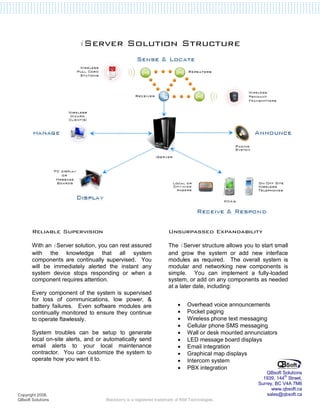
iServer               Solution Structure


       Reliable Supervision                                         Unsurpassed Expandability

       With an iServer solution, you can rest assured               The iServer structure allows you to start small
       with the knowledge that all system                           and grow the system or add new interface
       components are continually supervised. You                   modules as required. The overall system is
       will be immediately alerted the instant any                  modular and networking new components is
       system device stops responding or when a                     simple. You can implement a fully-loaded
       component requires attention.                                system, or add on any components as needed
                                                                    at a later date, including:
       Every component of the system is supervised
       for loss of communications, low power, &
       battery failures. Even software modules are                       •    Overhead voice announcements
       continually monitored to ensure they continue                     •    Pocket paging
       to operate flawlessly.                                            •    Wireless phone text messaging
                                                                         •    Cellular phone SMS messaging
       System troubles can be setup to generate                          •    Wall or desk mounted annunciators
       local on-site alerts, and or automatically send                   •    LED message board displays
       email alerts to your local maintenance                            •    Email integration
       contractor. You can customize the system to                       •    Graphical map displays
       operate how you want it to.                                       •    Intercom system
                                                                         •    PBX integration
                                                                                                           QBsoft Solutions
                                                                                                         1939, 144th Street,
                                                                                                       Surrey, BC V4A 7M6
                                                                                                             www.qbsoft.ca
Copyright 2008,                                                                                            sales@qbsoft.ca
QBsoft Solutions                    Blackberry is a registered trademark of RIM Technologies.
Easy to Install = Easy to Maintain
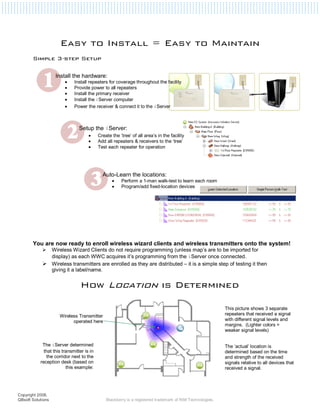
       Simple 3-step Setup

                    Install the hardware:
                         •   Install repeaters for coverage throughout the facility
                         •   Provide power to all repeaters
                         •   Install the primary receiver
                         •   Install the iServer computer
                         •   Power the receiver & connect it to the iServer


                                Setup the iServer:
                                     •     Create the ‘tree’ of all area’s in the facility
                                     •     Add all repeaters & receivers to the ‘tree’
                                     •     Test each repeater for operation


                                             Auto-Learn the locations:
                                                  •    Perform a 1-man walk-test to learn each room
                                                  •    Program/add fixed-location devices


       You are now ready to enroll wireless wizard clients and wireless transmitters onto the system!
                   Wireless Wizard Clients do not require programming (unless map’s are to be imported for
                   display) as each WWC acquires it’s programming from the iServer once connected.
                   Wireless transmitters are enrolled as they are distributed – it is a simple step of testing it then
                   giving it a label/name.


                                How Location is Determined

                                                                                                           This picture shows 3 separate
                      Wireless Transmitter                                                                 repeaters that received a signal
                            operated here                                                                  with different signal levels and
                                                                                                           margins. (Lighter colors =
                                                                                                           weaker signal levels)


            The iServer determined                                                                         The ‘actual’ location is
             that this transmitter is in                                                                   determined based on the time
              the corridor next to the                                                                     and strength of the received
           reception desk (based on                                                                        signals relative to all devices that
                         this example:                                                                     received a signal.


Copyright 2008,
QBsoft Solutions                               Blackberry is a registered trademark of RIM Technologies.
Easy-to-Use                                                  Powerful Integration

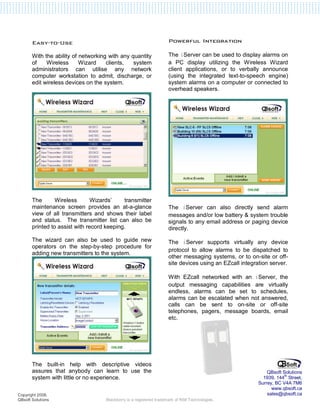
       With the ability of networking with any quantity             The iServer can be used to display alarms on
       of    Wireless      Wizard    clients,   system              a PC display utilizing the Wireless Wizard
       administrators can utilise any network                       client applications, or to verbally announce
       computer workstation to admit, discharge, or                 (using the integrated text-to-speech engine)
       edit wireless devices on the system.                         system alarms on a computer or connected to
                                                                    overhead speakers.


       The       Wireless       Wizards’    transmitter
       maintenance screen provides an at-a-glance                   The iServer can also directly send alarm
       view of all transmitters and shows their label               messages and/or low battery & system trouble
       and status. The transmitter list can also be                 signals to any email address or paging device
       printed to assist with record keeping.                       directly.

       The wizard can also be used to guide new                     The iServer supports virtually any device
       operators on the step-by-step procedure for
                                                                    protocol to allow alarms to be dispatched to
       adding new transmitters to the system.
                                                                    other messaging systems, or to on-site or off-
                                                                    site devices using an EZcall integration server.

                                                                    With EZcall networked with an iServer, the
                                                                    output messaging capabilities are virtually
                                                                    endless, alarms can be set to schedules,
                                                                    alarms can be escalated when not answered,
                                                                    calls can be sent to on-site or off-site
                                                                    telephones, pagers, message boards, email
                                                                    etc.


       The built-in help with descriptive videos
       assures that anybody can learn to use the                                                            QBsoft Solutions
       system with little or no experience.                                                               1939, 144th Street,
                                                                                                        Surrey, BC V4A 7M6
                                                                                                              www.qbsoft.ca
Copyright 2008,                                                                                             sales@qbsoft.ca
QBsoft Solutions                    Blackberry is a registered trademark of RIM Technologies.

I server wireless server sales sheet

  • 1.
    iServer Wireless Server with Real-Time Locating Engine o Low-cost location triangulation based on signal-strength and time differential o Easy to maintain and operate o Powerful interface options o Direct Email notifications o Direct paging output o Automated voice alerts o Graphical alarm display o Alerts provide information on the location as well as the name of the person who initiated the event o Simple and quick setup is ideal for retrofit applications Description Why choose iServer? The iServer is an ideal low-cost solution to The iServer offers the most reliability in an provide a powerful RFID locating duress easy-to-use user-friendly and cost-effective package. With iServer there are no hidden system for both staff and patients/residents in many facilities. licensing or monthly application fees. You do By leveraging the power of the iServer not have to pay to add device licenses in the future, or to connect additional client wireless duress hardware, the iServer can be applications. used to dispatch alarm events to PC displays, iServer uses a low-power industrial-grade overhead paging, or to wireless staff devices ranging from in-house wireless telephones or pagers, to off-site wide-area pagers, cellular digital mesh network that operates on a phones, Blackberry* devices, PDA’s to name a dedicated wireless band proven not to few. interfere with other wireless products. No costly network cabling needs to be installed, Many other types of wireless duress systems greatly reducing the overall system cost and offer similar functionality, but many are installation time. Because no network cabling plagued with not being able to accurately is needed, the iServer hardware can be easily determine the location of a wireless device. added to any new or existing installation with Some systems can only determine the ease. approximate area to about a 100-ft. radius, while others require an expensive network of iServer can be customized to operate the way infrared or ultrasonic devices for determining you work, don’t settle for a system that forces location. The iServer products used in you to operate the way the system was conjunction with the iServer offer a powerful designed to make you work. RF-only (Radio Frequency) triangulation QBsoft Solutions engine that can determine the exact location to 1939, 144th Street, within 3 meters when properly installed. Surrey, BC V4A 7M6 www.qbsoft.ca Copyright 2008, sales@qbsoft.ca QBsoft Solutions Blackberry is a registered trademark of RIM Technologies.
  • 2.
    iServer Solution Structure Reliable Supervision Unsurpassed Expandability With an iServer solution, you can rest assured The iServer structure allows you to start small with the knowledge that all system and grow the system or add new interface components are continually supervised. You modules as required. The overall system is will be immediately alerted the instant any modular and networking new components is system device stops responding or when a simple. You can implement a fully-loaded component requires attention. system, or add on any components as needed at a later date, including: Every component of the system is supervised for loss of communications, low power, & battery failures. Even software modules are • Overhead voice announcements continually monitored to ensure they continue • Pocket paging to operate flawlessly. • Wireless phone text messaging • Cellular phone SMS messaging System troubles can be setup to generate • Wall or desk mounted annunciators local on-site alerts, and or automatically send • LED message board displays email alerts to your local maintenance • Email integration contractor. You can customize the system to • Graphical map displays operate how you want it to. • Intercom system • PBX integration QBsoft Solutions 1939, 144th Street, Surrey, BC V4A 7M6 www.qbsoft.ca Copyright 2008, sales@qbsoft.ca QBsoft Solutions Blackberry is a registered trademark of RIM Technologies.
  • 3.
    Easy to Install= Easy to Maintain Simple 3-step Setup Install the hardware: • Install repeaters for coverage throughout the facility • Provide power to all repeaters • Install the primary receiver • Install the iServer computer • Power the receiver & connect it to the iServer Setup the iServer: • Create the ‘tree’ of all area’s in the facility • Add all repeaters & receivers to the ‘tree’ • Test each repeater for operation Auto-Learn the locations: • Perform a 1-man walk-test to learn each room • Program/add fixed-location devices You are now ready to enroll wireless wizard clients and wireless transmitters onto the system! Wireless Wizard Clients do not require programming (unless map’s are to be imported for display) as each WWC acquires it’s programming from the iServer once connected. Wireless transmitters are enrolled as they are distributed – it is a simple step of testing it then giving it a label/name. How Location is Determined This picture shows 3 separate Wireless Transmitter repeaters that received a signal operated here with different signal levels and margins. (Lighter colors = weaker signal levels) The iServer determined The ‘actual’ location is that this transmitter is in determined based on the time the corridor next to the and strength of the received reception desk (based on signals relative to all devices that this example: received a signal. Copyright 2008, QBsoft Solutions Blackberry is a registered trademark of RIM Technologies.
  • 4.
    Easy-to-Use Powerful Integration With the ability of networking with any quantity The iServer can be used to display alarms on of Wireless Wizard clients, system a PC display utilizing the Wireless Wizard administrators can utilise any network client applications, or to verbally announce computer workstation to admit, discharge, or (using the integrated text-to-speech engine) edit wireless devices on the system. system alarms on a computer or connected to overhead speakers. The Wireless Wizards’ transmitter maintenance screen provides an at-a-glance The iServer can also directly send alarm view of all transmitters and shows their label messages and/or low battery & system trouble and status. The transmitter list can also be signals to any email address or paging device printed to assist with record keeping. directly. The wizard can also be used to guide new The iServer supports virtually any device operators on the step-by-step procedure for protocol to allow alarms to be dispatched to adding new transmitters to the system. other messaging systems, or to on-site or off- site devices using an EZcall integration server. With EZcall networked with an iServer, the output messaging capabilities are virtually endless, alarms can be set to schedules, alarms can be escalated when not answered, calls can be sent to on-site or off-site telephones, pagers, message boards, email etc. The built-in help with descriptive videos assures that anybody can learn to use the QBsoft Solutions system with little or no experience. 1939, 144th Street, Surrey, BC V4A 7M6 www.qbsoft.ca Copyright 2008, sales@qbsoft.ca QBsoft Solutions Blackberry is a registered trademark of RIM Technologies.