1
2
In this session, you'll get a detailed insight into:
• Introduction to HyperHack 2023
• What is a hackathon and how to participate?
• Overview of rules and categories
• Demos of AI-Powered Automation Solutions
• Demos of Core Business Automation Solutions
• Judging criteria and prizes
• Submission guidelines and deadlines
• Tips on identifying your use case
• Tips on how to present and demonstrate your idea or project.
What’s Next? Ongoing help and support from MVPs, UiPath Forum, Upcoming Sessions
Agenda
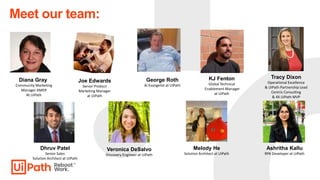
Diana Gray
Community Marketing
Manager AMER
At UiPath
Meet our team:
Joe Edwards
Senior Product
Marketing Manager
at UiPath
Tracy Dixon
Operational Excellence
& UiPath Partnership Lead
Centric Consulting
& 4X UiPath MVP
Dhruv Patel
Senior Sales
Solution Architect at UiPath
Veronica DeSalvo
Discovery Engineer at UiPath
Melody He
Solution Architect at UiPath
Ashritha Kallu
RPA Developer at UiPath
KJ Fenton
Global Technical
Enablement Manager
at UiPath
George Roth
AI Evangelist at UiPath
4
• Are you a problem solver within your team or organization?
• Are you interested in creating effective, ground-breaking solutions with UiPath technology?
• Do you often think of innovative use cases for any business problem that you come across?
The UiPath Community invites you to choose your challenge from one of two categories and
contribute to bringing automation ideas to life by identifying viable solutions.
For details and support for the UiPath HyperHack 2023, please visit The HyperHack 2023 page
at: https://community.uipath.com/e/mwx32h/
or the UiPath Forum Page at: https://forum.uipath.com/t/uipath-community-hyperhack-2023-is-
live-register-now/553983
Introduction to HyperHack 2023
5
• Hackathon is a word creation of the words hack(-ing) and marathon. In this
context, hacking stands for the development of software- or hardware-solution
and the marathon describes the format, which is completed in a short-time
duration.
• Usually, hackathons are open for several hundred hackers to compete.
• The goal of a hackathon is to develop a solution for a given problem. The
solution can be in different forms: it could be a pitch deck containing the
concept and business model, a mockup/wireframe of an app or functioning
software or hardware prototypes.
What Is a Hackathon?
6
1. AI-Powered Automation Solutions
New AI-powered innovations push automation’s boundaries even further. With AI and RPA, businesses
can identify new opportunities, reduce costs, and improve productivity. UiPath’s AI suite of products helps
you orchestrate all moving pieces of AI, enabling you to instantly apply the limitless cognitive power of AI
to any software currently being automated by RPA.
We challenge you to automate any Enterprise, Public Administration or Non-Profit Organization use case
with UiPath automation and AI Solutions.
2. Innovation Through Core Business Automation Solutions
We challenge you to use at least 2 UiPath technologies/tools to build a solution to solve any
Enterprise, Public Administration or Non-Profit Organization use case. It can be an out-of-the-
box automation designed to benefit every employee at your organization or a unique personal
assistant/automation. You can also use UiPath partner technologies to supplement your
automation ideas. For example: Chatbots, APIs etc.
Categories
7
Who can participate?
• RPA Professionals
• AI/Business Analysts
• Solution Architects
• Enterprise Customers
• Partners
• Student Software Developers
• Engineers
• Testers
• Anyone with ideas and automation skills
8
📅 Key Dates:
• June 15 - Registrations Open
• June 22 - Enablement sessions begin
• July 6 - Enablement session
• July 14 - Last date to register for the hackathon
• July 21 - Last date for submitting a functional demo of your idea/solution
• July 31 - Selected teams/Finalists to be notified
• August 3 - Final Live Jury Round
• August 7 - Winner’s announcement
Key Dates:
9
• The solution that you're submitting must not be available as a solution or component on the
UiPath Marketplace Winner section of previous UiPath Hackathons or presented in current
UiPath Sponsored Hackathons (However, you may extend an existing solution, for example, a
connector for Salesforce but with enhanced functionalities beyond the connector already
available in the Marketplace.)
• You can join as an individual or in teams of a maximum of 4 people. When submitting, only
one of you will submit the final projects to be assessed.
• Everyone in the team needs to register separately to the hackathon.
• You can submit more than one solution as a participant or team.
Rules & Regulations
10
Demos of AI-Powered Automation Solutions
11
Think beyond UI – automate APIs and integrate AI
Easily drag and drop AI/ML models and APIs into your workflows
Processes Applications Documents Data
Semantic Automation
Automate
UI AI API
Low-code development experiences
12
Example AI Use Cases
• Description: https://forum.uipath.com/t/ai-
challenge-efficient-product-sequencing-
recommendation-
model/514055?_gl=1*1thfwtn*_gcl_au*MTQ5
OTUyMjUwNy4xNjgwMDIyNTkw
• UiPath Products Used: Studio, AI Center
• External Products Used: Python, Sci-Kit,
Pandas, Numpy, Vscode
Efficient Product Sequencing
• Description: The UiPath robot will use an AI
model developed by Skymind to screen
resumes for a data scientist position. It'll use
the AI model to make decisions about the
candidates and, when not sure, request help
from an operator. The operator will teach the
robot and that decision will be used to
improve the model's accuracy and
confidence.
• UiPath Products Used: Studio, AI Center
• External Products Used: Visual Studio
Resume Screening ChatGPT for Testing
• Description: Leverage ChatGPT to generate
test data to support any regression,
application and/or automation testing efforts.
• UiPath Products Used: Studio *Testing
activity pack)
• External Products Used: ChatGPT
13
Workflow Design Example
Efficient Product Sequencing
14
Advantages of using UiPath with Gen AI for Automation
More than calling a Generative AI Model
Context
Gathering
Specialized
Models
Robots Do Work Human In The Loop
Confidence
in governance
UiPath also has Specialized
models to complement Gen
AI interactions
Gen AI needs context,
UiPath can gather the
context from all sources
Gen AI is just a brain,
Automation is the muscle
that does the work
Gen AI “hallucinates”.
There are times you can
not get things wrong
Your business is governed
with audit logs and
controls while using Gen
AI with UiPath
3 Patterns for Gen AI Powered Automations
A use case may use 1 or multiple patterns
Pattern
1
Reader / Writer
Pattern
2
Pattern
3
Analyst / Doer
Assistant
UiPath can execute
processes as a result of
LLM calls
UiPath can gather context
from multiple sources to
generate and distribute
personalized messages
UiPath can add context and
action to conversational
assistants
UiPath
Advantage
Source 1
Source 2
Source 3
Source 4
LLM
Ingest Analyze
Data Next Best Action
System 1
System 2
System 3
System 4
Do
LLM
System 1
System 2
System 3
System 4
Do
Conversational
Interface
Human
Knowledge
Response
Action
OR
Source 1
Source 2
Source 3
Source 4
LLM
Read Write
Emails Summaries Content
16
Pattern 1 - Reader / Writer
Description:
LLMs are great at taking context and generating personalized text, whether longer or shorter than the original context. UiPath is collecting all the
relevant context and prompting the LLM for text. UiPath can keep a human in the loop to fine tune the output.
Example Use Cases
Cold Call Emails
Gather context about your audience and
generate email
Customer Feedback Response
Gather sentiment and customer history
to generate tailored response
Proposal Writer
Combine multiple answers from your KB
with additional context for a tailored
answer to a proposal question
Applicant Communications
Combine feedback from interviewers,
JD details, and applicant resume for
tailored communications
Customer Summary
Summarize customer history, support
ticket history, etc. for faster consumption
by customer facing agents
Email/PMO Summarizer
Summarize information from PM tools,
emails, other sources for faster
executive overviews
KYC Summarizer
Gather and summarize materials from
multiple sources for faster KYC review
Compliance and ESG Reporting
Monitor data and reports from multiple
systems/source and generate consistent
reporting
Product Documentation
Create and maintain product
documentation summarizing information
from feature tickets and marketing
Fraud Communications
Generate correspondence with
customers collating information multiple
systems
Insurance Claims Communication
Communicate to Customers around
their claims request synthesizing
information from multiple systems
Healthcare Appeals Communication
Tailor communications to customers
about using information about the
customer and the circumstance
Human Input
and Validation
Human in
the loop
Source 1
Source 2
Source 3
Source 4
LLM
Read Write
Emails Summaries Content
System 1
System 2
System 3
System 4
Distribute
17
Pattern 2 – Analyst / Doer
Description:
LLMs can generate structured output (data tables, code, XML/JSON) from multiple unstructured sources when prompted well. UiPath is
collecting the relevant sources and prompting the LLM to generate structured outputs. Critically, UiPath can validate the contents of the
structured outputs vs. systems of record or humans. UiPath can further execute processes based on the output.
Source 1
Source 2
Source 3
Source 4
LLM
Ingest Analyze
Data Next Best Action
System 1
System 2
System 3
System 4
Do/Validate
Human Input
and Validation
Human in
the loop
Example Use Cases
Multi-Source Report Creating
Gather reporting from different systems,
documents, and emails and combine
them into one set
Structuring and Normalizing Data
Normalize data from different sources
into a common schema
2 Way Match (Generic Reconciliation)
Normalize data from multiple systems
and further reconcile the two noting
differences for humans to validate
Contact Center Next Best Action
Gather context from sources,
recommend an action from a list and
execute the action
After Call Work (Action Item Doer)
Extract actions from call scripts for
follow-up. Execute those automatable.
Upsell / Cross-sell Assistant
Gather customer history and needs,
generate a recommendation for what to
sell, and a script to sell it
Contract Extractor
Extract structured data out of contracts /
amendments, validate against sources,
and input into systems
Company Filing Extractor
Extract key figures out of company
filings, validate with human, and use in
processes
Test Data Creator
Generate test data for application
testing and insert it into the system
using UiPath
Generic Classifier
Take in unstructured sources and
classify against a list of defined options.
Use this data as input for processes
Competition Analysis
Monitor pricing, news, reviews of
competitors and extract structured
findings
Vendor Selection
Analyze proposals from multiple
vendors, extract key differentiations, and
recommend a vendor
18
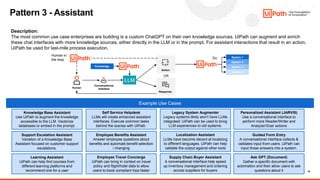
Pattern 3 - Assistant
Description:
The most common use case enterprises are building is a custom ChatGPT on their own knowledge sources. UiPath can augment and enrich
these chat interfaces with more knowledge sources, either directly in the LLM or in the prompt. For assistant interactions that result in an action,
UiPath be used for last-mile process execution.
LLM
System 1
System 2
System 3
System 4
Do
Conversational
Interface
Human
Knowledge
Response
Action
OR
Human in
the loop
Example Use Cases
Knowledge Base Assistant
Use UiPath to augment the knowledge
accessible to the LLM. Vectorize
databases or embed in the prompt.
Support Escalation Assistant
Variation of a Knowledge Base
Assistant focused on customer support
escalations.
Learning Assistant
UiPath can help find courses from
different learning platforms and
recommend one for a user
Self Service Helpdesk
LLMs will create enhanced assistant
interfaces. Execute common tasks
behind the scenes with UiPath.
Employee Benefits Assistant
Answer employee questions about
benefits and automate benefit selection
/ changing
Employee Travel Concierge
UiPath can bring in context on travel
policy and flight/hotel data to allow
users to book compliant trips faster
Legacy System Augmenter
Legacy systems likely won’t have LLMs
integrated. UiPath can be used to bring
LLM experiences to old systems.
Localization Assistant
LLMs have become decent at localizing
to different languages. UiPath can help
validate the output against other tools
Supply Chain Buyer Assistant
A conversational interface help speed
up inventory management and ordering
across suppliers for buyers
Personalized Assistant (JARVIS)
Use a conversational interface to
perform more Reader/Writer and
Analyzer/Doer actions
Guided Form Entry
A conversational interface collects &
validates input from users. UiPath can
input those answers into a system.
Ask GPT (Document)
Gather a specific document with
automation and then allow users to ask
questions about it
19
2 Way Match Invoice Processing
This process matches invoices to purchase orders to ensure accurate payment.
This process ensures that only valid invoices with valid line items are paid,
reducing the risk of fraud and errors; save time and money, and improve their
relationships with business partners.
Generative AI reduces the development complexity and enables developers to
handle complex validation logic with natural language prompts!
Increased Process
Efficiency​
Improved Accuracy,
Clear Compliance &
Audit Trail
Reduced Development
Complexity
Reduced Risk &
Cost Savings
Process: Invoice 2 Way Match
& Gen AI
Leverage the power of UiPath Document Understanding and Generative AI to
seamlessly process invoices
Natural language to prompt GenAI
to handle the validation logic
Automations handle processing,
involving a human when needed
Pattern
2
20
MeetingAI
How it works
45 minutes saved
in follow-up per meeting!
& Gen AI
Zoom
Recording
Triggers
Automation
Meeting
Gen AI:
Extract action items
Summarize meeting
Microsoft Azure
OpenAI
Gen AI:
Compare action items
to list of existing
automations
Get
Documentation
Microsoft Azure
OpenAI
Get meeting
times
Get recording
link
Compose email
[Meeting Summary]
[Follow-up items]
[Action items]
Less time spent on admin
tasks after meetings
Send email
More time for account strategy,
market research, meeting preparation
List of Automations
supplied by robot
Pattern
1
&
2
21
Subject:
Create automations and use collection of prompts to solve tasks by accessing LLMs. This can be
combined with other AI are techniques and models.
Definition:
Prompt engineering is a concept in artificial intelligence, particularly natural language processing. In prompt
engineering, the description of the task that the AI is supposed to accomplish is embedded in the input, e.g. as a
question, instead of it being explicitly given. Prompt engineering typically works by converting one or more tasks
to a prompt-based dataset and training a language model with what has been called "prompt-based learning" or
just "prompt learning".
Reads and Examples:
Prompt engineering for reusable activities
(68) ChatGPT: 5 Prompt Engineering Secrets For Beginners – YouTube
Promptbase.com
Function Calling
Prompt Engineering
22
• Impact 25% - We want to understand the value that your idea will bring to society or the specific
organization. Is it far-reaching, does it help a particular organization already, or do they expect to see
changes in how they do their work in the coming months?
• Concept 20% - We’ll evaluate your idea to see if it is disruptive or innovative while adding value to
enterprise business
• Technology 25% – We'll evaluate your solution on how effectively and efficiently you've used UiPath
products and if you've integrated those with the ecosystem of other technologies.
• Completion 20% - How complete is the solution? Have you delivered what you wanted?
• Presentation 10% - We will assess how well articulated your solution is and if your presentation is
precise.
Judging Criteria
23
Category 1 Prizes: AI Powered Automation Solutions
• 1st Prize – $4,500 award
• 2nd Prize – $3,000 award
• 3rd Prize – $1,500 award
• UiPath HyperHack Certificate for all Finalists
Category 2 Prizes: Innovation through Core Business Automation Solutions
• 1st Prize – $4,500 award
• 2nd Prize – $3,000 award
• 3rd Prize – $1,500 award
• UiPath HyperHack Certificate for all Finalists
Awards
24
• The submission deadline is July 14, 2023. If you're submitting as a team rather than as an
individual, you only need to fill in one submission form per team. The entire idea needs to be
fully functional so the judges can review it. Your Submission must include the following list
and avoid rejection.
• PDD (Process Design Document)/Solution Diagram [Recommended Using Task Capture]
• Project Files / Workflow
• Presentation (no longer than ten slides) - Please use this template. [Download a copy of the
template to build your presentation]
• Solution Video (no longer than 5 minutes)
• Additional Scripts (if applicable)
Submission Guidelines
25
A hackathon history
1. US Treasury (Washington DC)
- 2012 – 2018 as a Product and Program
Manager
- Led R&D Lab exploring new technologies,
where I first started working with UiPath
- We built Treasury’s first mobile apps for check
deposit and relationships with PayPal, Apple
Pay, etc.
2. -> UiPath (Atlanta)
- 2018 - present
- Focus areas
- Sharing how an automation company
automates itself (and supporting internal
hackathons)
- Evolving automation user interfaces (UiPath
Apps)
- Evangelizing our AI products
3. It’s great to talk with you all
- Feel free to connect on LinkedIn
Joe Edwards
Product Marketing @ UiPath
Treasury’s eCommerce Incubator
26
Solve a personal
pain point
Imagine your solution used by
1,000 busy non-technical people
LeverageAI in unexpected
ways
A video’s V2 is more
important than the V1
27
Tips on identifying your Use Case
28
Considerations for Core and AI/DU use cases:
- High volume & high time saving
- Repetitive Manual process
- Look at things that you or others are doing everyday. How can it be improved by automation, either in personal or
professional life?
- Choose use cases that you can be excited about and have a positive impact on your life or others
Additional consideration for AI/DU use cases:
- Ease of digitization
- Ease of classification
- Access to samples documents
- Leveraging OOTB Pre-Train ML model
- Understanding Document Structure: Structured, Semi-Structured, and Unstructured Documents
- Variation of document
- Number of Extraction fields
- Document Splitting needed?
- Number of languages the documents comes in from
- Handwritten contents for extraction?
- Post processing Options for process robustness
How to select an Ideal Core and AI/DU use case
29
Tips on how to Present and Demonstrate your
Idea or Project
30
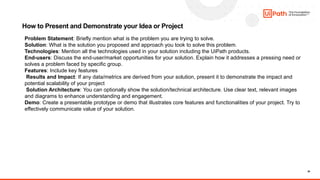
How to Present and Demonstrate your Idea or Project
Problem Statement: Briefly mention what is the problem you are trying to solve.
Solution: What is the solution you proposed and approach you took to solve this problem.
Technologies: Mention all the technologies used in your solution including the UiPath products.
End-users: Discuss the end-user/market opportunities for your solution. Explain how it addresses a pressing need or
solves a problem faced by specific group.
Features: Include key features
Results and Impact: If any data/metrics are derived from your solution, present it to demonstrate the impact and
potential scalability of your project
Solution Architecture: You can optionally show the solution/technical architecture. Use clear text, relevant images
and diagrams to enhance understanding and engagement.
Demo: Create a presentable prototype or demo that illustrates core features and functionalities of your project. Try to
effectively communicate value of your solution.
31
What’s Next?
Ongoing help and support from MVPs, UiPath Forum, Upcoming Sessions
UiPath Forum - https://forum.uipath.com/t/uipath-community-hyperhack-2023-is-live-register-now/553983
• Slack - https://uipathcommunity.slack.com
• Forum Use-Case Repository – We'll evaluate your solution on how effectively and efficiently you've used UiPath
products and if you've integrated those with the ecosystem of other
technologies. https://forum.uipath.com/t/submit-use-case/312214
• MVP Assistance on Forum – Meet the team below and there are more…
Tracy Dixon
Operational Excellence & UiPath
Partnership Lead Centric
Consulting & 4X UiPath MVP
Priya Darshini
UiPath MVP RPA Solutions
Architect & 4X UiPath MVP
Sharon Palawandram
Senior Machine Learning
Consultant Ashling Partners &
UiPath MVP
Russel Alfeche
Technology Leader, RPA qBotica
& UiPath MVP
Jeremy T. Gilliland
RPA CoE Lead, RPA Global
Innovation Award Winner
& UiPath MVP
32
Q&A
HyperHack 2023 Global Presentation - AMER Enablement_070623.pdf

HyperHack 2023 Global Presentation - AMER Enablement_070623.pdf

  • 1.
  • 2.
    2 In this session,you'll get a detailed insight into: • Introduction to HyperHack 2023 • What is a hackathon and how to participate? • Overview of rules and categories • Demos of AI-Powered Automation Solutions • Demos of Core Business Automation Solutions • Judging criteria and prizes • Submission guidelines and deadlines • Tips on identifying your use case • Tips on how to present and demonstrate your idea or project. What’s Next? Ongoing help and support from MVPs, UiPath Forum, Upcoming Sessions Agenda
  • 3.
    Diana Gray Community Marketing ManagerAMER At UiPath Meet our team: Joe Edwards Senior Product Marketing Manager at UiPath Tracy Dixon Operational Excellence & UiPath Partnership Lead Centric Consulting & 4X UiPath MVP Dhruv Patel Senior Sales Solution Architect at UiPath Veronica DeSalvo Discovery Engineer at UiPath Melody He Solution Architect at UiPath Ashritha Kallu RPA Developer at UiPath KJ Fenton Global Technical Enablement Manager at UiPath George Roth AI Evangelist at UiPath
  • 4.
    4 • Are youa problem solver within your team or organization? • Are you interested in creating effective, ground-breaking solutions with UiPath technology? • Do you often think of innovative use cases for any business problem that you come across? The UiPath Community invites you to choose your challenge from one of two categories and contribute to bringing automation ideas to life by identifying viable solutions. For details and support for the UiPath HyperHack 2023, please visit The HyperHack 2023 page at: https://community.uipath.com/e/mwx32h/ or the UiPath Forum Page at: https://forum.uipath.com/t/uipath-community-hyperhack-2023-is- live-register-now/553983 Introduction to HyperHack 2023
  • 5.
    5 • Hackathon isa word creation of the words hack(-ing) and marathon. In this context, hacking stands for the development of software- or hardware-solution and the marathon describes the format, which is completed in a short-time duration. • Usually, hackathons are open for several hundred hackers to compete. • The goal of a hackathon is to develop a solution for a given problem. The solution can be in different forms: it could be a pitch deck containing the concept and business model, a mockup/wireframe of an app or functioning software or hardware prototypes. What Is a Hackathon?
  • 6.
    6 1. AI-Powered AutomationSolutions New AI-powered innovations push automation’s boundaries even further. With AI and RPA, businesses can identify new opportunities, reduce costs, and improve productivity. UiPath’s AI suite of products helps you orchestrate all moving pieces of AI, enabling you to instantly apply the limitless cognitive power of AI to any software currently being automated by RPA. We challenge you to automate any Enterprise, Public Administration or Non-Profit Organization use case with UiPath automation and AI Solutions. 2. Innovation Through Core Business Automation Solutions We challenge you to use at least 2 UiPath technologies/tools to build a solution to solve any Enterprise, Public Administration or Non-Profit Organization use case. It can be an out-of-the- box automation designed to benefit every employee at your organization or a unique personal assistant/automation. You can also use UiPath partner technologies to supplement your automation ideas. For example: Chatbots, APIs etc. Categories
  • 7.
    7 Who can participate? •RPA Professionals • AI/Business Analysts • Solution Architects • Enterprise Customers • Partners • Student Software Developers • Engineers • Testers • Anyone with ideas and automation skills
  • 8.
    8 📅 Key Dates: •June 15 - Registrations Open • June 22 - Enablement sessions begin • July 6 - Enablement session • July 14 - Last date to register for the hackathon • July 21 - Last date for submitting a functional demo of your idea/solution • July 31 - Selected teams/Finalists to be notified • August 3 - Final Live Jury Round • August 7 - Winner’s announcement Key Dates:
  • 9.
    9 • The solutionthat you're submitting must not be available as a solution or component on the UiPath Marketplace Winner section of previous UiPath Hackathons or presented in current UiPath Sponsored Hackathons (However, you may extend an existing solution, for example, a connector for Salesforce but with enhanced functionalities beyond the connector already available in the Marketplace.) • You can join as an individual or in teams of a maximum of 4 people. When submitting, only one of you will submit the final projects to be assessed. • Everyone in the team needs to register separately to the hackathon. • You can submit more than one solution as a participant or team. Rules & Regulations
  • 10.
    10 Demos of AI-PoweredAutomation Solutions
  • 11.
    11 Think beyond UI– automate APIs and integrate AI Easily drag and drop AI/ML models and APIs into your workflows Processes Applications Documents Data Semantic Automation Automate UI AI API Low-code development experiences
  • 12.
    12 Example AI UseCases • Description: https://forum.uipath.com/t/ai- challenge-efficient-product-sequencing- recommendation- model/514055?_gl=1*1thfwtn*_gcl_au*MTQ5 OTUyMjUwNy4xNjgwMDIyNTkw • UiPath Products Used: Studio, AI Center • External Products Used: Python, Sci-Kit, Pandas, Numpy, Vscode Efficient Product Sequencing • Description: The UiPath robot will use an AI model developed by Skymind to screen resumes for a data scientist position. It'll use the AI model to make decisions about the candidates and, when not sure, request help from an operator. The operator will teach the robot and that decision will be used to improve the model's accuracy and confidence. • UiPath Products Used: Studio, AI Center • External Products Used: Visual Studio Resume Screening ChatGPT for Testing • Description: Leverage ChatGPT to generate test data to support any regression, application and/or automation testing efforts. • UiPath Products Used: Studio *Testing activity pack) • External Products Used: ChatGPT
  • 13.
  • 14.
    14 Advantages of usingUiPath with Gen AI for Automation More than calling a Generative AI Model Context Gathering Specialized Models Robots Do Work Human In The Loop Confidence in governance UiPath also has Specialized models to complement Gen AI interactions Gen AI needs context, UiPath can gather the context from all sources Gen AI is just a brain, Automation is the muscle that does the work Gen AI “hallucinates”. There are times you can not get things wrong Your business is governed with audit logs and controls while using Gen AI with UiPath
  • 15.
    3 Patterns forGen AI Powered Automations A use case may use 1 or multiple patterns Pattern 1 Reader / Writer Pattern 2 Pattern 3 Analyst / Doer Assistant UiPath can execute processes as a result of LLM calls UiPath can gather context from multiple sources to generate and distribute personalized messages UiPath can add context and action to conversational assistants UiPath Advantage Source 1 Source 2 Source 3 Source 4 LLM Ingest Analyze Data Next Best Action System 1 System 2 System 3 System 4 Do LLM System 1 System 2 System 3 System 4 Do Conversational Interface Human Knowledge Response Action OR Source 1 Source 2 Source 3 Source 4 LLM Read Write Emails Summaries Content
  • 16.
    16 Pattern 1 -Reader / Writer Description: LLMs are great at taking context and generating personalized text, whether longer or shorter than the original context. UiPath is collecting all the relevant context and prompting the LLM for text. UiPath can keep a human in the loop to fine tune the output. Example Use Cases Cold Call Emails Gather context about your audience and generate email Customer Feedback Response Gather sentiment and customer history to generate tailored response Proposal Writer Combine multiple answers from your KB with additional context for a tailored answer to a proposal question Applicant Communications Combine feedback from interviewers, JD details, and applicant resume for tailored communications Customer Summary Summarize customer history, support ticket history, etc. for faster consumption by customer facing agents Email/PMO Summarizer Summarize information from PM tools, emails, other sources for faster executive overviews KYC Summarizer Gather and summarize materials from multiple sources for faster KYC review Compliance and ESG Reporting Monitor data and reports from multiple systems/source and generate consistent reporting Product Documentation Create and maintain product documentation summarizing information from feature tickets and marketing Fraud Communications Generate correspondence with customers collating information multiple systems Insurance Claims Communication Communicate to Customers around their claims request synthesizing information from multiple systems Healthcare Appeals Communication Tailor communications to customers about using information about the customer and the circumstance Human Input and Validation Human in the loop Source 1 Source 2 Source 3 Source 4 LLM Read Write Emails Summaries Content System 1 System 2 System 3 System 4 Distribute
  • 17.
    17 Pattern 2 –Analyst / Doer Description: LLMs can generate structured output (data tables, code, XML/JSON) from multiple unstructured sources when prompted well. UiPath is collecting the relevant sources and prompting the LLM to generate structured outputs. Critically, UiPath can validate the contents of the structured outputs vs. systems of record or humans. UiPath can further execute processes based on the output. Source 1 Source 2 Source 3 Source 4 LLM Ingest Analyze Data Next Best Action System 1 System 2 System 3 System 4 Do/Validate Human Input and Validation Human in the loop Example Use Cases Multi-Source Report Creating Gather reporting from different systems, documents, and emails and combine them into one set Structuring and Normalizing Data Normalize data from different sources into a common schema 2 Way Match (Generic Reconciliation) Normalize data from multiple systems and further reconcile the two noting differences for humans to validate Contact Center Next Best Action Gather context from sources, recommend an action from a list and execute the action After Call Work (Action Item Doer) Extract actions from call scripts for follow-up. Execute those automatable. Upsell / Cross-sell Assistant Gather customer history and needs, generate a recommendation for what to sell, and a script to sell it Contract Extractor Extract structured data out of contracts / amendments, validate against sources, and input into systems Company Filing Extractor Extract key figures out of company filings, validate with human, and use in processes Test Data Creator Generate test data for application testing and insert it into the system using UiPath Generic Classifier Take in unstructured sources and classify against a list of defined options. Use this data as input for processes Competition Analysis Monitor pricing, news, reviews of competitors and extract structured findings Vendor Selection Analyze proposals from multiple vendors, extract key differentiations, and recommend a vendor
  • 18.
    18 Pattern 3 -Assistant Description: The most common use case enterprises are building is a custom ChatGPT on their own knowledge sources. UiPath can augment and enrich these chat interfaces with more knowledge sources, either directly in the LLM or in the prompt. For assistant interactions that result in an action, UiPath be used for last-mile process execution. LLM System 1 System 2 System 3 System 4 Do Conversational Interface Human Knowledge Response Action OR Human in the loop Example Use Cases Knowledge Base Assistant Use UiPath to augment the knowledge accessible to the LLM. Vectorize databases or embed in the prompt. Support Escalation Assistant Variation of a Knowledge Base Assistant focused on customer support escalations. Learning Assistant UiPath can help find courses from different learning platforms and recommend one for a user Self Service Helpdesk LLMs will create enhanced assistant interfaces. Execute common tasks behind the scenes with UiPath. Employee Benefits Assistant Answer employee questions about benefits and automate benefit selection / changing Employee Travel Concierge UiPath can bring in context on travel policy and flight/hotel data to allow users to book compliant trips faster Legacy System Augmenter Legacy systems likely won’t have LLMs integrated. UiPath can be used to bring LLM experiences to old systems. Localization Assistant LLMs have become decent at localizing to different languages. UiPath can help validate the output against other tools Supply Chain Buyer Assistant A conversational interface help speed up inventory management and ordering across suppliers for buyers Personalized Assistant (JARVIS) Use a conversational interface to perform more Reader/Writer and Analyzer/Doer actions Guided Form Entry A conversational interface collects & validates input from users. UiPath can input those answers into a system. Ask GPT (Document) Gather a specific document with automation and then allow users to ask questions about it
  • 19.
    19 2 Way MatchInvoice Processing This process matches invoices to purchase orders to ensure accurate payment. This process ensures that only valid invoices with valid line items are paid, reducing the risk of fraud and errors; save time and money, and improve their relationships with business partners. Generative AI reduces the development complexity and enables developers to handle complex validation logic with natural language prompts! Increased Process Efficiency​ Improved Accuracy, Clear Compliance & Audit Trail Reduced Development Complexity Reduced Risk & Cost Savings Process: Invoice 2 Way Match & Gen AI Leverage the power of UiPath Document Understanding and Generative AI to seamlessly process invoices Natural language to prompt GenAI to handle the validation logic Automations handle processing, involving a human when needed Pattern 2
  • 20.
    20 MeetingAI How it works 45minutes saved in follow-up per meeting! & Gen AI Zoom Recording Triggers Automation Meeting Gen AI: Extract action items Summarize meeting Microsoft Azure OpenAI Gen AI: Compare action items to list of existing automations Get Documentation Microsoft Azure OpenAI Get meeting times Get recording link Compose email [Meeting Summary] [Follow-up items] [Action items] Less time spent on admin tasks after meetings Send email More time for account strategy, market research, meeting preparation List of Automations supplied by robot Pattern 1 & 2
  • 21.
    21 Subject: Create automations anduse collection of prompts to solve tasks by accessing LLMs. This can be combined with other AI are techniques and models. Definition: Prompt engineering is a concept in artificial intelligence, particularly natural language processing. In prompt engineering, the description of the task that the AI is supposed to accomplish is embedded in the input, e.g. as a question, instead of it being explicitly given. Prompt engineering typically works by converting one or more tasks to a prompt-based dataset and training a language model with what has been called "prompt-based learning" or just "prompt learning". Reads and Examples: Prompt engineering for reusable activities (68) ChatGPT: 5 Prompt Engineering Secrets For Beginners – YouTube Promptbase.com Function Calling Prompt Engineering
  • 22.
    22 • Impact 25%- We want to understand the value that your idea will bring to society or the specific organization. Is it far-reaching, does it help a particular organization already, or do they expect to see changes in how they do their work in the coming months? • Concept 20% - We’ll evaluate your idea to see if it is disruptive or innovative while adding value to enterprise business • Technology 25% – We'll evaluate your solution on how effectively and efficiently you've used UiPath products and if you've integrated those with the ecosystem of other technologies. • Completion 20% - How complete is the solution? Have you delivered what you wanted? • Presentation 10% - We will assess how well articulated your solution is and if your presentation is precise. Judging Criteria
  • 23.
    23 Category 1 Prizes:AI Powered Automation Solutions • 1st Prize – $4,500 award • 2nd Prize – $3,000 award • 3rd Prize – $1,500 award • UiPath HyperHack Certificate for all Finalists Category 2 Prizes: Innovation through Core Business Automation Solutions • 1st Prize – $4,500 award • 2nd Prize – $3,000 award • 3rd Prize – $1,500 award • UiPath HyperHack Certificate for all Finalists Awards
  • 24.
    24 • The submissiondeadline is July 14, 2023. If you're submitting as a team rather than as an individual, you only need to fill in one submission form per team. The entire idea needs to be fully functional so the judges can review it. Your Submission must include the following list and avoid rejection. • PDD (Process Design Document)/Solution Diagram [Recommended Using Task Capture] • Project Files / Workflow • Presentation (no longer than ten slides) - Please use this template. [Download a copy of the template to build your presentation] • Solution Video (no longer than 5 minutes) • Additional Scripts (if applicable) Submission Guidelines
  • 25.
    25 A hackathon history 1.US Treasury (Washington DC) - 2012 – 2018 as a Product and Program Manager - Led R&D Lab exploring new technologies, where I first started working with UiPath - We built Treasury’s first mobile apps for check deposit and relationships with PayPal, Apple Pay, etc. 2. -> UiPath (Atlanta) - 2018 - present - Focus areas - Sharing how an automation company automates itself (and supporting internal hackathons) - Evolving automation user interfaces (UiPath Apps) - Evangelizing our AI products 3. It’s great to talk with you all - Feel free to connect on LinkedIn Joe Edwards Product Marketing @ UiPath Treasury’s eCommerce Incubator
  • 26.
    26 Solve a personal painpoint Imagine your solution used by 1,000 busy non-technical people LeverageAI in unexpected ways A video’s V2 is more important than the V1
  • 27.
  • 28.
    28 Considerations for Coreand AI/DU use cases: - High volume & high time saving - Repetitive Manual process - Look at things that you or others are doing everyday. How can it be improved by automation, either in personal or professional life? - Choose use cases that you can be excited about and have a positive impact on your life or others Additional consideration for AI/DU use cases: - Ease of digitization - Ease of classification - Access to samples documents - Leveraging OOTB Pre-Train ML model - Understanding Document Structure: Structured, Semi-Structured, and Unstructured Documents - Variation of document - Number of Extraction fields - Document Splitting needed? - Number of languages the documents comes in from - Handwritten contents for extraction? - Post processing Options for process robustness How to select an Ideal Core and AI/DU use case
  • 29.
    29 Tips on howto Present and Demonstrate your Idea or Project
  • 30.
    30 How to Presentand Demonstrate your Idea or Project Problem Statement: Briefly mention what is the problem you are trying to solve. Solution: What is the solution you proposed and approach you took to solve this problem. Technologies: Mention all the technologies used in your solution including the UiPath products. End-users: Discuss the end-user/market opportunities for your solution. Explain how it addresses a pressing need or solves a problem faced by specific group. Features: Include key features Results and Impact: If any data/metrics are derived from your solution, present it to demonstrate the impact and potential scalability of your project Solution Architecture: You can optionally show the solution/technical architecture. Use clear text, relevant images and diagrams to enhance understanding and engagement. Demo: Create a presentable prototype or demo that illustrates core features and functionalities of your project. Try to effectively communicate value of your solution.
  • 31.
    31 What’s Next? Ongoing helpand support from MVPs, UiPath Forum, Upcoming Sessions UiPath Forum - https://forum.uipath.com/t/uipath-community-hyperhack-2023-is-live-register-now/553983 • Slack - https://uipathcommunity.slack.com • Forum Use-Case Repository – We'll evaluate your solution on how effectively and efficiently you've used UiPath products and if you've integrated those with the ecosystem of other technologies. https://forum.uipath.com/t/submit-use-case/312214 • MVP Assistance on Forum – Meet the team below and there are more… Tracy Dixon Operational Excellence & UiPath Partnership Lead Centric Consulting & 4X UiPath MVP Priya Darshini UiPath MVP RPA Solutions Architect & 4X UiPath MVP Sharon Palawandram Senior Machine Learning Consultant Ashling Partners & UiPath MVP Russel Alfeche Technology Leader, RPA qBotica & UiPath MVP Jeremy T. Gilliland RPA CoE Lead, RPA Global Innovation Award Winner & UiPath MVP
  • 32.