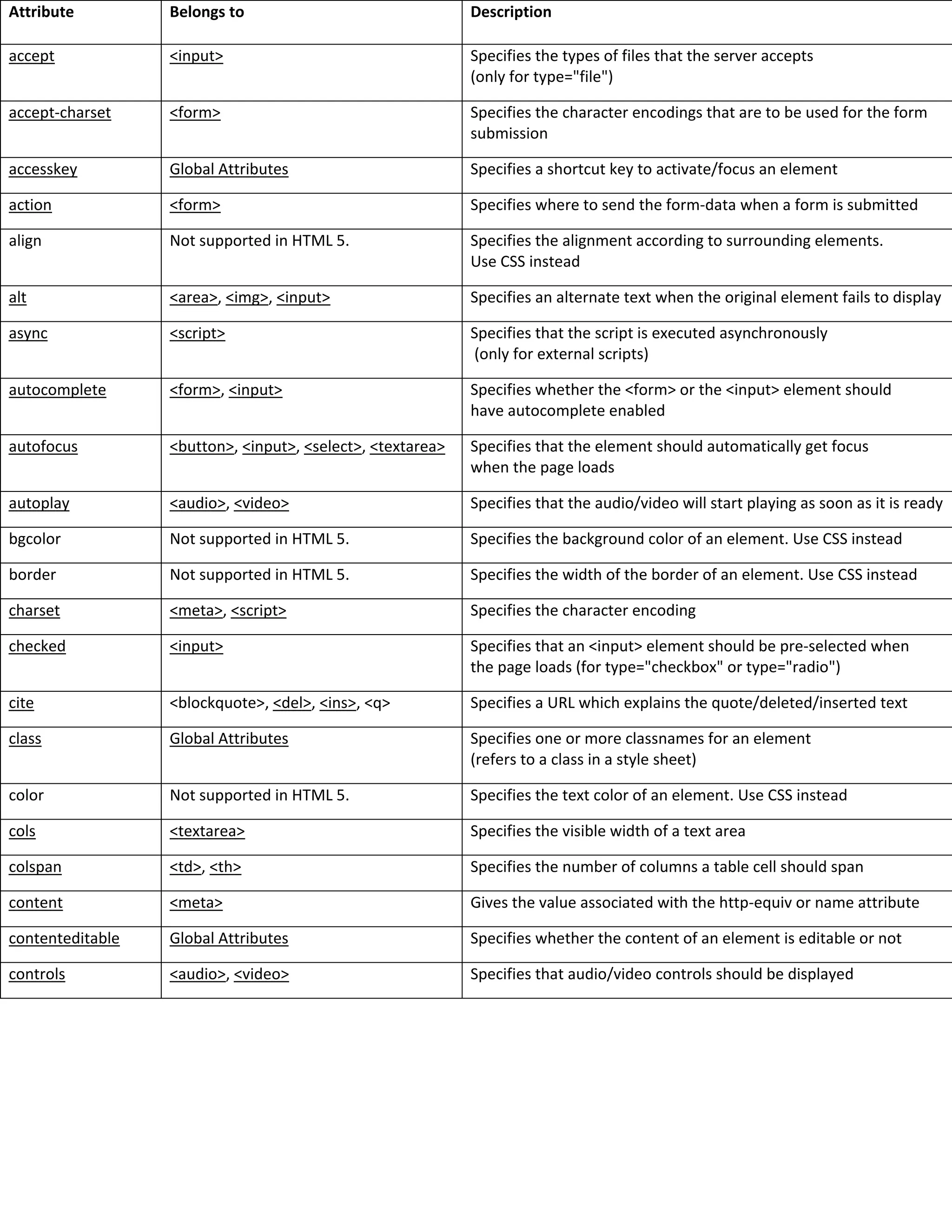
Attribute Belongs to Description
accept <input> Specifies the types of files that the server accepts
(only for type="file")
accept-charset <form> Specifies the character encodings that are to be used for the form
submission
accesskey Global Attributes Specifies a shortcut key to activate/focus an element
action <form> Specifies where to send the form-data when a form is submitted
align Not supported in HTML 5. Specifies the alignment according to surrounding elements.
Use CSS instead
alt <area>, <img>, <input> Specifies an alternate text when the original element fails to display
async <script> Specifies that the script is executed asynchronously
(only for external scripts)
autocomplete <form>, <input> Specifies whether the <form> or the <input> element should
have autocomplete enabled
autofocus <button>, <input>, <select>, <textarea> Specifies that the element should automatically get focus
when the page loads
autoplay <audio>, <video> Specifies that the audio/video will start playing as soon as it is ready
bgcolor Not supported in HTML 5. Specifies the background color of an element. Use CSS instead
border Not supported in HTML 5. Specifies the width of the border of an element. Use CSS instead
charset <meta>, <script> Specifies the character encoding
checked <input> Specifies that an <input> element should be pre-selected when
the page loads (for type="checkbox" or type="radio")
cite <blockquote>, <del>, <ins>, <q> Specifies a URL which explains the quote/deleted/inserted text
class Global Attributes Specifies one or more classnames for an element
(refers to a class in a style sheet)
color Not supported in HTML 5. Specifies the text color of an element. Use CSS instead
cols <textarea> Specifies the visible width of a text area
colspan <td>, <th> Specifies the number of columns a table cell should span
content <meta> Gives the value associated with the http-equiv or name attribute
contenteditable Global Attributes Specifies whether the content of an element is editable or not
controls <audio>, <video> Specifies that audio/video controls should be displayed
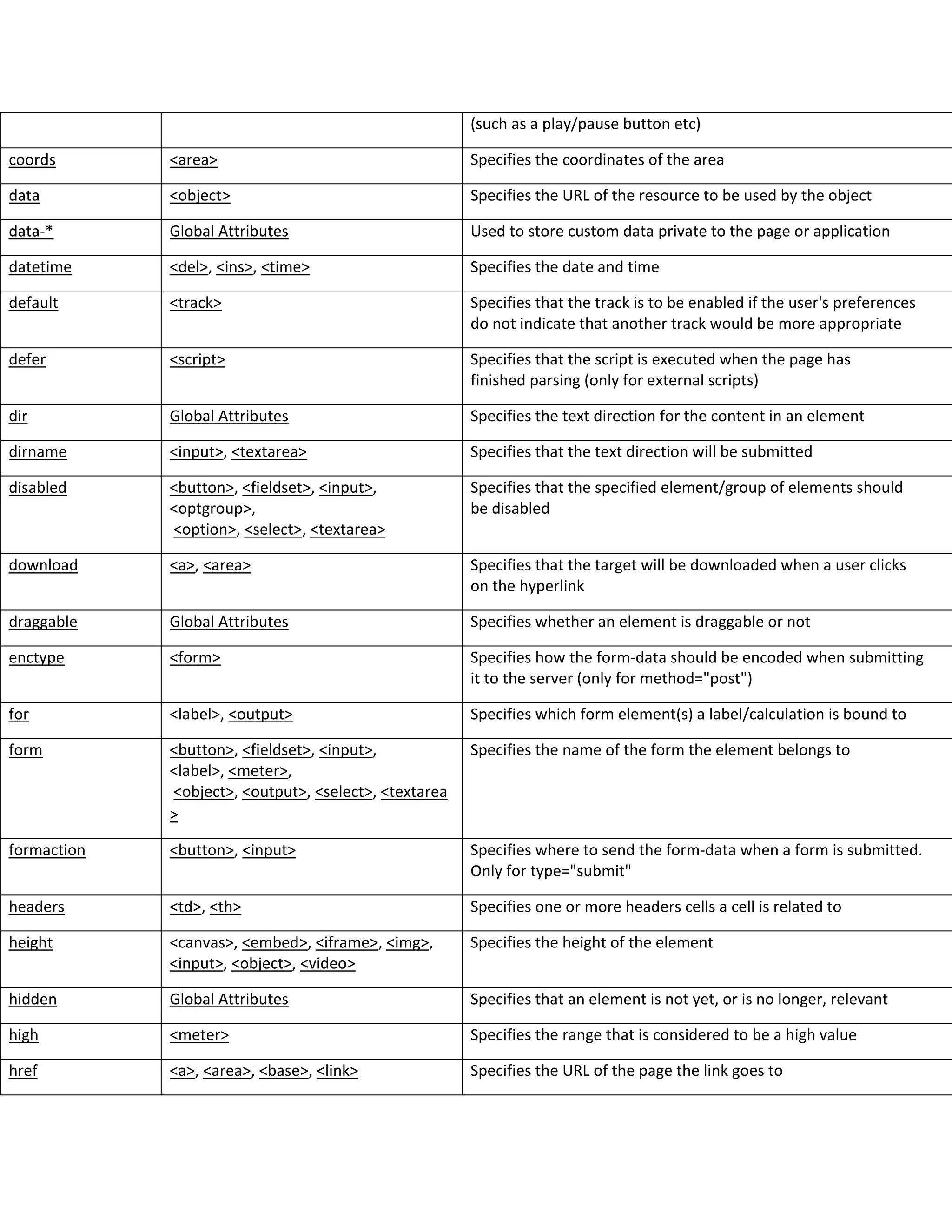
(such as a play/pause button etc)
coords <area> Specifies the coordinates of the area
data <object> Specifies the URL of the resource to be used by the object
data-* Global Attributes Used to store custom data private to the page or application
datetime <del>, <ins>, <time> Specifies the date and time
default <track> Specifies that the track is to be enabled if the user's preferences
do not indicate that another track would be more appropriate
defer <script> Specifies that the script is executed when the page has
finished parsing (only for external scripts)
dir Global Attributes Specifies the text direction for the content in an element
dirname <input>, <textarea> Specifies that the text direction will be submitted
disabled <button>, <fieldset>, <input>,
<optgroup>,
<option>, <select>, <textarea>
Specifies that the specified element/group of elements should
be disabled
download <a>, <area> Specifies that the target will be downloaded when a user clicks
on the hyperlink
draggable Global Attributes Specifies whether an element is draggable or not
enctype <form> Specifies how the form-data should be encoded when submitting
it to the server (only for method="post")
for <label>, <output> Specifies which form element(s) a label/calculation is bound to
form <button>, <fieldset>, <input>,
<label>, <meter>,
<object>, <output>, <select>, <textarea
>
Specifies the name of the form the element belongs to
formaction <button>, <input> Specifies where to send the form-data when a form is submitted.
Only for type="submit"
headers <td>, <th> Specifies one or more headers cells a cell is related to
height <canvas>, <embed>, <iframe>, <img>,
<input>, <object>, <video>
Specifies the height of the element
hidden Global Attributes Specifies that an element is not yet, or is no longer, relevant
high <meter> Specifies the range that is considered to be a high value
href <a>, <area>, <base>, <link> Specifies the URL of the page the link goes to
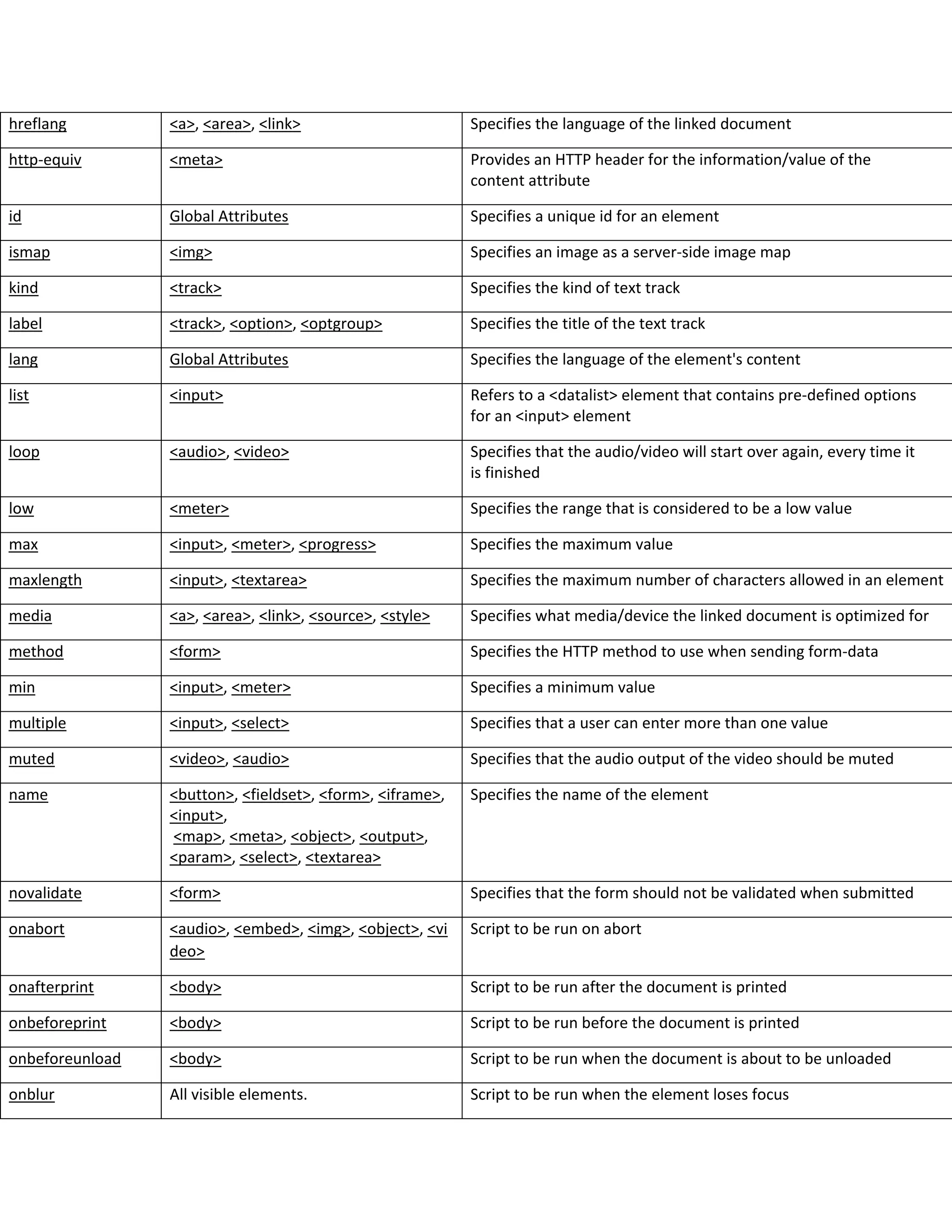
hreflang <a>, <area>, <link> Specifies the language of the linked document
http-equiv <meta> Provides an HTTP header for the information/value of the
content attribute
id Global Attributes Specifies a unique id for an element
ismap <img> Specifies an image as a server-side image map
kind <track> Specifies the kind of text track
label <track>, <option>, <optgroup> Specifies the title of the text track
lang Global Attributes Specifies the language of the element's content
list <input> Refers to a <datalist> element that contains pre-defined options
for an <input> element
loop <audio>, <video> Specifies that the audio/video will start over again, every time it
is finished
low <meter> Specifies the range that is considered to be a low value
max <input>, <meter>, <progress> Specifies the maximum value
maxlength <input>, <textarea> Specifies the maximum number of characters allowed in an element
media <a>, <area>, <link>, <source>, <style> Specifies what media/device the linked document is optimized for
method <form> Specifies the HTTP method to use when sending form-data
min <input>, <meter> Specifies a minimum value
multiple <input>, <select> Specifies that a user can enter more than one value
muted <video>, <audio> Specifies that the audio output of the video should be muted
name <button>, <fieldset>, <form>, <iframe>,
<input>,
<map>, <meta>, <object>, <output>,
<param>, <select>, <textarea>
Specifies the name of the element
novalidate <form> Specifies that the form should not be validated when submitted
onabort <audio>, <embed>, <img>, <object>, <vi
deo>
Script to be run on abort
onafterprint <body> Script to be run after the document is printed
onbeforeprint <body> Script to be run before the document is printed
onbeforeunload <body> Script to be run when the document is about to be unloaded
onblur All visible elements. Script to be run when the element loses focus
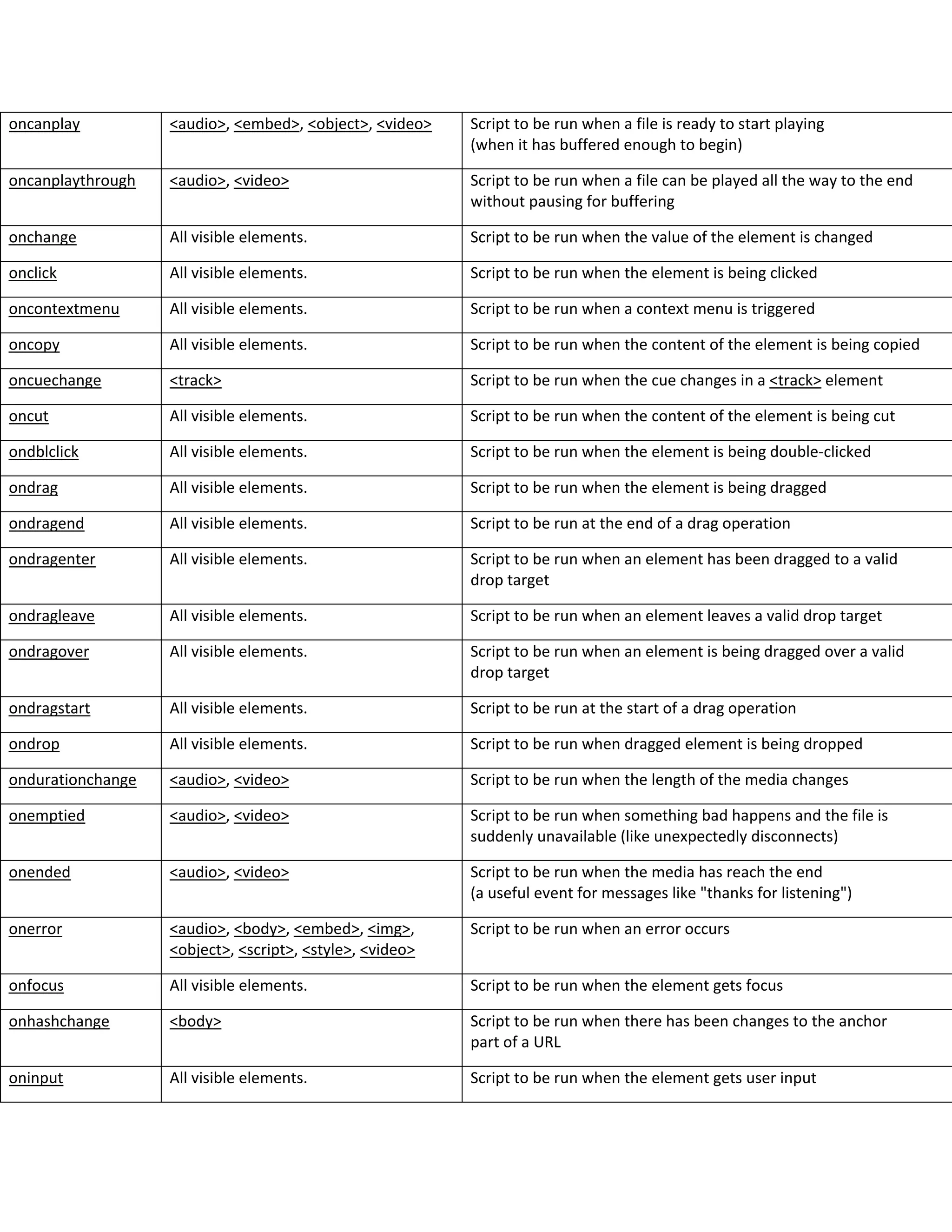
oncanplay <audio>, <embed>, <object>, <video> Script to be run when a file is ready to start playing
(when it has buffered enough to begin)
oncanplaythrough <audio>, <video> Script to be run when a file can be played all the way to the end
without pausing for buffering
onchange All visible elements. Script to be run when the value of the element is changed
onclick All visible elements. Script to be run when the element is being clicked
oncontextmenu All visible elements. Script to be run when a context menu is triggered
oncopy All visible elements. Script to be run when the content of the element is being copied
oncuechange <track> Script to be run when the cue changes in a <track> element
oncut All visible elements. Script to be run when the content of the element is being cut
ondblclick All visible elements. Script to be run when the element is being double-clicked
ondrag All visible elements. Script to be run when the element is being dragged
ondragend All visible elements. Script to be run at the end of a drag operation
ondragenter All visible elements. Script to be run when an element has been dragged to a valid
drop target
ondragleave All visible elements. Script to be run when an element leaves a valid drop target
ondragover All visible elements. Script to be run when an element is being dragged over a valid
drop target
ondragstart All visible elements. Script to be run at the start of a drag operation
ondrop All visible elements. Script to be run when dragged element is being dropped
ondurationchange <audio>, <video> Script to be run when the length of the media changes
onemptied <audio>, <video> Script to be run when something bad happens and the file is
suddenly unavailable (like unexpectedly disconnects)
onended <audio>, <video> Script to be run when the media has reach the end
(a useful event for messages like "thanks for listening")
onerror <audio>, <body>, <embed>, <img>,
<object>, <script>, <style>, <video>
Script to be run when an error occurs
onfocus All visible elements. Script to be run when the element gets focus
onhashchange <body> Script to be run when there has been changes to the anchor
part of a URL
oninput All visible elements. Script to be run when the element gets user input
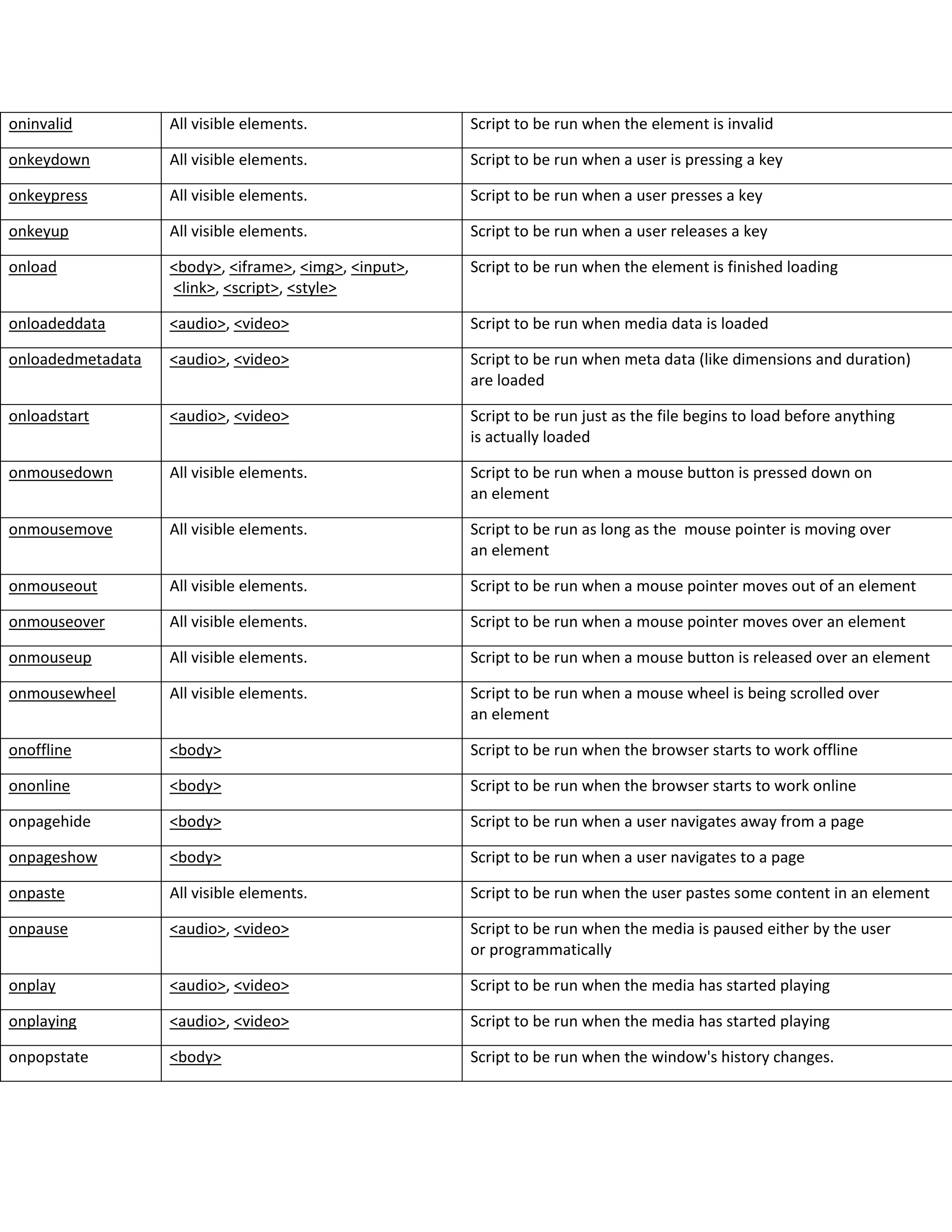
oninvalid All visible elements. Script to be run when the element is invalid
onkeydown All visible elements. Script to be run when a user is pressing a key
onkeypress All visible elements. Script to be run when a user presses a key
onkeyup All visible elements. Script to be run when a user releases a key
onload <body>, <iframe>, <img>, <input>,
<link>, <script>, <style>
Script to be run when the element is finished loading
onloadeddata <audio>, <video> Script to be run when media data is loaded
onloadedmetadata <audio>, <video> Script to be run when meta data (like dimensions and duration)
are loaded
onloadstart <audio>, <video> Script to be run just as the file begins to load before anything
is actually loaded
onmousedown All visible elements. Script to be run when a mouse button is pressed down on
an element
onmousemove All visible elements. Script to be run as long as the mouse pointer is moving over
an element
onmouseout All visible elements. Script to be run when a mouse pointer moves out of an element
onmouseover All visible elements. Script to be run when a mouse pointer moves over an element
onmouseup All visible elements. Script to be run when a mouse button is released over an element
onmousewheel All visible elements. Script to be run when a mouse wheel is being scrolled over
an element
onoffline <body> Script to be run when the browser starts to work offline
ononline <body> Script to be run when the browser starts to work online
onpagehide <body> Script to be run when a user navigates away from a page
onpageshow <body> Script to be run when a user navigates to a page
onpaste All visible elements. Script to be run when the user pastes some content in an element
onpause <audio>, <video> Script to be run when the media is paused either by the user
or programmatically
onplay <audio>, <video> Script to be run when the media has started playing
onplaying <audio>, <video> Script to be run when the media has started playing
onpopstate <body> Script to be run when the window's history changes.
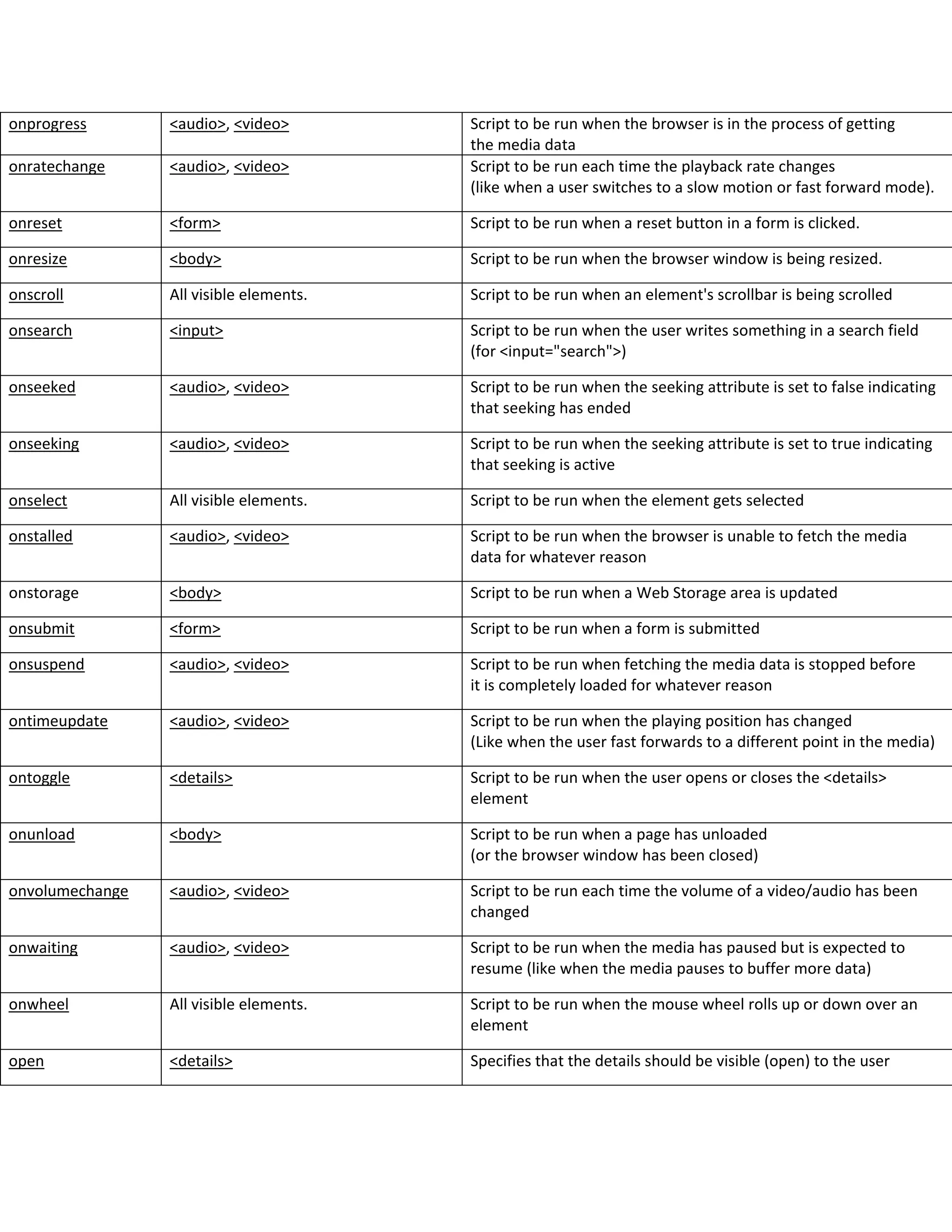
onprogress <audio>, <video> Script to be run when the browser is in the process of getting
the media data
onratechange <audio>, <video> Script to be run each time the playback rate changes
(like when a user switches to a slow motion or fast forward mode).
onreset <form> Script to be run when a reset button in a form is clicked.
onresize <body> Script to be run when the browser window is being resized.
onscroll All visible elements. Script to be run when an element's scrollbar is being scrolled
onsearch <input> Script to be run when the user writes something in a search field
(for <input="search">)
onseeked <audio>, <video> Script to be run when the seeking attribute is set to false indicating
that seeking has ended
onseeking <audio>, <video> Script to be run when the seeking attribute is set to true indicating
that seeking is active
onselect All visible elements. Script to be run when the element gets selected
onstalled <audio>, <video> Script to be run when the browser is unable to fetch the media
data for whatever reason
onstorage <body> Script to be run when a Web Storage area is updated
onsubmit <form> Script to be run when a form is submitted
onsuspend <audio>, <video> Script to be run when fetching the media data is stopped before
it is completely loaded for whatever reason
ontimeupdate <audio>, <video> Script to be run when the playing position has changed
(Like when the user fast forwards to a different point in the media)
ontoggle <details> Script to be run when the user opens or closes the <details>
element
onunload <body> Script to be run when a page has unloaded
(or the browser window has been closed)
onvolumechange <audio>, <video> Script to be run each time the volume of a video/audio has been
changed
onwaiting <audio>, <video> Script to be run when the media has paused but is expected to
resume (like when the media pauses to buffer more data)
onwheel All visible elements. Script to be run when the mouse wheel rolls up or down over an
element
open <details> Specifies that the details should be visible (open) to the user
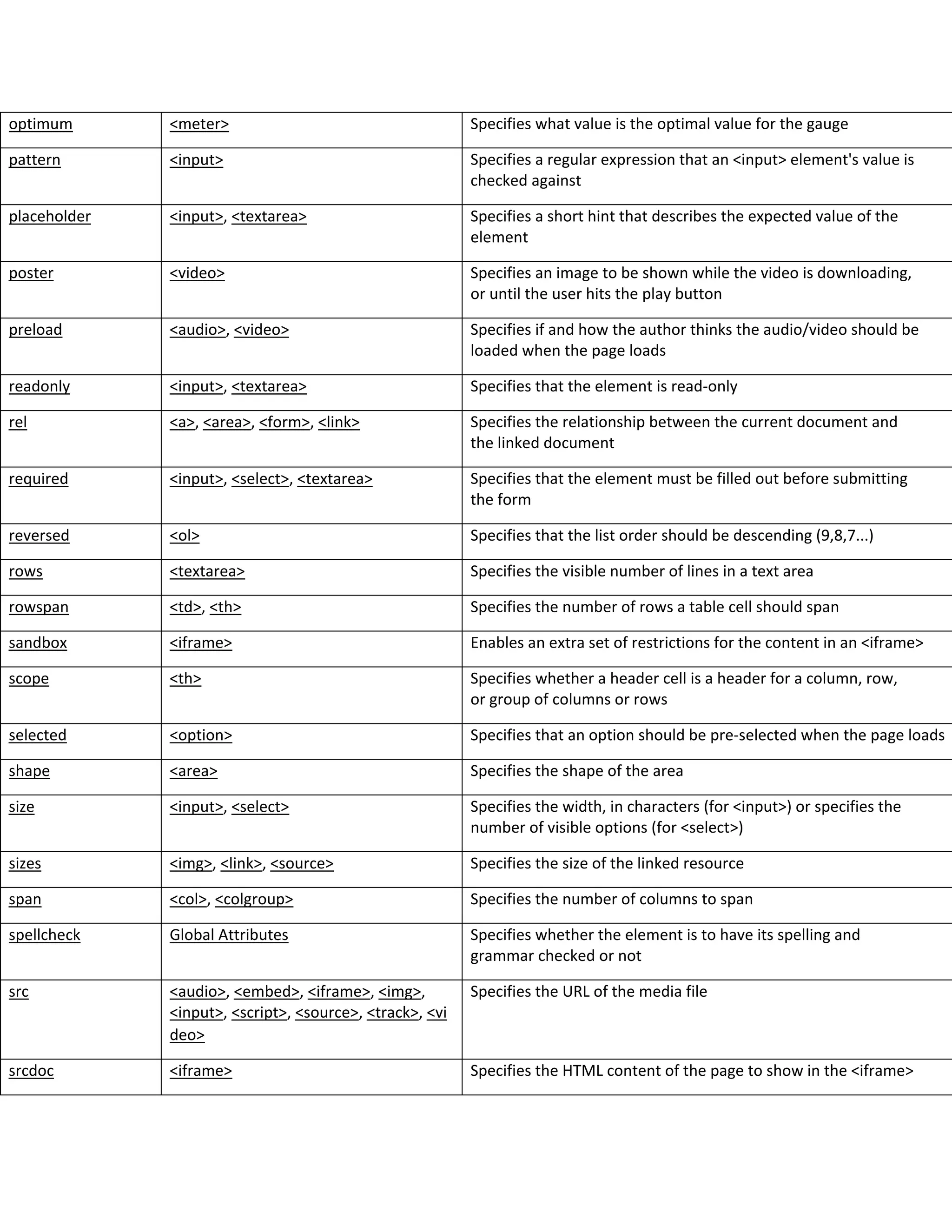
optimum <meter> Specifies what value is the optimal value for the gauge
pattern <input> Specifies a regular expression that an <input> element's value is
checked against
placeholder <input>, <textarea> Specifies a short hint that describes the expected value of the
element
poster <video> Specifies an image to be shown while the video is downloading,
or until the user hits the play button
preload <audio>, <video> Specifies if and how the author thinks the audio/video should be
loaded when the page loads
readonly <input>, <textarea> Specifies that the element is read-only
rel <a>, <area>, <form>, <link> Specifies the relationship between the current document and
the linked document
required <input>, <select>, <textarea> Specifies that the element must be filled out before submitting
the form
reversed <ol> Specifies that the list order should be descending (9,8,7...)
rows <textarea> Specifies the visible number of lines in a text area
rowspan <td>, <th> Specifies the number of rows a table cell should span
sandbox <iframe> Enables an extra set of restrictions for the content in an <iframe>
scope <th> Specifies whether a header cell is a header for a column, row,
or group of columns or rows
selected <option> Specifies that an option should be pre-selected when the page loads
shape <area> Specifies the shape of the area
size <input>, <select> Specifies the width, in characters (for <input>) or specifies the
number of visible options (for <select>)
sizes <img>, <link>, <source> Specifies the size of the linked resource
span <col>, <colgroup> Specifies the number of columns to span
spellcheck Global Attributes Specifies whether the element is to have its spelling and
grammar checked or not
src <audio>, <embed>, <iframe>, <img>,
<input>, <script>, <source>, <track>, <vi
deo>
Specifies the URL of the media file
srcdoc <iframe> Specifies the HTML content of the page to show in the <iframe>
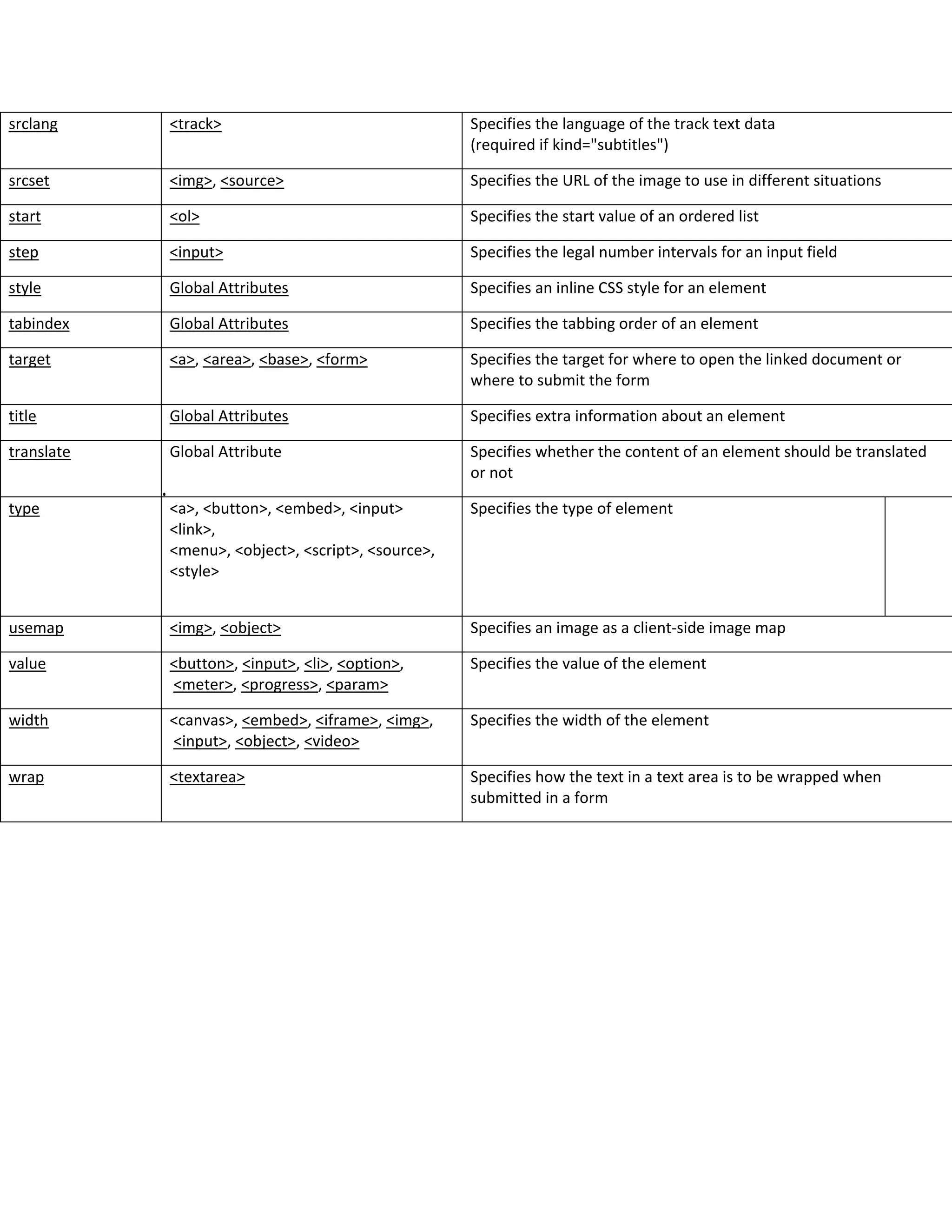
srclang <track> Specifies the language of the track text data
(required if kind="subtitles")
srcset <img>, <source> Specifies the URL of the image to use in different situations
start <ol> Specifies the start value of an ordered list
step <input> Specifies the legal number intervals for an input field
style Global Attributes Specifies an inline CSS style for an element
tabindex Global Attributes Specifies the tabbing order of an element
target <a>, <area>, <base>, <form> Specifies the target for where to open the linked document or
where to submit the form
title Global Attributes Specifies extra information about an element
translate Global Attribute Specifies whether the content of an element should be translated
or not
type <a>, <button>, <embed>, <input>
<link>,
<menu>, <object>, <script>, <source>,
<style>
Specifies the type of element
usemap <img>, <object> Specifies an image as a client-side image map
value <button>, <input>, <li>, <option>,
<meter>, <progress>, <param>
Specifies the value of the element
width <canvas>, <embed>, <iframe>, <img>,
<input>, <object>, <video>
Specifies the width of the element
wrap <textarea> Specifies how the text in a text area is to be wrapped when
submitted in a form

Html attributes

  • 1.
    Attribute Belongs toDescription accept <input> Specifies the types of files that the server accepts (only for type="file") accept-charset <form> Specifies the character encodings that are to be used for the form submission accesskey Global Attributes Specifies a shortcut key to activate/focus an element action <form> Specifies where to send the form-data when a form is submitted align Not supported in HTML 5. Specifies the alignment according to surrounding elements. Use CSS instead alt <area>, <img>, <input> Specifies an alternate text when the original element fails to display async <script> Specifies that the script is executed asynchronously (only for external scripts) autocomplete <form>, <input> Specifies whether the <form> or the <input> element should have autocomplete enabled autofocus <button>, <input>, <select>, <textarea> Specifies that the element should automatically get focus when the page loads autoplay <audio>, <video> Specifies that the audio/video will start playing as soon as it is ready bgcolor Not supported in HTML 5. Specifies the background color of an element. Use CSS instead border Not supported in HTML 5. Specifies the width of the border of an element. Use CSS instead charset <meta>, <script> Specifies the character encoding checked <input> Specifies that an <input> element should be pre-selected when the page loads (for type="checkbox" or type="radio") cite <blockquote>, <del>, <ins>, <q> Specifies a URL which explains the quote/deleted/inserted text class Global Attributes Specifies one or more classnames for an element (refers to a class in a style sheet) color Not supported in HTML 5. Specifies the text color of an element. Use CSS instead cols <textarea> Specifies the visible width of a text area colspan <td>, <th> Specifies the number of columns a table cell should span content <meta> Gives the value associated with the http-equiv or name attribute contenteditable Global Attributes Specifies whether the content of an element is editable or not controls <audio>, <video> Specifies that audio/video controls should be displayed
  • 2.
    (such as aplay/pause button etc) coords <area> Specifies the coordinates of the area data <object> Specifies the URL of the resource to be used by the object data-* Global Attributes Used to store custom data private to the page or application datetime <del>, <ins>, <time> Specifies the date and time default <track> Specifies that the track is to be enabled if the user's preferences do not indicate that another track would be more appropriate defer <script> Specifies that the script is executed when the page has finished parsing (only for external scripts) dir Global Attributes Specifies the text direction for the content in an element dirname <input>, <textarea> Specifies that the text direction will be submitted disabled <button>, <fieldset>, <input>, <optgroup>, <option>, <select>, <textarea> Specifies that the specified element/group of elements should be disabled download <a>, <area> Specifies that the target will be downloaded when a user clicks on the hyperlink draggable Global Attributes Specifies whether an element is draggable or not enctype <form> Specifies how the form-data should be encoded when submitting it to the server (only for method="post") for <label>, <output> Specifies which form element(s) a label/calculation is bound to form <button>, <fieldset>, <input>, <label>, <meter>, <object>, <output>, <select>, <textarea > Specifies the name of the form the element belongs to formaction <button>, <input> Specifies where to send the form-data when a form is submitted. Only for type="submit" headers <td>, <th> Specifies one or more headers cells a cell is related to height <canvas>, <embed>, <iframe>, <img>, <input>, <object>, <video> Specifies the height of the element hidden Global Attributes Specifies that an element is not yet, or is no longer, relevant high <meter> Specifies the range that is considered to be a high value href <a>, <area>, <base>, <link> Specifies the URL of the page the link goes to
  • 3.
    hreflang <a>, <area>,<link> Specifies the language of the linked document http-equiv <meta> Provides an HTTP header for the information/value of the content attribute id Global Attributes Specifies a unique id for an element ismap <img> Specifies an image as a server-side image map kind <track> Specifies the kind of text track label <track>, <option>, <optgroup> Specifies the title of the text track lang Global Attributes Specifies the language of the element's content list <input> Refers to a <datalist> element that contains pre-defined options for an <input> element loop <audio>, <video> Specifies that the audio/video will start over again, every time it is finished low <meter> Specifies the range that is considered to be a low value max <input>, <meter>, <progress> Specifies the maximum value maxlength <input>, <textarea> Specifies the maximum number of characters allowed in an element media <a>, <area>, <link>, <source>, <style> Specifies what media/device the linked document is optimized for method <form> Specifies the HTTP method to use when sending form-data min <input>, <meter> Specifies a minimum value multiple <input>, <select> Specifies that a user can enter more than one value muted <video>, <audio> Specifies that the audio output of the video should be muted name <button>, <fieldset>, <form>, <iframe>, <input>, <map>, <meta>, <object>, <output>, <param>, <select>, <textarea> Specifies the name of the element novalidate <form> Specifies that the form should not be validated when submitted onabort <audio>, <embed>, <img>, <object>, <vi deo> Script to be run on abort onafterprint <body> Script to be run after the document is printed onbeforeprint <body> Script to be run before the document is printed onbeforeunload <body> Script to be run when the document is about to be unloaded onblur All visible elements. Script to be run when the element loses focus
  • 4.
    oncanplay <audio>, <embed>,<object>, <video> Script to be run when a file is ready to start playing (when it has buffered enough to begin) oncanplaythrough <audio>, <video> Script to be run when a file can be played all the way to the end without pausing for buffering onchange All visible elements. Script to be run when the value of the element is changed onclick All visible elements. Script to be run when the element is being clicked oncontextmenu All visible elements. Script to be run when a context menu is triggered oncopy All visible elements. Script to be run when the content of the element is being copied oncuechange <track> Script to be run when the cue changes in a <track> element oncut All visible elements. Script to be run when the content of the element is being cut ondblclick All visible elements. Script to be run when the element is being double-clicked ondrag All visible elements. Script to be run when the element is being dragged ondragend All visible elements. Script to be run at the end of a drag operation ondragenter All visible elements. Script to be run when an element has been dragged to a valid drop target ondragleave All visible elements. Script to be run when an element leaves a valid drop target ondragover All visible elements. Script to be run when an element is being dragged over a valid drop target ondragstart All visible elements. Script to be run at the start of a drag operation ondrop All visible elements. Script to be run when dragged element is being dropped ondurationchange <audio>, <video> Script to be run when the length of the media changes onemptied <audio>, <video> Script to be run when something bad happens and the file is suddenly unavailable (like unexpectedly disconnects) onended <audio>, <video> Script to be run when the media has reach the end (a useful event for messages like "thanks for listening") onerror <audio>, <body>, <embed>, <img>, <object>, <script>, <style>, <video> Script to be run when an error occurs onfocus All visible elements. Script to be run when the element gets focus onhashchange <body> Script to be run when there has been changes to the anchor part of a URL oninput All visible elements. Script to be run when the element gets user input
  • 5.
    oninvalid All visibleelements. Script to be run when the element is invalid onkeydown All visible elements. Script to be run when a user is pressing a key onkeypress All visible elements. Script to be run when a user presses a key onkeyup All visible elements. Script to be run when a user releases a key onload <body>, <iframe>, <img>, <input>, <link>, <script>, <style> Script to be run when the element is finished loading onloadeddata <audio>, <video> Script to be run when media data is loaded onloadedmetadata <audio>, <video> Script to be run when meta data (like dimensions and duration) are loaded onloadstart <audio>, <video> Script to be run just as the file begins to load before anything is actually loaded onmousedown All visible elements. Script to be run when a mouse button is pressed down on an element onmousemove All visible elements. Script to be run as long as the mouse pointer is moving over an element onmouseout All visible elements. Script to be run when a mouse pointer moves out of an element onmouseover All visible elements. Script to be run when a mouse pointer moves over an element onmouseup All visible elements. Script to be run when a mouse button is released over an element onmousewheel All visible elements. Script to be run when a mouse wheel is being scrolled over an element onoffline <body> Script to be run when the browser starts to work offline ononline <body> Script to be run when the browser starts to work online onpagehide <body> Script to be run when a user navigates away from a page onpageshow <body> Script to be run when a user navigates to a page onpaste All visible elements. Script to be run when the user pastes some content in an element onpause <audio>, <video> Script to be run when the media is paused either by the user or programmatically onplay <audio>, <video> Script to be run when the media has started playing onplaying <audio>, <video> Script to be run when the media has started playing onpopstate <body> Script to be run when the window's history changes.
  • 6.
    onprogress <audio>, <video>Script to be run when the browser is in the process of getting the media data onratechange <audio>, <video> Script to be run each time the playback rate changes (like when a user switches to a slow motion or fast forward mode). onreset <form> Script to be run when a reset button in a form is clicked. onresize <body> Script to be run when the browser window is being resized. onscroll All visible elements. Script to be run when an element's scrollbar is being scrolled onsearch <input> Script to be run when the user writes something in a search field (for <input="search">) onseeked <audio>, <video> Script to be run when the seeking attribute is set to false indicating that seeking has ended onseeking <audio>, <video> Script to be run when the seeking attribute is set to true indicating that seeking is active onselect All visible elements. Script to be run when the element gets selected onstalled <audio>, <video> Script to be run when the browser is unable to fetch the media data for whatever reason onstorage <body> Script to be run when a Web Storage area is updated onsubmit <form> Script to be run when a form is submitted onsuspend <audio>, <video> Script to be run when fetching the media data is stopped before it is completely loaded for whatever reason ontimeupdate <audio>, <video> Script to be run when the playing position has changed (Like when the user fast forwards to a different point in the media) ontoggle <details> Script to be run when the user opens or closes the <details> element onunload <body> Script to be run when a page has unloaded (or the browser window has been closed) onvolumechange <audio>, <video> Script to be run each time the volume of a video/audio has been changed onwaiting <audio>, <video> Script to be run when the media has paused but is expected to resume (like when the media pauses to buffer more data) onwheel All visible elements. Script to be run when the mouse wheel rolls up or down over an element open <details> Specifies that the details should be visible (open) to the user
  • 7.
    optimum <meter> Specifieswhat value is the optimal value for the gauge pattern <input> Specifies a regular expression that an <input> element's value is checked against placeholder <input>, <textarea> Specifies a short hint that describes the expected value of the element poster <video> Specifies an image to be shown while the video is downloading, or until the user hits the play button preload <audio>, <video> Specifies if and how the author thinks the audio/video should be loaded when the page loads readonly <input>, <textarea> Specifies that the element is read-only rel <a>, <area>, <form>, <link> Specifies the relationship between the current document and the linked document required <input>, <select>, <textarea> Specifies that the element must be filled out before submitting the form reversed <ol> Specifies that the list order should be descending (9,8,7...) rows <textarea> Specifies the visible number of lines in a text area rowspan <td>, <th> Specifies the number of rows a table cell should span sandbox <iframe> Enables an extra set of restrictions for the content in an <iframe> scope <th> Specifies whether a header cell is a header for a column, row, or group of columns or rows selected <option> Specifies that an option should be pre-selected when the page loads shape <area> Specifies the shape of the area size <input>, <select> Specifies the width, in characters (for <input>) or specifies the number of visible options (for <select>) sizes <img>, <link>, <source> Specifies the size of the linked resource span <col>, <colgroup> Specifies the number of columns to span spellcheck Global Attributes Specifies whether the element is to have its spelling and grammar checked or not src <audio>, <embed>, <iframe>, <img>, <input>, <script>, <source>, <track>, <vi deo> Specifies the URL of the media file srcdoc <iframe> Specifies the HTML content of the page to show in the <iframe>
  • 8.
    srclang <track> Specifiesthe language of the track text data (required if kind="subtitles") srcset <img>, <source> Specifies the URL of the image to use in different situations start <ol> Specifies the start value of an ordered list step <input> Specifies the legal number intervals for an input field style Global Attributes Specifies an inline CSS style for an element tabindex Global Attributes Specifies the tabbing order of an element target <a>, <area>, <base>, <form> Specifies the target for where to open the linked document or where to submit the form title Global Attributes Specifies extra information about an element translate Global Attribute Specifies whether the content of an element should be translated or not type <a>, <button>, <embed>, <input> <link>, <menu>, <object>, <script>, <source>, <style> Specifies the type of element usemap <img>, <object> Specifies an image as a client-side image map value <button>, <input>, <li>, <option>, <meter>, <progress>, <param> Specifies the value of the element width <canvas>, <embed>, <iframe>, <img>, <input>, <object>, <video> Specifies the width of the element wrap <textarea> Specifies how the text in a text area is to be wrapped when submitted in a form