How To
Split Your
Worksheet In
Excel
Mohd Arsad Lee bin Abd
Syed
BG17110012
1. First, select a cell in
column A.
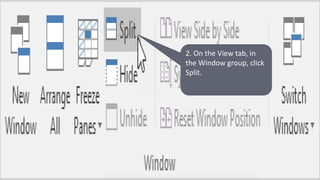
2. On the View tab, in
the Window group, click
Split.
3)Notice the two vertical scroll bars. For
example, use the lower vertical scroll bar to
move to row 1. As you can see, the first 10
rows remain visible
4) To remove the split, simply double click
the split bar.

How to split your worksheet in excel

  • 1.
    How To Split Your WorksheetIn Excel Mohd Arsad Lee bin Abd Syed BG17110012
  • 2.
    1. First, selecta cell in column A.
  • 3.
    2. On theView tab, in the Window group, click Split.
  • 4.
    3)Notice the twovertical scroll bars. For example, use the lower vertical scroll bar to move to row 1. As you can see, the first 10 rows remain visible 4) To remove the split, simply double click the split bar.