How to load a container 
for Export 
By 
Kingsnorth Waste Management 
01634 253557
Empty Container Side Number on container
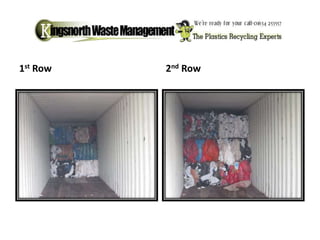
1st Row 2nd Row
3rd row 4th Row
5th Row / 6th Row 
Always take picture of product 
outside of container
If loading bags always take 
7th / 8th Row photos of product inside
9th last row 1 Door open and 1 closed
Annex 7 
Annex 7 
Must be put inside the container. 
• All highlight parts must be filled in. 
• 1. (person who arranges shipment 
• 2. importer (were it is going.3 
• 3. weight once loaded 
• 4. Date of shipement 
• 5a. 1st carrier (people collecting 
your product. 
• 6. Waste generator (your details) 
• 7. Recovery facility (were its going ) 
• 9. Description of waste/product 
• 12. person who arranged shipment 
must sign.
Doors Closed 
(try and not get the whole yard in the picture just the 
container) 
Seal Picture 
make sure numbers are clear
Collection Note Copy of weight ticket
• 1) Down load photos into folder marked who you sold to and date/ref number. 
• 2) Make sure all copy's of paper work are scanned over and put in same folder. 
• 3) Do invoice and save copy in folder 
• 4)Move folder to Dropbox. 
• 5) Share folder with client and email over link 
• 6) Print copy of pictures on 1 page 
• 7) Clip all paper work together and file. 
• Load is now completed Keep paper work for 3-5 years. 
• Keeping electronic copy's help the EA and customs if you are inspected.

How to load a container for export

  • 1.
    How to loada container for Export By Kingsnorth Waste Management 01634 253557
  • 2.
    Empty Container SideNumber on container
  • 3.
  • 4.
  • 5.
    5th Row /6th Row Always take picture of product outside of container
  • 6.
    If loading bagsalways take 7th / 8th Row photos of product inside
  • 7.
    9th last row1 Door open and 1 closed
  • 8.
    Annex 7 Annex7 Must be put inside the container. • All highlight parts must be filled in. • 1. (person who arranges shipment • 2. importer (were it is going.3 • 3. weight once loaded • 4. Date of shipement • 5a. 1st carrier (people collecting your product. • 6. Waste generator (your details) • 7. Recovery facility (were its going ) • 9. Description of waste/product • 12. person who arranged shipment must sign.
  • 9.
    Doors Closed (tryand not get the whole yard in the picture just the container) Seal Picture make sure numbers are clear
  • 10.
    Collection Note Copyof weight ticket
  • 11.
    • 1) Download photos into folder marked who you sold to and date/ref number. • 2) Make sure all copy's of paper work are scanned over and put in same folder. • 3) Do invoice and save copy in folder • 4)Move folder to Dropbox. • 5) Share folder with client and email over link • 6) Print copy of pictures on 1 page • 7) Clip all paper work together and file. • Load is now completed Keep paper work for 3-5 years. • Keeping electronic copy's help the EA and customs if you are inspected.