How to install Squid Proxy on Server or How to install Squid
Proxy on Centos O.S
Use belowcommandtoinstall SquidProxyonServer orHow to install SquidProxyonCentosO.S
Step) logininserverwithrootandproperpasswordand run below command.
1 ) # yum install squid
[root@server~]#yuminstall squid
Loadedplugins:fastestmirror
SettingupInstall Process
Determiningfastestmirrors
* base:mirrors.vonline.vn
* extras:mirrors.vinahost.vn
* rpmforge:kartolo.sby.datautama.net.id
* updates:mirrors.vinahost.vn
base | 3.7 kB 00:00
extras | 3.4 kB 00:00
rpmforge | 1.9 kB 00:00
updates | 3.4 kB 00:00
updates/primary_db 45% [======- ] 29 kB/s | 1.2 MB 00:50 ETA
#completed
2 ) # yum install httpd –y
[root@server~]#yuminstall httpd -y
Loadedplugins:fastestmirror
SettingupInstall Process
Loadingmirrorspeedsfromcachedhostfile
* base:mirrors.vonline.vn
* extras:mirrors.vinahost.vn
* rpmforge:kartolo.sby.datautama.net.id
* updates:mirrors.vinahost.vn
ResolvingDependencies
--> Runningtransactioncheck
--->Package httpd.x86_64 0:2.2.15-54.el6.centoswill be installed
--> FinishedDependencyResolution
DependenciesResolved
================================================================================
Package Arch Version Repository Size
================================================================================
Installing:
httpd x86_64 2.2.15-54.el6.centos updates 833 k
TransactionSummary
================================================================================
Install 1 Package(s)
Total downloadsize:833k
Installedsize:3.0M
DownloadingPackages:
httpd-2.2.15-54.el6.cento41%[====== ] 19 kB/s| 347 kB 00:26 ETA
#completed
3 ) # touch /etc/squid/passwd
This file for create squid password.
4 ) # chown squid /etc/squid/passwd
It will change the owner of password file from root to squid.
5 ) # htpasswd -c /etc/squid/squid_passwd game ------ user for squid
After enter it will ask for enter password
# enter password
Enter password and verify password for particular user of squid
Note : By using above command you can make another user for squid proxy.
6 ) # vi /etc/squid/squid.conf ------------ squid configure file
Open above mention file to edit or copy configure file for squid. Delete all thing if any thing under squid
configure file.Just copy below contain for confige file and paste it.
================================================================================
#add this to the auth_param section of squid.conf
#
auth_param basic program /usr/lib64/squid/ncsa_auth /etc/squid/squid_passwd
#
# Add this to the bottom of the ACL section of squid.conf
#
acl ncsa_users proxy_auth REQUIRED
#
# Add this at the top of the http_access section of squid.conf
#
http_access allow ncsa_users
forwarded_for off
http_port 7582 -------------------- you can assign any port
#delay_pools 1
#delay_class 1 1
#delay_parameters 1 110000/110000 8000/8000 100000/100000
#delay_access 1 allow ncsa_users
#TAG: httpd_suppress_version_string on|off
# Suppress Squid version string info in HTTP headers and HTML error pages.
#
#Default:
#httpd_suppress_version_string off
# TAG: httpd_suppress_version_string on|off
# Suppress Squid version string info in HTTP headers and HTML error pages.
#
#Default:
httpd_suppress_version_string on
# TAG: visible_hostname
# If you want to present a special hostname in error messages, etc,
# define this. Otherwise, the return value of gethostname()
# will be used. If you have multiple caches in a cluster and
# get errors about IP-forwarding you must set them to have individual
# names with this setting.
#
#Default:
# none
# TAG: visible_hostname
# If you want to present a special hostname in error messages, etc,
# define this. Otherwise, the return value of gethostname()
# will be used. If you have multiple caches in a cluster and
# get errors about IP-forwarding you must set them to have individual
# names with this setting.
#
#Default:
visible_hostname seoproxy
acl ip1 myip 192.162.5.3 --------------- mention your server ip
acl ip1 myip 192.162.5.4
tcp_outgoing_address 192.162.5.3 ip1 -------------- mention your server ip
tcp_outgoing_address 192.162.5.4 ip2
===========================================================================
Note: you can entry all ip those you have on your server like above , after editing all thing just save file
by pressing Esc button and type command :wq
7 ) /etc/init.d/squid restart
It will start service of squid.
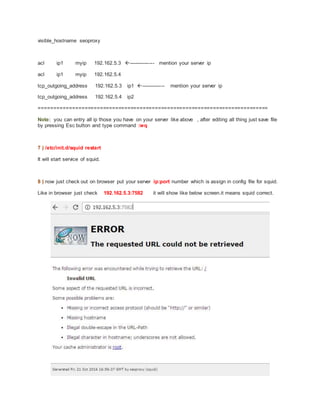
8 ) now just check out on browser put your server ip:port number which is assign in config file for squid.
Like in browser just check 192.162.5.3:7582 it will show like below screen.it means squid correct.
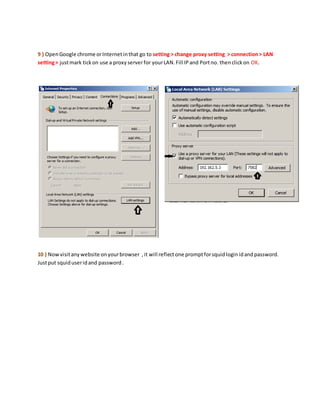
9 ) OpenGoogle chrome orInternetinthat go to setting > change proxy setting > connection> LAN
setting> justmark tickon use a proxyserverfor yourLAN.Fill IPand Portno. thenclickon OK.
10 ) Nowvisitanywebsite onyourbrowser ,it will reflectone promptforsquidloginidandpassword.
Justput squiduseridand password.

How to install squid proxy on server or how to install squid proxy on centos o

  • 1.
    How to installSquid Proxy on Server or How to install Squid Proxy on Centos O.S Use belowcommandtoinstall SquidProxyonServer orHow to install SquidProxyonCentosO.S Step) logininserverwithrootandproperpasswordand run below command. 1 ) # yum install squid [root@server~]#yuminstall squid Loadedplugins:fastestmirror SettingupInstall Process Determiningfastestmirrors * base:mirrors.vonline.vn * extras:mirrors.vinahost.vn * rpmforge:kartolo.sby.datautama.net.id * updates:mirrors.vinahost.vn base | 3.7 kB 00:00 extras | 3.4 kB 00:00 rpmforge | 1.9 kB 00:00 updates | 3.4 kB 00:00 updates/primary_db 45% [======- ] 29 kB/s | 1.2 MB 00:50 ETA #completed 2 ) # yum install httpd –y [root@server~]#yuminstall httpd -y Loadedplugins:fastestmirror SettingupInstall Process
  • 2.
    Loadingmirrorspeedsfromcachedhostfile * base:mirrors.vonline.vn * extras:mirrors.vinahost.vn *rpmforge:kartolo.sby.datautama.net.id * updates:mirrors.vinahost.vn ResolvingDependencies --> Runningtransactioncheck --->Package httpd.x86_64 0:2.2.15-54.el6.centoswill be installed --> FinishedDependencyResolution DependenciesResolved ================================================================================ Package Arch Version Repository Size ================================================================================ Installing: httpd x86_64 2.2.15-54.el6.centos updates 833 k TransactionSummary ================================================================================ Install 1 Package(s) Total downloadsize:833k Installedsize:3.0M DownloadingPackages: httpd-2.2.15-54.el6.cento41%[====== ] 19 kB/s| 347 kB 00:26 ETA #completed 3 ) # touch /etc/squid/passwd This file for create squid password.
  • 3.
    4 ) #chown squid /etc/squid/passwd It will change the owner of password file from root to squid. 5 ) # htpasswd -c /etc/squid/squid_passwd game ------ user for squid After enter it will ask for enter password # enter password Enter password and verify password for particular user of squid Note : By using above command you can make another user for squid proxy. 6 ) # vi /etc/squid/squid.conf ------------ squid configure file Open above mention file to edit or copy configure file for squid. Delete all thing if any thing under squid configure file.Just copy below contain for confige file and paste it. ================================================================================ #add this to the auth_param section of squid.conf # auth_param basic program /usr/lib64/squid/ncsa_auth /etc/squid/squid_passwd # # Add this to the bottom of the ACL section of squid.conf # acl ncsa_users proxy_auth REQUIRED # # Add this at the top of the http_access section of squid.conf # http_access allow ncsa_users forwarded_for off http_port 7582 -------------------- you can assign any port #delay_pools 1 #delay_class 1 1 #delay_parameters 1 110000/110000 8000/8000 100000/100000
  • 4.
    #delay_access 1 allowncsa_users #TAG: httpd_suppress_version_string on|off # Suppress Squid version string info in HTTP headers and HTML error pages. # #Default: #httpd_suppress_version_string off # TAG: httpd_suppress_version_string on|off # Suppress Squid version string info in HTTP headers and HTML error pages. # #Default: httpd_suppress_version_string on # TAG: visible_hostname # If you want to present a special hostname in error messages, etc, # define this. Otherwise, the return value of gethostname() # will be used. If you have multiple caches in a cluster and # get errors about IP-forwarding you must set them to have individual # names with this setting. # #Default: # none # TAG: visible_hostname # If you want to present a special hostname in error messages, etc, # define this. Otherwise, the return value of gethostname() # will be used. If you have multiple caches in a cluster and # get errors about IP-forwarding you must set them to have individual # names with this setting. # #Default:
  • 5.
    visible_hostname seoproxy acl ip1myip 192.162.5.3 --------------- mention your server ip acl ip1 myip 192.162.5.4 tcp_outgoing_address 192.162.5.3 ip1 -------------- mention your server ip tcp_outgoing_address 192.162.5.4 ip2 =========================================================================== Note: you can entry all ip those you have on your server like above , after editing all thing just save file by pressing Esc button and type command :wq 7 ) /etc/init.d/squid restart It will start service of squid. 8 ) now just check out on browser put your server ip:port number which is assign in config file for squid. Like in browser just check 192.162.5.3:7582 it will show like below screen.it means squid correct.
  • 6.
    9 ) OpenGooglechrome orInternetinthat go to setting > change proxy setting > connection> LAN setting> justmark tickon use a proxyserverfor yourLAN.Fill IPand Portno. thenclickon OK. 10 ) Nowvisitanywebsite onyourbrowser ,it will reflectone promptforsquidloginidandpassword. Justput squiduseridand password.