How can I edit my commit ..??
HS@DESKTOP-7UQLT6C MINGW64 ~
$
Made by Hyeseung Lee
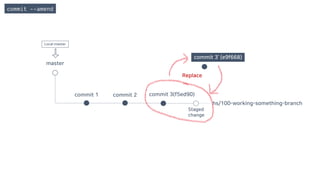
commit --amend
How to edit last commit
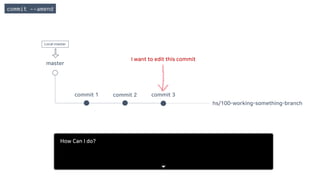
master
commit 1 commit 2 commit 3
hs/100-working-something-branch
I want to edit this commit
commit --amend
Local master
How Can I do?
master
commit 1 commit 2 commit 3
hs/100-working-something-branch
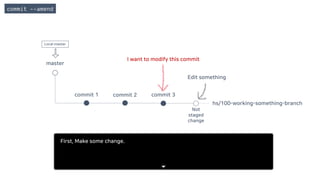
I want to modify this commit
Edit something
Not
staged
change
commit --amend
Local master
First, Make some change.
master
commit 1 commit 2 commit 3
hs/100-working-something-branch
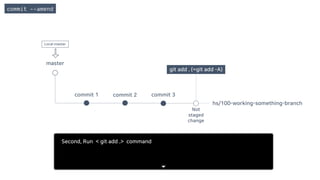
git add . (=git add -A)
Not
staged
change
commit --amend
Local master
Second, Run < git add .> command
master
commit 1 commit 2 commit 3
hs/100-working-something-branch
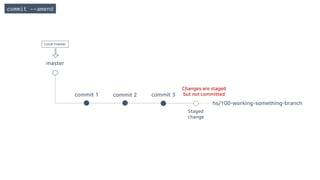
Changes are staged
but not committed
Staged
change
commit --amend
Local master
master
commit 1 commit 2 commit 3
hs/100-working-something-branch
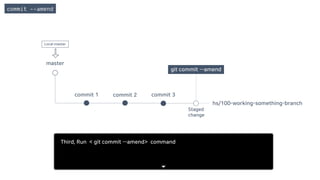
git commit --amend
Staged
change
commit --amend
Local master
Third, Run < git commit --amend> command
master
commit 1 commit 2
hs/100-working-something-branch
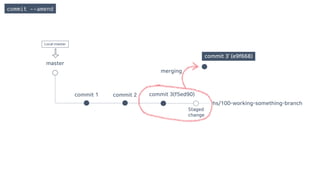
merging
commit --amend
commit 3(f5ed90)
commit 3’ (e9f668)
Staged
change
Local master
master
commit 1 commit 2 commit 3(f5ed90)
hs/100-working-something-branch
commit 3’ (e9f668)
Replace
commit --amend
Staged
change
Local master
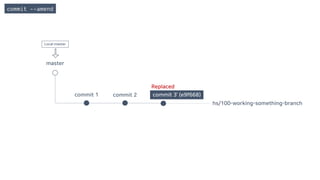
master
commit 1 commit 2 commit 3’ (e9f668)
hs/100-working-something-branch
Replaced
commit --amend
Local master
rebase
How to edit specific (not last) commit
- All conflicts can be resolved before the PR is created.
- Start a new task following the work you did on the other branch.
- Edit the commit at a specific point.
You can do these things with Rebase.
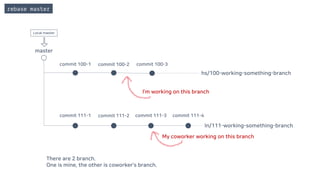
master
commit 100-1 commit 100-2
commit 111-1 commit 111-2 commit 111-3 commit 111-4
commit 100-3
hs/100-working-something-branch
ln/111-working-something-branch
I’m working on this branch
My coworker working on this branch
rebase master
There are 2 branch.
One is mine, the other is coworker’s branch.
Local master
master
commit 100-1 commit 100-2
commit 111-1 commit 111-2 commit 111-3 commit 111-4 Merged commit
commit 100-3
hs/100-working-something-branch
rebase master
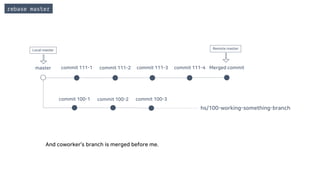
And coworker’s branch is merged before me.
Remote masterLocal master
master
commit 100-1 commit 100-2
commit 111-1 commit 111-2 commit 111-3 commit 111-4 Merged commit
commit 100-3
hs/100-working-something-branch
Create PR
rebase master
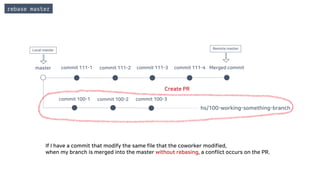
If I have a commit that modify the same file that the coworker modified,
when my branch is merged into the master without rebasing, a conflict occurs on the PR.
Remote masterLocal master
rebase master
master
commit 100-1 commit 100-2
commit 111-1 commit 111-2 commit 111-3 commit 111-4
commit 100-3
hs/100-working-something-branch
conflict occurred
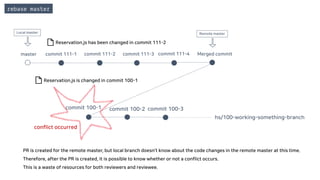
PR is created for the remote master, but local branch doesn’t know about the code changes in the remote master at this time.
Therefore, after the PR is created, it is possible to know whether or not a conflict occurs.
This is a waste of resources for both reviewers and reviewee.
Reservation.js has been changed in commit 111-2
Reservation.js is changed in commit 100-1
Local master Remote master
Merged commit
master
commit 100-1 commit 100-2
commit 111-1 commit 111-2 commit 111-3 commit 111-4
commit 100-3
hs/100-working-something-branch
rebase master
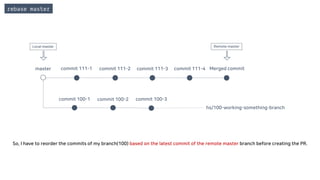
So, I have to reorder the commits of my branch(100) based on the latest commit of the remote master branch before creating the PR.
Local master Remote master
Merged commit
commit 100-1 commit 100-2
commit 111-1 commit 111-2 commit 111-3 commit 111-4
commit 100-3
hs/100-working-something-branch
rebase master
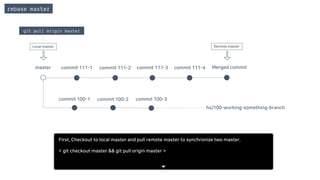
git pull origin master
Remote master
master
Local master
Merged commit
First, Checkout to local master and pull remote master to synchronize two master.
< git checkout master && git pull origin master >
commit 100-1 commit 100-2
commit 111-1 commit 111-2 commit 111-3 commit 111-4
commit 100-3
hs/100-working-something-branch
rebase master
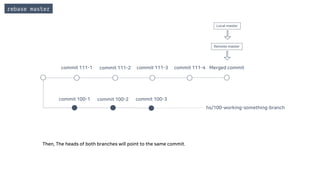
Then, The heads of both branches will point to the same commit.
Local master
Remote master
Merged commit
commit 100-1 commit 100-2
commit 111-1 commit 111-2 commit 111-3 commit 111-4
commit 100-3
hs/100-working-something-branch
rebase master
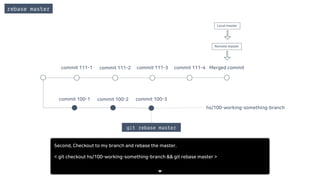
git rebase master
Local master
Remote master
Merged commit
Second, Checkout to my branch and rebase the master.
< git checkout hs/100-working-something-branch && git rebase master >
commit 100-1 commit 100-2
commit 111-1 commit 111-2 commit 111-3 commit 111-4
commit 100-3
hs/100-working-something-branch
rebase master
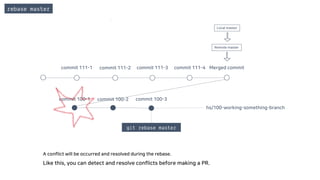
A conflict will be occurred and resolved during the rebase.
Like this, you can detect and resolve conflicts before making a PR.
git rebase master
Remote master
Local master
Merged commit
commit 100-1 commit 100-2
commit 111-1 commit 111-2 commit 111-3 commit 111-4
commit 100-3
hs/100-working-something-branch
rebase master
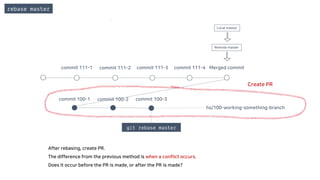
After rebasing, create PR.
The difference from the previous method is when a conflict occurs.
Does it occur before the PR is made, or after the PR is made?
git rebase master
Create PR
Remote master
Local master
Merged commit
- All conflicts can be resolved before the PR is created.
- Start a new task following the work you did on the other branch.
- Edit the commit at a specific point.
You can do these things with Rebase.
rebase [branch]
master
commit 100-1 commit 100-2 commit 100-3
hs/100-working-something-branch
I already made PR for this branch,
but that isn’t merged
Sometimes you want to do the consecutive task although the previous PR has not been completed.
In this case, You can rebase the branch you've worked on(ex. hs/100~).
I need these commits for doing next task.
Local master
rebase [branch]
First, Create a new branch to start the next consecutive task on master branch.
< git checkout -b hs/101-working-something-branch >
master
commit 100-1 commit 100-2 commit 100-3
hs/100-working-something-branch
hs/101-working-something-branch
HEAD of 101
HEAD of 100
Local master
rebase [branch]
Second, Rebase the branch that want to continue.
< git rebase hs/100-working-something-branch >
master
commit 100-1 commit 100-2 commit 100-3
hs/100-working-something-branch
hs/101-working-something-branch
HEAD of 101
Local master
git rebase hs/100-working-something-branch
HEAD of 100
rebase [branch]
master
commit 100-1 commit 100-2 commit 100-3
hs/100-working-something-branch
hs/101-working-something-branch
Then, the HEAD of the current working branch is moved to the HEAD of the target branch.
HEAD of 100
HEAD of 101
HEADs of both will be same
Local master
rebase [branch]
First, Checkout to make new branch on your working branch.
< git checkout hs/100… && git checkout -b hs/101-working-something-branch>
master
commit 100-1 commit 100-2 commit 100-3
hs/100-working-something-branch
HEAD of 100
Local master
git checkout -b hs/101-working-something-branch
rebase [branch]
master
commit 100-1 commit 100-2 commit 100-3
hs/100-working-something-branch
HEAD of 100
Local master
HEAD of 101 hs/101-working-something-branch
rebase [branch]
First, Checkout to make new branch on your working branch.
< git checkout hs/100… && git checkout -b hs/101-working-something-branch>
master
commit 100-1 commit 100-2 commit 100-3
hs/100-working-something-branch
HEAD of 101
HEAD of 100
Local master
git checkout -b hs/101-working-something-branch
rebase [branch]
master
commit 100-1 commit 100-2 commit 100-3
Commit
101-1
Commit
101-2
Commit
101-3
hs/100-working-something-branch
hs/101-working-something-branch
And then just working on that new branch.
HEAD of 100
HEAD of 101Local master
rebase [branch]
master
commit 100-1 commit 100-2 commit 100-3
Commit
101-1
Commit
101-2
Commit
101-3
hs/100-working-something-branch
hs/101-working-something-branch
It is important to note that if you create PR for new branch(101), it will include all of the commit of the base branch(100).
As a result, reviewers not only review code that is not related to current task, but also review the same changes twice.
So the conclusion is, You can do continuous work, but creating PR is eventually possible after the previous work branch has been merged.
HEAD of 100
HEAD of 101
PR will include all of the commit of the base branch.
Local master
rebase [branch]
master
commit 100-1 commit 100-2 commit 100-3
Commit
101-1
Commit
101-2
Commit
101-3
merged
commit
hs/100-working-something-branch(merged)
hs/101-working-something-branch
If you done your task and want to create new PR for branch 101, you have to wait for the previous branch to be merged.
HEAD of 101
Remote master
Local master
rebase [branch]
master
commit 100-1 commit 100-2
commit 100-3
Commit
101-1
Commit
101-2
Commit
101-3
merged
commit
hs/100-working-something-branch(merged)
hs/101-working-something-branch
HEAD of 101
git pull origin master
Remote master
Local master
First, Checkout to local master and pull remote master to synchronize two master.
< git checkout master && git pull origin master >
rebase [branch]
commit 100-1 commit 100-2
commit 100-3
Commit
101-1
Commit
101-2
Commit
101-3
merged
commit
hs/100-working-something-branch(merged)
hs/101-working-something-branch
HEAD of 101
git rebase master
Remote master
Local master
Second, Checkout to working branch and rebase the master branch.
< git checkout hs/101-working-something-branch && git rebase master >
rebase [branch]
commit 100-1 commit 100-2
commit 100-3
Commit
101-1
Commit
101-2
Commit
101-3
merged
commit
hs/101-working-something-branch
This will reorder the commit based on the local master branch, so it will exclude commits of the previous base branch(100) when you create the PR.
Now, You can create a new PR that contains commits only for the current task.
HEAD of 101
git rebase master
Remote master
Local master
- All conflicts can be resolved before the PR is created.
- Start a new task following the work you did on the other branch.
- Edit the commit at a specific point.
You can do these things with Rebase.
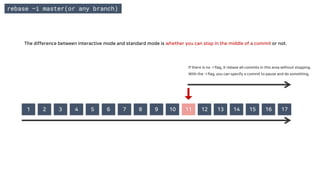
1 2 3 4 5 6 7 8 9 10 11 12 13 14 15 16 17
If there is no -i flag, it rebase all commits in this area without stopping.
With the -i flag, you can specify a commit to pause and do something.
rebase –i master(or any branch)
The difference between interactive mode and standard mode is whether you can stop in the middle of a commit or not.
rebase –i master(or any branch)
Here's how to use Interactive rebase
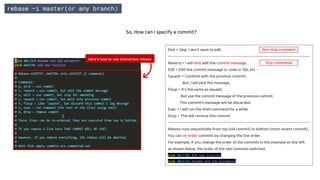
Pick = Skip. I don’t want to edit.
--------------------------------------------------------------------------------------------
Reword = I will only edit the commit message.
Edit = Edit the commit message or code or file, etc …
Squash = Combine with the previous commit.
But, I will pick the message.
Fixup = It's the same as squash.
But use the commit message of the previous commit.
This commit’s message will be discarded.
Exec = I will run the shell command for a while.
Drop = This will remove this commit.
--------------------------------------------------------------------------------------------
Rebase runs sequentially from top (old commit) to bottom (most recent commit).
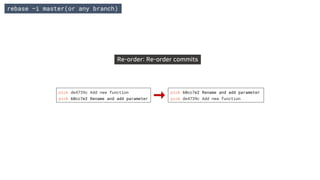
You can re-order commits by changing the line order.
For example, If you change the order of the commits in the example on the left
as shown below, the order of the two commits switched.
pick de4739c Add new function
pick 60cc7e2 Rename and add parameter
So, How can I specify a commit?
Stop commands
Non-stop command
1 2 3 4 5 6 7 8 9 10 11 12 13 14 15 16 17
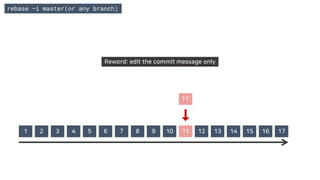
Reword: edit the commit message only
11’
rebase –i master(or any branch)
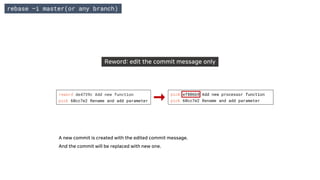
Reword: edit the commit message only
rebase –i master(or any branch)
reword de4739c Add new function
pick 60cc7e2 Rename and add parameter
pick ef806b9 Add new processor function
pick 60cc7e2 Rename and add parameter
A new commit is created with the edited commit message.
And the commit will be replaced with new one.
1 2 3 4 5 6 7 8 9 12 13 14 15 16 1710 + 11
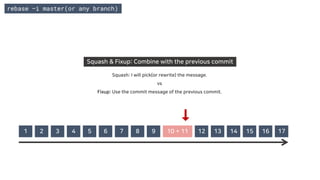
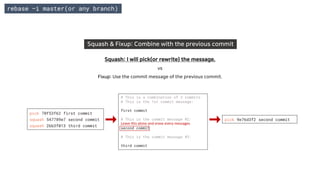
Squash & Fixup: Combine with the previous commit
Squash: I will pick(or rewrite) the message.
vs
Fixup: Use the commit message of the previous commit.
rebase –i master(or any branch)
Squash & Fixup: Combine with the previous commit
Squash: I will pick(or rewrite) the message.
vs
Fixup: Use the commit message of the previous commit.
pick 70f53f62 first commit
squash 547789e7 second commit
squash 2bb3f013 third commit
pick 9e76d3f2 second commit
# This is a combination of 3 commits.
# This is the 1st commit message:
first commit
# This is the commit message #2:
second commit
# This is the commit message #3:
third commit
Leave this alone and erase every messages.
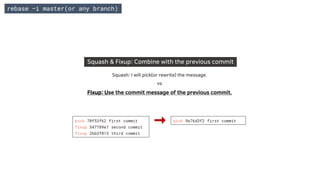
Squash & Fixup: Combine with the previous commit
Squash: I will pick(or rewrite) the message.
vs
Fixup: Use the commit message of the previous commit.
rebase –i master(or any branch)
pick 70f53f62 first commit
fixup 547789e7 second commit
fixup 2bb3f013 third commit
pick 9e76d3f2 first commit
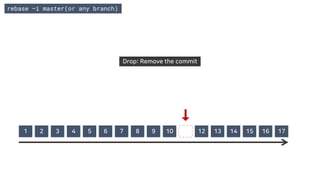
Drop: Remove the commit
1 2 3 4 5 6 7 8 9 10 11 12 13 14 15 16 17
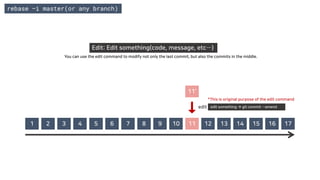
rebase –i master(or any branch)
Edit: Edit something(code, message, etc…)
You can use the edit command to modify not only the last commit, but also the commits in the middle.
1 2 3 4 5 6 7 8 9 10 11 12 13 14 15 16 17
11’
edit edit something → git commit --amend
*This is original purpose of the edit command
rebase –i master(or any branch)
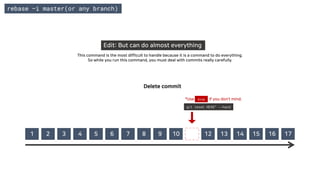
Edit: But can do almost everything
This command is the most difficult to handle because it is a command to do everything.
So while you run this command, you must deal with commits really carefully.
1 2 3 4 5 6 7 8 9 10 11 12 13 14 15 16 17
Delete commit
git reset HEAD^ --hard
*Use if you don’t mind.drop
rebase –i master(or any branch)
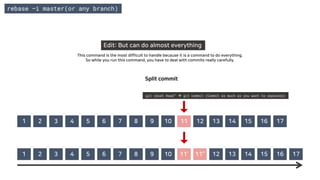
Edit: But can do almost everything
This command is the most difficult to handle because it is a command to do everything.
So while you run this command, you have to deal with commits really carefully.
Split commit
1 2 3 4 5 6 7 8 9 10 11’’ 12 13 14 15 16 1711’1 2 3 4 5 6 7
1 2 3 4 5 6 7 8 9 10 11 12 13 14 15 16 17
git reset Head^ → git commit (Commit as much as you want to separate)
rebase –i master(or any branch)
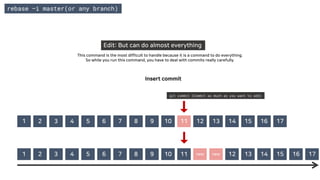
Edit: But can do almost everything
This command is the most difficult to handle because it is a command to do everything.
So while you run this command, you have to deal with commits really carefully.
Insert commit
1 2 3 4 5 6 7 8 9 10 new new 12 13 14 15 16111 2 3 4 5 6 7 17
1 2 3 4 5 6 7 8 9 10 11 12 13 14 15 16 17
git commit (Commit as much as you want to add)
rebase –i master(or any branch)
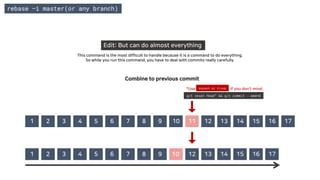
Edit: But can do almost everything
This command is the most difficult to handle because it is a command to do everything.
So while you run this command, you have to deal with commits really carefully.
Combine to previous commit
1 2 3 4 5 6 7 8 9 10’ 13 14 15 16 17121 2 3 4 5 6 7
1 2 3 4 5 6 7 8 9 10 11 12 13 14 15 16 17
git reset Head^ && git commit --amend
*Use if you don’t mind.squash or fixup
Re-order: Re-order commits
rebase –i master(or any branch)
pick de4739c Add new function
pick 60cc7e2 Rename and add parameter
pick de4739c Add new function
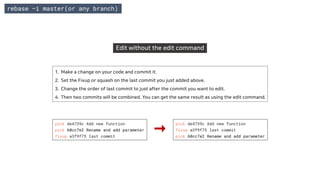
Edit without the edit command
1. Make a change on your code and commit it.
2. Set the Fixup or squash on the last commit you just added above.
3. Change the order of last commit to just after the commit you want to edit.
4. Then two commits will be combined. You can get the same result as using the edit command.
rebase –i master(or any branch)
pick de4739c Add new function
pick 60cc7e2 Rename and add parameter
fixup a3f9f75 last commit
pick de4739c Add new function
fixup a3f9f75 last commit
pick 60cc7e2 Rename and add parameter
How to edit my commit

How to edit my commit

  • 1.
    How can Iedit my commit ..?? HS@DESKTOP-7UQLT6C MINGW64 ~ $ Made by Hyeseung Lee
  • 2.
    commit --amend How toedit last commit
  • 3.
    master commit 1 commit2 commit 3 hs/100-working-something-branch I want to edit this commit commit --amend Local master How Can I do?
  • 4.
    master commit 1 commit2 commit 3 hs/100-working-something-branch I want to modify this commit Edit something Not staged change commit --amend Local master First, Make some change.
  • 5.
    master commit 1 commit2 commit 3 hs/100-working-something-branch git add . (=git add -A) Not staged change commit --amend Local master Second, Run < git add .> command
  • 6.
    master commit 1 commit2 commit 3 hs/100-working-something-branch Changes are staged but not committed Staged change commit --amend Local master
  • 7.
    master commit 1 commit2 commit 3 hs/100-working-something-branch git commit --amend Staged change commit --amend Local master Third, Run < git commit --amend> command
  • 8.
    master commit 1 commit2 hs/100-working-something-branch merging commit --amend commit 3(f5ed90) commit 3’ (e9f668) Staged change Local master
  • 9.
    master commit 1 commit2 commit 3(f5ed90) hs/100-working-something-branch commit 3’ (e9f668) Replace commit --amend Staged change Local master
  • 10.
    master commit 1 commit2 commit 3’ (e9f668) hs/100-working-something-branch Replaced commit --amend Local master
  • 11.
    rebase How to editspecific (not last) commit
  • 12.
    - All conflictscan be resolved before the PR is created. - Start a new task following the work you did on the other branch. - Edit the commit at a specific point. You can do these things with Rebase.
  • 13.
    master commit 100-1 commit100-2 commit 111-1 commit 111-2 commit 111-3 commit 111-4 commit 100-3 hs/100-working-something-branch ln/111-working-something-branch I’m working on this branch My coworker working on this branch rebase master There are 2 branch. One is mine, the other is coworker’s branch. Local master
  • 14.
    master commit 100-1 commit100-2 commit 111-1 commit 111-2 commit 111-3 commit 111-4 Merged commit commit 100-3 hs/100-working-something-branch rebase master And coworker’s branch is merged before me. Remote masterLocal master
  • 15.
    master commit 100-1 commit100-2 commit 111-1 commit 111-2 commit 111-3 commit 111-4 Merged commit commit 100-3 hs/100-working-something-branch Create PR rebase master If I have a commit that modify the same file that the coworker modified, when my branch is merged into the master without rebasing, a conflict occurs on the PR. Remote masterLocal master
  • 16.
    rebase master master commit 100-1commit 100-2 commit 111-1 commit 111-2 commit 111-3 commit 111-4 commit 100-3 hs/100-working-something-branch conflict occurred PR is created for the remote master, but local branch doesn’t know about the code changes in the remote master at this time. Therefore, after the PR is created, it is possible to know whether or not a conflict occurs. This is a waste of resources for both reviewers and reviewee. Reservation.js has been changed in commit 111-2 Reservation.js is changed in commit 100-1 Local master Remote master Merged commit
  • 17.
    master commit 100-1 commit100-2 commit 111-1 commit 111-2 commit 111-3 commit 111-4 commit 100-3 hs/100-working-something-branch rebase master So, I have to reorder the commits of my branch(100) based on the latest commit of the remote master branch before creating the PR. Local master Remote master Merged commit
  • 18.
    commit 100-1 commit100-2 commit 111-1 commit 111-2 commit 111-3 commit 111-4 commit 100-3 hs/100-working-something-branch rebase master git pull origin master Remote master master Local master Merged commit First, Checkout to local master and pull remote master to synchronize two master. < git checkout master && git pull origin master >
  • 19.
    commit 100-1 commit100-2 commit 111-1 commit 111-2 commit 111-3 commit 111-4 commit 100-3 hs/100-working-something-branch rebase master Then, The heads of both branches will point to the same commit. Local master Remote master Merged commit
  • 20.
    commit 100-1 commit100-2 commit 111-1 commit 111-2 commit 111-3 commit 111-4 commit 100-3 hs/100-working-something-branch rebase master git rebase master Local master Remote master Merged commit Second, Checkout to my branch and rebase the master. < git checkout hs/100-working-something-branch && git rebase master >
  • 21.
    commit 100-1 commit100-2 commit 111-1 commit 111-2 commit 111-3 commit 111-4 commit 100-3 hs/100-working-something-branch rebase master A conflict will be occurred and resolved during the rebase. Like this, you can detect and resolve conflicts before making a PR. git rebase master Remote master Local master Merged commit
  • 22.
    commit 100-1 commit100-2 commit 111-1 commit 111-2 commit 111-3 commit 111-4 commit 100-3 hs/100-working-something-branch rebase master After rebasing, create PR. The difference from the previous method is when a conflict occurs. Does it occur before the PR is made, or after the PR is made? git rebase master Create PR Remote master Local master Merged commit
  • 23.
    - All conflictscan be resolved before the PR is created. - Start a new task following the work you did on the other branch. - Edit the commit at a specific point. You can do these things with Rebase.
  • 24.
    rebase [branch] master commit 100-1commit 100-2 commit 100-3 hs/100-working-something-branch I already made PR for this branch, but that isn’t merged Sometimes you want to do the consecutive task although the previous PR has not been completed. In this case, You can rebase the branch you've worked on(ex. hs/100~). I need these commits for doing next task. Local master
  • 25.
    rebase [branch] First, Createa new branch to start the next consecutive task on master branch. < git checkout -b hs/101-working-something-branch > master commit 100-1 commit 100-2 commit 100-3 hs/100-working-something-branch hs/101-working-something-branch HEAD of 101 HEAD of 100 Local master
  • 26.
    rebase [branch] Second, Rebasethe branch that want to continue. < git rebase hs/100-working-something-branch > master commit 100-1 commit 100-2 commit 100-3 hs/100-working-something-branch hs/101-working-something-branch HEAD of 101 Local master git rebase hs/100-working-something-branch HEAD of 100
  • 27.
    rebase [branch] master commit 100-1commit 100-2 commit 100-3 hs/100-working-something-branch hs/101-working-something-branch Then, the HEAD of the current working branch is moved to the HEAD of the target branch. HEAD of 100 HEAD of 101 HEADs of both will be same Local master
  • 28.
    rebase [branch] First, Checkoutto make new branch on your working branch. < git checkout hs/100… && git checkout -b hs/101-working-something-branch> master commit 100-1 commit 100-2 commit 100-3 hs/100-working-something-branch HEAD of 100 Local master git checkout -b hs/101-working-something-branch
  • 29.
    rebase [branch] master commit 100-1commit 100-2 commit 100-3 hs/100-working-something-branch HEAD of 100 Local master HEAD of 101 hs/101-working-something-branch
  • 30.
    rebase [branch] First, Checkoutto make new branch on your working branch. < git checkout hs/100… && git checkout -b hs/101-working-something-branch> master commit 100-1 commit 100-2 commit 100-3 hs/100-working-something-branch HEAD of 101 HEAD of 100 Local master git checkout -b hs/101-working-something-branch
  • 31.
    rebase [branch] master commit 100-1commit 100-2 commit 100-3 Commit 101-1 Commit 101-2 Commit 101-3 hs/100-working-something-branch hs/101-working-something-branch And then just working on that new branch. HEAD of 100 HEAD of 101Local master
  • 32.
    rebase [branch] master commit 100-1commit 100-2 commit 100-3 Commit 101-1 Commit 101-2 Commit 101-3 hs/100-working-something-branch hs/101-working-something-branch It is important to note that if you create PR for new branch(101), it will include all of the commit of the base branch(100). As a result, reviewers not only review code that is not related to current task, but also review the same changes twice. So the conclusion is, You can do continuous work, but creating PR is eventually possible after the previous work branch has been merged. HEAD of 100 HEAD of 101 PR will include all of the commit of the base branch. Local master
  • 33.
    rebase [branch] master commit 100-1commit 100-2 commit 100-3 Commit 101-1 Commit 101-2 Commit 101-3 merged commit hs/100-working-something-branch(merged) hs/101-working-something-branch If you done your task and want to create new PR for branch 101, you have to wait for the previous branch to be merged. HEAD of 101 Remote master Local master
  • 34.
    rebase [branch] master commit 100-1commit 100-2 commit 100-3 Commit 101-1 Commit 101-2 Commit 101-3 merged commit hs/100-working-something-branch(merged) hs/101-working-something-branch HEAD of 101 git pull origin master Remote master Local master First, Checkout to local master and pull remote master to synchronize two master. < git checkout master && git pull origin master >
  • 35.
    rebase [branch] commit 100-1commit 100-2 commit 100-3 Commit 101-1 Commit 101-2 Commit 101-3 merged commit hs/100-working-something-branch(merged) hs/101-working-something-branch HEAD of 101 git rebase master Remote master Local master Second, Checkout to working branch and rebase the master branch. < git checkout hs/101-working-something-branch && git rebase master >
  • 36.
    rebase [branch] commit 100-1commit 100-2 commit 100-3 Commit 101-1 Commit 101-2 Commit 101-3 merged commit hs/101-working-something-branch This will reorder the commit based on the local master branch, so it will exclude commits of the previous base branch(100) when you create the PR. Now, You can create a new PR that contains commits only for the current task. HEAD of 101 git rebase master Remote master Local master
  • 37.
    - All conflictscan be resolved before the PR is created. - Start a new task following the work you did on the other branch. - Edit the commit at a specific point. You can do these things with Rebase.
  • 38.
    1 2 34 5 6 7 8 9 10 11 12 13 14 15 16 17 If there is no -i flag, it rebase all commits in this area without stopping. With the -i flag, you can specify a commit to pause and do something. rebase –i master(or any branch) The difference between interactive mode and standard mode is whether you can stop in the middle of a commit or not.
  • 39.
    rebase –i master(orany branch) Here's how to use Interactive rebase Pick = Skip. I don’t want to edit. -------------------------------------------------------------------------------------------- Reword = I will only edit the commit message. Edit = Edit the commit message or code or file, etc … Squash = Combine with the previous commit. But, I will pick the message. Fixup = It's the same as squash. But use the commit message of the previous commit. This commit’s message will be discarded. Exec = I will run the shell command for a while. Drop = This will remove this commit. -------------------------------------------------------------------------------------------- Rebase runs sequentially from top (old commit) to bottom (most recent commit). You can re-order commits by changing the line order. For example, If you change the order of the commits in the example on the left as shown below, the order of the two commits switched. pick de4739c Add new function pick 60cc7e2 Rename and add parameter So, How can I specify a commit? Stop commands Non-stop command
  • 40.
    1 2 34 5 6 7 8 9 10 11 12 13 14 15 16 17 Reword: edit the commit message only 11’ rebase –i master(or any branch)
  • 41.
    Reword: edit thecommit message only rebase –i master(or any branch) reword de4739c Add new function pick 60cc7e2 Rename and add parameter pick ef806b9 Add new processor function pick 60cc7e2 Rename and add parameter A new commit is created with the edited commit message. And the commit will be replaced with new one.
  • 42.
    1 2 34 5 6 7 8 9 12 13 14 15 16 1710 + 11 Squash & Fixup: Combine with the previous commit Squash: I will pick(or rewrite) the message. vs Fixup: Use the commit message of the previous commit. rebase –i master(or any branch)
  • 43.
    rebase –i master(orany branch) Squash & Fixup: Combine with the previous commit Squash: I will pick(or rewrite) the message. vs Fixup: Use the commit message of the previous commit. pick 70f53f62 first commit squash 547789e7 second commit squash 2bb3f013 third commit pick 9e76d3f2 second commit # This is a combination of 3 commits. # This is the 1st commit message: first commit # This is the commit message #2: second commit # This is the commit message #3: third commit Leave this alone and erase every messages.
  • 44.
    Squash & Fixup:Combine with the previous commit Squash: I will pick(or rewrite) the message. vs Fixup: Use the commit message of the previous commit. rebase –i master(or any branch) pick 70f53f62 first commit fixup 547789e7 second commit fixup 2bb3f013 third commit pick 9e76d3f2 first commit
  • 45.
    Drop: Remove thecommit 1 2 3 4 5 6 7 8 9 10 11 12 13 14 15 16 17 rebase –i master(or any branch)
  • 46.
    rebase –i master(orany branch) Edit: Edit something(code, message, etc…) You can use the edit command to modify not only the last commit, but also the commits in the middle. 1 2 3 4 5 6 7 8 9 10 11 12 13 14 15 16 17 11’ edit edit something → git commit --amend *This is original purpose of the edit command
  • 47.
    rebase –i master(orany branch) Edit: But can do almost everything This command is the most difficult to handle because it is a command to do everything. So while you run this command, you must deal with commits really carefully. 1 2 3 4 5 6 7 8 9 10 11 12 13 14 15 16 17 Delete commit git reset HEAD^ --hard *Use if you don’t mind.drop
  • 48.
    rebase –i master(orany branch) Edit: But can do almost everything This command is the most difficult to handle because it is a command to do everything. So while you run this command, you have to deal with commits really carefully. Split commit 1 2 3 4 5 6 7 8 9 10 11’’ 12 13 14 15 16 1711’1 2 3 4 5 6 7 1 2 3 4 5 6 7 8 9 10 11 12 13 14 15 16 17 git reset Head^ → git commit (Commit as much as you want to separate)
  • 49.
    rebase –i master(orany branch) Edit: But can do almost everything This command is the most difficult to handle because it is a command to do everything. So while you run this command, you have to deal with commits really carefully. Insert commit 1 2 3 4 5 6 7 8 9 10 new new 12 13 14 15 16111 2 3 4 5 6 7 17 1 2 3 4 5 6 7 8 9 10 11 12 13 14 15 16 17 git commit (Commit as much as you want to add)
  • 50.
    rebase –i master(orany branch) Edit: But can do almost everything This command is the most difficult to handle because it is a command to do everything. So while you run this command, you have to deal with commits really carefully. Combine to previous commit 1 2 3 4 5 6 7 8 9 10’ 13 14 15 16 17121 2 3 4 5 6 7 1 2 3 4 5 6 7 8 9 10 11 12 13 14 15 16 17 git reset Head^ && git commit --amend *Use if you don’t mind.squash or fixup
  • 51.
    Re-order: Re-order commits rebase–i master(or any branch) pick de4739c Add new function pick 60cc7e2 Rename and add parameter pick 60cc7e2 Rename and add parameter pick de4739c Add new function
  • 52.
    Edit without theedit command 1. Make a change on your code and commit it. 2. Set the Fixup or squash on the last commit you just added above. 3. Change the order of last commit to just after the commit you want to edit. 4. Then two commits will be combined. You can get the same result as using the edit command. rebase –i master(or any branch) pick de4739c Add new function pick 60cc7e2 Rename and add parameter fixup a3f9f75 last commit pick de4739c Add new function fixup a3f9f75 last commit pick 60cc7e2 Rename and add parameter