How to contribute with
WordPress.tv?
Nirmal Desai
Moderator @WordPressTV
Business Manager @Multidots
@nirmaldesai2
What is WordPress.tv?
● On WordPress.tv, you’ll find tutorials for both WordPress self-installs and
WordPress.com to help you get blogging fast and hassle-free.
● WordPress.tv is also now the place to find all that awesome WordCamp
footage that was floating around the web without a home. See the
presentations you missed and get a peek at behind-the-scenes action. We
call it WordCampTV.
● You’ll also find slideshows of presentations made by WordPress gurus, plus
interviews I’ve done with the media and fellow bloggers.
How to create video for WordPress.tv?
Source of WordPress.tv Video
Most of the videos are come from :
● WordCamp
● Local Meetups
● Interviews
● How to’s
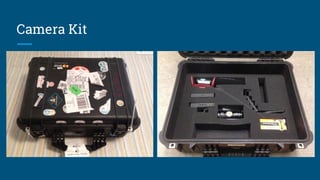
Camera Kit
Professional Videographers
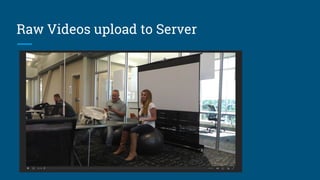
Raw Videos upload to Server
How to contribute with WordPress.tv?
( Steps and Procedures)
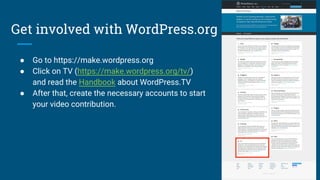
Get involved with WordPress.org
● Go to https://make.wordpress.org
● Click on TV (https://make.wordpress.org/tv/)
and read the Handbook about WordPress.TV
● After that, create the necessary accounts to start
your video contribution.
Create your account with WordPress.org
Join the #wptv slack channel
● We have weekly team meetings every Thursday, and they are open to the
public! Our next meeting is Thursday, February 2, 2017, 10:30 PM GMT+5:30
in the #wptv channel on Slack.
● If you want to find more about slack then you can visit this link :
https://make.wordpress.org/chat/
Start the interacting on Slack
Ask Questions about your queries .
On slack, you are surrounded by nice bunch of people who always eager to help.
● Jerry Bates : @jerrysarcastic - Team Lead - WordPress.tv Moderator Squad
● Pascal : @casiepa - Moderator - WordPress.tv
● Micheal Wiginton : @roseapplemedia - Moderator - WordPress.tv
● John Parkinson : @johnparkinson - Moderator - WordPress.tv
● Oleg Belousovs @Oleg - Team Member - WordPress.tv
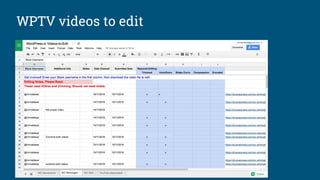
WPTV videos to edit
Download the necessary tools
If you are using mac :
● You can use iMovie as Video Editing tools. iMovie is included on all Macintosh computers by default, and
is a very capable editor for preparing video for submission to WordPress.tv.
● You can visit this link for the Video editing tutorial : https://videopress.com/v/x2a3RgY2
If you are using Windows:
● You can utilise Camtasia Studio 7 or any other good software.
For file compression :
● To upload your video to WordPress.tv, you will need to make sure that your converted video files are
under 1GB in size. If the files you created in your video editing app are over this size limit, you can use
another open-source app called Handbrake to compress them so that they can be uploaded.
Edit Intro and Outro Slides
Important Link :
https://docs.google.com/presentation/d/1gplm4fU6he7QHJzx6j9Q7B92oqYVH1z_RfEBKnSCTDM/edit
#slide=id.g1572197c6f_0_0
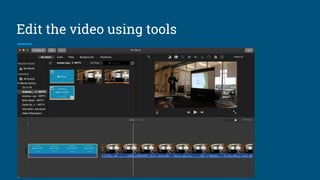
Edit the video using tools
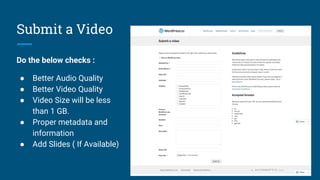
Submit a Video
Do the below checks :
● Better Audio Quality
● Better Video Quality
● Video Size will be less
than 1 GB.
● Proper metadata and
information
● Add Slides ( If Available)
Moderator will check and approve the video
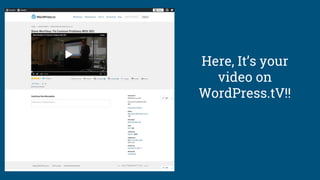
Here, It’s your
video on
WordPress.tV!!
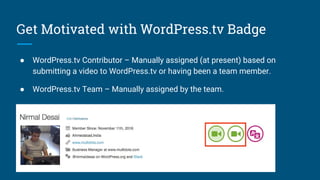
Get Motivated with WordPress.tv Badge
● WordPress.tv Contributor – Manually assigned (at present) based on
submitting a video to WordPress.tv or having been a team member.
● WordPress.tv Team – Manually assigned by the team.
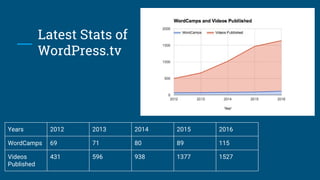
Latest Stats of
WordPress.tv
Years 2012 2013 2014 2015 2016
WordCamps 69 71 80 89 115
Videos
Published
431 596 938 1377 1527
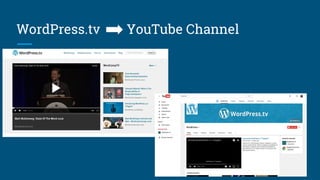
WordPress.tv YouTube Channel
Thank You!!!
All the Attendees, Volunteers &
Organisers @wcUdaipur :-)
@nirmaldesai2

How to Contributing with WordPress.tv?

  • 1.
    How to contributewith WordPress.tv? Nirmal Desai Moderator @WordPressTV Business Manager @Multidots @nirmaldesai2
  • 2.
    What is WordPress.tv? ●On WordPress.tv, you’ll find tutorials for both WordPress self-installs and WordPress.com to help you get blogging fast and hassle-free. ● WordPress.tv is also now the place to find all that awesome WordCamp footage that was floating around the web without a home. See the presentations you missed and get a peek at behind-the-scenes action. We call it WordCampTV. ● You’ll also find slideshows of presentations made by WordPress gurus, plus interviews I’ve done with the media and fellow bloggers.
  • 3.
    How to createvideo for WordPress.tv?
  • 4.
    Source of WordPress.tvVideo Most of the videos are come from : ● WordCamp ● Local Meetups ● Interviews ● How to’s
  • 5.
  • 6.
  • 7.
  • 8.
    How to contributewith WordPress.tv? ( Steps and Procedures)
  • 9.
    Get involved withWordPress.org ● Go to https://make.wordpress.org ● Click on TV (https://make.wordpress.org/tv/) and read the Handbook about WordPress.TV ● After that, create the necessary accounts to start your video contribution.
  • 10.
    Create your accountwith WordPress.org
  • 11.
    Join the #wptvslack channel ● We have weekly team meetings every Thursday, and they are open to the public! Our next meeting is Thursday, February 2, 2017, 10:30 PM GMT+5:30 in the #wptv channel on Slack. ● If you want to find more about slack then you can visit this link : https://make.wordpress.org/chat/
  • 12.
    Start the interactingon Slack Ask Questions about your queries . On slack, you are surrounded by nice bunch of people who always eager to help. ● Jerry Bates : @jerrysarcastic - Team Lead - WordPress.tv Moderator Squad ● Pascal : @casiepa - Moderator - WordPress.tv ● Micheal Wiginton : @roseapplemedia - Moderator - WordPress.tv ● John Parkinson : @johnparkinson - Moderator - WordPress.tv ● Oleg Belousovs @Oleg - Team Member - WordPress.tv
  • 13.
  • 14.
    Download the necessarytools If you are using mac : ● You can use iMovie as Video Editing tools. iMovie is included on all Macintosh computers by default, and is a very capable editor for preparing video for submission to WordPress.tv. ● You can visit this link for the Video editing tutorial : https://videopress.com/v/x2a3RgY2 If you are using Windows: ● You can utilise Camtasia Studio 7 or any other good software. For file compression : ● To upload your video to WordPress.tv, you will need to make sure that your converted video files are under 1GB in size. If the files you created in your video editing app are over this size limit, you can use another open-source app called Handbrake to compress them so that they can be uploaded.
  • 15.
    Edit Intro andOutro Slides Important Link : https://docs.google.com/presentation/d/1gplm4fU6he7QHJzx6j9Q7B92oqYVH1z_RfEBKnSCTDM/edit #slide=id.g1572197c6f_0_0
  • 16.
    Edit the videousing tools
  • 17.
    Submit a Video Dothe below checks : ● Better Audio Quality ● Better Video Quality ● Video Size will be less than 1 GB. ● Proper metadata and information ● Add Slides ( If Available)
  • 18.
    Moderator will checkand approve the video
  • 19.
    Here, It’s your videoon WordPress.tV!!
  • 20.
    Get Motivated withWordPress.tv Badge ● WordPress.tv Contributor – Manually assigned (at present) based on submitting a video to WordPress.tv or having been a team member. ● WordPress.tv Team – Manually assigned by the team.
  • 21.
    Latest Stats of WordPress.tv Years2012 2013 2014 2015 2016 WordCamps 69 71 80 89 115 Videos Published 431 596 938 1377 1527
  • 22.
  • 23.
    Thank You!!! All theAttendees, Volunteers & Organisers @wcUdaipur :-) @nirmaldesai2