

Actions on Google
Murphy | AgileCommunity.tw | judge0648@gmail.com
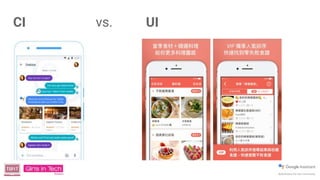
CI vs. UI
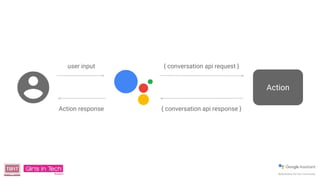
Action
{ conversation api request }
{ conversation api response }
user input
Action response
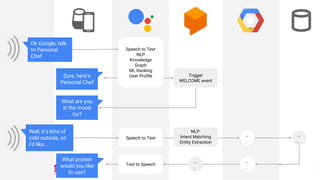
Ok Google, talk
to Personal
Chef
Sure, here’s
Personal Chef
What are you
in the mood
for?
What protein
would you like
to use?
Speech to Text
NLP
Knowledge
Graph
ML Ranking
User Profile
Speech to Text
Text to Speech
..
.
..
.
..
.
Trigger
WELCOME event
..
.
NLP:
Intent Matching
Entity Extraction
Well, it’s kind of
cold outside, so
I’d like...
“
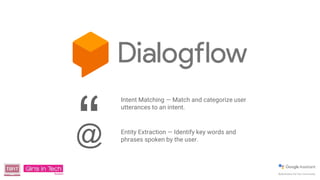
Intent Matching — Match and categorize user
utterances to an intent.
Entity Extraction — Identify key words and
phrases spoken by the user.@
Google Allo
iOS user
https://goo.gl/UfjCPV
Android user
https://goo.gl/tJhibt
Ok Google, talk
to Personal
Chef
Sure, here’s
Personal Chef
What are you
in the mood
for?
What protein
would you like
to use?
Speech to Text
NLP
Knowledge
Graph
ML Ranking
User Profile
Speech to Text
Text to Speech
..
.
..
.
..
.
Trigger
WELCOME event
..
.
NLP:
Intent Matching
Entity Extraction
Well, it’s kind of
cold outside, so
I’d like...
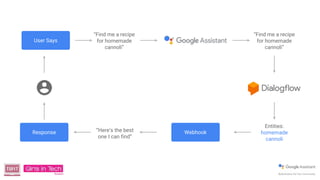
Entities:
homemade
cannoli
“Find me a recipe
for homemade
cannoli”
User Says
Response Webhook
“Find me a recipe
for homemade
cannoli”
“Here’s the best
one I can find”
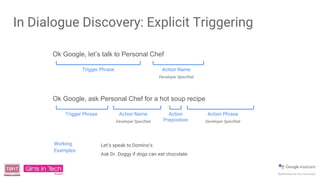
Ok Google, ask Personal Chef for a hot soup recipe
Trigger Phrase Action Name
Developer Specified
Action
Preposition
Action Phrase
Developer Specified
Working
Examples:
Let’s speak to Domino’s
Ask Dr. Doggy if dogs can eat chocolate
Ok Google, let’s talk to Personal Chef
Trigger Phrase Action Name
Developer Specified
In Dialogue Discovery: Explicit Triggering
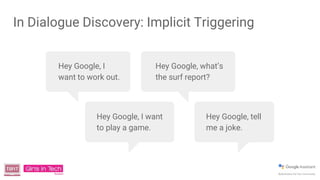
In Dialogue Discovery: Implicit Triggering
Hey Google, I
want to work out.
Hey Google, I want
to play a game.
Hey Google, what’s
the surf report?
Hey Google, tell
me a joke.
Dialogflow App Workshop
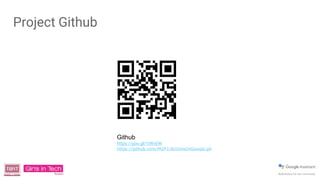
Project Github
Github
https://goo.gl/1iWvEW
https://github.com/iM2F1/ActionsOnGoogle.git
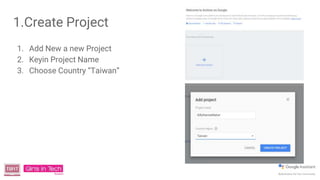
1.Create Project
1. Add New a new Project
2. Keyin Project Name
3. Choose Country “Taiwan”
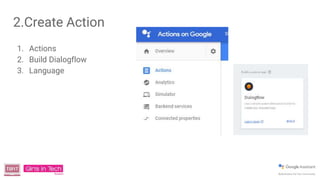
2.Create Action
1. Actions
2. Build Dialogflow
3. Language
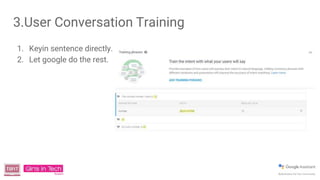
3.User Conversation Training
1. Keyin sentence directly.
2. Let google do the rest.
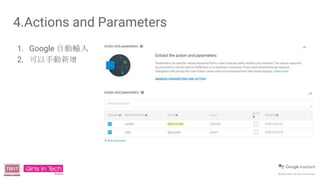
4.Actions and Parameters
1. Google 自動輸入
2. 可以手動新增
5.Response
1. $number
2. $color
3. Your silly name is $color $number . Hope you like it. See you next time.
6.Fulfillment
● Input api url
● Input any other parameters if you need.
● Not today.
6.1 Test
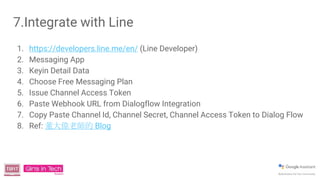
7.Integrate with Line
1. https://developers.line.me/en/ (Line Developer)
2. Messaging App
3. Keyin Detail Data
4. Choose Free Messaging Plan
5. Issue Channel Access Token
6. Paste Webhook URL from Dialogflow Integration
7. Copy Paste Channel Id, Channel Secret, Channel Access Token to Dialog Flow
8. Ref: 董大偉老師的 Blog
8.Deploy Your App
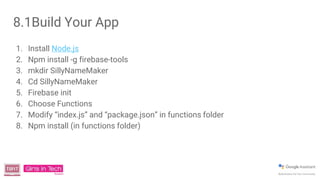
8.1Build Your App
1. Install Node.js
2. Npm install -g firebase-tools
3. mkdir SillyNameMaker
4. Cd SillyNameMaker
5. Firebase init
6. Choose Functions
7. Modify “index.js” and “package.json” in functions folder
8. Npm install (in functions folder)
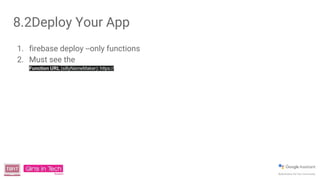
8.2Deploy Your App
1. firebase deploy --only functions
2. Must see the
Function URL (sillyNameMaker): https://
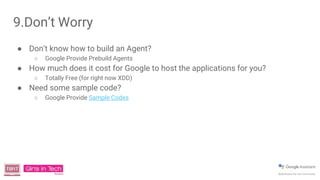
9.Don’t Worry
● Don’t know how to build an Agent?
○ Google Provide Prebuild Agents
● How much does it cost for Google to host the applications for you?
○ Totally Free (for right now XDD)
● Need some sample code?
○ Google Provide Sample Codes
Thank you.

How to Build a Dialogflow App by using Actions on Google.

  • 1.
    Actions on Google Murphy| AgileCommunity.tw | judge0648@gmail.com
  • 2.
  • 3.
    Action { conversation apirequest } { conversation api response } user input Action response
  • 4.
    Ok Google, talk toPersonal Chef Sure, here’s Personal Chef What are you in the mood for? What protein would you like to use? Speech to Text NLP Knowledge Graph ML Ranking User Profile Speech to Text Text to Speech .. . .. . .. . Trigger WELCOME event .. . NLP: Intent Matching Entity Extraction Well, it’s kind of cold outside, so I’d like...
  • 6.
    “ Intent Matching —Match and categorize user utterances to an intent. Entity Extraction — Identify key words and phrases spoken by the user.@
  • 7.
  • 9.
    Ok Google, talk toPersonal Chef Sure, here’s Personal Chef What are you in the mood for? What protein would you like to use? Speech to Text NLP Knowledge Graph ML Ranking User Profile Speech to Text Text to Speech .. . .. . .. . Trigger WELCOME event .. . NLP: Intent Matching Entity Extraction Well, it’s kind of cold outside, so I’d like...
  • 10.
    Entities: homemade cannoli “Find me arecipe for homemade cannoli” User Says Response Webhook “Find me a recipe for homemade cannoli” “Here’s the best one I can find”
  • 11.
    Ok Google, askPersonal Chef for a hot soup recipe Trigger Phrase Action Name Developer Specified Action Preposition Action Phrase Developer Specified Working Examples: Let’s speak to Domino’s Ask Dr. Doggy if dogs can eat chocolate Ok Google, let’s talk to Personal Chef Trigger Phrase Action Name Developer Specified In Dialogue Discovery: Explicit Triggering
  • 12.
    In Dialogue Discovery:Implicit Triggering Hey Google, I want to work out. Hey Google, I want to play a game. Hey Google, what’s the surf report? Hey Google, tell me a joke.
  • 13.
  • 14.
  • 15.
    1.Create Project 1. AddNew a new Project 2. Keyin Project Name 3. Choose Country “Taiwan”
  • 16.
    2.Create Action 1. Actions 2.Build Dialogflow 3. Language
  • 17.
    3.User Conversation Training 1.Keyin sentence directly. 2. Let google do the rest.
  • 18.
    4.Actions and Parameters 1.Google 自動輸入 2. 可以手動新增
  • 19.
    5.Response 1. $number 2. $color 3.Your silly name is $color $number . Hope you like it. See you next time.
  • 20.
    6.Fulfillment ● Input apiurl ● Input any other parameters if you need. ● Not today.
  • 21.
  • 22.
    7.Integrate with Line 1.https://developers.line.me/en/ (Line Developer) 2. Messaging App 3. Keyin Detail Data 4. Choose Free Messaging Plan 5. Issue Channel Access Token 6. Paste Webhook URL from Dialogflow Integration 7. Copy Paste Channel Id, Channel Secret, Channel Access Token to Dialog Flow 8. Ref: 董大偉老師的 Blog
  • 23.
  • 24.
    8.1Build Your App 1.Install Node.js 2. Npm install -g firebase-tools 3. mkdir SillyNameMaker 4. Cd SillyNameMaker 5. Firebase init 6. Choose Functions 7. Modify “index.js” and “package.json” in functions folder 8. Npm install (in functions folder)
  • 25.
    8.2Deploy Your App 1.firebase deploy --only functions 2. Must see the Function URL (sillyNameMaker): https://
  • 26.
    9.Don’t Worry ● Don’tknow how to build an Agent? ○ Google Provide Prebuild Agents ● How much does it cost for Google to host the applications for you? ○ Totally Free (for right now XDD) ● Need some sample code? ○ Google Provide Sample Codes
  • 27.

Editor's Notes

  • #2 其實是 Actions on Google Assistant
  • #3 傳統軟體的 UI vs. 有 AI 的 CI
  • #4 One option is to use the Conversation API and the Actions SDK. Your Action receives a request containing the spoken text from the user as a string. Google handles the speech recognition for you. You parse the strings, and then generate a response, and Google handles speaking this back to the user. However, as we just mentioned, parsing natural language can be really difficult.
  • #5 So you can see here where Dialogflow fits in. It handles the conversation invocation and fulfillment just like we showed earlier.
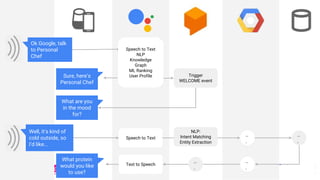
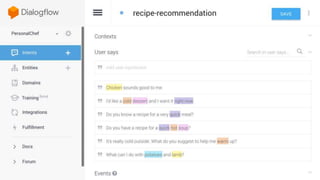
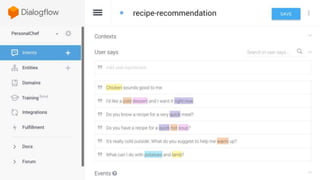
  • #6 So what is Dialogflow? It provides an intuitive graphical user interface to create conversational experiences. You program in, few example sentences of things that a user might speak. You can specify what values you need to get from the user. It then uses machine learning to understand the sentences and manage the conversation. The key part here is that you no longer need to process the raw strings - Dialogflow does this for you.
  • #7 Fortunately, Google provides tools that make handling this kind of thing really easy! Dialogflow is one of these. It’s a platform that makes it incredibly straightforward to build conversational experiences. You might not even have to write any code. We are going to give you an overview of it today, and it is what most of you should use for implementing your own Action
  • #9 So what is Dialogflow? It provides an intuitive graphical user interface to create conversational experiences. You program in, few example sentences of things that a user might speak. You can specify what values you need to get from the user. It then uses machine learning to understand the sentences and manage the conversation. The key part here is that you no longer need to process the raw strings - Dialogflow does this for you.
  • #10 So you can see here where Dialogflow fits in. It handles the conversation invocation and fulfillment just like we showed earlier.
  • #11 Dialogflow handles the conversation for you. Once the user is talking to your Action, they then start off with something Google calls the “user says” phrase. “Find me a recipe for homemade cannoli.” The Google Assistant and Dialogflow then process this, and find the appropriate intent to handle this phrase. The phrase is processed to extract entities, which are important pieces of information you are looking for. Then, it calls your webhook with these entities and the action name, and the webhook can then do something with this, and then generate a response that is spoken back to the user. You can also create your own demo here :)
  • #12 The basic way to access your Action is invoking it by name. When you submit your Action, you can provide a set of trigger phrases that the Assistant will recognize as a request to speak to your Action. You can also support deep links, so users can ask your Action for a particular thing.
  • #13 In the long term, users will be able to find your Action based on its specific capabilities. If they ask to play a game, the Assistant will offer them a few options from the Actions available.