APPS ON GOOGLE
ASSISTANT USING
ACTIONS
GAURAV BHATNAGAR
AGENDA
• Background
• Google AssistantWorkflow
• How Assistant provides customized response.
• Dialogflow and all its main components
• Demo of an example
• Basics of Conversation design
• GUI vsVUI
BACKGROUND
• Google Assistant is currently available on more than 400 million devices around the
world.
• It is available in phones(iOS or android), tablets, cars, Chromebook & Home Devices.
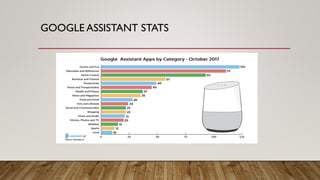
GOOGLE ASSISTANT STATS
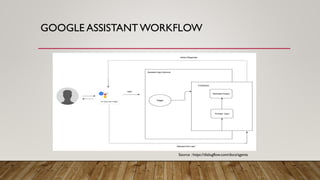
GOOGLE ASSISTANT WORKFLOW
Source : https://dialogflow.com/docs/agents
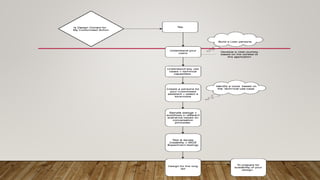
DIFFERENT APPROACHES FOR CUSTOMIZED
ASSISTANT APPS
GOOGLE ASSISTANT WORKFLOW (USING
DIALOGFLOW)
Source : https://dialogflow.com/docs/agents
DIALOGFLOW
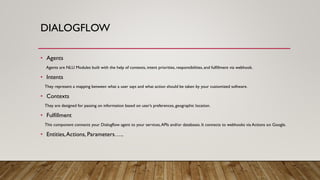
• Agents
Agents are NLU Modules built with the help of contexts, intent priorities, responsibilities, and fulfillment via webhook.
• Intents
They represent a mapping between what a user says and what action should be taken by your customized software.
• Contexts
They are designed for passing on information based on user’s preferences, geographic location.
• Fulfillment
This component connects your Dialogflow agent to your services,APIs and/or databases. It connects to webhooks via Actions on Google.
• Entities,Actions, Parameters…..
INTEGRATIONS PROVIDED BY DIALOGFLOW
Source : https://dialogflow.com/docs/integrations
SHOWING AN EXAMPLE
DEMO
CONVERSATION DESIGN
• It is basically a design language based on human conversation.
• We are providing an experience and merely not just an application.
• Creating a System and User persona.
• Conversation Design should be built on cooperative principle.
Conversations should always be designed to provide comfortable, frictionless and user
centric experience.
• Group devices by the components used in conversation : For e.g. Google Home/ Pixel.
BUILDING BLOCKS FOR CONVERSATION
• Expect users to give more information.
• Try to always keep the dialog towards the use case you are trying to solve.
• Try to always move the conversation forward.
• Try to keep the conversation optimized for relevance and provide clarity in answers.
• Try to understand the context and listen between the lines.
• Follow-up conversations should have the context attached.
• Keep the conversation going by taking turns and not try to monopolize.
ALWAYS KEEPING REAL LIFE USER CONDITIONS IN
MIND
Interrupted Cut off too soon No way out Accent Language
understanding
Self Correction Confused Side Speech Valid but not in
grammar
Didn’t Understand
Background noise Ask a question
back.
Coughs Talked too long Too quiet
Hesitate Know options by
some other
manner
Stutter Start Too many choices Poor connection
In Conversations, there are no “Errors”.
REFERENCES
• Actions on Google Developers : https://developers.google.com/actions.
• https://developers.google.com/actions/design/
• https://dialogflow.com
• https://caster.io/courses/google-assistant-app-with-zero-code

Google assistant basics

  • 1.
    APPS ON GOOGLE ASSISTANTUSING ACTIONS GAURAV BHATNAGAR
  • 2.
    AGENDA • Background • GoogleAssistantWorkflow • How Assistant provides customized response. • Dialogflow and all its main components • Demo of an example • Basics of Conversation design • GUI vsVUI
  • 3.
    BACKGROUND • Google Assistantis currently available on more than 400 million devices around the world. • It is available in phones(iOS or android), tablets, cars, Chromebook & Home Devices.
  • 4.
  • 5.
    GOOGLE ASSISTANT WORKFLOW Source: https://dialogflow.com/docs/agents
  • 6.
    DIFFERENT APPROACHES FORCUSTOMIZED ASSISTANT APPS
  • 7.
    GOOGLE ASSISTANT WORKFLOW(USING DIALOGFLOW) Source : https://dialogflow.com/docs/agents
  • 8.
    DIALOGFLOW • Agents Agents areNLU Modules built with the help of contexts, intent priorities, responsibilities, and fulfillment via webhook. • Intents They represent a mapping between what a user says and what action should be taken by your customized software. • Contexts They are designed for passing on information based on user’s preferences, geographic location. • Fulfillment This component connects your Dialogflow agent to your services,APIs and/or databases. It connects to webhooks via Actions on Google. • Entities,Actions, Parameters…..
  • 9.
    INTEGRATIONS PROVIDED BYDIALOGFLOW Source : https://dialogflow.com/docs/integrations
  • 10.
  • 11.
    CONVERSATION DESIGN • Itis basically a design language based on human conversation. • We are providing an experience and merely not just an application. • Creating a System and User persona. • Conversation Design should be built on cooperative principle. Conversations should always be designed to provide comfortable, frictionless and user centric experience. • Group devices by the components used in conversation : For e.g. Google Home/ Pixel.
  • 12.
    BUILDING BLOCKS FORCONVERSATION • Expect users to give more information. • Try to always keep the dialog towards the use case you are trying to solve. • Try to always move the conversation forward. • Try to keep the conversation optimized for relevance and provide clarity in answers. • Try to understand the context and listen between the lines. • Follow-up conversations should have the context attached. • Keep the conversation going by taking turns and not try to monopolize.
  • 14.
    ALWAYS KEEPING REALLIFE USER CONDITIONS IN MIND Interrupted Cut off too soon No way out Accent Language understanding Self Correction Confused Side Speech Valid but not in grammar Didn’t Understand Background noise Ask a question back. Coughs Talked too long Too quiet Hesitate Know options by some other manner Stutter Start Too many choices Poor connection In Conversations, there are no “Errors”.
  • 15.
    REFERENCES • Actions onGoogle Developers : https://developers.google.com/actions. • https://developers.google.com/actions/design/ • https://dialogflow.com • https://caster.io/courses/google-assistant-app-with-zero-code