HOW TO BECOME
AN ANDROID DEVELOPER?
By : Ahmed Mohamed
About Me
 Freelancer Android and Java Developer.
 Entrepreneur working on Ma7tety startup.
 TIEC Ambassador at Minia University.
 ITI Ambassador at Minia University.
 Challenge Team CO-Founder.
 ‫جيش‬ ‫:عندى‬D
Ground Rules
Mobile phones
Understanding Level (Fist of Five)
Questions
Voting
Agenda
 What is the different between Smartphones and Featured phones.
 Sample Apps and Startups.
 Smartphones Operating Systems.
 What is Android and Why?
 Android Versions.
 Android Architecture.
 How to become Android Developer.
 Types of JAVA.
 Activities – Layouts – Views – Connect to database.
 Simple Project.
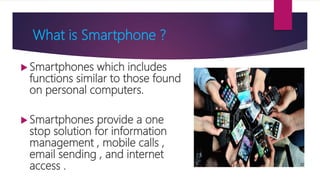
What is Smartphone ?
 Smartphones which includes
functions similar to those found
on personal computers.
 Smartphones provide a one
stop solution for information
management , mobile calls ,
email sending , and internet
access .
Entrepreneurship
Startups
Sample Apps
Arabic Apps (Startups)
Challenge 1
Applications with one Billion Downloads
Application Developer Date Reached
Gmail Google 2014-05-06
Google Maps Google 2014-05-28
Youtube Google 2014-07
Facebook Facebook 2014-09-02
Whatsapp Messenger Facebook 2015-03-04
Messenger Facebook 2015-06-06
Google Hangouts Facebook 2015-06-14
Google Chrome Facebook 2015-06-14
Instagram Facebook 2016-08-22
How to Earn Money from Android Apps?
 Advertising.
 In-app purchase.
 Partnerships & Sponsorships.
 Paid Apps.
 Mobile Data Analysis.
 White label.
Android Developer Jobs
 Your own startup
 Startup Competitions
 Hired in Company (as a developer)
 Freelancer
 Training and Mentoring
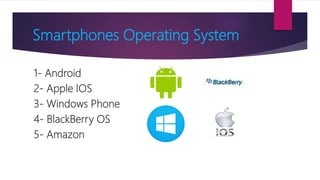
Smartphones Operating System
1- Android
2- Apple IOS
3- Windows Phone
4- BlackBerry OS
5- Amazon
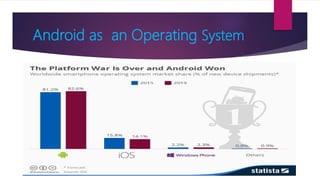
Android as an Operating System
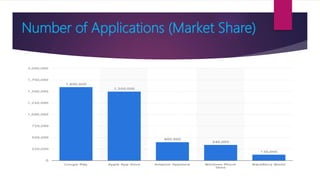
Number of Applications (Market Share)
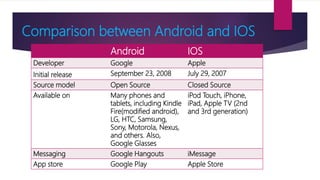
Comparison between Android and IOS
Android IOS
Developer Google Apple
Initial release September 23, 2008 July 29, 2007
Source model Open Source Closed Source
Available on Many phones and
tablets, including Kindle
Fire(modified android),
LG, HTC, Samsung,
Sony, Motorola, Nexus,
and others. Also,
Google Glasses
iPod Touch, iPhone,
iPad, Apple TV (2nd
and 3rd generation)
Messaging Google Hangouts iMessage
App store Google Play Apple Store
Comparison between Android and IOS
Android IOS
OS family Linux OS X, UNIX
Programmed in C, C++, Java C, C++, Objective-C,
Swift
Internet browsing Google Chrome Mobile Safari
Voice commands Google Now Siri
Maps Google Maps Apple Maps
Available language(s) 32 Languages 34 Languages
Device manufacturer Google, LG, Samsung,
HTC, Sony, ASUS,
Motorola, and many
more
Apple Inc
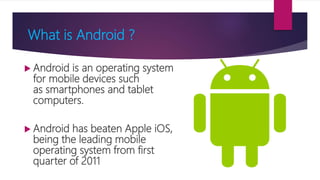
What is Android ?
 Android is an operating system
for mobile devices such
as smartphones and tablet
computers.
 Android has beaten Apple iOS,
being the leading mobile
operating system from first
quarter of 2011
Why Android ?
Open Source
Large Developer
Community Reach
Increased
Marketing
Reduced Cost of
Development
Rich Development
Environment
Higher Success
Ratio
Android runs on these devices
Smartphones Tablets Android TV
Android Wear Google Glasses
Challenge 2
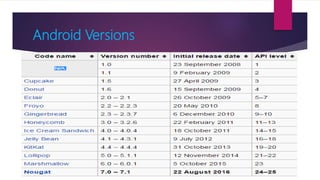
Android Versions
Android Architecture
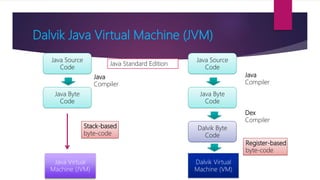
Dalvik Java Virtual Machine (JVM)
Java Source
Code
Java Byte
Code
Java Virtual
Machine (JVM)
Java Source
Code
Java Byte
Code
Dalvik Byte
Code
Dalvik Virtual
Machine (VM)
Java
Compiler
Java
Compiler
Dex
Compiler
Stack-based
byte-code
Register-based
byte-code
Java Standard Edition
Android Activity Life Cycle
Your Way to Android
 Building native applications means
using the native language of the
platform such as Java on Android.
 The main advantage of native
applications is their performance .
 Best performance includes fast and
fluid animations as well as full access
to phone hardware, multi touch
support and the latest APIs.
 Hybrid applications are web
applications (or web pages) in the
native browser, such as WebView in
Android.
 Hybrid apps are developed using
HTML, CSS and Javascript, and then
wrapped in a native application using
platforms like Cordova.
Native Hybrid
How to Become Android Developer ?
 Step 1 : Learn Programming Basics (Java).
 Step 2 : Learn OOP concepts (Java).
 Step 3 : Learn Android Layouts Design (XML).
 Step 4 : Learn how to connect Design (XML) to
Programming.
 Step 5 : Learn how to connect with internal and external
databases.(SQL , Web service).
 Step 6 : Learn Material Design and Support multi screens.
Types of Java
 Java Standard Edition (Java SE)
Example : Standalone Applications Like
Paint , Library Management System
 Java Enterprise Edition (Java EE)
Example : Web Applications Like Online
Hotel Reservation System
 Java Micro Edition (Java ME)
Example : Smart Cards
Java Important Terms
 Basic Data Types
 Basic Operations
 Decision Making (IF)
 Loop Control
 Strings
 Arrays
 Classes and Objects
 Inheritance
 Polymorphism
 Abstraction
 Encapsulation
 Packages
 Methods
What we need to Practice Android ?
 Install JDK 7 or 8 .
 Install Android Studio .
 Download SDK and APIs Package
 Create Emulator (AVD , Genymotion , Real
Device).
Technologies used in Mobile Apps
 Virtual reality
 Internet of Things
 Image Processing
 Cloud Computing
 Unity 2D , 3D
 Artificial Intelligence
Plan to study Android
Course Beginner Intermediate
Java Basics 2 Months 1 Month
Java OOP 2 Months 1 Month
Android Basics 2 Months 1 Month
Database (SQLite) 1 Month 15 Days
Web Service 1 Month 15 Days
Build First Android App 1 Month 15 Days
Build Second Android App 1 Month 15 Days
Total 10 Months 5 Months
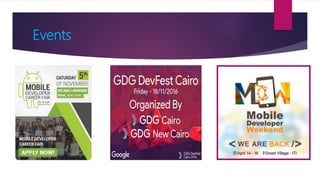
Events
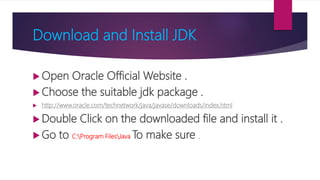
Download and Install JDK
 Open Oracle Official Website .
 Choose the suitable jdk package .
 http://www.oracle.com/technetwork/java/javase/downloads/index.html
 Double Click on the downloaded file and install it .
 Go to C:Program FilesJava To make sure .
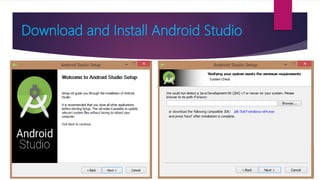
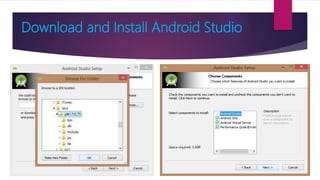
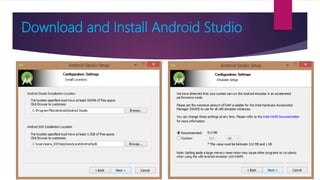
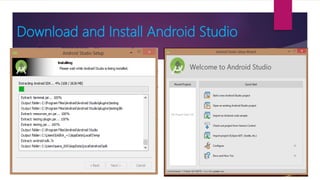
Download and Install Android Studio
 Open Android Official Official Website
.
 Download Android Studio
 https://dl.google.com/dl/android/studio/install/1.5.1.0/android-
studio-bundle-141.2456560-windows.exe
 Double Click and Install it.
Download and Install Android Studio
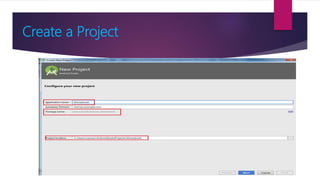
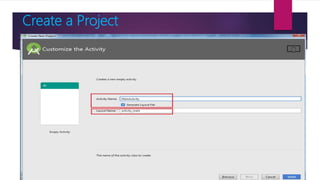
Create a Project
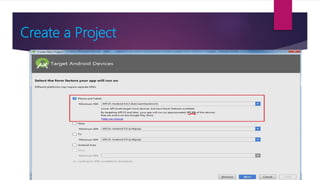
Create a Project
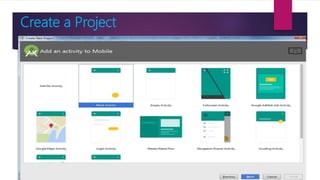
Create a Project
Create a Project
Create a Project
Activities
 An Activity corresponds to a single screen of
the Application.
 An Application can be composed of multiples
screens (Activities).
 The Home Activity is shown when the user
launches an application.
 Different activities can exhange information
one with each other.
Hello
World!
Android
HelloWorld
Button1
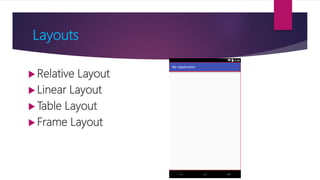
Layouts
 Relative Layout
 Linear Layout
 Table Layout
 Frame Layout
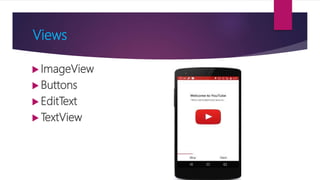
Views
 ImageView
 Buttons
 EditText
 TextView
Connect with Database
Internal Database
 SQLite
 XML
External Database
 Web Service
 Firebase
 Json
Create Emulator
Android Studio AVD
Genymotion
Real Device
Resources to Start Android
 MAL - Mobile Application Launchpad
http://www.mobileapplaunchpad.com.eg/
 Udacity Courses
https://www.udacity.com/courses/android
 Android Official Website
http://developer.android.com/index.html
 Tutorialspoint Android
http://www.tutorialspoint.com/android
Contacts
Blog : www.ahmedmohamedali.blogspot.com
linkedin : https://linkedin.com/in/umadeveloper
Facebook : www.fb.com/um.adeveloper
Twitter : www.twitter.com/um_adeveloper
Email : ahmedmoh93@gmail.com
Any Question ?
Thanks

How to become an android developer

  • 1.
    HOW TO BECOME ANANDROID DEVELOPER? By : Ahmed Mohamed
  • 2.
    About Me  FreelancerAndroid and Java Developer.  Entrepreneur working on Ma7tety startup.  TIEC Ambassador at Minia University.  ITI Ambassador at Minia University.  Challenge Team CO-Founder.  ‫جيش‬ ‫:عندى‬D
  • 3.
    Ground Rules Mobile phones UnderstandingLevel (Fist of Five) Questions Voting
  • 4.
    Agenda  What isthe different between Smartphones and Featured phones.  Sample Apps and Startups.  Smartphones Operating Systems.  What is Android and Why?  Android Versions.  Android Architecture.  How to become Android Developer.  Types of JAVA.  Activities – Layouts – Views – Connect to database.  Simple Project.
  • 5.
    What is Smartphone?  Smartphones which includes functions similar to those found on personal computers.  Smartphones provide a one stop solution for information management , mobile calls , email sending , and internet access .
  • 6.
  • 7.
  • 8.
  • 9.
  • 10.
    Applications with oneBillion Downloads Application Developer Date Reached Gmail Google 2014-05-06 Google Maps Google 2014-05-28 Youtube Google 2014-07 Facebook Facebook 2014-09-02 Whatsapp Messenger Facebook 2015-03-04 Messenger Facebook 2015-06-06 Google Hangouts Facebook 2015-06-14 Google Chrome Facebook 2015-06-14 Instagram Facebook 2016-08-22
  • 11.
    How to EarnMoney from Android Apps?  Advertising.  In-app purchase.  Partnerships & Sponsorships.  Paid Apps.  Mobile Data Analysis.  White label.
  • 12.
    Android Developer Jobs Your own startup  Startup Competitions  Hired in Company (as a developer)  Freelancer  Training and Mentoring
  • 13.
    Smartphones Operating System 1-Android 2- Apple IOS 3- Windows Phone 4- BlackBerry OS 5- Amazon
  • 14.
    Android as anOperating System
  • 15.
    Number of Applications(Market Share)
  • 16.
    Comparison between Androidand IOS Android IOS Developer Google Apple Initial release September 23, 2008 July 29, 2007 Source model Open Source Closed Source Available on Many phones and tablets, including Kindle Fire(modified android), LG, HTC, Samsung, Sony, Motorola, Nexus, and others. Also, Google Glasses iPod Touch, iPhone, iPad, Apple TV (2nd and 3rd generation) Messaging Google Hangouts iMessage App store Google Play Apple Store
  • 17.
    Comparison between Androidand IOS Android IOS OS family Linux OS X, UNIX Programmed in C, C++, Java C, C++, Objective-C, Swift Internet browsing Google Chrome Mobile Safari Voice commands Google Now Siri Maps Google Maps Apple Maps Available language(s) 32 Languages 34 Languages Device manufacturer Google, LG, Samsung, HTC, Sony, ASUS, Motorola, and many more Apple Inc
  • 18.
    What is Android?  Android is an operating system for mobile devices such as smartphones and tablet computers.  Android has beaten Apple iOS, being the leading mobile operating system from first quarter of 2011
  • 19.
    Why Android ? OpenSource Large Developer Community Reach Increased Marketing Reduced Cost of Development Rich Development Environment Higher Success Ratio
  • 20.
    Android runs onthese devices Smartphones Tablets Android TV Android Wear Google Glasses
  • 21.
  • 22.
  • 23.
  • 24.
    Dalvik Java VirtualMachine (JVM) Java Source Code Java Byte Code Java Virtual Machine (JVM) Java Source Code Java Byte Code Dalvik Byte Code Dalvik Virtual Machine (VM) Java Compiler Java Compiler Dex Compiler Stack-based byte-code Register-based byte-code Java Standard Edition
  • 25.
  • 26.
    Your Way toAndroid  Building native applications means using the native language of the platform such as Java on Android.  The main advantage of native applications is their performance .  Best performance includes fast and fluid animations as well as full access to phone hardware, multi touch support and the latest APIs.  Hybrid applications are web applications (or web pages) in the native browser, such as WebView in Android.  Hybrid apps are developed using HTML, CSS and Javascript, and then wrapped in a native application using platforms like Cordova. Native Hybrid
  • 27.
    How to BecomeAndroid Developer ?  Step 1 : Learn Programming Basics (Java).  Step 2 : Learn OOP concepts (Java).  Step 3 : Learn Android Layouts Design (XML).  Step 4 : Learn how to connect Design (XML) to Programming.  Step 5 : Learn how to connect with internal and external databases.(SQL , Web service).  Step 6 : Learn Material Design and Support multi screens.
  • 28.
    Types of Java Java Standard Edition (Java SE) Example : Standalone Applications Like Paint , Library Management System  Java Enterprise Edition (Java EE) Example : Web Applications Like Online Hotel Reservation System  Java Micro Edition (Java ME) Example : Smart Cards
  • 29.
    Java Important Terms Basic Data Types  Basic Operations  Decision Making (IF)  Loop Control  Strings  Arrays  Classes and Objects  Inheritance  Polymorphism  Abstraction  Encapsulation  Packages  Methods
  • 30.
    What we needto Practice Android ?  Install JDK 7 or 8 .  Install Android Studio .  Download SDK and APIs Package  Create Emulator (AVD , Genymotion , Real Device).
  • 31.
    Technologies used inMobile Apps  Virtual reality  Internet of Things  Image Processing  Cloud Computing  Unity 2D , 3D  Artificial Intelligence
  • 32.
    Plan to studyAndroid Course Beginner Intermediate Java Basics 2 Months 1 Month Java OOP 2 Months 1 Month Android Basics 2 Months 1 Month Database (SQLite) 1 Month 15 Days Web Service 1 Month 15 Days Build First Android App 1 Month 15 Days Build Second Android App 1 Month 15 Days Total 10 Months 5 Months
  • 33.
  • 34.
    Download and InstallJDK  Open Oracle Official Website .  Choose the suitable jdk package .  http://www.oracle.com/technetwork/java/javase/downloads/index.html  Double Click on the downloaded file and install it .  Go to C:Program FilesJava To make sure .
  • 35.
    Download and InstallAndroid Studio  Open Android Official Official Website .  Download Android Studio  https://dl.google.com/dl/android/studio/install/1.5.1.0/android- studio-bundle-141.2456560-windows.exe  Double Click and Install it.
  • 36.
    Download and InstallAndroid Studio
  • 37.
    Download and InstallAndroid Studio
  • 38.
    Download and InstallAndroid Studio
  • 39.
    Download and InstallAndroid Studio
  • 40.
  • 41.
  • 42.
  • 43.
  • 44.
  • 45.
    Activities  An Activitycorresponds to a single screen of the Application.  An Application can be composed of multiples screens (Activities).  The Home Activity is shown when the user launches an application.  Different activities can exhange information one with each other. Hello World! Android HelloWorld Button1
  • 46.
    Layouts  Relative Layout Linear Layout  Table Layout  Frame Layout
  • 47.
  • 48.
    Connect with Database InternalDatabase  SQLite  XML External Database  Web Service  Firebase  Json
  • 49.
    Create Emulator Android StudioAVD Genymotion Real Device
  • 50.
    Resources to StartAndroid  MAL - Mobile Application Launchpad http://www.mobileapplaunchpad.com.eg/  Udacity Courses https://www.udacity.com/courses/android  Android Official Website http://developer.android.com/index.html  Tutorialspoint Android http://www.tutorialspoint.com/android
  • 51.
    Contacts Blog : www.ahmedmohamedali.blogspot.com linkedin: https://linkedin.com/in/umadeveloper Facebook : www.fb.com/um.adeveloper Twitter : www.twitter.com/um_adeveloper Email : ahmedmoh93@gmail.com
  • 52.