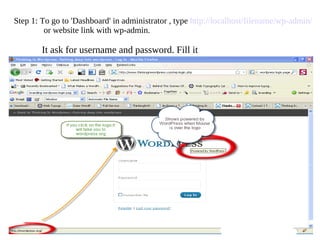
Step 1: To go to 'Dashboard' in administrator , type  http://localhost/filename/wp-admin/   or website link with wp-admin.     It ask for username and password. Fill it
Step 2: The dashboard  screenshot below would finally appear  on your screen.
Step 3: Go to left hand side click Appearance -> Widgets.
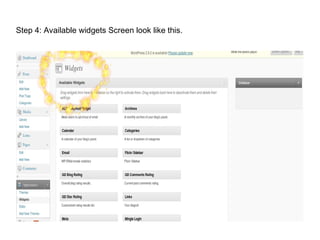
Step 4: Available widgets Screen look like this.
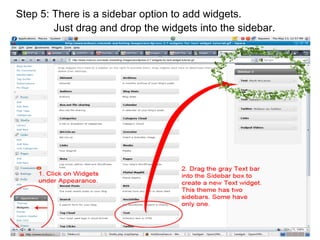
Step 5: There is a sidebar option to add widgets.    Just drag and drop the widgets into the sidebar.
Step 6: Add title name and  choose options. Then  click save button.
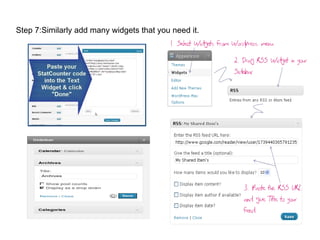
Step 7:Similarly add many widgets that you need it.
Step 8:Finally visit your website/blog.
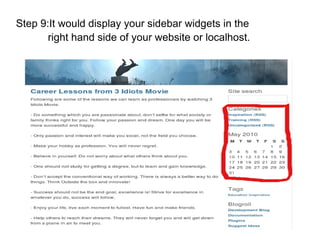
Step 9:It would display your sidebar widgets in the    right hand side of your website or localhost.
End

How to add Widget in sidebar

  • 1.
  • 2.
    Step 1: Togo to 'Dashboard' in administrator , type http://localhost/filename/wp-admin/ or website link with wp-admin. It ask for username and password. Fill it
  • 3.
    Step 2: Thedashboard screenshot below would finally appear on your screen.
  • 4.
    Step 3: Goto left hand side click Appearance -> Widgets.
  • 5.
    Step 4: Availablewidgets Screen look like this.
  • 6.
    Step 5: Thereis a sidebar option to add widgets. Just drag and drop the widgets into the sidebar.
  • 7.
    Step 6: Addtitle name and choose options. Then click save button.
  • 8.
    Step 7:Similarly addmany widgets that you need it.
  • 9.
    Step 8:Finally visityour website/blog.
  • 10.
    Step 9:It woulddisplay your sidebar widgets in the right hand side of your website or localhost.
  • 11.