By Mariyah Hoosenally
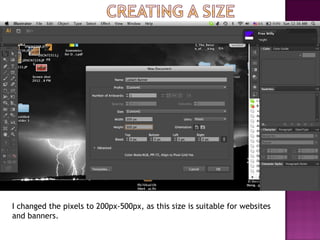
I changed the pixels to 200px-500px, as this size is suitable for websites
and banners.
I made a rectangle shape around the banner. I then went to the color tab on
the right hand panel- there, I selected three colors and dragged them into the
gradient bar on the right hand panel.
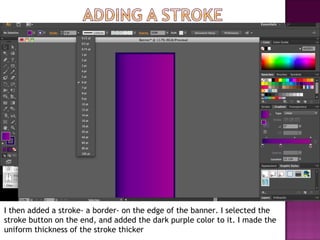
I then added a stroke- a border- on the edge of the banner. I selected the
stroke button on the end, and added the dark purple color to it. I made the
uniform thickness of the stroke thicker
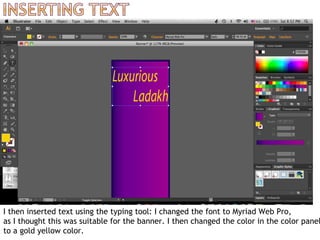
I then inserted text using the typing tool: I changed the font to Myriad Web Pro,
as I thought this was suitable for the banner. I then changed the color in the color panel
to a gold yellow color.
I then inserted the image my client wanted. In order to blend it in, I feathered
 the edges. To do this, I went to effect- Stylize- Feather- And adjusted the
radius to 9 pixels.
Ladakh banner

Ladakh banner

  • 1.
  • 2.
    I changed thepixels to 200px-500px, as this size is suitable for websites and banners.
  • 3.
    I made arectangle shape around the banner. I then went to the color tab on the right hand panel- there, I selected three colors and dragged them into the gradient bar on the right hand panel.
  • 4.
    I then addeda stroke- a border- on the edge of the banner. I selected the stroke button on the end, and added the dark purple color to it. I made the uniform thickness of the stroke thicker
  • 5.
    I then insertedtext using the typing tool: I changed the font to Myriad Web Pro, as I thought this was suitable for the banner. I then changed the color in the color panel to a gold yellow color.
  • 6.
    I then insertedthe image my client wanted. In order to blend it in, I feathered the edges. To do this, I went to effect- Stylize- Feather- And adjusted the radius to 9 pixels.