How Payments Work with Integration
Here We Show You How Your
Customers Can Make a
Payment Using Simply Easier
Payments
1. From Your Website
2. When Simply Easier Payments
is Integrated with your Billing
Systems
Your Web Page Payment Button
Your Customer Clicks
on “Make a Payment”
on Your Web Site
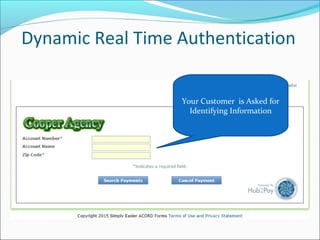
Dynamic Real Time Authentication
Your Customer is Asked for
Identifying Information
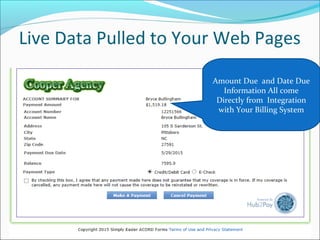
Live Data Pulled to Your Web Pages
Amount Due and Date Due
Information All come
Directly from Integration
with Your Billing System
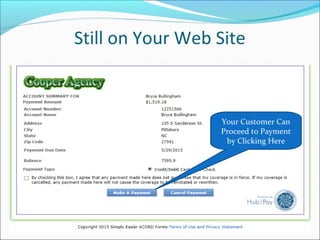
Still on Your Web Site
Your Customer Can
Proceed to Payment
by Clicking Here
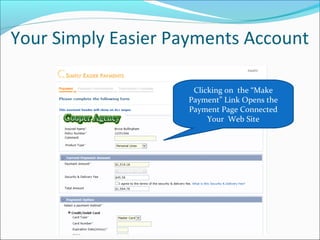
Your Simply Easier Payments Account
Clicking on the “Make
Payment” Link Opens the
Payment Page Connected
Your Web Site
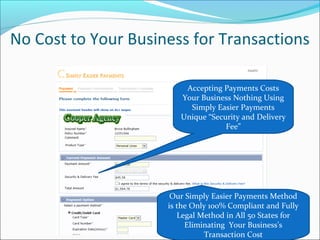
No Cost to Your Business for Transactions
Accepting Payments Costs
Your Business Nothing Using
Simply Easier Payments
Unique “Security and Delivery
Fee”
Our Simply Easier Payments Method
is the Only 100% Compliant and Fully
Legal Method in All 50 States for
Eliminating Your Business’s
Transaction Cost
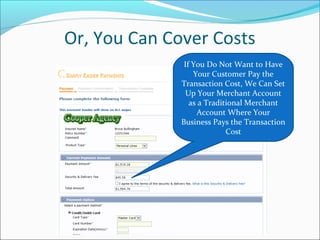
Or, You Can Cover Costs
If You Do Not Want to Have
Your Customer Pay the
Transaction Cost, We Can Set
Up Your Merchant Account
as a Traditional Merchant
Account Where Your
Business Pays the Transaction
Cost
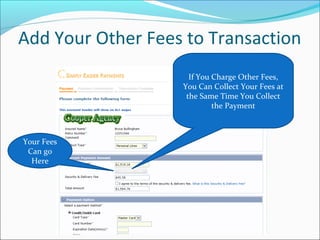
Add Your Other Fees to Transaction
If You Charge Other Fees,
You Can Collect Your Fees at
the Same Time You Collect
the Payment
Your Fees
Can go
Here
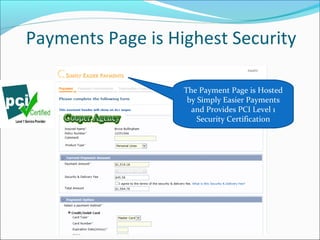
Payments Page is Highest Security
The Payment Page is Hosted
by Simply Easier Payments
and Provides PCI Level 1
Security Certification
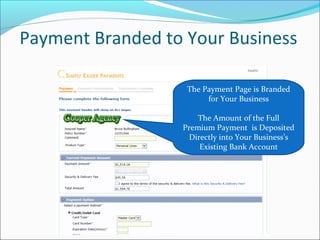
Payment Branded to Your Business
The Payment Page is Branded
for Your Business
The Amount of the Full
Premium Payment is Deposited
Directly into Your Business’s
Existing Bank Account
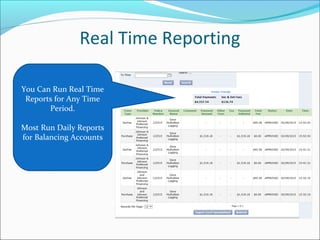
Real Time Reporting
You Can Run Real Time
Reports for Any Time
Period.
Most Run Daily Reports
for Balancing Accounts
Get Started Now
800-768-0907
cchurchill@simply-easier-payments.com
www.simplyeasierpayments.com
www.hub2pay.com

How Hub2Pay works with back office integration

  • 1.
    How Payments Workwith Integration Here We Show You How Your Customers Can Make a Payment Using Simply Easier Payments 1. From Your Website 2. When Simply Easier Payments is Integrated with your Billing Systems
  • 2.
    Your Web PagePayment Button Your Customer Clicks on “Make a Payment” on Your Web Site
  • 3.
    Dynamic Real TimeAuthentication Your Customer is Asked for Identifying Information
  • 4.
    Live Data Pulledto Your Web Pages Amount Due and Date Due Information All come Directly from Integration with Your Billing System
  • 5.
    Still on YourWeb Site Your Customer Can Proceed to Payment by Clicking Here
  • 6.
    Your Simply EasierPayments Account Clicking on the “Make Payment” Link Opens the Payment Page Connected Your Web Site
  • 7.
    No Cost toYour Business for Transactions Accepting Payments Costs Your Business Nothing Using Simply Easier Payments Unique “Security and Delivery Fee” Our Simply Easier Payments Method is the Only 100% Compliant and Fully Legal Method in All 50 States for Eliminating Your Business’s Transaction Cost
  • 8.
    Or, You CanCover Costs If You Do Not Want to Have Your Customer Pay the Transaction Cost, We Can Set Up Your Merchant Account as a Traditional Merchant Account Where Your Business Pays the Transaction Cost
  • 9.
    Add Your OtherFees to Transaction If You Charge Other Fees, You Can Collect Your Fees at the Same Time You Collect the Payment Your Fees Can go Here
  • 10.
    Payments Page isHighest Security The Payment Page is Hosted by Simply Easier Payments and Provides PCI Level 1 Security Certification
  • 11.
    Payment Branded toYour Business The Payment Page is Branded for Your Business The Amount of the Full Premium Payment is Deposited Directly into Your Business’s Existing Bank Account
  • 12.
    Real Time Reporting YouCan Run Real Time Reports for Any Time Period. Most Run Daily Reports for Balancing Accounts
  • 13.