6160P
                                                                                                     6160PX
                                                                          AlphaProx Keypad
                                        User Guide
This document provides operating instructions for using a proximity tag (referred to as a prox
tag) with your AlphaProx Keypad. Refer to your security system User Guide for all other
security system functions and operating procedures.

Prox Feature
The 6160PX Keypads are compatible with Prox Tags that can be used to alternately Arm and
Disarm the system. Presenting a prox tag is functionally equivalent to entering a 4-digit security
code.

Arming or Disarming the System                           LCD
                                                     DISPLAY

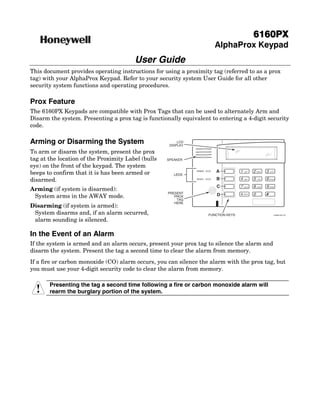
To arm or disarm the system, present the prox
tag at the location of the Proximity Label (bulls   SPEAKER

eye) on the front of the keypad. The system
beeps to confirm that it is has been armed or                  ARMED      A            1   OFF       2   AWAY   3   STAY

                                                       LEDS
disarmed.                                                      READY      B            4   MAX       5   TEST   6   BYPASS


                                                                           C           7             8   CODE   9   CHIME

Arming (if system is disarmed):
                                                                                           INSTANT


                                                    PRESENT                                          0          #
 System arms in the AWAY mode.                         PROX                D               READY


                                                        TAG
                                                       HERE
Disarming (if system is armed):
 System disarms and, if an alarm occurred,                             FUNCTION KEYS                                     6160PX-001-V0


 alarm sounding is silenced.

In the Event of an Alarm
If the system is armed and an alarm occurs, present your prox tag to silence the alarm and
disarm the system. Present the tag a second time to clear the alarm from memory.
If a fire or carbon monoxide (CO) alarm occurs, you can silence the alarm with the prox tag, but
you must use your 4-digit security code to clear the alarm from memory.

       Presenting the tag a second time following a fire or carbon monoxide alarm will
      rearm the burglary portion of the system.
Prox Tag User Log
Use this form to keep a record of system users and their associated Prox Tag.
                                             USER                   AUTHORITY       4-DIGIT TAG NUMBER
USER NAME
                                             NUMBER                 LEVEL           (Tag’s User Code)


                                    2 Corporate Center Drive, Suite 100
                                     P.O. Box 9040, Melville, NY 11747
                                    Copyright © 2009 Honeywell International Inc.

                                             www.honeywell.com/security


Ê800-04918V1bŠ
800-04918V1 4/10 Rev. A

Honeywell 6160 px-user-guide

  • 1.
    6160P 6160PX AlphaProx Keypad User Guide This document provides operating instructions for using a proximity tag (referred to as a prox tag) with your AlphaProx Keypad. Refer to your security system User Guide for all other security system functions and operating procedures. Prox Feature The 6160PX Keypads are compatible with Prox Tags that can be used to alternately Arm and Disarm the system. Presenting a prox tag is functionally equivalent to entering a 4-digit security code. Arming or Disarming the System LCD DISPLAY To arm or disarm the system, present the prox tag at the location of the Proximity Label (bulls SPEAKER eye) on the front of the keypad. The system beeps to confirm that it is has been armed or ARMED A 1 OFF 2 AWAY 3 STAY LEDS disarmed. READY B 4 MAX 5 TEST 6 BYPASS C 7 8 CODE 9 CHIME Arming (if system is disarmed): INSTANT PRESENT 0 # System arms in the AWAY mode. PROX D READY TAG HERE Disarming (if system is armed): System disarms and, if an alarm occurred, FUNCTION KEYS 6160PX-001-V0 alarm sounding is silenced. In the Event of an Alarm If the system is armed and an alarm occurs, present your prox tag to silence the alarm and disarm the system. Present the tag a second time to clear the alarm from memory. If a fire or carbon monoxide (CO) alarm occurs, you can silence the alarm with the prox tag, but you must use your 4-digit security code to clear the alarm from memory. Presenting the tag a second time following a fire or carbon monoxide alarm will rearm the burglary portion of the system.
  • 2.
    Prox Tag UserLog Use this form to keep a record of system users and their associated Prox Tag. USER AUTHORITY 4-DIGIT TAG NUMBER USER NAME NUMBER LEVEL (Tag’s User Code) 2 Corporate Center Drive, Suite 100 P.O. Box 9040, Melville, NY 11747 Copyright © 2009 Honeywell International Inc. www.honeywell.com/security Ê800-04918V1bŠ 800-04918V1 4/10 Rev. A