B2C Engagement and
  Communication:
  Integrating Sales
   and Technology
Engagement:
the act of attracting
  and holding fast
We all know about
    attracting
   prospects
But what do you
      do to
     hold on
    to them?
... to
carry them on through
  the sales process?
... to
   differentiate you
from your competition?
What do you do
to make them say,
    “WOW?”
This MAY
do it....
This WILL
do it....
Prompt, consistent
  and personal followup is a
certain path to creating those
           “wows”
And those “wows” equal
  more closed deals.
“The best time to contact a lead (especially an online lead) is
the same day you receive it. A good marketing goal: call
every lead within four days … Reaching [a lead] within four
business days significantly increases the likelihood that this
lead will become a sales prospect. After seven business days,
lead responsiveness dropped twenty percent.”
 - Knowledgestorm White Paper: “The Fine Art of Lead Management and Lead Follow-up.”
Suggested follow up frequency varies from study to study and
         can vary from industry to industry, and even
from business to business - but the overall takeaway from each
                         is consistent.

You MUST follow up, consistently and completely with each new
 lead - using whatever means you have available - phone, mail,
 email - until they are closed or you have determined they are
                     no longer in the market.
Consistent and complete
follow up requires a system
Do you have a sales system in
 place to instantly respond to
effectively follow up with them?
Open Leads as
      your
  Sales System:
   Easy Lead Management
               +
Simple Sales Force Automation
How does
Open Leads work?
How does
         Open Leads work?
Leads come in to the system from your website, your
online forms, or are manually entered
How does
         Open Leads work?
Leads come in to the system from your website, your
online forms, or are manually entered
These leads are written to your database and appear
in your lead list. Leads from your website or other
Open Leads forms can trigger a Workflow, which
assigns a Type to the lead, assigns a user, adds any
appropriate actions to the lead for follow up, and
generates an autoresponder email which is sent to the
person who filled out the form.
How does
         Open Leads work?
Leads come in to the system from your website, your
online forms, or are manually entered
These leads are written to your database and appear
in your lead list. Leads from your website or other
Open Leads forms can trigger a Workflow, which
assigns a Type to the lead, assigns a user, adds any
appropriate actions to the lead for follow up, and
generates an autoresponder email which is sent to the
person who filled out the form.
The user gets an email notice of a new lead being
assigned, and when they log in to their Open Leads
account, the lead is presented as new, and the tasks
they need to complete to close the sale are already
assigned to the lead.
Introduction to the Open Leads
           Application:
The Dashboard, Lead List and Lead
         Detail Screens
The Dashboard
The Dashboard


Your Account Snapshot:
The Dashboard


Your Account Snapshot:
  Sales Leads at the click of a
  mouse
The Dashboard


Your Account Snapshot:
  Sales Leads at the click of a
  mouse
  Plus the ability monitor lead
  generation and sales flow via
  graphs
The Dashboard


Your Account Snapshot:
  Sales Leads at the click of a
  mouse
  Plus the ability monitor lead
  generation and sales flow via
  graphs
  Calendar of events to monitor
  your lead followup workflow
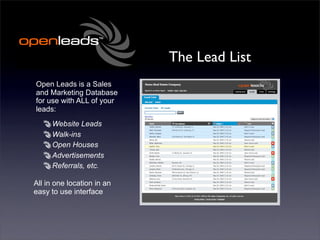
The Lead List
Open Leads is a Sales
and Marketing Database
for use with ALL of your
leads:
The Lead List
Open Leads is a Sales
and Marketing Database
for use with ALL of your
leads:
     Website Leads
     Walk-ins
     Open Houses
     Advertisements
     Referrals, etc.

All in one location in an
easy to use interface
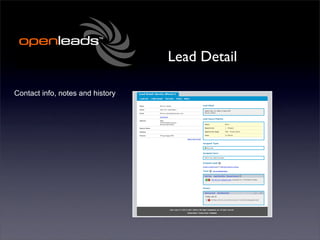
Lead Detail

Contact info, notes and history
Lead Detail

Contact info, notes and history

               Contact Info
Lead Detail

Contact info, notes and history

               Contact Info
                    Source
Lead Detail

Contact info, notes and history

               Contact Info
                    Source
                     Sales
                   Pipeline
Lead Detail

Contact info, notes and history

               Contact Info
                    Source
                     Sales
                   Pipeline
               Assignment
               Information
Lead Detail

Contact info, notes and history

               Contact Info
                    Source
                     Sales
                   Pipeline
               Assignment
               Information
                     Tasks
Lead Detail

Contact info, notes and history

               Contact Info
                    Source
                     Sales
                   Pipeline
               Assignment
               Information
                     Tasks
                    History
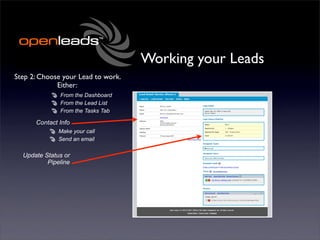
Working your Leads
Working your Leads
Step 1: Check for New Leads or
   Tasks on the Dashboard
Working your Leads
Step 1: Check for New Leads or
   Tasks on the Dashboard

       Look for new Leads
Working your Leads
Step 1: Check for New Leads or
   Tasks on the Dashboard

       Look for new Leads


          Check your daily
           Task Calendar
Working your Leads

OR Check the Tasks Tab
Working your Leads

OR Check the Tasks Tab

  By date or date range
Working your Leads

OR Check the Tasks Tab

  By date or date range


  From the daily “to-do”
                     list
Working your Leads
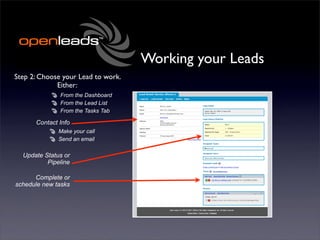
Step 2: Choose your Lead to work.
             Either:
Working your Leads
Step 2: Choose your Lead to work.
             Either:
              From the Dashboard
              From the Lead List
              From the Tasks Tab
Working your Leads
Step 2: Choose your Lead to work.
             Either:
              From the Dashboard
              From the Lead List
              From the Tasks Tab

      Contact Info
             Make your call
             Send an email
Working your Leads
Step 2: Choose your Lead to work.
             Either:
              From the Dashboard
              From the Lead List
              From the Tasks Tab

      Contact Info
             Make your call
             Send an email
Working your Leads
Step 2: Choose your Lead to work.
             Either:
              From the Dashboard
              From the Lead List
              From the Tasks Tab

      Contact Info
              Make your call
              Send an email

  Update Status or
          Pipeline
Working your Leads
Step 2: Choose your Lead to work.
             Either:
              From the Dashboard
              From the Lead List
              From the Tasks Tab

      Contact Info
              Make your call
              Send an email

  Update Status or
          Pipeline

      Complete or
schedule new tasks
Working your Leads
Step 2: Choose your Lead to work.
             Either:
              From the Dashboard
              From the Lead List
              From the Tasks Tab

      Contact Info
              Make your call
              Send an email

  Update Status or
          Pipeline

      Complete or
schedule new tasks

   Add Comments
Managing your Leads
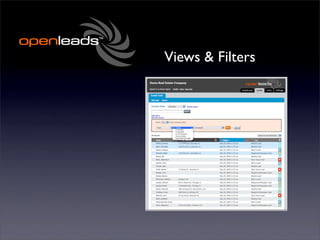
Views & Filters
Views & Filters
You may filter your lead list
by any number of elements
     Field Contents
     Date added or modified
     User
     Type
     Tasks, etc.

Then save your filters as
“Views” which are accessible
from the Lead List or
Dashboard - and then quickly
move between datasets as
needed
Integrating
   Open Leads
With Your Website
Integrating
       Open Leads
    With Your Website
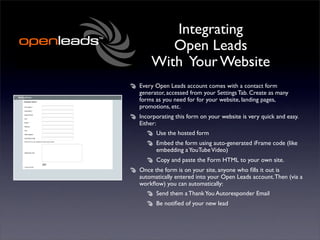
Every Open Leads account comes with a contact form
generator, accessed from your Settings Tab. Create as many
forms as you need for for your website, landing pages,
promotions, etc.
Integrating
       Open Leads
    With Your Website
Every Open Leads account comes with a contact form
generator, accessed from your Settings Tab. Create as many
forms as you need for for your website, landing pages,
promotions, etc.
Incorporating this form on your website is very quick and easy.
Either:
Integrating
       Open Leads
    With Your Website
Every Open Leads account comes with a contact form
generator, accessed from your Settings Tab. Create as many
forms as you need for for your website, landing pages,
promotions, etc.
Incorporating this form on your website is very quick and easy.
Either:
      Use the hosted form
Integrating
       Open Leads
    With Your Website
Every Open Leads account comes with a contact form
generator, accessed from your Settings Tab. Create as many
forms as you need for for your website, landing pages,
promotions, etc.
Incorporating this form on your website is very quick and easy.
Either:
      Use the hosted form
      Embed the form using auto-generated iFrame code (like
      embedding a YouTube Video)
Integrating
       Open Leads
    With Your Website
Every Open Leads account comes with a contact form
generator, accessed from your Settings Tab. Create as many
forms as you need for for your website, landing pages,
promotions, etc.
Incorporating this form on your website is very quick and easy.
Either:
      Use the hosted form
      Embed the form using auto-generated iFrame code (like
      embedding a YouTube Video)
      Copy and paste the Form HTML to your own site.
Integrating
       Open Leads
    With Your Website
Every Open Leads account comes with a contact form
generator, accessed from your Settings Tab. Create as many
forms as you need for for your website, landing pages,
promotions, etc.
Incorporating this form on your website is very quick and easy.
Either:
      Use the hosted form
      Embed the form using auto-generated iFrame code (like
      embedding a YouTube Video)
      Copy and paste the Form HTML to your own site.
Once the form is on your site, anyone who fills it out is
automatically entered into your Open Leads account. Then (via a
workflow) you can automatically:
Integrating
       Open Leads
    With Your Website
Every Open Leads account comes with a contact form
generator, accessed from your Settings Tab. Create as many
forms as you need for for your website, landing pages,
promotions, etc.
Incorporating this form on your website is very quick and easy.
Either:
      Use the hosted form
      Embed the form using auto-generated iFrame code (like
      embedding a YouTube Video)
      Copy and paste the Form HTML to your own site.
Once the form is on your site, anyone who fills it out is
automatically entered into your Open Leads account. Then (via a
workflow) you can automatically:
      Send them a Thank You Autoresponder Email
Integrating
       Open Leads
    With Your Website
Every Open Leads account comes with a contact form
generator, accessed from your Settings Tab. Create as many
forms as you need for for your website, landing pages,
promotions, etc.
Incorporating this form on your website is very quick and easy.
Either:
      Use the hosted form
      Embed the form using auto-generated iFrame code (like
      embedding a YouTube Video)
      Copy and paste the Form HTML to your own site.
Once the form is on your site, anyone who fills it out is
automatically entered into your Open Leads account. Then (via a
workflow) you can automatically:
      Send them a Thank You Autoresponder Email
      Be notified of your new lead
Integrating
       Open Leads
    With Your Website
Every Open Leads account comes with a contact form
generator, accessed from your Settings Tab. Create as many
forms as you need for for your website, landing pages,
promotions, etc.
Incorporating this form on your website is very quick and easy.
Either:
      Use the hosted form
      Embed the form using auto-generated iFrame code (like
      embedding a YouTube Video)
      Copy and paste the Form HTML to your own site.
Once the form is on your site, anyone who fills it out is
automatically entered into your Open Leads account. Then (via a
workflow) you can automatically:
      Send them a Thank You Autoresponder Email
      Be notified of your new lead
      Have followup tasks automatically scheduled
What can I do with
  Open Leads?


      * Source: “How Much Marketing Is Too Much?” by Jessica Tsai
                       DestinationCRM.com
What can I do with
      Open Leads?
Organize all of your leads - making it easy to
track which ones are converted to sales


                  * Source: “How Much Marketing Is Too Much?” by Jessica Tsai
                                   DestinationCRM.com
What can I do with
      Open Leads?
Organize all of your leads - making it easy to
track which ones are converted to sales
Open Leads helps you to centralize that data in
to a single resource


                  * Source: “How Much Marketing Is Too Much?” by Jessica Tsai
                                   DestinationCRM.com
What can I do with
      Open Leads?
Organize all of your leads - making it easy to
track which ones are converted to sales
Open Leads helps you to centralize that data in
to a single resource
  A recent survey of 852 marketing
  professionals indicated that 69 percent of
  whom use three or more applications to
  store and analyze their marketing and
  campaign data in their daily operations; 20
  percent use seven or more.*


                  * Source: “How Much Marketing Is Too Much?” by Jessica Tsai
                                   DestinationCRM.com
What can I do with
  Open Leads?


          * Source: “Your essential email campaign checklist”
      By David Baker imediaconnection.com September 29, 2008
What can I do with
       Open Leads?

Send personalized email marketing campaigns out to
your prospects on a regular basis using mass emails
(up to 10,000 email messages per month)


                       * Source: “Your essential email campaign checklist”
                   By David Baker imediaconnection.com September 29, 2008
What can I do with
        Open Leads?

Send personalized email marketing campaigns out to
your prospects on a regular basis using mass emails
(up to 10,000 email messages per month)
   Email is the most cost effective marketing tool
   available, with returns as high as 57:1 according to
   some analysts


                        * Source: “Your essential email campaign checklist”
                    By David Baker imediaconnection.com September 29, 2008
What can I do with
        Open Leads?

Send personalized email marketing campaigns out to
your prospects on a regular basis using mass emails
(up to 10,000 email messages per month)
   Email is the most cost effective marketing tool
   available, with returns as high as 57:1 according to
   some analysts
  Personalizing your email messages increases
  response 30-40% *

                        * Source: “Your essential email campaign checklist”
                    By David Baker imediaconnection.com September 29, 2008
What can I do with
      Open Leads?
Create and generate call lists or “to-do” lists
instantly, keeping you on-task for each prospect
Monitor your sales team’s activity
View your active and completed tasks
Categorize your leads
Monitor advertising effectiveness
Most of all - Manage and improve your marketing
communication via timely and automated
responses
Why is this important?

Research shows that a significant portion of
purchasers start on the Internet


             * Source: Pew Internet and American Life Project 5/18/2008
Why is this important?

Research shows that a significant portion of
purchasers start on the Internet
Half of all real estate purchasers indicate that the
Internet was their primary source for pre-
purchase research *


              * Source: Pew Internet and American Life Project 5/18/2008
Why is this important?

Research shows that a significant portion of
purchasers start on the Internet
Half of all real estate purchasers indicate that the
Internet was their primary source for pre-
purchase research *
We live in a society OBSESSED with “instant
gratification”


              * Source: Pew Internet and American Life Project 5/18/2008
Why is this important?

Research shows that a significant portion of
purchasers start on the Internet
Half of all real estate purchasers indicate that the
Internet was their primary source for pre-
purchase research *
We live in a society OBSESSED with “instant
gratification”
If a consumer approaches you for information,
they want it in a timely and professional manner.
How you handle this can be the difference
between sale and a “no sale”

              * Source: Pew Internet and American Life Project 5/18/2008
Key Elements of an
Internet Marketing System
Key Elements of an
Internet Marketing System

 Instant confirmation of receipt of their
 information - using Open Leads Autoresponders.
Key Elements of an
Internet Marketing System

 Instant confirmation of receipt of their
 information - using Open Leads Autoresponders.
 Providing them detailed information on your
 company, products and/or services. Internet users
 expect to find the information they are looking
 for
Key Elements of an
Internet Marketing System

 Instant confirmation of receipt of their
 information - using Open Leads Autoresponders.
 Providing them detailed information on your
 company, products and/or services. Internet users
 expect to find the information they are looking
 for
 Personalized service and followup. Too often we
 hide behind the technology, and lose that
 personal touch. Open Leads blends technology
 and personalization.
“3 Keys to Customer
         Satisfaction”
                                                                  - Dennis Snow
Look through the “lens of the customer.”
• Would you expect to be acknowledged immediately upon
   requesting information?
• Would you want a personalized response, or just a dry, generic
   message?
When it comes to a company’s environment, recognize that
“everything speaks”
• From the way you answer the phone to the way you reply to
   an inquiry, each element of your contact speaks volumes about
   your organization - and should be carefully orchestrated.
Create customer “wows”
• Little things you do, such as sending personalized messages for
   birthdays or anniversaries, etc., can cause the prospect or your
   customer to say, “Wow!”
• This is what sets you apart from your competition


                     * Source: Dennis Snow and Associates. www.snowassociates.org

NAHB Builder 20 - Open Leads

  • 1.
    B2C Engagement and Communication: Integrating Sales and Technology
  • 2.
    Engagement: the act ofattracting and holding fast
  • 3.
    We all knowabout attracting prospects
  • 4.
    But what doyou do to hold on to them?
  • 5.
    ... to carry themon through the sales process?
  • 6.
    ... to differentiate you from your competition?
  • 7.
    What do youdo to make them say, “WOW?”
  • 8.
  • 9.
  • 10.
    Prompt, consistent and personal followup is a certain path to creating those “wows”
  • 11.
    And those “wows”equal more closed deals.
  • 12.
    “The best timeto contact a lead (especially an online lead) is the same day you receive it. A good marketing goal: call every lead within four days … Reaching [a lead] within four business days significantly increases the likelihood that this lead will become a sales prospect. After seven business days, lead responsiveness dropped twenty percent.” - Knowledgestorm White Paper: “The Fine Art of Lead Management and Lead Follow-up.”
  • 13.
    Suggested follow upfrequency varies from study to study and can vary from industry to industry, and even from business to business - but the overall takeaway from each is consistent. You MUST follow up, consistently and completely with each new lead - using whatever means you have available - phone, mail, email - until they are closed or you have determined they are no longer in the market.
  • 14.
    Consistent and complete followup requires a system
  • 15.
    Do you havea sales system in place to instantly respond to effectively follow up with them?
  • 16.
    Open Leads as your Sales System: Easy Lead Management + Simple Sales Force Automation
  • 17.
  • 18.
    How does Open Leads work? Leads come in to the system from your website, your online forms, or are manually entered
  • 19.
    How does Open Leads work? Leads come in to the system from your website, your online forms, or are manually entered These leads are written to your database and appear in your lead list. Leads from your website or other Open Leads forms can trigger a Workflow, which assigns a Type to the lead, assigns a user, adds any appropriate actions to the lead for follow up, and generates an autoresponder email which is sent to the person who filled out the form.
  • 20.
    How does Open Leads work? Leads come in to the system from your website, your online forms, or are manually entered These leads are written to your database and appear in your lead list. Leads from your website or other Open Leads forms can trigger a Workflow, which assigns a Type to the lead, assigns a user, adds any appropriate actions to the lead for follow up, and generates an autoresponder email which is sent to the person who filled out the form. The user gets an email notice of a new lead being assigned, and when they log in to their Open Leads account, the lead is presented as new, and the tasks they need to complete to close the sale are already assigned to the lead.
  • 21.
    Introduction to theOpen Leads Application: The Dashboard, Lead List and Lead Detail Screens
  • 22.
  • 23.
  • 24.
    The Dashboard Your AccountSnapshot: Sales Leads at the click of a mouse
  • 25.
    The Dashboard Your AccountSnapshot: Sales Leads at the click of a mouse Plus the ability monitor lead generation and sales flow via graphs
  • 26.
    The Dashboard Your AccountSnapshot: Sales Leads at the click of a mouse Plus the ability monitor lead generation and sales flow via graphs Calendar of events to monitor your lead followup workflow
  • 27.
    The Lead List OpenLeads is a Sales and Marketing Database for use with ALL of your leads:
  • 28.
    The Lead List OpenLeads is a Sales and Marketing Database for use with ALL of your leads: Website Leads Walk-ins Open Houses Advertisements Referrals, etc. All in one location in an easy to use interface
  • 29.
    Lead Detail Contact info,notes and history
  • 30.
    Lead Detail Contact info,notes and history Contact Info
  • 31.
    Lead Detail Contact info,notes and history Contact Info Source
  • 32.
    Lead Detail Contact info,notes and history Contact Info Source Sales Pipeline
  • 33.
    Lead Detail Contact info,notes and history Contact Info Source Sales Pipeline Assignment Information
  • 34.
    Lead Detail Contact info,notes and history Contact Info Source Sales Pipeline Assignment Information Tasks
  • 35.
    Lead Detail Contact info,notes and history Contact Info Source Sales Pipeline Assignment Information Tasks History
  • 36.
  • 37.
    Working your Leads Step1: Check for New Leads or Tasks on the Dashboard
  • 38.
    Working your Leads Step1: Check for New Leads or Tasks on the Dashboard Look for new Leads
  • 39.
    Working your Leads Step1: Check for New Leads or Tasks on the Dashboard Look for new Leads Check your daily Task Calendar
  • 40.
    Working your Leads ORCheck the Tasks Tab
  • 41.
    Working your Leads ORCheck the Tasks Tab By date or date range
  • 42.
    Working your Leads ORCheck the Tasks Tab By date or date range From the daily “to-do” list
  • 43.
    Working your Leads Step2: Choose your Lead to work. Either:
  • 44.
    Working your Leads Step2: Choose your Lead to work. Either: From the Dashboard From the Lead List From the Tasks Tab
  • 45.
    Working your Leads Step2: Choose your Lead to work. Either: From the Dashboard From the Lead List From the Tasks Tab Contact Info Make your call Send an email
  • 46.
    Working your Leads Step2: Choose your Lead to work. Either: From the Dashboard From the Lead List From the Tasks Tab Contact Info Make your call Send an email
  • 47.
    Working your Leads Step2: Choose your Lead to work. Either: From the Dashboard From the Lead List From the Tasks Tab Contact Info Make your call Send an email Update Status or Pipeline
  • 48.
    Working your Leads Step2: Choose your Lead to work. Either: From the Dashboard From the Lead List From the Tasks Tab Contact Info Make your call Send an email Update Status or Pipeline Complete or schedule new tasks
  • 49.
    Working your Leads Step2: Choose your Lead to work. Either: From the Dashboard From the Lead List From the Tasks Tab Contact Info Make your call Send an email Update Status or Pipeline Complete or schedule new tasks Add Comments
  • 50.
  • 51.
  • 52.
    Views & Filters Youmay filter your lead list by any number of elements Field Contents Date added or modified User Type Tasks, etc. Then save your filters as “Views” which are accessible from the Lead List or Dashboard - and then quickly move between datasets as needed
  • 53.
    Integrating Open Leads With Your Website
  • 54.
    Integrating Open Leads With Your Website Every Open Leads account comes with a contact form generator, accessed from your Settings Tab. Create as many forms as you need for for your website, landing pages, promotions, etc.
  • 55.
    Integrating Open Leads With Your Website Every Open Leads account comes with a contact form generator, accessed from your Settings Tab. Create as many forms as you need for for your website, landing pages, promotions, etc. Incorporating this form on your website is very quick and easy. Either:
  • 56.
    Integrating Open Leads With Your Website Every Open Leads account comes with a contact form generator, accessed from your Settings Tab. Create as many forms as you need for for your website, landing pages, promotions, etc. Incorporating this form on your website is very quick and easy. Either: Use the hosted form
  • 57.
    Integrating Open Leads With Your Website Every Open Leads account comes with a contact form generator, accessed from your Settings Tab. Create as many forms as you need for for your website, landing pages, promotions, etc. Incorporating this form on your website is very quick and easy. Either: Use the hosted form Embed the form using auto-generated iFrame code (like embedding a YouTube Video)
  • 58.
    Integrating Open Leads With Your Website Every Open Leads account comes with a contact form generator, accessed from your Settings Tab. Create as many forms as you need for for your website, landing pages, promotions, etc. Incorporating this form on your website is very quick and easy. Either: Use the hosted form Embed the form using auto-generated iFrame code (like embedding a YouTube Video) Copy and paste the Form HTML to your own site.
  • 59.
    Integrating Open Leads With Your Website Every Open Leads account comes with a contact form generator, accessed from your Settings Tab. Create as many forms as you need for for your website, landing pages, promotions, etc. Incorporating this form on your website is very quick and easy. Either: Use the hosted form Embed the form using auto-generated iFrame code (like embedding a YouTube Video) Copy and paste the Form HTML to your own site. Once the form is on your site, anyone who fills it out is automatically entered into your Open Leads account. Then (via a workflow) you can automatically:
  • 60.
    Integrating Open Leads With Your Website Every Open Leads account comes with a contact form generator, accessed from your Settings Tab. Create as many forms as you need for for your website, landing pages, promotions, etc. Incorporating this form on your website is very quick and easy. Either: Use the hosted form Embed the form using auto-generated iFrame code (like embedding a YouTube Video) Copy and paste the Form HTML to your own site. Once the form is on your site, anyone who fills it out is automatically entered into your Open Leads account. Then (via a workflow) you can automatically: Send them a Thank You Autoresponder Email
  • 61.
    Integrating Open Leads With Your Website Every Open Leads account comes with a contact form generator, accessed from your Settings Tab. Create as many forms as you need for for your website, landing pages, promotions, etc. Incorporating this form on your website is very quick and easy. Either: Use the hosted form Embed the form using auto-generated iFrame code (like embedding a YouTube Video) Copy and paste the Form HTML to your own site. Once the form is on your site, anyone who fills it out is automatically entered into your Open Leads account. Then (via a workflow) you can automatically: Send them a Thank You Autoresponder Email Be notified of your new lead
  • 62.
    Integrating Open Leads With Your Website Every Open Leads account comes with a contact form generator, accessed from your Settings Tab. Create as many forms as you need for for your website, landing pages, promotions, etc. Incorporating this form on your website is very quick and easy. Either: Use the hosted form Embed the form using auto-generated iFrame code (like embedding a YouTube Video) Copy and paste the Form HTML to your own site. Once the form is on your site, anyone who fills it out is automatically entered into your Open Leads account. Then (via a workflow) you can automatically: Send them a Thank You Autoresponder Email Be notified of your new lead Have followup tasks automatically scheduled
  • 63.
    What can Ido with Open Leads? * Source: “How Much Marketing Is Too Much?” by Jessica Tsai DestinationCRM.com
  • 64.
    What can Ido with Open Leads? Organize all of your leads - making it easy to track which ones are converted to sales * Source: “How Much Marketing Is Too Much?” by Jessica Tsai DestinationCRM.com
  • 65.
    What can Ido with Open Leads? Organize all of your leads - making it easy to track which ones are converted to sales Open Leads helps you to centralize that data in to a single resource * Source: “How Much Marketing Is Too Much?” by Jessica Tsai DestinationCRM.com
  • 66.
    What can Ido with Open Leads? Organize all of your leads - making it easy to track which ones are converted to sales Open Leads helps you to centralize that data in to a single resource A recent survey of 852 marketing professionals indicated that 69 percent of whom use three or more applications to store and analyze their marketing and campaign data in their daily operations; 20 percent use seven or more.* * Source: “How Much Marketing Is Too Much?” by Jessica Tsai DestinationCRM.com
  • 67.
    What can Ido with Open Leads? * Source: “Your essential email campaign checklist” By David Baker imediaconnection.com September 29, 2008
  • 68.
    What can Ido with Open Leads? Send personalized email marketing campaigns out to your prospects on a regular basis using mass emails (up to 10,000 email messages per month) * Source: “Your essential email campaign checklist” By David Baker imediaconnection.com September 29, 2008
  • 69.
    What can Ido with Open Leads? Send personalized email marketing campaigns out to your prospects on a regular basis using mass emails (up to 10,000 email messages per month) Email is the most cost effective marketing tool available, with returns as high as 57:1 according to some analysts * Source: “Your essential email campaign checklist” By David Baker imediaconnection.com September 29, 2008
  • 70.
    What can Ido with Open Leads? Send personalized email marketing campaigns out to your prospects on a regular basis using mass emails (up to 10,000 email messages per month) Email is the most cost effective marketing tool available, with returns as high as 57:1 according to some analysts Personalizing your email messages increases response 30-40% * * Source: “Your essential email campaign checklist” By David Baker imediaconnection.com September 29, 2008
  • 71.
    What can Ido with Open Leads? Create and generate call lists or “to-do” lists instantly, keeping you on-task for each prospect Monitor your sales team’s activity View your active and completed tasks Categorize your leads Monitor advertising effectiveness Most of all - Manage and improve your marketing communication via timely and automated responses
  • 72.
    Why is thisimportant?
  • 73.
    Why is thisimportant? Research shows that a significant portion of purchasers start on the Internet * Source: Pew Internet and American Life Project 5/18/2008
  • 74.
    Why is thisimportant? Research shows that a significant portion of purchasers start on the Internet Half of all real estate purchasers indicate that the Internet was their primary source for pre- purchase research * * Source: Pew Internet and American Life Project 5/18/2008
  • 75.
    Why is thisimportant? Research shows that a significant portion of purchasers start on the Internet Half of all real estate purchasers indicate that the Internet was their primary source for pre- purchase research * We live in a society OBSESSED with “instant gratification” * Source: Pew Internet and American Life Project 5/18/2008
  • 76.
    Why is thisimportant? Research shows that a significant portion of purchasers start on the Internet Half of all real estate purchasers indicate that the Internet was their primary source for pre- purchase research * We live in a society OBSESSED with “instant gratification” If a consumer approaches you for information, they want it in a timely and professional manner. How you handle this can be the difference between sale and a “no sale” * Source: Pew Internet and American Life Project 5/18/2008
  • 77.
    Key Elements ofan Internet Marketing System
  • 78.
    Key Elements ofan Internet Marketing System Instant confirmation of receipt of their information - using Open Leads Autoresponders.
  • 79.
    Key Elements ofan Internet Marketing System Instant confirmation of receipt of their information - using Open Leads Autoresponders. Providing them detailed information on your company, products and/or services. Internet users expect to find the information they are looking for
  • 80.
    Key Elements ofan Internet Marketing System Instant confirmation of receipt of their information - using Open Leads Autoresponders. Providing them detailed information on your company, products and/or services. Internet users expect to find the information they are looking for Personalized service and followup. Too often we hide behind the technology, and lose that personal touch. Open Leads blends technology and personalization.
  • 81.
    “3 Keys toCustomer Satisfaction” - Dennis Snow Look through the “lens of the customer.” • Would you expect to be acknowledged immediately upon requesting information? • Would you want a personalized response, or just a dry, generic message? When it comes to a company’s environment, recognize that “everything speaks” • From the way you answer the phone to the way you reply to an inquiry, each element of your contact speaks volumes about your organization - and should be carefully orchestrated. Create customer “wows” • Little things you do, such as sending personalized messages for birthdays or anniversaries, etc., can cause the prospect or your customer to say, “Wow!” • This is what sets you apart from your competition * Source: Dennis Snow and Associates. www.snowassociates.org