HIKVISION EUROPE B.V.
European Technical Support Hotline +31 235542770
HIKVISION Camera URL
User Guide
HIKVISION EUROPE B.V.
European Technical Support Hotline +31 235542770
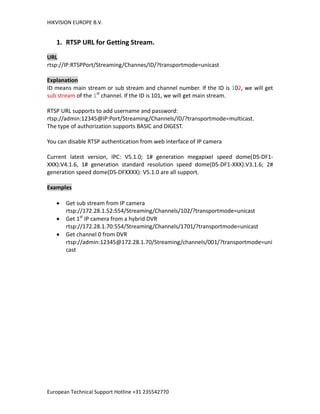
1. RTSP URL for Getting Stream.
URL
rtsp://IP:RTSPPort/Streaming/Channes/ID/?transportmode=unicast
Explanation
ID means main stream or sub stream and channel number. If the ID is 102, we will get
sub stream of the 1st
channel. If the ID is 101, we will get main stream.
RTSP URL supports to add username and password:
rtsp://admin:12345@IP:Port/Streaming/Channels/ID/?transportmode=multicast.
The type of authorization supports BASIC and DIGEST.
You can disable RTSP authentication from web interface of IP camera
Current latest version, IPC: V5.1.0; 1# generation megapixel speed dome(DS-DF1-
XXX):V4.1.6, 1# generation standard resolution speed dome(DS-DF1-XXX):V3.1.6; 2#
generation speed dome(DS-DFXXXX): V5.1.0 are all support.
Examples
 Get sub stream from IP camera
rtsp://172.28.1.52:554/Streaming/Channels/102/?transportmode=unicast
 Get 1st
IP camera from a hybrid DVR
rtsp://172.28.1.70:554/Streaming/Channels/1701/?transportmode=unicast
 Get channel 0 from DVR
rtsp://admin:12345@172.28.1.70/Streaming/channels/001/?transportmode=uni
cast
HIKVISION EUROPE B.V.
European Technical Support Hotline +31 235542770
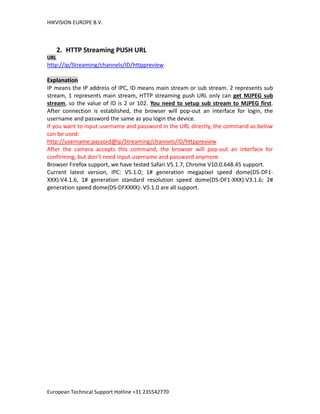
2. HTTP Streaming PUSH URL
URL
http://ip/Streaming/channels/ID/httppreview
Explanation
IP means the IP address of IPC, ID means main stream or sub stream. 2 represents sub
stream, 1 represents main stream, HTTP streaming push URL only can get MJPEG sub
stream, so the value of ID is 2 or 102. You need to setup sub stream to MJPEG first.
After connection is established, the browser will pop-out an interface for login, the
username and password the same as you login the device.
If you want to input username and password in the URL directly, the command as below
can be used:
http://username:passord@ip/Streaming/channels/ID/httppreview
After the camera accepts this command, the browser will pop-out an interface for
confirming, but don’t need input username and password anymore.
Browser Firefox support, we have tested Safari V5.1.7, Chrome V10.0.648.45 support.
Current latest version, IPC: V5.1.0; 1# generation megapixel speed dome(DS-DF1-
XXX):V4.1.6, 1# generation standard resolution speed dome(DS-DF1-XXX):V3.1.6; 2#
generation speed dome(DS-DFXXXX): V5.1.0 are all support.

Hikvision rtsp url streaming tutorial manual

  • 1.
    HIKVISION EUROPE B.V. EuropeanTechnical Support Hotline +31 235542770 HIKVISION Camera URL User Guide
  • 2.
    HIKVISION EUROPE B.V. EuropeanTechnical Support Hotline +31 235542770 1. RTSP URL for Getting Stream. URL rtsp://IP:RTSPPort/Streaming/Channes/ID/?transportmode=unicast Explanation ID means main stream or sub stream and channel number. If the ID is 102, we will get sub stream of the 1st channel. If the ID is 101, we will get main stream. RTSP URL supports to add username and password: rtsp://admin:12345@IP:Port/Streaming/Channels/ID/?transportmode=multicast. The type of authorization supports BASIC and DIGEST. You can disable RTSP authentication from web interface of IP camera Current latest version, IPC: V5.1.0; 1# generation megapixel speed dome(DS-DF1- XXX):V4.1.6, 1# generation standard resolution speed dome(DS-DF1-XXX):V3.1.6; 2# generation speed dome(DS-DFXXXX): V5.1.0 are all support. Examples  Get sub stream from IP camera rtsp://172.28.1.52:554/Streaming/Channels/102/?transportmode=unicast  Get 1st IP camera from a hybrid DVR rtsp://172.28.1.70:554/Streaming/Channels/1701/?transportmode=unicast  Get channel 0 from DVR rtsp://admin:12345@172.28.1.70/Streaming/channels/001/?transportmode=uni cast
  • 3.
    HIKVISION EUROPE B.V. EuropeanTechnical Support Hotline +31 235542770 2. HTTP Streaming PUSH URL URL http://ip/Streaming/channels/ID/httppreview Explanation IP means the IP address of IPC, ID means main stream or sub stream. 2 represents sub stream, 1 represents main stream, HTTP streaming push URL only can get MJPEG sub stream, so the value of ID is 2 or 102. You need to setup sub stream to MJPEG first. After connection is established, the browser will pop-out an interface for login, the username and password the same as you login the device. If you want to input username and password in the URL directly, the command as below can be used: http://username:passord@ip/Streaming/channels/ID/httppreview After the camera accepts this command, the browser will pop-out an interface for confirming, but don’t need input username and password anymore. Browser Firefox support, we have tested Safari V5.1.7, Chrome V10.0.648.45 support. Current latest version, IPC: V5.1.0; 1# generation megapixel speed dome(DS-DF1- XXX):V4.1.6, 1# generation standard resolution speed dome(DS-DF1-XXX):V3.1.6; 2# generation speed dome(DS-DFXXXX): V5.1.0 are all support.