Parallel Hardware and Parallel
Software
An Introduction to Parallel Programming
Peter Pacheco
Roadmap
 Modifications to the von Neumann
model
 Parallel hardware
 Parallel software
 Input and output
 Performance
 Parallel program design
 Writing and running parallel programs
 Assumptions
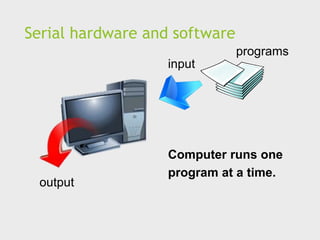
Serial hardware and software
input
output
programs
Computer runs one
program at a time.
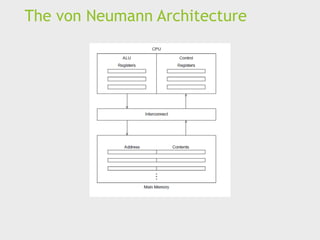
The von Neumann Architecture
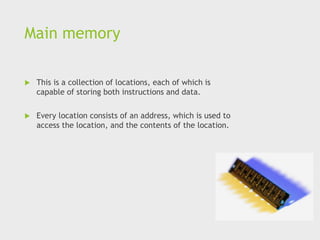
Main memory
 This is a collection of locations, each of which is
capable of storing both instructions and data.
 Every location consists of an address, which is used to
access the location, and the contents of the location.
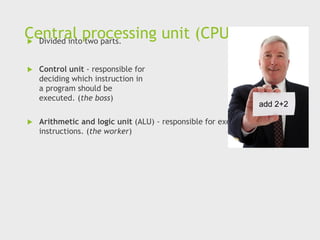
Central processing unit (CPU)
 Divided into two parts.
 Control unit - responsible for
deciding which instruction in
a program should be
executed. (the boss)
 Arithmetic and logic unit (ALU) - responsible for executing the actual
instructions. (the worker)
add 2+2
Key terms
 Register – very fast storage, part of the CPU.
 Program counter – stores address of the next
instruction to be executed.
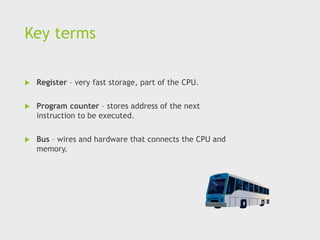
 Bus – wires and hardware that connects the CPU and
memory.
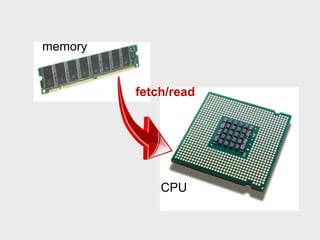
memory
CPU
fetch/read
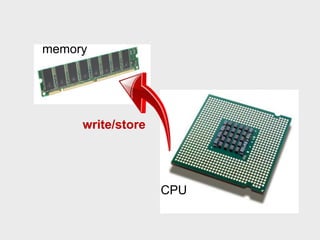
memory
CPU
write/store
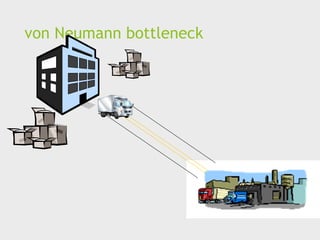
von Neumann bottleneck
An operating system
“process”
 An instance of a computer program that is being
executed.
 Components of a process:
 The executable machine language program.
 A block of memory.
 Descriptors of resources the OS has allocated to the
process.
 Security information.
 Information about the state of the process.
Multitasking
 Gives the illusion that a single processor system is
running multiple programs simultaneously.
 Each process takes turns running. (time slice)
 After its time is up, it waits until it has a turn again.
(blocks)
Threading
 Threads are contained within processes.
 They allow programmers to divide their programs into
(more or less) independent tasks.
 The hope is that when one thread blocks because it is
waiting on a resource, another will have work to do and
can run.
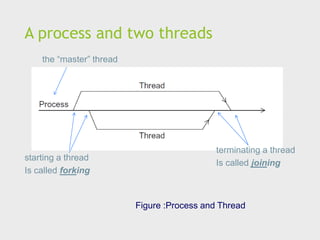
A process and two threads
Figure :Process and Thread
the “master” thread
starting a thread
Is called forking
terminating a thread
Is called joining
Modifications to the von
neumann model
Basics of caching
 A collection of memory locations that can be accessed
in less time than some other memory locations.
 A CPU cache is typically located on the same chip, or
one that can be accessed much faster than ordinary
memory.
Principle of locality
 Accessing one location is followed by an access of a
nearby location.
 Spatial locality – accessing a nearby location.
 Temporal locality – accessing in the near future.
Principle of locality
float z[1000];
…
sum = 0.0;
for (i = 0; i < 1000; i++)
sum += z[i];
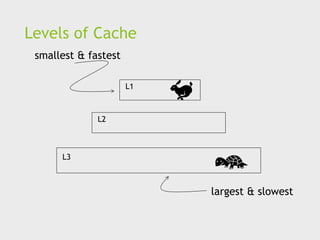
Levels of Cache
L1
L2
L3
smallest & fastest
largest & slowest
Cache hit
L1
L2
L3
x sum
y z total
A[ ] radius r1 center
fetch x
Cache miss
L1
L2
L3
y sum
r1 z total
A[ ] radius center
fetch x x
main
memory
Issues with cache
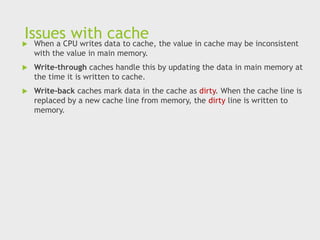
 When a CPU writes data to cache, the value in cache may be inconsistent
with the value in main memory.
 Write-through caches handle this by updating the data in main memory at
the time it is written to cache.
 Write-back caches mark data in the cache as dirty. When the cache line is
replaced by a new cache line from memory, the dirty line is written to
memory.
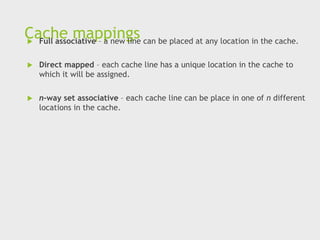
Cache mappings
 Full associative – a new line can be placed at any location in the cache.
 Direct mapped – each cache line has a unique location in the cache to
which it will be assigned.
 n-way set associative – each cache line can be place in one of n different
locations in the cache.
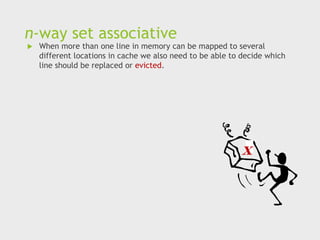
n-way set associative
 When more than one line in memory can be mapped to several
different locations in cache we also need to be able to decide which
line should be replaced or evicted.
x
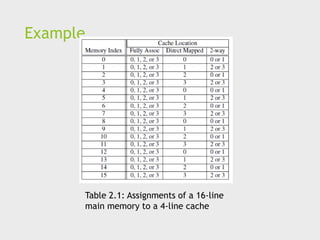
Example
Table 2.1: Assignments of a 16-line
main memory to a 4-line cache
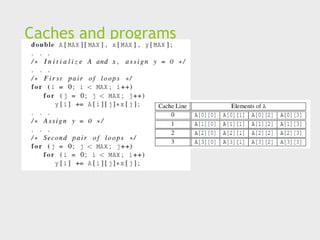
Caches and programs
Virtual memory (1)
 If we run a very large program or a program that
accesses very large data sets, all of the instructions and
data may not fit into main memory.
 Virtual memory functions as a cache for secondary
storage.
Virtual memory (2)
 It exploits the principle of spatial and temporal locality.
 It only keeps the active parts of running programs in
main memory.
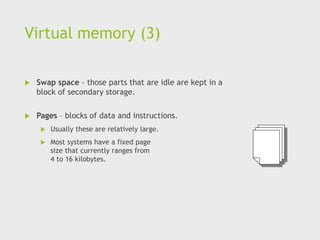
Virtual memory (3)
 Swap space - those parts that are idle are kept in a
block of secondary storage.
 Pages – blocks of data and instructions.
 Usually these are relatively large.
 Most systems have a fixed page
size that currently ranges from
4 to 16 kilobytes.
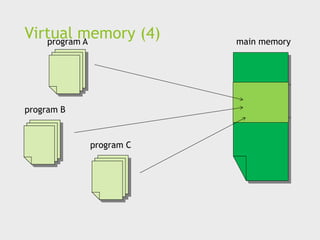
Virtual memory (4)
program A
program B
program C
main memory
Virtual page numbers
 When a program is compiled its pages are assigned
virtual page numbers.
 When the program is run, a table is created that maps
the virtual page numbers to physical addresses.
 A page table is used to translate the virtual address into
a physical address.
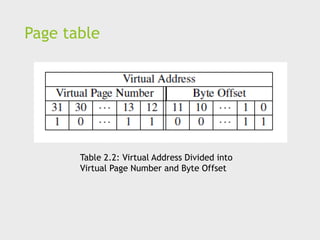
Page table
Table 2.2: Virtual Address Divided into
Virtual Page Number and Byte Offset
 Using a page table has the potential to significantly
increase each program’s overall run-time.
 A special address translation cache in the processor.
Translation-lookaside buffer (2)
 It caches a small number of entries (typically 16–512)
from the page table in very fast memory.
 Page fault – attempting to access a valid physical
address for a page in the page table but the page is only
stored on disk.
 Attempts to improve processor performance by having
multiple processor components or functional units
simultaneously executing instructions.
Instruction Level Parallelism (2)
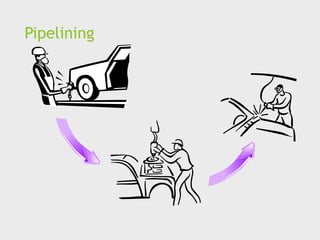
 Pipelining - functional units are arranged in stages.
 Multiple issue - multiple instructions can be
simultaneously initiated.
Pipelining
Pipelining example (1)
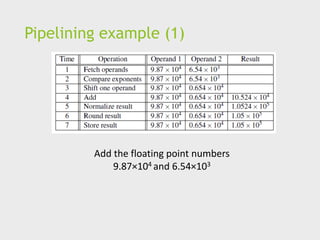
Add the floating point numbers
9.87×10⁴ and 6.54×10³
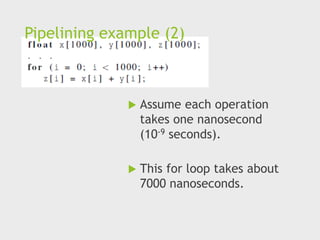
Pipelining example (2)
 Assume each operation
takes one nanosecond
(10-9 seconds).
 This for loop takes about
7000 nanoseconds.
Pipelining (3)
 Divide the floating point adder into 7 separate pieces of
hardware or functional units.
 First unit fetches two operands, second unit compares
exponents, etc.
 Output of one functional unit is input to the next.
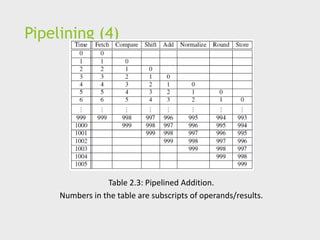
Pipelining (4)
Table 2.3: Pipelined Addition.
Numbers in the table are subscripts of operands/results.
Pipelining (5)
 One floating point addition still takes
7 nanoseconds.
 But 1000 floating point additions
now takes 1006 nanoseconds!
Multiple Issue (1)
 Multiple issue processors replicate functional units and try to
simultaneously execute different instructions in a program.
adder #1 adder #2
z[1]
z[3]
z[2]
z[4]
for (i = 0; i < 1000; i++)
z[i] = x[i] + y[i];
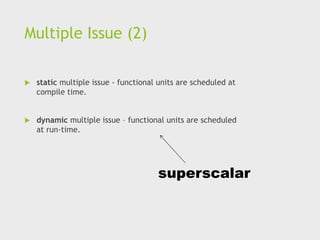
Multiple Issue (2)
 static multiple issue - functional units are scheduled at
compile time.
 dynamic multiple issue – functional units are scheduled
at run-time.
superscalar
Speculation (1)
 In order to make use of multiple issue, the system must find instructions
that can be executed simultaneously.
◼ In speculation, the compiler or the processor makes a
guess about an instruction, and then executes the
instruction on the basis of the guess.
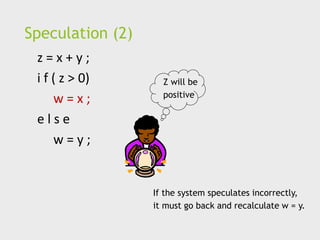
Speculation (2)
z = x + y ;
i f ( z > 0)
w = x ;
e l s e
w = y ;
Z will be
positive
If the system speculates incorrectly,
it must go back and recalculate w = y.
Hardware multithreading (1)
 There aren’t always good opportunities for simultaneous
execution of different threads.
 Hardware multithreading provides a means for systems
to continue doing useful work when the task being
currently executed has stalled.
 Ex., the current task has to wait for data to be loaded
from memory.
Hardware multithreading (2)
 Fine-grained - the processor switches between threads
after each instruction, skipping threads that are stalled.
 Pros: potential to avoid wasted machine time due to stalls.
 Cons: a thread that’s ready to execute a long sequence of
instructions may have to wait to execute every
instruction.
Hardware multithreading (3)
 Coarse-grained - only switches threads that are stalled
waiting for a time-consuming operation to complete.
 Pros: switching threads doesn’t need to be nearly
instantaneous.
 Cons: the processor can be idled on shorter stalls, and
thread switching will also cause delays.
Hardware multithreading (3)
 Simultaneous multithreading (SMT) - a variation on
fine-grained multithreading.
 Allows multiple threads to make use of the multiple
functional units.
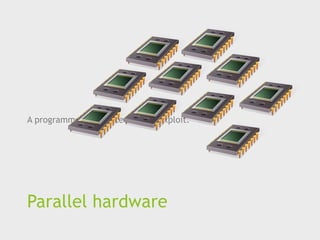
Parallel hardware
A programmer can write code to exploit.
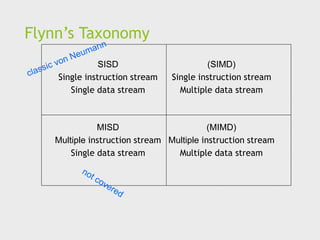
Flynn’s Taxonomy
SISD
Single instruction stream
Single data stream
(SIMD)
Single instruction stream
Multiple data stream
MISD
Multiple instruction stream
Single data stream
(MIMD)
Multiple instruction stream
Multiple data stream
SIMD
 Parallelism achieved by dividing data among the
processors.
 Applies the same instruction to multiple data items.
 Called data parallelism.
SIMD example
control unit
ALU1 ALU2 ALUn
…
for (i = 0; i < n; i++)
x[i] += y[i];
x[1] x[2] x[n]
n data items
n ALUs
SIMD
 What if we don’t have as many ALUs as data items?
 Divide the work and process iteratively.
 Ex. m = 4 ALUs and n = 15 data items.
Round3 ALU1 ALU2 ALU3 ALU4
1 X[0] X[1] X[2] X[3]
2 X[4] X[5] X[6] X[7]
3 X[8] X[9] X[10] X[11]
4 X[12] X[13] X[14]
SIMD drawbacks
 All ALUs are required to execute the same instruction,
or remain idle.
 In classic design, they must also operate synchronously.
 The ALUs have no instruction storage.
 Efficient for large data parallel problems, but not other
types of more complex parallel problems.
Vector processors (1)
 Operate on arrays or vectors of data while conventional
CPU’s operate on individual data elements or scalars.
 Vector registers.
 Capable of storing a vector of operands and operating
simultaneously on their contents.
Vector processors (2)
 Vectorized and pipelined functional units.
 The same operation is applied to each element in the
vector (or pairs of elements).
 Vector instructions.
 Operate on vectors rather than scalars.
Vector processors (3)
 Interleaved memory.
 Multiple “banks” of memory, which can be accessed more
or less independently.
 Distribute elements of a vector across multiple banks, so
reduce or eliminate delay in loading/storing successive
elements.
 Strided memory access and hardware scatter/gather.
 The program accesses elements of a vector located at
fixed intervals.
Vector processors - Pros
 Fast.
 Easy to use.
 Vectorizing compilers are good at identifying code to
exploit.
 Compilers also can provide information about code that
cannot be vectorized.
 Helps the programmer re-evaluate code.
 High memory bandwidth.
 Uses every item in a cache line.
Vector processors - Cons
 They don’t handle irregular
data structures as well as other
parallel architectures.
 A very finite limit to their ability to handle ever larger
problems. (scalability)
Graphics Processing Units
(GPU)
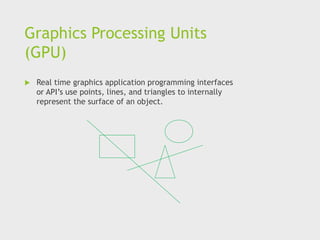
 Real time graphics application programming interfaces
or API’s use points, lines, and triangles to internally
represent the surface of an object.
GPUs
 A graphics processing pipeline converts the internal
representation into an array of pixels that can be sent
to a computer screen.
 Several stages of this pipeline
(called shader functions) are programmable.
 Typically just a few lines of C code.
GPUs
 Shader functions are also implicitly parallel, since they
can be applied to multiple elements in the graphics
stream.
 GPU’s can often optimize performance by using SIMD
parallelism.
 The current generation of GPU’s use SIMD parallelism.
 Although they are not pure SIMD systems.
MIMD
 Supports multiple simultaneous instruction streams
operating on multiple data streams.
 Typically consist of a collection of fully independent
processing units or cores, each of which has its own
control unit and its own ALU.
Shared Memory System (1)
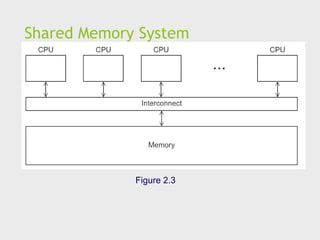
 A collection of autonomous processors is connected to a
memory system via an interconnection network.
 Each processor can access each memory location.
 The processors usually communicate implicitly by
accessing shared data structures.
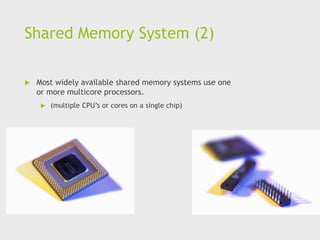
Shared Memory System (2)
 Most widely available shared memory systems use one
or more multicore processors.
 (multiple CPU’s or cores on a single chip)
Shared Memory System
Figure 2.3
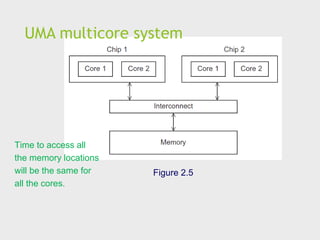
UMA multicore system
Figure 2.5
Time to access all
the memory locations
will be the same for
all the cores.
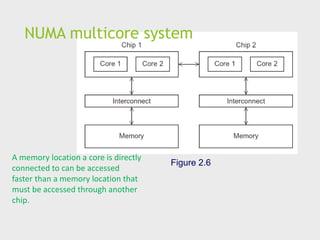
NUMA multicore system
Figure 2.6
A memory location a core is directly
connected to can be accessed
faster than a memory location that
must be accessed through another
chip.
Distributed Memory System
 Clusters (most popular)
 A collection of commodity systems.
 Connected by a commodity interconnection network.
 Nodes of a cluster are individual computations units joined by a
communication network.
a.k.a. hybrid systems
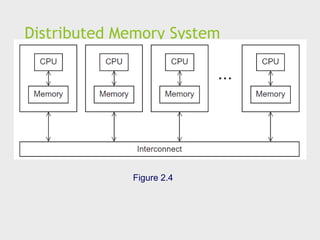
Distributed Memory System
Figure 2.4
Interconnection networks
 Affects performance of both distributed and shared
memory systems.
 Two categories:
 Shared memory interconnects
 Distributed memory interconnects
Shared memory interconnects
 Bus interconnect
 A collection of parallel communication wires together with
some hardware that controls access to the bus.
 Communication wires are shared by the devices that are
connected to it.
 As the number of devices connected to the bus increases,
contention for use of the bus increases, and performance
decreases.
Shared memory interconnects
 Switched interconnect
 Uses switches to control the routing of data among the
connected devices.
 Crossbar –
 Allows simultaneous communication among different devices.
 Faster than buses.
 But the cost of the switches and links is relatively high.
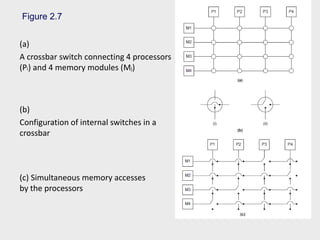
Figure 2.7
(a)
A crossbar switch connecting 4 processors
(Pi) and 4 memory modules (Mj)
(b)
Configuration of internal switches in a
crossbar
(c) Simultaneous memory accesses
by the processors
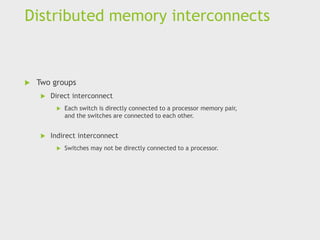
Distributed memory interconnects
 Two groups
 Direct interconnect
 Each switch is directly connected to a processor memory pair,
and the switches are connected to each other.
 Indirect interconnect
 Switches may not be directly connected to a processor.
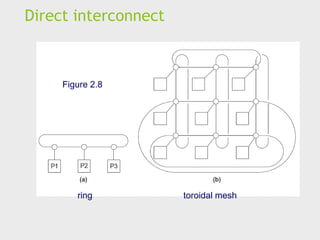
Direct interconnect
Figure 2.8
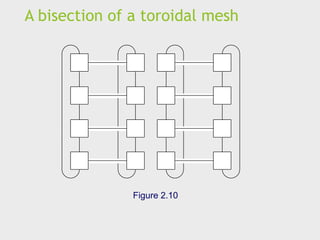
ring toroidal mesh
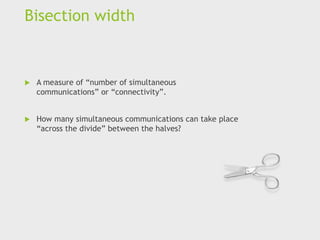
Bisection width
 A measure of “number of simultaneous
communications” or “connectivity”.
 How many simultaneous communications can take place
“across the divide” between the halves?
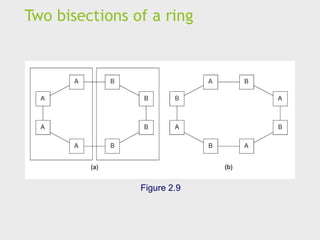
Two bisections of a ring
Figure 2.9
A bisection of a toroidal mesh
Figure 2.10
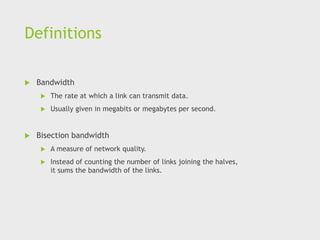
Definitions
 Bandwidth
 The rate at which a link can transmit data.
 Usually given in megabits or megabytes per second.
 Bisection bandwidth
 A measure of network quality.
 Instead of counting the number of links joining the halves,
it sums the bandwidth of the links.
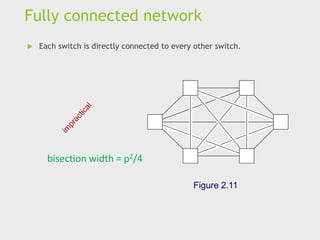
Fully connected network
 Each switch is directly connected to every other switch.
Figure 2.11
bisection width = p2/4
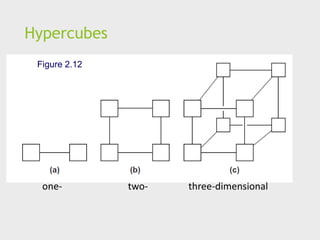
Hypercube
 Highly connected direct interconnect.
 Built inductively:
 A one-dimensional hypercube is a fully-connected system
with two processors.
 A two-dimensional hypercube is built from two one-
dimensional hypercubes by joining “corresponding”
switches.
 Similarly a three-dimensional hypercube is built from two
two-dimensional hypercubes.
Hypercubes
Figure 2.12
one- three-dimensional
two-
Indirect interconnects
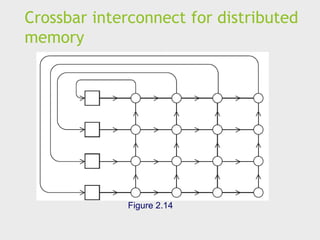
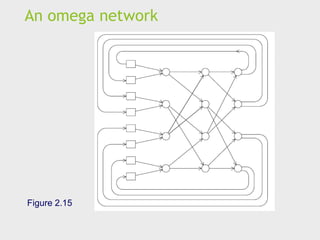
 Simple examples of indirect networks:
 Crossbar
 Omega network
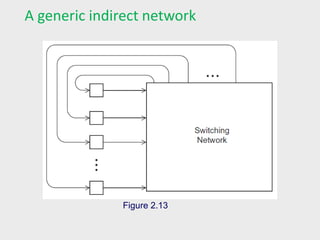
 Often shown with unidirectional links and a collection of
processors, each of which has an outgoing and an
incoming link, and a switching network.
A generic indirect network
Figure 2.13
Crossbar interconnect for distributed
memory
Figure 2.14
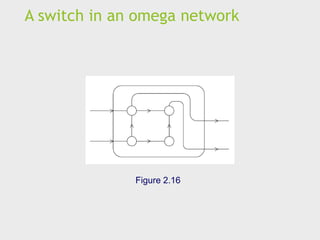
An omega network
Figure 2.15
A switch in an omega network
Figure 2.16
More definitions
 Any time data is transmitted, we’re interested in how long it will take for
the data to reach its destination.
 Latency
 The time that elapses between the source’s beginning to transmit the data and
the destination’s starting to receive the first byte.
 Bandwidth
 The rate at which the destination receives data after it has started to receive the
first byte.
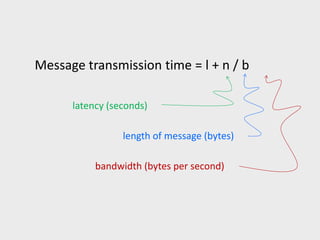
Message transmission time = l + n / b
latency (seconds)
bandwidth (bytes per second)
length of message (bytes)
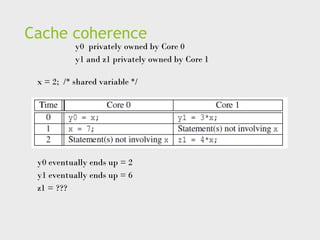
Cache coherence
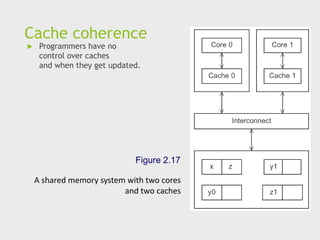
 Programmers have no
control over caches
and when they get updated.
Figure 2.17
A shared memory system with two cores
and two caches
Cache coherence
x = 2; /* shared variable */
y0 privately owned by Core 0
y1 and z1 privately owned by Core 1
y0 eventually ends up = 2
y1 eventually ends up = 6
z1 = ???
Snooping Cache Coherence
 The cores share a bus .
 Any signal transmitted on the bus can be “seen” by all
cores connected to the bus.
 When core 0 updates the copy of x stored in its cache it
also broadcasts this information across the bus.
 If core 1 is “snooping” the bus, it will see that x has
been updated and it can mark its copy of x as invalid.
 Uses a data structure called a directory that stores the
status of each cache line.
 When a variable is updated, the directory is consulted,
and the cache controllers of the cores that have that
variable’s cache line in their caches are invalidated.
Parallel software
The burden is on software
 Hardware and compilers can keep up the pace needed.
 From now on…
 In shared memory programs:
 Start a single process and fork threads.
 Threads carry out tasks.
 In distributed memory programs:
 Start multiple processes.
 Processes carry out tasks.
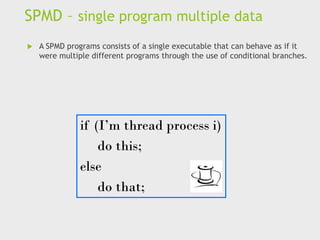
SPMD – single program multiple data
 A SPMD programs consists of a single executable that can behave as if it
were multiple different programs through the use of conditional branches.
if (I’m thread process i)
do this;
else
do that;
Writing Parallel Programs
double x[n], y[n];
…
for (i = 0; i < n; i++)
x[i] += y[i];
1. Divide the work among the
processes/threads
(a) so each process/thread
gets roughly the same
amount of work
(b) and communication is
minimized.
2. Arrange for the processes/threads to synchronize.
3. Arrange for communication among processes/threads.
Shared Memory
 Dynamic threads
 Master thread waits for work, forks new threads, and when threads are done,
they terminate
 Efficient use of resources, but thread creation and termination is time
consuming.
 Static threads
 Pool of threads created and are allocated work, but do not terminate until
cleanup.
 Better performance, but potential waste of system resources.
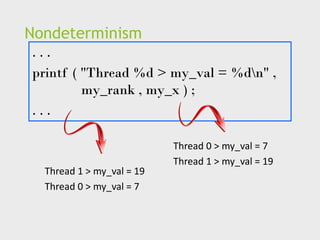
Nondeterminism
. . .
printf ( "Thread %d > my_val = %dn" ,
my_rank , my_x ) ;
. . .
Thread 0 > my_val = 7
Thread 1 > my_val = 19
Thread 0 > my_val = 7
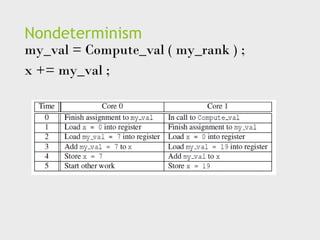
Nondeterminism
my_val = Compute_val ( my_rank ) ;
x += my_val ;
Nondeterminism
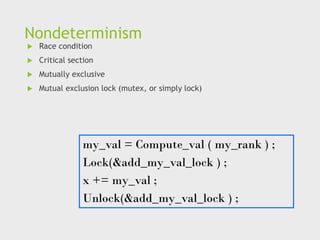
 Race condition
 Critical section
 Mutually exclusive
 Mutual exclusion lock (mutex, or simply lock)
my_val = Compute_val ( my_rank ) ;
Lock(&add_my_val_lock ) ;
x += my_val ;
Unlock(&add_my_val_lock ) ;
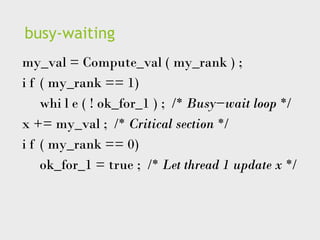
busy-waiting
my_val = Compute_val ( my_rank ) ;
i f ( my_rank == 1)
whi l e ( ! ok_for_1 ) ; /* Busy−wait loop */
x += my_val ; /* Critical section */
i f ( my_rank == 0)
ok_for_1 = true ; /* Let thread 1 update x */
message-passing
char message [ 1 0 0 ] ;
. . .
my_rank = Get_rank ( ) ;
i f ( my_rank == 1) {
sprintf ( message , "Greetings from process 1" ) ;
Send ( message , MSG_CHAR , 100 , 0 ) ;
} e l s e i f ( my_rank == 0) {
Receive ( message , MSG_CHAR , 100 , 1 ) ;
printf ( "Process 0 > Received: %sn" , message ) ;
}
Partitioned Global Address Space
Languages
shared i n t n = . . . ;
shared double x [ n ] , y [ n ] ;
private i n t i , my_first_element , my_last_element ;
my_first_element = . . . ;
my_last_element = . . . ;
/ * Initialize x and y */
. . .
f o r ( i = my_first_element ; i <= my_last_element ; i++)
x [ i ] += y [ i ] ;
Input and Output
 In distributed memory programs, only process 0 will
access stdin. In shared memory programs, only the
master thread or thread 0 will access stdin.
 In both distributed memory and shared memory
programs all the processes/threads can access stdout
and stderr.
Input and Output
 However, because of the indeterminacy of the order of
output to stdout, in most cases only a single
process/thread will be used for all output to stdout
other than debugging output.
 Debug output should always include the rank or id of
the process/thread that’s generating the output.
Input and Output
 Only a single process/thread will attempt to access any
single file other than stdin, stdout, or stderr. So, for
example, each process/thread can open its own, private
file for reading or writing, but no two processes/threads
will open the same file.
Performance
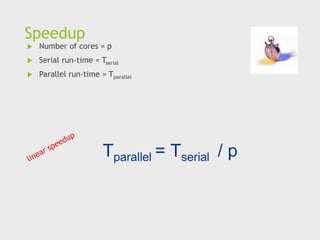
Speedup
 Number of cores = p
 Serial run-time = Tserial
 Parallel run-time = Tparallel
Tparallel = Tserial / p
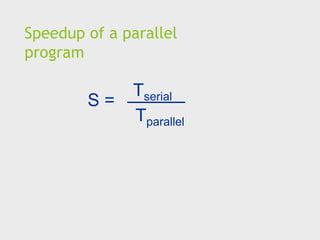
Speedup of a parallel
program
Tserial
Tparallel
S =
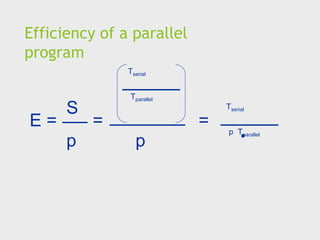
Efficiency of a parallel
program
E =
Tserial
Tparallel
S
p
=
p
=
Tserial
p Tparallel
.
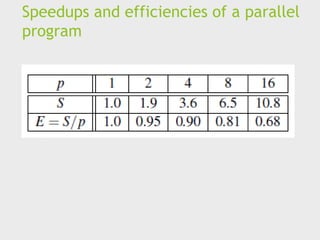
Speedups and efficiencies of a parallel
program
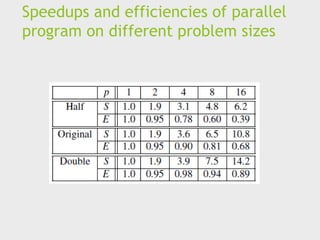
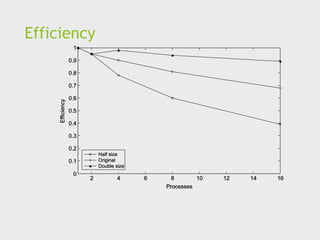
Speedups and efficiencies of parallel
program on different problem sizes
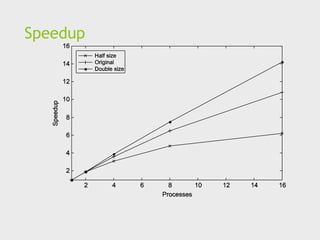
Speedup
Efficiency
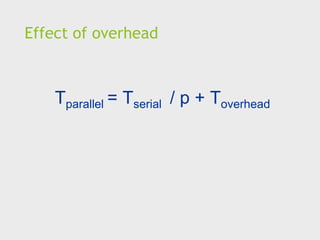
Effect of overhead
Tparallel = Tserial / p + Toverhead
Amdahl’s Law
 Unless virtually all of a serial program is parallelized,
the possible speedup is going to be very limited —
regardless of the number of cores available.
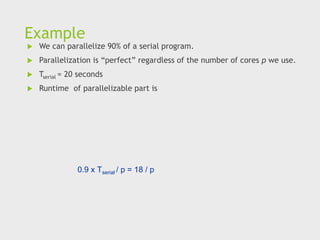
Example
 We can parallelize 90% of a serial program.
 Parallelization is “perfect” regardless of the number of cores p we use.
 Tserial = 20 seconds
 Runtime of parallelizable part is
0.9 x Tserial / p = 18 / p
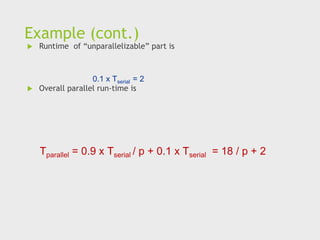
Example (cont.)
 Runtime of “unparallelizable” part is
 Overall parallel run-time is
0.1 x Tserial = 2
Tparallel = 0.9 x Tserial / p + 0.1 x Tserial = 18 / p + 2
Example (cont.)
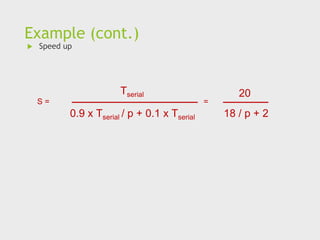
 Speed up
0.9 x Tserial / p + 0.1 x Tserial
Tserial
S = =
18 / p + 2
20
Scalability
 In general, a problem is scalable if it can handle
ever increasing problem sizes.
 If we increase the number of processes/threads
and keep the efficiency fixed without increasing
problem size, the problem is strongly scalable.
 If we keep the efficiency fixed by increasing the
problem size at the same rate as we increase
the number of processes/threads, the problem
is weakly scalable.
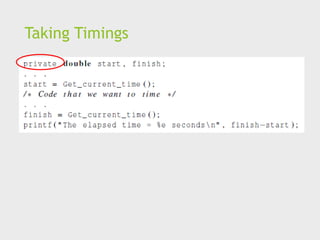
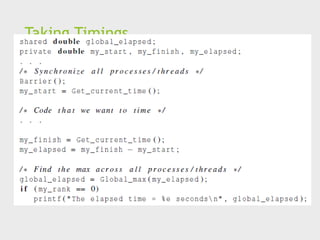
Taking Timings
 What is time?
 Start to finish?
 A program segment of interest?
 CPU time?
 Wall clock time?
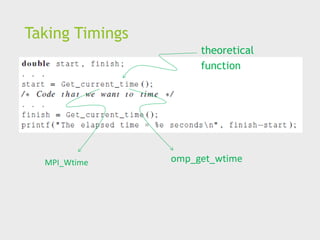
Taking Timings
theoretical
function
MPI_Wtime omp_get_wtime
Taking Timings
Taking Timings
Parallel program
design
Foster’s methodology
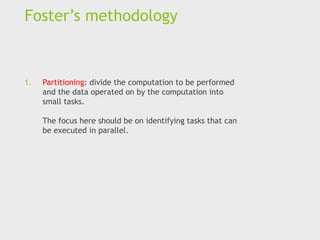
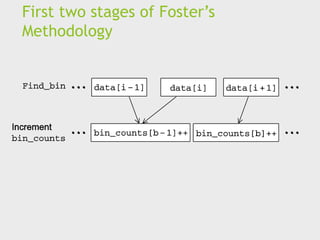
1. Partitioning: divide the computation to be performed
and the data operated on by the computation into
small tasks.
The focus here should be on identifying tasks that can
be executed in parallel.
Foster’s methodology
2. Communication: determine what communication
needs to be carried out among the tasks identified in
the previous step.
Foster’s methodology
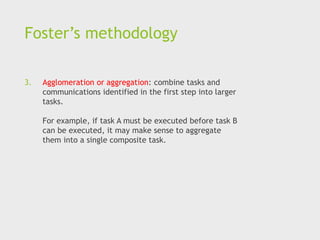
3. Agglomeration or aggregation: combine tasks and
communications identified in the first step into larger
tasks.
For example, if task A must be executed before task B
can be executed, it may make sense to aggregate
them into a single composite task.
Foster’s methodology
4. Mapping: assign the composite tasks identified in the
previous step to processes/threads.
This should be done so that communication is
minimized, and each process/thread gets roughly the
same amount of work.
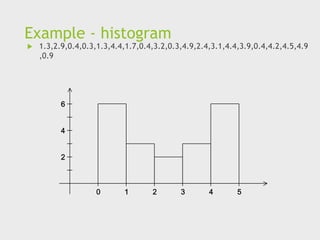
Example - histogram
 1.3,2.9,0.4,0.3,1.3,4.4,1.7,0.4,3.2,0.3,4.9,2.4,3.1,4.4,3.9,0.4,4.2,4.5,4.9
,0.9
Serial program - input
1. The number of measurements: data_count
2. An array of data_count floats: data
3. The minimum value for the bin containing the smallest
values: min_meas
4. The maximum value for the bin containing the largest
values: max_meas
5. The number of bins: bin_count
Serial program - output
1. bin_maxes : an array of bin_count floats
2. bin_counts : an array of bin_count ints
First two stages of Foster’s
Methodology
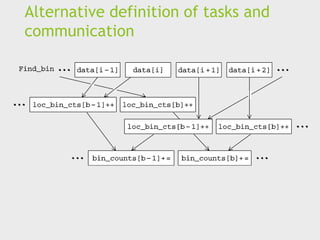
Alternative definition of tasks and
communication
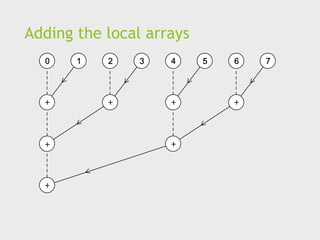
Adding the local arrays
Concluding Remarks (1)
 Serial systems
 The standard model of computer hardware has been the
von Neumann architecture.
 Parallel hardware
 Flynn’s taxonomy.
 Parallel software
 We focus on software for homogeneous MIMD systems,
consisting of a single program that obtains parallelism by
branching.
 SPMD programs.
Concluding Remarks (2)
 Input and Output
 We’ll write programs in which one process or thread can
access stdin, and all processes can access stdout and
stderr.
 However, because of nondeterminism, except for debug
output we’ll usually have a single process or thread
accessing stdout.
Concluding Remarks (3)
 Performance
 Speedup
 Efficiency
 Amdahl’s law
 Scalability
 Parallel Program Design
 Foster’s methodology
References
1. Peter S Pacheco, Matthew
Malensek – An Introduction to
Parallel Programming, second
edition, Morgan Kauffman.
High Performance computing Parallel Hardware and Software.pdf

  • 1.
    Parallel Hardware andParallel Software An Introduction to Parallel Programming Peter Pacheco
  • 2.
    Roadmap  Modifications tothe von Neumann model  Parallel hardware  Parallel software  Input and output  Performance  Parallel program design  Writing and running parallel programs  Assumptions
  • 3.
    Serial hardware andsoftware input output programs Computer runs one program at a time.
  • 4.
    The von NeumannArchitecture
  • 5.
    Main memory  Thisis a collection of locations, each of which is capable of storing both instructions and data.  Every location consists of an address, which is used to access the location, and the contents of the location.
  • 6.
    Central processing unit(CPU)  Divided into two parts.  Control unit - responsible for deciding which instruction in a program should be executed. (the boss)  Arithmetic and logic unit (ALU) - responsible for executing the actual instructions. (the worker) add 2+2
  • 7.
    Key terms  Register– very fast storage, part of the CPU.  Program counter – stores address of the next instruction to be executed.  Bus – wires and hardware that connects the CPU and memory.
  • 8.
  • 9.
  • 10.
  • 11.
    An operating system “process” An instance of a computer program that is being executed.  Components of a process:  The executable machine language program.  A block of memory.  Descriptors of resources the OS has allocated to the process.  Security information.  Information about the state of the process.
  • 12.
    Multitasking  Gives theillusion that a single processor system is running multiple programs simultaneously.  Each process takes turns running. (time slice)  After its time is up, it waits until it has a turn again. (blocks)
  • 13.
    Threading  Threads arecontained within processes.  They allow programmers to divide their programs into (more or less) independent tasks.  The hope is that when one thread blocks because it is waiting on a resource, another will have work to do and can run.
  • 14.
    A process andtwo threads Figure :Process and Thread the “master” thread starting a thread Is called forking terminating a thread Is called joining
  • 15.
    Modifications to thevon neumann model
  • 16.
    Basics of caching A collection of memory locations that can be accessed in less time than some other memory locations.  A CPU cache is typically located on the same chip, or one that can be accessed much faster than ordinary memory.
  • 17.
    Principle of locality Accessing one location is followed by an access of a nearby location.  Spatial locality – accessing a nearby location.  Temporal locality – accessing in the near future.
  • 18.
    Principle of locality floatz[1000]; … sum = 0.0; for (i = 0; i < 1000; i++) sum += z[i];
  • 19.
    Levels of Cache L1 L2 L3 smallest& fastest largest & slowest
  • 20.
    Cache hit L1 L2 L3 x sum yz total A[ ] radius r1 center fetch x
  • 21.
    Cache miss L1 L2 L3 y sum r1z total A[ ] radius center fetch x x main memory
  • 22.
    Issues with cache When a CPU writes data to cache, the value in cache may be inconsistent with the value in main memory.  Write-through caches handle this by updating the data in main memory at the time it is written to cache.  Write-back caches mark data in the cache as dirty. When the cache line is replaced by a new cache line from memory, the dirty line is written to memory.
  • 23.
    Cache mappings  Fullassociative – a new line can be placed at any location in the cache.  Direct mapped – each cache line has a unique location in the cache to which it will be assigned.  n-way set associative – each cache line can be place in one of n different locations in the cache.
  • 24.
    n-way set associative When more than one line in memory can be mapped to several different locations in cache we also need to be able to decide which line should be replaced or evicted. x
  • 25.
    Example Table 2.1: Assignmentsof a 16-line main memory to a 4-line cache
  • 26.
  • 27.
    Virtual memory (1) If we run a very large program or a program that accesses very large data sets, all of the instructions and data may not fit into main memory.  Virtual memory functions as a cache for secondary storage.
  • 28.
    Virtual memory (2) It exploits the principle of spatial and temporal locality.  It only keeps the active parts of running programs in main memory.
  • 29.
    Virtual memory (3) Swap space - those parts that are idle are kept in a block of secondary storage.  Pages – blocks of data and instructions.  Usually these are relatively large.  Most systems have a fixed page size that currently ranges from 4 to 16 kilobytes.
  • 30.
    Virtual memory (4) programA program B program C main memory
  • 31.
    Virtual page numbers When a program is compiled its pages are assigned virtual page numbers.  When the program is run, a table is created that maps the virtual page numbers to physical addresses.  A page table is used to translate the virtual address into a physical address.
  • 32.
    Page table Table 2.2:Virtual Address Divided into Virtual Page Number and Byte Offset
  • 33.
     Using apage table has the potential to significantly increase each program’s overall run-time.  A special address translation cache in the processor.
  • 34.
    Translation-lookaside buffer (2) It caches a small number of entries (typically 16–512) from the page table in very fast memory.  Page fault – attempting to access a valid physical address for a page in the page table but the page is only stored on disk.
  • 35.
     Attempts toimprove processor performance by having multiple processor components or functional units simultaneously executing instructions.
  • 36.
    Instruction Level Parallelism(2)  Pipelining - functional units are arranged in stages.  Multiple issue - multiple instructions can be simultaneously initiated.
  • 37.
  • 38.
    Pipelining example (1) Addthe floating point numbers 9.87×10⁴ and 6.54×10³
  • 39.
    Pipelining example (2) Assume each operation takes one nanosecond (10-9 seconds).  This for loop takes about 7000 nanoseconds.
  • 40.
    Pipelining (3)  Dividethe floating point adder into 7 separate pieces of hardware or functional units.  First unit fetches two operands, second unit compares exponents, etc.  Output of one functional unit is input to the next.
  • 41.
    Pipelining (4) Table 2.3:Pipelined Addition. Numbers in the table are subscripts of operands/results.
  • 42.
    Pipelining (5)  Onefloating point addition still takes 7 nanoseconds.  But 1000 floating point additions now takes 1006 nanoseconds!
  • 43.
    Multiple Issue (1) Multiple issue processors replicate functional units and try to simultaneously execute different instructions in a program. adder #1 adder #2 z[1] z[3] z[2] z[4] for (i = 0; i < 1000; i++) z[i] = x[i] + y[i];
  • 44.
    Multiple Issue (2) static multiple issue - functional units are scheduled at compile time.  dynamic multiple issue – functional units are scheduled at run-time. superscalar
  • 45.
    Speculation (1)  Inorder to make use of multiple issue, the system must find instructions that can be executed simultaneously. ◼ In speculation, the compiler or the processor makes a guess about an instruction, and then executes the instruction on the basis of the guess.
  • 46.
    Speculation (2) z =x + y ; i f ( z > 0) w = x ; e l s e w = y ; Z will be positive If the system speculates incorrectly, it must go back and recalculate w = y.
  • 47.
    Hardware multithreading (1) There aren’t always good opportunities for simultaneous execution of different threads.  Hardware multithreading provides a means for systems to continue doing useful work when the task being currently executed has stalled.  Ex., the current task has to wait for data to be loaded from memory.
  • 48.
    Hardware multithreading (2) Fine-grained - the processor switches between threads after each instruction, skipping threads that are stalled.  Pros: potential to avoid wasted machine time due to stalls.  Cons: a thread that’s ready to execute a long sequence of instructions may have to wait to execute every instruction.
  • 49.
    Hardware multithreading (3) Coarse-grained - only switches threads that are stalled waiting for a time-consuming operation to complete.  Pros: switching threads doesn’t need to be nearly instantaneous.  Cons: the processor can be idled on shorter stalls, and thread switching will also cause delays.
  • 50.
    Hardware multithreading (3) Simultaneous multithreading (SMT) - a variation on fine-grained multithreading.  Allows multiple threads to make use of the multiple functional units.
  • 51.
    Parallel hardware A programmercan write code to exploit.
  • 52.
    Flynn’s Taxonomy SISD Single instructionstream Single data stream (SIMD) Single instruction stream Multiple data stream MISD Multiple instruction stream Single data stream (MIMD) Multiple instruction stream Multiple data stream
  • 53.
    SIMD  Parallelism achievedby dividing data among the processors.  Applies the same instruction to multiple data items.  Called data parallelism.
  • 54.
    SIMD example control unit ALU1ALU2 ALUn … for (i = 0; i < n; i++) x[i] += y[i]; x[1] x[2] x[n] n data items n ALUs
  • 55.
    SIMD  What ifwe don’t have as many ALUs as data items?  Divide the work and process iteratively.  Ex. m = 4 ALUs and n = 15 data items. Round3 ALU1 ALU2 ALU3 ALU4 1 X[0] X[1] X[2] X[3] 2 X[4] X[5] X[6] X[7] 3 X[8] X[9] X[10] X[11] 4 X[12] X[13] X[14]
  • 56.
    SIMD drawbacks  AllALUs are required to execute the same instruction, or remain idle.  In classic design, they must also operate synchronously.  The ALUs have no instruction storage.  Efficient for large data parallel problems, but not other types of more complex parallel problems.
  • 57.
    Vector processors (1) Operate on arrays or vectors of data while conventional CPU’s operate on individual data elements or scalars.  Vector registers.  Capable of storing a vector of operands and operating simultaneously on their contents.
  • 58.
    Vector processors (2) Vectorized and pipelined functional units.  The same operation is applied to each element in the vector (or pairs of elements).  Vector instructions.  Operate on vectors rather than scalars.
  • 59.
    Vector processors (3) Interleaved memory.  Multiple “banks” of memory, which can be accessed more or less independently.  Distribute elements of a vector across multiple banks, so reduce or eliminate delay in loading/storing successive elements.  Strided memory access and hardware scatter/gather.  The program accesses elements of a vector located at fixed intervals.
  • 60.
    Vector processors -Pros  Fast.  Easy to use.  Vectorizing compilers are good at identifying code to exploit.  Compilers also can provide information about code that cannot be vectorized.  Helps the programmer re-evaluate code.  High memory bandwidth.  Uses every item in a cache line.
  • 61.
    Vector processors -Cons  They don’t handle irregular data structures as well as other parallel architectures.  A very finite limit to their ability to handle ever larger problems. (scalability)
  • 62.
    Graphics Processing Units (GPU) Real time graphics application programming interfaces or API’s use points, lines, and triangles to internally represent the surface of an object.
  • 63.
    GPUs  A graphicsprocessing pipeline converts the internal representation into an array of pixels that can be sent to a computer screen.  Several stages of this pipeline (called shader functions) are programmable.  Typically just a few lines of C code.
  • 64.
    GPUs  Shader functionsare also implicitly parallel, since they can be applied to multiple elements in the graphics stream.  GPU’s can often optimize performance by using SIMD parallelism.  The current generation of GPU’s use SIMD parallelism.  Although they are not pure SIMD systems.
  • 65.
    MIMD  Supports multiplesimultaneous instruction streams operating on multiple data streams.  Typically consist of a collection of fully independent processing units or cores, each of which has its own control unit and its own ALU.
  • 66.
    Shared Memory System(1)  A collection of autonomous processors is connected to a memory system via an interconnection network.  Each processor can access each memory location.  The processors usually communicate implicitly by accessing shared data structures.
  • 67.
    Shared Memory System(2)  Most widely available shared memory systems use one or more multicore processors.  (multiple CPU’s or cores on a single chip)
  • 68.
  • 69.
    UMA multicore system Figure2.5 Time to access all the memory locations will be the same for all the cores.
  • 70.
    NUMA multicore system Figure2.6 A memory location a core is directly connected to can be accessed faster than a memory location that must be accessed through another chip.
  • 71.
    Distributed Memory System Clusters (most popular)  A collection of commodity systems.  Connected by a commodity interconnection network.  Nodes of a cluster are individual computations units joined by a communication network. a.k.a. hybrid systems
  • 72.
  • 73.
    Interconnection networks  Affectsperformance of both distributed and shared memory systems.  Two categories:  Shared memory interconnects  Distributed memory interconnects
  • 74.
    Shared memory interconnects Bus interconnect  A collection of parallel communication wires together with some hardware that controls access to the bus.  Communication wires are shared by the devices that are connected to it.  As the number of devices connected to the bus increases, contention for use of the bus increases, and performance decreases.
  • 75.
    Shared memory interconnects Switched interconnect  Uses switches to control the routing of data among the connected devices.  Crossbar –  Allows simultaneous communication among different devices.  Faster than buses.  But the cost of the switches and links is relatively high.
  • 76.
    Figure 2.7 (a) A crossbarswitch connecting 4 processors (Pi) and 4 memory modules (Mj) (b) Configuration of internal switches in a crossbar (c) Simultaneous memory accesses by the processors
  • 77.
    Distributed memory interconnects Two groups  Direct interconnect  Each switch is directly connected to a processor memory pair, and the switches are connected to each other.  Indirect interconnect  Switches may not be directly connected to a processor.
  • 78.
  • 79.
    Bisection width  Ameasure of “number of simultaneous communications” or “connectivity”.  How many simultaneous communications can take place “across the divide” between the halves?
  • 80.
    Two bisections ofa ring Figure 2.9
  • 81.
    A bisection ofa toroidal mesh Figure 2.10
  • 82.
    Definitions  Bandwidth  Therate at which a link can transmit data.  Usually given in megabits or megabytes per second.  Bisection bandwidth  A measure of network quality.  Instead of counting the number of links joining the halves, it sums the bandwidth of the links.
  • 83.
    Fully connected network Each switch is directly connected to every other switch. Figure 2.11 bisection width = p2/4
  • 84.
    Hypercube  Highly connecteddirect interconnect.  Built inductively:  A one-dimensional hypercube is a fully-connected system with two processors.  A two-dimensional hypercube is built from two one- dimensional hypercubes by joining “corresponding” switches.  Similarly a three-dimensional hypercube is built from two two-dimensional hypercubes.
  • 85.
  • 86.
    Indirect interconnects  Simpleexamples of indirect networks:  Crossbar  Omega network  Often shown with unidirectional links and a collection of processors, each of which has an outgoing and an incoming link, and a switching network.
  • 87.
    A generic indirectnetwork Figure 2.13
  • 88.
    Crossbar interconnect fordistributed memory Figure 2.14
  • 89.
  • 90.
    A switch inan omega network Figure 2.16
  • 91.
    More definitions  Anytime data is transmitted, we’re interested in how long it will take for the data to reach its destination.  Latency  The time that elapses between the source’s beginning to transmit the data and the destination’s starting to receive the first byte.  Bandwidth  The rate at which the destination receives data after it has started to receive the first byte.
  • 92.
    Message transmission time= l + n / b latency (seconds) bandwidth (bytes per second) length of message (bytes)
  • 93.
    Cache coherence  Programmershave no control over caches and when they get updated. Figure 2.17 A shared memory system with two cores and two caches
  • 94.
    Cache coherence x =2; /* shared variable */ y0 privately owned by Core 0 y1 and z1 privately owned by Core 1 y0 eventually ends up = 2 y1 eventually ends up = 6 z1 = ???
  • 95.
    Snooping Cache Coherence The cores share a bus .  Any signal transmitted on the bus can be “seen” by all cores connected to the bus.  When core 0 updates the copy of x stored in its cache it also broadcasts this information across the bus.  If core 1 is “snooping” the bus, it will see that x has been updated and it can mark its copy of x as invalid.
  • 96.
     Uses adata structure called a directory that stores the status of each cache line.  When a variable is updated, the directory is consulted, and the cache controllers of the cores that have that variable’s cache line in their caches are invalidated.
  • 97.
  • 98.
    The burden ison software  Hardware and compilers can keep up the pace needed.  From now on…  In shared memory programs:  Start a single process and fork threads.  Threads carry out tasks.  In distributed memory programs:  Start multiple processes.  Processes carry out tasks.
  • 99.
    SPMD – singleprogram multiple data  A SPMD programs consists of a single executable that can behave as if it were multiple different programs through the use of conditional branches. if (I’m thread process i) do this; else do that;
  • 100.
    Writing Parallel Programs doublex[n], y[n]; … for (i = 0; i < n; i++) x[i] += y[i]; 1. Divide the work among the processes/threads (a) so each process/thread gets roughly the same amount of work (b) and communication is minimized. 2. Arrange for the processes/threads to synchronize. 3. Arrange for communication among processes/threads.
  • 101.
    Shared Memory  Dynamicthreads  Master thread waits for work, forks new threads, and when threads are done, they terminate  Efficient use of resources, but thread creation and termination is time consuming.  Static threads  Pool of threads created and are allocated work, but do not terminate until cleanup.  Better performance, but potential waste of system resources.
  • 102.
    Nondeterminism . . . printf( "Thread %d > my_val = %dn" , my_rank , my_x ) ; . . . Thread 0 > my_val = 7 Thread 1 > my_val = 19 Thread 1 > my_val = 19 Thread 0 > my_val = 7
  • 103.
    Nondeterminism my_val = Compute_val( my_rank ) ; x += my_val ;
  • 104.
    Nondeterminism  Race condition Critical section  Mutually exclusive  Mutual exclusion lock (mutex, or simply lock) my_val = Compute_val ( my_rank ) ; Lock(&add_my_val_lock ) ; x += my_val ; Unlock(&add_my_val_lock ) ;
  • 105.
    busy-waiting my_val = Compute_val( my_rank ) ; i f ( my_rank == 1) whi l e ( ! ok_for_1 ) ; /* Busy−wait loop */ x += my_val ; /* Critical section */ i f ( my_rank == 0) ok_for_1 = true ; /* Let thread 1 update x */
  • 106.
    message-passing char message [1 0 0 ] ; . . . my_rank = Get_rank ( ) ; i f ( my_rank == 1) { sprintf ( message , "Greetings from process 1" ) ; Send ( message , MSG_CHAR , 100 , 0 ) ; } e l s e i f ( my_rank == 0) { Receive ( message , MSG_CHAR , 100 , 1 ) ; printf ( "Process 0 > Received: %sn" , message ) ; }
  • 107.
    Partitioned Global AddressSpace Languages shared i n t n = . . . ; shared double x [ n ] , y [ n ] ; private i n t i , my_first_element , my_last_element ; my_first_element = . . . ; my_last_element = . . . ; / * Initialize x and y */ . . . f o r ( i = my_first_element ; i <= my_last_element ; i++) x [ i ] += y [ i ] ;
  • 108.
    Input and Output In distributed memory programs, only process 0 will access stdin. In shared memory programs, only the master thread or thread 0 will access stdin.  In both distributed memory and shared memory programs all the processes/threads can access stdout and stderr.
  • 109.
    Input and Output However, because of the indeterminacy of the order of output to stdout, in most cases only a single process/thread will be used for all output to stdout other than debugging output.  Debug output should always include the rank or id of the process/thread that’s generating the output.
  • 110.
    Input and Output Only a single process/thread will attempt to access any single file other than stdin, stdout, or stderr. So, for example, each process/thread can open its own, private file for reading or writing, but no two processes/threads will open the same file.
  • 111.
  • 112.
    Speedup  Number ofcores = p  Serial run-time = Tserial  Parallel run-time = Tparallel Tparallel = Tserial / p
  • 113.
    Speedup of aparallel program Tserial Tparallel S =
  • 114.
    Efficiency of aparallel program E = Tserial Tparallel S p = p = Tserial p Tparallel .
  • 115.
    Speedups and efficienciesof a parallel program
  • 116.
    Speedups and efficienciesof parallel program on different problem sizes
  • 117.
  • 118.
  • 119.
    Effect of overhead Tparallel= Tserial / p + Toverhead
  • 120.
    Amdahl’s Law  Unlessvirtually all of a serial program is parallelized, the possible speedup is going to be very limited — regardless of the number of cores available.
  • 121.
    Example  We canparallelize 90% of a serial program.  Parallelization is “perfect” regardless of the number of cores p we use.  Tserial = 20 seconds  Runtime of parallelizable part is 0.9 x Tserial / p = 18 / p
  • 122.
    Example (cont.)  Runtimeof “unparallelizable” part is  Overall parallel run-time is 0.1 x Tserial = 2 Tparallel = 0.9 x Tserial / p + 0.1 x Tserial = 18 / p + 2
  • 123.
    Example (cont.)  Speedup 0.9 x Tserial / p + 0.1 x Tserial Tserial S = = 18 / p + 2 20
  • 124.
    Scalability  In general,a problem is scalable if it can handle ever increasing problem sizes.  If we increase the number of processes/threads and keep the efficiency fixed without increasing problem size, the problem is strongly scalable.  If we keep the efficiency fixed by increasing the problem size at the same rate as we increase the number of processes/threads, the problem is weakly scalable.
  • 125.
    Taking Timings  Whatis time?  Start to finish?  A program segment of interest?  CPU time?  Wall clock time?
  • 126.
  • 127.
  • 128.
  • 129.
  • 130.
    Foster’s methodology 1. Partitioning:divide the computation to be performed and the data operated on by the computation into small tasks. The focus here should be on identifying tasks that can be executed in parallel.
  • 131.
    Foster’s methodology 2. Communication:determine what communication needs to be carried out among the tasks identified in the previous step.
  • 132.
    Foster’s methodology 3. Agglomerationor aggregation: combine tasks and communications identified in the first step into larger tasks. For example, if task A must be executed before task B can be executed, it may make sense to aggregate them into a single composite task.
  • 133.
    Foster’s methodology 4. Mapping:assign the composite tasks identified in the previous step to processes/threads. This should be done so that communication is minimized, and each process/thread gets roughly the same amount of work.
  • 134.
    Example - histogram 1.3,2.9,0.4,0.3,1.3,4.4,1.7,0.4,3.2,0.3,4.9,2.4,3.1,4.4,3.9,0.4,4.2,4.5,4.9 ,0.9
  • 135.
    Serial program -input 1. The number of measurements: data_count 2. An array of data_count floats: data 3. The minimum value for the bin containing the smallest values: min_meas 4. The maximum value for the bin containing the largest values: max_meas 5. The number of bins: bin_count
  • 136.
    Serial program -output 1. bin_maxes : an array of bin_count floats 2. bin_counts : an array of bin_count ints
  • 137.
    First two stagesof Foster’s Methodology
  • 138.
    Alternative definition oftasks and communication
  • 139.
  • 140.
    Concluding Remarks (1) Serial systems  The standard model of computer hardware has been the von Neumann architecture.  Parallel hardware  Flynn’s taxonomy.  Parallel software  We focus on software for homogeneous MIMD systems, consisting of a single program that obtains parallelism by branching.  SPMD programs.
  • 141.
    Concluding Remarks (2) Input and Output  We’ll write programs in which one process or thread can access stdin, and all processes can access stdout and stderr.  However, because of nondeterminism, except for debug output we’ll usually have a single process or thread accessing stdout.
  • 142.
    Concluding Remarks (3) Performance  Speedup  Efficiency  Amdahl’s law  Scalability  Parallel Program Design  Foster’s methodology
  • 143.
    References 1. Peter SPacheco, Matthew Malensek – An Introduction to Parallel Programming, second edition, Morgan Kauffman.