Slideshow for students who register on HescarThe following is what they will see AFTER they register i.e. they have keyed in their email & password. Use the format like on slideshare or maybe even host this on slideshare.
Thank you for registeringCheck out what you can do on this awesome site or if you prefer you can go on and: complete your personal details by clicking here
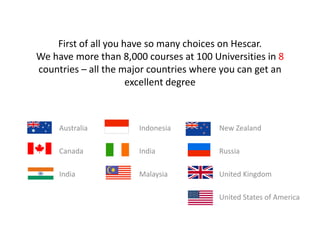
or go and look for courses hereFirst of all you have so many choices on Hescar. We have more than 8,000 courses at 100 Universities in 8 countries – all the major countries where you can get an excellent degree		Australia				Indonesia				New Zealand				Canada				India				Russia					India				Malaysia				United Kingdom												United States of America
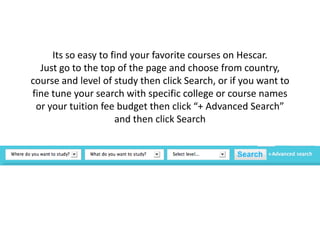
Its so easy to find your favorite courses on Hescar.Just go to the top of the page and choose from country, course and level of study then click Search, or if you want to fine tune your search with specific college or course names or your tuition fee budget then click “+ Advanced Search” and then click Search
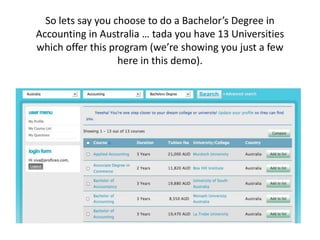
So lets say you choose to do a Bachelor’s Degree in Accounting in Australia … tada you have 13 Universities which offer this program (we’re showing you just a few here in this demo).
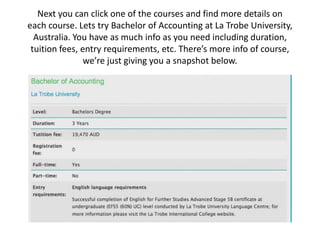
Next you can click one of the courses and find more details on each course. Lets try Bachelor of Accounting at La Trobe University, Australia. You have as much info as you need including duration, tuition fees, entry requirements, etc. There’s more info of course, we’re just giving you a snapshot below.
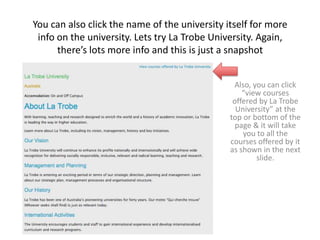
You can also click the name of the university itself for more info on the university. Lets try La Trobe University. Again, there’s lots more info and this is just a snapshotAlso, you can click “view courses offered by La Trobe University” at the top or bottom of the page & it will take you to all the courses offered by it as shown in the next slide.
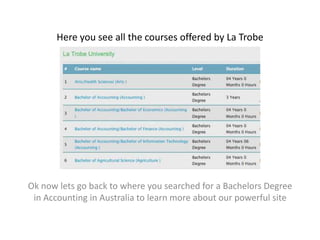
Here you see all the courses offered by La TrobeOk now lets go back to where you searched for a Bachelors Degree in Accounting in Australia to learn more about our powerful site
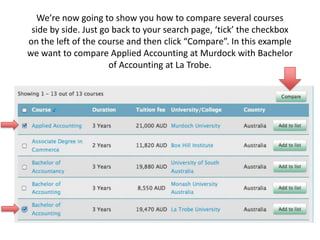
We’re now going to show you how to compare several courses side by side. Just go back to your search page, ‘tick’ the checkbox on the left of the course and then click “Compare”. In this example we want to compare Applied Accounting at Murdock with Bachelor of Accounting at La Trobe.
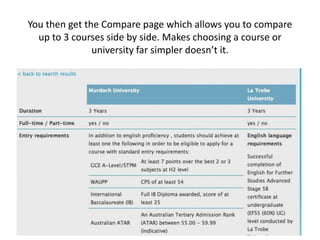
You then get the Compare page which allows you to compare up to 3 courses side by side. Makes choosing a course or university far simpler doesn’t it.
The rest to be completed later

Hescar slideshow for students

  • 1.
    Slideshow for studentswho register on HescarThe following is what they will see AFTER they register i.e. they have keyed in their email & password. Use the format like on slideshare or maybe even host this on slideshare.
  • 2.
    Thank you forregisteringCheck out what you can do on this awesome site or if you prefer you can go on and: complete your personal details by clicking here
  • 3.
    or go andlook for courses hereFirst of all you have so many choices on Hescar. We have more than 8,000 courses at 100 Universities in 8 countries – all the major countries where you can get an excellent degree Australia Indonesia New Zealand Canada India Russia India Malaysia United Kingdom United States of America
  • 4.
    Its so easyto find your favorite courses on Hescar.Just go to the top of the page and choose from country, course and level of study then click Search, or if you want to fine tune your search with specific college or course names or your tuition fee budget then click “+ Advanced Search” and then click Search
  • 5.
    So lets sayyou choose to do a Bachelor’s Degree in Accounting in Australia … tada you have 13 Universities which offer this program (we’re showing you just a few here in this demo).
  • 6.
    Next you canclick one of the courses and find more details on each course. Lets try Bachelor of Accounting at La Trobe University, Australia. You have as much info as you need including duration, tuition fees, entry requirements, etc. There’s more info of course, we’re just giving you a snapshot below.
  • 7.
    You can alsoclick the name of the university itself for more info on the university. Lets try La Trobe University. Again, there’s lots more info and this is just a snapshotAlso, you can click “view courses offered by La Trobe University” at the top or bottom of the page & it will take you to all the courses offered by it as shown in the next slide.
  • 8.
    Here you seeall the courses offered by La TrobeOk now lets go back to where you searched for a Bachelors Degree in Accounting in Australia to learn more about our powerful site
  • 9.
    We’re now goingto show you how to compare several courses side by side. Just go back to your search page, ‘tick’ the checkbox on the left of the course and then click “Compare”. In this example we want to compare Applied Accounting at Murdock with Bachelor of Accounting at La Trobe.
  • 10.
    You then getthe Compare page which allows you to compare up to 3 courses side by side. Makes choosing a course or university far simpler doesn’t it.
  • 11.
    The rest tobe completed later