What is Evaluation
Goals of evaluation
Evaluation Criteria
I. Evaluate the Design by expert
analysis
II.Evaluation through User
Participation
• Evaluation tests usability,
functionality and acceptability of
an interactive design.
• Evaluation should occur throughout
the design life cycle with the
results of the evaluation feedback
into modifications to the design.
• Evaluation occurs in laboratory,
field and collaboration with users.
• Evaluates both design and
implementation.
• assess extent and accessibility of
system functionality.
• assess user’s experience of
interaction.
• identify specific problems with
the system.
It involves:
Evaluate the Design by expert analysis
 Cognitive Walkthrough
 Heuristic Evaluation
Evaluation through User Participation.
 Proposed by Polson and Lewis(1990)
 Walkthrough means “sequence of steps”
 Evaluates design on how well it supports user in learning task
 Expert ‘walks though’ design to identify potential problems
using psychological principles
 The Sequence of actions to the steps that an interface will
require a user to perform in order to accomplish some known
tasks
For each task Walkthrough considers:
 What impact will interaction have on user?
 What Cognitive processes are required?
 What learning problem may occur?
What we need before starting a walkthrough?
 Specification OR prototype of system
 A description of representative task that most user would perform on
the system
 A complete list of actions needed to complete the task
 Knowledge about user abilities and experience
For each step in action sequence, evaluators try to answer:
 Is the effect of the action the same as the user’s goal at that
point?
 Will users see that the action is available?
 Once users have found the correct action, will they know it is the
one they need?
 After the action is taken, will user understand the feedback they
get?
 Proposed by Nielsen and Molich.
 Basic idea: Have one or more
experts evaluate an interface
based on a common set of
criteria.
 Heuristic evaluation is a
valuable technique to check the
usability.
 Performed in Design phase, useful
for evaluating early design.
 Heuristic evaluation “debugs”
design
 Heuristic evaluation is fast and
 Visibility of system status.
 Match between system and the real world.
 User control and freedom.
 Consistency and standards.
 Error prevention.
 Recognition rather than recall.
 Flexibility an efficiency of use.
 Aesthetics and minimalist design.
 Help users recognize, diagnose, and recover from
errors.
 Help and documentation.
 The interface should use concepts, language and
real-world conventions that are familiar to the
user.
Why?
 The user already has knowledge from the outside
world. A user interface can leverage that
knowledge
 If the interface does not match the way the
world typically works people will become
confused
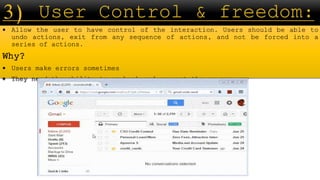
 Allow the user to have control of the interaction. Users should be able to
undo actions, exit from any sequence of actions, and not be forced into a
series of actions.
Why?
 Users make errors sometimes
 They need the ability to go back and correct the errors
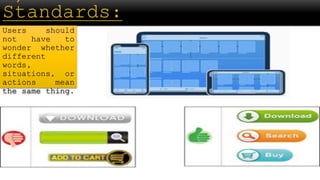
Users should
not have to
wonder whether
different
words,
situations, or
actions mean
the same thing.
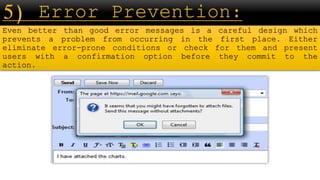
Even better than good error messages is a careful design which
prevents a problem from occurring in the first place. Either
eliminate error-prone conditions or check for them and present
users with a confirmation option before they commit to the
action.
 Show all the options available to the user rather than
expecting them to remember them all
 Do not require users to remember information.
The Interface should
be flexible
transforming itself
between a novice user
and an advanced user.
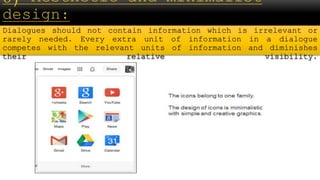
Dialogues should not contain information which is irrelevant or
rarely needed. Every extra unit of information in a dialogue
competes with the relevant units of information and diminishes
their relative visibility.
Error messages should be expressed in plain language (no
codes), precisely indicate the problem, and
constructively suggest a solution.
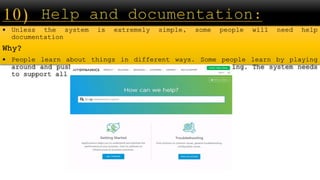
 Unless the system is extremely simple, some people will need help
documentation
Why?
 People learn about things in different ways. Some people learn by playing
around and pushing buttons, other people learn by reading. The system needs
to support all people.
1) Style of Evaluation:
 Laboratory studies
 Field Studies
2) Experimental Evaluation Design:
 Participants
 Variables
 Hypothesis
 Experimental Design
3) Observational Techniques:
 Think aloud
 Cooperate Evaluation
 Protocol Analysis
 Walkthrough
4) Query Techniques:
 Interviews
 Questionnaires
What is Evaluation
Goals of evaluation
Evaluation Criteria:
1) Evaluate the Design by expert analysis
 Cognitive Walkthrough
 Heuristic analysis
2) Evaluation through User Participation
 Style of Evaluation
 Experimental Evaluation Design:
 Observational Techniques
 Query Techniques

hci Evaluation Techniques.pptx

  • 1.
    What is Evaluation Goalsof evaluation Evaluation Criteria I. Evaluate the Design by expert analysis II.Evaluation through User Participation
  • 2.
    • Evaluation testsusability, functionality and acceptability of an interactive design. • Evaluation should occur throughout the design life cycle with the results of the evaluation feedback into modifications to the design. • Evaluation occurs in laboratory, field and collaboration with users. • Evaluates both design and implementation.
  • 3.
    • assess extentand accessibility of system functionality. • assess user’s experience of interaction. • identify specific problems with the system.
  • 4.
    It involves: Evaluate theDesign by expert analysis  Cognitive Walkthrough  Heuristic Evaluation Evaluation through User Participation.
  • 5.
     Proposed byPolson and Lewis(1990)  Walkthrough means “sequence of steps”  Evaluates design on how well it supports user in learning task  Expert ‘walks though’ design to identify potential problems using psychological principles  The Sequence of actions to the steps that an interface will require a user to perform in order to accomplish some known tasks For each task Walkthrough considers:  What impact will interaction have on user?  What Cognitive processes are required?  What learning problem may occur?
  • 6.
    What we needbefore starting a walkthrough?  Specification OR prototype of system  A description of representative task that most user would perform on the system  A complete list of actions needed to complete the task  Knowledge about user abilities and experience For each step in action sequence, evaluators try to answer:  Is the effect of the action the same as the user’s goal at that point?  Will users see that the action is available?  Once users have found the correct action, will they know it is the one they need?  After the action is taken, will user understand the feedback they get?
  • 7.
     Proposed byNielsen and Molich.  Basic idea: Have one or more experts evaluate an interface based on a common set of criteria.  Heuristic evaluation is a valuable technique to check the usability.  Performed in Design phase, useful for evaluating early design.  Heuristic evaluation “debugs” design  Heuristic evaluation is fast and
  • 8.
     Visibility ofsystem status.  Match between system and the real world.  User control and freedom.  Consistency and standards.  Error prevention.  Recognition rather than recall.  Flexibility an efficiency of use.  Aesthetics and minimalist design.  Help users recognize, diagnose, and recover from errors.  Help and documentation.
  • 10.
     The interfaceshould use concepts, language and real-world conventions that are familiar to the user. Why?  The user already has knowledge from the outside world. A user interface can leverage that knowledge  If the interface does not match the way the world typically works people will become confused
  • 11.
     Allow theuser to have control of the interaction. Users should be able to undo actions, exit from any sequence of actions, and not be forced into a series of actions. Why?  Users make errors sometimes  They need the ability to go back and correct the errors
  • 12.
    Users should not haveto wonder whether different words, situations, or actions mean the same thing.
  • 13.
    Even better thangood error messages is a careful design which prevents a problem from occurring in the first place. Either eliminate error-prone conditions or check for them and present users with a confirmation option before they commit to the action.
  • 14.
     Show allthe options available to the user rather than expecting them to remember them all  Do not require users to remember information.
  • 15.
    The Interface should beflexible transforming itself between a novice user and an advanced user.
  • 16.
    Dialogues should notcontain information which is irrelevant or rarely needed. Every extra unit of information in a dialogue competes with the relevant units of information and diminishes their relative visibility.
  • 17.
    Error messages shouldbe expressed in plain language (no codes), precisely indicate the problem, and constructively suggest a solution.
  • 18.
     Unless thesystem is extremely simple, some people will need help documentation Why?  People learn about things in different ways. Some people learn by playing around and pushing buttons, other people learn by reading. The system needs to support all people.
  • 19.
    1) Style ofEvaluation:  Laboratory studies  Field Studies 2) Experimental Evaluation Design:  Participants  Variables  Hypothesis  Experimental Design 3) Observational Techniques:  Think aloud  Cooperate Evaluation  Protocol Analysis  Walkthrough 4) Query Techniques:  Interviews  Questionnaires
  • 20.
    What is Evaluation Goalsof evaluation Evaluation Criteria: 1) Evaluate the Design by expert analysis  Cognitive Walkthrough  Heuristic analysis 2) Evaluation through User Participation  Style of Evaluation  Experimental Evaluation Design:  Observational Techniques  Query Techniques