

Hands-On Testing: How to
Integrate Tests in OPNFV
Jose Lausuch
Ericsson, Functest PTL
Do not worry
we make it easy for you
1) Check the documentation
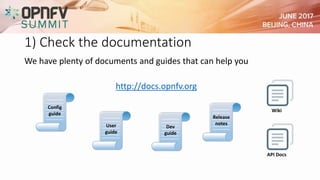
We have plenty of documents and guides that can help you
http://docs.opnfv.org
Config
guide
Dev
guide
User
guide
Release
notes
Wiki
API Docs
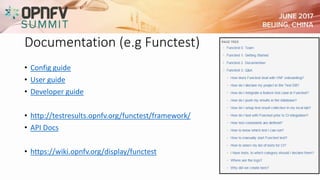
Documentation (e.g Functest)
• Config guide
• User guide
• Developer guide
• http://testresults.opnfv.org/functest/framework/
• API Docs
• https://wiki.opnfv.org/display/functest
2) Get familiar with the environment
Deploy OPNFV with your desired features installed
Follow the instructions to set up the test framework
Run tests
3) Write a dummy test case
Before testing your feature, make sure you can run
a simple “Hello World” with the test framework.
The framework should return “test successful”
4) Add the content of the test
Once you understand how to integrate a test in the
framework, you can start writing the code that exercises
your feature
Make use of framework libraries and helper functions
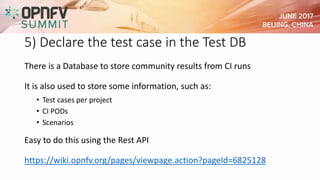
5) Declare the test case in the Test DB
There is a Database to store community results from CI runs
It is also used to store some information, such as:
• Test cases per project
• CI PODs
• Scenarios
Easy to do this using the Rest API
https://wiki.opnfv.org/pages/viewpage.action?pageId=6825128
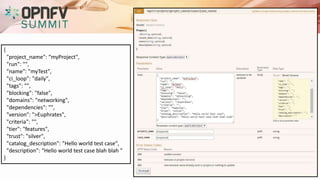
{
"project_name": “myProject",
"run": "",
"name": "myTest",
"ci_loop": "daily",
"tags": "",
"blocking": "false",
"domains": "networking",
"dependencies": "",
"version": ">Euphrates",
"criteria": "",
"tier": "features",
"trust": "silver",
"catalog_description": "Hello world test case",
"description": "Hello world test case blah blah "
}
6) Push your code
You probably want to keep the code of your test in your repo
BUT
You will need to enable some things in the test framework
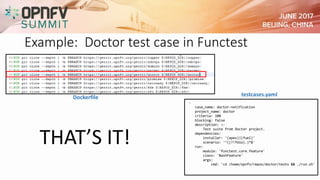
Example: Doctor test case in Functest
-
case_name: doctor-notification
project_name: doctor
criteria: 100
blocking: false
description: >-
Test suite from Doctor project.
dependencies:
installer: '(apex)|(fuel)'
scenario: '^((?!fdio).)*$'
run:
module: 'functest.core.feature'
class: 'BashFeature'
args:
cmd: 'cd /home/opnfv/repos/doctor/tests && ./run.sh'
testcases.yamlDockerfile
THAT’S IT!
7) Finally
Once the code is merged in your
repository and in the test framework
 Check CI
DEMO
Thank You

Hands-On Testing: How to Integrate Tests in OPNFV

  • 2.
    Hands-On Testing: Howto Integrate Tests in OPNFV Jose Lausuch Ericsson, Functest PTL
  • 4.
    Do not worry wemake it easy for you
  • 5.
    1) Check thedocumentation We have plenty of documents and guides that can help you http://docs.opnfv.org Config guide Dev guide User guide Release notes Wiki API Docs
  • 6.
    Documentation (e.g Functest) •Config guide • User guide • Developer guide • http://testresults.opnfv.org/functest/framework/ • API Docs • https://wiki.opnfv.org/display/functest
  • 7.
    2) Get familiarwith the environment Deploy OPNFV with your desired features installed Follow the instructions to set up the test framework Run tests
  • 8.
    3) Write adummy test case Before testing your feature, make sure you can run a simple “Hello World” with the test framework. The framework should return “test successful”
  • 9.
    4) Add thecontent of the test Once you understand how to integrate a test in the framework, you can start writing the code that exercises your feature Make use of framework libraries and helper functions
  • 10.
    5) Declare thetest case in the Test DB There is a Database to store community results from CI runs It is also used to store some information, such as: • Test cases per project • CI PODs • Scenarios Easy to do this using the Rest API https://wiki.opnfv.org/pages/viewpage.action?pageId=6825128
  • 11.
    { "project_name": “myProject", "run": "", "name":"myTest", "ci_loop": "daily", "tags": "", "blocking": "false", "domains": "networking", "dependencies": "", "version": ">Euphrates", "criteria": "", "tier": "features", "trust": "silver", "catalog_description": "Hello world test case", "description": "Hello world test case blah blah " }
  • 12.
    6) Push yourcode You probably want to keep the code of your test in your repo BUT You will need to enable some things in the test framework
  • 13.
    Example: Doctor testcase in Functest - case_name: doctor-notification project_name: doctor criteria: 100 blocking: false description: >- Test suite from Doctor project. dependencies: installer: '(apex)|(fuel)' scenario: '^((?!fdio).)*$' run: module: 'functest.core.feature' class: 'BashFeature' args: cmd: 'cd /home/opnfv/repos/doctor/tests && ./run.sh' testcases.yamlDockerfile THAT’S IT!
  • 14.
    7) Finally Once thecode is merged in your repository and in the test framework  Check CI
  • 15.
  • 16.