Hadoop File Formats and Data Ingestion
Prasanth Kothuri, CERN
2
Files Formats – not just CSV
- Key factor in Big Data processing and query
performance
- Schema Evolution
- Compression and Splittability
- Data Processing
• Write performance
• Partial read
• Full read
3
Hadoop File Formats and Data Ingestion
Available File Formats
- Text / CSV
- JSON
- SequenceFile
• binary key/value pair format
- Avro
- Parquet
- ORC
• optimized row columnar format
4
Hadoop File Formats and Data Ingestion
AVRO
- Language neutral data serialization system
- Write a file in python and read it in C
- AVRO data is described using language independent
schema
- AVRO schemas are usually written in JSON and data is
encoded in binary format
- Supports schema evolution
- producers and consumers at different versions of schema
- Supports compression and are splittable
5
Hadoop File Formats and Data Ingestion
Avro – File structure and example
Sample AVRO schema in JSON format Avro file structure
{
"type" : "record",
"name" : "tweets",
"fields" : [ {
"name" : "username",
"type" : "string",
}, {
"name" : "tweet",
"type" : "string",
}, {
"name" : "timestamp",
"type" : "long",
} ],
"doc:" : “schema for storing tweets"
}
Hadoop File Formats and Data Ingestion 6
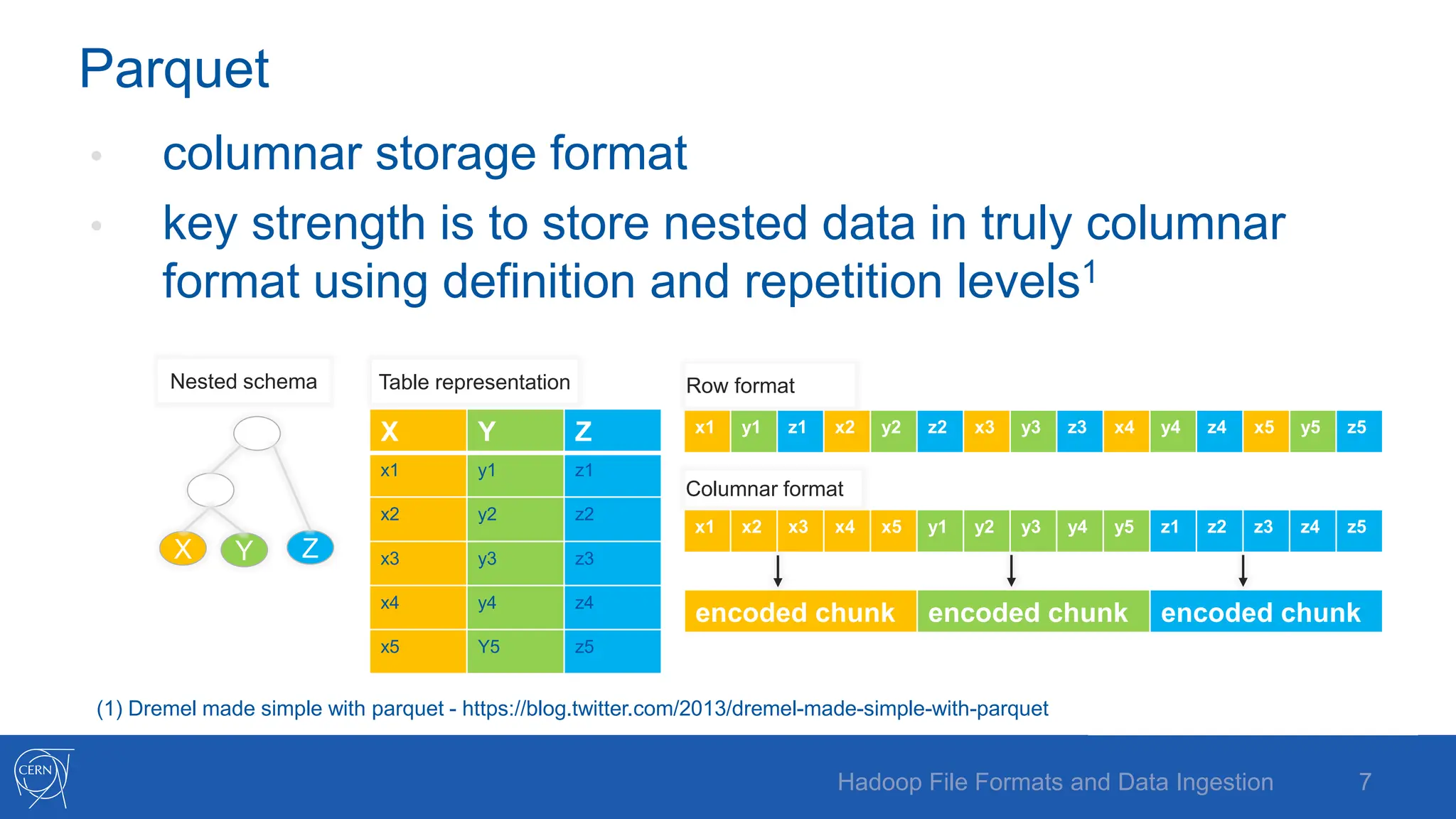
Parquet
• columnar storage format
• key strength is to store nested data in truly columnar
format using definition and repetition levels1
X Y Z
X Y Z
x1 y1 z1
x2 y2 z2
x3 y3 z3
x4 y4 z4
x5 Y5 z5
x1 y1 z1 x2 y2 z2 x3 y3 z3 x4 y4 z4 x5 y5 z5
x1 x2 x3 x4 x5 y1 y2 y3 y4 y5 z1 z2 z3 z4 z5
encoded chunk encoded chunk encoded chunk
Nested schema Table representation Row format
Columnar format
7
Hadoop File Formats and Data Ingestion
(1) Dremel made simple with parquet - https://blog.twitter.com/2013/dremel-made-simple-with-parquet
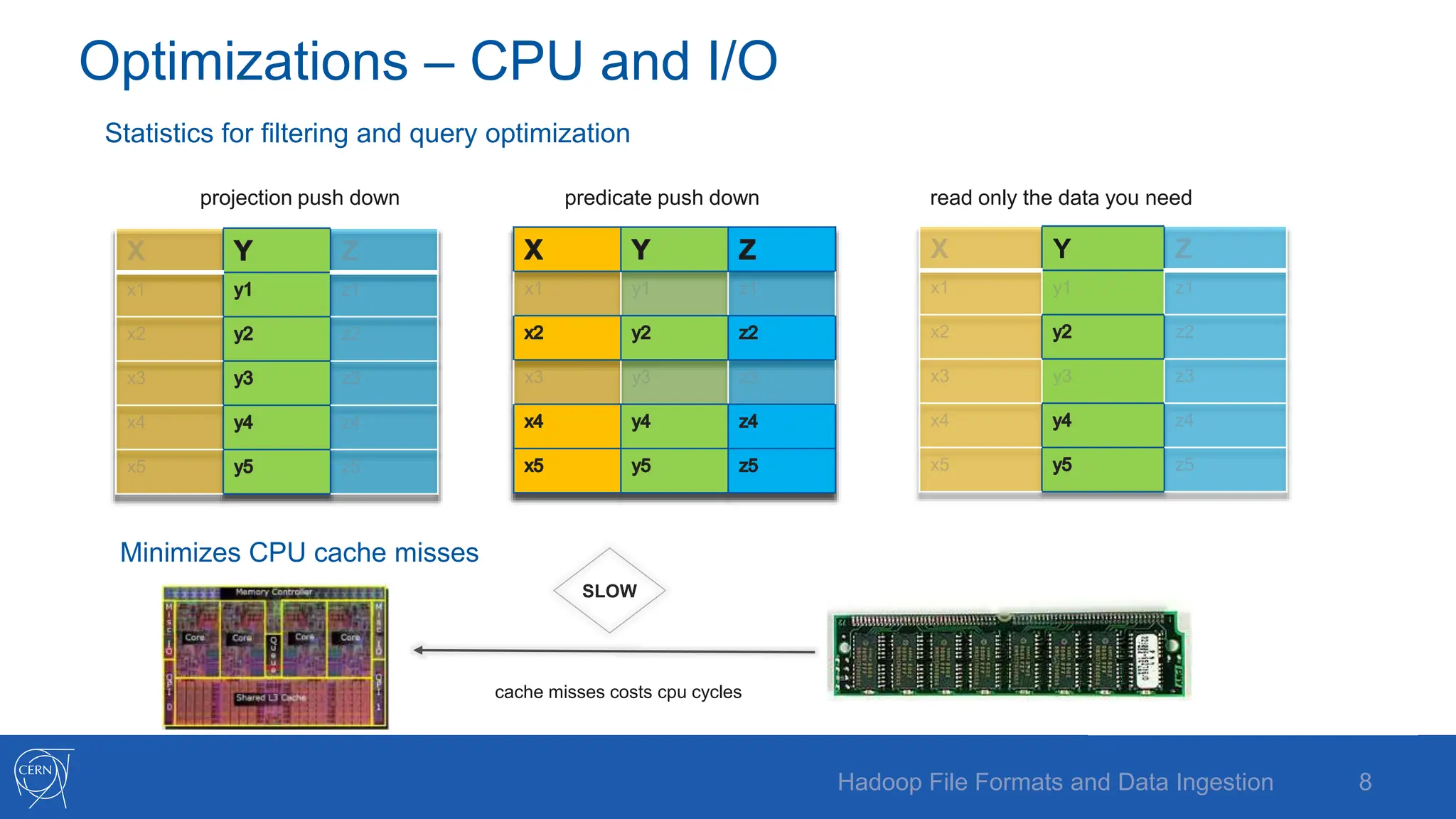
Optimizations – CPU and I/O
Statistics for filtering and query optimization
projection push down predicate push down read only the data you need
Minimizes CPU cache misses
Y
SLOW
cache misses costs cpu cycles
8
Hadoop File Formats and Data Ingestion
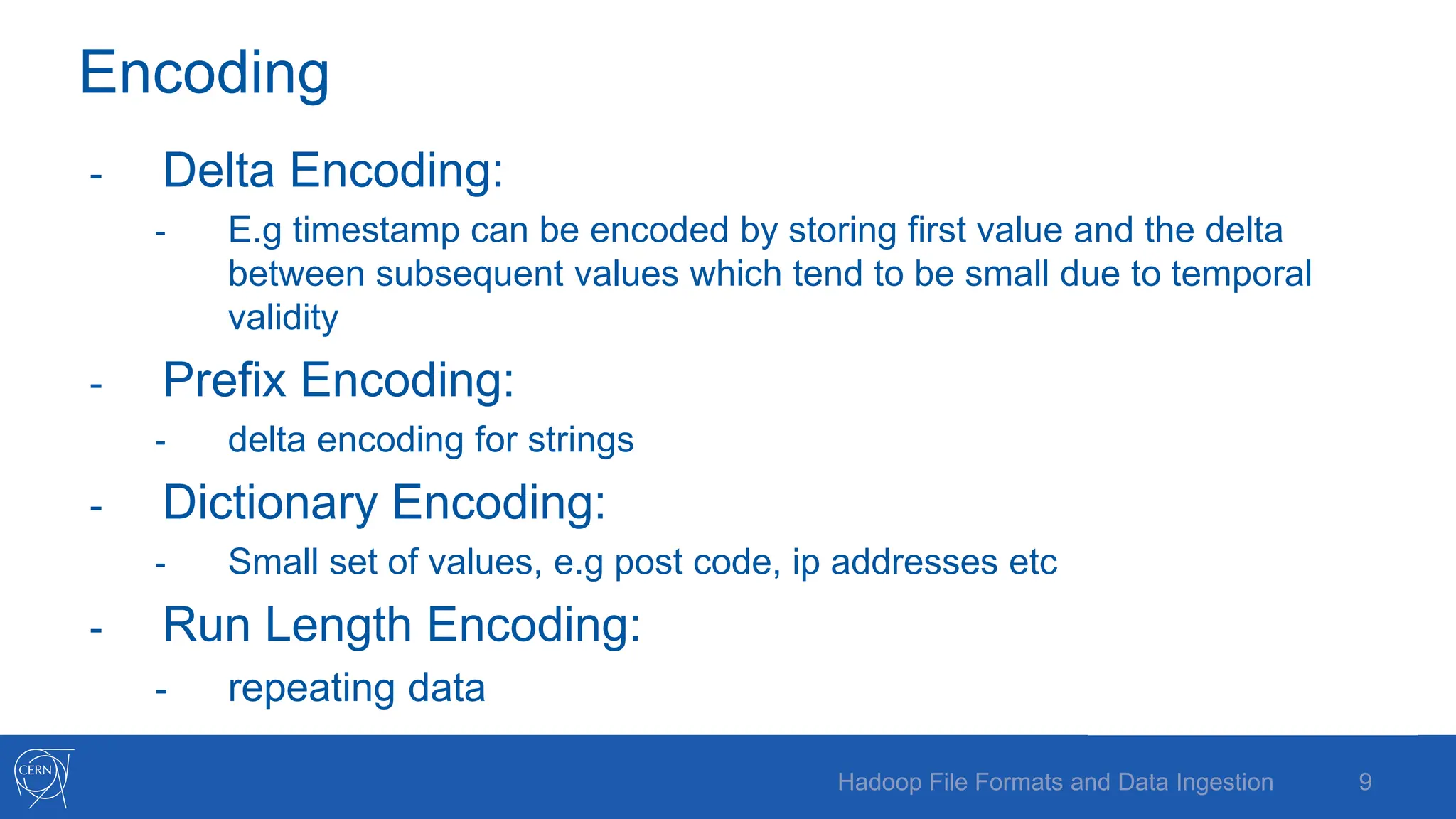
Encoding
- Delta Encoding:
- E.g timestamp can be encoded by storing first value and the delta
between subsequent values which tend to be small due to temporal
validity
- Prefix Encoding:
- delta encoding for strings
- Dictionary Encoding:
- Small set of values, e.g post code, ip addresses etc
- Run Length Encoding:
- repeating data
9
Hadoop File Formats and Data Ingestion
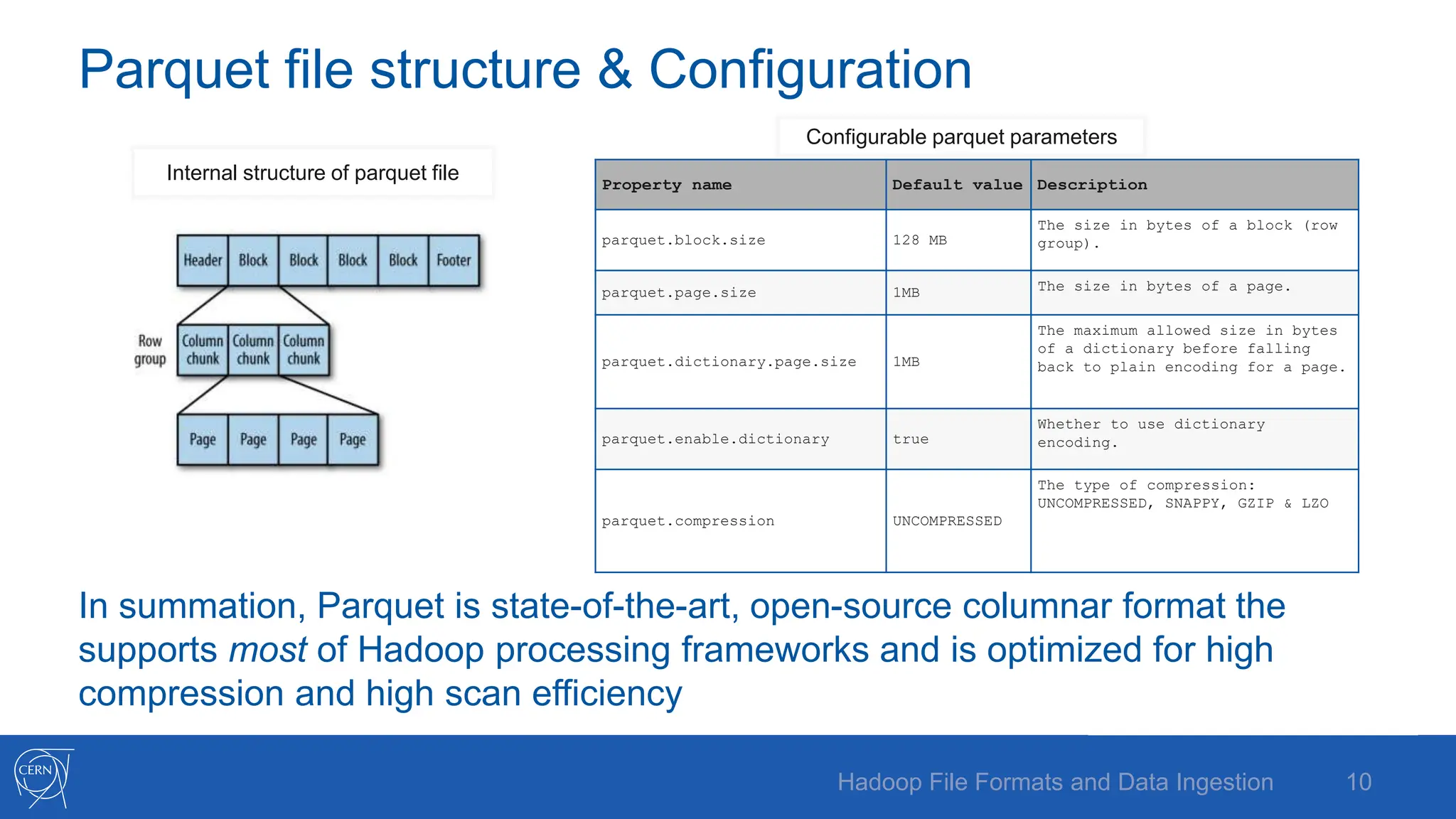
Parquet file structure & Configuration
Property name Default value Description
parquet.block.size 128 MB
The size in bytes of a block (row
group).
parquet.page.size 1MB The size in bytes of a page.
parquet.dictionary.page.size 1MB
The maximum allowed size in bytes
of a dictionary before falling
back to plain encoding for a page.
parquet.enable.dictionary true
Whether to use dictionary
encoding.
parquet.compression UNCOMPRESSED
The type of compression:
UNCOMPRESSED, SNAPPY, GZIP & LZO
In summation, Parquet is state-of-the-art, open-source columnar format the
supports most of Hadoop processing frameworks and is optimized for high
compression and high scan efficiency
Internal structure of parquet file
Configurable parquet parameters
10
Hadoop File Formats and Data Ingestion
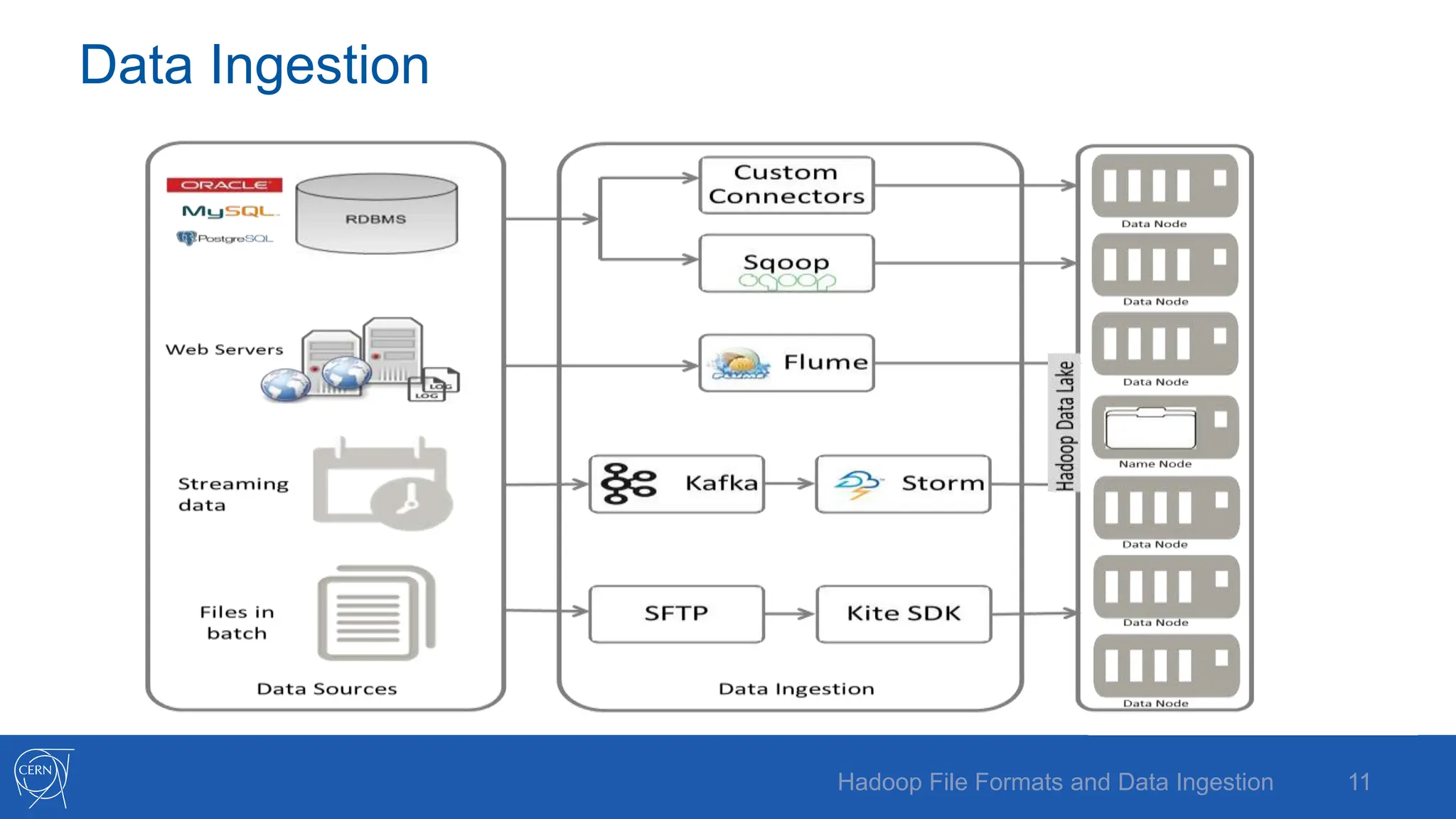
Data Ingestion
11
Hadoop File Formats and Data Ingestion
Flume
Flume is for high-volume ingestion into Hadoop of event-
based data
e.g collect logfiles from a bank of web servers, then
move log events from those files to HDFS (clickstream)
12
Hadoop File Formats and Data Ingestion
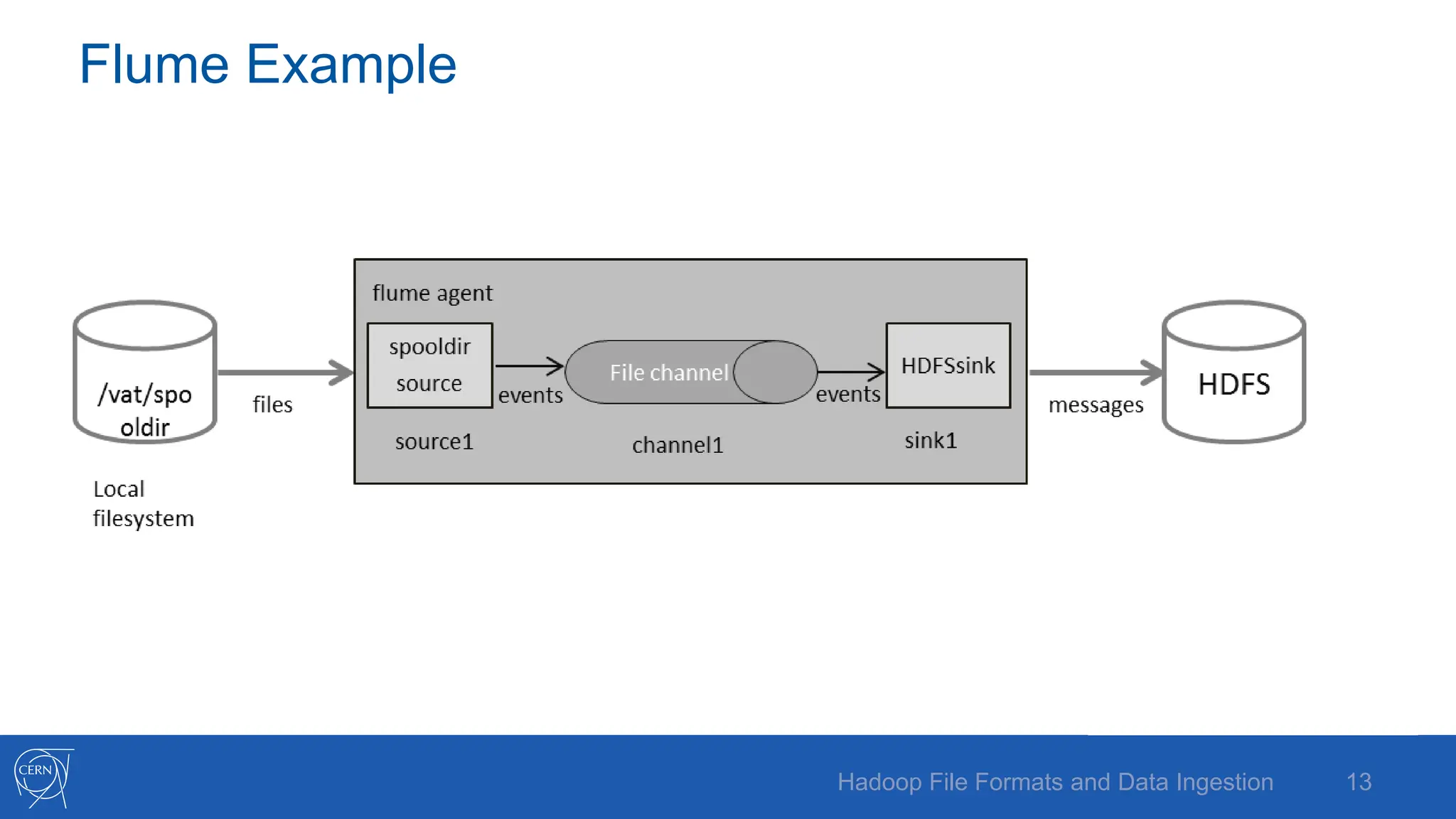
Flume Example
13
Hadoop File Formats and Data Ingestion
Flume configuration
agent1.sources = source1
agent1.sinks = sink1
agent1.channels = channel1
agent1.sources.source1.channels = channel1
agent1.sinks.sink1.channel = channel1
agent1.sources.source1.type = spooldir
agent1.sources.source1.spoolDir = /var/spooldir
agent1.sinks.sink1.type = hdfs
agent1.sinks.sink1.hdfs.path = hdfs://hostname:8020/user/flume/logs
agent1.sinks.sink1.hdfs.filetype = DataStream
agent1.channels.channel1.type = memory
agent1.channels.channel1.capacity = 10000
agent1.channels.channel1.transactionCapacity = 100
flume-ng agent –name agent1 –conf $FLUME_HOME/conf
Category Component
Source
Avro
Exec
HTTP
JMS
Netcat
Sequence generator
Spooling directory
Syslog
Thrift
Twitter
Sink
Avro
Elasticsearch
File roll
HBase
HDFS
IRC
Logger
Morphline (Solr)
Null
Thrift
Channel
File
JDBC
Memory
14
Hadoop File Formats and Data Ingestion
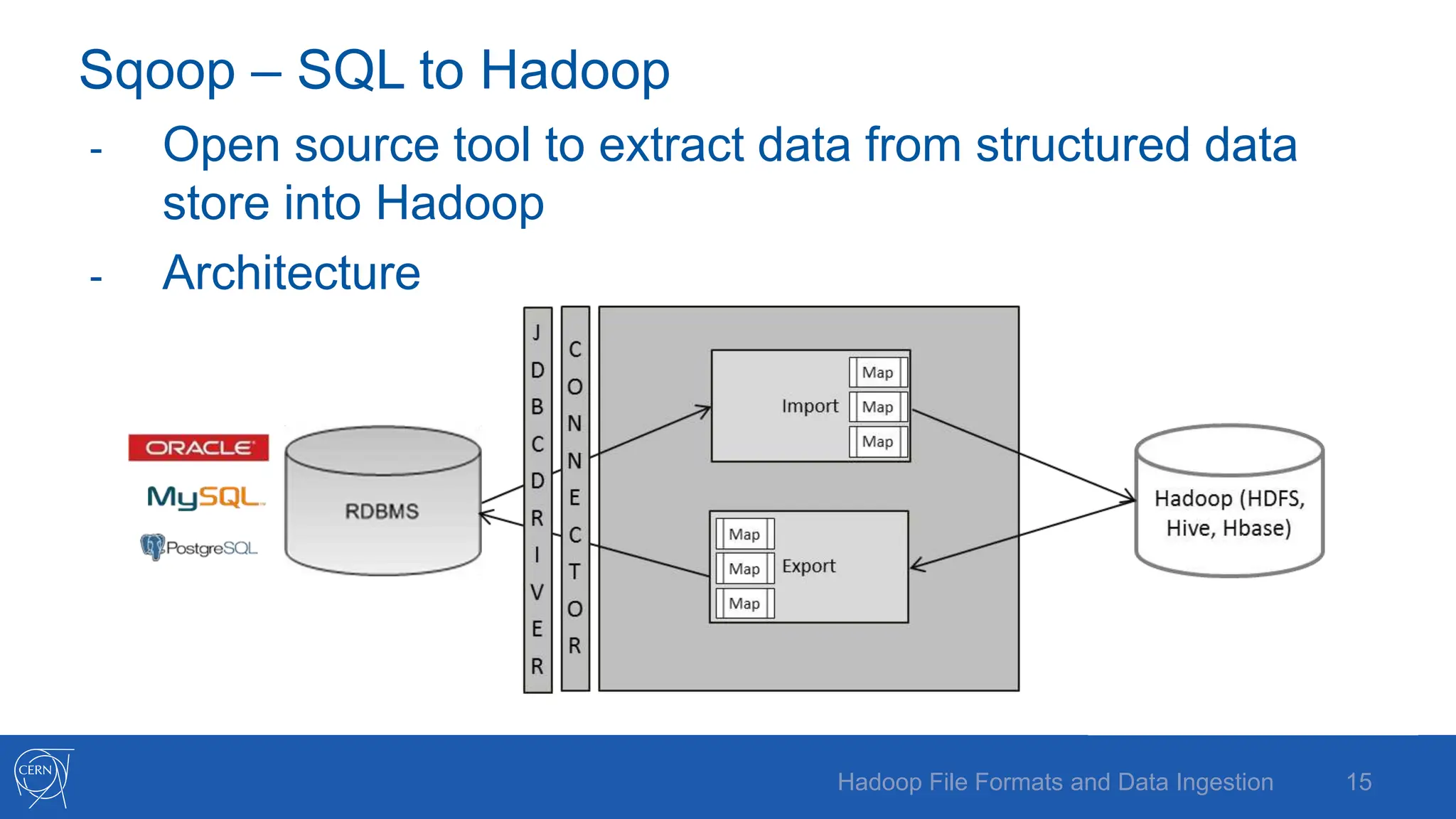
Sqoop – SQL to Hadoop
- Open source tool to extract data from structured data
store into Hadoop
- Architecture
15
Hadoop File Formats and Data Ingestion
Sqoop – contd.
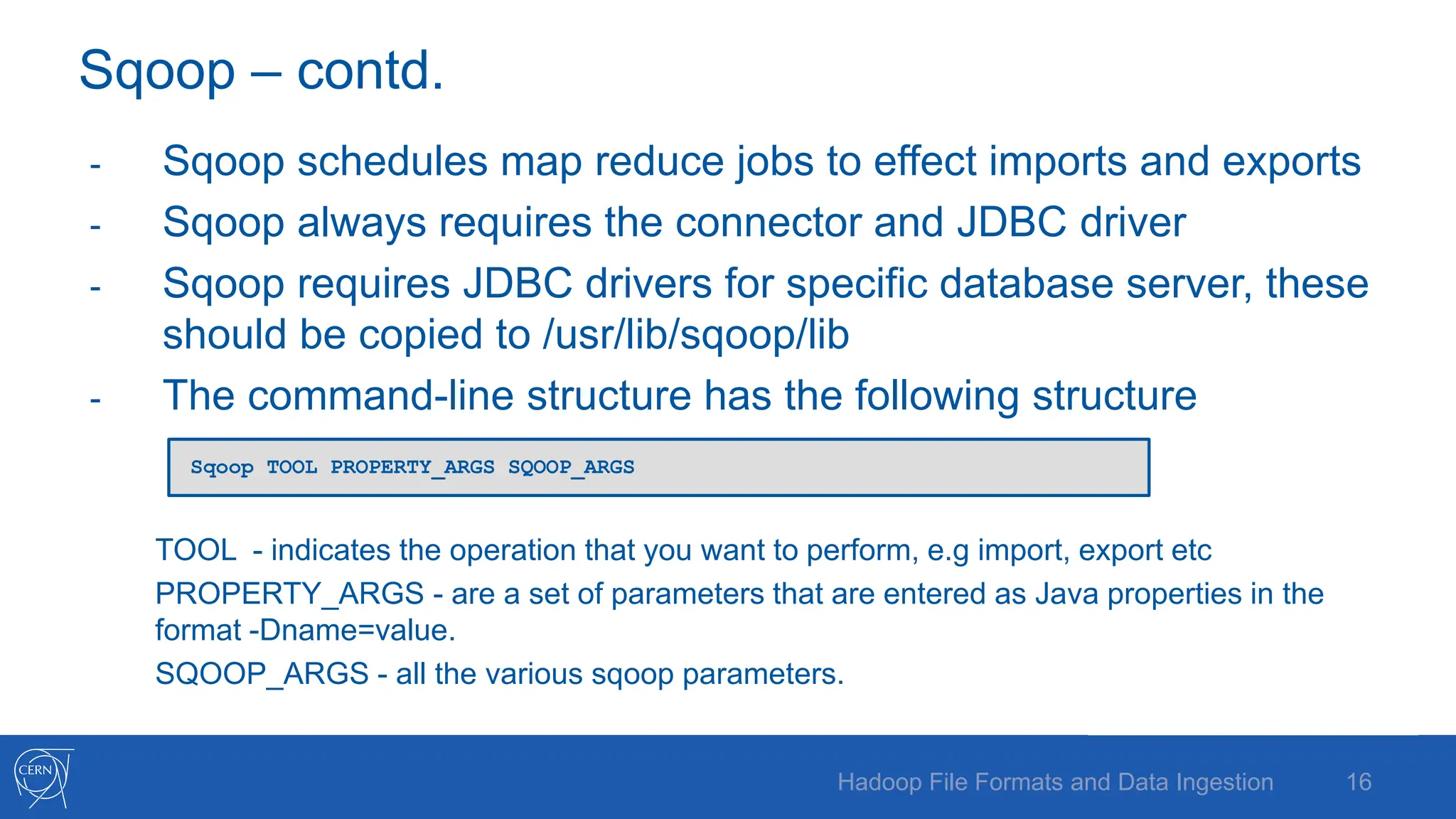
- Sqoop schedules map reduce jobs to effect imports and exports
- Sqoop always requires the connector and JDBC driver
- Sqoop requires JDBC drivers for specific database server, these
should be copied to /usr/lib/sqoop/lib
- The command-line structure has the following structure
TOOL - indicates the operation that you want to perform, e.g import, export etc
PROPERTY_ARGS - are a set of parameters that are entered as Java properties in the
format -Dname=value.
SQOOP_ARGS - all the various sqoop parameters.
16
Hadoop File Formats and Data Ingestion
Sqoop TOOL PROPERTY_ARGS SQOOP_ARGS
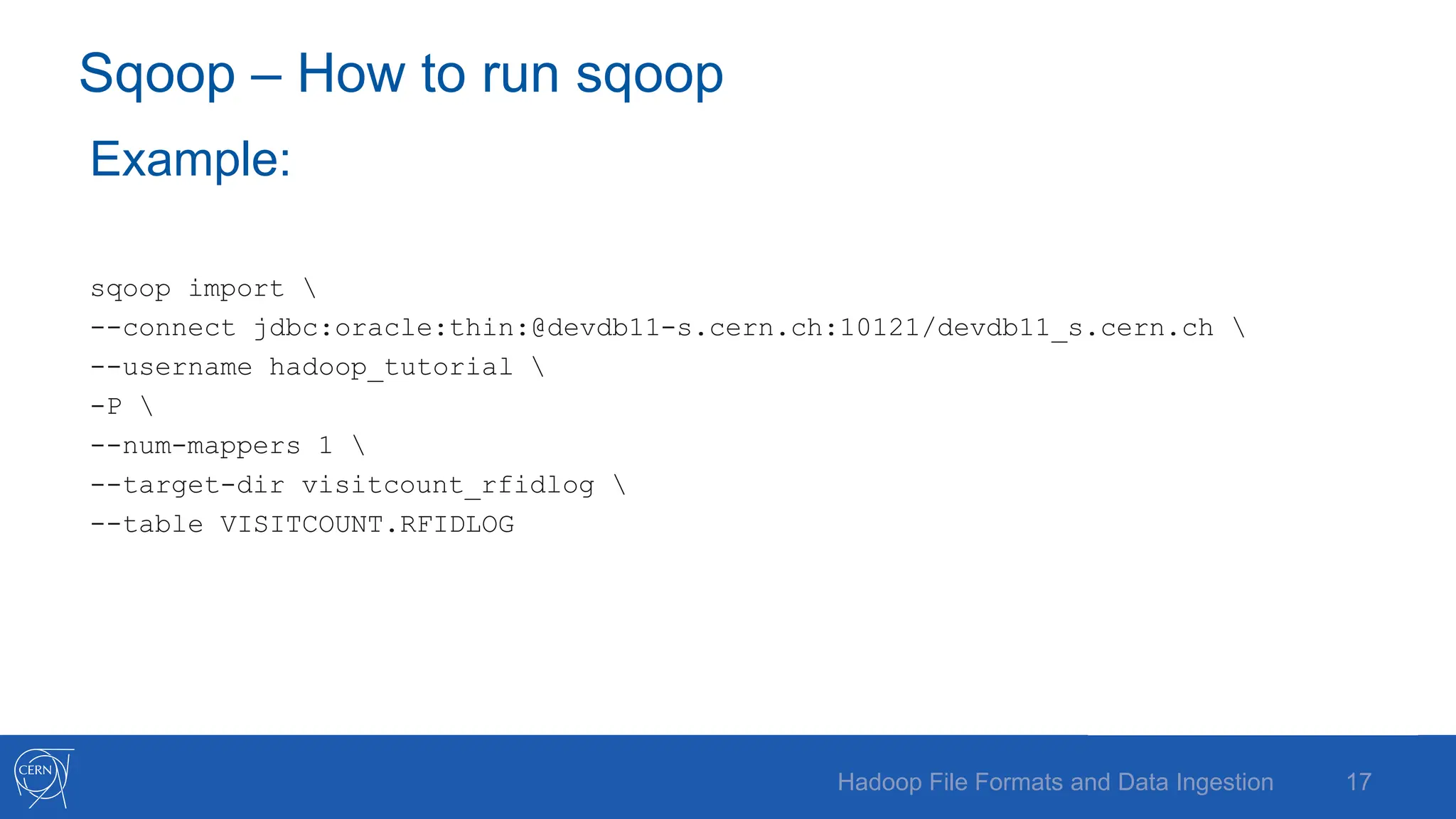
Sqoop – How to run sqoop
Example:
sqoop import 
--connect jdbc:oracle:thin:@devdb11-s.cern.ch:10121/devdb11_s.cern.ch 
--username hadoop_tutorial 
-P 
--num-mappers 1 
--target-dir visitcount_rfidlog 
--table VISITCOUNT.RFIDLOG
17
Hadoop File Formats and Data Ingestion
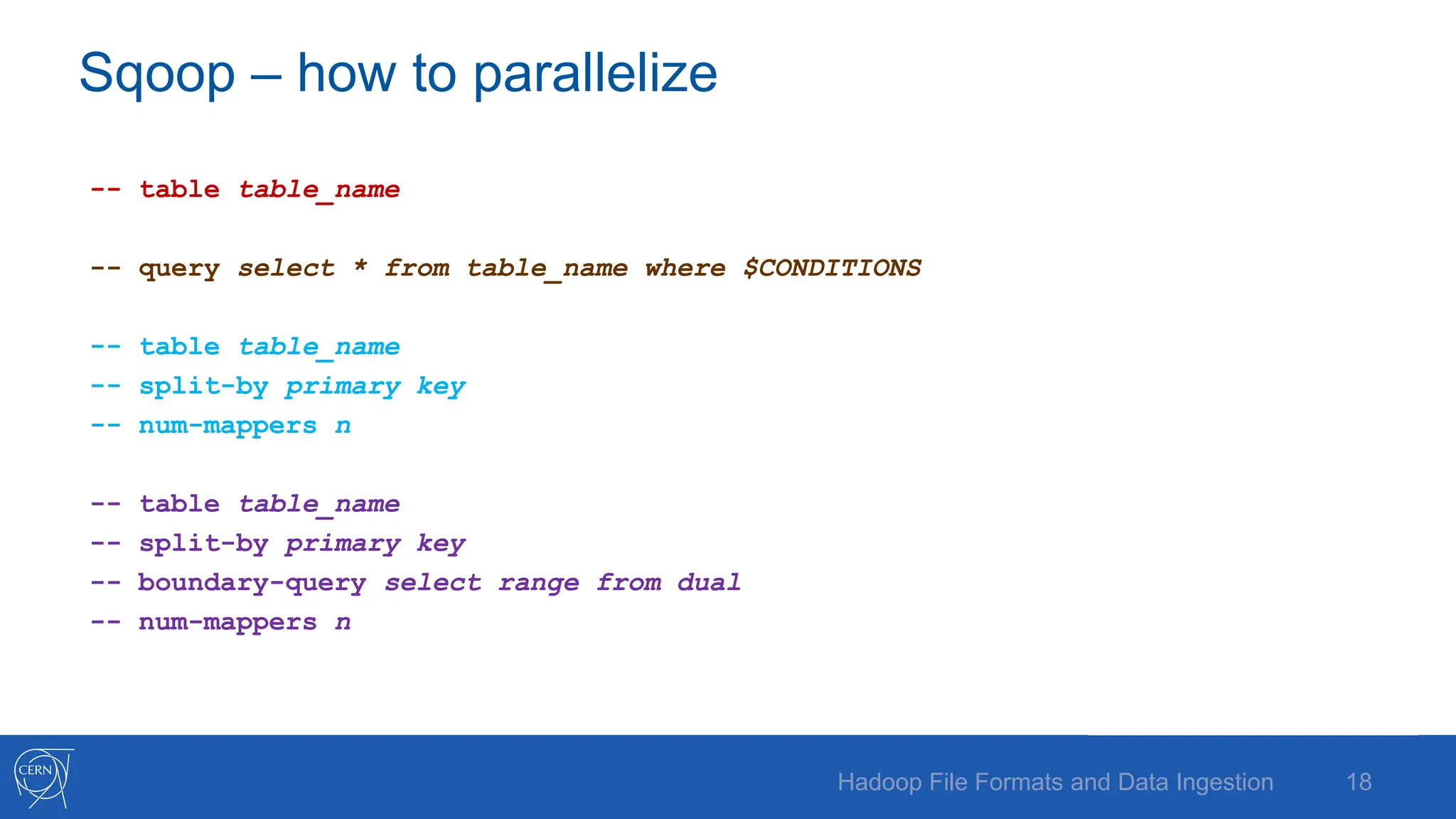
Sqoop – how to parallelize
-- table table_name
-- query select * from table_name where $CONDITIONS
-- table table_name
-- split-by primary key
-- num-mappers n
-- table table_name
-- split-by primary key
-- boundary-query select range from dual
-- num-mappers n
18
Hadoop File Formats and Data Ingestion
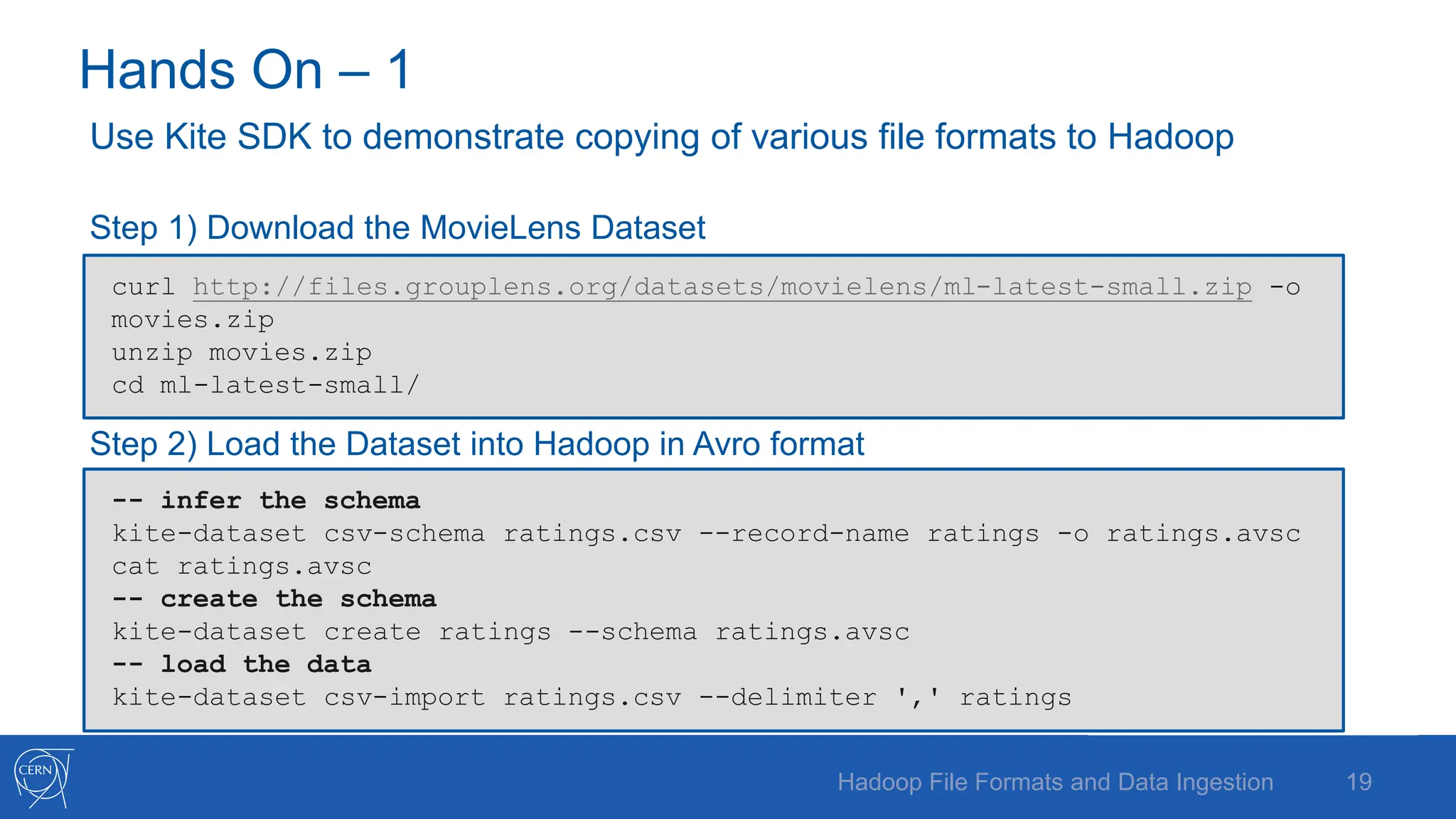
Hands On – 1
Use Kite SDK to demonstrate copying of various file formats to Hadoop
Step 1) Download the MovieLens Dataset
Step 2) Load the Dataset into Hadoop in Avro format
19
Hadoop File Formats and Data Ingestion
curl http://files.grouplens.org/datasets/movielens/ml-latest-small.zip -o
movies.zip
unzip movies.zip
cd ml-latest-small/
-- infer the schema
kite-dataset csv-schema ratings.csv --record-name ratings -o ratings.avsc
cat ratings.avsc
-- create the schema
kite-dataset create ratings --schema ratings.avsc
-- load the data
kite-dataset csv-import ratings.csv --delimiter ',' ratings
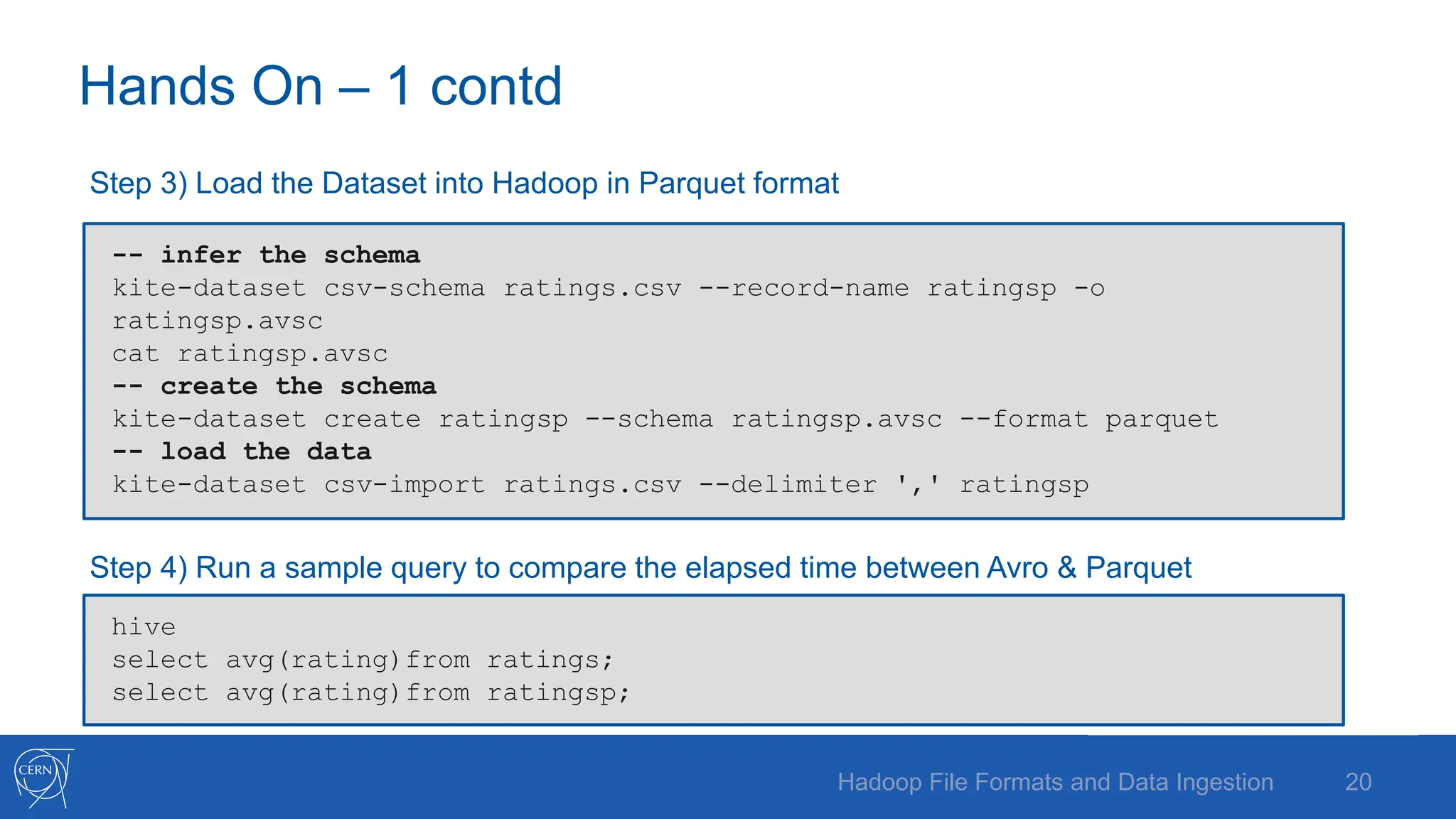
Hands On – 1 contd
Step 3) Load the Dataset into Hadoop in Parquet format
Step 4) Run a sample query to compare the elapsed time between Avro & Parquet
Hadoop File Formats and Data Ingestion 20
-- infer the schema
kite-dataset csv-schema ratings.csv --record-name ratingsp -o
ratingsp.avsc
cat ratingsp.avsc
-- create the schema
kite-dataset create ratingsp --schema ratingsp.avsc --format parquet
-- load the data
kite-dataset csv-import ratings.csv --delimiter ',' ratingsp
hive
select avg(rating)from ratings;
select avg(rating)from ratingsp;
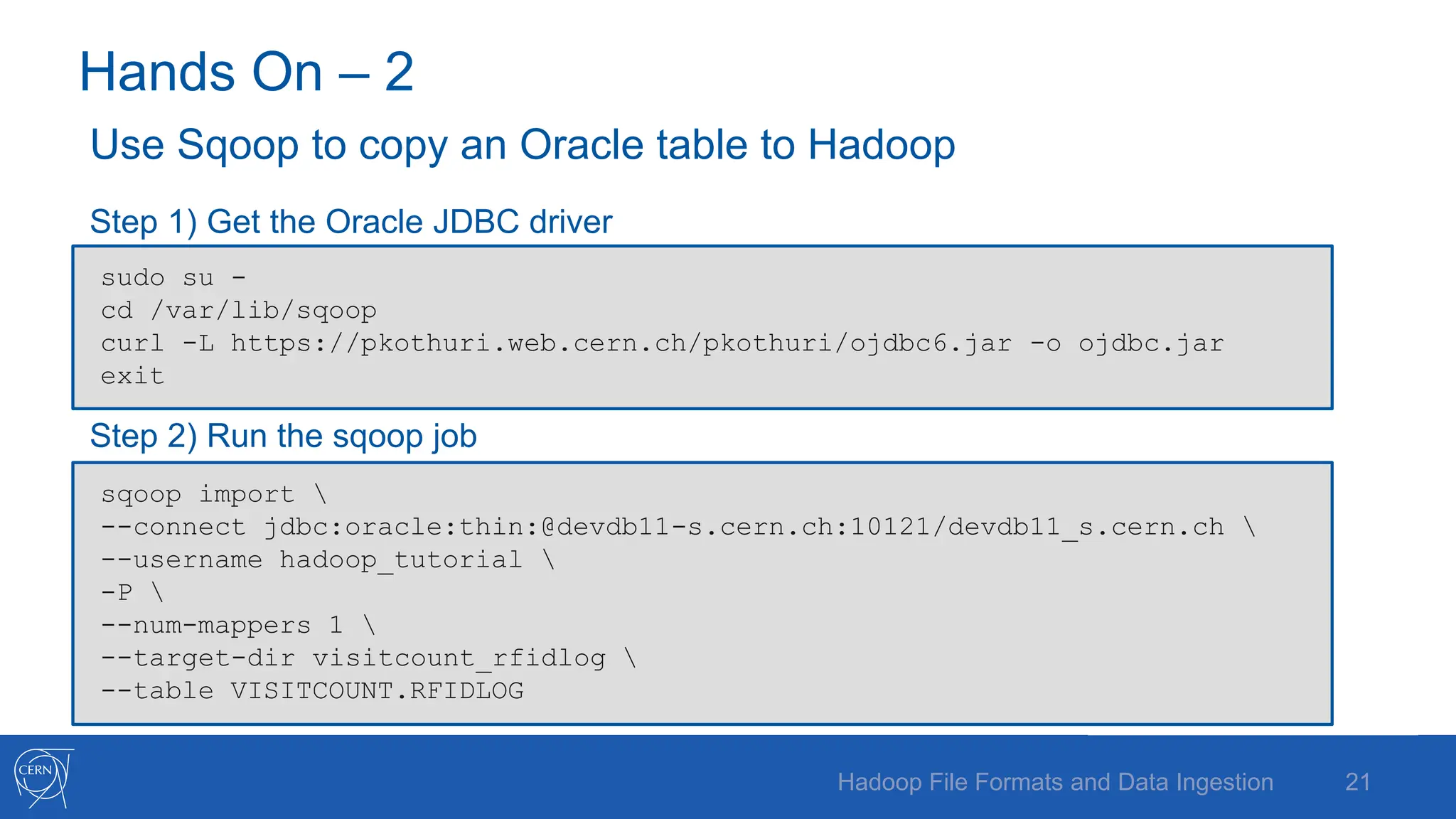
Hands On – 2
Use Sqoop to copy an Oracle table to Hadoop
Step 1) Get the Oracle JDBC driver
Step 2) Run the sqoop job
21
Hadoop File Formats and Data Ingestion
sudo su -
cd /var/lib/sqoop
curl -L https://pkothuri.web.cern.ch/pkothuri/ojdbc6.jar -o ojdbc.jar
exit
sqoop import 
--connect jdbc:oracle:thin:@devdb11-s.cern.ch:10121/devdb11_s.cern.ch 
--username hadoop_tutorial 
-P 
--num-mappers 1 
--target-dir visitcount_rfidlog 
--table VISITCOUNT.RFIDLOG
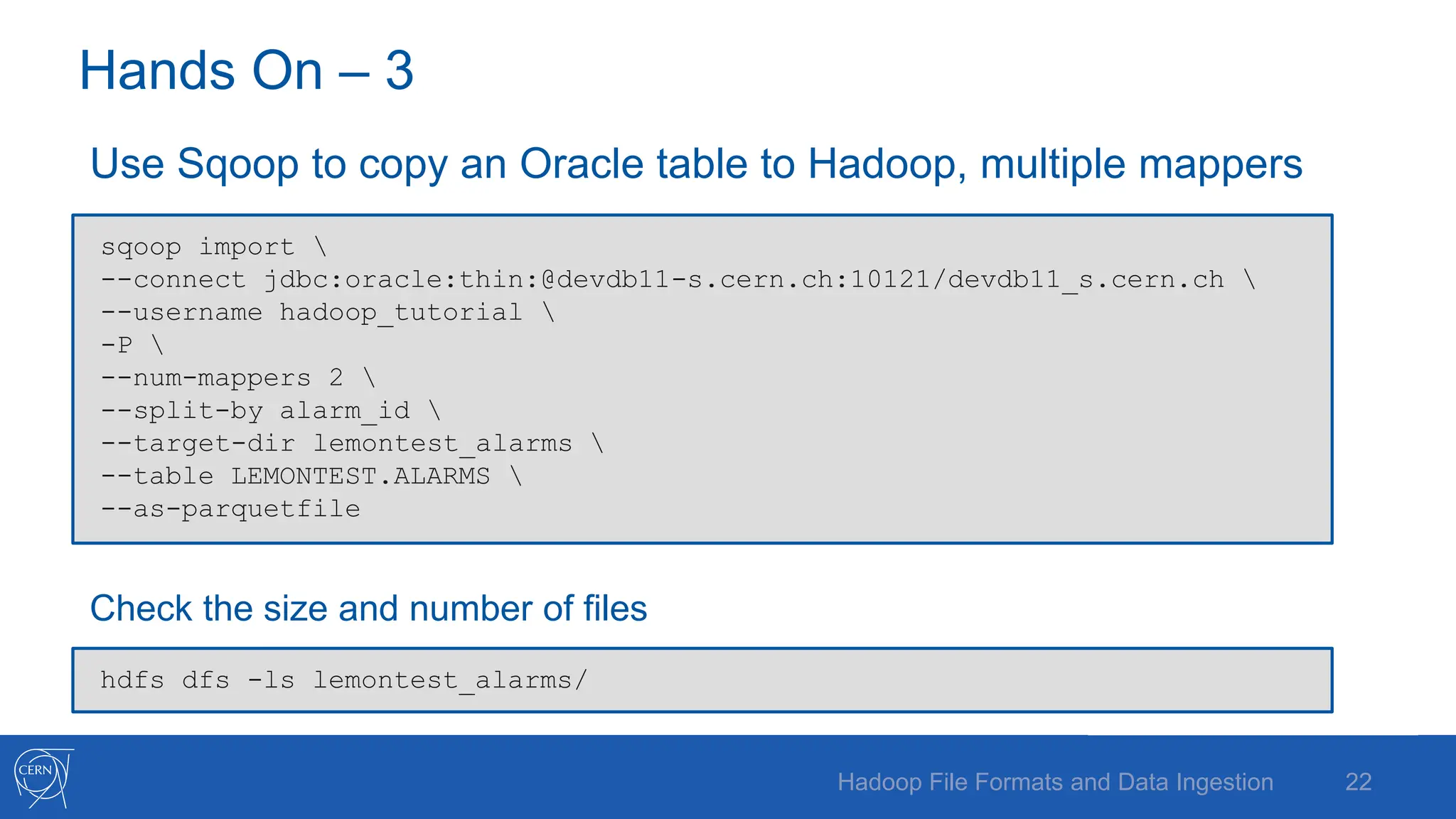
Hands On – 3
Use Sqoop to copy an Oracle table to Hadoop, multiple mappers
Check the size and number of files
22
Hadoop File Formats and Data Ingestion
sqoop import 
--connect jdbc:oracle:thin:@devdb11-s.cern.ch:10121/devdb11_s.cern.ch 
--username hadoop_tutorial 
-P 
--num-mappers 2 
--split-by alarm_id 
--target-dir lemontest_alarms 
--table LEMONTEST.ALARMS 
--as-parquetfile
hdfs dfs -ls lemontest_alarms/
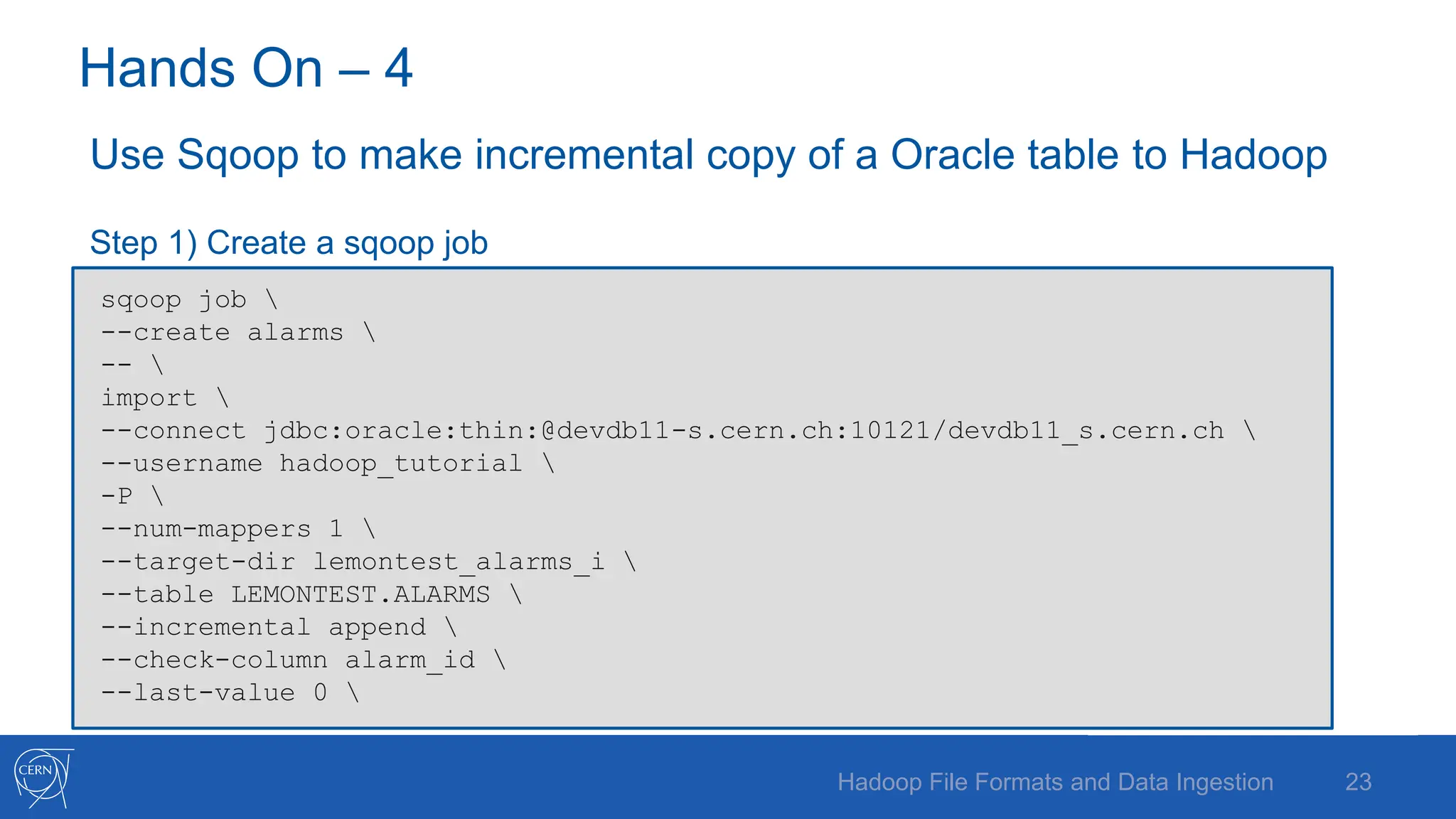
Hands On – 4
Use Sqoop to make incremental copy of a Oracle table to Hadoop
Step 1) Create a sqoop job
23
Hadoop File Formats and Data Ingestion
sqoop job 
--create alarms 
-- 
import 
--connect jdbc:oracle:thin:@devdb11-s.cern.ch:10121/devdb11_s.cern.ch 
--username hadoop_tutorial 
-P 
--num-mappers 1 
--target-dir lemontest_alarms_i 
--table LEMONTEST.ALARMS 
--incremental append 
--check-column alarm_id 
--last-value 0
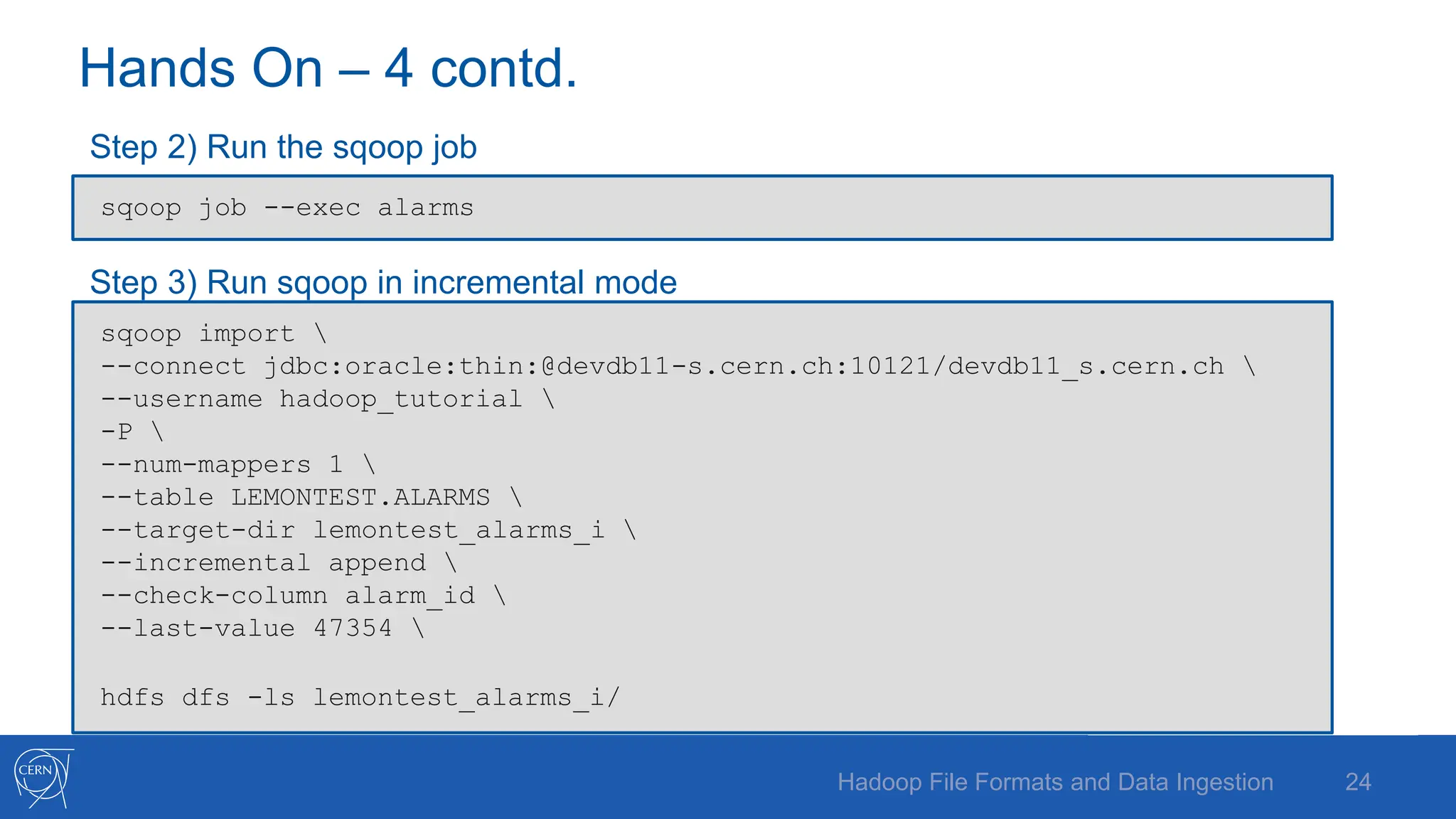
Hands On – 4 contd.
Step 2) Run the sqoop job
Step 3) Run sqoop in incremental mode
24
Hadoop File Formats and Data Ingestion
sqoop import 
--connect jdbc:oracle:thin:@devdb11-s.cern.ch:10121/devdb11_s.cern.ch 
--username hadoop_tutorial 
-P 
--num-mappers 1 
--table LEMONTEST.ALARMS 
--target-dir lemontest_alarms_i 
--incremental append 
--check-column alarm_id 
--last-value 47354 
hdfs dfs -ls lemontest_alarms_i/
sqoop job --exec alarms
E-mail: Prasanth.Kothuri@cern.ch
Blog: http://prasanthkothuri.wordpress.com
25
Q & A
See also: https://db-blog.web.cern.ch/

Hadoop_File_Formats_and_Data_Ingestion.pptx

  • 2.
    Hadoop File Formatsand Data Ingestion Prasanth Kothuri, CERN 2
  • 3.
    Files Formats –not just CSV - Key factor in Big Data processing and query performance - Schema Evolution - Compression and Splittability - Data Processing • Write performance • Partial read • Full read 3 Hadoop File Formats and Data Ingestion
  • 4.
    Available File Formats -Text / CSV - JSON - SequenceFile • binary key/value pair format - Avro - Parquet - ORC • optimized row columnar format 4 Hadoop File Formats and Data Ingestion
  • 5.
    AVRO - Language neutraldata serialization system - Write a file in python and read it in C - AVRO data is described using language independent schema - AVRO schemas are usually written in JSON and data is encoded in binary format - Supports schema evolution - producers and consumers at different versions of schema - Supports compression and are splittable 5 Hadoop File Formats and Data Ingestion
  • 6.
    Avro – Filestructure and example Sample AVRO schema in JSON format Avro file structure { "type" : "record", "name" : "tweets", "fields" : [ { "name" : "username", "type" : "string", }, { "name" : "tweet", "type" : "string", }, { "name" : "timestamp", "type" : "long", } ], "doc:" : “schema for storing tweets" } Hadoop File Formats and Data Ingestion 6
  • 7.
    Parquet • columnar storageformat • key strength is to store nested data in truly columnar format using definition and repetition levels1 X Y Z X Y Z x1 y1 z1 x2 y2 z2 x3 y3 z3 x4 y4 z4 x5 Y5 z5 x1 y1 z1 x2 y2 z2 x3 y3 z3 x4 y4 z4 x5 y5 z5 x1 x2 x3 x4 x5 y1 y2 y3 y4 y5 z1 z2 z3 z4 z5 encoded chunk encoded chunk encoded chunk Nested schema Table representation Row format Columnar format 7 Hadoop File Formats and Data Ingestion (1) Dremel made simple with parquet - https://blog.twitter.com/2013/dremel-made-simple-with-parquet
  • 8.
    Optimizations – CPUand I/O Statistics for filtering and query optimization projection push down predicate push down read only the data you need Minimizes CPU cache misses Y SLOW cache misses costs cpu cycles 8 Hadoop File Formats and Data Ingestion
  • 9.
    Encoding - Delta Encoding: -E.g timestamp can be encoded by storing first value and the delta between subsequent values which tend to be small due to temporal validity - Prefix Encoding: - delta encoding for strings - Dictionary Encoding: - Small set of values, e.g post code, ip addresses etc - Run Length Encoding: - repeating data 9 Hadoop File Formats and Data Ingestion
  • 10.
    Parquet file structure& Configuration Property name Default value Description parquet.block.size 128 MB The size in bytes of a block (row group). parquet.page.size 1MB The size in bytes of a page. parquet.dictionary.page.size 1MB The maximum allowed size in bytes of a dictionary before falling back to plain encoding for a page. parquet.enable.dictionary true Whether to use dictionary encoding. parquet.compression UNCOMPRESSED The type of compression: UNCOMPRESSED, SNAPPY, GZIP & LZO In summation, Parquet is state-of-the-art, open-source columnar format the supports most of Hadoop processing frameworks and is optimized for high compression and high scan efficiency Internal structure of parquet file Configurable parquet parameters 10 Hadoop File Formats and Data Ingestion
  • 11.
    Data Ingestion 11 Hadoop FileFormats and Data Ingestion
  • 12.
    Flume Flume is forhigh-volume ingestion into Hadoop of event- based data e.g collect logfiles from a bank of web servers, then move log events from those files to HDFS (clickstream) 12 Hadoop File Formats and Data Ingestion
  • 13.
    Flume Example 13 Hadoop FileFormats and Data Ingestion
  • 14.
    Flume configuration agent1.sources =source1 agent1.sinks = sink1 agent1.channels = channel1 agent1.sources.source1.channels = channel1 agent1.sinks.sink1.channel = channel1 agent1.sources.source1.type = spooldir agent1.sources.source1.spoolDir = /var/spooldir agent1.sinks.sink1.type = hdfs agent1.sinks.sink1.hdfs.path = hdfs://hostname:8020/user/flume/logs agent1.sinks.sink1.hdfs.filetype = DataStream agent1.channels.channel1.type = memory agent1.channels.channel1.capacity = 10000 agent1.channels.channel1.transactionCapacity = 100 flume-ng agent –name agent1 –conf $FLUME_HOME/conf Category Component Source Avro Exec HTTP JMS Netcat Sequence generator Spooling directory Syslog Thrift Twitter Sink Avro Elasticsearch File roll HBase HDFS IRC Logger Morphline (Solr) Null Thrift Channel File JDBC Memory 14 Hadoop File Formats and Data Ingestion
  • 15.
    Sqoop – SQLto Hadoop - Open source tool to extract data from structured data store into Hadoop - Architecture 15 Hadoop File Formats and Data Ingestion
  • 16.
    Sqoop – contd. -Sqoop schedules map reduce jobs to effect imports and exports - Sqoop always requires the connector and JDBC driver - Sqoop requires JDBC drivers for specific database server, these should be copied to /usr/lib/sqoop/lib - The command-line structure has the following structure TOOL - indicates the operation that you want to perform, e.g import, export etc PROPERTY_ARGS - are a set of parameters that are entered as Java properties in the format -Dname=value. SQOOP_ARGS - all the various sqoop parameters. 16 Hadoop File Formats and Data Ingestion Sqoop TOOL PROPERTY_ARGS SQOOP_ARGS
  • 17.
    Sqoop – Howto run sqoop Example: sqoop import --connect jdbc:oracle:thin:@devdb11-s.cern.ch:10121/devdb11_s.cern.ch --username hadoop_tutorial -P --num-mappers 1 --target-dir visitcount_rfidlog --table VISITCOUNT.RFIDLOG 17 Hadoop File Formats and Data Ingestion
  • 18.
    Sqoop – howto parallelize -- table table_name -- query select * from table_name where $CONDITIONS -- table table_name -- split-by primary key -- num-mappers n -- table table_name -- split-by primary key -- boundary-query select range from dual -- num-mappers n 18 Hadoop File Formats and Data Ingestion
  • 19.
    Hands On –1 Use Kite SDK to demonstrate copying of various file formats to Hadoop Step 1) Download the MovieLens Dataset Step 2) Load the Dataset into Hadoop in Avro format 19 Hadoop File Formats and Data Ingestion curl http://files.grouplens.org/datasets/movielens/ml-latest-small.zip -o movies.zip unzip movies.zip cd ml-latest-small/ -- infer the schema kite-dataset csv-schema ratings.csv --record-name ratings -o ratings.avsc cat ratings.avsc -- create the schema kite-dataset create ratings --schema ratings.avsc -- load the data kite-dataset csv-import ratings.csv --delimiter ',' ratings
  • 20.
    Hands On –1 contd Step 3) Load the Dataset into Hadoop in Parquet format Step 4) Run a sample query to compare the elapsed time between Avro & Parquet Hadoop File Formats and Data Ingestion 20 -- infer the schema kite-dataset csv-schema ratings.csv --record-name ratingsp -o ratingsp.avsc cat ratingsp.avsc -- create the schema kite-dataset create ratingsp --schema ratingsp.avsc --format parquet -- load the data kite-dataset csv-import ratings.csv --delimiter ',' ratingsp hive select avg(rating)from ratings; select avg(rating)from ratingsp;
  • 21.
    Hands On –2 Use Sqoop to copy an Oracle table to Hadoop Step 1) Get the Oracle JDBC driver Step 2) Run the sqoop job 21 Hadoop File Formats and Data Ingestion sudo su - cd /var/lib/sqoop curl -L https://pkothuri.web.cern.ch/pkothuri/ojdbc6.jar -o ojdbc.jar exit sqoop import --connect jdbc:oracle:thin:@devdb11-s.cern.ch:10121/devdb11_s.cern.ch --username hadoop_tutorial -P --num-mappers 1 --target-dir visitcount_rfidlog --table VISITCOUNT.RFIDLOG
  • 22.
    Hands On –3 Use Sqoop to copy an Oracle table to Hadoop, multiple mappers Check the size and number of files 22 Hadoop File Formats and Data Ingestion sqoop import --connect jdbc:oracle:thin:@devdb11-s.cern.ch:10121/devdb11_s.cern.ch --username hadoop_tutorial -P --num-mappers 2 --split-by alarm_id --target-dir lemontest_alarms --table LEMONTEST.ALARMS --as-parquetfile hdfs dfs -ls lemontest_alarms/
  • 23.
    Hands On –4 Use Sqoop to make incremental copy of a Oracle table to Hadoop Step 1) Create a sqoop job 23 Hadoop File Formats and Data Ingestion sqoop job --create alarms -- import --connect jdbc:oracle:thin:@devdb11-s.cern.ch:10121/devdb11_s.cern.ch --username hadoop_tutorial -P --num-mappers 1 --target-dir lemontest_alarms_i --table LEMONTEST.ALARMS --incremental append --check-column alarm_id --last-value 0
  • 24.
    Hands On –4 contd. Step 2) Run the sqoop job Step 3) Run sqoop in incremental mode 24 Hadoop File Formats and Data Ingestion sqoop import --connect jdbc:oracle:thin:@devdb11-s.cern.ch:10121/devdb11_s.cern.ch --username hadoop_tutorial -P --num-mappers 1 --table LEMONTEST.ALARMS --target-dir lemontest_alarms_i --incremental append --check-column alarm_id --last-value 47354 hdfs dfs -ls lemontest_alarms_i/ sqoop job --exec alarms
  • 25.

Editor's Notes

  • #3 Introduce myself: 8 years data engineering, data analytics (make sense)
  • #9 NameNode and DataNode each run an internal web server in order to display basic information about the current status of the cluster
  • #10 NameNode and DataNode each run an internal web server in order to display basic information about the current status of the cluster
  • #11 NameNode and DataNode each run an internal web server in order to display basic information about the current status of the cluster
  • #12 NameNode and DataNode each run an internal web server in order to display basic information about the current status of the cluster
  • #13 NameNode and DataNode each run an internal web server in order to display basic information about the current status of the cluster
  • #14 NameNode and DataNode each run an internal web server in order to display basic information about the current status of the cluster
  • #15 NameNode and DataNode each run an internal web server in order to display basic information about the current status of the cluster
  • #16 NameNode and DataNode each run an internal web server in order to display basic information about the current status of the cluster
  • #17 NameNode and DataNode each run an internal web server in order to display basic information about the current status of the cluster
  • #18 NameNode and DataNode each run an internal web server in order to display basic information about the current status of the cluster
  • #19 NameNode and DataNode each run an internal web server in order to display basic information about the current status of the cluster
  • #20 NameNode and DataNode each run an internal web server in order to display basic information about the current status of the cluster
  • #22 NameNode and DataNode each run an internal web server in order to display basic information about the current status of the cluster
  • #23 NameNode and DataNode each run an internal web server in order to display basic information about the current status of the cluster
  • #24 NameNode and DataNode each run an internal web server in order to display basic information about the current status of the cluster
  • #25 NameNode and DataNode each run an internal web server in order to display basic information about the current status of the cluster