HACKING WITH
BACKTRACK 5
Zia Ush Shamszaman
ANLAB, ICE, HUFS
Date: 20130412
!!Caution!!
This material is for educational
purpose only. We don't intend to ha
ck, crack or anything about
cyber crime
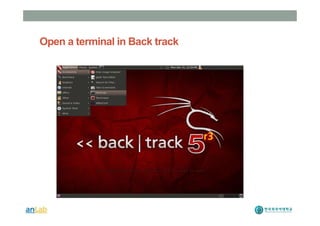
Open a terminal in Back track
Check your Network and Internet
• Open a terminal type “Ping www.google.com”
• If not working then do this…
• Application > Internet > Wicd Network Manager
• Select Wire/Wireless
• Click the Connect button
• If still have problem then check your Virtual box n
etwork option
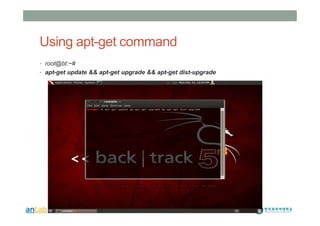
Using apt-get command
• root@bt:~#
• apt-get update && apt-get upgrade && apt-get dist-upgrade
Information Gathering
• Copying the victim web site
• HTTrack is a tool that can copy a website page-by-page a
nd we browse it offline
• Step-1: Open a terminal
• Step-2: Type “apt-get install httrack” // This will install the package
if it is not available in your system
• Step-3: Type “httrack”
• Step-4: Enter project name
• Step-5: Enter the location where the site will be stored
• Example: /root/test
• Step-6: Enter the URL of the victim site
Domain Information Collection
• Whois command
• Usinf this command you can collect the domain informatio
n of the victim
• Open a terminal
• Type: “whois <victimdomain>”
• Example: whois hufs.ac.kr
• www.domaintools.com is also an useful web tool to dig a
particular domain name.
Collecting email id
• Step-1: Open a terminal
• Step-2: Type “msfconsole” // This is a special tool of ba
cktrack
• Step-3: Type “use gather/search_email_collector”
• Step-4: Type “show options”
• Step-5: Type: “set DOMAIN <victimedomain_name>”
• Example: Type “run”
See the magic
Collect Victim information by “Zenmap”
• Application>Internet>Zenmap
• Enter victim IP address/Domain name in the “Target”
• Select a scan type in the “Profile”
• Check Hosts and Service in the left panel
• Select a service to check the open port
• Check Topology
• Check Host Details
• Check Nmap output
How to use Wireshark
• Application > Backtrack > Forensics> Network Forensics>
Wireshark
• Select the Interface, e.g eth0
• Select Start
• See the live packets area transferring through the interfac
e
• Go to capture menu
• Stop the capture process
• Go to File menu and Save it in Desktop
• Go to File menu and open the captured fil
Now its all yours..Play with it !! J
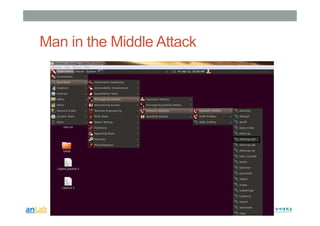
Man in the Middle Attack
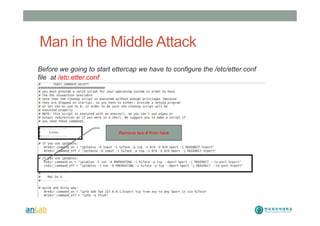
Before we going to start ettercap we have to configure the /etc/etter.conf
file at /etc.etter.conf
Remove two # from here
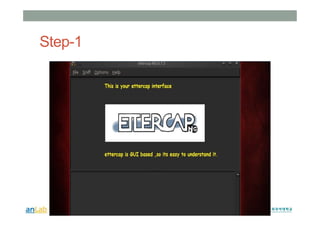
Step-1
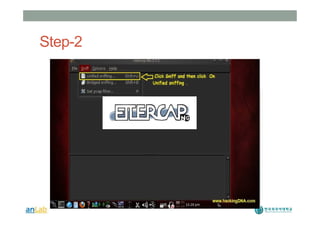
Step-2
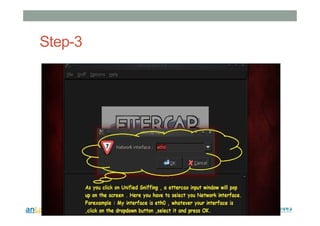
Step-3
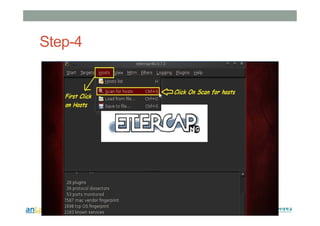
Step-4
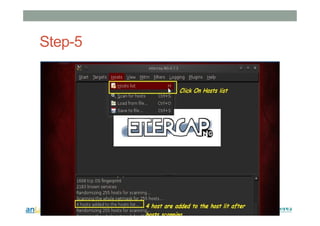
Step-5
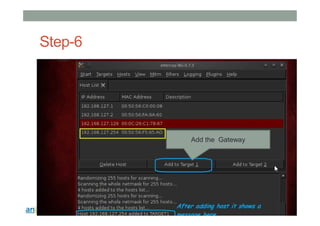
Step-6
Add the Gateway
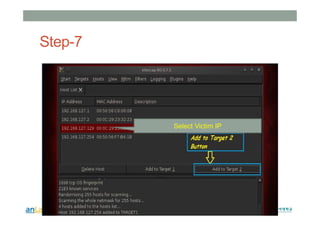
Step-7
Select Victim IP
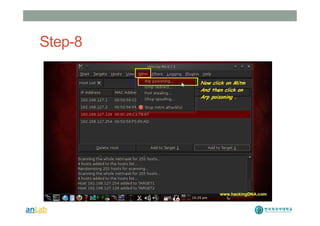
Step-8
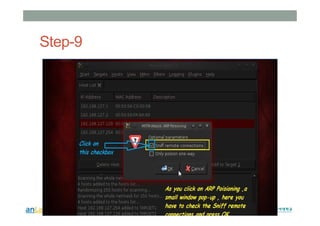
Step-9
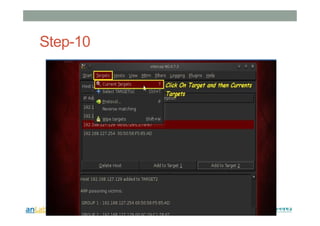
Step-10
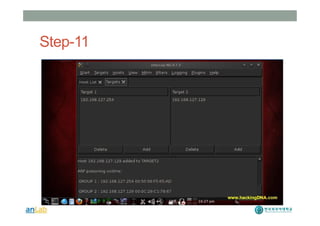
Step-11
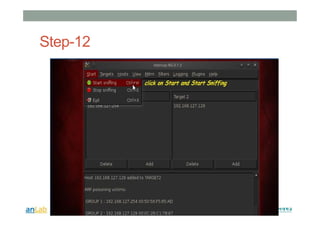
Step-12
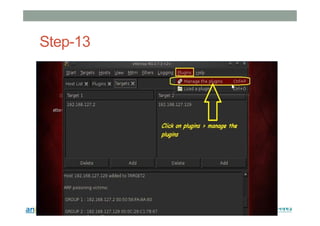
Step-13
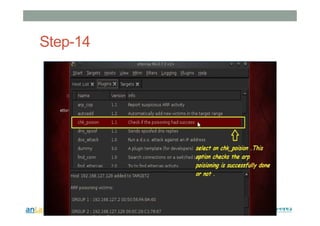
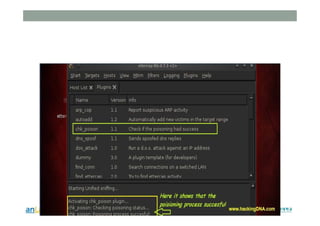
Step-14
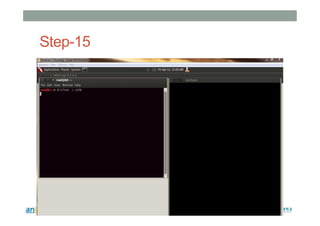
Step-15
Don’t do anything harmful
Thank You J
Extra Slides
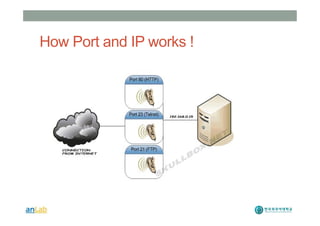
How Port and IP works !
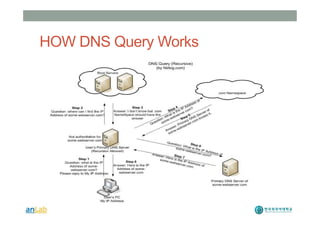
HOW DNS Query Works

Hacking with Backtrack Lecture-2

  • 1.
    HACKING WITH BACKTRACK 5 ZiaUsh Shamszaman ANLAB, ICE, HUFS Date: 20130412
  • 2.
    !!Caution!! This material isfor educational purpose only. We don't intend to ha ck, crack or anything about cyber crime
  • 3.
    Open a terminalin Back track
  • 4.
    Check your Networkand Internet • Open a terminal type “Ping www.google.com” • If not working then do this… • Application > Internet > Wicd Network Manager • Select Wire/Wireless • Click the Connect button • If still have problem then check your Virtual box n etwork option
  • 5.
    Using apt-get command •root@bt:~# • apt-get update && apt-get upgrade && apt-get dist-upgrade
  • 6.
    Information Gathering • Copyingthe victim web site • HTTrack is a tool that can copy a website page-by-page a nd we browse it offline • Step-1: Open a terminal • Step-2: Type “apt-get install httrack” // This will install the package if it is not available in your system • Step-3: Type “httrack” • Step-4: Enter project name • Step-5: Enter the location where the site will be stored • Example: /root/test • Step-6: Enter the URL of the victim site
  • 7.
    Domain Information Collection •Whois command • Usinf this command you can collect the domain informatio n of the victim • Open a terminal • Type: “whois <victimdomain>” • Example: whois hufs.ac.kr • www.domaintools.com is also an useful web tool to dig a particular domain name.
  • 8.
    Collecting email id •Step-1: Open a terminal • Step-2: Type “msfconsole” // This is a special tool of ba cktrack • Step-3: Type “use gather/search_email_collector” • Step-4: Type “show options” • Step-5: Type: “set DOMAIN <victimedomain_name>” • Example: Type “run” See the magic
  • 9.
    Collect Victim informationby “Zenmap” • Application>Internet>Zenmap • Enter victim IP address/Domain name in the “Target” • Select a scan type in the “Profile” • Check Hosts and Service in the left panel • Select a service to check the open port • Check Topology • Check Host Details • Check Nmap output
  • 10.
    How to useWireshark • Application > Backtrack > Forensics> Network Forensics> Wireshark • Select the Interface, e.g eth0 • Select Start • See the live packets area transferring through the interfac e • Go to capture menu • Stop the capture process • Go to File menu and Save it in Desktop • Go to File menu and open the captured fil Now its all yours..Play with it !! J
  • 11.
    Man in theMiddle Attack
  • 12.
    Man in theMiddle Attack Before we going to start ettercap we have to configure the /etc/etter.conf file at /etc.etter.conf Remove two # from here
  • 13.
  • 14.
  • 15.
  • 16.
  • 17.
  • 18.
  • 19.
  • 20.
  • 21.
  • 22.
  • 23.
  • 24.
  • 25.
  • 26.
  • 28.
  • 29.
    Don’t do anythingharmful Thank You J
  • 30.
  • 31.
    How Port andIP works !
  • 32.