Hack for Docker's Network
2014/02/12(水)
@hansode
まずは自己紹介

2
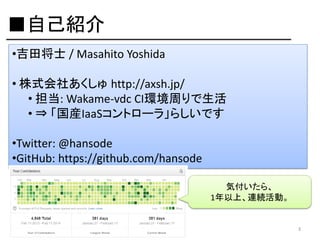
■自己紹介
•吉田将士 / Masahito Yoshida
• 株式会社あくしゅ http://axsh.jp/
• 担当: Wakame-vdc CI環境周りで生活
• ⇒ 「国産IaaSコントローラ」らしいです
•Twitter: @hansode
•GitHub: https://github.com/hansode
気付いたら、
1年以上、連続活動。

3
■Docker Contribution
さて、本題へ

5
Network周りを中心に、
疑問に思った事を
幾つか検証してみました。
6
事前情報として、
Docker
検証環境の内容です。
7
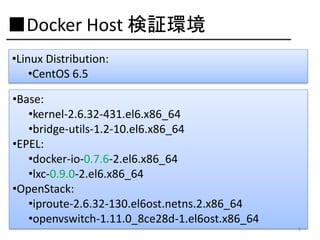
■Docker Host 検証環境
•Linux Distribution:
•CentOS 6.5

•Base:
•kernel-2.6.32-431.el6.x86_64
•bridge-utils-1.2-10.el6.x86_64
•EPEL:
•docker-io-0.7.6-2.el6.x86_64
•lxc-0.9.0-2.el6.x86_64
•OpenStack:
•iproute-2.6.32-130.el6ost.netns.2.x86_64
•openvswitch-1.11.0_8ce28d-1.el6ost.x86_64
8
Q: Dockerは
コンテナ間通信を
制御出来るのか?
9
ドキュメントを確認してみると、
制御機能、ありました。

10
ICC:
Inter-Container
Communication
11
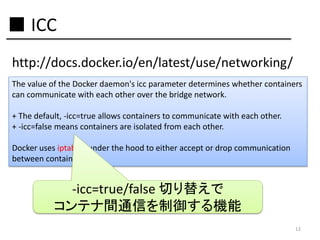
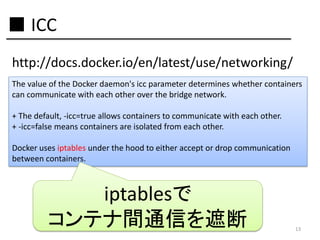
■ ICC
http://docs.docker.io/en/latest/use/networking/
The value of the Docker daemon's icc parameter determines whether containers
can communicate with each other over the bridge network.
+ The default, -icc=true allows containers to communicate with each other.
+ -icc=false means containers are isolated from each other.
Docker uses iptables under the hood to either accept or drop communication
between containers.

-icc=true/false 切り替えで
コンテナ間通信を制御する機能
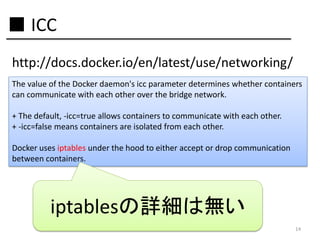
12
■ ICC
http://docs.docker.io/en/latest/use/networking/
The value of the Docker daemon's icc parameter determines whether containers
can communicate with each other over the bridge network.
+ The default, -icc=true allows containers to communicate with each other.
+ -icc=false means containers are isolated from each other.
Docker uses iptables under the hood to either accept or drop communication
between containers.

iptablesで
コンテナ間通信を遮断

13
■ ICC
http://docs.docker.io/en/latest/use/networking/
The value of the Docker daemon's icc parameter determines whether containers
can communicate with each other over the bridge network.
+ The default, -icc=true allows containers to communicate with each other.
+ -icc=false means containers are isolated from each other.
Docker uses iptables under the hood to either accept or drop communication
between containers.

iptablesの詳細は無い
14
-icc=true, -icc=false
iptablesルール差分、
気になりました。

15
気になったので
調べてみました。

16
ところで、
-icc=true, -icc=false
を設定するには・・・
17
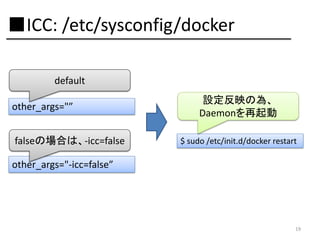
/etc/sysconfig/dockerを修正
(RHEL6系の場合)

18
■ICC: /etc/sysconfig/docker
default
other_args="”
falseの場合は、-icc=false

設定反映の為、
Daemonを再起動
$ sudo /etc/init.d/docker restart

other_args="-icc=false”

19
-icc=true, -icc=false
ルール比較する為の
シナリオ
20
■ルール比較のシナリオ

21
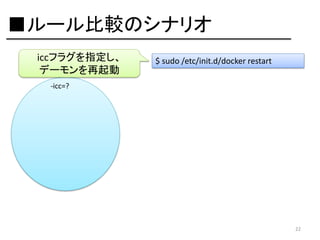
■ルール比較のシナリオ
iccフラグを指定し、
デーモンを再起動

$ sudo /etc/init.d/docker restart

-icc=?

22
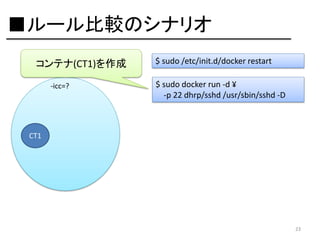
■ルール比較のシナリオ
コンテナ(CT1)を作成
-icc=?

$ sudo /etc/init.d/docker restart
$ sudo docker run -d ¥
-p 22 dhrp/sshd /usr/sbin/sshd -D

CT1

23
■ルール比較のシナリオ
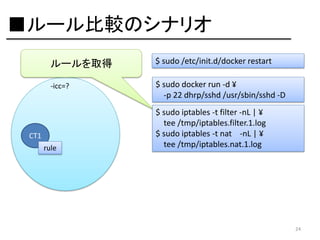
ルールを取得

$ sudo /etc/init.d/docker restart

-icc=?

$ sudo docker run -d ¥
-p 22 dhrp/sshd /usr/sbin/sshd -D

CT1
rule

$ sudo iptables -t filter -nL | ¥
tee /tmp/iptables.filter.1.log
$ sudo iptables -t nat -nL | ¥
tee /tmp/iptables.nat.1.log

24
■ルール比較のシナリオ
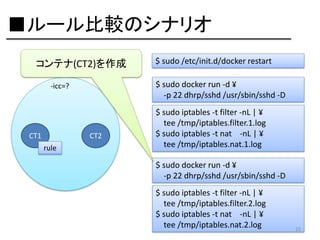
コンテナ(CT2)を作成

$ sudo docker run -d ¥
-p 22 dhrp/sshd /usr/sbin/sshd -D

-icc=?

CT1

CT2
rule

$ sudo /etc/init.d/docker restart

$ sudo iptables -t filter -nL | ¥
tee /tmp/iptables.filter.1.log
$ sudo iptables -t nat -nL | ¥
tee /tmp/iptables.nat.1.log
$ sudo docker run -d ¥
-p 22 dhrp/sshd /usr/sbin/sshd -D
$ sudo iptables -t filter -nL | ¥
tee /tmp/iptables.filter.2.log
$ sudo iptables -t nat -nL | ¥
tee /tmp/iptables.nat.2.log

25
■ルール比較のシナリオ
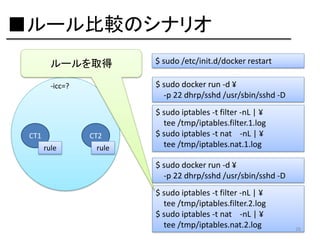
ルールを取得

$ sudo /etc/init.d/docker restart

-icc=?

$ sudo docker run -d ¥
-p 22 dhrp/sshd /usr/sbin/sshd -D

CT1

CT2
rule

rule

$ sudo iptables -t filter -nL | ¥
tee /tmp/iptables.filter.1.log
$ sudo iptables -t nat -nL | ¥
tee /tmp/iptables.nat.1.log
$ sudo docker run -d ¥
-p 22 dhrp/sshd /usr/sbin/sshd -D
$ sudo iptables -t filter -nL | ¥
tee /tmp/iptables.filter.2.log
$ sudo iptables -t nat -nL | ¥
tee /tmp/iptables.nat.2.log

26
■ルール比較のシナリオ
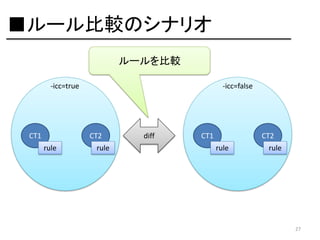
ルールを比較
-icc=true

CT1

-icc=false

CT2
rule

rule

diff

CT1

CT2
rule

rule

27
結果は・・・

28
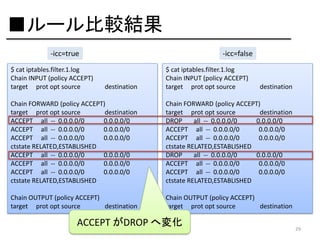
■ルール比較結果
-icc=true
$ cat iptables.filter.1.log
Chain INPUT (policy ACCEPT)
target prot opt source

-icc=false

destination

$ cat iptables.filter.1.log
Chain INPUT (policy ACCEPT)
target prot opt source

destination

Chain FORWARD (policy ACCEPT)
target prot opt source
destination
ACCEPT all -- 0.0.0.0/0
0.0.0.0/0
ACCEPT all -- 0.0.0.0/0
0.0.0.0/0
ACCEPT all -- 0.0.0.0/0
0.0.0.0/0
ctstate RELATED,ESTABLISHED
ACCEPT all -- 0.0.0.0/0
0.0.0.0/0
ACCEPT all -- 0.0.0.0/0
0.0.0.0/0
ACCEPT all -- 0.0.0.0/0
0.0.0.0/0
ctstate RELATED,ESTABLISHED

Chain FORWARD (policy ACCEPT)
target prot opt source
destination
DROP
all -- 0.0.0.0/0
0.0.0.0/0
ACCEPT all -- 0.0.0.0/0
0.0.0.0/0
ACCEPT all -- 0.0.0.0/0
0.0.0.0/0
ctstate RELATED,ESTABLISHED
DROP
all -- 0.0.0.0/0
0.0.0.0/0
ACCEPT all -- 0.0.0.0/0
0.0.0.0/0
ACCEPT all -- 0.0.0.0/0
0.0.0.0/0
ctstate RELATED,ESTABLISHED

Chain OUTPUT (policy ACCEPT)
target prot opt source
destination

Chain OUTPUT (policy ACCEPT)
target prot opt source
destination

ACCEPT がDROP へ変化

29
コンテナ内の通信が
遮断されてるか、
確認してみる。
30
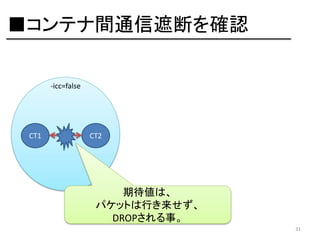
■コンテナ間通信遮断を確認
-icc=false

CT1

CT2

期待値は、
パケットは行き来せず、
DROPされる事。
31
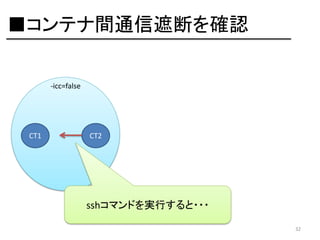
■コンテナ間通信遮断を確認
-icc=false

CT1

CT2

sshコマンドを実行すると・・・
32
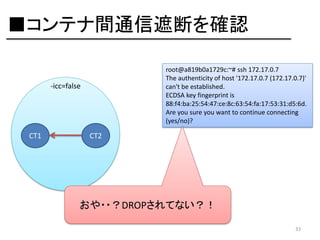
■コンテナ間通信遮断を確認
root@a819b0a1729c:~# ssh 172.17.0.7
The authenticity of host '172.17.0.7 (172.17.0.7)'
can't be established.
ECDSA key fingerprint is
88:f4:ba:25:54:47:ce:8c:63:54:fa:17:53:31:d5:6d.
Are you sure you want to continue connecting
(yes/no)?

-icc=false

CT1

CT2

おや・・?DROPされてない?!
33
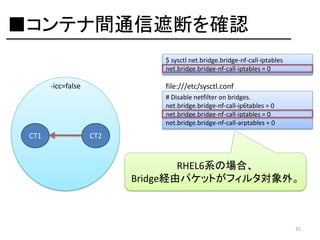
Q:sysctlは、どうなっている?

34
■コンテナ間通信遮断を確認
$ sysctl net.bridge.bridge-nf-call-iptables
net.bridge.bridge-nf-call-iptables = 0

-icc=false

file:///etc/sysctl.conf
# Disable netfilter on bridges.
net.bridge.bridge-nf-call-ip6tables = 0
net.bridge.bridge-nf-call-iptables = 0
net.bridge.bridge-nf-call-arptables = 0

CT1

CT2

RHEL6系の場合、
Bridge経由パケットがフィルタ対象外。

35
■コンテナ間通信遮断を確認
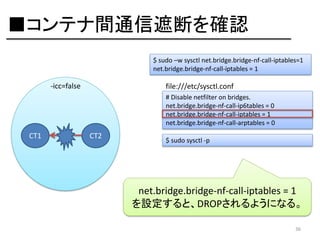
$ sudo –w sysctl net.bridge.bridge-nf-call-iptables=1
net.bridge.bridge-nf-call-iptables = 1

-icc=false

file:///etc/sysctl.conf
# Disable netfilter on bridges.
net.bridge.bridge-nf-call-ip6tables = 0
net.bridge.bridge-nf-call-iptables = 1
net.bridge.bridge-nf-call-arptables = 0

CT1

CT2

$ sudo sysctl -p

net.bridge.bridge-nf-call-iptables = 1
を設定すると、DROPされるようになる。
36
ICCをおさらい

37
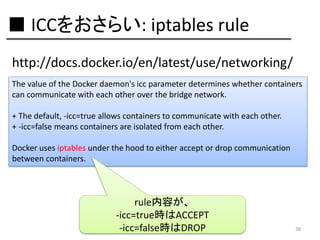
■ ICCをおさらい: iptables rule
http://docs.docker.io/en/latest/use/networking/
The value of the Docker daemon's icc parameter determines whether containers
can communicate with each other over the bridge network.
+ The default, -icc=true allows containers to communicate with each other.
+ -icc=false means containers are isolated from each other.
Docker uses iptables under the hood to either accept or drop communication
between containers.

rule内容が、
-icc=true時はACCEPT
-icc=false時はDROP

38
iccフラグにより、
コンテナ間通信が
遮断される事は分かった。
39
しかし、

40
特定コンテナ間通信は、
許可したい・・・

41
ドキュメントを確認してみると、
要望を満たす機能を発見。

42
Link Containers

43
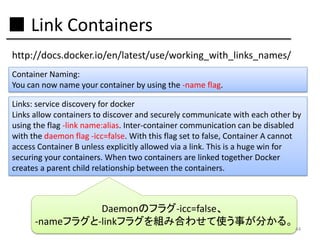
■ Link Containers
http://docs.docker.io/en/latest/use/working_with_links_names/
Container Naming:
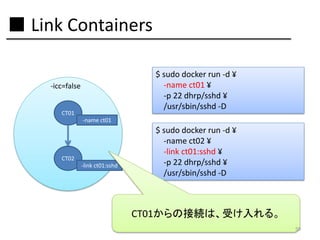
You can now name your container by using the -name flag.
Links: service discovery for docker
Links allow containers to discover and securely communicate with each other by
using the flag -link name:alias. Inter-container communication can be disabled
with the daemon flag -icc=false. With this flag set to false, Container A cannot
access Container B unless explicitly allowed via a link. This is a huge win for
securing your containers. When two containers are linked together Docker
creates a parent child relationship between the containers.

Daemonのフラグ-icc=false、
-nameフラグと-linkフラグを組み合わせて使う事が分かる。

44
この関係を
図とコマンドにしてみると、

45
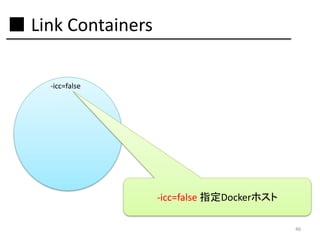
■ Link Containers
-icc=false

-icc=false 指定Dockerホスト
46
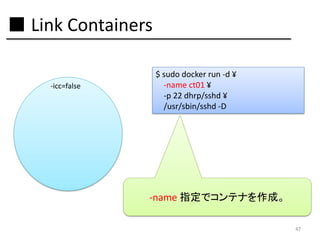
■ Link Containers
-icc=false

$ sudo docker run -d ¥
-name ct01 ¥
-p 22 dhrp/sshd ¥
/usr/sbin/sshd -D

-name 指定でコンテナを作成。
47
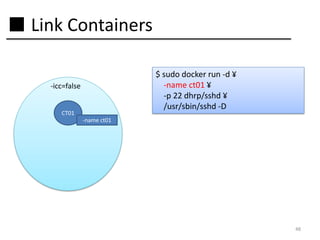
■ Link Containers
$ sudo docker run -d ¥
-name ct01 ¥
-p 22 dhrp/sshd ¥
/usr/sbin/sshd -D

-icc=false
CT01
-name ct01

48
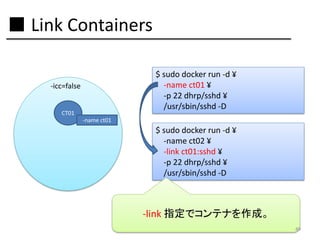
■ Link Containers
$ sudo docker run -d ¥
-name ct01 ¥
-p 22 dhrp/sshd ¥
/usr/sbin/sshd -D

-icc=false
CT01
-name ct01

$ sudo docker run -d ¥
-name ct02 ¥
-link ct01:sshd ¥
-p 22 dhrp/sshd ¥
/usr/sbin/sshd -D

-link 指定でコンテナを作成。
49
■ Link Containers
$ sudo docker run -d ¥
-name ct01 ¥
-p 22 dhrp/sshd ¥
/usr/sbin/sshd -D

-icc=false
CT01
-name ct01

CT02
-link ct01:sshd

$ sudo docker run -d ¥
-name ct02 ¥
-link ct01:sshd ¥
-p 22 dhrp/sshd ¥
/usr/sbin/sshd -D

CT01からの接続は、受け入れる。
50
■ Link Containers
$ sudo docker run -d ¥
-name ct01 ¥
-p 22 dhrp/sshd ¥
/usr/sbin/sshd -D

-icc=false
CT01
-name ct01
CT03

CT02
-link ct01:sshd

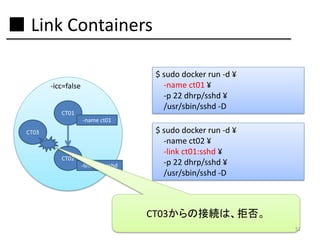
$ sudo docker run -d ¥
-name ct02 ¥
-link ct01:sshd ¥
-p 22 dhrp/sshd ¥
/usr/sbin/sshd -D

CT03からの接続は、拒否。
51
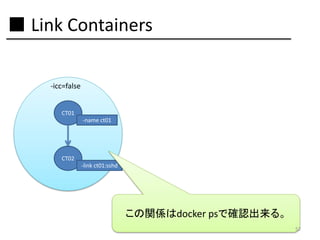
■ Link Containers
-icc=false
CT01
-name ct01

CT02
-link ct01:sshd

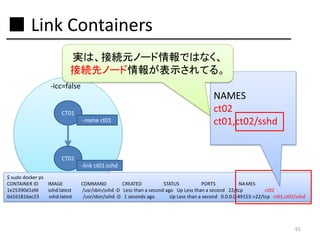
この関係はdocker psで確認出来る。
52
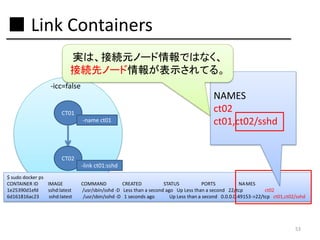
■ Link Containers
実は、接続元ノード情報ではなく、
接続先ノード情報が表示されてる。
-icc=false
CT01
-name ct01

NAMES
ct02
ct01,ct02/sshd

CT02
-link ct01:sshd
$ sudo docker ps
CONTAINER ID
IMAGE
1e25390d1efd
sshd:latest
6d161816ac23
sshd:latest

COMMAND
CREATED
STATUS
PORTS
NA MES
/usr/sbin/sshd -D Less than a second ago Up Less than a second 22/tcp
ct02
/usr/sbin/sshd -D 1 seconds ago
Up Less than a second 0.0.0.0:49153->22/tcp ct01,ct02/sshd

53
検証をしてたら、
nameの制約に遭遇。
54
-name <name>は、
再利用不可能?
55
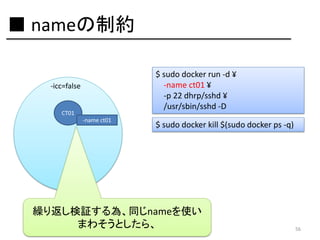
■ nameの制約
$ sudo docker run -d ¥
-name ct01 ¥
-p 22 dhrp/sshd ¥
/usr/sbin/sshd -D

-icc=false
CT01
-name ct01

$ sudo docker kill $(sudo docker ps -q)

繰り返し検証する為、同じnameを使い
まわそうとしたら、

56
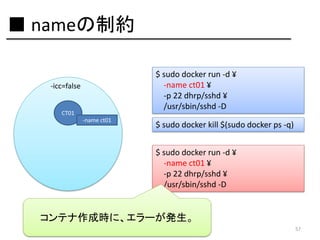
■ nameの制約
$ sudo docker run -d ¥
-name ct01 ¥
-p 22 dhrp/sshd ¥
/usr/sbin/sshd -D

-icc=false
CT01
-name ct01

$ sudo docker kill $(sudo docker ps -q)
$ sudo docker run -d ¥
-name ct01 ¥
-p 22 dhrp/sshd ¥
/usr/sbin/sshd -D

コンテナ作成時に、エラーが発生。
57
■ nameの制約
-icc=false
CT01
-name ct01

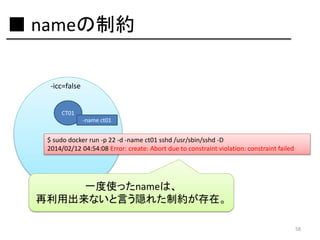
$ sudo docker run -p 22 -d -name ct01 sshd /usr/sbin/sshd -D
2014/02/12 04:54:08 Error: create: Abort due to constraint violation: constraint failed

一度使ったnameは、
再利用出来ないと言う隠れた制約が存在。
58
今の所、
-name <name>は、
ユニークにしておいた方が良い。

59
linkとnameの話に戻します。

60
■ Link Containers
実は、接続元ノード情報ではなく、
接続先ノード情報が表示されてる。
-icc=false
CT01
-name ct01

NAMES
ct02
ct01,ct02/sshd

CT02
-link ct01:sshd
$ sudo docker ps
CONTAINER ID
IMAGE
1e25390d1efd
sshd:latest
6d161816ac23
sshd:latest

COMMAND
CREATED
STATUS
PORTS
NA MES
/usr/sbin/sshd -D Less than a second ago Up Less than a second 22/tcp
ct02
/usr/sbin/sshd -D 1 seconds ago
Up Less than a second 0.0.0.0:49153->22/tcp ct01,ct02/sshd

61
Q:この時のiptables ruleは、
どうなっている?

62
■反映されてるiptables rule
Chain INPUT (policy ACCEPT)
target prot opt source

destination

-icc=false
CT01
-name ct01

CT02
-link ct01:sshd

Chain FORWARD (policy ACCEPT)
target prot opt source
destination
ACCEPT tcp -- 172.17.0.4
172.17.0.5
ACCEPT tcp -- 172.17.0.5
172.17.0.4
DROP
all -- 0.0.0.0/0
0.0.0.0/0
ACCEPT all -- 0.0.0.0/0
0.0.0.0/0
ACCEPT all -- 0.0.0.0/0
0.0.0.0/0
RELATED,ESTABLISHED
DROP
all -- 0.0.0.0/0
0.0.0.0/0
ACCEPT all -- 0.0.0.0/0
0.0.0.0/0
ACCEPT all -- 0.0.0.0/0
0.0.0.0/0
RELATED,ESTABLISHED

tcp spt:22
tcp dpt:22

ctstate

ctstate

Chain OUTPUT (policy ACCEPT)
target prot opt source
destination

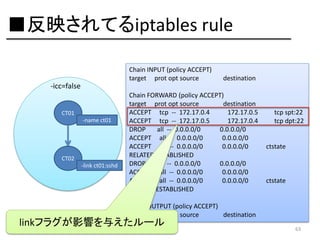
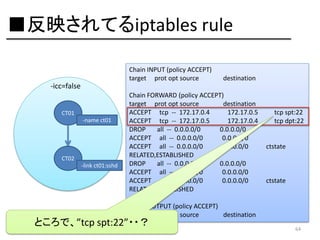
linkフラグが影響を与えたルール

63
■反映されてるiptables rule
Chain INPUT (policy ACCEPT)
target prot opt source

destination

-icc=false
CT01
-name ct01

CT02
-link ct01:sshd

Chain FORWARD (policy ACCEPT)
target prot opt source
destination
ACCEPT tcp -- 172.17.0.4
172.17.0.5
ACCEPT tcp -- 172.17.0.5
172.17.0.4
DROP
all -- 0.0.0.0/0
0.0.0.0/0
ACCEPT all -- 0.0.0.0/0
0.0.0.0/0
ACCEPT all -- 0.0.0.0/0
0.0.0.0/0
RELATED,ESTABLISHED
DROP
all -- 0.0.0.0/0
0.0.0.0/0
ACCEPT all -- 0.0.0.0/0
0.0.0.0/0
ACCEPT all -- 0.0.0.0/0
0.0.0.0/0
RELATED,ESTABLISHED

tcp spt:22
tcp dpt:22

ctstate

ctstate

Chain OUTPUT (policy ACCEPT)
target prot opt source
destination

ところで、”tcp spt:22”・・?

64
■反映されてるiptables rule
Chain INPUT (policy ACCEPT)
target prot opt source

destination

-icc=false
CT01
-name ct01

CT02
-link ct01:sshd

Chain FORWARD (policy ACCEPT)
target prot opt source
destination
ACCEPT tcp -- 172.17.0.4
172.17.0.5
ACCEPT tcp -- 172.17.0.5
172.17.0.4
DROP
all -- 0.0.0.0/0
0.0.0.0/0
ACCEPT all -- 0.0.0.0/0
0.0.0.0/0
ACCEPT all -- 0.0.0.0/0
0.0.0.0/0
RELATED,ESTABLISHED
DROP
all -- 0.0.0.0/0
0.0.0.0/0
ACCEPT all -- 0.0.0.0/0
0.0.0.0/0
ACCEPT all -- 0.0.0.0/0
0.0.0.0/0
RELATED,ESTABLISHED

tcp spt:22
tcp dpt:22

ctstate

ctstate

Chain OUTPUT (policy ACCEPT)
target prot opt source
destination

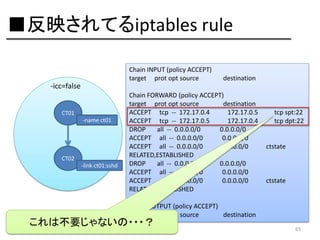
これは不要じゃないの・・・?

65
■反映されてるiptables rule
Chain INPUT (policy ACCEPT)
target prot opt source

destination

-icc=false
CT01
-name ct01

CT02
-link ct01:sshd

Chain FORWARD (policy ACCEPT)
target prot opt source
destination
ACCEPT tcp -- 172.17.0.4
172.17.0.5
ACCEPT tcp -- 172.17.0.5
172.17.0.4
DROP
all -- 0.0.0.0/0
0.0.0.0/0
ACCEPT all -- 0.0.0.0/0
0.0.0.0/0
ACCEPT all -- 0.0.0.0/0
0.0.0.0/0
RELATED,ESTABLISHED
DROP
all -- 0.0.0.0/0
0.0.0.0/0
ACCEPT all -- 0.0.0.0/0
0.0.0.0/0
ACCEPT all -- 0.0.0.0/0
0.0.0.0/0
RELATED,ESTABLISHED

tcp spt:22
tcp dpt:22

ctstate

ctstate

Chain OUTPUT (policy ACCEPT)
target prot opt source
destination

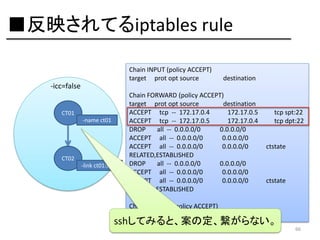
sshしてみると、案の定、繋がらない。

66
Bugっぽいので、
Issueを確認の上、
PRを送ってみようと思います。

67
Q:複雑なlink構成すると、
どうなるのか?

68
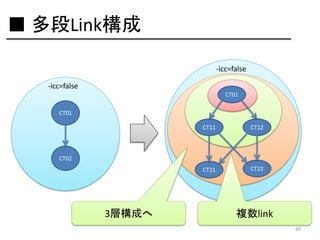
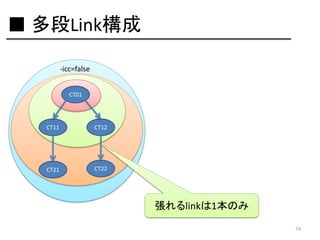
■ 多段Link構成
-icc=false
-icc=false
CT01
CT01
CT11

CT12

CT21

CT22

CT02

3層構成へ

複数link
69
しかし、この複数link構成、
仕様上不可能である事が判明する。

70
その仕様とは、
linkフラグは文字列型である事。

71
■ 多段Link構成
man docker より
Usage: docker run [OPTIONS] IMAGE[:TAG] [COMMAND] [ARG...]
Run a command in a new container
-a=map[]: Attach to stdin, stdout or stderr
-c=0: CPU shares (relative weight)
-cidfile="": Write the container ID to the file
-d=false: Detached mode: Run container in the background, print new container id
-e=[]: Set environment variables
-h="": Container host name
-i=false: Keep stdin open even if not attached
-privileged=false: Give extended privileges to this container
-m="": Memory limit (format: <number><optional unit>, where unit = b, k, m or g)
-n=true: Enable networking for this container
-p=[]: Map a network port to the container
-rm=false: Automatically remove the container when it exits (incompatible with -d)
-t=false: Allocate a pseudo-tty
-u="": Username or UID
-dns=[]: Set custom dns servers for the container
-v=[]: Create a bind mount with: [host-dir]:[container-dir]:[rw|ro]. If "container-dir" is missing, then docker creates a new volume.
-volumes-from="": Mount all volumes from the given container(s)
-entrypoint="": Overwrite the default entrypoint set by the image
-w="": Working directory inside the container
-lxc-conf=[]: Add custom lxc options -lxc-conf="lxc.cgroup.cpuset.cpus = 0,1"
-sig-proxy=true: Proxify all received signal to the process (even in non-tty mode)
-expose=[]: Expose a port from the container without publishing it to your host
-link="": Add link to another container (name:alias)
-name="": Assign the specified name to the container. If no name is specific docker will generate a random name
-P=false: Publish all exposed ports to the host interfaces

これが、
-link=[] だったなら・・・

-link="": Add link to another container (name:alias)

72
と言う事で、
現仕様で構成可能なのは、

73
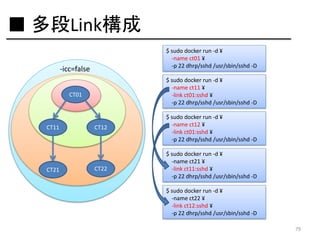
■ 多段Link構成
-icc=false
CT01

CT11

CT12
CT21

CT22

張れるlinkは1本のみ
74
多段link構成を作ってみる。

75
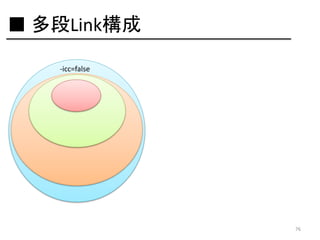
■ 多段Link構成
-icc=false

76
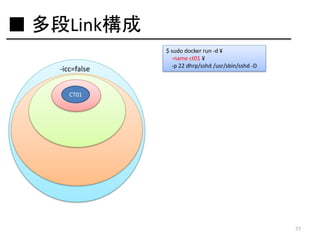
■ 多段Link構成
-icc=false

$ sudo docker run -d ¥
-name ct01 ¥
-p 22 dhrp/sshd /usr/sbin/sshd -D

CT01

77
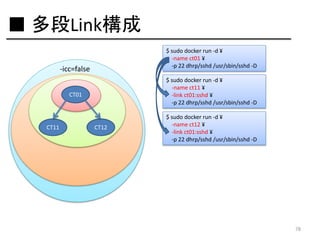
■ 多段Link構成
$ sudo docker run -d ¥
-name ct01 ¥
-p 22 dhrp/sshd /usr/sbin/sshd -D

-icc=false

$ sudo docker run -d ¥
-name ct11 ¥
-link ct01:sshd ¥
-p 22 dhrp/sshd /usr/sbin/sshd -D

CT01

CT11

CT12

$ sudo docker run -d ¥
-name ct12 ¥
-link ct01:sshd ¥
-p 22 dhrp/sshd /usr/sbin/sshd -D

78
■ 多段Link構成
$ sudo docker run -d ¥
-name ct01 ¥
-p 22 dhrp/sshd /usr/sbin/sshd -D

-icc=false

$ sudo docker run -d ¥
-name ct11 ¥
-link ct01:sshd ¥
-p 22 dhrp/sshd /usr/sbin/sshd -D

CT01

CT11

CT21

CT12

CT22

$ sudo docker run -d ¥
-name ct12 ¥
-link ct01:sshd ¥
-p 22 dhrp/sshd /usr/sbin/sshd -D
$ sudo docker run -d ¥
-name ct21 ¥
-link ct11:sshd ¥
-p 22 dhrp/sshd /usr/sbin/sshd -D
$ sudo docker run -d ¥
-name ct22 ¥
-link ct12:sshd ¥
-p 22 dhrp/sshd /usr/sbin/sshd -D
79
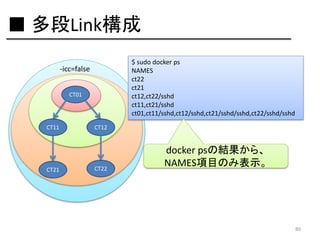
■ 多段Link構成
$ sudo docker ps
NAMES
ct22
ct21
ct12,ct22/sshd
ct11,ct21/sshd
ct01,ct11/sshd,ct12/sshd,ct21/sshd/sshd,ct22/sshd/sshd

-icc=false
CT01

CT11

CT21

CT12

CT22

docker psの結果から、
NAMES項目のみ表示。

80
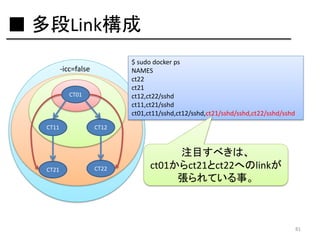
■ 多段Link構成
$ sudo docker ps
NAMES
ct22
ct21
ct12,ct22/sshd
ct11,ct21/sshd
ct01,ct11/sshd,ct12/sshd,ct21/sshd/sshd,ct22/sshd/sshd

-icc=false
CT01

CT11

CT21

CT12

CT22

注目すべきは、
ct01からct21とct22へのlinkが
張られている事。

81
Q:この時のiptables ruleは、
どうなっている?

82
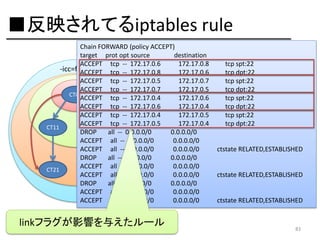
■反映されてるiptables rule
Chain FORWARD (policy ACCEPT)
target prot opt source
destination
ACCEPT tcp -- 172.17.0.6
172.17.0.8
-icc=false
ACCEPT tcp -- 172.17.0.8
172.17.0.6
ACCEPT tcp -- 172.17.0.5
172.17.0.7
ACCEPT tcp -- 172.17.0.7
172.17.0.5
CT01
ACCEPT tcp -- 172.17.0.4
172.17.0.6
ACCEPT tcp -- 172.17.0.6
172.17.0.4
ACCEPT tcp -- 172.17.0.4
172.17.0.5
ACCEPT tcp -- 172.17.0.5
172.17.0.4
CT11
CT12
DROP
all -- 0.0.0.0/0
0.0.0.0/0
ACCEPT all -- 0.0.0.0/0
0.0.0.0/0
ACCEPT all -- 0.0.0.0/0
0.0.0.0/0
DROP
all -- 0.0.0.0/0
0.0.0.0/0
ACCEPT all -- 0.0.0.0/0
0.0.0.0/0
CT22
CT21
ACCEPT all -- 0.0.0.0/0
0.0.0.0/0
DROP
all -- 0.0.0.0/0
0.0.0.0/0
ACCEPT all -- 0.0.0.0/0
0.0.0.0/0
ACCEPT all -- 0.0.0.0/0
0.0.0.0/0

linkフラグが影響を与えたルール

tcp spt:22
tcp dpt:22
tcp spt:22
tcp dpt:22
tcp spt:22
tcp dpt:22
tcp spt:22
tcp dpt:22

ctstate RELATED,ESTABLISHED

ctstate RELATED,ESTABLISHED

ctstate RELATED,ESTABLISHED

83
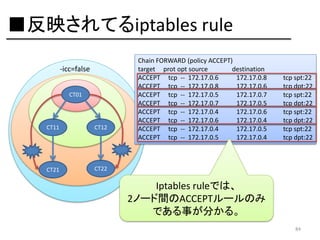
■反映されてるiptables rule
-icc=false
CT01

CT11

CT12

CT21

Chain FORWARD (policy ACCEPT)
target prot opt source
destination
ACCEPT tcp -- 172.17.0.6
172.17.0.8
ACCEPT tcp -- 172.17.0.8
172.17.0.6
ACCEPT tcp -- 172.17.0.5
172.17.0.7
ACCEPT tcp -- 172.17.0.7
172.17.0.5
ACCEPT tcp -- 172.17.0.4
172.17.0.6
ACCEPT tcp -- 172.17.0.6
172.17.0.4
ACCEPT tcp -- 172.17.0.4
172.17.0.5
ACCEPT tcp -- 172.17.0.5
172.17.0.4

tcp spt:22
tcp dpt:22
tcp spt:22
tcp dpt:22
tcp spt:22
tcp dpt:22
tcp spt:22
tcp dpt:22

CT22

Iptables ruleでは、
2ノード間のACCEPTルールのみ
である事が分かる。
84
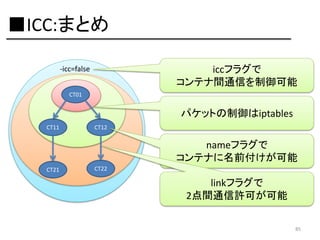
■ICC:まとめ
iccフラグで
コンテナ間通信を制御可能

-icc=false
CT01

パケットの制御はiptables
CT11

CT12

nameフラグで
コンテナに名前付けが可能
CT21

CT22

linkフラグで
2点間通信許可が可能
85
Q:コンテナに
狙ったIPアドレスを
指定できないのか?
86
A:今のDockerには、
割り当て機能が無い。

87
そこで登場するのが、

88
Pipework

89
■ Pipework
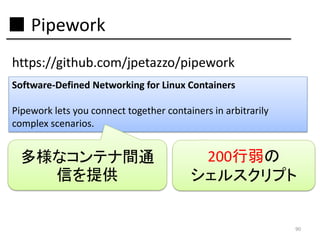
https://github.com/jpetazzo/pipework
Software-Defined Networking for Linux Containers

Pipework lets you connect together containers in arbitrarily
complex scenarios.

多様なコンテナ間通
信を提供

200行弱の
シェルスクリプト

90
■ Pipework: Usage
https://github.com/jpetazzo/pipework
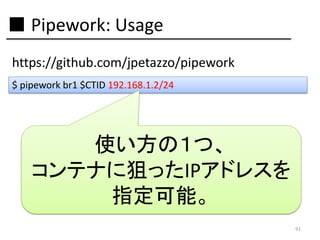
$ pipework br1 $CTID 192.168.1.2/24

使い方の1つ、
コンテナに狙ったIPアドレスを
指定可能。
91
Pipeworkを
動かしてみる。
92
■ Pipework
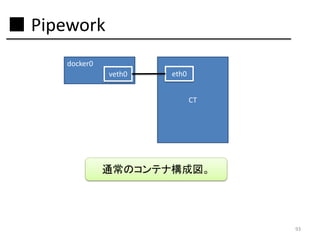
docker0
veth0

eth0

CT

通常のコンテナ構成図。

93
■ Pipework
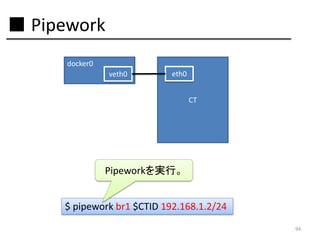
docker0
veth0

eth0

CT

Pipeworkを実行。
$ pipework br1 $CTID 192.168.1.2/24
94
■ Pipework
docker0
veth0

eth0

CT

veth1

eth1

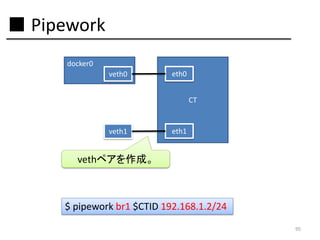
vethペアを作成。

$ pipework br1 $CTID 192.168.1.2/24
95
■ Pipework
docker0
veth0

eth0

CT
br1
veth1

eth1

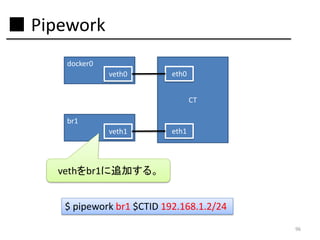
vethをbr1に追加する。
$ pipework br1 $CTID 192.168.1.2/24
96
■ Pipework
docker0
veth0

eth0

CT
br1
veth1

eth1

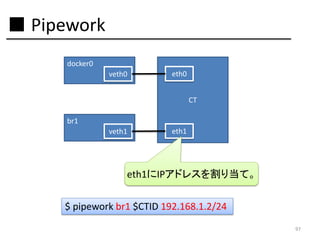
eth1にIPアドレスを割り当て。
$ pipework br1 $CTID 192.168.1.2/24
97
■ Pipework
docker0
veth0

eth0

CT
br1
veth1

eth1

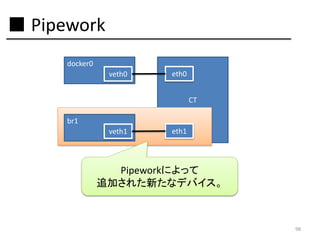
Pipeworkによって
追加された新たなデバイス。

98
Pipeworkの他の機能は?

99
■ Pipework
https://github.com/jpetazzo/pipework
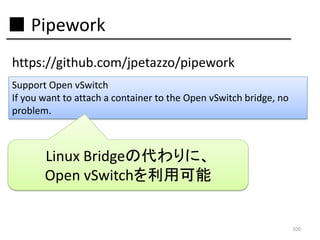
Support Open vSwitch
If you want to attach a container to the Open vSwitch bridge, no
problem.

Linux Bridgeの代わりに、
Open vSwitchを利用可能

100
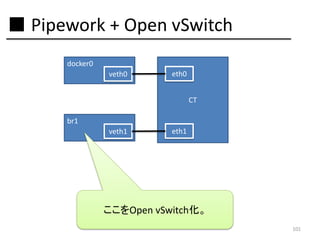
■ Pipework + Open vSwitch
docker0
veth0

eth0

CT
br1
veth1

eth1

ここをOpen vSwitch化。
101
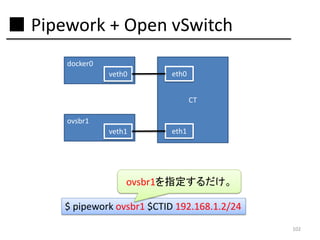
■ Pipework + Open vSwitch
docker0
veth0

eth0

CT
ovsbr1
veth1

eth1

ovsbr1を指定するだけ。
$ pipework ovsbr1 $CTID 192.168.1.2/24
102
ここまで重要なのは、
PipeworkはDockerコマンドを
一切実行してない事。

103
つまり、
Pipeworkが対象にしているのは、
LXCコンテナである事。

104
PipeworkとDockerは、
上手く住み分けされている。

105
以上、
駆け足で進めて参りました・・・

106
■ Network周りを触ってみて・・・
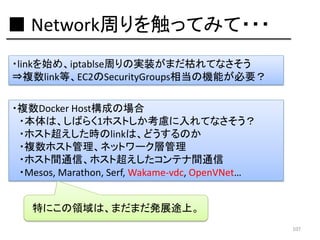
・linkを始め、iptablse周りの実装がまだ枯れてなさそう
⇒複数link等、EC2のSecurityGroups相当の機能が必要?
・複数Docker Host構成の場合
・本体は、しばらく1ホストしか考慮に入れてなさそう?
・ホスト超えした時のlinkは、どうするのか
・複数ホスト管理、ネットワーク層管理
・ホスト間通信、ホスト超えしたコンテナ間通信
・Mesos, Marathon, Serf, Wakame-vdc, OpenVNet…
特にこの領域は、まだまだ発展途上。
107
ご清聴ありがとうございました
https://twitter.com/hansode
http://blog.hansode.org/

108

Hack for Docker's Network