GV75MG User Manual
QSZTRACGV75MGUM0101
GV75MG User Manual
EGPRS/LTE Cat-M1/LTE Cat-NB1/GNSS Tracker
QSZTRACGV75MGUM0101
Version: 1.01
GV75MG User Manual
Document Title GV75MG User Manual
Version 1.01
Date 2019-11-11
Status Released
Document Control ID QSZTRACGV75MGUM0101
General Notes
Queclink offers this information as a service to its customers, to support application and
engineering efforts that use the products designed by Queclink. The information provided is
based upon requirements specifically provided to Queclink by the customers. Queclink has not
undertaken any independent search for additional relevant information, including any
information that may be in the customer’s possession. Furthermore, system validation of this
product designed by Queclink within a larger electronic system remains the responsibility of the
customer or the customer’s system integrator. All specifications supplied herein are subject to
change.
Copyright
This document contains proprietary technical information which is the property of Queclink.
Copying of this document, distribution to others or using or communication of the contents
thereof is forbidden without express authority. Offenders are liable to the payment of damages.
All rights are reserved in the event of a patent grant or registration of a utility model or design.
All specifications supplied herein are subject to change without notice at any time.
Copyright © Queclink Wireless Solutions Co., Ltd. 2019
QSZTRACGV75MGUM0101
Queclink
Confidential
GV75MG User Manual
Contents
0. Revision History.............................................................................................................................1
1. Introduction ..................................................................................................................................2
1.1. GV75MG Series Products ...................................................................................................2
1.2. Reference ...........................................................................................................................2
1.3. Terms and Abbreviations....................................................................................................2
2. Product Overview..........................................................................................................................3
2.1. Product Appearance...........................................................................................................3
2.2. LED Description..................................................................................................................3
2.3. Parts List.............................................................................................................................4
3. Interface Definition .......................................................................................................................5
4. Device Cable Color ........................................................................................................................6
5. Getting Started..............................................................................................................................7
5.1. Opening and Closing the Casing.........................................................................................7
5.2. Installing a SIM Card...........................................................................................................7
5.3. Power Supply Connection ..................................................................................................8
5.4. Ignition Detection...............................................................................................................8
5.5. Digital Input........................................................................................................................8
5.6. Digital Outputs ...................................................................................................................9
5.7. UART Interface .................................................................................................................10
6. Installation Precautions...............................................................................................................11
7. Troubleshooting and Safety Info .................................................................................................12
7.1. Troubleshooting ...............................................................................................................12
7.2. Safety Info ........................................................................................................................12
8. Appendix: Supported Accessories...............................................................................................13
QSZTRACGV75MGUM0101
Queclink
Confidential
GV75MG User Manual
0. Revision History
Version Date Author Description of change
1.00 2019-09-05 Heymi Lin Initial Version
1.01 2019-11-11 Heymi Lin Modified Table 4 and Table 5
QSZTRACGV75MGUM0101 1
Queclink
Confidential
GV75MG User Manual
1. Introduction
The GV75MG is a micro-type GSM and LTE GPS tracker designed for a wide variety of vehicle
tracking applications. It has I/O interfaces that can be used for monitoring or controlling external
devices. The built-in GPS receiver has superior sensitivity and fast initial positioning. Their
multiband LTE Cat-M1 and Cat-NB1 allow the GV75MG location to be monitored in real time or
periodically tracked by a backend server or mobile devices. System integration is straightforward
as complete documentation is provided for the full featured @Track protocol. The @Track
protocol supports a wide variety of reports including emergency alarm, geo-fence boundary
crossings, as well as external power supply monitoring and position reports.
1.1. GV75MG Series Products
Table 1. GV75MG Products
Model No. Region Technology Operating Band (MHz)
GV75MG Worldwide eMTC/NB-IoT
GSM:GSM850/GSM900/
DCS1800/PCS1900
LTE-TDD: B39 (for Cat.M1 only)
LTE-FDD:
B1/B2/B3/B4/B5/B8/B12/B13/B
18/B19/B20/B25/B28
1.2. Reference
Table 2. GV75MG Protocol Reference
SN Document name Remark
[1] GV75M @Track Air Interface Protocol
The air protocol interface between
GV75MG and backend server.
1.3. Terms and Abbreviations
Table 3. GV75MG Terms and Abbreviations
Abbreviation Description
RXD Receive Data
TXD Transmit Data
OUT1 Output 1
OUT2 Output 2
IGN Ignition
IN1 Input 1
GND Ground
VIN External DC Power Input
QSZTRACGV75MGUM0101 2
Queclink
Confidential
GV75MG User Manual
2. Product Overview
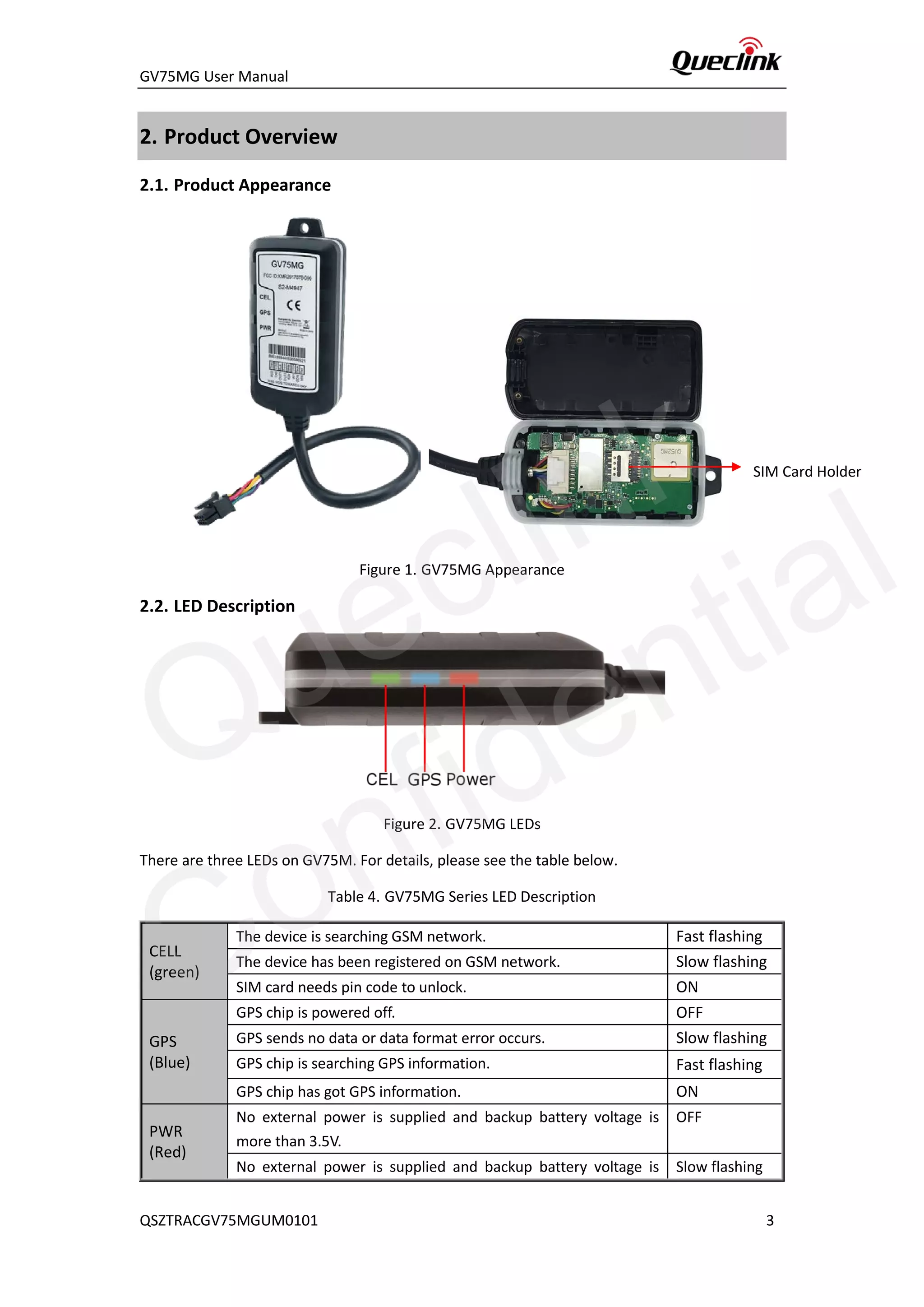
2.1. Product Appearance
Figure 1. GV75MG Appearance
2.2. LED Description
Figure 2. GV75MG LEDs
There are three LEDs on GV75M. For details, please see the table below.
Table 4. GV75MG Series LED Description
CELL
(green)
The device is searching GSM network. Fast flashing
The device has been registered on GSM network. Slow flashing
SIM card needs pin code to unlock. ON
GPS
(Blue)
GPS chip is powered off. OFF
GPS sends no data or data format error occurs. Slow flashing
GPS chip is searching GPS information. Fast flashing
GPS chip has got GPS information. ON
PWR
(Red)
No external power is supplied and backup battery voltage is
more than 3.5V.
OFF
No external power is supplied and backup battery voltage is Slow flashing
SIM Card Holder
QSZTRACGV75MGUM0101 3
Queclink
Confidential
GV75MG User Manual
lower than 3.5V.
External power is inserted and backup battery is charging. Fast flashing
External power is inserted and backup battery is fully charged. ON
Note:
1. Fast flashing intervals are about 100ms ON/200ms OFF.
2. Slow flashing intervals are about 200ms ON/1000ms OFF.
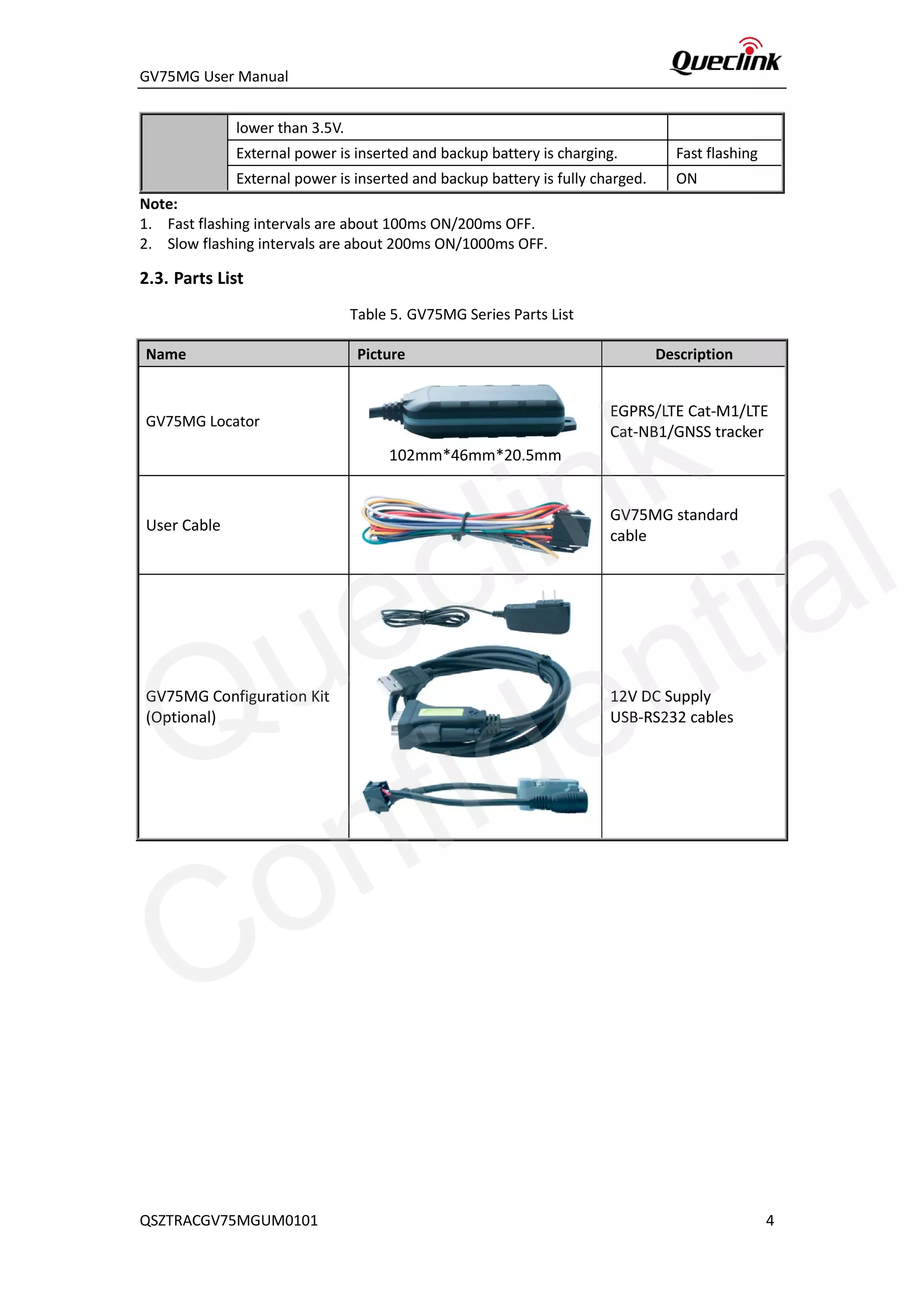
2.3. Parts List
Table 5. GV75MG Series Parts List
Name Picture Description
GV75MG Locator
102mm*46mm*20.5mm
EGPRS/LTE Cat-M1/LTE
Cat-NB1/GNSS tracker
User Cable
GV75MG standard
cable
GV75MG Configuration Kit
(Optional)
12V DC Supply
USB-RS232 cables
QSZTRACGV75MGUM0101 4
Queclink
Confidential
GV75MG User Manual
3. Interface Definition
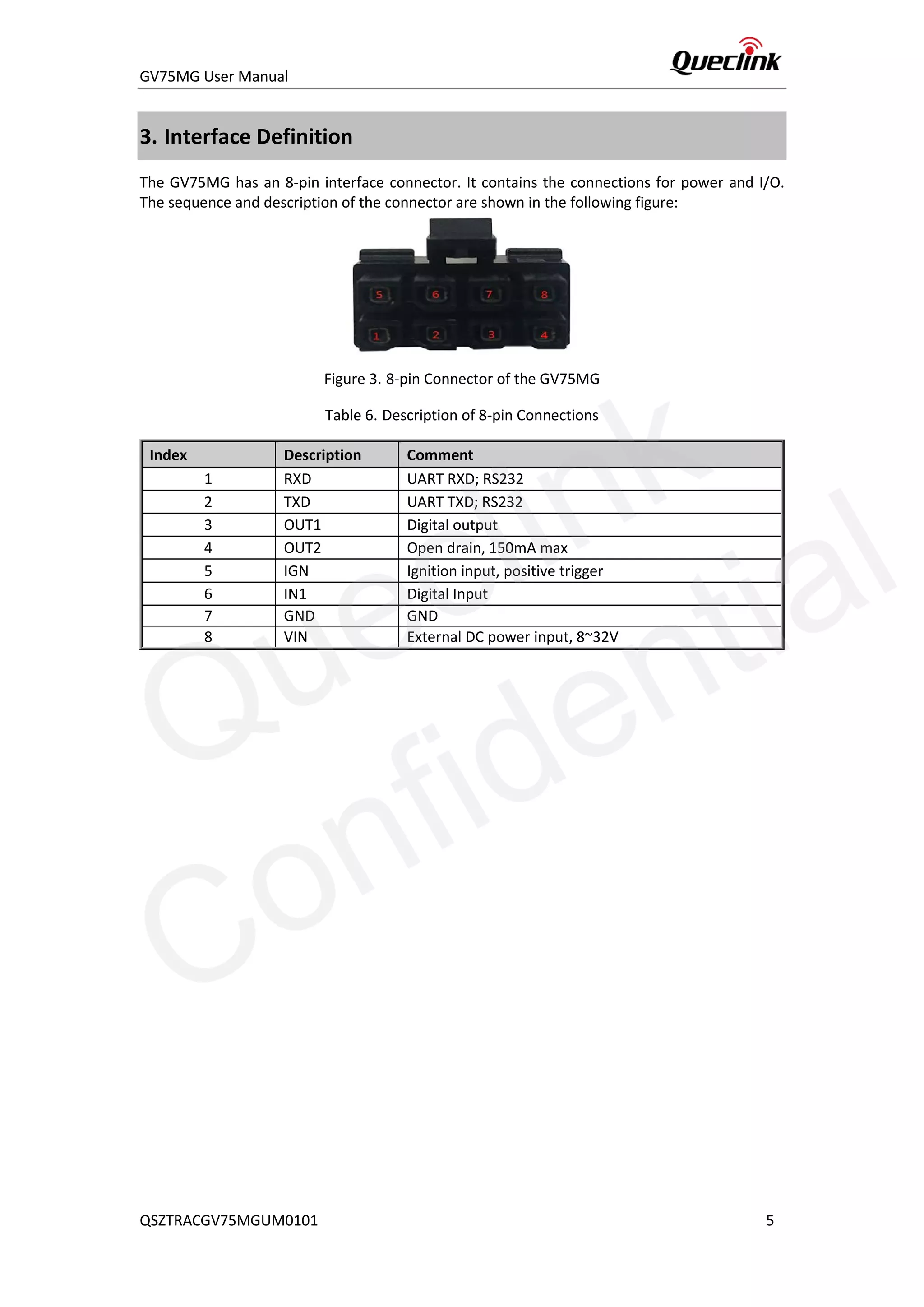
The GV75MG has an 8-pin interface connector. It contains the connections for power and I/O.
The sequence and description of the connector are shown in the following figure:
Figure 3. 8-pin Connector of the GV75MG
Table 6. Description of 8-pin Connections
Index Description Comment
1 RXD UART RXD; RS232
2 TXD UART TXD; RS232
3 OUT1 Digital output
4 OUT2 Open drain, 150mA max
5 IGN Ignition input, positive trigger
6 IN1 Digital Input
7 GND GND
8 VIN External DC power input, 8~32V
QSZTRACGV75MGUM0101 5
Queclink
Confidential
GV75MG User Manual
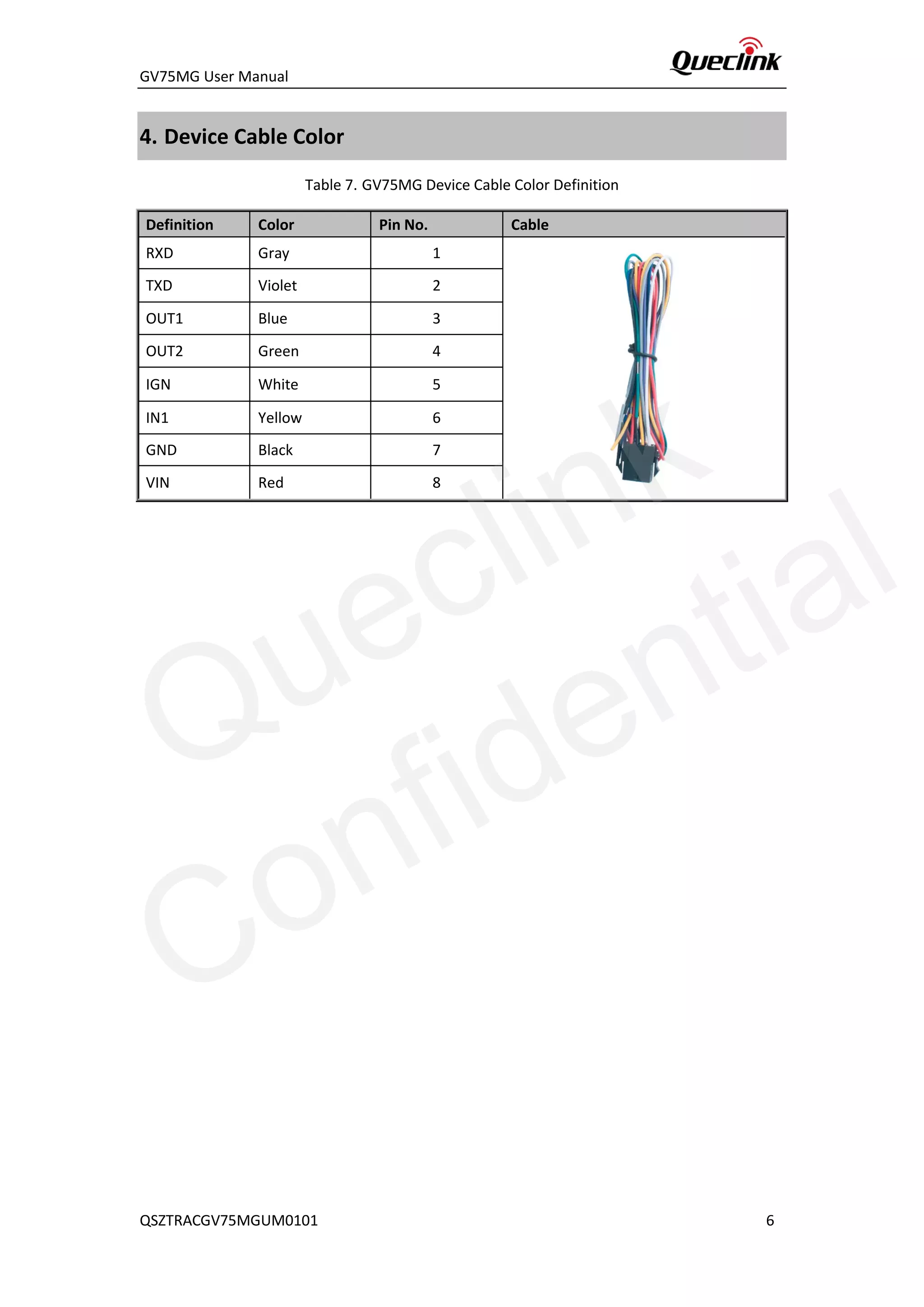
4. Device Cable Color
Table 7. GV75MG Device Cable Color Definition
Definition Color Pin No. Cable
RXD Gray 1
TXD Violet 2
OUT1 Blue 3
OUT2 Green 4
IGN White 5
IN1 Yellow 6
GND Black 7
VIN Red 8
QSZTRACGV75MGUM0101 6
Queclink
Confidential
GV75MG User Manual
5. Getting Started
5.1. Opening and Closing the Casing
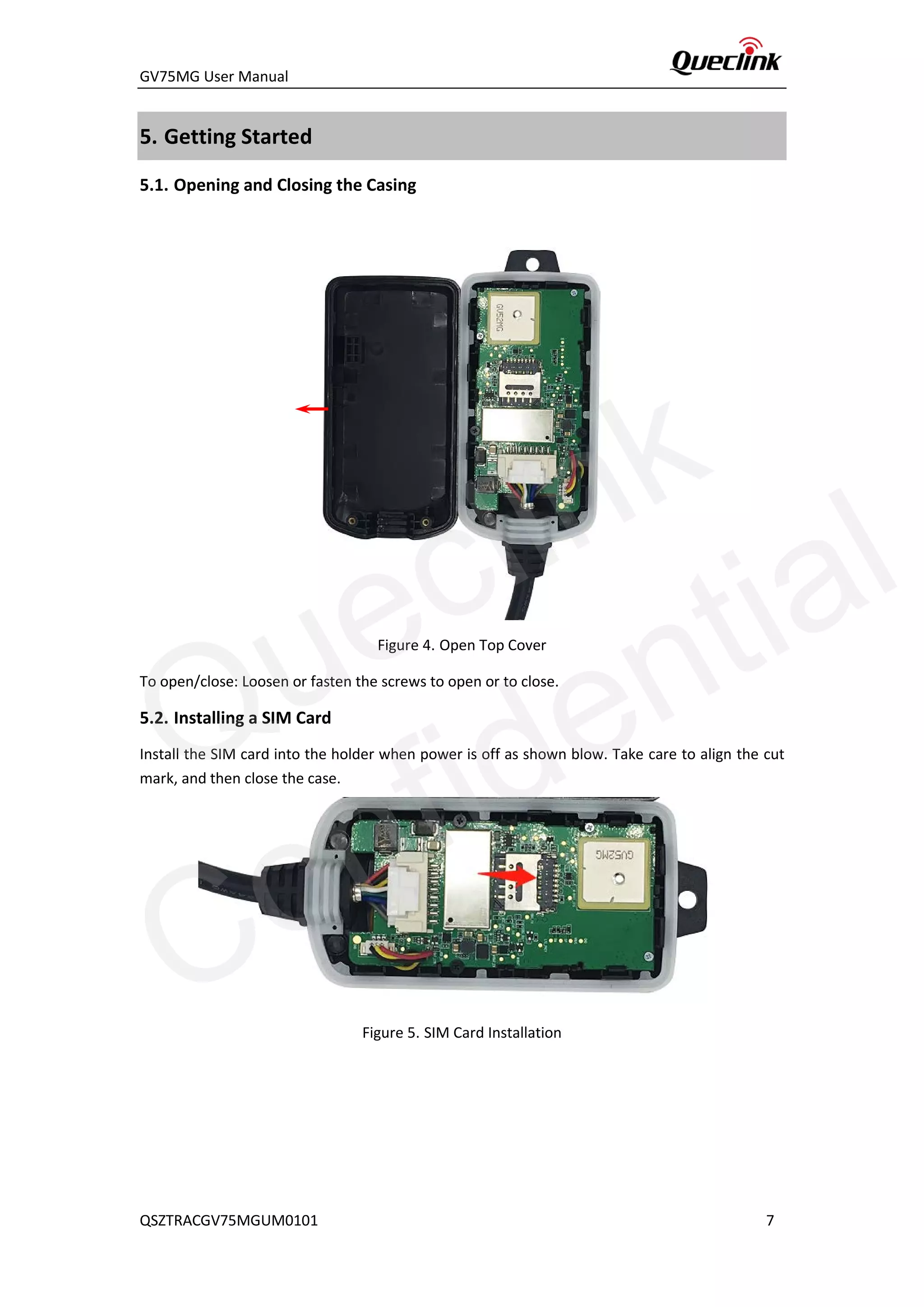
Figure 4. Open Top Cover
To open/close: Loosen or fasten the screws to open or to close.
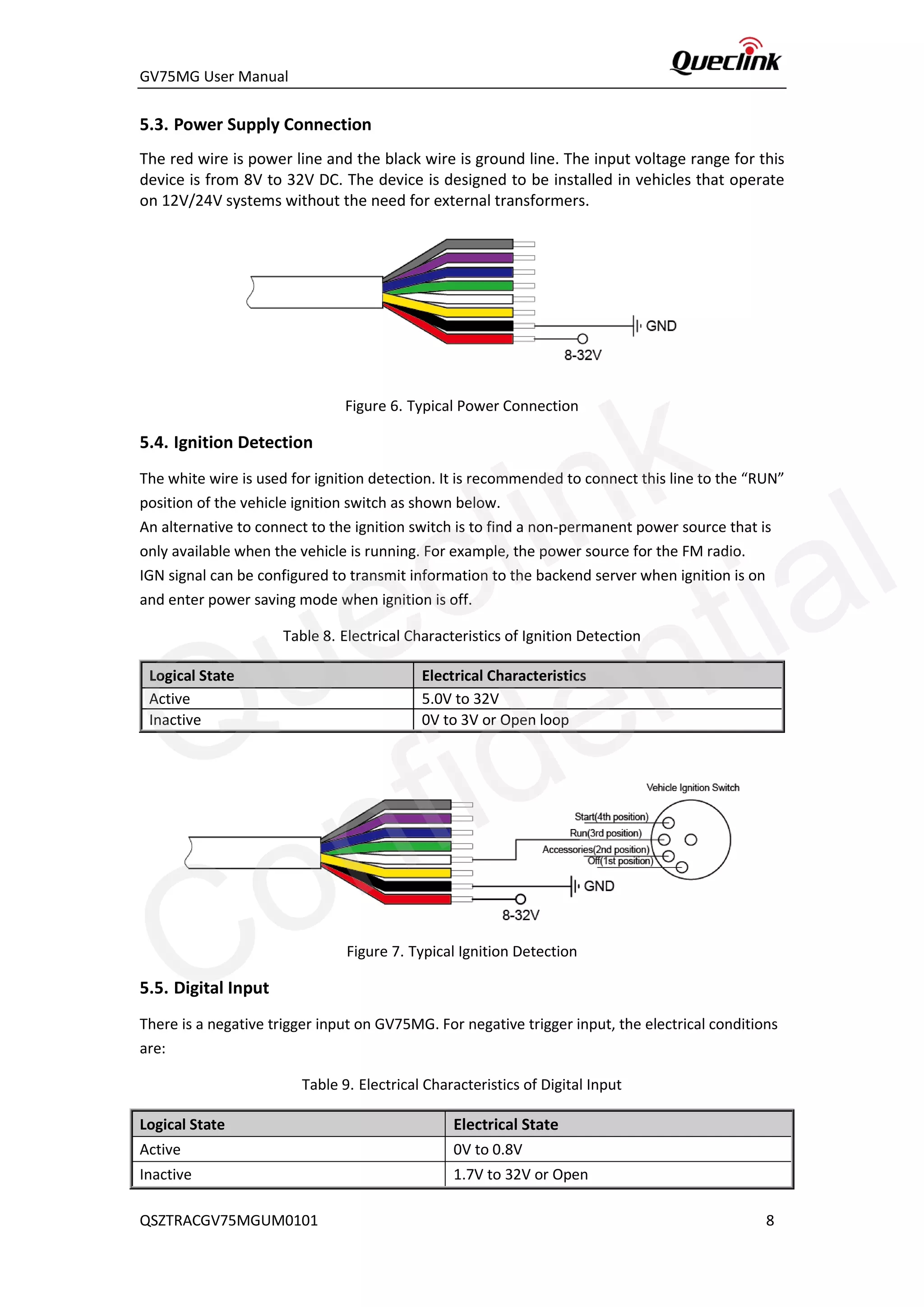
5.2. Installing a SIM Card
Install the SIM card into the holder when power is off as shown blow. Take care to align the cut
mark, and then close the case.
Figure 5. SIM Card Installation
QSZTRACGV75MGUM0101 7
Queclink
Confidential
GV75MG User Manual
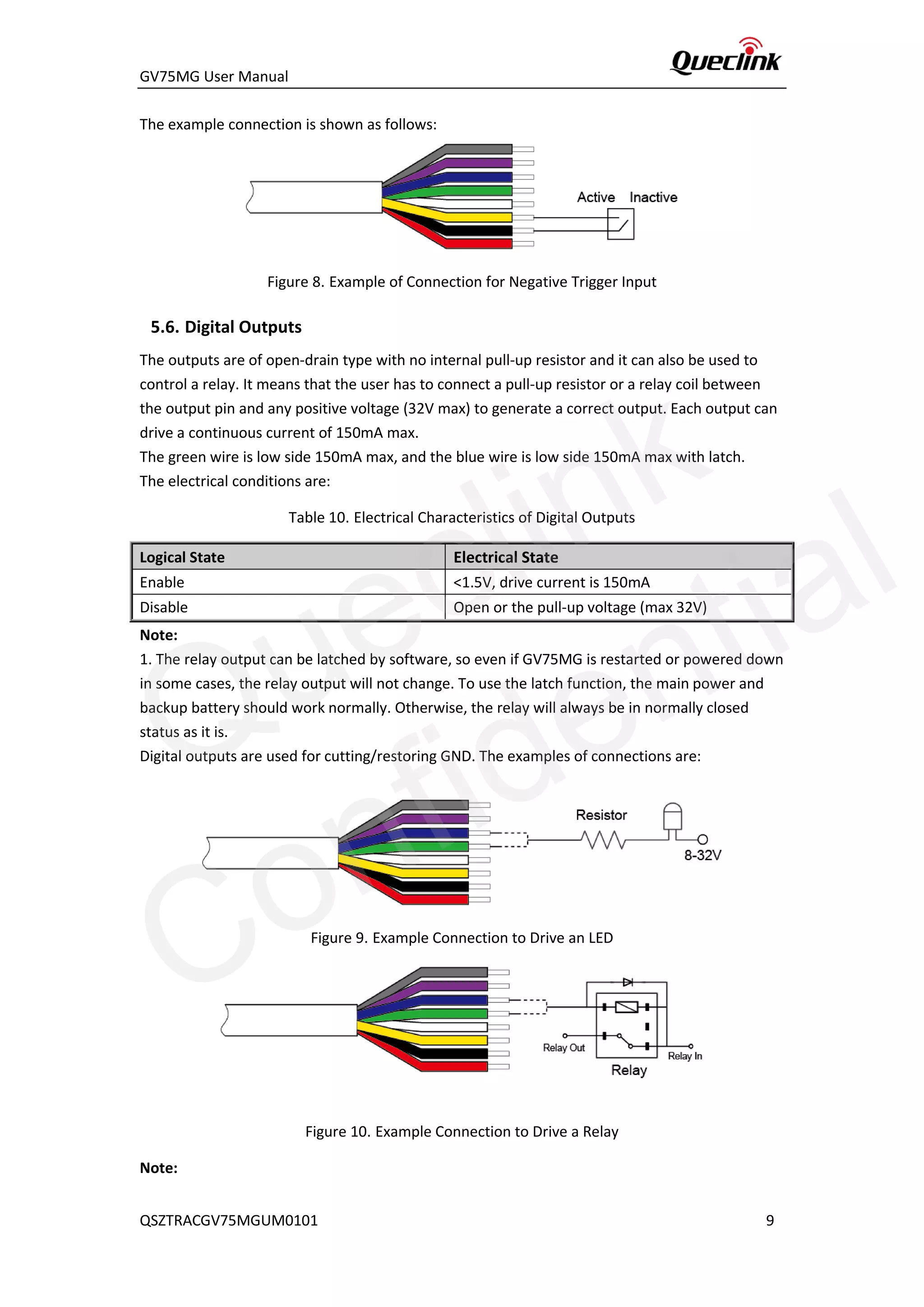
5.3. Power Supply Connection
The red wire is power line and the black wire is ground line. The input voltage range for this
device is from 8V to 32V DC. The device is designed to be installed in vehicles that operate
on 12V/24V systems without the need for external transformers.
Figure 6. Typical Power Connection
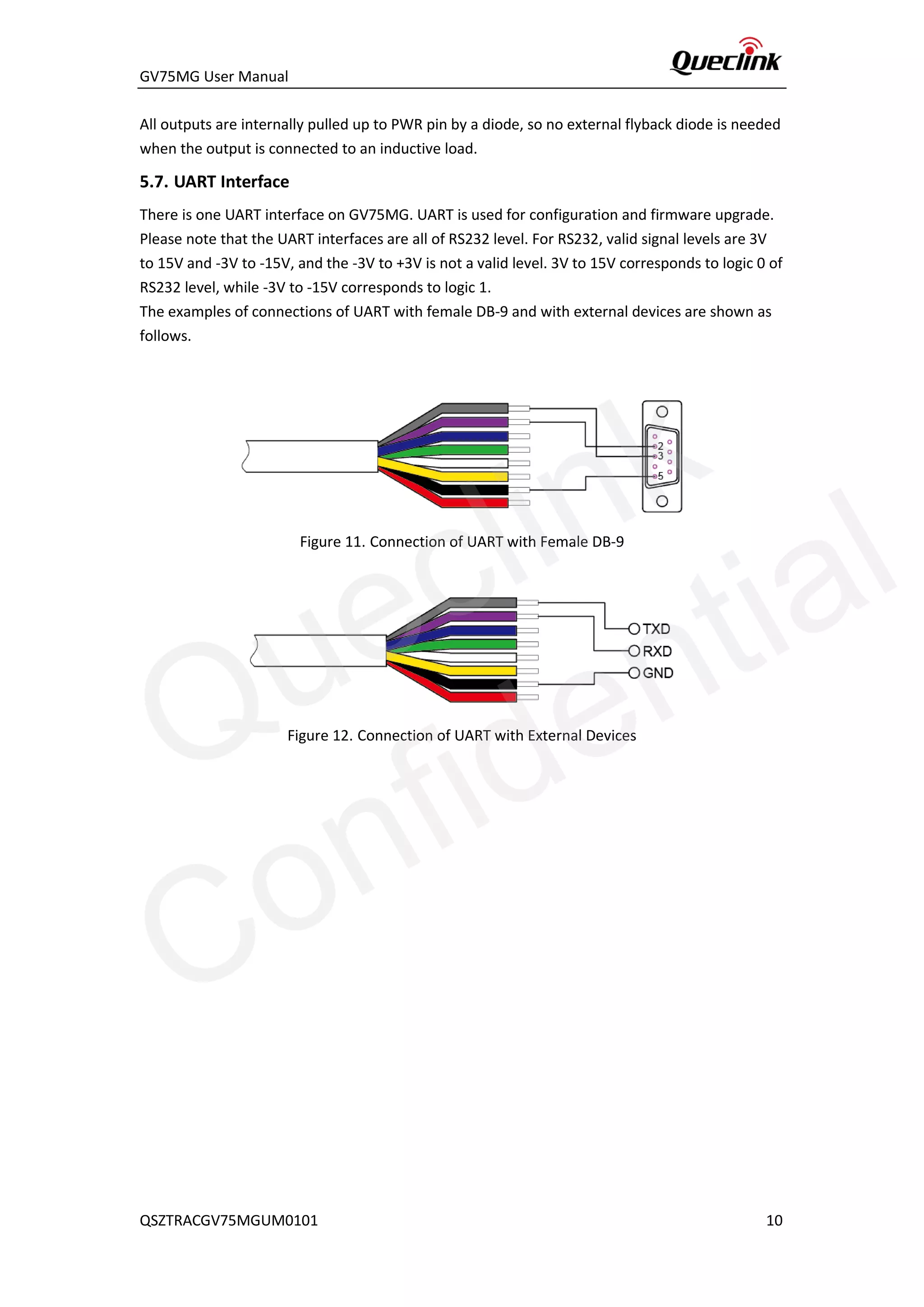
5.4. Ignition Detection
The white wire is used for ignition detection. It is recommended to connect this line to the “RUN”
position of the vehicle ignition switch as shown below.
An alternative to connect to the ignition switch is to find a non-permanent power source that is
only available when the vehicle is running. For example, the power source for the FM radio.
IGN signal can be configured to transmit information to the backend server when ignition is on
and enter power saving mode when ignition is off.
Table 8. Electrical Characteristics of Ignition Detection
Logical State Electrical Characteristics
Active 5.0V to 32V
Inactive 0V to 3V or Open loop
Figure 7. Typical Ignition Detection
5.5. Digital Input
There is a negative trigger input on GV75MG. For negative trigger input, the electrical conditions
are:
Table 9. Electrical Characteristics of Digital Input
Logical State Electrical State
Active 0V to 0.8V
Inactive 1.7V to 32V or Open
QSZTRACGV75MGUM0101 8
Queclink
Confidential
GV75MG User Manual
The example connection is shown as follows:
Figure 8. Example of Connection for Negative Trigger Input
5.6. Digital Outputs
The outputs are of open-drain type with no internal pull-up resistor and it can also be used to
control a relay. It means that the user has to connect a pull-up resistor or a relay coil between
the output pin and any positive voltage (32V max) to generate a correct output. Each output can
drive a continuous current of 150mA max.
The green wire is low side 150mA max, and the blue wire is low side 150mA max with latch.
The electrical conditions are:
Table 10. Electrical Characteristics of Digital Outputs
Logical State Electrical State
Enable <1.5V, drive current is 150mA
Disable Open or the pull-up voltage (max 32V)
Note:
1. The relay output can be latched by software, so even if GV75MG is restarted or powered down
in some cases, the relay output will not change. To use the latch function, the main power and
backup battery should work normally. Otherwise, the relay will always be in normally closed
status as it is.
Digital outputs are used for cutting/restoring GND. The examples of connections are:
Figure 9. Example Connection to Drive an LED
Figure 10. Example Connection to Drive a Relay
Note:
QSZTRACGV75MGUM0101 9
Queclink
Confidential
GV75MG User Manual
All outputs are internally pulled up to PWR pin by a diode, so no external flyback diode is needed
when the output is connected to an inductive load.
5.7. UART Interface
There is one UART interface on GV75MG. UART is used for configuration and firmware upgrade.
Please note that the UART interfaces are all of RS232 level. For RS232, valid signal levels are 3V
to 15V and -3V to -15V, and the -3V to +3V is not a valid level. 3V to 15V corresponds to logic 0 of
RS232 level, while -3V to -15V corresponds to logic 1.
The examples of connections of UART with female DB-9 and with external devices are shown as
follows.
Figure 11. Connection of UART with Female DB-9
Figure 12. Connection of UART with External Devices
QSZTRACGV75MGUM0101 10
Queclink
Confidential
GV75MG User Manual
6. Installation Precautions
 Firmly install the device to a reliable surface to prevent falling off.
 Make the side with antenna face sky to have better signal reception.
 Do not install the device under metal surface or in enclosed environments having
difficulty in getting GPS and network signal.
QSZTRACGV75MGUM0101 11
Queclink
Confidential
GV75MG User Manual
7. Troubleshooting and Safety Info
7.1. Troubleshooting
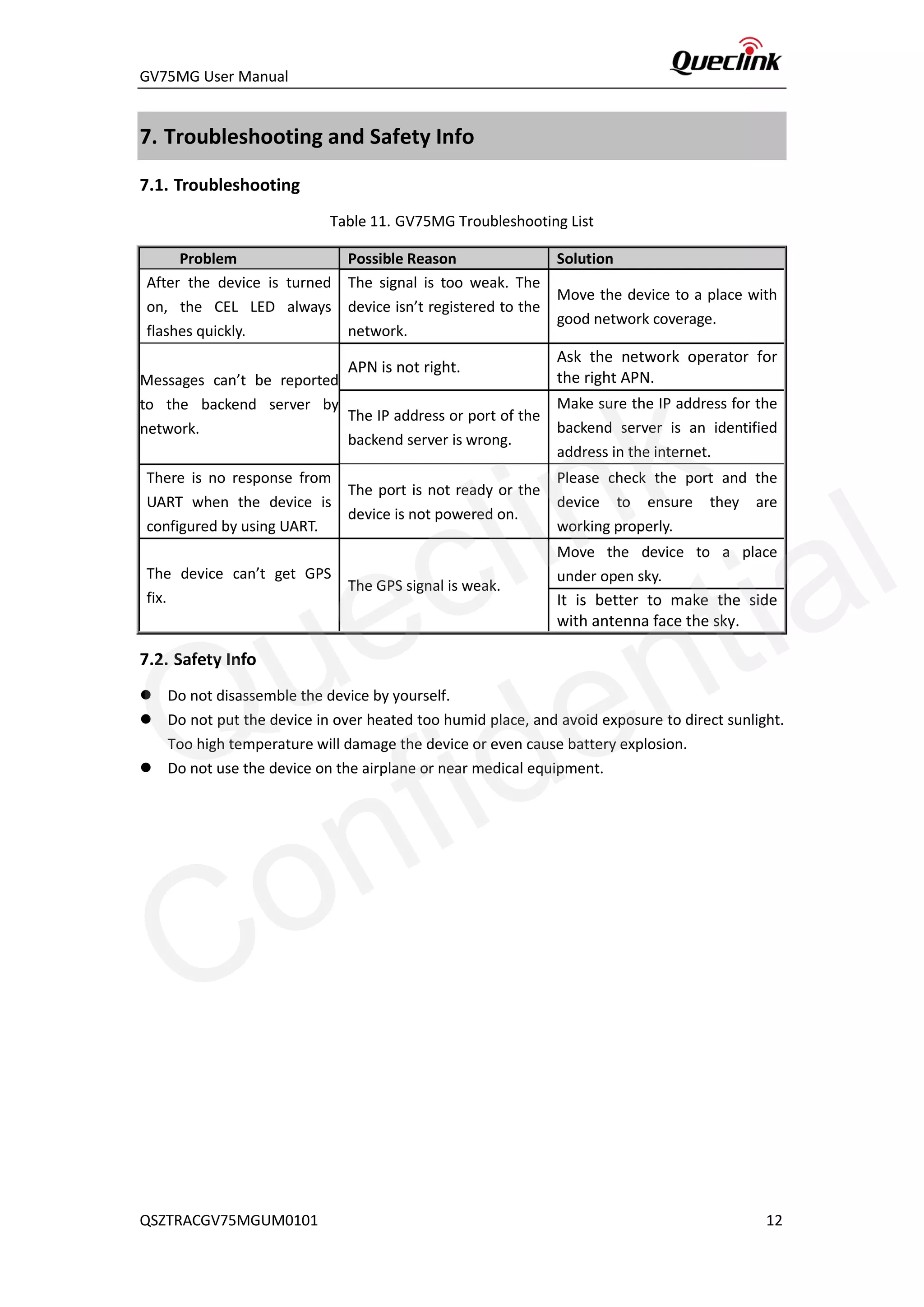
Table 11. GV75MG Troubleshooting List
Problem Possible Reason Solution
After the device is turned
on, the CEL LED always
flashes quickly.
The signal is too weak. The
device isn’t registered to the
network.
Move the device to a place with
good network coverage.
Messages can’t be reported
to the backend server by
network.
APN is not right.
Ask the network operator for
the right APN.
The IP address or port of the
backend server is wrong.
Make sure the IP address for the
backend server is an identified
address in the internet.
There is no response from
UART when the device is
configured by using UART.
The port is not ready or the
device is not powered on.
Please check the port and the
device to ensure they are
working properly.
The device can’t get GPS
fix.
The GPS signal is weak.
Move the device to a place
under open sky.
It is better to make the side
with antenna face the sky.
7.2. Safety Info
 Do not disassemble the device by yourself.
 Do not put the device in over heated too humid place, and avoid exposure to direct sunlight.
Too high temperature will damage the device or even cause battery explosion.
 Do not use the device on the airplane or near medical equipment.
QSZTRACGV75MGUM0101 12
Queclink
Confidential
GV75MG User Manual
8. Appendix: Supported Accessories
Currently, no external accessory is supported.
QSZTRACGV75MGUM0101 13
Queclink
Confidential

Gv75 mg user manual v1.01

  • 1.
    GV75MG User Manual QSZTRACGV75MGUM0101 GV75MGUser Manual EGPRS/LTE Cat-M1/LTE Cat-NB1/GNSS Tracker QSZTRACGV75MGUM0101 Version: 1.01
  • 2.
    GV75MG User Manual DocumentTitle GV75MG User Manual Version 1.01 Date 2019-11-11 Status Released Document Control ID QSZTRACGV75MGUM0101 General Notes Queclink offers this information as a service to its customers, to support application and engineering efforts that use the products designed by Queclink. The information provided is based upon requirements specifically provided to Queclink by the customers. Queclink has not undertaken any independent search for additional relevant information, including any information that may be in the customer’s possession. Furthermore, system validation of this product designed by Queclink within a larger electronic system remains the responsibility of the customer or the customer’s system integrator. All specifications supplied herein are subject to change. Copyright This document contains proprietary technical information which is the property of Queclink. Copying of this document, distribution to others or using or communication of the contents thereof is forbidden without express authority. Offenders are liable to the payment of damages. All rights are reserved in the event of a patent grant or registration of a utility model or design. All specifications supplied herein are subject to change without notice at any time. Copyright © Queclink Wireless Solutions Co., Ltd. 2019 QSZTRACGV75MGUM0101 Queclink Confidential
  • 3.
    GV75MG User Manual Contents 0.Revision History.............................................................................................................................1 1. Introduction ..................................................................................................................................2 1.1. GV75MG Series Products ...................................................................................................2 1.2. Reference ...........................................................................................................................2 1.3. Terms and Abbreviations....................................................................................................2 2. Product Overview..........................................................................................................................3 2.1. Product Appearance...........................................................................................................3 2.2. LED Description..................................................................................................................3 2.3. Parts List.............................................................................................................................4 3. Interface Definition .......................................................................................................................5 4. Device Cable Color ........................................................................................................................6 5. Getting Started..............................................................................................................................7 5.1. Opening and Closing the Casing.........................................................................................7 5.2. Installing a SIM Card...........................................................................................................7 5.3. Power Supply Connection ..................................................................................................8 5.4. Ignition Detection...............................................................................................................8 5.5. Digital Input........................................................................................................................8 5.6. Digital Outputs ...................................................................................................................9 5.7. UART Interface .................................................................................................................10 6. Installation Precautions...............................................................................................................11 7. Troubleshooting and Safety Info .................................................................................................12 7.1. Troubleshooting ...............................................................................................................12 7.2. Safety Info ........................................................................................................................12 8. Appendix: Supported Accessories...............................................................................................13 QSZTRACGV75MGUM0101 Queclink Confidential
  • 4.
    GV75MG User Manual 0.Revision History Version Date Author Description of change 1.00 2019-09-05 Heymi Lin Initial Version 1.01 2019-11-11 Heymi Lin Modified Table 4 and Table 5 QSZTRACGV75MGUM0101 1 Queclink Confidential
  • 5.
    GV75MG User Manual 1.Introduction The GV75MG is a micro-type GSM and LTE GPS tracker designed for a wide variety of vehicle tracking applications. It has I/O interfaces that can be used for monitoring or controlling external devices. The built-in GPS receiver has superior sensitivity and fast initial positioning. Their multiband LTE Cat-M1 and Cat-NB1 allow the GV75MG location to be monitored in real time or periodically tracked by a backend server or mobile devices. System integration is straightforward as complete documentation is provided for the full featured @Track protocol. The @Track protocol supports a wide variety of reports including emergency alarm, geo-fence boundary crossings, as well as external power supply monitoring and position reports. 1.1. GV75MG Series Products Table 1. GV75MG Products Model No. Region Technology Operating Band (MHz) GV75MG Worldwide eMTC/NB-IoT GSM:GSM850/GSM900/ DCS1800/PCS1900 LTE-TDD: B39 (for Cat.M1 only) LTE-FDD: B1/B2/B3/B4/B5/B8/B12/B13/B 18/B19/B20/B25/B28 1.2. Reference Table 2. GV75MG Protocol Reference SN Document name Remark [1] GV75M @Track Air Interface Protocol The air protocol interface between GV75MG and backend server. 1.3. Terms and Abbreviations Table 3. GV75MG Terms and Abbreviations Abbreviation Description RXD Receive Data TXD Transmit Data OUT1 Output 1 OUT2 Output 2 IGN Ignition IN1 Input 1 GND Ground VIN External DC Power Input QSZTRACGV75MGUM0101 2 Queclink Confidential
  • 6.
    GV75MG User Manual 2.Product Overview 2.1. Product Appearance Figure 1. GV75MG Appearance 2.2. LED Description Figure 2. GV75MG LEDs There are three LEDs on GV75M. For details, please see the table below. Table 4. GV75MG Series LED Description CELL (green) The device is searching GSM network. Fast flashing The device has been registered on GSM network. Slow flashing SIM card needs pin code to unlock. ON GPS (Blue) GPS chip is powered off. OFF GPS sends no data or data format error occurs. Slow flashing GPS chip is searching GPS information. Fast flashing GPS chip has got GPS information. ON PWR (Red) No external power is supplied and backup battery voltage is more than 3.5V. OFF No external power is supplied and backup battery voltage is Slow flashing SIM Card Holder QSZTRACGV75MGUM0101 3 Queclink Confidential
  • 7.
    GV75MG User Manual lowerthan 3.5V. External power is inserted and backup battery is charging. Fast flashing External power is inserted and backup battery is fully charged. ON Note: 1. Fast flashing intervals are about 100ms ON/200ms OFF. 2. Slow flashing intervals are about 200ms ON/1000ms OFF. 2.3. Parts List Table 5. GV75MG Series Parts List Name Picture Description GV75MG Locator 102mm*46mm*20.5mm EGPRS/LTE Cat-M1/LTE Cat-NB1/GNSS tracker User Cable GV75MG standard cable GV75MG Configuration Kit (Optional) 12V DC Supply USB-RS232 cables QSZTRACGV75MGUM0101 4 Queclink Confidential
  • 8.
    GV75MG User Manual 3.Interface Definition The GV75MG has an 8-pin interface connector. It contains the connections for power and I/O. The sequence and description of the connector are shown in the following figure: Figure 3. 8-pin Connector of the GV75MG Table 6. Description of 8-pin Connections Index Description Comment 1 RXD UART RXD; RS232 2 TXD UART TXD; RS232 3 OUT1 Digital output 4 OUT2 Open drain, 150mA max 5 IGN Ignition input, positive trigger 6 IN1 Digital Input 7 GND GND 8 VIN External DC power input, 8~32V QSZTRACGV75MGUM0101 5 Queclink Confidential
  • 9.
    GV75MG User Manual 4.Device Cable Color Table 7. GV75MG Device Cable Color Definition Definition Color Pin No. Cable RXD Gray 1 TXD Violet 2 OUT1 Blue 3 OUT2 Green 4 IGN White 5 IN1 Yellow 6 GND Black 7 VIN Red 8 QSZTRACGV75MGUM0101 6 Queclink Confidential
  • 10.
    GV75MG User Manual 5.Getting Started 5.1. Opening and Closing the Casing Figure 4. Open Top Cover To open/close: Loosen or fasten the screws to open or to close. 5.2. Installing a SIM Card Install the SIM card into the holder when power is off as shown blow. Take care to align the cut mark, and then close the case. Figure 5. SIM Card Installation QSZTRACGV75MGUM0101 7 Queclink Confidential
  • 11.
    GV75MG User Manual 5.3.Power Supply Connection The red wire is power line and the black wire is ground line. The input voltage range for this device is from 8V to 32V DC. The device is designed to be installed in vehicles that operate on 12V/24V systems without the need for external transformers. Figure 6. Typical Power Connection 5.4. Ignition Detection The white wire is used for ignition detection. It is recommended to connect this line to the “RUN” position of the vehicle ignition switch as shown below. An alternative to connect to the ignition switch is to find a non-permanent power source that is only available when the vehicle is running. For example, the power source for the FM radio. IGN signal can be configured to transmit information to the backend server when ignition is on and enter power saving mode when ignition is off. Table 8. Electrical Characteristics of Ignition Detection Logical State Electrical Characteristics Active 5.0V to 32V Inactive 0V to 3V or Open loop Figure 7. Typical Ignition Detection 5.5. Digital Input There is a negative trigger input on GV75MG. For negative trigger input, the electrical conditions are: Table 9. Electrical Characteristics of Digital Input Logical State Electrical State Active 0V to 0.8V Inactive 1.7V to 32V or Open QSZTRACGV75MGUM0101 8 Queclink Confidential
  • 12.
    GV75MG User Manual Theexample connection is shown as follows: Figure 8. Example of Connection for Negative Trigger Input 5.6. Digital Outputs The outputs are of open-drain type with no internal pull-up resistor and it can also be used to control a relay. It means that the user has to connect a pull-up resistor or a relay coil between the output pin and any positive voltage (32V max) to generate a correct output. Each output can drive a continuous current of 150mA max. The green wire is low side 150mA max, and the blue wire is low side 150mA max with latch. The electrical conditions are: Table 10. Electrical Characteristics of Digital Outputs Logical State Electrical State Enable <1.5V, drive current is 150mA Disable Open or the pull-up voltage (max 32V) Note: 1. The relay output can be latched by software, so even if GV75MG is restarted or powered down in some cases, the relay output will not change. To use the latch function, the main power and backup battery should work normally. Otherwise, the relay will always be in normally closed status as it is. Digital outputs are used for cutting/restoring GND. The examples of connections are: Figure 9. Example Connection to Drive an LED Figure 10. Example Connection to Drive a Relay Note: QSZTRACGV75MGUM0101 9 Queclink Confidential
  • 13.
    GV75MG User Manual Alloutputs are internally pulled up to PWR pin by a diode, so no external flyback diode is needed when the output is connected to an inductive load. 5.7. UART Interface There is one UART interface on GV75MG. UART is used for configuration and firmware upgrade. Please note that the UART interfaces are all of RS232 level. For RS232, valid signal levels are 3V to 15V and -3V to -15V, and the -3V to +3V is not a valid level. 3V to 15V corresponds to logic 0 of RS232 level, while -3V to -15V corresponds to logic 1. The examples of connections of UART with female DB-9 and with external devices are shown as follows. Figure 11. Connection of UART with Female DB-9 Figure 12. Connection of UART with External Devices QSZTRACGV75MGUM0101 10 Queclink Confidential
  • 14.
    GV75MG User Manual 6.Installation Precautions  Firmly install the device to a reliable surface to prevent falling off.  Make the side with antenna face sky to have better signal reception.  Do not install the device under metal surface or in enclosed environments having difficulty in getting GPS and network signal. QSZTRACGV75MGUM0101 11 Queclink Confidential
  • 15.
    GV75MG User Manual 7.Troubleshooting and Safety Info 7.1. Troubleshooting Table 11. GV75MG Troubleshooting List Problem Possible Reason Solution After the device is turned on, the CEL LED always flashes quickly. The signal is too weak. The device isn’t registered to the network. Move the device to a place with good network coverage. Messages can’t be reported to the backend server by network. APN is not right. Ask the network operator for the right APN. The IP address or port of the backend server is wrong. Make sure the IP address for the backend server is an identified address in the internet. There is no response from UART when the device is configured by using UART. The port is not ready or the device is not powered on. Please check the port and the device to ensure they are working properly. The device can’t get GPS fix. The GPS signal is weak. Move the device to a place under open sky. It is better to make the side with antenna face the sky. 7.2. Safety Info  Do not disassemble the device by yourself.  Do not put the device in over heated too humid place, and avoid exposure to direct sunlight. Too high temperature will damage the device or even cause battery explosion.  Do not use the device on the airplane or near medical equipment. QSZTRACGV75MGUM0101 12 Queclink Confidential
  • 16.
    GV75MG User Manual 8.Appendix: Supported Accessories Currently, no external accessory is supported. QSZTRACGV75MGUM0101 13 Queclink Confidential