GL320M Series User Manual
EGPRS/LTE Cat-M1/LTE Cat-NB2/GNSS Tracker
QSZTRACGL320MUM0100
Version: 1.00
GL320M Series User Manual
QSZTRACGL320MUM0100
Document Title GL320M Series User Manual
Version 1.00
Date 2021-04-06
Status Released
Document Control ID QSZTRACGL320MUM0100
General Notes
Queclink offers this information as a service to its customers, to support application and
engineering efforts that use the products designed by Queclink. The information provided is
based upon requirements specifically provided to Queclink by the customers. Queclink has not
undertaken any independent search for additional relevant information, including any
information that may be in the customer’s possession. Furthermore, system validation of this
product designed by Queclink within a larger electronic system remains the responsibility of the
customer or the customer’s system integrator. All specifications supplied herein are subject to
change.
Copyright
This document contains proprietary technical information which is the property of Queclink.
Copying of this document, distribution to others or using or communication of the contents
thereof is forbidden without express authority. Offenders are liable to the payment of damages.
All rights reserved in the event of grant of a patent or the registration of a utility model or design.
All specifications supplied herein are subject to change without notice at any time.
Copyright © Queclink Wireless Solutions Co., Ltd. 2021
Queclink
Confidential
GL320M Series User Manual
QSZTRACGL320MUM0100
Contents
0. Revision History.............................................................................................................................1
1. Introduction ..................................................................................................................................2
1.1. GL320M Series Product......................................................................................................2
1.2. Reference ...........................................................................................................................2
1.3. Terms and Abbreviations....................................................................................................2
2. Product Overview..........................................................................................................................3
2.1. Product Appearance...........................................................................................................3
2.2. Key/Type-C Interface Description.......................................................................................3
2.3. LED Description ..................................................................................................................4
2.4. Parts List.............................................................................................................................5
3. Interface Definition .......................................................................................................................6
4. GL320M Device Cable Color (Optional Extension Cable)..............................................................7
5. Getting Started..............................................................................................................................8
5.1. Battery Charging.................................................................................................................8
5.2. Turning On/off the Device..................................................................................................8
5.3. External Power Supply Connection....................................................................................9
5.3.1. External DC Charger Connection.............................................................................9
5.3.2. External Battery Connection ...................................................................................9
5.4. Ignition Detection.............................................................................................................10
5.5. External Input Connection ...............................................................................................11
6. Installation Precautions...............................................................................................................12
7. Troubleshooting and Safety Info .................................................................................................13
7.1. Troubleshooting ...............................................................................................................13
7.2. Safety Info ........................................................................................................................13
8. Appendix: Supported Accessories...............................................................................................14
Queclink
Confidential
GL320M Series User Manual
QSZTRACGL320MUM0100 1
0. Revision History
Version Date Author Description of Change
1.00 2021-04-06 Arry Wang Initial
Queclink
Confidential
GL320M Series User Manual
QSZTRACGL320MUM0100 2
1. Introduction
The GL320M Series is water resistant GPS trackers designed for lone worker, vehicle, pet and
asset tracking applications. The thumb sized button makes the series ideal for applications
requiring rapid emergency alert or setting of Geo-fences based on current locations. The built-in
GPS receiver has superior sensitivity and fast initial positioning. The LTE allows the GL320M
location to be monitored in real time or periodically tracked by a backend server or other
specified terminals. The built-in 3-axis accelerometer allows motion detection and sophisticated
power management algorithms extend battery life. System integration is straightforward as
complete documentation is provided for the full featured @Track protocol. The @Track protocol
supports a wide variety of reports including emergency, Geo-fence boundary crossings, low
battery and scheduled GPS position reports.
1.1. GL320M Series Product
Table 1. GL320M Series Product
Model No. Region Technology LTE Category Operating Band
GL320MG Global GSM/LTE eMTC/NB-IoT
Cat M1/Cat NB2:
Cat M1:
B1/B2/B3/B4/B5/B8/B12/B13/B18/B19/
B20/B25/B26/B27/B28/B66/B85
Cat NB2:
B1/B2/B3/B4/B5/B8/B12/B13/B18/B19/
B20/B25/B28/B66/B71/B85
EGPRS: 850/900/1800/1900MHz
1.2. Reference
Table 2. GL320M Series Protocol Reference
SN Document Name Remark
[1] GL320M Series @Track Air Interface
Protocol
The air interface protocol between GL320M
series and backend server.
1.3. Terms and Abbreviations
Table 3. GL320M Series Terms and Abbreviations
Abbreviation Description
RXD Receive Data
TXD Transmit Data
IGN Ignition
Queclink
Confidential
GL320M Series User Manual
QSZTRACGL320MUM0100 3
2. Product Overview
2.1. Product Appearance
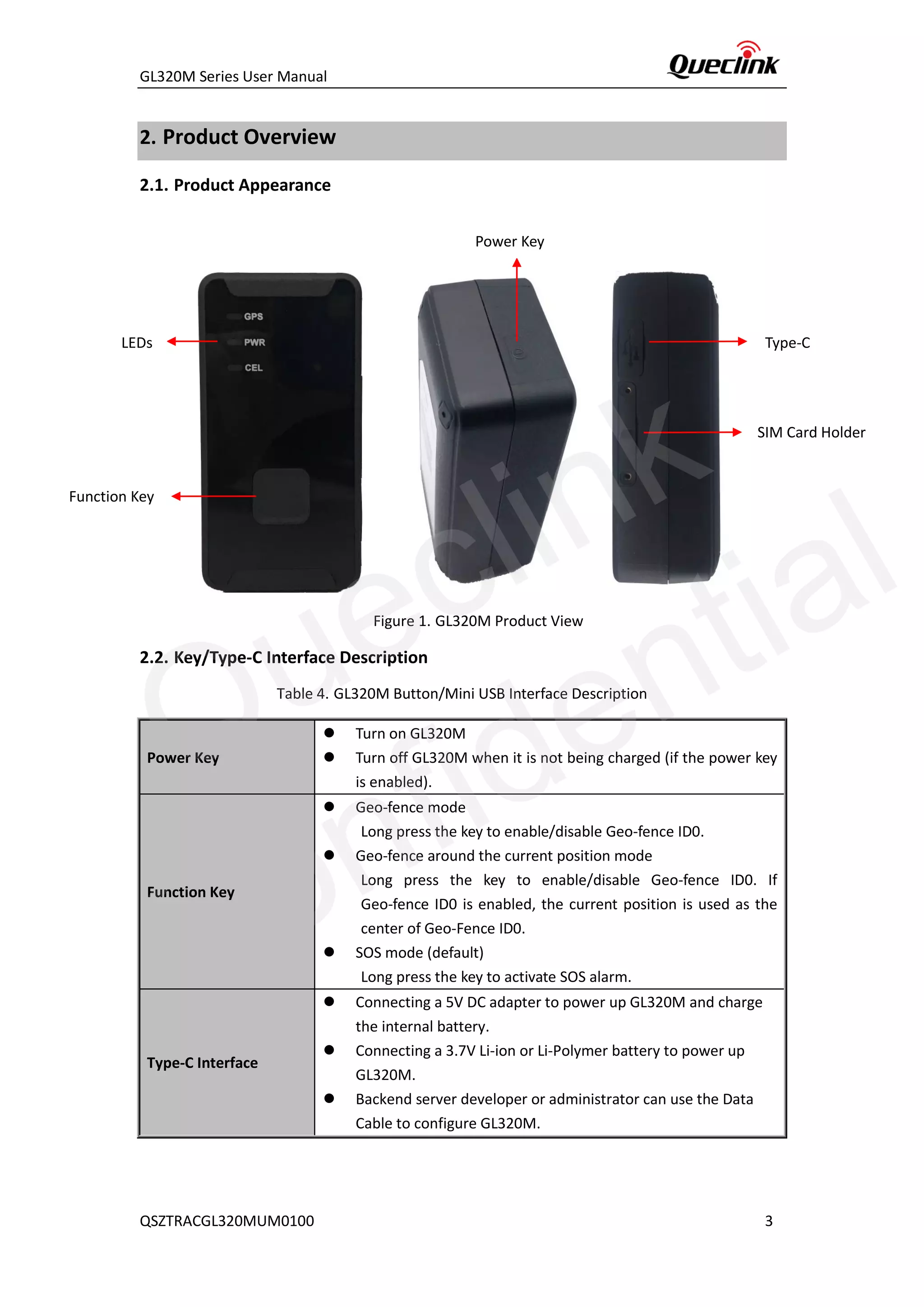
Figure 1. GL320M Product View
2.2. Key/Type-C Interface Description
Table 4. GL320M Button/Mini USB Interface Description
Power Key
⚫ Turn on GL320M
⚫ Turn off GL320M when it is not being charged (if the power key
is enabled).
Function Key
⚫ Geo-fence mode
Long press the key to enable/disable Geo-fence ID0.
⚫ Geo-fence around the current position mode
Long press the key to enable/disable Geo-fence ID0. If
Geo-fence ID0 is enabled, the current position is used as the
center of Geo-Fence ID0.
⚫ SOS mode (default)
Long press the key to activate SOS alarm.
Type-C Interface
⚫ Connecting a 5V DC adapter to power up GL320M and charge
the internal battery.
⚫ Connecting a 3.7V Li-ion or Li-Polymer battery to power up
GL320M.
⚫ Backend server developer or administrator can use the Data
Cable to configure GL320M.
LEDs
Function Key
Power Key
Type-C
SIM Card Holder
Queclink
Confidential
GL320M Series User Manual
QSZTRACGL320MUM0100 4
2.3. LED Description
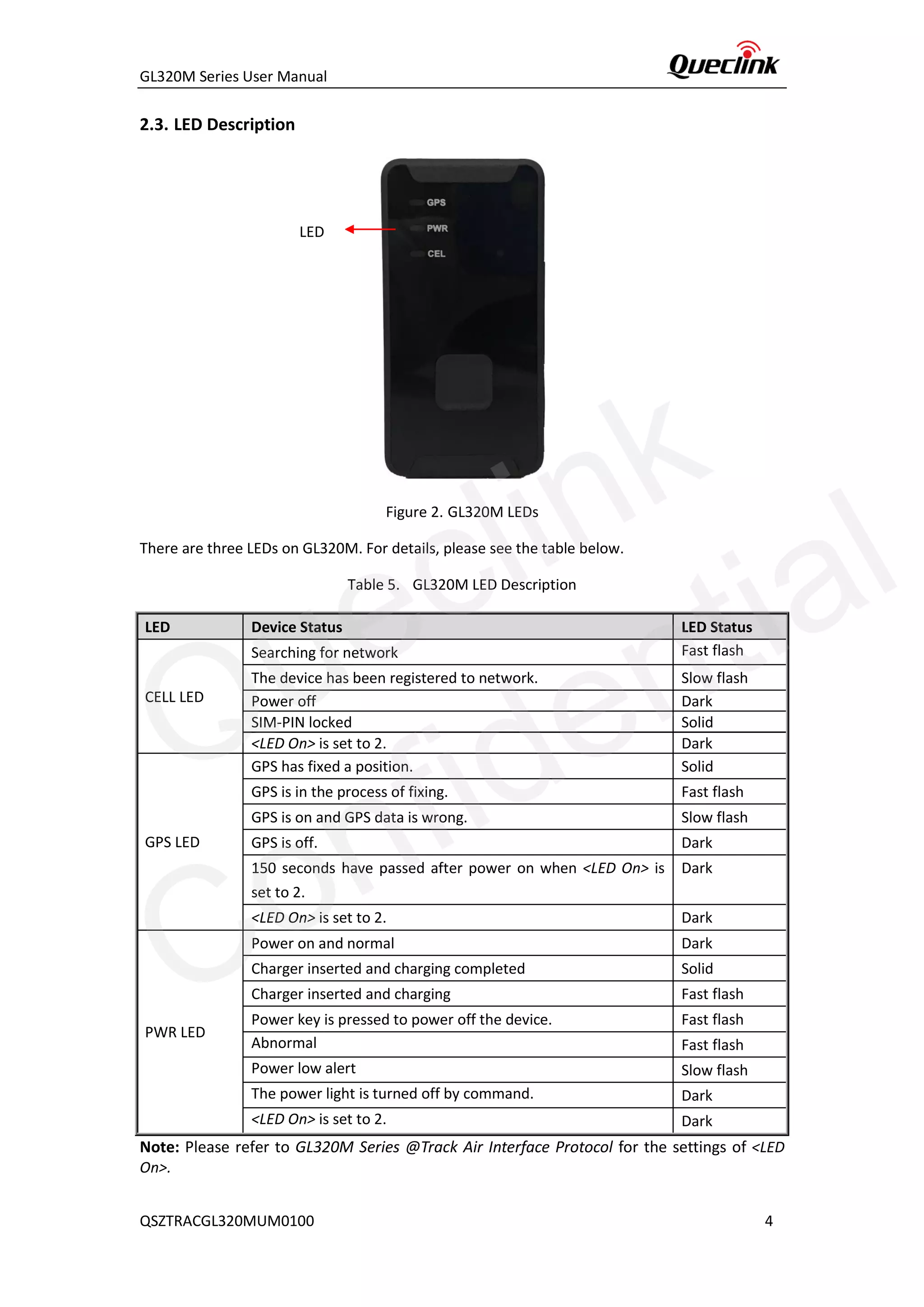
Figure 2. GL320M LEDs
There are three LEDs on GL320M. For details, please see the table below.
Table 5. GL320M LED Description
Note: Please refer to GL320M Series @Track Air Interface Protocol for the settings of <LED
On>.
LED Device Status LED Status
CELL LED
Searching for network Fast flash
The device has been registered to network. Slow flash
Power off Dark
SIM-PIN locked Solid
<LED On> is set to 2. Dark
GPS LED
GPS has fixed a position. Solid
GPS is in the process of fixing. Fast flash
GPS is on and GPS data is wrong. Slow flash
GPS is off. Dark
150 seconds have passed after power on when <LED On> is
set to 2.
Dark
<LED On> is set to 2. Dark
PWR LED
Power on and normal Dark
Charger inserted and charging completed Solid
Charger inserted and charging Fast flash
Power key is pressed to power off the device. Fast flash
Abnormal Fast flash
Power low alert Slow flash
The power light is turned off by command. Dark
<LED On> is set to 2. Dark
LED
Queclink
Confidential
GL320M Series User Manual
QSZTRACGL320MUM0100 5
2.4. Parts List
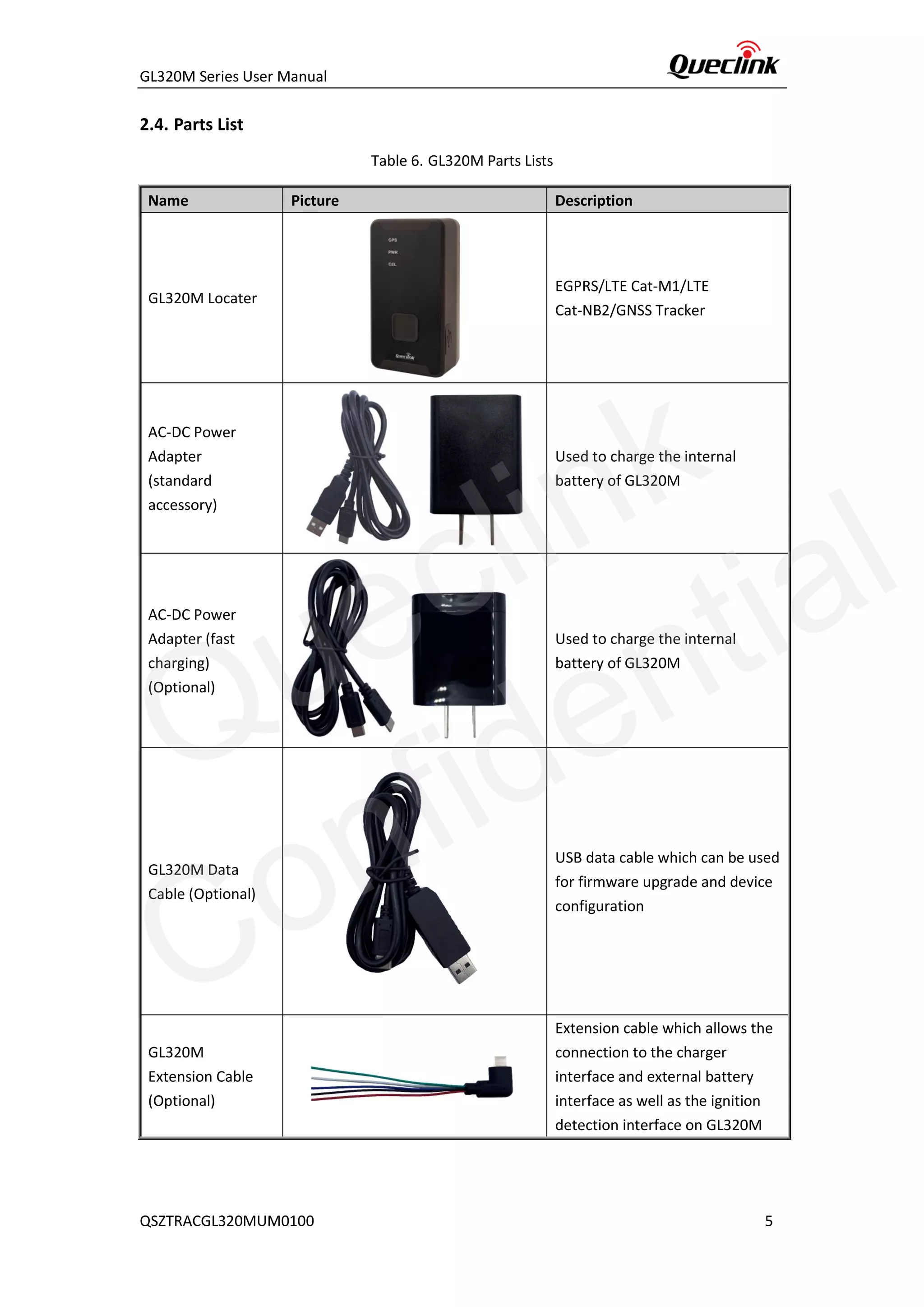
Table 6. GL320M Parts Lists
Name Picture Description
GL320M Locater
EGPRS/LTE Cat-M1/LTE
Cat-NB2/GNSS Tracker
AC-DC Power
Adapter
(standard
accessory)
Used to charge the internal
battery of GL320M
AC-DC Power
Adapter (fast
charging)
(Optional)
Used to charge the internal
battery of GL320M
GL320M Data
Cable (Optional)
USB data cable which can be used
for firmware upgrade and device
configuration
GL320M
Extension Cable
(Optional)
Extension cable which allows the
connection to the charger
interface and external battery
interface as well as the ignition
detection interface on GL320M
Queclink
Confidential
GL320M Series User Manual
QSZTRACGL320MUM0100 6
3. Interface Definition
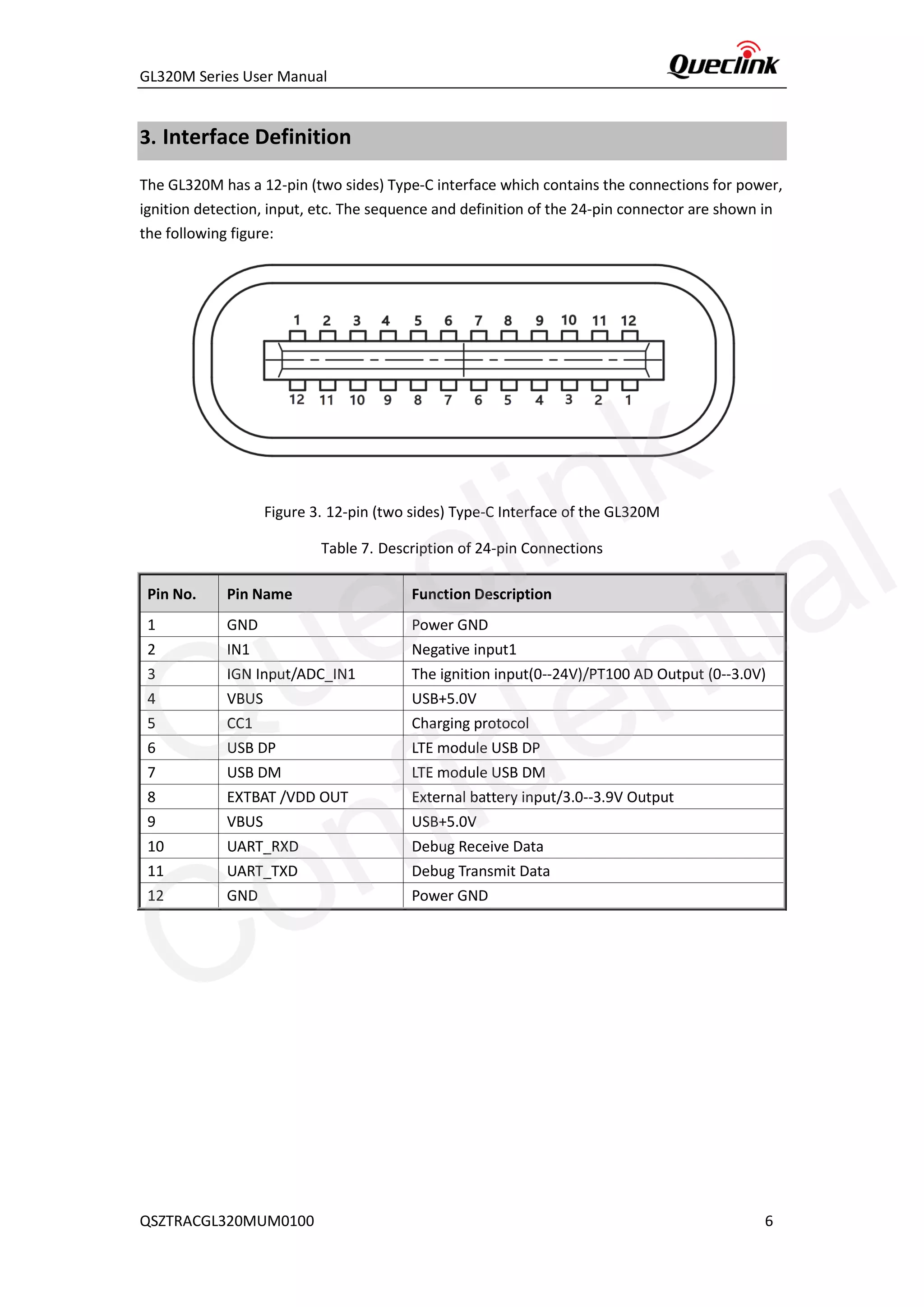
The GL320M has a 12-pin (two sides) Type-C interface which contains the connections for power,
ignition detection, input, etc. The sequence and definition of the 24-pin connector are shown in
the following figure:
Figure 3. 12-pin (two sides) Type-C Interface of the GL320M
Table 7. Description of 24-pin Connections
Pin No. Pin Name Function Description
1 GND Power GND
2 IN1 Negative input1
3 IGN Input/ADC_IN1 The ignition input(0--24V)/PT100 AD Output (0--3.0V)
4 VBUS USB+5.0V
5 CC1 Charging protocol
6 USB DP LTE module USB DP
7 USB DM LTE module USB DM
8 EXTBAT /VDD OUT External battery input/3.0--3.9V Output
9 VBUS USB+5.0V
10 UART_RXD Debug Receive Data
11 UART_TXD Debug Transmit Data
12 GND Power GND
Queclink
Confidential
GL320M Series User Manual
QSZTRACGL320MUM0100 7
4. GL320M Device Cable Color (Optional Extension Cable)
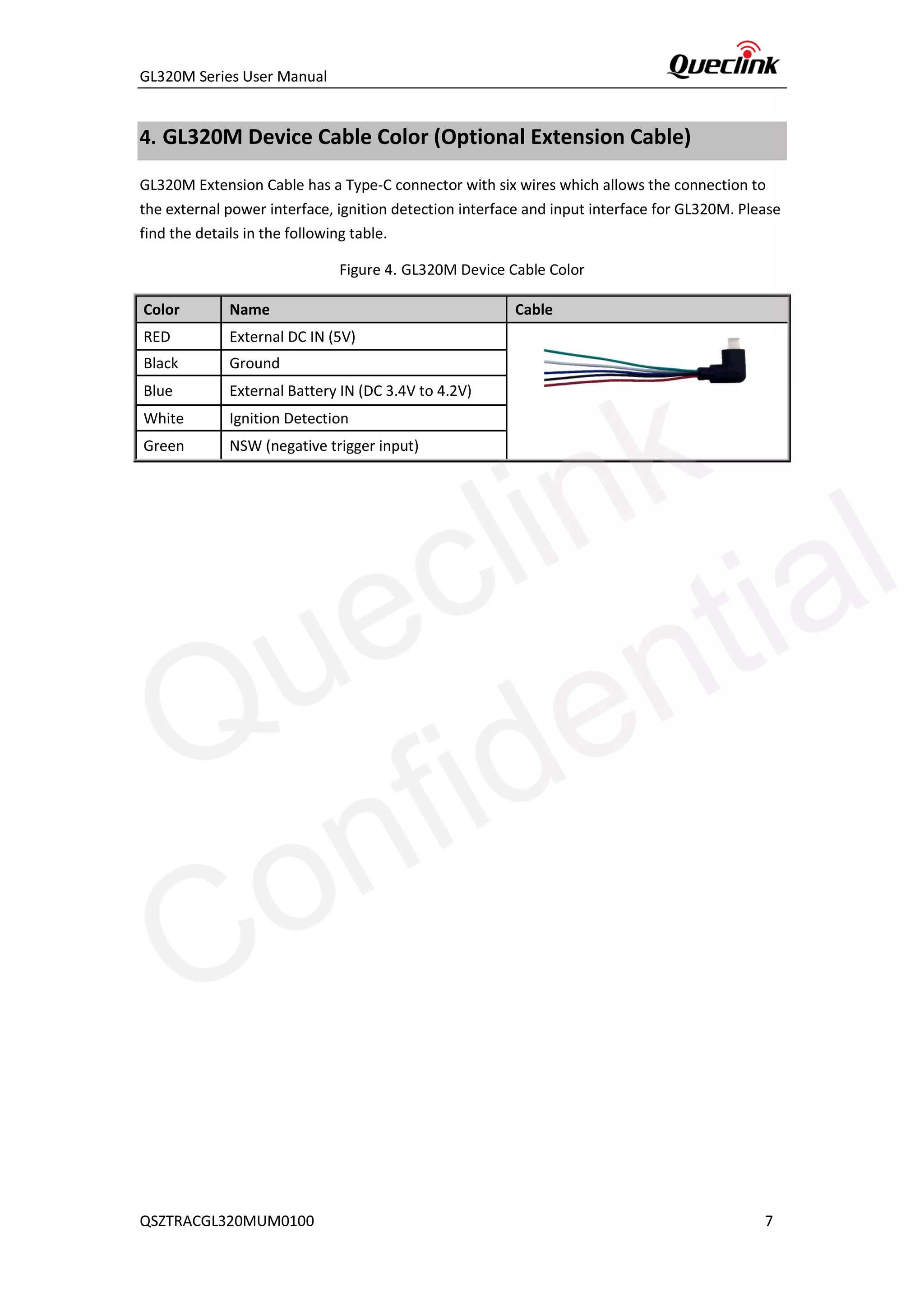
GL320M Extension Cable has a Type-C connector with six wires which allows the connection to
the external power interface, ignition detection interface and input interface for GL320M. Please
find the details in the following table.
Figure 4. GL320M Device Cable Color
Color Name Cable
RED External DC IN (5V)
Black Ground
Blue External Battery IN (DC 3.4V to 4.2V)
White Ignition Detection
Green NSW (negative trigger input)
Queclink
Confidential
GL320M Series User Manual
QSZTRACGL320MUM0100 8
5. Getting Started
5.1. Battery Charging
1. Connect AC-DC power adapter to GL320M.
2. Insert the AC-DC power adapter into the power socket.
3. During charging, the PWR LED flashes fast. When the battery is fully charged, the PWR
LED will be always on.
4. You can also charge the battery via USB cable which connects GL320M to the PC.
5. Charging time is about 3.5 hours.
Note:
Before using GL320M for the first time, please fully charge the battery.
5.2. Turning On/off the Device
To turn on the device:
◆ Method 1: Press the Power key at least 3 seconds and then release it to turn on
GL320M. At the same time, PWR LED will also turn on.
◆ Method 2: Connect the device to the charger or external battery. The device will turn
on automatically, and PWR LED will also turn on.
To turn off the device:
◆ Method 1: Press the power key about 2 seconds. PWR LED will flash fast and then turn
off. It indicates that GL320M is turned off. The time needed to power off the device
depends on the quality of the network. The maximum time needed for power off is 90
seconds. This method is only valid for turning off the device when internal battery is
used. Please note the end-user cannot power off GL320M through Method 1 when the
power key is disabled by Protocol.
◆ Method 2: If external battery is used, the device will power off when the external
battery is disconnected.
Queclink
Confidential
GL320M Series User Manual
QSZTRACGL320MUM0100 9
5.3. External Power Supply Connection
5.3.1. External DC Charger Connection
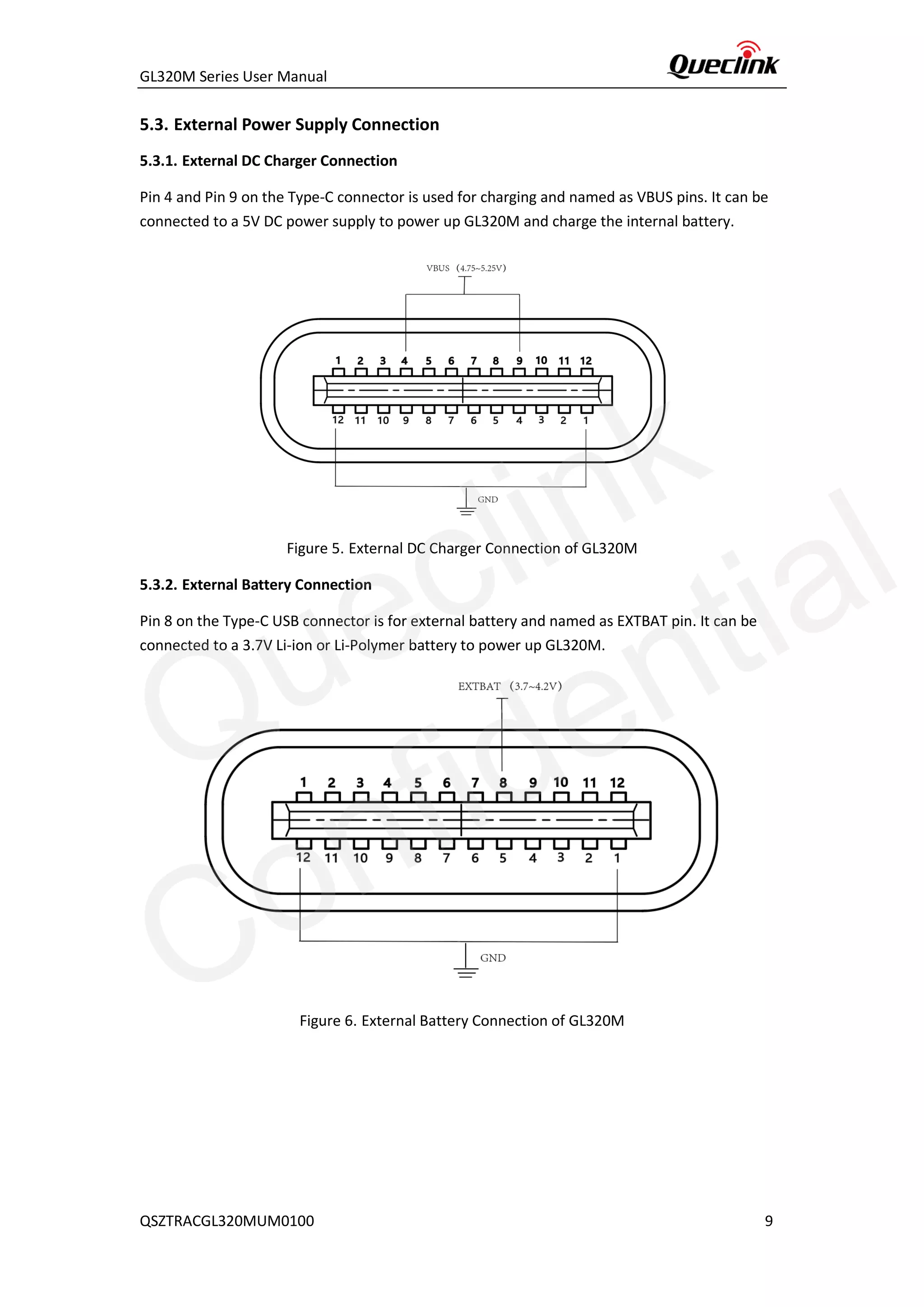
Pin 4 and Pin 9 on the Type-C connector is used for charging and named as VBUS pins. It can be
connected to a 5V DC power supply to power up GL320M and charge the internal battery.
Figure 5. External DC Charger Connection of GL320M
5.3.2. External Battery Connection
Pin 8 on the Type-C USB connector is for external battery and named as EXTBAT pin. It can be
connected to a 3.7V Li-ion or Li-Polymer battery to power up GL320M.
Figure 6. External Battery Connection of GL320M
Queclink
Confidential
GL320M Series User Manual
QSZTRACGL320MUM0100 10
5.4. Ignition Detection
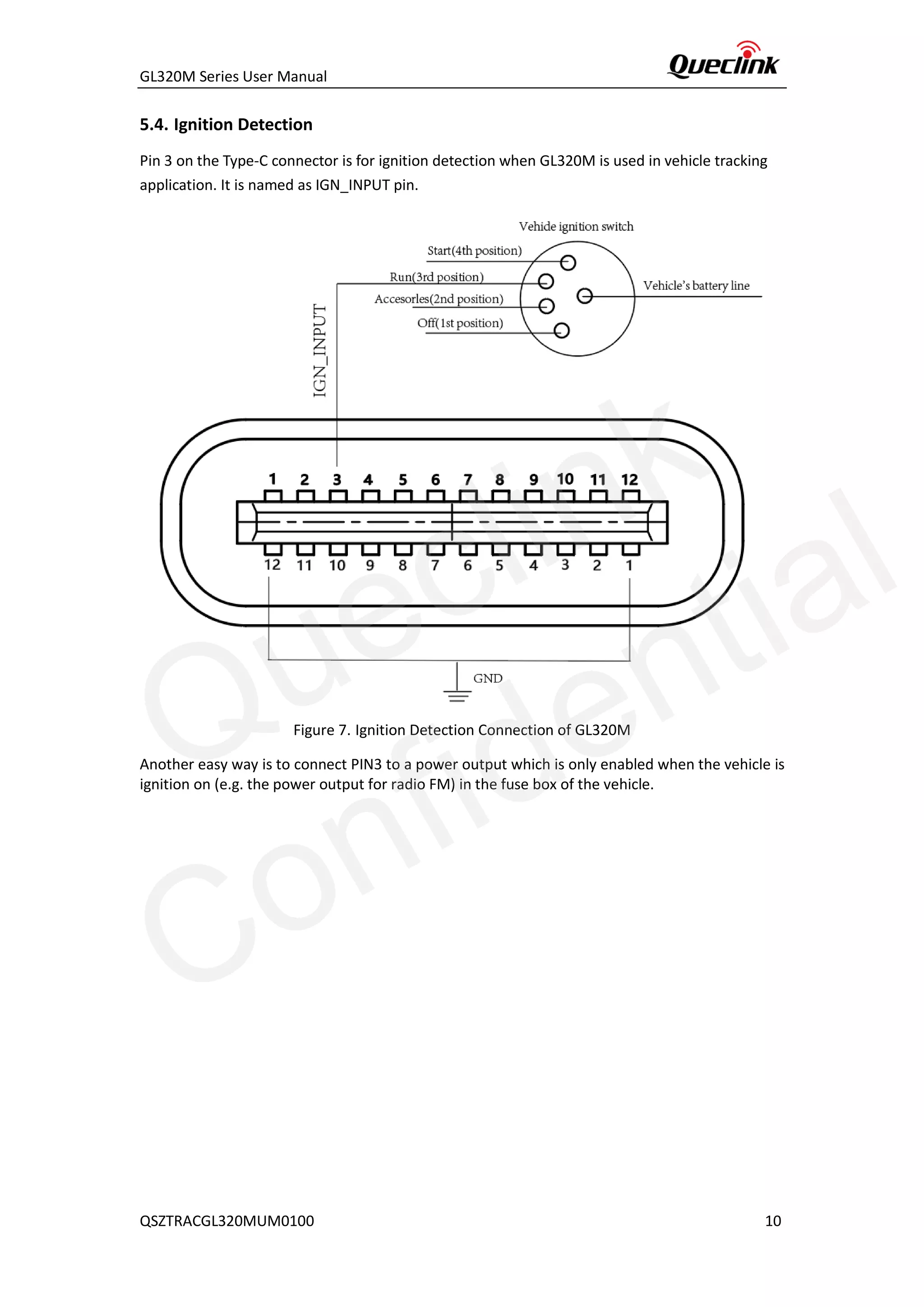
Pin 3 on the Type-C connector is for ignition detection when GL320M is used in vehicle tracking
application. It is named as IGN_INPUT pin.
Figure 7. Ignition Detection Connection of GL320M
Another easy way is to connect PIN3 to a power output which is only enabled when the vehicle is
ignition on (e.g. the power output for radio FM) in the fuse box of the vehicle.
Queclink
Confidential
GL320M Series User Manual
QSZTRACGL320MUM0100 11
5.5. External Input Connection
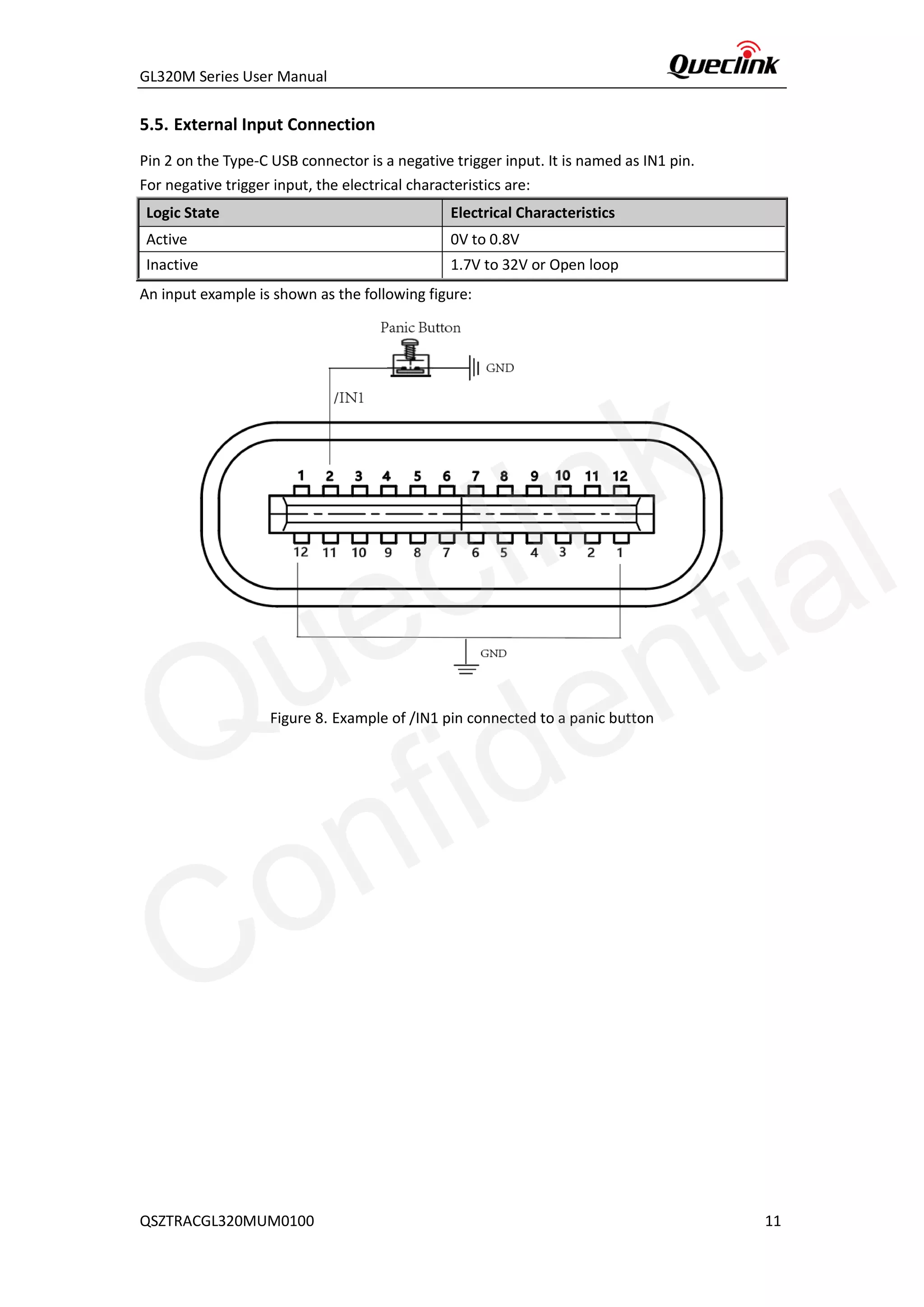
Pin 2 on the Type-C USB connector is a negative trigger input. It is named as IN1 pin.
For negative trigger input, the electrical characteristics are:
Logic State Electrical Characteristics
Active 0V to 0.8V
Inactive 1.7V to 32V or Open loop
An input example is shown as the following figure:
Figure 8. Example of /IN1 pin connected to a panic button
Queclink
Confidential
GL320M Series User Manual
QSZTRACGL320MUM0100 12
6. Installation Precautions
◆ Firmly install the device to a reliable surface to prevent falling off.
◆ Make the side with antenna face sky to have better signal reception.
◆ Do not install the device under metal surface or in enclosed environments having
difficulty in getting GPS and network signal.
Queclink
Confidential
GL320M Series User Manual
QSZTRACGL320MUM0100 13
7. Troubleshooting and Safety Info
7.1. Troubleshooting
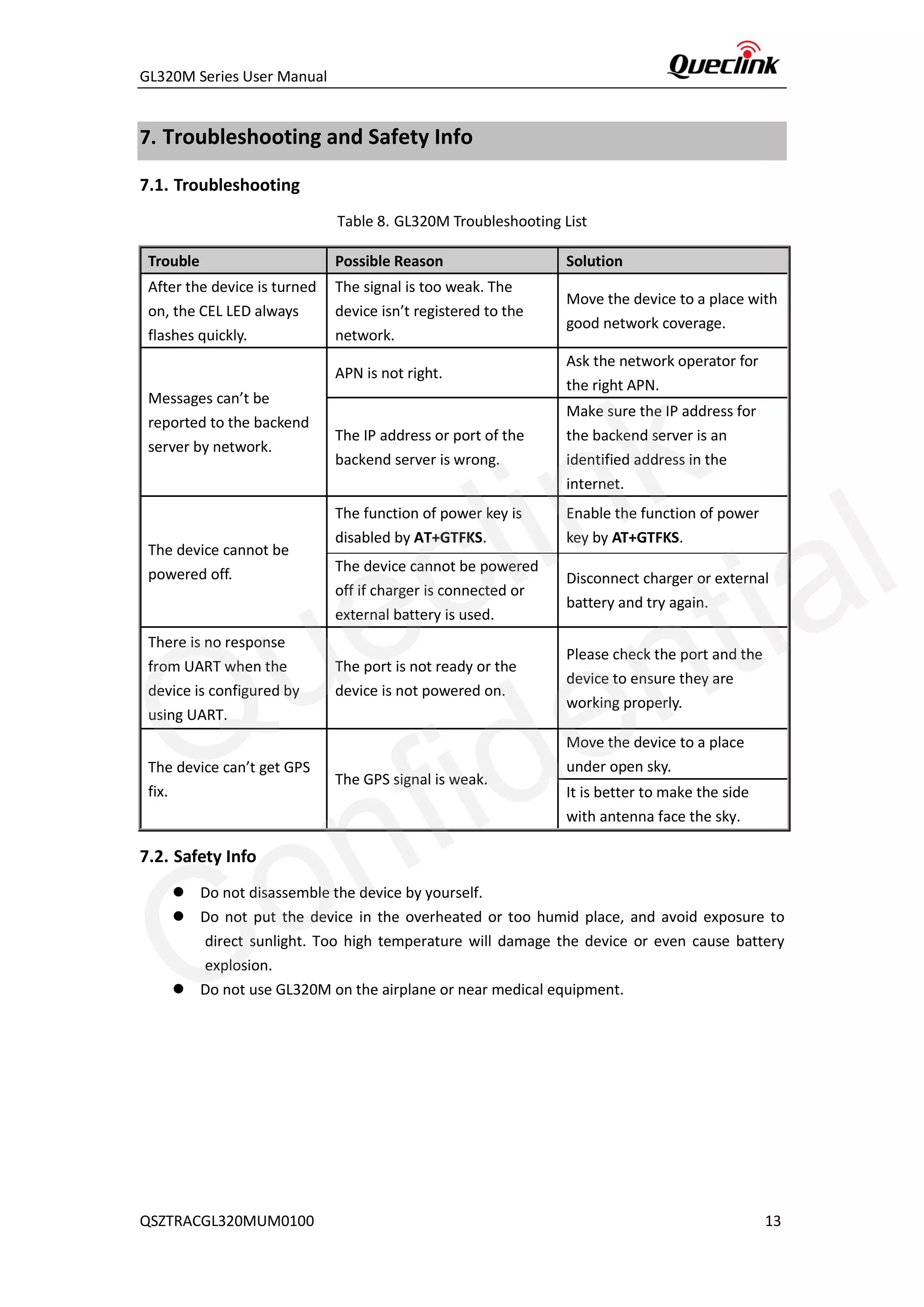
Table 8. GL320M Troubleshooting List
Trouble Possible Reason Solution
After the device is turned
on, the CEL LED always
flashes quickly.
The signal is too weak. The
device isn’t registered to the
network.
Move the device to a place with
good network coverage.
Messages can’t be
reported to the backend
server by network.
APN is not right.
Ask the network operator for
the right APN.
The IP address or port of the
backend server is wrong.
Make sure the IP address for
the backend server is an
identified address in the
internet.
The device cannot be
powered off.
The function of power key is
disabled by AT+GTFKS.
Enable the function of power
key by AT+GTFKS.
The device cannot be powered
off if charger is connected or
external battery is used.
Disconnect charger or external
battery and try again.
There is no response
from UART when the
device is configured by
using UART.
The port is not ready or the
device is not powered on.
Please check the port and the
device to ensure they are
working properly.
The device can’t get GPS
fix.
The GPS signal is weak.
Move the device to a place
under open sky.
It is better to make the side
with antenna face the sky.
7.2. Safety Info
⚫ Do not disassemble the device by yourself.
⚫ Do not put the device in the overheated or too humid place, and avoid exposure to
direct sunlight. Too high temperature will damage the device or even cause battery
explosion.
⚫ Do not use GL320M on the airplane or near medical equipment.
Queclink
Confidential
GL320M Series User Manual
QSZTRACGL320MUM0100 14
8. Appendix: Supported Accessories
◆ External large volume battery pack
Queclink
Confidential

Gl320M series user manual v1.00

  • 1.
    GL320M Series UserManual EGPRS/LTE Cat-M1/LTE Cat-NB2/GNSS Tracker QSZTRACGL320MUM0100 Version: 1.00
  • 2.
    GL320M Series UserManual QSZTRACGL320MUM0100 Document Title GL320M Series User Manual Version 1.00 Date 2021-04-06 Status Released Document Control ID QSZTRACGL320MUM0100 General Notes Queclink offers this information as a service to its customers, to support application and engineering efforts that use the products designed by Queclink. The information provided is based upon requirements specifically provided to Queclink by the customers. Queclink has not undertaken any independent search for additional relevant information, including any information that may be in the customer’s possession. Furthermore, system validation of this product designed by Queclink within a larger electronic system remains the responsibility of the customer or the customer’s system integrator. All specifications supplied herein are subject to change. Copyright This document contains proprietary technical information which is the property of Queclink. Copying of this document, distribution to others or using or communication of the contents thereof is forbidden without express authority. Offenders are liable to the payment of damages. All rights reserved in the event of grant of a patent or the registration of a utility model or design. All specifications supplied herein are subject to change without notice at any time. Copyright © Queclink Wireless Solutions Co., Ltd. 2021 Queclink Confidential
  • 3.
    GL320M Series UserManual QSZTRACGL320MUM0100 Contents 0. Revision History.............................................................................................................................1 1. Introduction ..................................................................................................................................2 1.1. GL320M Series Product......................................................................................................2 1.2. Reference ...........................................................................................................................2 1.3. Terms and Abbreviations....................................................................................................2 2. Product Overview..........................................................................................................................3 2.1. Product Appearance...........................................................................................................3 2.2. Key/Type-C Interface Description.......................................................................................3 2.3. LED Description ..................................................................................................................4 2.4. Parts List.............................................................................................................................5 3. Interface Definition .......................................................................................................................6 4. GL320M Device Cable Color (Optional Extension Cable)..............................................................7 5. Getting Started..............................................................................................................................8 5.1. Battery Charging.................................................................................................................8 5.2. Turning On/off the Device..................................................................................................8 5.3. External Power Supply Connection....................................................................................9 5.3.1. External DC Charger Connection.............................................................................9 5.3.2. External Battery Connection ...................................................................................9 5.4. Ignition Detection.............................................................................................................10 5.5. External Input Connection ...............................................................................................11 6. Installation Precautions...............................................................................................................12 7. Troubleshooting and Safety Info .................................................................................................13 7.1. Troubleshooting ...............................................................................................................13 7.2. Safety Info ........................................................................................................................13 8. Appendix: Supported Accessories...............................................................................................14 Queclink Confidential
  • 4.
    GL320M Series UserManual QSZTRACGL320MUM0100 1 0. Revision History Version Date Author Description of Change 1.00 2021-04-06 Arry Wang Initial Queclink Confidential
  • 5.
    GL320M Series UserManual QSZTRACGL320MUM0100 2 1. Introduction The GL320M Series is water resistant GPS trackers designed for lone worker, vehicle, pet and asset tracking applications. The thumb sized button makes the series ideal for applications requiring rapid emergency alert or setting of Geo-fences based on current locations. The built-in GPS receiver has superior sensitivity and fast initial positioning. The LTE allows the GL320M location to be monitored in real time or periodically tracked by a backend server or other specified terminals. The built-in 3-axis accelerometer allows motion detection and sophisticated power management algorithms extend battery life. System integration is straightforward as complete documentation is provided for the full featured @Track protocol. The @Track protocol supports a wide variety of reports including emergency, Geo-fence boundary crossings, low battery and scheduled GPS position reports. 1.1. GL320M Series Product Table 1. GL320M Series Product Model No. Region Technology LTE Category Operating Band GL320MG Global GSM/LTE eMTC/NB-IoT Cat M1/Cat NB2: Cat M1: B1/B2/B3/B4/B5/B8/B12/B13/B18/B19/ B20/B25/B26/B27/B28/B66/B85 Cat NB2: B1/B2/B3/B4/B5/B8/B12/B13/B18/B19/ B20/B25/B28/B66/B71/B85 EGPRS: 850/900/1800/1900MHz 1.2. Reference Table 2. GL320M Series Protocol Reference SN Document Name Remark [1] GL320M Series @Track Air Interface Protocol The air interface protocol between GL320M series and backend server. 1.3. Terms and Abbreviations Table 3. GL320M Series Terms and Abbreviations Abbreviation Description RXD Receive Data TXD Transmit Data IGN Ignition Queclink Confidential
  • 6.
    GL320M Series UserManual QSZTRACGL320MUM0100 3 2. Product Overview 2.1. Product Appearance Figure 1. GL320M Product View 2.2. Key/Type-C Interface Description Table 4. GL320M Button/Mini USB Interface Description Power Key ⚫ Turn on GL320M ⚫ Turn off GL320M when it is not being charged (if the power key is enabled). Function Key ⚫ Geo-fence mode Long press the key to enable/disable Geo-fence ID0. ⚫ Geo-fence around the current position mode Long press the key to enable/disable Geo-fence ID0. If Geo-fence ID0 is enabled, the current position is used as the center of Geo-Fence ID0. ⚫ SOS mode (default) Long press the key to activate SOS alarm. Type-C Interface ⚫ Connecting a 5V DC adapter to power up GL320M and charge the internal battery. ⚫ Connecting a 3.7V Li-ion or Li-Polymer battery to power up GL320M. ⚫ Backend server developer or administrator can use the Data Cable to configure GL320M. LEDs Function Key Power Key Type-C SIM Card Holder Queclink Confidential
  • 7.
    GL320M Series UserManual QSZTRACGL320MUM0100 4 2.3. LED Description Figure 2. GL320M LEDs There are three LEDs on GL320M. For details, please see the table below. Table 5. GL320M LED Description Note: Please refer to GL320M Series @Track Air Interface Protocol for the settings of <LED On>. LED Device Status LED Status CELL LED Searching for network Fast flash The device has been registered to network. Slow flash Power off Dark SIM-PIN locked Solid <LED On> is set to 2. Dark GPS LED GPS has fixed a position. Solid GPS is in the process of fixing. Fast flash GPS is on and GPS data is wrong. Slow flash GPS is off. Dark 150 seconds have passed after power on when <LED On> is set to 2. Dark <LED On> is set to 2. Dark PWR LED Power on and normal Dark Charger inserted and charging completed Solid Charger inserted and charging Fast flash Power key is pressed to power off the device. Fast flash Abnormal Fast flash Power low alert Slow flash The power light is turned off by command. Dark <LED On> is set to 2. Dark LED Queclink Confidential
  • 8.
    GL320M Series UserManual QSZTRACGL320MUM0100 5 2.4. Parts List Table 6. GL320M Parts Lists Name Picture Description GL320M Locater EGPRS/LTE Cat-M1/LTE Cat-NB2/GNSS Tracker AC-DC Power Adapter (standard accessory) Used to charge the internal battery of GL320M AC-DC Power Adapter (fast charging) (Optional) Used to charge the internal battery of GL320M GL320M Data Cable (Optional) USB data cable which can be used for firmware upgrade and device configuration GL320M Extension Cable (Optional) Extension cable which allows the connection to the charger interface and external battery interface as well as the ignition detection interface on GL320M Queclink Confidential
  • 9.
    GL320M Series UserManual QSZTRACGL320MUM0100 6 3. Interface Definition The GL320M has a 12-pin (two sides) Type-C interface which contains the connections for power, ignition detection, input, etc. The sequence and definition of the 24-pin connector are shown in the following figure: Figure 3. 12-pin (two sides) Type-C Interface of the GL320M Table 7. Description of 24-pin Connections Pin No. Pin Name Function Description 1 GND Power GND 2 IN1 Negative input1 3 IGN Input/ADC_IN1 The ignition input(0--24V)/PT100 AD Output (0--3.0V) 4 VBUS USB+5.0V 5 CC1 Charging protocol 6 USB DP LTE module USB DP 7 USB DM LTE module USB DM 8 EXTBAT /VDD OUT External battery input/3.0--3.9V Output 9 VBUS USB+5.0V 10 UART_RXD Debug Receive Data 11 UART_TXD Debug Transmit Data 12 GND Power GND Queclink Confidential
  • 10.
    GL320M Series UserManual QSZTRACGL320MUM0100 7 4. GL320M Device Cable Color (Optional Extension Cable) GL320M Extension Cable has a Type-C connector with six wires which allows the connection to the external power interface, ignition detection interface and input interface for GL320M. Please find the details in the following table. Figure 4. GL320M Device Cable Color Color Name Cable RED External DC IN (5V) Black Ground Blue External Battery IN (DC 3.4V to 4.2V) White Ignition Detection Green NSW (negative trigger input) Queclink Confidential
  • 11.
    GL320M Series UserManual QSZTRACGL320MUM0100 8 5. Getting Started 5.1. Battery Charging 1. Connect AC-DC power adapter to GL320M. 2. Insert the AC-DC power adapter into the power socket. 3. During charging, the PWR LED flashes fast. When the battery is fully charged, the PWR LED will be always on. 4. You can also charge the battery via USB cable which connects GL320M to the PC. 5. Charging time is about 3.5 hours. Note: Before using GL320M for the first time, please fully charge the battery. 5.2. Turning On/off the Device To turn on the device: ◆ Method 1: Press the Power key at least 3 seconds and then release it to turn on GL320M. At the same time, PWR LED will also turn on. ◆ Method 2: Connect the device to the charger or external battery. The device will turn on automatically, and PWR LED will also turn on. To turn off the device: ◆ Method 1: Press the power key about 2 seconds. PWR LED will flash fast and then turn off. It indicates that GL320M is turned off. The time needed to power off the device depends on the quality of the network. The maximum time needed for power off is 90 seconds. This method is only valid for turning off the device when internal battery is used. Please note the end-user cannot power off GL320M through Method 1 when the power key is disabled by Protocol. ◆ Method 2: If external battery is used, the device will power off when the external battery is disconnected. Queclink Confidential
  • 12.
    GL320M Series UserManual QSZTRACGL320MUM0100 9 5.3. External Power Supply Connection 5.3.1. External DC Charger Connection Pin 4 and Pin 9 on the Type-C connector is used for charging and named as VBUS pins. It can be connected to a 5V DC power supply to power up GL320M and charge the internal battery. Figure 5. External DC Charger Connection of GL320M 5.3.2. External Battery Connection Pin 8 on the Type-C USB connector is for external battery and named as EXTBAT pin. It can be connected to a 3.7V Li-ion or Li-Polymer battery to power up GL320M. Figure 6. External Battery Connection of GL320M Queclink Confidential
  • 13.
    GL320M Series UserManual QSZTRACGL320MUM0100 10 5.4. Ignition Detection Pin 3 on the Type-C connector is for ignition detection when GL320M is used in vehicle tracking application. It is named as IGN_INPUT pin. Figure 7. Ignition Detection Connection of GL320M Another easy way is to connect PIN3 to a power output which is only enabled when the vehicle is ignition on (e.g. the power output for radio FM) in the fuse box of the vehicle. Queclink Confidential
  • 14.
    GL320M Series UserManual QSZTRACGL320MUM0100 11 5.5. External Input Connection Pin 2 on the Type-C USB connector is a negative trigger input. It is named as IN1 pin. For negative trigger input, the electrical characteristics are: Logic State Electrical Characteristics Active 0V to 0.8V Inactive 1.7V to 32V or Open loop An input example is shown as the following figure: Figure 8. Example of /IN1 pin connected to a panic button Queclink Confidential
  • 15.
    GL320M Series UserManual QSZTRACGL320MUM0100 12 6. Installation Precautions ◆ Firmly install the device to a reliable surface to prevent falling off. ◆ Make the side with antenna face sky to have better signal reception. ◆ Do not install the device under metal surface or in enclosed environments having difficulty in getting GPS and network signal. Queclink Confidential
  • 16.
    GL320M Series UserManual QSZTRACGL320MUM0100 13 7. Troubleshooting and Safety Info 7.1. Troubleshooting Table 8. GL320M Troubleshooting List Trouble Possible Reason Solution After the device is turned on, the CEL LED always flashes quickly. The signal is too weak. The device isn’t registered to the network. Move the device to a place with good network coverage. Messages can’t be reported to the backend server by network. APN is not right. Ask the network operator for the right APN. The IP address or port of the backend server is wrong. Make sure the IP address for the backend server is an identified address in the internet. The device cannot be powered off. The function of power key is disabled by AT+GTFKS. Enable the function of power key by AT+GTFKS. The device cannot be powered off if charger is connected or external battery is used. Disconnect charger or external battery and try again. There is no response from UART when the device is configured by using UART. The port is not ready or the device is not powered on. Please check the port and the device to ensure they are working properly. The device can’t get GPS fix. The GPS signal is weak. Move the device to a place under open sky. It is better to make the side with antenna face the sky. 7.2. Safety Info ⚫ Do not disassemble the device by yourself. ⚫ Do not put the device in the overheated or too humid place, and avoid exposure to direct sunlight. Too high temperature will damage the device or even cause battery explosion. ⚫ Do not use GL320M on the airplane or near medical equipment. Queclink Confidential
  • 17.
    GL320M Series UserManual QSZTRACGL320MUM0100 14 8. Appendix: Supported Accessories ◆ External large volume battery pack Queclink Confidential