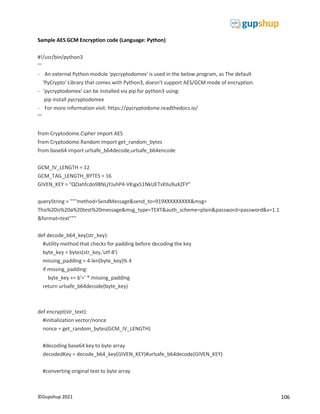
1
©Gupshup 2021
Messaging API for WhatsApp Business
2
©Gupshup 2021
© 2021 Gupshup
All rights reserved. No parts of this work may be reproduced in any form or by any means -graphic, electronic, or
mechanical, including photocopying, recording, taping, or information storage and retrieval systems -without the
written permission of the publisher. Products that are referred to in this document may be either trademarks and / or
registered trademarks of the respective owners. The publisher and the author make no claim to these trademarks.
While every precaution has been taken in the preparation of this document, the publisher and the author assume no
responsibility for errors or omissions, or for damages resulting from the use of information contained in this document
or from the use of programs and source code that may accompany it. In no event shall the publisher and the author
be liable for any loss of profit or any other commercial damage caused or alleged to have been caused directly or
indirectly by this document.
Published: June 2021
3
©Gupshup 2021
Table of Contents
About WhatsApp Business...................................................................................................................................................... 5
Business Account Approval .................................................................................................................................................... 5
Business Phone Number......................................................................................................................................................... 5
Discovery............................................................................................................................................................................ 6
Sending notifications on WhatsApp................................................................................................................................... 7
WhatsApp Template creation guidelines ........................................................................................................................... 7
Opt-in requirements for WhatsApp ................................................................................................................................... 8
Customer support on WhatsApp........................................................................................................................................ 8
Customer Care window...................................................................................................................................................... 8
Button message templates ................................................................................................................................................ 8
Header and Footer ............................................................................................................................................................. 9
List Messages – Interactive Messaging ............................................................................................................................ 10
Dynamic Reply Buttons – Interactive Messaging ............................................................................................................. 10
Quality Rating................................................................................................................................................................... 11
Significance of Quality Rating ...................................................................................................................................... 11
How to Maintain (or Improve) Quality Rating ............................................................................................................. 12
Quality-Based Messaging Limits................................................................................................................................... 12
Official Business Account ................................................................................................................................................. 14
Gupshup Messaging API Reference...................................................................................................................................... 15
API Endpoint..................................................................................................................................................................... 16
User Authentication Scheme ....................................................................................................................................... 16
HTTPS/SSL Support....................................................................................................................................................... 16
Data Encryption............................................................................................................................................................ 16
Pre-Requisites .................................................................................................................................................................. 16
API Collection ................................................................................................................................................................... 17
Opt-in a User .................................................................................................................................................................... 17
API Endpoint ................................................................................................................................................................ 17
Request Headers.......................................................................................................................................................... 17
Request Body ............................................................................................................................................................... 18
Sample Requests.......................................................................................................................................................... 19
API Response................................................................................................................................................................ 20
API Errors ..................................................................................................................................................................... 20
Opt-out a user .................................................................................................................................................................. 21
4
©Gupshup 2021
API Endpoint ................................................................................................................................................................ 21
Request Headers.......................................................................................................................................................... 21
Request Body ............................................................................................................................................................... 21
Sample Requests.......................................................................................................................................................... 22
API Response................................................................................................................................................................ 23
API Errors ..................................................................................................................................................................... 23
Send a Notification Message............................................................................................................................................ 24
Send a Text Template Notification............................................................................................................................... 25
Send a Media Template Notification................................................................................................................................ 32
Send a Location Template Notification........................................................................................................................ 48
URL Encoding ............................................................................................................................................................... 53
Formatting Options...................................................................................................................................................... 54
API Response................................................................................................................................................................ 54
API Errors ..................................................................................................................................................................... 55
Receive an Inbound Message........................................................................................................................................... 56
Webhooks.................................................................................................................................................................... 56
Sample Events.............................................................................................................................................................. 60
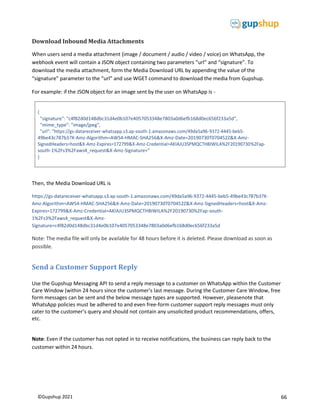
Download Inbound Media Attachments...................................................................................................................... 66
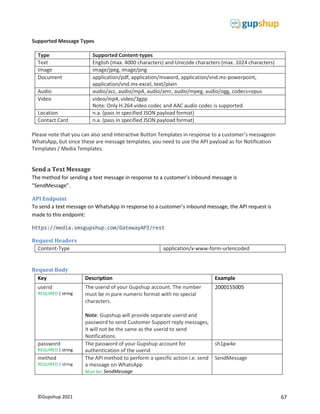
Send a Customer Support Reply....................................................................................................................................... 66
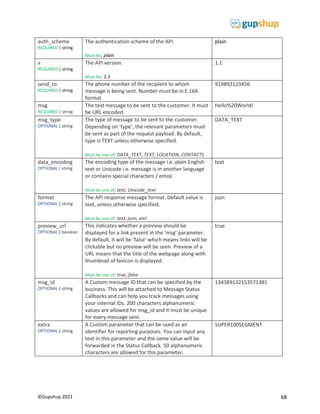
Send a Text Message.................................................................................................................................................... 67
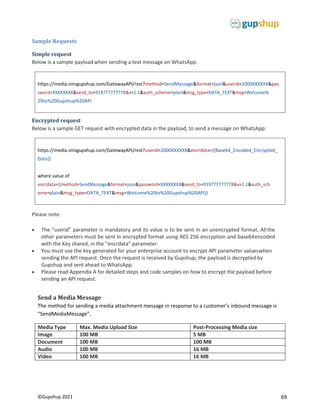
Send a Media Message ................................................................................................................................................ 69
Send a Location Message............................................................................................................................................. 73
Send a Contact Card..................................................................................................................................................... 76
Send a List Message ..................................................................................................................................................... 82
Send a Dynamic Quick Reply Buttons: ......................................................................................................................... 89
Formatting Options...................................................................................................................................................... 99
API Response................................................................................................................................................................ 99
API Errors ..................................................................................................................................................................... 99
Real Time Delivery Reports ............................................................................................................................................100
APPENDIX A....................................................................................................................................................................102
5
©Gupshup 2021
Introduction
This guide provides specifications of the Gupshup Messaging API for WhatsApp Business for the purposeof
sending and receiving messages on WhatsApp via a simple REST API through HTTP/HTTPS modes. This
guide is intended for the developers and IT personnel of enterprises who plan to integrate their systems
with the Gupshup Messaging API.
About WhatsApp Business
Today, more than 1.5 billion people in over 180 countries use WhatsApp to stay in touch with friends and
family—anytime and anywhere. Businesses all over the world have already been using WhatsApp
informally to communicate with customers, whether about product enquiries or transactional updates.
WhatsApp Business is a new way for businesses to better manage such conversations with their customers
and reach new customers who will also value the fast, convenient, and private messagingexperience.
This guide will help businesses get started on building an official brand presence on WhatsApp and
creating engaging conversational messaging experiences using the Gupshup Messaging API.
Business Account Approval
Every business seeking to get access to the WhatsApp Business API must apply to WhatsApp for approval.
As an authorized service provider for WhatsApp Business, Gupshup will facilitate the approvalprocess on
behalf of the business. To apply for a WhatsApp Business Account (WABA), you must fill up the Early
Access Request form and share.
Final approval decision completely lies with WhatsApp. You will typically get a decision on WABA
application status within 4-7 working days.
Business Phone Number
Your business will be identified by a phone number on WhatsApp, known as the Business Phone number.
This number will be registered in your WhatsApp Business account (WABA) and customers willbe able to
interact with your business on WhatsApp on this registered number.
 This number should not have been previously registered on WhatsApp or on the WhatsApp
Business app.
 If you are already using a number on WhatsApp for your business and wish to use the same
number, then you must first deregister the number on WhatsApp by deleting that account.
 This number can be a mobile number (SIM or virtual) or a landline phone number, which has SMS
and/or Voice calling facility enabled. During the “Verify Number” step in “Go-live” process,
WhatsApp will send a One-Time Password (OTP) for two factor authentication via SMS or Voice.
 This number cannot be a number that is behind an IVR since then the OTP verification processwill
not be possible.
 Once the number is verified here, please do not register the number on WhatsApp or the WhatsApp
Business app on a mobile phone. This will result in the number being de-registeredfrom the
WhatsApp Business API service provided by Gupshup.
6
©Gupshup 2021
Discovery
Once your WABA Approval is in place and your Business Phone Number has been verified, you can help
customers discover your business and grow your brand presence on WhatsApp. Discovery that leads to
customers initiating a conversation with your business on your WhatsApp Business Phone Number, can
be accomplished with the following tools:
 Click-to-Chat web links
o Publish these web links on your website or in your direct-to-customer communication
channels like SMS, email, etc. and automatically redirect customers into a conversation
with your business on WhatsApp Web.
o The web link format is:
https://wa.me/<BusinessPhoneNumberinE.164Format>?text=<urlencodedtext>
o For example, if your Business Phone Number is +91 7834811114, your deep link can be
https://wa.me/917834811114?text=Hi%20there
 Click-to-Chat deep links
o Embed these deep links in your mobile app or mobile ads to automatically redirect
customers into a conversation with your business on WhatsApp.
o The deep link format is:
whatsapp://send?phone=<BusinessPhoneNumberinE.164Format>&text=<urlenco
dedtext>
o For example, if your Business Phone Number is +91 7834811114, your deep link can be
whatsapp://send?phone=917834811114&text=Hi%20there
 Facebook Ads that Click-to-WhatsApp (CTWA)
o Facebook and Instagram Ads that Click-to-WhatsApp are an effective way for businesses
to get discovered and for customers to chat with them on WhatsApp.
o This feature allows people to easily start a message thread in WhatsApp directly from
Facebook or Instagram. When a person taps on an ad that clicks-to-WhatsApp, they will
be transferred to a pre-filled WhatsApp chat where they can message your business
quickly. Learn how to get started with this feature here.
o We recommend that you register the same Facebook Business Manager ID (through
which you run your Facebook/Instagram ads) during the WABA application process. This
feature will then become available to you.
7
©Gupshup 2021
Sending notifications on WhatsApp
To send a notification to a customer on WhatsApp, you must have:
 An explicit opt-in from that customer indicating his consent to receive messages from your
business on WhatsApp (Read more about WhatsApp’s opt-in requirements below)
 The notification message must be in the form of a message template that has been pre-
approved by WhatsApp.
o Message Templates are transactional message templates that your business will
send to customers over WhatsApp.
o Good examples of Message Templates are credit card payment reminders, e-
commerce order delivery status updates, loan approval status changes, policy change
notice, etc.
o Message Templates cannot have any promotional or remarketing content, such as
cross-selling or up-selling products. This is strictly against WhatsApp policy and will be
rejected during the approval process.
o WhatsApp has an upper limit of 250 message templates per WhatsApp Business
account (WABA). It can be extended by raising a special request to WhatsApp with valid
justification to a maximum of 1500 templates.
o Currently WhatsApp support text and rich media (image, document, and video) and
location message templates
WhatsApp Template creation guidelines
 Always adhere to the WhatsApp Business policy and commerce policy.
 The template must be simplistic and clearly non-promotional. Make it sound like you are notifying /
alerting someone about a recent action.
 The template CANNOT be a message that of type - 1:100. WhatsApp rejects promotional templates that
they think will cause a spam-like experience.
 The template verbiage must be such that the variable values can be easily determined such as, “Dear
{{1}} This is to inform you that, your insurance policy with policy number {{2}} has a premium amount
{{3}} which is due for payment on date {{4}} “
 Media Templates must have a clear caption part that speaks for the’ media’ attachment. WhatsApp
must be able to understand what the contents of the media from the message / caption would be.
 If you need to write a message template to reopen the 24-hour window, it is suggested that the
templates start with some reference to the previous conversation.
 In case dispute needs to be raised with WhatsApp, the business use case of the template along with
sample values must be shared.
 Avoid floating variable {{1}} {{2}} i.e., consecutive variables specified immediately as these do not give
WhatsApp clarity on the possible values.
 Make it a point to always stick to the content languages as per specified in the ‘language’ while creating
a template.
 CTA Button templates must have genuine website links (static part) that must be accessible for
8
©Gupshup 2021
verification by WhatsApp as a part of the template approval.
 In order to speed up Template approvals, WhatsApp has made it mandatory to add sample values for
variables within a template.
Opt-in requirements for WhatsApp
A user must first consent to receive messages in WhatsApp by opting into them via a third-party channel.
This can be any channel your business uses to communicate with people today such as — your website,
mobile app, missed call, IVR, email, SMS, retail location, contact center and WhatsApp session-based
messages.
 The opt-in must be an explicit i.e., triggered by a user action, such as entering a phone number or
ticking a checkbox to indicate consent.
 Clear opt-in messaging so that a user knows what types of messaging the person is signing up for.
 Opt-ins must be maintained by the business and should be produced if WhatsApp requests for this
information.
 Session based OPTINs are permitted. i.e., during the session message, the customer can express
explicit consent to receive notifications from a brand. However please note, customer initiating a
conversation on WhatsApp cannot be considered as an opt-in. If the user sends any message, brand
can ask them if they are interested to opt in and post explicit consent from user, it can be considered
as opt-in.
Customer support on WhatsApp
To respond back to customer queries sent on WhatsApp, the business can use the API to send messages
but only during the Customer Care Window (see below).
 User need not have opted in to receive these customer support replies.
 Such customer support replies can be free text and are non-templated.
 Such customer support replies must only include customer solicited information. These messages
cannot be of the below nature:
o recommendations of other similar products (that would be cross-sell)
o Re-engagement with offers or promotional codes on products and services.
Customer Care window
The business can reply to a customer’s query on WhatsApp only within 24 hours from the
customer’s last message on WhatsApp (“Customer Care Window”). If the business attempts to send a
message after the Customer Care Window has elapsed, the message will fail unless the message is a
notification message i.e., is a pre-approved template and that customer has opted in to receive
notifications from the business.

Button message templates
The Interactive Message Templates feature in WhatsApp Business API allows you to add buttons in
message templates that can be used with customized call to action buttons and quick replies. Buttons
9
©Gupshup 2021
will give businesses the ability to develop interactive experiences with pre-set options for users. There
are two types of buttons:
Call-to-Action buttons: You can add two call-to-action buttons to media message or text-based message
templates and customize the text of the button. These features will help increase your overall engagement
rate with notifications. We have the following types of call-to-action buttons available:
 Visit website objective – can be a static or dynamic website URL or deeplink
 Call phone number objective – must be a static phone number
At most, 1 button of each type can be added to a text or media message template. The Display Text for
the Call-to-Action Buttons is defined in the template at the time of template creation and cannot be
customized on the fly. The Display text cannot exceed 20 characters and cannot include emojis.

Quick Reply buttons: You can add three quick reply buttons to message templates. These quick reply
buttons will help you improve the quality of conversations with users by prompting responses that can
reduce spelling errors and improve an automated experience. These buttons can be attached to text
messages or media messages. Once these templates have been created and approved, you can use them
in notification messages as well as customer service/care messages.
The Display Text for the Quick Reply Buttons is defined in the template at the time of template creation
and cannot be customized on the fly. The Display text cannot exceed 20 characters and cannot include
emojis. Once a user clicks on a Quick Reply button in a text or media message template, it is greyed out
and cannot be clicked again.
Header and Footer
 WhatsApp for Business has enhanced message templates and has made it more structured with the
introduction of the Header and Footer component.
Header:
 A WhatsApp message; text or media will contain an optional parameter called the Header.
 A text message can have additional text as the Header whereas in a Media message, the Header is
already specified as the media file (image, document, video or location).
 In a Text message, a header usually refers to the ‘Title’ of the message whereas in a Media message, the
Header component specifies the ‘type of media’ that will be used in the template.
 The character length of a header is 60 characters and can contain variables. (Total value of the header
with variables must be upto 60 characters)
 Headers can also be sent for List Messages and text messages with Dynamic Reply Buttons in Interactive
messaging within the 24-hour window.
Footer:
 A WhatsApp message; text or Media will contain an optional Parameter called the Footer.
 The Footer is a usually a short line of text to the bottom of the message template.
10
©Gupshup 2021
 The total character length of the Footer can be a maximum of 60 characters and cannot contain
variables.
 Footers can be sent for list messages, text and media messages with Dynamic Reply Buttons in
Interactive messaging within the 24-hour window.
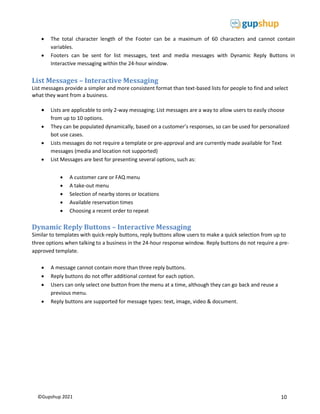
List Messages – Interactive Messaging
List messages provide a simpler and more consistent format than text-based lists for people to find and select
what they want from a business.
 Lists are applicable to only 2-way messaging; List messages are a way to allow users to easily choose
from up to 10 options.
 They can be populated dynamically, based on a customer’s responses, so can be used for personalized
bot use cases.
 Lists messages do not require a template or pre-approval and are currently made available for Text
messages (media and location not supported)
 List Messages are best for presenting several options, such as:
 A customer care or FAQ menu
 A take-out menu
 Selection of nearby stores or locations
 Available reservation times
 Choosing a recent order to repeat
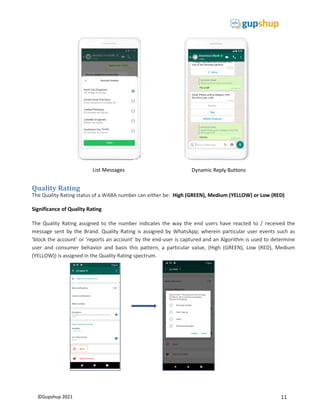
Dynamic Reply Buttons – Interactive Messaging
Similar to templates with quick-reply buttons, reply buttons allow users to make a quick selection from up to
three options when talking to a business in the 24-hour response window. Reply buttons do not require a pre-
approved template.
 A message cannot contain more than three reply buttons.
 Reply buttons do not offer additional context for each option.
 Users can only select one button from the menu at a time, although they can go back and reuse a
previous menu.
 Reply buttons are supported for message types: text, image, video & document.
11
©Gupshup 2021
Quality Rating
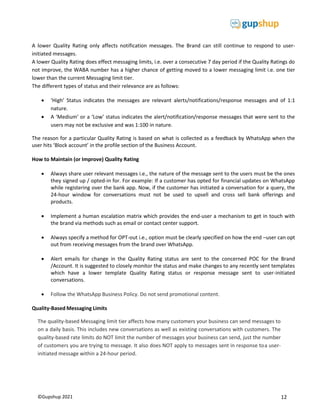
The Quality Rating status of a WABA number can either be: High (GREEN), Medium (YELLOW) or Low (RED)
Significance of Quality Rating
The Quality Rating assigned to the number indicates the way the end users have reacted to / received the
message sent by the Brand. Quality Rating is assigned by WhatsApp; wherein particular user events such as
‘block the account’ or ‘reports an account' by the end-user is captured and an Algorithm is used to determine
user and consumer behavior and basis this pattern, a particular value, (High (GREEN), Low (RED), Medium
(YELLOW)) is assigned in the Quality Rating spectrum.
List Messages Dynamic Reply Buttons
12
©Gupshup 2021
A lower Quality Rating only affects notification messages. The Brand can still continue to respond to user-
initiated messages.
A lower Quality Rating does effect messaging limits, i.e. over a consecutive 7 day period if the Quality Ratings do
not improve, the WABA number has a higher chance of getting moved to a lower messaging limit i.e. one tier
lower than the current Messaging limit tier.
The different types of status and their relevance are as follows:
 ‘High’ Status indicates the messages are relevant alerts/notifications/response messages and of 1:1
nature.
 A ‘Medium’ or a ‘Low’ status indicates the alert/notification/response messages that were sent to the
users may not be exclusive and was 1:100 in nature.
The reason for a particular Quality Rating is based on what is collected as a feedback by WhatsApp when the
user hits ‘Block account’ in the profile section of the Business Account.
How to Maintain (or Improve) Quality Rating
 Always share user relevant messages i.e., the nature of the message sent to the users must be the ones
they signed up / opted-in for. For example: If a customer has opted for financial updates on WhatsApp
while registering over the bank app. Now, if the customer has initiated a conversation for a query, the
24-hour window for conversations must not be used to upsell and cross sell bank offerings and
products.
 Implement a human escalation matrix which provides the end-user a mechanism to get in touch with
the brand via methods such as email or contact center support.
 Always specify a method for OPT-out i.e., option must be clearly specified on how the end –user can opt
out from receiving messages from the brand over WhatsApp.
 Alert emails for change in the Quality Rating status are sent to the concerned POC for the Brand
/Account. It is suggested to closely monitor the status and make changes to any recently sent templates
which have a lower template Quality Rating status or response message sent to user-initiated
conversations.
 Follow the WhatsApp Business Policy. Do not send promotional content.
Quality-Based Messaging Limits
The quality-based Messaging limit tier affects how many customers your business can send messages to
on a daily basis. This includes new conversations as well as existing conversations with customers. The
quality-based rate limits do NOT limit the number of messages your business can send, just the number
of customers you are trying to message. It also does NOT apply to messages sent in response toa user-
initiated message within a 24-hour period.
13
©Gupshup 2021
Tier 1: Allows your business to send messages to 1K unique customers in a rolling 24-hour period.
Tier 2: Allows your business to send messages to 10K unique customers in a rolling 24-hour period.
Tier 3: Allows your business to send messages to 100K unique customers in a rolling 24-hour period.
Note: A business starts in Tier 1 when it registers its phone number.
The business will be upgraded to the next tier if:
 its quality rating is not in the Red state, AND
 it messages 2X the number of customers of its current limit in a maximum window of 7 days. Note:
As soon as the business reaches its 2X number, it will be moved to the next tier. Since there is a
limit of X number of customers per day, the earliest the upgrade can occur is after 2days.

Similarly, the business will be downgraded to a lower tier when quality rating falls to Red state and
continues to remain so for 7 consecutive days. It is possible that the business will be Suspended i.e.
Blocked if it continues to remain in Tier 1 and quality rating remains in Red state for an extended period
of time.
14
©Gupshup 2021
Official Business Account
There are two types of WhatsApp Business Accounts, which determines how your business appears to
your customers.
Name Description How the Business appears to customers
Business
Account
Any account that is using the
WhatsApp Business API is by default a
Business Account.
The name of the business is not visible if the
customer hasn't added the business to their
address book; instead the Business Phone
Number will be visible. In addition, if the
business sends a template notification which
contains a link, then links will not be clickable.
Once the customer adds the business to their
address book or replies on the WhatsApp chat,
the links become clickable.
We recommend that the first notification sent
to users instruct them to save the number in
their address book.
Official
Business
Account
WhatsApp has verified that an
authentic brand owns this account.
Note:
The business must apply for an Official
Business Account status and will be
considered only after at least one
month of go-live with an average.
traffic of at least 1000 messages per
Day over a 7-day period. WhatsApp
decides whether to grant the Official
Business Account status and the
decision cannot be contested.
An Official Business Account has a green
checkmark badge in its profile and next to the
header in the chat thread. The name of the
business is visible even if the customer has
not added the business to their address book.
However, if the customer has saved the
business to their address book, then the
Address Book Name takes precedence over the
Verified Name of the Business.
15
©Gupshup 2021
Few things to note about the WhatsApp official Business Account
 The Official Business Account (verified badge) is awarded by WhatsApp based on certain criteria such as
mentioned below (but not limited to)
1. Notability
2. Volumes
3. WhatsApp Business Account Number Quality rating etc.
 Notability is defined by WhatsApp as: An account that must represent a well-known often searched
brand or entity. WhatsApp reviews accounts that are featured in multiple news sources, and they don't
consider paid or promotional content as sources for review.
 The decision to grant the Official Business Account (verified badge) is at WhatsApp’s discretion.
 Gupshup will raise the request to WhatsApp for an Official Business Account on behalf of the Business.
 If WhatsApp has decided to not grant the OBA to the Business, the Business can re-apply after a period
of 30 days.
Gupshup Messaging API Reference
This guide provides the API specifications to send and receive messages to / from customers on
WhatsApp using the Gupshup Messaging API.
Concepts
Before using the Gupshup Messaging API, a few concepts that you should be familiar with:
 Number Format: The Gupshup Messaging API supports numbers in E.164 format. 
 Authentication: The Gupshup Messaging API authenticates using your Gupshup account userIdand
password.
 Webhooks: These are user-defined HTTP callbacks that are triggered by specific events such asan
inbound message from a customer and can be forwarded to your application e.g. your CRM or
customer support platform or chatbot.
16
©Gupshup 2021

API Endpoint
The Gupshup Messaging API resides at this endpoint:
https://media.smsgupshup.com/GatewayAPI/rest
Please use this URL for all API methods.
User Authentication Scheme
Currently, our API supports Plain Authentication Scheme for the user. This authentication scheme requires
only the user ID and password. The connection security is provided through HTTPS protocol andencryption
of parameters using AES-256-bit encryption.
HTTPS/SSL Support
Our API has been designed to allow you to access an SSL Enabled connection for added security i.e. the
API also support Hypertext Transfer Protocol over Secure Socket Layer (HTTPS) protocol.
The API call has syntax identical to the HTTP API call. However, in case of an HTTPS call, the HTTP headers
shall be encrypted which provides better security of data. For this, enter the URL beginning with https://
instead of http://
Data Encryption
In addition to SSL, our API has been designed to allow you to securely send sensitive data to the
Gupshup platform by encrypting the data using Advanced Encryption Standard i.e., AES 256-bit
encryption. On your request (please reach out to us at 022 42006799 or email us at enterprise-
support@gupshup.io , a 256-bit symmetric key is generated by Gupshup and set up for youraccount.
You must use this key to encrypt API parameter values when sending the API request. Once the request
is received by Gupshup, the payload is decrypted by Gupshup and sent ahead to WhatsApp.
Pre-Requisites
1. UserId & password. If you don’t have an account, please contact your account manager.
2. URL encoding of your message, password etc.
3. Encryption key in case you have opted for this feature
4. Verified Business Phone Number: To test sending of messages, you must have a Verified
Business Phone Number linked to your account.
For any queries our support is available for you at 022 42006799 or email us at enterprise-
support@gupshup.io
17
©Gupshup 2021
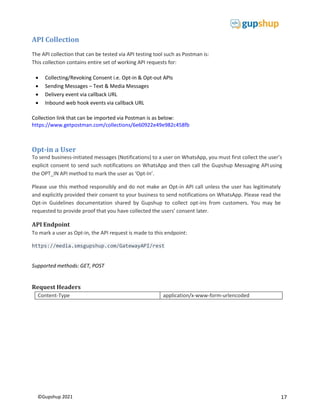
API Collection
The API collection that can be tested via API testing tool such as Postman is:
This collection contains entire set of working API requests for:
 Collecting/Revoking Consent i.e. Opt-in & Opt-out APIs
 Sending Messages – Text & Media Messages
 Delivery event via callback URL
 Inbound web hook events via callback URL
Collection link that can be imported via Postman is as below:
https://www.getpostman.com/collections/6e60922e49e982c458fb
Opt-in a User
To send business-initiated messages (Notifications) to a user on WhatsApp, you must first collect the user’s
explicit consent to send such notifications on WhatsApp and then call the Gupshup Messaging APIusing
the OPT_IN API method to mark the user as ‘Opt-In’.
Please use this method responsibly and do not make an Opt-in API call unless the user has legitimately
and explicitly provided their consent to your business to send notifications on WhatsApp. Please read the
Opt-in Guidelines documentation shared by Gupshup to collect opt-ins from customers. You may be
requested to provide proof that you have collected the users’ consent later.
API Endpoint
To mark a user as Opt-in, the API request is made to this endpoint:
https://media.smsgupshup.com/GatewayAPI/rest
Supported methods: GET, POST
Request Headers
Content-Type application/x-www-form-urlencoded
18
©Gupshup 2021
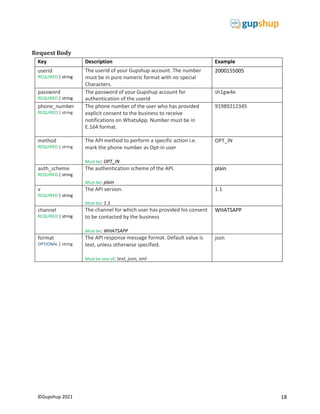
Request Body
Key Description Example
userid
REQUIRED | string
The userid of your Gupshup account. The number
must be in pure numeric format with no special
Characters.
2000155005
password
REQUIRED | string
The password of your Gupshup account for
authentication of the userid
sh1gw4e
phone_number
REQUIRED | string
The phone number of the user who has provided
explicit consent to the business to receive
notifications on WhatsApp. Number must be in
E.164 format.
91989212345
method
REQUIRED | string
The API method to perform a specific action i.e.
mark the phone number as Opt-in user
Must be: OPT_IN
OPT_IN
auth_scheme
REQUIRED | string
The authentication scheme of the API.
Must be: plain
plain
v
REQUIRED | string
The API version.
Must be: 1.1
1.1
channel
REQUIRED | string
The channel for which user has provided his consent
to be contacted by the business
Must be: WHATSAPP
WHATSAPP
format
OPTIONAL | string
The API response message format. Default value is
text, unless otherwise specified.
Must be one of: text, json, xml
json
19
©Gupshup 2021
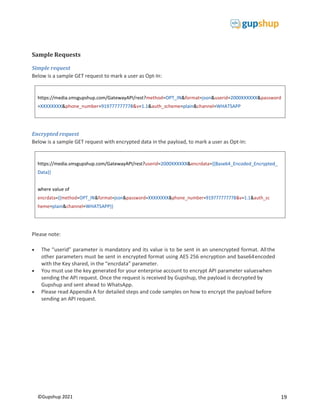
https://media.smsgupshup.com/GatewayAPI/rest?method=OPT_IN&format=json&userid=2000XXXXXX&password
=XXXXXXXX&phone_number=919777777778&v=1.1&auth_scheme=plain&channel=WHATSAPP
https://media.smsgupshup.com/GatewayAPI/rest?userid=2000XXXXXX&encrdata={{Base64_Encoded_Encrypted_
Data}}
where value of
encrdata={{method=OPT_IN&format=json&password=XXXXXXXX&phone_number=919777777778&v=1.1&auth_sc
heme=plain&channel=WHATSAPP}}
Sample Requests
Simple request
Below is a sample GET request to mark a user as Opt-In:
Encrypted request
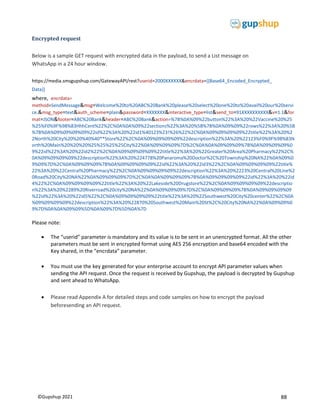
Below is a sample GET request with encrypted data in the payload, to mark a user as Opt-In:
Please note:
 The “userid” parameter is mandatory and its value is to be sent in an unencrypted format. Allthe
other parameters must be sent in encrypted format using AES 256 encryption and base64encoded
with the Key shared, in the “encrdata” parameter.
 You must use the key generated for your enterprise account to encrypt API parameter valueswhen
sending the API request. Once the request is received by Gupshup, the payload is decrypted by
Gupshup and sent ahead to WhatsApp.
 Please read Appendix A for detailed steps and code samples on how to encrypt the payload before
sending an API request.
20
©Gupshup 2021
{
"response": {
"id": "3795200898494416206",
"phone": "",
"details": "OPT_IN",
"status": "success"
},
"data": {
"response_messages": [
{
"id": "3795200898494416206",
"phone": "919777777778",
"details": "OPT_IN",
"status": "success"
}
]
}
}
API Response
A successful API request generates an HTTP 200 response. The response to a request where output
format was specified as json, is a JSON array with response status, unique identifier and method as
OPT_IN.
This indicates that the mobile number 919777777778 has been successfully opted in under a Unique
Identifier ‘3795200898494416206’. The identifier string is unique for each recipient number and is auto
generated at the time of opt-in submission.
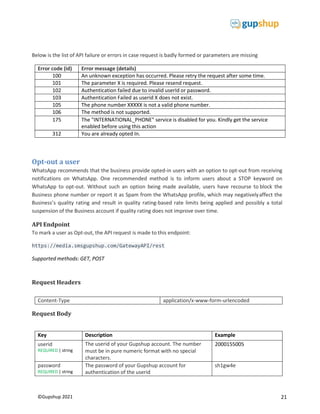
API Errors
An error response is generated when any of the required parameters is not specified correctly or any
other technical error exists. The error response will indicate an error code along with the actual error
message.
typical error response is
{
"response": {
"id": "105",
"phone": "",
"details": "The phone number "666" is not a valid phone number",
"status": "error"
}
}
21
©Gupshup 2021
Below is the list of API failure or errors in case request is badly formed or parameters are missing
Error code (id) Error message (details)
100 An unknown exception has occurred. Please retry the request after some time.
101 The parameter X is required. Please resend request.
102 Authentication failed due to invalid userId or password.
103 Authentication Failed as userid X does not exist.
105 The phone number XXXXX is not a valid phone number.
106 The method is not supported.
175 The "INTERNATIONAL_PHONE" service is disabled for you. Kindly get the service
enabled before using this action
312 You are already opted In.
Opt-out a user
WhatsApp recommends that the business provide opted-in users with an option to opt-out from receiving
notifications on WhatsApp. One recommended method is to inform users about a STOP keyword on
WhatsApp to opt-out. Without such an option being made available, users have recourse to block the
Business phone number or report it as Spam from the WhatsApp profile, which may negativelyaffect the
Business’s quality rating and result in quality rating-based rate limits being applied and possibly a total
suspension of the Business account if quality rating does not improve over time.
API Endpoint
To mark a user as Opt-out, the API request is made to this endpoint:
https://media.smsgupshup.com/GatewayAPI/rest
Supported methods: GET, POST
Request Headers
Content-Type application/x-www-form-urlencoded
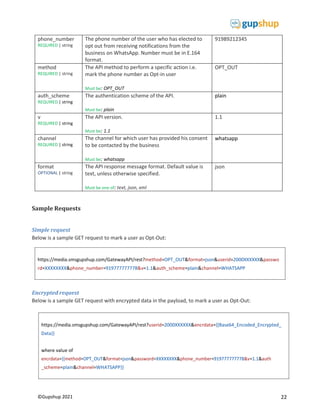
Request Body
Key Description Example
userid
REQUIRED | string
The userid of your Gupshup account. The number
must be in pure numeric format with no special
characters.
2000155005
password
REQUIRED | string
The password of your Gupshup account for
authentication of the userid
sh1gw4e
22
©Gupshup 2021
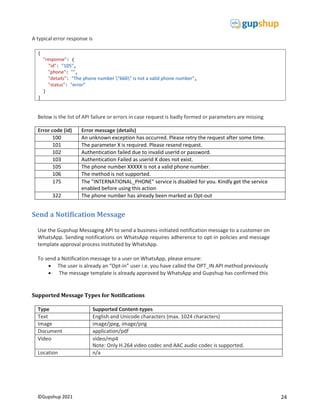
https://media.smsgupshup.com/GatewayAPI/rest?userid=2000XXXXXX&encrdata={{Base64_Encoded_Encrypted_
Data}}
where value of
_scheme=plain&channel=WHATSAPP}}
https://media.smsgupshup.com/GatewayAPI/rest?method=OPT_OUT&format=json&userid=2000XXXXXX&passwo
rd=XXXXXXXX&phone_number=919777777778&v=1.1&auth_scheme=plain&channel=WHATSAPP
phone_number
REQUIRED | string
The phone number of the user who has elected to
opt out from receiving notifications from the
business on WhatsApp. Number must be in E.164
format.
91989212345
method
REQUIRED | string
The API method to perform a specific action i.e.
mark the phone number as Opt-in user
Must be: OPT_OUT
OPT_OUT
auth_scheme
REQUIRED | string
The authentication scheme of the API.
Must be: plain
plain
v
REQUIRED | string
The API version.
Must be: 1.1
1.1
channel
REQUIRED | string
The channel for which user has provided his consent
to be contacted by the business
Must be: whatsapp
whatsapp
format
OPTIONAL | string
The API response message format. Default value is
text, unless otherwise specified.
Must be one of: text, json, xml
json
Sample Requests
Simple request
Below is a sample GET request to mark a user as Opt-Out:
Encrypted request
Below is a sample GET request with encrypted data in the payload, to mark a user as Opt-Out:
23
©Gupshup 2021
{
"response": {
"id": "3622162179146741070",
"phone": "",
"details": "OPT_OUT",
"status": "success"
},
"data": {
"response_messages": [
{
"id": " 3622162179146741070",
"phone": "919777777778",
"details": "OPT_OUT",
"status": "success"
}
]
}
}
Please note:
 The “userid” parameter is mandatory and its value is to be sent in an unencrypted format. Allthe
other parameters must be sent in encrypted format using AES 256 encryption and base64encoded
with the Key shared, in the “encrdata” parameter.
 You must use the key generated for your enterprise account to encrypt API parameter valueswhen
sending the API request. Once the request is received by Gupshup, the payload is decrypted by
Gupshup and sent ahead to WhatsApp.
 Please read Appendix A for detailed steps and code samples on how to encrypt the payload before
sending an API request.
API Response
A successful API request generates an HTTP 200 response. The response to a request where output
format was specified as json, is a JSON array with response status, unique identifier and method as
OPT_OUT.
This indicates that the mobile number 919777777778 has been successfully opted out under a Unique
Identifier- ‘3622162179146741070’. The identifier string is unique for each recipient number and is
auto generated at the time of opt-out submission.
API Errors
An error response is generated when any of the required parameters is not specified correctly or any
other technical error exists. The error response will indicate an error code along with the actual error
message.
24
©Gupshup 2021
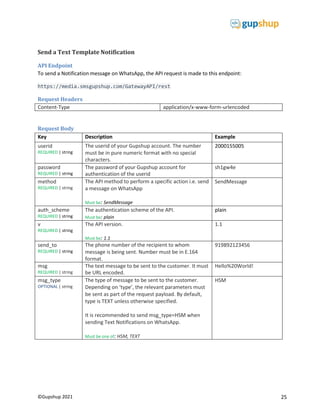
A typical error response is
Below is the list of API failure or errors in case request is badly formed or parameters are missing
Error code (id) Error message (details)
100 An unknown exception has occurred. Please retry the request after some time.
101 The parameter X is required. Please resend request.
102 Authentication failed due to invalid userId or password.
103 Authentication Failed as userid X does not exist.
105 The phone number XXXXX is not a valid phone number.
106 The method is not supported.
175 The "INTERNATIONAL_PHONE" service is disabled for you. Kindly get the service
enabled before using this action
322 The phone number has already been marked as Opt-out
Send a Notification Message
Use the Gupshup Messaging API to send a business-initiated notification message to a customer on
WhatsApp. Sending notifications on WhatsApp requires adherence to opt-in policies and message
template approval process instituted by WhatsApp.
To send a Notification message to a user on WhatsApp, please ensure:
 The user is already an “Opt-in” user i.e. you have called the OPT_IN API method previously
 The message template is already approved by WhatsApp and Gupshup has confirmed this
Supported Message Types for Notifications
Type Supported Content-types
Text English and Unicode characters (max. 1024 characters)
Image image/jpeg, image/png
Document application/pdf
Video video/mp4
Note: Only H.264 video codec and AAC audio codec is supported.
Location n/a
{
"response": {
"id": "105",
"phone": "",
"details": "The phone number "666" is not a valid phone number",
"status": "error"
}
}
25
©Gupshup 2021
Send a Text Template Notification
API Endpoint
To send a Notification message on WhatsApp, the API request is made to this endpoint:
https://media.smsgupshup.com/GatewayAPI/rest
Request Headers
Content-Type application/x-www-form-urlencoded
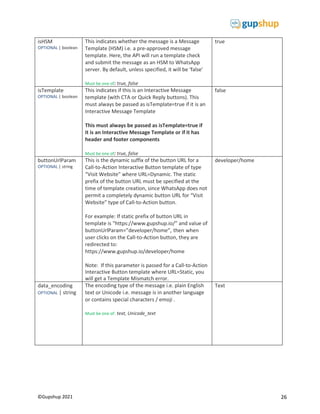
Request Body
Key Description Example
userid
REQUIRED | string
The userid of your Gupshup account. The number
must be in pure numeric format with no special
characters.
2000155005
password
REQUIRED | string
The password of your Gupshup account for
authentication of the userid
sh1gw4e
method
REQUIRED | string
The API method to perform a specific action i.e. send
a message on WhatsApp
Must be: SendMessage
SendMessage
auth_scheme
REQUIRED | string
The authentication scheme of the API.
Must be: plain
plain
v
REQUIRED | string
The API version.
Must be: 1.1
1.1
send_to
REQUIRED | string
The phone number of the recipient to whom
message is being sent. Number must be in E.164
format.
919892123456
msg
REQUIRED | string
The text message to be sent to the customer. It must
be URL encoded.
Hello%20World!
msg_type
OPTIONAL | string
The type of message to be sent to the customer.
Depending on ‘type’, the relevant parameters must
be sent as part of the request payload. By default,
type is TEXT unless otherwise specified.
It is recommended to send msg_type=HSM when
sending Text Notifications on WhatsApp.
Must be one of: HSM, TEXT
HSM
26
©Gupshup 2021
isHSM
OPTIONAL | boolean
This indicates whether the message is a Message
Template (HSM) i.e. a pre-approved message
template. Here, the API will run a template check
and submit the message as an HSM to WhatsApp
server. By default, unless specified, it will be ‘false’
Must be one of: true, false
true
isTemplate
OPTIONAL | boolean
This indicates if this is an Interactive Message
template (with CTA or Quick Reply buttons). This
must always be passed as isTemplate=true if it is an
Interactive Message Template
This must always be passed as isTemplate=true if
it is an Interactive Message Template or if it has
header and footer components
Must be one of: true, false
false
buttonUrlParam
OPTIONAL | string
This is the dynamic suffix of the button URL for a
Call-to-Action Interactive Button template of type
“Visit Website” where URL=Dynamic. The static
prefix of the button URL must be specified at the
time of template creation, since WhatsApp does not
permit a completely dynamic button URL for “Visit
Website” type of Call-to-Action button.
For example: If static prefix of button URL in
template is “https://www.gupshup.io/” and value of
buttonUrlParam=”developer/home”, then when
user clicks on the Call-to-Action button, they are
redirected to:
https://www.gupshup.io/developer/home
Note: If this parameter is passed for a Call-to-Action
Interactive Button template where URL=Static, you
will get a Template Mismatch error.
developer/home
data_encoding
OPTIONAL | string
The encoding type of the message i.e. plain English
text or Unicode i.e. message is in another language
or contains special characters / emoji .
Must be one of: text, Unicode_text
Text
27
©Gupshup 2021
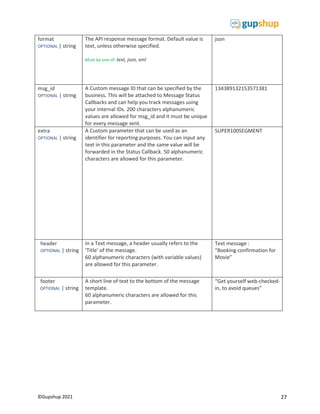
format
OPTIONAL | string
The API response message format. Default value is
text, unless otherwise specified.
Must be one of: text, json, xml
json
msg_id
OPTIONAL | string
A Custom message ID that can be specified by the
business. This will be attached to Message Status
Callbacks and can help you track messages using
your internal IDs. 200 characters alphanumeric
values are allowed for msg_id and it must be unique
for every message sent.
134389132153571381
extra
OPTIONAL | string
A Custom parameter that can be used as an
identifier for reporting purposes. You can input any
text in this parameter and the same value will be
forwarded in the Status Callback. 50 alphanumeric
characters are allowed for this parameter.
SUPER100SEGMENT
header
OPTIONAL | string
In a Text message, a header usually refers to the
‘Title’ of the message.
60 alphanumeric characters (with variable values)
are allowed for this parameter.
Text message :
“Booking confirmation for
Movie”
footer
OPTIONAL | string
A short line of text to the bottom of the message
template.
60 alphanumeric characters are allowed for this
parameter.
“Get yourself web-checked-
in, to avoid queues”
28
©Gupshup 2021
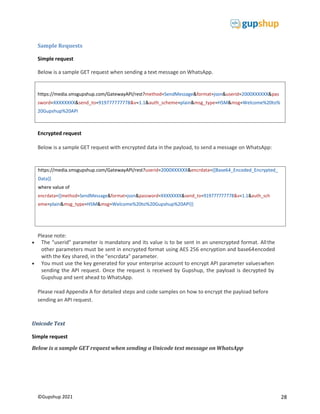
https://media.smsgupshup.com/GatewayAPI/rest?method=SendMessage&format=json&userid=2000XXXXXX&pas
sword=XXXXXXXX&send_to=919777777778&v=1.1&auth_scheme=plain&msg_type=HSM&msg=Welcome%20to%
20Gupshup%20API
Sample Requests
Simple request
Below is a sample GET request when sending a text message on WhatsApp.
Encrypted request
Below is a sample GET request with encrypted data in the payload, to send a message on WhatsApp:
Please note:
 The “userid” parameter is mandatory and its value is to be sent in an unencrypted format. Allthe
other parameters must be sent in encrypted format using AES 256 encryption and base64encoded
with the Key shared, in the “encrdata” parameter.
 You must use the key generated for your enterprise account to encrypt API parameter valueswhen
sending the API request. Once the request is received by Gupshup, the payload is decrypted by
Gupshup and sent ahead to WhatsApp.
Please read Appendix A for detailed steps and code samples on how to encrypt the payload before
sending an API request.
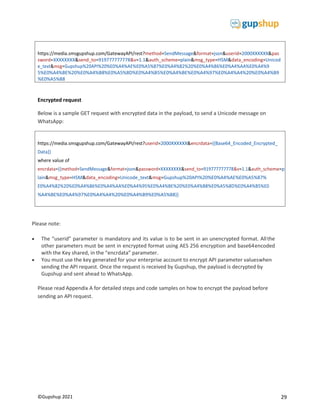
Unicode Text
Simple request
Below is a sample GET request when sending a Unicode text message on WhatsApp
https://media.smsgupshup.com/GatewayAPI/rest?userid=2000XXXXXX&encrdata={{Base64_Encoded_Encrypted_
Data}}
where value of
encrdata={{method=SendMessage&format=json&password=XXXXXXXX&send_to=919777777778&v=1.1&auth_sch
eme=plain&msg_type=HSM&msg=Welcome%20to%20Gupshup%20API}}
29
©Gupshup 2021
https://media.smsgupshup.com/GatewayAPI/rest?method=SendMessage&format=json&userid=2000XXXXXX&pas
sword=XXXXXXXX&send_to=919777777778&v=1.1&auth_scheme=plain&msg_type=HSM&data_encoding=Unicod
e_text&msg=Gupshup%20API%20%E0%A4%AE%E0%A5%87%E0%A4%82%20%E0%A4%86%E0%A4%AA%E0%A4%9
5%E0%A4%BE%20%E0%A4%B8%E0%A5%8D%E0%A4%B5%E0%A4%BE%E0%A4%97%E0%A4%A4%20%E0%A4%B9
%E0%A5%88
https://media.smsgupshup.com/GatewayAPI/rest?userid=2000XXXXXX&encrdata={{Base64_Encoded_Encrypted_
Data}}
where value of
encrdata={{method=SendMessage&format=json&password=XXXXXXXX&send_to=919777777778&v=1.1&auth_scheme=p
lain&msg_type=HSM&data_encoding=Unicode_text&msg=Gupshup%20API%20%E0%A4%AE%E0%A5%87%
E0%A4%82%20%E0%A4%86%E0%A4%AA%E0%A4%95%E0%A4%BE%20%E0%A4%B8%E0%A5%8D%E0%A4%B5%E0
%A4%BE%E0%A4%97%E0%A4%A4%20%E0%A4%B9%E0%A5%88}}
Encrypted request
Below is a sample GET request with encrypted data in the payload, to send a Unicode message on
WhatsApp:
Please note:
 The “userid” parameter is mandatory and its value is to be sent in an unencrypted format. Allthe
other parameters must be sent in encrypted format using AES 256 encryption and base64encoded
with the Key shared, in the “encrdata” parameter.
 You must use the key generated for your enterprise account to encrypt API parameter valueswhen
sending the API request. Once the request is received by Gupshup, the payload is decrypted by
Gupshup and sent ahead to WhatsApp.
Please read Appendix A for detailed steps and code samples on how to encrypt the payload before
sending an API request.
30
©Gupshup 2021
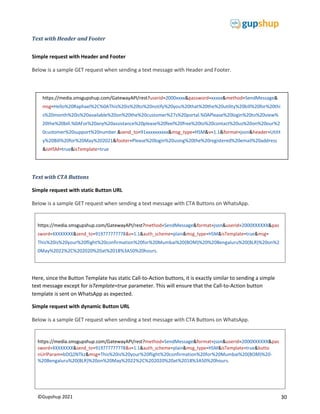
https://media.smsgupshup.com/GatewayAPI/rest?method=SendMessage&format=json&userid=2000XXXXXX&pas
sword=XXXXXXXX&send_to=919777777778&v=1.1&auth_scheme=plain&msg_type=HSM&isTemplate=true&msg=
This%20is%20your%20flight%20confirmation%20for%20Mumbai%20(BOM)%20%20Bengaluru%20(BLR)%20on%2
0May%2022%2C%202020%20at%2018%3A50%20hours.
https://media.smsgupshup.com/GatewayAPI/rest?method=SendMessage&format=json&userid=2000XXXXXX&pas
sword=XXXXXXXX&send_to=919777777778&v=1.1&auth_scheme=plain&msg_type=HSM&isTemplate=true&butto
nUrlParam=bDQ2NTkz&msg=This%20is%20your%20flight%20confirmation%20for%20Mumbai%20(BOM)%20-
%20Bengaluru%20(BLR)%20on%20May%2022%2C%202020%20at%2018%3A50%20hours.
Text with Header and Footer
Simple request with Header and Footer
Below is a sample GET request when sending a text message with Header and Footer.
Text with CTA Buttons
Simple request with static Button URL
Below is a sample GET request when sending a text message with CTA Buttons on WhatsApp.
Here, since the Button Template has static Call-to-Action buttons, it is exactly similar to sending a simple
text message except for isTemplate=true parameter. This will ensure that the Call-to-Action button
template is sent on WhatsApp as expected.
Simple request with dynamic Button URL
Below is a sample GET request when sending a text message with CTA Buttons on WhatsApp.
https://media.smsgupshup.com/GatewayAPI/rest?userid=2000xxxx&password=xxxxx&method=SendMessage&
msg=Hello%20Raphael%2C%0AThis%20is%20to%20notify%20you%20that%20the%20utility%20bill%20for%20thi
s%20month%20is%20available%20on%20the%20customer%27s%20portal.%0APlease%20login%20to%20view%
20the%20bill.%0AFor%20any%20assistance%20please%20feel%20free%20to%20contact%20us%20on%20our%2
0customer%20support%20number.&send_to=91xxxxxxxxxx&msg_type=HSM&v=1.1&format=json&header=Utilit
y%20Bill%20for%20May%202021&footer=Please%20login%20using%20the%20registered%20email%20address
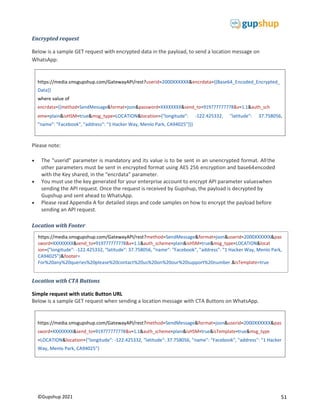
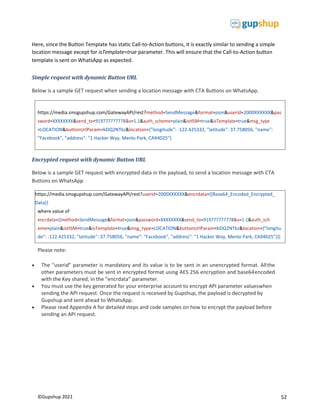
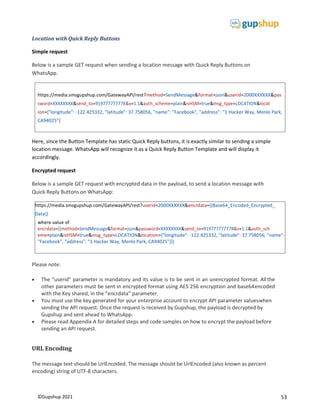
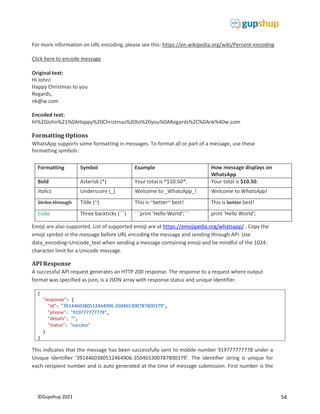
&isHSM=true&isTemplate=true
31
©Gupshup 2021
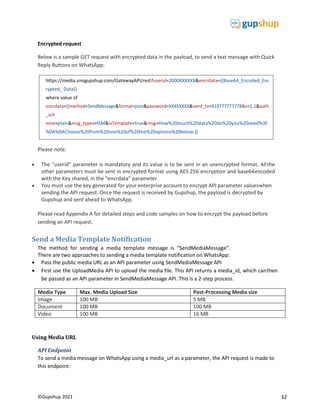
https://media.smsgupshup.com/GatewayAPI/rest?method=SendMessage&format=json&userid=2000XXXXXX&pas
sword=XXXXXXXX&send_to=919777777778&v=1.1&auth_scheme=plain&msg_type=HSM&isTemplate=true&msg=
How%20much%20data%20do%20you%20need%3F%0A%0AChoose%20from%20one%20of%20the%20options%20
below.
Encrypted request with dynamic Button URL
Below is a sample GET request with encrypted data in the payload, to send a text message with CTA
Buttons on WhatsApp:
Please note:
 The “userid” parameter is mandatory and its value is to be sent in an unencrypted format. Allthe
other parameters must be sent in encrypted format using AES 256 encryption and base64encoded
with the Key shared, in the “encrdata” parameter.
 You must use the key generated for your enterprise account to encrypt API parameter valueswhen
sending the API request. Once the request is received by Gupshup, the payload is decrypted by
Gupshup and sent ahead to WhatsApp.
 Please read Appendix A for detailed steps and code samples on how to encrypt the payload before
sending an API request.
Text with Quick Reply Buttons
Simple request
Below is a sample GET request when sending a text message with Quick Reply Buttons on WhatsApp.
Here, since the Button Template has static Quick Reply buttons, it is exactly similar to sending a simple
text message except for isTemplate=true parameter. This will ensure that the Quick Reply button
template is sent on WhatsApp as expected.
https://media.smsgupshup.com/GatewayAPI/rest?userid=2000XXXXXX&encrdata={{Base64_Encoded_Encrypted_
Data}}
where value of
eme=plain&msg_type=HSM&isTemplate=true&buttonUrlParam=bDQ2NTkz&msg=This%20is%20your%20flight
%20 confirmation%20for%20Mumbai%20(BOM)%20-
%20Bengaluru%20(BLR)%20on%20May%2022%2C%202020%20at%2018%3A50%20hours.}}
32
©Gupshup 2021
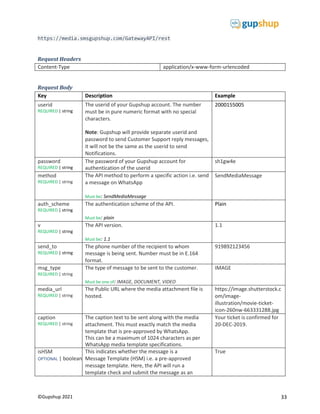
Encrypted request
Below is a sample GET request with encrypted data in the payload, to send a text message with Quick
Reply Buttons on WhatsApp:
Please note:
 The “userid” parameter is mandatory and its value is to be sent in an unencrypted format. Allthe
other parameters must be sent in encrypted format using AES 256 encryption and base64encoded
with the Key shared, in the “encrdata” parameter.
 You must use the key generated for your enterprise account to encrypt API parameter valueswhen
sending the API request. Once the request is received by Gupshup, the payload is decrypted by
Gupshup and sent ahead to WhatsApp.
Please read Appendix A for detailed steps and code samples on how to encrypt the payload before
sending an API request.
Send a Media Template Notification
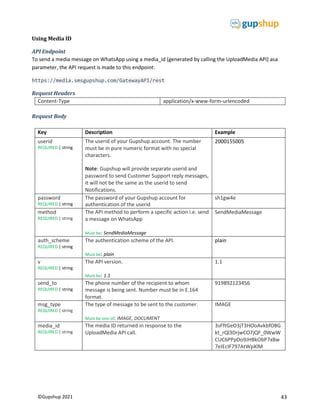
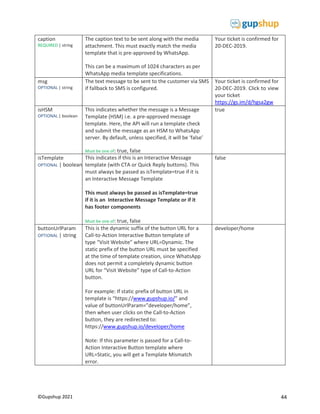
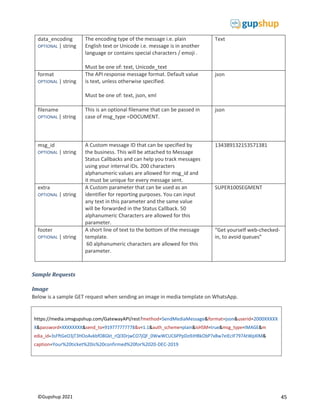
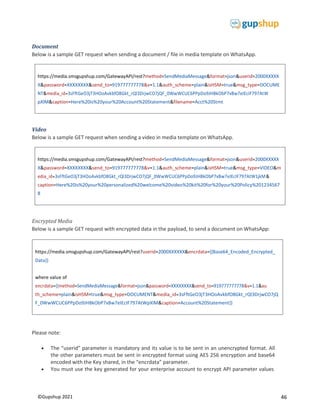
The method for sending a media template message is “SendMediaMessage”.
There are two approaches to sending a media template notification on WhatsApp:
 Pass the public media URL as an API parameter using SendMediaMessage API
 First use the UploadMedia API to upload the media file. This API returns a media_id, which canthen
be passed as an API parameter in SendMediaMessage API. This is a 2-step process.
Media Type Max. Media Upload Size Post-Processing Media size
Image 100 MB 5 MB
Document 100 MB 100 MB
Video 100 MB 16 MB
Using Media URL
API Endpoint
To send a media message on WhatsApp using a media_url as a parameter, the API request is made to
this endpoint:
https://media.smsgupshup.com/GatewayAPI/rest?userid=2000XXXXXX&encrdata={{Base64_Encoded_Enc
rypted_ Data}}
where value of
eme=plain&msg_type=HSM&isTemplate=true&msg=How%20much%20data%20do%20you%20need%3F
%0A%0AChoose%20from%20one%20of%20the%20options%20below.}}
33
©Gupshup 2021
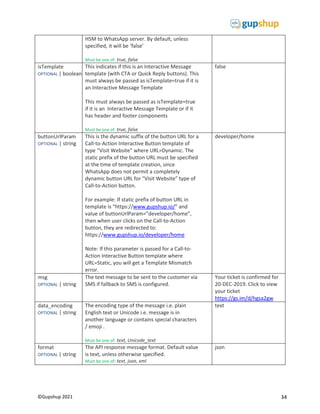
https://media.smsgupshup.com/GatewayAPI/rest
Request Headers
Content-Type application/x-www-form-urlencoded
Request Body
Key Description Example
userid
REQUIRED | string
The userid of your Gupshup account. The number
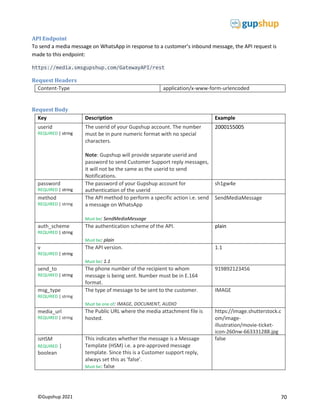
must be in pure numeric format with no special
characters.
Note: Gupshup will provide separate userid and
password to send Customer Support reply messages,
it will not be the same as the userid to send
Notifications.
2000155005
password
REQUIRED | string
The password of your Gupshup account for
authentication of the userid
sh1gw4e
method
REQUIRED | string
The API method to perform a specific action i.e. send
a message on WhatsApp
Must be: SendMediaMessage
SendMediaMessage
auth_scheme
REQUIRED | string
The authentication scheme of the API.
Must be: plain
Plain
v
REQUIRED | string
The API version.
Must be: 1.1
1.1
send_to
REQUIRED | string
The phone number of the recipient to whom
message is being sent. Number must be in E.164
format.
919892123456
msg_type
REQUIRED | string
The type of message to be sent to the customer.
Must be one of: IMAGE, DOCUMENT, VIDEO
IMAGE
media_url
REQUIRED | string
The Public URL where the media attachment file is
hosted.
https://image.shutterstock.c
om/image-
illustration/movie-ticket-
icon-260nw-663331288.jpg
caption
REQUIRED | string
The caption text to be sent along with the media
attachment. This must exactly match the media
template that is pre-approved by WhatsApp.
This can be a maximum of 1024 characters as per
WhatsApp media template specifications.
Your ticket is confirmed for
20-DEC-2019.
isHSM
OPTIONAL | boolean
This indicates whether the message is a
Message Template (HSM) i.e. a pre-approved
message template. Here, the API will run a
template check and submit the message as an
True
34
©Gupshup 2021
HSM to WhatsApp server. By default, unless
specified, it will be ‘false’
Must be one of: true, false
isTemplate
OPTIONAL | boolean
This indicates if this is an Interactive Message
template (with CTA or Quick Reply buttons). This
must always be passed as isTemplate=true if it is
an Interactive Message Template
This must always be passed as isTemplate=true
if it is an Interactive Message Template or if it
has header and footer components
Must be one of: true, false
false
buttonUrlParam
OPTIONAL | string
This is the dynamic suffix of the button URL for a
Call-to-Action Interactive Button template of
type “Visit Website” where URL=Dynamic. The
static prefix of the button URL must be specified
at the time of template creation, since
WhatsApp does not permit a completely
dynamic button URL for “Visit Website” type of
Call-to-Action button.
For example: If static prefix of button URL in
template is “https://www.gupshup.io/” and
value of buttonUrlParam=”developer/home”,
then when user clicks on the Call-to-Action
button, they are redirected to:
https://www.gupshup.io/developer/home
Note: If this parameter is passed for a Call-to-
Action Interactive Button template where
URL=Static, you will get a Template Mismatch
error.
developer/home
msg
OPTIONAL | string
The text message to be sent to the customer via
SMS if fallback to SMS is configured.
Your ticket is confirmed for
20-DEC-2019. Click to view
your ticket
https://gs.im/d/hgsa2gw
data_encoding
OPTIONAL | string
The encoding type of the message i.e. plain
English text or Unicode i.e. message is in
another language or contains special characters
/ emoji .
Must be one of: text, Unicode_text
text
format
OPTIONAL | string
The API response message format. Default value
is text, unless otherwise specified.
Must be one of: text, json, xml
json
35
©Gupshup 2021
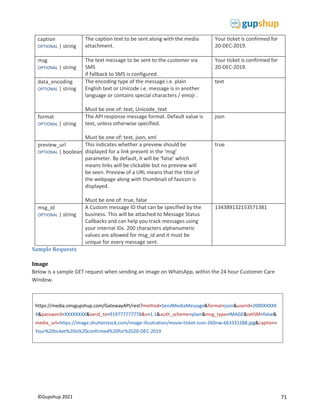
https://media.smsgupshup.com/GatewayAPI/rest?method=SendMediaMessage&format=json&userid=2000XXXXX
X&password=XXXXXXXX&send_to=919777777778&v=1.1&auth_scheme=plain&isHSM=true&msg_type=IMAGE&m
edia_url=https://image.shutterstock.com/image-illustration/movie-ticket-icon-260nw-663331288.jpg&caption=
Your%20ticket%20is%20confirmed%20for%2020-DEC-2019
https://media.smsgupshup.com/GatewayAPI/rest?method=SendMediaMessage&format=json&userid=2000XXXXX
X&password=XXXXXXXX&send_to=919777777778&v=1.1&auth_scheme=plain&isHSM=true&msg_type=DOCUME
NT&media_url=http://www.africau.edu/images/default/sample.pdf&caption=Here%20is%20your%20Account%20
Statement&filename=Acct%20Stmt
filename
OPTIONAL | string
This is an optional filename that can be passed
in
case of msg_type=DOCUMENT.
json
msg_id
OPTIONAL | string
A Custom message ID that can be specified by
the business. This will be attached to Message
Status Callbacks and can help you track
messages using your internal IDs. 200 characters
alphanumeric values are allowed for msg_id and
it must be unique
for every message sent.
134389132153571381
extra
OPTIONAL | string
A Custom parameter that can be used as an
identifier for reporting purposes. You can input
any text in this parameter and the same value
will be forwarded in the Status Callback. 50
alphanumeric
Characters are allowed for this parameter.
SUPER100SEGMENT
footer
OPTIONAL | string
A short line of text to the bottom of the
message template
“Get yourself web-
checked-in, to avoid
queues”
Sample Requests
Image
Below is a sample GET request when sending an image in media template on WhatsApp.
Document
Below is a sample GET request when sending a document / file in media template on WhatsApp.
36
©Gupshup 2021
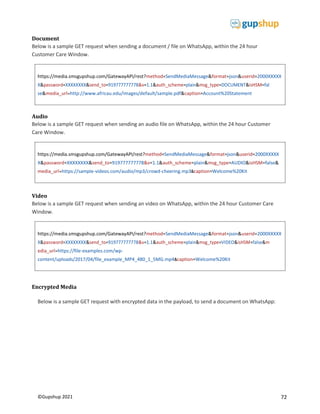
https://media.smsgupshup.com/GatewayAPI/rest?method=SendMediaMessage&format=json&userid=2000XXXXX
X&password=XXXXXXXX&send_to=919777777778&v=1.1&auth_scheme=plain&isHSM=true&msg_type=VIDEO&m
edia_url=http://techslides.com/demos/sample-
Policy%2012345678
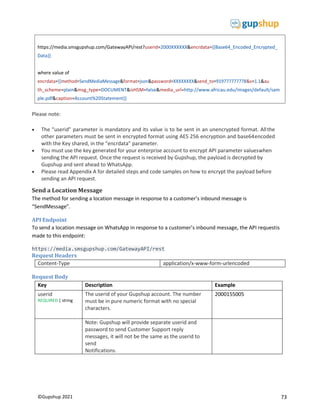
https://media.smsgupshup.com/GatewayAPI/rest?userid=2000XXXXXX&encrdata={{Base64_Encoded_Encrypted_
Data}}
where value of
th_scheme=plain&isHSM=true&msg_type=DOCUMENT&media_url=http://www.africau.edu/images/default/samp
le.pdf&caption=Account%20Statement}}
Video
Below is a sample GET request when sending a video in media template on WhatsApp.
Encrypted Media
Below is a sample GET request with encrypted data in the payload, to send a document on WhatsApp:
Image with Footer:
Below is a sample GET request when sending an image Footer onWhatsApp.
https://media.smsgupshup.com/GatewayAPI/rest?method=SendMediaMessage&format=json&userid=2000XXXXX
edia_url=https://image.shutterstock.com/image-illustration/movie-ticket-icon-260nw-663331288.jpg&caption=
Your%20ticket%20is%20confirmed%20for%2020-DEC-
2019 footer=Please%20use%20the%20QR%20scanner%20to%20scan%20at%20the%20Entrance.&isTemplate=tru
e
37
©Gupshup 2021
https://media.smsgupshup.com/GatewayAPI/rest?method=SendMediaMessage&format=json&userid=2000XXXXX
X&password=XXXXXXXX&send_to=919777777778&v=1.1&auth_scheme=plain&isHSM=true&isTemplate=true&ms
g_type=IMAGE&media_url=https://image.shutterstock.com/image-illustration/movie-ticket-icon-260nw-
663331288.jpg&caption= Your%20ticket%20is%20confirmed%20for%2020-DEC-2019
Image with CTA Buttons (Static)
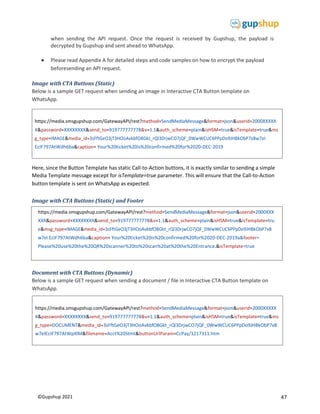
Below is a sample GET request when sending an image in Interactive CTA Button template on
WhatsApp.
Here, since the Button Template has static Call-to-Action buttons, it is exactly similar to sending a simple
Media Template message except for isTemplate=true parameter. This will ensure that the Call-to-Action
button template is sent on WhatsApp as expected.
Document with CTA Buttons (Dynamic)
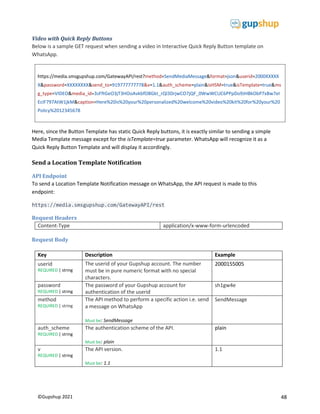
Below is a sample GET request when sending a document / file in Interactive CTA Button template on
WhatsApp.
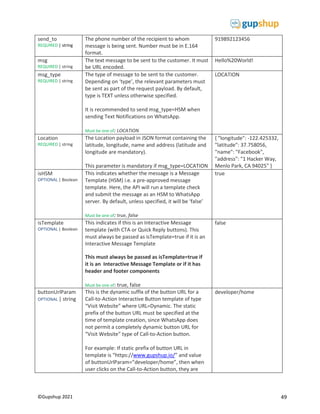
Video with Quick Reply Buttons
Below is a sample GET request when sending a video in Interactive Quick Reply Button template on
WhatsApp.
Here, since the Button Template has static Quick Reply buttons, it is exactly similar to sending a simple
https://media.smsgupshup.com/GatewayAPI/rest?method=SendMediaMessage&format=json&userid=2000XXXXX
X&password=XXXXXXXX&send_to=919777777778&v=1.1&auth_scheme=plain&isHSM=true&msg_type=DOCUME
Statement&filename=Acct%20Stmt&isTemplate=true&buttonUrlParam=CcPay/1217311.htm
https://media.smsgupshup.com/GatewayAPI/rest?method=SendMediaMessage&format=json&userid=2000XXXXX
X&password=XXXXXXXX&send_to=919777777778&v=1.1&auth_scheme=plain&isHSM=true&isTemplate=true&ms
g_type=VIDEO&media_url=http://techslides.com/demos/sample-
Policy%2012345678
38
©Gupshup 2021
text message except for isTemplate=true parameter. This will ensure that the Quick Reply button
template is sent on WhatsApp as expected.
Please note:
 The “userid” parameter is mandatory and its value is to be sent in an unencrypted format. Allthe
other parameters must be sent in encrypted format using AES 256 encryption and base64encoded
with the Key shared, in the “encrdata” parameter.
 You must use the key generated for your enterprise account to encrypt API parameter valueswhen
sending the API request. Once the request is received by Gupshup, the payload is decrypted by
Gupshup and sent ahead to WhatsApp.
 Please read Appendix A for detailed steps and code samples on how to encrypt the payload before
sending an API request.
Upload Media
In this approach, first use the UploadMedia API to upload the media file. This API returns a media_id,
which can then be passed as an API parameter in SendMediaMessage API.
Use this approach when you don’t have a publically hosted media file or if you want to send the same
media file to all recipients like a document or an image that is not customized to every individual.
API Endpoint
To upload a media message on WhatsApp, the API request is made to this endpoint:
https://media.smsgupshup.com/GatewayAPI/rest
Request Headers
Content-Type application/x-www-form-urlencoded
39
©Gupshup 2021
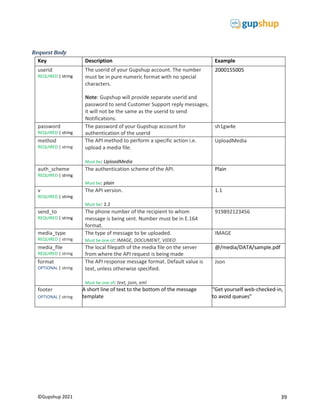
Request Body
Key Description Example
userid
REQUIRED | string
The userid of your Gupshup account. The number
must be in pure numeric format with no special
characters.
Note: Gupshup will provide separate userid and
password to send Customer Support reply messages,
it will not be the same as the userid to send
Notifications.
2000155005
password
REQUIRED | string
The password of your Gupshup account for
authentication of the userid
sh1gw4e
method
REQUIRED | string
The API method to perform a specific action i.e.
upload a media file.
Must be: UploadMedia
UploadMedia
auth_scheme
REQUIRED | string
The authentication scheme of the API.
Must be: plain
Plain
v
REQUIRED | string
The API version.
Must be: 1.1
1.1
send_to
REQUIRED | string
The phone number of the recipient to whom
message is being sent. Number must be in E.164
format.
919892123456
media_type
REQUIRED | string
The type of message to be uploaded.
Must be one of: IMAGE, DOCUMENT, VIDEO
IMAGE
media_file
REQUIRED | string
The local filepath of the media file on the server
from where the API request is being made
@/media/DATA/sample.pdf
format
OPTIONAL | string
The API response message format. Default value is
text, unless otherwise specified.
Must be one of: text, json, xml
Json
footer
OPTIONAL | string
A short line of text to the bottom of the message
template
“Get yourself web-checked-in,
to avoid queues”
40
©Gupshup 2021
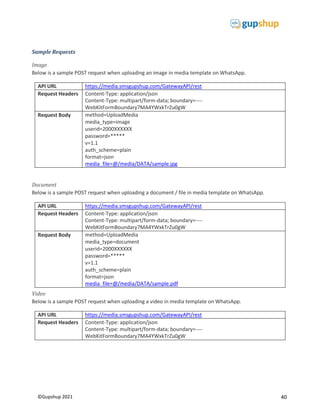
Sample Requests
Image
Below is a sample POST request when uploading an image in media template on WhatsApp.
API URL https://media.smsgupshup.com/GatewayAPI/rest
Request Headers Content-Type: application/json
Content-Type: multipart/form-data; boundary=----
WebKitFormBoundary7MA4YWxkTrZu0gW
Request Body method=UploadMedia
media_type=image
userid=2000XXXXXX
password=*****
v=1.1
auth_scheme=plain
format=json
media_file=@/media/DATA/sample.jpg
Document
Below is a sample POST request when uploading a document / file in media template on WhatsApp.
API URL https://media.smsgupshup.com/GatewayAPI/rest
Request Headers Content-Type: application/json
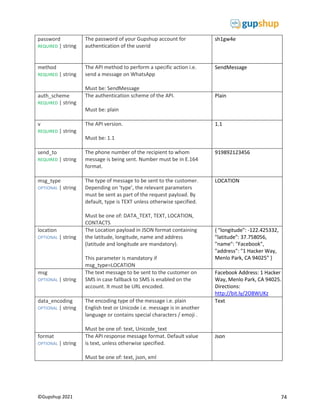
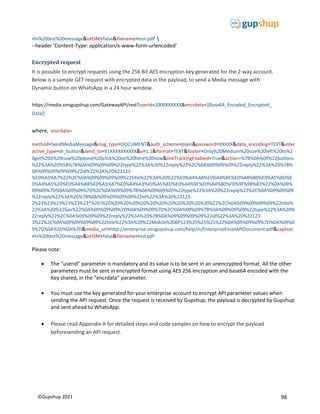
Content-Type: multipart/form-data; boundary=----
WebKitFormBoundary7MA4YWxkTrZu0gW
Request Body method=UploadMedia
media_type=document
userid=2000XXXXXX
password=*****
v=1.1
auth_scheme=plain
format=json
media_file=@/media/DATA/sample.pdf
Video
Below is a sample POST request when uploading a video in media template on WhatsApp.
API URL https://media.smsgupshup.com/GatewayAPI/rest
Request Headers Content-Type: application/json
Content-Type: multipart/form-data; boundary=----
WebKitFormBoundary7MA4YWxkTrZu0gW
41
©Gupshup 2021
{
"response": {
"id":
"phone": "",
"details": "",
"status": "success"
}
}
Request Body method=UploadMedia
media_type=video
userid=2000XXXXXX
password=*****
v=1.1
auth_scheme=plain
format=json
media_file=@/media/DATA/sample.mp4
API Response
A successful API request generates an HTTP 200 response. The response to a request where output
format was specified as json, is a JSON array with response status and unique identifier
This indicates that the media file has been successfully uploaded under a Unique Media ID
‘3sFftGeO3jT3HOoAvkbfO8Gkt_rQl3DrjwCO7jQF_0WwWCUC6PPpDo9JHBkObP7xBw7eIEcIF797AtWpXl M’.
The identifier string is unique for each media file uploaded and is auto generated at the time of upload
submission. This media ID value is to be used in the SendMediaMessage API in the ‘media_id’ parameter in
order to send a media message on WhatsApp.
API Errors
An error response is generated when any of the required parameters is not specified correctly or any
other technical error exists. The error response will indicate an error code along with the actual error
message.
42
©Gupshup 2021
A typical error response is
Below is the list of API failure or errors in case request is badly formed or parameters are missing
Error code (id) Error message (details)
100 An unknown exception has occurred. Please retry the request after some time.
101 The parameter X is required. Please resend request.
102 Authentication failed due to invalid userId or password.
103 Authentication Failed as userid X does not exist.
104 This user with number is currently disabled. Please contact support for further details.
106 The method X is not supported.
124 Validity of your WhatsApp pack has expired on. You are not allowed to send messages
now.
171 You are not allowed to perform this action.
175 The "INTERNATIONAL_PHONE" service is disabled for you. Kindly get the service
enabled before using this action
318 Message does not match WhatsApp HSM template.
321 Media upload Error Msg : X
328 Invalid Media Content Type
329 HSM not supported for this msg_type
330 Media Id (X) not found or has expired
{
"response": {
"id": "328",
"phone": "",
"details": "Invalid Media Content Type",
"status": "error"
}
}
43
©Gupshup 2021
Using Media ID
API Endpoint
To send a media message on WhatsApp using a media_id (generated by calling the UploadMedia API) asa
parameter, the API request is made to this endpoint:
https://media.smsgupshup.com/GatewayAPI/rest
Request Headers
Content-Type application/x-www-form-urlencoded
Request Body
Key Description Example
userid
REQUIRED | string
The userid of your Gupshup account. The number
must be in pure numeric format with no special
characters.
Note: Gupshup will provide separate userid and
password to send Customer Support reply messages,
it will not be the same as the userid to send
Notifications.
2000155005
password
REQUIRED | string
The password of your Gupshup account for
authentication of the userid
sh1gw4e
method
REQUIRED | string
The API method to perform a specific action i.e. send
a message on WhatsApp
Must be: SendMediaMessage
SendMediaMessage
auth_scheme
REQUIRED | string
The authentication scheme of the API.
Must be: plain
plain
v
REQUIRED | string
The API version.
Must be: 1.1
1.1
send_to
REQUIRED | string
The phone number of the recipient to whom
message is being sent. Number must be in E.164
format.
919892123456
msg_type
REQUIRED | string
The type of message to be sent to the customer.
Must be one of: IMAGE, DOCUMENT
IMAGE
media_id
REQUIRED | string
The media ID returned in response to the
UploadMedia API call.
3sFftGeO3jT3HOoAvkbfO8G
kt_rQl3DrjwCO7jQF_0WwW
CUC6PPpDo9JHBkObP7xBw
7eIEcIF797AtWpXlM
44
©Gupshup 2021
caption
REQUIRED | string
The caption text to be sent along with the media
attachment. This must exactly match the media
template that is pre-approved by WhatsApp.
This can be a maximum of 1024 characters as per
WhatsApp media template specifications.
Your ticket is confirmed for
20-DEC-2019.
msg
OPTIONAL | string
The text message to be sent to the customer via SMS
if fallback to SMS is configured.
Your ticket is confirmed for
20-DEC-2019. Click to view
your ticket
https://gs.im/d/hgsa2gw
isHSM
OPTIONAL | boolean
This indicates whether the message is a Message
Template (HSM) i.e. a pre-approved message
template. Here, the API will run a template check
and submit the message as an HSM to WhatsApp
server. By default, unless specified, it will be ‘false’
Must be one of: true, false
true
isTemplate
OPTIONAL | boolean
This indicates if this is an Interactive Message
template (with CTA or Quick Reply buttons). This
must always be passed as isTemplate=true if it is
an Interactive Message Template
This must always be passed as isTemplate=true
if it is an Interactive Message Template or if it
has footer components
Must be one of: true, false
false
buttonUrlParam
OPTIONAL | string
This is the dynamic suffix of the button URL for a
Call-to-Action Interactive Button template of
type “Visit Website” where URL=Dynamic. The
static prefix of the button URL must be specified
at the time of template creation, since WhatsApp
does not permit a completely dynamic button
URL for “Visit Website” type of Call-to-Action
button.
For example: If static prefix of button URL in
template is “https://www.gupshup.io/” and
value of buttonUrlParam=”developer/home”,
then when user clicks on the Call-to-Action
button, they are redirected to:
https://www.gupshup.io/developer/home
Note: If this parameter is passed for a Call-to-
Action Interactive Button template where
URL=Static, you will get a Template Mismatch
error.
developer/home
45
©Gupshup 2021
https://media.smsgupshup.com/GatewayAPI/rest?method=SendMediaMessage&format=json&userid=2000XXXXX
caption=Your%20ticket%20is%20confirmed%20for%2020-DEC-2019
data_encoding
OPTIONAL | string
The encoding type of the message i.e. plain
English text or Unicode i.e. message is in another
language or contains special characters / emoji .
Must be one of: text, Unicode_text
Text
format
OPTIONAL | string
The API response message format. Default value
is text, unless otherwise specified.
Must be one of: text, json, xml
json
filename
OPTIONAL | string
This is an optional filename that can be passed in
case of msg_type =DOCUMENT.
json
msg_id
OPTIONAL | string
A Custom message ID that can be specified by
the business. This will be attached to Message
Status Callbacks and can help you track messages
using your internal IDs. 200 characters
alphanumeric values are allowed for msg_id and
it must be unique for every message sent.
134389132153571381
extra
OPTIONAL | string
A Custom parameter that can be used as an
identifier for reporting purposes. You can input
any text in this parameter and the same value
will be forwarded in the Status Callback. 50
alphanumeric Characters are allowed for this
parameter.
SUPER100SEGMENT
footer
OPTIONAL | string
A short line of text to the bottom of the message
template.
60 alphanumeric characters are allowed for this
parameter.
“Get yourself web-checked-
in, to avoid queues”
Sample Requests
Image
Below is a sample GET request when sending an image in media template on WhatsApp.
46
©Gupshup 2021
https://media.smsgupshup.com/GatewayAPI/rest?method=SendMediaMessage&format=json&userid=2000XXXXX
X&password=XXXXXXXX&send_to=919777777778&v=1.1&auth_scheme=plain&isHSM=true&msg_type=DOCUME
NT&media_id=3sFftGeO3jT3HOoAvkbfO8Gkt_rQl3DrjwCO7jQF_0WwWCUC6PPpDo9JHBkObP7xBw7eIEcIF797AtW
pXlM&caption=Here%20is%20your%20Account%20Statement&filename=Acct%20Stmt
https://media.smsgupshup.com/GatewayAPI/rest?method=SendMediaMessage&format=json&userid=2000XXXXX
X&password=XXXXXXXX&send_to=919777777778&v=1.1&auth_scheme=plain&isHSM=true&msg_type=VIDEO&m
edia_id=3sFftGeO3jT3HOoAvkbfO8Gkt_rQl3DrjwCO7jQF_0WwWCUC6PPpDo9JHBkObP7xBw7eIEcIF797AtW1jkM&
caption=Here%20is%20your%20personalized%20welcome%20video%20kit%20for%20your%20Policy%201234567
8
Document
Below is a sample GET request when sending a document / file in media template on WhatsApp.
Video
Below is a sample GET request when sending a video in media template on WhatsApp.
Encrypted Media
Below is a sample GET request with encrypted data in the payload, to send a document on WhatsApp:
Please note:
 The “userid” parameter is mandatory and its value is to be sent in an unencrypted format. All
the other parameters must be sent in encrypted format using AES 256 encryption and base64
encoded with the Key shared, in the “encrdata” parameter.
 You must use the key generated for your enterprise account to encrypt API parameter values
https://media.smsgupshup.com/GatewayAPI/rest?userid=2000XXXXXX&encrdata={{Base64_Encoded_Encrypted_
Data}}
where value of
th_scheme=plain&isHSM=true&msg_type=DOCUMENT&media_id=3sFftGeO3jT3HOoAvkbfO8Gkt_rQl3DrjwCO7jQ
F_0WwWCUC6PPpDo9JHBkObP7xBw7eIEcIF797AtWpXlM&caption=Account%20Statement}}
47
©Gupshup 2021
https://media.smsgupshup.com/GatewayAPI/rest?method=SendMediaMessage&format=json&userid=2000XXXXX
X&password=XXXXXXXX&send_to=919777777778&v=1.1&auth_scheme=plain&isHSM=true&isTemplate=true&ms
g_type=DOCUMENT&media_id=3sFftGeO3jT3HOoAvkbfO8Gkt_rQl3DrjwCO7jQF_0WwWCUC6PPpDo9JHBkObP7xB
w7eIEcIF797AtWpXlM&filename=Acct%20Stmt&buttonUrlParam=CcPay/1217311.htm
https://media.smsgupshup.com/GatewayAPI/rest?method=SendMediaMessage&format=json&userid=2000XXXXX
X&password=XXXXXXXX&send_to=919777777778&v=1.1&auth_scheme=plain&isHSM=true&isTemplate=true&ms
g_type=IMAGE&media_id=3sFftGeO3jT3HOoAvkbfO8Gkt_rQl3DrjwCO7jQF_0WwWCUC6PPpDo9JHBkObP7xBw7eI
EcIF797AtWdh6ba&caption= Your%20ticket%20is%20confirmed%20for%2020-DEC-2019
when sending the API request. Once the request is received by Gupshup, the payload is
decrypted by Gupshup and sent ahead to WhatsApp.
 Please read Appendix A for detailed steps and code samples on how to encrypt the payload
beforesending an API request.
Image with CTA Buttons (Static)
Below is a sample GET request when sending an image in Interactive CTA Button template on
WhatsApp.
Here, since the Button Template has static Call-to-Action buttons, it is exactly similar to sending a simple
Media Template message except for isTemplate=true parameter. This will ensure that the Call-to-Action
button template is sent on WhatsApp as expected.
Image with CTA Buttons (Static) and Footer
Document with CTA Buttons (Dynamic)
Below is a sample GET request when sending a document / file in Interactive CTA Button template on
WhatsApp.
https://media.smsgupshup.com/GatewayAPI/rest?method=SendMediaMessage&format=json&userid=2000XXX
XXX&password=XXXXXXXX&send_to=919777777778&v=1.1&auth_scheme=plain&isHSM=true&isTemplate=tru
e&ms
EcIF797AtWdh6ba&caption= Your%20ticket%20is%20confirmed%20for%2020-DEC-2019a&footer=
Please%20use%20the%20QR%20scanner%20to%20scan%20at%20the%20Entrance.&isTemplate=true
48
©Gupshup 2021
https://media.smsgupshup.com/GatewayAPI/rest?method=SendMediaMessage&format=json&userid=2000XXXXX
X&password=XXXXXXXX&send_to=919777777778&v=1.1&auth_scheme=plain&isHSM=true&isTemplate=true&ms
g_type=VIDEO&media_id=3sFftGeO3jT3HOoAvkbfO8Gkt_rQl3DrjwCO7jQF_0WwWCUC6PPpDo9JHBkObP7xBw7eI
EcIF797AtW1jkM&caption=Here%20is%20your%20personalized%20welcome%20video%20kit%20for%20your%20
Policy%2012345678
Video with Quick Reply Buttons
Below is a sample GET request when sending a video in Interactive Quick Reply Button template on
WhatsApp.
Here, since the Button Template has static Quick Reply buttons, it is exactly similar to sending a simple
Media Template message except for the isTemplate=true parameter. WhatsApp will recognize it as a
Quick Reply Button Template and will display it accordingly.
Send a Location Template Notification
API Endpoint
To send a Location Template Notification message on WhatsApp, the API request is made to this
endpoint:
https://media.smsgupshup.com/GatewayAPI/rest
Request Headers
Content-Type application/x-www-form-urlencoded
Request Body
Key Description Example
userid
REQUIRED | string
The userid of your Gupshup account. The number
must be in pure numeric format with no special
characters.
2000155005
password
REQUIRED | string
The password of your Gupshup account for
authentication of the userid
sh1gw4e
method
REQUIRED | string
The API method to perform a specific action i.e. send
a message on WhatsApp
Must be: SendMessage
SendMessage
auth_scheme
REQUIRED | string
The authentication scheme of the API.
Must be: plain
plain
v
REQUIRED | string
The API version.
Must be: 1.1
1.1
49
©Gupshup 2021
send_to
REQUIRED | string
The phone number of the recipient to whom
message is being sent. Number must be in E.164
format.
919892123456
msg
REQUIRED | string
The text message to be sent to the customer. It must
be URL encoded.
Hello%20World!
msg_type
REQUIRED | string
The type of message to be sent to the customer.
Depending on ‘type’, the relevant parameters must
be sent as part of the request payload. By default,
type is TEXT unless otherwise specified.
It is recommended to send msg_type=HSM when
sending Text Notifications on WhatsApp.
Must be one of: LOCATION
LOCATION
Location
REQUIRED | string
The Location payload in JSON format containing the
latitude, longitude, name and address (latitude and
longitude are mandatory).
This parameter is mandatory if msg_type=LOCATION
{ "longitude": -122.425332,
"latitude": 37.758056,
"name": "Facebook",
"address": "1 Hacker Way,
Menlo Park, CA 94025" }
isHSM
OPTIONAL | Boolean
This indicates whether the message is a Message
Template (HSM) i.e. a pre-approved message
template. Here, the API will run a template check
and submit the message as an HSM to WhatsApp
server. By default, unless specified, it will be ‘false’
Must be one of: true, false
true
isTemplate
OPTIONAL | Boolean
This indicates if this is an Interactive Message
template (with CTA or Quick Reply buttons). This
must always be passed as isTemplate=true if it is an
Interactive Message Template
This must always be passed as isTemplate=true if
it is an Interactive Message Template or if it has
header and footer components
Must be one of: true, false
false
buttonUrlParam
OPTIONAL | string
This is the dynamic suffix of the button URL for a
Call-to-Action Interactive Button template of type
“Visit Website” where URL=Dynamic. The static
prefix of the button URL must be specified at the
time of template creation, since WhatsApp does
not permit a completely dynamic button URL for
“Visit Website” type of Call-to-Action button.
For example: If static prefix of button URL in
template is “https://www.gupshup.io/” and value
of buttonUrlParam=”developer/home”, then when
user clicks on the Call-to-Action button, they are
developer/home
50
©Gupshup 2021
https://media.smsgupshup.com/GatewayAPI/rest?method=SendMessage&format=json&userid=2000XXXXXX&pas
sword=XXXXXXXX&send_to=919777777778&v=1.1&auth_scheme=plain&isHSM=true&msg_type=LOCATION&locat
ion={"longitude": -122.425332, "latitude": 37.758056, "name": "Facebook", "address": "1 Hacker Way, Menlo Park,
CA94025"}
redirected to:
https://www.gupshup.io/developer/home
Note: If this parameter is passed for a Call-to-
Action Interactive Button template where
URL=Static, you will get a Template Mismatch
error.
data_encoding
OPTIONAL | string
The encoding type of the message i.e. plain English
text or Unicode i.e. message is in another language
or contains special characters / emoji.
Must be one of: text, Unicode_text
Text
Format
OPTIONAL | string
The API response message format. Default value is
text, unless otherwise specified.
Must be one of: text, json, xml
json
msg_id
OPTIONAL | string
A Custom message ID that can be specified by the
business. This will be attached to Message Status
Callbacks and can help you track messages using
your internal IDs. 200 characters alphanumeric
values are allowed for msg_id and it must be
unique
for every message sent.
134389132153571381
extra
OPTIONAL | string
A Custom parameter that can be used as an
identifier for reporting purposes. You can input any
text in this parameter and the same value will be
forwarded in the Status Callback. 50 alphanumeric
characters are allowed for this parameter.
SUPER100SEGMENT
footer
OPTIONAL | string
A short line of text to the bottom of the message
template.
60 alphanumeric characters are allowed for this
parameter.
For any queries please
contact us on our support
number
Sample Requests
Location
Simple request
Below is a sample GET request when sending a location message on WhatsApp.
51
©Gupshup 2021
https://media.smsgupshup.com/GatewayAPI/rest?method=SendMessage&format=json&userid=2000XXXXXX&pas
=LOCATION&location={"longitude": -122.425332, "latitude": 37.758056, "name": "Facebook", "address": "1 Hacker
Way, Menlo Park, CA94025"}
https://media.smsgupshup.com/GatewayAPI/rest?userid=2000XXXXXX&encrdata={{Base64_Encoded_Encrypted_
Data}}
where value of
encrdata={{method=SendMessage&format=json&password=XXXXXXXX&send_to=919777777778&v=1.1&auth_sch
eme=plain&isHSM=true&msg_type=LOCATION&location={"longitude":
"name": "Facebook", "address": "1 Hacker Way, Menlo Park, CA94025"}}}
-122.425332, "latitude": 37.758056,
Encrypted request
Below is a sample GET request with encrypted data in the payload, to send a location message on
WhatsApp:
Please note:
 The “userid” parameter is mandatory and its value is to be sent in an unencrypted format. Allthe
other parameters must be sent in encrypted format using AES 256 encryption and base64encoded
with the Key shared, in the “encrdata” parameter.
 You must use the key generated for your enterprise account to encrypt API parameter valueswhen
sending the API request. Once the request is received by Gupshup, the payload is decrypted by
Gupshup and sent ahead to WhatsApp.
 Please read Appendix A for detailed steps and code samples on how to encrypt the payload before
sending an API request.

Location with Footer
Location with CTA Buttons
Simple request with static Button URL
Below is a sample GET request when sending a location message with CTA Buttons on WhatsApp.
https://media.smsgupshup.com/GatewayAPI/rest?method=SendMessage&format=json&userid=2000XXXXXX&pas
ion={"longitude": -122.425332, "latitude": 37.758056, "name": "Facebook", "address": "1 Hacker Way, Menlo Park,
CA94025"}&footer=
For%20any%20queries%20please%20contact%20us%20on%20our%20support%20number. =true
52
©Gupshup 2021
https://media.smsgupshup.com/GatewayAPI/rest?method=SendMessage&format=json&userid=2000XXXXXX&pas
sword=XXXXXXXX&send_to=919777777778&v=1.1&auth_scheme=plain&isHSM=true&isTemplate=true&msg_type
=LOCATION&buttonUrlParam=bDQ2NTkz&location={"longitude": -122.425332, "latitude": 37.758056, "name":
"Facebook", "address": "1 Hacker Way, Menlo Park, CA94025"}
https://media.smsgupshup.com/GatewayAPI/rest?userid=2000XXXXXX&encrdata={{Base64_Encoded_Encrypted_
Data}}
where value of
encrdata={{method=SendMessage&format=json&password=XXXXXXXX&send_to=919777777778&v=1.1&auth_sch
eme=plain&isHSM=true&isTemplate=true&msg_type=LOCATION&buttonUrlParam=bDQ2NTkz&location={"longitu
de": -122.425332, "latitude": 37.758056, "name": "Facebook", "address": "1 Hacker Way, Menlo Park, CA94025"}}}
Here, since the Button Template has static Call-to-Action buttons, it is exactly similar to sending a simple
location message except for isTemplate=true parameter. This will ensure that the Call-to-Action button
template is sent on WhatsApp as expected.
Simple request with dynamic Button URL
Below is a sample GET request when sending a location message with CTA Buttons on WhatsApp.
Encrypted request with dynamic Button URL
Below is a sample GET request with encrypted data in the payload, to send a location message with CTA
Buttons on WhatsApp
Please note:
 The “userid” parameter is mandatory and its value is to be sent in an unencrypted format. Allthe
other parameters must be sent in encrypted format using AES 256 encryption and base64encoded
with the Key shared, in the “encrdata” parameter.
 You must use the key generated for your enterprise account to encrypt API parameter valueswhen
sending the API request. Once the request is received by Gupshup, the payload is decrypted by
Gupshup and sent ahead to WhatsApp.
 Please read Appendix A for detailed steps and code samples on how to encrypt the payload before
sending an API request.
53
©Gupshup 2021
https://media.smsgupshup.com/GatewayAPI/rest?method=SendMessage&format=json&userid=2000XXXXXX&pas
sword=XXXXXXXX&send_to=919777777778&v=1.1&auth_scheme=plain&isHSM=true&msg_type=LOCATION&locat
ion={"longitude": -122.425332, "latitude": 37.758056, "name": "Facebook", "address": "1 Hacker Way, Menlo Park,
CA94025"}
https://media.smsgupshup.com/GatewayAPI/rest?userid=2000XXXXXX&encrdata={{Base64_Encoded_Encrypted_
Data}}
where value of
encrdata={{method=SendMessage&format=json&password=XXXXXXXX&send_to=919777777778&v=1.1&auth_sch
eme=plain&isHSM=true&msg_type=LOCATION&location={"longitude": -122.425332, "latitude": 37.758056, "name":
"Facebook", "address": "1 Hacker Way, Menlo Park, CA94025"}}}
Location with Quick Reply Buttons
Simple request
Below is a sample GET request when sending a location message with Quick Reply Buttons on
WhatsApp.
Here, since the Button Template has static Quick Reply buttons, it is exactly similar to sending a simple
location message. WhatsApp will recognize it as a Quick Reply Button Template and will display it
accordingly.
Encrypted request
Below is a sample GET request with encrypted data in the payload, to send a location message with
Quick Reply Buttons on WhatsApp:
Please note:
 The “userid” parameter is mandatory and its value is to be sent in an unencrypted format. Allthe
other parameters must be sent in encrypted format using AES 256 encryption and base64encoded
with the Key shared, in the “encrdata” parameter.
 You must use the key generated for your enterprise account to encrypt API parameter valueswhen
sending the API request. Once the request is received by Gupshup, the payload is decrypted by
Gupshup and sent ahead to WhatsApp.
 Please read Appendix A for detailed steps and code samples on how to encrypt the payload before
sending an API request.
URL Encoding
The message text should be UrlEncoded. The message should be UrlEncoded (also known as percent
encoding) string of UTF-8 characters.
54
©Gupshup 2021
{
"response": {
"id": "3914460380512464906-350465300787800379",
"phone": "919777777778",
"details": "",
"status": "success"
}
}
For more information on URL encoding, please see this: https://en.wikipedia.org/wiki/Percent-encoding
Click here to encode message
Original text:
Hi John!
Happy Christmas to you
Regards,
nk@w.com
Encoded text:
Hi%20John%21%0AHappy%20Christmas%20to%20you%0ARegards%2C%0Ank%40w.com
Formatting Options
WhatsApp supports some formatting in messages. To format all or part of a message, use these
formatting symbols:
Formatting Symbol Example How message displays on
WhatsApp
Bold Asterisk (*) Your total is *$10.50*. Your total is $10.50.
Italics Underscore (_) Welcome to _WhatsApp_! Welcome to WhatsApp!
Strike-through Tilde (~) This is ~better~ best! This is better best!
Code Three backticks (```) ```print 'Hello World';``` print 'Hello World';
Emoji are also supported. List of supported emoji are at https://emojipedia.org/whatsapp/ . Copy the
emoji symbol in the message before URL encoding the message and sending through API. Use
data_encoding=Unicode_text when sending a message containing emoji and be mindful of the 1024-
character limit for a Unicode message.
API Response
A successful API request generates an HTTP 200 response. The response to a request where output
format was specified as json, is a JSON array with response status and unique identifier.
This indicates that the message has been successfully sent to mobile number 919777777778 under a
Unique Identifier ‘3914460380512464906-350465300787800379’. The identifier string is unique for
each recipient number and is auto generated at the time of message submission. First number is the
55
©Gupshup 2021
transaction ID and second one is message ID. If a custom msg_id is passed in the API request (say,
msg_id=1343891), it would be set as the message ID and returned back in the API response message as
the second half of the unique identifier. For instance, the ‘id’ parameter would be
‘3914460380512464906-1343891’.
API Errors
An error response is generated when any of the required parameters is not specified correctly or any
other technical error exists. The error response will indicate an error code along with the actual error
message.
A typical error response is
Below is the list of API failure or errors in case request is badly formed or parameters are missing
Error code (id) Error message (details)
100 An unknown exception has occurred. Please retry the request after some time.
101 The parameter X is required. Please resend request.
102 Authentication failed due to invalid userId or password.
103 Authentication Failed as userid X does not exist.
104 This user with number is currently disabled. Please contact support for further details.
105 The phone number is not a valid phone number.
106 The method X is not supported.
112 The phone number field cannot be null.
123 Your account does not have sufficient credits to post this message.
124 Validity of your WhatsApp pack has expired on. You are not allowed to send messages
now.
171 You are not allowed to perform this action.
175 The "INTERNATIONAL_PHONE" service is disabled for you. Kindly get the service
enabled before using this action
315 The phone number XXX is not opted in
318 Message does not match WhatsApp HSM template.
328 Invalid Media Content Type
329 HSM not supported for this msg_type
332 Interactive button template not supported for non HSM requests
333 Interactive button template mismatch
334 Message length exceeded. Max limit for type X is Y.
{
"response": {
"id": "318",
"phone": "",
"details": " Message does not match WhatsApp HSM template.",
"status": "error"
}
}
56
©Gupshup 2021
Receive an Inbound Message
Inbound messages sent by customers to your WhatsApp Business Phone Number will be sent to your
webhook endpoint via HTTP/HTTPS.
Gupshup doesnot store incoming messages; it is simply sent to the webhook enpoint which can either
be a customer engagement tool, bot application or any other application as desired, provided the
application can accept the webhook events in the formats mentioned below
Webhooks
Webhooks are user-defined HTTP callbacks that are triggered by specific events such as an inbound
message from a customer i.e. customer sends a text message or media attachment on WhatsApp.
Whenever that trigger event occurs, the Gupshup Messaging API registers the event and immediately
sends a notification (HTTP GET/POST request) to the Callback URL specified in your account settings
indicating when you receive a message.
Please reach out to your account manager to set the Callback URL for your account in order to receive
inbound message webhook events. Only one callback URL can be specified per account.
Request Header
Content-Type application/json
Request Body
Key Description Example
waNumber
REQUIRED | string
The WhatsApp Business number on which the
customer has sent a message. Number is in E.164
format
917834811114
mobile
REQUIRED | string
The phone number of the customer who has sent
the message. Number is in E.164 format
919777777778
replyId
OPTIONAL | object
The unique system identifier for the original
message sent by the business to the customer, on
which the customer has replied (swipe left action on
WhatsApp to reply to a specific message). This is the
transaction ID of the original message.
3914460380512464906
messageId
OPTIONAL | string
The unique identifier for the original message sent
by the business to the customer, on which the
customer has replied (swipe left action on WhatsApp
to reply to a specific message). This is the message
ID that can be a custom value specified in the Send
Message API request of the original message.
350465300787800379
timestamp
REQUIRED | string
The time in unix timestamp in milliseconds when the
message sent by the customer was received by
Gupshup
1564472864000
name
REQUIRED | string
The profile name set by the customer in WhatsApp John Smith
57
©Gupshup 2021
type
REQUIRED | string
The type of message sent by the customer on
WhatsApp
Must be one of: text, image, document, voice, audio, video,
location, contacts, interactive,
text
text
OPTIONAL | string
The text message sent by the user When will my order be
delivered
image
OPTIONAL | string
The JSON object containing details of the image sent
by the user
See media Object
documentation below
document
OPTIONAL | object
The JSON object containing details of the document
sent by the user
See media Object
documentation below
voice
OPTIONAL | string
The JSON object containing details of the voice
message sent by the user
See media Object
documentation below
audio
OPTIONAL | string
The JSON object containing details of the audio sent
by the user
See media Object
documentation below
video
OPTIONAL | object
The JSON object containing details of the video sent
by the user
See media Object
documentation below
location
OPTIONAL | string
The JSON object containing details of the geo-
location sent by the user
See location Object
documentation below
contacts
OPTIONAL | object
The JSON object containing details of the contact
card sent by the user
See contacts Object
documentation below
The media object
Key Description Example
mime_type
REQUIRED | string
The IANA standard media type of the media file
(image / document / audio / voice / video) sent by
the customer on WhatsApp
image/jpeg
signature
REQUIRED | string
The unique signature that is required to download
the media file securely from the Gupshup platform.
c4f82d0d148dbc31d4e0b10
7e4057053348e7803a0d6ef
b168d0ec656f233a5d
url
REQUIRED | string
The public URL where the media attachment sent by
the customer is hosted. You can download the
media by appending the signature value to the URL.
Note: The media file will only be available for 48
hours before it is deleted. Please download as soon
as possible.
https://gs-datareceiver-
whatsapp.s3.ap-south-
1.amazonaws.com/49da5a9
6-9372-4445-beb5-
49be43c787b3?X-Amz-
Algorithm=AWS4-HMAC-
SHA256&X-Amz-
Date=20190730T070452Z&X
-Amz-
SignedHeaders=host&X-
Amz-Expires=172799&X-
Amz-
Credential=AKIAJU3SPMQCT
HBIWILA%2F20190730%2Fa
p-south-
1%2Fs3%2Faws4_request&X
-Amz-Signature=
58
©Gupshup 2021
caption
OPTIONAL | string
The caption text sent for an inbound message of
type = image/ document/ audio
This is a caption message
The location object
Key Description Example
latitude
string
The latitude of the static location shared by the
customer. Only present if type=location
19.1454121
longitude
string
The longitude of the static location shared by the
customer. Only present if type=location
72.8553098
The contacts object
Key Description Example
addresses
OPTIONAL | array
The JSON object containing a set of full addresses for
the contact. Each address can contain street, city,
state, zip, country, country_code, and type fields.
[
{
"city": "Menlo Park",
"country": "United
States",
"country_code": "us",
"state": "CA",
"street": "1 Hacker Way",
"type": "WORK",
"zip": "94025"
}
]
birthday
OPTIONAL | string
The birthday of the contact in YYYY-MM-DD
formatted string.
1987-09-10
ims
OPTIONAL | array
The Instant Messaging contact information. Each ims
object contains service and user_id fields.
[
{
"service": "AIM", "user_id":
"kfish"
}
]
org
OPTIONAL | object
The contact’s organization information. Each org
object can contain company, department, and title
fields.
{
"company": "Gupshup",
"title": "Senior Manager -
Marketing"
}
59
©Gupshup 2021
emails
OPTIONAL | array
The contact’s email address(es). Each emails object
can contains email and type fields.
[
{
"email": "kfish@fb.com",
"type": "WORK"
}
]
name
OPTIONAL | object
The full contact name. Each name object can contain
first_name, middle_name, last_name,
formatted_name, name-prefix, and name_suffix
fields.
{
"first_name": "Kerry",
"formatted_name": "Kerry
Fisher",
"last_name": "Fisher"
}
phones
OPTIONAL | array
The contact’s phone number(s). Each phones object
can contain phone, wa_id, and type fields
[
{
"phone": "+1 (940) 555-
1234",
"type": "CELL"
},
{
"phone": "+1 (650) 555-
1234",
"type": "WORK", "wa_id":
"16505551234"
}
]
urls
OPTIONAL | array
The contact’s URL(s). Each urls object can contain url
and type fields.
[{
"url":
"https://www.facebook.com
",
"type": "WORK"
}
]
For dynamic reply buttons
Key Description Example
60
©Gupshup 2021
interactive The JSON for the button selected specifying the
button ID and title
{"type":"button_reply","
button_reply":{"id":"uniq
ue-postback-id-
2","title":" बटन"
For Lists messages
Key Description Example
interactive The JSON for the button selected specifying the
row_ID, row_title and row_description selected by
the end user from the List message.
{"list_reply":{"description
":"123 North Main
%%%%City","id":"id1@12
3#!&","title":"North City
@@**Store"},"type":"list
_reply"}
Sample Events
The below examples illustrate POST events in JSON format.
Other supported callback event formats:
 GET request with query parameters
 POST request with Content-type= application/x-www-form-urlencoded
Text
Below is a sample payload when a customer sends a text message on WhatsApp to your business
number.
Request Headers Content-Type: application/json
Request Body {
"waNumber": "919560222091",
"mobile": "919004371797",
"replyId": "3900363981641897487",
"messageId": "custom Message ID",
"text": "Hola Amigo",
"name": "John Smith",
"type": "text",
"timestamp": "1564471290000"
}
Image
Below is a sample payload when a customer sends an image on WhatsApp to your business number. Ifno
caption is sent, the “caption” key will be missing in the image object, as seen below.
Request Headers Content-Type: application/json
61
©Gupshup 2021
Request Body {
"image":
"{"signature":"c4f82d0d148dbc31d4e0b107e4057053348e7803a0d6efb168d0ec
656f233a5d","mime_type":"image/jpeg","url":"https://gs-datareceiver-
whatsapp.s3.ap-south-1.amazonaws.com/49da5a96-9372-4445-beb5-
49be43c787b3?X-Amz-Algorithm=AWS4-HMAC-SHA256&X-Amz-
Date=20190730T070452Z&X-Amz-SignedHeaders=host&X-Amz-Expires=172799&X-
Amz-Credential=AKIAJU3SPMQCTHBIWILA%2F20190730%2Fap-south-
1%2Fs3%2Faws4_request&X-Amz-Signature="}",
"waNumber": "919560222091",
"mobile": "919004371797",
"replyId": "3900342770242053647",
"messageId": "174087351014158005",
"type": "image",
"name": "John Smith",
"timestamp": "1564470288000"
}
Document
Below is a sample payload when a customer sends a document along with a caption on WhatsApp to your
business number. If no caption is sent, the “caption” key will be missing in the messageObj object.
Request Headers Content-Type: application/json
Request Body {
"waNumber": "919560222091",
"document":
"{"signature":"9f77d0d187d926f8d6fa4ce8487bd827ae2c4f6f975f157424643159
e356dead","mime_type":"application/pdf","caption":"2017 Feb
Payslip","url":"https://gs-datareceiver-whatsapp.s3.ap-south-
1.amazonaws.com/8fd22186-6cd1-42f2-ad56-ab2f370f5e47?X-Amz-
Algorithm=AWS4-HMAC-SHA256&X-Amz-Date=20190730T074011Z&X-Amz-
SignedHeaders=host&X-Amz-Expires=172800&X-Amz-
Credential=AKIAJU3SPMQCTHBIWILA%2F20190730%2Fap-south-
1%2Fs3%2Faws4_request&X-Amz-Signature="}","mobile":
"919004371797",
"replyId": "3900363981641897487",
"messageId": "custom Message ID",
"type": "document",
"name": "John Smith",
"timestamp": "1564472408000"
}
Voice
Below is a sample payload when a customer sends a voice message on WhatsApp to your business
number. WhatsApp does not allow users to send a caption along with voice messages.
Request Headers Content-Type: application/json
62
©Gupshup 2021
Request Body {
"voice":
"{"signature":"c6ce0840e2c1a7f0248a3dd35bbc516c585428b9e58054018477f33
f20b00541","mime_type":"audio/ogg; codecs=opus","url":"https://gs-
datareceiver-whatsapp.s3.ap-south-1.amazonaws.com/561e4a31-b179-4c3f-ba6a-
da1044ee79c1?X-Amz-Algorithm=AWS4-HMAC-SHA256&X-Amz-
Date=20190730T074746Z&X-Amz-SignedHeaders=host&X-Amz-Expires=172800&X-
Amz-Credential=AKIAJU3SPMQCTHBIWILA%2F20190730%2Fap-south-
1%2Fs3%2Faws4_request&X-Amz-Signature="}",
"waNumber": "919560222091",
"mobile": "919004371797",
"replyId": "3900363981641897487",
"messageId": "custom Message ID", "type": "voice",
"name": "John Smith", "timestamp": "1564472864000"
}
Audio
Below is a sample payload when a customer sends an audio file on WhatsApp to your business number.
WhatsApp does not allow users to send a caption along with audio file attachments.
Request Headers Content-Type: application/json
Request Body {
"waNumber": "919560222091",
"mobile": "919004371797",
"replyId": "3900363981641897487",
"messageId": "custom Message ID",
"audio":
"{"signature":"6ebfaf75460b2b50adaa2f7226698d725f513384f176d233a96328d
1e6d56ddf","mime_type":"audio/mpeg","url":"https://gs-datareceiver-
whatsapp.s3.ap-south-1.amazonaws.com/f1b476a0-f750-443e-81d1-
cda460307422?X-Amz-Algorithm=AWS4-HMAC-SHA256&X-Amz-
Date=20190730T075711Z&X-Amz-SignedHeaders=host&X-Amz-Expires=172800&X-
Amz-Credential=AKIAJU3SPMQCTHBIWILA%2F20190730%2Fap-south-
1%2Fs3%2Faws4_request&X-Amz-Signature="}",
"type": "audio",
"name": "John Smith",
"timestamp": "1564473428000"
}
Video
Below is a sample payload when a customer sends a video along with a caption on WhatsApp to your
business number. If no caption is sent, the “caption” key will be missing in the messageObj object.
Request Headers Content-Type: application/json
63
©Gupshup 2021
Request Body {
"waNumber": "919560222091",
"mobile": "919004371797",
"replyId": "3900363981641897487",
"messageId": "custom Message Sandy",
"video":
"{"signature":"3378b5389001e947d8c2e475de43a3ef0cba37cf848ce755c66228b
bf407661b","mime_type":"video/mp4","caption":"Morning","url":"https
://gs-datareceiver-whatsapp.s3.ap-south-1.amazonaws.com/bc53da72-03a2-4af4-
9c98-d246d901c01a?X-Amz-Algorithm=AWS4-HMAC-SHA256&X-Amz-
Date=20190730T080407Z&X-Amz-SignedHeaders=host&X-Amz-Expires=172799&X-
Amz-Credential=AKIAJU3SPMQCTHBIWILA%2F20190730%2Fap-south-
1%2Fs3%2Faws4_request&X-Amz-Signature="}",
"type": "video",
"name": "John Smith",
"timestamp": "1564473841000"
}
Location
Below is a sample payload when a customer shares their location on WhatsApp to your business
number. Please note that Live Location is not a supported message type on WhatsApp Business at the
moment.
Request Headers Content-Type: application/json
Request Body {
"waNumber": "919560222091",
"mobile": "919004371797",
"replyId": "3900363981641897487",
"messageId": "custom Message ID",
"location": "{"latitude":19.1453861,"longitude":72.8552714}",
"type": "location",
"name": "John Smith",
"timestamp": "1564473179000"
}
Contact Card
Below is a sample payload when a customer shares a contact on WhatsApp to your business number.
Request Headers Content-Type: application/json
64
©Gupshup 2021
Request Body {
"waNumber": "919560222091",
"mobile": "919004371797",
"replyId": "3900342770242053647",
"messageId": "174087351014158005",
"type": "contacts",
"name": "John Smith",
"contacts": "[{"addresses":[{"country_code":"ac","street":"415 Jackson
Street, Suite B, San Francisco, CA 94111","type":"Work"}],"birthday":"1978-
10-
11","emails":[{"email":"aruns@gupshup.io"}],"ims":[],"name":{"first_na
me":"Arun","formatted_name":"Arun
Sharma","last_name":"Sharma"},"org":{"company":"Gupshup","title":"
Senior Manager - Marketing"},"phones":[{"phone":"+1 (855) 982-
8439","type":"Mobile"},{"phone":"+1 (855) 982-
2997","type":"Work"}],"urls":[{"type":"OTHER","url":"https://www.gu
pshup.io"}]}]",
"timestamp": "1564470556000"
}
Quick Reply Button Click
Below is a sample payload when a customer sends a text message on WhatsApp to your business
number.
Request Headers Content-Type: application/json
Request Body {
"waNumber": "919560222091",
"mobile": "919004371797",
"replyId": "3900363981641897487",
"messageId": "custom Message ID",
"text": "Hola Amigo",
"name": "John Smith",
"type": "button",
"timestamp": "1564471290000",
"button": "{"text":"Pay Now"}"
}
65
©Gupshup 2021
Lists
Request Headers Content-Type: application/json
Request Body {
"waNumber": "919405318774",
"mobile": "9190909090",
"interactive": "{"list_reply":{"description":"123 North Main
%%%%City","id":"id1@123#!&","title":"North City
@@**Store"},"type":"list_reply"}",
"replyId": "4402907459323151889",
"name": "Joe Louis",
"messageId": "2476507863298479726",
"type": "interactive",
"timestamp": "1624379159000"
}
Dynamic Reply Buttons
Request Headers Content-Type: application/json
Request Body {
"waNumber": "919405318774",
"mobile": "919090909090",
"interactive": "{"type":"button_reply","button_reply":{"id":"unique-
postback-id-2","title":" बटन"}}",
"replyId": "1624371663347",
"name": "Joe Louis",
"messageId": "322826132822872112",
"type": "interactive",
"timestamp": "1624371681000"
}
66
©Gupshup 2021
{
"signature": "c4f82d0d148dbc31d4e0b107e4057053348e7803a0d6efb168d0ec656f233a5d",
"mime_type": "image/jpeg",
"url": "https://gs-datareceiver-whatsapp.s3.ap-south-1.amazonaws.com/49da5a96-9372-4445-beb5-
49be43c787b3?X-Amz-Algorithm=AWS4-HMAC-SHA256&X-Amz-Date=20190730T070452Z&X-Amz-
SignedHeaders=host&X-Amz-Expires=172799&X-Amz-Credential=AKIAJU3SPMQCTHBIWILA%2F20190730%2Fap-
south-1%2Fs3%2Faws4_request&X-Amz-Signature="
}
Download Inbound Media Attachments
When users send a media attachment (image / document / audio / video / voice) on WhatsApp, the
webhook event will contain a JSON object containing two parameters “url” and “signature”. To
download the media attachment, form the Media Download URL by appending the value of the
“signature” parameter to the “url” and use WGET command to download the media from Gupshup.
For example: if the JSON object for an image sent by the user on WhatsApp is -
Then, the Media Download URL is
https://gs-datareceiver-whatsapp.s3.ap-south-1.amazonaws.com/49da5a96-9372-4445-beb5-49be43c787b3?X-
Amz-Algorithm=AWS4-HMAC-SHA256&X-Amz-Date=20190730T070452Z&X-Amz-SignedHeaders=host&X-Amz-
Expires=172799&X-Amz-Credential=AKIAJU3SPMQCTHBIWILA%2F20190730%2Fap-south-
1%2Fs3%2Faws4_request&X-Amz-
Signature=c4f82d0d148dbc31d4e0b107e4057053348e7803a0d6efb168d0ec656f233a5d
Note: The media file will only be available for 48 hours before it is deleted. Please download as soon as
possible.
Send a Customer Support Reply
Use the Gupshup Messaging API to send a reply message to a customer on WhatsApp within the Customer
Care Window (within 24 hours since the customer’s last message. During the Customer Care Window, free
form messages can be sent and the below message types are supported. However, pleasenote that
WhatsApp policies must be adhered to and even free-form customer support reply messages must only
cater to the customer’s query and should not contain any unsolicited product recommendations, offers,
etc.
Note: Even if the customer has not opted in to receive notifications, the business can reply back to the
customer within 24 hours.
67
©Gupshup 2021
Supported Message Types
Type Supported Content-types
Text English (max. 4000 characters) and Unicode characters (max. 1024 characters)
Image image/jpeg, image/png
Document application/pdf, application/msword, application/vnd.ms-powerpoint,
application/vnd.ms-excel, text/plain
Audio audio/acc, audio/mp4, audio/amr, audio/mpeg, audio/ogg, codecs=opus
Video video/mp4, video/3gpp
Note: Only H.264 video codec and AAC audio codec is supported.
Location n.a. (pass in specified JSON payload format)
Contact Card n.a. (pass in specified JSON payload format)
Please note that you can also send Interactive Button Templates in response to a customer’s messageon
WhatsApp, but since these are message templates, you need to use the API payload as for Notification
Templates / Media Templates.
Send a Text Message
The method for sending a text message in response to a customer’s inbound message is
“SendMessage”.
API Endpoint
To send a text message on WhatsApp in response to a customer’s inbound message, the API request is
made to this endpoint:
https://media.smsgupshup.com/GatewayAPI/rest
Request Headers
Content-Type application/x-www-form-urlencoded
Request Body
Key Description Example
userid
REQUIRED | string
The userid of your Gupshup account. The number
must be in pure numeric format with no special
characters.
Note: Gupshup will provide separate userid and
password to send Customer Support reply messages,
it will not be the same as the userid to send
Notifications.
2000155005
password
REQUIRED | string
The password of your Gupshup account for
authentication of the userid
sh1gw4e
method
REQUIRED | string
The API method to perform a specific action i.e. send
a message on WhatsApp
Must be: SendMessage
SendMessage
68
©Gupshup 2021
auth_scheme
REQUIRED | string
The authentication scheme of the API.
Must be: plain
plain
v
REQUIRED | string
The API version.
Must be: 1.1
1.1
send_to
REQUIRED | string
The phone number of the recipient to whom
message is being sent. Number must be in E.164
format.
919892123456
msg
REQUIRED | string
The text message to be sent to the customer. It must
be URL encoded.
Hello%20World!
msg_type
OPTIONAL | string
The type of message to be sent to the customer.
Depending on ‘type’, the relevant parameters must
be sent as part of the request payload. By default,
type is TEXT unless otherwise specified.
Must be one of: DATA_TEXT, TEXT, LOCATION, CONTACTS
DATA_TEXT
data_encoding
OPTIONAL | string
The encoding type of the message i.e. plain English
text or Unicode i.e. message is in another language
or contains special characters / emoji .
Must be one of: text, Unicode_text
text
format
OPTIONAL | string
The API response message format. Default value is
text, unless otherwise specified.
Must be one of: text, json, xml
json
preview_url
OPTIONAL | boolean
This indicates whether a preview should be
displayed for a link present in the ‘msg’ parameter.
By default, it will be ‘false’ which means links will be
clickable but no preview will be seen. Preview of a
URL means that the title of the webpage along with
thumbnail of favicon is displayed.
Must be one of: true, false
true
msg_id
OPTIONAL | string
A Custom message ID that can be specified by the
business. This will be attached to Message Status
Callbacks and can help you track messages using
your internal IDs. 200 characters alphanumeric
values are allowed for msg_id and it must be unique
for every message sent.
134389132153571381
extra
OPTIONAL | string
A Custom parameter that can be used as an
identifier for reporting purposes. You can input any
text in this parameter and the same value will be
forwarded in the Status Callback. 50 alphanumeric
characters are allowed for this parameter.
SUPER100SEGMENT
69
©Gupshup 2021
https://media.smsgupshup.com/GatewayAPI/rest?method=SendMessage&format=json&userid=2000XXXXXX&pas
sword=XXXXXXXX&send_to=919777777778&v=1.1&auth_scheme=plain&msg_type=DATA_TEXT&msg=Welcome%
20to%20Gupshup%20API
https://media.smsgupshup.com/GatewayAPI/rest?userid=2000XXXXXX&encrdata={{Base64_Encoded_Encrypted_
Data}}
where value of
encrdata={{method=SendMessage&format=json&password=XXXXXXXX&send_to=919777777778&v=1.1&auth_sch
eme=plain&msg_type=DATA_TEXT&msg=Welcome%20to%20Gupshup%20API}}
Sample Requests
Simple request
Below is a sample payload when sending a text message on WhatsApp.
Encrypted request
Below is a sample GET request with encrypted data in the payload, to send a message on WhatsApp:
Please note:
 The “userid” parameter is mandatory and its value is to be sent in an unencrypted format. Allthe
other parameters must be sent in encrypted format using AES 256 encryption and base64encoded
with the Key shared, in the “encrdata” parameter.
 You must use the key generated for your enterprise account to encrypt API parameter valueswhen
sending the API request. Once the request is received by Gupshup, the payload is decrypted by
Gupshup and sent ahead to WhatsApp.
 Please read Appendix A for detailed steps and code samples on how to encrypt the payload before
sending an API request.
Send a Media Message
The method for sending a media attachment message in response to a customer’s inbound message is
“SendMediaMessage”.
Media Type Max. Media Upload Size Post-Processing Media size
Image 100 MB 5 MB
Document 100 MB 100 MB
Audio 100 MB 16 MB
Video 100 MB 16 MB
70
©Gupshup 2021
API Endpoint
To send a media message on WhatsApp in response to a customer’s inbound message, the API request is
made to this endpoint:
https://media.smsgupshup.com/GatewayAPI/rest
Request Headers
Content-Type application/x-www-form-urlencoded
Request Body
Key Description Example
userid
REQUIRED | string
The userid of your Gupshup account. The number
must be in pure numeric format with no special
characters.
Note: Gupshup will provide separate userid and
password to send Customer Support reply messages,
it will not be the same as the userid to send
Notifications.
2000155005
password
REQUIRED | string
The password of your Gupshup account for
authentication of the userid
sh1gw4e
method
REQUIRED | string
The API method to perform a specific action i.e. send
a message on WhatsApp
Must be: SendMediaMessage
SendMediaMessage
auth_scheme
REQUIRED | string
The authentication scheme of the API.
Must be: plain
plain
v
REQUIRED | string
The API version.
Must be: 1.1
1.1
send_to
REQUIRED | string
The phone number of the recipient to whom
message is being sent. Number must be in E.164
format.
919892123456
msg_type
REQUIRED | string
The type of message to be sent to the customer.
Must be one of: IMAGE, DOCUMENT, AUDIO
IMAGE
media_url
REQUIRED | string
The Public URL where the media attachment file is
hosted.
https://image.shutterstock.c
om/image-
illustration/movie-ticket-
icon-260nw-663331288.jpg
isHSM
REQUIRED |
boolean
This indicates whether the message is a Message
Template (HSM) i.e. a pre-approved message
template. Since this is a Customer support reply,
always set this as ‘false’.
Must be: false
false
71
©Gupshup 2021
caption
OPTIONAL | string
The caption text to be sent along with the media
attachment.
Your ticket is confirmed for
20-DEC-2019.
msg
OPTIONAL | string
The text message to be sent to the customer via
SMS
if fallback to SMS is configured.
Your ticket is confirmed for
20-DEC-2019.
data_encoding
OPTIONAL | string
The encoding type of the message i.e. plain
English text or Unicode i.e. message is in another
language or contains special characters / emoji .
Must be one of: text, Unicode_text
text
format
OPTIONAL | string
The API response message format. Default value is
text, unless otherwise specified.
Must be one of: text, json, xml
json
preview_url
OPTIONAL | boolean
This indicates whether a preview should be
displayed for a link present in the ‘msg’
parameter. By default, it will be ‘false’ which
means links will be clickable but no preview will
be seen. Preview of a URL means that the title of
the webpage along with thumbnail of favicon is
displayed.
Must be one of: true, false
true
msg_id
OPTIONAL | string
A Custom message ID that can be specified by the
business. This will be attached to Message Status
Callbacks and can help you track messages using
your internal IDs. 200 characters alphanumeric
values are allowed for msg_id and it must be
unique for every message sent.
134389132153571381
Sample Requests
Image
Below is a sample GET request when sending an image on WhatsApp, within the 24 hour Customer Care
Window.
https://media.smsgupshup.com/GatewayAPI/rest?method=SendMediaMessage&format=json&userid=2000XXXXX
X&password=XXXXXXXX&send_to=919777777778&v=1.1&auth_scheme=plain&msg_type=IMAGE&isHSM=false&
media_url=https://image.shutterstock.com/image-illustration/movie-ticket-icon-260nw-663331288.jpg&caption=
Your%20ticket%20is%20confirmed%20for%2020-DEC-2019
72
©Gupshup 2021
https://media.smsgupshup.com/GatewayAPI/rest?method=SendMediaMessage&format=json&userid=2000XXXXX
se&media_url=http://www.africau.edu/images/default/sample.pdf&caption=Account%20Statement
https://media.smsgupshup.com/GatewayAPI/rest?method=SendMediaMessage&format=json&userid=2000XXXXX
X&password=XXXXXXXX&send_to=919777777778&v=1.1&auth_scheme=plain&msg_type=AUDIO&isHSM=false&
media_url=https://sample-videos.com/audio/mp3/crowd-cheering.mp3&caption=Welcome%20Kit
https://media.smsgupshup.com/GatewayAPI/rest?method=SendMediaMessage&format=json&userid=2000XXXXX
X&password=XXXXXXXX&send_to=919777777778&v=1.1&auth_scheme=plain&msg_type=VIDEO&isHSM=false&m
edia_url=https://file-examples.com/wp-
content/uploads/2017/04/file_example_MP4_480_1_5MG.mp4&caption=Welcome%20Kit
Document
Below is a sample GET request when sending a document / file on WhatsApp, within the 24 hour
Customer Care Window.
Audio
Below is a sample GET request when sending an audio file on WhatsApp, within the 24 hour Customer
Care Window.
Video
Below is a sample GET request when sending an video on WhatsApp, within the 24 hour Customer Care
Window.
Encrypted Media
Below is a sample GET request with encrypted data in the payload, to send a document on WhatsApp:
73
©Gupshup 2021
Please note:
 The “userid” parameter is mandatory and its value is to be sent in an unencrypted format. Allthe
other parameters must be sent in encrypted format using AES 256 encryption and base64encoded
with the Key shared, in the “encrdata” parameter.
 You must use the key generated for your enterprise account to encrypt API parameter valueswhen
sending the API request. Once the request is received by Gupshup, the payload is decrypted by
Gupshup and sent ahead to WhatsApp.
 Please read Appendix A for detailed steps and code samples on how to encrypt the payload before
sending an API request.
Send a Location Message
The method for sending a location message in response to a customer’s inbound message is
“SendMessage”.
API Endpoint
To send a location message on WhatsApp in response to a customer’s inbound message, the API requestis
made to this endpoint:
https://media.smsgupshup.com/GatewayAPI/rest
Request Headers
Content-Type application/x-www-form-urlencoded
Request Body
Key Description Example
userid
REQUIRED | string
The userid of your Gupshup account. The number
must be in pure numeric format with no special
characters.
2000155005
Note: Gupshup will provide separate userid and
password to send Customer Support reply
messages, it will not be the same as the userid to
send
Notifications.
https://media.smsgupshup.com/GatewayAPI/rest?userid=2000XXXXXX&encrdata={{Base64_Encoded_Encrypted_
Data}}
where value of
th_scheme=plain&msg_type=DOCUMENT&isHSM=false&media_url=http://www.africau.edu/images/default/sam
ple.pdf&caption=Account%20Statement}}
74
©Gupshup 2021
password
REQUIRED | string
The password of your Gupshup account for
authentication of the userid
sh1gw4e
method
REQUIRED | string
The API method to perform a specific action i.e.
send a message on WhatsApp
Must be: SendMessage
SendMessage
auth_scheme
REQUIRED | string
The authentication scheme of the API.
Must be: plain
Plain
v
REQUIRED | string
The API version.
Must be: 1.1
1.1
send_to
REQUIRED | string
The phone number of the recipient to whom
message is being sent. Number must be in E.164
format.
919892123456
msg_type
OPTIONAL | string
The type of message to be sent to the customer.
Depending on ‘type’, the relevant parameters
must be sent as part of the request payload. By
default, type is TEXT unless otherwise specified.
Must be one of: DATA_TEXT, TEXT, LOCATION,
CONTACTS
LOCATION
location
OPTIONAL | string
The Location payload in JSON format containing
the latitude, longitude, name and address
(latitude and longitude are mandatory).
This parameter is mandatory if
msg_type=LOCATION
{ "longitude": -122.425332,
"latitude": 37.758056,
"name": "Facebook",
"address": "1 Hacker Way,
Menlo Park, CA 94025" }
msg
OPTIONAL | string
The text message to be sent to the customer on
SMS in case fallback to SMS is enabled on the
account. It must be URL encoded.
Facebook Address: 1 Hacker
Way, Menlo Park, CA 94025.
Directions:
http://bit.ly/2O8WUKz
data_encoding
OPTIONAL | string
The encoding type of the message i.e. plain
English text or Unicode i.e. message is in another
language or contains special characters / emoji .
Must be one of: text, Unicode_text
Text
format
OPTIONAL | string
The API response message format. Default value
is text, unless otherwise specified.
Must be one of: text, json, xml
Json
75
©Gupshup 2021
https://media.smsgupshup.com/GatewayAPI/rest?method=SendMessage&format=json&userid=2000XXXXXX&pas
de": -
122.425332, "latitude": 37.758056, "name": "Facebook", "address": "1 Hacker Way, Menlo Park, CA94025"}
https://media.smsgupshup.com/GatewayAPI/rest?userid=2000XXXXXX&encrdata={{Base64_Encoded_Encrypted_
Data}}
where value of
eme=plain&msg_type=LOCATION&location={"longitude": -122.425332, "latitude": 37.758056, "name":
"Facebook", "address": "1 Hacker Way, Menlo Park, CA94025"}}}
msg_id
OPTIONAL | string
A Custom message ID that can be specified by the
business. This will be attached to Message Status
Callbacks and can help you track messages using
your internal IDs. 200 characters alphanumeric
values are allowed for msg_id and it must be unique
for every message sent.
134389132153571381
extra
OPTIONAL | string
A Custom parameter that can be used as an
identifier for reporting purposes. You can input any
text in this parameter and the same value will be
forwarded in the Status Callback. 50 alphanumeric
Characters are allowed for this parameter.
SUPER100SEGMENT
Sample Requests
Simple request
Below is a sample GET request when sending a location message on WhatsApp, within the 24 hour
Customer Care Window.
Encrypted request
Below is a sample GET request with encrypted data in the payload, to send a location message on
WhatsApp:
76
©Gupshup 2021
Please note:
 The “userid” parameter is mandatory and its value is to be sent in an unencrypted format. All
the other parameters must be sent in encrypted format using AES 256 encryption and base64
encoded with the Key shared, in the “encrdata” parameter.
 You must use the key generated for your enterprise account to encrypt API parameter values
when sending the API request. Once the request is received by Gupshup, the payload is
decrypted by Gupshup and sent ahead to WhatsApp.
 Please read Appendix A for detailed steps and code samples on how to encrypt the payload
before sending an API request.

Send a Contact Card
The method for sending a contact card in response to a customer’s inbound message is “SendMessage”.
API Endpoint
To send a contact card message on WhatsApp in response to a customer’s inbound message, the API
request is made to this endpoint:
https://media.smsgupshup.com/GatewayAPI/rest
Request Headers
Content-Type application/x-www-form-urlencoded
Request Body
Key Description Example
userid
REQUIRED | string
The userid of your Gupshup account. The number
must be in pure numeric format with no special
characters.
Note: Gupshup will provide separate userid and
password to send Customer Support reply messages,
it will not be the same as the userid to send
Notifications.
2000155005
password
REQUIRED | string
The password of your Gupshup account for
authentication of the userid
sh1gw4e
method
REQUIRED | string
The API method to perform a specific action i.e. send
a message on WhatsApp
Must be: SendMessage
SendMessage
auth_scheme
REQUIRED | string
The authentication scheme of the API.
Must be: plain
Plain
77
©Gupshup 2021
v
REQUIRED | string
The API version.
Must be: 1.1
1.1
send_to
REQUIRED | string
The phone number of the recipient to whom
message is being sent. Number must be in E.164
format.
919892123456
msg_type
OPTIONAL | string
The type of message to be sent to the customer.
Depending on ‘type’, the relevant parameters must
be sent as part of the request payload. By default,
type is TEXT unless otherwise specified.
Must be one of: DATA_TEXT, TEXT, LOCATION, CONTACTS
CONTACTS
contacts
OPTIONAL | string
The Contacts payload in JSON format containing the
contact details.
This parameter is mandatory if msg_type=CONTACTS
[
{
"name": {
"first_name": "John",
"formatted_name":
"John Smith",
"last_name": "Smith"
},
"org": {
"company":
"WhatsApp",
"department":
"Design",
"title": "Manager"
},
"phones": [
{
"phone": "+1 (650)
555-1234",
"type": "WORK",
"wa_id":
"16505551234"
}
]
}
]
msg
OPTIONAL | string
The text message to be sent to the customer on SMS
in case fallback to SMS is enabled on the account. It
must be URL encoded.
[Name] John Smith
[Phone] +1 650-555-1234
[Org] WhatsApp
78
©Gupshup 2021
data_encoding
OPTIONAL | string
The encoding type of the message i.e. plain English
text or Unicode i.e. message is in another language
or contains special characters / emoji .
Must be one of: text, Unicode_text
Text
format
OPTIONAL | string
The API response message format. Default value is
text, unless otherwise specified.
Must be one of: text, json, xml
Json
msg_id
OPTIONAL | string
A Custom message ID that can be specified by the
business. This will be attached to Message Status
Callbacks and can help you track messages using
your internal IDs. 200 characters alphanumeric
values are allowed for msg_id and it must be unique
for every message sent.
134389132153571381
Extra
OPTIONAL | string
A Custom parameter that can be used as an
identifier for reporting purposes. You can input any
text in this parameter and the same value will be
forwarded in the Status Callback. 50 alphanumeric
Characters are allowed for this parameter.
SUPER100SEGMENT
Sample Requests
Simple request
Below is a sample GET request when sending a contact card on WhatsApp, within the 24 hour Customer
Care Window.
https://media.smsgupshup.com/GatewayAPI/rest?method=SendMessage&format=json&userid=2000xxxxx&password=xxxx
x&send_to=91xxxxxxxxxx&v=1.1&auth_scheme=plain&msg_type=CONTACTS&contacts=[{
"addresses": [
{
"city": "Menlo Park",
"country": "United States",
"country_code": "us",
"state": "CA",
"street": "1 Hacker Way",
"type": "HOME",
"zip": "94025"
},
{
"city": "Menlo Park",
"country": "United States",
"country_code": "us",
79
©Gupshup 2021
"state": "CA",
"street": "200 Jefferson Dr",
"type": "WORK",
"zip": "94025"
}
],
"birthday": "2012-08-18",
"emails": [
{
"email": "test@fb.com",
"type": "WORK"
},
{
"email": "test@whatsapp.com",
"type": "WORK"
}
],
"name": {
"first_name": "John",
"formatted_name": " Adolph Blaine",
"last_name": "Smith"
},
"org": {
"company": "WhatsApp",
"department": "Design",
"title": "Manager"
},
"phones": [
{
"phone": " 1 (940) 555-1234","type": "HOME"
},
{
"phone": " 1 (650) 555-1234",
"type": "WORK",
"wa_id": "16505551234"
},{
"phone": "8767879963",
"type": "WORK",
}
],
"urls": [
{
"url": "https://www.facebook.com",
"type": "WORK"
}
]
}
]&isHSM=false
80
©Gupshup 2021
Encrypted request
Below is a sample GET request with encrypted data in the payload, to send a location message on
WhatsApp:
https://media.smsgupshup.com/GatewayAPI/rest?userid=2000XXXXXX&encrdata={{Base64_Encoded_En
crypted_ Data}}
where:
encrdata method format
eme=plain&msg_type=CONTACTS&contacts=[{
"addresses": [
{
"city": "Menlo Park",
"country": "United States",
"country_code": "us",
"state": "CA",
"street": "1 Hacker Way",
"type": "HOME",
"zip": "94025"
},
{
"city": "Menlo Park",
"country": "United States",
"country_code": "us",
"state": "CA",
"street": "200 Jefferson Dr",
"type": "WORK",
"zip": "94025"
}
],
"birthday": "2012-08-18",
"emails": [
{
"email": "test@fb.com",
"type": "WORK"
},
{
"email": "test@whatsapp.com",
"type": "WORK"
}
],
"name": {
"first_name": "John",
"formatted_name": " Adolph Blaine",
"last_name": "Smith"
},
"org": {
"company": "WhatsApp",
"department": "Design",
"title": "Manager"
},
81
©Gupshup 2021
"phones": [
{
"phone": " 1 (940) 555-1234","type": "HOME"
},
{
"phone": " 1 (650) 555-1234",
"type": "WORK",
"wa_id": "16505551234"
},{
"phone": "8767879963",
"type": "WORK",
}
],
"urls": [
{
"url": "https://www.facebook.com",
"type": "WORK"
}
]
}
]&isHSM=false
Please note:
 The “userid” parameter is mandatory and its value is to be sent in an unencrypted format. All the
other parameters must be sent in encrypted format using AES 256 encryption and base64
encoded with the Key shared, in the “encrdata” parameter.
 You must use the key generated for your enterprise account to encrypt API parameter values
when sending the API request. Once the request is received by Gupshup, the payload is decrypted
by Gupshup and sent ahead to WhatsApp.
 Please read Appendix A for detailed steps and code samples on how to encrypt the
payload beforesending an API request.
82
©Gupshup 2021
Send a List Message
Since Lists are supported by Text messages the method will be “SendMessage”
API Endpoint
To send a contact card message on WhatsApp in response to a customer’s inbound message, the API
request is made to this endpoint:
https://media.smsgupshup.com/GatewayAPI/rest
Request Headers
Content-Type application/x-www-form-urlencoded
Request Body
Key Description Example
userid
REQUIRED | string
The userid of your Gupshup
account. The numbermust be in
pure numeric format with no
special characters.
Note: Gupshup will provide separate
userid and password to send Customer
Support reply messages,it will not be
the same as the userid to send
Notifications.
2000155005
password
REQUIRED | string
The password of your Gupshup account
for
authentication of the userid
sh1gw4e
method
REQUIRED | string
The API method to perform a specific
action i.e. senda message on
WhatsApp
Must be: SendMessage
SendMessage
auth_scheme
REQUIRED | string
The authentication scheme of the API.
Must be: plain
Plain
v
REQUIRED | string
The API version.
Must be: 1.1
1.1
send_to
REQUIRED | string
The phone number of the
recipient to whom the message is
being sent. Number must be in
E.164
Format.
919892123456
83
©Gupshup 2021
msg
REQUIRED | string
The Message that will be sent in the
body of the message
Must be within 1024 characters
including variable values
Hello John,
As per your request please find the list of
ATMs in and around the Pincode shared
by you.
Tap on “List” to view further and make a
selection.
action
REQUIRED | string
This is the encoded JSON that specifies
the list sections, rows and description
%7B%0A%09%22button%22%3A%20%22
Vaccine%20Center%22%2C%0A%0A%09%
22sections%22%3A%20%5B%7B%0A%09
%09%22rows%22%3A%20%5B%7B%0A%
09%09%09%09%22id%22%3A%20%22id1
%22%2C%0A%09%09%09%09%22title%2
2%3A%20%22North%20City%20%20Store
%22%2C%0A%09%09%09%09%22descript
ion%22%3A%20%22123%20North%20Mai
n%20City%22%0A%09%09%09%7D%2C%
0A%0A%09%09%09%7B%0A%09%09%09
%09%22id%22%3A%20%22id2%22%2C%0
A%09%09%09%09%22title%22%3A%20%
22Greater%20Area%20Pharmacy%22%2C
%0A%09%09%09%09%22description%22
%3A%20%224778%20Panaroma%20Doct
or%2C%20Township%20NA%22%0A%09%
09%09%7D%2C%0A%09%09%09%7B%0A
%09%09%09%09%22id%22%3A%20%22id
3%22%2C%0A%09%09%09%09%22title%
22%3A%20%22Central%20Pharmacy%22
%2C%0A%09%09%09%09%22description
%22%3A%20%2223%20Central%20Line%
20Road%20City%20NA%22%0A%09%09%
09%7D%2C%0A%0A%09%09%09%7B%0A
%09%09%09%09%22id%22%3A%20%22id
4%22%2C%0A%09%09%09%09%22title%
22%3A%20%22Lakeside%20Drugstore%2
2%2C%0A%09%09%09%09%22descriptio
n%22%3A%20%2289%20Riverroad%20cit
y%20NA%22%0A%09%09%09%7D%2C%0
A%09%09%09%7B%0A%09%09%09%09%
22id%22%3A%20%22id5%22%2C%0A%09
%09%09%09%22title%22%3A%20%22Sou
thwest%20City%20center%22%2C%0A%0
9%09%09%09%22description%22%3A%2
0%22870%20Southwest%20Main%20St%
2C%20City%20NA%22%0A%09%09%09%7
D%0A%0A%09%09%5D%0A%09%7D%5D
%0A%7D
interactive_type
REQUIRED | string
The type of Interactive message to be
sent to the customer.
This is a mandatory parameter
Has to be list for List Messages
list
84
©Gupshup 2021
msg_type
OPTIONAL | string
The type of message to be sent to the
customer. Depending on ‘type’, the
relevant parameters mustbe sent as
part of the request payload. By
default,
type is TEXT unless otherwise specified.
Must be one of: DATA_TEXT, TEXT,
LOCATION, CONTACTS
text
data_encoding
OPTIONAL | string
The encoding type of the message
i.e. plain English text or Unicode i.e.
message is in another language or
contains special characters / emoji .
Must be one of: text, Unicode_text
Text
format
OPTIONAL | string
The API response message format.
Default value istext, unless
otherwise specified.
Must be one of: text, json, xml
Json
msg_id
OPTIONAL | string
A Custom message ID that can be
specified by the business. This will be
attached to Message Status Callbacks
and can help you track messages using
your internal IDs. 200 characters
alphanumeric values are allowed for
msg_id and it must be unique
for every message sent.
134389132153571381
header
OPTIONAL | string
In a Text message, a header usually
refers to the ‘Title’ of the message.
60 alphanumeric characters (with
variable values) are allowed for this
parameter.
Text message :
“Booking confirmation for Movie”
footer
OPTIONAL | string
A short line of text to the bottom of
the message template.
60 alphanumeric characters are
allowed for this parameter.
“Get yourself web-checked-in, to avoid
queues”
extra
OPTIONAL | string
A Custom parameter that can be used
as an
identifier for reporting purposes. You
can input any text in this parameter
and the same value will be forwarded
in the Status Callback. 50
alphanumeric
Characters are allowed for this
parameter.
45123id
85
©Gupshup 2021
JSON structure:
{
"button": "Menu_name",
"sections": [{
"title": "Section_1_name",
"rows": [{
"id": "Row_1_id",
"title": "Row_1_title",
"description": "Row_1_Description"
}
]
},
{
"title": "Section_2_name",
"rows": [{
"id": "Row_3_id",
"title": "Row_3_title",
"description": "Row_3_Description"
}
]
}
]
}
Example JSON for action for List messages (Decoded)
{
"button": "Vaccine Center",
"sections": [{
"rows": [{
"id": "id1",
"title": "North City Store",
"description": "123 North Main City"
},
{
"id": "id2",
"title": "Greater Area Pharmacy",
"description": "4778 Panaroma Doctor, Township NA"
},
{
"id": "id3",
"title": "Central Pharmacy",
"description": "23 Central Line Road City NA"
},
86
©Gupshup 2021
{
"id": "id4",
"title": "Lakeside Drugstore",
"description": "89 Riverroad city NA"
},
{
"id": "id5",
"title": "Southwest City center",
"description": "870 Southwest Main St, City NA"
}
]
}
]
}
Action components explained:
Key Description Specification
button
REQUIRED | String
This specifies the Title / Name of
the List
 Maximum characters
allowed: 25
 Alphanumeric, Unicode,
Emojis, Spaces permitted.
 Special Characters are
rendered as specified.
sections_title
Optional | String
This specifies the section titles  Maximum characters
allowed: 24
 Alphanumeric , Unicode &
Spaces permitted
 Special Characters are
rendered as specified.
 Maximum such sections
permitted is 10
rows_title
REQUIRED | String
This indicates the individual row
names which can be selected via
the associated Radio button
 Maximum characters
allowed: 24
 Alphanumeric, Emojis,
Spaces permitted
 Special Characters are
rendered as specified.
 Maximum such rows
permitted is 10
rows_id
REQUIRED | String
This is an identifier to indicate the
specific rows_title.
 Maximum characters
allowed: 24
 Alphanumeric, Spaces
87
©Gupshup 2021
In a single request with more than
one rows_title, the rows_id value
has to be unique.
The same rows_id can be used in
other requests.
permitted
 Special Characters are
rendered as specified.
 Emojis are not allowed
rows_description
Optional | String
A brief one-liner that provides
additional context for the selection
choice.
 Maximum characters
allowed: 200
 Alphanumeric, Emojis,
Spaces permitted.
 Special Characters are
rendered as specified.
Sample Requests
Below is a sample GET request when sending a List message on WhatsApp, within the 24 hour Customer
Care Window.
curl --location --request GET
'https://media.smsgupshup.com/GatewayAPI/rest?method=SendMessage&msg=Welcome%20to%20ABC%20Bank%20pleas
e%20select%20one%20to%20avail%20our%20service.&msg_type=text&userid=20000xxxxx&auth_scheme=plain&passwor
d=XXXXXXX&interactive_type=list&send_to=91XXXXXXXXXX&v=1.1&format=JSON&footer=ABC%20Bank&header=ABC%20
Bank&action=%7B%0A%09%22button%22%3A%20%22Vaccine%20%25%25%F0%9F%98%83HhhCent%22%2C%0A%0A%09
%22sections%22%3A%20%5B%7B%0A%09%09%22rows%22%3A%20%5B%7B%0A%09%09%09%09%22id%22%3A%20%22id
1%40123%23!%26%22%2C%0A%09%09%09%09%22title%22%3A%20%22North%20City%20%20%40%40**Store%22%2C%0
A%09%09%09%09%22description%22%3A%20%22123%F0%9F%98%83North%20Main%20%20%20%25%25%25%25City%22
%0A%09%09%09%7D%2C%0A%0A%09%09%09%7B%0A%09%09%09%09%22id%22%3A%20%22id2%22%2C%0A%09%09%0
9%09%22title%22%3A%20%22Greater%20Area%20Pharmacy%22%2C%0A%09%09%09%09%22description%22%3A%20%22
4778%20Panaroma%20Doctor%2C%20Township%20NA%22%0A%09%09%09%7D%2C%0A%09%09%09%7B%0A%09%09%0
9%09%22id%22%3A%20%22id3%22%2C%0A%09%09%09%09%22title%22%3A%20%22Central%20Pharmacy%22%2C%0A%0
9%09%09%09%22description%22%3A%20%2223%20Central%20Line%20Road%20City%20NA%22%0A%09%09%09%7D%2C
%0A%0A%09%09%09%7B%0A%09%09%09%09%22id%22%3A%20%22id4%22%2C%0A%09%09%09%09%22title%22%3A%2
0%22Lakeside%20Drugstore%22%2C%0A%09%09%09%09%22description%22%3A%20%2289%20Riverroad%20city%20NA%
22%0A%09%09%09%7D%2C%0A%09%09%09%7B%0A%09%09%09%09%22id%22%3A%20%22id5%22%2C%0A%09%09%09
%09%22title%22%3A%20%22Southwest%20City%20center%22%2C%0A%09%09%09%09%22description%22%3A%20%2287
0%20Southwest%20Main%20St%2C%20City%20NA%22%0A%09%09%09%7D%0A%0A%09%09%5D%0A%09%7D%5D%0A%7
D' 
--header 'Content-Type: application/x-www-form-urlencoded'
88
©Gupshup 2021
Encrypted request
Below is a sample GET request with encrypted data in the payload, to send a List message on
WhatsApp in a 24 hour window.
https://media.smsgupshup.com/GatewayAPI/rest?userid=2000XXXXXX&encrdata={{Base64_Encoded_Encrypted_
Data}}
where, encrdata=
method=SendMessage&msg=Welcome%20to%20ABC%20Bank%20please%20select%20one%20to%20avail%20our%20servi
ce.&msg_type=text&auth_scheme=plain&password=XXXXXXX&interactive_type=list&send_to=91XXXXXXXXXX&v=1.1&for
mat=JSON&footer=ABC%20Bank&header=ABC%20Bank&action=%7B%0A%09%22button%22%3A%20%22Vaccine%20%25
%25%F0%9F%98%83HhhCent%22%2C%0A%0A%09%22sections%22%3A%20%5B%7B%0A%09%09%22rows%22%3A%20%5B
%7B%0A%09%09%09%09%22id%22%3A%20%22id1%40123%23!%26%22%2C%0A%09%09%09%09%22title%22%3A%20%2
2North%20City%20%20%40%40**Store%22%2C%0A%09%09%09%09%22description%22%3A%20%22123%F0%9F%98%83N
orth%20Main%20%20%20%25%25%25%25City%22%0A%09%09%09%7D%2C%0A%0A%09%09%09%7B%0A%09%09%09%0
9%22id%22%3A%20%22id2%22%2C%0A%09%09%09%09%22title%22%3A%20%22Greater%20Area%20Pharmacy%22%2C%
0A%09%09%09%09%22description%22%3A%20%224778%20Panaroma%20Doctor%2C%20Township%20NA%22%0A%09%0
9%09%7D%2C%0A%09%09%09%7B%0A%09%09%09%09%22id%22%3A%20%22id3%22%2C%0A%09%09%09%09%22title%
22%3A%20%22Central%20Pharmacy%22%2C%0A%09%09%09%09%22description%22%3A%20%2223%20Central%20Line%2
0Road%20City%20NA%22%0A%09%09%09%7D%2C%0A%0A%09%09%09%7B%0A%09%09%09%09%22id%22%3A%20%22id
4%22%2C%0A%09%09%09%09%22title%22%3A%20%22Lakeside%20Drugstore%22%2C%0A%09%09%09%09%22descriptio
n%22%3A%20%2289%20Riverroad%20city%20NA%22%0A%09%09%09%7D%2C%0A%09%09%09%7B%0A%09%09%09%09
%22id%22%3A%20%22id5%22%2C%0A%09%09%09%09%22title%22%3A%20%22Southwest%20City%20center%22%2C%0A
%09%09%09%09%22description%22%3A%20%22870%20Southwest%20Main%20St%2C%20City%20NA%22%0A%09%09%0
9%7D%0A%0A%09%09%5D%0A%09%7D%5D%0A%7D
Please note:
 The “userid” parameter is mandatory and its value is to be sent in an unencrypted format. All the other
parameters must be sent in encrypted format using AES 256 encryption and base64 encoded with the
Key shared, in the “encrdata” parameter.
 You must use the key generated for your enterprise account to encrypt API parameter values when
sending the API request. Once the request is received by Gupshup, the payload is decrypted by Gupshup
and sent ahead to WhatsApp.
 Please read Appendix A for detailed steps and code samples on how to encrypt the payload
beforesending an API request.
89
©Gupshup 2021
Send a Dynamic Quick Reply Buttons:
Dynamic Quick reply buttons are supported for both Text & Media (Image, Document & Video) hence the
supported methods will be – “SendMessage” & “SendMediaMessage”
Sending Dynamic Buttons for Text Messages:
API Endpoint
To send a contact card message on WhatsApp in response to a customer’s inbound message, the API
request is made to this endpoint:
https://media.smsgupshup.com/GatewayAPI/rest
Request Headers
Content-Type application/x-www-form-urlencoded
Request Body
Key Description Example
userid
REQUIRED | string
The userid of your Gupshup
account. The numbermust be in
pure numeric format with no
special characters.
Note: Gupshup will provide separate
userid and password to send
Customer Support reply messages,it
will not be the same as the userid to
send
Notifications.
2000155005
password
REQUIRED | string
The password of your Gupshup
account for
authentication of the userid
sh1gw4e
method
REQUIRED | string
The API method to perform a specific
action i.e. senda message on
WhatsApp
Must be: SendMessage
SendMessage
auth_scheme
REQUIRED | string
The authentication scheme of the API.
Must be: plain
Plain
v
REQUIRED | string
The API version.
Must be: 1.1
1.1
send_to
REQUIRED | string
The phone number of the
recipient to whom the message
is being sent. Number must be
919892123456
90
©Gupshup 2021
in E.164
Format.
msg
REQUIRED | string
The Message that will be sent in
the body of the message
Must be within 1024 characters
including variable values
Hello John,
As per your request please find the list of
ATMs in and around the Pincode shared
by you.
Tap on “List” to view further and make a
selection.
action
REQUIRED | string
This is the encoded JSON that
specifies the button name and
identifiers
%7B%0A%09%22buttons%22%3A%20%5B
%7B%0A%09%09%09%22type%22%3A%2
0%22reply%22%2C%0A%09%09%09%22r
eply%22%3A%20%7B%0A%09%09%09%0
9%22id%22%3A%20%22123-
1%22%2C%0A%09%09%09%09%22title%
22%3A%20%22Electric%22%0A%09%09%
09%7D%0A%09%09%7D%2C%0A%09%09
%7B%0A%09%09%09%22type%22%3A%2
0%22reply%22%2C%0A%09%09%09%22r
eply%22%3A%20%7B%0A%09%09%09%0
9%22id%22%3A%20%22123-
2%22%2C%0A%09%09%09%09%22title%
22%3A%20%22Gas%22%0A%09%09%09%
7D%0A%09%09%7D%2C%0A%09%09%7B
%0A%09%09%09%22type%22%3A%20%2
2reply%22%2C%0A%09%09%09%22reply
%22%3A%20%7B%0A%09%09%09%09%2
2id%22%3A%20%22123-
3%22%2C%0A%09%09%09%09%22title%
22%3A%20%22Mobile%22%0A%09%09%
09%7D%0A%09%09%7D%0A%5D%0A%7D
interactive_type
REQUIRED | string
The type of Interactive message
to be sent to the customer.
This is a mandatory parameter
Must to be dr_button for dynamic
reply buttons
dr_button
msg_type
OPTIONAL | string
The type of message to be sent
to the customer. Depending on
‘type’, the relevant parameters
must be sent as part of the
request payload. By default,
type is TEXT unless otherwise
specified.
Must be one of: TEXT, DATA_TEXT
text
data_encoding
OPTIONAL | string
The encoding type of the
message i.e. plain English text or
Unicode i.e. message is in
another language or contains
Text
91
©Gupshup 2021
special characters / emoji.
Must be one of: text, Unicode_text
format
OPTIONAL | string
The API response message
format. Default value is text,
unless otherwise specified.
Must be one of: text, json, xml
Json
msg_id
OPTIONAL | string
A Custom message ID that can
be specified by the business.
This will be attached to
Message Status Callbacks and
can help you track messages
using your internal IDs. 200
characters alphanumeric values
are allowed for msg_id and it
must be unique
for every message sent.
134389132153571381
extra
OPTIONAL | string
A Custom parameter that can be
used as an
identifier for reporting purposes.
You can input any text in this
parameter and the same value will
be forwarded in the Status Callback.
50 alphanumeric
Characters are allowed for this
parameter.
SUPER100SEGMENT
header
OPTIONAL | string
In a Text message, a header
usually refers to the ‘Title’ of
the message.
60 alphanumeric characters
(with variable values) are
allowed for this parameter.
Text message :
“Booking confirmation for Movie”
footer
OPTIONAL | string
A short line of text to the
bottom of the message
template.
60 alphanumeric characters are
allowed for this parameter.
“Get yourself web-checked-in, to avoid
queues”
linkTrackingEnabled
OPTIONAL | string
This parameter can be used to
specify linktracking for links present
in the caption
Must be : True/false
True
92
©Gupshup 2021
Sending Dynamic Buttons for Media Messages:
API Endpoint
To send a contact card message on WhatsApp in response to a customer’s inbound message, the API
request is made to this endpoint:
https://media.smsgupshup.com/GatewayAPI/rest
Request Headers
Content-Type application/x-www-form-urlencoded
Request Body
Key Description Example
userid
REQUIRED | string
The userid of your
Gupshup account. The
numbermust be in pure
numeric format with no
special characters.
Note: Gupshup will provide
separate userid and password
to send Customer Support
reply messages,it will not be
the same as the userid to
send
Notifications.
2000155005
password
REQUIRED | string
The password of your Gupshup
account for
authentication of the userid
sh1gw4e
method
REQUIRED | string
The API method to perform a
specific action i.e. senda
message on WhatsApp
Must be: SendMediaMessage
SendMediaMessage
auth_scheme
REQUIRED | string
The authentication scheme of
the API.
Must be: plain
plain
v
REQUIRED | string
The API version.
Must be: 1.1
1.1
send_to
REQUIRED | string
The phone number of
the recipient to whom
message is being sent.
Number must be in E.164
919892123456
93
©Gupshup 2021
format.
msg_type
REQUIRED | string
The type of message to be sent
to the customer.
Must be one of: IMAGE,
DOCUMENT, VIDEO
IMAGE
media_url
REQUIRED | string
The Public URL where the
media attachment file is
hosted.
https://image.shutterstock.com/image-
illustration/movie-ticket- icon-260nw-
663331288.jpg
isHSM
REQUIRED | boolean
This indicates whether the
message is a Message
Template (HSM) i.e. a pre-
approved message
template. Since this is a
Customer support reply,
always set this as ‘false’.
Must be: false
false
caption
REQUIRED | string
The caption text to be sent
along with the media
Attachment.
Your ticket is confirmed for
20-DEC-2019.
action
REQUIRED | string
This is the encoded JSON that
specifies the button name and
identifiers
%7B%0A%09%22buttons%22%3A%20%5B%7B%
0A%09%09%09%22type%22%3A%20%22reply%
22%2C%0A%09%09%09%22reply%22%3A%20%
7B%0A%09%09%09%09%22id%22%3A%20%221
23-
1%22%2C%0A%09%09%09%09%22title%22%3A
%20%22Electric%22%0A%09%09%09%7D%0A%
09%09%7D%2C%0A%09%09%7B%0A%09%09%0
9%22type%22%3A%20%22reply%22%2C%0A%0
9%09%09%22reply%22%3A%20%7B%0A%09%0
9%09%09%22id%22%3A%20%22123-
2%22%2C%0A%09%09%09%09%22title%22%3A
%20%22Gas%22%0A%09%09%09%7D%0A%09%
09%7D%2C%0A%09%09%7B%0A%09%09%09%2
2type%22%3A%20%22reply%22%2C%0A%09%0
9%09%22reply%22%3A%20%7B%0A%09%09%0
9%09%22id%22%3A%20%22123-
3%22%2C%0A%09%09%09%09%22title%22%3A
%20%22Mobile%22%0A%09%09%09%7D%0A%
09%09%7D%0A%5D%0A%7D
interactive_type
REQUIRED | string
The type of Interactive message
to be sent to the customer.
This is a mandatory parameter
Has to be dr_button for
dynamic reply buttons
dr_button
msg
OPTIONAL | string
The text message to be
sent to the customer via
Your ticket is confirmed for
20-DEC-2019.
94
©Gupshup 2021
SMS if fallback to SMS is
configured.
data_encoding
OPTIONAL | string
The encoding type of the
message i.e. plain English
text or Unicode i.e.
message is in another
language or contains
special characters / emoji .
Must be one of: text,
Unicode_text
text
format
OPTIONAL | string
The API response message
format. Default value is
text, unless otherwise
specified.
Must be one of: text, json,
xml
json
preview_url
OPTIONAL | boolean
This indicates whether a
preview should be
displayed for a link present
in the ‘msg’ parameter. By
default, it will be ‘false’
which means links will be
clickable but no preview
will be seen. Preview of a
URL means that the title of
the webpage along with
thumbnail of favicon is
displayed.
Must be one of: true, false
true
msg_id
OPTIONAL | string
A Custom message ID that
can be specified by the
business. This will be
attached to Message
Status Callbacks and can
help you track messages
using your internal IDs. 200
characters alphanumeric
values are allowed for
msg_id and it must be
unique for every message
sent.
134389132153571381
footer
OPTIONAL | string
A short line of text to the
bottom of the message
template.
60 alphanumeric characters
are allowed for this
“Get yourself web-checked-in, to avoid queues”
95
©Gupshup 2021
parameter.
linkTrackingEnabled
OPTIONAL | string
This parameter can be used
to specify linktracking for
links present in the caption
Must be : True/false
True
JSON structure for action:
{
"buttons": [
{
"type": "reply",
"reply": {
"id": "button_id_1",
"title": "button_name_1"
}
},
{
"type": "reply",
"reply": {
"id": "button_id_2",
"title": "button_name_2"
}
},
{
"type": "reply",
"reply": {
"id": "button_id_3",
"title": "button_name_3"
}
}
]
}
Example JSON for action for Dynamic Buttons: (Decoded version)
{
"buttons": [{
"type": "reply",
"reply": {
"id": "123-1",
"title": "Electric"
}
},
{
"type": "reply",
"reply": {
"id": "123-2",
96
©Gupshup 2021
"title": "Gas"
}
},
{
"type": "reply",
"reply": {
"id": "123-3",
"title": "Mobile"
}
}
]
}
Key Description
Action
 The type has to mandatorily be “reply”
 The id has to be an alphanumeric string with a character length of 256 (special
characters and spaces are permitted)
 The title is the name of the button. The maximum number of characters allowed is 20
(Alphanumeric, Emojis and spaces permitted; special characters if inserted appear as
is)
 A single request with more than one button must have unique values for “id” as this
will be sent in the incoming web-hook events to the call back URL so that the button
selected can be identified.
 Maximum buttons allowed is 3.
 The same “id” value can be used in other requests.
97
©Gupshup 2021
Sample Requests
Text with Dynamic Buttons:
Below is a sample GET request when sending a dynamic button text Message on WhatsApp, within the 24
hour CustomerCare Window.
curl --location --request GET
'https://media.smsgupshup.com/GatewayAPI/rest?method=SendMessage&msg=http%3A%2F%2Fqa.smsgupshup.com%2F
whatsAppBulkMessaging%20all%20the%20products%20for%20future%20purchase.All%20kind%20of%20shirts%20are%20av
ailable%20as%20per%20the%20size%20you%20can%20select%20and%20add%20to%20you%20cart%20to%20get%20the%2
0delivered%20at%20you%20home%20for%20a%20very%20minimal%20fees%20with%2010%25%20discount%20on%20all%
20the%20products%20for%20future%20purchase.Thanks%20you%20for%20shopping%20bye&msg_type=text&userid=200
00XXX&auth_scheme=plain&password=XXXXX&data_encoding=TEXT&interactive_type=dr_button&send_to=91XXXXXXXX
XX&v=1.1&format=TEXT&header=NIKE%20Shirt%20for%20sale%20online%20on%20whatsapp,to%20purchase%20clickhere
&footer=Only%20Medium%20size%20left%20to%20get%20it%20now%20please%20click%20on%20here%20now&linkTrack
ingEnabled=True&action=%7B%0A%09%22buttons%22%3A%20%5B%7B%0A%09%09%09%22type%22%3A%20%22reply%2
2%2C%0A%09%09%09%22reply%22%3A%20%7B%0A%09%09%09%09%22id%22%3A%20%22123-
1%22%2C%0A%09%09%09%09%22title%22%3A%20%22Electric%22%0A%09%09%09%7D%0A%09%09%7D%2C%0A%09%09
%7B%0A%09%09%09%22type%22%3A%20%22reply%22%2C%0A%09%09%09%22reply%22%3A%20%7B%0A%09%09%09%
09%22id%22%3A%20%22123-
2%23%23%23%23%23%23*%26!%20%20%20%20%20%20%20%20%20%20%20%20%22%2C%0A%09%09%09%09%22title%
22%3A%20%22Gas%22%0A%09%09%09%7D%0A%09%09%7D%2C%0A%09%09%7B%0A%09%09%09%22type%22%3A%20%
22reply%22%2C%0A%09%09%09%22reply%22%3A%20%7B%0A%09%09%09%09%22id%22%3A%20%22123-
3%22%2C%0A%09%09%09%09%22title%22%3A%20%22Mobile%206P123%25%25%25%22%0A%09%09%09%7D%0A%09%0
9%7D%0A%5D%0A%7D&isHSM=false' 
--header 'Content-Type: application/x-www-form-urlencoded'
Media with Dynamic Buttons
Below is a sample GET request when sending a dynamic button Media Message (Document) on
WhatsApp, within the 24 hour CustomerCare Window.
curl --location --request GET
'https://media.smsgupshup.com/GatewayAPI/rest?method=SendMediaMessage&msg_type=DOCUMENT&userid=20000XX
XX&auth_scheme=plain&password=XXXXX&data_encoding=TEXT&interactive_type=dr_button&send_to=91XXXXXXXXXX&
v=1.1&format=TEXT&footer=Only%20Medium%20size%20left%20to%20get%20it%20now%20please%20click%20on%20her
e%20now&linkTrackingEnabled=True&action=%7B%0A%09%22buttons%22%3A%20%5B%7B%0A%09%09%09%22type%22
%3A%20%22reply%22%2C%0A%09%09%09%22reply%22%3A%20%7B%0A%09%09%09%09%22id%22%3A%20%22123-
%E0%A5%A7%22%2C%0A%09%09%09%09%22title%22%3A%20%22%E0%A4%A8%E0%A4%BE%E0%A4%B0%E0%A5%8D%E
0%A4%A5%20%E0%A4%B8%E0%A5%87%E0%A4%A3%E0%A5%8D%E0%A4%9F%E0%A4%B0%F0%9F%98%83%22%0A%09%
09%09%7D%0A%09%09%7D%2C%0A%09%09%7B%0A%09%09%09%22type%22%3A%20%22reply%22%2C%0A%09%09%09
%22reply%22%3A%20%7B%0A%09%09%09%09%22id%22%3A%20%22123-
2%23%23%23%23%23%23*%26!%20%20%20%20%20%20%20%20%20%20%20%20%22%2C%0A%09%09%09%09%22title%
22%3A%20%22Gas%22%0A%09%09%09%7D%0A%09%09%7D%2C%0A%09%09%7B%0A%09%09%09%22type%22%3A%20%
22reply%22%2C%0A%09%09%09%22reply%22%3A%20%7B%0A%09%09%09%09%22id%22%3A%20%22123-
3%22%2C%0A%09%09%09%09%22title%22%3A%20%22Mobile%206P123%25%25%25%22%0A%09%09%09%7D%0A%09%0
9%7D%0A%5D%0A%7D&media_url=http://enterprise.smsgupshup.com/help/in/EnterpriseEmailAPIDocument.pdf&caption
98
©Gupshup 2021
=hi%20test%20message&isHSM=false&filename=test.pdf' 
--header 'Content-Type: application/x-www-form-urlencoded'
Encrypted request
It is possible to encrypt requests using the 256 Bit AES encryption key generated for the 2-way account.
Below is a sample GET request with encrypted data in the payload, to send a Media message with
Dynamic button on WhatsApp in a 24 hour window.
https://media.smsgupshup.com/GatewayAPI/rest?userid=2000XXXXXX&encrdata={{Base64_Encoded_Encrypted_
Data}}
where, encrdata=
method=SendMediaMessage&msg_type=DOCUMENT&auth_scheme=plain&password=XXXXX&data_encoding=TEXT&inter
active_type=dr_button&send_to=91XXXXXXXXXX&v=1.1&format=TEXT&footer=Only%20Medium%20size%20left%20to%2
0get%20it%20now%20please%20click%20on%20here%20now&linkTrackingEnabled=True&action=%7B%0A%09%22buttons
%22%3A%20%5B%7B%0A%09%09%09%22type%22%3A%20%22reply%22%2C%0A%09%09%09%22reply%22%3A%20%7B%
0A%09%09%09%09%22id%22%3A%20%22123-
%E0%A5%A7%22%2C%0A%09%09%09%09%22title%22%3A%20%22%E0%A4%A8%E0%A4%BE%E0%A4%B0%E0%A5%8D%E
0%A4%A5%20%E0%A4%B8%E0%A5%87%E0%A4%A3%E0%A5%8D%E0%A4%9F%E0%A4%B0%F0%9F%98%83%22%0A%09%
09%09%7D%0A%09%09%7D%2C%0A%09%09%7B%0A%09%09%09%22type%22%3A%20%22reply%22%2C%0A%09%09%09
%22reply%22%3A%20%7B%0A%09%09%09%09%22id%22%3A%20%22123-
2%23%23%23%23%23%23*%26!%20%20%20%20%20%20%20%20%20%20%20%20%22%2C%0A%09%09%09%09%22title%
22%3A%20%22Gas%22%0A%09%09%09%7D%0A%09%09%7D%2C%0A%09%09%7B%0A%09%09%09%22type%22%3A%20%
22reply%22%2C%0A%09%09%09%22reply%22%3A%20%7B%0A%09%09%09%09%22id%22%3A%20%22123-
3%22%2C%0A%09%09%09%09%22title%22%3A%20%22Mobile%206P123%25%25%25%22%0A%09%09%09%7D%0A%09%0
9%7D%0A%5D%0A%7D&media_url=http://enterprise.smsgupshup.com/help/in/EnterpriseEmailAPIDocument.pdf&caption
=hi%20test%20message&isHSM=false&filename=test.pdf
Please note:
 The “userid” parameter is mandatory and its value is to be sent in an unencrypted format. All the other
parameters must be sent in encrypted format using AES 256 encryption and base64 encoded with the
Key shared, in the “encrdata” parameter.
 You must use the key generated for your enterprise account to encrypt API parameter values when
sending the API request. Once the request is received by Gupshup, the payload is decrypted by Gupshup
and sent ahead to WhatsApp.
 Please read Appendix A for detailed steps and code samples on how to encrypt the payload
beforesending an API request.
99
©Gupshup 2021
{
"response": {
"id": "3914460380512464906-350465300787800379",
"phone": "919777777778",
"details": "",
"status": "success"
}
}
Formatting Options
WhatsApp supports some formatting in messages. To format all or part of a message, use these
formatting symbols:
Formatting Symbol Example How message displays on
WhatsApp
Bold Asterisk (*) Your total is *$10.50*. Your total is $10.50.
Italics Underscore (_) Welcome to _WhatsApp_! Welcome to WhatsApp!
Strike-through Tilde (~) This is ~better~ best! This is better best!
Code Three backticks (```) ```print 'Hello World';``` print 'Hello World';
Emoji are also supported. List of supported emoji are at https://emojipedia.org/whatsapp/ . Copy the
emoji symbol in the message when sending through API. Use data_encoding=Unicode_text when sending
a message containing emoji and be mindful of the 1024-character limit for a Unicode message.
API Response
A successful API request generates an HTTP 200 response. The response to a request where output
format was specified as json, is a JSON array with response status and unique identifier.
This indicates that the message has been successfully sent to mobile number 919777777778 under a
Unique Identifier ‘3914460380512464906-350465300787800379’. The identifier string is unique for
each recipient number and is auto generated at the time of message submission. First number is the
transaction ID and second one is message ID. If a custom msg_id is passed in the API request (say,
msg_id=1343891), it would be set as the message ID and returned back in the API response message as
the second half of the unique identifier. For instance, the ‘id’ parameter would be
‘3914460380512464906-1343891’.
API Errors
An error response is generated when any of the required parameters is not specified correctly or any
other technical error exists. The error response will indicate an error code along with the actual error
message.
A typical error response is
100
©Gupshup 2021
Below is the list of API failure or errors in case request is badly formed or parameters are missing
Error code (id) Error message (details)
100 An unknown exception has occurred. Please retry the request after some time.
101 The parameter X is required. Please resend request.
102 Authentication failed due to invalid userId or password.
103 Authentication Failed as userid X does not exist.
104 This user with number is currently disabled. Please contact support for further details.
105 The phone number is not a valid phone number.
106 The method X is not supported.
112 The phone number field cannot be null.
123 Your account does not have sufficient credits to post this message.
124 Validity of your WhatsApp pack has expired on. You are not allowed to send messages
now.
171 You are not allowed to perform this action.
175 The "INTERNATIONAL_PHONE" service is disabled for you. Kindly get the service
enabled before using this action
328 Invalid Media Content Type
Real Time Delivery Reports
Track the delivery and read status of Notification and Customer Support Reply messages sent to
WhatsApp using the Gupshup Messaging API in real time.
Message Status Webhooks are user-defined HTTP callbacks that are triggered by specific events such as
a successful message delivery or a message read receipt on WhatsApp. Whenever that trigger event
occurs, the Gupshup Messaging API registers the event and immediately sends a notification (HTTP POST
request) to the Callback URL specified in your account settings indicating when your message has been
sent, delivered or read on WhatsApp.
Please reach out to your account manager to set the Callback URL for your account in order to receive
message status webhook events. Only one callback URL can be specified per account.
Let's say you have www.example.com/RealTimeDLR/readurl as the callback URL for a given user
account, Gupshup will send a HTTP/HTTPS POST request (Content-Type=application/x-www- form-
urlencoded) with payload as a key-value pair where 'response' is key and value containsa JSON array
of one or more status callback events. There can be up to 20 status callback events per request.
{
"response": {
"id": "105",
"phone": "",
"details": "The phone number "666" is not a valid phone number",
"status": "error"
}
}
101
©Gupshup 2021
[response=
[
{
"externalId": 3562707498794989059-328736121207676738,
"eventType": "SENT",
"eventTs": 1526347800000,
"destAddr": 919892488888,
"srcAddr": 919223399999,
"cause": "SENT",
"errorCode": 25,
"channel": "WHATSAPP"
},
{
"externalId": 3562707498794989059-327736131207676738,
"eventType": "DELIVERED",
"eventTs": 1526347800000,
"destAddr": 91989237777,
"srcAddr": 919223399999,
"cause": "SUCCESS",
"errorCode": 0,
"channel": "WHATSAPP"
}
]
]
Following is the explanation of various parameters:
• externalId - Unique ID for each message “causeId-msgId”
• eventType - Final status of the message, possible values are {SENT, DELIVERED, READ, FAILED}
• eventTs - Time of event as a LONG number.
• destAddr - In case of WhatsApp, phone number of the recipient.
• srcAddr – In case of WhatsApp, this is WhatsApp Business phone number.
• cause - This is the response you will get depending on the eventType. Various causes and their
explanation are below.
• errorCode – error code assigned to different delivery failure causes, possible values are
{0,25,26,20,3,10,22}. Various error codes and their explanation are given below.
• channel - Possible value are sms, whatsapp
errorCode cause status
0 SUCCESS DELIVERED
25 SENT SENT
26 READ READ
102
©Gupshup 2021
20 OTHER FAILED
3 UNKNOWN_SUBSCRIBER FAILED
10 DEFERRED FAILED
22 BLOCKED_FOR_USER FAILED
Cause Explanation:
• SENT: Message is sent to WhatsApp server successfully (equivalent of single grey tick on
WhatsApp)
• SUCCESS: Message is delivered to the user on WhatsApp (equivalent of two grey ticks on
WhatsApp)
• READ: Message is read by the user on WhatsApp (equivalent of two blue ticks on WhatsApp)
• UNKNOWN_SUBSCRIBER: Unknown/invalid number/does not exist on WhatsApp
• DEFERRED: Messages that could not be sent to WhatsApp
• OTHER: Message that are sent to WhatsApp but could not be delivered for reasons that
don’t fall under any mentioned category
We will call the URL provided by you with above mentioned parameters as we receive delivery
reports from the service provider.
APPENDIX A
Symmetric Key Encryption process for method=“Send Message” is described here. The same steps need
to be followed for any other API method as well. Refer section below for sample AES GCM Encryption
code.
1) Form a querystring using rest of the API parameters and its values:
Querystring: method=SendMessage&send_to=919XXXXXXXXX&msg=
This%20is%20a%20test%20message&msg_type=TEXT&auth_scheme=plain&password=password&v=1.1
&format=text
2) Encrypt the query string using AES encryption algorithm (256-bit algorithm)
 Use only GCM mode
 Length of the IV (Initialization Vector) parameter should be 12 bytes. IV value should be unique
for every API request/call.
 Length of authentication tag should be 16 bytes
3) Output of AES Encryption (256 bit) should be encoded using base 64 Urlsafe
4) Output of base64 urlsafe should be passed in encrdata parameter. Base64 encoded encrypted cipher
will be passed as a payload in encrdata parameter.
103
©Gupshup 2021
5) Sample encrypted payload using above steps: raMuJzQKkfBvWWESo6Lyyhr2q-
5NvTpogCJwku_doItZBsQg7Wj3Lt8qm_jGQMsvpHfGTBREiMNO8FmyahWBsv27tH5n8q0vPgd3kxYgpCbC
QHGfQ0KobiGYnKqHBdqICa_UDLIQrjOjeX4XJOGVyA1bQOaUHA9qSFZ3Ob5SwZk8Ua5tJ5th5L8Nmk6AZA
-P0N8JvwzLjVkSZzIywc1cDU5jlQS6uEartb6z
Sample AES GCM Encryption code
This code returns the encrypted payload that needs to be passed in encrdata parameter.
**********************************
import java.nio.charset.StandardCharsets;
import java.security.Key;
import java.security.SecureRandom;
import javax.crypto.Cipher;
import javax.crypto.spec.GCMParameterSpec;
import javax.crypto.spec.SecretKeySpec;
import org.apache.commons.codec.binary.Base64;
public class AES
{
private static final int GCM_IV_LENGTH = 12;
private static final int GCM_TAG_LENGTH = 16;
private static final String GIVEN_KEY = "QOahfcdo98NLjYJuhP4-VKigx51NkUETsKlIu9uXZFY";
public static String encrypt(String text) throws Exception
{
byte[] bytes = text.getBytes(StandardCharsets.UTF_8);
Key secretKey = new SecretKeySpec(Base64.decodeBase64(GIVEN_KEY), "AES");
byte[] iv = new byte[GCM_IV_LENGTH];
new SecureRandom().nextBytes(iv);
Cipher cipher = Cipher.getInstance("AES/GCM/NoPadding");
SecretKeySpec keySpec = new SecretKeySpec(secretKey.getEncoded(), "AES");
GCMParameterSpec gcmParameterSpec = new GCMParameterSpec(GCM_TAG_LENGTH * 8, iv);
cipher.init(Cipher.ENCRYPT_MODE, keySpec, gcmParameterSpec);
104
©Gupshup 2021
byte[] cipherText = cipher.doFinal(bytes);
byte[] finalArray = new byte[cipherText.length + GCM_IV_LENGTH];
System.arraycopy(iv, 0, finalArray, 0, GCM_IV_LENGTH);
System.arraycopy(cipherText, 0, finalArray, GCM_IV_LENGTH, cipherText.length);
return new String(Base64.encodeBase64URLSafe(finalArray), StandardCharsets.UTF_8);
}
public static void main(String[] args) throws Exception
{
/* Note that values in query String are URL encoded. */
String queryString = "method=SendMessage&send_to=919XXXXXXXXX&msg=
This%20is%20a%20test%20message&msg_type=TEXT&auth_scheme=plain&password=password&v=1.1
&format=text ";
System.out.println(AES.encrypt(queryString));
}
}
***************************************************************************************
105
©Gupshup 2021
Sample AES GCM Encryption code (node.js)
let encrypt = (text) => {
const crypto = require('crypto');
const GCM_IV_LENGTH = 12;
const GCM_TAG_LENGTH_BYTES = 16;
const GIVEN_KEY = "QOahfcdo98NLjYJuhP4-VKigx51NkUETsKlIu9uXZFY";//32 byte key
const ALGO = "aes-256-gcm";
//initialization vector
const iv = Buffer.from(crypto.randomBytes(GCM_IV_LENGTH), 'utf8');
//key decoding
let decodedKey = Buffer.from(GIVEN_KEY, 'base64');
//initializing the cipher
const cipher = crypto.createCipheriv(ALGO, decodedKey, iv, { authTagLength: GCM_TAG_LENGTH_BYTES })
cipher.setAutoPadding(false);
//running encryption
const encrypted = Buffer.concat([cipher.update(text, 'utf8')]);
cipher.final()
//Obtaining auth tag
tag = cipher.getAuthTag();
const finalBuffer = Buffer.concat([iv, encrypted, tag]);
//converting string to base64
const finalString = finalBuffer.toString('base64');
//making the string url safe
const urlSafeString = finalString.replace(/+/g, '-').replace(///g, '_').replace(/=+$/g, '');
return urlSafeString;
}
console.log(encrypt("password=XXXXXX&method=TWO_FACTOR_AUTH&v=1.1&phone_no=919XXXXXXXXX&o
tp_code=1564"));
*************************************************************************************
106
©Gupshup 2021
Sample AES GCM Encryption code (Language: Python)
#!/usr/bin/python3
'''
- An external Python module 'pycryptodomex' is used in the below program, as The default
'PyCrypto' Library that comes with Python3, doesn't support AES/GCM mode of encryption.
- 'pycryptodomex' can be installed via pip for python3 using:
pip install pycryptodomex
- For more information visit: https://pycryptodome.readthedocs.io/
'''
from Cryptodome.Cipher import AES
from Cryptodome.Random import get_random_bytes
from base64 import urlsafe_b64decode,urlsafe_b64encode
GCM_IV_LENGTH = 12
GCM_TAG_LENGTH_BYTES = 16
GIVEN_KEY = "QOahfcdo98NLjYJuhP4-VKigx51NkUETsKlIu9uXZFY"
queryString = """method=SendMessage&send_to=919XXXXXXXXX&msg=
This%20is%20a%20test%20message&msg_type=TEXT&auth_scheme=plain&password=password&v=1.1
&format=text"""
def decode_b64_key(str_key):
#utility method that checks for padding before decoding the key
byte_key = bytes(str_key,'utf-8')
missing_padding = 4-len(byte_key)% 4
if missing_padding:
byte_key += b'=' * missing_padding
return urlsafe_b64decode(byte_key)
def encrypt(str_text):
#initialization vector/nonce
nonce = get_random_bytes(GCM_IV_LENGTH)
#decoding base64 key to byte array
decodedKey = decode_b64_key(GIVEN_KEY)#urlsafe_b64decode(GIVEN_KEY)
#converting original text to byte array
107
©Gupshup 2021
bytes_text = bytes(str_text,'utf-8')
#Initializing Cipher AES/GCM/NoPadding
cipher = AES.new(decodedKey,AES.MODE_GCM,nonce=nonce,mac_len=GCM_TAG_LENGTH_BYTES)
#carrying out encryption
ciphertext, tag = cipher.encrypt_and_digest(bytes_text)
finalbytesbuffer =b"".join([nonce,ciphertext, tag])
#converting bytearray to url safe base64 format
return(urlsafe_b64encode(finalbytesbuffer).decode('utf-8'))
print(encrypt(queryString))
*****************************************************************************************

Gupshup whats app_api_document_v1.2_29thjune

  • 1.
    1 ©Gupshup 2021 Messaging APIfor WhatsApp Business
  • 2.
    2 ©Gupshup 2021 © 2021Gupshup All rights reserved. No parts of this work may be reproduced in any form or by any means -graphic, electronic, or mechanical, including photocopying, recording, taping, or information storage and retrieval systems -without the written permission of the publisher. Products that are referred to in this document may be either trademarks and / or registered trademarks of the respective owners. The publisher and the author make no claim to these trademarks. While every precaution has been taken in the preparation of this document, the publisher and the author assume no responsibility for errors or omissions, or for damages resulting from the use of information contained in this document or from the use of programs and source code that may accompany it. In no event shall the publisher and the author be liable for any loss of profit or any other commercial damage caused or alleged to have been caused directly or indirectly by this document. Published: June 2021
  • 3.
    3 ©Gupshup 2021 Table ofContents About WhatsApp Business...................................................................................................................................................... 5 Business Account Approval .................................................................................................................................................... 5 Business Phone Number......................................................................................................................................................... 5 Discovery............................................................................................................................................................................ 6 Sending notifications on WhatsApp................................................................................................................................... 7 WhatsApp Template creation guidelines ........................................................................................................................... 7 Opt-in requirements for WhatsApp ................................................................................................................................... 8 Customer support on WhatsApp........................................................................................................................................ 8 Customer Care window...................................................................................................................................................... 8 Button message templates ................................................................................................................................................ 8 Header and Footer ............................................................................................................................................................. 9 List Messages – Interactive Messaging ............................................................................................................................ 10 Dynamic Reply Buttons – Interactive Messaging ............................................................................................................. 10 Quality Rating................................................................................................................................................................... 11 Significance of Quality Rating ...................................................................................................................................... 11 How to Maintain (or Improve) Quality Rating ............................................................................................................. 12 Quality-Based Messaging Limits................................................................................................................................... 12 Official Business Account ................................................................................................................................................. 14 Gupshup Messaging API Reference...................................................................................................................................... 15 API Endpoint..................................................................................................................................................................... 16 User Authentication Scheme ....................................................................................................................................... 16 HTTPS/SSL Support....................................................................................................................................................... 16 Data Encryption............................................................................................................................................................ 16 Pre-Requisites .................................................................................................................................................................. 16 API Collection ................................................................................................................................................................... 17 Opt-in a User .................................................................................................................................................................... 17 API Endpoint ................................................................................................................................................................ 17 Request Headers.......................................................................................................................................................... 17 Request Body ............................................................................................................................................................... 18 Sample Requests.......................................................................................................................................................... 19 API Response................................................................................................................................................................ 20 API Errors ..................................................................................................................................................................... 20 Opt-out a user .................................................................................................................................................................. 21
  • 4.
    4 ©Gupshup 2021 API Endpoint................................................................................................................................................................ 21 Request Headers.......................................................................................................................................................... 21 Request Body ............................................................................................................................................................... 21 Sample Requests.......................................................................................................................................................... 22 API Response................................................................................................................................................................ 23 API Errors ..................................................................................................................................................................... 23 Send a Notification Message............................................................................................................................................ 24 Send a Text Template Notification............................................................................................................................... 25 Send a Media Template Notification................................................................................................................................ 32 Send a Location Template Notification........................................................................................................................ 48 URL Encoding ............................................................................................................................................................... 53 Formatting Options...................................................................................................................................................... 54 API Response................................................................................................................................................................ 54 API Errors ..................................................................................................................................................................... 55 Receive an Inbound Message........................................................................................................................................... 56 Webhooks.................................................................................................................................................................... 56 Sample Events.............................................................................................................................................................. 60 Download Inbound Media Attachments...................................................................................................................... 66 Send a Customer Support Reply....................................................................................................................................... 66 Send a Text Message.................................................................................................................................................... 67 Send a Media Message ................................................................................................................................................ 69 Send a Location Message............................................................................................................................................. 73 Send a Contact Card..................................................................................................................................................... 76 Send a List Message ..................................................................................................................................................... 82 Send a Dynamic Quick Reply Buttons: ......................................................................................................................... 89 Formatting Options...................................................................................................................................................... 99 API Response................................................................................................................................................................ 99 API Errors ..................................................................................................................................................................... 99 Real Time Delivery Reports ............................................................................................................................................100 APPENDIX A....................................................................................................................................................................102
  • 5.
    5 ©Gupshup 2021 Introduction This guideprovides specifications of the Gupshup Messaging API for WhatsApp Business for the purposeof sending and receiving messages on WhatsApp via a simple REST API through HTTP/HTTPS modes. This guide is intended for the developers and IT personnel of enterprises who plan to integrate their systems with the Gupshup Messaging API. About WhatsApp Business Today, more than 1.5 billion people in over 180 countries use WhatsApp to stay in touch with friends and family—anytime and anywhere. Businesses all over the world have already been using WhatsApp informally to communicate with customers, whether about product enquiries or transactional updates. WhatsApp Business is a new way for businesses to better manage such conversations with their customers and reach new customers who will also value the fast, convenient, and private messagingexperience. This guide will help businesses get started on building an official brand presence on WhatsApp and creating engaging conversational messaging experiences using the Gupshup Messaging API. Business Account Approval Every business seeking to get access to the WhatsApp Business API must apply to WhatsApp for approval. As an authorized service provider for WhatsApp Business, Gupshup will facilitate the approvalprocess on behalf of the business. To apply for a WhatsApp Business Account (WABA), you must fill up the Early Access Request form and share. Final approval decision completely lies with WhatsApp. You will typically get a decision on WABA application status within 4-7 working days. Business Phone Number Your business will be identified by a phone number on WhatsApp, known as the Business Phone number. This number will be registered in your WhatsApp Business account (WABA) and customers willbe able to interact with your business on WhatsApp on this registered number.  This number should not have been previously registered on WhatsApp or on the WhatsApp Business app.  If you are already using a number on WhatsApp for your business and wish to use the same number, then you must first deregister the number on WhatsApp by deleting that account.  This number can be a mobile number (SIM or virtual) or a landline phone number, which has SMS and/or Voice calling facility enabled. During the “Verify Number” step in “Go-live” process, WhatsApp will send a One-Time Password (OTP) for two factor authentication via SMS or Voice.  This number cannot be a number that is behind an IVR since then the OTP verification processwill not be possible.  Once the number is verified here, please do not register the number on WhatsApp or the WhatsApp Business app on a mobile phone. This will result in the number being de-registeredfrom the WhatsApp Business API service provided by Gupshup.
  • 6.
    6 ©Gupshup 2021 Discovery Once yourWABA Approval is in place and your Business Phone Number has been verified, you can help customers discover your business and grow your brand presence on WhatsApp. Discovery that leads to customers initiating a conversation with your business on your WhatsApp Business Phone Number, can be accomplished with the following tools:  Click-to-Chat web links o Publish these web links on your website or in your direct-to-customer communication channels like SMS, email, etc. and automatically redirect customers into a conversation with your business on WhatsApp Web. o The web link format is: https://wa.me/<BusinessPhoneNumberinE.164Format>?text=<urlencodedtext> o For example, if your Business Phone Number is +91 7834811114, your deep link can be https://wa.me/917834811114?text=Hi%20there  Click-to-Chat deep links o Embed these deep links in your mobile app or mobile ads to automatically redirect customers into a conversation with your business on WhatsApp. o The deep link format is: whatsapp://send?phone=<BusinessPhoneNumberinE.164Format>&text=<urlenco dedtext> o For example, if your Business Phone Number is +91 7834811114, your deep link can be whatsapp://send?phone=917834811114&text=Hi%20there  Facebook Ads that Click-to-WhatsApp (CTWA) o Facebook and Instagram Ads that Click-to-WhatsApp are an effective way for businesses to get discovered and for customers to chat with them on WhatsApp. o This feature allows people to easily start a message thread in WhatsApp directly from Facebook or Instagram. When a person taps on an ad that clicks-to-WhatsApp, they will be transferred to a pre-filled WhatsApp chat where they can message your business quickly. Learn how to get started with this feature here. o We recommend that you register the same Facebook Business Manager ID (through which you run your Facebook/Instagram ads) during the WABA application process. This feature will then become available to you.
  • 7.
    7 ©Gupshup 2021 Sending notificationson WhatsApp To send a notification to a customer on WhatsApp, you must have:  An explicit opt-in from that customer indicating his consent to receive messages from your business on WhatsApp (Read more about WhatsApp’s opt-in requirements below)  The notification message must be in the form of a message template that has been pre- approved by WhatsApp. o Message Templates are transactional message templates that your business will send to customers over WhatsApp. o Good examples of Message Templates are credit card payment reminders, e- commerce order delivery status updates, loan approval status changes, policy change notice, etc. o Message Templates cannot have any promotional or remarketing content, such as cross-selling or up-selling products. This is strictly against WhatsApp policy and will be rejected during the approval process. o WhatsApp has an upper limit of 250 message templates per WhatsApp Business account (WABA). It can be extended by raising a special request to WhatsApp with valid justification to a maximum of 1500 templates. o Currently WhatsApp support text and rich media (image, document, and video) and location message templates WhatsApp Template creation guidelines  Always adhere to the WhatsApp Business policy and commerce policy.  The template must be simplistic and clearly non-promotional. Make it sound like you are notifying / alerting someone about a recent action.  The template CANNOT be a message that of type - 1:100. WhatsApp rejects promotional templates that they think will cause a spam-like experience.  The template verbiage must be such that the variable values can be easily determined such as, “Dear {{1}} This is to inform you that, your insurance policy with policy number {{2}} has a premium amount {{3}} which is due for payment on date {{4}} “  Media Templates must have a clear caption part that speaks for the’ media’ attachment. WhatsApp must be able to understand what the contents of the media from the message / caption would be.  If you need to write a message template to reopen the 24-hour window, it is suggested that the templates start with some reference to the previous conversation.  In case dispute needs to be raised with WhatsApp, the business use case of the template along with sample values must be shared.  Avoid floating variable {{1}} {{2}} i.e., consecutive variables specified immediately as these do not give WhatsApp clarity on the possible values.  Make it a point to always stick to the content languages as per specified in the ‘language’ while creating a template.  CTA Button templates must have genuine website links (static part) that must be accessible for
  • 8.
    8 ©Gupshup 2021 verification byWhatsApp as a part of the template approval.  In order to speed up Template approvals, WhatsApp has made it mandatory to add sample values for variables within a template. Opt-in requirements for WhatsApp A user must first consent to receive messages in WhatsApp by opting into them via a third-party channel. This can be any channel your business uses to communicate with people today such as — your website, mobile app, missed call, IVR, email, SMS, retail location, contact center and WhatsApp session-based messages.  The opt-in must be an explicit i.e., triggered by a user action, such as entering a phone number or ticking a checkbox to indicate consent.  Clear opt-in messaging so that a user knows what types of messaging the person is signing up for.  Opt-ins must be maintained by the business and should be produced if WhatsApp requests for this information.  Session based OPTINs are permitted. i.e., during the session message, the customer can express explicit consent to receive notifications from a brand. However please note, customer initiating a conversation on WhatsApp cannot be considered as an opt-in. If the user sends any message, brand can ask them if they are interested to opt in and post explicit consent from user, it can be considered as opt-in. Customer support on WhatsApp To respond back to customer queries sent on WhatsApp, the business can use the API to send messages but only during the Customer Care Window (see below).  User need not have opted in to receive these customer support replies.  Such customer support replies can be free text and are non-templated.  Such customer support replies must only include customer solicited information. These messages cannot be of the below nature: o recommendations of other similar products (that would be cross-sell) o Re-engagement with offers or promotional codes on products and services. Customer Care window The business can reply to a customer’s query on WhatsApp only within 24 hours from the customer’s last message on WhatsApp (“Customer Care Window”). If the business attempts to send a message after the Customer Care Window has elapsed, the message will fail unless the message is a notification message i.e., is a pre-approved template and that customer has opted in to receive notifications from the business.  Button message templates The Interactive Message Templates feature in WhatsApp Business API allows you to add buttons in message templates that can be used with customized call to action buttons and quick replies. Buttons
  • 9.
    9 ©Gupshup 2021 will givebusinesses the ability to develop interactive experiences with pre-set options for users. There are two types of buttons: Call-to-Action buttons: You can add two call-to-action buttons to media message or text-based message templates and customize the text of the button. These features will help increase your overall engagement rate with notifications. We have the following types of call-to-action buttons available:  Visit website objective – can be a static or dynamic website URL or deeplink  Call phone number objective – must be a static phone number At most, 1 button of each type can be added to a text or media message template. The Display Text for the Call-to-Action Buttons is defined in the template at the time of template creation and cannot be customized on the fly. The Display text cannot exceed 20 characters and cannot include emojis.  Quick Reply buttons: You can add three quick reply buttons to message templates. These quick reply buttons will help you improve the quality of conversations with users by prompting responses that can reduce spelling errors and improve an automated experience. These buttons can be attached to text messages or media messages. Once these templates have been created and approved, you can use them in notification messages as well as customer service/care messages. The Display Text for the Quick Reply Buttons is defined in the template at the time of template creation and cannot be customized on the fly. The Display text cannot exceed 20 characters and cannot include emojis. Once a user clicks on a Quick Reply button in a text or media message template, it is greyed out and cannot be clicked again. Header and Footer  WhatsApp for Business has enhanced message templates and has made it more structured with the introduction of the Header and Footer component. Header:  A WhatsApp message; text or media will contain an optional parameter called the Header.  A text message can have additional text as the Header whereas in a Media message, the Header is already specified as the media file (image, document, video or location).  In a Text message, a header usually refers to the ‘Title’ of the message whereas in a Media message, the Header component specifies the ‘type of media’ that will be used in the template.  The character length of a header is 60 characters and can contain variables. (Total value of the header with variables must be upto 60 characters)  Headers can also be sent for List Messages and text messages with Dynamic Reply Buttons in Interactive messaging within the 24-hour window. Footer:  A WhatsApp message; text or Media will contain an optional Parameter called the Footer.  The Footer is a usually a short line of text to the bottom of the message template.
  • 10.
    10 ©Gupshup 2021  Thetotal character length of the Footer can be a maximum of 60 characters and cannot contain variables.  Footers can be sent for list messages, text and media messages with Dynamic Reply Buttons in Interactive messaging within the 24-hour window. List Messages – Interactive Messaging List messages provide a simpler and more consistent format than text-based lists for people to find and select what they want from a business.  Lists are applicable to only 2-way messaging; List messages are a way to allow users to easily choose from up to 10 options.  They can be populated dynamically, based on a customer’s responses, so can be used for personalized bot use cases.  Lists messages do not require a template or pre-approval and are currently made available for Text messages (media and location not supported)  List Messages are best for presenting several options, such as:  A customer care or FAQ menu  A take-out menu  Selection of nearby stores or locations  Available reservation times  Choosing a recent order to repeat Dynamic Reply Buttons – Interactive Messaging Similar to templates with quick-reply buttons, reply buttons allow users to make a quick selection from up to three options when talking to a business in the 24-hour response window. Reply buttons do not require a pre- approved template.  A message cannot contain more than three reply buttons.  Reply buttons do not offer additional context for each option.  Users can only select one button from the menu at a time, although they can go back and reuse a previous menu.  Reply buttons are supported for message types: text, image, video & document.
  • 11.
    11 ©Gupshup 2021 Quality Rating TheQuality Rating status of a WABA number can either be: High (GREEN), Medium (YELLOW) or Low (RED) Significance of Quality Rating The Quality Rating assigned to the number indicates the way the end users have reacted to / received the message sent by the Brand. Quality Rating is assigned by WhatsApp; wherein particular user events such as ‘block the account’ or ‘reports an account' by the end-user is captured and an Algorithm is used to determine user and consumer behavior and basis this pattern, a particular value, (High (GREEN), Low (RED), Medium (YELLOW)) is assigned in the Quality Rating spectrum. List Messages Dynamic Reply Buttons
  • 12.
    12 ©Gupshup 2021 A lowerQuality Rating only affects notification messages. The Brand can still continue to respond to user- initiated messages. A lower Quality Rating does effect messaging limits, i.e. over a consecutive 7 day period if the Quality Ratings do not improve, the WABA number has a higher chance of getting moved to a lower messaging limit i.e. one tier lower than the current Messaging limit tier. The different types of status and their relevance are as follows:  ‘High’ Status indicates the messages are relevant alerts/notifications/response messages and of 1:1 nature.  A ‘Medium’ or a ‘Low’ status indicates the alert/notification/response messages that were sent to the users may not be exclusive and was 1:100 in nature. The reason for a particular Quality Rating is based on what is collected as a feedback by WhatsApp when the user hits ‘Block account’ in the profile section of the Business Account. How to Maintain (or Improve) Quality Rating  Always share user relevant messages i.e., the nature of the message sent to the users must be the ones they signed up / opted-in for. For example: If a customer has opted for financial updates on WhatsApp while registering over the bank app. Now, if the customer has initiated a conversation for a query, the 24-hour window for conversations must not be used to upsell and cross sell bank offerings and products.  Implement a human escalation matrix which provides the end-user a mechanism to get in touch with the brand via methods such as email or contact center support.  Always specify a method for OPT-out i.e., option must be clearly specified on how the end –user can opt out from receiving messages from the brand over WhatsApp.  Alert emails for change in the Quality Rating status are sent to the concerned POC for the Brand /Account. It is suggested to closely monitor the status and make changes to any recently sent templates which have a lower template Quality Rating status or response message sent to user-initiated conversations.  Follow the WhatsApp Business Policy. Do not send promotional content. Quality-Based Messaging Limits The quality-based Messaging limit tier affects how many customers your business can send messages to on a daily basis. This includes new conversations as well as existing conversations with customers. The quality-based rate limits do NOT limit the number of messages your business can send, just the number of customers you are trying to message. It also does NOT apply to messages sent in response toa user- initiated message within a 24-hour period.
  • 13.
    13 ©Gupshup 2021 Tier 1:Allows your business to send messages to 1K unique customers in a rolling 24-hour period. Tier 2: Allows your business to send messages to 10K unique customers in a rolling 24-hour period. Tier 3: Allows your business to send messages to 100K unique customers in a rolling 24-hour period. Note: A business starts in Tier 1 when it registers its phone number. The business will be upgraded to the next tier if:  its quality rating is not in the Red state, AND  it messages 2X the number of customers of its current limit in a maximum window of 7 days. Note: As soon as the business reaches its 2X number, it will be moved to the next tier. Since there is a limit of X number of customers per day, the earliest the upgrade can occur is after 2days.  Similarly, the business will be downgraded to a lower tier when quality rating falls to Red state and continues to remain so for 7 consecutive days. It is possible that the business will be Suspended i.e. Blocked if it continues to remain in Tier 1 and quality rating remains in Red state for an extended period of time.
  • 14.
    14 ©Gupshup 2021 Official BusinessAccount There are two types of WhatsApp Business Accounts, which determines how your business appears to your customers. Name Description How the Business appears to customers Business Account Any account that is using the WhatsApp Business API is by default a Business Account. The name of the business is not visible if the customer hasn't added the business to their address book; instead the Business Phone Number will be visible. In addition, if the business sends a template notification which contains a link, then links will not be clickable. Once the customer adds the business to their address book or replies on the WhatsApp chat, the links become clickable. We recommend that the first notification sent to users instruct them to save the number in their address book. Official Business Account WhatsApp has verified that an authentic brand owns this account. Note: The business must apply for an Official Business Account status and will be considered only after at least one month of go-live with an average. traffic of at least 1000 messages per Day over a 7-day period. WhatsApp decides whether to grant the Official Business Account status and the decision cannot be contested. An Official Business Account has a green checkmark badge in its profile and next to the header in the chat thread. The name of the business is visible even if the customer has not added the business to their address book. However, if the customer has saved the business to their address book, then the Address Book Name takes precedence over the Verified Name of the Business.
  • 15.
    15 ©Gupshup 2021 Few thingsto note about the WhatsApp official Business Account  The Official Business Account (verified badge) is awarded by WhatsApp based on certain criteria such as mentioned below (but not limited to) 1. Notability 2. Volumes 3. WhatsApp Business Account Number Quality rating etc.  Notability is defined by WhatsApp as: An account that must represent a well-known often searched brand or entity. WhatsApp reviews accounts that are featured in multiple news sources, and they don't consider paid or promotional content as sources for review.  The decision to grant the Official Business Account (verified badge) is at WhatsApp’s discretion.  Gupshup will raise the request to WhatsApp for an Official Business Account on behalf of the Business.  If WhatsApp has decided to not grant the OBA to the Business, the Business can re-apply after a period of 30 days. Gupshup Messaging API Reference This guide provides the API specifications to send and receive messages to / from customers on WhatsApp using the Gupshup Messaging API. Concepts Before using the Gupshup Messaging API, a few concepts that you should be familiar with:  Number Format: The Gupshup Messaging API supports numbers in E.164 format.   Authentication: The Gupshup Messaging API authenticates using your Gupshup account userIdand password.  Webhooks: These are user-defined HTTP callbacks that are triggered by specific events such asan inbound message from a customer and can be forwarded to your application e.g. your CRM or customer support platform or chatbot.
  • 16.
    16 ©Gupshup 2021  API Endpoint TheGupshup Messaging API resides at this endpoint: https://media.smsgupshup.com/GatewayAPI/rest Please use this URL for all API methods. User Authentication Scheme Currently, our API supports Plain Authentication Scheme for the user. This authentication scheme requires only the user ID and password. The connection security is provided through HTTPS protocol andencryption of parameters using AES-256-bit encryption. HTTPS/SSL Support Our API has been designed to allow you to access an SSL Enabled connection for added security i.e. the API also support Hypertext Transfer Protocol over Secure Socket Layer (HTTPS) protocol. The API call has syntax identical to the HTTP API call. However, in case of an HTTPS call, the HTTP headers shall be encrypted which provides better security of data. For this, enter the URL beginning with https:// instead of http:// Data Encryption In addition to SSL, our API has been designed to allow you to securely send sensitive data to the Gupshup platform by encrypting the data using Advanced Encryption Standard i.e., AES 256-bit encryption. On your request (please reach out to us at 022 42006799 or email us at enterprise- support@gupshup.io , a 256-bit symmetric key is generated by Gupshup and set up for youraccount. You must use this key to encrypt API parameter values when sending the API request. Once the request is received by Gupshup, the payload is decrypted by Gupshup and sent ahead to WhatsApp. Pre-Requisites 1. UserId & password. If you don’t have an account, please contact your account manager. 2. URL encoding of your message, password etc. 3. Encryption key in case you have opted for this feature 4. Verified Business Phone Number: To test sending of messages, you must have a Verified Business Phone Number linked to your account. For any queries our support is available for you at 022 42006799 or email us at enterprise- support@gupshup.io
  • 17.
    17 ©Gupshup 2021 API Collection TheAPI collection that can be tested via API testing tool such as Postman is: This collection contains entire set of working API requests for:  Collecting/Revoking Consent i.e. Opt-in & Opt-out APIs  Sending Messages – Text & Media Messages  Delivery event via callback URL  Inbound web hook events via callback URL Collection link that can be imported via Postman is as below: https://www.getpostman.com/collections/6e60922e49e982c458fb Opt-in a User To send business-initiated messages (Notifications) to a user on WhatsApp, you must first collect the user’s explicit consent to send such notifications on WhatsApp and then call the Gupshup Messaging APIusing the OPT_IN API method to mark the user as ‘Opt-In’. Please use this method responsibly and do not make an Opt-in API call unless the user has legitimately and explicitly provided their consent to your business to send notifications on WhatsApp. Please read the Opt-in Guidelines documentation shared by Gupshup to collect opt-ins from customers. You may be requested to provide proof that you have collected the users’ consent later. API Endpoint To mark a user as Opt-in, the API request is made to this endpoint: https://media.smsgupshup.com/GatewayAPI/rest Supported methods: GET, POST Request Headers Content-Type application/x-www-form-urlencoded
  • 18.
    18 ©Gupshup 2021 Request Body KeyDescription Example userid REQUIRED | string The userid of your Gupshup account. The number must be in pure numeric format with no special Characters. 2000155005 password REQUIRED | string The password of your Gupshup account for authentication of the userid sh1gw4e phone_number REQUIRED | string The phone number of the user who has provided explicit consent to the business to receive notifications on WhatsApp. Number must be in E.164 format. 91989212345 method REQUIRED | string The API method to perform a specific action i.e. mark the phone number as Opt-in user Must be: OPT_IN OPT_IN auth_scheme REQUIRED | string The authentication scheme of the API. Must be: plain plain v REQUIRED | string The API version. Must be: 1.1 1.1 channel REQUIRED | string The channel for which user has provided his consent to be contacted by the business Must be: WHATSAPP WHATSAPP format OPTIONAL | string The API response message format. Default value is text, unless otherwise specified. Must be one of: text, json, xml json
  • 19.
    19 ©Gupshup 2021 https://media.smsgupshup.com/GatewayAPI/rest?method=OPT_IN&format=json&userid=2000XXXXXX&password =XXXXXXXX&phone_number=919777777778&v=1.1&auth_scheme=plain&channel=WHATSAPP https://media.smsgupshup.com/GatewayAPI/rest?userid=2000XXXXXX&encrdata={{Base64_Encoded_Encrypted_ Data}} where valueof encrdata={{method=OPT_IN&format=json&password=XXXXXXXX&phone_number=919777777778&v=1.1&auth_sc heme=plain&channel=WHATSAPP}} Sample Requests Simple request Below is a sample GET request to mark a user as Opt-In: Encrypted request Below is a sample GET request with encrypted data in the payload, to mark a user as Opt-In: Please note:  The “userid” parameter is mandatory and its value is to be sent in an unencrypted format. Allthe other parameters must be sent in encrypted format using AES 256 encryption and base64encoded with the Key shared, in the “encrdata” parameter.  You must use the key generated for your enterprise account to encrypt API parameter valueswhen sending the API request. Once the request is received by Gupshup, the payload is decrypted by Gupshup and sent ahead to WhatsApp.  Please read Appendix A for detailed steps and code samples on how to encrypt the payload before sending an API request.
  • 20.
    20 ©Gupshup 2021 { "response": { "id":"3795200898494416206", "phone": "", "details": "OPT_IN", "status": "success" }, "data": { "response_messages": [ { "id": "3795200898494416206", "phone": "919777777778", "details": "OPT_IN", "status": "success" } ] } } API Response A successful API request generates an HTTP 200 response. The response to a request where output format was specified as json, is a JSON array with response status, unique identifier and method as OPT_IN. This indicates that the mobile number 919777777778 has been successfully opted in under a Unique Identifier ‘3795200898494416206’. The identifier string is unique for each recipient number and is auto generated at the time of opt-in submission. API Errors An error response is generated when any of the required parameters is not specified correctly or any other technical error exists. The error response will indicate an error code along with the actual error message. typical error response is { "response": { "id": "105", "phone": "", "details": "The phone number "666" is not a valid phone number", "status": "error" } }
  • 21.
    21 ©Gupshup 2021 Below isthe list of API failure or errors in case request is badly formed or parameters are missing Error code (id) Error message (details) 100 An unknown exception has occurred. Please retry the request after some time. 101 The parameter X is required. Please resend request. 102 Authentication failed due to invalid userId or password. 103 Authentication Failed as userid X does not exist. 105 The phone number XXXXX is not a valid phone number. 106 The method is not supported. 175 The "INTERNATIONAL_PHONE" service is disabled for you. Kindly get the service enabled before using this action 312 You are already opted In. Opt-out a user WhatsApp recommends that the business provide opted-in users with an option to opt-out from receiving notifications on WhatsApp. One recommended method is to inform users about a STOP keyword on WhatsApp to opt-out. Without such an option being made available, users have recourse to block the Business phone number or report it as Spam from the WhatsApp profile, which may negativelyaffect the Business’s quality rating and result in quality rating-based rate limits being applied and possibly a total suspension of the Business account if quality rating does not improve over time. API Endpoint To mark a user as Opt-out, the API request is made to this endpoint: https://media.smsgupshup.com/GatewayAPI/rest Supported methods: GET, POST Request Headers Content-Type application/x-www-form-urlencoded Request Body Key Description Example userid REQUIRED | string The userid of your Gupshup account. The number must be in pure numeric format with no special characters. 2000155005 password REQUIRED | string The password of your Gupshup account for authentication of the userid sh1gw4e
  • 22.
    22 ©Gupshup 2021 https://media.smsgupshup.com/GatewayAPI/rest?userid=2000XXXXXX&encrdata={{Base64_Encoded_Encrypted_ Data}} where valueof _scheme=plain&channel=WHATSAPP}} https://media.smsgupshup.com/GatewayAPI/rest?method=OPT_OUT&format=json&userid=2000XXXXXX&passwo rd=XXXXXXXX&phone_number=919777777778&v=1.1&auth_scheme=plain&channel=WHATSAPP phone_number REQUIRED | string The phone number of the user who has elected to opt out from receiving notifications from the business on WhatsApp. Number must be in E.164 format. 91989212345 method REQUIRED | string The API method to perform a specific action i.e. mark the phone number as Opt-in user Must be: OPT_OUT OPT_OUT auth_scheme REQUIRED | string The authentication scheme of the API. Must be: plain plain v REQUIRED | string The API version. Must be: 1.1 1.1 channel REQUIRED | string The channel for which user has provided his consent to be contacted by the business Must be: whatsapp whatsapp format OPTIONAL | string The API response message format. Default value is text, unless otherwise specified. Must be one of: text, json, xml json Sample Requests Simple request Below is a sample GET request to mark a user as Opt-Out: Encrypted request Below is a sample GET request with encrypted data in the payload, to mark a user as Opt-Out:
  • 23.
    23 ©Gupshup 2021 { "response": { "id":"3622162179146741070", "phone": "", "details": "OPT_OUT", "status": "success" }, "data": { "response_messages": [ { "id": " 3622162179146741070", "phone": "919777777778", "details": "OPT_OUT", "status": "success" } ] } } Please note:  The “userid” parameter is mandatory and its value is to be sent in an unencrypted format. Allthe other parameters must be sent in encrypted format using AES 256 encryption and base64encoded with the Key shared, in the “encrdata” parameter.  You must use the key generated for your enterprise account to encrypt API parameter valueswhen sending the API request. Once the request is received by Gupshup, the payload is decrypted by Gupshup and sent ahead to WhatsApp.  Please read Appendix A for detailed steps and code samples on how to encrypt the payload before sending an API request. API Response A successful API request generates an HTTP 200 response. The response to a request where output format was specified as json, is a JSON array with response status, unique identifier and method as OPT_OUT. This indicates that the mobile number 919777777778 has been successfully opted out under a Unique Identifier- ‘3622162179146741070’. The identifier string is unique for each recipient number and is auto generated at the time of opt-out submission. API Errors An error response is generated when any of the required parameters is not specified correctly or any other technical error exists. The error response will indicate an error code along with the actual error message.
  • 24.
    24 ©Gupshup 2021 A typicalerror response is Below is the list of API failure or errors in case request is badly formed or parameters are missing Error code (id) Error message (details) 100 An unknown exception has occurred. Please retry the request after some time. 101 The parameter X is required. Please resend request. 102 Authentication failed due to invalid userId or password. 103 Authentication Failed as userid X does not exist. 105 The phone number XXXXX is not a valid phone number. 106 The method is not supported. 175 The "INTERNATIONAL_PHONE" service is disabled for you. Kindly get the service enabled before using this action 322 The phone number has already been marked as Opt-out Send a Notification Message Use the Gupshup Messaging API to send a business-initiated notification message to a customer on WhatsApp. Sending notifications on WhatsApp requires adherence to opt-in policies and message template approval process instituted by WhatsApp. To send a Notification message to a user on WhatsApp, please ensure:  The user is already an “Opt-in” user i.e. you have called the OPT_IN API method previously  The message template is already approved by WhatsApp and Gupshup has confirmed this Supported Message Types for Notifications Type Supported Content-types Text English and Unicode characters (max. 1024 characters) Image image/jpeg, image/png Document application/pdf Video video/mp4 Note: Only H.264 video codec and AAC audio codec is supported. Location n/a { "response": { "id": "105", "phone": "", "details": "The phone number "666" is not a valid phone number", "status": "error" } }
  • 25.
    25 ©Gupshup 2021 Send aText Template Notification API Endpoint To send a Notification message on WhatsApp, the API request is made to this endpoint: https://media.smsgupshup.com/GatewayAPI/rest Request Headers Content-Type application/x-www-form-urlencoded Request Body Key Description Example userid REQUIRED | string The userid of your Gupshup account. The number must be in pure numeric format with no special characters. 2000155005 password REQUIRED | string The password of your Gupshup account for authentication of the userid sh1gw4e method REQUIRED | string The API method to perform a specific action i.e. send a message on WhatsApp Must be: SendMessage SendMessage auth_scheme REQUIRED | string The authentication scheme of the API. Must be: plain plain v REQUIRED | string The API version. Must be: 1.1 1.1 send_to REQUIRED | string The phone number of the recipient to whom message is being sent. Number must be in E.164 format. 919892123456 msg REQUIRED | string The text message to be sent to the customer. It must be URL encoded. Hello%20World! msg_type OPTIONAL | string The type of message to be sent to the customer. Depending on ‘type’, the relevant parameters must be sent as part of the request payload. By default, type is TEXT unless otherwise specified. It is recommended to send msg_type=HSM when sending Text Notifications on WhatsApp. Must be one of: HSM, TEXT HSM
  • 26.
    26 ©Gupshup 2021 isHSM OPTIONAL |boolean This indicates whether the message is a Message Template (HSM) i.e. a pre-approved message template. Here, the API will run a template check and submit the message as an HSM to WhatsApp server. By default, unless specified, it will be ‘false’ Must be one of: true, false true isTemplate OPTIONAL | boolean This indicates if this is an Interactive Message template (with CTA or Quick Reply buttons). This must always be passed as isTemplate=true if it is an Interactive Message Template This must always be passed as isTemplate=true if it is an Interactive Message Template or if it has header and footer components Must be one of: true, false false buttonUrlParam OPTIONAL | string This is the dynamic suffix of the button URL for a Call-to-Action Interactive Button template of type “Visit Website” where URL=Dynamic. The static prefix of the button URL must be specified at the time of template creation, since WhatsApp does not permit a completely dynamic button URL for “Visit Website” type of Call-to-Action button. For example: If static prefix of button URL in template is “https://www.gupshup.io/” and value of buttonUrlParam=”developer/home”, then when user clicks on the Call-to-Action button, they are redirected to: https://www.gupshup.io/developer/home Note: If this parameter is passed for a Call-to-Action Interactive Button template where URL=Static, you will get a Template Mismatch error. developer/home data_encoding OPTIONAL | string The encoding type of the message i.e. plain English text or Unicode i.e. message is in another language or contains special characters / emoji . Must be one of: text, Unicode_text Text
  • 27.
    27 ©Gupshup 2021 format OPTIONAL |string The API response message format. Default value is text, unless otherwise specified. Must be one of: text, json, xml json msg_id OPTIONAL | string A Custom message ID that can be specified by the business. This will be attached to Message Status Callbacks and can help you track messages using your internal IDs. 200 characters alphanumeric values are allowed for msg_id and it must be unique for every message sent. 134389132153571381 extra OPTIONAL | string A Custom parameter that can be used as an identifier for reporting purposes. You can input any text in this parameter and the same value will be forwarded in the Status Callback. 50 alphanumeric characters are allowed for this parameter. SUPER100SEGMENT header OPTIONAL | string In a Text message, a header usually refers to the ‘Title’ of the message. 60 alphanumeric characters (with variable values) are allowed for this parameter. Text message : “Booking confirmation for Movie” footer OPTIONAL | string A short line of text to the bottom of the message template. 60 alphanumeric characters are allowed for this parameter. “Get yourself web-checked- in, to avoid queues”
  • 28.
    28 ©Gupshup 2021 https://media.smsgupshup.com/GatewayAPI/rest?method=SendMessage&format=json&userid=2000XXXXXX&pas sword=XXXXXXXX&send_to=919777777778&v=1.1&auth_scheme=plain&msg_type=HSM&msg=Welcome%20to% 20Gupshup%20API Sample Requests Simplerequest Below is a sample GET request when sending a text message on WhatsApp. Encrypted request Below is a sample GET request with encrypted data in the payload, to send a message on WhatsApp: Please note:  The “userid” parameter is mandatory and its value is to be sent in an unencrypted format. Allthe other parameters must be sent in encrypted format using AES 256 encryption and base64encoded with the Key shared, in the “encrdata” parameter.  You must use the key generated for your enterprise account to encrypt API parameter valueswhen sending the API request. Once the request is received by Gupshup, the payload is decrypted by Gupshup and sent ahead to WhatsApp. Please read Appendix A for detailed steps and code samples on how to encrypt the payload before sending an API request. Unicode Text Simple request Below is a sample GET request when sending a Unicode text message on WhatsApp https://media.smsgupshup.com/GatewayAPI/rest?userid=2000XXXXXX&encrdata={{Base64_Encoded_Encrypted_ Data}} where value of encrdata={{method=SendMessage&format=json&password=XXXXXXXX&send_to=919777777778&v=1.1&auth_sch eme=plain&msg_type=HSM&msg=Welcome%20to%20Gupshup%20API}}
  • 29.
    29 ©Gupshup 2021 https://media.smsgupshup.com/GatewayAPI/rest?method=SendMessage&format=json&userid=2000XXXXXX&pas sword=XXXXXXXX&send_to=919777777778&v=1.1&auth_scheme=plain&msg_type=HSM&data_encoding=Unicod e_text&msg=Gupshup%20API%20%E0%A4%AE%E0%A5%87%E0%A4%82%20%E0%A4%86%E0%A4%AA%E0%A4%9 5%E0%A4%BE%20%E0%A4%B8%E0%A5%8D%E0%A4%B5%E0%A4%BE%E0%A4%97%E0%A4%A4%20%E0%A4%B9 %E0%A5%88 https://media.smsgupshup.com/GatewayAPI/rest?userid=2000XXXXXX&encrdata={{Base64_Encoded_Encrypted_ Data}} where valueof encrdata={{method=SendMessage&format=json&password=XXXXXXXX&send_to=919777777778&v=1.1&auth_scheme=p lain&msg_type=HSM&data_encoding=Unicode_text&msg=Gupshup%20API%20%E0%A4%AE%E0%A5%87% E0%A4%82%20%E0%A4%86%E0%A4%AA%E0%A4%95%E0%A4%BE%20%E0%A4%B8%E0%A5%8D%E0%A4%B5%E0 %A4%BE%E0%A4%97%E0%A4%A4%20%E0%A4%B9%E0%A5%88}} Encrypted request Below is a sample GET request with encrypted data in the payload, to send a Unicode message on WhatsApp: Please note:  The “userid” parameter is mandatory and its value is to be sent in an unencrypted format. Allthe other parameters must be sent in encrypted format using AES 256 encryption and base64encoded with the Key shared, in the “encrdata” parameter.  You must use the key generated for your enterprise account to encrypt API parameter valueswhen sending the API request. Once the request is received by Gupshup, the payload is decrypted by Gupshup and sent ahead to WhatsApp. Please read Appendix A for detailed steps and code samples on how to encrypt the payload before sending an API request.
  • 30.
    30 ©Gupshup 2021 https://media.smsgupshup.com/GatewayAPI/rest?method=SendMessage&format=json&userid=2000XXXXXX&pas sword=XXXXXXXX&send_to=919777777778&v=1.1&auth_scheme=plain&msg_type=HSM&isTemplate=true&msg= This%20is%20your%20flight%20confirmation%20for%20Mumbai%20(BOM)%20%20Bengaluru%20(BLR)%20on%2 0May%2022%2C%202020%20at%2018%3A50%20hours. https://media.smsgupshup.com/GatewayAPI/rest?method=SendMessage&format=json&userid=2000XXXXXX&pas sword=XXXXXXXX&send_to=919777777778&v=1.1&auth_scheme=plain&msg_type=HSM&isTemplate=true&butto nUrlParam=bDQ2NTkz&msg=This%20is%20your%20flight%20confirmation%20for%20Mumbai%20(BOM)%20- %20Bengaluru%20(BLR)%20on%20May%2022%2C%202020%20at%2018%3A50%20hours. Text withHeader and Footer Simple request with Header and Footer Below is a sample GET request when sending a text message with Header and Footer. Text with CTA Buttons Simple request with static Button URL Below is a sample GET request when sending a text message with CTA Buttons on WhatsApp. Here, since the Button Template has static Call-to-Action buttons, it is exactly similar to sending a simple text message except for isTemplate=true parameter. This will ensure that the Call-to-Action button template is sent on WhatsApp as expected. Simple request with dynamic Button URL Below is a sample GET request when sending a text message with CTA Buttons on WhatsApp. https://media.smsgupshup.com/GatewayAPI/rest?userid=2000xxxx&password=xxxxx&method=SendMessage& msg=Hello%20Raphael%2C%0AThis%20is%20to%20notify%20you%20that%20the%20utility%20bill%20for%20thi s%20month%20is%20available%20on%20the%20customer%27s%20portal.%0APlease%20login%20to%20view% 20the%20bill.%0AFor%20any%20assistance%20please%20feel%20free%20to%20contact%20us%20on%20our%2 0customer%20support%20number.&send_to=91xxxxxxxxxx&msg_type=HSM&v=1.1&format=json&header=Utilit y%20Bill%20for%20May%202021&footer=Please%20login%20using%20the%20registered%20email%20address &isHSM=true&isTemplate=true
  • 31.
    31 ©Gupshup 2021 https://media.smsgupshup.com/GatewayAPI/rest?method=SendMessage&format=json&userid=2000XXXXXX&pas sword=XXXXXXXX&send_to=919777777778&v=1.1&auth_scheme=plain&msg_type=HSM&isTemplate=true&msg= How%20much%20data%20do%20you%20need%3F%0A%0AChoose%20from%20one%20of%20the%20options%20 below. Encrypted requestwith dynamic Button URL Below is a sample GET request with encrypted data in the payload, to send a text message with CTA Buttons on WhatsApp: Please note:  The “userid” parameter is mandatory and its value is to be sent in an unencrypted format. Allthe other parameters must be sent in encrypted format using AES 256 encryption and base64encoded with the Key shared, in the “encrdata” parameter.  You must use the key generated for your enterprise account to encrypt API parameter valueswhen sending the API request. Once the request is received by Gupshup, the payload is decrypted by Gupshup and sent ahead to WhatsApp.  Please read Appendix A for detailed steps and code samples on how to encrypt the payload before sending an API request. Text with Quick Reply Buttons Simple request Below is a sample GET request when sending a text message with Quick Reply Buttons on WhatsApp. Here, since the Button Template has static Quick Reply buttons, it is exactly similar to sending a simple text message except for isTemplate=true parameter. This will ensure that the Quick Reply button template is sent on WhatsApp as expected. https://media.smsgupshup.com/GatewayAPI/rest?userid=2000XXXXXX&encrdata={{Base64_Encoded_Encrypted_ Data}} where value of eme=plain&msg_type=HSM&isTemplate=true&buttonUrlParam=bDQ2NTkz&msg=This%20is%20your%20flight %20 confirmation%20for%20Mumbai%20(BOM)%20- %20Bengaluru%20(BLR)%20on%20May%2022%2C%202020%20at%2018%3A50%20hours.}}
  • 32.
    32 ©Gupshup 2021 Encrypted request Belowis a sample GET request with encrypted data in the payload, to send a text message with Quick Reply Buttons on WhatsApp: Please note:  The “userid” parameter is mandatory and its value is to be sent in an unencrypted format. Allthe other parameters must be sent in encrypted format using AES 256 encryption and base64encoded with the Key shared, in the “encrdata” parameter.  You must use the key generated for your enterprise account to encrypt API parameter valueswhen sending the API request. Once the request is received by Gupshup, the payload is decrypted by Gupshup and sent ahead to WhatsApp. Please read Appendix A for detailed steps and code samples on how to encrypt the payload before sending an API request. Send a Media Template Notification The method for sending a media template message is “SendMediaMessage”. There are two approaches to sending a media template notification on WhatsApp:  Pass the public media URL as an API parameter using SendMediaMessage API  First use the UploadMedia API to upload the media file. This API returns a media_id, which canthen be passed as an API parameter in SendMediaMessage API. This is a 2-step process. Media Type Max. Media Upload Size Post-Processing Media size Image 100 MB 5 MB Document 100 MB 100 MB Video 100 MB 16 MB Using Media URL API Endpoint To send a media message on WhatsApp using a media_url as a parameter, the API request is made to this endpoint: https://media.smsgupshup.com/GatewayAPI/rest?userid=2000XXXXXX&encrdata={{Base64_Encoded_Enc rypted_ Data}} where value of eme=plain&msg_type=HSM&isTemplate=true&msg=How%20much%20data%20do%20you%20need%3F %0A%0AChoose%20from%20one%20of%20the%20options%20below.}}
  • 33.
    33 ©Gupshup 2021 https://media.smsgupshup.com/GatewayAPI/rest Request Headers Content-Typeapplication/x-www-form-urlencoded Request Body Key Description Example userid REQUIRED | string The userid of your Gupshup account. The number must be in pure numeric format with no special characters. Note: Gupshup will provide separate userid and password to send Customer Support reply messages, it will not be the same as the userid to send Notifications. 2000155005 password REQUIRED | string The password of your Gupshup account for authentication of the userid sh1gw4e method REQUIRED | string The API method to perform a specific action i.e. send a message on WhatsApp Must be: SendMediaMessage SendMediaMessage auth_scheme REQUIRED | string The authentication scheme of the API. Must be: plain Plain v REQUIRED | string The API version. Must be: 1.1 1.1 send_to REQUIRED | string The phone number of the recipient to whom message is being sent. Number must be in E.164 format. 919892123456 msg_type REQUIRED | string The type of message to be sent to the customer. Must be one of: IMAGE, DOCUMENT, VIDEO IMAGE media_url REQUIRED | string The Public URL where the media attachment file is hosted. https://image.shutterstock.c om/image- illustration/movie-ticket- icon-260nw-663331288.jpg caption REQUIRED | string The caption text to be sent along with the media attachment. This must exactly match the media template that is pre-approved by WhatsApp. This can be a maximum of 1024 characters as per WhatsApp media template specifications. Your ticket is confirmed for 20-DEC-2019. isHSM OPTIONAL | boolean This indicates whether the message is a Message Template (HSM) i.e. a pre-approved message template. Here, the API will run a template check and submit the message as an True
  • 34.
    34 ©Gupshup 2021 HSM toWhatsApp server. By default, unless specified, it will be ‘false’ Must be one of: true, false isTemplate OPTIONAL | boolean This indicates if this is an Interactive Message template (with CTA or Quick Reply buttons). This must always be passed as isTemplate=true if it is an Interactive Message Template This must always be passed as isTemplate=true if it is an Interactive Message Template or if it has header and footer components Must be one of: true, false false buttonUrlParam OPTIONAL | string This is the dynamic suffix of the button URL for a Call-to-Action Interactive Button template of type “Visit Website” where URL=Dynamic. The static prefix of the button URL must be specified at the time of template creation, since WhatsApp does not permit a completely dynamic button URL for “Visit Website” type of Call-to-Action button. For example: If static prefix of button URL in template is “https://www.gupshup.io/” and value of buttonUrlParam=”developer/home”, then when user clicks on the Call-to-Action button, they are redirected to: https://www.gupshup.io/developer/home Note: If this parameter is passed for a Call-to- Action Interactive Button template where URL=Static, you will get a Template Mismatch error. developer/home msg OPTIONAL | string The text message to be sent to the customer via SMS if fallback to SMS is configured. Your ticket is confirmed for 20-DEC-2019. Click to view your ticket https://gs.im/d/hgsa2gw data_encoding OPTIONAL | string The encoding type of the message i.e. plain English text or Unicode i.e. message is in another language or contains special characters / emoji . Must be one of: text, Unicode_text text format OPTIONAL | string The API response message format. Default value is text, unless otherwise specified. Must be one of: text, json, xml json
  • 35.
    35 ©Gupshup 2021 https://media.smsgupshup.com/GatewayAPI/rest?method=SendMediaMessage&format=json&userid=2000XXXXX X&password=XXXXXXXX&send_to=919777777778&v=1.1&auth_scheme=plain&isHSM=true&msg_type=IMAGE&m edia_url=https://image.shutterstock.com/image-illustration/movie-ticket-icon-260nw-663331288.jpg&caption= Your%20ticket%20is%20confirmed%20for%2020-DEC-2019 https://media.smsgupshup.com/GatewayAPI/rest?method=SendMediaMessage&format=json&userid=2000XXXXX X&password=XXXXXXXX&send_to=919777777778&v=1.1&auth_scheme=plain&isHSM=true&msg_type=DOCUME NT&media_url=http://www.africau.edu/images/default/sample.pdf&caption=Here%20is%20your%20Account%20 Statement&filename=Acct%20Stmt filename OPTIONAL |string This is an optional filename that can be passed in case of msg_type=DOCUMENT. json msg_id OPTIONAL | string A Custom message ID that can be specified by the business. This will be attached to Message Status Callbacks and can help you track messages using your internal IDs. 200 characters alphanumeric values are allowed for msg_id and it must be unique for every message sent. 134389132153571381 extra OPTIONAL | string A Custom parameter that can be used as an identifier for reporting purposes. You can input any text in this parameter and the same value will be forwarded in the Status Callback. 50 alphanumeric Characters are allowed for this parameter. SUPER100SEGMENT footer OPTIONAL | string A short line of text to the bottom of the message template “Get yourself web- checked-in, to avoid queues” Sample Requests Image Below is a sample GET request when sending an image in media template on WhatsApp. Document Below is a sample GET request when sending a document / file in media template on WhatsApp.
  • 36.
    36 ©Gupshup 2021 https://media.smsgupshup.com/GatewayAPI/rest?method=SendMediaMessage&format=json&userid=2000XXXXX X&password=XXXXXXXX&send_to=919777777778&v=1.1&auth_scheme=plain&isHSM=true&msg_type=VIDEO&m edia_url=http://techslides.com/demos/sample- Policy%2012345678 https://media.smsgupshup.com/GatewayAPI/rest?userid=2000XXXXXX&encrdata={{Base64_Encoded_Encrypted_ Data}} where valueof th_scheme=plain&isHSM=true&msg_type=DOCUMENT&media_url=http://www.africau.edu/images/default/samp le.pdf&caption=Account%20Statement}} Video Below is a sample GET request when sending a video in media template on WhatsApp. Encrypted Media Below is a sample GET request with encrypted data in the payload, to send a document on WhatsApp: Image with Footer: Below is a sample GET request when sending an image Footer onWhatsApp. https://media.smsgupshup.com/GatewayAPI/rest?method=SendMediaMessage&format=json&userid=2000XXXXX edia_url=https://image.shutterstock.com/image-illustration/movie-ticket-icon-260nw-663331288.jpg&caption= Your%20ticket%20is%20confirmed%20for%2020-DEC- 2019 footer=Please%20use%20the%20QR%20scanner%20to%20scan%20at%20the%20Entrance.&isTemplate=tru e
  • 37.
    37 ©Gupshup 2021 https://media.smsgupshup.com/GatewayAPI/rest?method=SendMediaMessage&format=json&userid=2000XXXXX X&password=XXXXXXXX&send_to=919777777778&v=1.1&auth_scheme=plain&isHSM=true&isTemplate=true&ms g_type=IMAGE&media_url=https://image.shutterstock.com/image-illustration/movie-ticket-icon-260nw- 663331288.jpg&caption= Your%20ticket%20is%20confirmed%20for%2020-DEC-2019 Imagewith CTA Buttons (Static) Below is a sample GET request when sending an image in Interactive CTA Button template on WhatsApp. Here, since the Button Template has static Call-to-Action buttons, it is exactly similar to sending a simple Media Template message except for isTemplate=true parameter. This will ensure that the Call-to-Action button template is sent on WhatsApp as expected. Document with CTA Buttons (Dynamic) Below is a sample GET request when sending a document / file in Interactive CTA Button template on WhatsApp. Video with Quick Reply Buttons Below is a sample GET request when sending a video in Interactive Quick Reply Button template on WhatsApp. Here, since the Button Template has static Quick Reply buttons, it is exactly similar to sending a simple https://media.smsgupshup.com/GatewayAPI/rest?method=SendMediaMessage&format=json&userid=2000XXXXX X&password=XXXXXXXX&send_to=919777777778&v=1.1&auth_scheme=plain&isHSM=true&msg_type=DOCUME Statement&filename=Acct%20Stmt&isTemplate=true&buttonUrlParam=CcPay/1217311.htm https://media.smsgupshup.com/GatewayAPI/rest?method=SendMediaMessage&format=json&userid=2000XXXXX X&password=XXXXXXXX&send_to=919777777778&v=1.1&auth_scheme=plain&isHSM=true&isTemplate=true&ms g_type=VIDEO&media_url=http://techslides.com/demos/sample- Policy%2012345678
  • 38.
    38 ©Gupshup 2021 text messageexcept for isTemplate=true parameter. This will ensure that the Quick Reply button template is sent on WhatsApp as expected. Please note:  The “userid” parameter is mandatory and its value is to be sent in an unencrypted format. Allthe other parameters must be sent in encrypted format using AES 256 encryption and base64encoded with the Key shared, in the “encrdata” parameter.  You must use the key generated for your enterprise account to encrypt API parameter valueswhen sending the API request. Once the request is received by Gupshup, the payload is decrypted by Gupshup and sent ahead to WhatsApp.  Please read Appendix A for detailed steps and code samples on how to encrypt the payload before sending an API request. Upload Media In this approach, first use the UploadMedia API to upload the media file. This API returns a media_id, which can then be passed as an API parameter in SendMediaMessage API. Use this approach when you don’t have a publically hosted media file or if you want to send the same media file to all recipients like a document or an image that is not customized to every individual. API Endpoint To upload a media message on WhatsApp, the API request is made to this endpoint: https://media.smsgupshup.com/GatewayAPI/rest Request Headers Content-Type application/x-www-form-urlencoded
  • 39.
    39 ©Gupshup 2021 Request Body KeyDescription Example userid REQUIRED | string The userid of your Gupshup account. The number must be in pure numeric format with no special characters. Note: Gupshup will provide separate userid and password to send Customer Support reply messages, it will not be the same as the userid to send Notifications. 2000155005 password REQUIRED | string The password of your Gupshup account for authentication of the userid sh1gw4e method REQUIRED | string The API method to perform a specific action i.e. upload a media file. Must be: UploadMedia UploadMedia auth_scheme REQUIRED | string The authentication scheme of the API. Must be: plain Plain v REQUIRED | string The API version. Must be: 1.1 1.1 send_to REQUIRED | string The phone number of the recipient to whom message is being sent. Number must be in E.164 format. 919892123456 media_type REQUIRED | string The type of message to be uploaded. Must be one of: IMAGE, DOCUMENT, VIDEO IMAGE media_file REQUIRED | string The local filepath of the media file on the server from where the API request is being made @/media/DATA/sample.pdf format OPTIONAL | string The API response message format. Default value is text, unless otherwise specified. Must be one of: text, json, xml Json footer OPTIONAL | string A short line of text to the bottom of the message template “Get yourself web-checked-in, to avoid queues”
  • 40.
    40 ©Gupshup 2021 Sample Requests Image Belowis a sample POST request when uploading an image in media template on WhatsApp. API URL https://media.smsgupshup.com/GatewayAPI/rest Request Headers Content-Type: application/json Content-Type: multipart/form-data; boundary=---- WebKitFormBoundary7MA4YWxkTrZu0gW Request Body method=UploadMedia media_type=image userid=2000XXXXXX password=***** v=1.1 auth_scheme=plain format=json media_file=@/media/DATA/sample.jpg Document Below is a sample POST request when uploading a document / file in media template on WhatsApp. API URL https://media.smsgupshup.com/GatewayAPI/rest Request Headers Content-Type: application/json Content-Type: multipart/form-data; boundary=---- WebKitFormBoundary7MA4YWxkTrZu0gW Request Body method=UploadMedia media_type=document userid=2000XXXXXX password=***** v=1.1 auth_scheme=plain format=json media_file=@/media/DATA/sample.pdf Video Below is a sample POST request when uploading a video in media template on WhatsApp. API URL https://media.smsgupshup.com/GatewayAPI/rest Request Headers Content-Type: application/json Content-Type: multipart/form-data; boundary=---- WebKitFormBoundary7MA4YWxkTrZu0gW
  • 41.
    41 ©Gupshup 2021 { "response": { "id": "phone":"", "details": "", "status": "success" } } Request Body method=UploadMedia media_type=video userid=2000XXXXXX password=***** v=1.1 auth_scheme=plain format=json media_file=@/media/DATA/sample.mp4 API Response A successful API request generates an HTTP 200 response. The response to a request where output format was specified as json, is a JSON array with response status and unique identifier This indicates that the media file has been successfully uploaded under a Unique Media ID ‘3sFftGeO3jT3HOoAvkbfO8Gkt_rQl3DrjwCO7jQF_0WwWCUC6PPpDo9JHBkObP7xBw7eIEcIF797AtWpXl M’. The identifier string is unique for each media file uploaded and is auto generated at the time of upload submission. This media ID value is to be used in the SendMediaMessage API in the ‘media_id’ parameter in order to send a media message on WhatsApp. API Errors An error response is generated when any of the required parameters is not specified correctly or any other technical error exists. The error response will indicate an error code along with the actual error message.
  • 42.
    42 ©Gupshup 2021 A typicalerror response is Below is the list of API failure or errors in case request is badly formed or parameters are missing Error code (id) Error message (details) 100 An unknown exception has occurred. Please retry the request after some time. 101 The parameter X is required. Please resend request. 102 Authentication failed due to invalid userId or password. 103 Authentication Failed as userid X does not exist. 104 This user with number is currently disabled. Please contact support for further details. 106 The method X is not supported. 124 Validity of your WhatsApp pack has expired on. You are not allowed to send messages now. 171 You are not allowed to perform this action. 175 The "INTERNATIONAL_PHONE" service is disabled for you. Kindly get the service enabled before using this action 318 Message does not match WhatsApp HSM template. 321 Media upload Error Msg : X 328 Invalid Media Content Type 329 HSM not supported for this msg_type 330 Media Id (X) not found or has expired { "response": { "id": "328", "phone": "", "details": "Invalid Media Content Type", "status": "error" } }
  • 43.
    43 ©Gupshup 2021 Using MediaID API Endpoint To send a media message on WhatsApp using a media_id (generated by calling the UploadMedia API) asa parameter, the API request is made to this endpoint: https://media.smsgupshup.com/GatewayAPI/rest Request Headers Content-Type application/x-www-form-urlencoded Request Body Key Description Example userid REQUIRED | string The userid of your Gupshup account. The number must be in pure numeric format with no special characters. Note: Gupshup will provide separate userid and password to send Customer Support reply messages, it will not be the same as the userid to send Notifications. 2000155005 password REQUIRED | string The password of your Gupshup account for authentication of the userid sh1gw4e method REQUIRED | string The API method to perform a specific action i.e. send a message on WhatsApp Must be: SendMediaMessage SendMediaMessage auth_scheme REQUIRED | string The authentication scheme of the API. Must be: plain plain v REQUIRED | string The API version. Must be: 1.1 1.1 send_to REQUIRED | string The phone number of the recipient to whom message is being sent. Number must be in E.164 format. 919892123456 msg_type REQUIRED | string The type of message to be sent to the customer. Must be one of: IMAGE, DOCUMENT IMAGE media_id REQUIRED | string The media ID returned in response to the UploadMedia API call. 3sFftGeO3jT3HOoAvkbfO8G kt_rQl3DrjwCO7jQF_0WwW CUC6PPpDo9JHBkObP7xBw 7eIEcIF797AtWpXlM
  • 44.
    44 ©Gupshup 2021 caption REQUIRED |string The caption text to be sent along with the media attachment. This must exactly match the media template that is pre-approved by WhatsApp. This can be a maximum of 1024 characters as per WhatsApp media template specifications. Your ticket is confirmed for 20-DEC-2019. msg OPTIONAL | string The text message to be sent to the customer via SMS if fallback to SMS is configured. Your ticket is confirmed for 20-DEC-2019. Click to view your ticket https://gs.im/d/hgsa2gw isHSM OPTIONAL | boolean This indicates whether the message is a Message Template (HSM) i.e. a pre-approved message template. Here, the API will run a template check and submit the message as an HSM to WhatsApp server. By default, unless specified, it will be ‘false’ Must be one of: true, false true isTemplate OPTIONAL | boolean This indicates if this is an Interactive Message template (with CTA or Quick Reply buttons). This must always be passed as isTemplate=true if it is an Interactive Message Template This must always be passed as isTemplate=true if it is an Interactive Message Template or if it has footer components Must be one of: true, false false buttonUrlParam OPTIONAL | string This is the dynamic suffix of the button URL for a Call-to-Action Interactive Button template of type “Visit Website” where URL=Dynamic. The static prefix of the button URL must be specified at the time of template creation, since WhatsApp does not permit a completely dynamic button URL for “Visit Website” type of Call-to-Action button. For example: If static prefix of button URL in template is “https://www.gupshup.io/” and value of buttonUrlParam=”developer/home”, then when user clicks on the Call-to-Action button, they are redirected to: https://www.gupshup.io/developer/home Note: If this parameter is passed for a Call-to- Action Interactive Button template where URL=Static, you will get a Template Mismatch error. developer/home
  • 45.
    45 ©Gupshup 2021 https://media.smsgupshup.com/GatewayAPI/rest?method=SendMediaMessage&format=json&userid=2000XXXXX caption=Your%20ticket%20is%20confirmed%20for%2020-DEC-2019 data_encoding OPTIONAL |string The encoding type of the message i.e. plain English text or Unicode i.e. message is in another language or contains special characters / emoji . Must be one of: text, Unicode_text Text format OPTIONAL | string The API response message format. Default value is text, unless otherwise specified. Must be one of: text, json, xml json filename OPTIONAL | string This is an optional filename that can be passed in case of msg_type =DOCUMENT. json msg_id OPTIONAL | string A Custom message ID that can be specified by the business. This will be attached to Message Status Callbacks and can help you track messages using your internal IDs. 200 characters alphanumeric values are allowed for msg_id and it must be unique for every message sent. 134389132153571381 extra OPTIONAL | string A Custom parameter that can be used as an identifier for reporting purposes. You can input any text in this parameter and the same value will be forwarded in the Status Callback. 50 alphanumeric Characters are allowed for this parameter. SUPER100SEGMENT footer OPTIONAL | string A short line of text to the bottom of the message template. 60 alphanumeric characters are allowed for this parameter. “Get yourself web-checked- in, to avoid queues” Sample Requests Image Below is a sample GET request when sending an image in media template on WhatsApp.
  • 46.
    46 ©Gupshup 2021 https://media.smsgupshup.com/GatewayAPI/rest?method=SendMediaMessage&format=json&userid=2000XXXXX X&password=XXXXXXXX&send_to=919777777778&v=1.1&auth_scheme=plain&isHSM=true&msg_type=DOCUME NT&media_id=3sFftGeO3jT3HOoAvkbfO8Gkt_rQl3DrjwCO7jQF_0WwWCUC6PPpDo9JHBkObP7xBw7eIEcIF797AtW pXlM&caption=Here%20is%20your%20Account%20Statement&filename=Acct%20Stmt https://media.smsgupshup.com/GatewayAPI/rest?method=SendMediaMessage&format=json&userid=2000XXXXX X&password=XXXXXXXX&send_to=919777777778&v=1.1&auth_scheme=plain&isHSM=true&msg_type=VIDEO&m edia_id=3sFftGeO3jT3HOoAvkbfO8Gkt_rQl3DrjwCO7jQF_0WwWCUC6PPpDo9JHBkObP7xBw7eIEcIF797AtW1jkM& caption=Here%20is%20your%20personalized%20welcome%20video%20kit%20for%20your%20Policy%201234567 8 Document Below isa sample GET request when sending a document / file in media template on WhatsApp. Video Below is a sample GET request when sending a video in media template on WhatsApp. Encrypted Media Below is a sample GET request with encrypted data in the payload, to send a document on WhatsApp: Please note:  The “userid” parameter is mandatory and its value is to be sent in an unencrypted format. All the other parameters must be sent in encrypted format using AES 256 encryption and base64 encoded with the Key shared, in the “encrdata” parameter.  You must use the key generated for your enterprise account to encrypt API parameter values https://media.smsgupshup.com/GatewayAPI/rest?userid=2000XXXXXX&encrdata={{Base64_Encoded_Encrypted_ Data}} where value of th_scheme=plain&isHSM=true&msg_type=DOCUMENT&media_id=3sFftGeO3jT3HOoAvkbfO8Gkt_rQl3DrjwCO7jQ F_0WwWCUC6PPpDo9JHBkObP7xBw7eIEcIF797AtWpXlM&caption=Account%20Statement}}
  • 47.
    47 ©Gupshup 2021 https://media.smsgupshup.com/GatewayAPI/rest?method=SendMediaMessage&format=json&userid=2000XXXXX X&password=XXXXXXXX&send_to=919777777778&v=1.1&auth_scheme=plain&isHSM=true&isTemplate=true&ms g_type=DOCUMENT&media_id=3sFftGeO3jT3HOoAvkbfO8Gkt_rQl3DrjwCO7jQF_0WwWCUC6PPpDo9JHBkObP7xB w7eIEcIF797AtWpXlM&filename=Acct%20Stmt&buttonUrlParam=CcPay/1217311.htm https://media.smsgupshup.com/GatewayAPI/rest?method=SendMediaMessage&format=json&userid=2000XXXXX X&password=XXXXXXXX&send_to=919777777778&v=1.1&auth_scheme=plain&isHSM=true&isTemplate=true&ms g_type=IMAGE&media_id=3sFftGeO3jT3HOoAvkbfO8Gkt_rQl3DrjwCO7jQF_0WwWCUC6PPpDo9JHBkObP7xBw7eI EcIF797AtWdh6ba&caption= Your%20ticket%20is%20confirmed%20for%2020-DEC-2019 whensending the API request. Once the request is received by Gupshup, the payload is decrypted by Gupshup and sent ahead to WhatsApp.  Please read Appendix A for detailed steps and code samples on how to encrypt the payload beforesending an API request. Image with CTA Buttons (Static) Below is a sample GET request when sending an image in Interactive CTA Button template on WhatsApp. Here, since the Button Template has static Call-to-Action buttons, it is exactly similar to sending a simple Media Template message except for isTemplate=true parameter. This will ensure that the Call-to-Action button template is sent on WhatsApp as expected. Image with CTA Buttons (Static) and Footer Document with CTA Buttons (Dynamic) Below is a sample GET request when sending a document / file in Interactive CTA Button template on WhatsApp. https://media.smsgupshup.com/GatewayAPI/rest?method=SendMediaMessage&format=json&userid=2000XXX XXX&password=XXXXXXXX&send_to=919777777778&v=1.1&auth_scheme=plain&isHSM=true&isTemplate=tru e&ms EcIF797AtWdh6ba&caption= Your%20ticket%20is%20confirmed%20for%2020-DEC-2019a&footer= Please%20use%20the%20QR%20scanner%20to%20scan%20at%20the%20Entrance.&isTemplate=true
  • 48.
    48 ©Gupshup 2021 https://media.smsgupshup.com/GatewayAPI/rest?method=SendMediaMessage&format=json&userid=2000XXXXX X&password=XXXXXXXX&send_to=919777777778&v=1.1&auth_scheme=plain&isHSM=true&isTemplate=true&ms g_type=VIDEO&media_id=3sFftGeO3jT3HOoAvkbfO8Gkt_rQl3DrjwCO7jQF_0WwWCUC6PPpDo9JHBkObP7xBw7eI EcIF797AtW1jkM&caption=Here%20is%20your%20personalized%20welcome%20video%20kit%20for%20your%20 Policy%2012345678 Video withQuick Reply Buttons Below is a sample GET request when sending a video in Interactive Quick Reply Button template on WhatsApp. Here, since the Button Template has static Quick Reply buttons, it is exactly similar to sending a simple Media Template message except for the isTemplate=true parameter. WhatsApp will recognize it as a Quick Reply Button Template and will display it accordingly. Send a Location Template Notification API Endpoint To send a Location Template Notification message on WhatsApp, the API request is made to this endpoint: https://media.smsgupshup.com/GatewayAPI/rest Request Headers Content-Type application/x-www-form-urlencoded Request Body Key Description Example userid REQUIRED | string The userid of your Gupshup account. The number must be in pure numeric format with no special characters. 2000155005 password REQUIRED | string The password of your Gupshup account for authentication of the userid sh1gw4e method REQUIRED | string The API method to perform a specific action i.e. send a message on WhatsApp Must be: SendMessage SendMessage auth_scheme REQUIRED | string The authentication scheme of the API. Must be: plain plain v REQUIRED | string The API version. Must be: 1.1 1.1
  • 49.
    49 ©Gupshup 2021 send_to REQUIRED |string The phone number of the recipient to whom message is being sent. Number must be in E.164 format. 919892123456 msg REQUIRED | string The text message to be sent to the customer. It must be URL encoded. Hello%20World! msg_type REQUIRED | string The type of message to be sent to the customer. Depending on ‘type’, the relevant parameters must be sent as part of the request payload. By default, type is TEXT unless otherwise specified. It is recommended to send msg_type=HSM when sending Text Notifications on WhatsApp. Must be one of: LOCATION LOCATION Location REQUIRED | string The Location payload in JSON format containing the latitude, longitude, name and address (latitude and longitude are mandatory). This parameter is mandatory if msg_type=LOCATION { "longitude": -122.425332, "latitude": 37.758056, "name": "Facebook", "address": "1 Hacker Way, Menlo Park, CA 94025" } isHSM OPTIONAL | Boolean This indicates whether the message is a Message Template (HSM) i.e. a pre-approved message template. Here, the API will run a template check and submit the message as an HSM to WhatsApp server. By default, unless specified, it will be ‘false’ Must be one of: true, false true isTemplate OPTIONAL | Boolean This indicates if this is an Interactive Message template (with CTA or Quick Reply buttons). This must always be passed as isTemplate=true if it is an Interactive Message Template This must always be passed as isTemplate=true if it is an Interactive Message Template or if it has header and footer components Must be one of: true, false false buttonUrlParam OPTIONAL | string This is the dynamic suffix of the button URL for a Call-to-Action Interactive Button template of type “Visit Website” where URL=Dynamic. The static prefix of the button URL must be specified at the time of template creation, since WhatsApp does not permit a completely dynamic button URL for “Visit Website” type of Call-to-Action button. For example: If static prefix of button URL in template is “https://www.gupshup.io/” and value of buttonUrlParam=”developer/home”, then when user clicks on the Call-to-Action button, they are developer/home
  • 50.
    50 ©Gupshup 2021 https://media.smsgupshup.com/GatewayAPI/rest?method=SendMessage&format=json&userid=2000XXXXXX&pas sword=XXXXXXXX&send_to=919777777778&v=1.1&auth_scheme=plain&isHSM=true&msg_type=LOCATION&locat ion={"longitude": -122.425332,"latitude": 37.758056, "name": "Facebook", "address": "1 Hacker Way, Menlo Park, CA94025"} redirected to: https://www.gupshup.io/developer/home Note: If this parameter is passed for a Call-to- Action Interactive Button template where URL=Static, you will get a Template Mismatch error. data_encoding OPTIONAL | string The encoding type of the message i.e. plain English text or Unicode i.e. message is in another language or contains special characters / emoji. Must be one of: text, Unicode_text Text Format OPTIONAL | string The API response message format. Default value is text, unless otherwise specified. Must be one of: text, json, xml json msg_id OPTIONAL | string A Custom message ID that can be specified by the business. This will be attached to Message Status Callbacks and can help you track messages using your internal IDs. 200 characters alphanumeric values are allowed for msg_id and it must be unique for every message sent. 134389132153571381 extra OPTIONAL | string A Custom parameter that can be used as an identifier for reporting purposes. You can input any text in this parameter and the same value will be forwarded in the Status Callback. 50 alphanumeric characters are allowed for this parameter. SUPER100SEGMENT footer OPTIONAL | string A short line of text to the bottom of the message template. 60 alphanumeric characters are allowed for this parameter. For any queries please contact us on our support number Sample Requests Location Simple request Below is a sample GET request when sending a location message on WhatsApp.
  • 51.
    51 ©Gupshup 2021 https://media.smsgupshup.com/GatewayAPI/rest?method=SendMessage&format=json&userid=2000XXXXXX&pas =LOCATION&location={"longitude": -122.425332,"latitude": 37.758056, "name": "Facebook", "address": "1 Hacker Way, Menlo Park, CA94025"} https://media.smsgupshup.com/GatewayAPI/rest?userid=2000XXXXXX&encrdata={{Base64_Encoded_Encrypted_ Data}} where value of encrdata={{method=SendMessage&format=json&password=XXXXXXXX&send_to=919777777778&v=1.1&auth_sch eme=plain&isHSM=true&msg_type=LOCATION&location={"longitude": "name": "Facebook", "address": "1 Hacker Way, Menlo Park, CA94025"}}} -122.425332, "latitude": 37.758056, Encrypted request Below is a sample GET request with encrypted data in the payload, to send a location message on WhatsApp: Please note:  The “userid” parameter is mandatory and its value is to be sent in an unencrypted format. Allthe other parameters must be sent in encrypted format using AES 256 encryption and base64encoded with the Key shared, in the “encrdata” parameter.  You must use the key generated for your enterprise account to encrypt API parameter valueswhen sending the API request. Once the request is received by Gupshup, the payload is decrypted by Gupshup and sent ahead to WhatsApp.  Please read Appendix A for detailed steps and code samples on how to encrypt the payload before sending an API request.  Location with Footer Location with CTA Buttons Simple request with static Button URL Below is a sample GET request when sending a location message with CTA Buttons on WhatsApp. https://media.smsgupshup.com/GatewayAPI/rest?method=SendMessage&format=json&userid=2000XXXXXX&pas ion={"longitude": -122.425332, "latitude": 37.758056, "name": "Facebook", "address": "1 Hacker Way, Menlo Park, CA94025"}&footer= For%20any%20queries%20please%20contact%20us%20on%20our%20support%20number. =true
  • 52.
    52 ©Gupshup 2021 https://media.smsgupshup.com/GatewayAPI/rest?method=SendMessage&format=json&userid=2000XXXXXX&pas sword=XXXXXXXX&send_to=919777777778&v=1.1&auth_scheme=plain&isHSM=true&isTemplate=true&msg_type =LOCATION&buttonUrlParam=bDQ2NTkz&location={"longitude": -122.425332,"latitude": 37.758056, "name": "Facebook", "address": "1 Hacker Way, Menlo Park, CA94025"} https://media.smsgupshup.com/GatewayAPI/rest?userid=2000XXXXXX&encrdata={{Base64_Encoded_Encrypted_ Data}} where value of encrdata={{method=SendMessage&format=json&password=XXXXXXXX&send_to=919777777778&v=1.1&auth_sch eme=plain&isHSM=true&isTemplate=true&msg_type=LOCATION&buttonUrlParam=bDQ2NTkz&location={"longitu de": -122.425332, "latitude": 37.758056, "name": "Facebook", "address": "1 Hacker Way, Menlo Park, CA94025"}}} Here, since the Button Template has static Call-to-Action buttons, it is exactly similar to sending a simple location message except for isTemplate=true parameter. This will ensure that the Call-to-Action button template is sent on WhatsApp as expected. Simple request with dynamic Button URL Below is a sample GET request when sending a location message with CTA Buttons on WhatsApp. Encrypted request with dynamic Button URL Below is a sample GET request with encrypted data in the payload, to send a location message with CTA Buttons on WhatsApp Please note:  The “userid” parameter is mandatory and its value is to be sent in an unencrypted format. Allthe other parameters must be sent in encrypted format using AES 256 encryption and base64encoded with the Key shared, in the “encrdata” parameter.  You must use the key generated for your enterprise account to encrypt API parameter valueswhen sending the API request. Once the request is received by Gupshup, the payload is decrypted by Gupshup and sent ahead to WhatsApp.  Please read Appendix A for detailed steps and code samples on how to encrypt the payload before sending an API request.
  • 53.
    53 ©Gupshup 2021 https://media.smsgupshup.com/GatewayAPI/rest?method=SendMessage&format=json&userid=2000XXXXXX&pas sword=XXXXXXXX&send_to=919777777778&v=1.1&auth_scheme=plain&isHSM=true&msg_type=LOCATION&locat ion={"longitude": -122.425332,"latitude": 37.758056, "name": "Facebook", "address": "1 Hacker Way, Menlo Park, CA94025"} https://media.smsgupshup.com/GatewayAPI/rest?userid=2000XXXXXX&encrdata={{Base64_Encoded_Encrypted_ Data}} where value of encrdata={{method=SendMessage&format=json&password=XXXXXXXX&send_to=919777777778&v=1.1&auth_sch eme=plain&isHSM=true&msg_type=LOCATION&location={"longitude": -122.425332, "latitude": 37.758056, "name": "Facebook", "address": "1 Hacker Way, Menlo Park, CA94025"}}} Location with Quick Reply Buttons Simple request Below is a sample GET request when sending a location message with Quick Reply Buttons on WhatsApp. Here, since the Button Template has static Quick Reply buttons, it is exactly similar to sending a simple location message. WhatsApp will recognize it as a Quick Reply Button Template and will display it accordingly. Encrypted request Below is a sample GET request with encrypted data in the payload, to send a location message with Quick Reply Buttons on WhatsApp: Please note:  The “userid” parameter is mandatory and its value is to be sent in an unencrypted format. Allthe other parameters must be sent in encrypted format using AES 256 encryption and base64encoded with the Key shared, in the “encrdata” parameter.  You must use the key generated for your enterprise account to encrypt API parameter valueswhen sending the API request. Once the request is received by Gupshup, the payload is decrypted by Gupshup and sent ahead to WhatsApp.  Please read Appendix A for detailed steps and code samples on how to encrypt the payload before sending an API request. URL Encoding The message text should be UrlEncoded. The message should be UrlEncoded (also known as percent encoding) string of UTF-8 characters.
  • 54.
    54 ©Gupshup 2021 { "response": { "id":"3914460380512464906-350465300787800379", "phone": "919777777778", "details": "", "status": "success" } } For more information on URL encoding, please see this: https://en.wikipedia.org/wiki/Percent-encoding Click here to encode message Original text: Hi John! Happy Christmas to you Regards, nk@w.com Encoded text: Hi%20John%21%0AHappy%20Christmas%20to%20you%0ARegards%2C%0Ank%40w.com Formatting Options WhatsApp supports some formatting in messages. To format all or part of a message, use these formatting symbols: Formatting Symbol Example How message displays on WhatsApp Bold Asterisk (*) Your total is *$10.50*. Your total is $10.50. Italics Underscore (_) Welcome to _WhatsApp_! Welcome to WhatsApp! Strike-through Tilde (~) This is ~better~ best! This is better best! Code Three backticks (```) ```print 'Hello World';``` print 'Hello World'; Emoji are also supported. List of supported emoji are at https://emojipedia.org/whatsapp/ . Copy the emoji symbol in the message before URL encoding the message and sending through API. Use data_encoding=Unicode_text when sending a message containing emoji and be mindful of the 1024- character limit for a Unicode message. API Response A successful API request generates an HTTP 200 response. The response to a request where output format was specified as json, is a JSON array with response status and unique identifier. This indicates that the message has been successfully sent to mobile number 919777777778 under a Unique Identifier ‘3914460380512464906-350465300787800379’. The identifier string is unique for each recipient number and is auto generated at the time of message submission. First number is the
  • 55.
    55 ©Gupshup 2021 transaction IDand second one is message ID. If a custom msg_id is passed in the API request (say, msg_id=1343891), it would be set as the message ID and returned back in the API response message as the second half of the unique identifier. For instance, the ‘id’ parameter would be ‘3914460380512464906-1343891’. API Errors An error response is generated when any of the required parameters is not specified correctly or any other technical error exists. The error response will indicate an error code along with the actual error message. A typical error response is Below is the list of API failure or errors in case request is badly formed or parameters are missing Error code (id) Error message (details) 100 An unknown exception has occurred. Please retry the request after some time. 101 The parameter X is required. Please resend request. 102 Authentication failed due to invalid userId or password. 103 Authentication Failed as userid X does not exist. 104 This user with number is currently disabled. Please contact support for further details. 105 The phone number is not a valid phone number. 106 The method X is not supported. 112 The phone number field cannot be null. 123 Your account does not have sufficient credits to post this message. 124 Validity of your WhatsApp pack has expired on. You are not allowed to send messages now. 171 You are not allowed to perform this action. 175 The "INTERNATIONAL_PHONE" service is disabled for you. Kindly get the service enabled before using this action 315 The phone number XXX is not opted in 318 Message does not match WhatsApp HSM template. 328 Invalid Media Content Type 329 HSM not supported for this msg_type 332 Interactive button template not supported for non HSM requests 333 Interactive button template mismatch 334 Message length exceeded. Max limit for type X is Y. { "response": { "id": "318", "phone": "", "details": " Message does not match WhatsApp HSM template.", "status": "error" } }
  • 56.
    56 ©Gupshup 2021 Receive anInbound Message Inbound messages sent by customers to your WhatsApp Business Phone Number will be sent to your webhook endpoint via HTTP/HTTPS. Gupshup doesnot store incoming messages; it is simply sent to the webhook enpoint which can either be a customer engagement tool, bot application or any other application as desired, provided the application can accept the webhook events in the formats mentioned below Webhooks Webhooks are user-defined HTTP callbacks that are triggered by specific events such as an inbound message from a customer i.e. customer sends a text message or media attachment on WhatsApp. Whenever that trigger event occurs, the Gupshup Messaging API registers the event and immediately sends a notification (HTTP GET/POST request) to the Callback URL specified in your account settings indicating when you receive a message. Please reach out to your account manager to set the Callback URL for your account in order to receive inbound message webhook events. Only one callback URL can be specified per account. Request Header Content-Type application/json Request Body Key Description Example waNumber REQUIRED | string The WhatsApp Business number on which the customer has sent a message. Number is in E.164 format 917834811114 mobile REQUIRED | string The phone number of the customer who has sent the message. Number is in E.164 format 919777777778 replyId OPTIONAL | object The unique system identifier for the original message sent by the business to the customer, on which the customer has replied (swipe left action on WhatsApp to reply to a specific message). This is the transaction ID of the original message. 3914460380512464906 messageId OPTIONAL | string The unique identifier for the original message sent by the business to the customer, on which the customer has replied (swipe left action on WhatsApp to reply to a specific message). This is the message ID that can be a custom value specified in the Send Message API request of the original message. 350465300787800379 timestamp REQUIRED | string The time in unix timestamp in milliseconds when the message sent by the customer was received by Gupshup 1564472864000 name REQUIRED | string The profile name set by the customer in WhatsApp John Smith
  • 57.
    57 ©Gupshup 2021 type REQUIRED |string The type of message sent by the customer on WhatsApp Must be one of: text, image, document, voice, audio, video, location, contacts, interactive, text text OPTIONAL | string The text message sent by the user When will my order be delivered image OPTIONAL | string The JSON object containing details of the image sent by the user See media Object documentation below document OPTIONAL | object The JSON object containing details of the document sent by the user See media Object documentation below voice OPTIONAL | string The JSON object containing details of the voice message sent by the user See media Object documentation below audio OPTIONAL | string The JSON object containing details of the audio sent by the user See media Object documentation below video OPTIONAL | object The JSON object containing details of the video sent by the user See media Object documentation below location OPTIONAL | string The JSON object containing details of the geo- location sent by the user See location Object documentation below contacts OPTIONAL | object The JSON object containing details of the contact card sent by the user See contacts Object documentation below The media object Key Description Example mime_type REQUIRED | string The IANA standard media type of the media file (image / document / audio / voice / video) sent by the customer on WhatsApp image/jpeg signature REQUIRED | string The unique signature that is required to download the media file securely from the Gupshup platform. c4f82d0d148dbc31d4e0b10 7e4057053348e7803a0d6ef b168d0ec656f233a5d url REQUIRED | string The public URL where the media attachment sent by the customer is hosted. You can download the media by appending the signature value to the URL. Note: The media file will only be available for 48 hours before it is deleted. Please download as soon as possible. https://gs-datareceiver- whatsapp.s3.ap-south- 1.amazonaws.com/49da5a9 6-9372-4445-beb5- 49be43c787b3?X-Amz- Algorithm=AWS4-HMAC- SHA256&X-Amz- Date=20190730T070452Z&X -Amz- SignedHeaders=host&X- Amz-Expires=172799&X- Amz- Credential=AKIAJU3SPMQCT HBIWILA%2F20190730%2Fa p-south- 1%2Fs3%2Faws4_request&X -Amz-Signature=
  • 58.
    58 ©Gupshup 2021 caption OPTIONAL |string The caption text sent for an inbound message of type = image/ document/ audio This is a caption message The location object Key Description Example latitude string The latitude of the static location shared by the customer. Only present if type=location 19.1454121 longitude string The longitude of the static location shared by the customer. Only present if type=location 72.8553098 The contacts object Key Description Example addresses OPTIONAL | array The JSON object containing a set of full addresses for the contact. Each address can contain street, city, state, zip, country, country_code, and type fields. [ { "city": "Menlo Park", "country": "United States", "country_code": "us", "state": "CA", "street": "1 Hacker Way", "type": "WORK", "zip": "94025" } ] birthday OPTIONAL | string The birthday of the contact in YYYY-MM-DD formatted string. 1987-09-10 ims OPTIONAL | array The Instant Messaging contact information. Each ims object contains service and user_id fields. [ { "service": "AIM", "user_id": "kfish" } ] org OPTIONAL | object The contact’s organization information. Each org object can contain company, department, and title fields. { "company": "Gupshup", "title": "Senior Manager - Marketing" }
  • 59.
    59 ©Gupshup 2021 emails OPTIONAL |array The contact’s email address(es). Each emails object can contains email and type fields. [ { "email": "kfish@fb.com", "type": "WORK" } ] name OPTIONAL | object The full contact name. Each name object can contain first_name, middle_name, last_name, formatted_name, name-prefix, and name_suffix fields. { "first_name": "Kerry", "formatted_name": "Kerry Fisher", "last_name": "Fisher" } phones OPTIONAL | array The contact’s phone number(s). Each phones object can contain phone, wa_id, and type fields [ { "phone": "+1 (940) 555- 1234", "type": "CELL" }, { "phone": "+1 (650) 555- 1234", "type": "WORK", "wa_id": "16505551234" } ] urls OPTIONAL | array The contact’s URL(s). Each urls object can contain url and type fields. [{ "url": "https://www.facebook.com ", "type": "WORK" } ] For dynamic reply buttons Key Description Example
  • 60.
    60 ©Gupshup 2021 interactive TheJSON for the button selected specifying the button ID and title {"type":"button_reply"," button_reply":{"id":"uniq ue-postback-id- 2","title":" बटन" For Lists messages Key Description Example interactive The JSON for the button selected specifying the row_ID, row_title and row_description selected by the end user from the List message. {"list_reply":{"description ":"123 North Main %%%%City","id":"id1@12 3#!&","title":"North City @@**Store"},"type":"list _reply"} Sample Events The below examples illustrate POST events in JSON format. Other supported callback event formats:  GET request with query parameters  POST request with Content-type= application/x-www-form-urlencoded Text Below is a sample payload when a customer sends a text message on WhatsApp to your business number. Request Headers Content-Type: application/json Request Body { "waNumber": "919560222091", "mobile": "919004371797", "replyId": "3900363981641897487", "messageId": "custom Message ID", "text": "Hola Amigo", "name": "John Smith", "type": "text", "timestamp": "1564471290000" } Image Below is a sample payload when a customer sends an image on WhatsApp to your business number. Ifno caption is sent, the “caption” key will be missing in the image object, as seen below. Request Headers Content-Type: application/json
  • 61.
    61 ©Gupshup 2021 Request Body{ "image": "{"signature":"c4f82d0d148dbc31d4e0b107e4057053348e7803a0d6efb168d0ec 656f233a5d","mime_type":"image/jpeg","url":"https://gs-datareceiver- whatsapp.s3.ap-south-1.amazonaws.com/49da5a96-9372-4445-beb5- 49be43c787b3?X-Amz-Algorithm=AWS4-HMAC-SHA256&X-Amz- Date=20190730T070452Z&X-Amz-SignedHeaders=host&X-Amz-Expires=172799&X- Amz-Credential=AKIAJU3SPMQCTHBIWILA%2F20190730%2Fap-south- 1%2Fs3%2Faws4_request&X-Amz-Signature="}", "waNumber": "919560222091", "mobile": "919004371797", "replyId": "3900342770242053647", "messageId": "174087351014158005", "type": "image", "name": "John Smith", "timestamp": "1564470288000" } Document Below is a sample payload when a customer sends a document along with a caption on WhatsApp to your business number. If no caption is sent, the “caption” key will be missing in the messageObj object. Request Headers Content-Type: application/json Request Body { "waNumber": "919560222091", "document": "{"signature":"9f77d0d187d926f8d6fa4ce8487bd827ae2c4f6f975f157424643159 e356dead","mime_type":"application/pdf","caption":"2017 Feb Payslip","url":"https://gs-datareceiver-whatsapp.s3.ap-south- 1.amazonaws.com/8fd22186-6cd1-42f2-ad56-ab2f370f5e47?X-Amz- Algorithm=AWS4-HMAC-SHA256&X-Amz-Date=20190730T074011Z&X-Amz- SignedHeaders=host&X-Amz-Expires=172800&X-Amz- Credential=AKIAJU3SPMQCTHBIWILA%2F20190730%2Fap-south- 1%2Fs3%2Faws4_request&X-Amz-Signature="}","mobile": "919004371797", "replyId": "3900363981641897487", "messageId": "custom Message ID", "type": "document", "name": "John Smith", "timestamp": "1564472408000" } Voice Below is a sample payload when a customer sends a voice message on WhatsApp to your business number. WhatsApp does not allow users to send a caption along with voice messages. Request Headers Content-Type: application/json
  • 62.
    62 ©Gupshup 2021 Request Body{ "voice": "{"signature":"c6ce0840e2c1a7f0248a3dd35bbc516c585428b9e58054018477f33 f20b00541","mime_type":"audio/ogg; codecs=opus","url":"https://gs- datareceiver-whatsapp.s3.ap-south-1.amazonaws.com/561e4a31-b179-4c3f-ba6a- da1044ee79c1?X-Amz-Algorithm=AWS4-HMAC-SHA256&X-Amz- Date=20190730T074746Z&X-Amz-SignedHeaders=host&X-Amz-Expires=172800&X- Amz-Credential=AKIAJU3SPMQCTHBIWILA%2F20190730%2Fap-south- 1%2Fs3%2Faws4_request&X-Amz-Signature="}", "waNumber": "919560222091", "mobile": "919004371797", "replyId": "3900363981641897487", "messageId": "custom Message ID", "type": "voice", "name": "John Smith", "timestamp": "1564472864000" } Audio Below is a sample payload when a customer sends an audio file on WhatsApp to your business number. WhatsApp does not allow users to send a caption along with audio file attachments. Request Headers Content-Type: application/json Request Body { "waNumber": "919560222091", "mobile": "919004371797", "replyId": "3900363981641897487", "messageId": "custom Message ID", "audio": "{"signature":"6ebfaf75460b2b50adaa2f7226698d725f513384f176d233a96328d 1e6d56ddf","mime_type":"audio/mpeg","url":"https://gs-datareceiver- whatsapp.s3.ap-south-1.amazonaws.com/f1b476a0-f750-443e-81d1- cda460307422?X-Amz-Algorithm=AWS4-HMAC-SHA256&X-Amz- Date=20190730T075711Z&X-Amz-SignedHeaders=host&X-Amz-Expires=172800&X- Amz-Credential=AKIAJU3SPMQCTHBIWILA%2F20190730%2Fap-south- 1%2Fs3%2Faws4_request&X-Amz-Signature="}", "type": "audio", "name": "John Smith", "timestamp": "1564473428000" } Video Below is a sample payload when a customer sends a video along with a caption on WhatsApp to your business number. If no caption is sent, the “caption” key will be missing in the messageObj object. Request Headers Content-Type: application/json
  • 63.
    63 ©Gupshup 2021 Request Body{ "waNumber": "919560222091", "mobile": "919004371797", "replyId": "3900363981641897487", "messageId": "custom Message Sandy", "video": "{"signature":"3378b5389001e947d8c2e475de43a3ef0cba37cf848ce755c66228b bf407661b","mime_type":"video/mp4","caption":"Morning","url":"https ://gs-datareceiver-whatsapp.s3.ap-south-1.amazonaws.com/bc53da72-03a2-4af4- 9c98-d246d901c01a?X-Amz-Algorithm=AWS4-HMAC-SHA256&X-Amz- Date=20190730T080407Z&X-Amz-SignedHeaders=host&X-Amz-Expires=172799&X- Amz-Credential=AKIAJU3SPMQCTHBIWILA%2F20190730%2Fap-south- 1%2Fs3%2Faws4_request&X-Amz-Signature="}", "type": "video", "name": "John Smith", "timestamp": "1564473841000" } Location Below is a sample payload when a customer shares their location on WhatsApp to your business number. Please note that Live Location is not a supported message type on WhatsApp Business at the moment. Request Headers Content-Type: application/json Request Body { "waNumber": "919560222091", "mobile": "919004371797", "replyId": "3900363981641897487", "messageId": "custom Message ID", "location": "{"latitude":19.1453861,"longitude":72.8552714}", "type": "location", "name": "John Smith", "timestamp": "1564473179000" } Contact Card Below is a sample payload when a customer shares a contact on WhatsApp to your business number. Request Headers Content-Type: application/json
  • 64.
    64 ©Gupshup 2021 Request Body{ "waNumber": "919560222091", "mobile": "919004371797", "replyId": "3900342770242053647", "messageId": "174087351014158005", "type": "contacts", "name": "John Smith", "contacts": "[{"addresses":[{"country_code":"ac","street":"415 Jackson Street, Suite B, San Francisco, CA 94111","type":"Work"}],"birthday":"1978- 10- 11","emails":[{"email":"aruns@gupshup.io"}],"ims":[],"name":{"first_na me":"Arun","formatted_name":"Arun Sharma","last_name":"Sharma"},"org":{"company":"Gupshup","title":" Senior Manager - Marketing"},"phones":[{"phone":"+1 (855) 982- 8439","type":"Mobile"},{"phone":"+1 (855) 982- 2997","type":"Work"}],"urls":[{"type":"OTHER","url":"https://www.gu pshup.io"}]}]", "timestamp": "1564470556000" } Quick Reply Button Click Below is a sample payload when a customer sends a text message on WhatsApp to your business number. Request Headers Content-Type: application/json Request Body { "waNumber": "919560222091", "mobile": "919004371797", "replyId": "3900363981641897487", "messageId": "custom Message ID", "text": "Hola Amigo", "name": "John Smith", "type": "button", "timestamp": "1564471290000", "button": "{"text":"Pay Now"}" }
  • 65.
    65 ©Gupshup 2021 Lists Request HeadersContent-Type: application/json Request Body { "waNumber": "919405318774", "mobile": "9190909090", "interactive": "{"list_reply":{"description":"123 North Main %%%%City","id":"id1@123#!&","title":"North City @@**Store"},"type":"list_reply"}", "replyId": "4402907459323151889", "name": "Joe Louis", "messageId": "2476507863298479726", "type": "interactive", "timestamp": "1624379159000" } Dynamic Reply Buttons Request Headers Content-Type: application/json Request Body { "waNumber": "919405318774", "mobile": "919090909090", "interactive": "{"type":"button_reply","button_reply":{"id":"unique- postback-id-2","title":" बटन"}}", "replyId": "1624371663347", "name": "Joe Louis", "messageId": "322826132822872112", "type": "interactive", "timestamp": "1624371681000" }
  • 66.
    66 ©Gupshup 2021 { "signature": "c4f82d0d148dbc31d4e0b107e4057053348e7803a0d6efb168d0ec656f233a5d", "mime_type":"image/jpeg", "url": "https://gs-datareceiver-whatsapp.s3.ap-south-1.amazonaws.com/49da5a96-9372-4445-beb5- 49be43c787b3?X-Amz-Algorithm=AWS4-HMAC-SHA256&X-Amz-Date=20190730T070452Z&X-Amz- SignedHeaders=host&X-Amz-Expires=172799&X-Amz-Credential=AKIAJU3SPMQCTHBIWILA%2F20190730%2Fap- south-1%2Fs3%2Faws4_request&X-Amz-Signature=" } Download Inbound Media Attachments When users send a media attachment (image / document / audio / video / voice) on WhatsApp, the webhook event will contain a JSON object containing two parameters “url” and “signature”. To download the media attachment, form the Media Download URL by appending the value of the “signature” parameter to the “url” and use WGET command to download the media from Gupshup. For example: if the JSON object for an image sent by the user on WhatsApp is - Then, the Media Download URL is https://gs-datareceiver-whatsapp.s3.ap-south-1.amazonaws.com/49da5a96-9372-4445-beb5-49be43c787b3?X- Amz-Algorithm=AWS4-HMAC-SHA256&X-Amz-Date=20190730T070452Z&X-Amz-SignedHeaders=host&X-Amz- Expires=172799&X-Amz-Credential=AKIAJU3SPMQCTHBIWILA%2F20190730%2Fap-south- 1%2Fs3%2Faws4_request&X-Amz- Signature=c4f82d0d148dbc31d4e0b107e4057053348e7803a0d6efb168d0ec656f233a5d Note: The media file will only be available for 48 hours before it is deleted. Please download as soon as possible. Send a Customer Support Reply Use the Gupshup Messaging API to send a reply message to a customer on WhatsApp within the Customer Care Window (within 24 hours since the customer’s last message. During the Customer Care Window, free form messages can be sent and the below message types are supported. However, pleasenote that WhatsApp policies must be adhered to and even free-form customer support reply messages must only cater to the customer’s query and should not contain any unsolicited product recommendations, offers, etc. Note: Even if the customer has not opted in to receive notifications, the business can reply back to the customer within 24 hours.
  • 67.
    67 ©Gupshup 2021 Supported MessageTypes Type Supported Content-types Text English (max. 4000 characters) and Unicode characters (max. 1024 characters) Image image/jpeg, image/png Document application/pdf, application/msword, application/vnd.ms-powerpoint, application/vnd.ms-excel, text/plain Audio audio/acc, audio/mp4, audio/amr, audio/mpeg, audio/ogg, codecs=opus Video video/mp4, video/3gpp Note: Only H.264 video codec and AAC audio codec is supported. Location n.a. (pass in specified JSON payload format) Contact Card n.a. (pass in specified JSON payload format) Please note that you can also send Interactive Button Templates in response to a customer’s messageon WhatsApp, but since these are message templates, you need to use the API payload as for Notification Templates / Media Templates. Send a Text Message The method for sending a text message in response to a customer’s inbound message is “SendMessage”. API Endpoint To send a text message on WhatsApp in response to a customer’s inbound message, the API request is made to this endpoint: https://media.smsgupshup.com/GatewayAPI/rest Request Headers Content-Type application/x-www-form-urlencoded Request Body Key Description Example userid REQUIRED | string The userid of your Gupshup account. The number must be in pure numeric format with no special characters. Note: Gupshup will provide separate userid and password to send Customer Support reply messages, it will not be the same as the userid to send Notifications. 2000155005 password REQUIRED | string The password of your Gupshup account for authentication of the userid sh1gw4e method REQUIRED | string The API method to perform a specific action i.e. send a message on WhatsApp Must be: SendMessage SendMessage
  • 68.
    68 ©Gupshup 2021 auth_scheme REQUIRED |string The authentication scheme of the API. Must be: plain plain v REQUIRED | string The API version. Must be: 1.1 1.1 send_to REQUIRED | string The phone number of the recipient to whom message is being sent. Number must be in E.164 format. 919892123456 msg REQUIRED | string The text message to be sent to the customer. It must be URL encoded. Hello%20World! msg_type OPTIONAL | string The type of message to be sent to the customer. Depending on ‘type’, the relevant parameters must be sent as part of the request payload. By default, type is TEXT unless otherwise specified. Must be one of: DATA_TEXT, TEXT, LOCATION, CONTACTS DATA_TEXT data_encoding OPTIONAL | string The encoding type of the message i.e. plain English text or Unicode i.e. message is in another language or contains special characters / emoji . Must be one of: text, Unicode_text text format OPTIONAL | string The API response message format. Default value is text, unless otherwise specified. Must be one of: text, json, xml json preview_url OPTIONAL | boolean This indicates whether a preview should be displayed for a link present in the ‘msg’ parameter. By default, it will be ‘false’ which means links will be clickable but no preview will be seen. Preview of a URL means that the title of the webpage along with thumbnail of favicon is displayed. Must be one of: true, false true msg_id OPTIONAL | string A Custom message ID that can be specified by the business. This will be attached to Message Status Callbacks and can help you track messages using your internal IDs. 200 characters alphanumeric values are allowed for msg_id and it must be unique for every message sent. 134389132153571381 extra OPTIONAL | string A Custom parameter that can be used as an identifier for reporting purposes. You can input any text in this parameter and the same value will be forwarded in the Status Callback. 50 alphanumeric characters are allowed for this parameter. SUPER100SEGMENT
  • 69.
    69 ©Gupshup 2021 https://media.smsgupshup.com/GatewayAPI/rest?method=SendMessage&format=json&userid=2000XXXXXX&pas sword=XXXXXXXX&send_to=919777777778&v=1.1&auth_scheme=plain&msg_type=DATA_TEXT&msg=Welcome% 20to%20Gupshup%20API https://media.smsgupshup.com/GatewayAPI/rest?userid=2000XXXXXX&encrdata={{Base64_Encoded_Encrypted_ Data}} where valueof encrdata={{method=SendMessage&format=json&password=XXXXXXXX&send_to=919777777778&v=1.1&auth_sch eme=plain&msg_type=DATA_TEXT&msg=Welcome%20to%20Gupshup%20API}} Sample Requests Simple request Below is a sample payload when sending a text message on WhatsApp. Encrypted request Below is a sample GET request with encrypted data in the payload, to send a message on WhatsApp: Please note:  The “userid” parameter is mandatory and its value is to be sent in an unencrypted format. Allthe other parameters must be sent in encrypted format using AES 256 encryption and base64encoded with the Key shared, in the “encrdata” parameter.  You must use the key generated for your enterprise account to encrypt API parameter valueswhen sending the API request. Once the request is received by Gupshup, the payload is decrypted by Gupshup and sent ahead to WhatsApp.  Please read Appendix A for detailed steps and code samples on how to encrypt the payload before sending an API request. Send a Media Message The method for sending a media attachment message in response to a customer’s inbound message is “SendMediaMessage”. Media Type Max. Media Upload Size Post-Processing Media size Image 100 MB 5 MB Document 100 MB 100 MB Audio 100 MB 16 MB Video 100 MB 16 MB
  • 70.
    70 ©Gupshup 2021 API Endpoint Tosend a media message on WhatsApp in response to a customer’s inbound message, the API request is made to this endpoint: https://media.smsgupshup.com/GatewayAPI/rest Request Headers Content-Type application/x-www-form-urlencoded Request Body Key Description Example userid REQUIRED | string The userid of your Gupshup account. The number must be in pure numeric format with no special characters. Note: Gupshup will provide separate userid and password to send Customer Support reply messages, it will not be the same as the userid to send Notifications. 2000155005 password REQUIRED | string The password of your Gupshup account for authentication of the userid sh1gw4e method REQUIRED | string The API method to perform a specific action i.e. send a message on WhatsApp Must be: SendMediaMessage SendMediaMessage auth_scheme REQUIRED | string The authentication scheme of the API. Must be: plain plain v REQUIRED | string The API version. Must be: 1.1 1.1 send_to REQUIRED | string The phone number of the recipient to whom message is being sent. Number must be in E.164 format. 919892123456 msg_type REQUIRED | string The type of message to be sent to the customer. Must be one of: IMAGE, DOCUMENT, AUDIO IMAGE media_url REQUIRED | string The Public URL where the media attachment file is hosted. https://image.shutterstock.c om/image- illustration/movie-ticket- icon-260nw-663331288.jpg isHSM REQUIRED | boolean This indicates whether the message is a Message Template (HSM) i.e. a pre-approved message template. Since this is a Customer support reply, always set this as ‘false’. Must be: false false
  • 71.
    71 ©Gupshup 2021 caption OPTIONAL |string The caption text to be sent along with the media attachment. Your ticket is confirmed for 20-DEC-2019. msg OPTIONAL | string The text message to be sent to the customer via SMS if fallback to SMS is configured. Your ticket is confirmed for 20-DEC-2019. data_encoding OPTIONAL | string The encoding type of the message i.e. plain English text or Unicode i.e. message is in another language or contains special characters / emoji . Must be one of: text, Unicode_text text format OPTIONAL | string The API response message format. Default value is text, unless otherwise specified. Must be one of: text, json, xml json preview_url OPTIONAL | boolean This indicates whether a preview should be displayed for a link present in the ‘msg’ parameter. By default, it will be ‘false’ which means links will be clickable but no preview will be seen. Preview of a URL means that the title of the webpage along with thumbnail of favicon is displayed. Must be one of: true, false true msg_id OPTIONAL | string A Custom message ID that can be specified by the business. This will be attached to Message Status Callbacks and can help you track messages using your internal IDs. 200 characters alphanumeric values are allowed for msg_id and it must be unique for every message sent. 134389132153571381 Sample Requests Image Below is a sample GET request when sending an image on WhatsApp, within the 24 hour Customer Care Window. https://media.smsgupshup.com/GatewayAPI/rest?method=SendMediaMessage&format=json&userid=2000XXXXX X&password=XXXXXXXX&send_to=919777777778&v=1.1&auth_scheme=plain&msg_type=IMAGE&isHSM=false& media_url=https://image.shutterstock.com/image-illustration/movie-ticket-icon-260nw-663331288.jpg&caption= Your%20ticket%20is%20confirmed%20for%2020-DEC-2019
  • 72.
    72 ©Gupshup 2021 https://media.smsgupshup.com/GatewayAPI/rest?method=SendMediaMessage&format=json&userid=2000XXXXX se&media_url=http://www.africau.edu/images/default/sample.pdf&caption=Account%20Statement https://media.smsgupshup.com/GatewayAPI/rest?method=SendMediaMessage&format=json&userid=2000XXXXX X&password=XXXXXXXX&send_to=919777777778&v=1.1&auth_scheme=plain&msg_type=AUDIO&isHSM=false& media_url=https://sample-videos.com/audio/mp3/crowd-cheering.mp3&caption=Welcome%20Kit https://media.smsgupshup.com/GatewayAPI/rest?method=SendMediaMessage&format=json&userid=2000XXXXX X&password=XXXXXXXX&send_to=919777777778&v=1.1&auth_scheme=plain&msg_type=VIDEO&isHSM=false&m edia_url=https://file-examples.com/wp- content/uploads/2017/04/file_example_MP4_480_1_5MG.mp4&caption=Welcome%20Kit Document Below isa sample GET request when sending a document / file on WhatsApp, within the 24 hour Customer Care Window. Audio Below is a sample GET request when sending an audio file on WhatsApp, within the 24 hour Customer Care Window. Video Below is a sample GET request when sending an video on WhatsApp, within the 24 hour Customer Care Window. Encrypted Media Below is a sample GET request with encrypted data in the payload, to send a document on WhatsApp:
  • 73.
    73 ©Gupshup 2021 Please note: The “userid” parameter is mandatory and its value is to be sent in an unencrypted format. Allthe other parameters must be sent in encrypted format using AES 256 encryption and base64encoded with the Key shared, in the “encrdata” parameter.  You must use the key generated for your enterprise account to encrypt API parameter valueswhen sending the API request. Once the request is received by Gupshup, the payload is decrypted by Gupshup and sent ahead to WhatsApp.  Please read Appendix A for detailed steps and code samples on how to encrypt the payload before sending an API request. Send a Location Message The method for sending a location message in response to a customer’s inbound message is “SendMessage”. API Endpoint To send a location message on WhatsApp in response to a customer’s inbound message, the API requestis made to this endpoint: https://media.smsgupshup.com/GatewayAPI/rest Request Headers Content-Type application/x-www-form-urlencoded Request Body Key Description Example userid REQUIRED | string The userid of your Gupshup account. The number must be in pure numeric format with no special characters. 2000155005 Note: Gupshup will provide separate userid and password to send Customer Support reply messages, it will not be the same as the userid to send Notifications. https://media.smsgupshup.com/GatewayAPI/rest?userid=2000XXXXXX&encrdata={{Base64_Encoded_Encrypted_ Data}} where value of th_scheme=plain&msg_type=DOCUMENT&isHSM=false&media_url=http://www.africau.edu/images/default/sam ple.pdf&caption=Account%20Statement}}
  • 74.
    74 ©Gupshup 2021 password REQUIRED |string The password of your Gupshup account for authentication of the userid sh1gw4e method REQUIRED | string The API method to perform a specific action i.e. send a message on WhatsApp Must be: SendMessage SendMessage auth_scheme REQUIRED | string The authentication scheme of the API. Must be: plain Plain v REQUIRED | string The API version. Must be: 1.1 1.1 send_to REQUIRED | string The phone number of the recipient to whom message is being sent. Number must be in E.164 format. 919892123456 msg_type OPTIONAL | string The type of message to be sent to the customer. Depending on ‘type’, the relevant parameters must be sent as part of the request payload. By default, type is TEXT unless otherwise specified. Must be one of: DATA_TEXT, TEXT, LOCATION, CONTACTS LOCATION location OPTIONAL | string The Location payload in JSON format containing the latitude, longitude, name and address (latitude and longitude are mandatory). This parameter is mandatory if msg_type=LOCATION { "longitude": -122.425332, "latitude": 37.758056, "name": "Facebook", "address": "1 Hacker Way, Menlo Park, CA 94025" } msg OPTIONAL | string The text message to be sent to the customer on SMS in case fallback to SMS is enabled on the account. It must be URL encoded. Facebook Address: 1 Hacker Way, Menlo Park, CA 94025. Directions: http://bit.ly/2O8WUKz data_encoding OPTIONAL | string The encoding type of the message i.e. plain English text or Unicode i.e. message is in another language or contains special characters / emoji . Must be one of: text, Unicode_text Text format OPTIONAL | string The API response message format. Default value is text, unless otherwise specified. Must be one of: text, json, xml Json
  • 75.
    75 ©Gupshup 2021 https://media.smsgupshup.com/GatewayAPI/rest?method=SendMessage&format=json&userid=2000XXXXXX&pas de": - 122.425332,"latitude": 37.758056, "name": "Facebook", "address": "1 Hacker Way, Menlo Park, CA94025"} https://media.smsgupshup.com/GatewayAPI/rest?userid=2000XXXXXX&encrdata={{Base64_Encoded_Encrypted_ Data}} where value of eme=plain&msg_type=LOCATION&location={"longitude": -122.425332, "latitude": 37.758056, "name": "Facebook", "address": "1 Hacker Way, Menlo Park, CA94025"}}} msg_id OPTIONAL | string A Custom message ID that can be specified by the business. This will be attached to Message Status Callbacks and can help you track messages using your internal IDs. 200 characters alphanumeric values are allowed for msg_id and it must be unique for every message sent. 134389132153571381 extra OPTIONAL | string A Custom parameter that can be used as an identifier for reporting purposes. You can input any text in this parameter and the same value will be forwarded in the Status Callback. 50 alphanumeric Characters are allowed for this parameter. SUPER100SEGMENT Sample Requests Simple request Below is a sample GET request when sending a location message on WhatsApp, within the 24 hour Customer Care Window. Encrypted request Below is a sample GET request with encrypted data in the payload, to send a location message on WhatsApp:
  • 76.
    76 ©Gupshup 2021 Please note: The “userid” parameter is mandatory and its value is to be sent in an unencrypted format. All the other parameters must be sent in encrypted format using AES 256 encryption and base64 encoded with the Key shared, in the “encrdata” parameter.  You must use the key generated for your enterprise account to encrypt API parameter values when sending the API request. Once the request is received by Gupshup, the payload is decrypted by Gupshup and sent ahead to WhatsApp.  Please read Appendix A for detailed steps and code samples on how to encrypt the payload before sending an API request.  Send a Contact Card The method for sending a contact card in response to a customer’s inbound message is “SendMessage”. API Endpoint To send a contact card message on WhatsApp in response to a customer’s inbound message, the API request is made to this endpoint: https://media.smsgupshup.com/GatewayAPI/rest Request Headers Content-Type application/x-www-form-urlencoded Request Body Key Description Example userid REQUIRED | string The userid of your Gupshup account. The number must be in pure numeric format with no special characters. Note: Gupshup will provide separate userid and password to send Customer Support reply messages, it will not be the same as the userid to send Notifications. 2000155005 password REQUIRED | string The password of your Gupshup account for authentication of the userid sh1gw4e method REQUIRED | string The API method to perform a specific action i.e. send a message on WhatsApp Must be: SendMessage SendMessage auth_scheme REQUIRED | string The authentication scheme of the API. Must be: plain Plain
  • 77.
    77 ©Gupshup 2021 v REQUIRED |string The API version. Must be: 1.1 1.1 send_to REQUIRED | string The phone number of the recipient to whom message is being sent. Number must be in E.164 format. 919892123456 msg_type OPTIONAL | string The type of message to be sent to the customer. Depending on ‘type’, the relevant parameters must be sent as part of the request payload. By default, type is TEXT unless otherwise specified. Must be one of: DATA_TEXT, TEXT, LOCATION, CONTACTS CONTACTS contacts OPTIONAL | string The Contacts payload in JSON format containing the contact details. This parameter is mandatory if msg_type=CONTACTS [ { "name": { "first_name": "John", "formatted_name": "John Smith", "last_name": "Smith" }, "org": { "company": "WhatsApp", "department": "Design", "title": "Manager" }, "phones": [ { "phone": "+1 (650) 555-1234", "type": "WORK", "wa_id": "16505551234" } ] } ] msg OPTIONAL | string The text message to be sent to the customer on SMS in case fallback to SMS is enabled on the account. It must be URL encoded. [Name] John Smith [Phone] +1 650-555-1234 [Org] WhatsApp
  • 78.
    78 ©Gupshup 2021 data_encoding OPTIONAL |string The encoding type of the message i.e. plain English text or Unicode i.e. message is in another language or contains special characters / emoji . Must be one of: text, Unicode_text Text format OPTIONAL | string The API response message format. Default value is text, unless otherwise specified. Must be one of: text, json, xml Json msg_id OPTIONAL | string A Custom message ID that can be specified by the business. This will be attached to Message Status Callbacks and can help you track messages using your internal IDs. 200 characters alphanumeric values are allowed for msg_id and it must be unique for every message sent. 134389132153571381 Extra OPTIONAL | string A Custom parameter that can be used as an identifier for reporting purposes. You can input any text in this parameter and the same value will be forwarded in the Status Callback. 50 alphanumeric Characters are allowed for this parameter. SUPER100SEGMENT Sample Requests Simple request Below is a sample GET request when sending a contact card on WhatsApp, within the 24 hour Customer Care Window. https://media.smsgupshup.com/GatewayAPI/rest?method=SendMessage&format=json&userid=2000xxxxx&password=xxxx x&send_to=91xxxxxxxxxx&v=1.1&auth_scheme=plain&msg_type=CONTACTS&contacts=[{ "addresses": [ { "city": "Menlo Park", "country": "United States", "country_code": "us", "state": "CA", "street": "1 Hacker Way", "type": "HOME", "zip": "94025" }, { "city": "Menlo Park", "country": "United States", "country_code": "us",
  • 79.
    79 ©Gupshup 2021 "state": "CA", "street":"200 Jefferson Dr", "type": "WORK", "zip": "94025" } ], "birthday": "2012-08-18", "emails": [ { "email": "test@fb.com", "type": "WORK" }, { "email": "test@whatsapp.com", "type": "WORK" } ], "name": { "first_name": "John", "formatted_name": " Adolph Blaine", "last_name": "Smith" }, "org": { "company": "WhatsApp", "department": "Design", "title": "Manager" }, "phones": [ { "phone": " 1 (940) 555-1234","type": "HOME" }, { "phone": " 1 (650) 555-1234", "type": "WORK", "wa_id": "16505551234" },{ "phone": "8767879963", "type": "WORK", } ], "urls": [ { "url": "https://www.facebook.com", "type": "WORK" } ] } ]&isHSM=false
  • 80.
    80 ©Gupshup 2021 Encrypted request Belowis a sample GET request with encrypted data in the payload, to send a location message on WhatsApp: https://media.smsgupshup.com/GatewayAPI/rest?userid=2000XXXXXX&encrdata={{Base64_Encoded_En crypted_ Data}} where: encrdata method format eme=plain&msg_type=CONTACTS&contacts=[{ "addresses": [ { "city": "Menlo Park", "country": "United States", "country_code": "us", "state": "CA", "street": "1 Hacker Way", "type": "HOME", "zip": "94025" }, { "city": "Menlo Park", "country": "United States", "country_code": "us", "state": "CA", "street": "200 Jefferson Dr", "type": "WORK", "zip": "94025" } ], "birthday": "2012-08-18", "emails": [ { "email": "test@fb.com", "type": "WORK" }, { "email": "test@whatsapp.com", "type": "WORK" } ], "name": { "first_name": "John", "formatted_name": " Adolph Blaine", "last_name": "Smith" }, "org": { "company": "WhatsApp", "department": "Design", "title": "Manager" },
  • 81.
    81 ©Gupshup 2021 "phones": [ { "phone":" 1 (940) 555-1234","type": "HOME" }, { "phone": " 1 (650) 555-1234", "type": "WORK", "wa_id": "16505551234" },{ "phone": "8767879963", "type": "WORK", } ], "urls": [ { "url": "https://www.facebook.com", "type": "WORK" } ] } ]&isHSM=false Please note:  The “userid” parameter is mandatory and its value is to be sent in an unencrypted format. All the other parameters must be sent in encrypted format using AES 256 encryption and base64 encoded with the Key shared, in the “encrdata” parameter.  You must use the key generated for your enterprise account to encrypt API parameter values when sending the API request. Once the request is received by Gupshup, the payload is decrypted by Gupshup and sent ahead to WhatsApp.  Please read Appendix A for detailed steps and code samples on how to encrypt the payload beforesending an API request.
  • 82.
    82 ©Gupshup 2021 Send aList Message Since Lists are supported by Text messages the method will be “SendMessage” API Endpoint To send a contact card message on WhatsApp in response to a customer’s inbound message, the API request is made to this endpoint: https://media.smsgupshup.com/GatewayAPI/rest Request Headers Content-Type application/x-www-form-urlencoded Request Body Key Description Example userid REQUIRED | string The userid of your Gupshup account. The numbermust be in pure numeric format with no special characters. Note: Gupshup will provide separate userid and password to send Customer Support reply messages,it will not be the same as the userid to send Notifications. 2000155005 password REQUIRED | string The password of your Gupshup account for authentication of the userid sh1gw4e method REQUIRED | string The API method to perform a specific action i.e. senda message on WhatsApp Must be: SendMessage SendMessage auth_scheme REQUIRED | string The authentication scheme of the API. Must be: plain Plain v REQUIRED | string The API version. Must be: 1.1 1.1 send_to REQUIRED | string The phone number of the recipient to whom the message is being sent. Number must be in E.164 Format. 919892123456
  • 83.
    83 ©Gupshup 2021 msg REQUIRED |string The Message that will be sent in the body of the message Must be within 1024 characters including variable values Hello John, As per your request please find the list of ATMs in and around the Pincode shared by you. Tap on “List” to view further and make a selection. action REQUIRED | string This is the encoded JSON that specifies the list sections, rows and description %7B%0A%09%22button%22%3A%20%22 Vaccine%20Center%22%2C%0A%0A%09% 22sections%22%3A%20%5B%7B%0A%09 %09%22rows%22%3A%20%5B%7B%0A% 09%09%09%09%22id%22%3A%20%22id1 %22%2C%0A%09%09%09%09%22title%2 2%3A%20%22North%20City%20%20Store %22%2C%0A%09%09%09%09%22descript ion%22%3A%20%22123%20North%20Mai n%20City%22%0A%09%09%09%7D%2C% 0A%0A%09%09%09%7B%0A%09%09%09 %09%22id%22%3A%20%22id2%22%2C%0 A%09%09%09%09%22title%22%3A%20% 22Greater%20Area%20Pharmacy%22%2C %0A%09%09%09%09%22description%22 %3A%20%224778%20Panaroma%20Doct or%2C%20Township%20NA%22%0A%09% 09%09%7D%2C%0A%09%09%09%7B%0A %09%09%09%09%22id%22%3A%20%22id 3%22%2C%0A%09%09%09%09%22title% 22%3A%20%22Central%20Pharmacy%22 %2C%0A%09%09%09%09%22description %22%3A%20%2223%20Central%20Line% 20Road%20City%20NA%22%0A%09%09% 09%7D%2C%0A%0A%09%09%09%7B%0A %09%09%09%09%22id%22%3A%20%22id 4%22%2C%0A%09%09%09%09%22title% 22%3A%20%22Lakeside%20Drugstore%2 2%2C%0A%09%09%09%09%22descriptio n%22%3A%20%2289%20Riverroad%20cit y%20NA%22%0A%09%09%09%7D%2C%0 A%09%09%09%7B%0A%09%09%09%09% 22id%22%3A%20%22id5%22%2C%0A%09 %09%09%09%22title%22%3A%20%22Sou thwest%20City%20center%22%2C%0A%0 9%09%09%09%22description%22%3A%2 0%22870%20Southwest%20Main%20St% 2C%20City%20NA%22%0A%09%09%09%7 D%0A%0A%09%09%5D%0A%09%7D%5D %0A%7D interactive_type REQUIRED | string The type of Interactive message to be sent to the customer. This is a mandatory parameter Has to be list for List Messages list
  • 84.
    84 ©Gupshup 2021 msg_type OPTIONAL |string The type of message to be sent to the customer. Depending on ‘type’, the relevant parameters mustbe sent as part of the request payload. By default, type is TEXT unless otherwise specified. Must be one of: DATA_TEXT, TEXT, LOCATION, CONTACTS text data_encoding OPTIONAL | string The encoding type of the message i.e. plain English text or Unicode i.e. message is in another language or contains special characters / emoji . Must be one of: text, Unicode_text Text format OPTIONAL | string The API response message format. Default value istext, unless otherwise specified. Must be one of: text, json, xml Json msg_id OPTIONAL | string A Custom message ID that can be specified by the business. This will be attached to Message Status Callbacks and can help you track messages using your internal IDs. 200 characters alphanumeric values are allowed for msg_id and it must be unique for every message sent. 134389132153571381 header OPTIONAL | string In a Text message, a header usually refers to the ‘Title’ of the message. 60 alphanumeric characters (with variable values) are allowed for this parameter. Text message : “Booking confirmation for Movie” footer OPTIONAL | string A short line of text to the bottom of the message template. 60 alphanumeric characters are allowed for this parameter. “Get yourself web-checked-in, to avoid queues” extra OPTIONAL | string A Custom parameter that can be used as an identifier for reporting purposes. You can input any text in this parameter and the same value will be forwarded in the Status Callback. 50 alphanumeric Characters are allowed for this parameter. 45123id
  • 85.
    85 ©Gupshup 2021 JSON structure: { "button":"Menu_name", "sections": [{ "title": "Section_1_name", "rows": [{ "id": "Row_1_id", "title": "Row_1_title", "description": "Row_1_Description" } ] }, { "title": "Section_2_name", "rows": [{ "id": "Row_3_id", "title": "Row_3_title", "description": "Row_3_Description" } ] } ] } Example JSON for action for List messages (Decoded) { "button": "Vaccine Center", "sections": [{ "rows": [{ "id": "id1", "title": "North City Store", "description": "123 North Main City" }, { "id": "id2", "title": "Greater Area Pharmacy", "description": "4778 Panaroma Doctor, Township NA" }, { "id": "id3", "title": "Central Pharmacy", "description": "23 Central Line Road City NA" },
  • 86.
    86 ©Gupshup 2021 { "id": "id4", "title":"Lakeside Drugstore", "description": "89 Riverroad city NA" }, { "id": "id5", "title": "Southwest City center", "description": "870 Southwest Main St, City NA" } ] } ] } Action components explained: Key Description Specification button REQUIRED | String This specifies the Title / Name of the List  Maximum characters allowed: 25  Alphanumeric, Unicode, Emojis, Spaces permitted.  Special Characters are rendered as specified. sections_title Optional | String This specifies the section titles  Maximum characters allowed: 24  Alphanumeric , Unicode & Spaces permitted  Special Characters are rendered as specified.  Maximum such sections permitted is 10 rows_title REQUIRED | String This indicates the individual row names which can be selected via the associated Radio button  Maximum characters allowed: 24  Alphanumeric, Emojis, Spaces permitted  Special Characters are rendered as specified.  Maximum such rows permitted is 10 rows_id REQUIRED | String This is an identifier to indicate the specific rows_title.  Maximum characters allowed: 24  Alphanumeric, Spaces
  • 87.
    87 ©Gupshup 2021 In asingle request with more than one rows_title, the rows_id value has to be unique. The same rows_id can be used in other requests. permitted  Special Characters are rendered as specified.  Emojis are not allowed rows_description Optional | String A brief one-liner that provides additional context for the selection choice.  Maximum characters allowed: 200  Alphanumeric, Emojis, Spaces permitted.  Special Characters are rendered as specified. Sample Requests Below is a sample GET request when sending a List message on WhatsApp, within the 24 hour Customer Care Window. curl --location --request GET 'https://media.smsgupshup.com/GatewayAPI/rest?method=SendMessage&msg=Welcome%20to%20ABC%20Bank%20pleas e%20select%20one%20to%20avail%20our%20service.&msg_type=text&userid=20000xxxxx&auth_scheme=plain&passwor d=XXXXXXX&interactive_type=list&send_to=91XXXXXXXXXX&v=1.1&format=JSON&footer=ABC%20Bank&header=ABC%20 Bank&action=%7B%0A%09%22button%22%3A%20%22Vaccine%20%25%25%F0%9F%98%83HhhCent%22%2C%0A%0A%09 %22sections%22%3A%20%5B%7B%0A%09%09%22rows%22%3A%20%5B%7B%0A%09%09%09%09%22id%22%3A%20%22id 1%40123%23!%26%22%2C%0A%09%09%09%09%22title%22%3A%20%22North%20City%20%20%40%40**Store%22%2C%0 A%09%09%09%09%22description%22%3A%20%22123%F0%9F%98%83North%20Main%20%20%20%25%25%25%25City%22 %0A%09%09%09%7D%2C%0A%0A%09%09%09%7B%0A%09%09%09%09%22id%22%3A%20%22id2%22%2C%0A%09%09%0 9%09%22title%22%3A%20%22Greater%20Area%20Pharmacy%22%2C%0A%09%09%09%09%22description%22%3A%20%22 4778%20Panaroma%20Doctor%2C%20Township%20NA%22%0A%09%09%09%7D%2C%0A%09%09%09%7B%0A%09%09%0 9%09%22id%22%3A%20%22id3%22%2C%0A%09%09%09%09%22title%22%3A%20%22Central%20Pharmacy%22%2C%0A%0 9%09%09%09%22description%22%3A%20%2223%20Central%20Line%20Road%20City%20NA%22%0A%09%09%09%7D%2C %0A%0A%09%09%09%7B%0A%09%09%09%09%22id%22%3A%20%22id4%22%2C%0A%09%09%09%09%22title%22%3A%2 0%22Lakeside%20Drugstore%22%2C%0A%09%09%09%09%22description%22%3A%20%2289%20Riverroad%20city%20NA% 22%0A%09%09%09%7D%2C%0A%09%09%09%7B%0A%09%09%09%09%22id%22%3A%20%22id5%22%2C%0A%09%09%09 %09%22title%22%3A%20%22Southwest%20City%20center%22%2C%0A%09%09%09%09%22description%22%3A%20%2287 0%20Southwest%20Main%20St%2C%20City%20NA%22%0A%09%09%09%7D%0A%0A%09%09%5D%0A%09%7D%5D%0A%7 D' --header 'Content-Type: application/x-www-form-urlencoded'
  • 88.
    88 ©Gupshup 2021 Encrypted request Belowis a sample GET request with encrypted data in the payload, to send a List message on WhatsApp in a 24 hour window. https://media.smsgupshup.com/GatewayAPI/rest?userid=2000XXXXXX&encrdata={{Base64_Encoded_Encrypted_ Data}} where, encrdata= method=SendMessage&msg=Welcome%20to%20ABC%20Bank%20please%20select%20one%20to%20avail%20our%20servi ce.&msg_type=text&auth_scheme=plain&password=XXXXXXX&interactive_type=list&send_to=91XXXXXXXXXX&v=1.1&for mat=JSON&footer=ABC%20Bank&header=ABC%20Bank&action=%7B%0A%09%22button%22%3A%20%22Vaccine%20%25 %25%F0%9F%98%83HhhCent%22%2C%0A%0A%09%22sections%22%3A%20%5B%7B%0A%09%09%22rows%22%3A%20%5B %7B%0A%09%09%09%09%22id%22%3A%20%22id1%40123%23!%26%22%2C%0A%09%09%09%09%22title%22%3A%20%2 2North%20City%20%20%40%40**Store%22%2C%0A%09%09%09%09%22description%22%3A%20%22123%F0%9F%98%83N orth%20Main%20%20%20%25%25%25%25City%22%0A%09%09%09%7D%2C%0A%0A%09%09%09%7B%0A%09%09%09%0 9%22id%22%3A%20%22id2%22%2C%0A%09%09%09%09%22title%22%3A%20%22Greater%20Area%20Pharmacy%22%2C% 0A%09%09%09%09%22description%22%3A%20%224778%20Panaroma%20Doctor%2C%20Township%20NA%22%0A%09%0 9%09%7D%2C%0A%09%09%09%7B%0A%09%09%09%09%22id%22%3A%20%22id3%22%2C%0A%09%09%09%09%22title% 22%3A%20%22Central%20Pharmacy%22%2C%0A%09%09%09%09%22description%22%3A%20%2223%20Central%20Line%2 0Road%20City%20NA%22%0A%09%09%09%7D%2C%0A%0A%09%09%09%7B%0A%09%09%09%09%22id%22%3A%20%22id 4%22%2C%0A%09%09%09%09%22title%22%3A%20%22Lakeside%20Drugstore%22%2C%0A%09%09%09%09%22descriptio n%22%3A%20%2289%20Riverroad%20city%20NA%22%0A%09%09%09%7D%2C%0A%09%09%09%7B%0A%09%09%09%09 %22id%22%3A%20%22id5%22%2C%0A%09%09%09%09%22title%22%3A%20%22Southwest%20City%20center%22%2C%0A %09%09%09%09%22description%22%3A%20%22870%20Southwest%20Main%20St%2C%20City%20NA%22%0A%09%09%0 9%7D%0A%0A%09%09%5D%0A%09%7D%5D%0A%7D Please note:  The “userid” parameter is mandatory and its value is to be sent in an unencrypted format. All the other parameters must be sent in encrypted format using AES 256 encryption and base64 encoded with the Key shared, in the “encrdata” parameter.  You must use the key generated for your enterprise account to encrypt API parameter values when sending the API request. Once the request is received by Gupshup, the payload is decrypted by Gupshup and sent ahead to WhatsApp.  Please read Appendix A for detailed steps and code samples on how to encrypt the payload beforesending an API request.
  • 89.
    89 ©Gupshup 2021 Send aDynamic Quick Reply Buttons: Dynamic Quick reply buttons are supported for both Text & Media (Image, Document & Video) hence the supported methods will be – “SendMessage” & “SendMediaMessage” Sending Dynamic Buttons for Text Messages: API Endpoint To send a contact card message on WhatsApp in response to a customer’s inbound message, the API request is made to this endpoint: https://media.smsgupshup.com/GatewayAPI/rest Request Headers Content-Type application/x-www-form-urlencoded Request Body Key Description Example userid REQUIRED | string The userid of your Gupshup account. The numbermust be in pure numeric format with no special characters. Note: Gupshup will provide separate userid and password to send Customer Support reply messages,it will not be the same as the userid to send Notifications. 2000155005 password REQUIRED | string The password of your Gupshup account for authentication of the userid sh1gw4e method REQUIRED | string The API method to perform a specific action i.e. senda message on WhatsApp Must be: SendMessage SendMessage auth_scheme REQUIRED | string The authentication scheme of the API. Must be: plain Plain v REQUIRED | string The API version. Must be: 1.1 1.1 send_to REQUIRED | string The phone number of the recipient to whom the message is being sent. Number must be 919892123456
  • 90.
    90 ©Gupshup 2021 in E.164 Format. msg REQUIRED| string The Message that will be sent in the body of the message Must be within 1024 characters including variable values Hello John, As per your request please find the list of ATMs in and around the Pincode shared by you. Tap on “List” to view further and make a selection. action REQUIRED | string This is the encoded JSON that specifies the button name and identifiers %7B%0A%09%22buttons%22%3A%20%5B %7B%0A%09%09%09%22type%22%3A%2 0%22reply%22%2C%0A%09%09%09%22r eply%22%3A%20%7B%0A%09%09%09%0 9%22id%22%3A%20%22123- 1%22%2C%0A%09%09%09%09%22title% 22%3A%20%22Electric%22%0A%09%09% 09%7D%0A%09%09%7D%2C%0A%09%09 %7B%0A%09%09%09%22type%22%3A%2 0%22reply%22%2C%0A%09%09%09%22r eply%22%3A%20%7B%0A%09%09%09%0 9%22id%22%3A%20%22123- 2%22%2C%0A%09%09%09%09%22title% 22%3A%20%22Gas%22%0A%09%09%09% 7D%0A%09%09%7D%2C%0A%09%09%7B %0A%09%09%09%22type%22%3A%20%2 2reply%22%2C%0A%09%09%09%22reply %22%3A%20%7B%0A%09%09%09%09%2 2id%22%3A%20%22123- 3%22%2C%0A%09%09%09%09%22title% 22%3A%20%22Mobile%22%0A%09%09% 09%7D%0A%09%09%7D%0A%5D%0A%7D interactive_type REQUIRED | string The type of Interactive message to be sent to the customer. This is a mandatory parameter Must to be dr_button for dynamic reply buttons dr_button msg_type OPTIONAL | string The type of message to be sent to the customer. Depending on ‘type’, the relevant parameters must be sent as part of the request payload. By default, type is TEXT unless otherwise specified. Must be one of: TEXT, DATA_TEXT text data_encoding OPTIONAL | string The encoding type of the message i.e. plain English text or Unicode i.e. message is in another language or contains Text
  • 91.
    91 ©Gupshup 2021 special characters/ emoji. Must be one of: text, Unicode_text format OPTIONAL | string The API response message format. Default value is text, unless otherwise specified. Must be one of: text, json, xml Json msg_id OPTIONAL | string A Custom message ID that can be specified by the business. This will be attached to Message Status Callbacks and can help you track messages using your internal IDs. 200 characters alphanumeric values are allowed for msg_id and it must be unique for every message sent. 134389132153571381 extra OPTIONAL | string A Custom parameter that can be used as an identifier for reporting purposes. You can input any text in this parameter and the same value will be forwarded in the Status Callback. 50 alphanumeric Characters are allowed for this parameter. SUPER100SEGMENT header OPTIONAL | string In a Text message, a header usually refers to the ‘Title’ of the message. 60 alphanumeric characters (with variable values) are allowed for this parameter. Text message : “Booking confirmation for Movie” footer OPTIONAL | string A short line of text to the bottom of the message template. 60 alphanumeric characters are allowed for this parameter. “Get yourself web-checked-in, to avoid queues” linkTrackingEnabled OPTIONAL | string This parameter can be used to specify linktracking for links present in the caption Must be : True/false True
  • 92.
    92 ©Gupshup 2021 Sending DynamicButtons for Media Messages: API Endpoint To send a contact card message on WhatsApp in response to a customer’s inbound message, the API request is made to this endpoint: https://media.smsgupshup.com/GatewayAPI/rest Request Headers Content-Type application/x-www-form-urlencoded Request Body Key Description Example userid REQUIRED | string The userid of your Gupshup account. The numbermust be in pure numeric format with no special characters. Note: Gupshup will provide separate userid and password to send Customer Support reply messages,it will not be the same as the userid to send Notifications. 2000155005 password REQUIRED | string The password of your Gupshup account for authentication of the userid sh1gw4e method REQUIRED | string The API method to perform a specific action i.e. senda message on WhatsApp Must be: SendMediaMessage SendMediaMessage auth_scheme REQUIRED | string The authentication scheme of the API. Must be: plain plain v REQUIRED | string The API version. Must be: 1.1 1.1 send_to REQUIRED | string The phone number of the recipient to whom message is being sent. Number must be in E.164 919892123456
  • 93.
    93 ©Gupshup 2021 format. msg_type REQUIRED |string The type of message to be sent to the customer. Must be one of: IMAGE, DOCUMENT, VIDEO IMAGE media_url REQUIRED | string The Public URL where the media attachment file is hosted. https://image.shutterstock.com/image- illustration/movie-ticket- icon-260nw- 663331288.jpg isHSM REQUIRED | boolean This indicates whether the message is a Message Template (HSM) i.e. a pre- approved message template. Since this is a Customer support reply, always set this as ‘false’. Must be: false false caption REQUIRED | string The caption text to be sent along with the media Attachment. Your ticket is confirmed for 20-DEC-2019. action REQUIRED | string This is the encoded JSON that specifies the button name and identifiers %7B%0A%09%22buttons%22%3A%20%5B%7B% 0A%09%09%09%22type%22%3A%20%22reply% 22%2C%0A%09%09%09%22reply%22%3A%20% 7B%0A%09%09%09%09%22id%22%3A%20%221 23- 1%22%2C%0A%09%09%09%09%22title%22%3A %20%22Electric%22%0A%09%09%09%7D%0A% 09%09%7D%2C%0A%09%09%7B%0A%09%09%0 9%22type%22%3A%20%22reply%22%2C%0A%0 9%09%09%22reply%22%3A%20%7B%0A%09%0 9%09%09%22id%22%3A%20%22123- 2%22%2C%0A%09%09%09%09%22title%22%3A %20%22Gas%22%0A%09%09%09%7D%0A%09% 09%7D%2C%0A%09%09%7B%0A%09%09%09%2 2type%22%3A%20%22reply%22%2C%0A%09%0 9%09%22reply%22%3A%20%7B%0A%09%09%0 9%09%22id%22%3A%20%22123- 3%22%2C%0A%09%09%09%09%22title%22%3A %20%22Mobile%22%0A%09%09%09%7D%0A% 09%09%7D%0A%5D%0A%7D interactive_type REQUIRED | string The type of Interactive message to be sent to the customer. This is a mandatory parameter Has to be dr_button for dynamic reply buttons dr_button msg OPTIONAL | string The text message to be sent to the customer via Your ticket is confirmed for 20-DEC-2019.
  • 94.
    94 ©Gupshup 2021 SMS iffallback to SMS is configured. data_encoding OPTIONAL | string The encoding type of the message i.e. plain English text or Unicode i.e. message is in another language or contains special characters / emoji . Must be one of: text, Unicode_text text format OPTIONAL | string The API response message format. Default value is text, unless otherwise specified. Must be one of: text, json, xml json preview_url OPTIONAL | boolean This indicates whether a preview should be displayed for a link present in the ‘msg’ parameter. By default, it will be ‘false’ which means links will be clickable but no preview will be seen. Preview of a URL means that the title of the webpage along with thumbnail of favicon is displayed. Must be one of: true, false true msg_id OPTIONAL | string A Custom message ID that can be specified by the business. This will be attached to Message Status Callbacks and can help you track messages using your internal IDs. 200 characters alphanumeric values are allowed for msg_id and it must be unique for every message sent. 134389132153571381 footer OPTIONAL | string A short line of text to the bottom of the message template. 60 alphanumeric characters are allowed for this “Get yourself web-checked-in, to avoid queues”
  • 95.
    95 ©Gupshup 2021 parameter. linkTrackingEnabled OPTIONAL |string This parameter can be used to specify linktracking for links present in the caption Must be : True/false True JSON structure for action: { "buttons": [ { "type": "reply", "reply": { "id": "button_id_1", "title": "button_name_1" } }, { "type": "reply", "reply": { "id": "button_id_2", "title": "button_name_2" } }, { "type": "reply", "reply": { "id": "button_id_3", "title": "button_name_3" } } ] } Example JSON for action for Dynamic Buttons: (Decoded version) { "buttons": [{ "type": "reply", "reply": { "id": "123-1", "title": "Electric" } }, { "type": "reply", "reply": { "id": "123-2",
  • 96.
    96 ©Gupshup 2021 "title": "Gas" } }, { "type":"reply", "reply": { "id": "123-3", "title": "Mobile" } } ] } Key Description Action  The type has to mandatorily be “reply”  The id has to be an alphanumeric string with a character length of 256 (special characters and spaces are permitted)  The title is the name of the button. The maximum number of characters allowed is 20 (Alphanumeric, Emojis and spaces permitted; special characters if inserted appear as is)  A single request with more than one button must have unique values for “id” as this will be sent in the incoming web-hook events to the call back URL so that the button selected can be identified.  Maximum buttons allowed is 3.  The same “id” value can be used in other requests.
  • 97.
    97 ©Gupshup 2021 Sample Requests Textwith Dynamic Buttons: Below is a sample GET request when sending a dynamic button text Message on WhatsApp, within the 24 hour CustomerCare Window. curl --location --request GET 'https://media.smsgupshup.com/GatewayAPI/rest?method=SendMessage&msg=http%3A%2F%2Fqa.smsgupshup.com%2F whatsAppBulkMessaging%20all%20the%20products%20for%20future%20purchase.All%20kind%20of%20shirts%20are%20av ailable%20as%20per%20the%20size%20you%20can%20select%20and%20add%20to%20you%20cart%20to%20get%20the%2 0delivered%20at%20you%20home%20for%20a%20very%20minimal%20fees%20with%2010%25%20discount%20on%20all% 20the%20products%20for%20future%20purchase.Thanks%20you%20for%20shopping%20bye&msg_type=text&userid=200 00XXX&auth_scheme=plain&password=XXXXX&data_encoding=TEXT&interactive_type=dr_button&send_to=91XXXXXXXX XX&v=1.1&format=TEXT&header=NIKE%20Shirt%20for%20sale%20online%20on%20whatsapp,to%20purchase%20clickhere &footer=Only%20Medium%20size%20left%20to%20get%20it%20now%20please%20click%20on%20here%20now&linkTrack ingEnabled=True&action=%7B%0A%09%22buttons%22%3A%20%5B%7B%0A%09%09%09%22type%22%3A%20%22reply%2 2%2C%0A%09%09%09%22reply%22%3A%20%7B%0A%09%09%09%09%22id%22%3A%20%22123- 1%22%2C%0A%09%09%09%09%22title%22%3A%20%22Electric%22%0A%09%09%09%7D%0A%09%09%7D%2C%0A%09%09 %7B%0A%09%09%09%22type%22%3A%20%22reply%22%2C%0A%09%09%09%22reply%22%3A%20%7B%0A%09%09%09% 09%22id%22%3A%20%22123- 2%23%23%23%23%23%23*%26!%20%20%20%20%20%20%20%20%20%20%20%20%22%2C%0A%09%09%09%09%22title% 22%3A%20%22Gas%22%0A%09%09%09%7D%0A%09%09%7D%2C%0A%09%09%7B%0A%09%09%09%22type%22%3A%20% 22reply%22%2C%0A%09%09%09%22reply%22%3A%20%7B%0A%09%09%09%09%22id%22%3A%20%22123- 3%22%2C%0A%09%09%09%09%22title%22%3A%20%22Mobile%206P123%25%25%25%22%0A%09%09%09%7D%0A%09%0 9%7D%0A%5D%0A%7D&isHSM=false' --header 'Content-Type: application/x-www-form-urlencoded' Media with Dynamic Buttons Below is a sample GET request when sending a dynamic button Media Message (Document) on WhatsApp, within the 24 hour CustomerCare Window. curl --location --request GET 'https://media.smsgupshup.com/GatewayAPI/rest?method=SendMediaMessage&msg_type=DOCUMENT&userid=20000XX XX&auth_scheme=plain&password=XXXXX&data_encoding=TEXT&interactive_type=dr_button&send_to=91XXXXXXXXXX& v=1.1&format=TEXT&footer=Only%20Medium%20size%20left%20to%20get%20it%20now%20please%20click%20on%20her e%20now&linkTrackingEnabled=True&action=%7B%0A%09%22buttons%22%3A%20%5B%7B%0A%09%09%09%22type%22 %3A%20%22reply%22%2C%0A%09%09%09%22reply%22%3A%20%7B%0A%09%09%09%09%22id%22%3A%20%22123- %E0%A5%A7%22%2C%0A%09%09%09%09%22title%22%3A%20%22%E0%A4%A8%E0%A4%BE%E0%A4%B0%E0%A5%8D%E 0%A4%A5%20%E0%A4%B8%E0%A5%87%E0%A4%A3%E0%A5%8D%E0%A4%9F%E0%A4%B0%F0%9F%98%83%22%0A%09% 09%09%7D%0A%09%09%7D%2C%0A%09%09%7B%0A%09%09%09%22type%22%3A%20%22reply%22%2C%0A%09%09%09 %22reply%22%3A%20%7B%0A%09%09%09%09%22id%22%3A%20%22123- 2%23%23%23%23%23%23*%26!%20%20%20%20%20%20%20%20%20%20%20%20%22%2C%0A%09%09%09%09%22title% 22%3A%20%22Gas%22%0A%09%09%09%7D%0A%09%09%7D%2C%0A%09%09%7B%0A%09%09%09%22type%22%3A%20% 22reply%22%2C%0A%09%09%09%22reply%22%3A%20%7B%0A%09%09%09%09%22id%22%3A%20%22123- 3%22%2C%0A%09%09%09%09%22title%22%3A%20%22Mobile%206P123%25%25%25%22%0A%09%09%09%7D%0A%09%0 9%7D%0A%5D%0A%7D&media_url=http://enterprise.smsgupshup.com/help/in/EnterpriseEmailAPIDocument.pdf&caption
  • 98.
    98 ©Gupshup 2021 =hi%20test%20message&isHSM=false&filename=test.pdf' --header'Content-Type: application/x-www-form-urlencoded' Encrypted request It is possible to encrypt requests using the 256 Bit AES encryption key generated for the 2-way account. Below is a sample GET request with encrypted data in the payload, to send a Media message with Dynamic button on WhatsApp in a 24 hour window. https://media.smsgupshup.com/GatewayAPI/rest?userid=2000XXXXXX&encrdata={{Base64_Encoded_Encrypted_ Data}} where, encrdata= method=SendMediaMessage&msg_type=DOCUMENT&auth_scheme=plain&password=XXXXX&data_encoding=TEXT&inter active_type=dr_button&send_to=91XXXXXXXXXX&v=1.1&format=TEXT&footer=Only%20Medium%20size%20left%20to%2 0get%20it%20now%20please%20click%20on%20here%20now&linkTrackingEnabled=True&action=%7B%0A%09%22buttons %22%3A%20%5B%7B%0A%09%09%09%22type%22%3A%20%22reply%22%2C%0A%09%09%09%22reply%22%3A%20%7B% 0A%09%09%09%09%22id%22%3A%20%22123- %E0%A5%A7%22%2C%0A%09%09%09%09%22title%22%3A%20%22%E0%A4%A8%E0%A4%BE%E0%A4%B0%E0%A5%8D%E 0%A4%A5%20%E0%A4%B8%E0%A5%87%E0%A4%A3%E0%A5%8D%E0%A4%9F%E0%A4%B0%F0%9F%98%83%22%0A%09% 09%09%7D%0A%09%09%7D%2C%0A%09%09%7B%0A%09%09%09%22type%22%3A%20%22reply%22%2C%0A%09%09%09 %22reply%22%3A%20%7B%0A%09%09%09%09%22id%22%3A%20%22123- 2%23%23%23%23%23%23*%26!%20%20%20%20%20%20%20%20%20%20%20%20%22%2C%0A%09%09%09%09%22title% 22%3A%20%22Gas%22%0A%09%09%09%7D%0A%09%09%7D%2C%0A%09%09%7B%0A%09%09%09%22type%22%3A%20% 22reply%22%2C%0A%09%09%09%22reply%22%3A%20%7B%0A%09%09%09%09%22id%22%3A%20%22123- 3%22%2C%0A%09%09%09%09%22title%22%3A%20%22Mobile%206P123%25%25%25%22%0A%09%09%09%7D%0A%09%0 9%7D%0A%5D%0A%7D&media_url=http://enterprise.smsgupshup.com/help/in/EnterpriseEmailAPIDocument.pdf&caption =hi%20test%20message&isHSM=false&filename=test.pdf Please note:  The “userid” parameter is mandatory and its value is to be sent in an unencrypted format. All the other parameters must be sent in encrypted format using AES 256 encryption and base64 encoded with the Key shared, in the “encrdata” parameter.  You must use the key generated for your enterprise account to encrypt API parameter values when sending the API request. Once the request is received by Gupshup, the payload is decrypted by Gupshup and sent ahead to WhatsApp.  Please read Appendix A for detailed steps and code samples on how to encrypt the payload beforesending an API request.
  • 99.
    99 ©Gupshup 2021 { "response": { "id":"3914460380512464906-350465300787800379", "phone": "919777777778", "details": "", "status": "success" } } Formatting Options WhatsApp supports some formatting in messages. To format all or part of a message, use these formatting symbols: Formatting Symbol Example How message displays on WhatsApp Bold Asterisk (*) Your total is *$10.50*. Your total is $10.50. Italics Underscore (_) Welcome to _WhatsApp_! Welcome to WhatsApp! Strike-through Tilde (~) This is ~better~ best! This is better best! Code Three backticks (```) ```print 'Hello World';``` print 'Hello World'; Emoji are also supported. List of supported emoji are at https://emojipedia.org/whatsapp/ . Copy the emoji symbol in the message when sending through API. Use data_encoding=Unicode_text when sending a message containing emoji and be mindful of the 1024-character limit for a Unicode message. API Response A successful API request generates an HTTP 200 response. The response to a request where output format was specified as json, is a JSON array with response status and unique identifier. This indicates that the message has been successfully sent to mobile number 919777777778 under a Unique Identifier ‘3914460380512464906-350465300787800379’. The identifier string is unique for each recipient number and is auto generated at the time of message submission. First number is the transaction ID and second one is message ID. If a custom msg_id is passed in the API request (say, msg_id=1343891), it would be set as the message ID and returned back in the API response message as the second half of the unique identifier. For instance, the ‘id’ parameter would be ‘3914460380512464906-1343891’. API Errors An error response is generated when any of the required parameters is not specified correctly or any other technical error exists. The error response will indicate an error code along with the actual error message. A typical error response is
  • 100.
    100 ©Gupshup 2021 Below isthe list of API failure or errors in case request is badly formed or parameters are missing Error code (id) Error message (details) 100 An unknown exception has occurred. Please retry the request after some time. 101 The parameter X is required. Please resend request. 102 Authentication failed due to invalid userId or password. 103 Authentication Failed as userid X does not exist. 104 This user with number is currently disabled. Please contact support for further details. 105 The phone number is not a valid phone number. 106 The method X is not supported. 112 The phone number field cannot be null. 123 Your account does not have sufficient credits to post this message. 124 Validity of your WhatsApp pack has expired on. You are not allowed to send messages now. 171 You are not allowed to perform this action. 175 The "INTERNATIONAL_PHONE" service is disabled for you. Kindly get the service enabled before using this action 328 Invalid Media Content Type Real Time Delivery Reports Track the delivery and read status of Notification and Customer Support Reply messages sent to WhatsApp using the Gupshup Messaging API in real time. Message Status Webhooks are user-defined HTTP callbacks that are triggered by specific events such as a successful message delivery or a message read receipt on WhatsApp. Whenever that trigger event occurs, the Gupshup Messaging API registers the event and immediately sends a notification (HTTP POST request) to the Callback URL specified in your account settings indicating when your message has been sent, delivered or read on WhatsApp. Please reach out to your account manager to set the Callback URL for your account in order to receive message status webhook events. Only one callback URL can be specified per account. Let's say you have www.example.com/RealTimeDLR/readurl as the callback URL for a given user account, Gupshup will send a HTTP/HTTPS POST request (Content-Type=application/x-www- form- urlencoded) with payload as a key-value pair where 'response' is key and value containsa JSON array of one or more status callback events. There can be up to 20 status callback events per request. { "response": { "id": "105", "phone": "", "details": "The phone number "666" is not a valid phone number", "status": "error" } }
  • 101.
    101 ©Gupshup 2021 [response= [ { "externalId": 3562707498794989059-328736121207676738, "eventType":"SENT", "eventTs": 1526347800000, "destAddr": 919892488888, "srcAddr": 919223399999, "cause": "SENT", "errorCode": 25, "channel": "WHATSAPP" }, { "externalId": 3562707498794989059-327736131207676738, "eventType": "DELIVERED", "eventTs": 1526347800000, "destAddr": 91989237777, "srcAddr": 919223399999, "cause": "SUCCESS", "errorCode": 0, "channel": "WHATSAPP" } ] ] Following is the explanation of various parameters: • externalId - Unique ID for each message “causeId-msgId” • eventType - Final status of the message, possible values are {SENT, DELIVERED, READ, FAILED} • eventTs - Time of event as a LONG number. • destAddr - In case of WhatsApp, phone number of the recipient. • srcAddr – In case of WhatsApp, this is WhatsApp Business phone number. • cause - This is the response you will get depending on the eventType. Various causes and their explanation are below. • errorCode – error code assigned to different delivery failure causes, possible values are {0,25,26,20,3,10,22}. Various error codes and their explanation are given below. • channel - Possible value are sms, whatsapp errorCode cause status 0 SUCCESS DELIVERED 25 SENT SENT 26 READ READ
  • 102.
    102 ©Gupshup 2021 20 OTHERFAILED 3 UNKNOWN_SUBSCRIBER FAILED 10 DEFERRED FAILED 22 BLOCKED_FOR_USER FAILED Cause Explanation: • SENT: Message is sent to WhatsApp server successfully (equivalent of single grey tick on WhatsApp) • SUCCESS: Message is delivered to the user on WhatsApp (equivalent of two grey ticks on WhatsApp) • READ: Message is read by the user on WhatsApp (equivalent of two blue ticks on WhatsApp) • UNKNOWN_SUBSCRIBER: Unknown/invalid number/does not exist on WhatsApp • DEFERRED: Messages that could not be sent to WhatsApp • OTHER: Message that are sent to WhatsApp but could not be delivered for reasons that don’t fall under any mentioned category We will call the URL provided by you with above mentioned parameters as we receive delivery reports from the service provider. APPENDIX A Symmetric Key Encryption process for method=“Send Message” is described here. The same steps need to be followed for any other API method as well. Refer section below for sample AES GCM Encryption code. 1) Form a querystring using rest of the API parameters and its values: Querystring: method=SendMessage&send_to=919XXXXXXXXX&msg= This%20is%20a%20test%20message&msg_type=TEXT&auth_scheme=plain&password=password&v=1.1 &format=text 2) Encrypt the query string using AES encryption algorithm (256-bit algorithm)  Use only GCM mode  Length of the IV (Initialization Vector) parameter should be 12 bytes. IV value should be unique for every API request/call.  Length of authentication tag should be 16 bytes 3) Output of AES Encryption (256 bit) should be encoded using base 64 Urlsafe 4) Output of base64 urlsafe should be passed in encrdata parameter. Base64 encoded encrypted cipher will be passed as a payload in encrdata parameter.
  • 103.
    103 ©Gupshup 2021 5) Sampleencrypted payload using above steps: raMuJzQKkfBvWWESo6Lyyhr2q- 5NvTpogCJwku_doItZBsQg7Wj3Lt8qm_jGQMsvpHfGTBREiMNO8FmyahWBsv27tH5n8q0vPgd3kxYgpCbC QHGfQ0KobiGYnKqHBdqICa_UDLIQrjOjeX4XJOGVyA1bQOaUHA9qSFZ3Ob5SwZk8Ua5tJ5th5L8Nmk6AZA -P0N8JvwzLjVkSZzIywc1cDU5jlQS6uEartb6z Sample AES GCM Encryption code This code returns the encrypted payload that needs to be passed in encrdata parameter. ********************************** import java.nio.charset.StandardCharsets; import java.security.Key; import java.security.SecureRandom; import javax.crypto.Cipher; import javax.crypto.spec.GCMParameterSpec; import javax.crypto.spec.SecretKeySpec; import org.apache.commons.codec.binary.Base64; public class AES { private static final int GCM_IV_LENGTH = 12; private static final int GCM_TAG_LENGTH = 16; private static final String GIVEN_KEY = "QOahfcdo98NLjYJuhP4-VKigx51NkUETsKlIu9uXZFY"; public static String encrypt(String text) throws Exception { byte[] bytes = text.getBytes(StandardCharsets.UTF_8); Key secretKey = new SecretKeySpec(Base64.decodeBase64(GIVEN_KEY), "AES"); byte[] iv = new byte[GCM_IV_LENGTH]; new SecureRandom().nextBytes(iv); Cipher cipher = Cipher.getInstance("AES/GCM/NoPadding"); SecretKeySpec keySpec = new SecretKeySpec(secretKey.getEncoded(), "AES"); GCMParameterSpec gcmParameterSpec = new GCMParameterSpec(GCM_TAG_LENGTH * 8, iv); cipher.init(Cipher.ENCRYPT_MODE, keySpec, gcmParameterSpec);
  • 104.
    104 ©Gupshup 2021 byte[] cipherText= cipher.doFinal(bytes); byte[] finalArray = new byte[cipherText.length + GCM_IV_LENGTH]; System.arraycopy(iv, 0, finalArray, 0, GCM_IV_LENGTH); System.arraycopy(cipherText, 0, finalArray, GCM_IV_LENGTH, cipherText.length); return new String(Base64.encodeBase64URLSafe(finalArray), StandardCharsets.UTF_8); } public static void main(String[] args) throws Exception { /* Note that values in query String are URL encoded. */ String queryString = "method=SendMessage&send_to=919XXXXXXXXX&msg= This%20is%20a%20test%20message&msg_type=TEXT&auth_scheme=plain&password=password&v=1.1 &format=text "; System.out.println(AES.encrypt(queryString)); } } ***************************************************************************************
  • 105.
    105 ©Gupshup 2021 Sample AESGCM Encryption code (node.js) let encrypt = (text) => { const crypto = require('crypto'); const GCM_IV_LENGTH = 12; const GCM_TAG_LENGTH_BYTES = 16; const GIVEN_KEY = "QOahfcdo98NLjYJuhP4-VKigx51NkUETsKlIu9uXZFY";//32 byte key const ALGO = "aes-256-gcm"; //initialization vector const iv = Buffer.from(crypto.randomBytes(GCM_IV_LENGTH), 'utf8'); //key decoding let decodedKey = Buffer.from(GIVEN_KEY, 'base64'); //initializing the cipher const cipher = crypto.createCipheriv(ALGO, decodedKey, iv, { authTagLength: GCM_TAG_LENGTH_BYTES }) cipher.setAutoPadding(false); //running encryption const encrypted = Buffer.concat([cipher.update(text, 'utf8')]); cipher.final() //Obtaining auth tag tag = cipher.getAuthTag(); const finalBuffer = Buffer.concat([iv, encrypted, tag]); //converting string to base64 const finalString = finalBuffer.toString('base64'); //making the string url safe const urlSafeString = finalString.replace(/+/g, '-').replace(///g, '_').replace(/=+$/g, ''); return urlSafeString; } console.log(encrypt("password=XXXXXX&method=TWO_FACTOR_AUTH&v=1.1&phone_no=919XXXXXXXXX&o tp_code=1564")); *************************************************************************************
  • 106.
    106 ©Gupshup 2021 Sample AESGCM Encryption code (Language: Python) #!/usr/bin/python3 ''' - An external Python module 'pycryptodomex' is used in the below program, as The default 'PyCrypto' Library that comes with Python3, doesn't support AES/GCM mode of encryption. - 'pycryptodomex' can be installed via pip for python3 using: pip install pycryptodomex - For more information visit: https://pycryptodome.readthedocs.io/ ''' from Cryptodome.Cipher import AES from Cryptodome.Random import get_random_bytes from base64 import urlsafe_b64decode,urlsafe_b64encode GCM_IV_LENGTH = 12 GCM_TAG_LENGTH_BYTES = 16 GIVEN_KEY = "QOahfcdo98NLjYJuhP4-VKigx51NkUETsKlIu9uXZFY" queryString = """method=SendMessage&send_to=919XXXXXXXXX&msg= This%20is%20a%20test%20message&msg_type=TEXT&auth_scheme=plain&password=password&v=1.1 &format=text""" def decode_b64_key(str_key): #utility method that checks for padding before decoding the key byte_key = bytes(str_key,'utf-8') missing_padding = 4-len(byte_key)% 4 if missing_padding: byte_key += b'=' * missing_padding return urlsafe_b64decode(byte_key) def encrypt(str_text): #initialization vector/nonce nonce = get_random_bytes(GCM_IV_LENGTH) #decoding base64 key to byte array decodedKey = decode_b64_key(GIVEN_KEY)#urlsafe_b64decode(GIVEN_KEY) #converting original text to byte array
  • 107.
    107 ©Gupshup 2021 bytes_text =bytes(str_text,'utf-8') #Initializing Cipher AES/GCM/NoPadding cipher = AES.new(decodedKey,AES.MODE_GCM,nonce=nonce,mac_len=GCM_TAG_LENGTH_BYTES) #carrying out encryption ciphertext, tag = cipher.encrypt_and_digest(bytes_text) finalbytesbuffer =b"".join([nonce,ciphertext, tag]) #converting bytearray to url safe base64 format return(urlsafe_b64encode(finalbytesbuffer).decode('utf-8')) print(encrypt(queryString)) *****************************************************************************************