GUIDELINES FOR DOCUMENT MANAGEMENT
SYSTEM (DMS) AT HEADQUARTER SERVICE
OFFICE.(HSO)
AS AT 9TH
MARCH 2015
1
TABLE OF CONTENTS
Definition of DMS……………………………………………………………………………………………3
Background……………………………………………………………………………………………………..
3
Explain why DMS……………………………………………………………………………………………3
Key areas for DMS………………………………………………………………………………………….4
Document Delivery
Document Receipt………………………………………………………………………………..5
Documents Stored……………………………………………………………………………….6
Documents to be stored……………………………………………………………………….6
Retrieval………………………………………………………………………………………………7
2
1. Definition of DMS
Document Management System is a computerized system used to
track and to store documents.
They can either be the Tin application forms,Amendment forms,
documents from first tim registration of motor vehicle,change of
ownership of motor vehicle, transfer of motor vehicle to mention
among others.
2. Background.
Being efficient is a never-ending process. URA is always striving to
increase efficiency in operations while minimizing process defects
and improving overall performance.
Domestic Tax Department under took to improve service
delivery by migrating its business processes from manual to
electronic using E-tax System that resulted into incorporating
DMS module to manage its records. Document management system
will supportthe management of documents in a secure and reliable
manner.
In accordance to the electronic transaction Act 2001, digitized form
of material can be produced in courts of Law as evidence of business
transactions.
3. Why DMS
• Guaranteeing document recovery in case of disaster.
• minimize costs
a) Storage
b) floor space
c) Recruitment of short term employees
• Working in a paper less environment
• Minimization of possibility of lost information
• Saves time hence increasing output.
3
• Sharing of information among many users simultaneously
• Improvement of service delivery and response time to
customers.
• Improved security to manage records.
4. Key areas in DMS
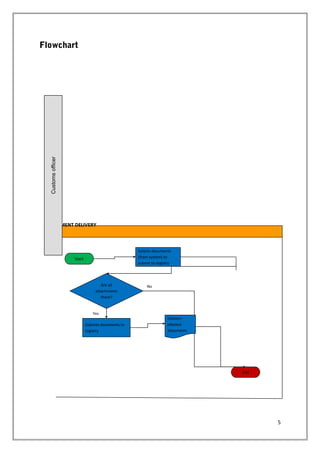
• DOCUMENT DELIVERY
Immediately after release of goods, customs officer should be
able to submit physical documents submitted by the tax payers
to CRMV.
After submitting documents, a task for document receipt should
be created for the registry officer.
4
Flowchart
5
DOCUMENT DELIVERY
Customsofficer
Start
Selects documents
(from system) to
submit to registry
End
Submits documents to
registry
Are all
attachments
there?
Yes
No
Delivers
physical
documents
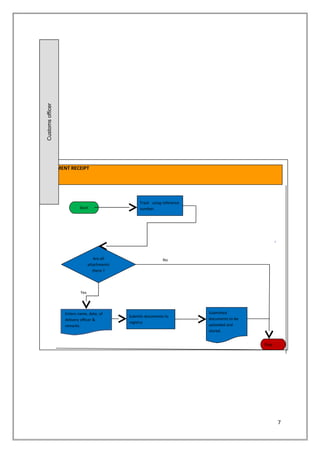
• Document Receipt
The registry officer shall be able to view documents submitted
by the Customs officer to CRMV.
The registry officer shall verify physical documents delivered
form CBC against the records transfer form.
The registry staff/officer shall track to electronically receive
documents.
Registry staff/officer shall ensure that all attachments are in
place and correspond with the barcodes.
Flow chart
6
7
DOCUMENT RECEIPT
Customsofficer
Start
Track using reference
number.
Stop
Submits documents to
registry
Are all
attachments
there ?
Yes
No
Submitted
documents to be
uploaded and
stored.
Enters name, date, of
delivery officer &
remarks
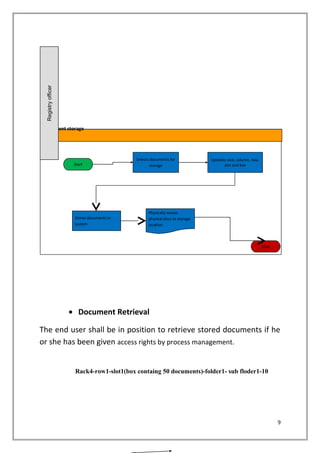
• Documents stored
Registry officer shall scan the barcoded documents and uploadand
submit to be stored.
• Documents to be stored
The registry officer shall be able to create a rack, row, slot, folder
and subfolder and assign a number that identifies the document and
store.
Flow chart
8
• Document Retrieval
The end user shall be in position to retrieve stored documents if he
or she has been given access rights by process management.
Rack4-row1-slot1(box containg 50 documents)-folder1- sub floder1-10
9
Document storage
Registryofficer
Start
Selects documents for
storage
Stop
Stores documents in
system
Physically moves
physical docs to storage
location
Updates rack, column, row,
slot and box
THANKS FOR YOUR TIME
10

GUIDELINES FOR DOCUMENT MANAGEMENT SYSTEM 23

  • 1.
    GUIDELINES FOR DOCUMENTMANAGEMENT SYSTEM (DMS) AT HEADQUARTER SERVICE OFFICE.(HSO) AS AT 9TH MARCH 2015 1
  • 2.
    TABLE OF CONTENTS Definitionof DMS……………………………………………………………………………………………3 Background…………………………………………………………………………………………………….. 3 Explain why DMS……………………………………………………………………………………………3 Key areas for DMS………………………………………………………………………………………….4 Document Delivery Document Receipt………………………………………………………………………………..5 Documents Stored……………………………………………………………………………….6 Documents to be stored……………………………………………………………………….6 Retrieval………………………………………………………………………………………………7 2
  • 3.
    1. Definition ofDMS Document Management System is a computerized system used to track and to store documents. They can either be the Tin application forms,Amendment forms, documents from first tim registration of motor vehicle,change of ownership of motor vehicle, transfer of motor vehicle to mention among others. 2. Background. Being efficient is a never-ending process. URA is always striving to increase efficiency in operations while minimizing process defects and improving overall performance. Domestic Tax Department under took to improve service delivery by migrating its business processes from manual to electronic using E-tax System that resulted into incorporating DMS module to manage its records. Document management system will supportthe management of documents in a secure and reliable manner. In accordance to the electronic transaction Act 2001, digitized form of material can be produced in courts of Law as evidence of business transactions. 3. Why DMS • Guaranteeing document recovery in case of disaster. • minimize costs a) Storage b) floor space c) Recruitment of short term employees • Working in a paper less environment • Minimization of possibility of lost information • Saves time hence increasing output. 3
  • 4.
    • Sharing ofinformation among many users simultaneously • Improvement of service delivery and response time to customers. • Improved security to manage records. 4. Key areas in DMS • DOCUMENT DELIVERY Immediately after release of goods, customs officer should be able to submit physical documents submitted by the tax payers to CRMV. After submitting documents, a task for document receipt should be created for the registry officer. 4
  • 5.
    Flowchart 5 DOCUMENT DELIVERY Customsofficer Start Selects documents (fromsystem) to submit to registry End Submits documents to registry Are all attachments there? Yes No Delivers physical documents
  • 6.
    • Document Receipt Theregistry officer shall be able to view documents submitted by the Customs officer to CRMV. The registry officer shall verify physical documents delivered form CBC against the records transfer form. The registry staff/officer shall track to electronically receive documents. Registry staff/officer shall ensure that all attachments are in place and correspond with the barcodes. Flow chart 6
  • 7.
    7 DOCUMENT RECEIPT Customsofficer Start Track usingreference number. Stop Submits documents to registry Are all attachments there ? Yes No Submitted documents to be uploaded and stored. Enters name, date, of delivery officer & remarks
  • 8.
    • Documents stored Registryofficer shall scan the barcoded documents and uploadand submit to be stored. • Documents to be stored The registry officer shall be able to create a rack, row, slot, folder and subfolder and assign a number that identifies the document and store. Flow chart 8
  • 9.
    • Document Retrieval Theend user shall be in position to retrieve stored documents if he or she has been given access rights by process management. Rack4-row1-slot1(box containg 50 documents)-folder1- sub floder1-10 9 Document storage Registryofficer Start Selects documents for storage Stop Stores documents in system Physically moves physical docs to storage location Updates rack, column, row, slot and box
  • 10.