Graphics and Visual Computing Lesson 1 discuss the lesson about designing logo, poster and system it also includes discussing about color theories and font suitable for designing a system.
1
2
3
4
DEFINITION AND SCOPEOF GRAPHICS
AND VISUAL COMPUTING
IMPORTANCE AND APPLICATIONS OF
GRAPHICS IN VARIOUS INDUSTRIES
OVERVIEW OF VISUAL COMPUTING
TECHNOLOGIES AND TRENDS
CAREERS AND JOB ROLES IN GRAPHICS
AND VISUAL COMPUTING
Graphics and VisualComputing
Graphics and visual computing encompass the
interdisciplinary field that merges art, design,
and technology to create, manipulate, and
present visual content. This expansive field
involves a wide range of techniques, tools, and
methodologies used to generate and
communicate visual information effectively.
Graphics and visual computing play a pivotal
role in diverse industries such as advertising,
marketing, entertainment, web design, user
interface development, gaming, animation, and
virtual reality.
5.
Graphics and VisualComputing
At its core, graphics and visual computing involve the creation, manipulation, and presentation of
visual elements utilizing both traditional and digital mediums. It encompasses the utilization of
images, illustrations, typography, animations, and interactive elements to convey messages, elicit
emotions, and engage users. The application of design principles, including composition, color
theory, balance, and visual hierarchy, guides the development of visually appealing and impactful
visual content.
The scope of graphics and visual computing is expansive, continuously evolving alongside
advancements in technology. Key areas within this field include raster and vector graphics, graphic
design principles, image editing software, vector graphics software, 3D modeling and rendering,
animation software, interactive graphics and web design, and augmented reality (AR) and virtual
reality (VR) integration.
6.
Graphics and VisualComputing
z
Graphic design principles are the basic rules to make visuals look good and
communicate clearly. These include:
Layout – how things are arranged on a page or screen
Typography – choosing and using fonts
Color theory – how colors work together
Visual composition – the overall balance and design
Image editing software, like Adobe Photoshop, lets you change and improve pictures
using tools like:
Cropping – cutting out parts you don’t need
Retouching – fixing flaws or blemishes
Color correction – adjusting brightness or colors
Image composition – combining different images into one
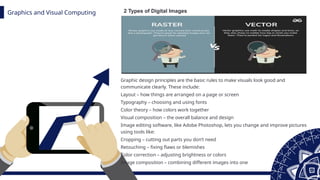
2 Types of Digital Images
7.
Graphics and VisualComputing
z
Interactive graphics and web design involve crafting visually captivating
and interactive websites, user interfaces, and digital experiences. Lastly,
the integration of augmented reality (AR) and virtual reality (VR) within
graphics allows for computer-generated visuals to augment the real
world or create immersive virtual environments, serving purposes
ranging from gaming to training and visualization.
Interactive graphics and web design are about creating websites and
apps that are not only nice to look at, but also fun and easy to use. This
includes:
User interfaces (like buttons, menus, and layouts)
Animations or effects that respond when you click, scroll, or move
Making sure users can interact smoothly with the content
8.
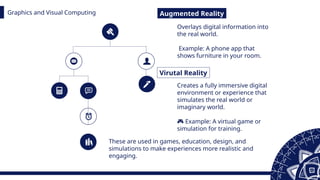
Graphics and VisualComputing Augmented Reality
Virutal Reality
Overlays digital information into
the real world.
Example: A phone app that
shows furniture in your room.
Creates a fully immersive digital
environment or experience that
simulates the real world or
imaginary world.
🎮 Example: A virtual game or
simulation for training.
These are used in games, education, design, and
simulations to make experiences more realistic and
engaging.
9.
Graphics and VisualComputing
Graphics and visual computing play a big role in our everyday
lives. They affect how we:
• Take in information (like reading news online),
• Share ideas (through social media or presentations),
• and enjoy digital content (like videos, games, or websites).
By learning what this field is and what it includes, people can use
visual tools and techniques to create content that is:
• Clear
• Attractive
• and Engaging across different platforms (like websites, apps,
or videos).
Graphics and VisualComputing
Graphics hold immense importance in various industries due to
their ability to visually communicate information and enhance
user experiences. In the advertising and marketing industry,
graphics play a critical role in capturing attention, conveying
brand messages, and differentiating products or services.
Eye-catching graphics in advertisements, promotional materials,
and digital campaigns significantly impact consumer perception
and engagement.
12.
Graphics and VisualComputing
1
2
3
Entertainment and Media Industry
Web design and UI
Architecture and Interior design
In the entertainment and media industry, graphics are the backbone of
visual storytelling. They bring characters, worlds, and narratives to life in film,
television, gaming, and animation. Visual effects, computer-generated imagery
(CGI), and motion graphics enhance the visual appeal and immersion in
movies, TV shows, video games, and interactive experiences.
In web design and user interface (UI) development, graphics are
essential for creating visually pleasing and intuitive digital interfaces. They
contribute to branding consistency, create visually appealing layouts, and
incorporate interactive elements that enhance user engagement and usability.
Graphics enable designers to convey information effectively and create
memorable user experiences.
In the fields of architecture and interior design, graphics are extensively
used for visualization purposes. They assist in creating realistic 3D models,
rendering architectural designs, and visualizing interior spaces. Graphics
allow clients, architects, and designers to explore different design options,
analyze spatial relationships, and present projects in a compelling and
informative manner.
13.
Graphics and VisualComputing
Moreover, graphics find applications in industries such as
education, healthcare, manufacturing, and product design. They
aid in explaining complex concepts visually, creating informative
diagrams, and designing product packaging. Graphics help
simplify information, improve understanding, and
make content more engaging and memorable.
The importance of graphics in various industries lies in their
ability to communicate messages effectively, enhance user
experiences, and create visually appealing content. Whether it is
for advertising, entertainment, web design, architecture, or other
domains, graphics play a crucial role in captivating audiences,
conveying information, and establishing brand identity.
Graphics and VisualComputing
Visual computing technologies have made significant
advancements, shaping the way we create,
manipulate, and interact with visual content.
High_x0002_performance Graphics Processing Units
(GPUs) have played a pivotal role in visual
computing, enabling faster rendering, image
processing, and simulation. These powerful
hardware components deliver the computational
power
required for complex visual
computations,contributing to the creation of realistic
and visually stunning graphics.
Real-time rendering techniques have significantly
advanced, allowing for the creation of highly realistic
and interactive graphics in real-time. This capability
has revolutionized industries such as gaming, film,
and animation, where instantaneous rendering is
essential for engaging user experiences.Real-time
rendering has also enabled new possibilities in fields
such as
architectural visualization, where clients can explore
designs and make real_x0002_time modifications.
Virtual Reality (VR) and Augmented Reality (AR)
technologies have emerged as major trends in visual
computing. VR immerses users in virtual environments,
providing highly interactive and immersive experiences.
AR overlays digital information onto the real world,
enhancing our perception and interaction with the
environment. These technologies have found applications
in gaming, training simulations, architecture, healthcare,
and various other fields
16.
Graphics and VisualComputing
Machine learning and artificial intelligence have made
substantial contributions to visual computing. These
technologies have enhanced image and video processing
capabilities, enabling automated tasks such as object
recognition, image classification, and content generation.
Machine learning algorithms can analyze vast amounts of
visual data and extract meaningful insights, leading to
improved efficiency and accuracy in various applications.
Additionally, advancements in computer vision have
expanded the scope of visual computing. Computer vision
techniques enable machines to understand and interpret
visual data, enabling applications such as facial
recognition, object tracking, and scene understanding.
These technologies have found applications in areas such
as surveillance, autonomous vehicles, and robotics.
17.
Graphics and VisualComputing
As visual computing keeps improving, new trends and
technologies are making graphics look even more realistic
and impressive. These include:
Ray tracing – a technique that creates very realistic lighting,
shadows, and reflections, like how light works in the real
world
Photorealistic rendering – making computer images look
almost like real photos
Real-time global illumination – showing natural lighting
effects instantly, even as scenes change
Advanced displays like:
HDR (High Dynamic Range) – shows brighter highlights and
deeper shadows
WCG (Wide Color Gamut) – displays more vivid and accurate
colors. Adobe RGB monitors used by graphic designers show
more color detail than standard monitors, useful for high-
end photo editing.
18.
Graphics and VisualComputing
The visual computing technologies and trends are
constantly pushing the boundaries of what is possible in
terms of visual content creation, interaction, and realism.
From GPUs and VR/AR to real-time rendering and
machine learning, these advancements continue to shape
various industries and offer exciting possibilities for the
future of visual computing
Add your title
Addyour words here,according to your
need to draw the text box size.
Add your words here,according to your
need to draw the text box size.
Add your words here,according to
your need to draw the text box size.
Add your words here,according to your
need to draw the text box size.
01
02
03
04
21.
Add your title
01
Addyour words here,according to your need
to draw the text box size.Please read the
instructions and more work at the end of the
manual template.
02
Add your words here,according to your need
to draw the text box size.Please read the
instructions and more work at the end of the
manual template.
03
Add your words here,according to your need
to draw the text box size.Please read the
instructions and more work at the end of the
manual template.
22.
Add your title
TITLE
Addyour words
here,according to
your need to draw
the text box size.
TITLE
Add your words
here,according to
your need to draw
the text box size.
TITLE
Add your words
here,according to
your need to draw
the text box size.
23.
Add your title
Addyour title
Add your words here,according to your need to draw
the text box size.
Add your words here,according to your need to draw
the text box size.
Add your words here,according to your need to draw
the text box size.









![Lecture 1 cad [compatibility mode]](https://cdn.slidesharecdn.com/ss_thumbnails/lecture1cadcompatibilitymode-120115121710-phpapp02-thumbnail.jpg?width=640&height=640&fit=bounds)


![Getting Started with Apache Spark: Big Data Made Simple [Free Meetup]](https://cdn.slidesharecdn.com/ss_thumbnails/apachesparkgettingstarted-260203175547-8361bcc3-thumbnail.jpg?width=640&height=640&fit=bounds)


