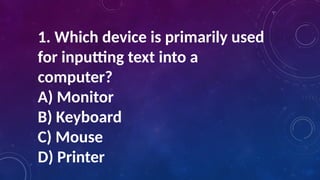
1. Which deviceis primarily used
for inputting text into a
computer?
A) Monitor
B) Keyboard
C) Mouse
D) Printer
3.
2. Which softwareapplication is
best suited for creating and
editing text documents?
A) Microsoft Excel
B) Adobe Photoshop
C) Microsoft Word
D) AutoCAD
4.
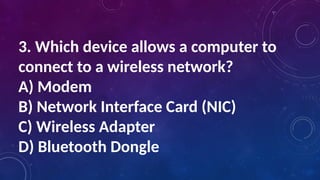
3. Which deviceallows a computer to
connect to a wireless network?
A) Modem
B) Network Interface Card (NIC)
C) Wireless Adapter
D) Bluetooth Dongle
5.
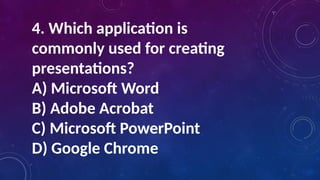
4. Which applicationis
commonly used for creating
presentations?
A) Microsoft Word
B) Adobe Acrobat
C) Microsoft PowerPoint
D) Google Chrome
6.
5. For videoediting, which of the
following software would be most
appropriate?
A) Adobe Premiere Pro
B) Microsoft Excel
C) Mozilla Firefox
D) Microsoft Publisher
1. Why isit important
to be a responsible
digital citizen?
2. How can digital
citizenship affect our
online and offline lives?
10.
A. Social MediaInteractions
Scenario: A student shares a post on social media that
could be interpreted as offensive or controversial.
This leads to a heated discussion in the comments section
• Questions: What do you think makes someone a good
digital citizen in the context of social media
interactions? Can you share an experience where
practicing good digital citizenship on social media
was important?
11.
B. Online Gaming
Scenario:During an online gaming session, a player
encounters another player who is using abusive
language and harassing others.
• Questions: What do you think makes someone a
good digital citizen in the context of online gaming?
Can you share an experience where digital citizenship
was important while playing online games?
12.
C. Email Communication
Scenario:A student receives an email from an unknown
sender with a suspicious link. The student needs
to decide whether to open the link or report the email.
Questions: What do you think makes someone a good
digital citizen when it comes to email communication?
Can you share an experience where being a responsible
digital citizen in email communication was crucial?
13.
D. Online LearningPlatforms
Scenario: In an online class discussion forum, a student
posts a comment that is respectful and
constructive, even though they disagree with the original
post.
• Questions: What do you think makes someone a good
digital citizen in the context of online learning
platforms? Can you share an experience where digital
citizenship was important in an online
learning environment?
14.
E. Content Creationand Sharing
Scenario: A student creates a video and shares it
online, ensuring that all content used is original or
properly credited to avoid plagiarism.
• Questions: What do you think makes someone a
good digital citizen when creating and sharing
content online? Can you share an experience where
practicing good digital citizenship in content
creation was important?
15.
Digital citizenship refersto the responsible use of
technology by anyone who uses computers, the
Internet, and digital devices to engage with society
on any level. It encompasses a wide range of
behaviors
and skills that are necessary for effective and
ethical participation in digital environments
16.
According to Ribble(2017), there are nine elements
of Digital Citizenship. These elements include:
1. Digital Access
2. Digital Commerce
3. Digital Communication
4. Digital Literacy
5. Digital Etiquette
6. Digital Law
7. Digital Rights and Responsibilities
8. Digital Health and Wellness
17.
Scenario: Cyberbullying Incident
ScenarioDescription
• A student, Alex, posts a picture of their new project on a
school-related social media group. Another
student, Sam, starts posting negative comments about Alex's
project, calling it "stupid" and "a
waste of time." Other students join in, and the comments
escalate to personal attacks on Alex’s
appearance and abilities. Alex feels hurt and embarrassed
and doesn't know how to respond
18.
Identify Ignored DigitalCitizenship Elements
1. Digital Etiquette - Sam and the other students ignored
the norms of respectful and kind
communication online.
2. Digital Rights and Responsibilities - The bullies ignored
Alex's right to a safe and respectful online
environment.
3. Digital Security - The situation could escalate to a point
where Alex's personal information might
be at risk if the bullying continues.
19.
Analyze the Situation
1.How did Alex feel? Discuss the emotional
impact of cyberbullying on Alex.
2. Why did Sam and the other students behave
this way? Explore the reasons behind
cyberbullying
behavior.
3. What role did the bystanders play? Discuss
the impact of bystanders either joining in or
staying
silent.
20.
How Could theSituation Have Been Handled Better?
1. Digital Etiquette - Sam and the other students
should have respected Alex's post and provided
constructive feedback if necessary.
2. Digital Rights and Responsibilities- Students
should recognize their responsibility to create a
positive online environment and report
inappropriate behavior.
3. Intervention- The teacher should intervene early
to stop the bullying and provide support to Alex
21.
1. Digital Etiquette- Emphasize the importance of
treating others with respect online, just as one
would in person. Discuss the long-term impact of
negative online behavior.
2. Digital Security - Highlight the need to protect
personal information and the potential risks of
sharing too much online. Discuss how bullying can
sometimes lead to more serious security issues.
22.
What is aDigital Footprint?
A digital footprint is the trail of data that
individuals leave behind when they use the
internet.
This includes all the information that is shared,
both intentionally and unintentionally, through
various
online activities such as social media
interactions, website visits, emails, and online
shopping.
23.
1. Active DigitalFootprints - These are the data
trails you leave intentionally, such as posts on
social media, blog entries, or any other content
you actively upload or share online.
2. Passive Digital Footprints - These are the data
trails you leave unintentionally, such as cookies
that track your browsing habits, IP addresses, and
other metadata collected by websites and online
services.
24.
Importance of DigitalFootprints
• Privacy and Security - The data you leave behind can be used to build a
profile about you, which
can be exploited for malicious purposes such as identity theft or targeted
cyber-attacks (Solove,
2007).
• Reputation Management - Your digital footprint can affect your reputation.
Employers, colleges,
and other entities often search for online information about candidates, and
inappropriate content
can have negative consequences (Berkelaar, 2014).
• Personalization - Companies use digital footprints to personalize user
experiences, such as
recommending products or content based on browsing history (Turow, 2011).
Privacy Settings -Regularly review and adjust the privacy settings on your social media
accounts
and other online services to control who can see your information.
• Search Yourself - Periodically search for your own name on search engines to see
what
information is publicly accessible.
• Think Before You Post - Consider the long-term impact of the content you share
online. Once
something is posted, it can be difficult to remove it completely.
• Use Secure Connections - Ensure that you are using secure (HTTPS) connections
when browsing
the internet to protect your data from being intercepted.
27.
Digital Identity
Digital identityrefers to the online persona that
is created through your digital footprints. It
encompasses all the information available about you
online, including social media profiles, online
transactions, and any other digital interactions. Your
digital identity can influence how others perceive
you and can have real-world implications.
28.
Components of DigitalIdentity
• Personal Information - This includes your name, date of
birth, address, and other identifying details.
• Professional Information - This includes your employment
history, professional skills, and educational background, often
found on platforms like LinkedIn.
• Social Information - This includes your social media activity,
such as posts, likes, comments, and the networks you are part
of.
• Behavioral Information - This includes your browsing habits,
purchase history, and other online behaviors that can be
tracked and analyzed.
29.
Risks Associated withDigital Identity
• Identity Theft - Cybercriminals can use your personal
information to steal your identity and commit fraud (Newman
& McNally, 2005).
• Reputation Damage - Negative information or inappropriate
content associated with your digital
identity can harm your personal and professional reputation.
• Data Exploitation - Companies can exploit your digital
identity for targeted advertising and other
commercial purposes without your explicit consent (Acquisti &
Gross, 2006).
30.
Protecting Your DigitalIdentity
• Strong Passwords - Use strong, unique
passwords for different online accounts
and change them regularly.
• Two-Factor Authentication - Enable
two-factor authentication (2FA) for an
added layer of
security.
31.
• Be Skepticalof Phishing - Be cautious
of emails, messages, or websites that
ask for personal
information.
• Regular Monitoring - Keep an eye on
your online accounts for any suspicious
activity.