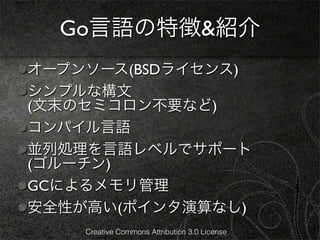
Go言語の特徴&紹介
公式サイト http://golang.org
翻訳サイト http://golang.jp/
GoPlayground http://play.golang.org/
A Tour of Go http://go-tour-jp.appspot.com
golang-nuts
http://groups.google.com/group/golang-nuts
golang-jp
https://groups.google.com/forum/#!forum/
golang-jp Creative Commons Attribution 3.0 License
11.
Go言語の特徴&紹介
公式サイト http://golang.org
Go version 1
翻訳サイト http://golang.jp/ 未対応箇所あるので注意
Go Playground http://play.golang.org/
A Tour of Go http://go-tour-jp.appspot.com
golang-nuts
http://groups.google.com/group/golang-nuts
golang-jp
https://groups.google.com/forum/#!forum/
golang-jp Creative Commons Attribution 3.0 License
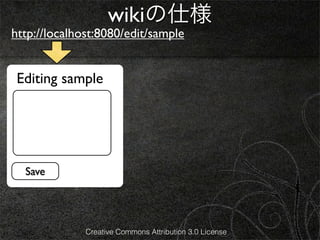
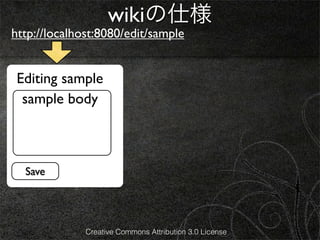
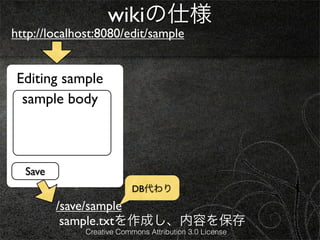
wikiの仕様
http://localhost:8080/edit/sample
/view/sample
Editing sample sample
sample body [edit]
sample body
Save
DB代わり
リダイレクト
/save/sample
sample.txtを作成し、内容を保存
Creative Commons Attribution 3.0 License
39.
wikiの仕様
http://localhost:8080/edit/sample
/view/sample
Editing sample sample
sample body [edit]
sample body
Save
DB代わり
リダイレクト
/save/sample
sample.txtを作成し、内容を保存
Creative Commons Attribution 3.0 License
40.
wikiの仕様
http://localhost:8080/edit/sample
/view/sample
Title Title
Editing sample sample
sample body [edit]
sample body
Body Body
Save
DB代わり
リダイレクト
/save/sample
sample.txtを作成し、内容を保存
Creative Commons Attribution 3.0 License
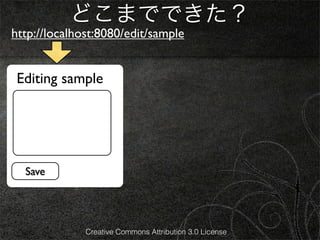
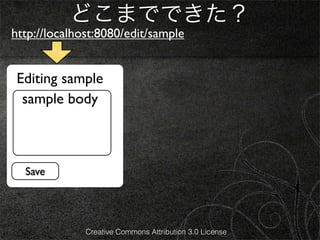
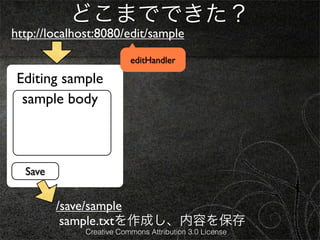
どこまでできた?
http://localhost:8080/edit/sample
/view/sample
editHandler
Editing sample sample
sample body [edit]
sample body
Save
/save/sample
sample.txtを作成し、内容を保存
Creative Commons Attribution 3.0 License
83.
どこまでできた?
http://localhost:8080/edit/sample
/view/sample
editHandler
Editing sample sample
sample body [edit]
sample body
Save
/save/sample
sample.txtを作成し、内容を保存
Creative Commons Attribution 3.0 License
84.
どこまでできた?
http://localhost:8080/edit/sample
/view/sample
editHandler
Title Title
Editing sample edit.html sample viewHandler
view.html
sample body [edit]
sample body
Body Body
Save
/save/sample
sample.txtを作成し、内容を保存
Creative Commons Attribution 3.0 License
85.
どこまでできた?
http://localhost:8080/edit/sample
/view/sample
editHandler
Title Title
Editing sample edit.html sample viewHandler
view.html
sample body [edit]
sample body
Body Body
Save
/save/sample
sample.txtを作成し、内容を保存
Creative Commons Attribution 3.0 License
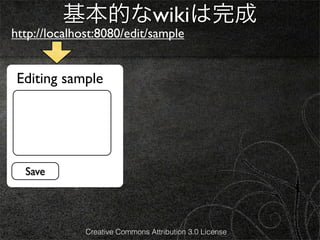
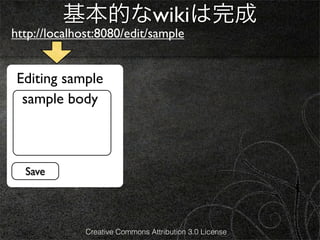
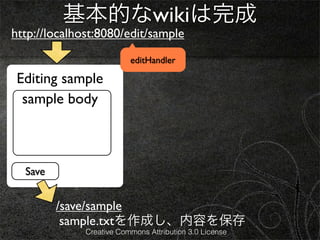
基本的なwikiは完成
http://localhost:8080/edit/sample
/view/sample
editHandler
Editing sample sample
sample body [edit]
sample body
Save
/save/sample
sample.txtを作成し、内容を保存
Creative Commons Attribution 3.0 License
95.
基本的なwikiは完成
http://localhost:8080/edit/sample
/view/sample
editHandler
Editing sample sample
sample body [edit]
sample body
Save
/save/sample
sample.txtを作成し、内容を保存
Creative Commons Attribution 3.0 License
96.
基本的なwikiは完成
http://localhost:8080/edit/sample
/view/sample
editHandler
Title Title
Editing sample edit.html sample viewHandler
view.html
sample body [edit]
sample body
Body Body
Save
/save/sample
sample.txtを作成し、内容を保存
Creative Commons Attribution 3.0 License
97.
基本的なwikiは完成
http://localhost:8080/edit/sample
/view/sample
editHandler
Title Title
Editing sample edit.html sample viewHandler
view.html
sample body [edit]
sample body
Body saveHandler
Body
Save
/save/sample
sample.txtを作成し、内容を保存
Creative Commons Attribution 3.0 License









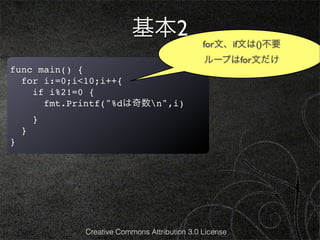
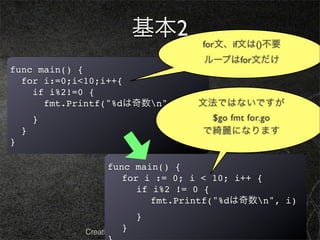
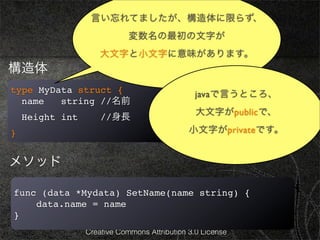
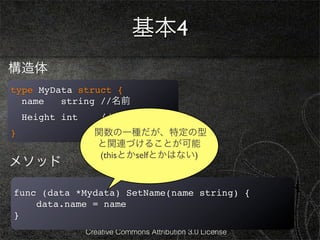
![基本3
b := []string{“g”,”o”,”l”,”a”,”n”,”g”}
配列に似ていますが、これをスライスといいます。
b[2:] == []string{”l”,”a”,”n”,”g”}
上記の左辺ように書くと、右辺と同じ意味になります。
(スライスについては、前回の資料を参照ください。)
Creative Commons Attribution 3.0 License](https://image.slidesharecdn.com/goweb120209-130210002630-phpapp01/85/Go-web-26-320.jpg)
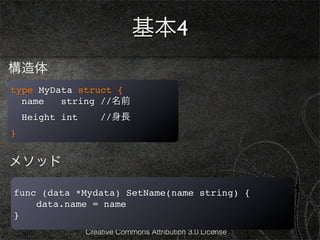
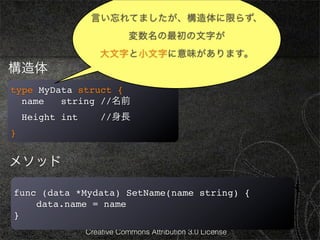
![wikiの仕様
http://localhost:8080/edit/sample
/view/sample
Editing sample sample
sample body [edit]
sample body
Save
DB代わり
リダイレクト
/save/sample
sample.txtを作成し、内容を保存
Creative Commons Attribution 3.0 License](https://image.slidesharecdn.com/goweb120209-130210002630-phpapp01/85/Go-web-38-320.jpg)
![wikiの仕様
http://localhost:8080/edit/sample
/view/sample
Editing sample sample
sample body [edit]
sample body
Save
DB代わり
リダイレクト
/save/sample
sample.txtを作成し、内容を保存
Creative Commons Attribution 3.0 License](https://image.slidesharecdn.com/goweb120209-130210002630-phpapp01/85/Go-web-39-320.jpg)
![wikiの仕様
http://localhost:8080/edit/sample
/view/sample
Title Title
Editing sample sample
sample body [edit]
sample body
Body Body
Save
DB代わり
リダイレクト
/save/sample
sample.txtを作成し、内容を保存
Creative Commons Attribution 3.0 License](https://image.slidesharecdn.com/goweb120209-130210002630-phpapp01/85/Go-web-40-320.jpg)
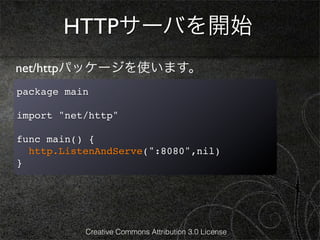
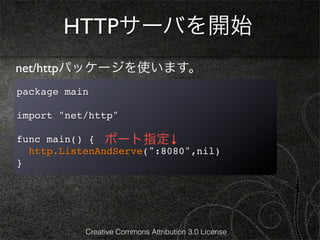
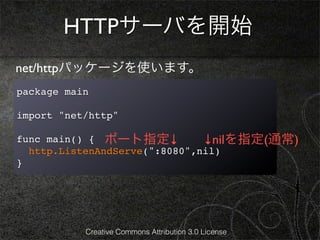
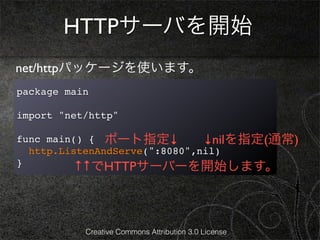
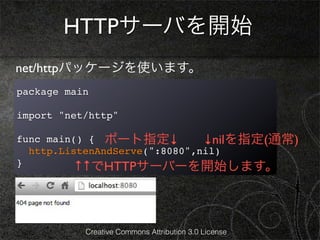
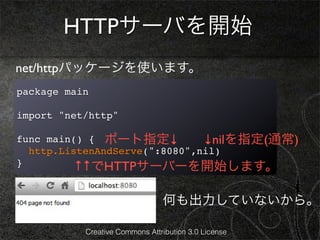
![ハンドラの登録
webページに出力させるには、
ハンドラを登録する必要があります。
package main
import "net/http"
func viewHandler(w http.ResponseWriter, r *http.Request){
fmt.Fprintf(w, “Hello, %q”, r.URL.Path[1:])
}
func main() {
http.HandleFunc(“/”, viewHandler)
http.ListenAndServe(":8080",nil)
}
Creative Commons Attribution 3.0 License](https://image.slidesharecdn.com/goweb120209-130210002630-phpapp01/85/Go-web-47-320.jpg)
![ハンドラの登録
webページに出力させるには、
ハンドラを登録する必要があります。
package main
import "net/http"
func viewHandler(w http.ResponseWriter, r *http.Request){
fmt.Fprintf(w, “Hello, %q”, r.URL.Path[1:])
}
func main() { ↓”/”にviewHandlerを登録
http.HandleFunc(“/”, viewHandler)
http.ListenAndServe(":8080",nil)
}
Creative Commons Attribution 3.0 License](https://image.slidesharecdn.com/goweb120209-130210002630-phpapp01/85/Go-web-48-320.jpg)
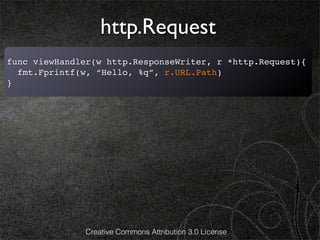
![http.Request
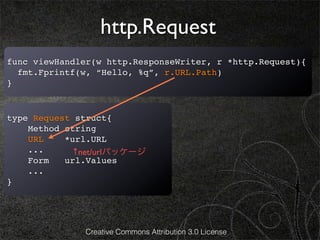
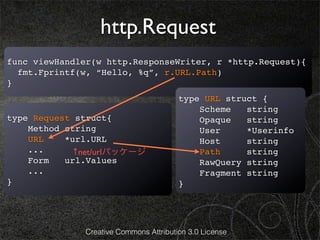
func viewHandler(w http.ResponseWriter, r *http.Request){
fmt.Fprintf(w, “Hello, %q”, r.URL.Path)
}
type URL struct {
Scheme string
type Request struct{ Opaque string
Method string User *Userinfo
URL *url.URL Host string
... ↑net/urlパッケージ Path string
Form url.Values RawQuery string
... Fragment string
} }
URLは次のような形を表現しています。
scheme://[userinfo@]host/path[?query][#fragment]
Creative Commons Attribution 3.0 License](https://image.slidesharecdn.com/goweb120209-130210002630-phpapp01/85/Go-web-52-320.jpg)
![ハンドラの登録
先ほどのviewHandlerを登録すると、次のようになります。
再掲
func viewHandler(w http.ResponseWriter, r *http.Request){
fmt.Fprintf(w, “Hello, %q”, r.URL.Path[1:])
}
func main() {
http.HandleFunc(“/” viewHandler)
http.ListenAndServe(":8080",nil)
} Creative Commons Attribution 3.0 License](https://image.slidesharecdn.com/goweb120209-130210002630-phpapp01/85/Go-web-53-320.jpg)
![データ構造の定義
さて、このwikiはeditページとviewページに
TitleとBodyを持っていますので、
構造体として保持しておくことにしましょう。
type Page struct {
Title string
Body []byte
}
Creative Commons Attribution 3.0 License](https://image.slidesharecdn.com/goweb120209-130210002630-phpapp01/85/Go-web-54-320.jpg)
![テキストファイルへ保存
このPage構造体に対して、保存できるように
saveメソッド作成しましょう。
func (p *Page) save() error { パーミッション
filename := p.Title + “.txt” を8進数で指定↓
return ioutil.WriteFile(filename, p.Body, 0600)
} ↑string ↑[]byte
※io/ioutilパッケージのインポートが必要です。
Creative Commons Attribution 3.0 License](https://image.slidesharecdn.com/goweb120209-130210002630-phpapp01/85/Go-web-55-320.jpg)
![テキストファイルから読み込み
次に保存したファイルを読み込めるような関数を作りましょう。
func loadPage(title string) (*Page, error) {
filename := title + “.txt”
body, err := ioutil.ReadFile(filename)
if err != nil { ↑ []byte、errorを返す
return nil, err
}
return &Page{Title:title, Body:body}, nil
}
※io/ioutilパッケージのインポートが必要です。
Creative Commons Attribution 3.0 License](https://image.slidesharecdn.com/goweb120209-130210002630-phpapp01/85/Go-web-56-320.jpg)
![HTMLを生成
http://localhost:8080/view/sample sample Title
にアクセスがあった時に、
[edit]
sample.txtを読み込み、
sample body Body
右図のように表示したい。
Creative Commons Attribution 3.0 License](https://image.slidesharecdn.com/goweb120209-130210002630-phpapp01/85/Go-web-57-320.jpg)
![HTMLを生成
http://localhost:8080/view/sample sample Title
にアクセスがあった時に、
[edit]
sample.txtを読み込み、
sample body Body
右図のように表示したい。
func viewHandler(w http.ResponseWriter, r *http.Request) {
! title := r.URL.Path[6:]
! p, _ := loadPage(title)
! fmt.Fprintf(w, "<h1>%s</h1><p>[<a href="/edit/%s
">edit</a>]</p><div>%s</div>",
p.Title, p.Title, p.Body)
}
Creative Commons Attribution 3.0 License](https://image.slidesharecdn.com/goweb120209-130210002630-phpapp01/85/Go-web-58-320.jpg)
![HTMLを生成
http://localhost:8080/view/sample sample Title
にアクセスがあった時に、
[edit]
sample.txtを読み込み、
sample body Body
右図のように表示したい。
func viewHandler(w http.ResponseWriter, r *http.Request) {
! title := r.URL.Path[6:]
! p, _ := loadPage(title)
! fmt.Fprintf(w, "<h1>%s</h1><p>[<a href="/edit/%s
">edit</a>]</p><div>%s</div>",
p.Title, p.Title, p.Body)
}
Creative Commons Attribution 3.0 License](https://image.slidesharecdn.com/goweb120209-130210002630-phpapp01/85/Go-web-59-320.jpg)
![HTMLを生成
http://localhost:8080/view/sample sample Title
にアクセスがあった時に、
[edit]
sample.txtを読み込み、
sample body Body
右図のように表示したい。
このようなHTMLの
ハードコーディングはダサいですよね。
func viewHandler(w http.ResponseWriter, r *http.Request) {
いい方法がありますよ。奥さん
! title := r.URL.Path[6:]
! p, _ := loadPage(title)
! fmt.Fprintf(w, "<h1>%s</h1><p>[<a href="/edit/%s
">edit</a>]</p><div>%s</div>",
p.Title, p.Title, p.Body)
}
Creative Commons Attribution 3.0 License](https://image.slidesharecdn.com/goweb120209-130210002630-phpapp01/85/Go-web-60-320.jpg)


![HTMLを生成
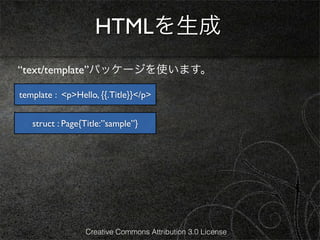
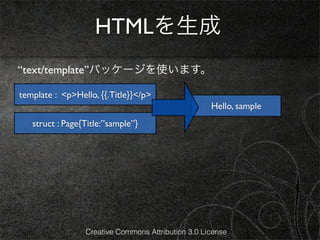
“text/template”パッケージを使います。
template : <p>Hello, {{.Title}}</p>
Hello, sample
struct : Page{Title:”sample”}
func viewHandler(w *http.ResponseWriter, r *http.Request){
! title := r.URL.Path[6:]
! p, _ := loadPage(title)
t, _ := tempalte.ParseFiles(“view.html”)
t.Execute(w, p)
}
Creative Commons Attribution 3.0 License](https://image.slidesharecdn.com/goweb120209-130210002630-phpapp01/85/Go-web-65-320.jpg)
![HTMLを生成
“text/template”パッケージを使います。
template : <p>Hello, {{.Title}}</p>
Hello, sample
struct : Page{Title:”sample”}
func viewHandler(w *http.ResponseWriter, r *http.Request){
! title := r.URL.Path[6:]
! p, _ := loadPage(title)
t, _ := tempalte.ParseFiles(“view.html”)
t.Execute(w, p)
}
Creative Commons Attribution 3.0 License](https://image.slidesharecdn.com/goweb120209-130210002630-phpapp01/85/Go-web-66-320.jpg)
![HTMLを生成
“text/template”パッケージを使います。
template : <p>Hello, {{.Title}}</p>
Hello, sample
struct : Page{Title:”sample”}
Template構造体を作成しパースします
func viewHandler(w *http.ResponseWriter, r *http.Request){
*Templateとerror を返します
! title := r.URL.Path[6:]
! p, _ := loadPage(title)
t, _ := tempalte.ParseFiles(“view.html”)
t.Execute(w, p)
}
Creative Commons Attribution 3.0 License](https://image.slidesharecdn.com/goweb120209-130210002630-phpapp01/85/Go-web-67-320.jpg)
![HTMLを生成
“text/template”パッケージを使います。
template : <p>Hello, {{.Title}}</p>
Hello, sample
struct : Page{Title:”sample”}
パースされたテンプレート tを
Template構造体を作成しパースします
pに適用して、
func viewHandler(w *http.ResponseWriter, r *http.Request){
*Templateとerror を返します
! title := r.URL.Path[6:]
wに出力します
! p, _ := loadPage(title)
t, _ := tempalte.ParseFiles(“view.html”)
t.Execute(w, p)
}
Creative Commons Attribution 3.0 License](https://image.slidesharecdn.com/goweb120209-130210002630-phpapp01/85/Go-web-68-320.jpg)
![HTMLを生成
“text/template”パッケージを使います。
template : <p>Hello, {{.Title}}</p>
Hello, sample
struct : Page{Title:”sample”}
パースされたテンプレート tを
Template構造体を作成しパースします
pに適用して、
func viewHandler(w *http.ResponseWriter, r *http.Request){
*Templateとerror を返します
! title := r.URL.Path[6:]
wに出力します
! p, _ := loadPage(title)
t, _ := tempalte.ParseFiles(“view.html”)
t.Execute(w, p)
} 先ほどハードコーディングされた
HTMLを別ファイルに書く(あとで)
Creative Commons Attribution 3.0 License](https://image.slidesharecdn.com/goweb120209-130210002630-phpapp01/85/Go-web-69-320.jpg)
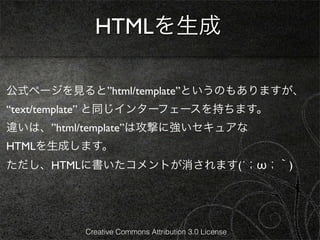

![HTMLを生成
view.htmlを次のようにします。
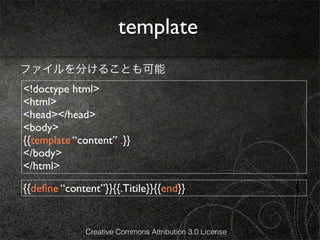
<h1>{{.Title}}</h1>
<p>[<a href="/edit/{{.Title}}">edit</a>]</p>
<div>{{printf "%s" .Body}}</div>
Creative Commons Attribution 3.0 License](https://image.slidesharecdn.com/goweb120209-130210002630-phpapp01/85/Go-web-72-320.jpg)
![HTMLを生成
view.htmlを次のようにします。
<h1>{{.Title}}</h1>
<p>[<a href="/edit/{{.Title}}">edit</a>]</p>
<div>{{printf "%s" .Body}}</div>
これは、 .Bodyが[]byteであるため、stringにして表示しています。
http://golang.org/pkg/text/template/#hdr-Functions
Creative Commons Attribution 3.0 License](https://image.slidesharecdn.com/goweb120209-130210002630-phpapp01/85/Go-web-73-320.jpg)
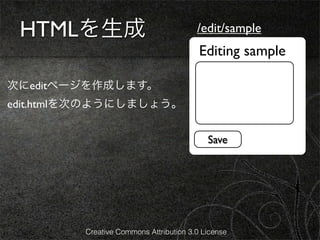
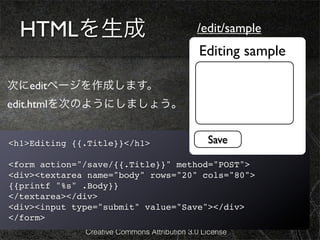

![HTMLを生成
editHandlerを次のようにします。
http.HandleFunc(“/edit/”, editHandler) ←ハンドラ登録も忘れずに
func editHandler(w *http.ResponseWriter,r *http.Request){
title := r.URL.Path[6:]
p, err := loadPage(title)
if err != nil {
p = &Page{Title: title} //空のPage構造体を作成
}
t, _ := template.ParseFiles(“edit.html”)
t.Execute(w, p)
}
Creative Commons Attribution 3.0 License](https://image.slidesharecdn.com/goweb120209-130210002630-phpapp01/85/Go-web-77-320.jpg)
![どこまでできた?
http://localhost:8080/edit/sample
/view/sample
editHandler
Editing sample sample
sample body [edit]
sample body
Save
/save/sample
sample.txtを作成し、内容を保存
Creative Commons Attribution 3.0 License](https://image.slidesharecdn.com/goweb120209-130210002630-phpapp01/85/Go-web-82-320.jpg)
![どこまでできた?
http://localhost:8080/edit/sample
/view/sample
editHandler
Editing sample sample
sample body [edit]
sample body
Save
/save/sample
sample.txtを作成し、内容を保存
Creative Commons Attribution 3.0 License](https://image.slidesharecdn.com/goweb120209-130210002630-phpapp01/85/Go-web-83-320.jpg)
![どこまでできた?
http://localhost:8080/edit/sample
/view/sample
editHandler
Title Title
Editing sample edit.html sample viewHandler
view.html
sample body [edit]
sample body
Body Body
Save
/save/sample
sample.txtを作成し、内容を保存
Creative Commons Attribution 3.0 License](https://image.slidesharecdn.com/goweb120209-130210002630-phpapp01/85/Go-web-84-320.jpg)
![どこまでできた?
http://localhost:8080/edit/sample
/view/sample
editHandler
Title Title
Editing sample edit.html sample viewHandler
view.html
sample body [edit]
sample body
Body Body
Save
/save/sample
sample.txtを作成し、内容を保存
Creative Commons Attribution 3.0 License](https://image.slidesharecdn.com/goweb120209-130210002630-phpapp01/85/Go-web-85-320.jpg)
![saveHandlerを作成
edit.htmlを次のようにします。
http.HandleFunc(“/save/”, saveHandler)
func saveHandler(w http.ResponseWriter, r *http.Request) {
title := r.URL.Path[6:]
body := r.FormValue("body")
p := &Page{Title:title, Body:[]byte(body)}
p.save()
http.Redirect(w, r, "/view/" + title, http.StatusFound)
}
Creative Commons Attribution 3.0 License](https://image.slidesharecdn.com/goweb120209-130210002630-phpapp01/85/Go-web-86-320.jpg)
![saveHandlerを作成
テキストエリアに
edit.htmlを次のようにします。
入力した内容(string型)を取得できる
http.HandleFunc(“/save/”, saveHandler)
func saveHandler(w http.ResponseWriter, r *http.Request) {
title := r.URL.Path[6:]
body := r.FormValue("body")
p := &Page{Title:title, Body:[]byte(body)}
p.save()
http.Redirect(w, r, "/view/" + title, http.StatusFound)
}
Creative Commons Attribution 3.0 License](https://image.slidesharecdn.com/goweb120209-130210002630-phpapp01/85/Go-web-87-320.jpg)
![saveHandlerを作成
テキストエリアに
edit.htmlを次のようにします。
入力した内容(string型)を取得できる
http.HandleFunc(“/save/”, saveHandler)
func saveHandler(w http.ResponseWriter, r *http.Request) {
title := r.URL.Path[6:]
body := r.FormValue("body")
p := &Page{Title:title, Body:[]byte(body)}
p.save()
http.Redirect(w, r, "/view/" + title, http.StatusFound)
}
ステータスコードを付与してリダイレクトする
ここでは“/view/” + title にリダイレクト
Creative Commons Attribution 3.0 License](https://image.slidesharecdn.com/goweb120209-130210002630-phpapp01/85/Go-web-88-320.jpg)
![saveHandlerを作成
テキストエリアに
edit.htmlを次のようにします。
入力した内容(string型)を取得できる
http.StatusMovedPermanently = 301
http.HandleFunc(“/save/”, saveHandler)
http.StatusFound = 302
http.StatusSeeOther = 303
func saveHandler(w http.ResponseWriter, r *http.Request) {
title := r.URL.Path[6:] http.StatusTemporaryRedirect = 307
body := r.FormValue("body")
p := &Page{Title:title, Body:[]byte(body)}
p.save()
http.Redirect(w, r, "/view/" + title, http.StatusFound)
}
ステータスコードを付与してリダイレクトする
ここでは“/view/” + title にリダイレクト
Creative Commons Attribution 3.0 License](https://image.slidesharecdn.com/goweb120209-130210002630-phpapp01/85/Go-web-89-320.jpg)

![基本的なwikiは完成
http://localhost:8080/edit/sample
/view/sample
editHandler
Editing sample sample
sample body [edit]
sample body
Save
/save/sample
sample.txtを作成し、内容を保存
Creative Commons Attribution 3.0 License](https://image.slidesharecdn.com/goweb120209-130210002630-phpapp01/85/Go-web-94-320.jpg)
![基本的なwikiは完成
http://localhost:8080/edit/sample
/view/sample
editHandler
Editing sample sample
sample body [edit]
sample body
Save
/save/sample
sample.txtを作成し、内容を保存
Creative Commons Attribution 3.0 License](https://image.slidesharecdn.com/goweb120209-130210002630-phpapp01/85/Go-web-95-320.jpg)
![基本的なwikiは完成
http://localhost:8080/edit/sample
/view/sample
editHandler
Title Title
Editing sample edit.html sample viewHandler
view.html
sample body [edit]
sample body
Body Body
Save
/save/sample
sample.txtを作成し、内容を保存
Creative Commons Attribution 3.0 License](https://image.slidesharecdn.com/goweb120209-130210002630-phpapp01/85/Go-web-96-320.jpg)
![基本的なwikiは完成
http://localhost:8080/edit/sample
/view/sample
editHandler
Title Title
Editing sample edit.html sample viewHandler
view.html
sample body [edit]
sample body
Body saveHandler
Body
Save
/save/sample
sample.txtを作成し、内容を保存
Creative Commons Attribution 3.0 License](https://image.slidesharecdn.com/goweb120209-130210002630-phpapp01/85/Go-web-97-320.jpg)

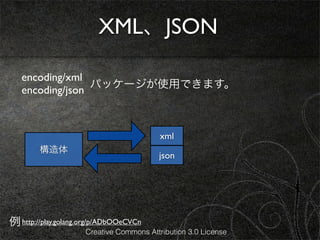
![XML、JSON
encoding/xml
パッケージが使用できます。
encoding/json
Marshal(v interface{}) (data []byte, error)
xml
構造体
json
Unmarshal(data []byte, v interface{}) error
例 http://play.golang.org/p/ADbOOeCVCn
Creative Commons Attribution 3.0 License](https://image.slidesharecdn.com/goweb120209-130210002630-phpapp01/85/Go-web-103-320.jpg)
![XML、JSON
encoding/xml
パッケージが使用できます。
encoding/json
Marshal(v interface{}) (data []byte, error)
xml
構造体 同じI/F
json
Unmarshal(data []byte, v interface{}) error
例 http://play.golang.org/p/ADbOOeCVCn
Creative Commons Attribution 3.0 License](https://image.slidesharecdn.com/goweb120209-130210002630-phpapp01/85/Go-web-104-320.jpg)
![XML、JSON
encoding/xml
パッケージが使用できます。
encoding/json
Marshal(v interface{}) (data []byte, error)
xml
構造体 同じI/F
json
Unmarshal(data []byte, v interface{}) error
ポインタじゃないと
例 http://play.golang.org/p/ADbOOeCVCn 怒られます
Creative Commons Attribution 3.0 License](https://image.slidesharecdn.com/goweb120209-130210002630-phpapp01/85/Go-web-105-320.jpg)




![[Golang] Go言語でサービス作ってる話](https://cdn.slidesharecdn.com/ss_thumbnails/go-140812084019-phpapp02-thumbnail.jpg?width=640&height=640&fit=bounds)


