Google Search  Using Advance  Search  Operators A Presentation  by Satish Reddy
People who made internet very easy Larry Page Sergey   Brin
 
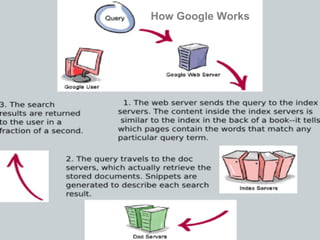
How Google Works
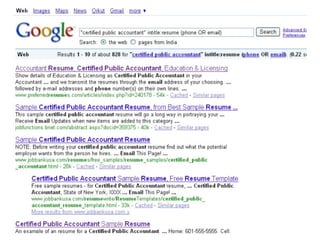
There are N number of resumes on the internet,  but there are some keywords that are very common among them.  Consider this list and you will see what I mean. Objective Summary Education Additional Skills References Phone  Email Let's do a few searches to see this in action.
 
Google Advance Search Operators: intitle inurl define phonebook (~) tilde (-) exclude (OR) “|” (Vertical Bar) Filetype  .. (Range Operator)
intitle:   The query intitle: term  restricts results to documents containing  term  in the  title . For instance, [  java developer intitle:resume  ] will return documents  that mention the word “resume” in their titles, and mention the words “java” and  “ developer” anywhere in the document (title or not). Note:  There must be no space between the intitle: and the following word.
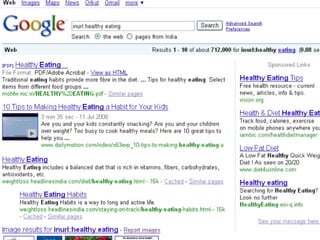
inurl:   If you include inurl: in your query, Google will restrict the results to documents  containing that word in the URL. For instance,  [ inurl:healthy eating ] will return documents that mention the words “healthy” in their URL, and mention the word “eating” anywhere in the document. Note: There must be no space between the inurl: and the following word. Example: inurl:healthy eating www.indianchild.com/Recipes/healthy-eating-tips.htm
 
Phonebook:   If you start your query with phonebook: Google shows all public U.S. residence telephone listings (name, address, phone number) for the person you specify.  For example, [ phonebook: John Doe New York NY ] will show phonebook listings of everyone named John Doe in New York, NY.
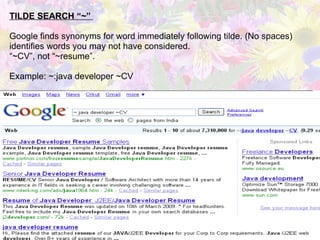
TILDE SEARCH “~”  Google finds synonyms for word immediately following tilde. (No spaces) identifies words you may not have considered. “ ~CV”, not “~resume”. Example: ~:java developer ~CV
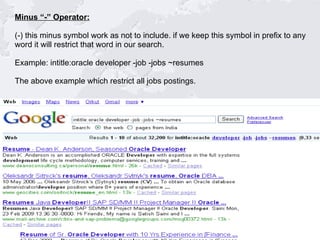
Minus “-” Operator: (-) this minus symbol work as not to include. if we keep this symbol in prefix to any  word it will restrict that word in our search. Example: intitle:oracle developer -job -jobs ~resumes The above example which restrict all jobs postings.
The “OR” and Vertical Bar “|” Operators The OR operator, for which you may also use | (vertical bar). Example: (Java OR J2ee) (Java|J2ee)  Both results give the same results. FILETYPE Filetype:pdf PDF file is the most common resume format online.  Others include doc, rtf, txt, ps, xls… Example: Filetype:pdf ~cv(“software sales” OR “software sell” (“.Net”) ASP
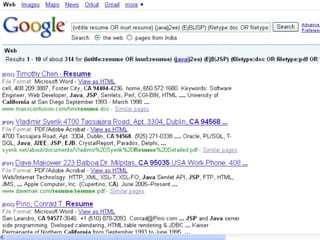
(..) NUMBER RANGE OPERATOR Finds WebPages that contain a number between a listed range To specify range, place two periods between low and high values:  Example: 60521..60532 (intitle:resume OR inurl:resume) (java|j2ee) (EjB|JSP) (filetype:doc OR filetype:pdf OR filetype:txt OR filetype:rtf)  90101..95101 (CA|California) Let see what the results of above string in google
 
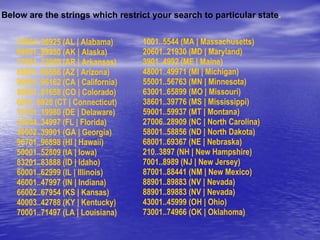
Below are the strings which restrict your search to particular state . 35004..36925 (AL | Alabama) 99501..99950 (AK | Alaska) 71601..72959 (AR | Arkansas) 85001..86556 (AZ | Arizona) 90001..96162 (CA | California) 80001..81658 (CO | Colorado) 6001..6928 (CT | Connecticut) 19701..19980 (DE | Delaware) 32004..34997 (FL | Florida) 30002..39901 (GA | Georgia) 96701..96898 (HI | Hawaii) 50001..52809 (IA | Iowa) 83201..83888 (ID | Idaho) 60001..62999 (IL | Illinois) 46001..47997 (IN | Indiana) 66002..67954 (KS | Kansas) 40003..42788 (KY | Kentucky) 70001..71497 (LA | Louisiana) 1001..5544 (MA | Massachusetts) 20601..21930 (MD | Maryland) 3901..4992 (ME | Maine) 48001..49971 (MI | Michigan) 55001..56763 (MN | Minnesota) 63001..65899 (MO | Missouri) 38601..39776 (MS | Mississippi) 59001..59937 (MT | Montana) 27006..28909 (NC | North Carolina) 58001..58856 (ND | North Dakota) 68001..69367 (NE | Nebraska) 210..3897 (NH | New Hampshire)  7001..8989 (NJ | New Jersey) 87001..88441 (NM | New Mexico) 88901..89883 (NV | Nevada) 88901..89883 (NV | Nevada)  43001..45999 (OH | Ohio) 73001..74966 (OK | Oklahoma)
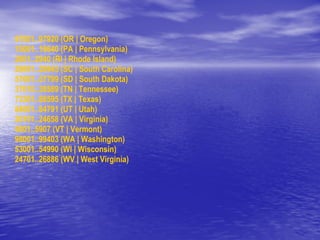
97001..97920 (OR | Oregon) 15001..19640 (PA | Pennsylvania) 2801..2940 (RI | Rhode Island) 29001..29945 (SC | South Carolina)  57001..57799 (SD | South Dakota) 37010..38589 (TN | Tennessee) 73301..88595 (TX | Texas)  84001..84791 (UT | Utah) 20101..24658 (VA | Virginia)  5001..5907 (VT | Vermont) 98001..99403 (WA | Washington)  53001..54990 (WI | Wisconsin)  24701..26886 (WV | West Virginia)
Happy Sourcing Using Advance Google  Search Operators

Google Search Using Advance Search Operators [1]

  • 1.
    Google Search Using Advance Search Operators A Presentation by Satish Reddy
  • 2.
    People who madeinternet very easy Larry Page Sergey Brin
  • 3.
  • 4.
  • 5.
    There are Nnumber of resumes on the internet, but there are some keywords that are very common among them. Consider this list and you will see what I mean. Objective Summary Education Additional Skills References Phone Email Let's do a few searches to see this in action.
  • 6.
  • 7.
    Google Advance SearchOperators: intitle inurl define phonebook (~) tilde (-) exclude (OR) “|” (Vertical Bar) Filetype .. (Range Operator)
  • 8.
    intitle: The query intitle: term restricts results to documents containing term in the title . For instance, [  java developer intitle:resume  ] will return documents that mention the word “resume” in their titles, and mention the words “java” and “ developer” anywhere in the document (title or not). Note: There must be no space between the intitle: and the following word.
  • 9.
    inurl: If you include inurl: in your query, Google will restrict the results to documents containing that word in the URL. For instance, [ inurl:healthy eating ] will return documents that mention the words “healthy” in their URL, and mention the word “eating” anywhere in the document. Note: There must be no space between the inurl: and the following word. Example: inurl:healthy eating www.indianchild.com/Recipes/healthy-eating-tips.htm
  • 10.
  • 11.
    Phonebook: If you start your query with phonebook: Google shows all public U.S. residence telephone listings (name, address, phone number) for the person you specify. For example, [ phonebook: John Doe New York NY ] will show phonebook listings of everyone named John Doe in New York, NY.
  • 12.
    TILDE SEARCH “~” Google finds synonyms for word immediately following tilde. (No spaces) identifies words you may not have considered. “ ~CV”, not “~resume”. Example: ~:java developer ~CV
  • 13.
    Minus “-” Operator:(-) this minus symbol work as not to include. if we keep this symbol in prefix to any word it will restrict that word in our search. Example: intitle:oracle developer -job -jobs ~resumes The above example which restrict all jobs postings.
  • 14.
    The “OR” andVertical Bar “|” Operators The OR operator, for which you may also use | (vertical bar). Example: (Java OR J2ee) (Java|J2ee) Both results give the same results. FILETYPE Filetype:pdf PDF file is the most common resume format online. Others include doc, rtf, txt, ps, xls… Example: Filetype:pdf ~cv(“software sales” OR “software sell” (“.Net”) ASP
  • 15.
    (..) NUMBER RANGEOPERATOR Finds WebPages that contain a number between a listed range To specify range, place two periods between low and high values: Example: 60521..60532 (intitle:resume OR inurl:resume) (java|j2ee) (EjB|JSP) (filetype:doc OR filetype:pdf OR filetype:txt OR filetype:rtf) 90101..95101 (CA|California) Let see what the results of above string in google
  • 16.
  • 17.
    Below are thestrings which restrict your search to particular state . 35004..36925 (AL | Alabama) 99501..99950 (AK | Alaska) 71601..72959 (AR | Arkansas) 85001..86556 (AZ | Arizona) 90001..96162 (CA | California) 80001..81658 (CO | Colorado) 6001..6928 (CT | Connecticut) 19701..19980 (DE | Delaware) 32004..34997 (FL | Florida) 30002..39901 (GA | Georgia) 96701..96898 (HI | Hawaii) 50001..52809 (IA | Iowa) 83201..83888 (ID | Idaho) 60001..62999 (IL | Illinois) 46001..47997 (IN | Indiana) 66002..67954 (KS | Kansas) 40003..42788 (KY | Kentucky) 70001..71497 (LA | Louisiana) 1001..5544 (MA | Massachusetts) 20601..21930 (MD | Maryland) 3901..4992 (ME | Maine) 48001..49971 (MI | Michigan) 55001..56763 (MN | Minnesota) 63001..65899 (MO | Missouri) 38601..39776 (MS | Mississippi) 59001..59937 (MT | Montana) 27006..28909 (NC | North Carolina) 58001..58856 (ND | North Dakota) 68001..69367 (NE | Nebraska) 210..3897 (NH | New Hampshire) 7001..8989 (NJ | New Jersey) 87001..88441 (NM | New Mexico) 88901..89883 (NV | Nevada) 88901..89883 (NV | Nevada) 43001..45999 (OH | Ohio) 73001..74966 (OK | Oklahoma)
  • 18.
    97001..97920 (OR |Oregon) 15001..19640 (PA | Pennsylvania) 2801..2940 (RI | Rhode Island) 29001..29945 (SC | South Carolina) 57001..57799 (SD | South Dakota) 37010..38589 (TN | Tennessee) 73301..88595 (TX | Texas) 84001..84791 (UT | Utah) 20101..24658 (VA | Virginia) 5001..5907 (VT | Vermont) 98001..99403 (WA | Washington) 53001..54990 (WI | Wisconsin) 24701..26886 (WV | West Virginia)
  • 19.
    Happy Sourcing UsingAdvance Google Search Operators