Google Guava

      Source code available on GitHub:
 https://github.com/tdziurko/Guava-Lessons

           Author: Tomasz Dziurko

        Blog: http://tomaszdziurko.pl

Twitter: https://twitter.com/#!/TomaszDziurko
import com.google.common.base.Functions (1)


   Function can be used to execute defined action
    (function) on many objects
   It is used to change collections into collections of
    different type
   Main usage with transform() method from classes
    Colllections2, Lists, Iterables, Iterators, etc.
   Functions class provides a few pre-defined functions
    and allows to compose them into more complicated
    ones
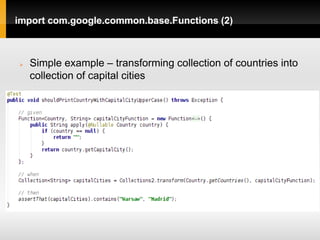
import com.google.common.base.Functions (2)


   Simple example – transforming collection of countries into
    collection of capital cities
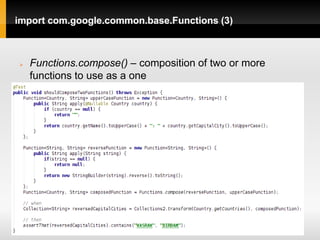
import com.google.common.base.Functions (3)


   Functions.compose() – composition of two or more
    functions to use as a one
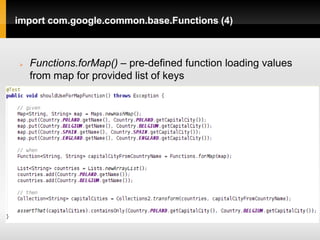
import com.google.common.base.Functions (4)


   Functions.forMap() – pre-defined function loading values
    from map for provided list of keys
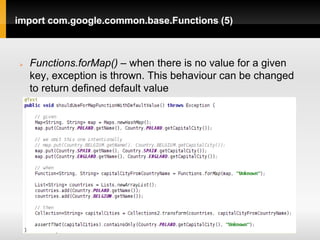
import com.google.common.base.Functions (5)


   Functions.forMap() – when there is no value for a given
    key, exception is thrown. This behaviour can be changed
    to return defined default value
import com.google.common.base.Predicates (1)


   Predicate checks if given condition is met for passed
    object.
   It is mainly used to filter collections using filter()
    method from Iterables, Iterators, Collections2, etc.
   I can be also used to check if all elements from
    collections are satisfying defined rule - method
    Iterables.all()
   Predicates class provides a few utility methods to work
    use and allows to compose many Predicates in one
import com.google.common.base.Predicates (2)


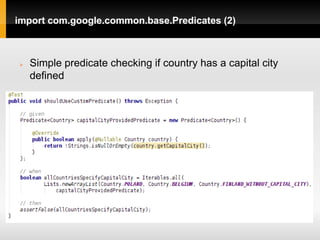
   Simple predicate checking if country has a capital city
    defined
import com.google.common.base.Predicates (3)


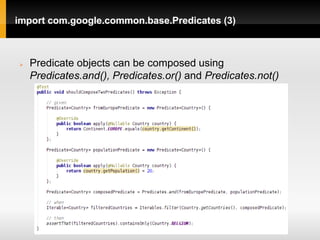
   Predicate objects can be composed using
    Predicates.and(), Predicates.or() and Predicates.not()
import com.google.common.base.Predicates (4)


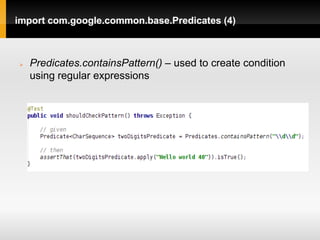
   Predicates.containsPattern() – used to create condition
    using regular expressions
import com.google.common.base.CharMatcher (1)


   It is a class similar to Predicate, but working with chars
   It allows to check if a sequence of characters satisfies
    given condition
   We can also use it to filter chars
   Additionaly it provides methods to modify char
    sequences: removeFrom(), replaceFrom(), trimFrom(),
    collapseFrom(), retainFrom()
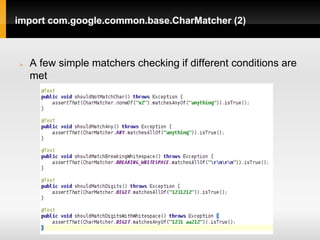
import com.google.common.base.CharMatcher (2)


   A few simple matchers checking if different conditions are
    met
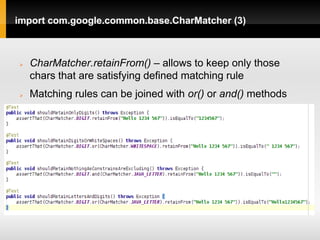
import com.google.common.base.CharMatcher (3)


   CharMatcher.retainFrom() – allows to keep only those
    chars that are satisfying defined matching rule
   Matching rules can be joined with or() or and() methods
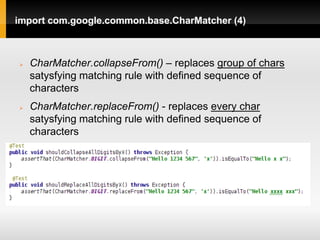
import com.google.common.base.CharMatcher (4)


   CharMatcher.collapseFrom() – replaces group of chars
    satysfying matching rule with defined sequence of
    characters
   CharMatcher.replaceFrom() - replaces every char
    satysfying matching rule with defined sequence of
    characters
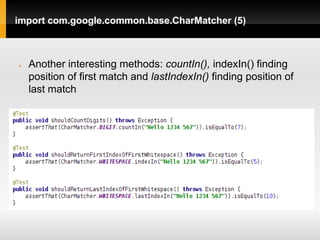
import com.google.common.base.CharMatcher (5)


   Another interesting methods: countIn(), indexIn() finding
    position of first match and lastIndexIn() finding position of
    last match
import com.google.common.base.CharMatcher (6)


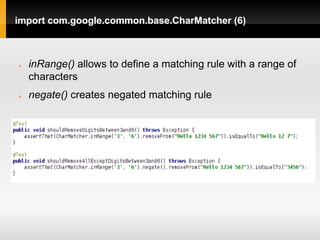
   inRange() allows to define a matching rule with a range of
    characters
   negate() creates negated matching rule
import com.google.common.base.CharMatcher (7)


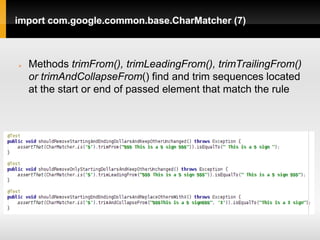
   Methods trimFrom(), trimLeadingFrom(), trimTrailingFrom()
    or trimAndCollapseFrom() find and trim sequences located
    at the start or end of passed element that match the rule
import com.google.common.base.Joiner(1)


   Class used to convert collections into single String
    object containing elements separated with a defined
    delimeter
   We can declare to omit nulls or replace them with a
    default value
   It also works with Maps
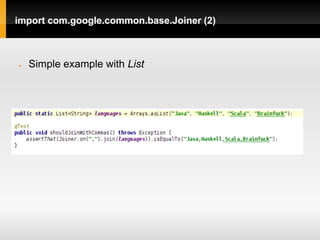
import com.google.common.base.Joiner (2)


   Simple example with List
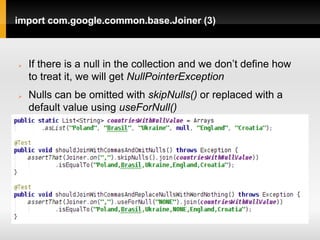
import com.google.common.base.Joiner (3)


   If there is a null in the collection and we don’t define how
    to treat it, we will get NullPointerException
   Nulls can be omitted with skipNulls() or replaced with a
    default value using useForNull()
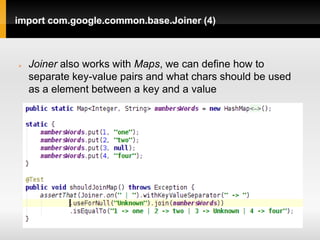
import com.google.common.base.Joiner (4)


   Joiner also works with Maps, we can define how to
    separate key-value pairs and what chars should be used
    as a element between a key and a value
import com.google.common.base.Objects(1)


   Utility class with helper method to implement equals(),
    hashcode() and toString() methods
   Additionally it contains useful method firstNonNull()
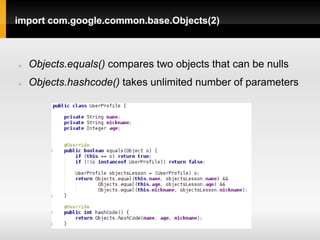
import com.google.common.base.Objects(2)


   Objects.equals() compares two objects that can be nulls
   Objects.hashcode() takes unlimited number of parameters
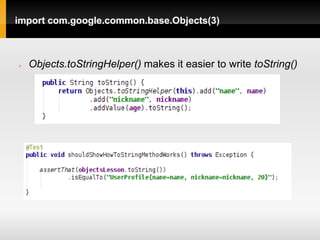
import com.google.common.base.Objects(3)


   Objects.toStringHelper() makes it easier to write toString()
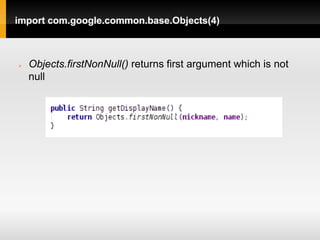
import com.google.common.base.Objects(4)


   Objects.firstNonNull() returns first argument which is not
    null
import com.google.common.base.Preconditions(1)


   This class allows to check correctness of parameters
    passed to our method and throw an appropriate
    exception when necessary
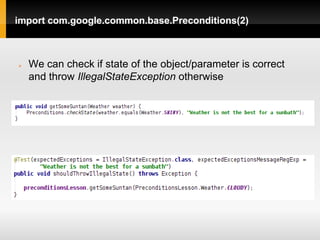
import com.google.common.base.Preconditions(2)


   We can check if state of the object/parameter is correct
    and throw IllegalStateException otherwise
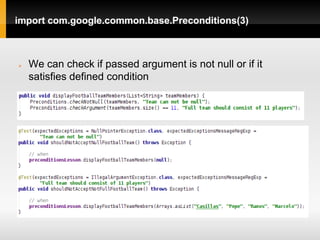
import com.google.common.base.Preconditions(3)


   We can check if passed argument is not null or if it
    satisfies defined condition
import com.google.common.base.Splitter(1)


   Class working in the opposite direction than Joiner
   It allows to split String into collection of elements
   Delimeter can be defined as a sequence of chars, reg
    exp or CharMatcher object
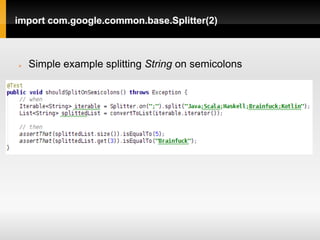
import com.google.common.base.Splitter(2)


   Simple example splitting String on semicolons
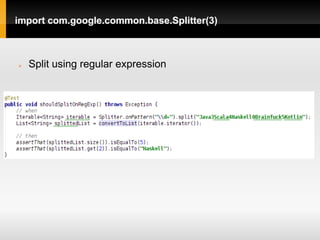
import com.google.common.base.Splitter(3)


   Split using regular expression
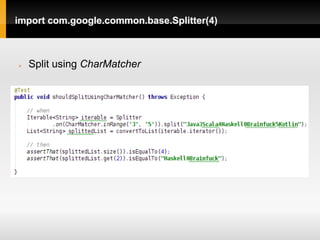
import com.google.common.base.Splitter(4)


   Split using CharMatcher
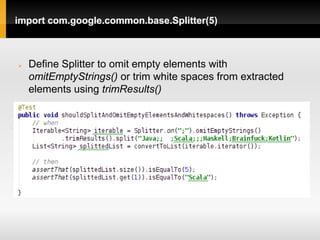
import com.google.common.base.Splitter(5)


   Define Splitter to omit empty elements with
    omitEmptyStrings() or trim white spaces from extracted
    elements using trimResults()
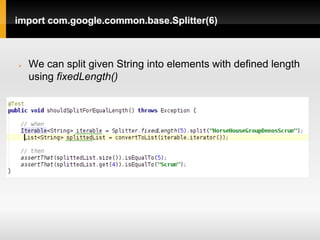
import com.google.common.base.Splitter(6)


   We can split given String into elements with defined length
    using fixedLength()
import com.google.common.base.Stopwatch(1)


   Class replacing traditional way of calculating method
    execution time using System.nanoTime()
   It provides methods that automatically calculate time
    between start() and stop() execution
   Can be easily mocked with our custom passing time
    provider
   Returns counted time using different units
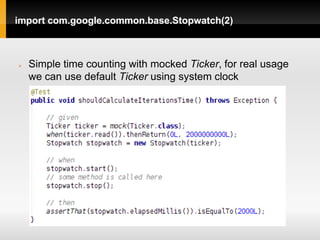
import com.google.common.base.Stopwatch(2)


   Simple time counting with mocked Ticker, for real usage
    we can use default Ticker using system clock
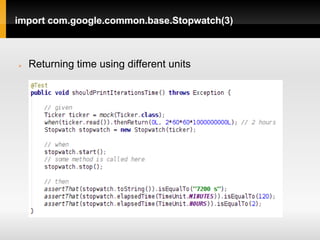
import com.google.common.base.Stopwatch(3)


   Returning time using different units
import com.google.common.base.Strings(1)


   Helper class to work with String objects
   Can replace null with empty String or empty String
    with null
   It provides methods to pad elements to left or right
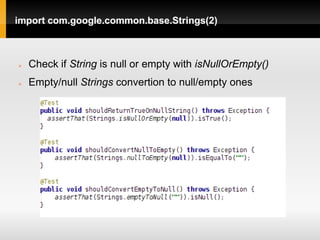
import com.google.common.base.Strings(2)


   Check if String is null or empty with isNullOrEmpty()
   Empty/null Strings convertion to null/empty ones
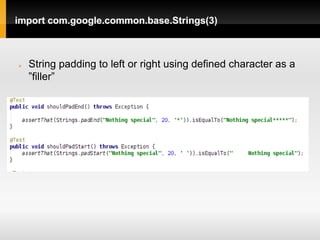
import com.google.common.base.Strings(3)


   String padding to left or right using defined character as a
    ”filler”
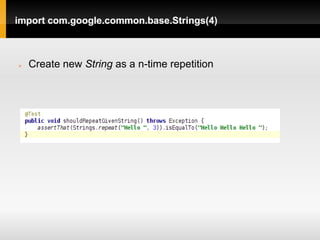
import com.google.common.base.Strings(4)


   Create new String as a n-time repetition
import com.google.common.base.Throwables(1)


   Helper class to work with exceptions
   It allows to extract root exception from the chain
   Converts stack trace to String
   Extracts list of exceptions from exceptions chain
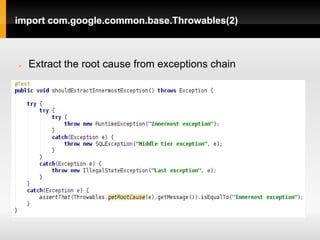
import com.google.common.base.Throwables(2)


   Extract the root cause from exceptions chain
import com.google.common.base.Throwables(3)


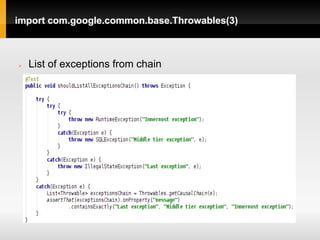
   List of exceptions from chain
import com.google.common.base.Throwables(4)


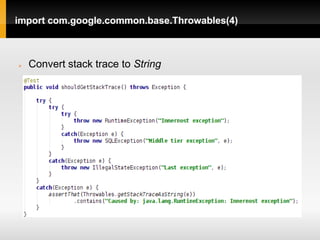
   Convert stack trace to String
import com.google.common.collect.Collections2(1)


   Class to filter and transform Collections using
    functions and predicates
import com.google.common.collect.Collections2(2)


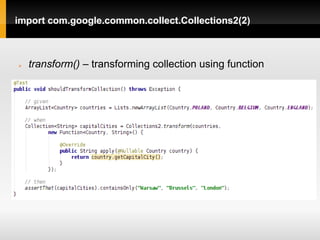
   transform() – transforming collection using function
import com.google.common.collect.Collections2(3)


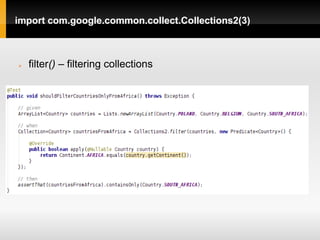
   filter() – filtering collections
import com.google.common.collect.Collections2(4)


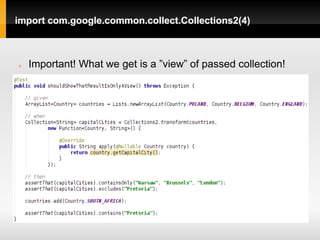
   Important! What we get is a ”view” of passed collection!
import com.google.common.collect.BiMap(1)


   BiMap is a Map with unique both keys and values
import com.google.common.collect.BiMap(2)


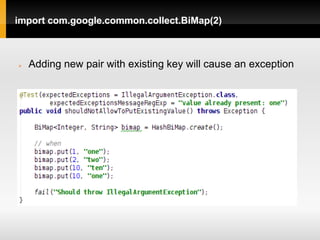
   Adding new pair with existing key will cause an exception
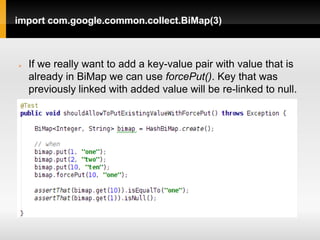
import com.google.common.collect.BiMap(3)


   If we really want to add a key-value pair with value that is
    already in BiMap we can use forcePut(). Key that was
    previously linked with added value will be re-linked to null.
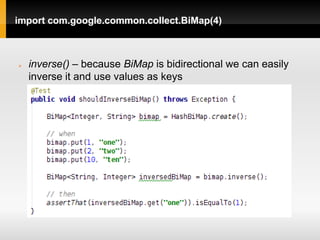
import com.google.common.collect.BiMap(4)


   inverse() – because BiMap is bidirectional we can easily
    inverse it and use values as keys
import com.google.common.collect.Constraints(1)


   Constraint class defines a condition which must be
    met to add a new element to collection
   Constraints is a helper class used to create collections
    with added constraint
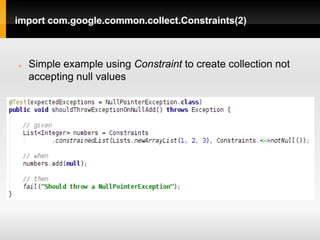
import com.google.common.collect.Constraints(2)


   Simple example using Constraint to create collection not
    accepting null values
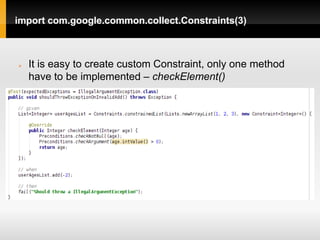
import com.google.common.collect.Constraints(3)


   It is easy to create custom Constraint, only one method
    have to be implemented – checkElement()
import com.google.common.collect.ForwardingCollection(1)


   Class forwarding method calls to its internal collection
   Allows to override methods to e.g. automate some
    operations on collection
   There are similar classes for List, Set, Multiset, Queue
    and Iterator
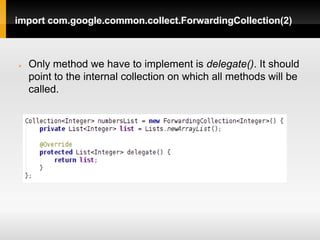
import com.google.common.collect.ForwardingCollection(2)


   Only method we have to implement is delegate(). It should
    point to the internal collection on which all methods will be
    called.
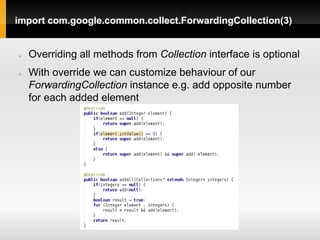
import com.google.common.collect.ForwardingCollection(3)


   Overriding all methods from Collection interface is optional
   With override we can customize behaviour of our
    ForwardingCollection instance e.g. add opposite number
    for each added element
import com.google.common.collect.ForwardingCollection(4)


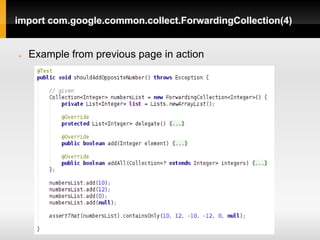
   Example from previous page in action
import com.google.common.collect.ImmutableMap(1)


   Class creating read-only Maps
   It has methods to create and initialize Maps with a few
    key ↔ value pairs
   There are similar classes for List, Set, Multiset etc.
import com.google.common.collect.ImmutableMap(2)


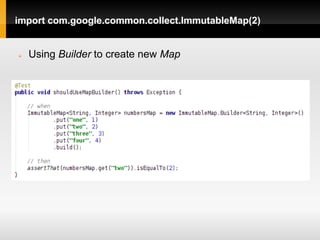
   Using Builder to create new Map
import com.google.common.collect.ImmutableMap(3)


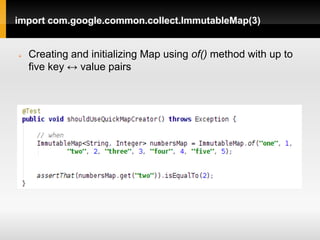
   Creating and initializing Map using of() method with up to
    five key ↔ value pairs
import com.google.common.collect.Iterables(1)


   Helper class to work with classes implementing
    Iterable
   It contains methods transform() oraz filter() mentioned
    earlier
   There is a ”clone” class: Iterators with almost the same
    methods as Iterables but working with Iterators
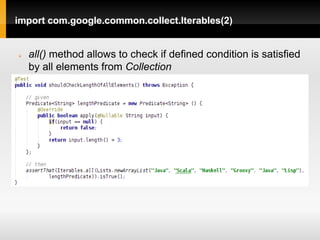
import com.google.common.collect.Iterables(2)


   all() method allows to check if defined condition is satisfied
    by all elements from Collection
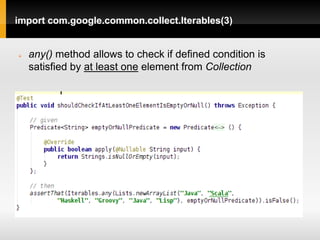
import com.google.common.collect.Iterables(3)


   any() method allows to check if defined condition is
    satisfied by at least one element from Collection
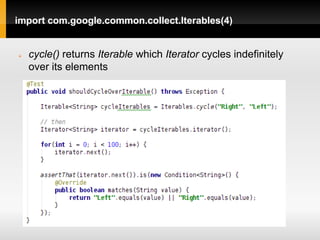
import com.google.common.collect.Iterables(4)


   cycle() returns Iterable which Iterator cycles indefinitely
    over its elements
import com.google.common.collect.Iterables(5)


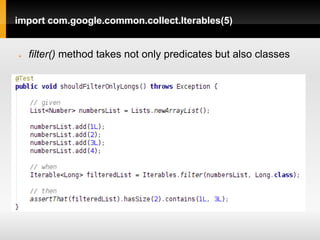
   filter() method takes not only predicates but also classes
import com.google.common.collect.Iterables(6)


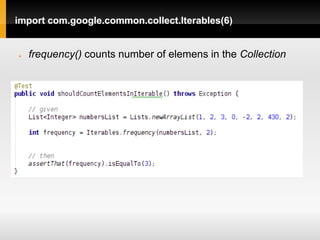
   frequency() counts number of elemens in the Collection
import com.google.common.collect.Iterables(7)


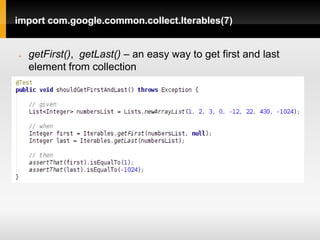
   getFirst(), getLast() – an easy way to get first and last
    element from collection
import com.google.common.collect.Iterables(8)


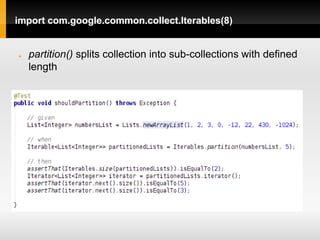
   partition() splits collection into sub-collections with defined
    length
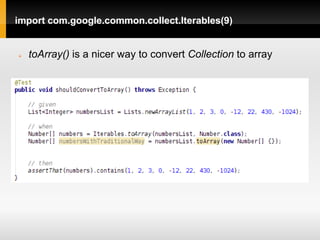
import com.google.common.collect.Iterables(9)


   toArray() is a nicer way to convert Collection to array
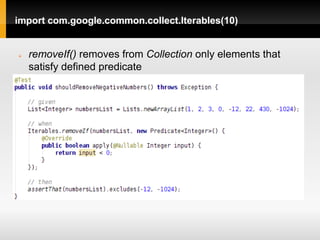
import com.google.common.collect.Iterables(10)


   removeIf() removes from Collection only elements that
    satisfy defined predicate
import com.google.common.collect.Multiset(1)


   Class allowing to insert the same element multiple
    times
   Returns number of occurences of an element
   Allows to set this number without calling add() N times
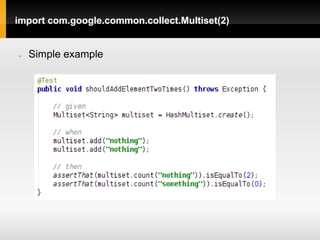
import com.google.common.collect.Multiset(2)


   Simple example
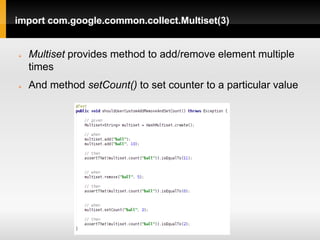
import com.google.common.collect.Multiset(3)


   Multiset provides method to add/remove element multiple
    times
   And method setCount() to set counter to a particular value
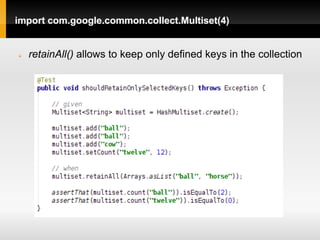
import com.google.common.collect.Multiset(4)


   retainAll() allows to keep only defined keys in the collection
import com.google.common.collect.Multimap(1)


   Class to replace objects similar to Map<String,
    List<String>>
   Developer is no longer forced to check if lists exists for
    a given key before adding something
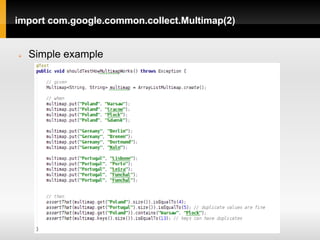
import com.google.common.collect.Multimap(2)


   Simple example
import com.google.common.collect.ObjectArrays(1)


   Utility class to operate on arrays of any type
   It allows to concatenate arrays and add single element
    before first or after last position
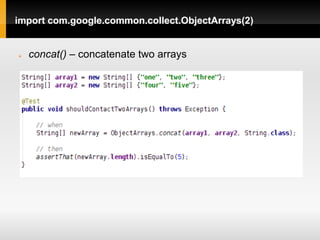
import com.google.common.collect.ObjectArrays(2)


   concat() – concatenate two arrays
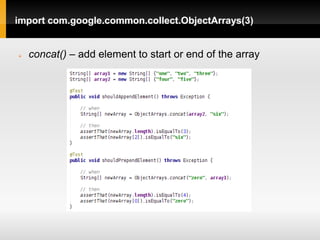
import com.google.common.collect.ObjectArrays(3)


   concat() – add element to start or end of the array
import com.google.common.collect.Ranges(1)


   Ranges and Range classes are used to define ranges
    and then checking if a given object is contained within
    defined range
   They work similarly to Predicate
   We can define open (2,10), closed <2,10> and mixed
    <2, 10) ranges
import com.google.common.collect.Ranges(2)


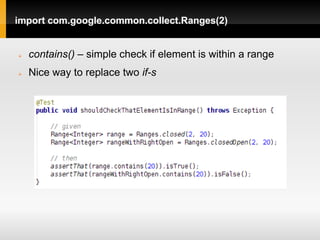
   contains() – simple check if element is within a range
   Nice way to replace two if-s
import com.google.common.collect.Ranges(3)


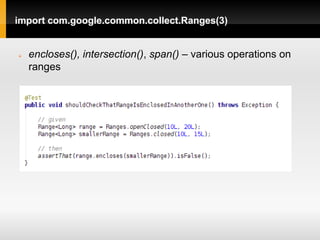
   encloses(), intersection(), span() – various operations on
    ranges
import com.google.common.collect.Ranges(4)


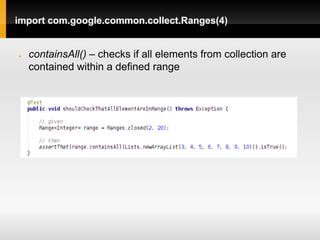
   containsAll() – checks if all elements from collection are
    contained within a defined range
import com.google.common.collect.Ranges(5)


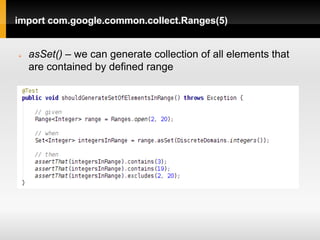
   asSet() – we can generate collection of all elements that
    are contained by defined range
import com.google.common.collect.Ranges(6)


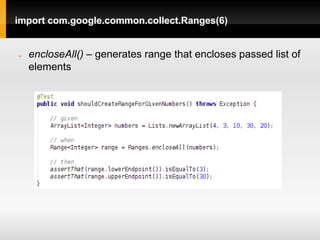
   encloseAll() – generates range that encloses passed list of
    elements
import com.google.common.primitives.Ints(1)


   Util class to work with ints and array of ints
   primitives.* package contains similar classes for
    boolean, float, double, etc.
import com.google.common.primitives.Ints(2)


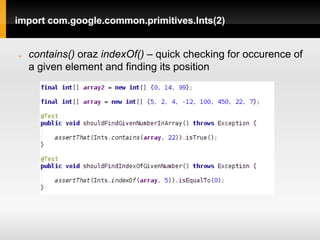
   contains() oraz indexOf() – quick checking for occurence of
    a given element and finding its position
import com.google.common.primitives.Ints(3)


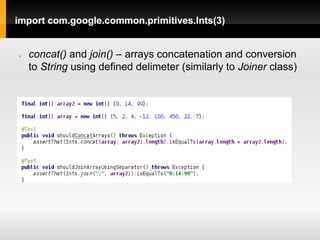
   concat() and join() – arrays concatenation and conversion
    to String using defined delimeter (similarly to Joiner class)
import com.google.common.primitives.Ints(4)


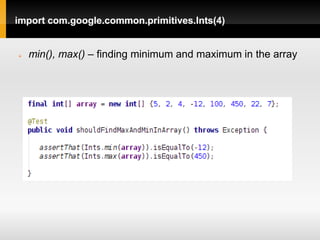
   min(), max() – finding minimum and maximum in the array
import com.google.common.eventbus.*(1)


   Classes from eventbus package can be used as a
    simple tool to implement publisher – subscriber use
    case
   Besides standard features these classes have some
    extras:
    - checking if someone is listening for an event of given
    type
    - events hierarchy
import com.google.common.eventbus.*(2)


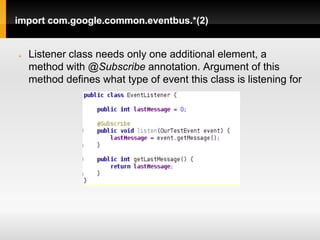
   Listener class needs only one additional element, a
    method with @Subscribe annotation. Argument of this
    method defines what type of event this class is listening for
import com.google.common.eventbus.*(3)


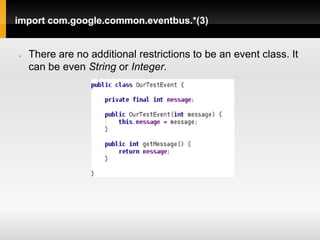
   There are no additional restrictions to be an event class. It
    can be even String or Integer.
import com.google.common.eventbus.*(4)


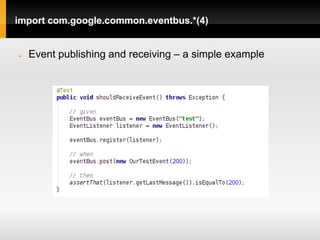
   Event publishing and receiving – a simple example
import com.google.common.eventbus.*(5)


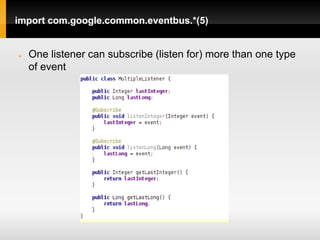
   One listener can subscribe (listen for) more than one type
    of event
import com.google.common.eventbus.*(6)


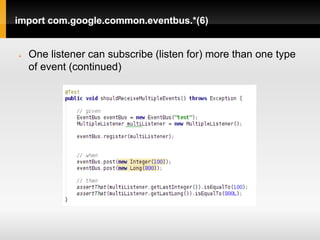
   One listener can subscribe (listen for) more than one type
    of event (continued)
import com.google.common.eventbus.*(7)


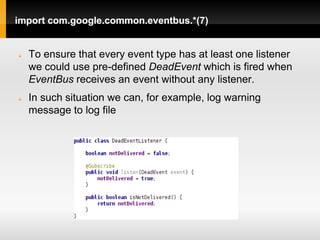
   To ensure that every event type has at least one listener
    we could use pre-defined DeadEvent which is fired when
    EventBus receives an event without any listener.
   In such situation we can, for example, log warning
    message to log file
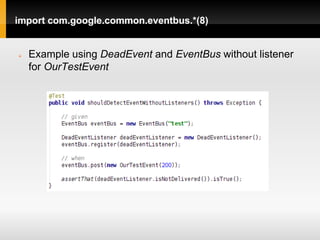
import com.google.common.eventbus.*(8)


   Example using DeadEvent and EventBus without listener
    for OurTestEvent
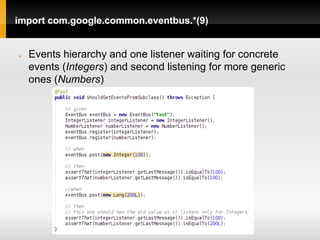
import com.google.common.eventbus.*(9)


   Events hierarchy and one listener waiting for concrete
    events (Integers) and second listening for more generic
    ones (Numbers)
import com.google.common.math.*(1)


   Classes from math package provides methods to
    perform some methematical calculations
   Available classes: IntMath, LongMath, DoubleMath
    and BigIntegerMath
   They saves developer from being affected by ”silent
    overflow” when for example adding numbers close to
    the Integer.MAX_INT
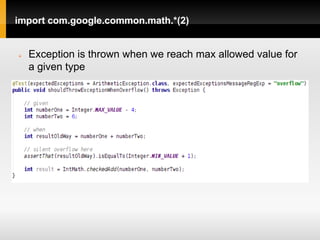
import com.google.common.math.*(2)


   Exception is thrown when we reach max allowed value for
    a given type
import com.google.common.math.*(3)


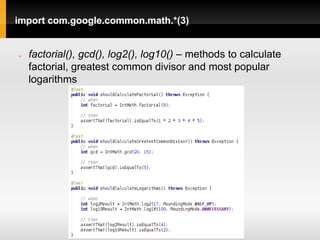
   factorial(), gcd(), log2(), log10() – methods to calculate
    factorial, greatest common divisor and most popular
    logarithms
import com.google.common.math.*(4)


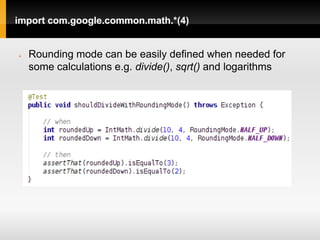
   Rounding mode can be easily defined when needed for
    some calculations e.g. divide(), sqrt() and logarithms
The End

Thank you for reading!


     Source code available on GitHub:
https://github.com/tdziurko/Guava-Lessons

      Blog: http://tomaszdziurko.pl

Google guava - almost everything you need to know