Integrate Google (Glasses)
with SAP
Alessandro Iannacci
Introduction
Google Glass is a type of wearable technology with an optical head-monted display (OHMD). It
was developed by Google with the mission of producing a mass-market ubiquitous computer.
Glass gestures
You can use touch gestures by tapping and sliding your finger on the touchpad
located on the right side of the device
Back and display off: Swipe down
from the Home screen to turn the
display off. Swiping down also acts as
your back button.
Activate Glass/Action: Tap the
touchpad to turn the display on.
Swipe forward and back: to navigate
your timeline.
Timeline
The timeline is the main user interface that is exposed to users and is comprised of
640 × 360 pixel cards
The most recent items reside closest to the Home card, which is the default card users see when they wake Glass up.
Cards
Static card display text, images, and video content. Can have menu items
that let users carry out actions, such as replying to a text message or
sharing a photo
Static card development pattern
Live cards contain rich, real-time content. Live cards also have access to low-
level sensor data like the accelerometer and GPS. With this type of card you
can still navigate the timeline, while the card continues running on the
background. Also this card can have menu items.
The Compass uses sensors and renders custom graphics to create a unique user experience.
The Compass runs in the timeline and users can navigate away and return to it when desired.
Live card development pattern
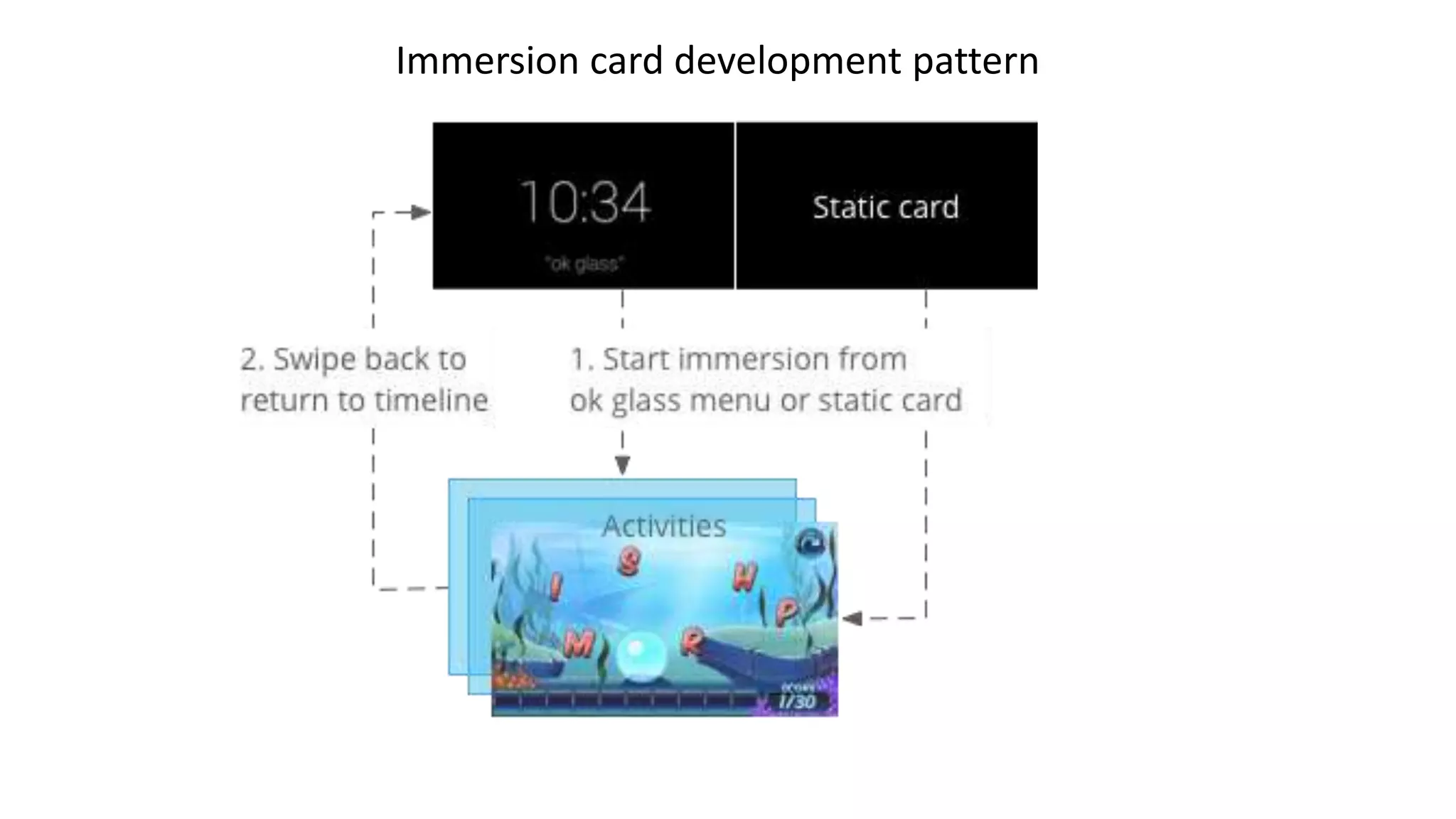
Immersion displays Android activities that take over the timeline experience.
Immersion card development pattern
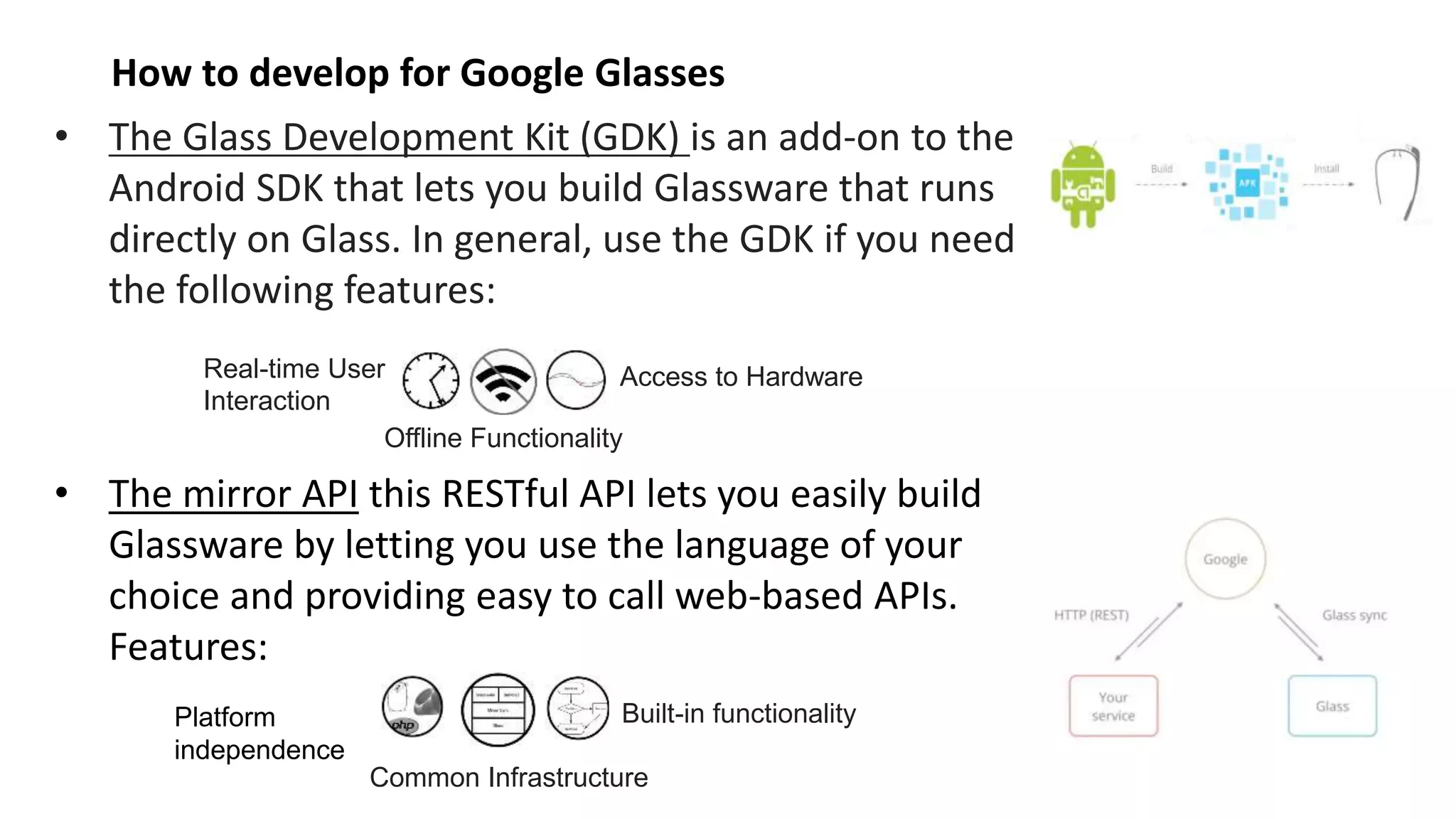
• The Glass Development Kit (GDK) is an add-on to the
Android SDK that lets you build Glassware that runs
directly on Glass. In general, use the GDK if you need
the following features:
• The mirror API this RESTful API lets you easily build
Glassware by letting you use the language of your
choice and providing easy to call web-based APIs.
Features:
How to develop for Google Glasses
Real-time User
Interaction
Offline Functionality
Access to Hardware
Platform
independence
Common Infrastructure
Built-in functionality
Cards and type of development
GDK Dev.
(i.e. SAP communications
via ODATA – as usual
Android development)
Live cards
Immersion
MIRROR APIs Dev.
Static cards
Special content: Hybrid Glassware
Mirror API Glassware can invoke GDK Glassware through a menu item.
Integrate Google (Glasses)
with SAP
Alessandro Iannacci
Using MIRROR APIs with SAP – use cases
VIDEO
https://www.youtube.com/watch?v=HPFBo41BEKY
Integrate Google (Glasses)
with SAP
Alessandro Iannacci
Google API ABAP Client
Google API Abap client
It's a library written in ABAP to leverage Google APIs (it's a newborn project so for now it supports only Mirror
APIs and the Google URL Shortener Service).
The library is directly translated from the official Google PHP library (google-api-PHP-client).
In future, like the official other libraries (php, java, etc.) it will support any other google api (geo data, gdrive,
gmail, tasks, etc. etc.).
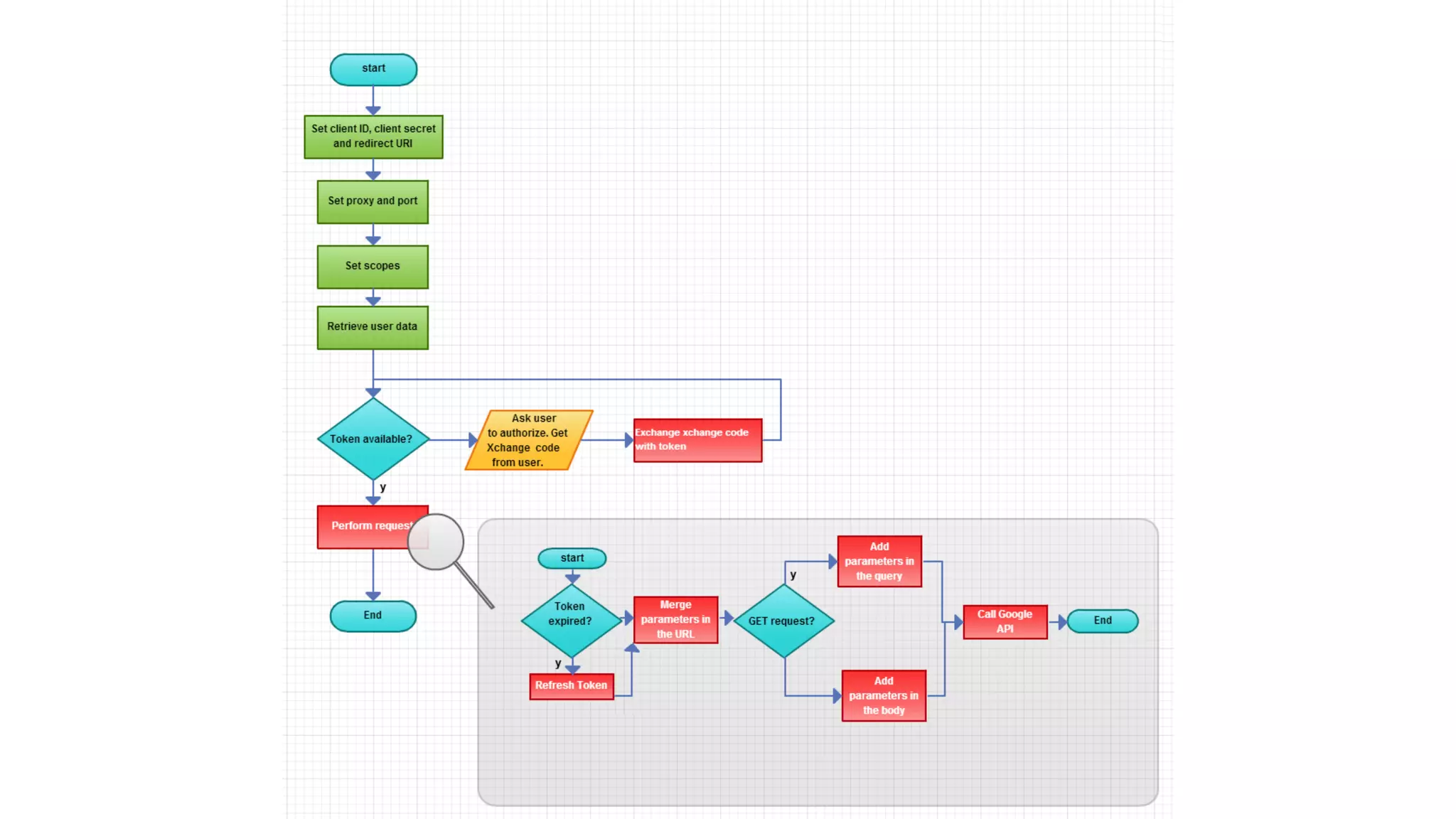
It is very simple to use google-api-ABAP-client:
1. download the nugget and import all the objects using SAPLink
2. Register the application google client ID and change this setting in the application together with proxy
settings if needed
3. install the certificates using the S_TRUST T-Code
4. run the demo report ZGOOGLE_TEST and enjoy!
• http://scn.sap.com/community/cloud/blog/2014/06/06/integrating-google-glasses-with-sap
• https://github.com/Gh14Cc10/google-api-ABAP-client
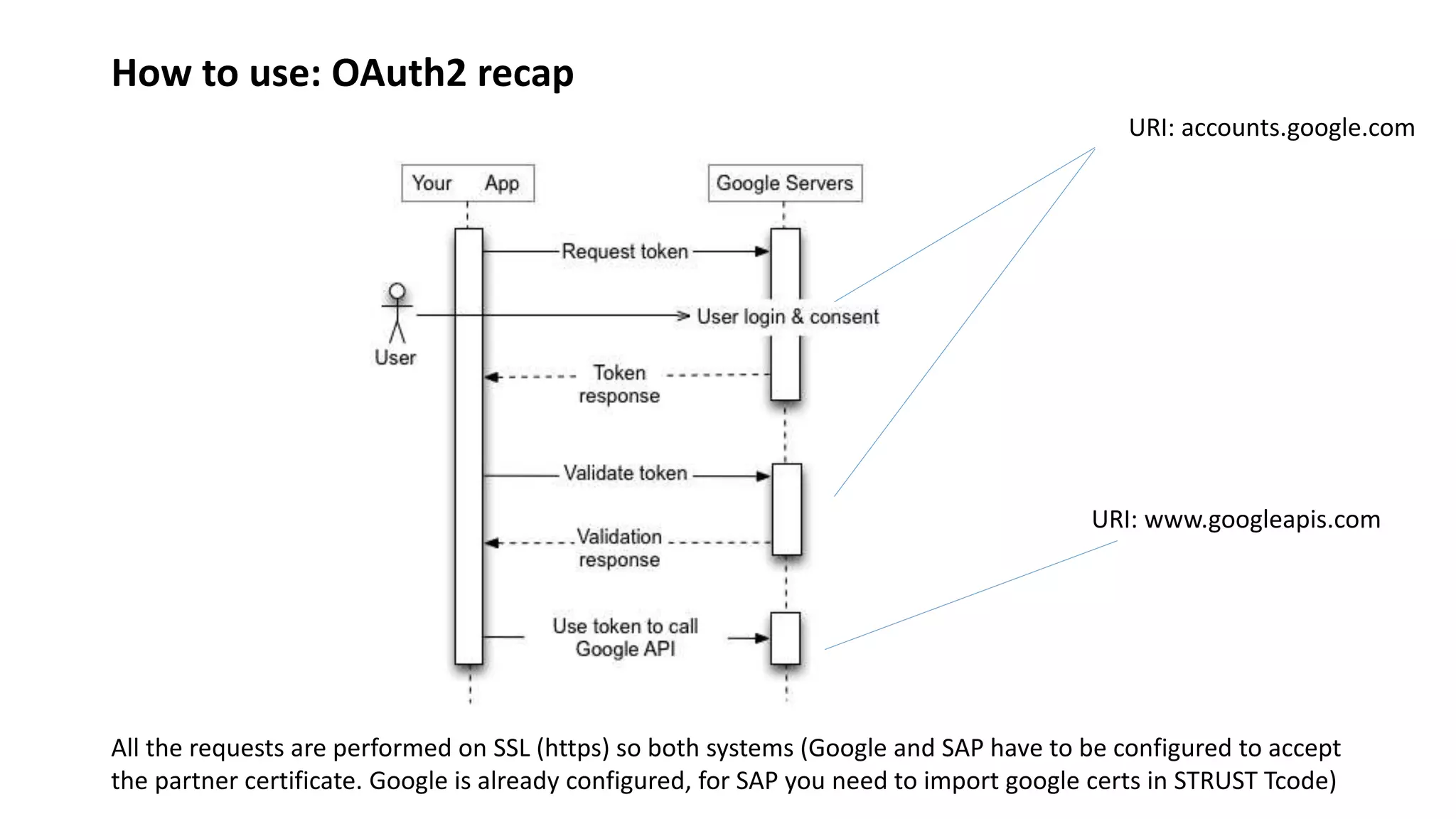
How to use: OAuth2 recap
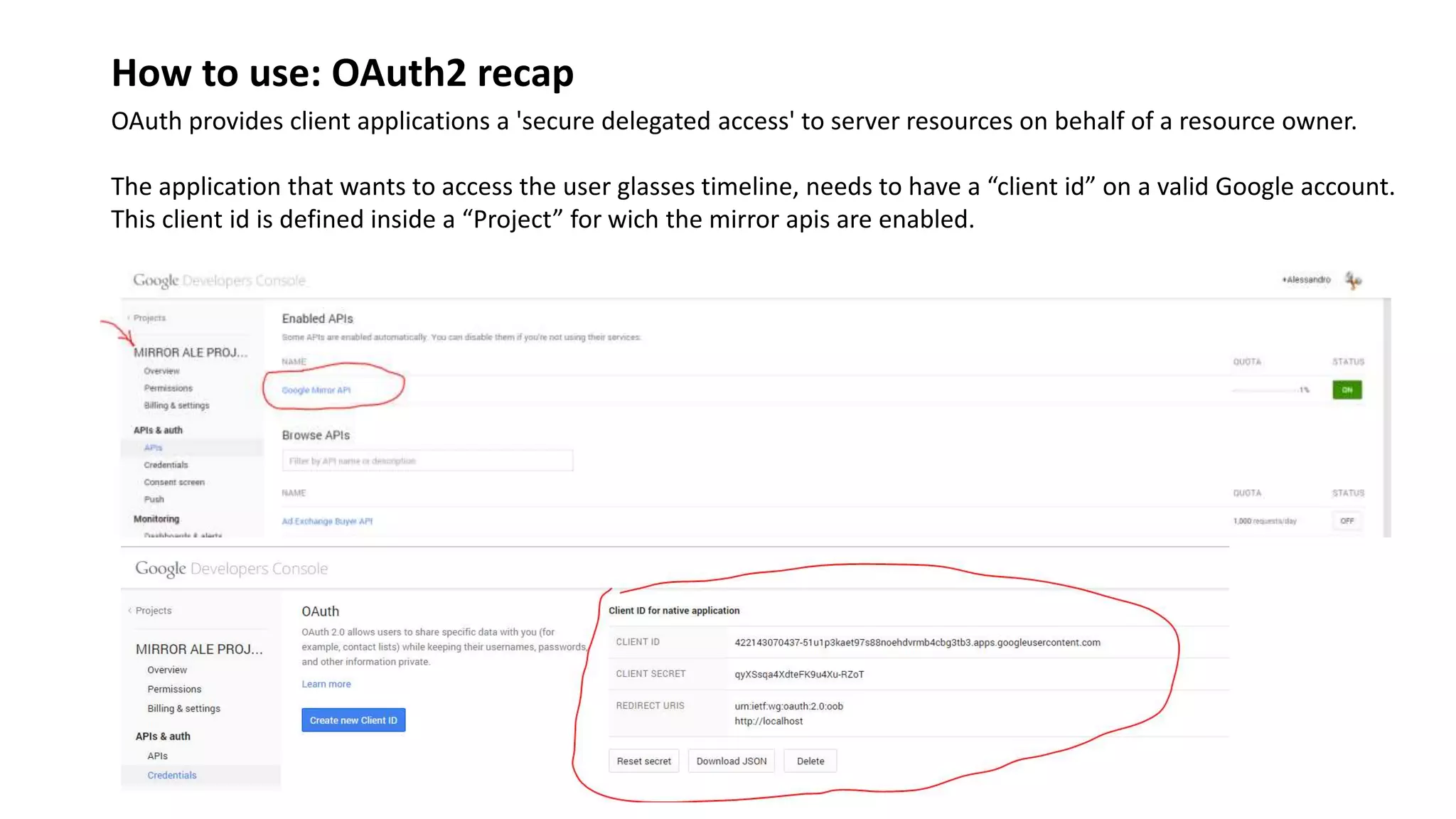
OAuth provides client applications a 'secure delegated access' to server resources on behalf of a resource owner.
The application that wants to access the user glasses timeline, needs to have a “client id” on a valid Google account.
This client id is defined inside a “Project” for wich the mirror apis are enabled.
How to use: OAuth2 recap
URI: accounts.google.com
URI: www.googleapis.com
All the requests are performed on SSL (https) so both systems (Google and SAP have to be configured to accept
the partner certificate. Google is already configured, for SAP you need to import google certs in STRUST Tcode)
How to use: Developer Key
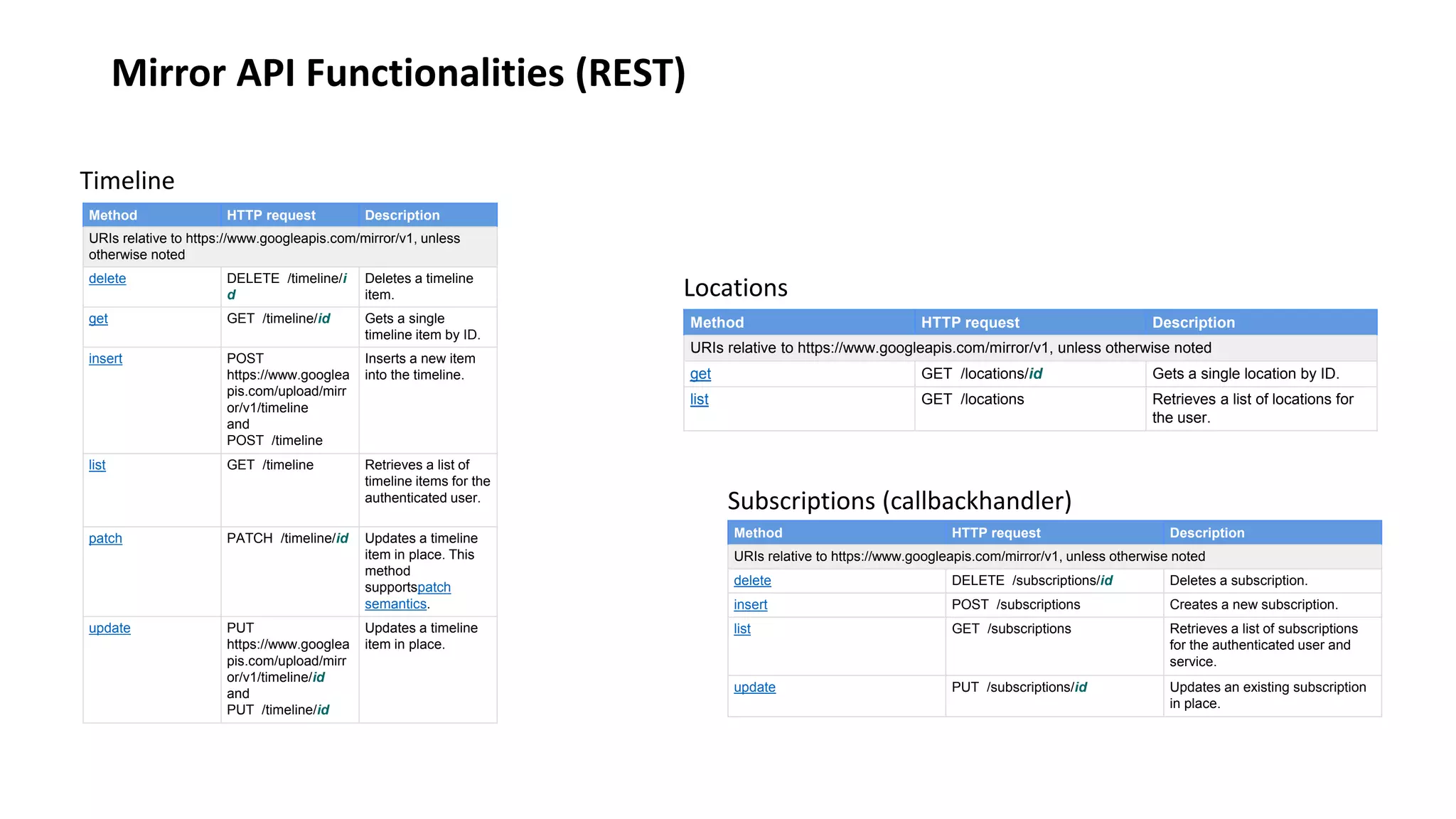
Mirror API Functionalities (REST)
Method HTTP request Description
URIs relative to https://www.googleapis.com/mirror/v1, unless
otherwise noted
delete DELETE /timeline/i
d
Deletes a timeline
item.
get GET /timeline/id Gets a single
timeline item by ID.
insert POST
https://www.googlea
pis.com/upload/mirr
or/v1/timeline
and
POST /timeline
Inserts a new item
into the timeline.
list GET /timeline Retrieves a list of
timeline items for the
authenticated user.
patch PATCH /timeline/id Updates a timeline
item in place. This
method
supportspatch
semantics.
update PUT
https://www.googlea
pis.com/upload/mirr
or/v1/timeline/id
and
PUT /timeline/id
Updates a timeline
item in place.
Timeline
Method HTTP request Description
URIs relative to https://www.googleapis.com/mirror/v1, unless otherwise noted
delete DELETE /subscriptions/id Deletes a subscription.
insert POST /subscriptions Creates a new subscription.
list GET /subscriptions Retrieves a list of subscriptions
for the authenticated user and
service.
update PUT /subscriptions/id Updates an existing subscription
in place.
Subscriptions (callbackhandler)
Method HTTP request Description
URIs relative to https://www.googleapis.com/mirror/v1, unless otherwise noted
get GET /locations/id Gets a single location by ID.
list GET /locations Retrieves a list of locations for
the user.
Locations
Example in the system!
Simulators:
• mirror API playground: is an application that is able to get the static card list,
and to insert new cards. If you use the same google client id of SAP
application in mirror API playground, you will be able to see the same cards
uploaded from SAP.
• Google glasses on Android (Xenologer): is a modified google glasses os
running on android. It is an old version (maps and html cards not working)
but with this simulator you can see contents published for all the
applications.
Thank you!

Google Glasses Integration with SAP

  • 1.
    Integrate Google (Glasses) withSAP Alessandro Iannacci Introduction
  • 2.
    Google Glass isa type of wearable technology with an optical head-monted display (OHMD). It was developed by Google with the mission of producing a mass-market ubiquitous computer.
  • 3.
    Glass gestures You canuse touch gestures by tapping and sliding your finger on the touchpad located on the right side of the device Back and display off: Swipe down from the Home screen to turn the display off. Swiping down also acts as your back button. Activate Glass/Action: Tap the touchpad to turn the display on. Swipe forward and back: to navigate your timeline.
  • 4.
    Timeline The timeline isthe main user interface that is exposed to users and is comprised of 640 × 360 pixel cards The most recent items reside closest to the Home card, which is the default card users see when they wake Glass up.
  • 5.
    Cards Static card displaytext, images, and video content. Can have menu items that let users carry out actions, such as replying to a text message or sharing a photo
  • 6.
  • 7.
    Live cards containrich, real-time content. Live cards also have access to low- level sensor data like the accelerometer and GPS. With this type of card you can still navigate the timeline, while the card continues running on the background. Also this card can have menu items. The Compass uses sensors and renders custom graphics to create a unique user experience. The Compass runs in the timeline and users can navigate away and return to it when desired.
  • 8.
  • 9.
    Immersion displays Androidactivities that take over the timeline experience.
  • 10.
  • 11.
    • The GlassDevelopment Kit (GDK) is an add-on to the Android SDK that lets you build Glassware that runs directly on Glass. In general, use the GDK if you need the following features: • The mirror API this RESTful API lets you easily build Glassware by letting you use the language of your choice and providing easy to call web-based APIs. Features: How to develop for Google Glasses Real-time User Interaction Offline Functionality Access to Hardware Platform independence Common Infrastructure Built-in functionality
  • 12.
    Cards and typeof development GDK Dev. (i.e. SAP communications via ODATA – as usual Android development) Live cards Immersion MIRROR APIs Dev. Static cards
  • 13.
    Special content: HybridGlassware Mirror API Glassware can invoke GDK Glassware through a menu item.
  • 14.
    Integrate Google (Glasses) withSAP Alessandro Iannacci Using MIRROR APIs with SAP – use cases
  • 15.
  • 16.
    Integrate Google (Glasses) withSAP Alessandro Iannacci Google API ABAP Client
  • 17.
    Google API Abapclient It's a library written in ABAP to leverage Google APIs (it's a newborn project so for now it supports only Mirror APIs and the Google URL Shortener Service). The library is directly translated from the official Google PHP library (google-api-PHP-client). In future, like the official other libraries (php, java, etc.) it will support any other google api (geo data, gdrive, gmail, tasks, etc. etc.). It is very simple to use google-api-ABAP-client: 1. download the nugget and import all the objects using SAPLink 2. Register the application google client ID and change this setting in the application together with proxy settings if needed 3. install the certificates using the S_TRUST T-Code 4. run the demo report ZGOOGLE_TEST and enjoy! • http://scn.sap.com/community/cloud/blog/2014/06/06/integrating-google-glasses-with-sap • https://github.com/Gh14Cc10/google-api-ABAP-client
  • 18.
    How to use:OAuth2 recap OAuth provides client applications a 'secure delegated access' to server resources on behalf of a resource owner. The application that wants to access the user glasses timeline, needs to have a “client id” on a valid Google account. This client id is defined inside a “Project” for wich the mirror apis are enabled.
  • 19.
    How to use:OAuth2 recap URI: accounts.google.com URI: www.googleapis.com All the requests are performed on SSL (https) so both systems (Google and SAP have to be configured to accept the partner certificate. Google is already configured, for SAP you need to import google certs in STRUST Tcode)
  • 20.
    How to use:Developer Key
  • 21.
    Mirror API Functionalities(REST) Method HTTP request Description URIs relative to https://www.googleapis.com/mirror/v1, unless otherwise noted delete DELETE /timeline/i d Deletes a timeline item. get GET /timeline/id Gets a single timeline item by ID. insert POST https://www.googlea pis.com/upload/mirr or/v1/timeline and POST /timeline Inserts a new item into the timeline. list GET /timeline Retrieves a list of timeline items for the authenticated user. patch PATCH /timeline/id Updates a timeline item in place. This method supportspatch semantics. update PUT https://www.googlea pis.com/upload/mirr or/v1/timeline/id and PUT /timeline/id Updates a timeline item in place. Timeline Method HTTP request Description URIs relative to https://www.googleapis.com/mirror/v1, unless otherwise noted delete DELETE /subscriptions/id Deletes a subscription. insert POST /subscriptions Creates a new subscription. list GET /subscriptions Retrieves a list of subscriptions for the authenticated user and service. update PUT /subscriptions/id Updates an existing subscription in place. Subscriptions (callbackhandler) Method HTTP request Description URIs relative to https://www.googleapis.com/mirror/v1, unless otherwise noted get GET /locations/id Gets a single location by ID. list GET /locations Retrieves a list of locations for the user. Locations
  • 23.
    Example in thesystem! Simulators: • mirror API playground: is an application that is able to get the static card list, and to insert new cards. If you use the same google client id of SAP application in mirror API playground, you will be able to see the same cards uploaded from SAP. • Google glasses on Android (Xenologer): is a modified google glasses os running on android. It is an old version (maps and html cards not working) but with this simulator you can see contents published for all the applications.
  • 24.