Step

    1                    Google Analytics
    Step              Content Experiments
    2                    (for WordPress)
    Step                in Five Easy Steps
    3
    Step
                                     Presented by
                                     Avery Cohen
    4
    Step

    5
©2013, Metrist Partners – may not be used without permission
Why Google Content Experiments?
                          1. Everybody likes a
                             winner
                          2. Helps your customer
                             become the winner
                          3. Your website will make
                             more money
                          4. And that makes you a
                             winner
                          5. It’s easy


               Don’t take my word for it; check out
                   http://whichtestwon.com/
Google Content Experiments in
           Five easy Steps
1. Set a Goal & establish it in Google Analytics
2. Create two versions of the page you want to
   test – and don’t stop at two!
3. Create the experiment in Google Analytics
4. Add experiment JavaScript to the Original Page
   – thank you CMS!
5. Monitor the test results - and keep improving!
Step

            1      Set a Goal
Program goals:
• Lower bounce rate
  by 20%
• Double new member
  registration rate
• Increase sales by
  $1,000/day
A/B test goal:
                                Can we
• Reach the purchase
                           make a better
  “thank you” page
                           first impression
                               than this?
Step

1      Create the Goal in Google Analytics
Step

1      Create a Goal in Google Analytics
Step

2          Create Alternative Page for “A/B” Test

Make a difference
• Tone of the page
• Page layout
• Information:
       – unique value
         propositions
       – Offers or enticements
                                      Can we
• Calls to action
                                 make a better
                                 first impression
                                     than this?
Step

 3      Create an Experiment
Google Analytics Content Experiment
Step

     3     Create an Experiment
• Google Analytics Content Experiment
Step

4      Add Code to Original Page


                   This is the code you need to add to
                   your original page.
Step
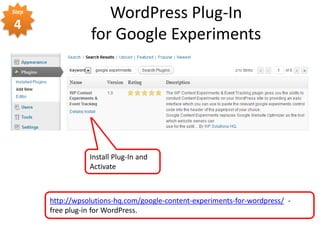
                     WordPress Plug-In
4
                  for Google Experiments


                  Install Plug-In and
                  Activate


       http://wpsolutions-hq.com/google-content-experiments-for-wordpress/ -
       free plug-in for WordPress.
Add Experiment Code to the Original Page
  Original Version of the Landing Page


                                         Edit your original
                                         page, check “enable
                                         Content Experiments”
                                         and paste in the code.


                                           Half the people who
                                           request the original
                                           page will receive the
                                           alternate “B” version.
View Page Source to Confirm Code
                             Google Analytics
                       Content Experiment code is
                              the first thing
                         in the <head> section!


                    And it ONLY appears on the
                       Original (“A”) Version
                     of the page being tested!
Verify the Experiment
 in Google Analytics
Step

5      Your Experiment is Running
Step

5      Monitor and Keep Testing!
Thank you.
Avery J. Cohen            Nick Martinelli
Metrist Partners          Joomla Rockers
Chicago, Illinois
averycohen@metrist.com    nick@joomlarockers.com
@averycohen               @shreddemon
www.metristpartners.com   www.joomlarockers.com
312-772-5945

Google Experiments in 5 Easy Steps (using WordPress)

  • 1.
    Step 1 Google Analytics Step Content Experiments 2 (for WordPress) Step in Five Easy Steps 3 Step Presented by Avery Cohen 4 Step 5 ©2013, Metrist Partners – may not be used without permission
  • 2.
    Why Google ContentExperiments? 1. Everybody likes a winner 2. Helps your customer become the winner 3. Your website will make more money 4. And that makes you a winner 5. It’s easy Don’t take my word for it; check out http://whichtestwon.com/
  • 3.
    Google Content Experimentsin Five easy Steps 1. Set a Goal & establish it in Google Analytics 2. Create two versions of the page you want to test – and don’t stop at two! 3. Create the experiment in Google Analytics 4. Add experiment JavaScript to the Original Page – thank you CMS! 5. Monitor the test results - and keep improving!
  • 4.
    Step 1 Set a Goal Program goals: • Lower bounce rate by 20% • Double new member registration rate • Increase sales by $1,000/day A/B test goal: Can we • Reach the purchase make a better “thank you” page first impression than this?
  • 5.
    Step 1 Create the Goal in Google Analytics
  • 6.
    Step 1 Create a Goal in Google Analytics
  • 7.
    Step 2 Create Alternative Page for “A/B” Test Make a difference • Tone of the page • Page layout • Information: – unique value propositions – Offers or enticements Can we • Calls to action make a better first impression than this?
  • 8.
    Step 3 Create an Experiment Google Analytics Content Experiment
  • 9.
    Step 3 Create an Experiment • Google Analytics Content Experiment
  • 13.
    Step 4 Add Code to Original Page This is the code you need to add to your original page.
  • 14.
    Step WordPress Plug-In 4 for Google Experiments Install Plug-In and Activate http://wpsolutions-hq.com/google-content-experiments-for-wordpress/ - free plug-in for WordPress.
  • 15.
    Add Experiment Codeto the Original Page Original Version of the Landing Page Edit your original page, check “enable Content Experiments” and paste in the code. Half the people who request the original page will receive the alternate “B” version.
  • 16.
    View Page Sourceto Confirm Code Google Analytics Content Experiment code is the first thing in the <head> section! And it ONLY appears on the Original (“A”) Version of the page being tested!
  • 17.
    Verify the Experiment in Google Analytics
  • 18.
    Step 5 Your Experiment is Running
  • 19.
    Step 5 Monitor and Keep Testing!
  • 20.
    Thank you. Avery J.Cohen Nick Martinelli Metrist Partners Joomla Rockers Chicago, Illinois averycohen@metrist.com nick@joomlarockers.com @averycohen @shreddemon www.metristpartners.com www.joomlarockers.com 312-772-5945