GO Performance Tooling
Adil Hafeez
@adilhafeez
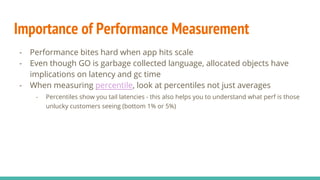
- Performance bites hard when app hits scale
- Even though GO is garbage collected language, allocated objects have
implications on latency and gc time
- When measuring latency,look at percentiles not just averages
- Percentiles show you tail latencies - this also helps you to understand what perf is those
unlucky customers seeing (bottom 1% or 5%)
Importance of Performance Measurement
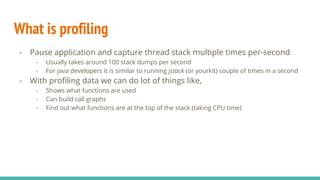
What is profiling
- Pause application and capture thread stack multiple times per-second
- Usually takes around 100 stack dumps per second
- For java developers it is similar to running jstack (or yourkit) couple of times in a second
- With profiling data we can do lot of things like,
- Shows what functions are used
- Can build call graphs
- Find out what functions are at the top of the stack (taking CPU time)
Viewing CPU/Memory profile snapshot
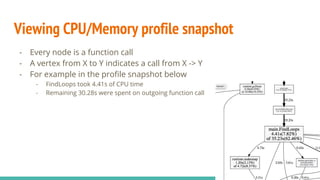
- Every node is a function call
- A vertex from X to Y indicates a call from X -> Y
- For example in the profile snapshot below
- FindLoops took 4.41s of CPU time
- Remaining 30.28s were spent on outgoing function call
- “web” command opens up web view of profiler
GO Profiling tools - pprof
- What we can profile?
- Standalone application (start with profiling enabled through commandline arg)
- A live process
- Using net.http.pprof, go can capture profile of a live process
- Many others features available thorugh web interface like viewing passed in
command line arguments, memory profile, cpu profile etc.
- What you can do with profiling data
- View methods that are taking more time, or allocation more objects
- Annotate code with cpu/memory profile data
- Slice and dice into different parts of the program for better understanding of cpu time
- GO allows you to do cpu and memory profile (and blocking)
- CPU allows you to look at what functions are taking cpu time
- Memory profile lets you see memory allocation per function
GO Profiling tools - benchmarking
- Run test X number of times and reports the average time
- Prints allocations per call
- Run with multiple CPU (GOMAXPROCs)
- Execute following command to get memory allocation along with runtime,
- $ go test -bench=. -benchmem
pprof commands (top)
- Top command lets you view functions that are taking up most CPU time
pprof commands (weblist)
- weblist annotates source code with profiler data (and assembly) in a
webview
- Drill down and expand each source line to see assembly instructions (pretty powerful)
Live demo
- Type of garbage collectors
- STW - Stop the World
- Concurrent
- With 1.5, go started to have concurrent gc
- This means less time spent in STW phase (~ 10ms)
- Latencies improve overall
- More details here
- GO 1.6 does little better
- GC pauses is even lower
- See here for details
Garbage Collector
- Simplicity - core principle
- GOGC - the only parameter that you’d ever to tune
- Defaults to 100%, which really means that your heap size after garbage collection will be
kept at
- gctrace (GODEBUG=gctrace=1 commandline)
- Go program will start writing detailed information about GC on stdout
- Helpful in debuggin whether GC is the cause of latency or the not
- GOMAXPROC
- This sets the maximum number of processes GO process can use
- As of go1.5, there isnt any need to set this as runtime figures it out automatically
GO Performance Tuning (GC)
Summary
- Be judicious when allocating new objects
- See if you can use simpler data structures (e.g. slice instead of map)
- Reuse objects if possible (connection pooling, objects cache etc)
- Measure latencies in percentiles
- Enable web pprof in our application
- Doesnt cost much, and lets you take traces of live process
- For all users of 1.3, upgrade to 1.6
- Concurrent GC
- Less time spent in GC, more time for the app (mutator)
- Play with GOGC and gcdebug parameter
Links and further reading
- GO 1.5 gc release notes - https://blog.golang.org/go15gc
- Concurrent vs stop the world gc - https://talks.golang.org/2015/go-gc.pdf
- Testing and benchmarking - https://golang.org/pkg/testing/
- Running pprof from http - https://golang.org/pkg/net/http/pprof/
- Profiling GO Programs - https://blog.golang.org/profiling-go-programs
- http://www.stuartcheshire.org/rants/Latency.html

Go performance tooling

  • 1.
    GO Performance Tooling AdilHafeez @adilhafeez
  • 2.
    - Performance biteshard when app hits scale - Even though GO is garbage collected language, allocated objects have implications on latency and gc time - When measuring latency,look at percentiles not just averages - Percentiles show you tail latencies - this also helps you to understand what perf is those unlucky customers seeing (bottom 1% or 5%) Importance of Performance Measurement
  • 3.
    What is profiling -Pause application and capture thread stack multiple times per-second - Usually takes around 100 stack dumps per second - For java developers it is similar to running jstack (or yourkit) couple of times in a second - With profiling data we can do lot of things like, - Shows what functions are used - Can build call graphs - Find out what functions are at the top of the stack (taking CPU time)
  • 4.
    Viewing CPU/Memory profilesnapshot - Every node is a function call - A vertex from X to Y indicates a call from X -> Y - For example in the profile snapshot below - FindLoops took 4.41s of CPU time - Remaining 30.28s were spent on outgoing function call - “web” command opens up web view of profiler
  • 5.
    GO Profiling tools- pprof - What we can profile? - Standalone application (start with profiling enabled through commandline arg) - A live process - Using net.http.pprof, go can capture profile of a live process - Many others features available thorugh web interface like viewing passed in command line arguments, memory profile, cpu profile etc. - What you can do with profiling data - View methods that are taking more time, or allocation more objects - Annotate code with cpu/memory profile data - Slice and dice into different parts of the program for better understanding of cpu time - GO allows you to do cpu and memory profile (and blocking) - CPU allows you to look at what functions are taking cpu time - Memory profile lets you see memory allocation per function
  • 6.
    GO Profiling tools- benchmarking - Run test X number of times and reports the average time - Prints allocations per call - Run with multiple CPU (GOMAXPROCs) - Execute following command to get memory allocation along with runtime, - $ go test -bench=. -benchmem
  • 7.
    pprof commands (top) -Top command lets you view functions that are taking up most CPU time
  • 8.
    pprof commands (weblist) -weblist annotates source code with profiler data (and assembly) in a webview - Drill down and expand each source line to see assembly instructions (pretty powerful)
  • 9.
  • 10.
    - Type ofgarbage collectors - STW - Stop the World - Concurrent - With 1.5, go started to have concurrent gc - This means less time spent in STW phase (~ 10ms) - Latencies improve overall - More details here - GO 1.6 does little better - GC pauses is even lower - See here for details Garbage Collector
  • 11.
    - Simplicity -core principle - GOGC - the only parameter that you’d ever to tune - Defaults to 100%, which really means that your heap size after garbage collection will be kept at - gctrace (GODEBUG=gctrace=1 commandline) - Go program will start writing detailed information about GC on stdout - Helpful in debuggin whether GC is the cause of latency or the not - GOMAXPROC - This sets the maximum number of processes GO process can use - As of go1.5, there isnt any need to set this as runtime figures it out automatically GO Performance Tuning (GC)
  • 12.
    Summary - Be judiciouswhen allocating new objects - See if you can use simpler data structures (e.g. slice instead of map) - Reuse objects if possible (connection pooling, objects cache etc) - Measure latencies in percentiles - Enable web pprof in our application - Doesnt cost much, and lets you take traces of live process - For all users of 1.3, upgrade to 1.6 - Concurrent GC - Less time spent in GC, more time for the app (mutator) - Play with GOGC and gcdebug parameter
  • 13.
    Links and furtherreading - GO 1.5 gc release notes - https://blog.golang.org/go15gc - Concurrent vs stop the world gc - https://talks.golang.org/2015/go-gc.pdf - Testing and benchmarking - https://golang.org/pkg/testing/ - Running pprof from http - https://golang.org/pkg/net/http/pprof/ - Profiling GO Programs - https://blog.golang.org/profiling-go-programs - http://www.stuartcheshire.org/rants/Latency.html