NetSuite Source Control
Integration Platform
Restore, Protect and Audit your NetSuite Configurations and
Customizations with our world class intuitive source backup system
solution
Daily overnight backups
Extracts all your account configurations and customizations
deployed in your NetSuite account every night, which is then
pushed into your GitHub repository.
Real-time visibility
Enhance your decision-making by monitoring past changes made in
features, roles and permissions with accurate time stamps
day/month/year and the account user with GitHub alerts.
Track and Monitor
Protects changes and customization deployed to your ERP system
which can be monitored and tracked with real-time visibility in a
unified source control repository.
“GitPro is designed to help companies, especially for risk and audit
collaborators to monitor, track and restore changes at the same
time protecting their account configurations and customization”
Take your efficiency to the next level with
GitPro and Transform your current Backup
Restoration Environment
How does this work and how to get started?
The process for your business to get started on our best-in-class
source control platform is twofold and is less time-consuming as a
whole.
Part One: GitHub Setup
Create a GitHub account if you don’t have one already
Create a GitHub repository
Add GitPro as a Collaborator
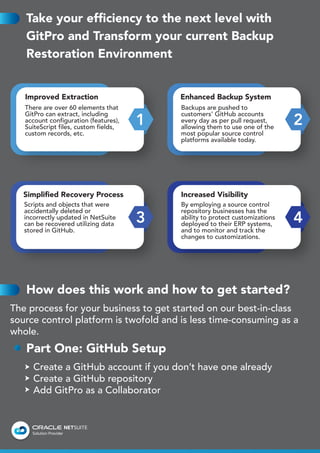
1 2
3 4
Improved Extraction Enhanced Backup System
Simplified Recovery Process Increased Visibility
There are over 60 elements that
GitPro can extract, including
account configuration (features),
SuiteScript files, custom fields,
custom records, etc.
Scripts and objects that were
accidentally deleted or
incorrectly updated in NetSuite
can be recovered utilizing data
stored in GitHub.
By employing a source control
repository businesses has the
ability to protect customizations
deployed to their ERP systems,
and to monitor and track the
changes to customizations.
Backups are pushed to
customers' GitHub accounts
every day as per pull request,
allowing them to use one of the
most popular source control
platforms available today.
Part Two: NetSuite Setup
Ensure your SDF (SuiteCloud Development Framework) is
enabled
Create a NetSuite Role
Provide Access to the Role
Generate the Access
Learn How GitPro is Helping its Clients in
Protecting and Customizing Their NetSuite
Accounts
Object/Script Recovery
NetSuite administrators and developers frequently make
changes directly to NetSuite production accounts, even at
businesses with clearly established software development
processes. Breaking changes is possible now.
A NetSuite administrator from a chemical distribution company
was happy to find the previous version of a complex Bill of
Lading PDF template after breaking changes introduced to the
production XML code.
Processing Integrity
The processing integrity team of a software company uses
GitPro to keep track of changes to roles and permissions. Every
time GitPro generates a pull request with changes to roles, the
company establishes a GitHub Action to create a GitHub issue
and tag members of the processing integrity team.
System Audit
A public firm that employs NetSuite as its ERP solution is SOX
compliant. Each NetSuite change must be registered in a
ticketing system and approved before implementation. GitPro
pull requests are chosen at random by external auditing firms
to verify that the right procedures were followed.
Change Management
A large manufacturing company's accounts payable
department had several problems due to customizations
delivered to the customer's NetSuite account, but they were
not adequately disclosed. GitPro pull requests are
continuously monitored by the director of training and change
management to spot training opportunities early on.
NetSuite Development
To use the SuiteCloud Extension for Visual Studio Code to
push scripts and deploy projects to NetSuite, NetSuite
developers can clone the GitHub repository.
Product features
To fully utilize one of the top source control systems available,
GitPro submits NetSuite updates to GitHub as pull requests.
GitHub Repository
Your project's files and each file's revision history are all
stored here from where you can manage and discuss the work
on your project.
Git Hub Pull Request Alerts
Every time GitPro uploads a new pull request to GitHub,
those who are watching the repository receive an email
notification.
List of Pull Requests
Users can browse the modifications made by each Pull
Request by browsing the list of daily pull requests generated
by GitPro.
Previous versions of the Repository
Users can look through the full repository at a specific point in
time. You won't ever lose your customized script files.
FAQs
Can I backup customer, vendor, and
transactional data using GitPro?
No. Only the definitions of account customizations can be
extracted using GitPro. GitPro does not back up records like
customers, transactions, and instances of custom records, nor
is it a NetSuite backup solution.
Do I have to add any scripts or bundles to my
NetSuite account?
No, the GitPro solution does not need scripts or bundles to
be installed on your account because it operates externally.
Is there a time slot I can set for GitPro to run?
Yes, GitPro can be scheduled to transfer for the logs from
NetSuite into GitHub overnight. ERP Buddies would take
ownership for setting that up.
Can bundle files that contain SuiteScript be
extracted?
The SuiteScripts folder is the only place where SuiteScript files
can be extracted. The SuiteBundles folder is where
bundle-related SuiteScript files can be found.
Are records contained in bundles extractable?
Yes. As long as they are not locked, records that are a part of
bundles can be removed. Locked records are impossible to
extract.
There are no workflows in the GitHub
repository despite the fact that I granted the
GitPro role access to them.
The GitPro role requires total access to the underlying records
to extract workflow definitions. For instance, the job needs
complete access to invoices to pull invoice workflows.
Is GitPro free?
GitPro is available for free use (no credit card required). There
will be a yearly cost following the trial time. Before sending
any invoice, we will get in touch with you to make sure you
are satisfied with GitPro.
What elements cannot be extracted by this
platform?
GitPro cannot extract locked objects and JavaScript files that
are part of bundles and don't support searches and reports.

GitPro Whitepaper

  • 1.
  • 2.
    Restore, Protect andAudit your NetSuite Configurations and Customizations with our world class intuitive source backup system solution Daily overnight backups Extracts all your account configurations and customizations deployed in your NetSuite account every night, which is then pushed into your GitHub repository. Real-time visibility Enhance your decision-making by monitoring past changes made in features, roles and permissions with accurate time stamps day/month/year and the account user with GitHub alerts. Track and Monitor Protects changes and customization deployed to your ERP system which can be monitored and tracked with real-time visibility in a unified source control repository. “GitPro is designed to help companies, especially for risk and audit collaborators to monitor, track and restore changes at the same time protecting their account configurations and customization”
  • 3.
    Take your efficiencyto the next level with GitPro and Transform your current Backup Restoration Environment How does this work and how to get started? The process for your business to get started on our best-in-class source control platform is twofold and is less time-consuming as a whole. Part One: GitHub Setup Create a GitHub account if you don’t have one already Create a GitHub repository Add GitPro as a Collaborator 1 2 3 4 Improved Extraction Enhanced Backup System Simplified Recovery Process Increased Visibility There are over 60 elements that GitPro can extract, including account configuration (features), SuiteScript files, custom fields, custom records, etc. Scripts and objects that were accidentally deleted or incorrectly updated in NetSuite can be recovered utilizing data stored in GitHub. By employing a source control repository businesses has the ability to protect customizations deployed to their ERP systems, and to monitor and track the changes to customizations. Backups are pushed to customers' GitHub accounts every day as per pull request, allowing them to use one of the most popular source control platforms available today.
  • 4.
    Part Two: NetSuiteSetup Ensure your SDF (SuiteCloud Development Framework) is enabled Create a NetSuite Role Provide Access to the Role Generate the Access Learn How GitPro is Helping its Clients in Protecting and Customizing Their NetSuite Accounts Object/Script Recovery NetSuite administrators and developers frequently make changes directly to NetSuite production accounts, even at businesses with clearly established software development processes. Breaking changes is possible now. A NetSuite administrator from a chemical distribution company was happy to find the previous version of a complex Bill of Lading PDF template after breaking changes introduced to the production XML code. Processing Integrity The processing integrity team of a software company uses GitPro to keep track of changes to roles and permissions. Every time GitPro generates a pull request with changes to roles, the company establishes a GitHub Action to create a GitHub issue and tag members of the processing integrity team.
  • 5.
    System Audit A publicfirm that employs NetSuite as its ERP solution is SOX compliant. Each NetSuite change must be registered in a ticketing system and approved before implementation. GitPro pull requests are chosen at random by external auditing firms to verify that the right procedures were followed. Change Management A large manufacturing company's accounts payable department had several problems due to customizations delivered to the customer's NetSuite account, but they were not adequately disclosed. GitPro pull requests are continuously monitored by the director of training and change management to spot training opportunities early on. NetSuite Development To use the SuiteCloud Extension for Visual Studio Code to push scripts and deploy projects to NetSuite, NetSuite developers can clone the GitHub repository. Product features To fully utilize one of the top source control systems available, GitPro submits NetSuite updates to GitHub as pull requests. GitHub Repository Your project's files and each file's revision history are all stored here from where you can manage and discuss the work on your project.
  • 6.
    Git Hub PullRequest Alerts Every time GitPro uploads a new pull request to GitHub, those who are watching the repository receive an email notification. List of Pull Requests Users can browse the modifications made by each Pull Request by browsing the list of daily pull requests generated by GitPro. Previous versions of the Repository Users can look through the full repository at a specific point in time. You won't ever lose your customized script files. FAQs Can I backup customer, vendor, and transactional data using GitPro? No. Only the definitions of account customizations can be extracted using GitPro. GitPro does not back up records like customers, transactions, and instances of custom records, nor is it a NetSuite backup solution. Do I have to add any scripts or bundles to my NetSuite account? No, the GitPro solution does not need scripts or bundles to be installed on your account because it operates externally.
  • 7.
    Is there atime slot I can set for GitPro to run? Yes, GitPro can be scheduled to transfer for the logs from NetSuite into GitHub overnight. ERP Buddies would take ownership for setting that up. Can bundle files that contain SuiteScript be extracted? The SuiteScripts folder is the only place where SuiteScript files can be extracted. The SuiteBundles folder is where bundle-related SuiteScript files can be found. Are records contained in bundles extractable? Yes. As long as they are not locked, records that are a part of bundles can be removed. Locked records are impossible to extract. There are no workflows in the GitHub repository despite the fact that I granted the GitPro role access to them. The GitPro role requires total access to the underlying records to extract workflow definitions. For instance, the job needs complete access to invoices to pull invoice workflows.
  • 8.
    Is GitPro free? GitProis available for free use (no credit card required). There will be a yearly cost following the trial time. Before sending any invoice, we will get in touch with you to make sure you are satisfied with GitPro. What elements cannot be extracted by this platform? GitPro cannot extract locked objects and JavaScript files that are part of bundles and don't support searches and reports.