Git ile Versiyon Kontrolü
Ajanda
Version Kontrolü nedir
Git nedir? Git kurulumu
Temel Komutlar
Kod Deposu Yönetimi (Github)
Takım Çalışmalarında Git
(Gitflow)
Semantik Versiyonlama:
Semver
Hedef: Takım halinde bir kod
deposu oluşturmak
Git Nedir
The name "git" was given by Linus Torvalds when he wrote the very first
version. He described the tool as "the stupid content tracker"and the name as
(depending on your way)
- random three-letter combination that is pronounceable, and not actually
used by any common UNIX command. The fact that it is a mispronunciation
of "get" may or may not be relevant.
- stupid. contemptible and despicable. simple. Take your pick from the
dictionary of slang.
- "global information tracker": you're in a good mood, and it actually works
for you. Angels sing, and a light suddenly fills the room.
- "g*dd*mn idiotic truckload of sh*t": when it breaks
Temel Komutlar ~ man git :)
~ git init
~ .gitignore
~ git config
~ git add
~ git stash
~ git commit
~ git remote
~ git checkout
~ git branch
~ git push
~ git pull
~ git log
~ git clone
~ git blame
~ git rebase
~ git merge
~ git fetch
~ git reset
~ git revert
~ git gc
~ git cherry-pick
~ git diff
~ git help <command>
https://try.github.io/levels/1
Önerilen Kullanım Biçimi
https://try.github.io/levels/1
~ man git => Kaynağından oku
Sık commit yap
Sakin ol. Git’te kod kaybolmaz (şayet commit’lediysen ;)
History’s güncelleme, yeni commit at
Dallanma akışı seç
Yetki dağılımına uygun kod depolarına ayır
Anlaşılır ve kısa commit mesajları at
Repine güncel tut (Sık git rebase)
Fazla stash tutma, askıdaki nesneleri temizle (git fetch -p & git gc)
Gitolite, Gitslave, Sourcetree gibi yardımcı araçlar kullan
Git kod depolama
servisi
2007’de kuruldu, ~48
mn projeyi barındırıyor
Açık kaynak projelerde
ücretsiz
Takım &
Organizasyonel Yetki
Yönetimi
Github Kullanımı
Hesap & Organizasyon Oluşturma
Repository (kod deposu) oluşturma
Klonlama (pull & push & revert & reset & remote ..)
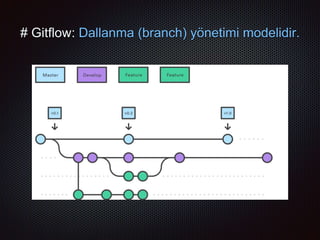
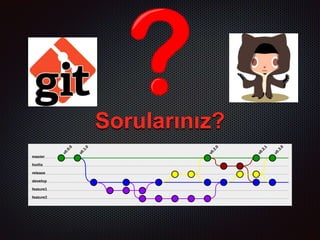
# Gitflow: Dallanma (branch) yönetimi modelidir.
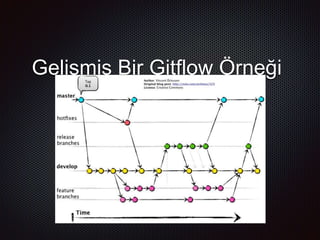
Gelişmiş Bir Gitflow Örneği
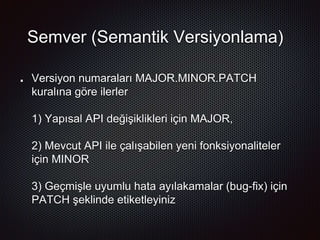
Semver (Semantik Versiyonlama)
Versiyon numaraları MAJOR.MINOR.PATCH
kuralına göre ilerler
1) Yapısal API değişiklikleri için MAJOR,
2) Mevcut API ile çalışabilen yeni fonksiyonaliteler
için MINOR
3) Geçmişle uyumlu hata ayılakamalar (bug-fix) için
PATCH şeklinde etiketleyiniz
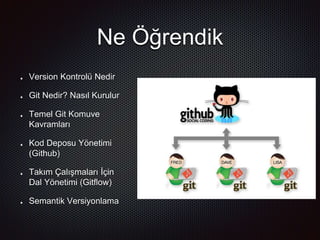
Ne Öğrendik
Version Kontrolü Nedir
Git Nedir? Nasıl Kurulur
Temel Git Komuve
Kavramları
Kod Deposu Yönetimi
(Github)
Takım Çalışmaları İçin
Dal Yönetimi (Gitflow)
Semantik Versiyonlama
Kaynakça
https://git-scm.com/doc
https://wildlyinaccurate.com/a-hackers-guide-to-git/
http://nvie.com/posts/a-successful-git-branching-model/
https://try.github.io
https://github.com
Sorularınız?
Lütfen aşağıdaki adreslerden geri dönüşlerinizi bildiriniz
Katıldığınız İçin Teşekkürler
iilhancetin@gmail.com
Twitter & Github: @ilhnctn
https://bit.ly/GitFeedback

Git ile versiyon kontrolü

  • 1.
  • 2.
    Ajanda Version Kontrolü nedir Gitnedir? Git kurulumu Temel Komutlar Kod Deposu Yönetimi (Github) Takım Çalışmalarında Git (Gitflow) Semantik Versiyonlama: Semver Hedef: Takım halinde bir kod deposu oluşturmak
  • 3.
    Git Nedir The name"git" was given by Linus Torvalds when he wrote the very first version. He described the tool as "the stupid content tracker"and the name as (depending on your way) - random three-letter combination that is pronounceable, and not actually used by any common UNIX command. The fact that it is a mispronunciation of "get" may or may not be relevant. - stupid. contemptible and despicable. simple. Take your pick from the dictionary of slang. - "global information tracker": you're in a good mood, and it actually works for you. Angels sing, and a light suddenly fills the room. - "g*dd*mn idiotic truckload of sh*t": when it breaks
  • 4.
    Temel Komutlar ~man git :) ~ git init ~ .gitignore ~ git config ~ git add ~ git stash ~ git commit ~ git remote ~ git checkout ~ git branch ~ git push ~ git pull ~ git log ~ git clone ~ git blame ~ git rebase ~ git merge ~ git fetch ~ git reset ~ git revert ~ git gc ~ git cherry-pick ~ git diff ~ git help <command> https://try.github.io/levels/1
  • 5.
    Önerilen Kullanım Biçimi https://try.github.io/levels/1 ~man git => Kaynağından oku Sık commit yap Sakin ol. Git’te kod kaybolmaz (şayet commit’lediysen ;) History’s güncelleme, yeni commit at Dallanma akışı seç Yetki dağılımına uygun kod depolarına ayır Anlaşılır ve kısa commit mesajları at Repine güncel tut (Sık git rebase) Fazla stash tutma, askıdaki nesneleri temizle (git fetch -p & git gc) Gitolite, Gitslave, Sourcetree gibi yardımcı araçlar kullan
  • 6.
    Git kod depolama servisi 2007’dekuruldu, ~48 mn projeyi barındırıyor Açık kaynak projelerde ücretsiz Takım & Organizasyonel Yetki Yönetimi
  • 7.
    Github Kullanımı Hesap &Organizasyon Oluşturma Repository (kod deposu) oluşturma Klonlama (pull & push & revert & reset & remote ..)
  • 8.
    # Gitflow: Dallanma(branch) yönetimi modelidir.
  • 9.
  • 10.
    Semver (Semantik Versiyonlama) Versiyonnumaraları MAJOR.MINOR.PATCH kuralına göre ilerler 1) Yapısal API değişiklikleri için MAJOR, 2) Mevcut API ile çalışabilen yeni fonksiyonaliteler için MINOR 3) Geçmişle uyumlu hata ayılakamalar (bug-fix) için PATCH şeklinde etiketleyiniz
  • 11.
    Ne Öğrendik Version KontrolüNedir Git Nedir? Nasıl Kurulur Temel Git Komuve Kavramları Kod Deposu Yönetimi (Github) Takım Çalışmaları İçin Dal Yönetimi (Gitflow) Semantik Versiyonlama
  • 12.
  • 13.
  • 14.
    Lütfen aşağıdaki adreslerdengeri dönüşlerinizi bildiriniz Katıldığınız İçin Teşekkürler iilhancetin@gmail.com Twitter & Github: @ilhnctn https://bit.ly/GitFeedback