GIT
GETTING STARTED
Vitalii Sharavara
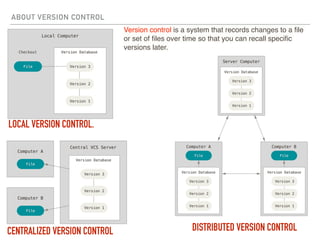
ABOUT VERSION CONTROL
LOCAL VERSION CONTROL.
CENTRALIZED VERSION CONTROL DISTRIBUTED VERSION CONTROL
Version control is a system that records changes to a file
or set of files over time so that you can recall specific
versions later.
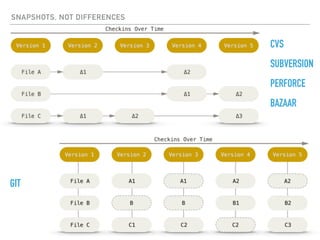
SNAPSHOTS, NOT DIFFERENCES
CVS
SUBVERSION
PERFORCE
BAZAAR
GIT
THE THREE STATES
Git has three main states that your files can reside in: committed, modified, and staged.
‣ Committed means that the data is safely stored in your local database.
‣ Modified means that you have changed the file but have not committed it to your
database yet.
‣ Staged means that you have marked a modified file in its current version to go into your
next commit snapshot.
STATES & COMMANDS
There are a lot of different ways to use Git. There are the original command line tools, and there are many graphical user interfaces of varying capabilities
CLI
Folder with a project:
Initializing a Repository in an existing directory:
CLI
Status:
Add files to the staging area:
CLI
Commit to repository:
Status:
CLI
Push to remote repository:
Remote status:
BRANCHES
A branch and its commit history HEAD pointing to a branch
The HEAD branch moves
forward when a commit is
made
HEAD moves when you checkout
The default branch name in Git is master.
How does Git know what branch you’re currently on? It keeps a special pointer called HEAD

Git. Getting started