Getting Your Grips
on Excel Chaos
Niels de Bruijn, Business Unit Manager APEX
San Antonio, 27-JUN-2017
2
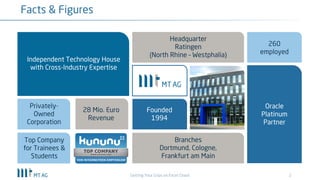
Facts & Figures
Independent Technology House
with Cross-Industry Expertise
Headquarter
Ratingen
(North Rhine – Westphalia)
260
employed
Founded
1994
Branches
Dortmund, Cologne,
Frankfurt am Main
Top Company
for Trainees &
Students
Privately-
Owned
Corporation
Oracle
Platinum
Partner
28 Mio. Euro
Revenue
Getting Your Grips on Excel Chaos
3
About me
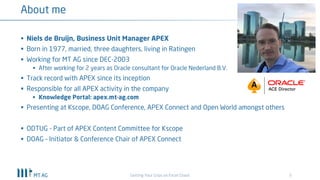
§ Niels de Bruijn, Business Unit Manager APEX
§ Born in 1977, married, three daughters, living in Ratingen
§ Working for MT AG since DEC-2003
§ After working for 2 years as Oracle consultant for Oracle Nederland B.V.
§ Track record with APEX since its inception
§ Responsible for all APEX activity in the company
§ Knowledge Portal: apex.mt-ag.com
§ Presenting at Kscope, DOAG Conference, APEX Connect and Open World amongst others
§ ODTUG - Part of APEX Content Committee for Kscope
§ DOAG – Initiator & Conference Chair of APEX Connect
Getting Your Grips on Excel Chaos
4
Agenda
Getting Your Grips on Excel Chaos
§ When to migrate
§ Moving your data to Oracle
§ Replacing the Excel frontend
5
Typical usage scenarios for Excel
Getting Your Grips on Excel Chaos
§ Listing of data
§ Project planning
§ Controlling
§ Management System
§ Management Reporting
6
When it is becoming a nightmare...
Getting Your Grips on Excel Chaos
§ when the creator leaves the company and no documentation exists
§ when Excel becomes part of daily business processes, operated by different
user groups throughout the organization
§ when multiple excel files are linked up, maybe even syncing data with Access
or other data sources
§ when business logic is implemented using VBA and/or macros
§ when the Excel file gets too big
§ when multiple versions of Excel files are flying around and are sent by e-mail
7
General issues with Excel
Getting Your Grips on Excel Chaos
§ No scalability
§ Poor security features
§ Data redundancy
§ No multi developer environment
§ No multi user environment
§ Data quality issues
§ No option for integration
8
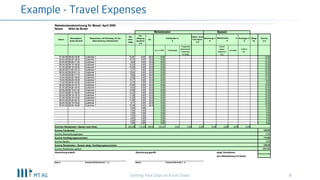
Example - Travel Expenses
Getting Your Grips on Excel Chaos
9
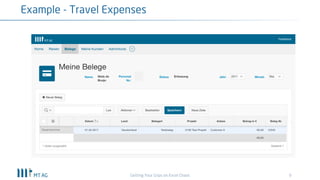
Example - Travel Expenses
Getting Your Grips on Excel Chaos
10
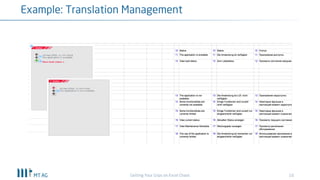
Example: Translation Management
Getting Your Grips on Excel Chaos
11
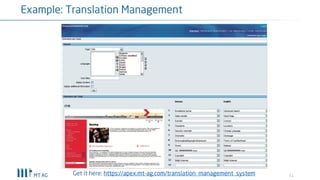
Example: Translation Management
Get it here: https://apex.mt-ag.com/translation_management_system
12
Agenda
Getting Your Grips on Excel Chaos
§ When to migrate
§ Moving your data to Oracle
§ Replacing the Excel frontend
13
Moving your data to Oracle
Getting Your Grips on Excel Chaos
§ Things to consider...
§ Option 1: don‘t migrate
§ Option 2: Upload CSVs through using the native APEX Wizard
§ Option 3: excel2collection Plugin
§ Other Options
14
Things to consider...
Getting Your Grips on Excel Chaos
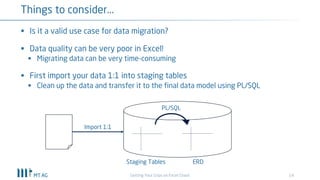
§ Is it a valid use case for data migration?
§ Data quality can be very poor in Excel!
§ Migrating data can be very time-consuming
§ First import your data 1:1 into staging tables
§ Clean up the data and transfer it to the final data model using PL/SQL
PL/SQL
Staging Tables ERD
Import 1:1
15
Option 1: don‘t migrate
Getting Your Grips on Excel Chaos
§ Leave the mess in Excel and just import the master data* of it
§ Start entering your transactional data through your new shiny APEX interface
*) Master Data being „Countries Table“, „Currencies Table“, etc.
16
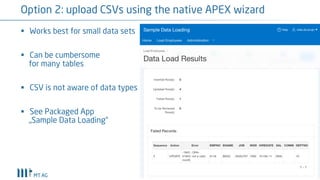
Option 2: upload CSVs using the native APEX wizard
§ Works best for small data sets
§ Can be cumbersome
for many tables
§ CSV is not aware of data types
§ See Packaged App
„Sample Data Loading“
17
Option 3: excel2collection Plugin
Getting Your Grips on Excel Chaos
§ Supports all common file types CSV, XLS and XLSX
§ First 48 columns are imported, because data is stored into an APEX collection
§ See: http://www.apex-plugin.com/oracle-apex-plugins/process-type-
plugin/excel2collections_271.html
18
Other Options
Getting Your Grips on Excel Chaos
§ Use SQL Loader to import CSV
§ SQL Developer (http://www.thatjeffsmith.com/archive/2012/04/how-to-
import-from-excel-to-oracle-with-sql-developer/)
§ Using „External Tables“ in Oracle Database
§ Apache POI: https://chrisonoracle.wordpress.com/2013/11/13/read-excel-file-
in-plsql-using-java-in-the-db/
§ Alternative with support: Opal:XE (http://www.opal-
consulting.de/site/products/opal-xe)
19
Agenda
Getting Your Grips on Excel Chaos
§ When to migrate
§ Moving your data to Oracle
§ Replacing the Excel frontend
20
Replacing the Excel frontend
Getting Your Grips on Excel Chaos
§ Native components in APEX 5.1.x
§ Handsontable
§ SmartPivot
21
Native components in APEX 5.1.x
Getting Your Grips on Excel Chaos
§ Single Row Update (SRU) Form
§ The best way to operate on a single table row
§ Charts
§ SQL Report
§ Good choice for custom formatting your (readonly) report and no Interactive
Reports features are needed
22
Native components in APEX 5.1.x
Getting Your Grips on Excel Chaos
§ Interactive Report
§ Still my no.1 choice when no data entry is required
§ Interactive Grid (IG)
§ Great for data entry of multiple rows on the same page, but....
§ Lacking some typical Excel features
(copy-down, copy/paste, vertical headers, drill-down headers, auto-width, etc.)
§ Time consuming customization done through JavaScript
§ No official API doc available (see blog posts of John Snyders / forum.oracleapex.com)
§ Multiple IGs on one page will slow down page load
23
Native components in APEX 5.1.x
Getting Your Grips on Excel Chaos
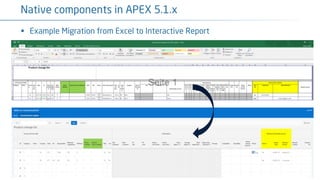
§ Example Migration from Excel to Interactive Report
24
Example of IG Customization
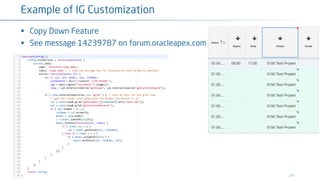
§ Copy Down Feature
§ See message 14239787 on forum.oracleapex.com
25
Replacing the Excel frontend
Getting Your Grips on Excel Chaos
§ Native components in APEX 5.1.x
§ Handsontable
§ SmartPivot
26
Handsontable
Getting Your Grips on Excel Chaos
“Handsontable is a composite spreadsheet component for apps and websites. It is written in
JavaScript and not constrained by any external framework. It can be easily modified or extended
with custom plugins. It also binds to any source using the JSON format and handles large
amounts of data. You can easily do all CRUD operations and provide end-users with an Excel-like
experience.”
- docs.handsontable.com
27
Handsontable
Getting Your Grips on Excel Chaos
§ Offers some more features compared to IG (copy/paste of data)
§ Data binding doesn‘t come out-of-the-box
§ apex.server.process calls needed to process the data
§ Requires licenses
28
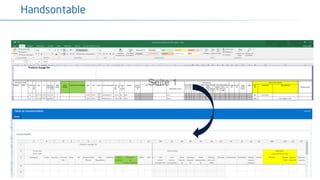
Handsontable
Getting Your Grips on Excel Chaos
29
Replacing the Excel frontend
Getting Your Grips on Excel Chaos
§ Native components in APEX 5.1.x
§ Handsontable
§ SmartPivot
30
SmartPivot
Getting Your Grips on Excel Chaos
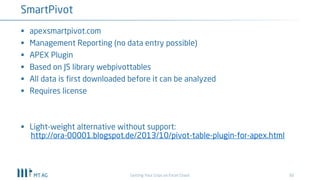
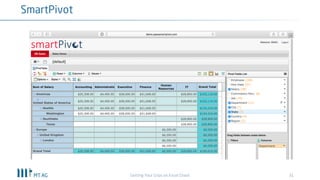
§ apexsmartpivot.com
§ Management Reporting (no data entry possible)
§ APEX Plugin
§ Based on JS library webpivottables
§ All data is first downloaded before it can be analyzed
§ Requires license
§ Light-weight alternative without support:
http://ora-00001.blogspot.de/2013/10/pivot-table-plugin-for-apex.html
31
SmartPivot
Getting Your Grips on Excel Chaos
32
Summary
Getting Your Grips on Excel Chaos
§ What benefit(s) do you get from migrating Excel to APEX?
§ Remember: Excel != APEX (Client-Tool vs. Webapp)
§ Evaluate if data migration of your Excel data is necessary
§ Data Quality/Redundancy is mostly an issue in Excel
§ Stick with standard APEX components/features whenever possible
Q&A
@nielsdb
http://de.linkedin.com/in/nielsdebruijn
www.xing.com/profile/Niels_deBruijn
http://blog.mt-ag.com/apex

Getting your grips on Excel chaos

  • 1.
    Getting Your Grips onExcel Chaos Niels de Bruijn, Business Unit Manager APEX San Antonio, 27-JUN-2017
  • 2.
    2 Facts & Figures IndependentTechnology House with Cross-Industry Expertise Headquarter Ratingen (North Rhine – Westphalia) 260 employed Founded 1994 Branches Dortmund, Cologne, Frankfurt am Main Top Company for Trainees & Students Privately- Owned Corporation Oracle Platinum Partner 28 Mio. Euro Revenue Getting Your Grips on Excel Chaos
  • 3.
    3 About me § Nielsde Bruijn, Business Unit Manager APEX § Born in 1977, married, three daughters, living in Ratingen § Working for MT AG since DEC-2003 § After working for 2 years as Oracle consultant for Oracle Nederland B.V. § Track record with APEX since its inception § Responsible for all APEX activity in the company § Knowledge Portal: apex.mt-ag.com § Presenting at Kscope, DOAG Conference, APEX Connect and Open World amongst others § ODTUG - Part of APEX Content Committee for Kscope § DOAG – Initiator & Conference Chair of APEX Connect Getting Your Grips on Excel Chaos
  • 4.
    4 Agenda Getting Your Gripson Excel Chaos § When to migrate § Moving your data to Oracle § Replacing the Excel frontend
  • 5.
    5 Typical usage scenariosfor Excel Getting Your Grips on Excel Chaos § Listing of data § Project planning § Controlling § Management System § Management Reporting
  • 6.
    6 When it isbecoming a nightmare... Getting Your Grips on Excel Chaos § when the creator leaves the company and no documentation exists § when Excel becomes part of daily business processes, operated by different user groups throughout the organization § when multiple excel files are linked up, maybe even syncing data with Access or other data sources § when business logic is implemented using VBA and/or macros § when the Excel file gets too big § when multiple versions of Excel files are flying around and are sent by e-mail
  • 7.
    7 General issues withExcel Getting Your Grips on Excel Chaos § No scalability § Poor security features § Data redundancy § No multi developer environment § No multi user environment § Data quality issues § No option for integration
  • 8.
    8 Example - TravelExpenses Getting Your Grips on Excel Chaos
  • 9.
    9 Example - TravelExpenses Getting Your Grips on Excel Chaos
  • 10.
  • 11.
    11 Example: Translation Management Getit here: https://apex.mt-ag.com/translation_management_system
  • 12.
    12 Agenda Getting Your Gripson Excel Chaos § When to migrate § Moving your data to Oracle § Replacing the Excel frontend
  • 13.
    13 Moving your datato Oracle Getting Your Grips on Excel Chaos § Things to consider... § Option 1: don‘t migrate § Option 2: Upload CSVs through using the native APEX Wizard § Option 3: excel2collection Plugin § Other Options
  • 14.
    14 Things to consider... GettingYour Grips on Excel Chaos § Is it a valid use case for data migration? § Data quality can be very poor in Excel! § Migrating data can be very time-consuming § First import your data 1:1 into staging tables § Clean up the data and transfer it to the final data model using PL/SQL PL/SQL Staging Tables ERD Import 1:1
  • 15.
    15 Option 1: don‘tmigrate Getting Your Grips on Excel Chaos § Leave the mess in Excel and just import the master data* of it § Start entering your transactional data through your new shiny APEX interface *) Master Data being „Countries Table“, „Currencies Table“, etc.
  • 16.
    16 Option 2: uploadCSVs using the native APEX wizard § Works best for small data sets § Can be cumbersome for many tables § CSV is not aware of data types § See Packaged App „Sample Data Loading“
  • 17.
    17 Option 3: excel2collectionPlugin Getting Your Grips on Excel Chaos § Supports all common file types CSV, XLS and XLSX § First 48 columns are imported, because data is stored into an APEX collection § See: http://www.apex-plugin.com/oracle-apex-plugins/process-type- plugin/excel2collections_271.html
  • 18.
    18 Other Options Getting YourGrips on Excel Chaos § Use SQL Loader to import CSV § SQL Developer (http://www.thatjeffsmith.com/archive/2012/04/how-to- import-from-excel-to-oracle-with-sql-developer/) § Using „External Tables“ in Oracle Database § Apache POI: https://chrisonoracle.wordpress.com/2013/11/13/read-excel-file- in-plsql-using-java-in-the-db/ § Alternative with support: Opal:XE (http://www.opal- consulting.de/site/products/opal-xe)
  • 19.
    19 Agenda Getting Your Gripson Excel Chaos § When to migrate § Moving your data to Oracle § Replacing the Excel frontend
  • 20.
    20 Replacing the Excelfrontend Getting Your Grips on Excel Chaos § Native components in APEX 5.1.x § Handsontable § SmartPivot
  • 21.
    21 Native components inAPEX 5.1.x Getting Your Grips on Excel Chaos § Single Row Update (SRU) Form § The best way to operate on a single table row § Charts § SQL Report § Good choice for custom formatting your (readonly) report and no Interactive Reports features are needed
  • 22.
    22 Native components inAPEX 5.1.x Getting Your Grips on Excel Chaos § Interactive Report § Still my no.1 choice when no data entry is required § Interactive Grid (IG) § Great for data entry of multiple rows on the same page, but.... § Lacking some typical Excel features (copy-down, copy/paste, vertical headers, drill-down headers, auto-width, etc.) § Time consuming customization done through JavaScript § No official API doc available (see blog posts of John Snyders / forum.oracleapex.com) § Multiple IGs on one page will slow down page load
  • 23.
    23 Native components inAPEX 5.1.x Getting Your Grips on Excel Chaos § Example Migration from Excel to Interactive Report
  • 24.
    24 Example of IGCustomization § Copy Down Feature § See message 14239787 on forum.oracleapex.com
  • 25.
    25 Replacing the Excelfrontend Getting Your Grips on Excel Chaos § Native components in APEX 5.1.x § Handsontable § SmartPivot
  • 26.
    26 Handsontable Getting Your Gripson Excel Chaos “Handsontable is a composite spreadsheet component for apps and websites. It is written in JavaScript and not constrained by any external framework. It can be easily modified or extended with custom plugins. It also binds to any source using the JSON format and handles large amounts of data. You can easily do all CRUD operations and provide end-users with an Excel-like experience.” - docs.handsontable.com
  • 27.
    27 Handsontable Getting Your Gripson Excel Chaos § Offers some more features compared to IG (copy/paste of data) § Data binding doesn‘t come out-of-the-box § apex.server.process calls needed to process the data § Requires licenses
  • 28.
  • 29.
    29 Replacing the Excelfrontend Getting Your Grips on Excel Chaos § Native components in APEX 5.1.x § Handsontable § SmartPivot
  • 30.
    30 SmartPivot Getting Your Gripson Excel Chaos § apexsmartpivot.com § Management Reporting (no data entry possible) § APEX Plugin § Based on JS library webpivottables § All data is first downloaded before it can be analyzed § Requires license § Light-weight alternative without support: http://ora-00001.blogspot.de/2013/10/pivot-table-plugin-for-apex.html
  • 31.
  • 32.
    32 Summary Getting Your Gripson Excel Chaos § What benefit(s) do you get from migrating Excel to APEX? § Remember: Excel != APEX (Client-Tool vs. Webapp) § Evaluate if data migration of your Excel data is necessary § Data Quality/Redundancy is mostly an issue in Excel § Stick with standard APEX components/features whenever possible
  • 33.