Getting to Know Your Data
1
Some sources from where you can access
datasets for data warehouse and data mining
Website: UCI Machine Learning Repository
Website: Kaggle Datasets
Website: Data.gov
Website: Google Dataset Search
Website: GitHub
Website: AWS Public Datasets
European Data Portal
5/1/2024 2
Getting to Know Your Data
 Data Objects and Attribute Types
 Basic Statistical Descriptions of Data
 Data Visualization
 Measuring Data Similarity and Dissimilarity
 Summary
3
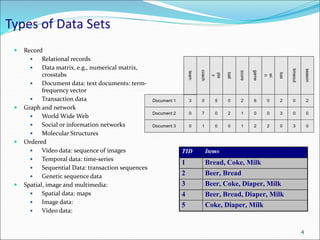
Types of Data Sets
 Record
 Relational records
 Data matrix, e.g., numerical matrix,
crosstabs
 Document data: text documents: term-
frequency vector
 Transaction data
 Graph and network
 World Wide Web
 Social or information networks
 Molecular Structures
 Ordered
 Video data: sequence of images
 Temporal data: time-series
 Sequential Data: transaction sequences
 Genetic sequence data
 Spatial, image and multimedia:
 Spatial data: maps
 Image data:
 Video data:
Document 1
season
timeout
lost
wi
n
game
score
ball
pla
y
coach
team
Document 2
Document 3
3 0 5 0 2 6 0 2 0 2
0
0
7 0 2 1 0 0 3 0 0
1 0 0 1 2 2 0 3 0
TID Items
1 Bread, Coke, Milk
2 Beer, Bread
3 Beer, Coke, Diaper, Milk
4 Beer, Bread, Diaper, Milk
5 Coke, Diaper, Milk
4
Important Characteristics of Structured Data
 Dimensionality
 Curse of dimensionality
 Sparsity
 Only presence counts
 Resolution
 Patterns depend on the scale
 Distribution
 Centrality and dispersion
5
Data Objects
 Data sets are made up of data objects.
 A data object represents an entity.
 Examples:
 sales database: customers, store items, sales
 medical database: patients, treatments
 university database: students, professors, courses
 Also called samples , examples, instances, data points, objects,
tuples.
 Data objects are described by attributes.
 Database rows -> data objects; columns ->attributes.
6
Attributes
 Attribute (or dimensions, features, variables): a data
field, representing a characteristic or feature of a data
object.
 E.g., customer _ID, name, address
 Types:
 Nominal
 Binary
 Numeric: quantitative
 Interval-scaled
 Ratio-scaled
7
Attribute Types
 Nominal: categories, states, or “names of things”
 Hair_color = {auburn, black, blond, brown, grey, red, white}
 marital status, occupation, ID numbers, zip codes
 Binary
 Nominal attribute with only 2 states (0 and 1)
 Symmetric binary: both outcomes equally important
 e.g., gender
 Asymmetric binary: outcomes not equally important.
 e.g., medical test (positive vs. negative)
 Convention: assign 1 to most important outcome (e.g., HIV
positive)
 Ordinal
 Values have a meaningful order (ranking) but magnitude between
successive values is not known.
 Size = {small, medium, large}, grades, army rankings
8
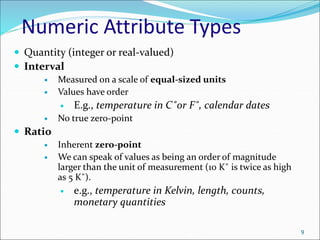
Numeric Attribute Types
 Quantity (integer or real-valued)
 Interval
 Measured on a scale of equal-sized units
 Values have order
 E.g., temperature in C˚or F˚, calendar dates
 No true zero-point
 Ratio
 Inherent zero-point
 We can speak of values as being an order of magnitude
larger than the unit of measurement (10 K˚ is twice as high
as 5 K˚).
 e.g., temperature in Kelvin, length, counts,
monetary quantities
9
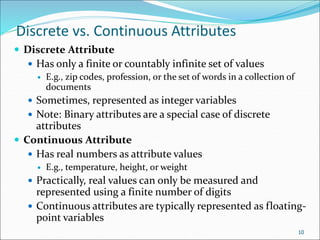
Discrete vs. Continuous Attributes
 Discrete Attribute
 Has only a finite or countably infinite set of values
 E.g., zip codes, profession, or the set of words in a collection of
documents
 Sometimes, represented as integer variables
 Note: Binary attributes are a special case of discrete
attributes
 Continuous Attribute
 Has real numbers as attribute values
 E.g., temperature, height, or weight
 Practically, real values can only be measured and
represented using a finite number of digits
 Continuous attributes are typically represented as floating-
point variables
10
Getting to Know Your Data
 Data Objects and Attribute Types
 Basic Statistical Descriptions of Data
 Data Visualization
 Measuring Data Similarity and Dissimilarity
 Summary
11
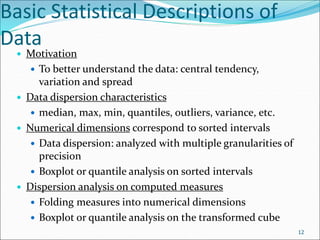
Basic Statistical Descriptions of
Data
 Motivation
 To better understand the data: central tendency,
variation and spread
 Data dispersion characteristics
 median, max, min, quantiles, outliers, variance, etc.
 Numerical dimensions correspond to sorted intervals
 Data dispersion: analyzed with multiple granularities of
precision
 Boxplot or quantile analysis on sorted intervals
 Dispersion analysis on computed measures
 Folding measures into numerical dimensions
 Boxplot or quantile analysis on the transformed cube
12
Measuring the Central Tendency
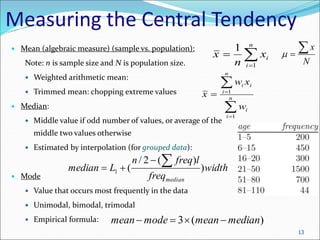
 Mean (algebraic measure) (sample vs. population):
Note: n is sample size and N is population size.
 Weighted arithmetic mean:
 Trimmed mean: chopping extreme values
 Median:
 Middle value if odd number of values, or average of the
middle two values otherwise
 Estimated by interpolation (for grouped data):
 Mode
 Value that occurs most frequently in the data
 Unimodal, bimodal, trimodal
 Empirical formula:
N
x



13



n
i
i
x
n
x
1
1




 n
i
i
n
i
i
i
w
x
w
x
1
1
width
freq
l
freq
n
L
median
median
)
)
(
2
/
(
1




)
(
3 median
mean
mode
mean 



Measuring the Dispersion of Data
 Quartiles, outliers and boxplots
 Quartiles: Q1 (25th percentile), Q3 (75th percentile)
 Inter-quartile range: IQR = Q3 – Q1
 Five number summary: min, Q1, median, Q3, max
 Boxplot: ends of the box are the quartiles; median is marked; add whiskers,
and plot outliers individually
 Outlier: usually, a value higher/lower than 1.5 x IQR
 Variance and standard deviation (sample: s, population: σ)
 Variance: (algebraic, scalable computation)
 Standard deviation s (or σ) is the square root of variance s2 (or σ2)

 





n
i
i
n
i
i x
N
x
N 1
2
2
1
2
2 1
)
(
1



14
 
  







n
i
n
i
i
i
n
i
i x
n
x
n
x
x
n
s
1 1
2
2
1
2
2
]
)
(
1
[
1
1
)
(
1
1
Boxplot Analysis
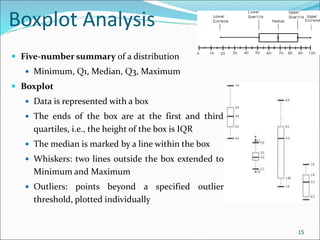
 Five-number summary of a distribution
 Minimum, Q1, Median, Q3, Maximum
 Boxplot
 Data is represented with a box
 The ends of the box are at the first and third
quartiles, i.e., the height of the box is IQR
 The median is marked by a line within the box
 Whiskers: two lines outside the box extended to
Minimum and Maximum
 Outliers: points beyond a specified outlier
threshold, plotted individually
15
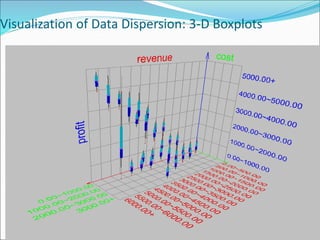
Visualization of Data Dispersion: 3-D Boxplots
May 1, 2024 Data Mining: Concepts and Techniques
16
Properties of Normal Distribution Curve
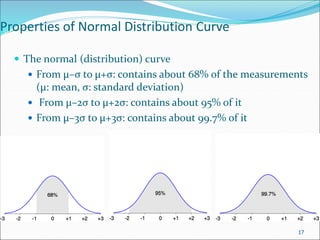
 The normal (distribution) curve
 From μ–σ to μ+σ: contains about 68% of the measurements
(μ: mean, σ: standard deviation)
 From μ–2σ to μ+2σ: contains about 95% of it
 From μ–3σ to μ+3σ: contains about 99.7% of it
17
Graphic Displays of Basic Statistical Descriptions
 Boxplot: graphic display of five-number summary
 Histogram: x-axis are values, y-axis repres. frequencies
 Quantile plot: each value xi is paired with fi indicating
that approximately 100 fi % of data are  xi
 Quantile-quantile (q-q) plot: graphs the quantiles of one
univariant distribution against the corresponding quantiles
of another
 Scatter plot: each pair of values is a pair of coordinates and
plotted as points in the plane
18
Histogram Analysis
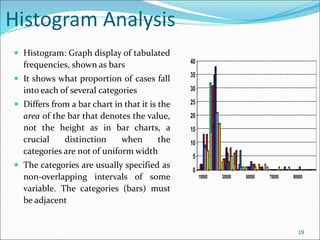
 Histogram: Graph display of tabulated
frequencies, shown as bars
 It shows what proportion of cases fall
into each of several categories
 Differs from a bar chart in that it is the
area of the bar that denotes the value,
not the height as in bar charts, a
crucial distinction when the
categories are not of uniform width
 The categories are usually specified as
non-overlapping intervals of some
variable. The categories (bars) must
be adjacent
0
5
10
15
20
25
30
35
40
10000 30000 50000 70000 90000
19
Histograms Often Tell More than Boxplots
20
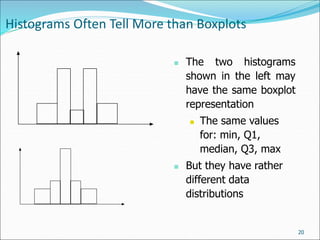
 The two histograms
shown in the left may
have the same boxplot
representation
 The same values
for: min, Q1,
median, Q3, max
 But they have rather
different data
distributions
Quantile Plot
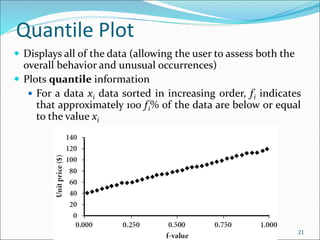
 Displays all of the data (allowing the user to assess both the
overall behavior and unusual occurrences)
 Plots quantile information
 For a data xi data sorted in increasing order, fi indicates
that approximately 100 fi% of the data are below or equal
to the value xi
Data Mining: Concepts and Techniques
21
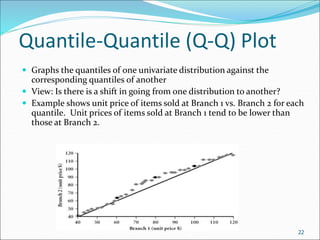
Quantile-Quantile (Q-Q) Plot
 Graphs the quantiles of one univariate distribution against the
corresponding quantiles of another
 View: Is there is a shift in going from one distribution to another?
 Example shows unit price of items sold at Branch 1 vs. Branch 2 for each
quantile. Unit prices of items sold at Branch 1 tend to be lower than
those at Branch 2.
22
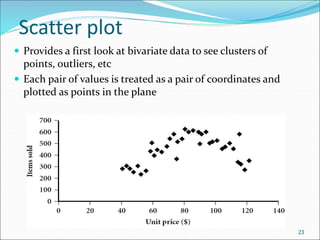
Scatter plot
 Provides a first look at bivariate data to see clusters of
points, outliers, etc
 Each pair of values is treated as a pair of coordinates and
plotted as points in the plane
23
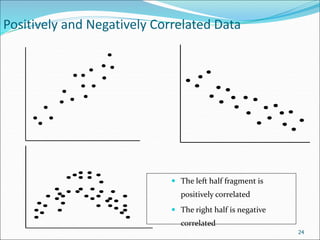
Positively and Negatively Correlated Data
 The left half fragment is
positively correlated
 The right half is negative
correlated
24
Contd…
 Positively and negatively correlated data refer to the
direction of the relationship between two variables.
5/1/2024 25
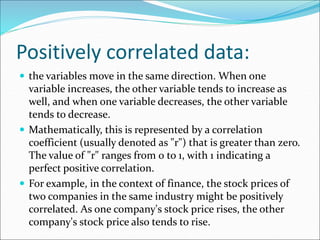
Positively correlated data:
 the variables move in the same direction. When one
variable increases, the other variable tends to increase as
well, and when one variable decreases, the other variable
tends to decrease.
 Mathematically, this is represented by a correlation
coefficient (usually denoted as "r") that is greater than zero.
The value of "r" ranges from 0 to 1, with 1 indicating a
perfect positive correlation.
 For example, in the context of finance, the stock prices of
two companies in the same industry might be positively
correlated. As one company's stock price rises, the other
company's stock price also tends to rise.
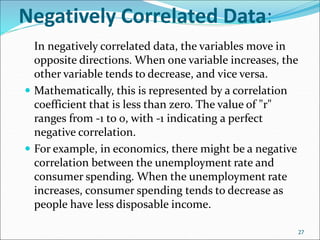
Negatively Correlated Data:
In negatively correlated data, the variables move in
opposite directions. When one variable increases, the
other variable tends to decrease, and vice versa.
 Mathematically, this is represented by a correlation
coefficient that is less than zero. The value of "r"
ranges from -1 to 0, with -1 indicating a perfect
negative correlation.
 For example, in economics, there might be a negative
correlation between the unemployment rate and
consumer spending. When the unemployment rate
increases, consumer spending tends to decrease as
people have less disposable income.
27
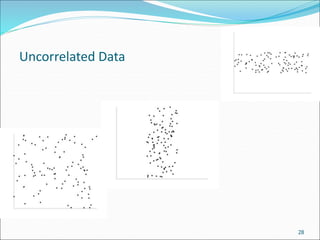
Uncorrelated Data
28
Contd…
 Uncorrelated data refers to a situation where there is
no discernible relationship or pattern between two or
more variables. In statistics, correlation measures the
degree to which two variables change together. When
data is uncorrelated, changes in one variable do not
correspond with changes in another variable.
Chapter 2: Getting to Know Your
Data
 Data Objects and Attribute Types
 Basic Statistical Descriptions of Data
 Data Visualization
 Measuring Data Similarity and Dissimilarity
 Summary
30
Data Visualization
 Why data visualization?
 Gain insight into an information space by mapping data onto graphical
primitives
 Provide qualitative overview of large data sets
 Search for patterns, trends, structure, irregularities, relationships among data
 Help find interesting regions and suitable parameters for further quantitative
analysis
 Provide a visual proof of computer representations derived
 Categorization of visualization methods:
 Pixel-oriented visualization techniques
 Geometric projection visualization techniques
 Icon-based visualization techniques
 Hierarchical visualization techniques
 Visualizing complex data and relations
31
32
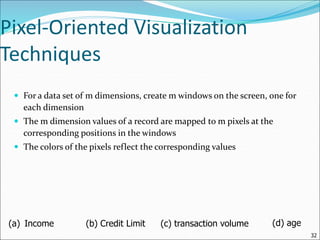
Pixel-Oriented Visualization
Techniques
 For a data set of m dimensions, create m windows on the screen, one for
each dimension
 The m dimension values of a record are mapped to m pixels at the
corresponding positions in the windows
 The colors of the pixels reflect the corresponding values
(a) Income (b) Credit Limit (c) transaction volume (d) age
33
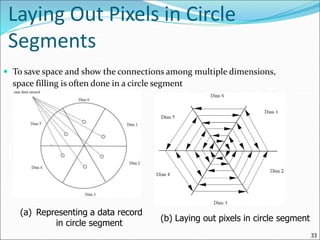
Laying Out Pixels in Circle
Segments
 To save space and show the connections among multiple dimensions,
space filling is often done in a circle segment
(a) Representing a data record
in circle segment
(b) Laying out pixels in circle segment
Geometric Projection Visualization Techniques
 Visualization of geometric transformations and projections of
the data
 Methods
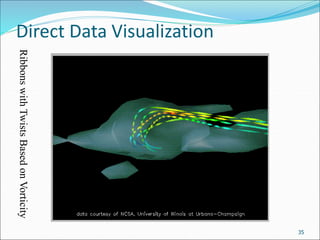
 Direct visualization
 Scatterplot and scatterplot matrices
 Landscapes
 Projection pursuit technique: Help users find meaningful
projections of multidimensional data
 Prosection views
 Hyperslice
 Parallel coordinates 34
Direct Data Visualization
35
Ribbons
with
Twists
Based
on
Vorticity
Scatterplot Matrices
Matrix of scatterplots (x-y-diagrams) of the k-dim. data [total of (k2/2-k) scatterplots]
36
Used
by
ermission
of
M.
Ward,
Worcester
Polytechnic
Institute
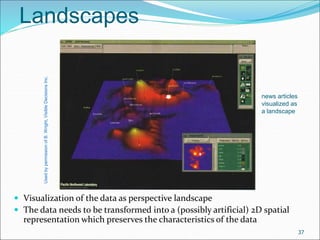
Landscapes
 Visualization of the data as perspective landscape
 The data needs to be transformed into a (possibly artificial) 2D spatial
representation which preserves the characteristics of the data
37
news articles
visualized as
a landscape
Used
by
permission
of
B.
Wright,
Visible
Decisions
Inc.
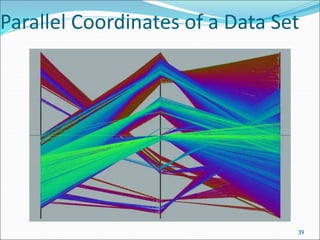
Parallel Coordinates
 n equidistant axes which are parallel to one of the screen axes and
correspond to the attributes
 The axes are scaled to the [minimum, maximum]: range of the
corresponding attribute
 Every data item corresponds to a polygonal line which intersects each of
the axes at the point which corresponds to the value for the attribute
38
Attr. 1 Attr. 2 Attr. k
Attr. 3
• • •
39
Parallel Coordinates of a Data Set
Icon-Based Visualization
Techniques
 Visualization of the data values as features of icons
 Typical visualization methods
 Chernoff Faces
 Stick Figures
 General techniques
 Shape coding: Use shape to represent certain information
encoding
 Color icons: Use color icons to encode more information
 Tile bars: Use small icons to represent the relevant feature
vectors in document retrieval
40
Chernoff Faces
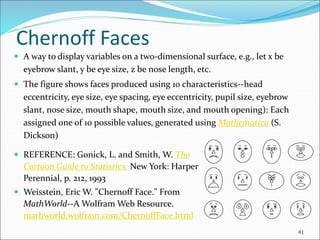
 A way to display variables on a two-dimensional surface, e.g., let x be
eyebrow slant, y be eye size, z be nose length, etc.
 The figure shows faces produced using 10 characteristics--head
eccentricity, eye size, eye spacing, eye eccentricity, pupil size, eyebrow
slant, nose size, mouth shape, mouth size, and mouth opening): Each
assigned one of 10 possible values, generated using Mathematica (S.
Dickson)
 REFERENCE: Gonick, L. and Smith, W. The
Cartoon Guide to Statistics. New York: Harper
Perennial, p. 212, 1993
 Weisstein, Eric W. "Chernoff Face." From
MathWorld--A Wolfram Web Resource.
mathworld.wolfram.com/ChernoffFace.html
41
42
Stick Figure
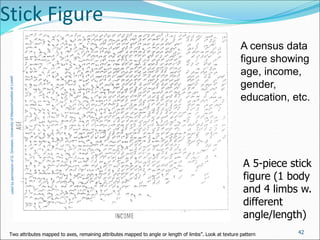
Two attributes mapped to axes, remaining attributes mapped to angle or length of limbs”. Look at texture pattern
A census data
figure showing
age, income,
gender,
education, etc.
A 5-piece stick
figure (1 body
and 4 limbs w.
different
angle/length)
Hierarchical Visualization Techniques
 Visualization of the data using a hierarchical
partitioning into subspaces
 Methods
 Dimensional Stacking
 Worlds-within-Worlds
 Tree-Map
 Cone Trees
 InfoCube
43
Contd…
 Dimensional Stacking: A technique used in data
visualization where multiple dimensions of data are
represented by stacking layers of information, often in a
spatial or hierarchical arrangement.
 Worlds-within-Worlds: A visualization approach that
presents nested levels of information, allowing users to
explore increasingly detailed views within broader
contexts.
 Tree-Map: A visualization method that displays
hierarchical data as nested rectangles, with the size and
color of each rectangle representing various attributes or
measures associated with the data.
44
Contd…
 Cone Trees: A three-dimensional visualization
technique used to represent hierarchical
structures, where nodes are arranged in a cone-
shaped tree structure, with the depth and width of
branches conveying information about the data
hierarchy.
 InfoCube: A multidimensional database structure
used in data warehousing, designed to optimize
the storage and retrieval of data for online
analytical processing (OLAP) applications.
5/1/2024 45
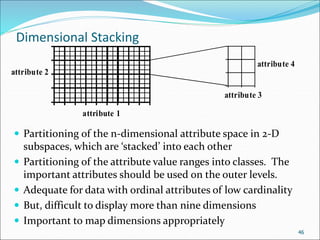
Dimensional Stacking
attribute 1
attribute 2
attribute 3
attribute 4
 Partitioning of the n-dimensional attribute space in 2-D
subspaces, which are ‘stacked’ into each other
 Partitioning of the attribute value ranges into classes. The
important attributes should be used on the outer levels.
 Adequate for data with ordinal attributes of low cardinality
 But, difficult to display more than nine dimensions
 Important to map dimensions appropriately
46
47
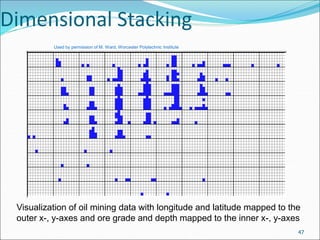
Dimensional Stacking
Used by permission of M. Ward, Worcester Polytechnic Institute
Visualization of oil mining data with longitude and latitude mapped to the
outer x-, y-axes and ore grade and depth mapped to the inner x-, y-axes
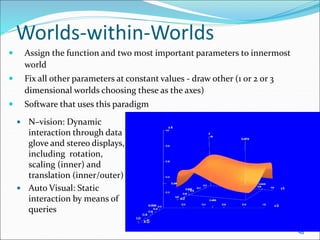
Worlds-within-Worlds
 Assign the function and two most important parameters to innermost
world
 Fix all other parameters at constant values - draw other (1 or 2 or 3
dimensional worlds choosing these as the axes)
 Software that uses this paradigm
 N–vision: Dynamic
interaction through data
glove and stereo displays,
including rotation,
scaling (inner) and
translation (inner/outer)
 Auto Visual: Static
interaction by means of
queries
48
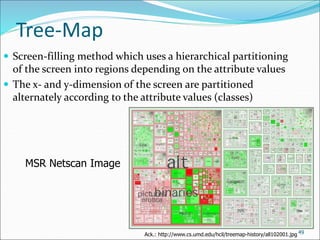
Tree-Map
 Screen-filling method which uses a hierarchical partitioning
of the screen into regions depending on the attribute values
 The x- and y-dimension of the screen are partitioned
alternately according to the attribute values (classes)
49
MSR Netscan Image
Ack.: http://www.cs.umd.edu/hcil/treemap-history/all102001.jpg
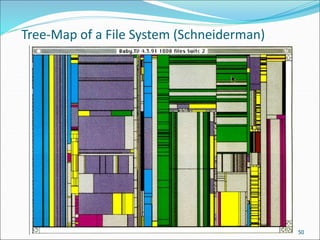
Tree-Map of a File System (Schneiderman)
50
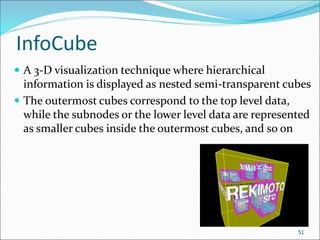
InfoCube
 A 3-D visualization technique where hierarchical
information is displayed as nested semi-transparent cubes
 The outermost cubes correspond to the top level data,
while the subnodes or the lower level data are represented
as smaller cubes inside the outermost cubes, and so on
51
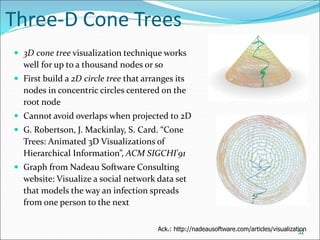
Three-D Cone Trees
 3D cone tree visualization technique works
well for up to a thousand nodes or so
 First build a 2D circle tree that arranges its
nodes in concentric circles centered on the
root node
 Cannot avoid overlaps when projected to 2D
 G. Robertson, J. Mackinlay, S. Card. “Cone
Trees: Animated 3D Visualizations of
Hierarchical Information”, ACM SIGCHI'91
 Graph from Nadeau Software Consulting
website: Visualize a social network data set
that models the way an infection spreads
from one person to the next
52
Ack.: http://nadeausoftware.com/articles/visualization
Getting to Know Your Data
 Data Objects and Attribute Types
 Basic Statistical Descriptions of Data
 Data Visualization
 Measuring Data Similarity and Dissimilarity
 Summary
53
Similarity and Dissimilarity
 Similarity
 Numerical measure of how alike two data objects are
 Value is higher when objects are more alike
 Often falls in the range [0,1]
 Dissimilarity (e.g., distance)
 Numerical measure of how different two data objects are
 Lower when objects are more alike
 Minimum dissimilarity is often 0
 Upper limit varies
 Proximity refers to a similarity or dissimilarity
54
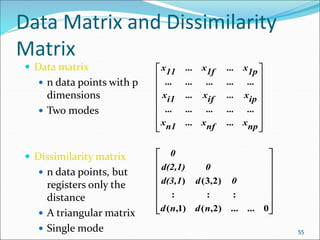
Data Matrix and Dissimilarity
Matrix
 Data matrix
 n data points with p
dimensions
 Two modes
 Dissimilarity matrix
 n data points, but
registers only the
distance
 A triangular matrix
 Single mode 55


















np
x
...
nf
x
...
n1
x
...
...
...
...
...
ip
x
...
if
x
...
i1
x
...
...
...
...
...
1p
x
...
1f
x
...
11
x
















0
...
)
2
,
(
)
1
,
(
:
:
:
)
2
,
3
(
)
...
n
d
n
d
0
d
d(3,1
0
d(2,1)
0
Proximity Measure for Nominal Attributes
 Can take 2 or more states, e.g., red, yellow, blue, green
(generalization of a binary attribute)
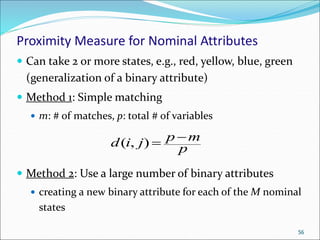
 Method 1: Simple matching
 m: # of matches, p: total # of variables
 Method 2: Use a large number of binary attributes
 creating a new binary attribute for each of the M nominal
states
56
p
m
p
j
i
d 

)
,
(
Chapter 2: Getting to Know Your
Data
 Data Objects and Attribute Types
 Basic Statistical Descriptions of Data
 Data Visualization
 Measuring Data Similarity and Dissimilarity
 Summary
57
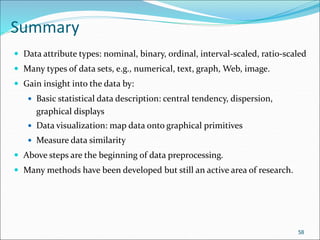
Summary
 Data attribute types: nominal, binary, ordinal, interval-scaled, ratio-scaled
 Many types of data sets, e.g., numerical, text, graph, Web, image.
 Gain insight into the data by:
 Basic statistical data description: central tendency, dispersion,
graphical displays
 Data visualization: map data onto graphical primitives
 Measure data similarity
 Above steps are the beginning of data preprocessing.
 Many methods have been developed but still an active area of research.
58
1st Question
 Create a dimensional model using an online modeling
tool for an imaginary e-commerce company. The
model should include dimensions and facts essential
for analyzing sales transactions and customer
behavior.
5/1/2024 59
2nd Question
 Design a data model for a social media platform
focused on connecting professionals and facilitating
networking opportunities. The model should include
dimensions and facts necessary for analyzing user
engagement, connections, and content interactions.
5/1/2024 60

Getting to Know Your Data Some sources from where you can access datasets for data warehouse and data mining

  • 1.
    Getting to KnowYour Data 1
  • 2.
    Some sources fromwhere you can access datasets for data warehouse and data mining Website: UCI Machine Learning Repository Website: Kaggle Datasets Website: Data.gov Website: Google Dataset Search Website: GitHub Website: AWS Public Datasets European Data Portal 5/1/2024 2
  • 3.
    Getting to KnowYour Data  Data Objects and Attribute Types  Basic Statistical Descriptions of Data  Data Visualization  Measuring Data Similarity and Dissimilarity  Summary 3
  • 4.
    Types of DataSets  Record  Relational records  Data matrix, e.g., numerical matrix, crosstabs  Document data: text documents: term- frequency vector  Transaction data  Graph and network  World Wide Web  Social or information networks  Molecular Structures  Ordered  Video data: sequence of images  Temporal data: time-series  Sequential Data: transaction sequences  Genetic sequence data  Spatial, image and multimedia:  Spatial data: maps  Image data:  Video data: Document 1 season timeout lost wi n game score ball pla y coach team Document 2 Document 3 3 0 5 0 2 6 0 2 0 2 0 0 7 0 2 1 0 0 3 0 0 1 0 0 1 2 2 0 3 0 TID Items 1 Bread, Coke, Milk 2 Beer, Bread 3 Beer, Coke, Diaper, Milk 4 Beer, Bread, Diaper, Milk 5 Coke, Diaper, Milk 4
  • 5.
    Important Characteristics ofStructured Data  Dimensionality  Curse of dimensionality  Sparsity  Only presence counts  Resolution  Patterns depend on the scale  Distribution  Centrality and dispersion 5
  • 6.
    Data Objects  Datasets are made up of data objects.  A data object represents an entity.  Examples:  sales database: customers, store items, sales  medical database: patients, treatments  university database: students, professors, courses  Also called samples , examples, instances, data points, objects, tuples.  Data objects are described by attributes.  Database rows -> data objects; columns ->attributes. 6
  • 7.
    Attributes  Attribute (ordimensions, features, variables): a data field, representing a characteristic or feature of a data object.  E.g., customer _ID, name, address  Types:  Nominal  Binary  Numeric: quantitative  Interval-scaled  Ratio-scaled 7
  • 8.
    Attribute Types  Nominal:categories, states, or “names of things”  Hair_color = {auburn, black, blond, brown, grey, red, white}  marital status, occupation, ID numbers, zip codes  Binary  Nominal attribute with only 2 states (0 and 1)  Symmetric binary: both outcomes equally important  e.g., gender  Asymmetric binary: outcomes not equally important.  e.g., medical test (positive vs. negative)  Convention: assign 1 to most important outcome (e.g., HIV positive)  Ordinal  Values have a meaningful order (ranking) but magnitude between successive values is not known.  Size = {small, medium, large}, grades, army rankings 8
  • 9.
    Numeric Attribute Types Quantity (integer or real-valued)  Interval  Measured on a scale of equal-sized units  Values have order  E.g., temperature in C˚or F˚, calendar dates  No true zero-point  Ratio  Inherent zero-point  We can speak of values as being an order of magnitude larger than the unit of measurement (10 K˚ is twice as high as 5 K˚).  e.g., temperature in Kelvin, length, counts, monetary quantities 9
  • 10.
    Discrete vs. ContinuousAttributes  Discrete Attribute  Has only a finite or countably infinite set of values  E.g., zip codes, profession, or the set of words in a collection of documents  Sometimes, represented as integer variables  Note: Binary attributes are a special case of discrete attributes  Continuous Attribute  Has real numbers as attribute values  E.g., temperature, height, or weight  Practically, real values can only be measured and represented using a finite number of digits  Continuous attributes are typically represented as floating- point variables 10
  • 11.
    Getting to KnowYour Data  Data Objects and Attribute Types  Basic Statistical Descriptions of Data  Data Visualization  Measuring Data Similarity and Dissimilarity  Summary 11
  • 12.
    Basic Statistical Descriptionsof Data  Motivation  To better understand the data: central tendency, variation and spread  Data dispersion characteristics  median, max, min, quantiles, outliers, variance, etc.  Numerical dimensions correspond to sorted intervals  Data dispersion: analyzed with multiple granularities of precision  Boxplot or quantile analysis on sorted intervals  Dispersion analysis on computed measures  Folding measures into numerical dimensions  Boxplot or quantile analysis on the transformed cube 12
  • 13.
    Measuring the CentralTendency  Mean (algebraic measure) (sample vs. population): Note: n is sample size and N is population size.  Weighted arithmetic mean:  Trimmed mean: chopping extreme values  Median:  Middle value if odd number of values, or average of the middle two values otherwise  Estimated by interpolation (for grouped data):  Mode  Value that occurs most frequently in the data  Unimodal, bimodal, trimodal  Empirical formula: N x    13    n i i x n x 1 1      n i i n i i i w x w x 1 1 width freq l freq n L median median ) ) ( 2 / ( 1     ) ( 3 median mean mode mean    
  • 14.
    Measuring the Dispersionof Data  Quartiles, outliers and boxplots  Quartiles: Q1 (25th percentile), Q3 (75th percentile)  Inter-quartile range: IQR = Q3 – Q1  Five number summary: min, Q1, median, Q3, max  Boxplot: ends of the box are the quartiles; median is marked; add whiskers, and plot outliers individually  Outlier: usually, a value higher/lower than 1.5 x IQR  Variance and standard deviation (sample: s, population: σ)  Variance: (algebraic, scalable computation)  Standard deviation s (or σ) is the square root of variance s2 (or σ2)         n i i n i i x N x N 1 2 2 1 2 2 1 ) ( 1    14             n i n i i i n i i x n x n x x n s 1 1 2 2 1 2 2 ] ) ( 1 [ 1 1 ) ( 1 1
  • 15.
    Boxplot Analysis  Five-numbersummary of a distribution  Minimum, Q1, Median, Q3, Maximum  Boxplot  Data is represented with a box  The ends of the box are at the first and third quartiles, i.e., the height of the box is IQR  The median is marked by a line within the box  Whiskers: two lines outside the box extended to Minimum and Maximum  Outliers: points beyond a specified outlier threshold, plotted individually 15
  • 16.
    Visualization of DataDispersion: 3-D Boxplots May 1, 2024 Data Mining: Concepts and Techniques 16
  • 17.
    Properties of NormalDistribution Curve  The normal (distribution) curve  From μ–σ to μ+σ: contains about 68% of the measurements (μ: mean, σ: standard deviation)  From μ–2σ to μ+2σ: contains about 95% of it  From μ–3σ to μ+3σ: contains about 99.7% of it 17
  • 18.
    Graphic Displays ofBasic Statistical Descriptions  Boxplot: graphic display of five-number summary  Histogram: x-axis are values, y-axis repres. frequencies  Quantile plot: each value xi is paired with fi indicating that approximately 100 fi % of data are  xi  Quantile-quantile (q-q) plot: graphs the quantiles of one univariant distribution against the corresponding quantiles of another  Scatter plot: each pair of values is a pair of coordinates and plotted as points in the plane 18
  • 19.
    Histogram Analysis  Histogram:Graph display of tabulated frequencies, shown as bars  It shows what proportion of cases fall into each of several categories  Differs from a bar chart in that it is the area of the bar that denotes the value, not the height as in bar charts, a crucial distinction when the categories are not of uniform width  The categories are usually specified as non-overlapping intervals of some variable. The categories (bars) must be adjacent 0 5 10 15 20 25 30 35 40 10000 30000 50000 70000 90000 19
  • 20.
    Histograms Often TellMore than Boxplots 20  The two histograms shown in the left may have the same boxplot representation  The same values for: min, Q1, median, Q3, max  But they have rather different data distributions
  • 21.
    Quantile Plot  Displaysall of the data (allowing the user to assess both the overall behavior and unusual occurrences)  Plots quantile information  For a data xi data sorted in increasing order, fi indicates that approximately 100 fi% of the data are below or equal to the value xi Data Mining: Concepts and Techniques 21
  • 22.
    Quantile-Quantile (Q-Q) Plot Graphs the quantiles of one univariate distribution against the corresponding quantiles of another  View: Is there is a shift in going from one distribution to another?  Example shows unit price of items sold at Branch 1 vs. Branch 2 for each quantile. Unit prices of items sold at Branch 1 tend to be lower than those at Branch 2. 22
  • 23.
    Scatter plot  Providesa first look at bivariate data to see clusters of points, outliers, etc  Each pair of values is treated as a pair of coordinates and plotted as points in the plane 23
  • 24.
    Positively and NegativelyCorrelated Data  The left half fragment is positively correlated  The right half is negative correlated 24
  • 25.
    Contd…  Positively andnegatively correlated data refer to the direction of the relationship between two variables. 5/1/2024 25
  • 26.
    Positively correlated data: the variables move in the same direction. When one variable increases, the other variable tends to increase as well, and when one variable decreases, the other variable tends to decrease.  Mathematically, this is represented by a correlation coefficient (usually denoted as "r") that is greater than zero. The value of "r" ranges from 0 to 1, with 1 indicating a perfect positive correlation.  For example, in the context of finance, the stock prices of two companies in the same industry might be positively correlated. As one company's stock price rises, the other company's stock price also tends to rise.
  • 27.
    Negatively Correlated Data: Innegatively correlated data, the variables move in opposite directions. When one variable increases, the other variable tends to decrease, and vice versa.  Mathematically, this is represented by a correlation coefficient that is less than zero. The value of "r" ranges from -1 to 0, with -1 indicating a perfect negative correlation.  For example, in economics, there might be a negative correlation between the unemployment rate and consumer spending. When the unemployment rate increases, consumer spending tends to decrease as people have less disposable income. 27
  • 28.
  • 29.
    Contd…  Uncorrelated datarefers to a situation where there is no discernible relationship or pattern between two or more variables. In statistics, correlation measures the degree to which two variables change together. When data is uncorrelated, changes in one variable do not correspond with changes in another variable.
  • 30.
    Chapter 2: Gettingto Know Your Data  Data Objects and Attribute Types  Basic Statistical Descriptions of Data  Data Visualization  Measuring Data Similarity and Dissimilarity  Summary 30
  • 31.
    Data Visualization  Whydata visualization?  Gain insight into an information space by mapping data onto graphical primitives  Provide qualitative overview of large data sets  Search for patterns, trends, structure, irregularities, relationships among data  Help find interesting regions and suitable parameters for further quantitative analysis  Provide a visual proof of computer representations derived  Categorization of visualization methods:  Pixel-oriented visualization techniques  Geometric projection visualization techniques  Icon-based visualization techniques  Hierarchical visualization techniques  Visualizing complex data and relations 31
  • 32.
    32 Pixel-Oriented Visualization Techniques  Fora data set of m dimensions, create m windows on the screen, one for each dimension  The m dimension values of a record are mapped to m pixels at the corresponding positions in the windows  The colors of the pixels reflect the corresponding values (a) Income (b) Credit Limit (c) transaction volume (d) age
  • 33.
    33 Laying Out Pixelsin Circle Segments  To save space and show the connections among multiple dimensions, space filling is often done in a circle segment (a) Representing a data record in circle segment (b) Laying out pixels in circle segment
  • 34.
    Geometric Projection VisualizationTechniques  Visualization of geometric transformations and projections of the data  Methods  Direct visualization  Scatterplot and scatterplot matrices  Landscapes  Projection pursuit technique: Help users find meaningful projections of multidimensional data  Prosection views  Hyperslice  Parallel coordinates 34
  • 35.
  • 36.
    Scatterplot Matrices Matrix ofscatterplots (x-y-diagrams) of the k-dim. data [total of (k2/2-k) scatterplots] 36 Used by ermission of M. Ward, Worcester Polytechnic Institute
  • 37.
    Landscapes  Visualization ofthe data as perspective landscape  The data needs to be transformed into a (possibly artificial) 2D spatial representation which preserves the characteristics of the data 37 news articles visualized as a landscape Used by permission of B. Wright, Visible Decisions Inc.
  • 38.
    Parallel Coordinates  nequidistant axes which are parallel to one of the screen axes and correspond to the attributes  The axes are scaled to the [minimum, maximum]: range of the corresponding attribute  Every data item corresponds to a polygonal line which intersects each of the axes at the point which corresponds to the value for the attribute 38 Attr. 1 Attr. 2 Attr. k Attr. 3 • • •
  • 39.
  • 40.
    Icon-Based Visualization Techniques  Visualizationof the data values as features of icons  Typical visualization methods  Chernoff Faces  Stick Figures  General techniques  Shape coding: Use shape to represent certain information encoding  Color icons: Use color icons to encode more information  Tile bars: Use small icons to represent the relevant feature vectors in document retrieval 40
  • 41.
    Chernoff Faces  Away to display variables on a two-dimensional surface, e.g., let x be eyebrow slant, y be eye size, z be nose length, etc.  The figure shows faces produced using 10 characteristics--head eccentricity, eye size, eye spacing, eye eccentricity, pupil size, eyebrow slant, nose size, mouth shape, mouth size, and mouth opening): Each assigned one of 10 possible values, generated using Mathematica (S. Dickson)  REFERENCE: Gonick, L. and Smith, W. The Cartoon Guide to Statistics. New York: Harper Perennial, p. 212, 1993  Weisstein, Eric W. "Chernoff Face." From MathWorld--A Wolfram Web Resource. mathworld.wolfram.com/ChernoffFace.html 41
  • 42.
    42 Stick Figure Two attributesmapped to axes, remaining attributes mapped to angle or length of limbs”. Look at texture pattern A census data figure showing age, income, gender, education, etc. A 5-piece stick figure (1 body and 4 limbs w. different angle/length)
  • 43.
    Hierarchical Visualization Techniques Visualization of the data using a hierarchical partitioning into subspaces  Methods  Dimensional Stacking  Worlds-within-Worlds  Tree-Map  Cone Trees  InfoCube 43
  • 44.
    Contd…  Dimensional Stacking:A technique used in data visualization where multiple dimensions of data are represented by stacking layers of information, often in a spatial or hierarchical arrangement.  Worlds-within-Worlds: A visualization approach that presents nested levels of information, allowing users to explore increasingly detailed views within broader contexts.  Tree-Map: A visualization method that displays hierarchical data as nested rectangles, with the size and color of each rectangle representing various attributes or measures associated with the data. 44
  • 45.
    Contd…  Cone Trees:A three-dimensional visualization technique used to represent hierarchical structures, where nodes are arranged in a cone- shaped tree structure, with the depth and width of branches conveying information about the data hierarchy.  InfoCube: A multidimensional database structure used in data warehousing, designed to optimize the storage and retrieval of data for online analytical processing (OLAP) applications. 5/1/2024 45
  • 46.
    Dimensional Stacking attribute 1 attribute2 attribute 3 attribute 4  Partitioning of the n-dimensional attribute space in 2-D subspaces, which are ‘stacked’ into each other  Partitioning of the attribute value ranges into classes. The important attributes should be used on the outer levels.  Adequate for data with ordinal attributes of low cardinality  But, difficult to display more than nine dimensions  Important to map dimensions appropriately 46
  • 47.
    47 Dimensional Stacking Used bypermission of M. Ward, Worcester Polytechnic Institute Visualization of oil mining data with longitude and latitude mapped to the outer x-, y-axes and ore grade and depth mapped to the inner x-, y-axes
  • 48.
    Worlds-within-Worlds  Assign thefunction and two most important parameters to innermost world  Fix all other parameters at constant values - draw other (1 or 2 or 3 dimensional worlds choosing these as the axes)  Software that uses this paradigm  N–vision: Dynamic interaction through data glove and stereo displays, including rotation, scaling (inner) and translation (inner/outer)  Auto Visual: Static interaction by means of queries 48
  • 49.
    Tree-Map  Screen-filling methodwhich uses a hierarchical partitioning of the screen into regions depending on the attribute values  The x- and y-dimension of the screen are partitioned alternately according to the attribute values (classes) 49 MSR Netscan Image Ack.: http://www.cs.umd.edu/hcil/treemap-history/all102001.jpg
  • 50.
    Tree-Map of aFile System (Schneiderman) 50
  • 51.
    InfoCube  A 3-Dvisualization technique where hierarchical information is displayed as nested semi-transparent cubes  The outermost cubes correspond to the top level data, while the subnodes or the lower level data are represented as smaller cubes inside the outermost cubes, and so on 51
  • 52.
    Three-D Cone Trees 3D cone tree visualization technique works well for up to a thousand nodes or so  First build a 2D circle tree that arranges its nodes in concentric circles centered on the root node  Cannot avoid overlaps when projected to 2D  G. Robertson, J. Mackinlay, S. Card. “Cone Trees: Animated 3D Visualizations of Hierarchical Information”, ACM SIGCHI'91  Graph from Nadeau Software Consulting website: Visualize a social network data set that models the way an infection spreads from one person to the next 52 Ack.: http://nadeausoftware.com/articles/visualization
  • 53.
    Getting to KnowYour Data  Data Objects and Attribute Types  Basic Statistical Descriptions of Data  Data Visualization  Measuring Data Similarity and Dissimilarity  Summary 53
  • 54.
    Similarity and Dissimilarity Similarity  Numerical measure of how alike two data objects are  Value is higher when objects are more alike  Often falls in the range [0,1]  Dissimilarity (e.g., distance)  Numerical measure of how different two data objects are  Lower when objects are more alike  Minimum dissimilarity is often 0  Upper limit varies  Proximity refers to a similarity or dissimilarity 54
  • 55.
    Data Matrix andDissimilarity Matrix  Data matrix  n data points with p dimensions  Two modes  Dissimilarity matrix  n data points, but registers only the distance  A triangular matrix  Single mode 55                   np x ... nf x ... n1 x ... ... ... ... ... ip x ... if x ... i1 x ... ... ... ... ... 1p x ... 1f x ... 11 x                 0 ... ) 2 , ( ) 1 , ( : : : ) 2 , 3 ( ) ... n d n d 0 d d(3,1 0 d(2,1) 0
  • 56.
    Proximity Measure forNominal Attributes  Can take 2 or more states, e.g., red, yellow, blue, green (generalization of a binary attribute)  Method 1: Simple matching  m: # of matches, p: total # of variables  Method 2: Use a large number of binary attributes  creating a new binary attribute for each of the M nominal states 56 p m p j i d   ) , (
  • 57.
    Chapter 2: Gettingto Know Your Data  Data Objects and Attribute Types  Basic Statistical Descriptions of Data  Data Visualization  Measuring Data Similarity and Dissimilarity  Summary 57
  • 58.
    Summary  Data attributetypes: nominal, binary, ordinal, interval-scaled, ratio-scaled  Many types of data sets, e.g., numerical, text, graph, Web, image.  Gain insight into the data by:  Basic statistical data description: central tendency, dispersion, graphical displays  Data visualization: map data onto graphical primitives  Measure data similarity  Above steps are the beginning of data preprocessing.  Many methods have been developed but still an active area of research. 58
  • 59.
    1st Question  Createa dimensional model using an online modeling tool for an imaginary e-commerce company. The model should include dimensions and facts essential for analyzing sales transactions and customer behavior. 5/1/2024 59
  • 60.
    2nd Question  Designa data model for a social media platform focused on connecting professionals and facilitating networking opportunities. The model should include dimensions and facts necessary for analyzing user engagement, connections, and content interactions. 5/1/2024 60