• Getting Started with Android

•
•

Except as otherwise noted, the content of this presentation is
licensed under the Creative Commons Attribution 2.5 License.
• How to make money with apps?
• Apps supplement other revenue source
– Ex. iFixit

• Paid apps in Android Market
• Free, ad-supported apps in Android Market
– Ad networks (AdMob, Quattro Wireless)
– Sell your own ads

• Services to other developers
– Ex. Skyhook Wireless

• Contests (this class, Android Developer Challenge)
• Others?
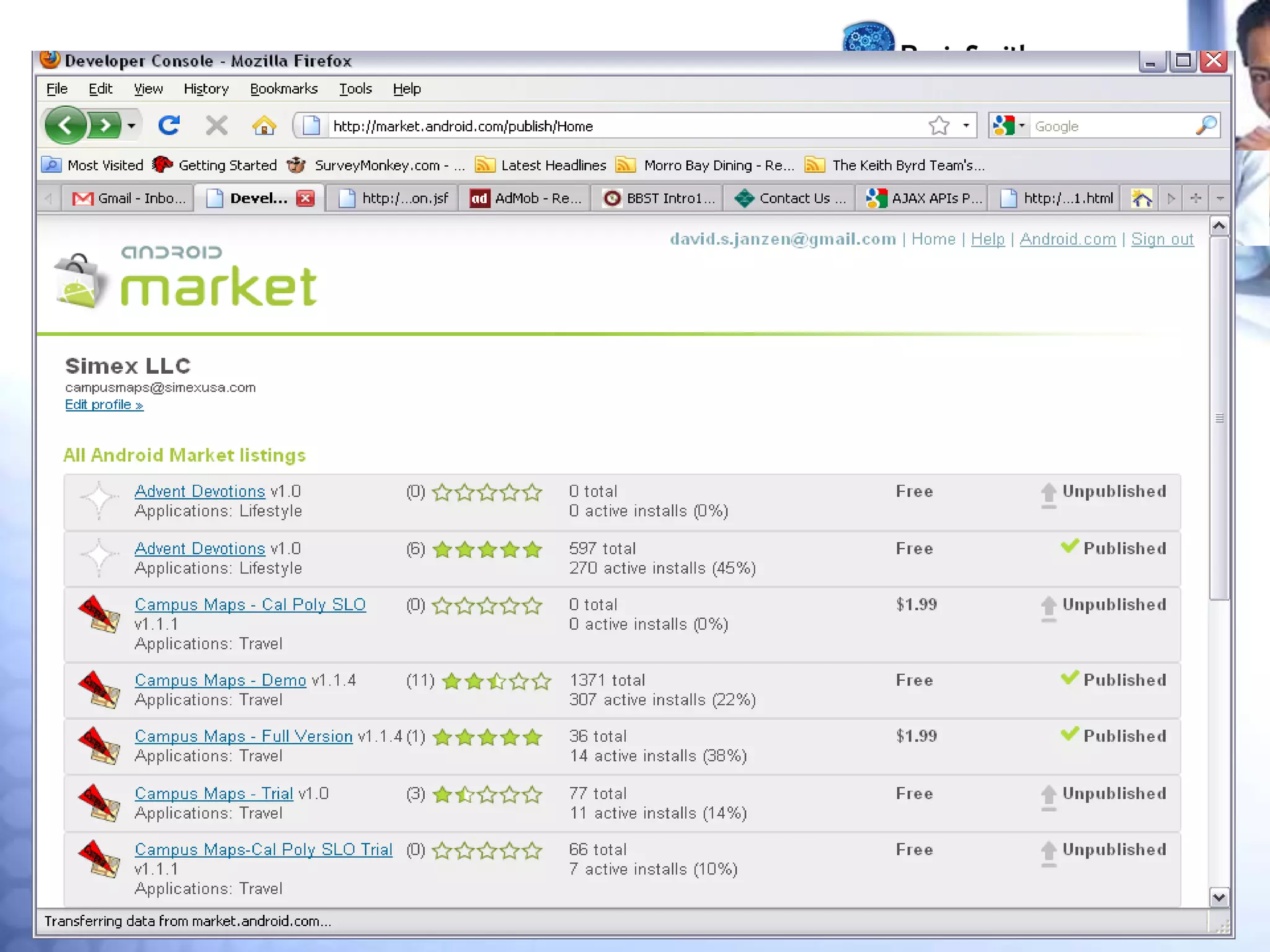
• Android Market
•
•
•
•

Categories, downloads, comments
Free/paid
Limited search capability
Featured apps on web
– http://www.android.com/market/
• Market (and iTunes/App Store)
– Level playing field, allowing third-party apps
– Revenue sharing
– 100K apps in iTunes, 18K in Android
• Publishing to Android Market
• Requires Google Developer Account
– $25 fee
• Link to a Merchant Account
– Google Checkout
– Link to your checking account
– Google takes 30% of app purchase price
• Quick Tour of Android
• Common features:
– User Interface
– IO widgets (buttons, textboxes, lists)
– Images
– 2D/3D drawing
– Database
– Application lifecycle
• Quick Tour of Android
• Less common features:
– Google Maps
– Hardware APIs
– GPS/Geo-location, calls, accelerometer, compass, bluetooth,
camera
– Multiple processes
– Managed by Android Dalvik VM
– Background Services
– Interprocess communications (e.g. Intents)
– No difference between third-party and native apps
• Android Design Philosophy
• Applications should be:
– Fast
– Resource constraints: <200MB RAM, slow processor
– Responsive
– Apps must respond to user actions within 5 seconds
– Secure
– Apps declare permissions in manifest
– Seamless
– Usability is key, persist data, suspend services
– Android kills processes in background as needed
• Leveraging the web
• To keep your apps fast and responsive, consider how you
can leverage the web
– What ____________ can be ________ on a server or in
the cloud?
– Tasks/performed
– Data/persisted
– Data/retrieved
– Beware, data transfer is also expensive and can be slow
• Apple vs. Google
• Open Handset Alliance
– 30+ technology companies
– Commitment to openness, shared vision, and concrete
plans
• Compare with Mac/PC battles
– Similar (many PC manufacturers, one Apple)
– Different (Microsoft sells Windows, Google gives away
Android)

Getting started

  • 1.
    • Getting Startedwith Android • • Except as otherwise noted, the content of this presentation is licensed under the Creative Commons Attribution 2.5 License.
  • 2.
    • How tomake money with apps? • Apps supplement other revenue source – Ex. iFixit • Paid apps in Android Market • Free, ad-supported apps in Android Market – Ad networks (AdMob, Quattro Wireless) – Sell your own ads • Services to other developers – Ex. Skyhook Wireless • Contests (this class, Android Developer Challenge) • Others?
  • 3.
    • Android Market • • • • Categories,downloads, comments Free/paid Limited search capability Featured apps on web – http://www.android.com/market/ • Market (and iTunes/App Store) – Level playing field, allowing third-party apps – Revenue sharing – 100K apps in iTunes, 18K in Android
  • 4.
    • Publishing toAndroid Market • Requires Google Developer Account – $25 fee • Link to a Merchant Account – Google Checkout – Link to your checking account – Google takes 30% of app purchase price
  • 6.
    • Quick Tourof Android • Common features: – User Interface – IO widgets (buttons, textboxes, lists) – Images – 2D/3D drawing – Database – Application lifecycle
  • 7.
    • Quick Tourof Android • Less common features: – Google Maps – Hardware APIs – GPS/Geo-location, calls, accelerometer, compass, bluetooth, camera – Multiple processes – Managed by Android Dalvik VM – Background Services – Interprocess communications (e.g. Intents) – No difference between third-party and native apps
  • 8.
    • Android DesignPhilosophy • Applications should be: – Fast – Resource constraints: <200MB RAM, slow processor – Responsive – Apps must respond to user actions within 5 seconds – Secure – Apps declare permissions in manifest – Seamless – Usability is key, persist data, suspend services – Android kills processes in background as needed
  • 9.
    • Leveraging theweb • To keep your apps fast and responsive, consider how you can leverage the web – What ____________ can be ________ on a server or in the cloud? – Tasks/performed – Data/persisted – Data/retrieved – Beware, data transfer is also expensive and can be slow
  • 10.
    • Apple vs.Google • Open Handset Alliance – 30+ technology companies – Commitment to openness, shared vision, and concrete plans • Compare with Mac/PC battles – Similar (many PC manufacturers, one Apple) – Different (Microsoft sells Windows, Google gives away Android)