

Getting Dirty With Android
Brent EdwardsSenior Consultant with MagenicBrentE@magenic.com@brentledwardsbrentedwards.net
What We Will CoverMenusLayoutStylesLifecycle ManagementAsyncTaskAll while building a sample app
AssumptionsBasic understanding of…AndroidActivities and IntentsResources
Menus
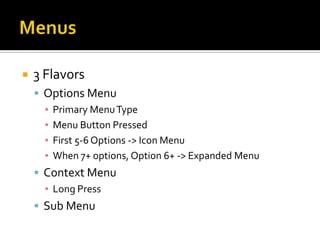
Menus3 FlavorsOptions MenuPrimary Menu TypeMenu Button PressedFirst 5-6 Options -> Icon MenuWhen 7+ options, Option 6+ -> Expanded MenuContext MenuLong PressSub Menu
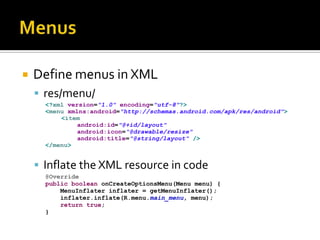
MenusDefine menus in XMLres/menu/Inflate the XML resource in code
Menus[Demo]
Layout
LayoutDefines what the UI looks likeWhere views are placedHow big views areHow views flowMade up of nested views
Layout2 Ways to define layoutXMLProvides most flexibilityBetter separation of UI from logicEasier to visualizeProgrammaticallyCan be more difficultBest when coupled with XML and LayoutInflater
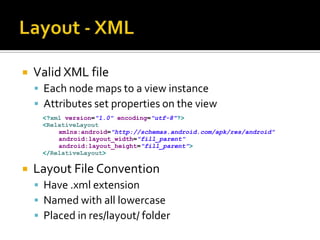
Layout - XMLValid XML fileEach node maps to a view instanceAttributes set properties on the viewLayout File ConventionHave .xml extensionNamed with all lowercasePlaced in res/layout/ folder
LayoutMost Useful Layout ObjectsLinearLayoutRelativeLayout
Layout - LinearLayoutViews are stacked [horizontally|vertically]
Layout - LinearLayoutWhy it is so usefulSimple to useEasy to understand at a glanceCan leverage weight for children to scale proportionally
LinearLayout[Demo]
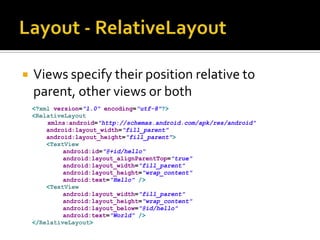
Layout - RelativeLayoutViews specify their position relative to parent, other views or both
Layout - RelativeLayoutWhy it is so usefulVery versatileScales very wellHandles rotation easily
RelativeLayout[Demo]
Styles
StylesSpecifies look and format for viewsSeparates design from contentCollection of propertiesFont SizeFont ColorBackground ColorPaddingMarginMuch more
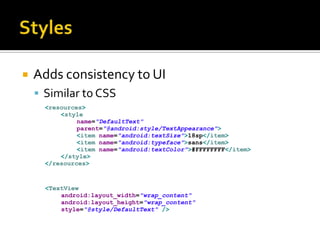
StylesAdds consistency to UISimilar to CSS
StylesStyles file conventionHave .xml extensionstyle.xmlPlaced in res/values/
Style[Demo]
Lifecycle Management
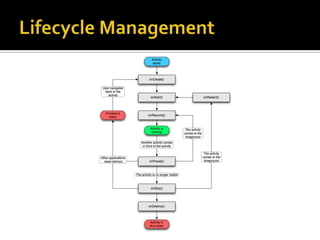
Lifecycle ManagementApplications have a lifecycleEssentially Three StatesActive / RunningPausedStopped
Lifecycle Management
Lifecycle ManagementStopped Activities can be killedThen recreated when brought to frontActivities with state need to be serializedonPause()onSaveInstanceState()
Lifecycle Management[Demo]
AsyncTask
AsyncTaskTasks run asynchronouslyDoesn’t freeze UIGood for long running tasksWeb requests
AsyncTaskDefined by 3 generic typesParamsProgressResult
AsyncTask4 StepsonPreExecuteExecutes on UI threaddoInBackgroundExecutes the actual task on background threadonProgressUpdateOptionally updates user on progress on UI threadonPostExecuteExecutes on UI thread
AsyncTaskRulesTask must be created in UI threadexecute must be invoked from UI threadTasks can only be executed onceDon’t call onPreExecute, onPostExecute, doInBackground or onProgressUpdate manually
AsyncTask[Demo]
Dialogs
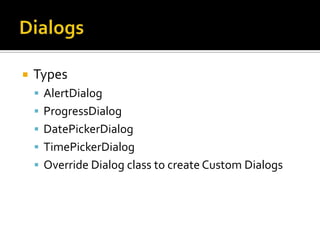
DialogsTypesAlertDialogProgressDialogDatePickerDialogTimePickerDialogOverride Dialog class to create Custom Dialogs
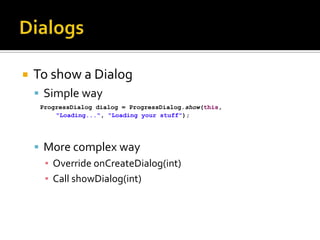
DialogsTo show a DialogSimple wayMore complex wayOverride onCreateDialog(int)Call showDialog(int)
Dialogs[Demo]
Valuable LinksFundamentalshttp://developer.android.com/guide/topics/fundamentals.htmlMenushttp://developer.android.com/guide/topics/ui/menus.htmlLayouthttp://developer.android.com/guide/topics/ui/declaring-layout.htmlStyleshttp://developer.android.com/guide/topics/ui/themes.htmlAsyncTaskhttp://developer.android.com/reference/android/os/AsyncTask.htmlDialogshttp://developer.android.com/guide/topics/ui/dialogs.html
Questions?
Brent EdwardsSenior Consultant with MagenicBrentE@magenic.com@brentledwardsbrentedwards.net

Getting Dirty with Android